4-1 YAMAHA TMAX 2016 Owners Manual
[x] Cancel search | Manufacturer: YAMAHA, Model Year: 2016, Model line: TMAX, Model: YAMAHA TMAX 2016Pages: 110, PDF Size: 6.26 MB
Page 5 of 110

Table of contents
Safety information............................ 1-1
Further safe-riding points ................ 1-5
Description ........................................ 2-1
Left view .......................................... 2-1
Right view ........................................ 2-2
Controls and instruments ................ 2-3
Smart key system ............................. 3-1
Smart key system ............................ 3-1
Operating range of the smart key system............. ....................... ...... 3-2
Handling of the smart key and
mechanical key ............................ 3-3
Smart key ........................................ 3-5
Replacing the smart key battery ...... 3-6
Vehicle power on and steering lock release .................................. 3-8
Powering off the vehicle .................. 3-9
How to lock the steering ................ 3-10
Seat opening and closing .............. 3-10
Parking mode ................................ 3-11
Instrument and control functions ... 4-1
Indicator lights and warning lights ... 4-1
Speedometer .............. ..................... 4-2
Tachometer ..................................... 4-3
Multi-function display ....................... 4-3
Handlebar switches ....................... 4-10
Front brake lever ........................... 4-11
Rear brake lever ............................ 4-12
Rear brake lock lever .................... 4-12
ABS (for ABS models) ................... 4-13
Fuel tank cap ................................. 4-14
Fuel ............................................... 4-15
Catalytic converter......................... 4-16
Adjusting the rider backrest ........... 4-17
Helmet holder ................................ 4-17
Storage compartments .................. 4-18
Windshield ..................................... 4-19
Rear view mirrors .......................... 4-21
Shock absorber assembly ............. 4-21
Sidestand ...................................... 4-22
Ignition circuit cut- off system ......... 4-22
Auxiliary DC jack ........................... 4-24 For your safety – pre-operation
checks
............................................... 5-1
Operation and important riding
points ................................................. 6-1
Starting the engine .......................... 6-2
Starting off....................................... 6-3
Acceleration and deceleration......... 6-3
Braking ............................................ 6-4
Tips for reducing fuel
consumption ................................ 6-5
Engine break-in ............................... 6-5
Parking ............................................ 6-6
Periodic maintenance and
adjustment ........................................ 7-1
Owner’s tool kit ............................... 7-2
Periodic maintenance chart for the emission control system ........ 7-3
General maintenance and lubrication chart ........................... 7-4
Removing and installing panels ...... 7-7
Checking the spark plugs................ 7-9
Engine oil and oil filter cartridge .... 7-10
Coolant.......................................... 7-13
Replacing the air filter element ..... 7-15
Adjusting the engine idling speed ......................................... 7-16
Checking the throttle grip free play ............................................ 7-16
Valve clearance ............................ 7-17
Tires .............................................. 7-17
Cast wheels .................................. 7-19
Checking the front and rear brake lever free play .................. 7-20
Adjusting the rear brake lock
cable .......................................... 7-21
Checking the rear brake lock ........ 7-21
Checking the front and rear
brake pads ................................. 7-22
Checking the brake fluid level ....... 7-22
Changing the brake fluid ............... 7-23
Drive belt slack.............................. 7-24
Checking and lubricating the cables ........................................ 7-24
2PW-9-E1.book 1 ページ 2015年9月10日 木曜日 午後5時17分
Page 12 of 110
2-1
1
2
3
4
5
6
7
8
9
10
11
12
13
14
Description
EAU63371
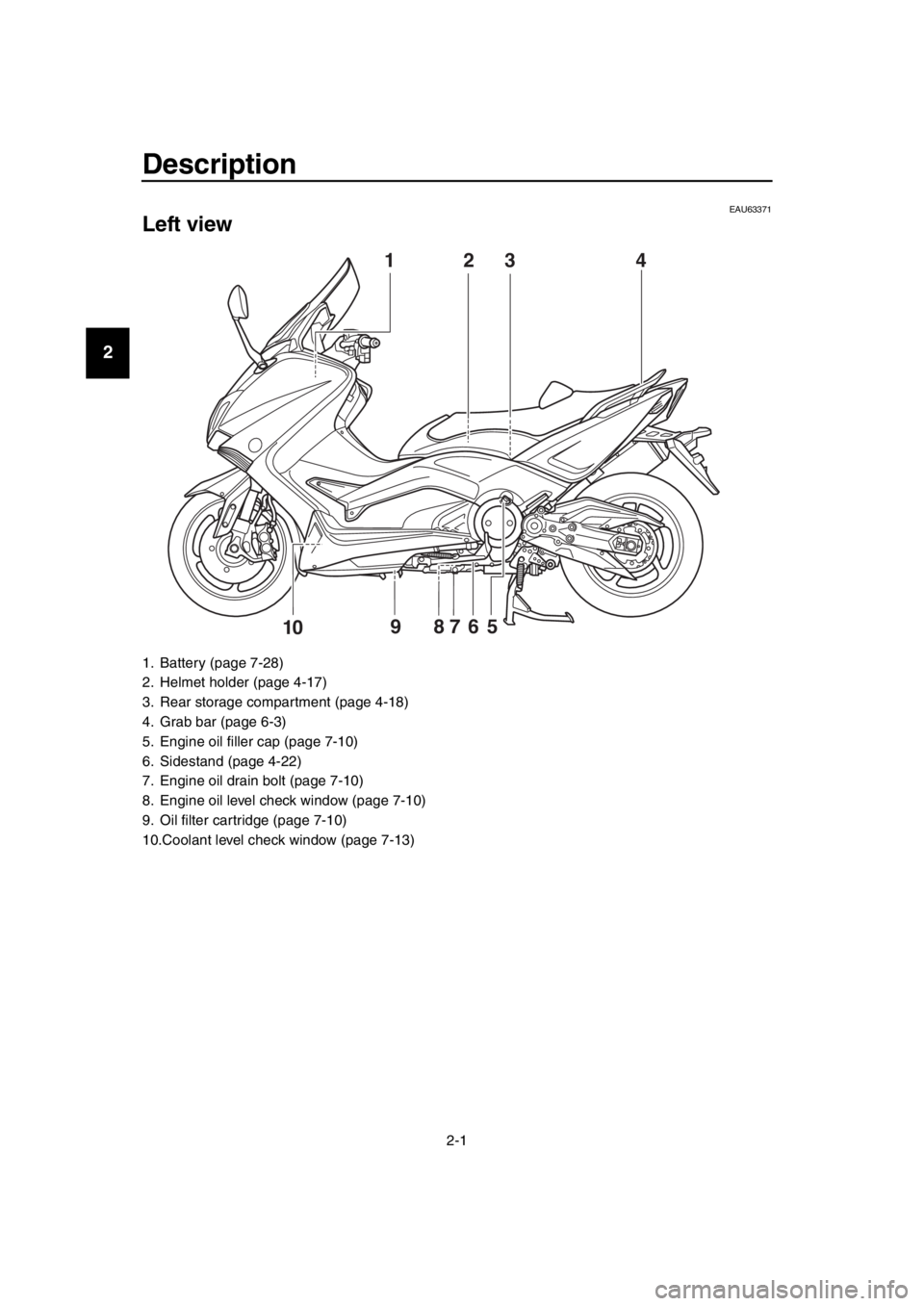
Left view
1. Battery (page 7-28)
2. Helmet holder (page 4-17)
3. Rear storage compartment (page 4-18)
4. Grab bar (page 6-3)
5. Engine oil filler cap (page 7-10)
6. Sidestand (page 4-22)
7. Engine oil drain bolt (page 7-10)
8. Engine oil level check window (page 7-10)
9. Oil filter cartridge (page 7-10)
10.Coolant level check window (page 7-13)
3
59 87610
142
2PW-9-E1.book 1 ページ 2015年9月10日 木曜日 午後5時17分
Page 13 of 110
Description
2-2
1
2
3
4
5
6
7
8
9
10
11
12
13
14
EAU63391
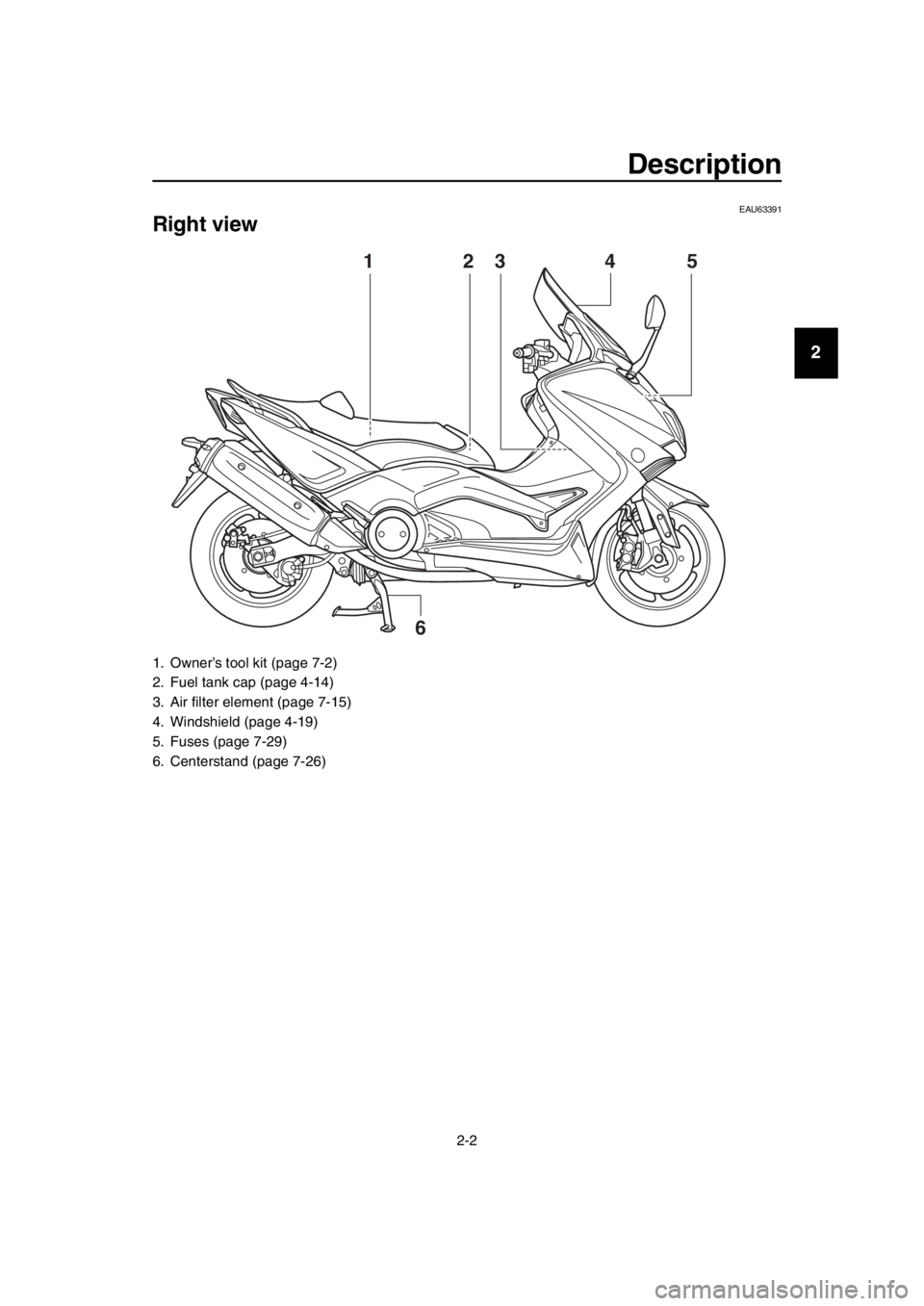
Right view
1. Owner’s tool kit (page 7-2)
2. Fuel tank cap (page 4-14)
3. Air filter element (page 7-15)
4. Windshield (page 4-19)
5. Fuses (page 7-29)
6. Centerstand (page 7-26)
3
6
1542
2PW-9-E1.book 2 ページ 2015年9月10日 木曜日 午後5時17分
Page 14 of 110
Description
2-3
1
2
3
4
5
6
7
8
9
10
11
12
13
14
EAU63401
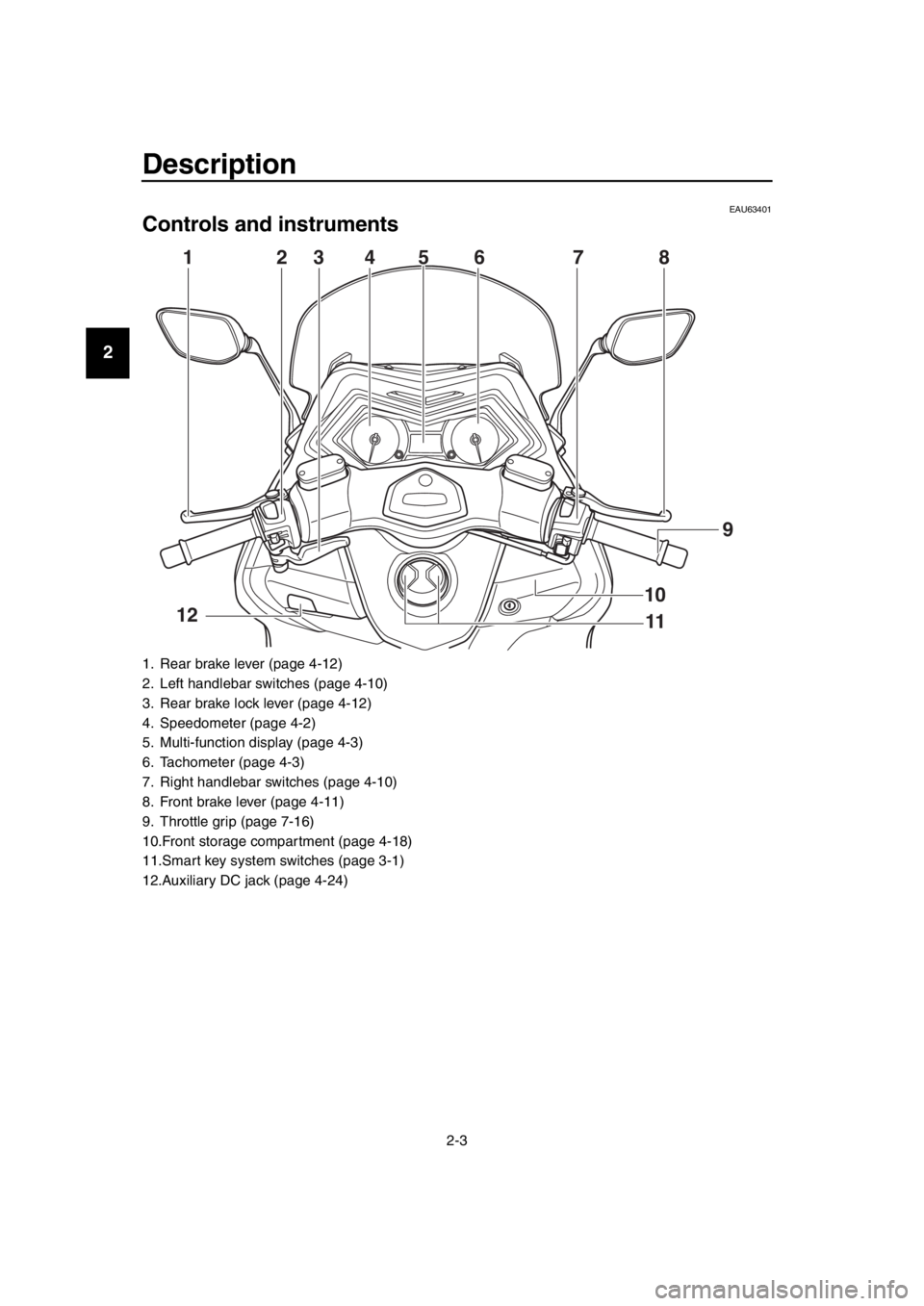
Controls and instruments
1. Rear brake lever (page 4-12)
2. Left handlebar switches (page 4-10)
3. Rear brake lock lever (page 4-12)
4. Speedometer (page 4-2)
5. Multi-function display (page 4-3)
6. Tachometer (page 4-3)
7. Right handlebar switches (page 4-10)
8. Front brake lever (page 4-11)
9. Throttle grip (page 7-16)
10.Front storage compartment (page 4-18)
11.Smart key system switches (page 3-1)
12.Auxiliary DC jack (page 4-24)
4236781
11 9
5
10
12
2PW-9-E1.book 3 ページ 2015年9月10日 木曜日 午後5時17分
Page 20 of 110
Smart key system
3-6
1
2
3
4
5
6
7
8
9
10
11
12
13
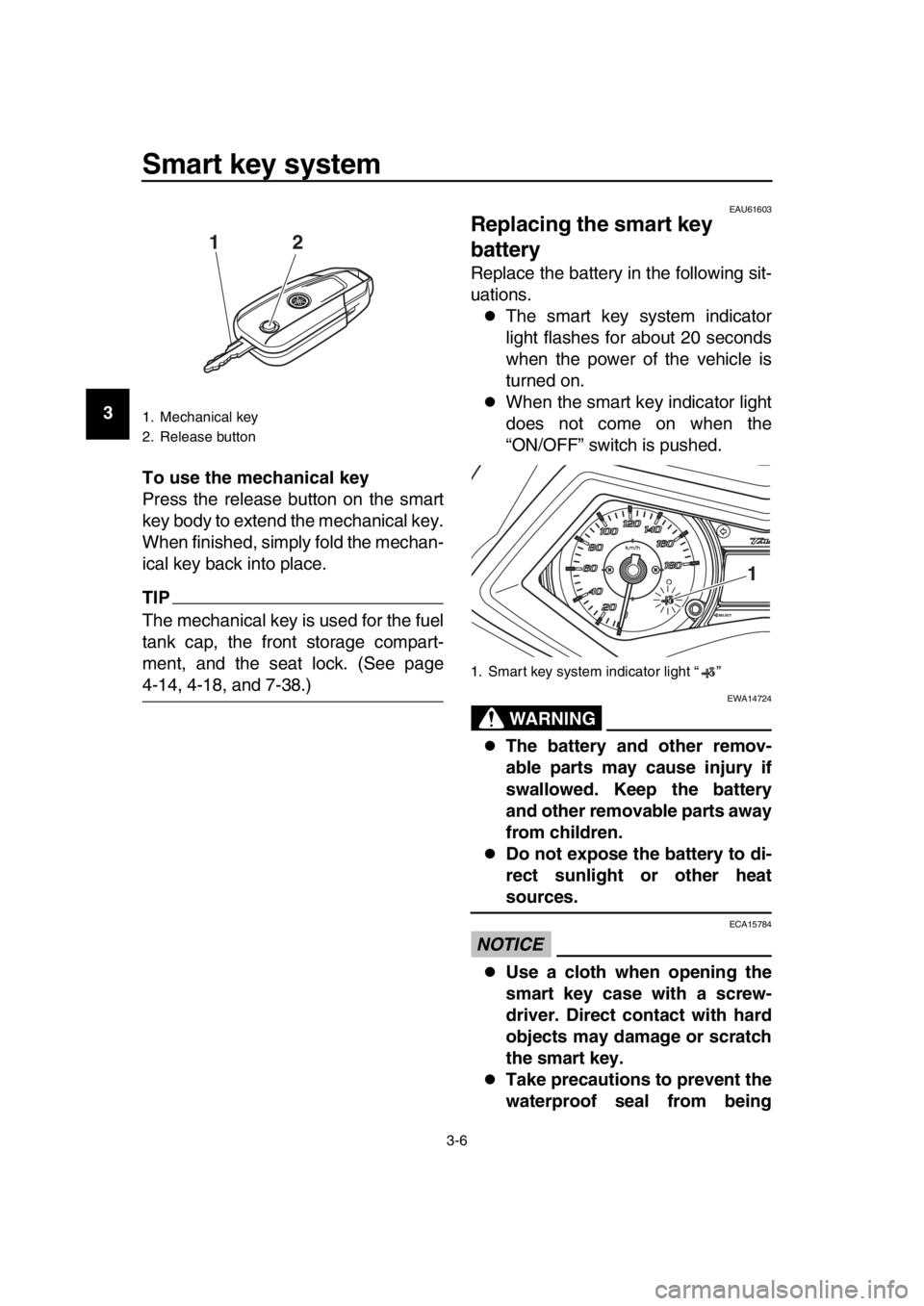
14 To use the mechanical key
Press the release button on the smart
key body to extend the mechanical key.
When finished, simply fold the mechan-
ical key back into place.
TIP
The mechanical key is used for the fuel
tank cap, the front storage compart-
ment, and the seat lock. (See page
4-14, 4-18, and 7-38.)
EAU61603
Replacing the smart key
battery
Replace the battery in the following sit-
uations.
The smart key system indicator
light flashes for about 20 seconds
when the power of the vehicle is
turned on.
When the smart key indicator light
does not come on when the
“ON/OFF” switch is pushed.
WARNING
EWA14724
The battery and other remov-
able parts may cause injury if
swallowed. Keep the battery
and other removable parts away
from children.
Do not expose the battery to di-
rect sunlight or other heat
sources.
NOTICE
ECA15784
Use a cloth when opening the
smart key case with a screw-
driver. Direct contact with hard
objects may damage or scratch
the smart key.
Take precautions to prevent the
waterproof seal from being
1. Mechanical key
2. Release button
12
1. Smart key system indicator light “ ”
1
2PW-9-E1.book 6 ページ 2015年9月10日 木曜日 午後5時17分
Page 26 of 110
4-1
1
2
3
4
5
6
7
8
9
10
11
12
13
14
Instrument and control functions
EAU49398
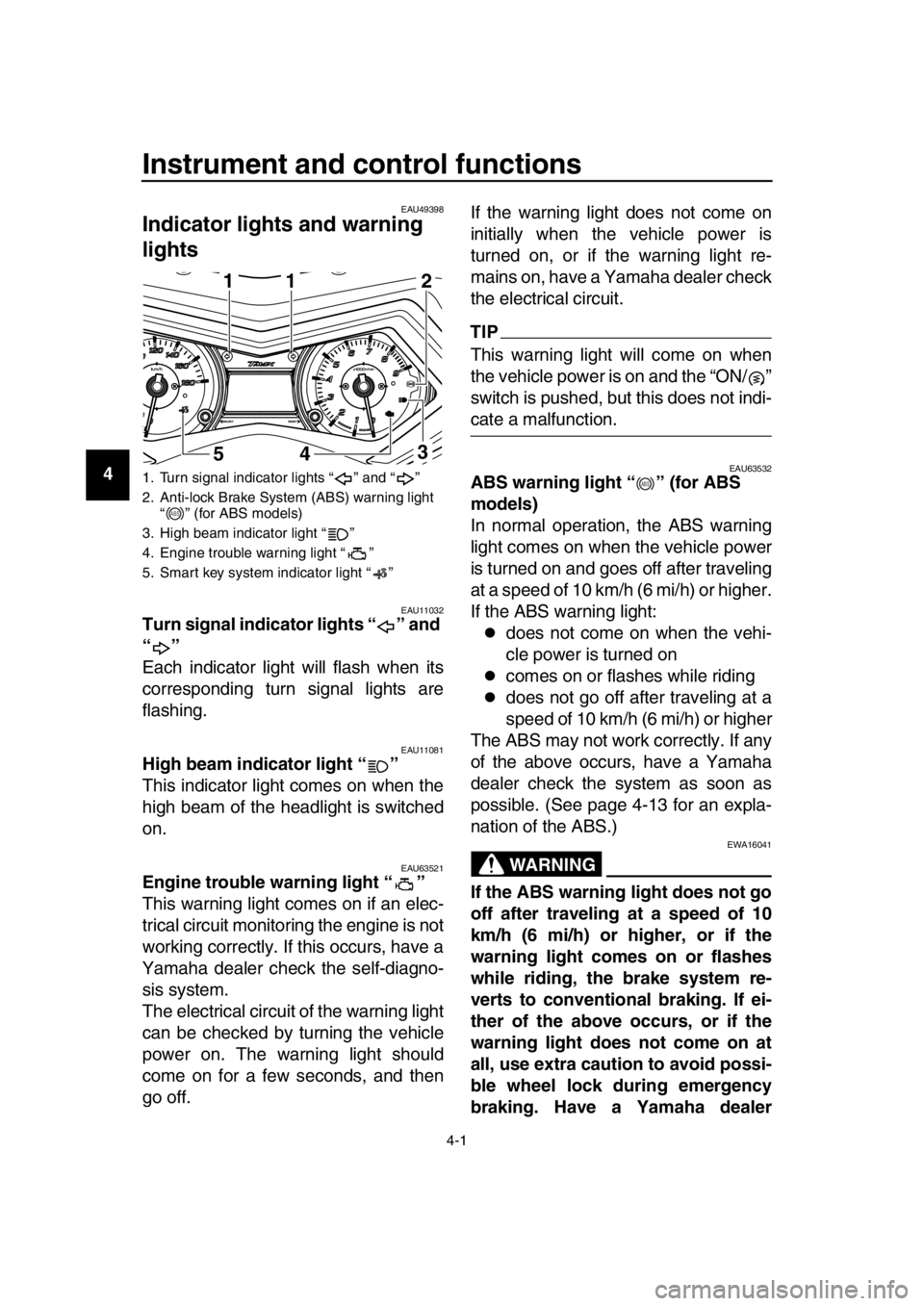
Indicator ligh ts and warning
lights
EAU11032Turn signal indicator lights “ ” and
“”
Each indicator light will flash when its
corresponding turn signal lights are
flashing.
EAU11081High beam indicator light “ ”
This indicator light comes on when the
high beam of the headlight is switched
on.
EAU63521Engine trouble warning light “ ”
This warning light comes on if an elec-
trical circuit monitoring the engine is not
working correctly. If this occurs, have a
Yamaha dealer check the self-diagno-
sis system.
The electrical circuit of the warning light
can be checked by turning the vehicle
power on. The warning light should
come on for a few seconds, and then
go off. If the warning light does not come on
initially when the vehicle power is
turned on, or if the warning light re-
mains on, have a Yamaha dealer check
the electrical circuit.
TIP
This warning light will come on when
the vehicle power is on and the “ON/ ”
switch is pushed, but this does not indi-
cate a malfunction.
EAU63532ABS warning light “ ” (for ABS
models)
In normal operation, the ABS warning
light comes on when the vehicle power
is turned on and goes off after traveling
at a speed of 10 km/h (6 mi/h) or higher.
If the ABS warning light:
does not come on when the vehi-
cle power is turned on
comes on or flashes while riding
does not go off after traveling at a
speed of 10 km/h (6 mi/h) or higher
The ABS may not work correctly. If any
of the above occurs, have a Yamaha
dealer check the system as soon as
possible. (See page 4-13 for an expla-
nation of the ABS.)
WARNING
EWA16041
If the ABS warning light does not go
off after traveling at a speed of 10
km/h (6 mi/h) or higher, or if the
warning light comes on or flashes
while riding, the brake system re-
verts to conventional braking. If ei-
ther of the above occurs, or if the
warning light does not come on at
all, use extra caution to avoid possi-
ble wheel lock during emergency
braking. Have a Yamaha dealer
1. Turn signal indicator lights “ ” and “ ”
2. Anti-lock Brake System (ABS) warning light “ ” (for ABS models)
3. High beam indicator light “ ”
4. Engine trouble warning light “ ”
5. Smart key system indicator light “ ”
1
5411
3 2
ABS
ABS
2PW-9-E1.book 1 ページ 2015年9月10日 木曜日 午後5時17分
Page 35 of 110
Instrument and control functions
4-10
1
2
3
4
5
6
7
8
9
10
11
12
13
14
EAU1234H
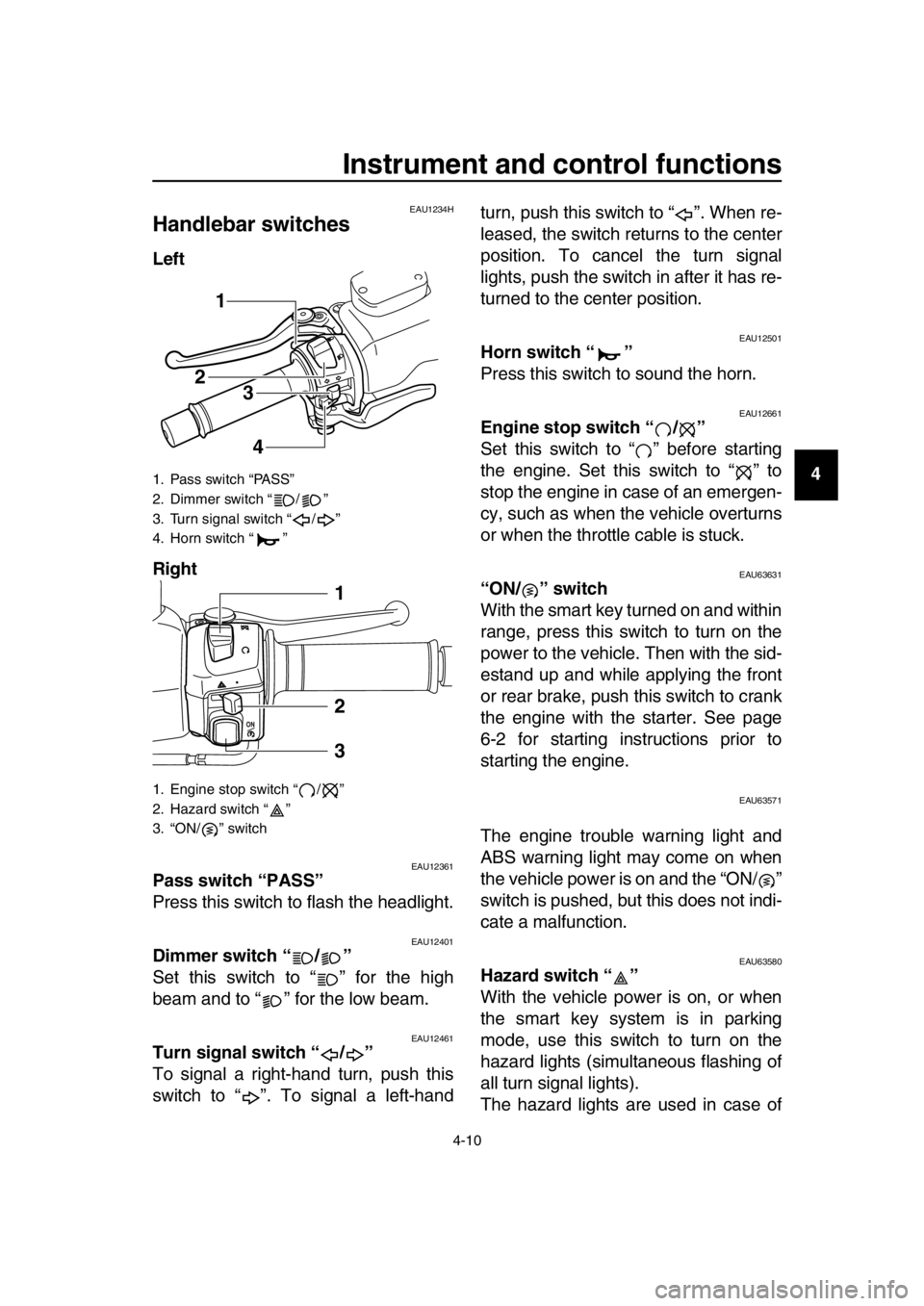
Handlebar switches
Left
Right
EAU12361Pass switch “PASS”
Press this switch to flash the headlight.
EAU12401Dimmer switch “ / ”
Set this switch to “ ” for the high
beam and to “ ” for the low beam.
EAU12461Turn signal switch “ / ”
To signal a right-hand turn, push this
switch to “ ”. To signal a left-hand turn, push this switch to “ ”. When re-
leased, the switch returns to the center
position. To cancel the turn signal
lights, push the switch in after it has re-
turned to the center position.
EAU12501Horn switch “ ”
Press this switch to sound the horn.
EAU12661Engine stop switch “ / ”
Set this switch to “ ” before starting
the engine. Set this switch to “ ” to
stop the engine in case of an emergen-
cy, such as when the vehicle overturns
or when the throttle cable is stuck.
EAU63631“ON/ ” switch
With the smart key turned on and within
range, press this switch to turn on the
power to the vehicle. Then with the sid-
estand up and while applying the front
or rear brake, push this switch to crank
the engine with the starter. See page
6-2 for starting instructions prior to
starting the engine.
EAU63571
The engine trouble warning light and
ABS warning light may come on when
the vehicle power is on and the “ON/ ”
switch is pushed, but this does not indi-
cate a malfunction.
EAU63580Hazard switch “ ”
With the vehicle power is on, or when
the smart key system is in parking
mode, use this switch to turn on the
hazard lights (simultaneous flashing of
all turn signal lights).
The hazard lights are used in case of
1. Pass switch “PASS”
2. Dimmer switch “ / ”
3. Turn signal switch “ / ”
4. Horn switch “ ”
1. Engine stop switch “ / ”
2. Hazard switch “ ”
3. “ON/ ” switch
1
23
4
1
2
3
2PW-9-E1.book 10 ページ 2015年9月10日 木曜日 午後5時17分
Page 36 of 110
Instrument and control functions
4-11
1
2
3
4
5
6
7
8
9
10
11
12
13
14 an emergency or to warn other drivers
when your vehicle is stopped where it
might be a traffic hazard.
NOTICE
ECA10062
Do not use the hazard lights for an
extended length of time with the en-
gine not running, otherwise the bat-
tery may discharge.
EAU44912
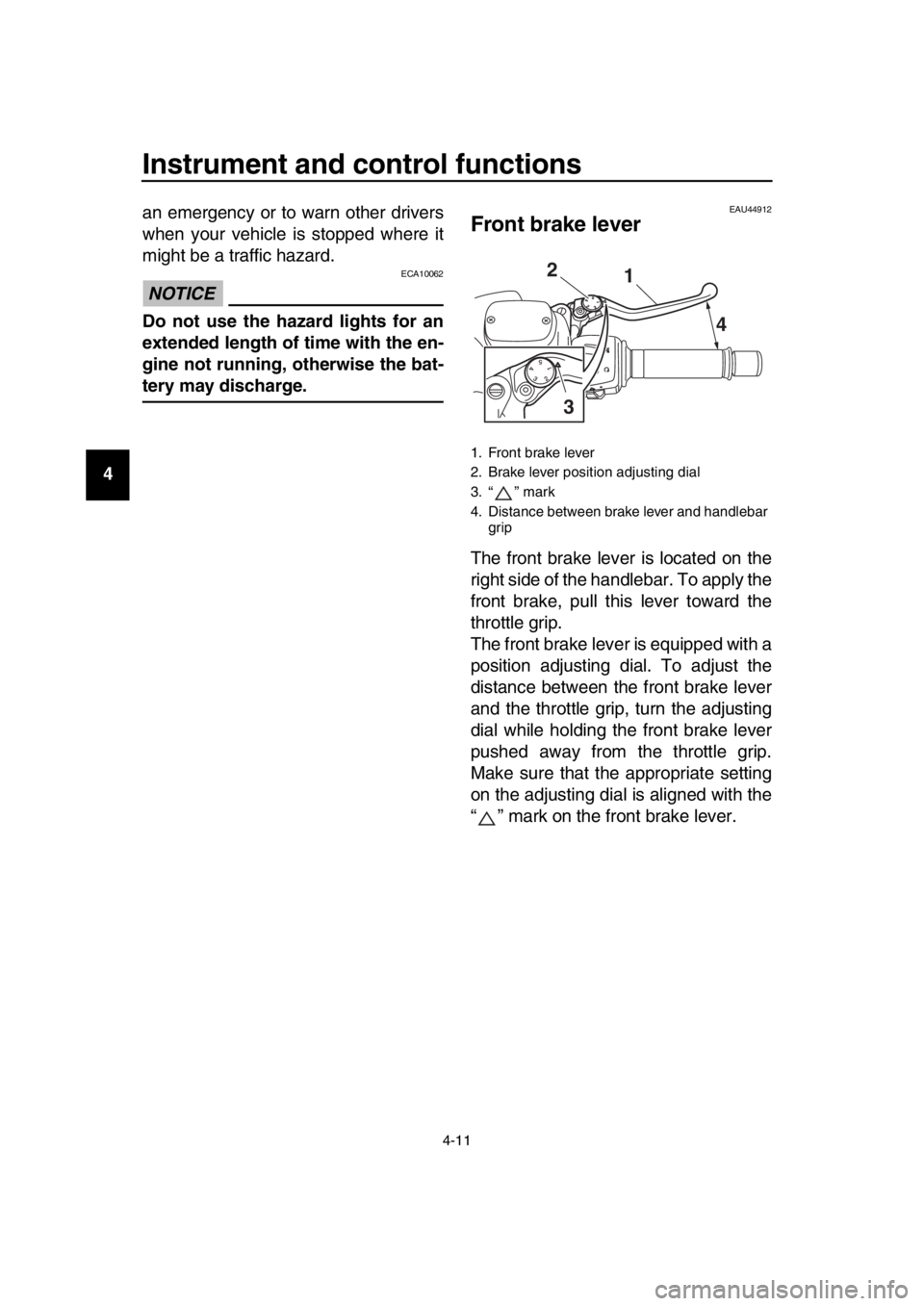
Front brake lever
The front brake lever is located on the
right side of the handlebar. To apply the
front brake, pull this lever toward the
throttle grip.
The front brake lever is equipped with a
position adjusting dial. To adjust the
distance between the front brake lever
and the throttle grip, turn the adjusting
dial while holding the front brake lever
pushed away from the throttle grip.
Make sure that the appropriate setting
on the adjusting dial is aligned with the
“ ” mark on the front brake lever.
1. Front brake lever
2. Brake lever position adjusting dial
3. “ ” mark
4. Distance between brake lever and handlebar
grip
1
4
2
3
2PW-9-E1.book 11 ページ 2015年9月10日 木曜日 午後5時17分
Page 37 of 110
Instrument and control functions
4-12
1
2
3
4
5
6
7
8
9
10
11
12
13
14
EAU44922
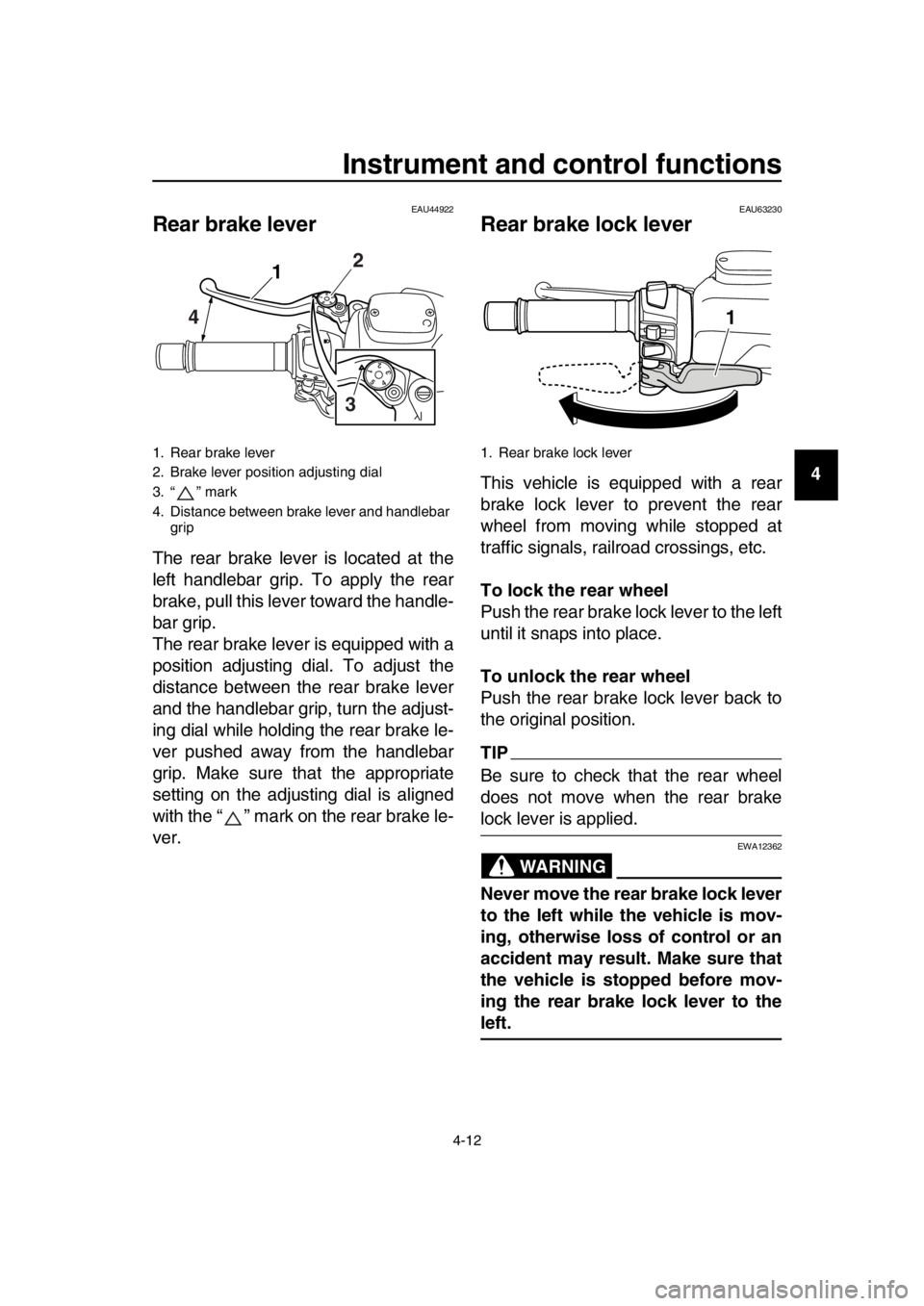
Rear brake lever
The rear brake lever is located at the
left handlebar grip. To apply the rear
brake, pull this lever toward the handle-
bar grip.
The rear brake lever is equipped with a
position adjusting dial. To adjust the
distance between the rear brake lever
and the handlebar grip, turn the adjust-
ing dial while holding the rear brake le-
ver pushed away from the handlebar
grip. Make sure that the appropriate
setting on the adjusting dial is aligned
with the “ ” mark on the rear brake le-
ver.
EAU63230
Rear brake lock lever
This vehicle is equipped with a rear
brake lock lever to prevent the rear
wheel from moving while stopped at
traffic signals, railroad crossings, etc.
To lock the rear wheel
Push the rear brake lock lever to the left
until it snaps into place.
To unlock the rear wheel
Push the rear brake lock lever back to
the original position.
TIP
Be sure to check that the rear wheel
does not move when the rear brake
lock lever is applied.
WARNING
EWA12362
Never move the rear brake lock lever
to the left while the vehicle is mov-
ing, otherwise loss of control or an
accident may result. Make sure that
the vehicle is stopped before mov-
ing the rear brake lock lever to the
left.
1. Rear brake lever
2. Brake lever position adjusting dial
3. “ ” mark
4. Distance between brake lever and handlebar grip
54321
32
1
4
1. Rear brake lock lever
1
2PW-9-E1.book 12 ページ 2015年9月10日 木曜日 午後5時17分
Page 38 of 110
Instrument and control functions
4-13
1
2
3
4
5
6
7
8
9
10
11
12
13
14
EAU63591
ABS (for ABS models)
The Yamaha ABS (Anti-lock Brake
System) features a dual electronic con-
trol system, which acts on the front and
rear brakes independently.
Operate the brakes with ABS as you
would conventional brakes. If the ABS
is activated, a pulsating sensation may
be felt at the brake levers. In this situa-
tion, continue to apply the brakes and
let the ABS work; do not “pump” the
brakes as this will reduce braking effec-
tiveness.
WARNING
EWA16051
Always keep a sufficient distance
from the vehicle ahead to match the
riding speed even with ABS.
The ABS performs best with
long braking distances.
On certain surfaces, such as
rough or gravel roads, the brak-
ing distance may be longer with
the ABS than without.
The ABS is monitored by an ECU,
which will revert the system to conven-
tional braking if a malfunction occurs.
TIP
The ABS performs a self-diagno-
sis test each time the vehicle is
turned on and travels at a speed of
10 km/h (6 mi/h) or higher. During
this test, a clicking noise can be
heard and if either brake lever is
even slightly applied, a vibration
can be felt at the lever, but this
does not indicate a malfunction.
This ABS has a test mode which
allows the owner to experience the
pulsation at the brake levers when the ABS is operating. However,
special tools are required, so
please consult your Yamaha deal-
er.
NOTICE
ECA20100
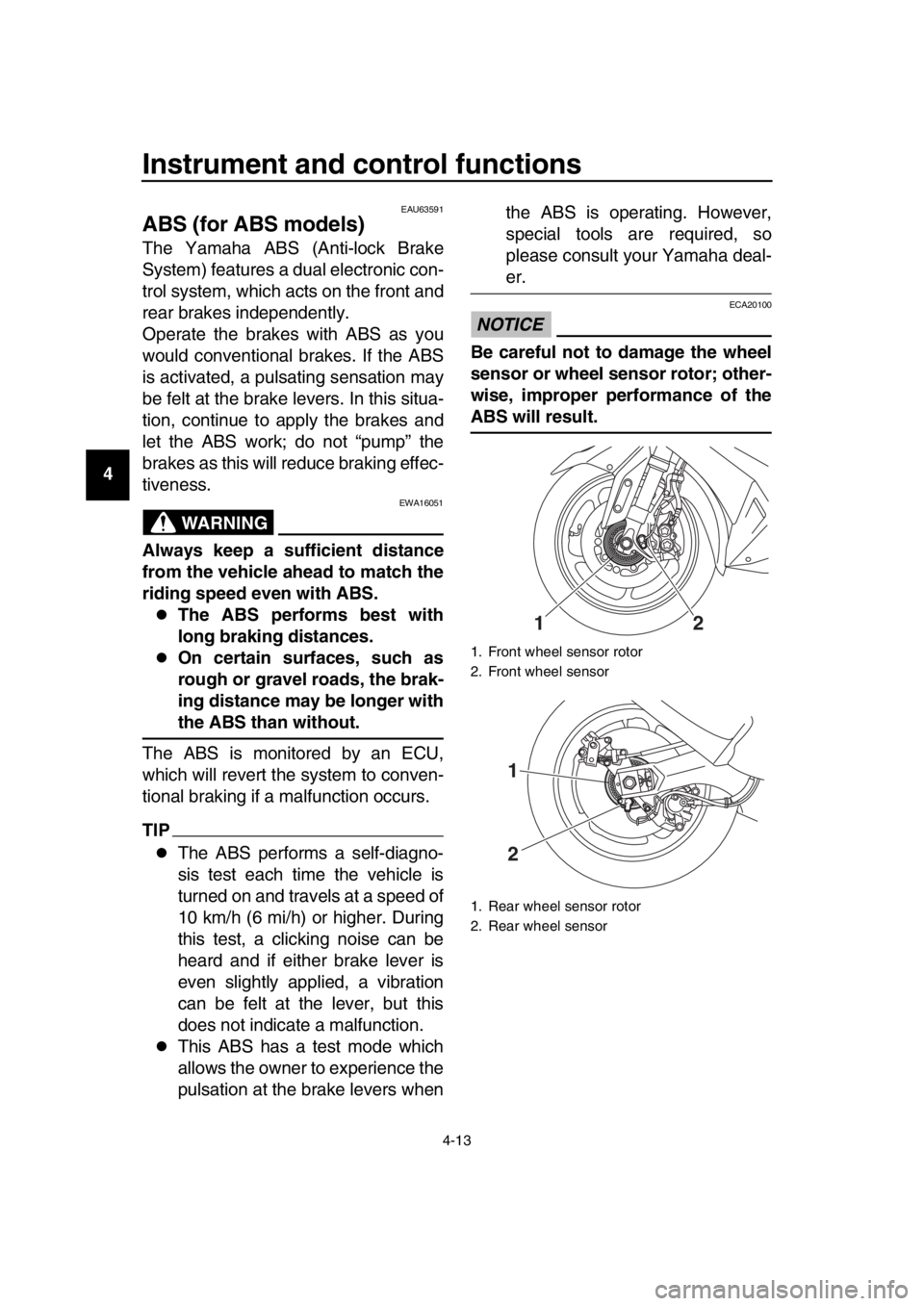
Be careful not to damage the wheel
sensor or wheel sensor rotor; other-
wise, improper performance of the
ABS will result.
1. Front wheel sensor rotor
2. Front wheel sensor
1. Rear wheel sensor rotor
2. Rear wheel sensor
12
1
2
2PW-9-E1.book 13 ページ 2015年9月10日 木曜日 午後5時17分