warning YAMAHA XSR 900 2022 User Guide
[x] Cancel search | Manufacturer: YAMAHA, Model Year: 2022, Model line: XSR 900, Model: YAMAHA XSR 900 2022Pages: 114, PDF Size: 4.36 MB
Page 28 of 114
Instrument and control functions
4-5
1
2
34
5
6
7
8
9
10
11
12
13 on “TCS-MODE”.
See page 3-3 for more informationon “D-MODE”.
EAU91374
Wheel switch “ ”
When the wheel switch is operated, a
cursor will appear around the previous-
ly selected item on the display.
The wheel switch controls:
Vehicle information displays
Settings MENU
Grip warmer function (Option)
Operate the wheel switch as follows:
Rotate up - rotate the wheel upward to
scroll up or increase a setting value.
Rotate down - rotate the wheel down-
ward to scroll down or decrease a set-
ting value.
Press inward - press the wheel switch
in towards the handlebar to select items
indicated by the cursor and confirm set-
tings changes. Press and hold the
switch inward to reset selected items.
TIP
If the wheel switch is not operated
for a certain period of time, the cur-
sor will disappear.
For items that can be reset, leave
the cursor over the item, press and
hold the switch to reset.
See page 4-9 for more information
on the main screen and its func-
tions.
See page 4-15 for more informa-
tion on the MENU screen and howto make settings changes.
EAU4939U
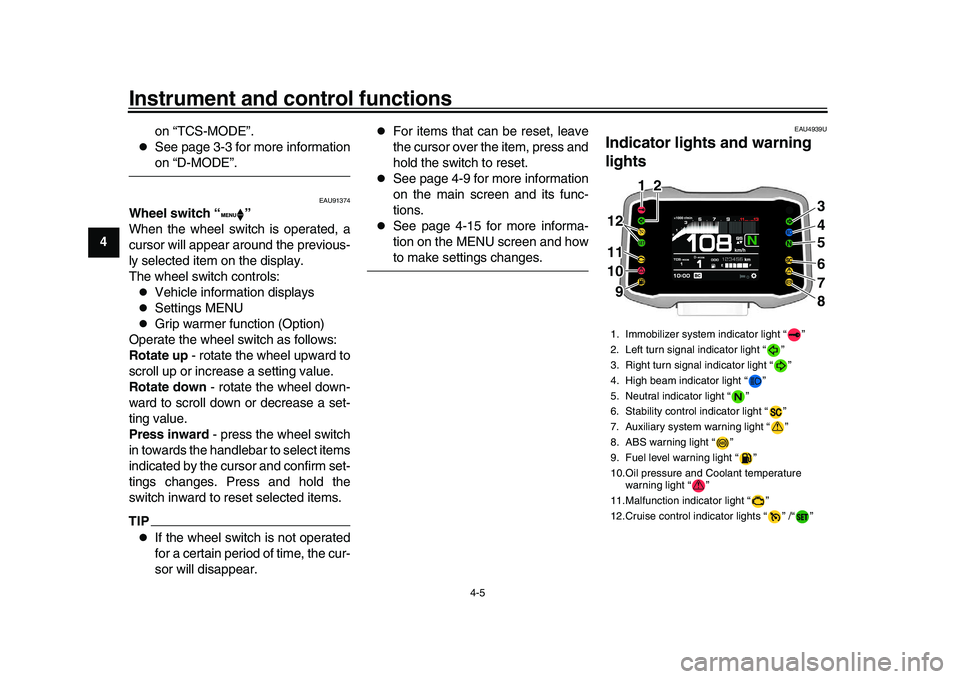
Indicator lights and warning
lights1. Immobilizer system indicator light “ ”
2. Left turn signal indicator light “ ”
3. Right turn signal indicator light “ ”
4. High beam indicator light “ ”
5. Neutral indicator light “ ”
6. Stability control indicator light “ ”
7. Auxiliary system warning light “ ”
8. ABS warning light “ ”
9. Fuel level warning light “ ”
10.Oil pressure and Coolant temperature warning light “ ”
11.Malfunction indicator light “ ”
12.Cruise control indicator lights “ ” /“ ”
ABS
3
4
56
7
8
11 11
10 10 9
11 1 12
2 2
1012 12 12 9 9
BEA-28199-E0.book 5 ページ 2021年12月1日 水曜日 午後7時8分
Page 29 of 114
Instrument and control functions
4-6
1
2
345
6
7
8
9
10
11
12
13
EAU88280
Turn signal indicator lights “ ” and
“”
Each indicator light will flash when its
corresponding turn signal lights are
flashing.
EAU88300
Neutral indicator light “ ”
This indicator light comes on when the
transmission is in the neutral position.
EAU88310
High beam indicator light “ ”
This indicator light comes on when the
high beam of the headlight is switched
on.
EAU88320
Fuel level warning light “ ”
This warning light comes on when the
fuel level drops below approximately
2.7 L (0.71 US gal, 0.59 Imp.gal). When
this occurs, refuel as soon as possible.
The electrical circuit of the warning light
can be checked by turning the vehicle
on. The warning light should come on
for a few seconds, and then go off.TIPIf the warning light does not come on at all, remains on after refueling, or if the
warning light flashes repeatedly, have
a Yamaha dealer check the vehicle.
EAU91650
Cruise control indicator lights “ ”/
“”
These indicator lights come on when
the cruise control system is activated.
(See page 3-1.)TIPWhen the vehicle is turned on, these
lights should come on for a few sec-
onds and then go off. Otherwise, havea Yamaha dealer check the vehicle.
EAU88331
Malfunction indicator light (MIL)
“”
This light comes on or flashes if a prob-
lem is detected in the engine or other
vehicle control system
. If this occurs,
have a Yamaha dealer check the
on-board diagnostic system. The elec-
trical circuit of the warning light can be
checked by turning the vehicle power
on. The light should come on for a few
seconds, and then go off. If the light does not come on initially when the ve-
hicle power is turned on, or if the light
remains on, have a Yamaha dealer
check the vehicle.
NOTICE
ECA26820
If the MIL starts flashing, reduce en-
gine speed to prevent exhaust sys-tem damage.TIPThe engine is sensitively monitored by
the on-board diagnostic system to de-
tect deterioration or malfunction of the
emission control system. Therefore the
MIL may come on or flash due to vehi-
cle modifications, lack of maintenance,
or excessive/improper use of the mo-
torcycle. To prevent this, observe these
precautions.
Do not attempt to modify the soft-
ware of the engine control unit.
Do not add any electrical accesso-
ries that interfere with engine con-
trol.
Do not use aftermarket accesso-
ries or parts such as suspension,
spark plugs, injectors, exhaust
system, etc.
BEA-28199-E0.book 6 ページ 2021年12月1日 水曜日 午後7時8分
Page 30 of 114
Instrument and control functions
4-7
1
2
34
5
6
7
8
9
10
11
12
13
Do not change the drivetrain spec-
ifications (chain, sprockets,
wheels, tires, etc.).
Do not remove or alter the O2 sen-
sor, air induction system, or ex-
haust parts (catalysts or EXUP,
etc.).
Maintain the drive chain properly.
Maintain correct tire pressure.
Maintain proper brake pedal
height to prevent rear brake from
dragging.
Do not operate the vehicle in an
extreme manner. For example, re-
peated or excessive opening and
closing of the throttle, racing, burn-
outs, wheelies, extendedhalf-clutch use, etc.
EAU91500
ABS warning light “ ”
In normal operation, the ABS warning
light comes on when the vehicle is
turned on, and goes off after traveling
at a speed of 5 km/h (3 mi/h) or higher.TIPIf the warning light does not work as de-
scribed above, or if the warning light comes on while riding, the ABS may not
work correctly. Have a Yamaha dealer
check the vehicle as soon as possible.
WARNING
EWA21120
If the ABS warning light does not
turn off after reaching 5 km/h (3
mi/h), or if the warning light comes
on while riding:
Use extra caution to avoid pos-
sible wheel lock during emer-
gency braking.
Have a Yamaha dealer check thevehicle as soon as possible.
EAU88350
Immobilizer system indicator light
“”
When the main switch is turned off and
30 seconds have passed, the indicator
light will flash steadil
y to indicate the im-
mobilizer system is enabled. After 24
hours have passed, the indicator light
will stop flashing, however the immobi-
lizer system is still enabled.TIPWhen the vehicle is turned on, this light should come on for a few seconds and
then go off. If the light does not come
on, or if the light remains on, have a
Yamaha dealer check the vehicle.
Transponder interference
If the immobilizer system indicator light
flashes in the pattern, slowly 5 times
then quickly 2 times, this could be
caused by transponder interference. If
this occurs, try the following.
1. Make sure there are no other im- mobilizer keys close to the main
switch.
2. Use the code re-registering key to start the engine.
3. If the engine starts, turn it off, and try starting the engine with the
standard keys.
4. If one or both of the standard keys do not start the engine, take the
vehicle and all 3 keys to a Yamaha
dealer to have the standard keys
re-registered.
EAU91472
Stability control indicator light “ ”
This indicator light flashes when the
traction control system, SCS, or LIF
BEA-28199-E0.book 7 ページ 2021年12月1日 水曜日 午後7時8分
Page 31 of 114
Instrument and control functions
4-8
1
2
345
6
7
8
9
10
11
12
13
systems engage while riding. When
“TCS-MODE” is set to “OFF”, the indi-
cator will come on.
TIPWhen the vehicle is turned on, this light
should come on for a few seconds and
then go off. If the light does not come
on, or if the light remains on, have aYamaha dealer check the vehicle.NOTICE
ECA27222
When turning the main switch on,
avoid any movement or vibration of
the vehicle as it may interfere with
the initialization of the IMU. If this oc-
curs, the traction control system will
not operate and the “TCS-MODE”
display will read “OFF” until the IMUcan initialize.
EAU88362
Oil pressure and Coolant tempera-
ture warning light “ ”
This warning light comes on if the en-
gine oil pressure is low or if the coolant
temperature is high. If this occurs, stop
the engine immediately.
TIP
When the vehicle is first turned on,
this light should come on until the
engine is started.
If a malfunction is detected, this
light will come on and the oil pres-sure icon will flash.
NOTICE
ECA22441
If the oil pressure and coolant warn-
ing light does not go off after start-
ing the engine or if it comes on while
the engine is running, stop the vehi-
cle and engine immediately.
If the engine is overheating, the
coolant temperature warning
icon will come on. Let the en-
gine cool. Check the coolant
level (see page 7-37).
If the engine oil pressure is low,
the oil pressure warning icon
will come on. Check the oil level
(see page 7-12).
If the warning light remains on
after letting the engine cool and
confirming the proper oil level,
have a Yamaha dealer check the
vehicle. Do not continue to op-
erate the vehicle!
EAU88370
Auxiliary system warning light “ ”
This warning light comes on if a prob-
lem is detected in a non-engine-related
system.TIPWhen the vehicle is turned on, this light
should come on for a few seconds and
then go off. Otherwise, have a Yamahadealer check the vehicle.
BEA-28199-E0.book 8 ページ 2021年12月1日 水曜日 午後7時8分
Page 32 of 114
Instrument and control functions
4-9
1
2
34
5
6
7
8
9
10
11
12
13
EAU96241
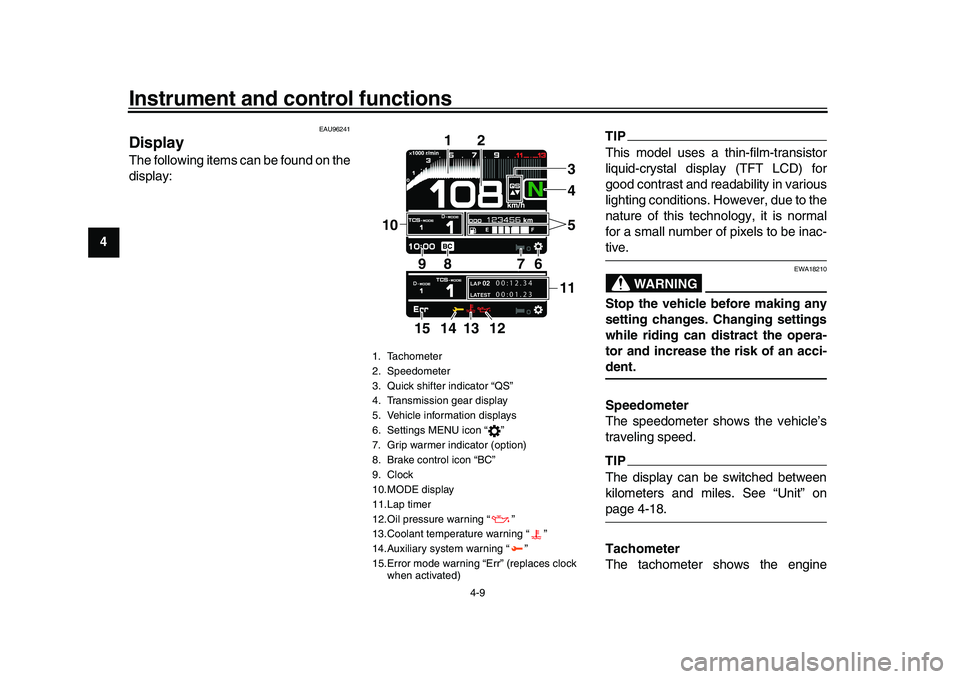
DisplayThe following items can be found on the
display:
TIPThis model uses a thin-film-transistor
liquid-crystal display (TFT LCD) for
good contrast and readability in various
lighting conditions. However, due to the
nature of this technology, it is normal
for a small number of pixels to be inac-tive.
WARNING
EWA18210
Stop the vehicle before making any
setting changes. Changing settings
while riding can distract the opera-
tor and increase the risk of an acci-dent.
Speedometer
The speedometer shows the vehicle’s
traveling speed.TIPThe display can be switched between
kilometers and miles. See “Unit” onpage 4-18.
Tachometer
The tachometer shows the engine
1. Tachometer
2. Speedometer
3. Quick shifter indicator “QS”
4. Transmission gear display
5. Vehicle information displays
6. Settings MENU icon “ ”
7. Grip warmer indicator (option)
8. Brake control icon “BC”
9. Clock
10.MODE display
11.Lap timer
12.Oil pressure warning “ ”
13.Coolant temperature warning “ ”
14.Auxiliary system warning “ ”
15.Error mode warning “Err” (replaces clock when activated)
LAP 02LATEST
00:12.34
00:01.23
4
1
2
7
6
9
10
8
1135
14 13
12
15
BEA-28199-E0.book 9 ページ 2021年12月1日 水曜日 午後7時8分
Page 35 of 114
Instrument and control functions
4-12
1
2
345
6
7
8
9
10
11
12
13
Fuel consumption trip meter:
Displays how much fuel has been con-
sumed since the trip meter was last re-
set.
Trip time:Displays engine running time.
To reset information display items1. Rotate the wheel switch to select
one of the two vehicle information
displays.
2. Press the wheel switch inward to highlight the information display.
3. Rotate the wheel switch to select the desired information display
item.
4. Press and hold the wheel switch inward until the highlighted display
item is reset. Transmission gear display
This shows which gear the transmis-
sion is in. This model has 6 gears and a
neutral position. The neutral position is
indicated by the neutral indicator light
“ ” and by the transmission gear dis-
play “ ”.
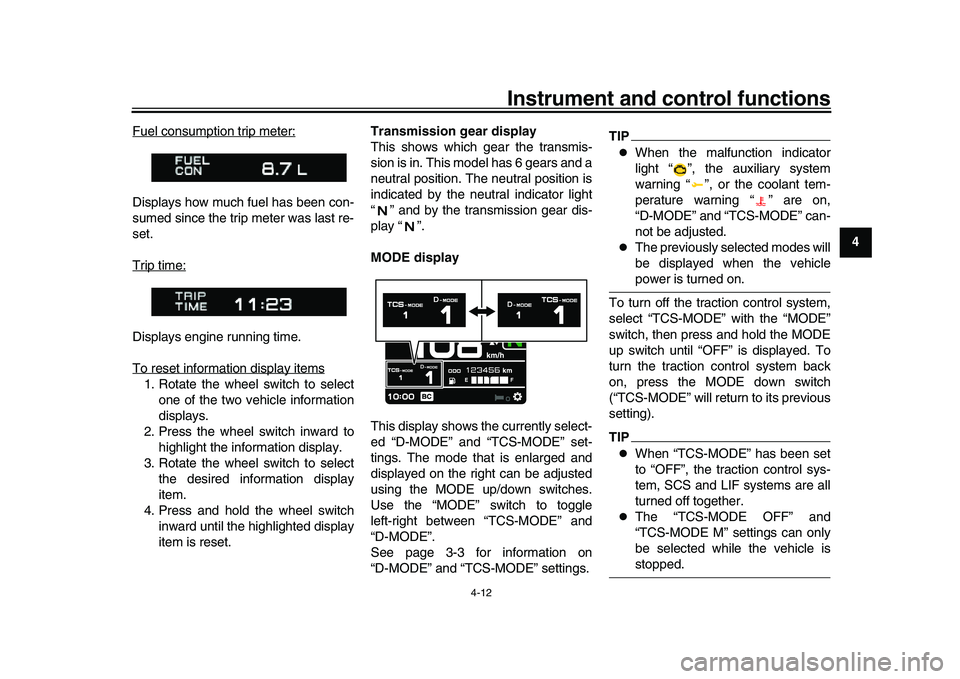
MODE display
This display shows the currently select-
ed “D-MODE” and “TCS-MODE” set-
tings. The mode that is enlarged and
displayed on the right can be adjusted
using the MODE up/down switches.
Use the “MODE” switch to toggle
left-right between “TCS-MODE” and
“D-MODE”.
See page 3-3 for information on
“D-MODE” and “TCS-MODE” settings.
TIP
When the malfunction indicator
light “ ”, the auxiliary system
warning “ ”, or the coolant tem-
perature warning “ ” are on,
“D-MODE” and “TCS-MODE” can-
not be adjusted.
The previously selected modes will
be displayed when the vehiclepower is turned on.
To turn off the traction control system,
select “TCS-MODE” with the “MODE”
switch, then press and hold the MODE
up switch until “OFF” is displayed. To
turn the traction control system back
on, press the MODE down switch
(“TCS-MODE” will return to its previous
setting).
TIP
When “TCS-MODE” has been set
to “OFF”, the traction control sys-
tem, SCS and LIF systems are all
turned off together.
The “TCS-MODE OFF” and
“TCS-MODE M” settings can only
be selected while the vehicle isstopped.
BEA-28199-E0.book 12 ページ 2021年12月1日 水曜日 午後7時8分
Page 37 of 114
Instrument and control functions
4-14
1
2
345
6
7
8
9
10
11
12
13
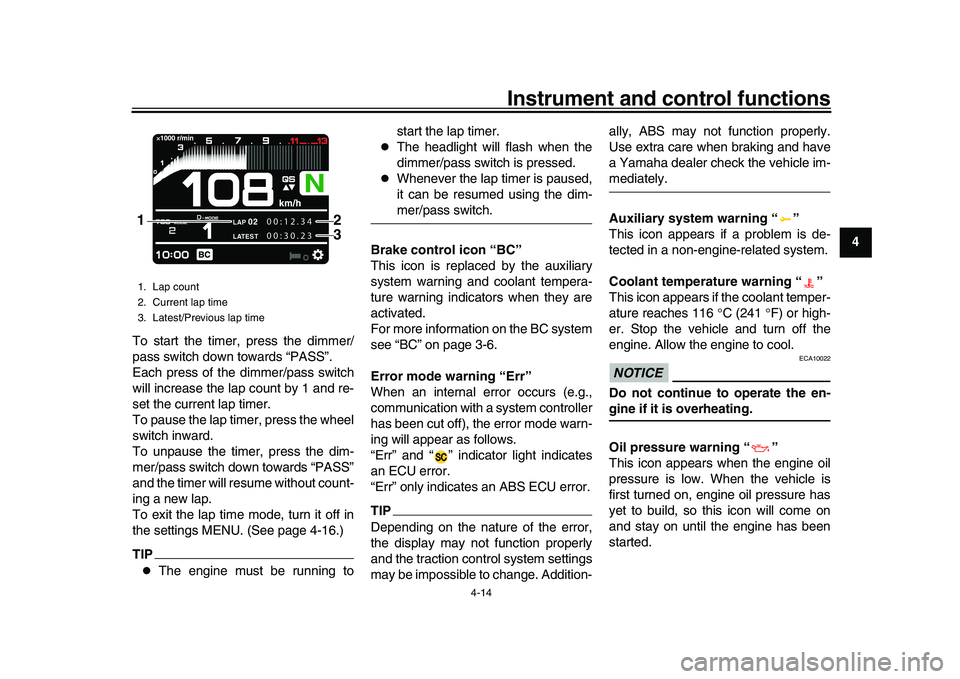
To start the timer, press the dimmer/
pass switch down towards “PASS”.
Each press of the dimmer/pass switch
will increase the lap count by 1 and re-
set the current lap timer.
To pause the lap timer, press the wheel
switch inward.
To unpause the timer, press the dim-
mer/pass switch down towards “PASS”
and the timer will resume without count-
ing a new lap.
To exit the lap time mode, turn it off in
the settings MENU. (See page 4-16.)
TIP
The engine must be running to start the lap timer.
The headlight will flash when the
dimmer/pass switch is pressed.
Whenever the lap timer is paused,
it can be resumed using the dim-mer/pass switch.
Brake control icon “BC”
This icon is replaced by the auxiliary
system warning and coolant tempera-
ture warning indicators when they are
activated.
For more information on the BC system
see “BC” on page 3-6.
Error mode warning “Err”
When an internal error occurs (e.g.,
communication with a system controller
has been cut off), the error mode warn-
ing will appear as follows.
“Err” and “ ” indicator light indicates
an ECU error.
“Err” only indicates an ABS ECU error.
TIPDepending on the nature of the error,
the display may not function properly
and the traction control system settings
may be impossible to change. Addition- ally, ABS may not function properly.
Use extra care when braking and have
a Yamaha dealer check the vehicle im-
mediately.
Auxiliary system warning “ ”
This icon appears if a problem is de-
tected in a non-engine-related system.
Coolant temperature warning “ ”
This icon appears if the coolant temper-
ature reaches 116
C (241 F) or high-
er. Stop the vehicle and turn off the
engine. Allow the engine to cool.NOTICE
ECA10022
Do not continue to operate the en-gine if it is overheating.
Oil pressure warning “ ”
This icon appears when the engine oil
pressure is low. When the vehicle is
first turned on, engine oil pressure has
yet to build, so this icon will come on
and stay on until the engine has been
started.
1. Lap count
2. Current lap time
3. Latest/Previous lap time
LAP
02
LATEST
00:12.34
00:30.23
2
1
3
BEA-28199-E0.book 14 ページ 2021年12月1日 水曜日 午後7時8分
Page 38 of 114
Instrument and control functions
4-15
1
2
34
5
6
7
8
9
10
11
12
13
TIPIf a malfunction is detected, the oil pres-sure warning icon will flash repeatedly.NOTICE
ECA26410
Do not continue to operate the en-gine if the oil pressure is low.
EAU9145B
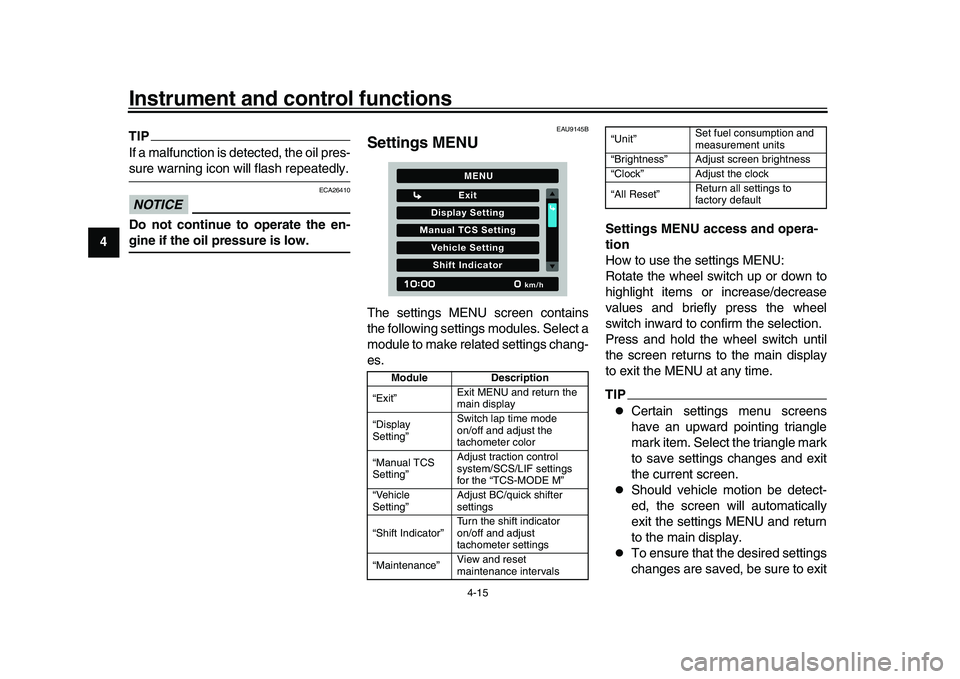
Settings MENUThe settings MENU screen contains
the following settings modules. Select a
module to make related settings chang-
es. Settings MENU access and opera-
tion
How to use the settings MENU:
Rotate the wheel switch up or down to
highlight items or increase/decrease
values and briefly press the wheel
switch inward to confirm the selection.
Press and hold the wheel switch until
the screen returns to the main display
to exit the MENU at any time.
TIP
Certain settings menu screens
have an upward pointing triangle
mark item. Select the triangle mark
to save settings changes and exit
the current screen.
Should vehicle motion be detect-
ed, the screen will automatically
exit the settings MENU and return
to the main display.
To ensure that the desired settings
changes are saved, be sure to exit
Module
Description
“Exit” Exit MENU and return the
main display
“Display
Setting” Switch lap time mode
on/off and adjust the
tachometer color
“Manual TCS
Setting” Adjust traction control
system/SCS/LIF settings
for the “TCS-MODE M”
“Vehicle
Setting” Adjust BC/quick shifter
settings
“Shift Indicator” Turn the shift indicator
on/off and adjust
tachometer settings
“Maintenance” View and reset
maintenance intervals
Display Setting
Exit
Manual TCS SettingVehicle SettingShift Indicator
km/h
MENU
“Unit”Set fuel consumption and
measurement units
“Brightness” Adjust screen brightness
“Clock” Adjust the clock
“All Reset” Return all settings to
factory default
BEA-28199-E0.book 15 ページ 2021年12月1日 水曜日 午後7時8分
Page 44 of 114
Instrument and control functions
4-21
1
2
34
5
6
7
8
9
10
11
12
13
EAU12944
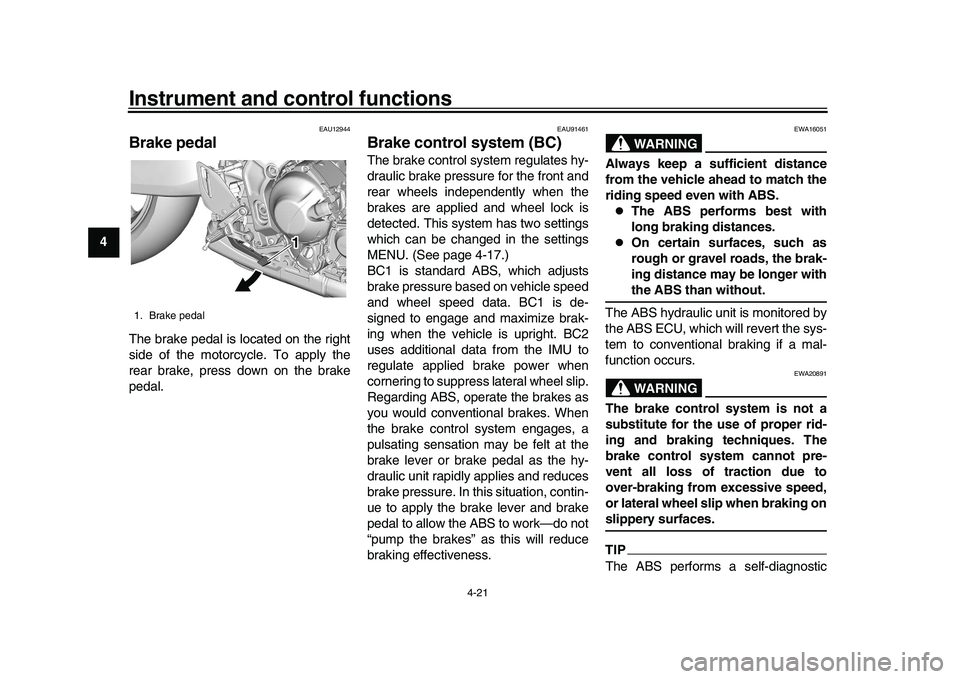
Brake pedalThe brake pedal is located on the right
side of the motorcycle. To apply the
rear brake, press down on the brake
pedal.
EAU91461
Brake control system (BC)The brake control system regulates hy-
draulic brake pressure for the front and
rear wheels independently when the
brakes are applied and wheel lock is
detected. This system has two settings
which can be changed in the settings
MENU. (See page 4-17.)
BC1 is standard ABS, which adjusts
brake pressure based on vehicle speed
and wheel speed data. BC1 is de-
signed to engage and maximize brak-
ing when the vehicle is upright. BC2
uses additional data from the IMU to
regulate applied brake power when
cornering to suppress lateral wheel slip.
Regarding ABS, operate the brakes as
you would conventional brakes. When
the brake control system engages, a
pulsating sensation may be felt at the
brake lever or brake pedal as the hy-
draulic unit rapidly applies and reduces
brake pressure. In this situation, contin-
ue to apply the brake lever and brake
pedal to allow the ABS to work—do not
“pump the brakes” as this will reduce
braking effectiveness.
WARNING
EWA16051
Always keep a sufficient distance
from the vehicle ahead to match the
riding speed even with ABS.
The ABS performs best with
long braking distances.
On certain surfaces, such as
rough or gravel roads, the brak-
ing distance may be longer withthe ABS than without.
The ABS hydraulic unit is monitored by
the ABS ECU, which will revert the sys-
tem to conventional braking if a mal-
function occurs.WARNING
EWA20891
The brake control system is not a
substitute for the use of proper rid-
ing and braking techniques. The
brake control system cannot pre-
vent all loss of traction due to
over-braking from excessive speed,
or lateral wheel slip when braking onslippery surfaces.TIPThe ABS performs a self-diagnostic
1. Brake pedal
11 1 1
BEA-28199-E0.book 21 ページ 2021年12月1日 水曜日 午後7時8分
Page 46 of 114
Instrument and control functions
4-23
1
2
34
5
6
7
8
9
10
11
12
13 the key cannot be removed if the cap is
not properly closed and locked.
WARNING
EWA11092
Make sure that the fuel tank cap is
properly closed after filling fuel.Leaking fuel is a fire hazard.
EAU13222
FuelMake sure there is sufficient gasoline in
the tank.
WARNING
EWA10882
Gasoline and gasoline vapors are
extremely flammable. To avoid fires
and explosions and to reduce the
risk of injury when refueling, followthese instructions.
1. Before refueling, turn off the en- gine and be sure that no one is sit-
ting on the vehicle. Never refuel
while smoking, or while in the vi-
cinity of sparks, open flames, or
other sources of ignition such as
the pilot lights of water heaters and
clothes dryers.
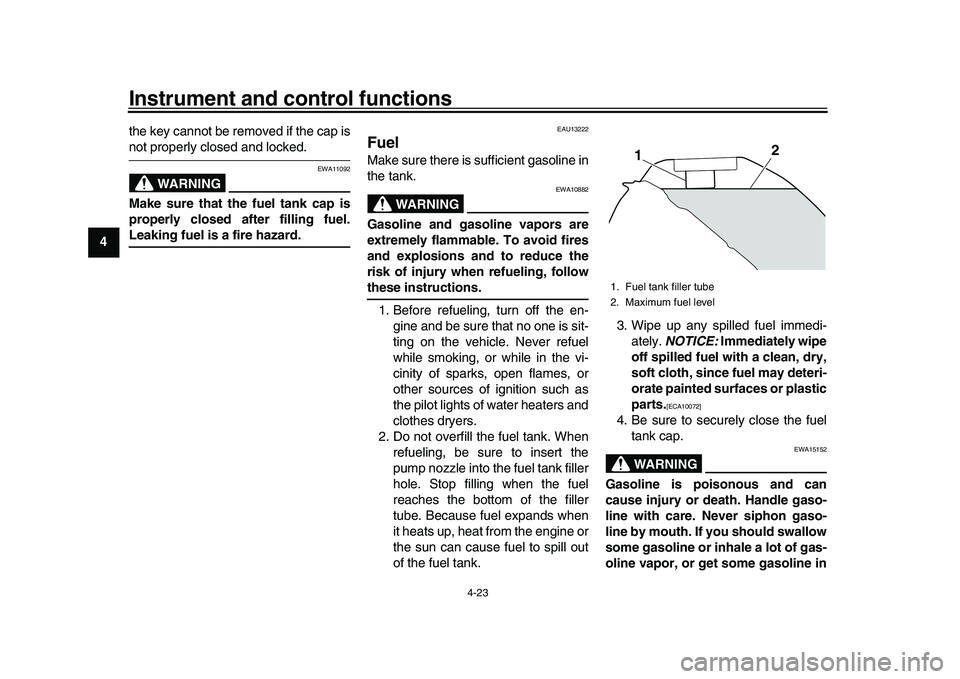
2. Do not overfill the fuel tank. When refueling, be sure to insert the
pump nozzle into the fuel tank filler
hole. Stop filling when the fuel
reaches the bottom of the filler
tube. Because fuel expands when
it heats up, heat from the engine or
the sun can cause fuel to spill out
of the fuel tank. 3. Wipe up any spilled fuel immedi-
ately. NOTICE: Immediately wipe
off spilled fuel with a clean, dry,
soft cloth, since fuel may deteri-
orate painted surfaces or plastic
parts.
[ECA10072]
4. Be sure to securely close the fuel tank cap.
WARNING
EWA15152
Gasoline is poisonous and can
cause injury or death. Handle gaso-
line with care. Never siphon gaso-
line by mouth. If you should swallow
some gasoline or inhale a lot of gas-
oline vapor, or get some gasoline in1. Fuel tank filler tube
2. Maximum fuel level
1
2
BEA-28199-E0.book 23 ページ 2021年12月1日 水曜日 午後7時8分