ignition AUDI Q2 2021 Owner´s Manual
[x] Cancel search | Manufacturer: AUDI, Model Year: 2021, Model line: Q2, Model: AUDI Q2 2021Pages: 364, PDF Size: 87.77 MB
Page 51 of 364
Lights and vision
Lights and vision
Exterior lights
Switching lights on and off
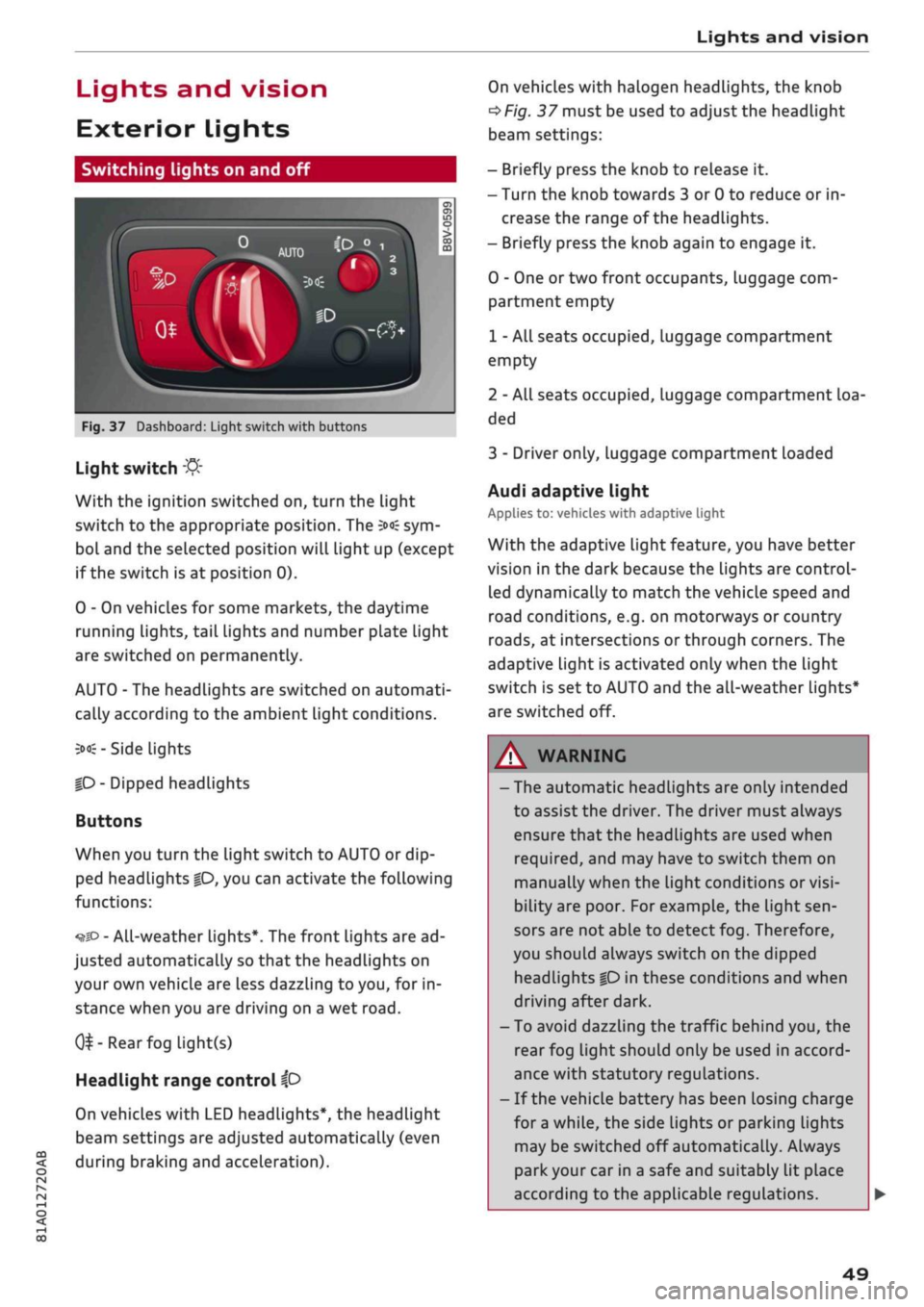
Fig.
37 Dashboard: Light switch with buttons
CO
<
O
rN rN
•-i
00
Light switch
:&
With the ignition switched on, turn the light
switch to the appropriate position. The
3»€
sym
bol and the selected position will light up (except
if the switch is at position 0).
0 - On vehicles for some markets, the daytime
running lights, tail lights and number plate Light
are switched on permanently.
AUTO - The headlights are switched on automati
cally according to the ambient light conditions.
3><£-
Side lights
|D
- Dipped headlights
Buttons
When you turn the light switch to AUTO or dip
ped headlights
|0,
you can activate the following
functions:
•^SD
- All-weather lights*. The front lights are ad
justed automatically so that the headlights on
your own vehicle are less dazzling to
you,
for in
stance when you are driving on a wet
road.
0^-Rear
fog light(s)
Headlight range control
ip
On vehicles with LED headlights*, the headlight
beam settings are adjusted automatically (even
during braking and acceleration).
On vehicles with halogen headlights, the knob
^Fig.
37 must be used to adjust the headlight
beam settings:
- Briefly press the knob to release it.
- Turn the knob towards 3 or 0 to reduce or in
crease the range of the headlights.
- Briefly press the knob again to engage it.
0 - One or two front occupants, luggage com
partment empty
1 - All seats occupied, luggage compartment
empty
2 - All seats occupied, Luggage compartment loa
ded
3 - Driver only, luggage compartment loaded
Audi adaptive light
Applies to: vehicles with adaptive light
With the adaptive light feature, you have better
vision in the dark because the Lights are control
led dynamically to match the vehicle speed and
road conditions, e.g. on motorways or country
roads,
at intersections or through corners. The
adaptive light is activated only when the Light
switch is set to AUTO and the all-weather Lights*
are switched off.
WARNING
- The automatic headlights are only intended
to assist the driver. The driver must always
ensure that the headlights are used when
required,
and may have to switch them on
manually when the light conditions or
visi
bility are poor. For example, the light
sen
sors are not able to detect fog. Therefore,
you should always switch on the dipped
headlights
|0
in these conditions and when
driving after dark.
- To avoid dazzling the traffic behind you, the
rear fog light should only be used in accord
ance with statutory regulations.
- If the vehicle battery has been losing charge
for
a
while, the side lights or parking lights
may be switched off automatically. Always
park your car in a safe and suitably lit place
according to the applicable regulations.
49
Page 52 of 364
Lights and vision
Avoid using the side lights for long periods
(several hours). If possible, switch the left
or right parking Lights on.
Observe all relevant statutory requirements
when using the lighting systems described
here.
- The light sensor for the automatic
head
lights*
is Located in the mounting for the in
terior mirror. Do not affix any stickers on
this section of the windscreen.
- Depending on the export market, the rear
lights on some vehicles may be switched on
together with the headlights when the
day
time running lights* are activated. On other
vehicles, the rear lights remain off.
-In cool
or
damp weather, the inside of the
headlights, turn signals or rear lights can
sometimes mist up, due to the temperature
difference between the interior and exterior
of the car. They should clear again partially
or completely soon after you switch on the
headlights. This phenomenon has no
influ
ence on the life expectancy of the vehicle
lights.
Turn signal and main beam lever
The
turn signal lever also operates the main
beam headlights, parking lights and headlight
flasher.
oo
PÏ
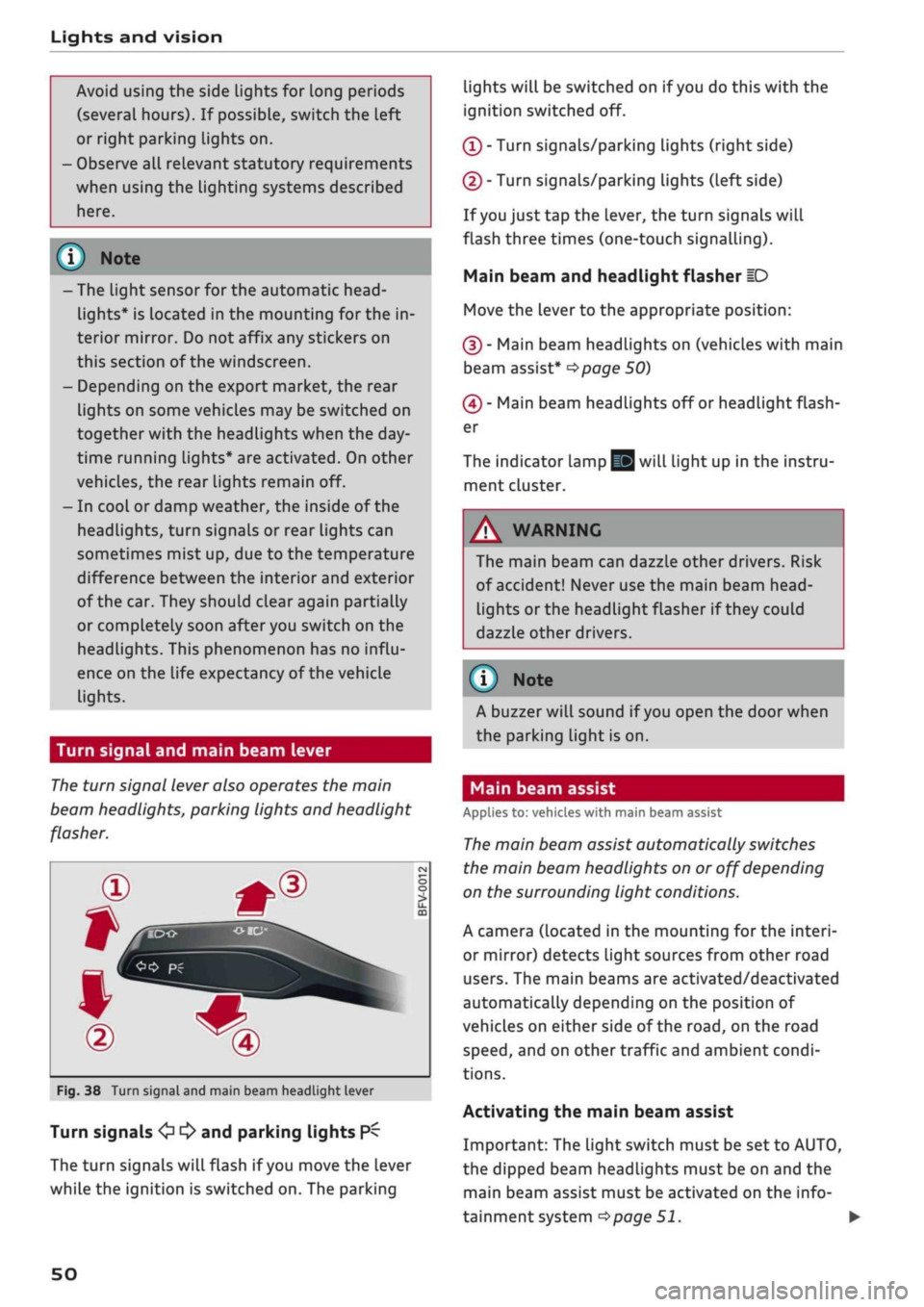
Fig.
38 Turn signal and main beam headlight lever
Turn signals
<£> ^
and parking lights
P^
The turn signals will flash if
you
move the lever
while the ignition is switched on. The parking
lights will be switched on if
you
do this with the
ignition switched off.
(T)
- Turn signals/parking Lights (right side)
(D - Turn signals/parking lights (left side)
If
you
just tap the lever, the turn signals will
flash three times (one-touch signalling).
Main beam and headlight flasher
ID
Move the lever to the appropriate position:
(§)
- Main beam headlights on (vehicles with main
beam assist*
^>page
50)
(4) - Main beam headlights off or headlight flash
er
The indicator lamp
gg
will light up in the instru
ment cluster.
A WARNING
The main beam can dazzle other drivers. Risk
of accident! Never use the main beam
head-
Lights or the headlight flasher if they could
dazzle other drivers.
© Note
A buzzer will sound if
you
open the door when
the parking light is on.
Main beam assist
Applies to: vehicles with main beam assist
The
main beam assist automatically switches
the main beam headlights on or off depending
on the surrounding light conditions.
A camera (located in the mounting for the interi
or mirror) detects light sources from other road
users.
The main beams are activated/deactivated
automatically depending on the position of
vehicles on either side of the
road,
on the road
speed,
and on other traffic and ambient condi
tions.
Activating the main beam assist
Important: The light switch must be set to AUTO,
the dipped beam headlights must be on and the
main beam assist must be activated on the info
tainment system
^>page
51.
•
50
Page 55 of 364
Lights and vision
CO
<
O
rN
iv
rN
i—i
o
< 00
Background lighting
Applies
to: vehicles with background lighting
The
background lighting can be adjusted via the
infotainment system.
• Select the following on the infotainment sys
tem:
|MENU| button > Car
>
left control button
> Vehicle settings > Background lighting.
It may be possible to adjust the brightness of the
individual zones, depending on the equipment
fitted in your vehicle:
• Press the right control button and select one of
the zones displayed.
The background lighting will be switched on
when you switch on the headlights with the
igni
tion on.
Instrument lighting
The
background lighting of the instruments and
displays (including the head-up display*) can be
adjusted as required.
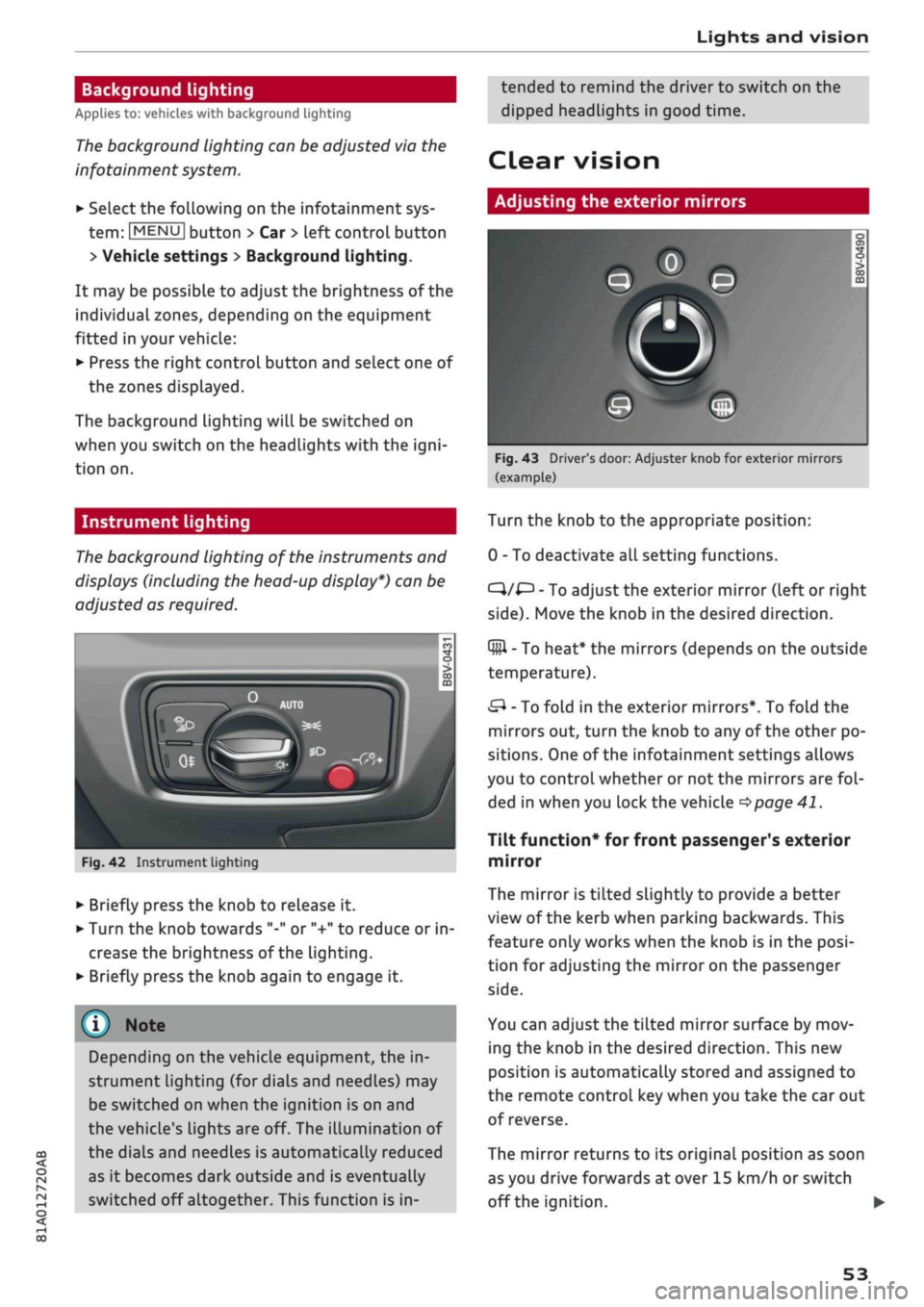
Fig.
42 Instrument lighting
• Briefly press the knob to release it.
• Turn the knob towards "-" or "+" to reduce or in
crease the brightness of the lighting.
• Briefly press the knob again to engage it.
Depending on the vehicle equipment, the in
strument lighting (for dials and needLes) may
be switched on when the ignition is on and
the vehicle's lights are off. The illumination of
the dials and needles is automatically reduced
as it becomes dark outside and is eventually
switched off altogether. This function is in
tended to remind the driver to switch on the
dipped headlights in good time.
dear
vision
Adjusting the exterior mirrors
Fig.
43 Driver's door: Adjuster knob for exterior mirrors
(example)
Turn the knob to the appropriate position:
0 - To deactivate all setting functions.
C}/^
- To adjust the exterior mirror (left or right
side).
Move the knob in the desired direction.
Q#l
- To heat* the mirrors (depends on the outside
temperature).
&
- To fold in the exterior mirrors*. To fold the
mirrors out, turn the knob to any of the other po
sitions. One of the infotainment settings allows
you to control whether or not the mirrors are
fol
ded in when you lock the vehicle
•=>page
41.
Tilt function* for front passenger's exterior
mirror
The mirror is tiLted slightly to provide a better
view of the kerb when parking backwards. This
feature only works when the knob is in the
posi
tion for adjusting the mirror on the passenger
side.
You can adjust the tilted mirror surface by mov
ing the knob in the desired direction. This new
position is automatically stored and assigned to
the remote control key when you take the car out
of reverse.
The mirror returns to its original position as soon
as you drive forwards at over 15 km/h or switch
off the ignition. •
53
Page 57 of 364

Lights and vision
CO
<
o
rN
iv
rN
t-H
o
< 00
The light* for the make-up mirror comes on auto
matically when you slide open the mirror cover
©•
Windscreen wipers
Switching on the windscreen wipers
V
WJIO
*
Fig. 45
Windscreen
wiper
lever
m®
v
"trj-i
s
to
o > 03 m
Fig.
46 Control lever for rear wiper
Move the windscreen wiper lever to the appropri
ate position:
@-Wipers
off
(Î) - Intermittent wipe. Move switch
®
to the Left
or to the right to increase or reduce the wiper de
lay interval. If your vehicle is equipped with a rain
sensor*, the windscreen wipers will be activated
automatically in the rain as long as the vehicle
has been moving faster than approx. 4 km/h at
Least once. The higher the sensitivity level for the
rain sensor (i.e. the further switch
(Â)
is moved to
the right), the sooner the windscreen wipers re
act to moisture on the windscreen. You can deac
tivate the rain sensor mode on the infotainment
system (this will activate the intermittent wipe
mode). To do so, select: |MENU| button > Car >
left control button > Driver assist
>
Rain sensor.
@-
Slow wipe
(|)-
Fast
wipe
(?) - Single wipe. If
you
hold the lever in this
posi
tion,
the wipers will switch from slow continuous
wiping to fast continuous wiping after
a
while.
(D - Wash/wipe. The screen is given an extra wipe
a few seconds later to remove any dribbles of wa
ter (if the vehicle is moving and the temperature
is above approx. 4
°C).
You can deactivate this
function by moving the lever to position
(s)
again
within 10 seconds after the extra wipe. The ex
tra-wipe function is activated again the next time
you switch on the ignition.
Headlight washers*. The headlight washer sys
tem*
only operates when the dipped headlights
are switched on. The headlights are also auto
matically washed intermittently when you move
the lever to position
(s).
(?) - Rear wipe. The rear window is wiped approxi
mately every 6 seconds.
If the windscreen wipers are on and in operation,
the rear window wiper will also be switched on
automatically when you engage reverse gear.
©-
Rear wash/wipe. The number of wiper cycles
depends on how long you hold the Lever in
posi
tion©.
A WARNING
- The rain sensor* is only intended to assist
the driver. The driver is still obliged to
man
ually operate the windscreen wipers as re
quired depending on visibility.
- Do not use water-repellent coatings on the
windscreen. In bad visibility conditions such
as light
rain,
low sun or when driving at
night these coatings can cause increased
dazzle, which is a serious safety hazard.
Such coatings can aLso cause the wiper
blades to judder.
- Poor visibility can cause accidents. Always
ensure that the wiper blades are in good
condition
^>page
56, Changing the
wind
screen wiper blades.
55
Page 58 of 364

Lights and vision
© CAUTIO © CAUTION
- In icy conditions, check that the wiper
blades are not frozen to the windscreen. If
the wiper blades are frozen to the
wind
screen when you switch on the windscreen
wipers, this could damage the wiper blades.
- Make sure you switch off the windscreen
wiper system (lever in position
@)
before
you use an automatic car wash. This will
avoid inadvertent triggering of the wipers
and possible damage to the wiper system.
© Note
- The windscreen wipers are deactivated
when the ignition is switched off. You can
activate the windscreen wipers after switch
ing the ignition on again by moving the
windscreen wiper lever to any position.
- Worn or dirty wiper blades can cause smear
ing on the glass. This can also impair the ef
fectiveness of the rain sensor. Please check
the wiper blades regularly.
-The windscreen washer jets are heated*
when the ignition is switched on if the out
side temperature is low.
- If
you
stop briefly, e.g. at traffic lights, the
wiper speed setting will automatically be re
duced
by
one level.
Cleaning the wiper blades
Clean the wiper blades if the wipers leave smear
ing on the glass. Use a soft cloth and glass clean
ing solution.
Windscreen wipers
• Set the wiper arms to the service position
^>page
56.
• Lift the wiper arms away from the glass.
Rear window wiper
• Lift the rear wiper arm away from the glass.
/\
WARNING
Dirty wiper blades can impair the driver's view
- risk of accident!
If the wipers still Leave smearing on the glass
after they have been cleaned, the wiper
blades should be replaced
<=>page
56.
Changing the windscreen wiper blades
Fig.
47 Removing the wiper blades
Service position / wiper change position
• To move the windscreen wipers into the service
position,
switch off the ignition and move the
windscreen wiper lever to position (3) for at
least 2 seconds
<^page
55, Fig. 45.
• To move the windscreen wipers back to their
original position, switch on the ignition and
move the windscreen wiper lever to position (4)
for at least 2 seconds.
Taking off the wiper blade
• Lift the wiper arm away from the glass.
• Press the release button
(T)
on the wiper blade
^>Fig.
47. Keep hold of the wiper blade while
doing so.
• Take off the wiper blade in the direction of the
arrow.
Fitting the wiper blade
• Fit the new wiper blade into the mounting on
the wiper arm (5). You should hear it engage in
the wiper arm.
• Fold the wiper arm back down onto the
wind
screen.
• Switch off the service position again.
A
WARNING
For safety, the wiper blades should be
changed once or twice a year.
56
Page 62 of 364
Seats and storage
The ashtray is inserted in the centre console and
can be placed on either the driver's or front pas
senger's side. Lift the lid to open the ashtray. Al
ways put the ashtray safely back into the holder
after removing it (e.g. after emptying it).
A WARNING
Never put waste paper in the ashtray, as this
could cause a fire
Cigarette lighter
Applies to: vehicles with cigarette lighter
-
c
cc
o
Fig.
54 Centre console: Cigarette lighter
• Press in the cigarette lighter.
• When the cigarette lighter springs out, pull it
out completely.
The cigarette lighter should only be used as a
power source in exceptional circumstances, e.g.
for the compressor of the tyre repair kit.
A WARNING
The cigarette lighter only works when the ig
nition is on. Improper use can cause serious
injury or start a fire. To avoid the risk of injury,
never leave children unsupervised in the
vehi
cle with the key.
60
Power sources
-
CO
-
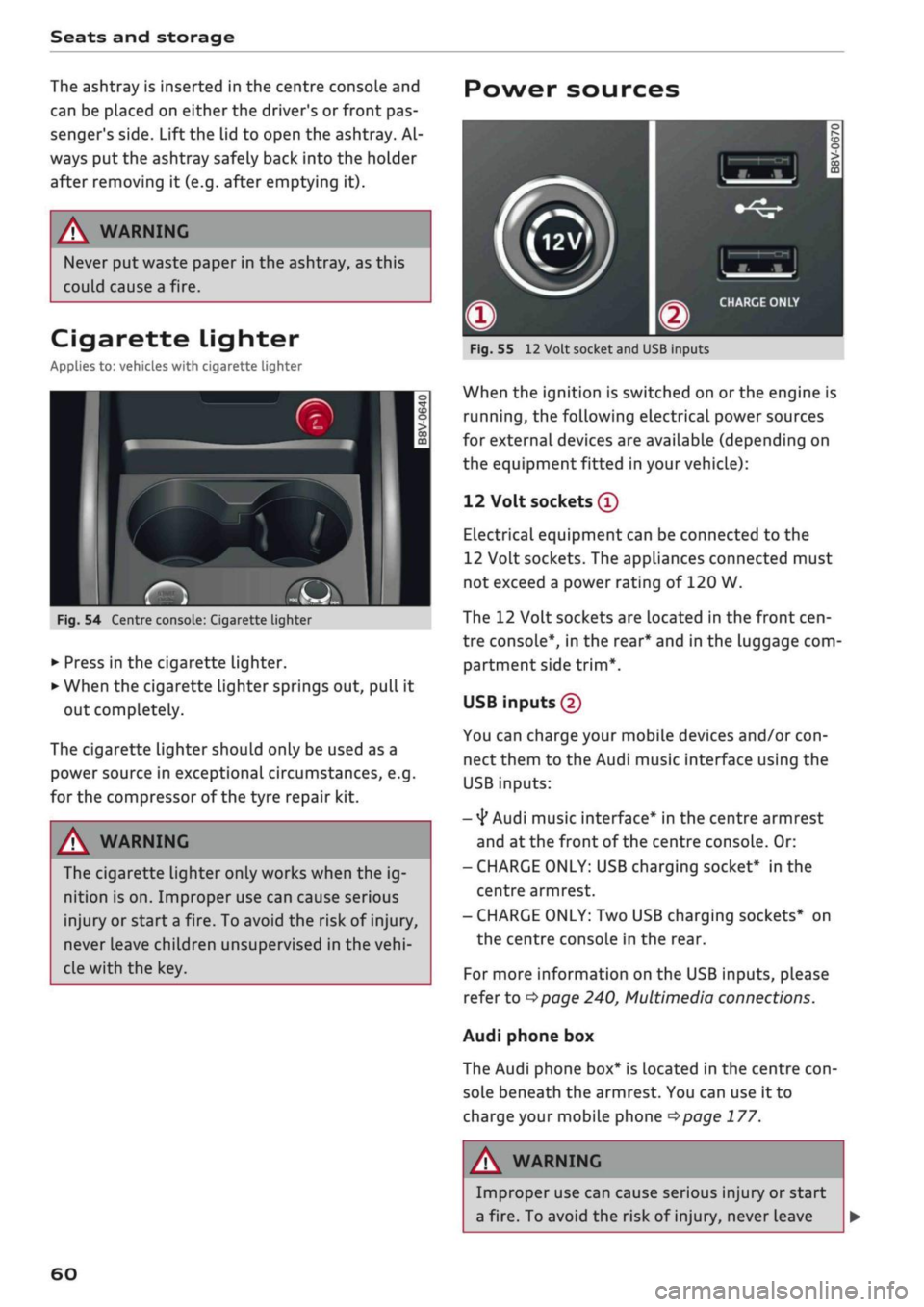
Fig.
55
12
Volt socket and USB inputs
When the ignition is switched on
or
the engine is
running,
the following electrical power sources
for external devices are available (depending on
the equipment fitted in your vehicle):
12 Volt sockets
®
Electrical equipment can be connected to the
12 Volt sockets. The appliances connected must
not exceed a power rating of 120 W.
The 12 Volt sockets are located in the front
cen
tre console*, in the rear* and in the luggage com
partment side
trim*.
USB inputs (2)
You can charge your mobile devices and/or
con
nect them to the Audi music interface using the
USB inputs:
-
4*
Audi music interface* in the centre armrest
and at the front of the centre console. Or:
- CHARGE ONLY: USB charging socket* in the
centre armrest.
- CHARGE ONLY: Two USB charging sockets* on
the centre console in the rear.
For more information on the USB inputs, please
refer to
^>page
240, Multimedia connections.
Audi phone box
The Audi phone box* is located in the centre
con
sole beneath the armrest. You can use it to
charge your mobile phone
<$page
177.
A
i
WARNING
Improper use can cause serious injury or start
a fire. To avoid the risk of injury, never Leave
Page 70 of 364
Heating and cooling
cS5
Air recirculation mode
In air recirculation mode, the air from the interi
or of the vehicle is filtered and recirculated. This
setting prevents fumes etc. from entering the in
terior. We recommend switching on the air recir
culation mode when driving through a tunnel or
in traffic queues
•=>
A-
The air recirculation mode is switched off when
the control is in the defrost position
Qjp
Rear window heating
If the rear window heating is activated with the
ignition switched on, the battery management
determines whether or not the vehicle battery
charge level is sufficient for the rear window
heating to be switched on. Otherwise the rear
window heating operates when the engine is
run
ning,
and switches off automatically after about
10 - 20 minutes, depending on the outside
tem
perature.
To switch on the rear window heating perma
nently, press and hold the
CÛJD
button for at least
2 seconds. This setting will be stored for approxi
mately 15 minutes after the ignition is switched
off.
J
Seat heating*
When you press the
«0
button, the seat heating is
switched on at level 3 (the highest level). The
LEDs indicate the temperature level. To reduce
the temperature, press the button again. To
switch off the seat heating, press the button re
peatedly until all the LEDs have gone out.
The seat heating automatically switches from
level 3 to level 2 after about 10 minutes.
(7) CAUTION
To avoid damaging the heating elements of
the seat heating, please do not kneel on the
seat or apply sharp pressure at
a
single
point
© Note
- The setting for the driver's seat heating is
assigned to the key in use.
- If the front passenger's seat heating was on
when you Last switched off the ignition, it
will be switched on automatically only if the
ignition is switched on again within 10 mi
nutes.
/K
WARNING
- For reasons of safety you should not Leave
the air recirculation switched on for too
long.
This mode prevents fresh air from en
tering the vehicle, so the windows can mist
over if the air cooling* is switched off. Bad
visibility can cause an accident.
- People with limited capacity to feel pain or
sense temperature could burn themselves
when using the seat heating. These people
must not use the seat heating - risk of in
jury!
68
Page 72 of 364
Heating and cooling
%
Blower
You can adjust the blower speed manually using
the control
%.
You should leave the blower on at
a low setting to prevent the windows from mist
ing up and to ensure that the vehicle interior is
constantly ventilated. Press the AUTO button for
automatic control of the blower speed.
%£/
%8/
'J Air distribution and air outlets
The buttons can be used to adjust the air distri
bution.
Press the AUTO button for automatic air
distribution.
The round air outlets in the dashboard can be ad
justed
^>page
71.
To prevent the front side windows from misting
up in wet weather, it's a good idea to open the
side air outlets and point them to the side.
Foot-Level
air outlets are provided underneath
the front seats to heat the rear cabin.
1
Defroster
The windscreen and side windows are defrosted
or demisted as quickly as possible. The air output
is increased to maximum and most of the air
comes out of the outlets below the windscreen.
The air recirculation mode is deactivated. The
temperature should be set to 22 °C or higher.
The temperature is regulated automatically. At
setting
$&
the A/C cooling mode is automatically
activated depending on the ambient tempera
ture.
The defroster is switched off when the AUTO but
ton is pressed.
<^>
Air recirculation mode
The air recirculation mode can be switched on
manually or automatically*.
- To switch the manual air recirculation mode
on/off, press the
button.
-The automatic* air recirculation function must
be activated on the infotainment system. Se
lect the following on the infotainment system:
|MENU|
button > Car > left control button > A/C
> Auto recirculation. The air quality sensor,
which is designed for the detection of diesel
and petrol exhaust fumes, automatically
switches the air recirculation mode on or off
depending on the
level
of pollution in the out
side air.
In air recirculation mode, the air from the interi
or of the vehicle is filtered and recirculated. This
setting prevents fumes etc. from entering the in
terior. We recommend switching on the air recir
culation mode when driving through a tunnel or
in traffic queues
•=>
A-
The air recirculation mode is switched off when
the
<^>
or AUTO or
M.
button is pressed.
If the engine is
cold,
the air conditioner will auto
matically switch to air recirculation mode when
the vehicle is reversing.
$tr
Rear window heating
If the rear window heating is activated with the
ignition switched on, the battery management
determines whether or not the battery charge
level is sufficient for the rear window heating to
be switched on. Otherwise the rear window heat
ing operates when the engine is running, and
switches off automatically after about
10 - 20 minutes, depending on the outside
tem
perature.
To switch on the rear window heating perma
nently, press and hold the
S
button for at least
2 seconds. This setting will be stored for approxi
mately 15 minutes after the ignition is switched
off.
^
Seat heating*
When you press the
«r
button, the seat heating is
switched on at level 3 (the highest level). The
LEDs indicate the temperature level. To reduce
the temperature, press the button again. To
switch off the seat heating, press the button re
peatedly until all the LEDs have gone out.
The seat heating automatically switches from
level 3 to level 2 after about 10 minutes.
A WARNING
For reasons of safety you should not leave
the air recirculation switched on for too
long.
This mode prevents fresh air from en
tering the vehicle, so the windows can mist
70
Page 73 of 364

Heating and cooling
over if the air cooling is switched off. Bad
visibility can cause an accident.
- People with limited capacity to feel pain or
sense temperature could burn themselves
when using the seat heating. These people
must not use the seat heating - risk of in
jury!
© CAUTION
To avoid damaging the heating elements of
the seat heating, please do not kneel on the
seat or apply sharp pressure at a single point.
© Note
- The setting for the driver's seat heating is
assigned to the key in use.
- If the front passenger's seat heating was on
when you last switched off the ignition, it
will be switched on automatically only if the
ignition is switched on again within 10 mi
nutes.
Adjusting air outlets
Fig.
67 Dashboard: Adjusting air outlet
CO
<
O
rN
IV
rN
•-i
00
The following settings are possible
OFig.
67:
- ® Air flow intensity
-@
Air
flow direction
To adjust the air flow intensity, turn the ribbed
outer adjustment ring®
oFig.
67. To shut off
the air flow, turn the adjustment ring all the way
to the right.
To adjust the air flow direction, move the inside
grille @ in the air outlet.
71
Page 76 of 364

Driving
Steering
Adjusting the steering wheel position
The height and reach of the steering wheel can
be adjusted as required to suit the
driver.
Fig.
68 Steering column: Lever for steering column adjust
ment
•
Push the Lever
^>Fig.
68 down
<=> /\.
•
Move the steering wheel to the desired
posi
tion.
•
Then push the lever towards the steering
col
umn until the catch engages.
WARNING
- Never adjust the position of the steering
wheel when the vehicle is moving - this
could cause an accident.
- Press the lever upwards so it is secure and
so that the position of the steering wheel
cannot shift unexpectedly while the vehicle
is moving - risk of accident!
Starting and stopping
the engine (vehicles with
ignition Lock)
Starting the engine
Applies to: vehicles with ignition lock
Insert the key in the ignition lock to switch on
the ignition and start the engine.
Fig.
69 Ignition lock: Ignition key positions
Switching the ignition on/off
•
To switch on the ignition, turn the ignition key
to position ®. Vehicles without start/stop sys
tem*:
The rev counter needle will move to the
READY position.
• To switch off the ignition, turn the ignition key
to position ©. The rev counter needle will
move to the OFF position.
Diesel engines are automatically preheated when
you switch on the ignition.
Starting the engine
•
Manual gearbox: Press the clutch pedal all the
way down and move the gear lever into neutral.
•
Automatic gearbox: Press the brake pedal and
move the selector lever to position P or N.
•
Turn the ignition key briefly to position @. The
ignition key automatically returns to position
®. Do not press the accelerator.
Applies to: vehicles with diesel engine
•
The engine may take a few seconds Longer than
usual to start on cold days. Please keep your
foot on the clutch pedal (manual gearbox) or
brake pedal (automatic gearbox) until the en
gine starts. The indicator Lamp
E g
lights up
while the glow plugs are preheating.
74