ad blue CITROEN C-ELYSÉE 2016 User Guide
[x] Cancel search | Manufacturer: CITROEN, Model Year: 2016, Model line: C-ELYSÉE, Model: CITROEN C-ELYSÉE 2016Pages: 260, PDF Size: 7.11 MB
Page 31 of 260
29
C-elysee_en_Chap01_controle-de-marche_ed01-2016
C-elysee_en_Chap01_controle-de-marche_ed01-2016
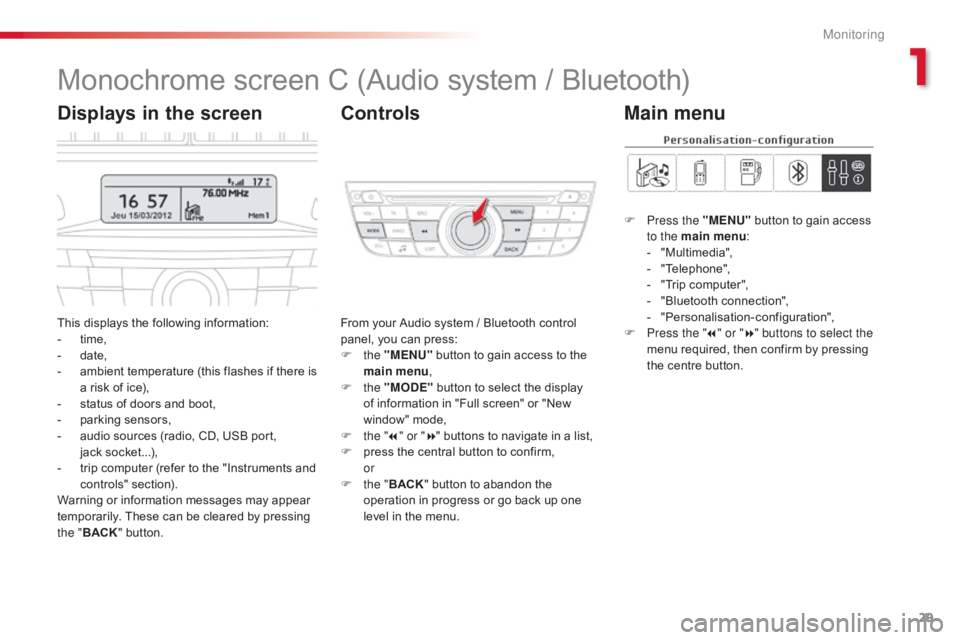
Monochrome screen C (Audio system / Bluetooth)
This displays the following information:
- t ime,
-
d
ate,
-
a
mbient temperature (this flashes if there is
a
risk of ice),
-
s
tatus of doors and boot,
-
p
arking sensors,
-
a
udio sources (radio, CD, USB port,
j
ack socket...),
-
t
rip computer (refer to the "Instruments and
c
ontrols"
s
ection).
Warning
or information messages may appear
t
emporarily. These can be cleared by pressing
t
he " BACK "
button. From
your Audio system / Bluetooth control p
anel, you can press:
F
the "MENU"
button to gain access to the
m
ain menu,
F
the "MODE"
button to select the display
o
f information in "Full screen" or "New
w
indow" mode,
F
t
he "7" or " 8"
buttons to navigate in a list,
F
p
ress the central button to confirm,
or
F
t
he "BACK "
button to abandon the
o
peration in progress or go back up one
l
evel in the menu.
Displays in the screenControls
F Press the "MENU" button to gain access t
o the main menu :
-
"
Multimedia",
-
"
Telephone",
-
"
Trip computer",
-
"
Bluetooth connection",
-
"
Personalisation-configuration",
F
P
ress the " 7" or " 8" buttons to select the
menu
required, then confirm by pressing
t
he centre button.
Main menu
1
Monitoring
Page 32 of 260
30
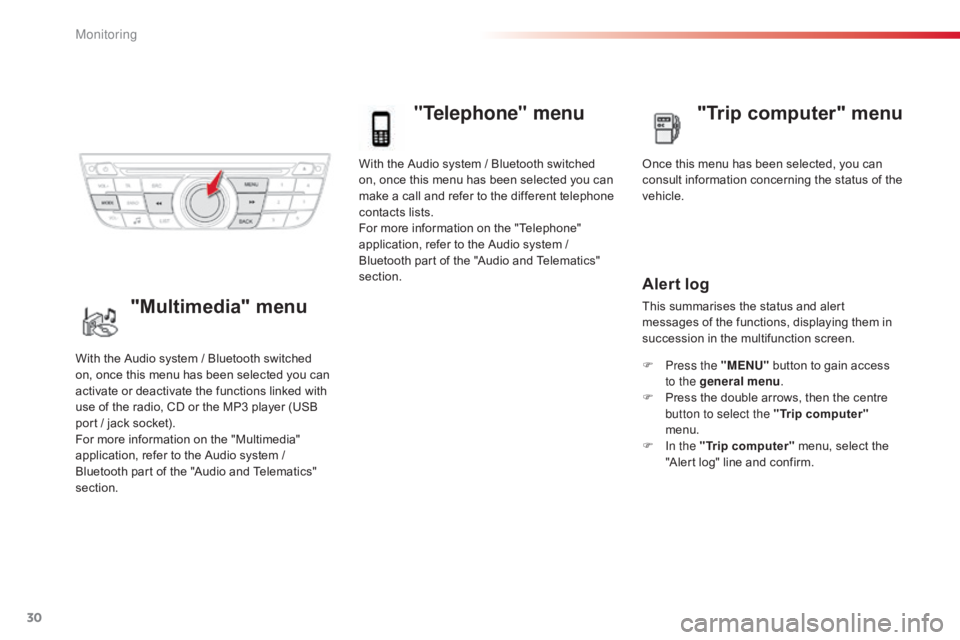
With the Audio system / Bluetooth switched on, once this menu has been selected you can
m
ake a call and refer to the different telephone
c
ontacts lists.
For
more information on the "Telephone"
a
pplication, refer to the Audio system /
B
luetooth part of the "Audio and Telematics"
s
ection.
"Telephone" menu
Once this menu has been selected, you can c onsult information concerning the status of the
v
ehicle.
Alert log
This summarises the status and alert m essages of the functions, displaying them in
s
uccession in the multifunction screen.
F
P
ress the "MENU"
button to gain access
t
o the general menu .
F
P
ress the double arrows, then the centre
b
utton to select the " Trip computer"
menu.
F
I
n the " Trip computer "
menu, select the
"
Alert log" line and confirm.
With
the
Audio
system
/
Bluetooth
switched
o
n,
once
this
menu
has
been
selected
you
can
a
ctivate
or
deactivate
the
functions
linked
with
u
se
of
the
radio,
CD
or
the
MP3
player
(USB
p
ort
/
jack
socket).
For
more
information
on
the
"Multimedia"
a
pplication,
refer
to
the
Audio
system
/
B
luetooth
part
of
the
"Audio
and
Telematics"
s
ection."Multimedia" menu "Trip computer" menu
Monitoring
Page 33 of 260
31
C-elysee_en_Chap01_controle-de-marche_ed01-2016
C-elysee_en_Chap01_controle-de-marche_ed01-2016
"Bluetooth
connection" menu
With the Audio system / Bluetooth switched on, once this menu has been selected you
c
an connect or disconnect a Bluetooth device
(
telephone, media player) and define the
c
onnection mode (hands-free kit, playing
a
udio files).
For
more information on the "Bluetooth
c
onnection" application, refer to the Audio
s
ystem / Bluetooth part of the "Audio and
T
elematics"
se
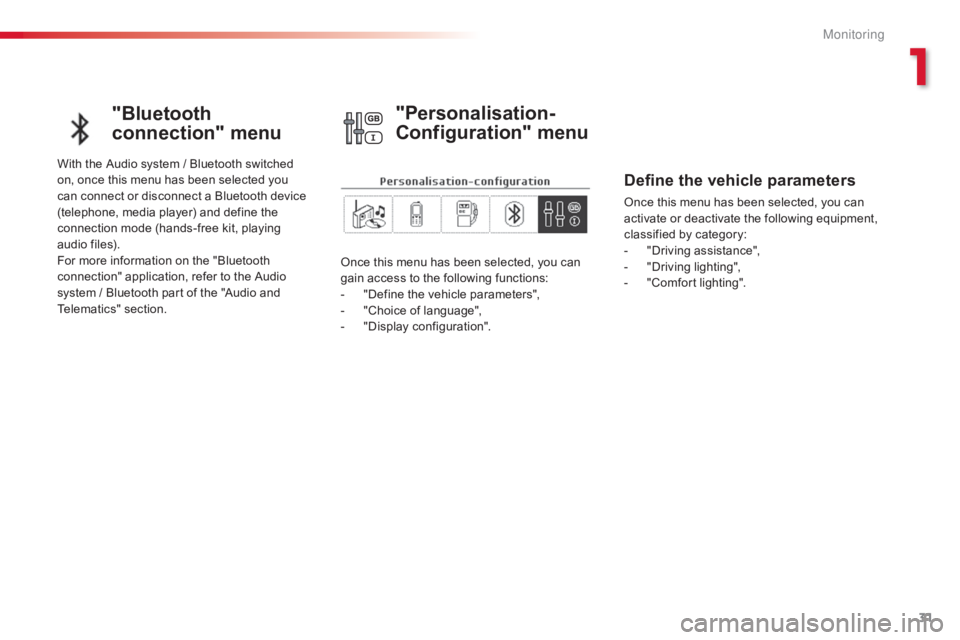
ction. Once
this menu has been selected, you can
g
ain access to the following functions:
-
"
Define the vehicle parameters",
-
"
Choice of language",
-
"
Display configuration".
"Personalisation-
Configuration" menu
Define the vehicle parameters
Once this menu has been selected, you can activate or deactivate the following equipment,
c
lassified by category:
-
"
Driving assistance",
-
"
Driving lighting",
-
"
Comfort lighting".
1
M
Page 55 of 260
53
C-elysee_en_Chap03_confort_ed01-2016
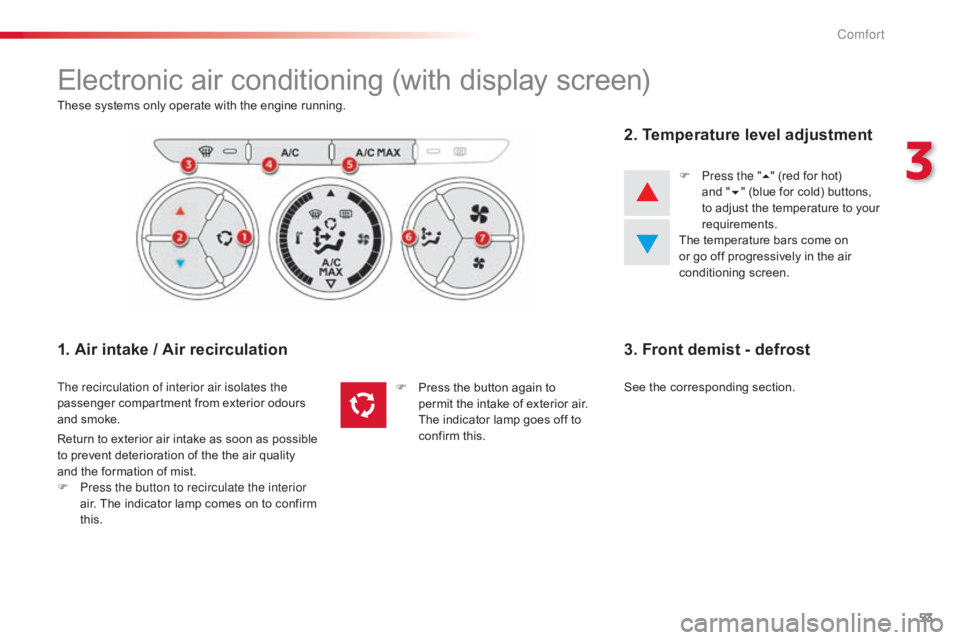
Electronic air conditioning (with display screen)
These systems only operate with the engine running.
1. Air intake / Air recirculation
The recirculation of interior air isolates the
passenger compartment from exterior odours
a
nd smoke.
2. Temperature level adjustment
F Press the " 5" (red for hot) a
nd "6"
(blue for cold) buttons,
t
o adjust the temperature to your
r
equirements.
The
temperature bars come on
o
r go off progressively in the air
c
onditioning
s
creen.
Return
to
exterior
air
intake
as
soon
as
possible
t
o
prevent
deterioration
of
the
the
air
quality
a
nd
the
formation
of
mist.
F
P
ress the button to recirculate the interior
air.
The
indicator
lamp
comes
on
to
confirm
t
his. F
P
ress
the
button
again
to
p
ermit
the
intake
of
exterior
air.
T
he indicator
lamp
goes
off
to
c
onfirm
this.
3. Front demist - defrost
See the corresponding section.
3
Comfort
Page 134 of 260

132
C-elysee_en_Chap09_info-pratiques_ed01-2016
On vehicle fitted with HDi engines, the fuel system must be primed if you run out of fuel;
r
efer to the engine compartment view on the
"
Diesel engine" section.
If
the tank on your vehicle is fitted with
a
misfuel prevention device, refer to the
c
orresponding
s
ection.
Running out of fuel (Diesel)
If the engine does not start first time, don't keep trying. Start the procedure
a
gain from the beginning.
HDi 92 engine
F Fill the fuel tank with at least five litres of d
iesel.
F
O
pen the bonnet.
F
S
queeze and release the priming pump
r
epeatedly until resistance is felt (there
m
ay be resistance at the first press).
F
O
perate the starter until the engine starts
(
if the engine does not start at the first
a
ttempt, wait around 15 seconds before
t
rying
ag
ain).
F
I
f the engine does not start after a few
a
ttempts, operate the priming pump again
t
hen start the engine.
F
C
lose the bonnet.
BlueHDi engine
F Fill the fuel tank with at least five litres of D
iesel.
F
S
witch on the ignition (without starting the
e
ngine).
F
W
ait around 6 seconds and switch off the
ig
nition.
F
R
epeat the operation 10 times.
F
O
perate the starter to run the engine.
Pr
Page 135 of 260

133
C-elysee_en_Chap09_info-pratiques_ed01-2016
AdBlue® additive and SCR system
f
or
BlueHDi Diesel engines
To assure respect for the environment and c
onformity with the new Euro 6 emissions
s
tandard, without adversely affecting the
p
er formance or fuel consumption of Diesel
e
ngines, CITROËN has taken the decision to
e
quip its vehicles with an effective system that
a
ssociates SCR (Selective Catalytic Reduction)
w
ith a particle filter (FAP) for the treatment of
e
xhaust gases.
Presentation of the SCR system
Using an additive called AdBlue® containing u
rea,
a
catalytic
converter
turns
up to 85%
o
f
nitrous
oxides
(NOx)
into
nitrogen and
w
ater,
which
are
harmless
to
health and the
e
nvironment. The
AdBlue
® additive is held in a special t
ank
located
under the boot at the rear of
t
he
vehicle.
It has a capacity of 17 litres: this
p
rovides
a
driving range of about 12 500 miles
(
20
000
km),
after which an alert is triggered
w
arning
you
when the reserve remaining is
e
nough
for
just 1 500 miles (2 400 km).
During
each
scheduled service of your vehicle
b
y
a
CITROËN dealer or a qualified workshop,
t
he
AdBlue
® additive tank is refilled in order to a
llow
normal operation of the SCR system.
If
the
estimated mileage between two services
i
s
greater
than 12 500 miles (20 000 km), we
r
ecommend
that you go to a CITROËN dealer
o
r
a
qualified workshop to have the necessary
t
op-up
carried out. Once
the AdBlue
® tank is empty, a s
ystem
required
by regulations prevents
s
tarting
of
the
engine.
If the SCR
is faulty, the level of
emissions
from
your vehicle will no
l
onger
meet
the
Euro 6 standard: your
v
ehicle
becomes
polluting.
In
the
event
of
a
confirmed fault
w
ith
the
SCR
system, you must go
t
o
a
CITROËN
dealer or a qualified
w
orkshop
as
soon as possible: after
a
running
distance of 650 miles
(
1 100
km),
a
system will be triggered
a
utomatically
to
prevent engine starting.
9
Practical information
Page 136 of 260

134
C-elysee_en_Chap09_info-pratiques_ed01-2016
Range indicators
Once the AdBlue® tank is on reserve or after d
etection
of
a
fault with the SCR emissions
c
ontrol
system,
when the ignition is switched
o
n,
an
indicator
displays an estimate of the
d
istance
that
can
be covered, the range, before
e
ngine
starting
is
prevented.
In
the
event
of
simultaneous system fault and
l
ow
AdBlue
® level, the shortest range figure is t
he
one
displayed.
In the event of the risk of non-starting related to a lack of AdBlue®
Range greater than 1 500 miles (2 400 km)
When the ignition is switched on, no
i
nformation on range is displayed automatically
i
n the instrument panel.
Remaining range between 350 and 1500 miles (600 and 2 400 km)
When switching on the ignition, the UREA warning lamp comes on, accompanied by an
a
udible signal and the temporary display in
t
he instrument panel of "NO START IN" and
a
distance, indicating the remaining range
e
xpressed in miles or kilometres before
e
ngine starting is prevented - (For example
"
NO START IN 900 miles" means that "Starting
w
ill be prevented in 900 miles).
When
driving, this display appears every
1
50 miles (300 km) until the additive tank has
be
en
t
opped-up.
Go
to a dealer CITROËN or a qualified
w
orkshop to have the AdBlue
® tank topped-up.
Y
ou
can
also
top-up
the
tank
yourself.
For
more
information
on
topping-up the
Ad
Blue
® additive, refer to the corresponding s
ection.
The
engine
start
prevention
system
r
equired
by
regulations
is
activated
a
utomatically
once
the
AdBlue
® tank is e
m pt y.
Practical information
Page 137 of 260

135
C-elysee_en_Chap09_info-pratiques_ed01-2016
Breakdown related to a lack of AdBlue® additive
When switching on the ignition, the SERVICE w
arning lamp comes on and the UREA
w
arning lamp flashes, accompanied by an
a
udible signal and the temporary display in
t
he instrument panel of "NO START IN" and
0 k
m or miles - ("NO START IN 0 miles" means
"
Starting
p
revented").
The
Ad
Blue
® tank is empty: t he s ystem r equired b
y
regulations prevents engine starting.
Remaining range between 0 and 350 miles (0 and 600 km)
When switching on the ignition, the SERVICE warning lamp comes on and the UREA
w
arning lamp flashes, accompanied by an
a
udible signal and the temporary display in
t
he instrument panel of "NO START IN" and
a
distance indicating the remaining range
e
xpressed in miles or kilometres before
e
ngine starting is prevented - (For example
"
NO START IN 180 miles" means "Starting will
b
e prevented in 180 miles).
When
driving, this display appears every
3
0 seconds until the additive tank has been
t
opped-up.
Go
to a CITROËN dealer or a qualified
w
orkshop to have the AdBlue
® tank topped-up.
Y
ou
can
also
top-up
the
tank
yourself.
Other wise you will not be able to restart your
engine.
For
more
information
on
topping-up the
Ad
Blue
® additive, refer to the corresponding s
ection. To
be able to start the engine,
w
e recommend that you call on
a
CITROËN dealer or a qualified
w
orkshop for the top-up required. If
y
ou carry out the top-up yourself, it is
e
ssential to add at least 3.8 litres of
Ad
Blue
® to the additive tank.
F
or
more information on topping-up
t
he
AdBlue
® additive, refer to the c
orresponding s ection.
9
Practical information
Page 139 of 260

137
C-elysee_en_Chap09_info-pratiques_ed01-2016
Freezing of the AdBlue® additive
The
AdBlue
® additive freezes at t
emperatures below around -11°C.
The
SCR
system includes a heater
f
or
the
AdBlue
® tank, allowing you to c
ontinue
driving in very cold conditions.
Topping-up the AdBlue® additive
Precautions in use
Use only AdBlue® additive that meets the
I
SO
22241
standard.
The
supply
in
a
non-drip bottle simplifies
t
opping-up.
You
can obtain 1.89 litre (half a US
g
allon)
bottles
from a CITROËN dealer or a
q
ualified
w
orkshop.
Keep
AdBlue
® out of the reach of
children,
in
its
original bottle.
Never
transfer AdBlue
® to another
container:
it
would
lose
its purity. Never
dilute the additive with water.
Never pour the additive into the Diesel
f
uel tank.
Never top-up from an AdBlue®
dispenser
reserved
for
heavy
goods
v
ehicles.
Filling
the
AdBlue
® tank is an operation i
ncluded
in
every
routine service on your
v
ehicle
by
a
CITROËN dealer or a qualified
w
orkshop.
Nevertheless,
given the capacity of the tank,
i
t
may
be
necessary to top-up the additive
b
etween
services,
more particularly if an alert
(
warning
lamps
and a message) signals the
r
equirement.
You
can
got
to
a
CITROËN dealer or a qualified
w
orkshop.
If
you
envisage
topping-up yourself, please
r
ead
the
following
warnings carefully. The
AdBlue
® additive is an urea-based s
olution.
This liquid is non-flammable,
c
olourless
and odourless (kept in a cool area).
In
the
event
of contact with the skin, wash
t
he
affected
area with soap and water. In the
e
vent
of
contact with the eyes, wash (irrigate)
t
he
eyes
with large amounts of water or with
a
n
eye
wash
solution for at least 15 minutes.
I
f
a
burning
sensation or irritation persists, get
m
edical
attention.
If
swallowed, immediately wash out the mouth
w
ith
clean
water and then drink plenty of water.
In
certain
conditions (high ambient
t
emperature,
for example), the risk of release
o
f
ammonia
cannot be excluded: do not inhale
t
he
product.
Ammonia vapour has an irritant
e
ffect
on
mucous membranes (eyes, nose and
t
hroat).
9
Practical information
Page 140 of 260

138
C-elysee_en_Chap09_info-pratiques_ed01-2016
Recommendations on storageProcedure
F Switch off the ignition and remove the key.
F F or access to the AdBlue® tank, open the b
oot,
remove
the
boot
floor and then lift out
t
he
storage
box
containing the tools.
F
U
nclip
the
plastic
blanking
plug.
F
I
nsert
your
fingers
into
the aperture and
t
urn
the
blue
cap
a
6
th of a turn anti-
c
lockwise.
F
C
arefully
lift
off
the
cap, without dropping it.
Never
store
bottles
of
AdBlue
® in your
vehicle. Before
topping-up, ensure that the vehicle is
p
arked on a flat and level sur face.
In wintry conditions, ensure that the
t
emperature of the vehicle is above -11°C.
O
therwise
t
he
A
dBlue
® may be frozen and s
o
cannot
be
poured
into its tank. Park your
v
ehicle
in
a
warmer
area for a few hours to
a
llow
the
top-up
to
be
carried out.
AdBlue
® freezes at about -11°C and d
eteriorates above 25°C. It is recommended
t
hat
bottles be stored in a cool area and
p
rotected from direct sunlight.
Under
these conditions, the additive can be
k
ept
for
at least a year.
If
the
additive has frozen, it can be used once it
h
as
completely thawed out.
Practical information