ECU DODGE RAM SRT-10 2006 Service Repair Manual
[x] Cancel search | Manufacturer: DODGE, Model Year: 2006, Model line: RAM SRT-10, Model: DODGE RAM SRT-10 2006Pages: 5267, PDF Size: 68.7 MB
Page 5082 of 5267
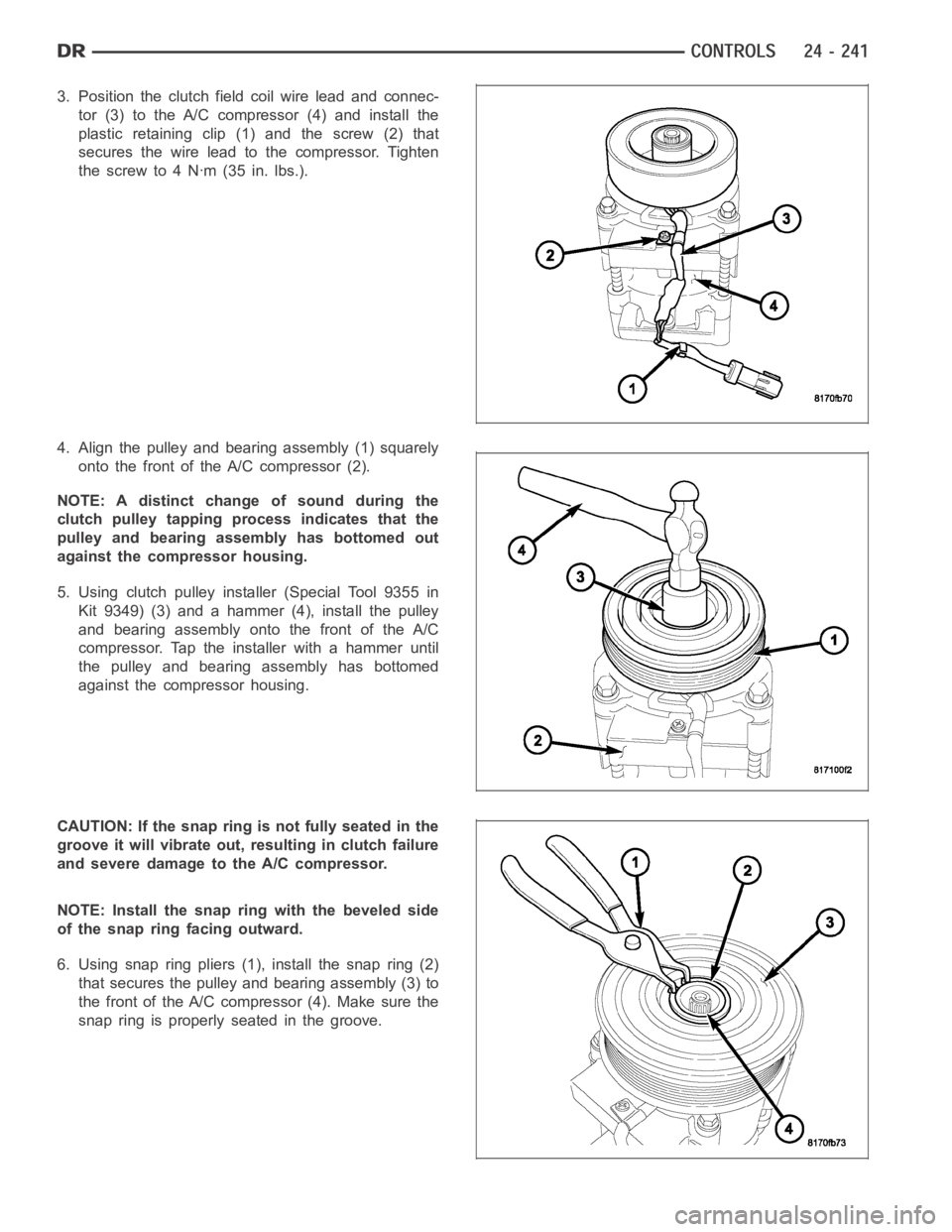
3. Position the clutch fieldcoil wire lead and connec-
tor (3) to the A/C compressor (4) and install the
plastic retaining clip (1) and the screw (2) that
secures the wire lead to the compressor. Tighten
thescrewto4Nꞏm(35in.lbs.).
4. Align the pulley and bearing assembly (1) squarely
onto the front of the A/C compressor (2).
NOTE: A distinct change of sound during the
clutch pulley tapping process indicates that the
pulley and bearing assembly has bottomed out
against the compressor housing.
5. Using clutch pulley installer (Special Tool 9355 in
Kit 9349) (3) and a hammer (4), install the pulley
and bearing assembly onto the front of the A/C
compressor. Tap the installer with a hammer until
the pulley and bearing assembly has bottomed
against the compressor housing.
CAUTION: If the snap ring is not fully seated in the
groove it will vibrate out, resulting in clutch failure
and severe damage to the A/C compressor.
NOTE: Install the snap ring with the beveled side
ofthesnapringfacingoutward.
6. Using snap ring pliers (1), install the snap ring (2)
that secures the pulley and bearing assembly (3) to
the front of the A/C compressor (4). Make sure the
snap ring is properly seated in the groove.
Page 5083 of 5267
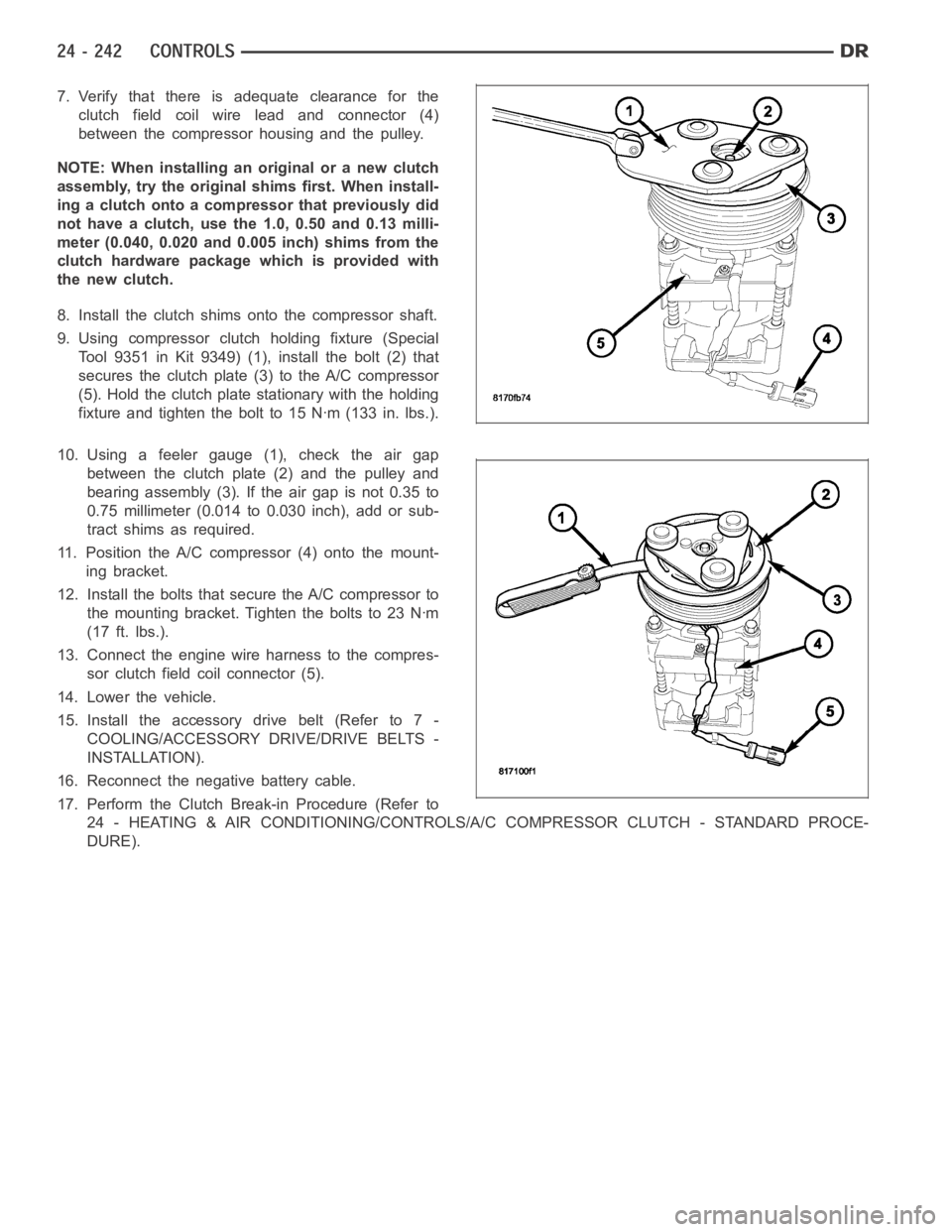
7. Verify that there is adequate clearance for the
clutch field coil wire lead and connector (4)
between the compressor housing and the pulley.
NOTE: When installing an original or a new clutch
assembly, try the original shims first. When install-
ing a clutch onto a compressor that previously did
not have a clutch, use the 1.0, 0.50 and 0.13 milli-
meter (0.040, 0.020 and 0.005 inch) shims from the
clutch hardware package which is provided with
the new clutch.
8. Install the clutch shims onto the compressor shaft.
9. Using compressor clutch holding fixture (Special
Tool 9351 in Kit 9349) (1), install the bolt (2) that
secures the clutch plate (3) to the A/C compressor
(5). Hold the clutch plate stationary with the holding
fixture and tighten the bolt to 15 Nꞏm (133 in. lbs.).
10. Using a feeler gauge (1), check the air gap
between the clutch plate (2) and the pulley and
bearing assembly (3). If the air gap is not 0.35 to
0.75 millimeter (0.014 to 0.030 inch), add or sub-
tract shims as required.
11. Position the A/C compressor (4) onto the mount-
ing bracket.
12. Install the bolts that secure the A/C compressor to
themountingbracket.Tightentheboltsto23Nꞏm
(17 ft. lbs.).
13. Connect the engine wire harness to the compres-
sor clutch field coil connector (5).
14. Lower the vehicle.
15. Install the accessory drive belt (Refer to 7 -
COOLING/ACCESSORY DRIVE/DRIVE BELTS -
INSTALLATION).
16. Reconnect the negative battery cable.
17. Perform the Clutch Break-in Procedure (Refer to
24 - HEATING & AIR CONDITIONING/CONTROLS/A/C COMPRESSOR CLUTCH - STANDARD PROCE-
DURE).
Page 5085 of 5267
The A/C-heater control is diagnosed using a scan tool (Refer to 24 - HEATING& AIR CONDITIONING - DIAGNO-
SIS AND TESTING and to 24 - HVAC Electrical Diagnostics for more information).
The A/C-heater control cannot be repaired and, if faulty or damaged, it must be replaced. The illumination lamps for
the A/C-heater control are available for service replacement.
REMOVAL
WARNING: On vehicles equipped with airbags, disable the airbag system before attempting any steering
wheel, steering column, or instrument panel component diagnosis or service. Disconnect and isolate the
battery negative (ground) cable, then wait two minutes for the airbag system capacitor to discharge before
performing further diagnosis or service. This is the only sure way to disable the airbag system. Failure to
take the proper precautions could result in an accidental airbag deployment and possible personal injury or
death.
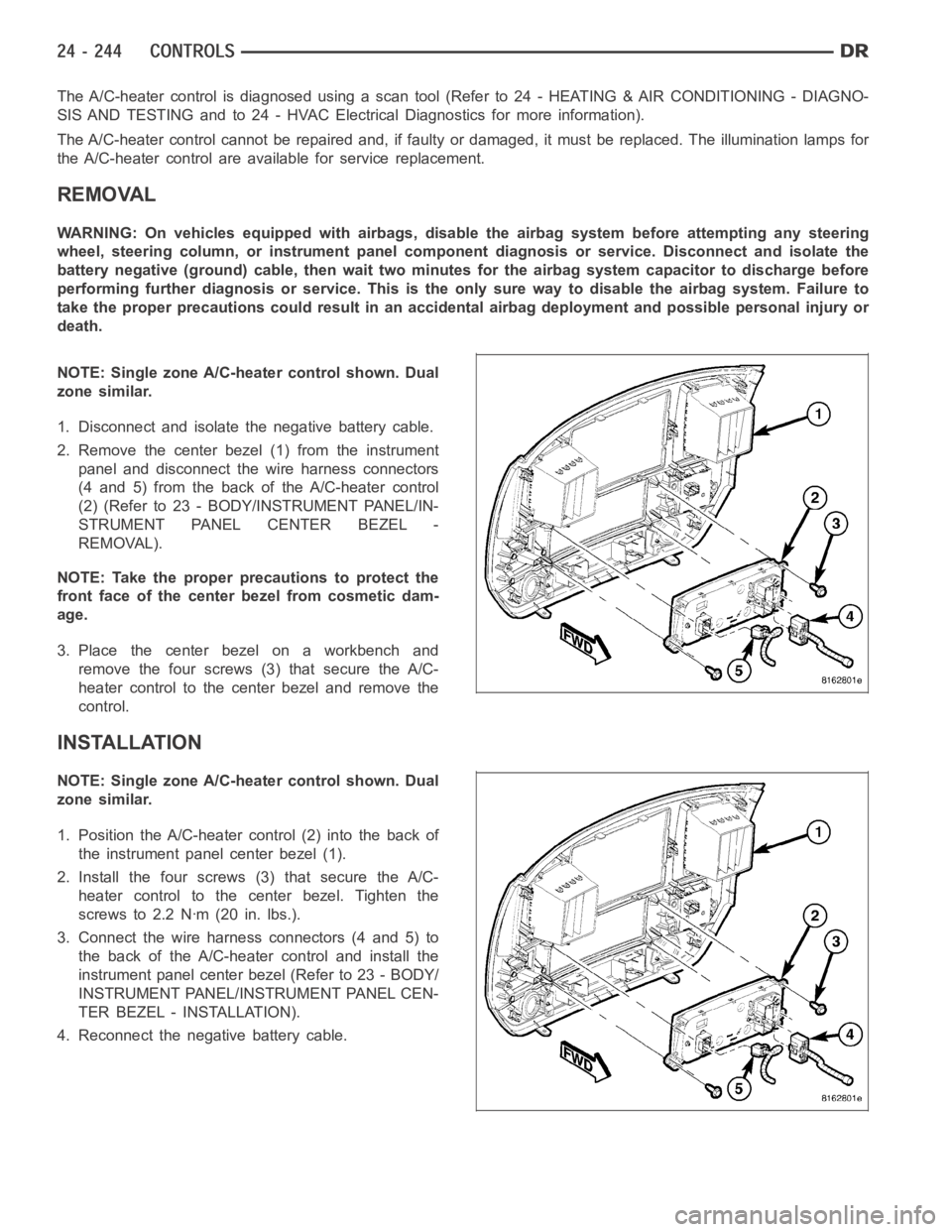
NOTE: Single zone A/C-heater control shown. Dual
zone similar.
1. Disconnect and isolate the negative battery cable.
2. Remove the center bezel (1) from the instrument
panel and disconnect the wire harness connectors
(4 and 5) from the back of the A/C-heater control
(2) (Refer to 23 - BODY/INSTRUMENT PANEL/IN-
STRUMENT PANEL CENTER BEZEL -
REMOVAL).
NOTE: Take the proper precautions to protect the
front face of the center bezel from cosmetic dam-
age.
3. Place the center bezel on a workbench and
remove the four screws (3) that secure the A/C-
heater control to the center bezel and remove the
control.
INSTALLATION
NOTE: Single zone A/C-heater control shown. Dual
zone similar.
1. Position the A/C-heater control (2) into the back of
the instrument panel center bezel (1).
2. Install the four screws (3) that secure the A/C-
heater control to the center bezel. Tighten the
screws to 2.2 Nꞏm (20 in. lbs.).
3. Connect the wire harness connectors (4 and 5) to
the back of the A/C-heater control and install the
instrument panel center bezel (Refer to 23 - BODY/
INSTRUMENT PANEL/INSTRUMENT PANEL CEN-
TER BEZEL - INSTALLATION).
4. Reconnect the negative battery cable.
Page 5087 of 5267
3. Using an ohmmeter, check for continuity between all of the blower motor resistor terminals. In each case there
should be continuity. If OK, repair the wire harness circuits between the blower motor speed control and the
blower motor resistor or blower motor as required. If not OK, replace the faulty blower motor resistor.
REMOVAL
WARNING: On vehicles equipped with airbags, disable the airbag system before attempting any steering
wheel, steering column, or instrument panel component diagnosis or service. Disconnect and isolate the
battery negative (ground) cable, then wait two minutes for the airbag system capacitor to discharge before
performing further diagnosis or service. This is the only sure way to disable the airbag system. Failure to
take the proper precautions could result in an accidental airbag deployment and possible personal injury or
death.
WARNING: The blower motor resistor may get very hot during normal operation. If the blower motor was
turned on prior to servicing the blower motor resistor, wait five minutes to allow the blower motor resistors
to cool before performing diagnosis or service. Failure to take this precaution can result in possible per-
sonal injury.
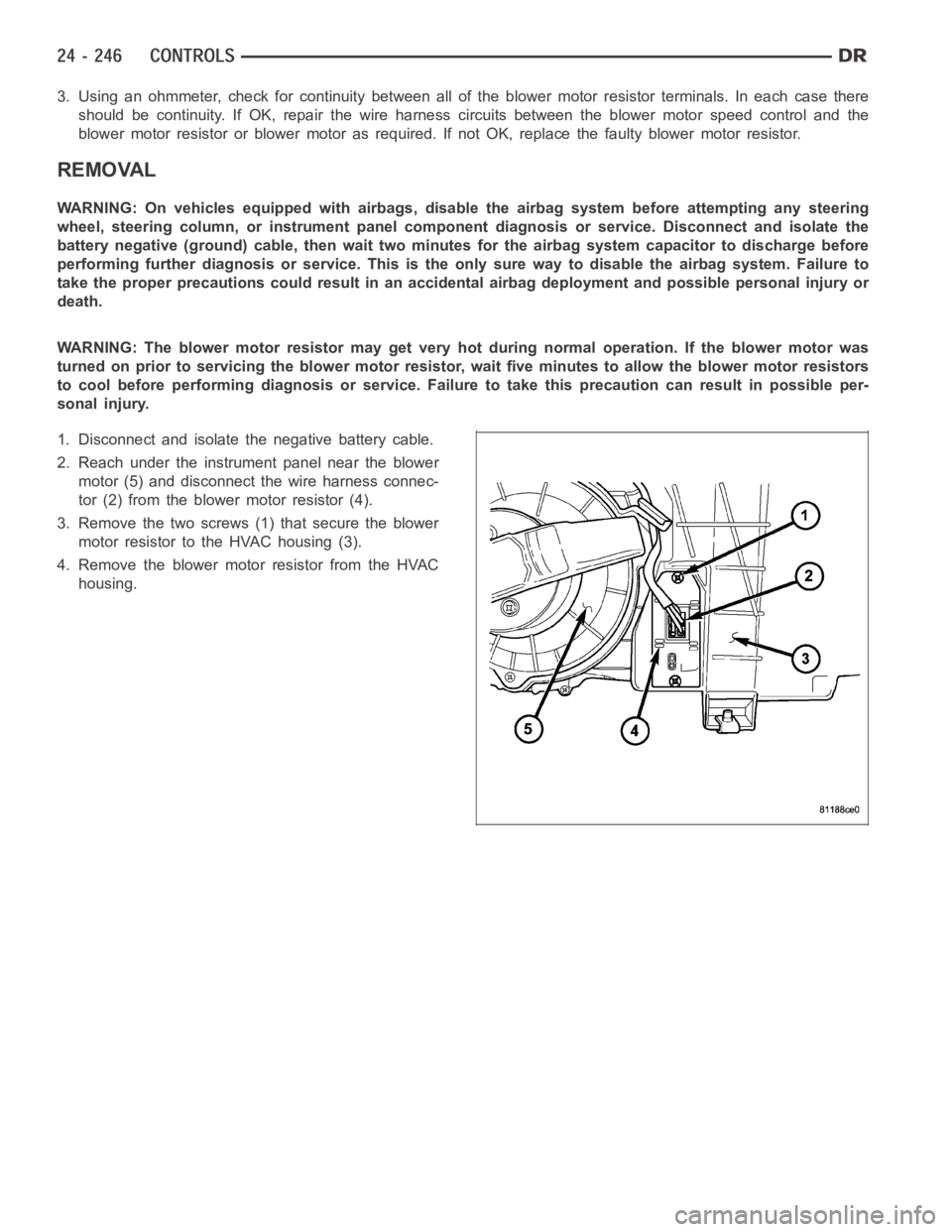
1. Disconnect and isolate the negative battery cable.
2. Reach under the instrument panel near the blower
motor (5) and disconnect the wire harness connec-
tor (2) from the blower motor resistor (4).
3. Remove the two screws (1) that secure the blower
motor resistor to the HVAC housing (3).
4. Remove the blower motor resistor from the HVAC
housing.
Page 5088 of 5267
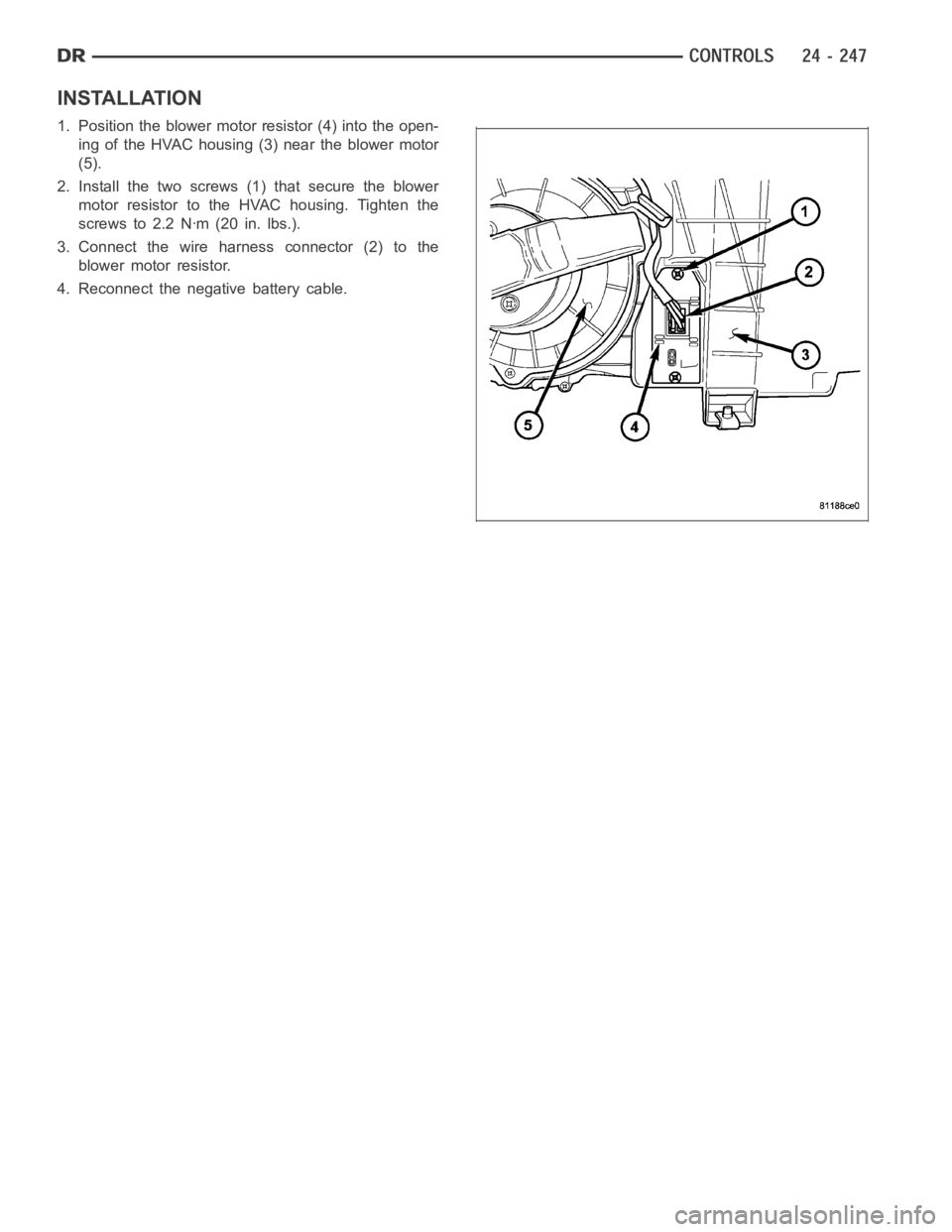
INSTALLATION
1. Position the blower motor resistor (4) into the open-
ing of the HVAC housing (3) near the blower motor
(5).
2. Install the two screws (1) that secure the blower
motor resistor to the HVAC housing. Tighten the
screws to 2.2 Nꞏm (20 in. lbs.).
3. Connect the wire harness connector (2) to the
blower motor resistor.
4. Reconnect the negative battery cable.
Page 5093 of 5267
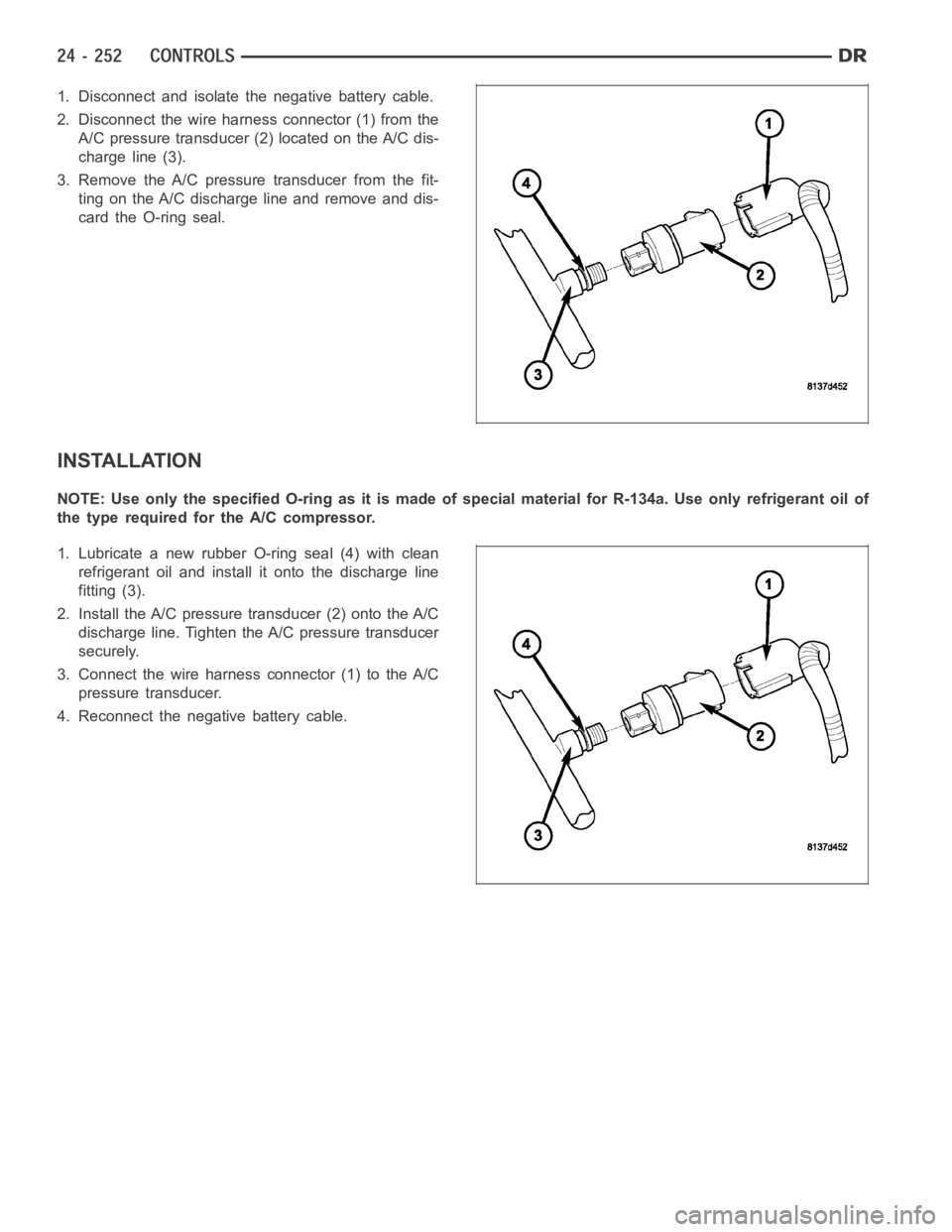
1. Disconnect and isolate the negative battery cable.
2. Disconnect the wire harness connector (1) from the
A/C pressure transducer (2) located on the A/C dis-
charge line (3).
3. Remove the A/C pressure transducer from the fit-
ting on the A/C discharge line and remove and dis-
card the O-ring seal.
INSTALLATION
NOTE:UseonlythespecifiedO-ringasitismadeofspecialmaterialforR-134a. Use only refrigerant oil of
the type required for the A/C compressor.
1. Lubricate a new rubber O-ring seal (4) with clean
refrigerant oil and install it onto the discharge line
fitting (3).
2. Install the A/C pressure transducer (2) onto the A/C
discharge line. Tighten the A/C pressure transducer
securely.
3. Connect the wire harness connector (1) to the A/C
pressure transducer.
4. Reconnect the negative battery cable.
Page 5095 of 5267
DUCT-DEFROSTER
REMOVAL
WARNING: On vehicles equipped with airbags, disable the airbag system before attempting any steering
wheel, steering column, or instrument panel component diagnosis or service. Disconnect and isolate the
battery negative (ground) cable, then wait two minutes for the airbag system capacitor to discharge before
performing further diagnosis or service. This is the only sure way to disable the airbag system. Failure to
take the proper precautions could result in accidental airbag deploymentand possible personal injury or
death.
NOTE: Take the proper precautions to protect the instrument panel from cosmetic damage.
1. Remove the instrument panel and place it on a workbench (Refer to 23 - BODY/INSTRUMENT PANEL/INSTRU-
MENT PANEL ASSEMBLY - REMOVAL).
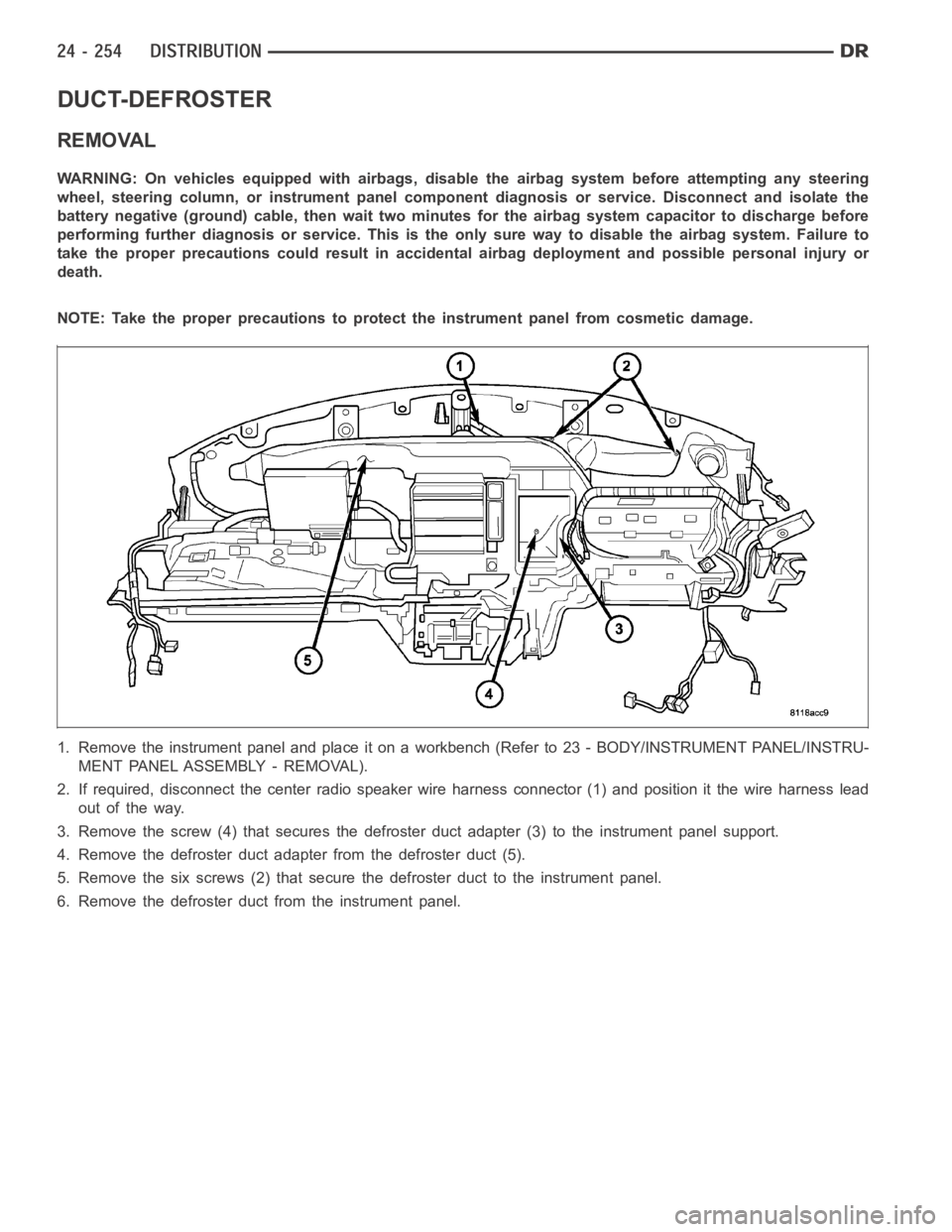
2. If required, disconnect the center radio speaker wire harness connector (1) and position it the wire harness lead
out of the way.
3. Remove the screw (4) that secures the defroster duct adapter (3) to the instrument panel support.
4. Remove the defroster duct adapter from the defroster duct (5).
5. Remove the six screws (2) that secure the defroster duct to the instrument panel.
6. Remove the defroster duct from the instrument panel.
Page 5096 of 5267
INSTALLATION
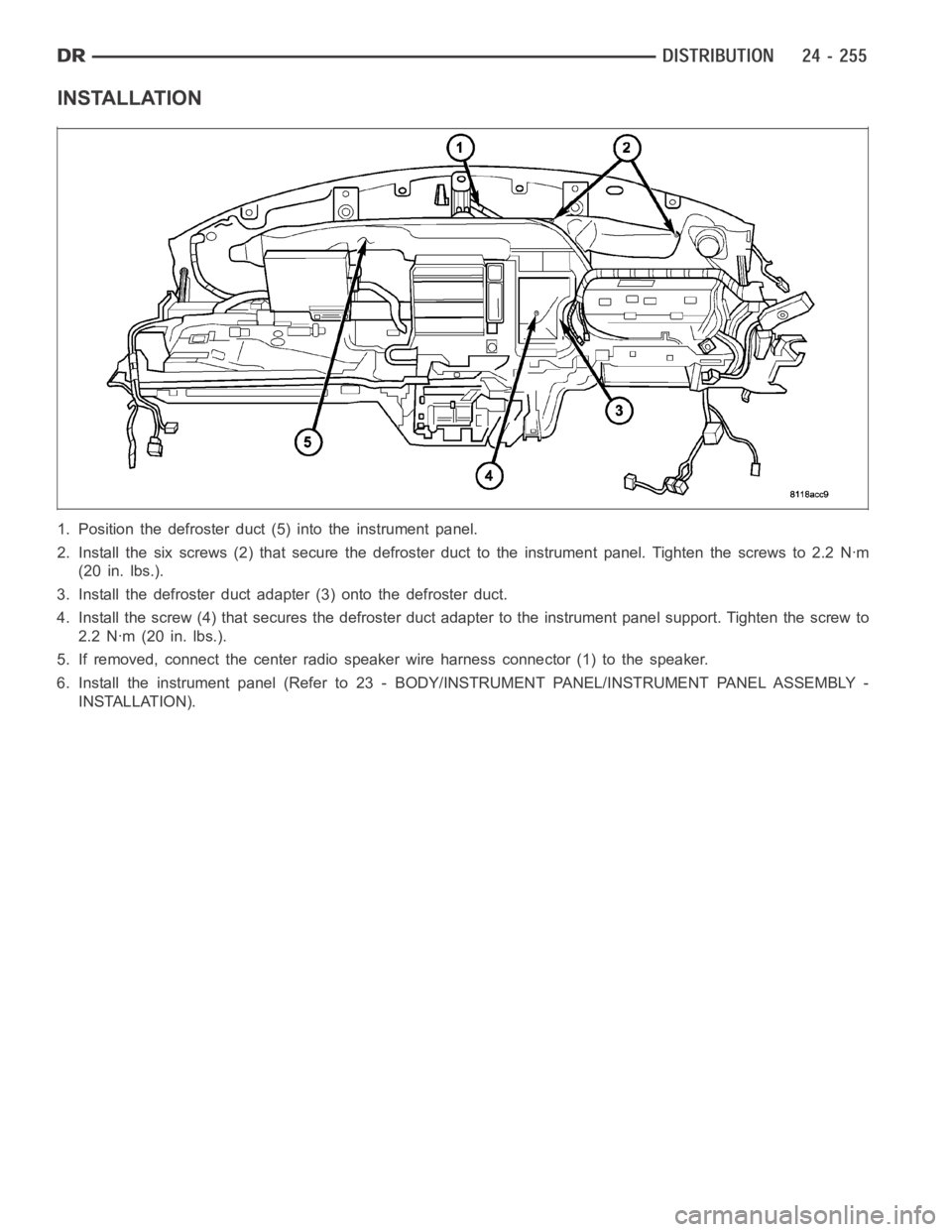
1. Position the defroster duct (5) into the instrument panel.
2. Install the six screws (2) that secure the defroster duct to the instrument panel. Tighten the screws to 2.2 Nꞏm
(20 in. lbs.).
3. Install the defroster duct adapter (3) onto the defroster duct.
4. Install the screw (4) that secures the defroster duct adapter to the instrument panel support. Tighten the screw to
2.2 Nꞏm (20 in. lbs.).
5. If removed, connect the center radiospeaker wire harness connector (1)to the speaker.
6. Install the instrument panel (Refer to 23 - BODY/INSTRUMENT PANEL/INSTRUMENT PANEL ASSEMBLY -
INSTALLATION).
Page 5098 of 5267
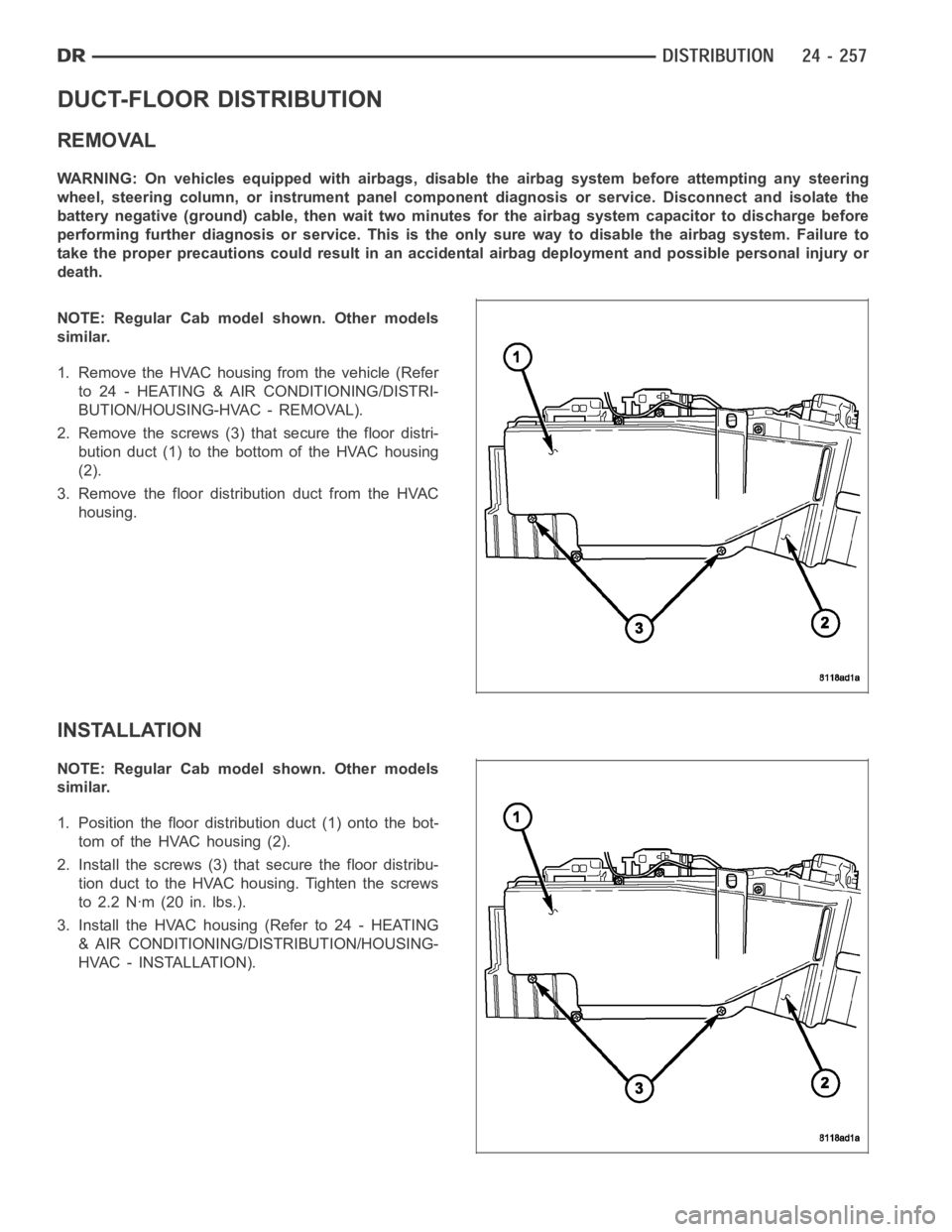
DUCT-FLOOR DISTRIBUTION
REMOVAL
WARNING: On vehicles equipped with airbags, disable the airbag system before attempting any steering
wheel, steering column, or instrument panel component diagnosis or service. Disconnect and isolate the
battery negative (ground) cable, then wait two minutes for the airbag system capacitor to discharge before
performing further diagnosis or service. This is the only sure way to disable the airbag system. Failure to
take the proper precautions could result in an accidental airbag deployment and possible personal injury or
death.
NOTE: Regular Cab model shown. Other models
similar.
1. Remove the HVAC housing from the vehicle (Refer
to 24 - HEATING & AIR CONDITIONING/DISTRI-
BUTION/HOUSING-HVAC - REMOVAL).
2. Remove the screws (3) that secure the floor distri-
bution duct (1) to the bottom of the HVAC housing
(2).
3. Remove the floor distribution duct from the HVAC
housing.
INSTALLATION
NOTE: Regular Cab model shown. Other models
similar.
1. Position the floor distribution duct (1) onto the bot-
tom of the HVAC housing (2).
2. Install the screws (3) that secure the floor distribu-
tion duct to the HVAC housing. Tighten the screws
to 2.2 Nꞏm (20 in. lbs.).
3. Install the HVAC housing (Refer to 24 - HEATING
& AIR CONDITIONING/DISTRIBUTION/HOUSING-
HVAC - INSTALLATION).
Page 5099 of 5267
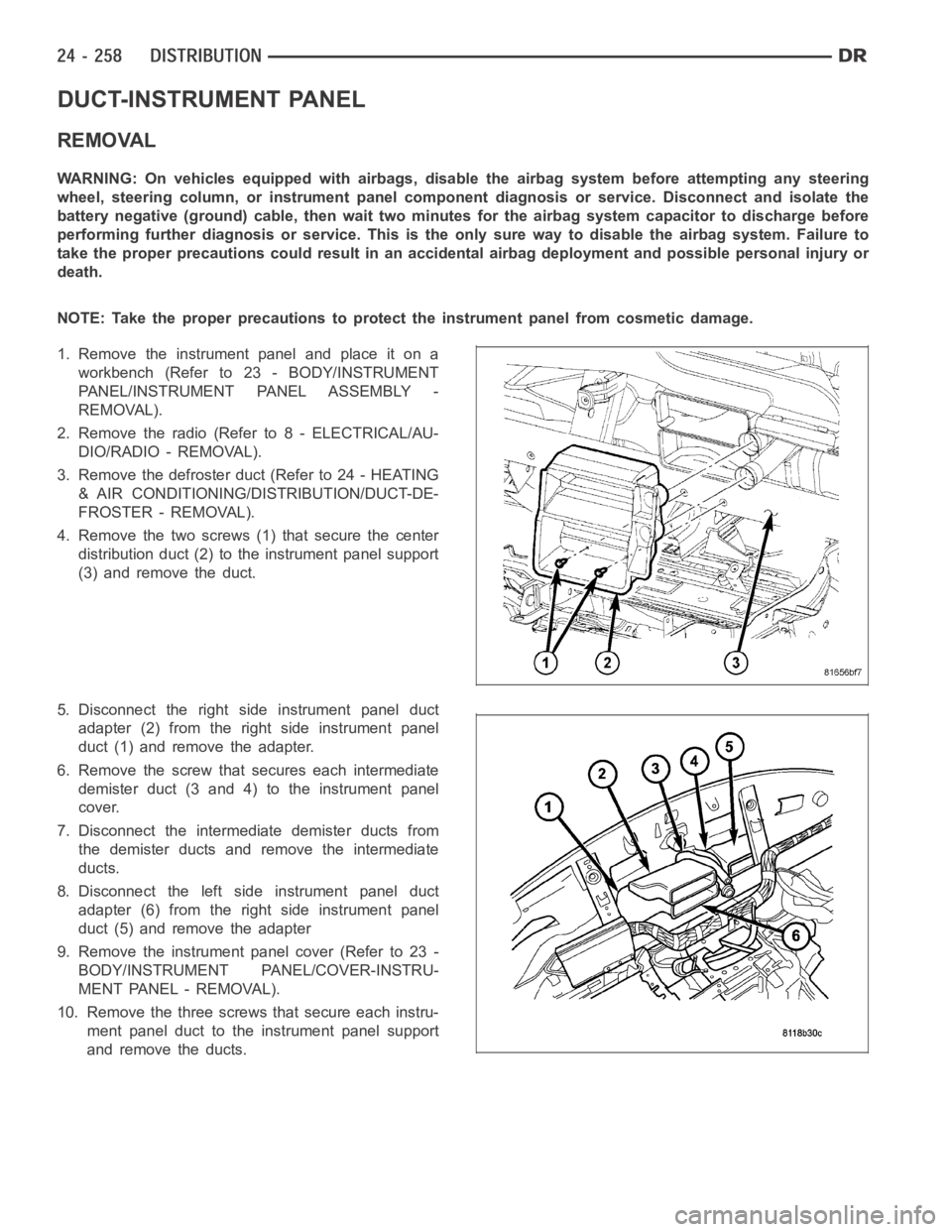
DUCT-INSTRUMENT PANEL
REMOVAL
WARNING: On vehicles equipped with airbags, disable the airbag system before attempting any steering
wheel, steering column, or instrument panel component diagnosis or service. Disconnect and isolate the
battery negative (ground) cable, then wait two minutes for the airbag system capacitor to discharge before
performing further diagnosis or service. This is the only sure way to disable the airbag system. Failure to
take the proper precautions could result in an accidental airbag deployment and possible personal injury or
death.
NOTE: Take the proper precautions to protect the instrument panel from cosmetic damage.
1. Remove the instrument panel and place it on a
workbench (Refer to 23 - BODY/INSTRUMENT
PANEL/INSTRUMENT PANEL ASSEMBLY -
REMOVAL).
2. Remove the radio (Refer to 8 - ELECTRICAL/AU-
DIO/RADIO - REMOVAL).
3. Remove the defroster duct (Refer to 24 - HEATING
& AIR CONDITIONING/DISTRIBUTION/DUCT-DE-
FROSTER - REMOVAL).
4. Remove the two screws (1) that secure the center
distribution duct (2) to the instrument panel support
(3) and remove the duct.
5. Disconnect the right side instrument panel duct
adapter (2) from the right side instrument panel
duct (1) and remove the adapter.
6. Remove the screw that secures each intermediate
demister duct (3 and 4) to the instrument panel
cover.
7. Disconnect the intermediate demister ducts from
the demister ducts and remove the intermediate
ducts.
8. Disconnect the left side instrument panel duct
adapter (6) from the right side instrument panel
duct (5) and remove the adapter
9. Remove the instrument panel cover (Refer to 23 -
BODY/INSTRUMENT PANEL/COVER-INSTRU-
MENT PANEL - REMOVAL).
10. Remove the three screws that secure each instru-
ment panel duct to the instrument panel support
and remove the ducts.