ISUZU TROOPER 1995 Workshop Manual
Manufacturer: ISUZU, Model Year: 1995, Model line: TROOPER, Model: ISUZU TROOPER 1995Pages: 1928
Page 1291 of 1928
STARTER SWITCH
Refer to "START AND CHARGING" in this section.
'-' STOPLIGHT SWITCH (FOR VEHICLES
W/0 CRUISE CONTROL)
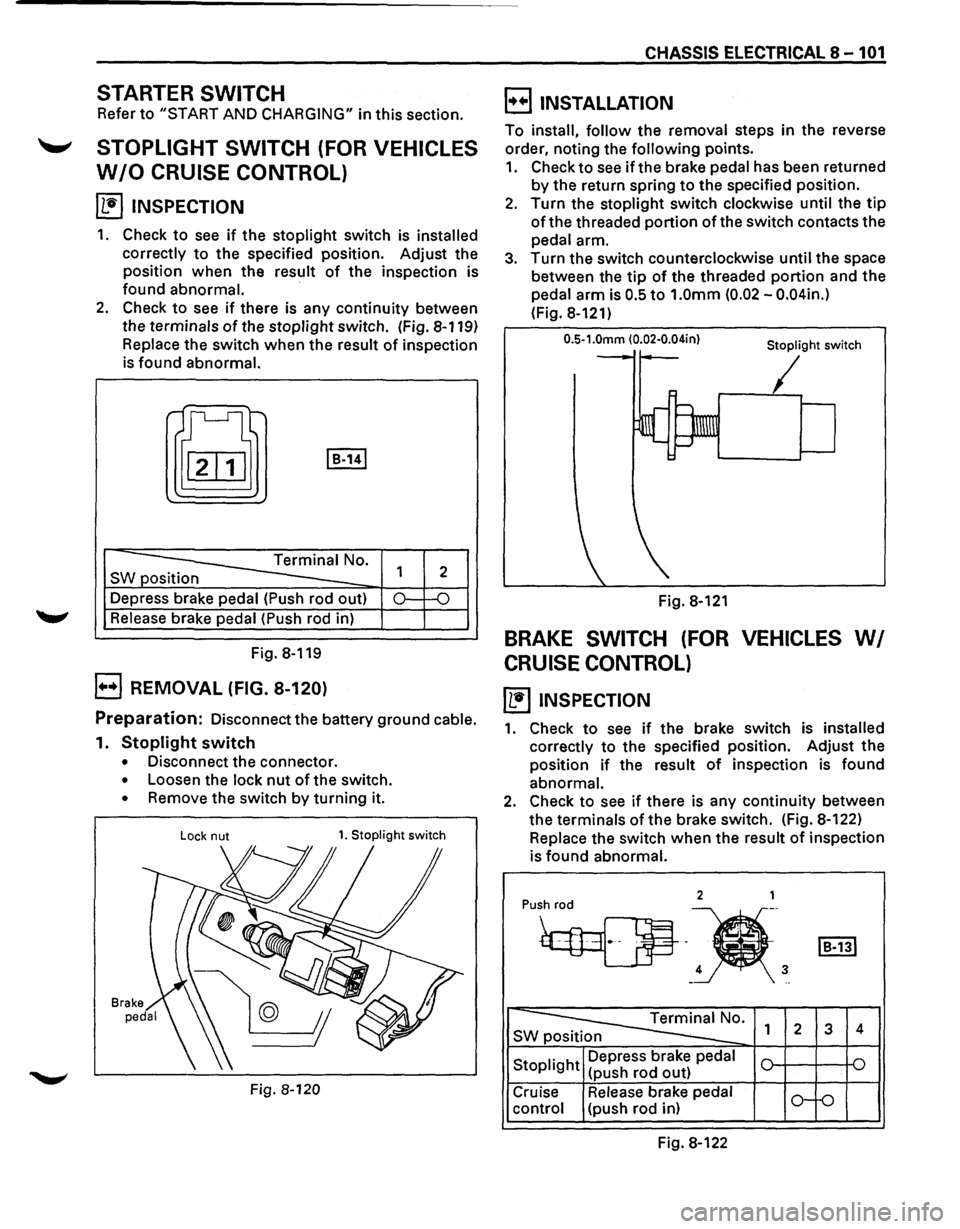
~ INSPECTION
1. Check to see if the stoplight switch is installed
correctly
to the specified position. Adjust the
position when the result
of the inspection is
found abnormal.
·
2. Check to see if there is any continuity between
the terminals
of the stoplight switch. (Fig. 8-119)
Replace the switch when the result of inspection
is found abnormal.
t[J I B-141
-----==== Terminal No.
SW position
--Depress brake pedal (Push rod out)
Release brake pedal (Push rod in)
Fig. 8-119
B REMOVAL (FIG. 8-120)
1
2
0.: -o
Preparation: Disconnect the battery ground cable.
1. Stoplight switch
• Disconnect the connector.
• Loosen the lock nut of the switch.
• Remove the switch by turning it.
Lock nut 1. Stoplight switch
Fig. 8-120
CHASSIS ELECTRICAL 8-101
B INSTALLATION
To install, follow the removal steps in the reverse
order, noting the
following points.
1. Check to see if the brake pedal has been returned
by the return spring to the specified position.
2. Turn the stoplight switch clockwise until the tip
of the threaded portion of the switch contacts the
pedal arm.
3. Turn the switch counterclockwise until the space
between the
tip of the threaded portion and the
pedal arm is
0.5 to 1.0mm (0.02 -0.04in.)
(Fig. 8-121)
0.5-1.0mm (0.02·0.04in} Stoplight switch
Fig. 8-121
BRAKE SWITCH (FOR VEHICLES WI
CRUISE CONTROL)
~ INSPECTION
1. Check to see if the brake switch is installed
correctly
to the specified position. Adjust the
position
if the result of inspection is found
abnormal.
2. Check to see if there is any continuity between
the terminals
of the brake switch. (Fig. 8-122)
Replace the switch
when the result of inspection
is
found abnormal.
2 1
Pu•h
4 3 -..
~0. SWp 1 2 3 4
Stoplight Depress
brake pedal
(push rod out)
Cruise Release brake pedal
o-f-o control (push rod in)
Fig. 8-122
Page 1292 of 1928
8-102 CHASSIS ELECTRICAL
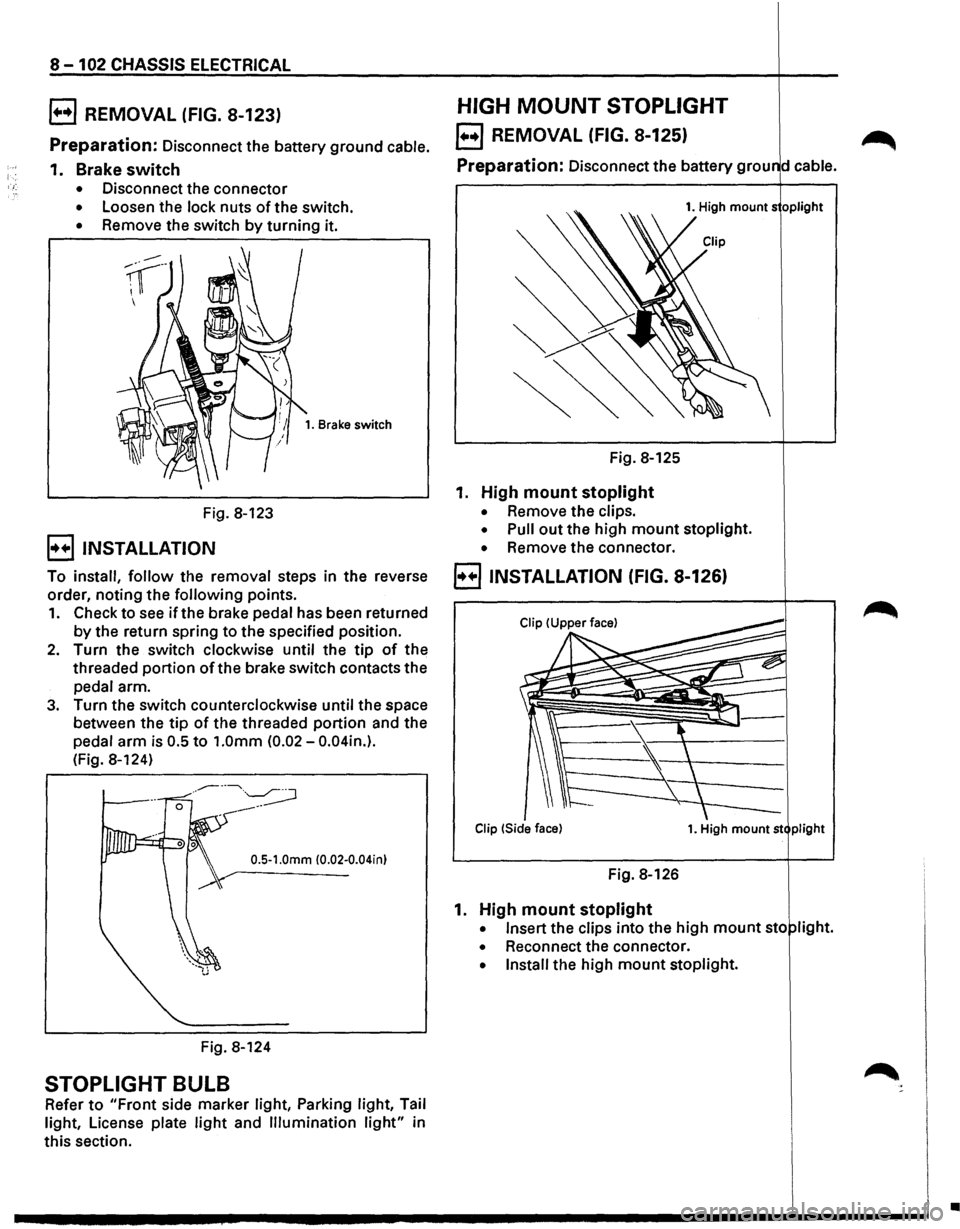
B REMOVAL (FIG. 8-123)
Preparation: Disconnect the battery ground cable.
1. Brake switch
• Disconnect the connector
• Loosen the lock nuts of the switch.
• Remove the switch by turning it.
Fig. 8-123
B INSTALLATION
1. Brake switch
To install, follow the removal steps in the reverse
order, noting the
following points.
1. Check to see if the brake pedal has been returned
by the return spring to the specified position.
2. Turn the switch clockwise until the tip of the
threaded
portion ofthe brake switch contacts the
pedal arm.
3. Turn the switch counterclockwise until the space
between the
tip of the threaded portion and the
pedal
arm is 0.5 to 1.0mm (0.02-0.04in.).
(Fig. 8-124)
0.5-1.0mm (0.02-0.04in)
Fig. 8-124
STOPLIGHT BULB
Refer to "Front side marker light, Parking light, Tail
light, License plate
light and Illumination light" in
this section.
HIGH MOUNT STOPLIGHT
EJ REMOVAL (FIG. 8-125) ~
Preparation: Disconnect the battery grou d cable.
1. High mounts oplight
Fig. 8-125
1. High mount stoplight
• Remove the clips.
• Pull out the high mount stoplight.
• Remove the connector.
B INSTALLATION (FIG. 8-126)
Clip !Side face) 1. High mount st plight
Fig. 8-126
1. High mount stoplight
• Insert the clips into the high mount sto light.
• Reconnect the connector.
• Install the high mount stoplight.
•
Page 1293 of 1928
![ISUZU TROOPER 1995 Workshop Manual REAR DEFOGGER SWITCH
(1!] INSPECTION
I~~ Check to see if there is any continuity between
the terminals
of the defogger switch. (Fig. 8-127)
Replace the switch, when the result
of inspecti](/img/61/57183/w960_57183-1292.png "ISUZU TROOPER 1995 Workshop Manual REAR DEFOGGER SWITCH
(1!] INSPECTION
I~~ Check to see if there is any continuity between
the terminals
of the defogger switch. (Fig. 8-127)
Replace the switch, when the result
of inspecti")
REAR DEFOGGER SWITCH
(1!] INSPECTION
I~~ Check to see if there is any continuity between
the terminals
of the defogger switch. (Fig. 8-127)
Replace the switch, when the result
of inspection
is found abnormal.
a [~~·~] ]]
r ~)
~0. s 1
4
ON o-r--0---
OFF o-~
Fig. 8-127
B REMOVAL (FIG. 8-128)
5. Rear defogger switch
Fig. 8-128
[ill
5 2 1 s
-o
~
4. Instrument panel
.cluster assembly
CHASSIS ELECTRICAL 8-103
Preparation: Disconnect the battery ground cable.
1.
Front console assembly
2. Lower cluster assembly
3. Instrument panel driver lower cover
4. Instrument panel cluster assembly
• Refer to FOG LIGHT SWITCH removal steps
in
this section.
5.
Rear defogger switch
• To remove the switch, pushing the lock from
the back side of the cluster assembly.
E) INSTALLATION
To install, follow the removal steps in the reverse
order, noting
the following point.
1. Push in the switch with your fingers until it locks
securely.
REAR DEFOGGER HEAT WIRES
w CAUTION:
• Heat wires are printed on the inner side of
the rear glass.
To clean, use a
soft cloth and wipe horizon
tally along the wires.
• Never use glass cleaner or equivalent.
~ INSPECTION
It~ I Measure the voltage of heat wire.
Repair the heat wire
when the result of inspection
is found abnormal.
'f CAUTION:
• When measuring voltage, wind a piece of
tin foil around the tip of the negative probe
and press
the foil against the wire with your
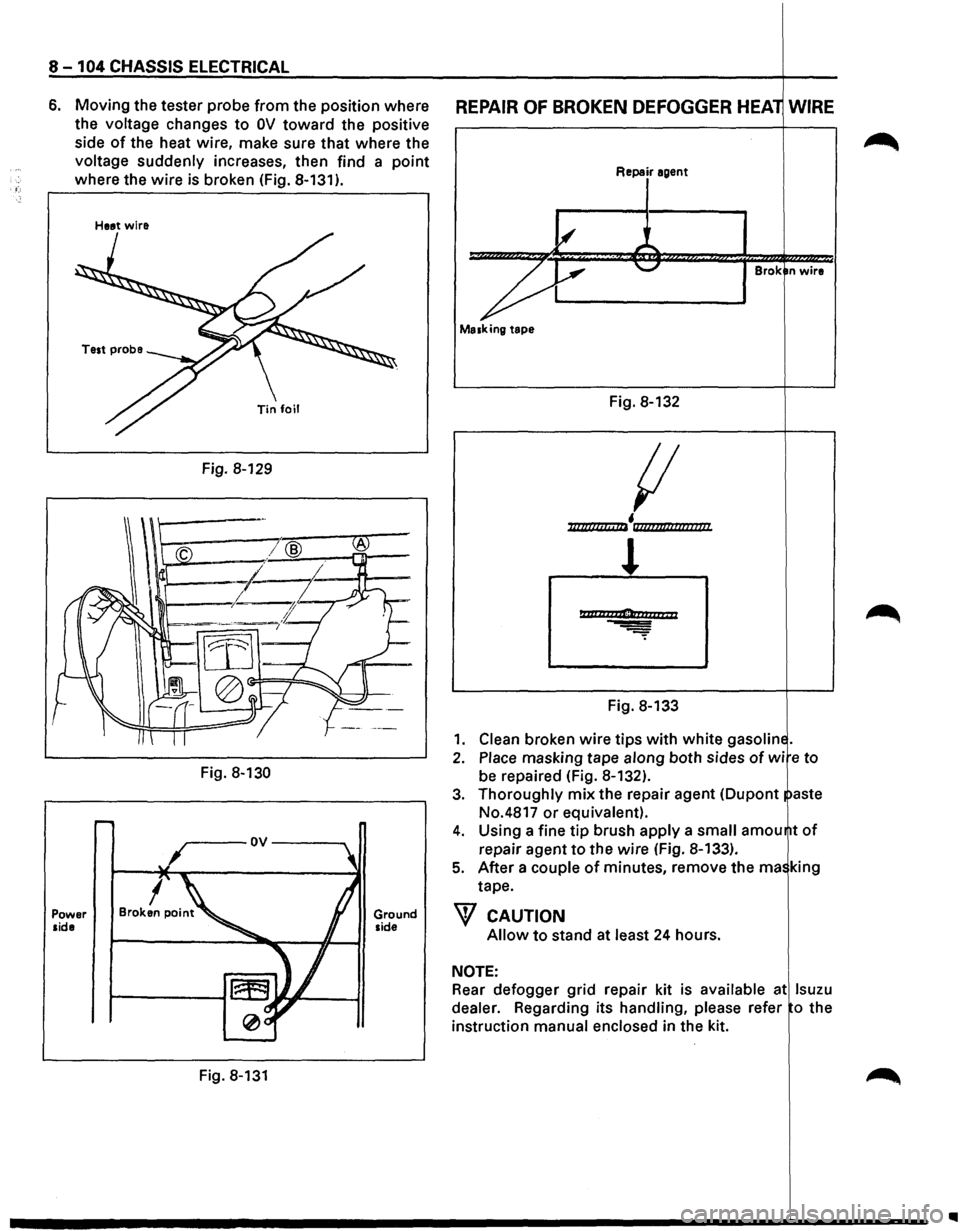
finger (Fig. 8-129).
1. Turn the starter switch on.
2. Turn the rear defogger switch on.
3. Measure the voltage between the three points
on
the heat wire and the(-) terminal with a voltmeter.
4. Check that the voltage becomes smaller from ®
to @to© (Fig. 8-130).
5. If there is a place where the voltage suddenly
changes
to OV, there is a OPEN CIRCUIT between
there and the
prior point.
Page 1294 of 1928
8 -104 CHASSIS ELECTRICAL
6. Moving the tester probe from the position where
the
voltage changes to OV toward the positive
side
of the heat wire, make sure that where the
voltage suddenly increases, then find a point
where the wire is broken (Fig. 8-131).
Power side
Heat wire
Fig. 8-129
Fig.
8-130
Fig. 8-131
Ground side
REPAIR OF BROKEN DEFOGGER HEA WIRE
Repair agent
Brok n wire
Masking tape
Fig. 8-132
{I
• ll/lllllclt c IIi llli?flt/llflllllll/
l
Ptttlh2ti1Clonaarr; 11
Fig. 8-133
1. Clean broken wire tips with white gasolin
2. Place masking tape along both sides of wi e to
be repaired (Fig. 8-132).
3. Thoroughly mix the repair agent (Dupont aste
No.4817
or equivalent).
4. Using a fine tip brush apply a small amou
repair agent
to the wire (Fig. 8-133).
5. After a couple of minutes, remove the rna king
tape.
W CAUTION
Allow to stand at least 24 hours.
NOTE:
Rear defogger grid repair kit is available at lsuzu
dealer.
Regarding its handling, please refer o the
instruction
manual enclosed in the kit.
..
Page 1295 of 1928
REAR DEFOGGER RELAY
~ INSPECTION
Fig. 8-134
r·-----,
~~o--L-4> I I
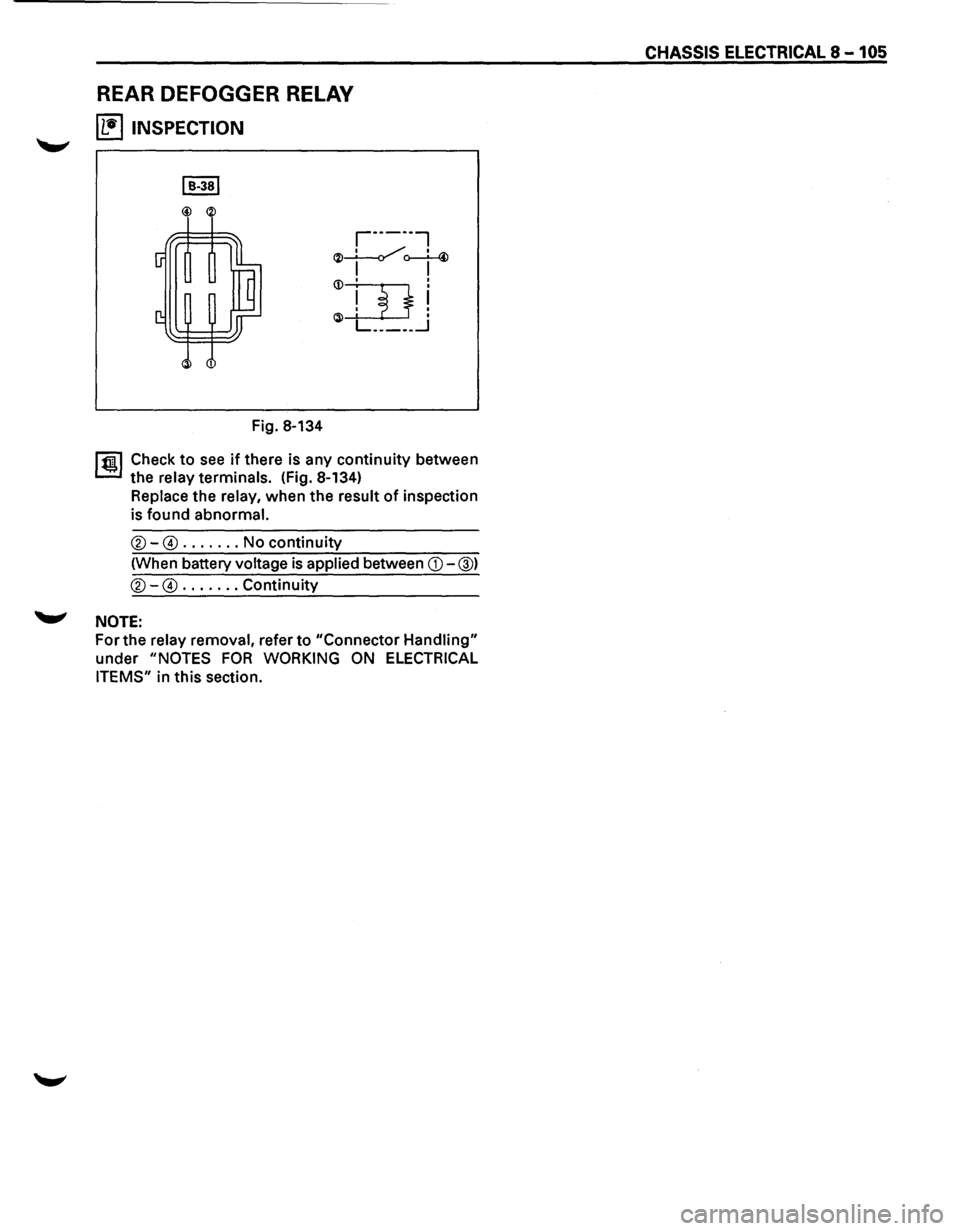
1 ~~ Check to see if there is any continuity between
the
relay terminals. (Fig. 8-134)
Replace the relay, when the result of inspection
is found
abnormal.
®-@ ....... No continuity
(When battery
voltage is applied between CD-@)
®-@ ....... Continuity
'-"' NOTE:
For the relay removal, refer to "Connector Handling"
under "NOTES FOR WORKING ON ELECTRICAL
ITEMS"
in this section.
CHASSIS ELECTRICAL 8-105
Page 1296 of 1928
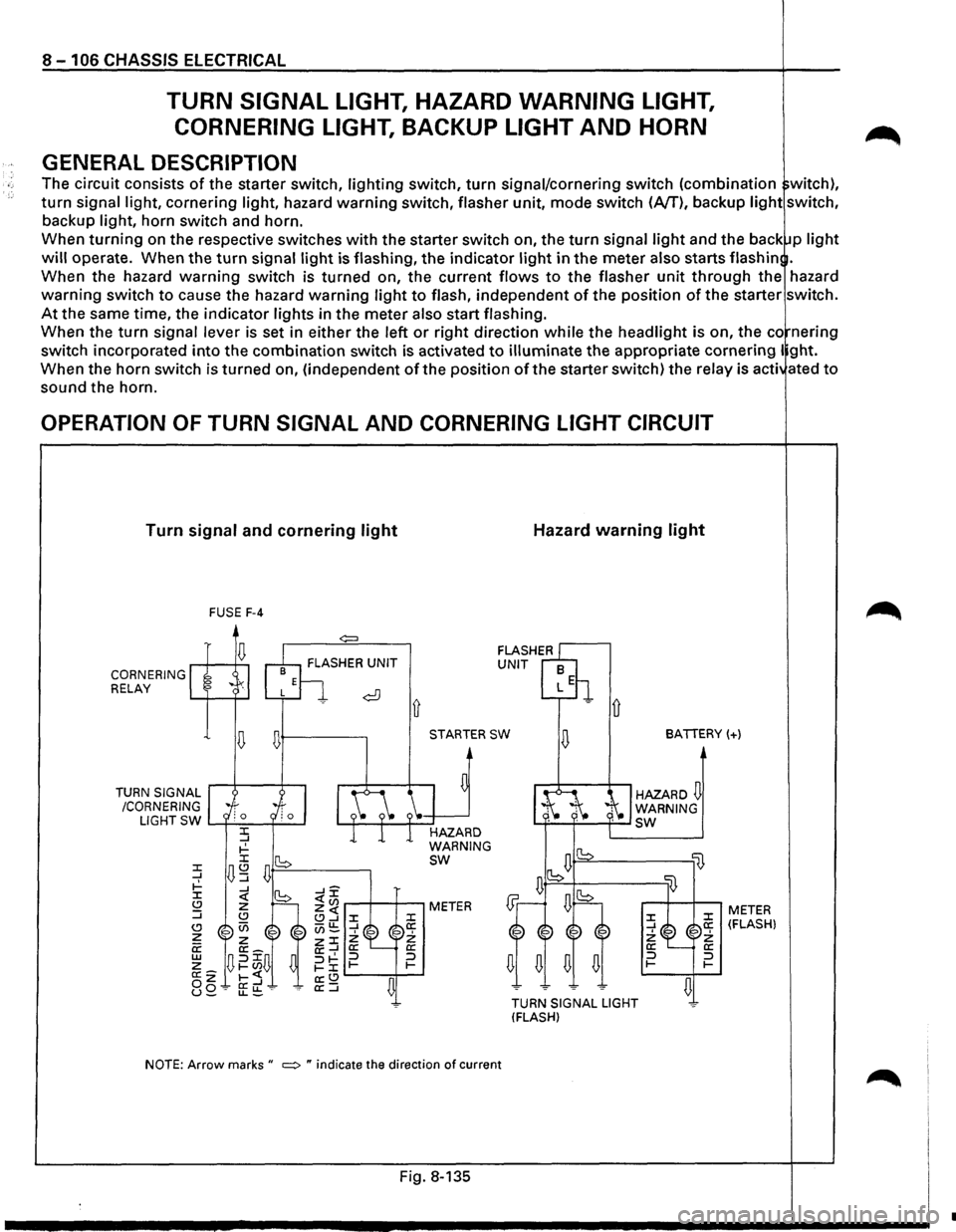
8 - 1 06 CHASSIS ELECTRICAL
TURN SIGNAL LIGHT, HAZARD WARNING LIGHT,
CORNERING LIGHT,
BACKUP LIGHT AND HORN
GENERAL DESCRIPTION
The circuit consists of the starter switch, lighting switch, turn signal/cornering switch (combination witch),
turn signal light, cornering light, hazard warning switch, flasher unit, mode switch (A/T), backup light switch,
backup light, horn switch and horn.
When
turning on the respective switches with the starter switch on, the turn signal light and the back p light
will operate. When the turn signal light is flashing, the indicator light in the meter also starts flash in .
When the hazard
warning switch is turned on, the current flows to the flasher unit through the hazard
warning switch to cause the hazard warning light to flash, independent of the position of the starter switch.
At the same time, the indicator lights in the meter also start flashing.
When the
turn signal lever is set in either the left or right direction while the headlight is on, the co nering
switch incorporated
into the combination switch is activated to illuminate the appropriate cornering I ght.
When the horn switch is turned on, (independent
of the position of the starter switch) the relay is acti ated to
sound the horn.
OPERATION OF TURN SIGNAL AND CORNERING LIGHT CIRCUIT
Turn signal and cornering light
CORNERING RELAY
TURN
SIGNAL
/CORNERING FUSE
F-4
~+---------.
Ll G
HT SW L......f-'-=-~--l
STARTER SW
HAZARD
WARNING
sw
NOTE: Arrow marks " ~ " indicate the direction of current
Fig. 8-135
Hazard warning light
D
BATTERY(+)
HAZARD~ WARNING L.f-~'-'----f--' sw
lB
TURN SIGNAL LIGHT
(FLASH)
:z: _J 2: a: :::J 1-
li}
:z: a: 2: a: :::J 1-
~
METER (FLASH)
•
Page 1297 of 1928
 /
CORN")
-n 10' 00 I .... w 0>
(
RELAY:
CORNERING LIGHT
DIODE
RELAY;HORN
\
RELAY
& FUSE
BOX'·.,,
(FL-1, FL-2,
F-31
~.
"",
BATTERY
'
FRT
TURN
SIGNAL,
HAZARD.
WARNING LIGHT
(RH) /
CORNERING LIGHT
(RH) C-31 HORN (HIGH)
( TURN
SIGNAL,
HAZARED
WARNING
INDICATOR LIGHT
(METER)
(
COMBINATION
SW
HAZARD
WARN
IN~
LIGHT
SW
FRT TURN
SIGNAL,
HAZARD
WARNING
LIGHT
(LH)
CORNERING LIGHT
(LH)
LIGHTING
SW
TURN
SIGNAL LIGHT,
/~l/
~/
CORNERING LIGHT SW. RR
TURN
SIGNAL,
HAZARD
WARNING LIGHT (LHI
=·
BACKUP
B-53
LIGHT(LH) "R-7 TRAILER HARNESS
CONNECTOR
FLASHER
UNIT
FUSE
BOX (C-3)
BACKUP LIGHT SW, (MfTI
)g ~ (/) r-0 (") ~ 0
2
(") ::c )> en
en en m rm (") -i :lJ (") )> rQI) I ..a 0 .....
Page 1298 of 1928
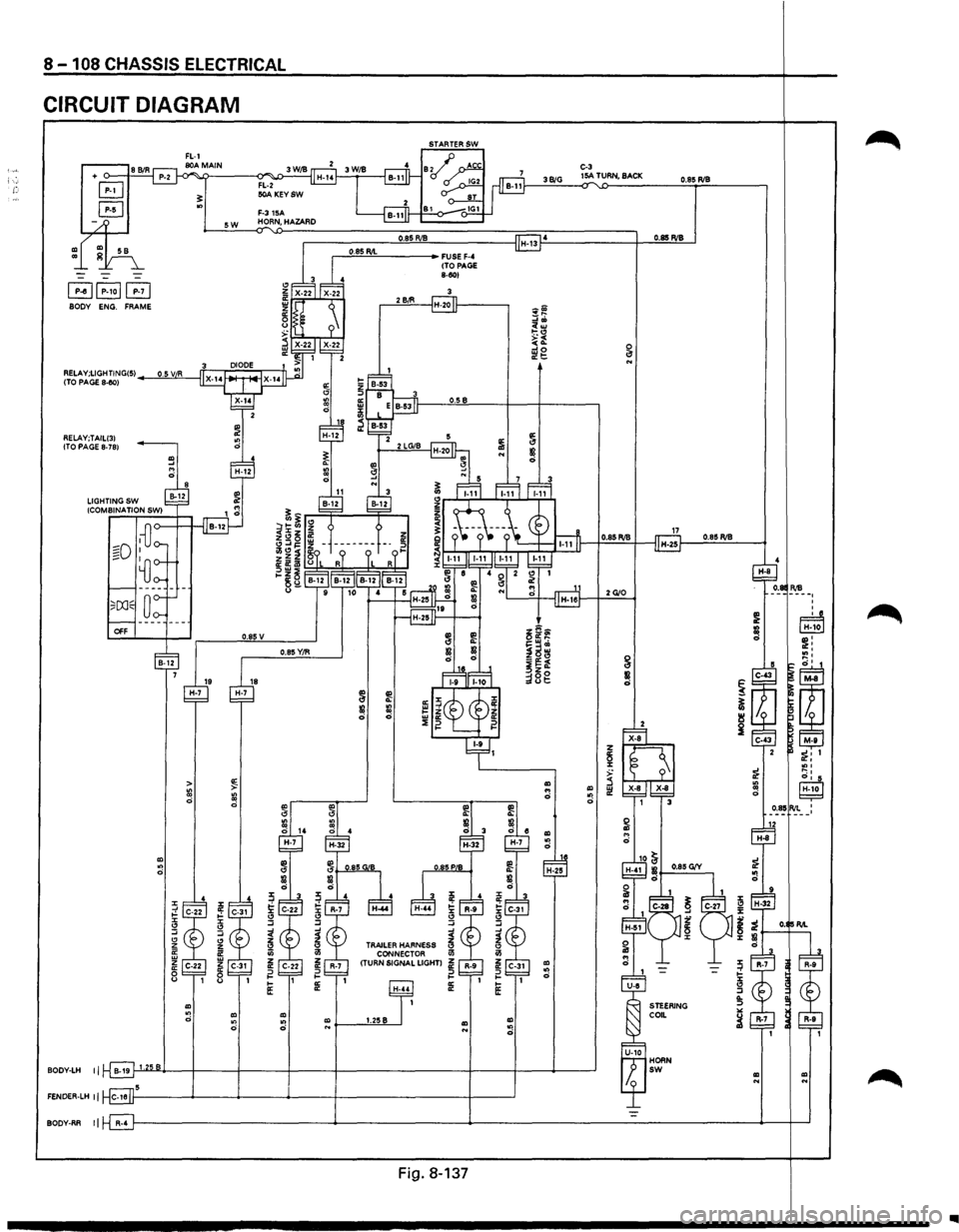
8 -108 CHASSIS ELECTRICAL
CIRCUIT DIAGRAM
+ o-___,f.=8C.::BI::..:R'-l
B
B
~~P-1ol~ BODY ENG. FRAME
RELAY;TAILI31
ITO PAGE 8-781
OFF
BOOY-LH II
FENOER-LH II
BOOY-RR II
"' ., 0
19 H-7
~ > ::: ::: 0
0
:z: :z: ;! 0:
"" r :z: " " :J :J " " z z ffi ii! w z z 0:
0: 0 0 " "
"' ~ "' ., 0
0.85 v
0.85Y/R
~
" :J
"' z !2 ., z 0: ::> 1-
1-
1£
"' "' 0 "'
.---"'0·:::;85::.:RIL=-----+ FUSE F-4 (TO PAGE 8-50)
.-----'2'-'B~iR,___-jH-20 If-------,
O.SB
"' ~ a II! ::: 0
TRAILER HARNESS CONNECTOR
(TURN SIGNAL LIGHT)
1.25B "' "' "' 0
Fig. 8-137
C-3 38/G 15A TURN, BACK 0.85 RIB
0.85 RIB
0.85 RIB
2G/O
5~;1 !=w' ~: ~~; g :e· ~~~
=
:~co ! ~ _ut:
~ I!! ~ z !5 i: 1 :z: "'' ~ ...,, 0' 5 "' "' IH-,10 I ... il! 0 "! 0 0.85 RIL ' '
"' "' 0 1 H-25
:z: ~
"' r "' ;t 0 :z:
" :J .._ ::> "" ~
"' "' ..
..
Page 1299 of 1928
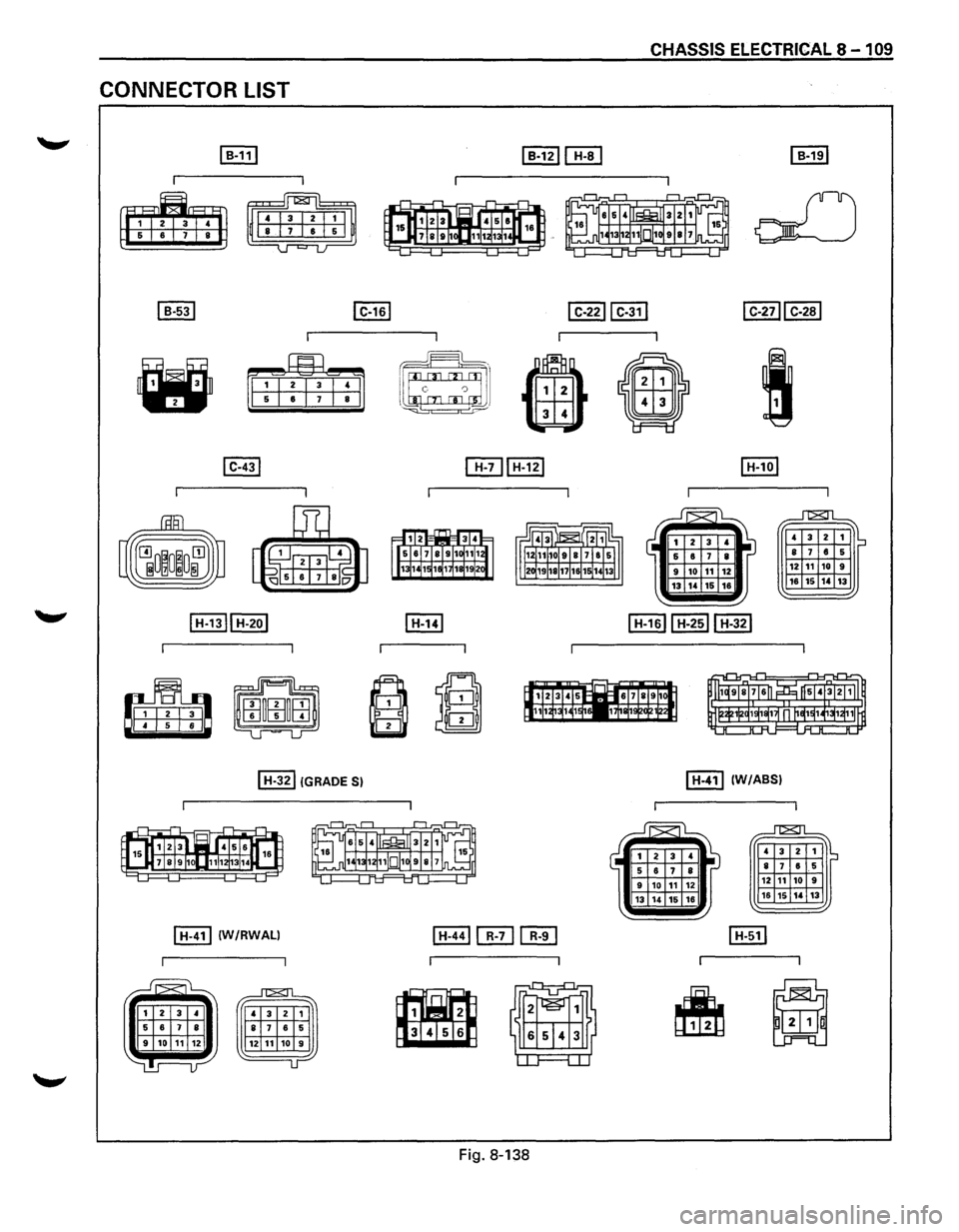
CONNECTOR LIST
~
~
I B-531
•
I C-431
I C-161
I H-321 !GRADE S)
I H-411 IW/RWALI
CHASSIS ELECTRICAL 8 - 1 09
I C-2211 C-311 I C-2711 C-281
~J 1 c 0 J
G) 4
•
I
[[Til H-121
~
~
Fig. 8-138
I H-101
~
4 3 2 1 IS 8 7 6 5
12 11 10 9
18 15 14 13
I H-411 (W/ABS)
~
4 3 2 1 ~ 8 7 6 5
12 11 10 9
16 15 14 13
Page 1300 of 1928
![ISUZU TROOPER 1995 Workshop Manual 8 -110 CHASSIS ELECTRICAL
CONNECTOR LIST
~ .. [li] [fill [Eill "
t!J·I·I·~'bfftjj gi• fi;J;j3J•lsl•J~~1r~
•
8
I M-all M-91 lliJ IE] [EJ~[E] I P-10 I
I I
--G=J~ ~ ~ JJCQ) ~
lli](/img/61/57183/w960_57183-1299.png "ISUZU TROOPER 1995 Workshop Manual 8 -110 CHASSIS ELECTRICAL
CONNECTOR LIST
~ .. [li] [fill [Eill \"
t!J·I·I·~'bfftjj gi• fi;J;j3J•lsl•J~~1r~
•
8
I M-all M-91 lliJ IE] [EJ~[E] I P-10 I
I I
--G=J~ ~ ~ JJCQ) ~
lli")
8 -110 CHASSIS ELECTRICAL
CONNECTOR LIST
~ .. [li] [fill [Eill "
t!J·I·I·~'bfftjj gi• fi;J;j3J•lsl•J~~1r~
•
8
I M-all M-91 lliJ IE] [EJ~[E] I P-10 I
I I
--G=J~ ~ ~ JJCQ) ~
lliJ [[!] lu-1ol
I I I I
~ ~·!!~
•
==f::.,--, r·;l :---·===----:! em:(]=: ,
~
[I!] I X-141 I X-221
~
l,~r:ml Eilil 4
~
Fig.
8-139
•