ISUZU TROOPER 1995 Workshop Manual
Manufacturer: ISUZU, Model Year: 1995, Model line: TROOPER, Model: ISUZU TROOPER 1995Pages: 1928
Page 1311 of 1928
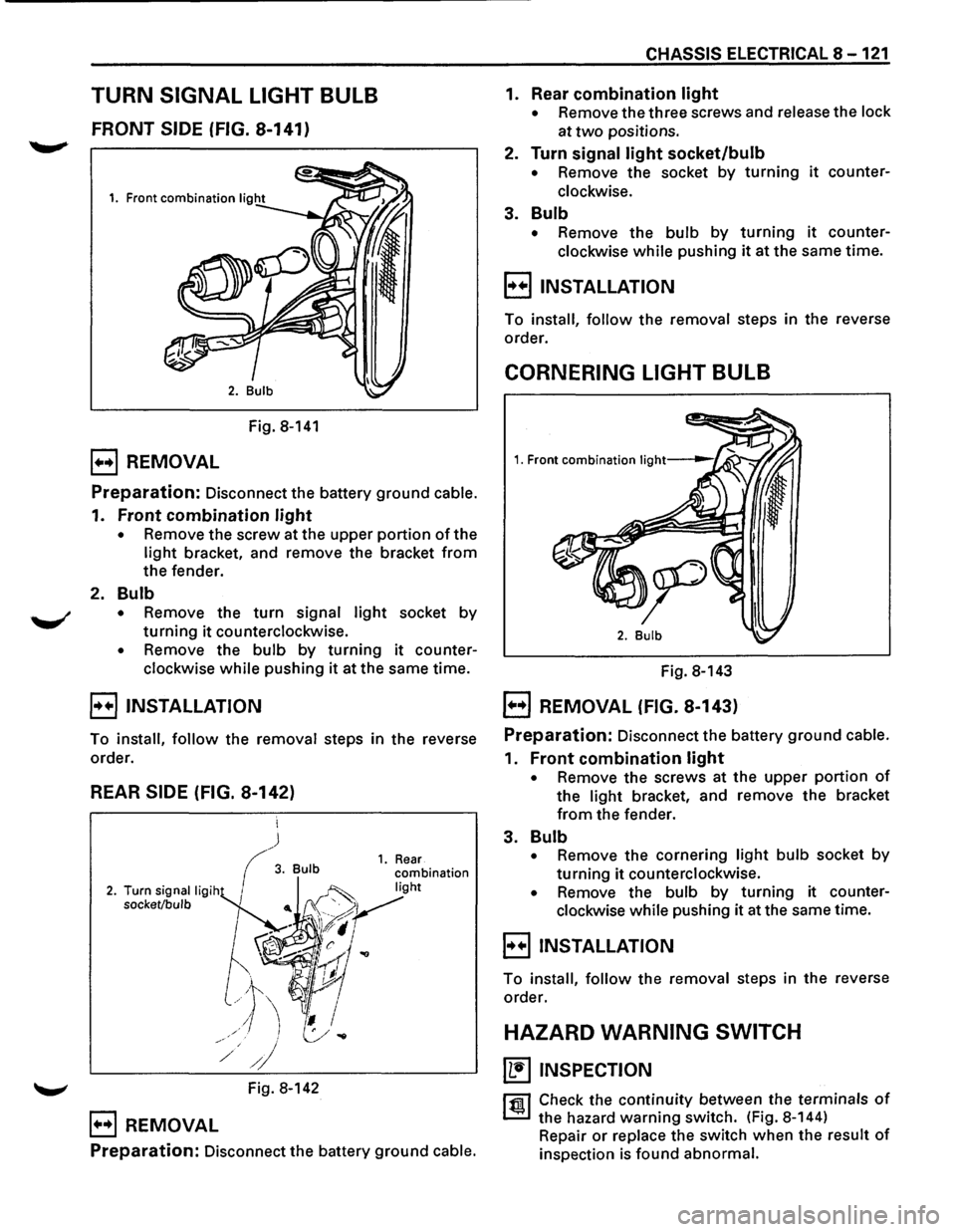
TURN SIGNAL LIGHT BULB
FRONT SIDE (FIG. 8-141)
Fig. 8-141
B REMOVAL
Preparation: Disconnect the battery ground cable.
1. Front combination light
• Remove the screw at the upper portion of the
light bracket, and remove the bracket from
the fender.
2. Bulb
• Remove the turn signal light socket by
turning it counterclockwise.
• Remove the bulb by turning it counter
clockwise
while pushing it at the same time.
B INSTALLATION
To install, follow the removal steps in the reverse
order.
REAR SIDE (FIG. 8-142)
~ Fig. 8-142
B REMOVAL
Preparation: Disconnect the battery ground cable.
CHASSIS ELECTRICAL 8-121
1. Rear combination light
• Remove the three screws and release the lock
at
two positions.
2. Turn signal light socket/bulb
• Remove the socket by turning it counter
clockwise.
3. Bulb
• Remove the bulb by turning it counter
clockwise
while pushing it at the same time.
B INSTALLATION
To install, follow the removal steps in the reverse
order.
CORNERING LIGHT BULB
Fig. 8-143
EJ REMOVAL (FIG. 8-143)
Preparation: Disconnect the battery ground cable.
1. Front combination light
• Remove the screws at the upper portion of
the light bracket, and remove the bracket
from the fender.
3. Bulb
• Remove the cornering light bulb socket by
turning it counterclockwise.
• Remove the bulb by turning it counter
clockwise while pushing it at the same time.
E) INSTALLATION
To install, follow the removal steps in the reverse
order.
HAZARD WARNING SWITCH
~ INSPECTION
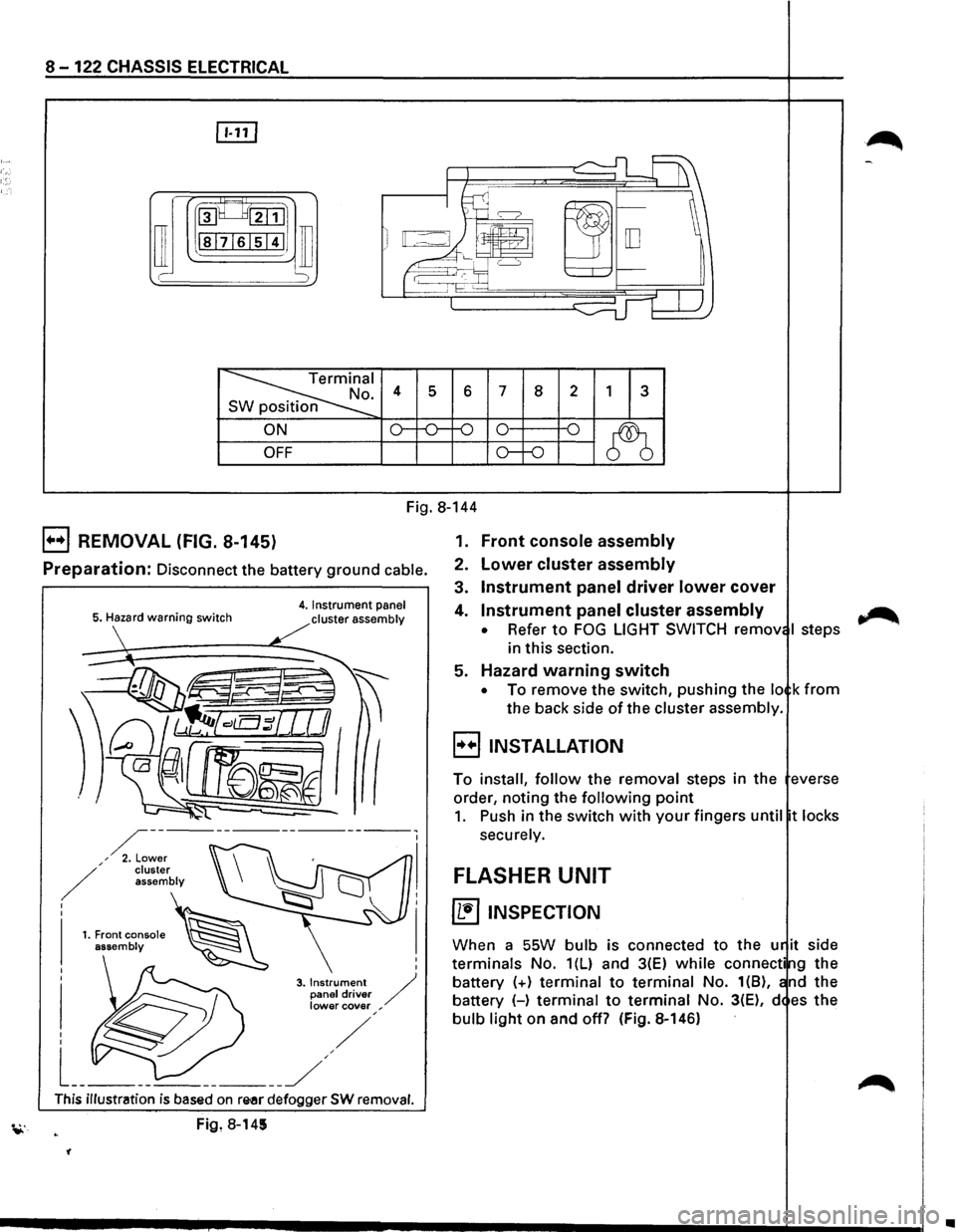
rfll Check the continuity between the terminals of
~ the hazard warning switch. (Fig. 8-144)
Repair
or replace the switch when the result of
inspection is found abnormal.
Page 1312 of 1928
8-122 CHASSIS ELECTRICAL
rn
~~:::1
ill I -
~I . 4 s 6 7 8 2 1 3 n
ON o--o-f-0 0 -o
~ OFF o--o
Fig. 8-144
B REMOVAL (FIG. 8-145)
Preparation: Disconnect the battery ground cable.
5. Hazard warning switch 4. Instrument panel
cluster assembly
I
I
3. Instrument / panel driver lower cover ,
This illustration is based on re-ar defogger SW removal.
Fig, 8-145
'(
1. Front console assembly
2. Lower cluster assembly
3. Instrument panel driver lower cover
4. Instrument panel cluster assembly
• Refer to FOG LIGHT SWITCH remov I steps
in this section.
5. Hazard warning switch
• To remove the switch, pushing the lo k from
the back side of the cluster assembly.
B INSTALLATION
To install, follow the removal steps in the everse
order, noting the
following point
1. Push in the switch with your fingers until t locks
securely.
FLASHER UNIT
~ INSPECTION
When a SSW bulb is connected to the u it side
terminals No. 1(L) and 3(E) while connecti g the
battery
(+) terminal to terminal No. 1(8), nd the
battery (-)
terminal to terminal No. 3(E), d es the
bulb light on and off? (Fig. 8-146)
~
•
Page 1313 of 1928
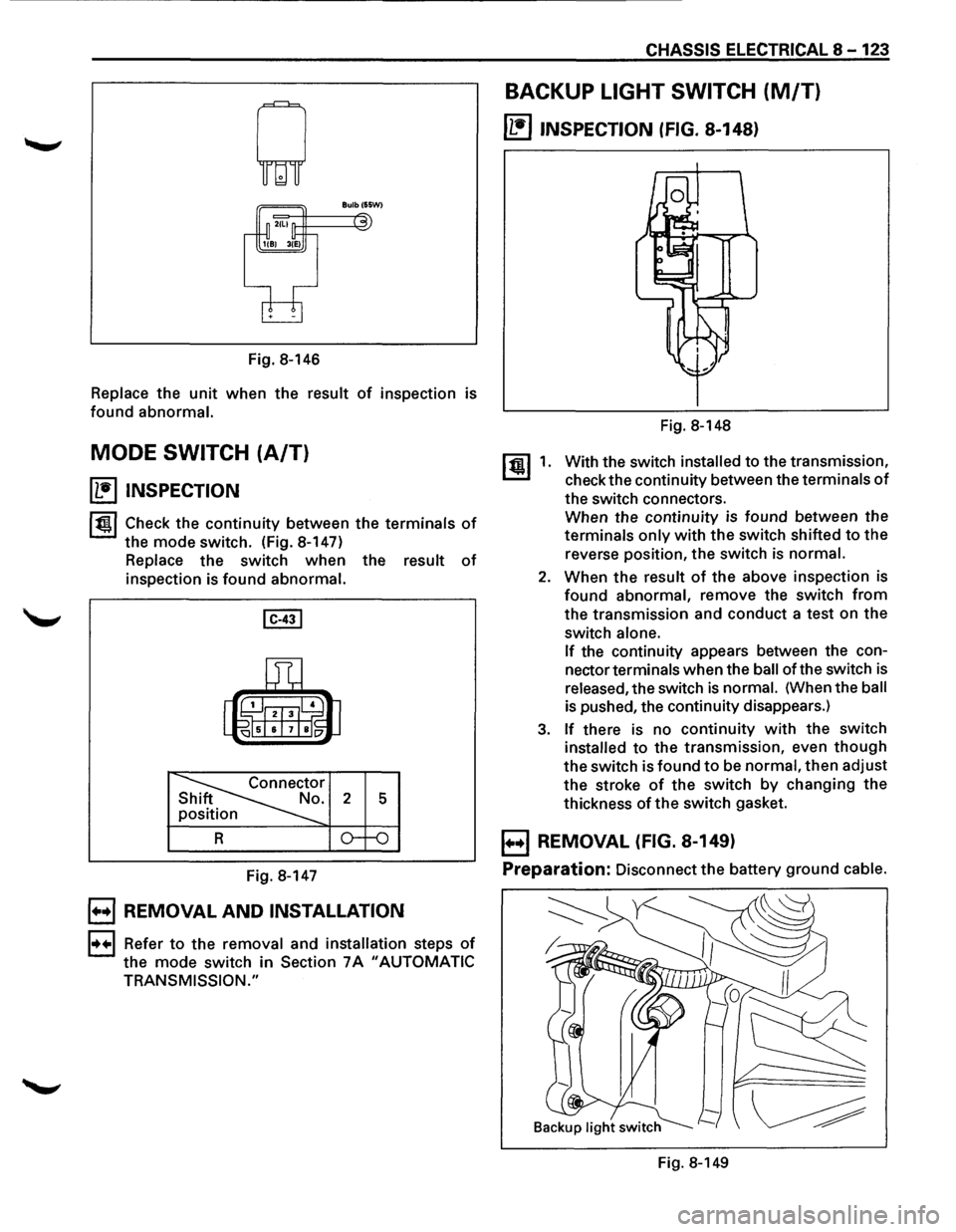
Fig. 8-146
Replace the unit when the result of inspection is
found abnormal.
MODE SWITCH (A/T)
~ INSPECTION
1~1 Check the continuity between the terminals of
the mode switch. (Fig. 8-147)
Replace the switch when the result of
inspection is found abnormal.
Fig. 8-147
B REMOVAL AND INSTALLATION
1••1 Refer to the removal and installation steps of
the mode switch in Section 7A "AUTOMATIC
TRANSMISSION."
CHASSIS ELECTRICAL 8-123
BACKUP LIGHT SWITCH (M/T)
~ INSPECTION (FIG. 8-148}
[!) 1.
Fig. 8-148
With the switch
installed to the transmission,
check the continuity between the
terminals of
the switch connectors.
When the continuity is found between the
terminals only with the switch shifted to the
reverse position, the switch
is normal.
2. When the result of the above inspection is
found abnormal, remove the switch from
the transmission and conduct a test on the
switch
alone.
If
the continuity appears between the con
nector
terminals when the ball of the switch is
released, the switch is normal. (When the ball
is pushed, the continuity disappears.)
3. If there is no continuity with the switch
installed to the transmission, even though
the switch is found to be normal, then adjust
the stroke
of the switch by changing the
thickness
of the switch gasket.
B REMOVAL (FIG. 8-149}
Preparation:
Disconnect the battery ground cable.
Fig. 8-149
Page 1314 of 1928
8-124 CHASSIS ELECTRICAL
1. Backup light switch For low note (Fig.S-151)
• Remove the connectors.
• Remove the switch by turning it counter
clockwise.
B INSTALLATION
To install, follow the removal steps in the reverse
order,
noting the following point.
1.
Backup light switch
li:i1 • Apply liquid gasket to the screw portion of
~ the switch to prevent oil leak.
BACKUP LIGHT BULB
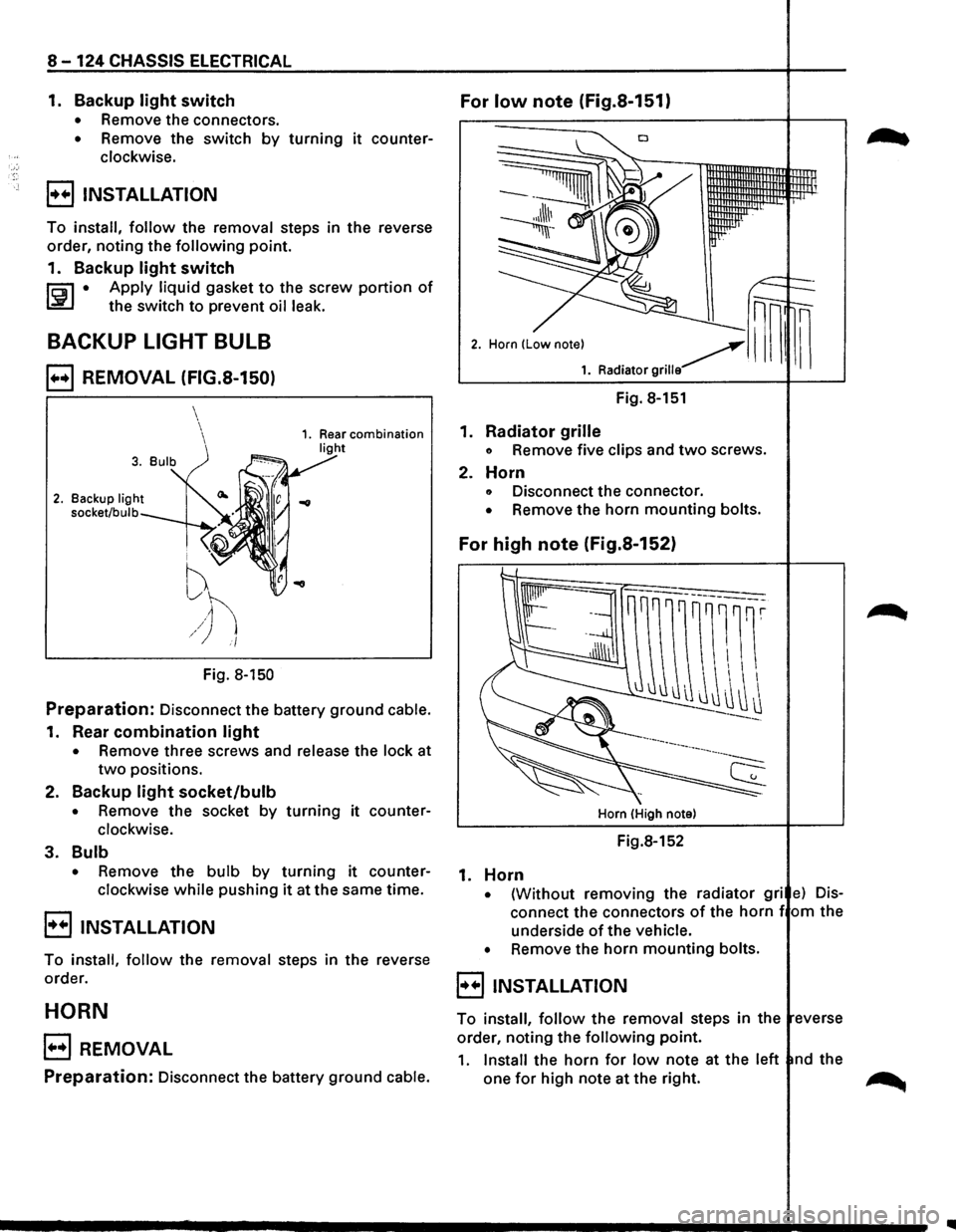
B REMOVAL (FIG.S-150)
2. Backup light
socket/bulb
i ''V
f
~h /) i/
Fig. 8-150
Preparation: Disconnect the battery ground cable.
1. Rear combination light
• Remove three screws and release the lock at
two positions.
2.
Backup light socket/bulb
• Remove the socket by turning it counter
clockwise.
3. Bulb
• Remove the bulb by turning it counter
clockwise
while pushing it at the same time.
B INSTALLATION
To install, follow the removal steps in the reverse
order.
HORN
B REMOVAL
Preparation: Disconnect the battery ground cable.
Fig. 8-151
1.
Radiator grille
o Remove five clips and two screws.
2. Horn
o Disconnect the connector.
• Remove the horn mounting bolts.
For high note (Fig.S-152)
Horn (High note)
Fig.8-152
1. Horn
• {Without removing the radiator gri e) Dis
connect the connectors of the horn f om the
underside
of the vehicle.
•
Remove the horn mounting bolts.
8 INSTALLATION
To install, follow the removal steps in the everse
order, noting the
following point.
1. Install the horn for low note at the left nd the
one
for high note at the right. ~
Page 1315 of 1928
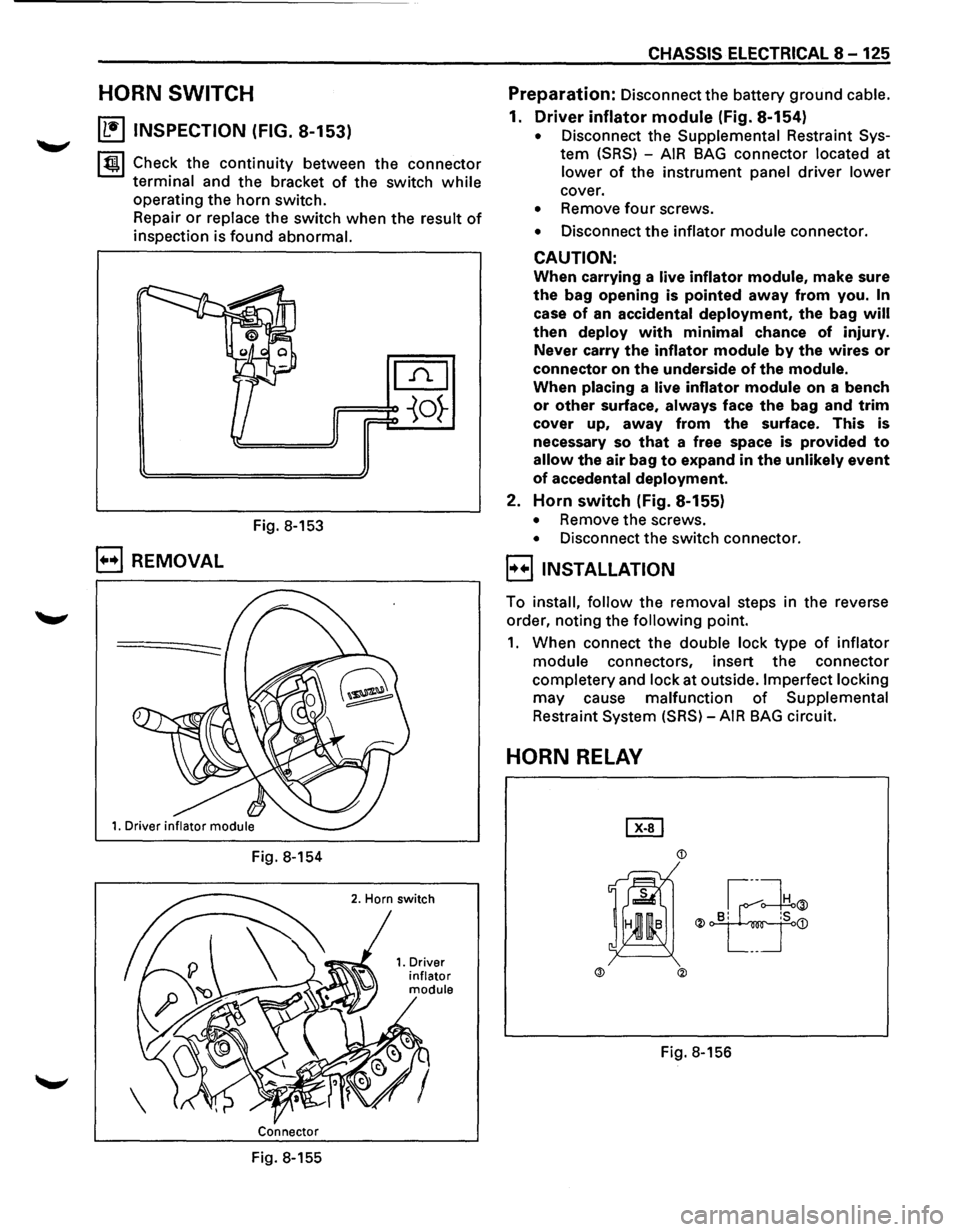
HORN SWITCH
~ INSPECTION (FIG. 8-153)
~~~ Check the continuity between the connector
terminal and the bracket of the switch while
operating the horn switch.
Repair
or replace the switch when the result of
inspection is found abnormal.
Fig. 8-153
B REMOVAL
Fig. 8-154
Connector
Fig. 8-155
CHASSIS ELECTRICAL 8-125
Preparation: Disconnect the battery ground cable.
1. Driver inflator module (Fig. 8-154)
• Disconnect the Supplemental Restraint Sys
tem (SRS) -AIR BAG connector located at
lower of the instrument panel driver lower
cover.
• Remove four screws.
• Disconnect the inflator module connector.
CAUTION:
When carrying a live inflator module, make sure
the bag opening is pointed away from you. In
case of an accidental deployment, the bag will
then deploy with minimal chance of injury.
Never carry
the inflator module by the wires or
connector on the underside of the module.
When placing a live inflator module on a bench
or other surface, always face the bag and trim
cover up, away from the surface. This is
necessary so
that a free space is provided to
allow the air bag to expand in the unlikely event
of accedental deployment.
2. Horn switch (Fig. 8-155)
• Remove the screws.
• Disconnect the switch connector.
l·u·IINSTALLATION
To install, follow the removal steps in the reverse
order, noting the
following point.
1. When connect the double lock type of inflator
module connectors, insert the connector
completery and lock at outside. Imperfect locking
may cause malfunction of Supplemental
Restraint System (SRS)-AIR BAG circuit.
HORN RELAY
Page 1316 of 1928
8-126 CHASSIS ELECTRICAL
~ INSPECTION
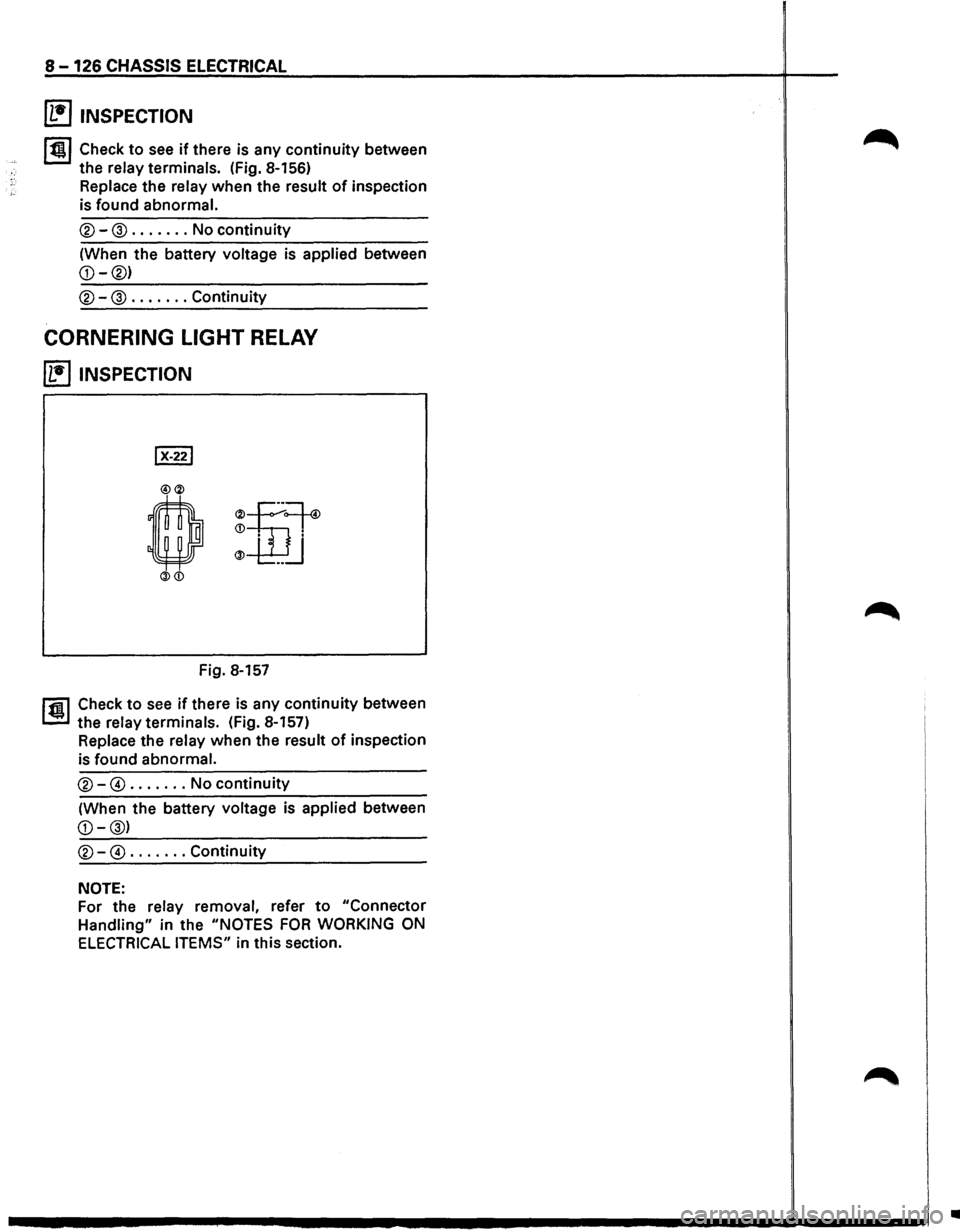
lt!ll Check to see if there is any continuity between
the
relay terminals. (Fig. 8-156)
Replace the
relay when the result of inspection
is
found abnormal.
®-@ ....... No continuity
(When the battery voltage is applied between
CORNERING LIGHT RELAY
~ INSPECTION
Fig. 8-157
r1il Check to see if there is any continuity between
1.!!!.1 the relay terminals. (Fig. 8-157)
Replace the relay when the result of inspection
is
found abnormal.
®-@ ....... No continuity
(When the battery voltage is applied between
NOTE:
For the relay removal, refer to "Connector
Handling" in the "NOTES FOR WORKING ON
ELECTRICAL ITEMS" in this section.
•
Page 1317 of 1928
CHASSIS ELECTRICAL 8-127
MEMO
Page 1318 of 1928
8-128 CHASSIS ELECTRICAL
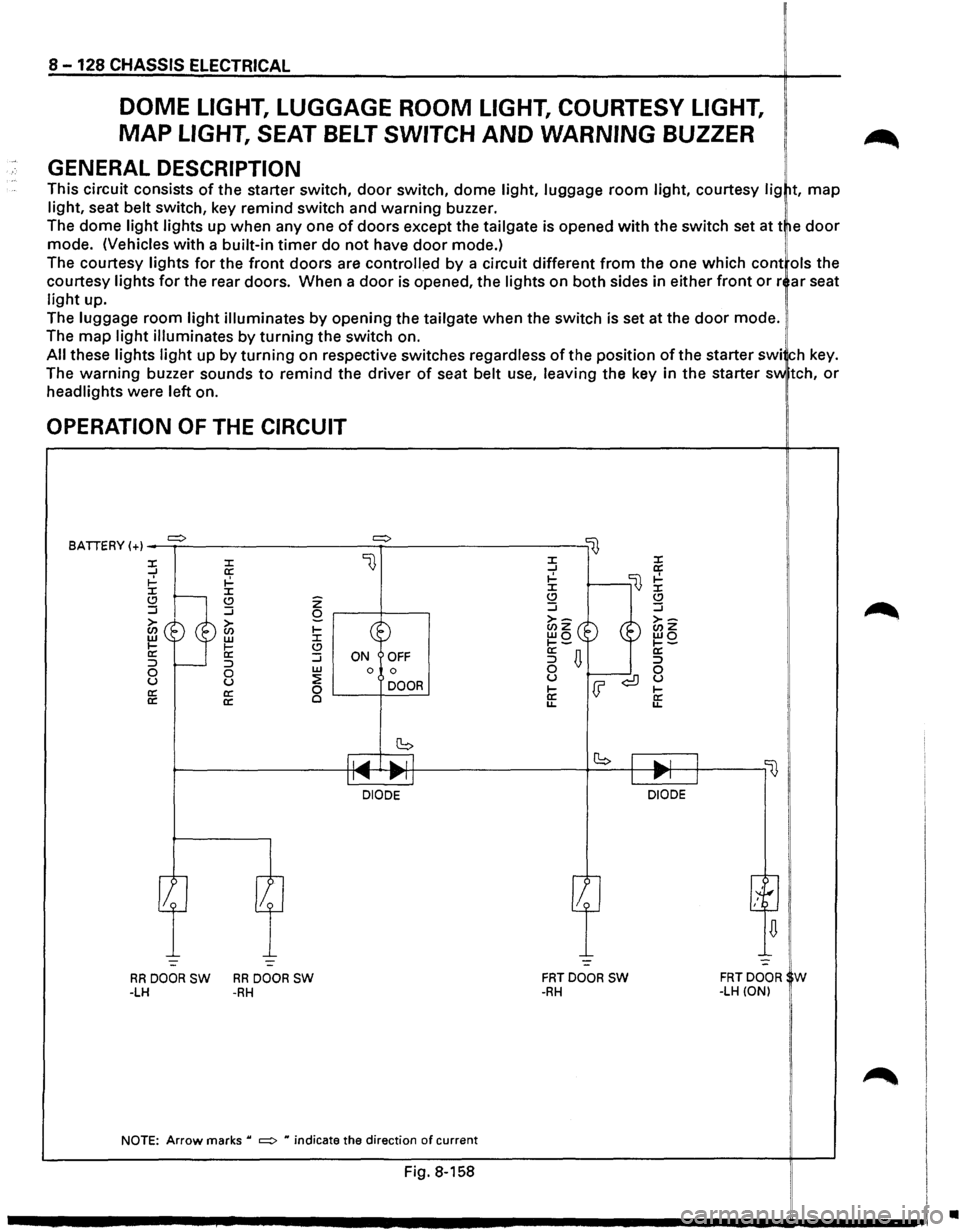
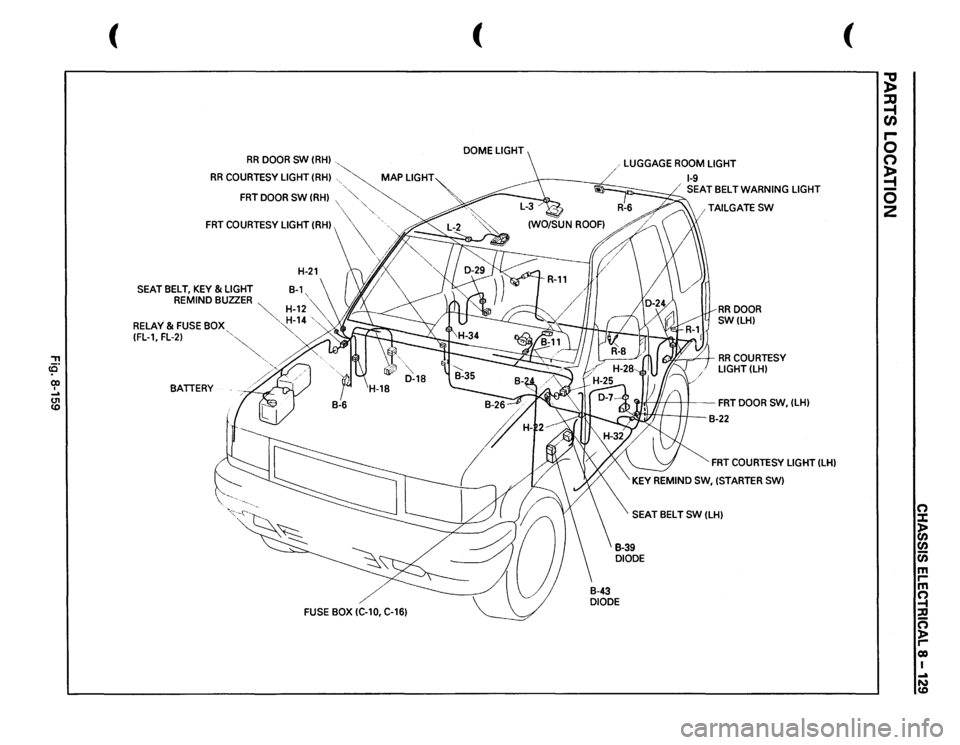
DOME LIGHT, LUGGAGE ROOM LIGHT, COURTESY LIGHT,
MAP LIGHT, SEAT BELT SWITCH AND WARNING BUZZER
GENERAL DESCRIPTION
This circuit consists of the starter switch, door switch, dome light, luggage room light, courtesy lig t, map
light, seat belt switch, key remind switch and warning buzzer.
The dome
light lights up when any one of doors except the tailgate is opened with the switch set at t e door
mode. (Vehicles with a built-in timer do not have door mode.) !
The courtesy lights for the front doors are controlled by a circuit different from the one which cont ols the
courtesy
lights for the rear doors. When a door is opened, the lights on both sides in either front or r ar seat
light up.
The
luggage room light illuminates by opening the tailgate when the switch is set at the door mode.
The
map light illuminates by turning the switch on.
All these lights light up by turning on respective switches regardless of the position of the starter swi ch key.
The
warning buzzer sounds to remind the driver of seat belt use, leaving the key in the starter sv.. tch, or
headlights were left on.
OPERATION OF THE CIRCUIT
BATIERY (+) _....,.=>..:.__ _________ =>~---------lij
l} :X: :X: ...J a: ~ ~ :X: :X: Q .....__ (.!) ...J :J
~~ ®~ II: li: :::> r----:::> 0 0 u u a: a:
a: a:
z Q r---t----,
~ Go (.!) :J w ON OFF 0 0
~ DOOR 0 '-----+------'
~----------~~~~~~~~lr-l ____________ ,_b __ +-~~~-'--~'---,~ II...... 111"""11 Ill"""' J
-:..._ -=-
RRDOORSW RRDOORSW -LH -RH
DIODE DIODE
-=
FRTDOOR SW -RH
NOTE: Arrow marks u =:> H indicate the direction of current
Fig. 8-158
FRTDOOR W -LH (ON)
•
Page 1319 of 1928
, ce· co I .... U1 co
(
RR
DOOR
SW
(RH)
, '-..__
RR
COURTESY LIGHT
(RH)
, ,
~
MAP
LIGHT~
FRT
DOOR
SW
(RH)
,
~,
~
,·
"·,.
FRT
COURTESY LIGHT (RH),
\\,
:~~ /,
' ;. >,I
H-21
(\
/~~
\,
SEAT
BELT,
KEY
&LIGHT
B-1,
REMIND BUZZER
~
""
~
H-12,""
RELAY & FUSE
BOX,
~
14
',,
(FL-1, FL-2)
'~
'
BATIERY
FUSE
BOX IC-10, C-16)
( DOME
LIGHT
/ 1 LUGGAGE
ROOM
LIGHT
1-9 SEATBELTWARNING
LIGHT
, TAILGATE
SW
/
RR
DOOR
SW(LH)
I(Y.£!
= /
I RR
COURTESY
LIGHT(LH)
~11
) I
FRT
DOOR
sw.
(LH)
-
I.
B-22
FRT
COURTESY LIGHT
(LH)
KEY
REMIND SW,
(STARTER
SW)
SEAT BELT
SW
(LH)
(
~ :lJ ~ r-0 0 ~ 0 2
0 :c 1:i en 0 m I""' m 0 -t ::0 cs )> I""' co I ...a N CD
Page 1320 of 1928
8 -130 CHASSIS ELECTRICAL
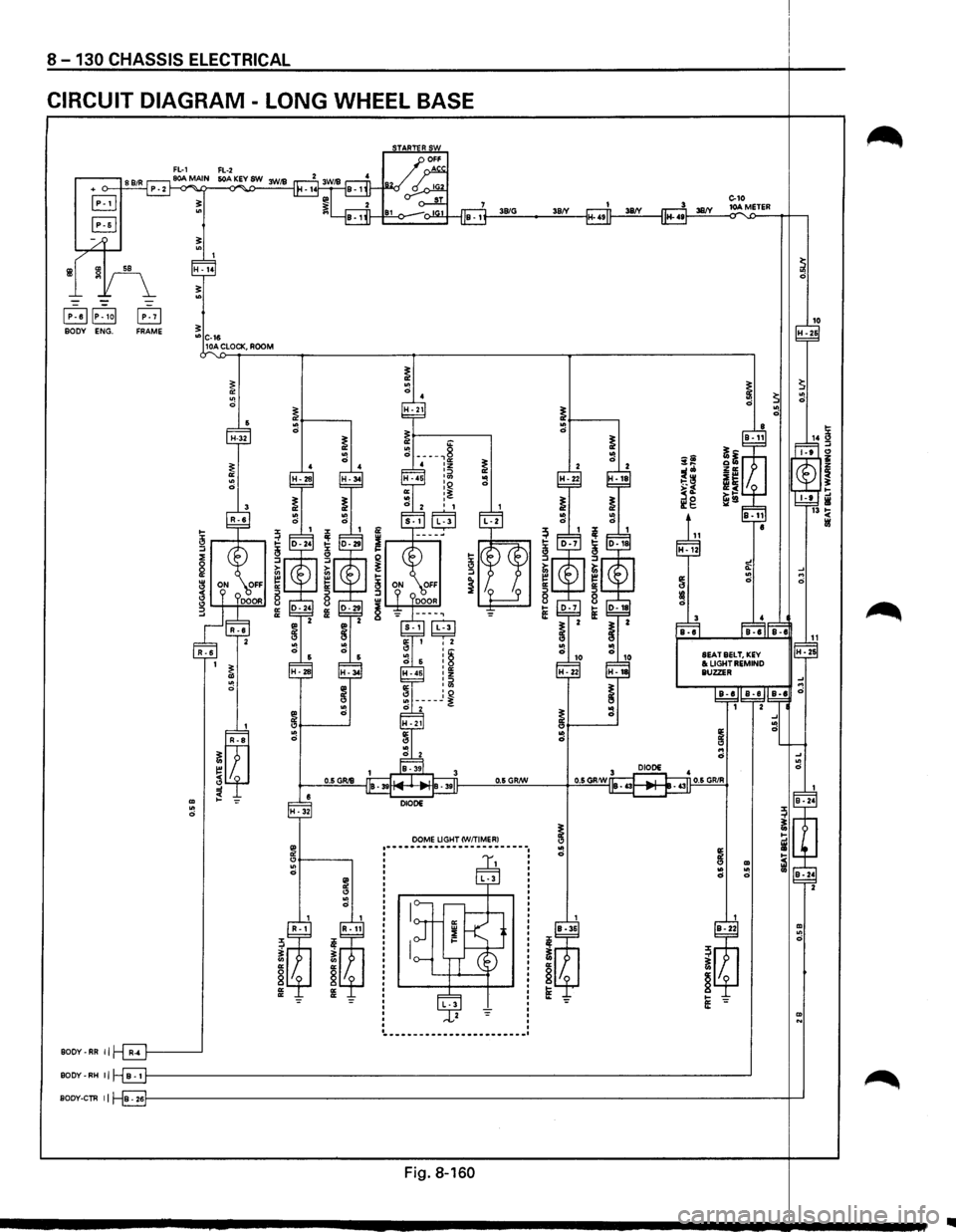
CIRCUIT DIAGRAM -LONG WHEEL BASE
39/G 38/'(
~
10 H -26
~ ~ ~ .. ~ 0 ~ .. "' 0 0 0 ~ ~ ~ .. .. 14 ~ 0
0
~ ~ ~-....
~ .. " ~ 0 il Q~ iO z :J"' Zll: ~ "! 1:':.~ -~ 0 ~"' ~ .. ~!! !:; ~g HI 13 !;( ,. til
~ 1 ,. ~ 1 'I' 1-~ iS 'i: ,.
" " ::J ::J ::J ::J a! > ~ ~ i:; .... "' ~ ~ .. .., ~ ~ 0
0 0: 0: II:
8 :::1
:::1 :::1 8 8
8 a: a: 1-tE a: " e:
~ .... ~ ~
..
~ B-1 8-8 8-1 0 .. ~ ~ ~ 0 .... "! " " i 0 .. .. 0
0 " .. 0 DIODE
0.6 GRIS 0.6 GRIW
m DIODE .. H • 32 0
DOME UGHT CW/TIMERI ~ " ~ -----------------------.. i 0 " " m .. .. .. 0
0 0 ~ " .. 0
m ..
~ ~
,. 0
~ ~ "
" " 0 §
§ ~ 8 "
" tE "
" 1-e: m N
------------------------BOOY-RR 11
BODY -RH II
80DY·CTR II
Fig. 8-160