battery location ISUZU TROOPER 1995 User Guide
[x] Cancel search | Manufacturer: ISUZU, Model Year: 1995, Model line: TROOPER, Model: ISUZU TROOPER 1995Pages: 1928
Page 1585 of 1928
---------------~-~---
CRUISE CONTROL 9B-1
SECTION 98
CRUISE CONTROL
CONTENTS
General description ................................ .
Parts location .......................................... .
Circuit diagram ....................................... .
Diagnosis ................................................. .
On-vehicle service ................................. ..
Brake switch adjustment ................ ..
Clutch switch adjustment ................ .
Actuator
cable adjustment .............. .
Starter switch ................................... .
Cruise control main switch .............. .
GENERAL DESCRIPTION
98-1
9B-3
98-4
9B-7
98-28
9B-28
9B-28
9B-28
9B-28
9B-30 Cruise
control
switch
(combination switch) ........................ 98-31
Cruise control unit .......................... ... 9B-32
Pump
& actuator .................. .............. 9B-34
Brake switch ....................................... 9B-36
Clutch switch .............................. ....... 9B-36
Mode switch .. .. .. .. .. .. .. .. .. .. .. .. .. .. .. .. .. .. .. . 9B-37
Vehicle speed sensor
(incorporated in speedometer) ......... 9B-38
Diode
.. .. .. .. .. .. . .. .. .. .. .. . .. .. .. .. .. .. .. .. .. .. . .. .. .. 9B-38
Cruise control main relay .................. 9B-39
The circuit consists of the starter switch, cruise control main switch, cruise control switch, cruise control unit,
pump &actuator, brake switch, clutch switch (M/T), mode switch (A/T), vehicle speed sensor (incorporated into
the speedometer) and indicator light.
The cruise control keeps
the vehicle running at a fixed speed until a signal canceling this fixed speed is received.
When the main switch "AUTO CRUISE" is turned on with the vehicle in the running mode, the battery voltage
is applied
to the control unit. When a signal from the control switch is input to the control unit while the vehicle
is in this state, the cruise control actuator is activated to operate the system .
.._, Also, while the system is operating, the "AUTO CRUISE" indicator light in the indicator box lights up.
1. SET /COAST SWITCH FUNCTION
1) SET function: When the SET/COAST switch
is pressed and released
with the main switch
on, the speed at
which the vehicle is running
at that moment is stored in the memory, and
the vehicle
automatically runs at the speed
stored.
2) COAST-DOWN function: When the SET/
COAST switch is kept on while the vehicle in
running, the vehicle decelerates
during that
time. The speed at which vehicle is running
when the control switch is turned off is stored
in the
memory, and the vehicle automatically
returns
to the stored speed.
3) Tap-down function: When the SET/COAST
switch is turned on and off instantaneously
while the vehicle is running, the vehicle decel
erates a mile for each on/off operation. The
vehicle speed at
which the vehicle was run
ning when the SET/COAST was turned off last
is stored in the
memory, and the vehicle auto
matically returns to this stored speed.
2. RESUME/ ACCEL SWITCH FUNC
TION
1) Resume function: When the RESUME/
ACCEL switch is turned
on/off after the system
is
temporarily deactivated by pressing the
brake or clutch pedal while the vehicle is
running,
the vehicle resumes. The speed
stored before the system
was released.
2) Accelerate function: When the RESUME/
ACCEL switch is kept on after the system is
released completely, the vehicle accelerates
its speed
during that time. The vehicle speed
at
which the vehicle was running when the
switch
was turned off is stored in the memory,
and the vehicle automatically returns to this
speed.
3) Tap-up function: When the RESU ME/ACCEL
switch is
turned on and off instantaneously
while the vehicle is running, the vehicle decel
erates a mile for each on/off operation. The
vehicle speed at
which the vehicle was run
ning when the switch was turned off last is
stored in the
memory, and the vehicle auto
matically returns to this stored speed.
Page 1641 of 1928
'"""' Supplemental Restraint System 9J-17
3. Short the two SRS deployment harness leads
together by fully seating one banana plug into the
other. SRS deployment harness shall remain
shorted and not be connected to a power source until
the air bag is to
be deployed.
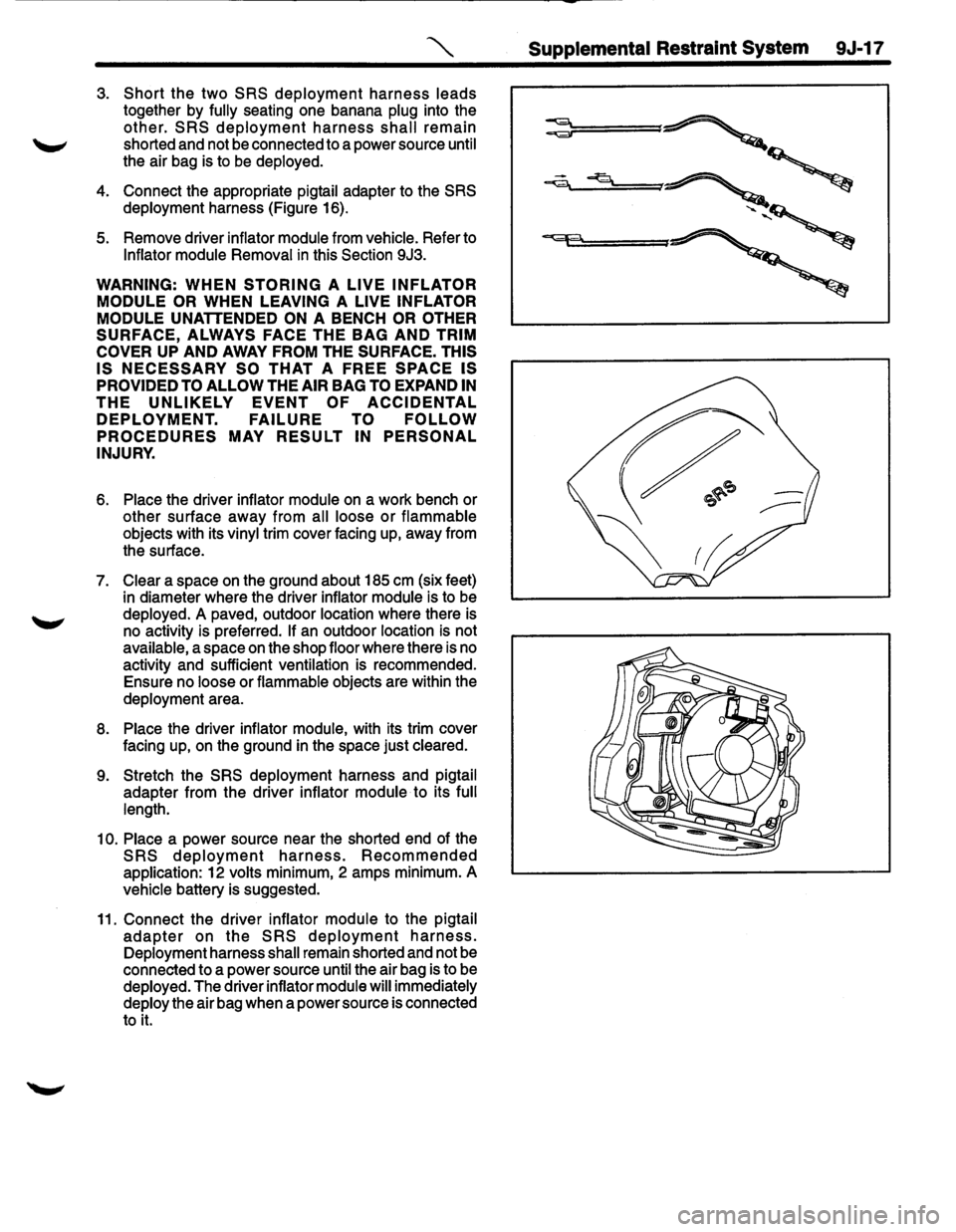
4. Connect the appropriate pigtail adapter to the SRS
deployment harness (Figure 16).
5. Remove driver inflator module from vehicle. Refer to
Inflator module Removal in this Section 9J3.
WARNING: WHEN STORING A LIVE INFLATOR
MODULE OR
WHEN LEAVING A LIVE INFLATOR
MODULE
UNATTENDED ON A BENCH OR OTHER
SURFACE, ALWAYS FACE THE BAG AND TRIM
COVER
UP AND AWAY FROM THE SURFACE. THIS
IS NECESSARY SO THAT A FREE SPACE IS
PROVIDED TO ALLOW THE AIR BAG TO EXPAND IN
THE UNLIKELY EVENT OF ACCIDENTAL
DEPLOYMENT. FAILURE TO FOLLOW
PROCEDURES MAY RESULT IN PERSONAL
INJURY.
6. Place the driver inflator module on a work bench or
other surface away from all loose
or flammable
objects with its vinyl trim cover facing up, away from
the surface.
7. Clear a space on the ground about 185 em (six feet)
in diameter where the driver inflator module is to be
deployed.
A paved, outdoor location where there is
no activity is preferred.
If an outdoor location is not
available, a space
on the shop floor where there is no
activity and sufficient ventilation is recommended.
Ensure no loose or flammable objects are within the
deployment area.
8. Place the driver inflator module, with its trim cover
facing up,
on the ground in the space just cleared.
9. Stretch the SRS deployment harness and pigtail
adapter from the driver inflator module to its full
length.
10. Place a power source near the shorted end of the
SRS deployment harness. Recommended
application: 12 volts minimum, 2 amps minimum. A
vehicle battery is suggested.
11. Connect the driver inflator module to the pigtail
adapter on the SRS deployment harness.
Deployment harness shall remain shorted and not be
connected to a power source until the air bag is to be
deployed. The driver inflator module will immediately
deploy the air bag when a power source is connected
to
it.
Page 1644 of 1928
9J-20 Supplemental Restraint SysteA
~----------------------------------~
--
=======C.pp=::::J
============~~ 'r;;;;r=
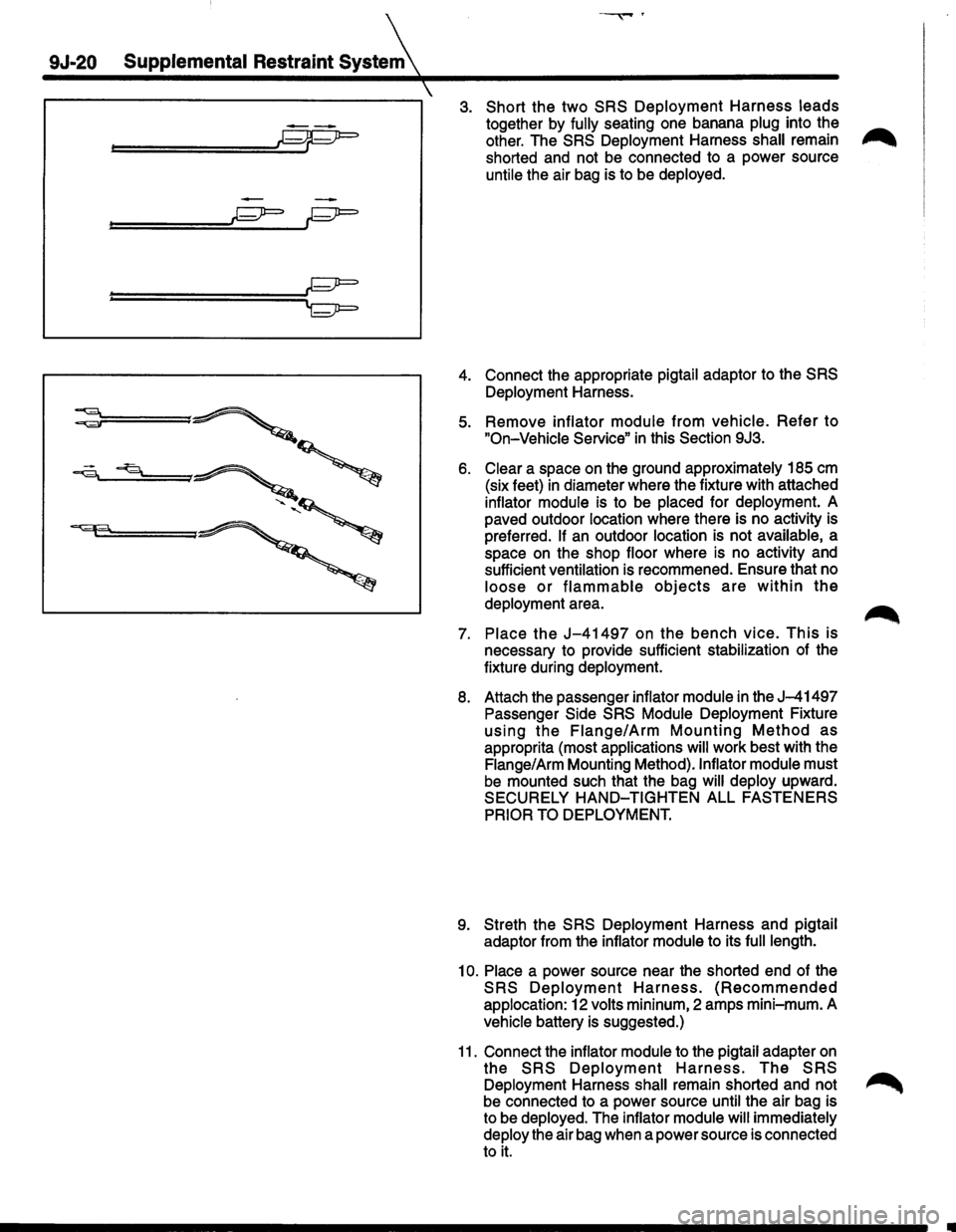
3. Short the two SRS Deployment Harness leads
together by fully seating one banana plug into the ..-.,.
other. The SRS Deployment Harness shall remain ,..,......
shorted and not be connected to a power source
untile the air bag is to be deployed.
4. Connect the appropriate pigtail adaptor to the SRS
Deployment Harness.
5. Remove inflator module from vehicle. Refer to
"On-Vehicle Service" in this Section 9J3.
6. Clear a space on the ground approximately 185 em
(six feet) in diameter where the fixture with attached
inflator module is to be placed for deployment. A
paved outdoor location where there is no activity is
preferred.
If an outdoor location is not available, a
space on the shop floor where is no activity and
sufficient ventilation is recommened. Ensure that no
loose or flammable objects are within the
deployment area.
7. Place the J-41497 on the bench vice. This is
necessary to provide sufficient stabilization of the
fixture during deployment.
8. Attach the passenger inflator module in the J-41497
Passenger Side SRS Module Deployment Fixture
using the Flange/Arm Mounting Method as
approprita (most applications will work best with the
Flange/Arm Mounting Method).lnflator module must
be mounted such that the bag will deploy upward.
SECURELY
HAND-TIGHTEN ALL FASTENERS
PRIOR TO DEPLOYMENT.
9. Streth the SRS Deployment Harness and pigtail
adaptor from the inflator module to its
full length.
10. Place a power source near the shorted end of the
SRS Deployment Harness. (Recommended
applocation: 12 volts mininum, 2 amps mini-mum. A
vehicle battery is suggested.)
11. Connect the inflator module to the pigtail adapter on
the SRS Deployment Harness. The SRS
Deployment Harness shall remain shorted and not ~
be connected to a power source until the air bag is
to be deployed. The inflator module
will immediately
deploy the air bag when a power source is connected
to it.
Page 1792 of 1928
1o-34 BODY
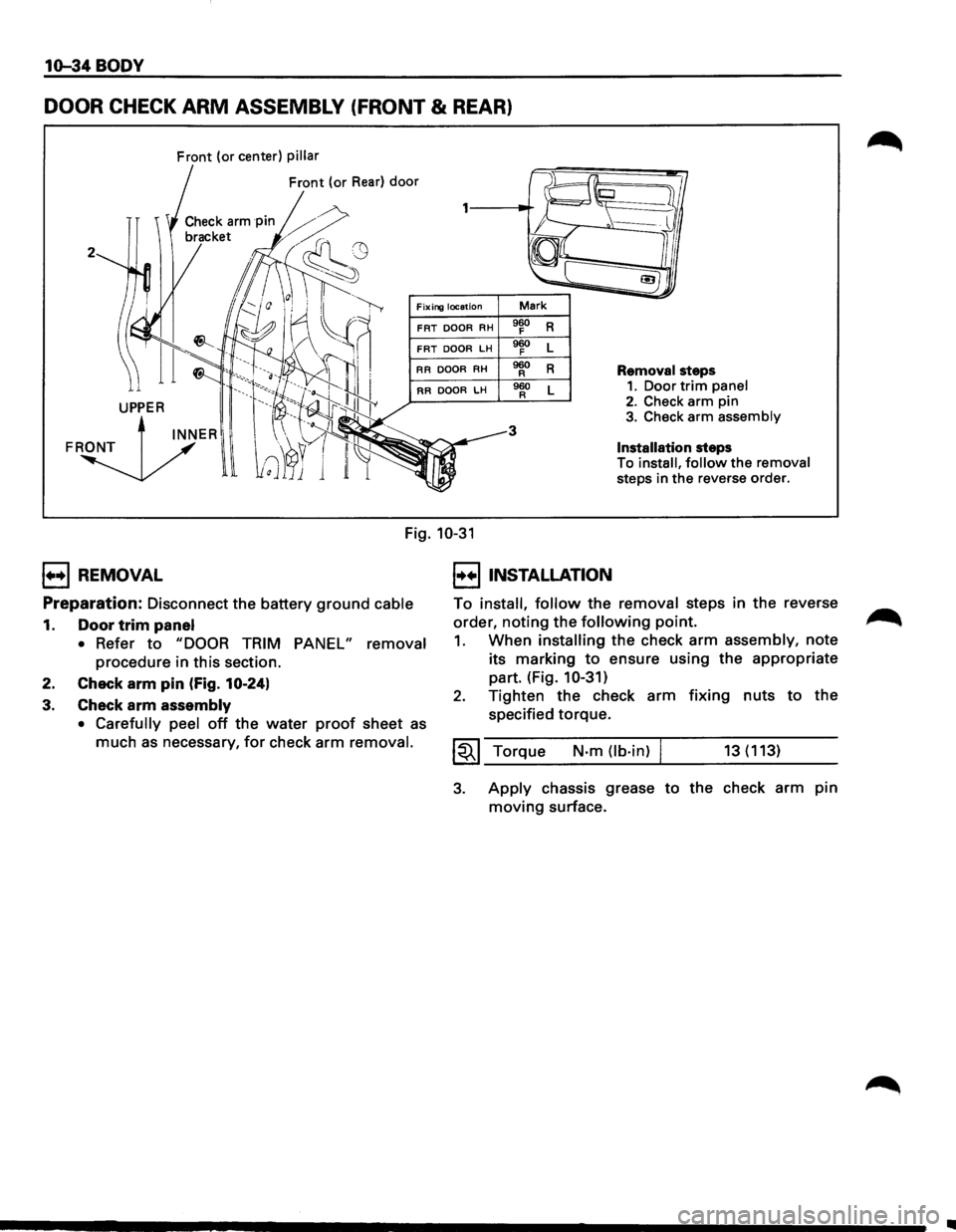
DOOR CHECK ARM ASSEMBLY (FRONT & REAR)
Front (or center) pillar
Front (or Rear) door
2
Fixing location Mark
FRT DOOR RH 960 R F
FRT DOOR LH 960 L F
RR
DOOR RH 960 R R Removal steps
RR DOOR LH 960 L R 1. Door trim panel
3
2. Check arm pin 3. Check arm assembly
Installation steps
To
install, follow the removal
steps in
the reverse order.
Fig. 10-31
1++1 REMOVAL
Preparation:
Disconnect the battery ground cable
1. Door trim panel
• Refer to "DOOR TRIM PANEL" removal
procedure in this section.
2. Check
arm pin (Fig. 10-24)
3. Check arm assembly
• Carefully peel off the water proof sheet as
much as necessary, for check arm removal.
I••IINSTALLATION
To install, follow the removal steps in the reverse
order,
noting the following point.
1. When installing the check arm assembly, note
its marking
to ensure using the appropriate
part. (Fig.
10-31)
2. Tighten the check arm fixing nuts to the
specified torque.
~~~ Torque N-m (lb·in) I 13(113)
3. Apply chassis grease to the check arm pin
moving surface.
..
Page 1845 of 1928
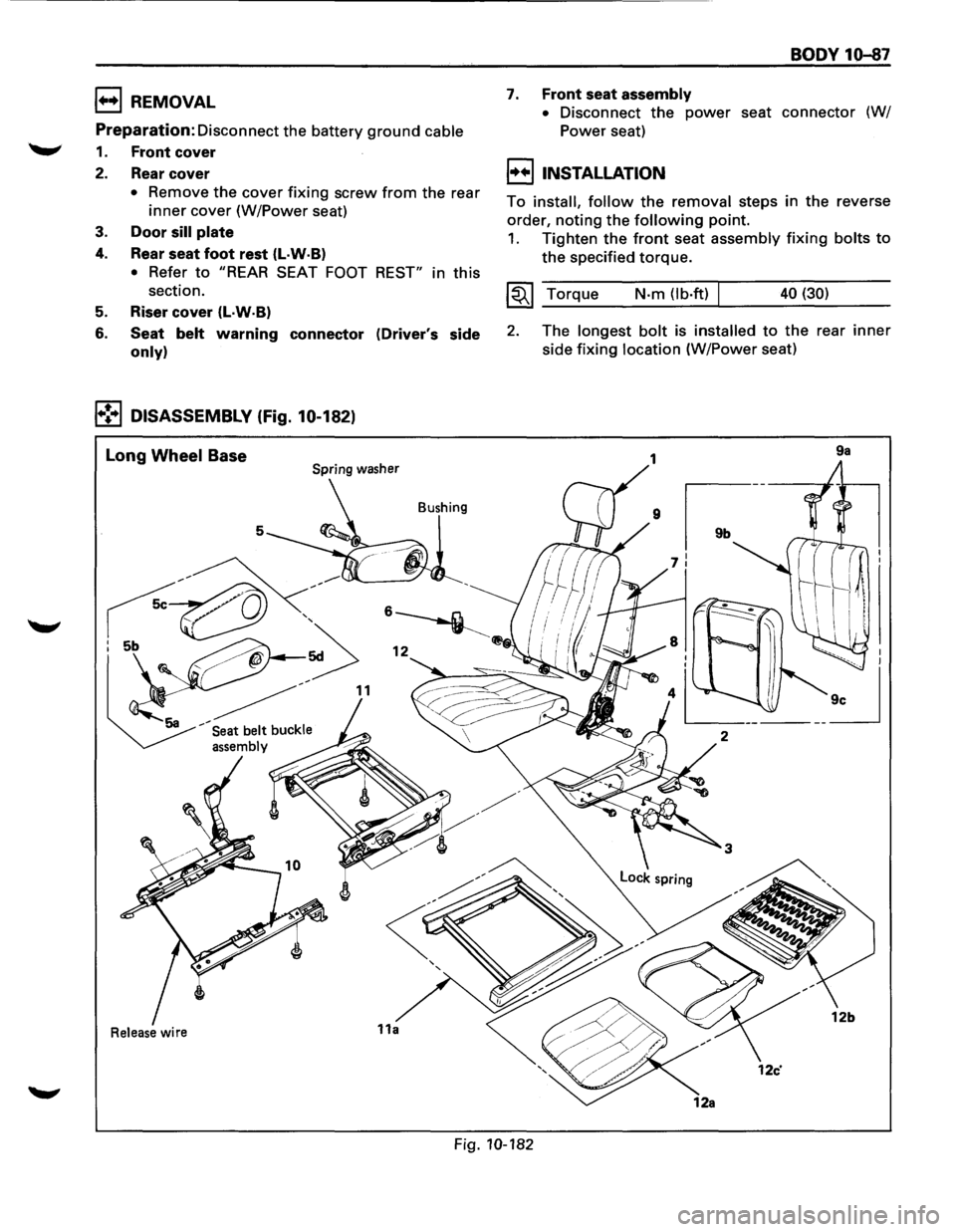
1++1 REMOVAL
Preparation:
Disconnect the battery ground cable
1. Front cover
2. Rear cover
• Remove the cover fixing screw from the rear
inner cover (W/Power seat)
3. Door sill plate
4. Rear seat foot rest (l·W·B)
• Refer to "REAR SEAT FOOT REST" in this
section.
5. Riser cover (L·W·B)
6. Seat belt warning connector (Driver's side
only)
1•!•1 DISASSEMBLY (Fig. 10-182)
Long Wheel Base Spring washer
Bushing
5
Release wire
BODY 10-87
7. Front seat assembly
•
Disconnect the power seat connector (W/
Power seat)
I++IINSTALLATION
To install, follow the removal steps in the reverse
order,
noting the following point.
1. Tighten the front seat assembly fixing bolts to
the specified torque.
~~~ Torque N-m (lb·ft) 40 (30)
2. The longest bolt is installed to the rear inner
side fixing location (W/Power seat)
9a
Fig. 10-182