battery JAGUAR XJ6 1994 2.G Repair Manual
[x] Cancel search | Manufacturer: JAGUAR, Model Year: 1994, Model line: XJ6, Model: JAGUAR XJ6 1994 2.GPages: 521, PDF Size: 17.35 MB
Page 307 of 521

Body Components & Trim
0 13.8.1 1 Front Seat Belt Buckle Unit, Renew
. Disconnect vehicle battery ground lead.
. Remove the front seat cushion.
. Disconnect cable connector and remove cable into seat
frame.
. Remove securing bolt, buckle unit and wavy washer.
. To refit, carry out reversal of the above procedure.
13.8.12 Front Seat Belt, Renew
. Position the front seat for access.
. Disconnect vehicle battery ground lead.
. Release 'B' post upper trim and belt aperture cover.
. Remove cover from seat belt upper fixing.
. Removeseat belt upper fixing and releaseseat belt anchor
. Lower the upper trim pad with seat belt onto the seat.
Remove 'B' post lower trim.
. Remove seat belt lower fixing, disconnect anchor plate
and remove wavy washer.
. Release upper trim pad from seat belt. Remove upper
guide fixings at 'B' post.
. Remove seat belt reel fixings and remove reel and belt as- sem bly.
. Refit seat cushion.
Secure seat belt reel to the specified torque.
Fit and secure upper guide plate to 'B' post.
Pass the seat belt through the upper trim pad.
. Fit wavy washerto lower anchor,fit lower anchor plate and
. Refit lower 'B' post trim panel.
. Refit upper 'B' post trim panel.
from
height adjuster; remove wavy washer.
0
nut; tighten to specified torque.
Place wavy washer
on height adjuster stud, fit belt upper
anchor and nut; tighten to specified torque.
. Fit plastic cover and split finisher.
13.8.13 Rear Inertia Seat Belt, Renew
= Remove seat cushion, rear seat squab and rear parcel tray.
. Remove foam pad from rear shelf and remove seat belt
. Remove buckle assembly, washers and spacers.
. Remove side seat belt buckle and the lower anchorage
. Move the belt aside and remove the upper spacer.
Remove theseat belt bracket/ body fixing and remove reel
= Remove seat belt reel / securing bracket fixings.
. Remove the reel and belt assembly.
. To refit, carry out reversal of the above procedure.
0 buckle bolt.
belt.
/ bracket assembly.
m
Issue 1 August 1994 52 X300 VSM ~~
Page 314 of 521
Climate Control Systems
14.1 WORKING PRACTICES
14.1.1 General
o Be aware of, and comply with all health and safety requirements, whether they be legislative or common sense.
This applies to conditions set both for the operator and workshop.
o Before commencing any repair or service procedure, disconnect the vehicle battery ground connection and
protect the vehicle where appropriate, from dirt or damage.
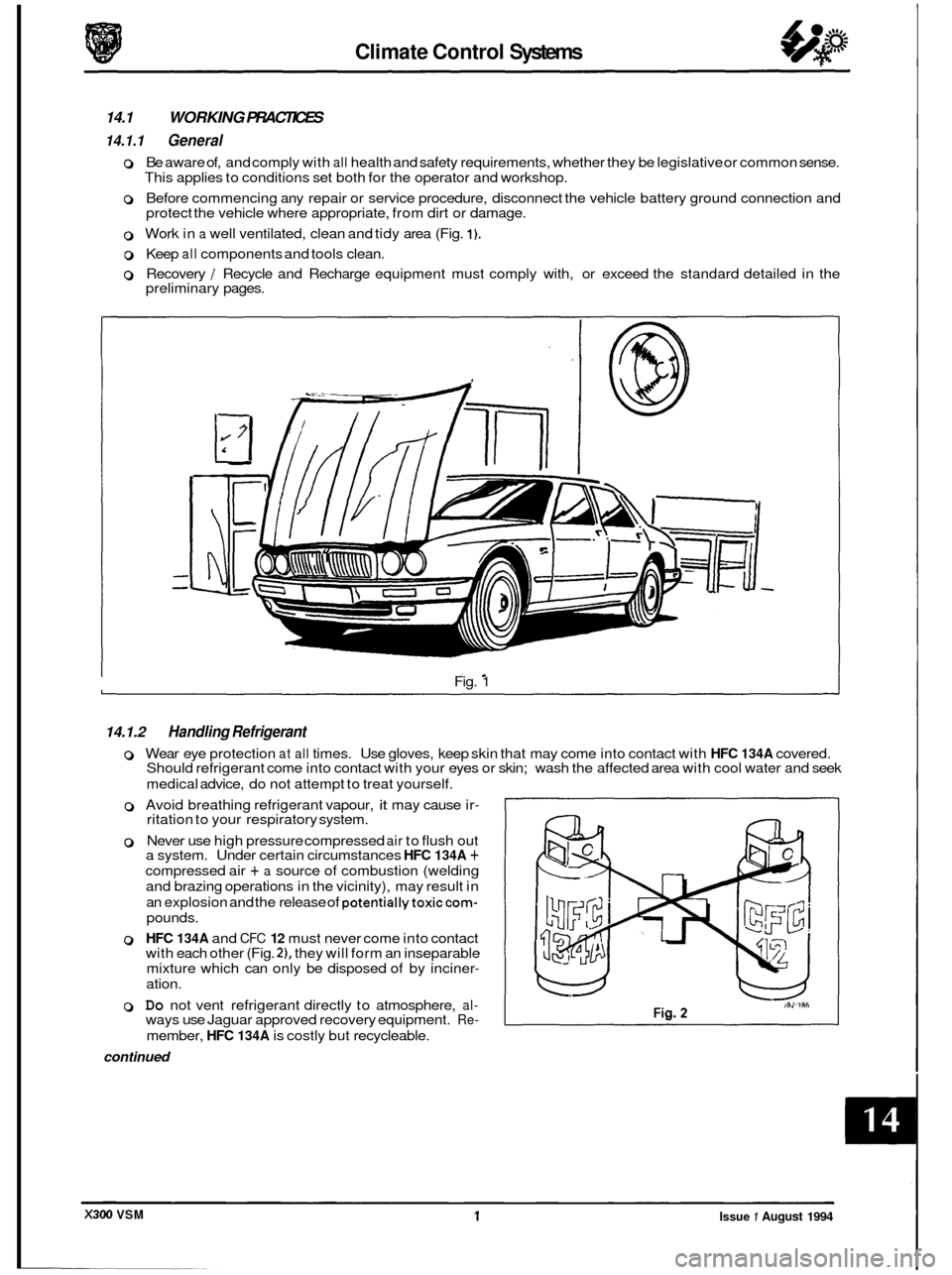
0 Work in a well ventilated, clean and tidy area (Fig. 1).
0 Keep all components and tools clean.
0 Recovery / Recycle and Recharge equipment must comply with, or exceed the standard detailed in the
preliminary pages.
Fig.
1
14.1.2 Handling Refrigerant
0 Wear eye protection at all times. Use gloves, keep skin that may come into contact with HFC 134A covered.
Should refrigerant come into contact with your eyes or skin; wash the affected area with cool water and seek
medical advice, do not attempt to treat yourself.
o Avoid breathing refrigerant vapour, it may cause ir- ritation to your respiratory system.
0 Never use high pressure compressed air to flush out
a system. Under certain circumstances HFC 134A +
compressed air + a source of combustion (welding
and brazing operations in the vicinity), may result in
an explosion and the release
of potentiallytoxiccom-
pounds.
0 HFC 134A and CFC 12 must never come into contact
with each other (Fig. 21, they will form an inseparable
mixture which can only be disposed of by inciner
-
ation.
0 Do not vent refrigerant directly to atmosphere, al- ways use Jaguar approved recovery equipment. Re-
member, HFC 134A is costly but recycleable.
continued
1 Issue 1 August 1994 X300 VSM
Page 325 of 521
Climate Control Systems
14.8 REFRIGERATION CYCLE:
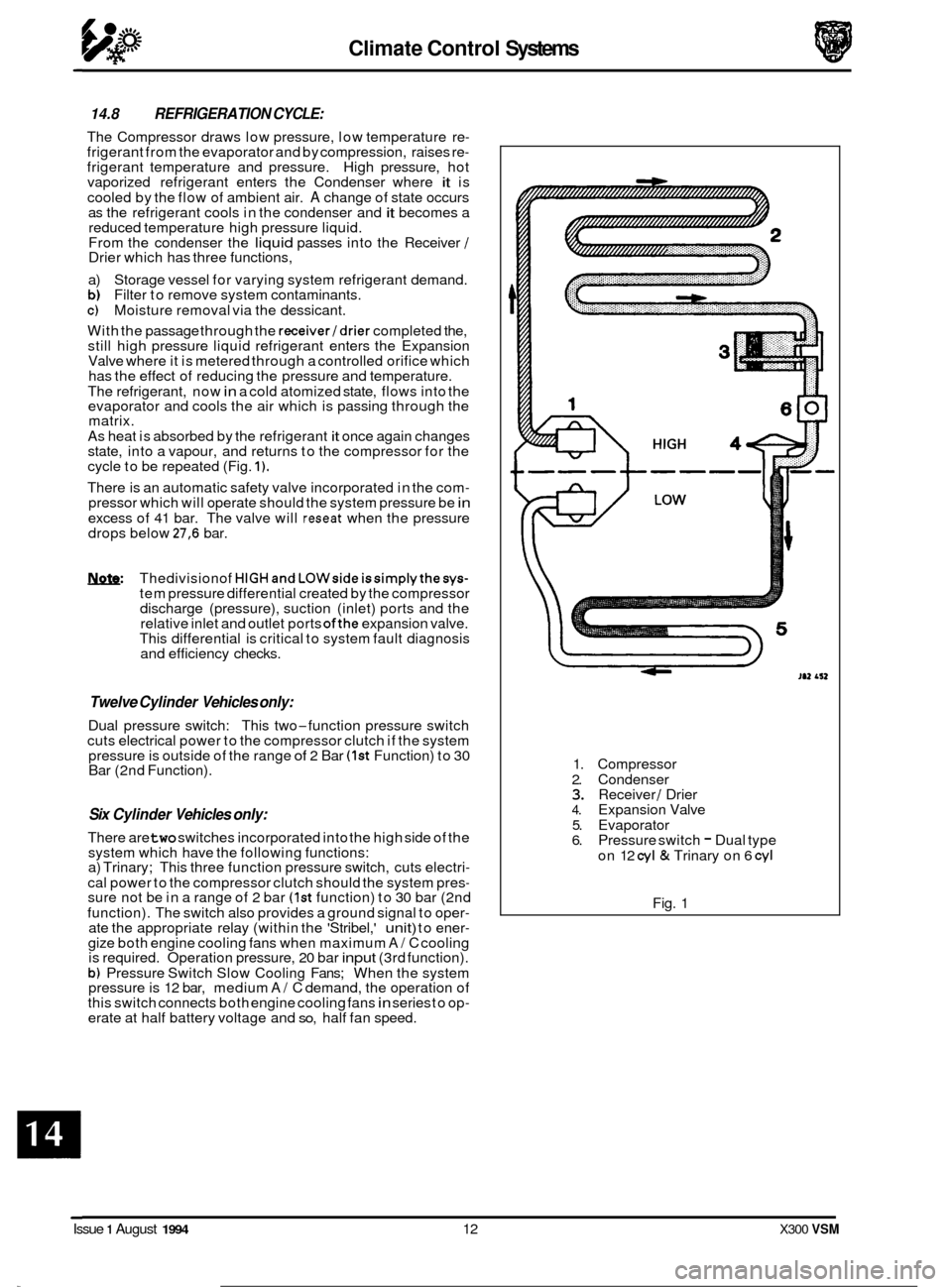
The Compressor draws low pressure, low temperature re- frigerant from the evaporator and by compression, raises re- frigerant temperature and pressure. High pressure, hot
vaporized refrigerant enters the Condenser where it is
cooled by the flow of ambient air.
A change of state occurs
as the refrigerant cools in the condenser and it becomes a
reduced temperature high pressure liquid.
From the condenser the
liquid passes into the Receiver / Drier which has three functions,
a) Storage vessel for varying system refrigerant demand.
b) Filter to remove system contaminants. c) Moisture removal via the dessicant.
With the passage through the
receiver/drier completed the,
still high pressure liquid refrigerant enters the Expansion
Valve where it is metered through a controlled orifice which
has the effect of reducing the pressure and temperature.
The refrigerant, now
in a cold atomized state, flows into the
evaporator and cools the air which is passing through the
matrix.
As heat is absorbed by the refrigerant
it once again changes
state, into a vapour, and returns to the compressor for the
cycle to be repeated (Fig.
1).
There is an automatic safety valve incorporated in the com- pressor which will operate should the system pressure be in
excess of 41 bar. The valve will reseat when the pressure
drops below 27,6 bar.
W Thedivisionof HIGHandLOWsideissimplythesys- tem pressure differential created by the compressor
discharge (pressure), suction (inlet) ports and the
relative inlet and outlet ports
ofthe expansion valve.
This differential is critical to system fault diagnosis
and efficiency checks.
Twelve Cylinder Vehicles only:
Dual pressure switch: This two-function pressure switch
cuts electrical power to the compressor clutch if the system
pressure is outside of the range
of 2 Bar (1st Function) to 30
Bar (2nd Function).
Six Cylinder Vehicles only:
There are two switches incorporated into the high side of the
system which have the following functions:
a) Trinary; This three function pressure switch, cuts electri
-
cal power to the compressor clutch should the system pres- sure not be in a range of 2 bar (1st function) to 30 bar (2nd
function). The switch also provides a ground signal to oper
- ate the appropriate relay (within the 'Stribel,' unit) to ener- gize both engine cooling fans when maximum A/ C cooling
is required. Operation pressure, 20 bar input (3rd function).
b) Pressure Switch Slow Cooling Fans; When the system
pressure is 12 bar, medium A/ C demand, the operation of
this switch connects both engine cooling fans in series to op- erate at half battery voltage and so, half fan speed. 1.
Compressor
2. Condenser
3. Receiver / Drier 4. Expansion Valve
5. Evaporator
6. Pressure switch - Dual type
on 12
cyl & Trinary on 6 cyl
Fig. 1
0
0
Issue 1 August 1994 12 X300 VSM
Page 338 of 521
Electrical cl
.
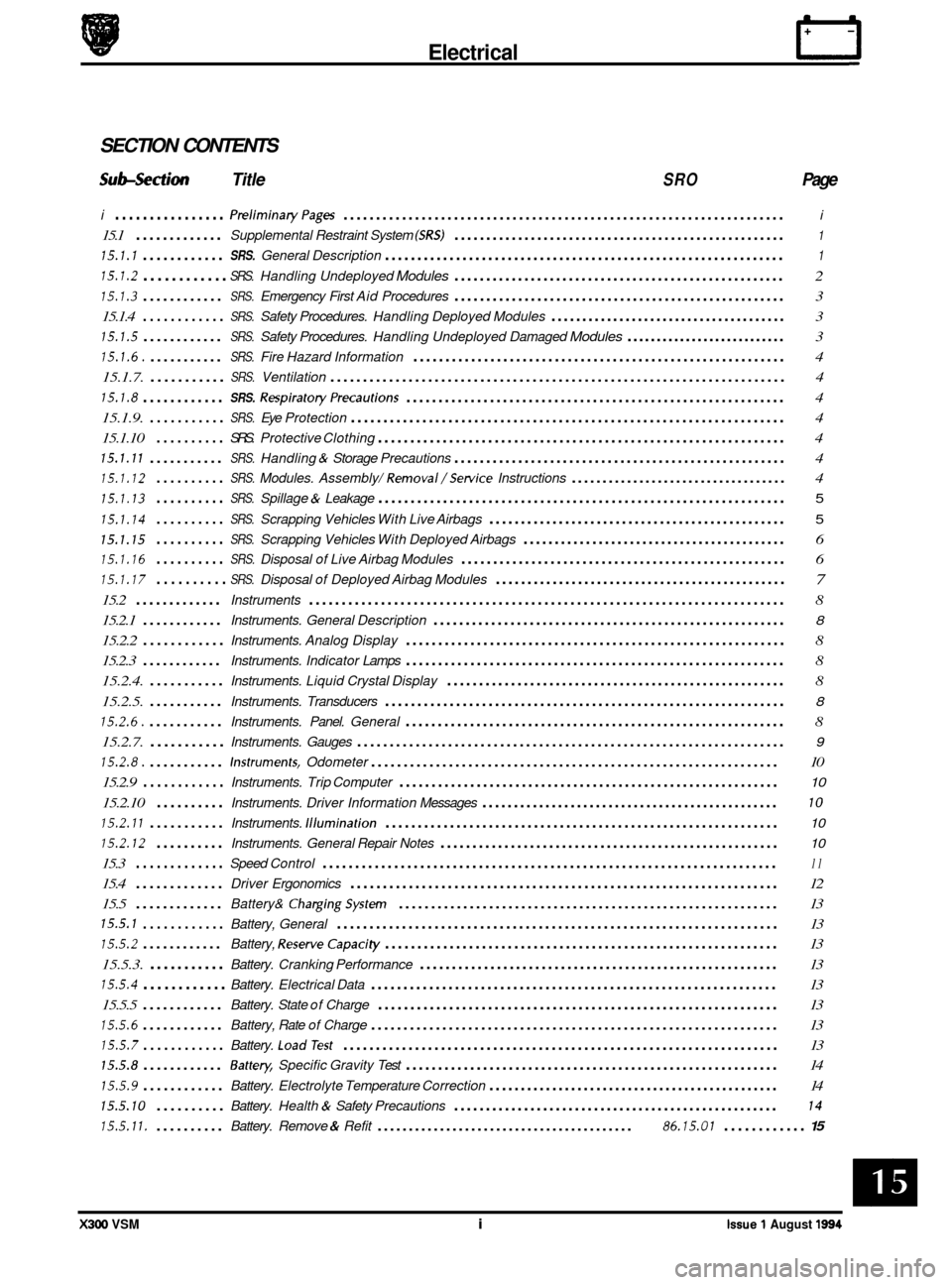
SECTION CONTENTS
Subsection Title SRO Page
i ................ PreliminaryPages .................................................................... i
15.1 ............. Supplemental Restraint System (SRS) .................................................... 1
15.1.1 ............ SRS. General Description .............................................................. 1
15.1.2 ............ SRS. Handling Undeployed Modules .................................................... 2
15.1.3 ............ SRS. Emergency First Aid Procedures .................................................... 3
15.1.4
............ SRS. Safety Procedures. Handling Deployed Modules ...................................... 3
15.1.5 ............ SRS. Safety Procedures. Handling Undeployed Damaged Modules ........................... 3
15.1.6. ........... SRS. Fire Hazard Information .......................................................... 4
15.1.7.
........... SRS. Ventilation ...................................................................... 4
15.1.8 ............ SRS. RespiratoryPrecautions ........................................................... 4
15.1.9.
........... SRS. Eye Protection ................................................................... 4
15.1.10
.......... SRS. Protective Clothing ............................................................... 4
15.1.11 ........... SRS. Handling & Storage Precautions .................................................... 4
15.1.12 .......... SRS. Modules. Assembly/ Removal/Setvice Instructions ................................... 4
15.1.13 .......... SRS. Spillage & Leakage ............................................................... 5
15.1.14 .......... SRS. Scrapping Vehicles With Live Airbags ............................................... 5
15.1.15 .......... SRS. Scrapping Vehicles With Deployed Airbags .......................................... 6
15.1.16 .......... SRS. Disposal of Live Airbag Modules ................................................... 6
15.1.17 .......... SRS. Disposal of Deployed Airbag Modules .............................................. 7
15.2 ............. Instruments ........................................................................\
. 8
15.2.1
............ Instruments. General Description ....................................................... 8
15.2.2 ............ Instruments. Analog Display ........................................................... 8
15.2.3
............ Instruments. Indicator Lamps ........................................................... 8
15.2.4.
........... Instruments. Liquid Crystal Display ..................................................... 8
15.2.5.
........... Instruments. Transducers .............................................................. 8
15.2.6. ........... Instruments. Panel. General ........................................................... 8
15.2.7.
........... Instruments. Gauges .................................................................. 9
15.2.8. ........... Instruments. Odometer ............................................................... 10
15.2.9
............ Instruments. Trip Computer ........................................................... 10
15.2.10 .......... Instruments. Driver Information Messages ............................................... 10
15.2.11 ........... Instruments. Illumination ............................................................. 10
15.2.12 .......... Instruments. General Repair Notes ..................................................... 10
15.3 ............. Speed Control ...................................................................... 11
15.4 ............. Driver Ergonomics .................................................................. 12
15.5
............. Battery& ChargingSystem ........................................................... 13
15.5.1 ............ Battery, General .................................................................... 13
15.5.2 ............ Battery, ReserveCapaci ty ............................................................. 13
15.5.3.
........... Battery. Cranking Performance ........................................................ 13
15.5.4 ............ Battery. Electrical Data ............................................................... 13
15.5.5
............ Battery. State of Charge .............................................................. 13
15.5.6 ............ Battery, Rate of Charge ............................................................... 13
15.5.7 ............ Battery. LoadTest ................................................................... 13
15.5.8 ............ Battey. Specific Gravity Test .......................................................... 14
15.5.9 ............ Battery. Electrolyte Temperature Correction .............................................. 14
15.5.10 .......... Battery. Health & Safety Precautions ................................................... 14
15.5.11. .......... Battery. Remove & Refit ......................................... 86.15.01 ............ 15
e
e
X300 VSM i Issue 1 August 1994
Page 339 of 521
rl Electrical
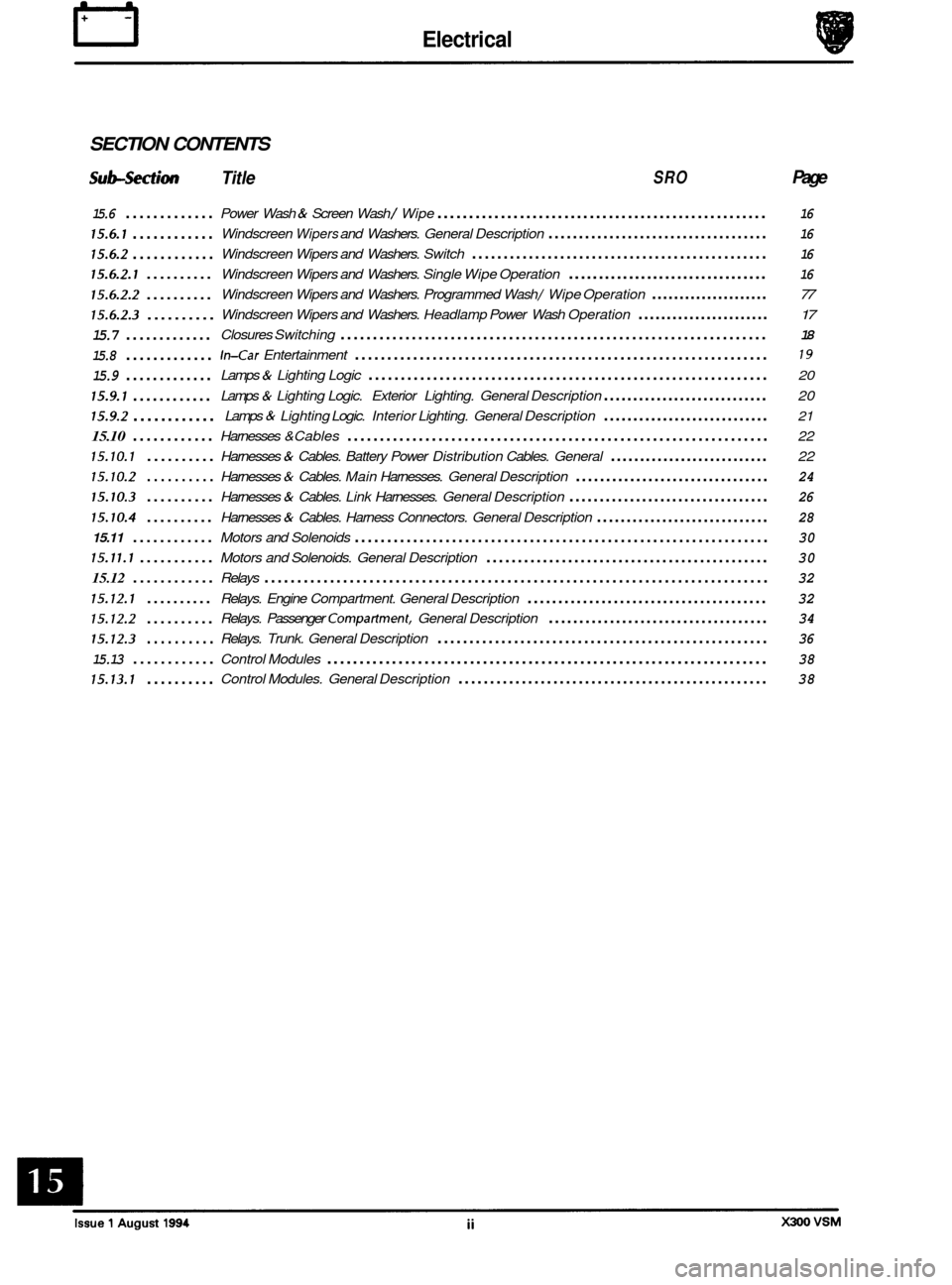
SECTION CONTENTS
Sub-section Title SRO Page
15.6 .............
15.6.1 ............
15.6.2 ............
15.6.2.1 ..........
15.6.2.2 ..........
15.6.2.3 ..........
15.7 .............
15.8 .............
15.9 .............
15.9.1 ............
15.9.2 ............
15.10 ............
15.10.1 ..........
15.10.2 ..........
15.10.3 ..........
15.10.4 ..........
15.11 ............
15.11.1 ...........
15.12 ............
15.12.1 ..........
15.12.2 ..........
15.12.3 ..........
15.13 ............
15.13.1 ..........
Power Wash & Screen Wash / Wipe .................................................... 16
Windscreen Wipers and Washers. General Description .................................... 16
Windscreen Wipers and Washers. Switch ............................................... 16
Windscreen Wipers and Washers. Single Wipe Operation ................................. 16
Windscreen Wipers and Washers. Programmed Wash / Wipe Operation ..................... 77
Windscreen Wipers and Washers. Headlamp Power Wash Operation ....................... 17
Closures Switching .................................................................. 18
In-Car Entertainment ................................................................ 19
Lamps & Lighting Logic .............................................................. 20
Lamps & Lighting Logic. Exterior Lighting. General Description ............................ 20
Lamps & Lighting Logic. Interior Lighting. General Description ............................ 21
Harnesses &Cables ................................................................. 22
Harnesses
& Cables. Battery Power Distribution Cables. General ........................... 22
Harnesses & Cables. Main Harnesses. General Description ................................ 24
Harnesses & Cables. Link Harnesses. General Description ................................. 26
Harnesses & Cables. Harness Connectors. General Description ............................. 28
Motors and Solenoids ................................................................ 30
Motors and Solenoids. General Description ............................................. 30
Relays ........................................................................\
..... 32
Relays. Engine Compartment. General Description ....................................... 32
Relays. Passenger Compartment. General Description .................................... 34
Relays. Trunk. General Description .................................................... 36
Control Modules .................................................................... 38
Control Modules. General Description ................................................. 38
Page 345 of 521
rl Electrical
15.1.6 Fire Hazard Infonnath
Thermal decomposition or combustion may produce dense smoke and other dangerous fumes which in fire situations
form
a highly toxic explosive.
In the event of fire the surrounding area must be evacuated and
all personnel kept well upwind of the area.
Full fire fighting protective gear and
a self contained breathing apparatus operating in the positive pressure mode must
be worn for combating fire. Material near fires must be cooled with water spray to prevent ignition.
Fires should be allowed to burn themselves
out if not threatening to life or property. If fire is threatening to life or prop- erty use copious quantities of water to extinguish.
15.1.7 Ventilath
Local exhaust ventilation designed by a professional engineer should be provided if vapours, fumes, or dusts are gen- erated whilst working with airbag module.
The latest issue of the manual for recommended practices on 'Industrial Ventilation' is available from the
ACGIH Com- mittee on Industrial Ventilation, PO Box 16153, Lansing, MI 48910, USA.
The need for local exhaust ventilation should be evaluated by a professional industrial hygienist.
15.1.8 Respiratory Precauth
To prevent the inhalation of dangerous fumes and dusts, an approved mask should be worn.
15.1.9 Eye Protection
Chemical protective goggles are recommended where there is a possibility of eye contact with the propellant.
Safety glasses with side shields are recommended for
all other operations.
15.1. I0 Protective Clothing
Approved protective gloves, overalls and shoes / boots should be worn.
15.1.1 1 Handling and Storage Precautions
Do not store airbag module near live electrical equipment or circuitry. Store in a dry environment at ambient tempera-
tures.
Good housekeeping and engineering practices should be employed to prevent the generation and accumulation of
dusts. Store in compliance with
all local state and federal regulations.
15.1.12 Driver And Passenger Airbag Modules Assembly / Removal / Service Instructions
Before starting work, ensure ignition switch is in 'IocK position, key is removed and negative terminal cable
is disconnected from the battery.
As the airbag is equipped with a back up power source and due to the risk of airbag being inadvertently
deployed, wait one minute or longer before starting work.
0 Disconnecting the battery cancels the memory for clock, radio, seats, mirrors, steering column and any other
components using battery power. Reset memory after work is completed.
0 Never use airbags from other vehicles, always use new parts.
0 After work is completed, reconnect battery and perform warning light check see diagnostic manual.
0 Never use electrical probes to check voltage or electrical resistance.
0 Disconnect the airbag before carrying out any work on, or in the vicinity of module, or when using electric weld- ing equipment.
0 Always ensure that battery negative has been disconnected for one minute or longer before commencing any
removal procedure.
EB
Issue 1 August 1994 4 X300 VSM
Page 346 of 521
15.1.13 Spillage and Leakage
If material is spilled or released,contact Jaguar Service for clean up procedures. All other personnel must be kept away
from contaminated area.
Do not dispose contaminated propellant or water into storm or sanitary sewers, ground water or soil.
Spills may be reportable to local state,
and/or federal authorities.
Material should
be disposed of by incineration or chemical oxidation under carefully controlled conditions by specially
trained individuals in accordance with local State and Federal regulations.
0
15.1.14 Scrapping Vehicles With Live Airbag(s)
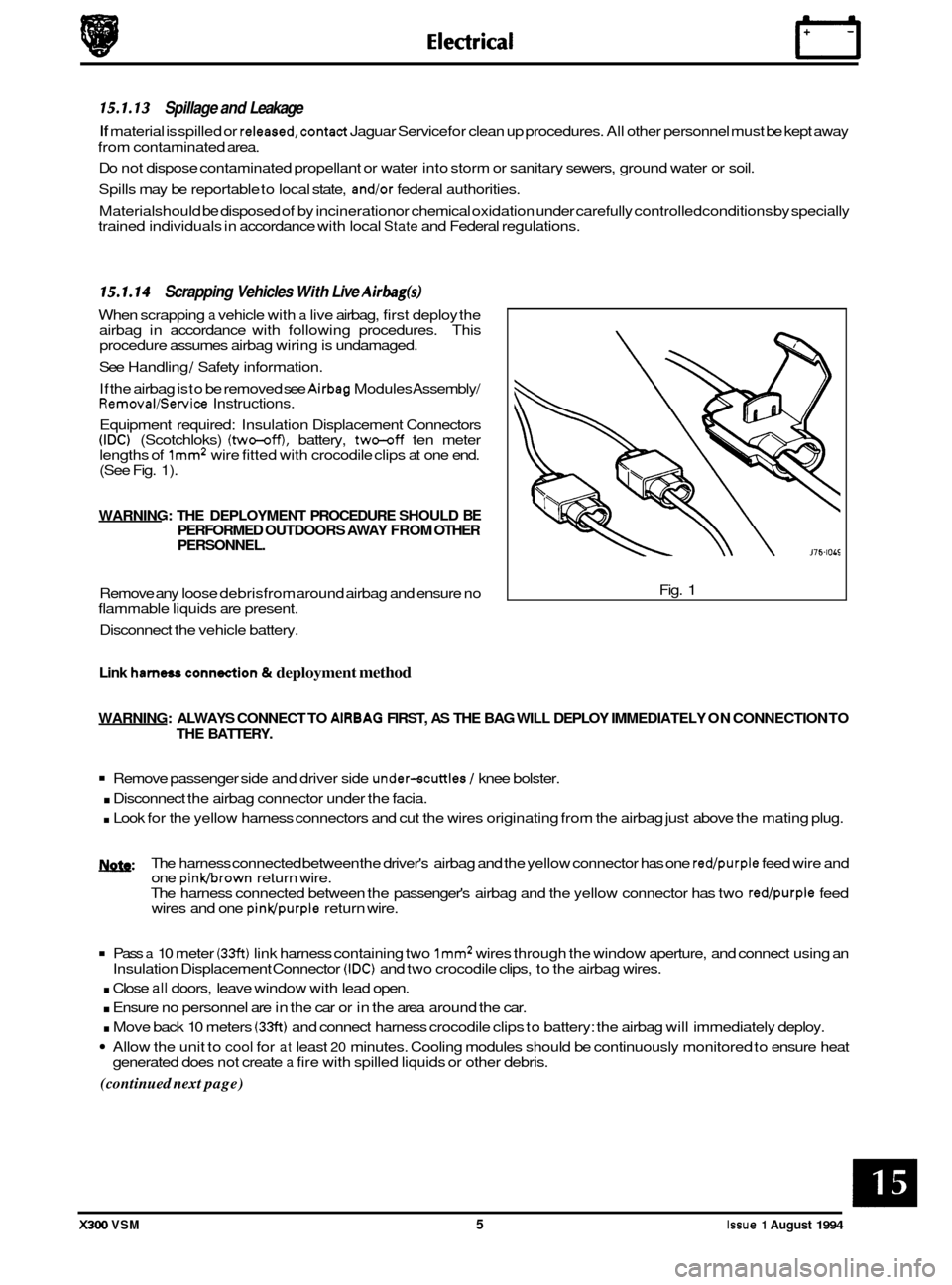
When scrapping a vehicle with a live airbag, first deploy the
airbag in accordance with following procedures. This
procedure assumes airbag wiring is undamaged.
See Handling
/ Safety information.
If the airbag is
to be removed see Airbag Modules Assembly/ Removal/Service Instructions.
Equipment required: Insulation Displacement Connectors
(IDC) (Scotchloks) (two-off), battery, two-off ten meter
lengths of lmm2 wire fitted with crocodile clips at one end. (See Fig. 1).
WARNING: THE DEPLOYMENT PROCEDURE SHOULD BE PERFORMED OUTDOORS AWAY FROM OTHER
PERSONNEL.
Remove any loose debrisfrom around airbag and ensure no
flammable liquids are present.
Disconnect the vehicle battery. Fig. 1
Link harness conn&ion & deployment method
WARNING:
ALWAYS CONNECT TO AlRBAG FIRST, AS THE BAG WILL DEPLOY IMMEDIATELY ON CONNECTION TO
THE BATTERY.
Remove passenger side and driver side under-scuttles / knee bolster.
. Disconnect the airbag connector under the facia.
. Look for the yellow harness connectors and cut the wires originating from the airbag just above the mating plug.
w: The harness connected between the driver's airbag and the yellow connector has one red/purple feed wire and
one pinkbrown return wire.
The harness connected between the passenger's airbag and the yellow connector has two
red/purple feed
wires and one pinwpurple return wire.
Pass a 10 meter (33ft) link harness containing two lmm2 wires through the window aperture, and connect using an
. Close all doors, leave window with lead open.
. Ensure no personnel are in the car or in the area around the car.
. Move back 10 meters (33ft) and connect harness crocodile clips to battery: the airbag will immediately deploy.
Allow the unit to cool for at least 20 minutes. Cooling modules should be continuously monitored to ensure heat
(continued next page)
Insulation Displacement Connector (IDC) and two crocodile clips, to the airbag wires.
generated does not create
a fire with spilled liquids or other debris.
X300 VSM 5 Issue 1 August 1994
Page 347 of 521
Electrical
(continued from previous page)
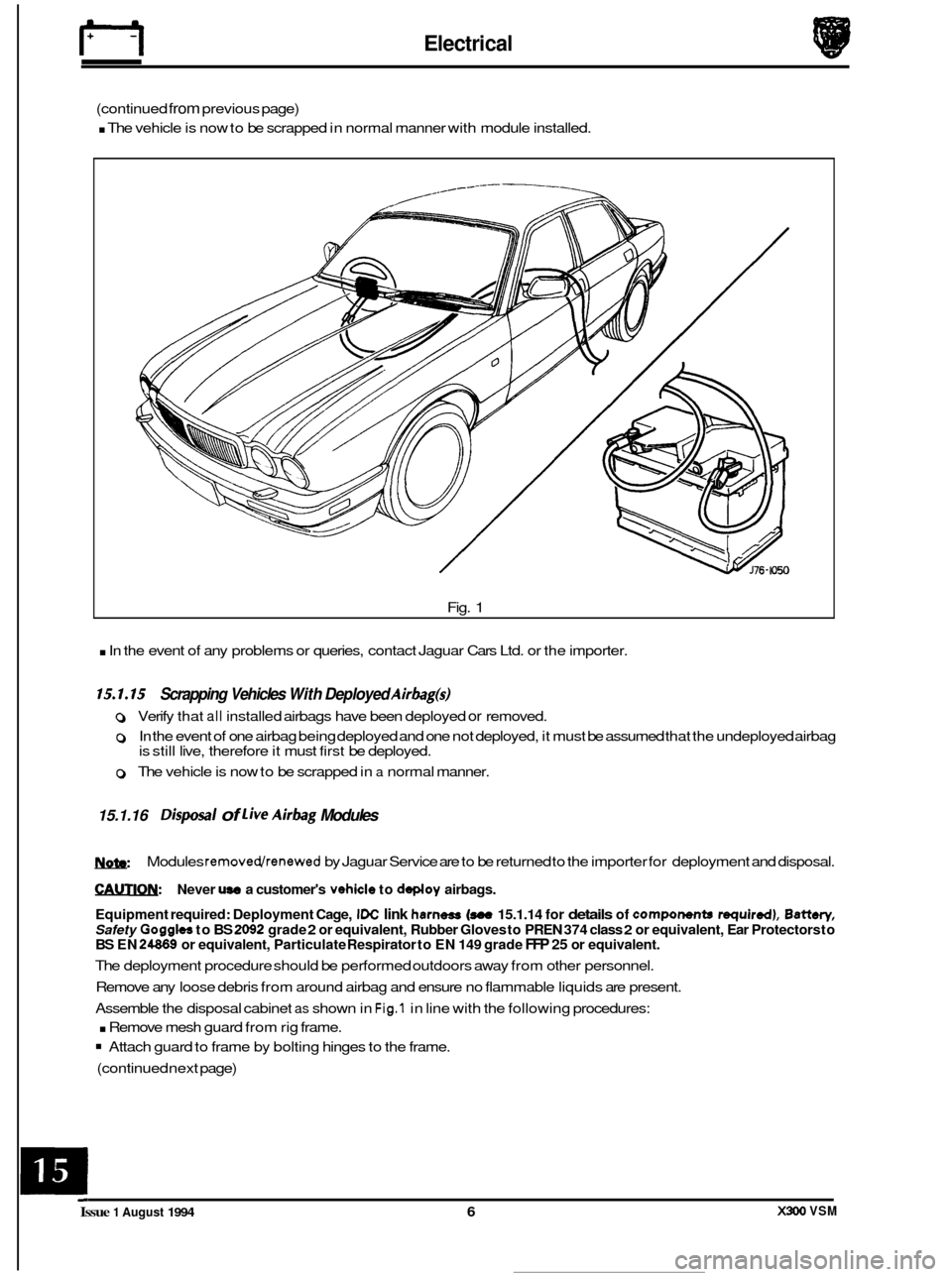
. The vehicle is now to be scrapped in normal manner with module installed.
Fig.
1
. In the event of any problems or queries, contact Jaguar Cars Ltd. or the importer.
15.1.15 Scrapping Vehicles With Deployed Airbag@
0 Verify that all installed airbags have been deployed or removed.
0 In the event of one airbag being deployed and one not deployed, it must be assumed that the undeployed airbag
is still live, therefore it must first be deployed.
0 The vehicle is now to be scrapped in a normal manner.
15.1.16 Disposal of live Airbag Modules
W
€AUTIQN: Never use a customer's vehicle to deploy airbags.
Equipment required: Deployment Cage,
IDC link harness (see 15.1.14 for details of components required), Battery,
Safety Goggles to BS 2092 grade 2 or equivalent, Rubber Gloves to PREN 374 class 2 or equivalent, Ear Protectors to BS EN 24869 or equivalent, Particulate Respirator to EN 149 grade FFP 25 or equivalent.
The deployment procedure should be performed outdoors away from other personnel.
Remove any loose debris from around airbag and ensure no flammable liquids are present.
Assemble the disposal cabinet
as shown in Fig.1 in line with the following procedures:
. Remove mesh guard from rig frame.
Attach guard to frame by bolting hinges to the frame.
(continued next page)
Modules
removedlrenewed by
Jaguar Service are to be returned to the importer for deployment and disposal.
X#w) VSM Issue 1 August 1994 6
Page 348 of 521
(continued from previous page)
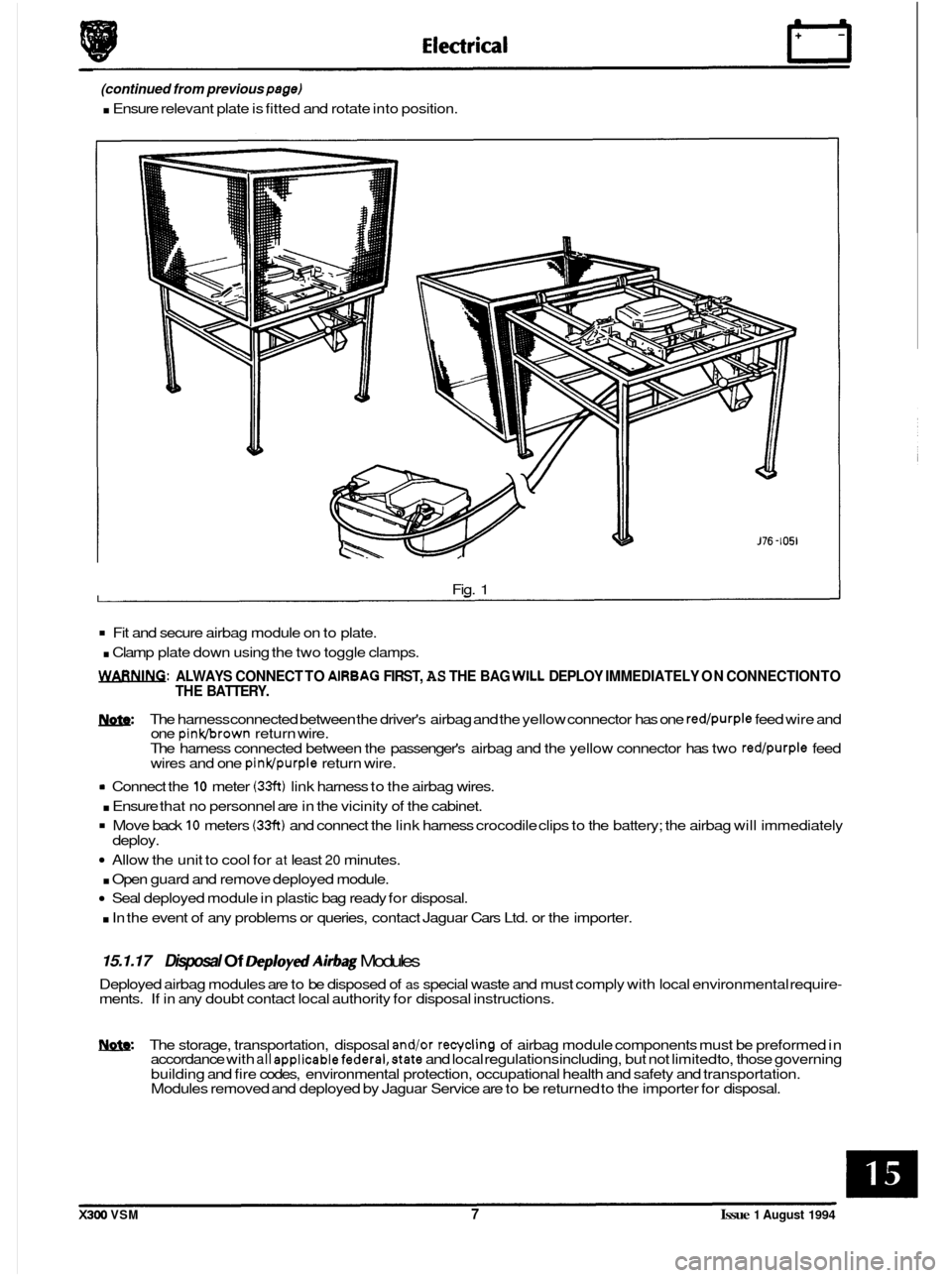
. Ensure relevant plate is fitted and rotate into position.
0
Fig. 1
Fit and secure airbag module on to plate.
. Clamp plate down using the two toggle clamps.
WARNING: ALWAYS CONNECT TO AlRBAG FIRST, AS THE BAG WILL DEPLOY IMMEDIATELY ON CONNECTION TO
THE BATTERY.
m: The harness connected between the driver's airbag and the yellow connector has one red/purple feed wire and
one pinkbrown return wire.
The harness connected between the passenger's airbag and the yellow connector has two red/purple feed
wires and one pinldpurple return wire.
rn Connect the 10 meter (33ft) link harness to the airbag wires.
. Ensure that no personnel are in the vicinity of the cabinet.
Move back 10 meters (33ft) and connect the link harness crocodile clips to the battery; the airbag will immediately
Allow the unit to cool for at least 20 minutes.
. Open guard and remove deployed module.
Seal deployed module in plastic bag ready for disposal.
. In the event of any problems or queries, contact Jaguar Cars Ltd. or the importer.
deploy.
15.1.17 Disposal Of Deploytd Airbag Modules
Deployed airbag modules are to be disposed of as special waste and must comply with local environmental require- ments. If in any doubt contact local authority for disposal instructions.
W. The storage, transportation, disposal and/or recycling of airbag module components must be preformed in
accordance with all appIicablefedera1,state and local regulations including, but not limited to, those governing
building and fire codes, environmental protection, occupational health and safety and transportation.
Modules removed and deployed by Jaguar Service are to be returned to the importer for disposal.
X300 VSM 7 Issue 1 August 1994
Page 349 of 521
Electrical rl
15.2 INSTRUMENTS
15.2.1 General Description
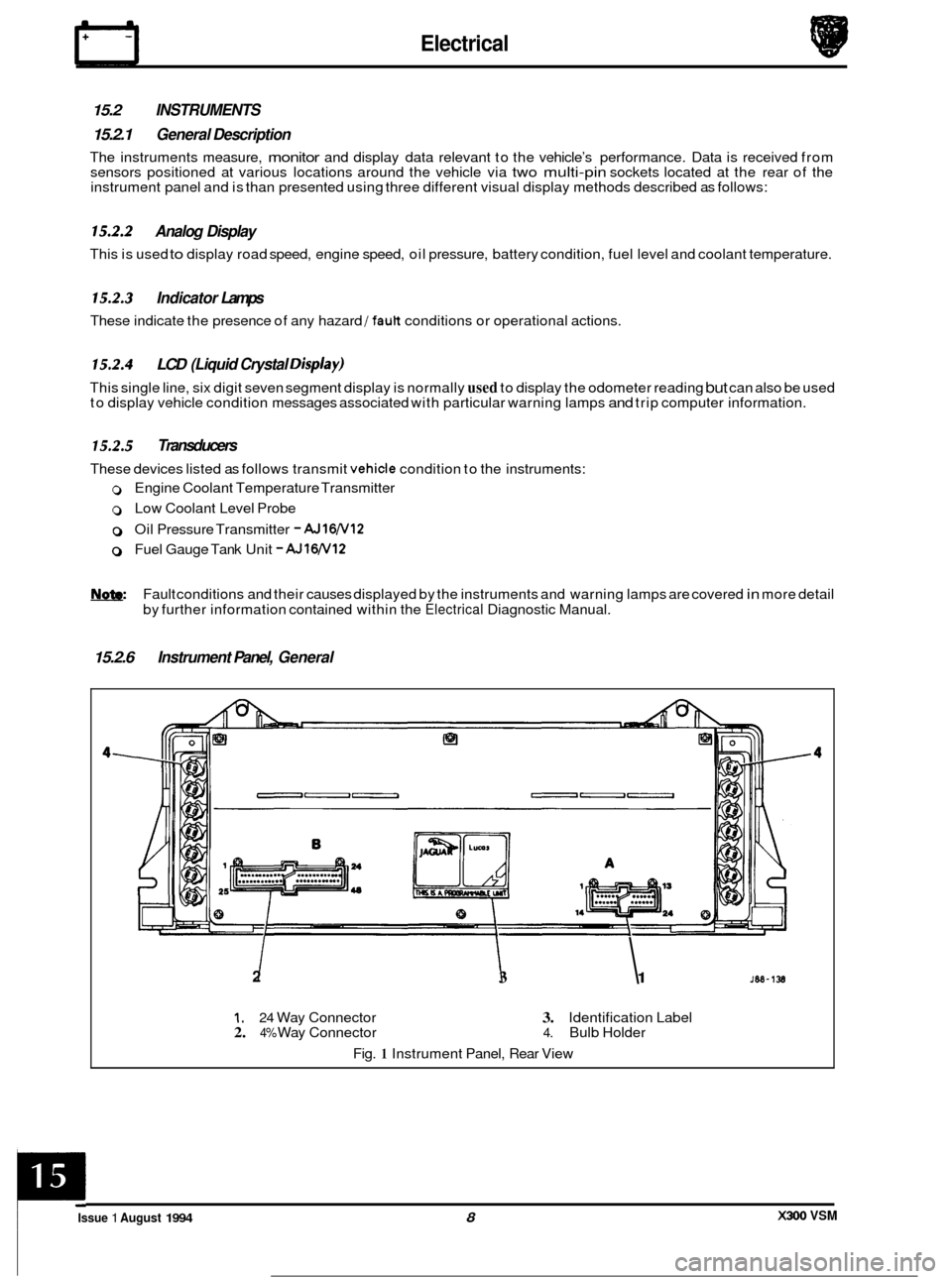
The instruments measure, monitor and display data relevant to the vehicle’s performance. Data is received from
sensors positioned at various locations around the vehicle via two multi-pin sockets located at the rear of the
instrument panel and is than presented using three different visual display methods described as follows:
15.2.2 Analog Display
This is used to display road speed, engine speed, oil pressure, battery condition, fuel level and coolant temperature.
15.2.3 Indicator Lamps
These indicate the presence of any hazard /fault conditions or operational actions.
15.2.4 LCD (Liquid Crystal Disp/ay)
This single line, six digit seven segment display is normally used to display the odometer reading but can also be used
to display vehicle condition messages associated with particular warning lamps and trip computer information.
15.2.5 Transducers
These devices listed as follows transmit vehicle condition to the instruments:
0 Engine Coolant Temperature Transmitter
0 Low Coolant Level Probe
0 Oil Pressure Transmitter - AJ16N12
0 Fuel Gauge Tank Unit - AJlW12
Fault conditions and their causes displayed by the instruments and warning lamps are covered in more detail
by further information contained within the
Electrical Diagnostic Manual.
15.2.6 Instrument Panel, General
2 I I 3 1
1. 24 Way Connector 3. Identification Label 2. 4% Way Connector 4. Bulb Holder
Fig.
1 Instrument Panel, Rear View
X300 VSM Issue 1 August 1994 8
c