ESP LAND ROVER FRELANDER 2 2006 Manual PDF
[x] Cancel search | Manufacturer: LAND ROVER, Model Year: 2006, Model line: FRELANDER 2, Model: LAND ROVER FRELANDER 2 2006Pages: 3229, PDF Size: 78.5 MB
Page 1844 of 3229
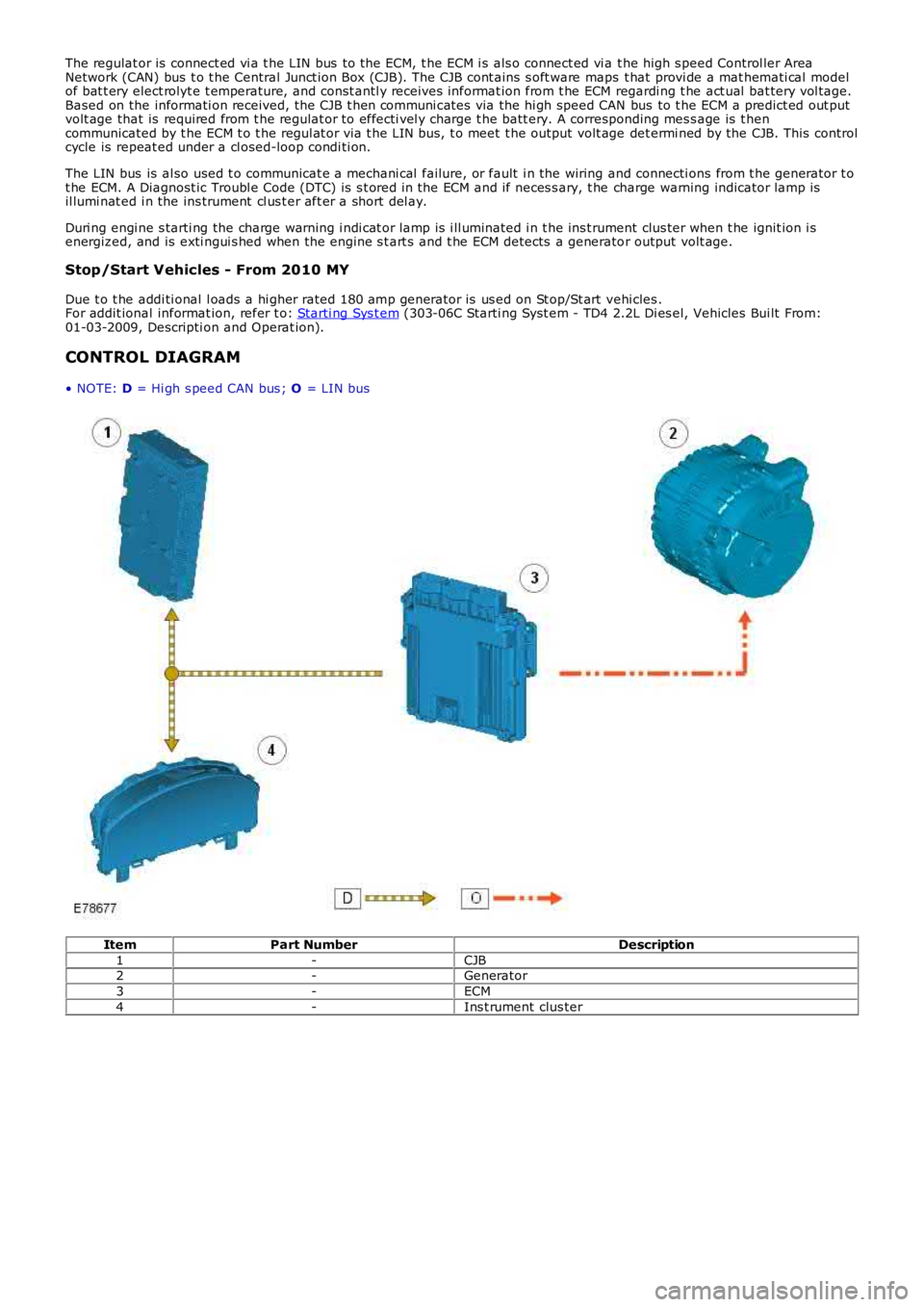
The regulat or is connect ed vi a t he LIN bus to the ECM, t he ECM i s als o connect ed vi a t he high s peed Control ler AreaNetwork (CAN) bus t o t he Central Junct ion Box (CJB). The CJB cont ains s oft ware maps t hat provi de a mat hemati cal modelof bat t ery elect rolyt e t emperature, and const antl y receives informat ion from t he ECM regardi ng t he act ual bat tery vol tage.Based on the informati on received, the CJB t hen communi cat es via the hi gh speed CAN bus to t he ECM a predict ed out putvolt age that is required from t he regulat or to effecti vel y charge t he batt ery. A corresponding mes s age is t hencommunicated by t he ECM t o t he regul at or via t he LIN bus, t o meet t he output volt age det ermi ned by the CJB. This controlcycle is repeat ed under a cl osed-loop condi ti on.
The LIN bus is al so used t o communicat e a mechani cal failure, or fault i n the wiring and connecti ons from t he generator t ot he ECM. A Diagnost ic Troubl e Code (DTC) is s t ored in the ECM and if neces s ary, t he charge warning indicator lamp isil lumi nat ed i n the ins trument cl us t er aft er a short del ay.
Duri ng engi ne s tarti ng the charge warning i ndi cat or lamp is i ll uminated i n t he ins t rument clus ter when t he ignit ion i senergized, and is exti ngui s hed when the engine s t art s and t he ECM detects a generator output volt age.
Stop/Start Vehicles - From 2010 MY
Due t o t he addi ti onal l oads a hi gher rated 180 amp generator is us ed on St op/St art vehi cles .For addit ional informat ion, refer t o: Starti ng Sys t em (303-06C Starti ng Syst em - TD4 2.2L Di es el, Vehicles Bui lt From:01-03-2009, Descripti on and Operat ion).
CONTROL DIAGRAM
• NOTE: D = Hi gh s peed CAN bus ; O = LIN bus
ItemPart NumberDescription
1-CJB2-Generator
3-ECM
4-Ins t rument clus ter
Page 1863 of 3229
1
1
1
1
1
1
1
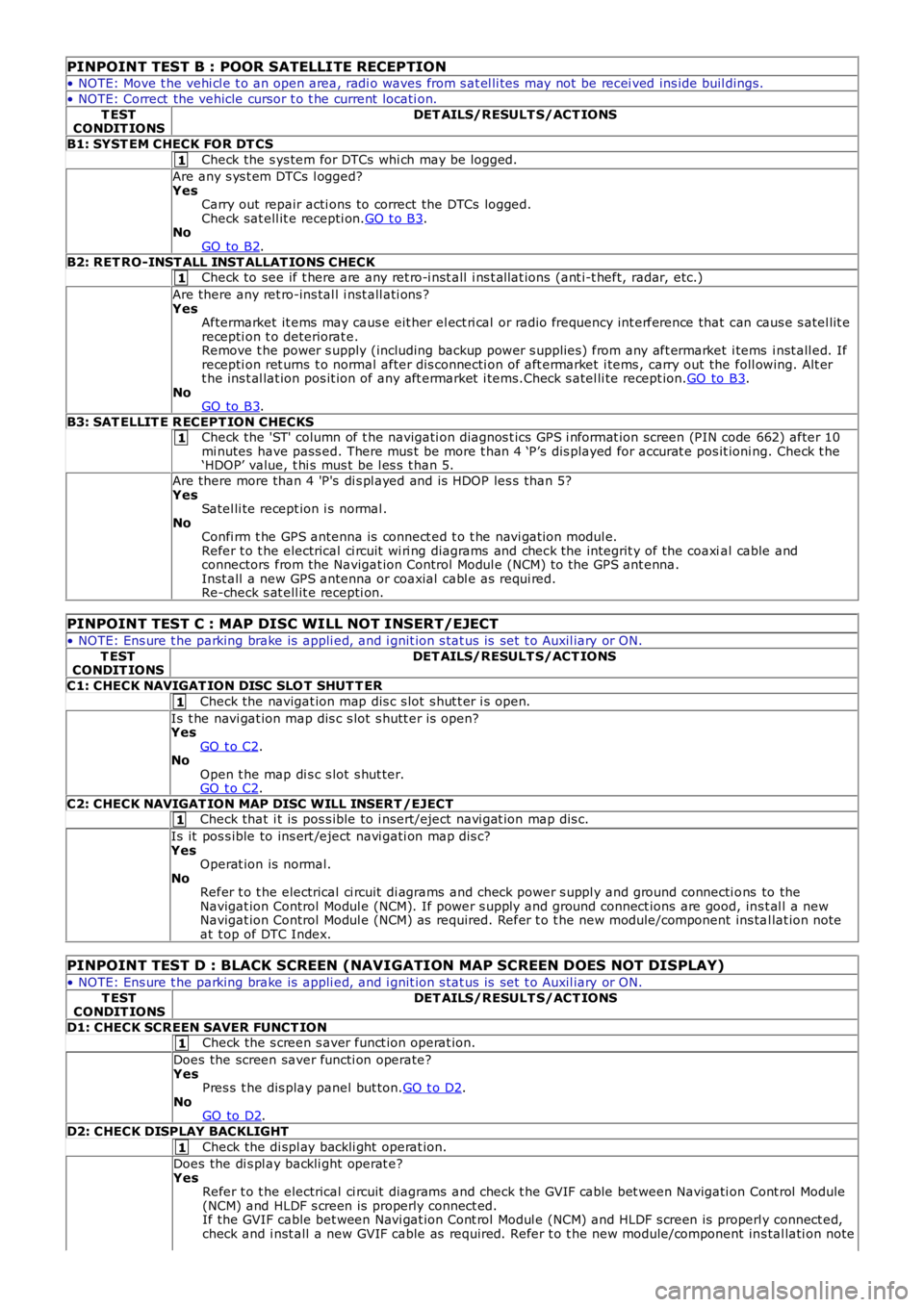
PINPOINT TEST B : POOR SATELLITE RECEPTION
• NOTE: Move t he vehi cl e t o an open area, radi o waves from s at el li tes may not be recei ved ins ide buil dings.
• NOTE: Correct the vehicle cursor t o t he current locati on.
T ESTCONDIT IONSDET AILS/RESULT S/ACT IONS
B1: SYST EM CHECK FOR DT CS
Check the s ys tem for DTCs whi ch may be logged.
Are any s ys t em DTCs l ogged?YesCarry out repair acti ons to correct the DTCs logged.Check sat ell it e recepti on.GO t o B3.NoGO to B2.
B2: RET RO-INST ALL INST ALLAT IONS CHECKCheck to see if t here are any ret ro-i nst all i ns t allat ions (ant i-t heft, radar, etc.)
Are there any ret ro-ins tal l i nst all ati ons ?YesAftermarket it ems may caus e eit her el ect ri cal or radio frequency int erference that can caus e s atel lit erecepti on t o deteriorat e.Remove t he power s upply (including backup power s upplies ) from any aft ermarket i tems i nst all ed. Ifrecepti on ret urns t o normal after dis connecti on of aft ermarket i tems , carry out the foll owing. Alt ert he ins t al lat ion pos it ion of any aft ermarket i tems.Check s atel li te recept ion.GO to B3.NoGO to B3.
B3: SAT ELLIT E R ECEPT ION CHECKSCheck the 'ST' column of t he navigati on diagnos t ics GPS i nformat ion screen (PIN code 662) after 10mi nutes have pass ed. There mus t be more t han 4 ‘P’s dis played for accurat e pos it ioning. Check t he‘HDOP’ value, t hi s mus t be l es s t han 5.
Are there more than 4 'P's di s pl ayed and is HDOP les s than 5?YesSatel li te recept ion i s normal .NoConfi rm t he GPS antenna is connect ed t o t he navi gat ion modul e.Refer t o t he electrical ci rcuit wi ri ng diagrams and check the integrit y of the coaxial cable andconnectors from the Navigat ion Control Modul e (NCM) to the GPS ant enna.Inst all a new GPS antenna or coaxial cabl e as requi red.Re-check s at ell it e recepti on.
PINPOINT TEST C : MAP DISC WILL NOT INSERT/EJECT
• NOTE: Ens ure t he parking brake is appli ed, and i gnit ion s tat us is set t o Auxil iary or ON.
T ESTCONDIT IONSDET AILS/RESULT S/ACT IONS
C1: CHECK NAVIGAT ION DISC SLO T SHUT T ER
Check the navigat ion map dis c s lot s hut t er i s open.
Is t he navi gat ion map dis c s lot s hutt er is open?YesGO t o C2.NoOpen t he map di s c s lot s hut ter.GO t o C2.
C2: CHECK NAVIGAT ION MAP DISC WILL INSERT /EJECTCheck that i t is pos s ible to i nsert/eject navi gat ion map dis c.
Is it pos s ible to ins ert /eject navi gati on map dis c?YesOperat ion is normal.NoRefer t o t he electrical ci rcuit di agrams and check power s uppl y and ground connecti ons to theNavigat ion Control Modul e (NCM). If power s upply and ground connect ions are good, ins t al l a newNavigat ion Control Modul e (NCM) as required. Refer t o t he new module/component ins tal lat ion noteat t op of DTC Index.
PINPOINT TEST D : BLACK SCREEN (NAVIGATION MAP SCREEN DOES NOT DISPLAY)
• NOTE: Ens ure t he parking brake is appli ed, and i gnit ion s tat us is set t o Auxil iary or ON.
T ESTCONDIT IONSDET AILS/RESULT S/ACT IONS
D1: CHECK SCREEN SAVER FUNCT IONCheck the s creen s aver funct ion operat ion.
Does the screen saver functi on operate?YesPres s t he dis play panel but ton.GO t o D2.NoGO to D2.
D2: CHECK DISPLAY BACKLIGHT
Check the di spl ay backli ght operat ion.
Does the di s pl ay backli ght operat e?YesRefer t o t he electrical ci rcuit diagrams and check t he GVIF cable bet ween Navigati on Cont rol Module(NCM) and HLDF s creen is properly connect ed.If the GVIF cable bet ween Navi gat ion Cont rol Modul e (NCM) and HLDF s creen is properly connect ed,check and i nst all a new GVIF cable as required. Refer t o t he new module/component ins tal lati on note
Page 1865 of 3229
1
1
1
1
1
1
1
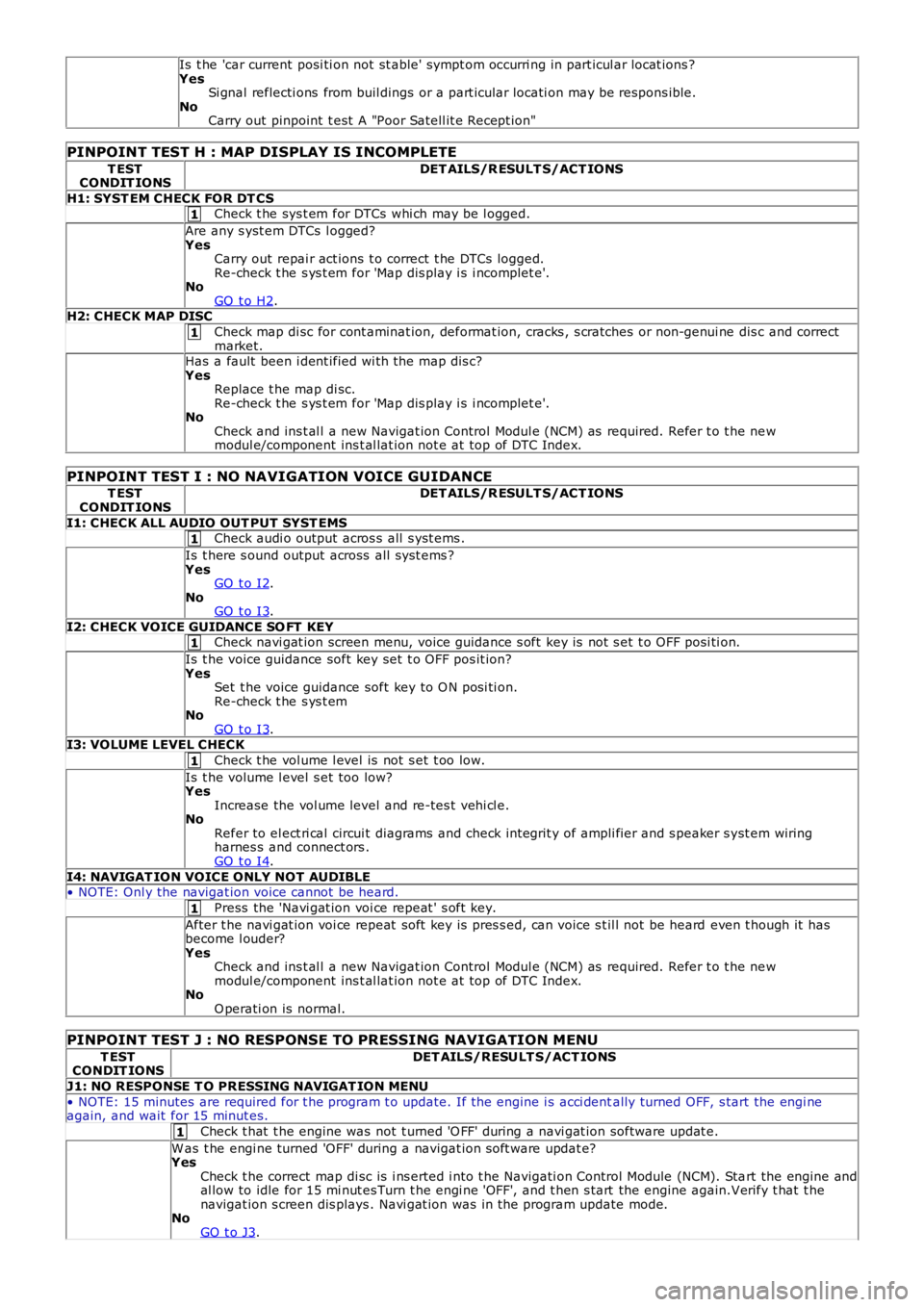
Is t he 'car current posi ti on not st able' sympt om occurri ng in part icul ar locat ions ?YesSi gnal reflecti ons from buil dings or a part icular locati on may be respons ible.NoCarry out pinpoint t est A "Poor Satell it e Recept ion"
PINPOINT TEST H : MAP DISPLAY IS INCOMPLETE
T ESTCONDIT IONSDET AILS/R ESULT S/ACT IONS
H1: SYST EM CHECK FOR DT CSCheck t he sys t em for DTCs whi ch may be l ogged.
Are any s yst em DTCs l ogged?YesCarry out repai r act ions t o correct t he DTCs logged.Re-check t he s ys t em for 'Map dis play i s i ncomplet e'.NoGO t o H2.H2: CHECK MAP DISC
Check map di sc for cont aminat ion, deformat ion, cracks , s cratches or non-genui ne dis c and correctmarket.Has a fault been i dent ified wi th the map dis c?YesReplace t he map di sc.Re-check t he s ys t em for 'Map dis play i s i ncomplet e'.NoCheck and ins t al l a new Navigat ion Control Modul e (NCM) as required. Refer t o t he newmodul e/component ins t al lat ion not e at top of DTC Index.
PINPOINT TEST I : NO NAVIGATION VOICE GUIDANCE
T ESTCONDIT IONSDET AILS/R ESULT S/ACT IONS
I1: CHECK ALL AUDIO OUT PUT SYST EMSCheck audi o output acros s all s yst ems .
Is t here s ound output across all s ys t ems ?YesGO t o I2.NoGO t o I3.
I2: CHECK VOICE GUIDANCE SO FT KEYCheck navi gat ion screen menu, voice guidance s oft key is not s et t o OFF posi ti on.
Is t he voice guidance soft key set t o OFF pos it ion?YesSet t he voice guidance soft key to O N posi ti on.Re-check t he s ys t emNoGO t o I3.I3: VOLUME LEVEL CHECK
Check t he vol ume l evel is not s et t oo low.
Is t he volume l evel s et too low?YesIncrease the vol ume level and re-tes t vehi cl e.NoRefer to el ect ri cal circui t diagrams and check int egrit y of ampli fier and s peaker s yst em wiringharnes s and connect ors .GO t o I4.
I4: NAVIGAT ION VOICE ONLY NOT AUDIBLE• NOTE: Onl y the navigat ion voice cannot be heard.
Press the 'Navi gat ion voi ce repeat ' s oft key.
After t he navi gat ion voi ce repeat soft key is pres s ed, can voice s t il l not be heard even t hough it hasbecome l ouder?YesCheck and ins t al l a new Navigat ion Control Modul e (NCM) as required. Refer t o t he newmodul e/component ins t al lat ion not e at top of DTC Index.NoO perati on is normal.
PINPOINT TEST J : NO RESPONSE TO PRESSING NAVIGATION MENU
T ESTCONDIT IONSDET AILS/RESULT S/ACT IONS
J1: NO RESPONSE T O PRESSING NAVIGAT ION MENU
• NOTE: 15 minutes are required for t he program t o update. If the engine i s acci dentally turned OFF, s tart the engi neagain, and wait for 15 minut es.
Check t hat t he engine was not t urned 'O FF' during a navi gat ion software updat e.
W as t he engi ne turned 'OFF' during a navigat ion s oft ware updat e?YesCheck t he correct map di sc is i ns erted i nto t he Navigati on Control Module (NCM). Start the engine andal low to idle for 15 mi nut es Turn t he engi ne 'OFF', and t hen s tart the engine again.Verify t hat t henavigat ion s creen dis plays . Navi gat ion was in the program update mode.NoGO t o J3.
Page 1866 of 3229
1
1
1
1
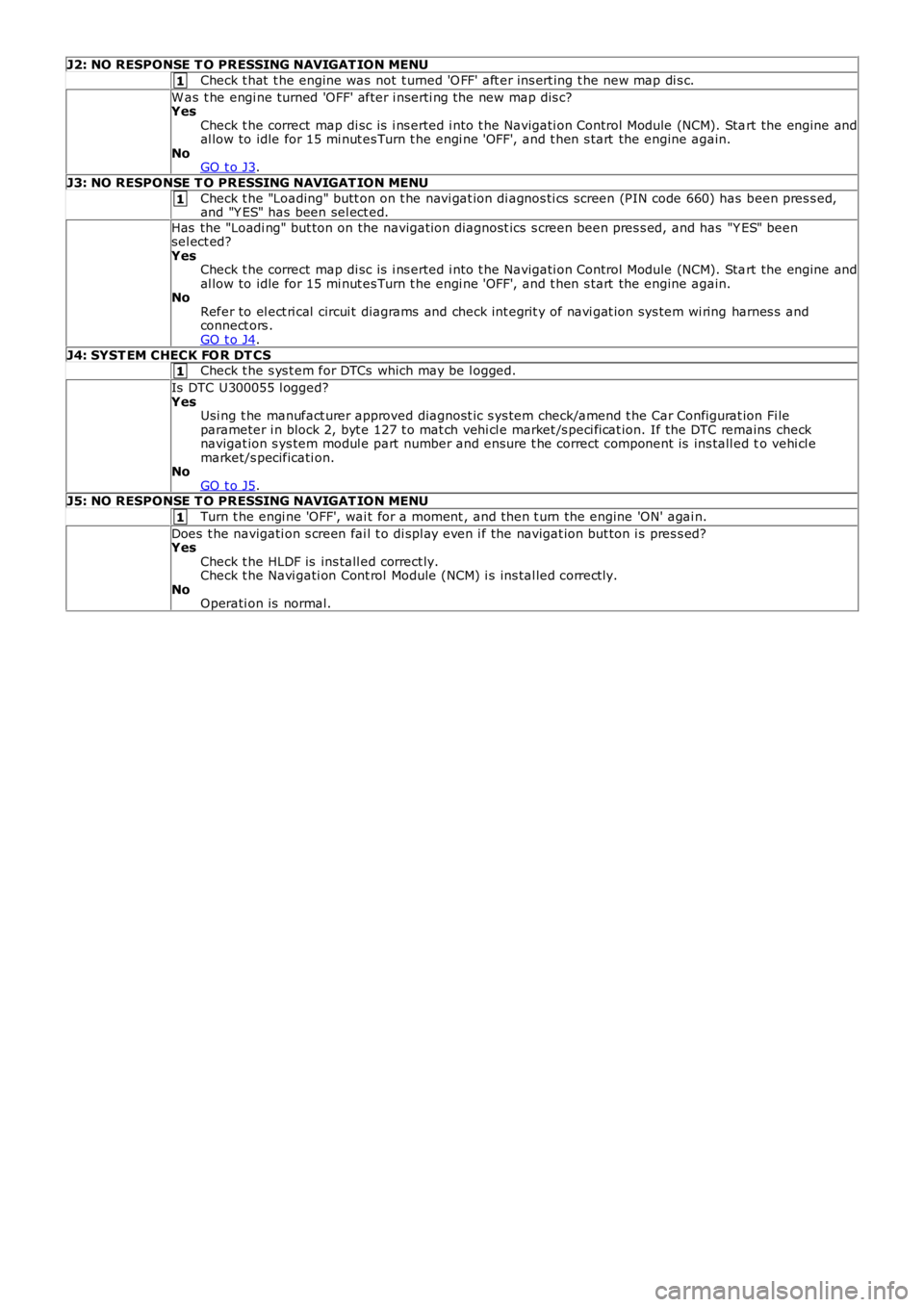
J2: NO RESPONSE T O PRESSING NAVIGAT ION MENU
Check t hat t he engine was not t urned 'O FF' aft er ins ert ing t he new map di s c.
W as t he engi ne turned 'OFF' after i nserti ng the new map dis c?YesCheck t he correct map di sc is i ns erted i nto t he Navigati on Control Module (NCM). Start the engine andal low to idle for 15 mi nut es Turn t he engi ne 'OFF', and t hen s tart the engine again.NoGO t o J3.
J3: NO RESPONSE T O PRESSING NAVIGAT ION MENU
Check t he "Loading" butt on on t he navi gat ion di agnos ti cs screen (PIN code 660) has been pres s ed,and "Y ES" has been sel ect ed.
Has the "Loadi ng" but ton on the navigati on diagnost ics s creen been pres s ed, and has "Y ES" beensel ect ed?YesCheck t he correct map di sc is i ns erted i nto t he Navigati on Control Module (NCM). Start the engine andal low to idle for 15 mi nut es Turn t he engi ne 'OFF', and t hen s tart the engine again.NoRefer to el ect ri cal circui t diagrams and check int egrit y of navi gat ion sys tem wi ring harnes s andconnect ors .GO t o J4.
J4: SYST EM CHECK FO R DT CSCheck t he s ys t em for DTCs which may be l ogged.
Is DTC U300055 l ogged?YesUsi ng t he manufact urer approved diagnost ic s ys tem check/amend t he Car Configurat ion Fi leparameter i n block 2, byt e 127 t o mat ch vehi cl e market /s peci fi cat ion. If the DTC remains checknavigat ion s ys tem modul e part number and ensure t he correct component is ins tall ed to vehi cl emarket/s pecificati on.NoGO t o J5.J5: NO RESPONSE T O PRESSING NAVIGAT ION MENU
Turn t he engi ne 'OFF', wai t for a moment , and then t urn the engine 'ON' agai n.
Does t he navigati on s creen fai l t o di spl ay even i f the navigat ion but ton i s pres s ed?YesCheck t he HLDF is ins tall ed correct ly.Check t he Navi gati on Cont rol Module (NCM) i s ins tal led correct ly.NoOperati on is normal.
Page 1873 of 3229
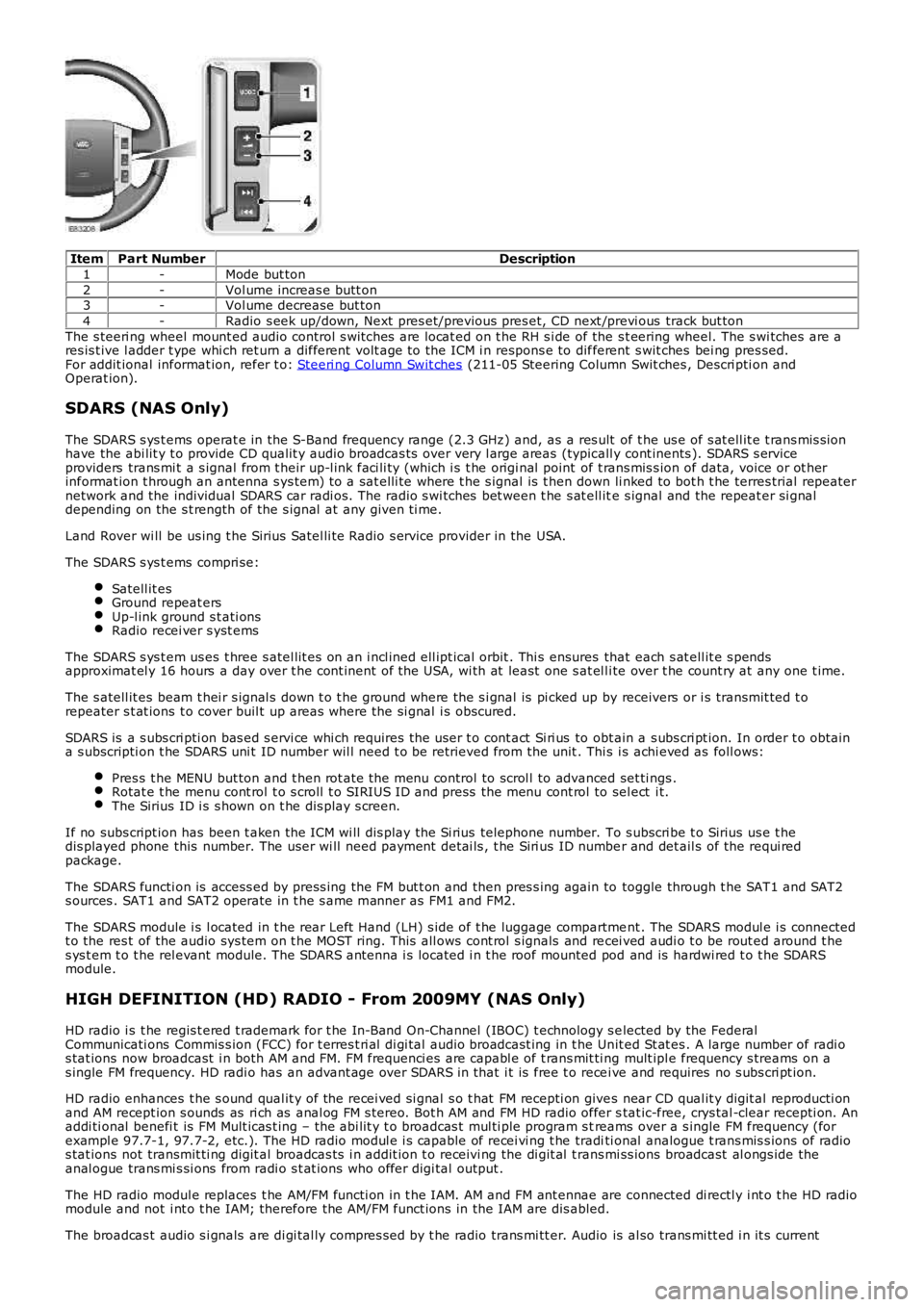
ItemPart NumberDescription
1-Mode but ton
2-Vol ume increas e butt on3-Vol ume decrease but ton
4-Radio s eek up/down, Next pres et/previous pres et, CD next /previ ous track but ton
The s teeri ng wheel mount ed audio control s wi tches are locat ed on t he RH s i de of the s t eering wheel. The s wi tches are ares is t ive l adder t ype whi ch ret urn a different volt age to the ICM i n respons e to different s wit ches bei ng pres sed.For addit ional informat ion, refer t o: Steeri ng Column Swit ches (211-05 Steering Column Swit ches , Descri pti on andOperat ion).
SDARS (NAS Only)
The SDARS s ys t ems operat e in the S-Band frequency range (2.3 GHz) and, as a res ult of t he us e of s at ell it e t rans mis s ionhave the abi lit y t o provide CD qualit y audio broadcas ts over very l arge areas (typicall y cont inents ). SDARS s erviceproviders trans mi t a s ignal from t heir up-l ink faci li ty (which i s t he origi nal point of t rans mis s ion of data, voice or ot herinformat ion t hrough an antenna s ys tem) t o a sat elli te where t he s ignal is t hen down li nked to bot h t he terres trial repeaternetwork and the individual SDARS car radi os. The radio s wi tches bet ween t he s at ell ite s ignal and the repeat er si gnaldepending on the s t rength of the s ignal at any given ti me.
Land Rover wi ll be us ing t he Sirius Satel li te Radio s ervice provider in the USA.
The SDARS s ys t ems compri se:
Satell it esGround repeat ersUp-l ink ground s t ati onsRadio recei ver s yst ems
The SDARS s ys t em us es t hree s atel lit es on an i ncl ined ell ipt ical orbit . Thi s ensures that each s at ell it e s pendsapproximat el y 16 hours a day over t he cont inent of the USA, wi th at least one s at el li te over t he count ry at any one t ime.
The s atell it es beam t hei r s ignal s down t o t he ground where the s i gnal is pi cked up by receivers or i s transmit ted t orepeater s t at ions t o cover buil t up areas where the si gnal i s obscured.
SDARS is a s ubs cri pti on bas ed s ervi ce whi ch requires the us er t o cont act Si ri us to obt ain a s ubs cri pt ion. In order t o obtaina s ubscripti on t he SDARS uni t ID number wil l need t o be retrieved from the unit . This i s achi eved as foll ows:
Pres s t he MENU but ton and t hen rot ate the menu control to scrol l to advanced set ti ngs .Rotat e t he menu cont rol t o s croll t o SIRIUS ID and press the menu cont rol to sel ect i t.The Sirius ID i s s hown on t he dis play s creen.
If no subs cript ion has been t aken the ICM wi ll dis play the Si rius telephone number. To s ubscri be t o Sirius us e t hedis played phone this number. The user wi ll need payment det ai ls , t he Siri us ID number and det ail s of the requi redpackage.
The SDARS functi on is access ed by press ing the FM but t on and then pres s ing again to toggle through t he SAT1 and SAT2s ources . SAT1 and SAT2 operate in t he s ame manner as FM1 and FM2.
The SDARS module i s l ocated in t he rear Left Hand (LH) s ide of t he luggage compartment . The SDARS modul e i s connectedt o the res t of the audio sys tem on t he MOST ring. This all ows cont rol s ignals and recei ved audi o t o be rout ed around t hes ys t em t o t he rel evant module. The SDARS antenna i s located i n t he roof mounted pod and is hardwi red t o t he SDARSmodule.
HIGH DEFINITION (HD) RADIO - From 2009MY (NAS Only)
HD radio i s t he regis t ered t rademark for t he In-Band On-Channel (IBOC) t echnology s elected by the FederalCommunicati ons Commis s ion (FCC) for t erres t ri al di gi tal audio broadcast ing in t he Unit ed St at es . A large number of radi os tat ions now broadcast i n both AM and FM. FM frequenci es are capabl e of t rans mit ti ng mult ipl e frequency s treams on as ingle FM frequency. HD radi o has an advant age over SDARS in that i t is free t o recei ve and requires no s ubs cri pt ion.
HD radio enhances t he s ound qual it y of the recei ved si gnal s o t hat FM recepti on gives near CD qual it y digit al reproducti onand AM recept ion s ounds as ri ch as anal og FM s tereo. Bot h AM and FM HD radio offer stat ic-free, crys tal -clear recepti on. Anaddi ti onal benefi t is FM Mult icas t ing – the abi lit y t o broadcas t mul ti ple program s treams over a s ingle FM frequency (forexampl e 97.7-1, 97.7-2, etc.). The HD radio modul e i s capable of recei vi ng t he traditi onal analogue t rans mis s ions of radios tat ions not transmit ti ng digit al broadcas ts i n addit ion t o receivi ng the di git al t rans mi ss ions broadcast al ongs ide theanal ogue trans mi s si ons from radi o s t at ions who offer digi tal output .
The HD radio modul e replaces t he AM/FM functi on in t he IAM. AM and FM ant ennae are connected di rectl y i nt o t he HD radiomodule and not i nt o t he IAM; therefore the AM/FM funct ions in the IAM are dis abled.
The broadcas t audio s i gnals are di gi tal ly compres s ed by t he radio trans mi tt er. Audio is al so trans mi tt ed i n it s current
Page 1874 of 3229
anal ogue form al ongs ide t he digi tal t ransmis s ion. The HD radi o module recei ves the analogue and digi tal s ignals vi a thevehi cl e AM and FM antennae along wi th accompanyi ng text t ransmis s ions. Thes e s ignals are decoded by t he module andplayed as an audio out put or di spl ayed as an informati on text on t he head unit LCD dis play or t he ICM LCD di spl aydepending the s ys tem ins tal led.
The HD radio modul e is locat ed in the LH s ide of t he luggage compartment . The modul e receives a fus ed power s upplyfrom the AJB. The modul e i s als o connected on the MOST ri ng and is abl e t o communicate wit h the ot her ent ert ainmentand informat ion s ys tems i n t he vehi cl e.
CLOCK
The ICM cont ains t he mas ter clock funct ional it y. Other vehi cl e i nfotai nment modul es that require clock funct ional it y us et he ti me s upplied from t he ICM.
The clock is avail abl e t o any cont rol module that is connect ed t o an i nt erconnect ing bus , for exampl e, ei ther of t he CANbuses or t he MOST ring.
The clock dis play configurabl e t o s how in AM / PM or 24 hour format . Midnight is shown as 12:00AM or 00:00 respecti vel y.The default condi ti on, if not specified, aft er power on or deli very, s hould defaul t to 12:00PM or 00:00. Depending upon t hemarket s et the cl ock will defaul t to ei ther 12 or 24 hour format.
The t ime is adjus t ed from t he ICM. Under condi ti ons when any bus could be asl eep or shut down, the ICM does not all owclock adjus tment s.
AMPLIFIERS
The audi o s yst em has three amplificati on opti ons dependant on t he audio s ys tem s pecified:
Int ernal ampli fi erHarman kardonHarman kardon LOGIC 7
The ampli fi er i s l ocated in t he Right Hand (RH) corner of t he luggage compartment and i s connected to t he audio s ys temvia t he MOST bus . Speaker connecti ons are hardwi red.
CONTROL DIAGRAM
• NOTE: A = Hardwi red connect ion; D = Medium s peed CAN bus ; P = MOST
Page 1920 of 3229
10-RH s i de turn s ignal lamp
11-Licens e pl ate lamps
12-LH rear l amp as s embl y13-RH rear lamp as s embly
14-LH headlamp as s embly
15-AFS cont rol module16-Headl amp l evel ing mot or
17-RH headlamp as s embly
18-Steering wheel modul e19-LH s t eering column mult ifunct ion s wit ch
20-High mount ed s top lamp
21-Central Junct ion Box (CJB)22-Revers e s wit ch (manual transmis si on only)
23-Stoplamp s wit ch
24-Rain/light s ensor25-Hazard flas her s wi tch
26-Light s wit ch modul e
27-Fuse 15A (F33)
CENTRAL JUNCTION BOX (CJB)
The CJB receives exteri or li ght ing relat ed inputs from t he fol lowing s wi tches:
Light s wit ch modul e- Side l amp pos it ion- Headlamp pos it ion- Automat ic (AUTO) posi ti on (if fi tt ed)- Front fog lamp swi tch (if fit ted)- Rear fog l amp s wit ch- Dimmer cont rol- Headlamp l evel ing control (if fit ted).Brake s wi tchLH s t eering column mult ifunct ion s wit ch for t urn si gnal i ndi cat ors and hi gh beam/headl amp flas hHazard flas her s wi tchRain/light s ensor (LIN si gnal ).
Circuit Protection
Two 60 Amp fus ibl e li nks in t he batt ery junct ion box protect the power feed to the CJB LH and RH li ght ing ci rcuit sres pect ively. All ext erior l ighti ng ci rcuit s are prot ect ed by Field Effect Trans is t ors (FETs ), l ocat ed in the CJB, which candetect overloads and s hort circuit s .
The FETs res pond to heat generated by increased current fl ow caus ed by a s hort ci rcuit . On a normal ci rcuit t his woul dcaus e t he fus e to bl ow. The FETs respond t o t he heat i ncrease and di s connect t he s uppl y t o t he affect ed ci rcuit . W hen t hefaul t is rect ified or t he FET has cool ed, t he FET wil l res et and operate t he circui t normall y. If t he faul t pers is ts the FET wi llcycle, di sconnect ing and reconnect ing t he power supply. The CJB s tores fault codes which can be ret rieved usi ng a LandRover approved diagnost ic sys tem. The fault code wil l identi fy t hat there is a fault on a part icular out put which as si s t infaul t det ect ion.
Alarm Indications
The exteri or li ght ing s ys tem is us ed for al arm arm and dis arm reques ts . W hen t he driver l ocks or unlocks the vehicle, avis ual i ndicat ion of a s uccess ful l ock or unlock reques t is di spl ayed t o t he dri ver by the hazard flas hers operat ing a numberof ti mes .For addit ional informat ion, refer t o: Anti -Theft - Act ive (419-01A Anti -Theft - Acti ve, Des cri pt ion and Operati on).
Lights On Warning chime
W hen t he i gni ti on in the off (power mode 0) or auxi liary (power mode 4) mode and the l ighti ng cont rol rotary swit ch is i nt he si de lamp or headlamp posi ti on, a warning chime wi ll s ound i f the driver's door is opened. This indicates t o t he dri vert hat t he exterior li ght s have been left on. The chime is generat ed from t he i ns t rument clus ter s ounder on receipt of ali ght s on s i gnal , a door open s ignal and an ignit ion swi tch off s ignal from t he CJB on the hi gh s peed CAN bus.
Crash Signal Activation
W hen a crash s ignal i s t rans mit ted from t he Rest rai nts Cont rol Modul e (RCM), t he CJB act ivat es the hazard flas hers andt he turn s ignal indicators in t he i ns t rument clus ter. The hazard fl ashers wil l continue to operate unt il t he ignit ion mode ischanged t o t he auxi liary power mode 4or the off power mode 0 or the RCM no longer trans mi ts the cras h si gnal .For addit ional informat ion, refer t o: Air Bag and Safet y Belt Pretens ioner Supplement al Res traint Syst em (SRS) (501-20BSuppl ement al Rest rai nt Sys tem, Des cri pti on and Operati on).
Headlamp Timer
The CJB cont rol s a headl amp t imer funct ion whi ch allows the headlamps t o remain on for a peri od of ti me after leaving t hevehi cl e. Thi s is a dri ver conveni ence feat ure which il lumi nat es t he dri veway after leaving t he vehicle.
This feat ure can onl y be acti vat ed by pulli ng t he high beam ' flas h-t o-pas s' on t he LH s t eering column mult ifunct ion s wi tch.It can be deacti vat ed eit her by ti ming out or by pull ing t he mul ti funct ion swi tch again.
The default s ett ing can be changed by a Land Rover or authorized deal er . The default t imi ng is s et t o 30s but can bechanged t o 0s (OFF), 30s (defaul t), 60s , 90s , 120s , 150s and 180s .For addit ional informat ion, refer t o: Informat ion and Mes s age Cent er (413-08 Informat ion and Mes s age Cent er, Des cript ionand Operat ion).
Page 2017 of 3229
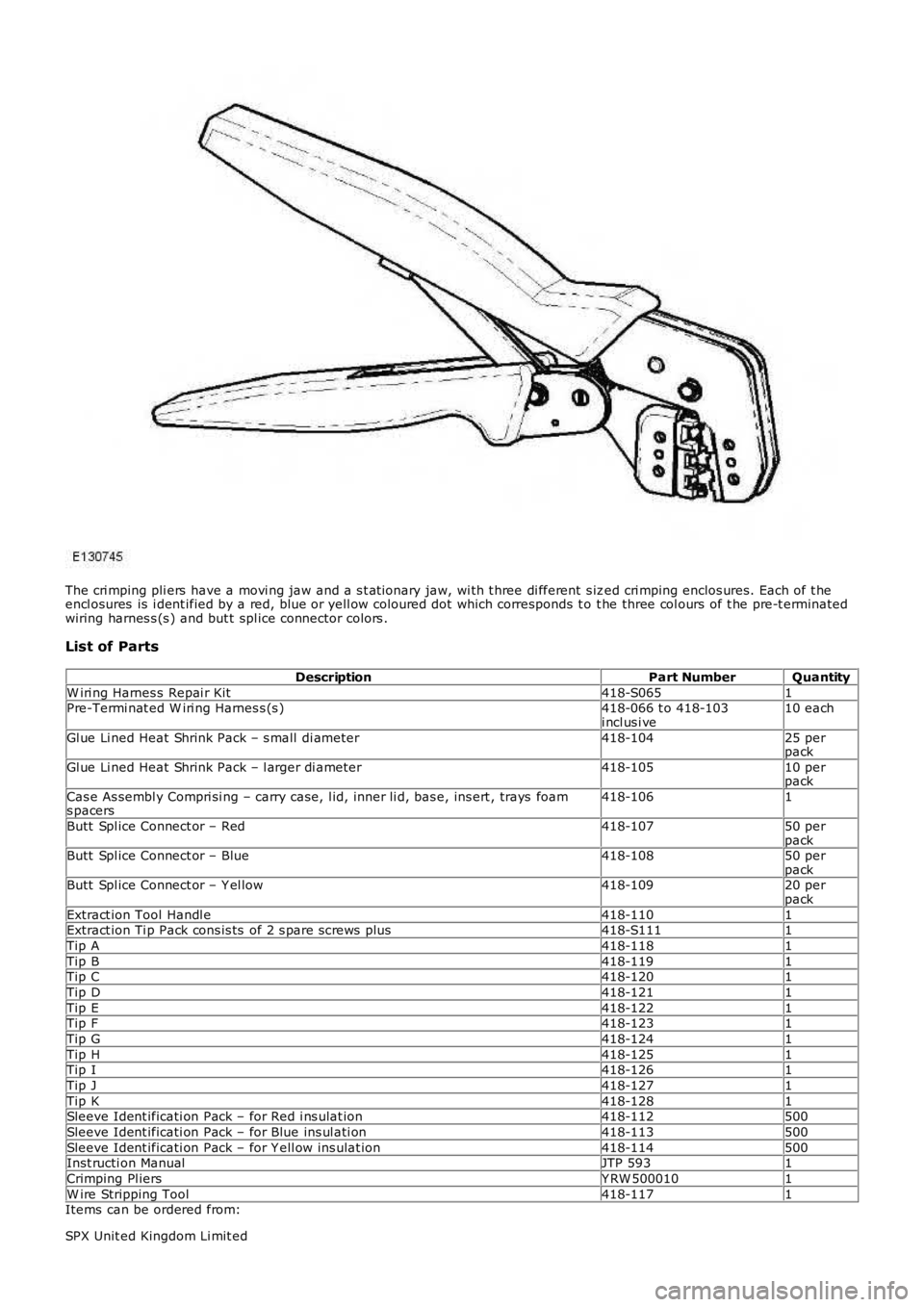
The cri mping pli ers have a movi ng jaw and a s t at ionary jaw, wi th t hree di fferent s ized cri mping enclos ures. Each of t heencl osures is i dent ified by a red, blue or yell ow coloured dot which corresponds t o t he three col ours of t he pre-t erminatedwiring harnes s (s ) and but t spl ice connector colors .
List of Parts
DescriptionPart NumberQuantity
W iri ng Harnes s Repai r Kit418-S0651Pre-Termi nat ed W iri ng Harnes s (s )418-066 t o 418-103i ncl us i ve10 each
Gl ue Li ned Heat Shrink Pack – s mall di ameter418-10425 perpack
Gl ue Li ned Heat Shrink Pack – l arger di ameter418-10510 perpack
Cas e As sembl y Compri si ng – carry case, l id, inner li d, bas e, ins ert , trays foams pacers418-1061
Butt Spl ice Connect or – Red418-10750 perpackButt Spl ice Connect or – Blue418-10850 perpackButt Spl ice Connect or – Y el low418-10920 perpack
Extract ion Tool Handl e418-1101Extract ion Ti p Pack cons is ts of 2 s pare s crews plus418-S1111
Tip A418-1181
Tip B418-1191Tip C418-1201
Tip D418-1211
Tip E418-1221Tip F418-1231
Tip G418-1241
Tip H418-1251Tip I418-1261
Tip J418-1271
Tip K418-1281Sleeve Ident ificati on Pack – for Red i ns ulat ion418-112500
Sleeve Ident ificati on Pack – for Blue ins ul ati on418-113500
Sleeve Ident ificati on Pack – for Y ell ow ins ulat ion418-114500Inst ructi on ManualJTP 5931
Crimping Pl iersY RW 5000101
W ire Stripping Tool418-1171Items can be ordered from:
SPX Unit ed Kingdom Li mit ed
Page 2018 of 3229
Ironst one W ay
Bri xwort h
Nort hant s
NN6 9UD
Unit ed Kingdom
Telephone: +44 (0) 1327 704461
Fax: +44 (0) 1327 706632
Repair Methods
CAUTION: Several different types and sizes of terminal may be found in a single electrical connector housing.
It is neces s ary to i dent ify:
The conductor (wire) si ze of the affected wiri ng harnes sThe electrical connect or range from which t he damaged wiri ng harnes s is to be removedThe t ermi nal t ype
Us e of the approved di agnos ti c tool wi ll greatl y as si s t in t he quick i dent ificati on of el ect ri cal connectors and faul ty pi nt ermi nal (s ).
Reference can als o be made to the vehicle Elect rical Gui des , held by Deal ers , to identi fy wi ri ng harness (s ) and el ect ri calconnector(s ).
By us ing t he Relat ionshi p Table, the wiring harnes s conductor (wire) si ze can be relat ed t o a s uit able pre-t ermi nat edwiring harnes s by t he color of the ins ul ati on. Al so, t he correct lengt h of ins ulati on t o be s tripped from the wiri ng harnes slead i s ident ifi ed.
Relationship Table
CABLE RANGESPLICEST RIP LENGT H
0.35 mm² t o 1.50 mm²RED6.00 t o 7.00 mm1.00 mm² t o 2.50 mm²BLUE6.00 t o 7.00 mm
4.00 mm² t o 6.00 mm²Y ELLO W9.00 t o 9.50 mm
Electrical Connector Terminal Extraction
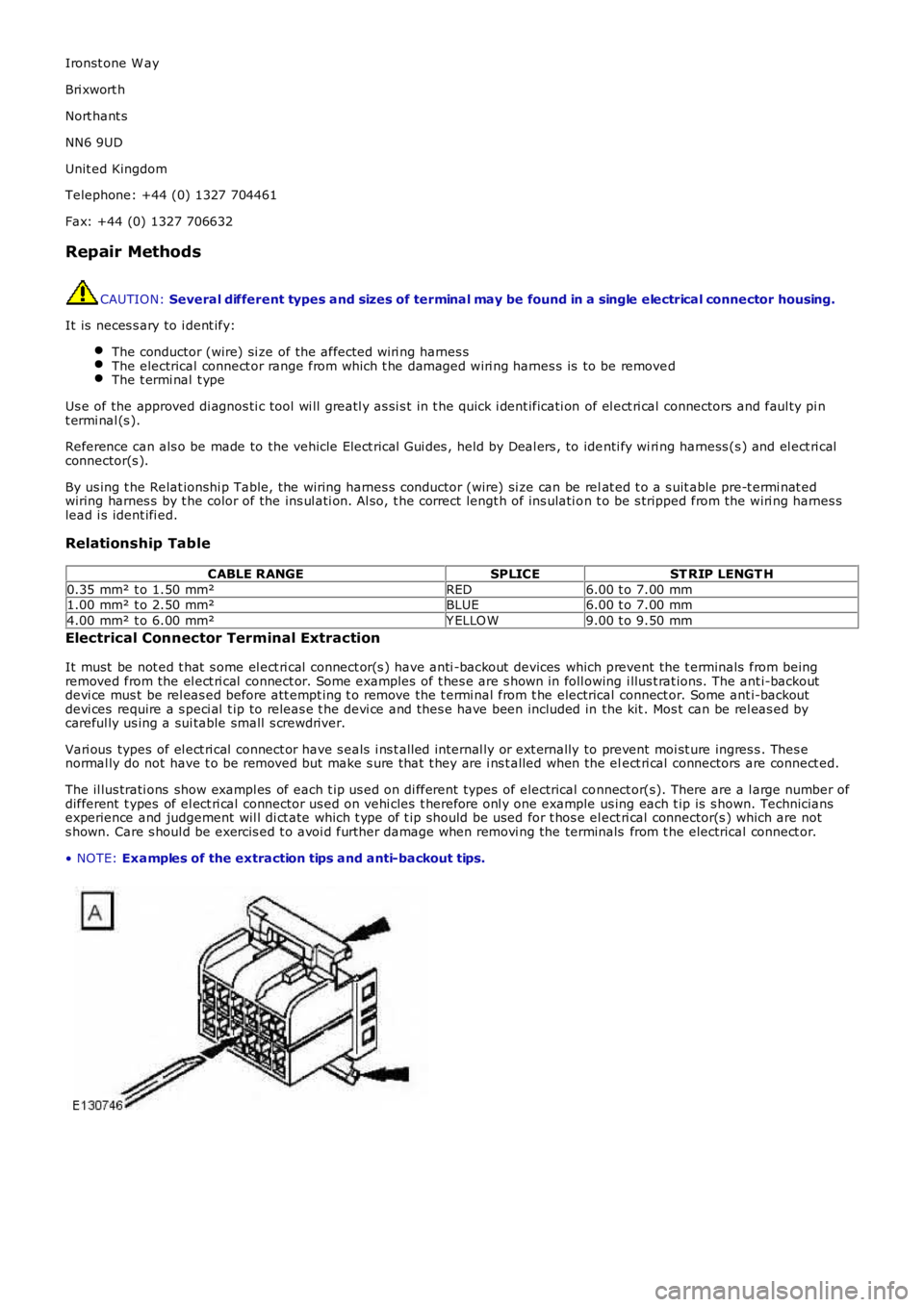
It must be not ed t hat s ome el ect ri cal connect or(s ) have anti -backout devices which prevent the t erminals from beingremoved from the el ect ri cal connect or. Some examples of t hes e are s hown in foll owing i llus t rat ions. The ant i-backoutdevi ce mus t be rel eas ed before att empt ing t o remove the t ermi nal from t he electrical connect or. Some ant i-backoutdevi ces require a s peci al t ip to releas e t he devi ce and thes e have been included in the kit . Mos t can be rel eas ed bycareful ly us ing a sui table small s crewdriver.
Vari ous types of el ect ri cal connect or have s eals i ns t alled internal ly or ext ernally to prevent moi st ure ingres s . Thes enormal ly do not have t o be removed but make s ure that t hey are i ns t alled when the elect ri cal connectors are connect ed.
The il lus trati ons show exampl es of each t ip us ed on di fferent types of electrical connect or(s). There are a l arge number ofdifferent t ypes of el ect ri cal connector us ed on vehi cles t herefore onl y one example us ing each t ip is s hown. Techniciansexperience and judgement wil l di ct ate which t ype of t ip should be used for t hos e el ect ri cal connector(s ) which are nots hown. Care s houl d be exercis ed t o avoi d further damage when removi ng the terminals from t he electrical connect or.
• NOTE: Examples of the extraction tips and anti-backout tips.
Page 2063 of 3229
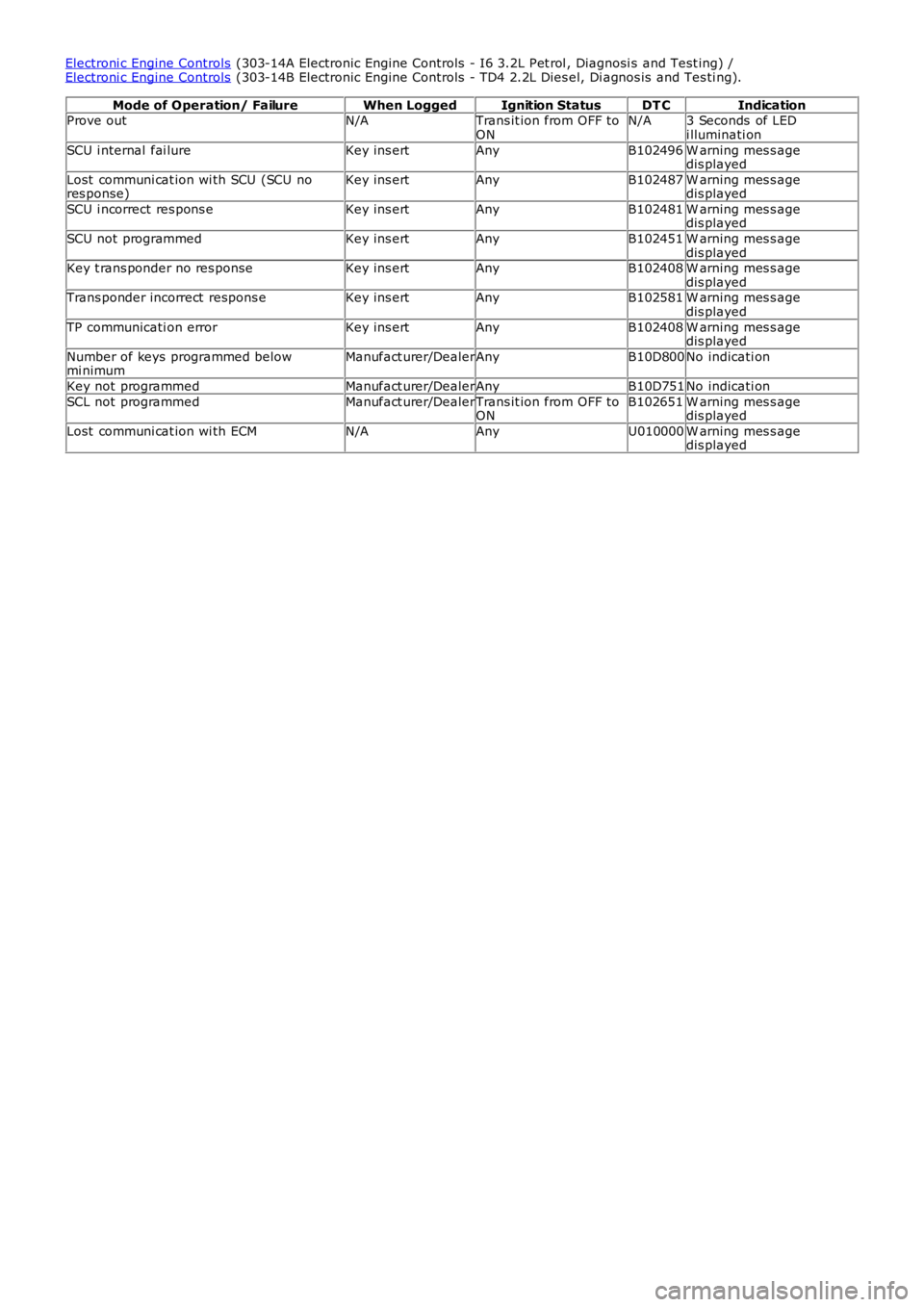
Electroni c Engine Controls (303-14A Electronic Engine Controls - I6 3.2L Pet rol , Diagnosi s and Test ing) /Electroni c Engine Controls (303-14B Electronic Engine Controls - TD4 2.2L Dies el, Di agnos is and Tes ti ng).
Mode of Operation/ FailureWhen LoggedIgnition StatusDT CIndicationProve outN/ATrans it ion from OFF toONN/A3 Seconds of LEDi lluminati on
SCU i nternal fai lureKey ins ertAnyB102496W arning mes s agedis played
Lost communi cat ion wi th SCU (SCU nores ponse)Key ins ertAnyB102487W arning mes s agedis played
SCU i ncorrect res pons eKey ins ertAnyB102481W arning mes s agedis played
SCU not programmedKey ins ertAnyB102451W arning mes s agedis playedKey t rans ponder no res ponseKey ins ertAnyB102408W arning mes s agedis playedTrans ponder incorrect respons eKey ins ertAnyB102581W arning mes s agedis played
TP communicati on errorKey ins ertAnyB102408W arning mes s agedis played
Number of keys programmed belowmi nimumManufact urer/DealerAnyB10D800No indicati on
Key not programmedManufact urer/DealerAnyB10D751No indicati on
SCL not programmedManufact urer/DealerTrans it ion from OFF toONB102651W arning mes s agedis played
Lost communi cat ion wi th ECMN/AAnyU010000W arning mes s agedis played