ESP NISSAN TEANA 2008 Service Manual
[x] Cancel search | Manufacturer: NISSAN, Model Year: 2008, Model line: TEANA, Model: NISSAN TEANA 2008Pages: 5121, PDF Size: 69.03 MB
Page 3944 of 5121
![NISSAN TEANA 2008 Service Manual SE-80
< SYMPTOM DIAGNOSIS >[WITH VENTILATION SEAT]
SQUEAK AND RATTLE TROUBLE DIAGNOSES
SQUEAK AND RATTLE TROUBLE DIAGNOSES
Work FlowINFOID:0000000003940143
CUSTOMER INTERVIEW
Interview the customer if](/img/5/57391/w960_57391-3943.png "NISSAN TEANA 2008 Service Manual SE-80
< SYMPTOM DIAGNOSIS >[WITH VENTILATION SEAT]
SQUEAK AND RATTLE TROUBLE DIAGNOSES
SQUEAK AND RATTLE TROUBLE DIAGNOSES
Work FlowINFOID:0000000003940143
CUSTOMER INTERVIEW
Interview the customer if")
SE-80
< SYMPTOM DIAGNOSIS >[WITH VENTILATION SEAT]
SQUEAK AND RATTLE TROUBLE DIAGNOSES
SQUEAK AND RATTLE TROUBLE DIAGNOSES
Work FlowINFOID:0000000003940143
CUSTOMER INTERVIEW
Interview the customer if possible, to determine the conditions that exist when the noise occurs. Use the Diag-
nostic Worksheet during the interview to document the facts and conditions when the noise occurs and any of
the customer's comments; refer to SE-84, "
Diagnostic Worksheet". This information is necessary to duplicate
the conditions that exist when the noise occurs.
The customer may not be able to provide a detailed description or the location of the noise. Attempt to obtain
all the facts and conditions that exist when the noise occurs (or does not occur).
If there is more than one noise in the vehicle, be sure to diagnose and repair the noise that the customer is
concerned about. This can be accomplished by a test drive with the customer.
After identifying the type of noise, isolate the noise in terms of its characteristics. The noise characteristics
are provided so the customer, service adviser and technician are all speaking the same language when
defining the noise.
Squeak – (Like tennis shoes on a clean floor)
Squeak characteristics include the light contact/fast movement/brought on by road conditions/hard surfaces
= higher pitch noise/softer surfaces = lower pitch noises/edge to surface = chirping
Creak – (Like walking on an old wooden floor)
Creak characteristics include firm contact/slow movement/twisting with a rotational movement/pitch depen-
dent on materials/often brought on by activity.
Rattle – (Like shaking a baby rattle)
Rattle characteristics include the fast repeated contact/vibration or similar movement/loose parts/missing
clip or fastener/incorrect clearance.
Knock – (Like a knock on a door)
Knock characteristics include hollow sounding/sometimes repeating/often brought on by driver action.
Tick – (Like a clock second hand)
Tick characteristics include gentle contacting of light materials/loose components/can be caused by driver
action or road conditions.
Thump – (Heavy, muffled knock noise)
Thump characteristics include softer knock/dead sound often brought on by activity.
Buzz – (Like a bumble bee)
Buzz characteristics include high frequency rattle/firm contact.
Often the degree of acceptable noise level will vary depending upon the person. A noise that a technician
may judge as acceptable may be very irritating to the customer.
Weather conditions, especially humidity and temperature, may have a great effect on noise level.
DUPLICATE THE NOISE AND TEST DRIVE
If possible, drive the vehicle with the customer until the noise is duplicated. Note any additional information on
the Diagnostic Worksheet regarding the conditions or location of the noise. This information can be used to
duplicate the same conditions when the repair is reconfirmed.
SBT842
Page 3985 of 5121
![NISSAN TEANA 2008 Service Manual SQUEAK AND RATTLE TROUBLE DIAGNOSES
SE-121
< SYMPTOM DIAGNOSIS >[WITHOUT VENTILATION SEAT]
C
D
E
F
G
H
I
K
L
MA
B
SE
N
O
P
SYMPTOM DIAGNOSIS
SQUEAK AND RATTLE TROUBLE DIAGNOSES
Work FlowINFOID:0000000](/img/5/57391/w960_57391-3984.png "NISSAN TEANA 2008 Service Manual SQUEAK AND RATTLE TROUBLE DIAGNOSES
SE-121
< SYMPTOM DIAGNOSIS >[WITHOUT VENTILATION SEAT]
C
D
E
F
G
H
I
K
L
MA
B
SE
N
O
P
SYMPTOM DIAGNOSIS
SQUEAK AND RATTLE TROUBLE DIAGNOSES
Work FlowINFOID:0000000")
SQUEAK AND RATTLE TROUBLE DIAGNOSES
SE-121
< SYMPTOM DIAGNOSIS >[WITHOUT VENTILATION SEAT]
C
D
E
F
G
H
I
K
L
MA
B
SE
N
O
P
SYMPTOM DIAGNOSIS
SQUEAK AND RATTLE TROUBLE DIAGNOSES
Work FlowINFOID:0000000003940140
CUSTOMER INTERVIEW
Interview the customer if possible, to determine the conditions that exist when the noise occurs. Use the Diag-
nostic Worksheet during the interview to document the facts and conditions when the noise occurs and any of
the customer's comments; refer to SE-125, "
Diagnostic Worksheet". This information is necessary to duplicate
the conditions that exist when the noise occurs.
The customer may not be able to provide a detailed description or the location of the noise. Attempt to obtain
all the facts and conditions that exist when the noise occurs (or does not occur).
If there is more than one noise in the vehicle, be sure to diagnose and repair the noise that the customer is
concerned about. This can be accomplished by a test drive with the customer.
After identifying the type of noise, isolate the noise in terms of its characteristics. The noise characteristics
are provided so the customer, service adviser and technician are all speaking the same language when
defining the noise.
Squeak – (Like tennis shoes on a clean floor)
Squeak characteristics include the light contact/fast movement/brought on by road conditions/hard surfaces
= higher pitch noise/softer surfaces = lower pitch noises/edge to surface = chirping
Creak – (Like walking on an old wooden floor)
Creak characteristics include firm contact/slow movement/twisting with a rotational movement/pitch depen-
dent on materials/often brought on by activity.
Rattle – (Like shaking a baby rattle)
Rattle characteristics include the fast repeated contact/vibration or similar movement/loose parts/missing
clip or fastener/incorrect clearance.
Knock – (Like a knock on a door)
Knock characteristics include hollow sounding/sometimes repeating/often brought on by driver action.
Tick – (Like a clock second hand)
Tick characteristics include gentle contacting of light materials/loose components/can be caused by driver
action or road conditions.
Thump – (Heavy, muffled knock noise)
Thump characteristics include softer knock/dead sound often brought on by activity.
Buzz – (Like a bumble bee)
Buzz characteristics include high frequency rattle/firm contact.
Often the degree of acceptable noise level will vary depending upon the person. A noise that a technician
may judge as acceptable may be very irritating to the customer.
Weather conditions, especially humidity and temperature, may have a great effect on noise level.
DUPLICATE THE NOISE AND TEST DRIVE
SBT842
Page 4020 of 5121
![NISSAN TEANA 2008 Service Manual INTELLIGENT KEY SYSTEM/ENGINE START FUNCTION
SEC-11
< FUNCTION DIAGNOSIS >[INTELLIGENT KEY SYSTEM]
C
D
E
F
G
H
I
J
L
MA
B
SEC
N
O
P
PUSH-BUTTON IGNITION SWITCH OPERATION PROCEDURE
The power supply pos](/img/5/57391/w960_57391-4019.png "NISSAN TEANA 2008 Service Manual INTELLIGENT KEY SYSTEM/ENGINE START FUNCTION
SEC-11
< FUNCTION DIAGNOSIS >[INTELLIGENT KEY SYSTEM]
C
D
E
F
G
H
I
J
L
MA
B
SEC
N
O
P
PUSH-BUTTON IGNITION SWITCH OPERATION PROCEDURE
The power supply pos")
INTELLIGENT KEY SYSTEM/ENGINE START FUNCTION
SEC-11
< FUNCTION DIAGNOSIS >[INTELLIGENT KEY SYSTEM]
C
D
E
F
G
H
I
J
L
MA
B
SEC
N
O
P
PUSH-BUTTON IGNITION SWITCH OPERATION PROCEDURE
The power supply position changing operation can be performed with the following operations.
Operation Enable Condition
When an Intelligent Key is within the detection area of inside key antenna and when it is inserted to the key
slot, it is equivalent to the operations below.
When starting the engine, the BCM monitors the following engine start conditions,
- Brake pedal operating condition
- Selector lever position
- Vehicle speed
Unless each start condition is fulfilled, the engine will not respond regardless of how many times the engine
switch is pressed. At that time, illumination repeats the position in the order of LOCK→ACC→ON→OFF.
Operation Condition
*1: When the selector lever position is in the N position, the engine start condition is different according to the vehicle speed.
At a vehicle speed of less than 4 km/h (2.5MPH), the engine can start only when the brake pedal is depressed.
At a vehicle speed of 4 km/h (2.5MPH) or more, the engine can start even if the brake pedal is not depressed. (It is the same as
“Engine stall return operation while driving”.)
*2: When the selector lever position is in any position other than the P position and when the vehicle speed is 5 km/h (3.1MPH) or more,
the engine stop condition is different.
Press and hold the push-button ignition switch for 2 seconds or more. (When the push-button ignition switch is pressed for too short a
time, the operation may be invalid, so properly press and hold to prevent an incorrect operation.)
Press the push-button ignition switch 3 times or more within 1.5 seconds. (Emergency stop operation)Power supply positionEngine start/stop condition
Push-button ignition switch op-
eration frequency
Brake pedal Selector lever position
LOCK → ACC Not depressed Any position 1
LOCK → ACC → ON Not depressed Any position 2
LOCK → ACC → ON →
OFFNot depressed Any position 3
LOCK → START
ACC → START
ON → START
(Engine start)Depressed P or N position (*1)1
[If the switch is pressed once,
the engine starts from any pow-
er supply position (LOCK, ACC,
and ON)]
Engine is running →
OFF
(Engine stop)— P position 1
Engine is running →
ACC
(Engine stop)— Any position other than P (*2) 1
Engine stall return oper-
ation while driving— N position 1
Page 4098 of 5121
![NISSAN TEANA 2008 Service Manual B2617 STARTER RELAY CIRCUIT
SEC-89
< COMPONENT DIAGNOSIS >[INTELLIGENT KEY SYSTEM]
C
D
E
F
G
H
I
J
L
MA
B
SEC
N
O
P
B2617 STARTER RELAY CIRCUIT
DescriptionINFOID:0000000003815026
Located in IPDM E/R,](/img/5/57391/w960_57391-4097.png "NISSAN TEANA 2008 Service Manual B2617 STARTER RELAY CIRCUIT
SEC-89
< COMPONENT DIAGNOSIS >[INTELLIGENT KEY SYSTEM]
C
D
E
F
G
H
I
J
L
MA
B
SEC
N
O
P
B2617 STARTER RELAY CIRCUIT
DescriptionINFOID:0000000003815026
Located in IPDM E/R,")
B2617 STARTER RELAY CIRCUIT
SEC-89
< COMPONENT DIAGNOSIS >[INTELLIGENT KEY SYSTEM]
C
D
E
F
G
H
I
J
L
MA
B
SEC
N
O
P
B2617 STARTER RELAY CIRCUIT
DescriptionINFOID:0000000003815026
Located in IPDM E/R, it runs the starter motor. The starter relay is turned ON by the BCM when the ignition
switch is in the START position. IPDM E/R transmits the starter relay ON signal to BCM via CAN communica-
tion.
DTC LogicINFOID:0000000003815027
DTC DETECTION LOGIC
NOTE:
If DTC B2617 is displayed with DTC U1000, first perform the trouble diagnosis for DTC U1000. Refer to
SEC-28, "
BCM : DTC Logic".
If DTC B2617 is displayed with DTC U1010, first perform the trouble diagnosis for DTC U1010. Refer to
SEC-30, "
BCM : DTC Logic".
If DTC B2617 is displayed with DTC B2611, first perform the trouble diagnosis for DTC B2611. Refer to
SEC-89, "
DTC Logic".
If DTC B2617 is displayed with DTC B210E for IPDM E/R, first perform the trouble diagnosis for DTC
B210E. Refer to SEC-105, "
DTC Logic".
DTC CONFIRMATION PROCEDURE
1.PERFORM DTC CONFIRMATION PROCEDURE
1. Turn ignition switch ON under the following conditions and wait for at least 1 second.
- Selector lever is in the P or N position.
- Do not depress brake pedal.
2. Check “Self diagnostic result” with CONSULT-III.
Is DTC detected?
YES >> Go to SEC-89, "Diagnosis Procedure".
NO >> INSPECTION END
Diagnosis ProcedureINFOID:0000000003815028
1.CHECK STARTER RELAY
1. Turn ignition switch ON.
2. Check voltage between BCM harness connector and ground.
Is the inspection result normal?
YES >> GO TO 3.
NO >> GO TO 2.
2.CHECK STARTER RELAY CIRCUIT
1. Turn ignition switch OFF.
2. Disconnect BCM connector and IPDM E/R connector.
3. Check continuity between IPDM E/R harness connector and BCM harness connector.
DTC No.Trouble diagnosis
nameDTC detecting condition Possible cause
B2617STARTER RELAY
CIRCUITAn immediate operation of starter relay is request-
ed by BCM, but there is no response for more than
1 second Harness or connectors
(Starter relay circuit is open or short-
ed)
IPDM E/R
(+)
(–) ConditionVoltage (V)
(Approx.) BCM
Connector Terminal
M121 52 Ground Selector leverN or P position Battery voltage
Other than above 0
Page 4184 of 5121
![NISSAN TEANA 2008 Service Manual BCM (BODY CONTROL MODULE)
SEC-175
< ECU DIAGNOSIS >[INTELLIGENT KEY SYSTEM]
C
D
E
F
G
H
I
J
L
MA
B
SEC
N
O
P
HIGH FLASHER OPERATION
BCM detects the turn signal lamp circuit status by the current value](/img/5/57391/w960_57391-4183.png "NISSAN TEANA 2008 Service Manual BCM (BODY CONTROL MODULE)
SEC-175
< ECU DIAGNOSIS >[INTELLIGENT KEY SYSTEM]
C
D
E
F
G
H
I
J
L
MA
B
SEC
N
O
P
HIGH FLASHER OPERATION
BCM detects the turn signal lamp circuit status by the current value")
BCM (BODY CONTROL MODULE)
SEC-175
< ECU DIAGNOSIS >[INTELLIGENT KEY SYSTEM]
C
D
E
F
G
H
I
J
L
MA
B
SEC
N
O
P
HIGH FLASHER OPERATION
BCM detects the turn signal lamp circuit status by the current value.
BCM increases the turn signal lamp blinking speed if the bulb or harness open is detected with the turn signal
lamp operating.
NOTE:
The blinking speed is normal while activating the hazard warning lamp.
DTC Inspection Priority ChartINFOID:0000000003880728
If some DTCs are displayed at the same time, perform inspections one by one based on the following priority
chart.
B2608: STARTER RELAY Inhibit engine cranking500 ms after the following signal communication status becomes
consistent
Starter motor relay control signal
Starter relay status signal (CAN)
B2609: S/L STATUS Inhibit engine cranking
Inhibit steering lockWhen the following steering lock conditions agree
BCM steering lock control status
Steering lock condition No. 1 signal status
Steering lock condition No. 2 signal status
B260A: IGNITION RELAY Inhibit engine cranking500 ms after the following conditions are fulfilled
IGN relay (IPDM E/R) control signal: OFF (Battery voltage)
Ignition ON signal (CAN to IPDM E/R): OFF (Request signal)
Ignition ON signal (CAN from IPDM E/R): OFF (Condition signal)
B260F: ENG STATE SIG LOSTMaintains the power supply
position attained at the time
of DTC detectionWhen any of the following conditions is fulfilled
Power position changes to ACC
Receives engine status signal (CAN)
B2612: S/L STATUS Inhibit engine cranking
Inhibit steering lockWhen any of the following conditions is fulfilled
Steering lock unit status signal (CAN) is received normally
The BCM steering lock control status matches the steering lock
status recognized by the steering lock unit status signal (CAN
from IPDM E/R)
B2617: STARTER RELAY CIRC Inhibit engine cranking1 second after the starter motor relay control inside BCM becomes
normal
B2618: BCM Inhibit engine cranking1 second after the ignition relay (IPDM E/R) control inside BCM be-
comes normal
B2619: BCM Inhibit engine cranking1 second after the steering lock unit power supply output control in-
side BCM becomes normal
B261E: VEHICLE TYPE Inhibit engine cranking BCM initialization
B26E1: ENG STATE NO RES Inhibit engine crankingWhen any of the following conditions is fulfilled
Power position changes to ACC
Receives engine status signal (CAN)
B26E9: S/L STATUS Inhibit engine cranking
Inhibit steering lockWhen BCM transmits the LOCK request signal to steering lock unit,
and receives LOCK response signal from steering lock unit, the fol-
lowing conditions is fulfilled
Steering condition No. 1 signal: LOCK (0 V)
Steering condition No. 2 signal: LOCK (Battery voltage) Display contents of CONSULT Fail-safe Cancellation
Priority DTC
1 B2562: LOW VOLTAGE
2 U1000: CAN COMM CIRCUIT
U1010: CONTROL UNIT (CAN)
3 B2190: NATS ANTENNA AMP
B2191: DIFFERENCE OF KEY
B2192: ID DISCORD BCM-ECM
B2193: CHAIN OF BCM-ECM
Page 4243 of 5121
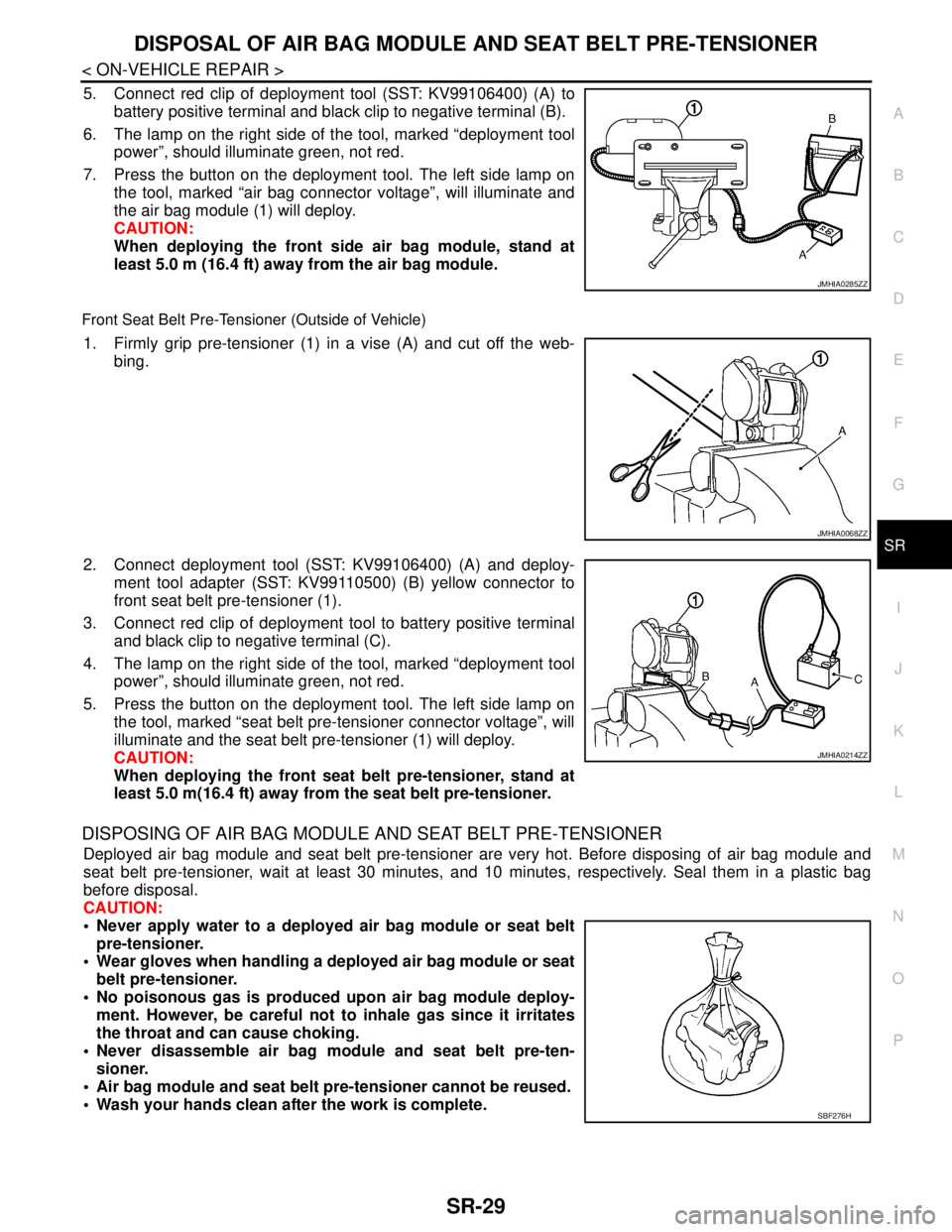
DISPOSAL OF AIR BAG MODULE AND SEAT BELT PRE-TENSIONER
SR-29
< ON-VEHICLE REPAIR >
C
D
E
F
G
I
J
K
L
MA
B
SR
N
O
P
5. Connect red clip of deployment tool (SST: KV99106400) (A) to
battery positive terminal and black clip to negative terminal (B).
6. The lamp on the right side of the tool, marked “deployment tool
power”, should illuminate green, not red.
7. Press the button on the deployment tool. The left side lamp on
the tool, marked “air bag connector voltage”, will illuminate and
the air bag module (1) will deploy.
CAUTION:
When deploying the front side air bag module, stand at
least 5.0 m (16.4 ft) away from the air bag module.
Front Seat Belt Pre-Tensioner (Outside of Vehicle)
1. Firmly grip pre-tensioner (1) in a vise (A) and cut off the web-
bing.
2. Connect deployment tool (SST: KV99106400) (A) and deploy-
ment tool adapter (SST: KV99110500) (B) yellow connector to
front seat belt pre-tensioner (1).
3. Connect red clip of deployment tool to battery positive terminal
and black clip to negative terminal (C).
4. The lamp on the right side of the tool, marked “deployment tool
power”, should illuminate green, not red.
5. Press the button on the deployment tool. The left side lamp on
the tool, marked “seat belt pre-tensioner connector voltage”, will
illuminate and the seat belt pre-tensioner (1) will deploy.
CAUTION:
When deploying the front seat belt pre-tensioner, stand at
least 5.0 m(16.4 ft) away from the seat belt pre-tensioner.
DISPOSING OF AIR BAG MODULE AND SEAT BELT PRE-TENSIONER
Deployed air bag module and seat belt pre-tensioner are very hot. Before disposing of air bag module and
seat belt pre-tensioner, wait at least 30 minutes, and 10 minutes, respectively. Seal them in a plastic bag
before disposal.
CAUTION:
Never apply water to a deployed air bag module or seat belt
pre-tensioner.
Wear gloves when handling a deployed air bag module or seat
belt pre-tensioner.
No poisonous gas is produced upon air bag module deploy-
ment. However, be careful not to inhale gas since it irritates
the throat and can cause choking.
Never disassemble air bag module and seat belt pre-ten-
sioner.
Air bag module and seat belt pre-tensioner cannot be reused.
Wash your hands clean after the work is complete.
JMHIA0285ZZ
JMHIA0068ZZ
JMHIA0214ZZ
SBF276H
Page 4430 of 5121
STC-2
< BASIC INSPECTION >
DIAGNOSIS AND REPAIR WORK FLOW
BASIC INSPECTION
DIAGNOSIS AND REPAIR WORK FLOW
Work FlowINFOID:0000000003893521
DETAILED FLOW
1.COLLECT THE INFORMATION FROM THE CUSTOMER
It is also important to clarify customer complaints before inspection. First of all, reproduce symptoms and
understand them fully. Ask customer about his/her complaints carefully. In some cases, it is necessary to
check symptoms by driving vehicle with customer.
CAUTION:
Customers are not professional. It is dangerous to make an easy guess like “maybe the customer
means that...,” or “maybe the customer mentions this symptom”.
>> GO TO 2.
2.CHECK THE STATUS
1. Check the power steering fluid leakage and power steering fluid level. Refer to ST-7, "
Inspection".
2. Check the drive belt tension. Refer to EM-12, "
Checking".
3. Check the power steering gear for damages, cracks and fluid leakage. Refer to ST-26, "
Inspection".
4. Check the relief oil pressure. Refer to ST-32, "
Inspection".
>> GO TO 3.
3.DIAGNOSIS CHART BY SYMPTOM
Perform the diagnosis by symptom. Refer to STC-17, "
Diagnosis Procedure".
>> GO TO 4.
4.FINAL CHECK
Check the input/output standard values for the power steering control unit.
Are the power steering control unit input/output values within standard ranges respectively?
YES >> INSPECTION END
NO >> GO TO 2.
Page 4482 of 5121
![NISSAN TEANA 2008 Service Manual DIAGNOSIS AND REPAIR WORK FLOW
TM-9
< BASIC INSPECTION >[CVT: RE0F09B]
C
E
F
G
H
I
J
K
L
MA
B
TM
N
O
P
BASIC INSPECTION
DIAGNOSIS AND REPAIR WORK FLOW
Work FlowINFOID:0000000003848914
INTRODUCTION
The](/img/5/57391/w960_57391-4481.png "NISSAN TEANA 2008 Service Manual DIAGNOSIS AND REPAIR WORK FLOW
TM-9
< BASIC INSPECTION >[CVT: RE0F09B]
C
E
F
G
H
I
J
K
L
MA
B
TM
N
O
P
BASIC INSPECTION
DIAGNOSIS AND REPAIR WORK FLOW
Work FlowINFOID:0000000003848914
INTRODUCTION
The")
DIAGNOSIS AND REPAIR WORK FLOW
TM-9
< BASIC INSPECTION >[CVT: RE0F09B]
C
E
F
G
H
I
J
K
L
MA
B
TM
N
O
P
BASIC INSPECTION
DIAGNOSIS AND REPAIR WORK FLOW
Work FlowINFOID:0000000003848914
INTRODUCTION
The TCM receives signals from the vehicle speed sensor and PNP switch. Then it provides shift control or
lock-up control via CVT solenoid valves.
The TCM also communicates with the ECM by means of signals
sent from sensing elements used with the OBD-related parts of the
CVT system for malfunction-diagnostic purposes. The TCM is capa-
ble of diagnosing malfunctioning parts while the ECM can store mal-
functions in its memory.
Input and output signals must always be correct and stable in the
operation of the CVT system. The CVT system must be in good
operating condition and be free of valve seizure, solenoid valve mal-
function, etc.
It is much more difficult to diagnose a malfunction that occurs inter-
mittently rather than continuously. Most intermittent malfunctions are
caused by poor electric connections or improper wiring. In this case,
careful checking of suspected circuits may help prevent the replace-
ment of good parts.
A visual check only may not find the cause of the malfunctions. A
road test with CONSULT-III (or GST) or a circuit tester connected
should be performed. Follow the “DETAILED FLOW”.
Before undertaking actual checks, take a few minutes to talk with a
customer who approaches with a driveability complaint. The cus-
tomer can supply good information about such malfunctions, espe-
cially intermittent ones. Find out what symptoms are present and
under what conditions they occur. A “Diagnostic Work Sheet” as
shown on the example (Refer to TM-10
) should be used.
Start your diagnosis by looking for “conventional” malfunctions first.
This will help troubleshoot driveability malfunctions on an electroni-
cally controlled engine vehicle.
Also check related Service Bulletins.
DETAILED FLOW
1.COLLECT THE INFORMATION FROM THE CUSTOMER
Get the detailed information from the customer about the symptom (the condition and the environment when
the incident/malfunction occurred) using the diagnosis work sheet. Refer to TM-10, "
Diagnostic Work Sheet".
>> GO TO 2.
2.CHECK SYMPTOM 1
Check the following items based on the information obtained from the customer.
Fail-safe. Refer to TM-120, "
Fail-safe".
CVT fluid inspection. Refer to TM-142, "
Inspection".
Line pressure test. Refer to TM-146, "
Inspection and Judgment".
SAT631IB
SAT632I
SEF234G
Page 4496 of 5121
![NISSAN TEANA 2008 Service Manual CONTROL SYSTEM
TM-23
< FUNCTION DIAGNOSIS >[CVT: RE0F09B]
C
E
F
G
H
I
J
K
L
MA
B
TM
N
O
P
CONTROL SYSTEM
System DiagramINFOID:0000000003848928
System DescriptionINFOID:0000000003848929
The CVT senses](/img/5/57391/w960_57391-4495.png "NISSAN TEANA 2008 Service Manual CONTROL SYSTEM
TM-23
< FUNCTION DIAGNOSIS >[CVT: RE0F09B]
C
E
F
G
H
I
J
K
L
MA
B
TM
N
O
P
CONTROL SYSTEM
System DiagramINFOID:0000000003848928
System DescriptionINFOID:0000000003848929
The CVT senses")
CONTROL SYSTEM
TM-23
< FUNCTION DIAGNOSIS >[CVT: RE0F09B]
C
E
F
G
H
I
J
K
L
MA
B
TM
N
O
P
CONTROL SYSTEM
System DiagramINFOID:0000000003848928
System DescriptionINFOID:0000000003848929
The CVT senses vehicle operating conditions through various sensors. It always controls the optimum shift
position and reduces shifting and lock-up shocks.
TCM FUNCTION
The function of the TCM is to:
Receive input signals sent from various switches and sensors.
Determine required line pressure, shifting point, and lock-up operation.
Send required output signals to the step motor and the respective solenoids.
INPUT/OUTPUT SIGNAL OF TCM
JPDIA0809GB
SENSORS (or SIGNAL)
⇒TCM
⇒ACTUATORS
PNP switch
Accelerator pedal position signal
Closed throttle position signal
Engine speed signal
CVT fluid temperature sensor
Vehicle speed signal
Sport mode switch signal
Stop lamp switch signal
Primary speed sensor
Secondary speed sensor
Primary pressure sensor
Secondary pressure sensorShift control
Line pressure control
Primary pressure control
Secondary pressure control
Lock-up control
Engine brake control
Vehicle speed control
Fail-safe control
Self-diagnosis
CONSULT-III communication line
Duet-EA control
CAN system
On board diagnosisStep motor
Torque converter clutch solenoid
valve
Lock-up select solenoid valve
Line pressure solenoid valve
Secondary pressure solenoid valve
SPORT indicator lamp
Shift position indicator
Stater relay
Page 4508 of 5121
![NISSAN TEANA 2008 Service Manual ON BOARD DIAGNOSTIC (OBD) SYSTEM
TM-35
< FUNCTION DIAGNOSIS >[CVT: RE0F09B]
C
E
F
G
H
I
J
K
L
MA
B
TM
N
O
P
ON BOARD DIAGNOSTIC (OBD) SYSTEM
Diagnosis DescriptionINFOID:0000000003848943
DESCRIPTION
Th](/img/5/57391/w960_57391-4507.png "NISSAN TEANA 2008 Service Manual ON BOARD DIAGNOSTIC (OBD) SYSTEM
TM-35
< FUNCTION DIAGNOSIS >[CVT: RE0F09B]
C
E
F
G
H
I
J
K
L
MA
B
TM
N
O
P
ON BOARD DIAGNOSTIC (OBD) SYSTEM
Diagnosis DescriptionINFOID:0000000003848943
DESCRIPTION
Th")
ON BOARD DIAGNOSTIC (OBD) SYSTEM
TM-35
< FUNCTION DIAGNOSIS >[CVT: RE0F09B]
C
E
F
G
H
I
J
K
L
MA
B
TM
N
O
P
ON BOARD DIAGNOSTIC (OBD) SYSTEM
Diagnosis DescriptionINFOID:0000000003848943
DESCRIPTION
The CVT system has two self-diagnostic systems.
The first is the emission-related on board diagnostic system (OBD) performed by the TCM in combination with
the ECM. A malfunction is indicated by the MI (Malfunction Indicator) and is stored as a DTC in the ECM mem-
ory and in the TCM memory.
The second is the TCM original self-diagnosis performed by the TCM. A malfunction history is stored in the
TCM memory. The detected items are overlapped with OBD self-diagnostic items. For details, refer to TM-121,
"DTC Index".
OBD FUNCTION
The ECM provides emission-related on board diagnostic (OBD) functions for the CVT system. One function is
to receive a signal from the TCM used with OBD-related parts of the CVT system. The signal is sent to the
ECM when a malfunction occurs in the corresponding OBD-related part. The other function is to indicate a
diagnostic result by means of the MI (Malfunction Indicator) on the instrument panel. Sensors, switches and
solenoid valves are used as sensing elements.
The MI automatically illuminates in “One or Two Trip Detection Logic” when a malfunction is sensed in relation
to CVT system parts.
ONE OR TWO TRIP DETECTION LOGIC OF OBD
One Trip Detection Logic
If a malfunction is sensed during the first test drive, the MI illuminates and the ECM memory stores the mal-
function as a DTC. The TCM is not provided with such a memory function.
Two Trip Detection Logic
When a malfunction is sensed during the first test drive, it is stored in the ECM memory as a 1st trip DTC
(diagnostic trouble code) or 1st trip freeze frame data. At this point, the MI does not illuminate. — 1st trip
If the same malfunction as that experienced during the first test drive is sensed during the second test drive,
the MI will illuminate. — 2nd trip
The “trip” in the “One or Two Trip Detection Logic” means a driving mode in which self-diagnosis is performed
during vehicle operation.
OBD DIAGNOSTIC TROUBLE CODE (DTC)
How to Read DTC and 1st Trip DTC
DTC and 1st trip DTC can be read by the following methods.
( with CONSULT-III or GST) CONSULT-III or GST (Generic Scan Tool) Examples: P0705, P0720, etc.
These DTC are prescribed by ISO 15031-6.
(CONSULT-III also displays the malfunctioning component or system.)
1st trip DTC No. is the same as DTC No.
Output of the diagnostic trouble code indicates that the indicated circuit has a malfunction. How-
ever, in case of the Mode II and GST, they do not indicate whether the malfunction is still occurring or
it occurred in the past and has returned to normal.
CONSULT-III can identify them as shown below, therefore, CONSULT-III (if available) is recom-
mended.
- DTC or 1st trip DTC of a malfunction is displayed in “Self-Diagnostic Results” mode for “ENGINE” with CON-
SULT-III. Time data indicates how many times the vehicle was driven after the last detection of a DTC.
- If the DTC is being detected currently, the time data will be “0”.
- If a 1st trip DTC is stored in the ECM, the time data will be “1t”.
Freeze Frame Data and 1st Trip Freeze Frame Data The ECM has a memory function, which stores the driving conditions such as fuel system status, calculated
load value, engine coolant temperature, short-term fuel trim, long-term fuel trim, engine speed and vehicle
speed at the moment the ECM detects a malfunction.
Data that are stored in the ECM memory, along with the 1st trip DTC, are called 1st trip freeze frame data,
and the data, stored together with the DTC data, are called freeze frame data and displayed on CONSULT-
III or GST. The 1st trip freeze frame data can only be displayed on the CONSULT-III screen, not on the GST.
For details, refer to EC-113, "
CONSULT-III Function".