lock NISSAN TEANA 2008 Service Manual
[x] Cancel search | Manufacturer: NISSAN, Model Year: 2008, Model line: TEANA, Model: NISSAN TEANA 2008Pages: 5121, PDF Size: 69.03 MB
Page 2548 of 5121

SQUEAK AND RATTLE TROUBLE DIAGNOSES
GW-5
< SYMPTOM DIAGNOSIS >
C
D
E
F
G
H
I
J
L
MA
B
GW
N
O
P
Again, pressing on the components to stop the noise while duplicating the conditions can isolate most of these
incidents. Repairs usually consist of insulating with felt cloth tape.
SEATS
When isolating seat noise it is important to note the position the seat is in and the load placed on the seat
when the noise occurs. These conditions should be duplicated when verifying and isolating the cause of the
noise.
Cause of seat noise include:
1. Headrest rods and holder
2. A squeak between the seat pad cushion and frame
3. Rear seatback lock and bracket
These noises can be isolated by moving or pressing on the suspected components while duplicating the con-
ditions under which the noise occurs. Most of these incidents can be repaired by repositioning the component
or applying urethane tape to the contact area.
UNDERHOOD
Some interior noise may be caused by components under the hood or on the engine wall. The noise is then
transmitted into the passenger compartment.
Causes of transmitted underhood noise include:
1. Any component mounted to the engine wall
2. Components that pass through the engine wall
3. Engine wall mounts and connectors
4. Loose radiator mounting pins
5. Hood bumpers out of adjustment
6. Hood striker out of adjustment
These noises can be difficult to isolate since they cannot be reached from the interior of the vehicle. The best
method is to secure, move or insulate one component at a time and test drive the vehicle. Also, engine RPM
or load can be changed to isolate the noise. Repairs can usually be made by moving, adjusting, securing, or
insulating the component causing the noise.
Page 2579 of 5121
HA-10
< SYMPTOM DIAGNOSIS >
REFRIGERATION SYSTEM SYMPTOMS
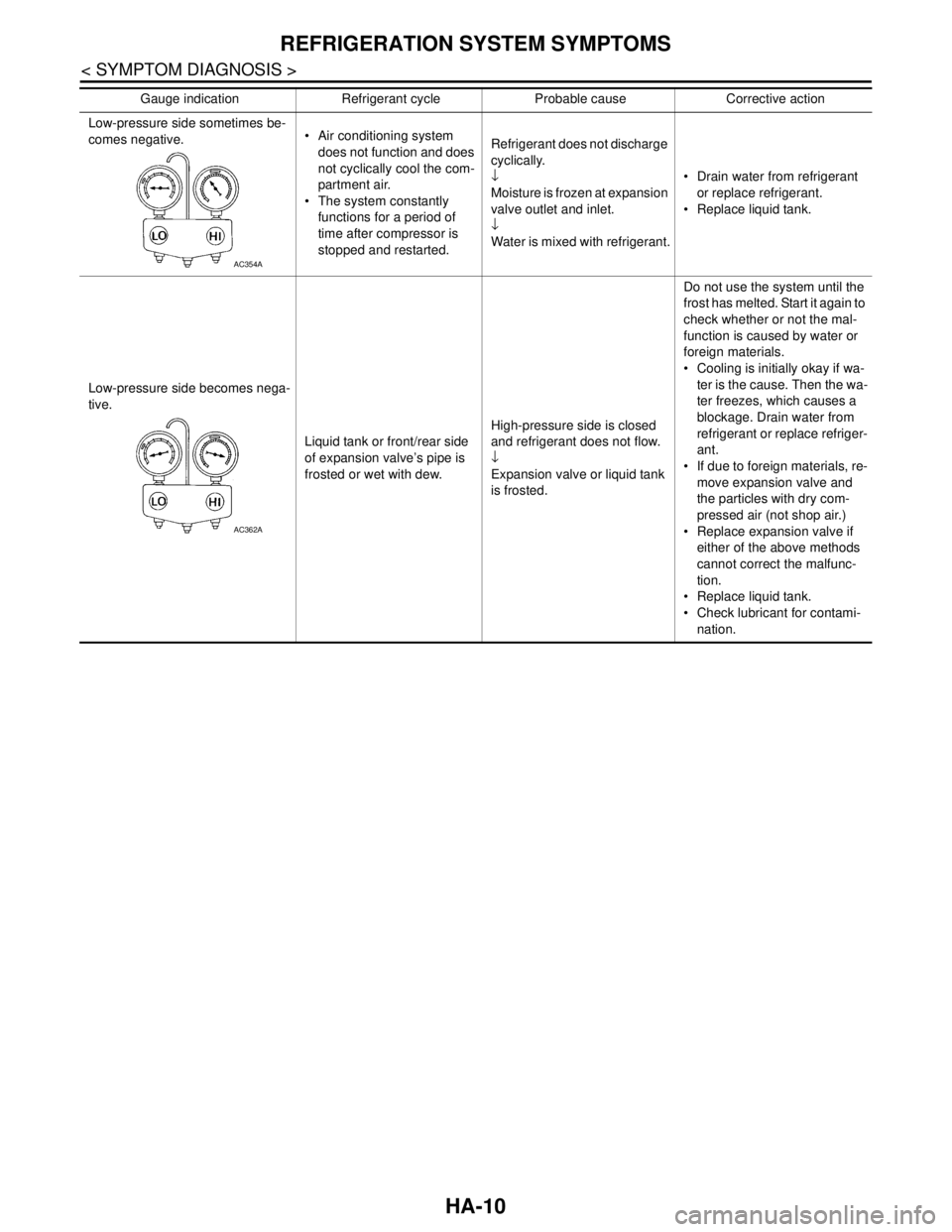
Low-pressure side sometimes be-
comes negative. Air conditioning system
does not function and does
not cyclically cool the com-
partment air.
The system constantly
functions for a period of
time after compressor is
stopped and restarted.Refrigerant does not discharge
cyclically.
↓
Moisture is frozen at expansion
valve outlet and inlet.
↓
Water is mixed with refrigerant. Drain water from refrigerant
or replace refrigerant.
Replace liquid tank.
Low-pressure side becomes nega-
tive.
Liquid tank or front/rear side
of expansion valve’s pipe is
frosted or wet with dew.High-pressure side is closed
and refrigerant does not flow.
↓
Expansion valve or liquid tank
is frosted.Do not use the system until the
frost has melted. Start it again to
check whether or not the mal-
function is caused by water or
foreign materials.
Cooling is initially okay if wa-
ter is the cause. Then the wa-
ter freezes, which causes a
blockage. Drain water from
refrigerant or replace refriger-
ant.
If due to foreign materials, re-
move expansion valve and
the particles with dry com-
pressed air (not shop air.)
Replace expansion valve if
either of the above methods
cannot correct the malfunc-
tion.
Replace liquid tank.
Check lubricant for contami-
nation. Gauge indication Refrigerant cycle Probable cause Corrective action
AC354A
AC362A
Page 2581 of 5121

HA-12
< PRECAUTION >
PRECAUTIONS
PRECAUTION
PRECAUTIONS
Precaution for Supplemental Restraint System (SRS) "AIR BAG" and "SEAT BELT
PRE-TENSIONER"
INFOID:0000000003844112
The Supplemental Restraint System such as “AIR BAG” and “SEAT BELT PRE-TENSIONER”, used along
with a front seat belt, helps to reduce the risk or severity of injury to the driver and front passenger for certain
types of collision. Information necessary to service the system safely is included in the “SRS AIRBAG” and
“SEAT BELT” of this Service Manual.
WARNING:
• To avoid rendering the SRS inoperative, which could increase the risk of personal injury or death in
the event of a collision which would result in air bag inflation, all maintenance must be performed by
an authorized NISSAN/INFINITI dealer.
Improper maintenance, including incorrect removal and installation of the SRS, can lead to personal
injury caused by unintentional activation of the system. For removal of Spiral Cable and Air Bag
Module, see the “SRS AIRBAG”.
Never use electrical test equipment on any circuit related to the SRS unless instructed to in this Ser-
vice Manual. SRS wiring harnesses can be identified by yellow and/or orange harnesses or harness
connectors.
Precaution Necessary for Steering Wheel Rotation after Battery Disconnect
INFOID:0000000003844113
NOTE:
Before removing and installing any control units, first turn the push-button ignition switch to the LOCK posi-
tion, then disconnect both battery cables.
After finishing work, confirm that all control unit connectors are connected properly, then re-connect both
battery cables.
Always use CONSULT-III to perform self-diagnosis as a part of each function inspection after finishing work.
If a DTC is detected, perform trouble diagnosis according to self-diagnosis results.
This vehicle is equipped with a push-button ignition switch and a steering lock unit.
If the battery is disconnected or discharged, the steering wheel will lock and cannot be turned.
If turning the steering wheel is required with the battery disconnected or discharged, follow the procedure
below before starting the repair operation.
OPERATION PROCEDURE
1. Connect both battery cables.
NOTE:
Supply power using jumper cables if battery is discharged.
2. Turn the push-button ignition switch to ACC position.
(At this time, the steering lock will be released.)
3. Disconnect both battery cables. The steering lock will remain released with both battery cables discon-
nected and the steering wheel can be turned.
4. Perform the necessary repair operation.
5. When the repair work is completed, re-connect both battery cables. With the brake pedal released, turn
the push-button ignition switch from ACC position to ON position, then to LOCK position. (The steering
wheel will lock when the push-button ignition switch is turned to LOCK position.)
6. Perform self-diagnosis check of all control units using CONSULT-III.
Page 2586 of 5121
PRECAUTIONS
HA-17
< PRECAUTION >
C
D
E
F
G
H
J
K
L
MA
B
HA
N
O
P
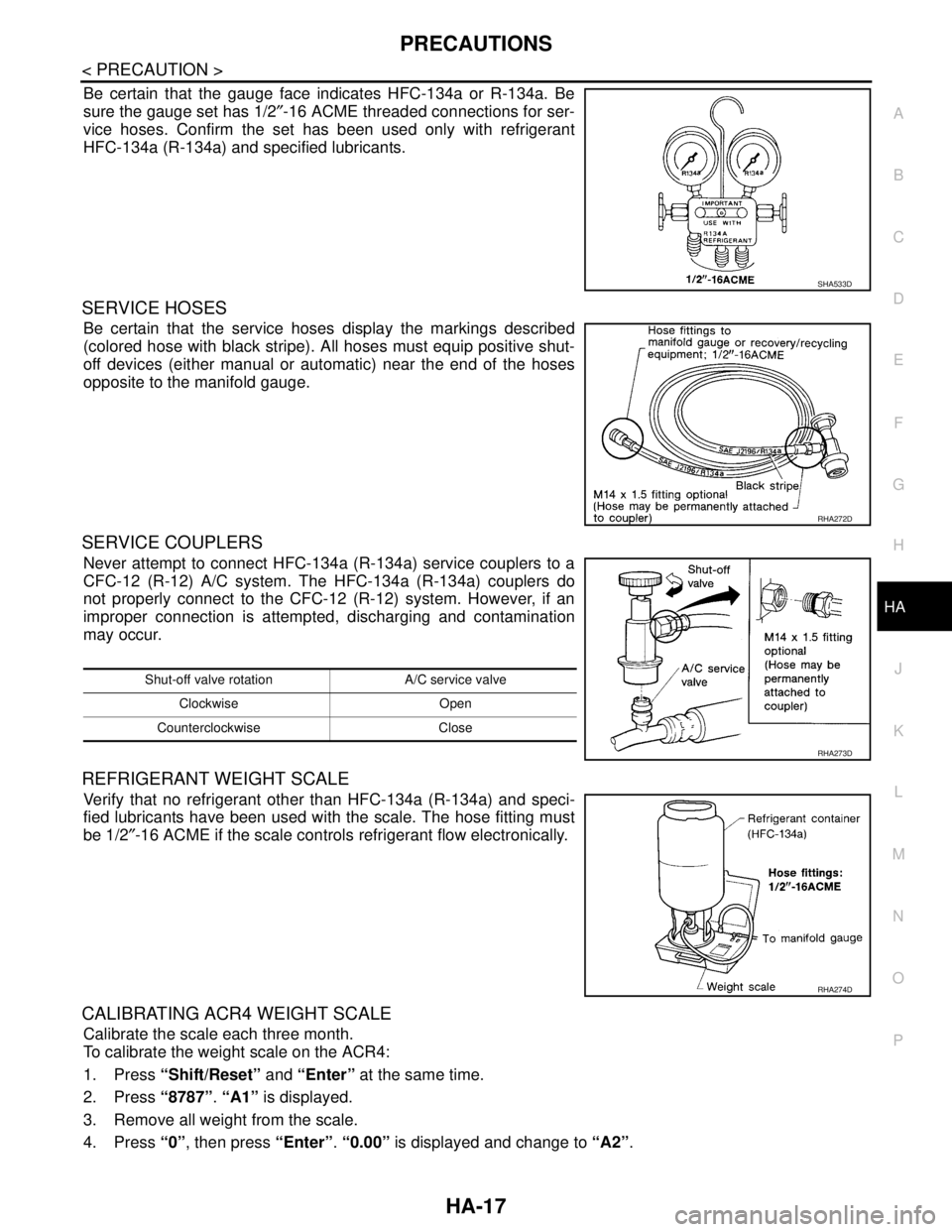
Be certain that the gauge face indicates HFC-134a or R-134a. Be
sure the gauge set has 1/2″-16 ACME threaded connections for ser-
vice hoses. Confirm the set has been used only with refrigerant
HFC-134a (R-134a) and specified lubricants.
SERVICE HOSES
Be certain that the service hoses display the markings described
(colored hose with black stripe). All hoses must equip positive shut-
off devices (either manual or automatic) near the end of the hoses
opposite to the manifold gauge.
SERVICE COUPLERS
Never attempt to connect HFC-134a (R-134a) service couplers to a
CFC-12 (R-12) A/C system. The HFC-134a (R-134a) couplers do
not properly connect to the CFC-12 (R-12) system. However, if an
improper connection is attempted, discharging and contamination
may occur.
REFRIGERANT WEIGHT SCALE
Verify that no refrigerant other than HFC-134a (R-134a) and speci-
fied lubricants have been used with the scale. The hose fitting must
be 1/2″-16 ACME if the scale controls refrigerant flow electronically.
CALIBRATING ACR4 WEIGHT SCALE
Calibrate the scale each three month.
To calibrate the weight scale on the ACR4:
1. Press “Shift/Reset” and “Enter” at the same time.
2. Press “8787”. “A1” is displayed.
3. Remove all weight from the scale.
4. Press “0”, then press “Enter”. “0.00” is displayed and change to “A2”.
SHA533D
RHA272D
Shut-off valve rotation A/C service valve
Clockwise Open
Counterclockwise Close
RHA273D
RHA274D
Page 2615 of 5121
HA-46
< ON-VEHICLE REPAIR >
CONDENSER
CONDENSER
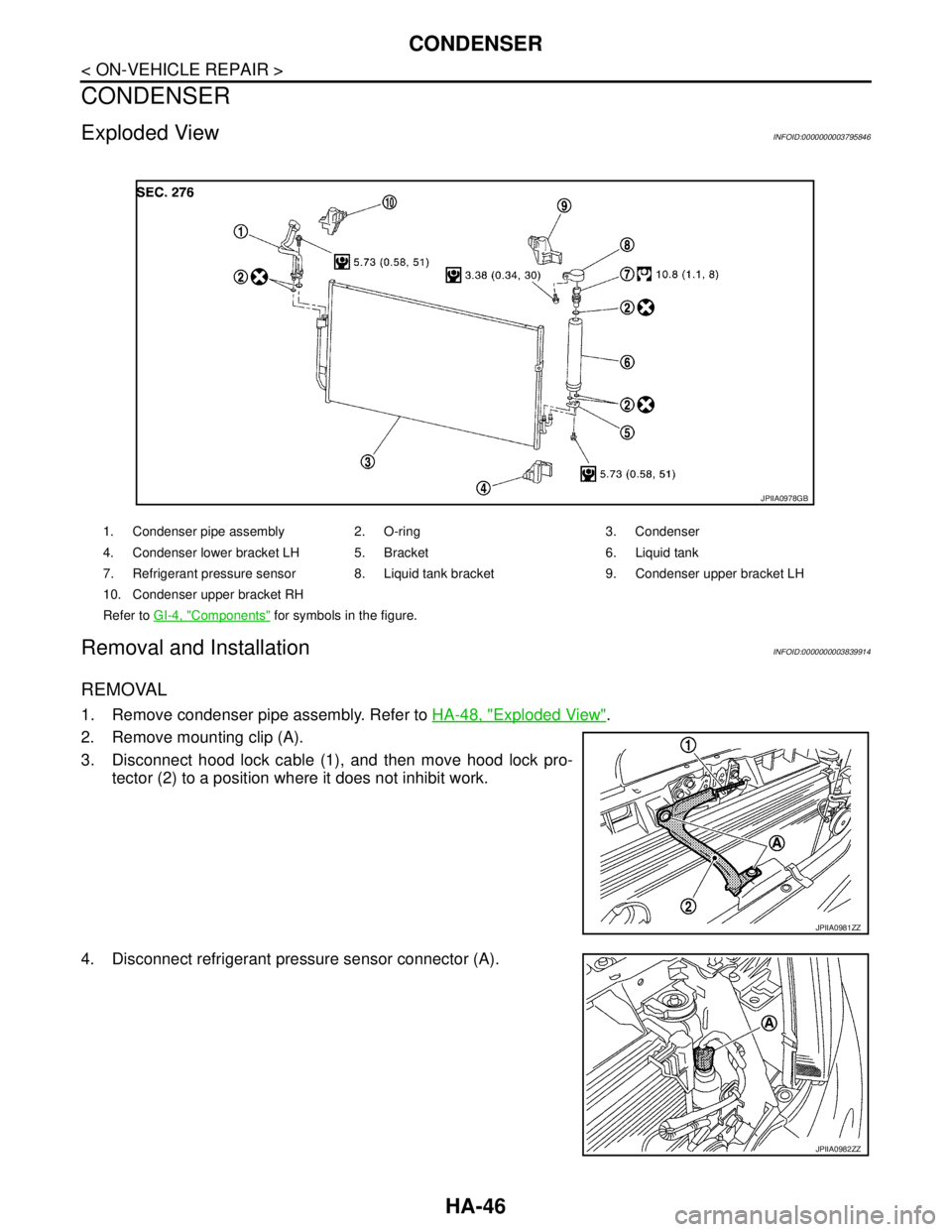
Exploded ViewINFOID:0000000003795846
Removal and InstallationINFOID:0000000003839914
REMOVAL
1. Remove condenser pipe assembly. Refer to HA-48, "Exploded View".
2. Remove mounting clip (A).
3. Disconnect hood lock cable (1), and then move hood lock pro-
tector (2) to a position where it does not inhibit work.
4. Disconnect refrigerant pressure sensor connector (A).
1. Condenser pipe assembly 2. O-ring 3. Condenser
4. Condenser lower bracket LH 5. Bracket 6. Liquid tank
7. Refrigerant pressure sensor 8. Liquid tank bracket 9. Condenser upper bracket LH
10. Condenser upper bracket RH
Refer to GI-4, "
Components" for symbols in the figure.
JPIIA0978GB
JPIIA0981ZZ
JPIIA0982ZZ
Page 2628 of 5121
SERVICE DATA AND SPECIFICATIONS (SDS)
HA-59
< SERVICE DATA AND SPECIFICATIONS (SDS)
C
D
E
F
G
H
J
K
L
MA
B
HA
N
O
P
SERVICE DATA AND SPECIFICATIONS (SDS)
SERVICE DATA AND SPECIFICATIONS (SDS)
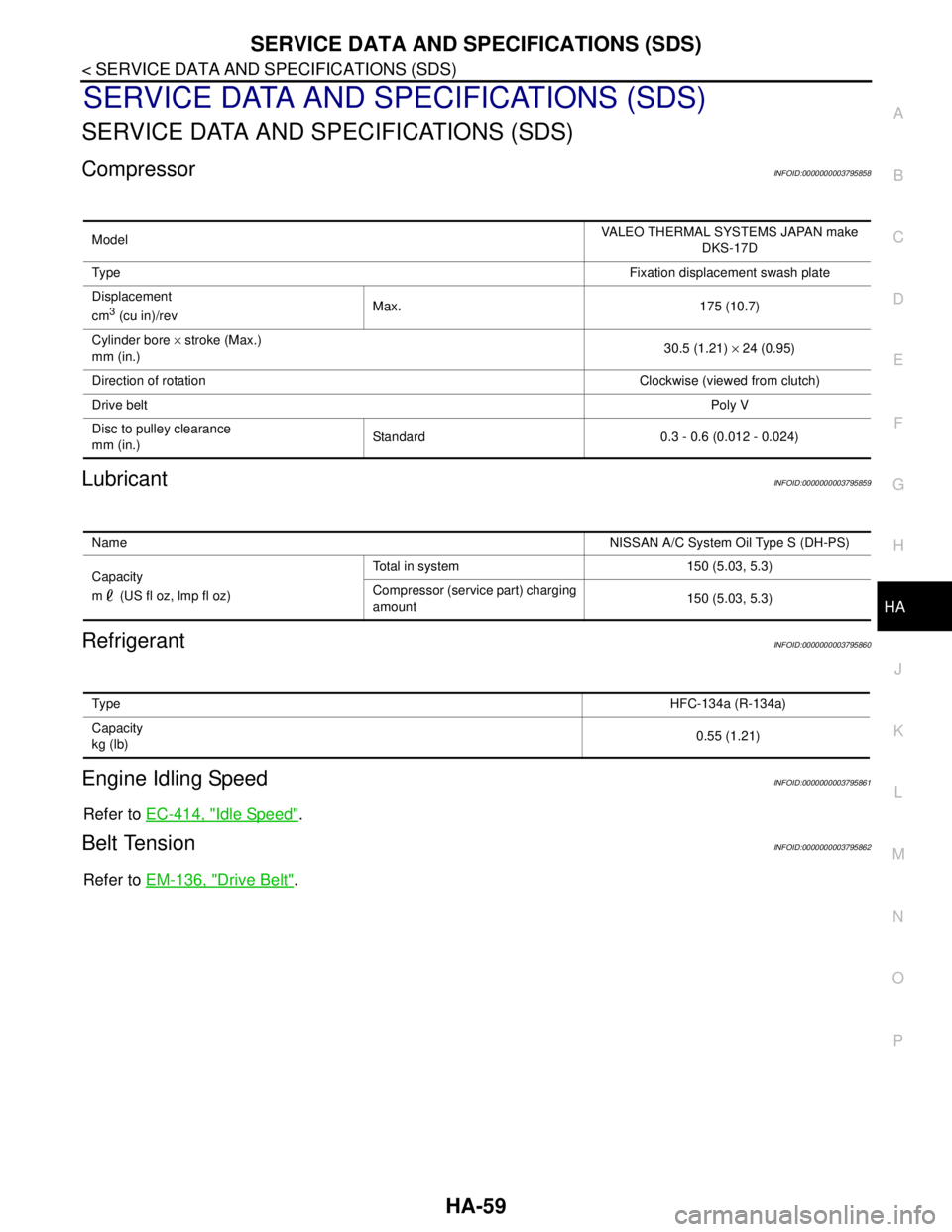
CompressorINFOID:0000000003795858
LubricantINFOID:0000000003795859
RefrigerantINFOID:0000000003795860
Engine Idling SpeedINFOID:0000000003795861
Refer to EC-414, "Idle Speed".
Belt TensionINFOID:0000000003795862
Refer to EM-136, "Drive Belt".
ModelVALEO THERMAL SYSTEMS JAPAN make
DKS-17D
Ty p eFixation displacement swash plate
Displacement
cm
3 (cu in)/revMax. 175 (10.7)
Cylinder bore × stroke (Max.)
mm (in.)30.5 (1.21) × 24 (0.95)
Direction of rotationClockwise (viewed from clutch)
Drive beltPoly V
Disc to pulley clearance
mm (in.)Standard 0.3 - 0.6 (0.012 - 0.024)
NameNISSAN A/C System Oil Type S (DH-PS)
Capacity
m (US fl oz, lmp fl oz)Total in system 150 (5.03, 5.3)
Compressor (service part) charging
amount150 (5.03, 5.3)
Ty p eHFC-134a (R-134a)
Capacity
kg (lb)0.55 (1.21)
Page 2631 of 5121

HAC-3
C
D
E
F
G
H
J
K
L
MA
B
HAC
N
O
P WITHOUT INTELLIGENT AIR CONDITIONER
SYSTEM : Foot Position Setting Trimmer .............
110
WITHOUT INTELLIGENT AIR CONDITIONER
SYSTEM : Inlet Port Memory Function (FRE) .......
111
WITHOUT INTELLIGENT AIR CONDITIONER
SYSTEM : Inlet Port Memory Function (REC) ......
111
WITH INTELLIGENT AIR CONDITIONER SYS-
TEM ..........................................................................
111
WITH INTELLIGENT AIR CONDITIONER SYS-
TEM : Description & Inspection .............................
112
WITH INTELLIGENT AIR CONDITIONER SYS-
TEM : Temperature Setting Trimmer ....................
114
WITH INTELLIGENT AIR CONDITIONER SYS-
TEM : Foot Position Setting Trimmer ....................
114
WITH INTELLIGENT AIR CONDITIONER SYS-
TEM : Inlet Port Memory Function (FRE) ..............
115
WITH INTELLIGENT AIR CONDITIONER SYS-
TEM : Inlet Port Memory Function (REC) .............
115
WITH INTELLIGENT AIR CONDITIONER SYS-
TEM : Gas Sensor Sensitivity Adjustment Func-
tion (With Intelligent Air Conditioner System) ........
116
WITH INTELLIGENT AIR CONDITIONER SYS-
TEM : Clean Switch Interlocking Movement
Change Function (With Intelligent Air Conditioner
System) .................................................................
116
FUNCTION DIAGNOSIS ............................117
COMPRESSOR CONTROL FUNCTION ..........117
Description ............................................................117
Fail-Safe ................................................................118
Component Part Location .....................................118
Component’s Role .................................................120
AUTOMATIC AIR CONDITIONER SYSTEM ...122
WITHOUT INTELLIGENT AIR CONDITIONER
SYSTEM ..................................................................
122
WITHOUT INTELLIGENT AIR CONDITIONER
SYSTEM : System Diagram ..................................
122
WITHOUT INTELLIGENT AIR CONDITIONER
SYSTEM : System Description .............................
122
WITHOUT INTELLIGENT AIR CONDITIONER
SYSTEM : Component Part Location ....................
129
WITHOUT INTELLIGENT AIR CONDITIONER
SYSTEM : Component Description .......................
132
WITH INTELLIGENT AIR CONDITIONER SYS-
TEM ..........................................................................
132
WITH INTELLIGENT AIR CONDITIONER SYS-
TEM : System Diagram .........................................
132
WITH INTELLIGENT AIR CONDITIONER SYS-
TEM : System Description .....................................
133
WITH INTELLIGENT AIR CONDITIONER SYS-
TEM : Component Part Location ...........................
138
WITH INTELLIGENT AIR CONDITIONER SYS-
TEM : Component Description ..............................
141
PLASMACLUSTER SYSTEM ..........................142
WITH INTELLIGENT AIR CONDITIONER SYS-
TEM ..........................................................................
142
WITH INTELLIGENT AIR CONDITIONER SYS-
TEM : System Diagram .........................................
142
WITH INTELLIGENT AIR CONDITIONER SYS-
TEM : System Description .....................................
142
WITH INTELLIGENT AIR CONDITIONER SYS-
TEM : Component Part Location ...........................
143
WITH INTELLIGENT AIR CONDITIONER SYS-
TEM : Component Description ..............................
144
MODE DOOR CONTROL SYSTEM ................145
System Diagram ....................................................145
System Description ................................................145
AIR MIX DOOR CONTROL SYSTEM .............147
System Diagram ....................................................147
System Description ................................................147
INTAKE DOOR CONTROL SYSTEM .............149
WITHOUT INTELLIGENT AIR CONDITIONER
SYSTEM ...................................................................
149
WITHOUT INTELLIGENT AIR CONDITIONER
SYSTEM : System Diagram ..................................
149
WITHOUT INTELLIGENT AIR CONDITIONER
SYSTEM : System Description ..............................
149
WITH INTELLIGENT AIR CONDITIONER SYS-
TEM ..........................................................................
150
WITH INTELLIGENT AIR CONDITIONER SYS-
TEM : System Diagram .........................................
150
WITH INTELLIGENT AIR CONDITIONER SYS-
TEM : System Description .....................................
150
BLOWER MOTOR CONTROL SYSTEM ........152
System Diagram ....................................................152
System Description ................................................152
MAGNET CLUTCH CONTROL SYSTEM .......154
System Diagram ....................................................154
System Description ................................................154
CAN COMMUNICATION SYSTEM .................155
System Description ................................................155
DIAGNOSIS SYSTEM (HVAC) .......................156
WITHOUT INTELLIGENT AIR CONDITIONER
SYSTEM ...................................................................
156
WITHOUT INTELLIGENT AIR CONDITIONER
SYSTEM : CONSULT-III Function .........................
156
WITH INTELLIGENT AIR CONDITIONER SYS-
TEM ..........................................................................
159
WITH INTELLIGENT AIR CONDITIONER SYS-
TEM : CONSULT-III Function ................................
159
COMPONENT DIAGNOSIS .......................164
U1000 CAN COMM CIRCUIT .........................164
Description .............................................................164
Page 2693 of 5121
![NISSAN TEANA 2008 Service Manual POWER SUPPLY AND GROUND CIRCUIT
HAC-65
< COMPONENT DIAGNOSIS >[WITHOUT 7 INCH DISPLAY]
C
D
E
F
G
H
J
K
L
MA
B
HAC
N
O
P
POWER SUPPLY AND GROUND CIRCUIT
A/C AUTO AMP.
A/C AUTO AMP. : Diagnosis Procedur](/img/5/57391/w960_57391-2692.png "NISSAN TEANA 2008 Service Manual POWER SUPPLY AND GROUND CIRCUIT
HAC-65
< COMPONENT DIAGNOSIS >[WITHOUT 7 INCH DISPLAY]
C
D
E
F
G
H
J
K
L
MA
B
HAC
N
O
P
POWER SUPPLY AND GROUND CIRCUIT
A/C AUTO AMP.
A/C AUTO AMP. : Diagnosis Procedur")
POWER SUPPLY AND GROUND CIRCUIT
HAC-65
< COMPONENT DIAGNOSIS >[WITHOUT 7 INCH DISPLAY]
C
D
E
F
G
H
J
K
L
MA
B
HAC
N
O
P
POWER SUPPLY AND GROUND CIRCUIT
A/C AUTO AMP.
A/C AUTO AMP. : Diagnosis ProcedureINFOID:0000000003941309
1.CHECK FUSE
Check 10A fuses [Nos. 3, 6 and 19, located in the fuse block (J/B)].
NOTE:
Refer to PG-101, "
Fuse, Connector and Terminal Arrangement".
Is the inspection result normal?
YES >> GO TO 2.
NO >> Replace the fuse after repairing the applicable circuit.
2.CHECK A/C AUTO AMP. POWER SUPPLY CIRCUIT
1. Disconnect the A/C auto amp. connector.
2. Check voltage between A/C auto amp. harness connector and ground.
Is the inspection result normal?
YES >> GO TO 3.
NO >> Repair the harnesses or connectors.
3.CHECK A/C AUTO AMP. CIRCUIT CONTINUITY
1. Turn ignition switch OFF.
2. Check continuity between A/C auto amp. harness connector and ground.
Is the inspection result normal?
YES >> INSPECTION END
NO >> Repair the harnesses or connectors.
A/C CONTROL
A/C CONTROL : Diagnosis ProcedureINFOID:0000000003846370
1.CHECK A/C CONTROL POWER SUPPLY CIRCUIT
1. Disconnect the A/C control connector.
2. Turn ignition switch ON.
3. Check voltage between A/C control harness connector and ground.
(+) (−) Voltage
A/C auto amp.
—Ignition switch position
Connector Terminal OFF ACC ON
M5017
GroundApprox. 0 V Battery voltage Battery voltage
20 Approx. 0 V Approx. 0 V Battery voltage
40 Battery voltage Battery voltage Battery voltage
A/C auto amp.
—Continuity
Connector Terminal
M5019
Ground Existed
39
(+) (−)
Voltage A/C control
—
Connector Terminal
M95 1 Ground Battery voltage
Page 2694 of 5121
![NISSAN TEANA 2008 Service Manual HAC-66
< COMPONENT DIAGNOSIS >[WITHOUT 7 INCH DISPLAY]
POWER SUPPLY AND GROUND CIRCUIT
Is the inspection result normal?
YES >> GO TO 2.
NO >> Check 10A fuse (No. 3, located in the fuse block). Refer t](/img/5/57391/w960_57391-2693.png "NISSAN TEANA 2008 Service Manual HAC-66
< COMPONENT DIAGNOSIS >[WITHOUT 7 INCH DISPLAY]
POWER SUPPLY AND GROUND CIRCUIT
Is the inspection result normal?
YES >> GO TO 2.
NO >> Check 10A fuse (No. 3, located in the fuse block). Refer t")
HAC-66
< COMPONENT DIAGNOSIS >[WITHOUT 7 INCH DISPLAY]
POWER SUPPLY AND GROUND CIRCUIT
Is the inspection result normal?
YES >> GO TO 2.
NO >> Check 10A fuse (No. 3, located in the fuse block). Refer to PG-101, "
Fuse, Connector and Ter-
minal Arrangement".
If fuse is OK, check harness for open circuit. Repair or replace if necessary.
If fuse is NG, replace fuse and check for short circuit. Repair or replace if necessary.
2.CHECK A/C CONTROL CIRCUIT CONTINUITY
1. Turn ignition switch OFF.
2. Check continuity between A/C control harness connector and ground.
Is the inspection result normal?
YES >> Replace the A/C control.
NO >> Repair the harnesses or connectors.
A/C DISPLAY
A/C DISPLAY : Diagnosis ProcedureINFOID:0000000003846371
1.CHECK A/C DISPLAY POWER SUPPLY CIRCUIT
1. Disconnect the A/C display connector.
2. Turn ignition switch ON.
3. Check voltage between A/C display harness connector and ground.
Is the inspection result normal?
YES >> GO TO 2.
NO >> Repair the harnesses or connectors.
2.CHECK A/C DISPLAY CIRCUIT CONTINUITY
1. Turn ignition switch OFF.
2. Check continuity between A/C display harness connector and ground.
Is the inspection result normal?
YES >> Replace the A/C display.
NO >> Check 10A fuse (No. 3, located in the fuse block). Refer to PG-101, "
Fuse, Connector and Ter-
minal Arrangement".
If fuse is OK, check harness for open circuit. Repair or replace if necessary.
If fuse is NG, replace fuse and check for short circuit. Repair or replace if necessary.
A/C control
—Continuity
Connector Terminal
M95 2 Ground Existed
(+) (−)
Voltage A/C display
—
Connector Terminal
M16 6 Ground Battery voltage
A/C display
—Continuity
Connector Terminal
M16 1 Ground Existed
Page 2698 of 5121
![NISSAN TEANA 2008 Service Manual HAC-70
< COMPONENT DIAGNOSIS >[WITHOUT 7 INCH DISPLAY]
BLOWER MOTOR
YES >> GO TO 6.
NO >> Repair harness or connector.
6.CHECK A/C AUTO AMP. OUTPUT SIGNAL
1. Reconnect blower motor connector and A/C a](/img/5/57391/w960_57391-2697.png "NISSAN TEANA 2008 Service Manual HAC-70
< COMPONENT DIAGNOSIS >[WITHOUT 7 INCH DISPLAY]
BLOWER MOTOR
YES >> GO TO 6.
NO >> Repair harness or connector.
6.CHECK A/C AUTO AMP. OUTPUT SIGNAL
1. Reconnect blower motor connector and A/C a")
HAC-70
< COMPONENT DIAGNOSIS >[WITHOUT 7 INCH DISPLAY]
BLOWER MOTOR
YES >> GO TO 6.
NO >> Repair harness or connector.
6.CHECK A/C AUTO AMP. OUTPUT SIGNAL
1. Reconnect blower motor connector and A/C auto amp. connector.
2. Turn ignition switch ON.
3. Set MODE switch to the VENT position.
4. Check the output waveform between blower motor harness connector and ground using an oscilloscope,
while varying the fan speed from 1 to 7.
Is the inspection result normal?
YES >> Replace the blower motor.
NO >> Replace the A/C auto amp.
7.CHECK POWER VOLTAGE OF BLOWER RELAY
1. Turn the ignition switch OFF.
2. Remove the blower relay. Refer to PG-101, "
Fuse, Connector and Terminal Arrangement".
3. Turn the ignition switch ON.
4. Check the voltage between blower relay fuse block side terminal and ground. Refer to PG-101, "
Fuse,
Connector and Terminal Arrangement" for relay terminal assignment.
Is the inspection result normal?
YES >> GO TO 8.
NO >> Inspection the power supply circuit. Refer to PG-55, "
Wiring Diagram - IGNITION POWER SUP-
PLY -".
8.CHECK BLOWER RELAY
1. Turn the ignition switch OFF.
2. Install the blower relay. Refer to PG-101, "
Fuse, Connector and Terminal Arrangement".
3. Turn the ignition switch ON.
4. Check the operating sound of blower relay.
Is the inspection result normal?
YES >> GO TO 9.
NO >> Replace the blower relay.
9.CHECK FUSE
Check 15A fuses (Nos. 21 and 22).
JPIIA1025GB
(+) (−)
Vol tag e
Blower relay —
1
Ground Battery voltage
3