display NISSAN TEANA 2014 Service Manual
[x] Cancel search | Manufacturer: NISSAN, Model Year: 2014, Model line: TEANA, Model: NISSAN TEANA 2014Pages: 4801, PDF Size: 51.2 MB
Page 3903 of 4801

SEC-78
< DTC/CIRCUIT DIAGNOSIS >
B210E STARTER RELAY
B210E STARTER RELAY
DTC LogicINFOID:0000000009461125
DTC DETECTION LOGIC
NOTE:
• If DTC B210E is displayed with DTC U1000, first perform the trouble diagnosis for DTC U1000. Refer to
BCS-68, "DTC Logic"
.
• If DTC B210E is displayed with DTC U1010, first perform the trouble diagnosis for DTC U1010. Refer to
BCS-69, "DTC Logic"
.
• When IPDM E/R power supply voltage is low (Approx. 7 - 8 V for about 1 second), the DTC B210F may be
detected.
DTC CONFIRMATION PROCEDURE
1.PERFORM DTC CONFIRMATION PROCEDURE
1. Turn ignition switch ON under the following conditions and wait for at least 1 second.
- CVT selector lever is in the P (Park) or N (Neutral) position
- Do not depress the brake pedal
2. Check Self-diagnostic result with CONSULT.
Is DTC detected?
YES >> Refer to SEC-78, "Diagnosis Procedure".
NO >> Inspection End.
Diagnosis ProcedureINFOID:0000000009461126
Regarding Wiring Diagram information, refer to SEC-29, "Wiring Diagram".
1. PERFORM SELF DIAGNOSTIC RESULT
Perform Self Diagnostic Result of IPDM E/R using CONSULT.
Is display history of DTC B210E CRNT?
YES >> GO TO 2.
NO >> Refer to GI-43, "Intermittent Incident"
.
2.CHECK STARTER CONTROL RELA Y CONTROL CIRCUITS VOLTAGE
Check voltage between IPDM E/R connectors and ground.
Is the inspection result normal?
YES >> Replace IPDM E/R. Refer to PCS-32, "Removal and Installation".
NO >> GO TO 3.
DTC No. Trouble diagnosis
name DTC detecting condition Possible cause
B210E STARTER RELAY
OFF When comparing the following items, IPDM E/R de-
tects that starter control relay is stuck in the OFF po-
sition for 5 second or more.
• Starter control relay signal (CAN) from BCM
• Starter relay status signal (CAN) from BCM
• Starter control relay and st arter relay status signal
(IPDM E/R input)
• Starter control relay cont rol signal (IPDM E/R out-
put) • IPDM E/R
•BCM
•Battery
IPDM E/R GroundVo l ta g e
(Approx.)
Connector Terminal
E63 33 — Battery voltage
Revision: November 20132014 Altima NAMRevision: November 20132014 Altima NAM
Page 3905 of 4801

SEC-80
< DTC/CIRCUIT DIAGNOSIS >
B210F TRANSMISSION RANGE SWITCH
B210F TRANSMISSION RANGE SWITCH
DescriptionINFOID:0000000009461127
IPDM E/R confirms the shift position with the following signals.
• Transmission range switch
• Shift position signal from BCM (CAN)
DTC LogicINFOID:0000000009461128
DTC DETECTION LOGIC
NOTE:
• If DTC B210F is displayed with DTC U1000, first perform the trouble diagnosis for DTC U1000. Refer to BCS-68, "DTC Logic"
.
• If DTC B210F is displayed with DTC U1010, first perform the trouble diagnosis for DTC U1010. Refer to
BCS-69, "DTC Logic"
.
DTC CONFIRMATION PROCEDURE
1.PERFORM DTC CONFIRMATION PROCEDURE
1. Turn ignition switch ON under the following conditions and wait for at least 1 second.
- CVT selector lever is in the P (Park) or N (Neutral) position
- Do not depress the brake pedal
2. Check Self-diagnostic result with CONSULT.
Is DTC detected?
YES >> Refer to SEC-80, "Diagnosis Procedure".
NO >> Inspection End.
Diagnosis ProcedureINFOID:0000000009461129
Regarding Wiring Diagram information, refer to SEC-29, "Wiring Diagram" or SEC-40, "Wiring Diagram".
1.CHECK DTC WITH BCM
Refer to BCS-52, "DTC Index"
.
Is the inspection result normal?
YES >> GO TO 2.
NO >> Repair or replace malfunctioning parts.
2.CHECK TRANSMISSION RANGE SWITCH INPUT SIGNAL
1. Turn ignition switch OFF.
2. Disconnect IPDM E/R harness connector.
3. Turn ignition switch ON.
4. Check voltage between IPDM E/R harness connector E63 terminal 37 and ground under following condi-
tion.
DTC No. Trouble diagnosis name DTC detecting condition Possible cause
B210F TRANSMISSION
RANGE SWITCH IPDM E/R detects a mismatch between the signals
below for 1 second or more.
• Transmission range switch input signal
• Shift position signal from BCM (CAN) • Harness or connectors
Transmission range switch circuit is
open or shorted
• Transmission range switch
Revision: November 20132014 Altima NAMRevision: November 20132014 Altima NAM
Page 3907 of 4801

SEC-82
< DTC/CIRCUIT DIAGNOSIS >
B2110 TRANSMISSION RANGE SWITCH
B2110 TRANSMISSION RANGE SWITCH
DescriptionINFOID:0000000009461130
IPDM E/R confirms the shift position with the following signals.
• Transmission range switch
• Shift position signal from BCM (CAN)
DTC LogicINFOID:0000000009461131
DTC DETECTION LOGIC
NOTE:
• If DTC B2110 is displayed with DTC U1000, first perform the trouble diagnosis for DTC U1000. Refer to BCS-68, "DTC Logic"
.
• If DTC B2110 is displayed with DTC U1010, first perform the trouble diagnosis for DTC U1010. Refer to
BCS-69, "DTC Logic"
.
DTC CONFIRMATION PROCEDURE
1.PERFORM DTC CONFIRMATION PROCEDURE
1. Turn the ignition switch ON under the following conditions and wait for at least 1 second.
- CVT selector lever is in the P (Park) or N (Neutral) position
- Do not depress the brake pedal
2. Check Self-diagnostic result with CONSULT.
Is DTC detected?
YES >> Refer to SEC-82, "Diagnosis Procedure".
NO >> Inspection End.
Diagnosis ProcedureINFOID:0000000009461132
Regarding Wiring Diagram information, refer to SEC-29, "Wiring Diagram" or SEC-40, "Wiring Diagram".
1.CHECK DTC WITH BCM
Refer to BCS-52, "DTC Index"
.
Is the inspection result normal?
YES >> GO TO 2.
NO >> Repair or replace malfunctioning parts.
2.CHECK TRANSMISSION RANGE SWITCH INPUT SIGNAL
1. Turn ignition switch OFF.
2. Disconnect IPDM E/R harness connector.
3. Turn ignition switch ON.
4. Check voltage between IPDM E/R harness connector E63 terminal 37 and ground under following condi-
tion.
DTC No. Trouble diagnosis
name DTC detecting condition Possible cause
B2110 TRANSMISSION
RANGE SWITCH IPDM E/R detects mismatch between the signal
below for 1 second or more.
• Transmission range switch input signal • Harness or connectors
Transmission range switch circuit is
open or shorted
• Transmission range switch
Revision: November 20132014 Altima NAMRevision: November 20132014 Altima NAM
Page 3913 of 4801
SEC-88
< DTC/CIRCUIT DIAGNOSIS >
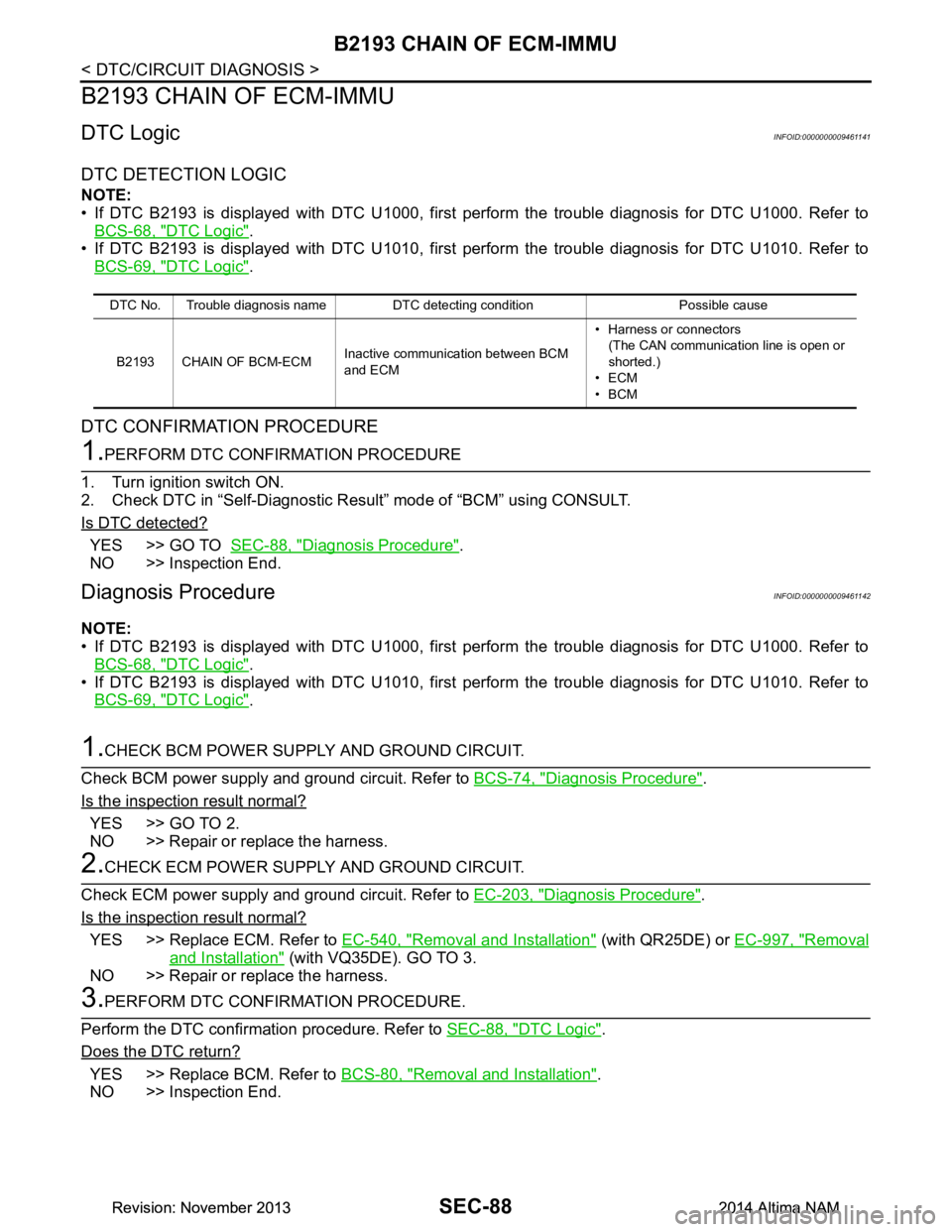
B2193 CHAIN OF ECM-IMMU
B2193 CHAIN OF ECM-IMMU
DTC LogicINFOID:0000000009461141
DTC DETECTION LOGIC
NOTE:
• If DTC B2193 is displayed with DTC U1000, first perform the trouble diagnosis for DTC U1000. Refer to
BCS-68, "DTC Logic"
.
• If DTC B2193 is displayed with DTC U1010, first perform the trouble diagnosis for DTC U1010. Refer to BCS-69, "DTC Logic"
.
DTC CONFIRMATION PROCEDURE
1.PERFORM DTC CONFIRMATION PROCEDURE
1. Turn ignition switch ON.
2. Check DTC in “Self-Diagnostic Result” mode of “BCM” using CONSULT.
Is DTC detected?
YES >> GO TO SEC-88, "Diagnosis Procedure".
NO >> Inspection End.
Diagnosis ProcedureINFOID:0000000009461142
NOTE:
• If DTC B2193 is displayed with DTC U1000, first perform the trouble diagnosis for DTC U1000. Refer to BCS-68, "DTC Logic"
.
• If DTC B2193 is displayed with DTC U1010, first perform the trouble diagnosis for DTC U1010. Refer to
BCS-69, "DTC Logic"
.
1.CHECK BCM POWER SUPPLY AND GROUND CIRCUIT.
Check BCM power supply and ground circuit. Refer to BCS-74, "Diagnosis Procedure"
.
Is the inspection result normal?
YES >> GO TO 2.
NO >> Repair or replace the harness.
2.CHECK ECM POWER SUPPLY AND GROUND CIRCUIT.
Check ECM power supply and ground circuit. Refer to EC-203, "Diagnosis Procedure"
.
Is the inspection result normal?
YES >> Replace ECM. Refer to EC-540, "Removal and Installation" (with QR25DE) or EC-997, "Removal
and Installation" (with VQ35DE). GO TO 3.
NO >> Repair or replace the harness.
3.PERFORM DTC CONFIRMATION PROCEDURE.
Perform the DTC confirmation procedure. Refer to SEC-88, "DTC Logic"
.
Does the DTC return?
YES >> Replace BCM. Refer to BCS-80, "Removal and Installation".
NO >> Inspection End.
DTC No. Trouble diagnosis name DTC detecting condition Possible cause
B2193 CHAIN OF BCM-ECM Inactive communication between BCM
and ECM • Harness or connectors
(The CAN communication line is open or
shorted.)
•ECM
•BCM
Revision: November 20132014 Altima NAMRevision: November 20132014 Altima NAM
Page 3915 of 4801
SEC-90
< DTC/CIRCUIT DIAGNOSIS >
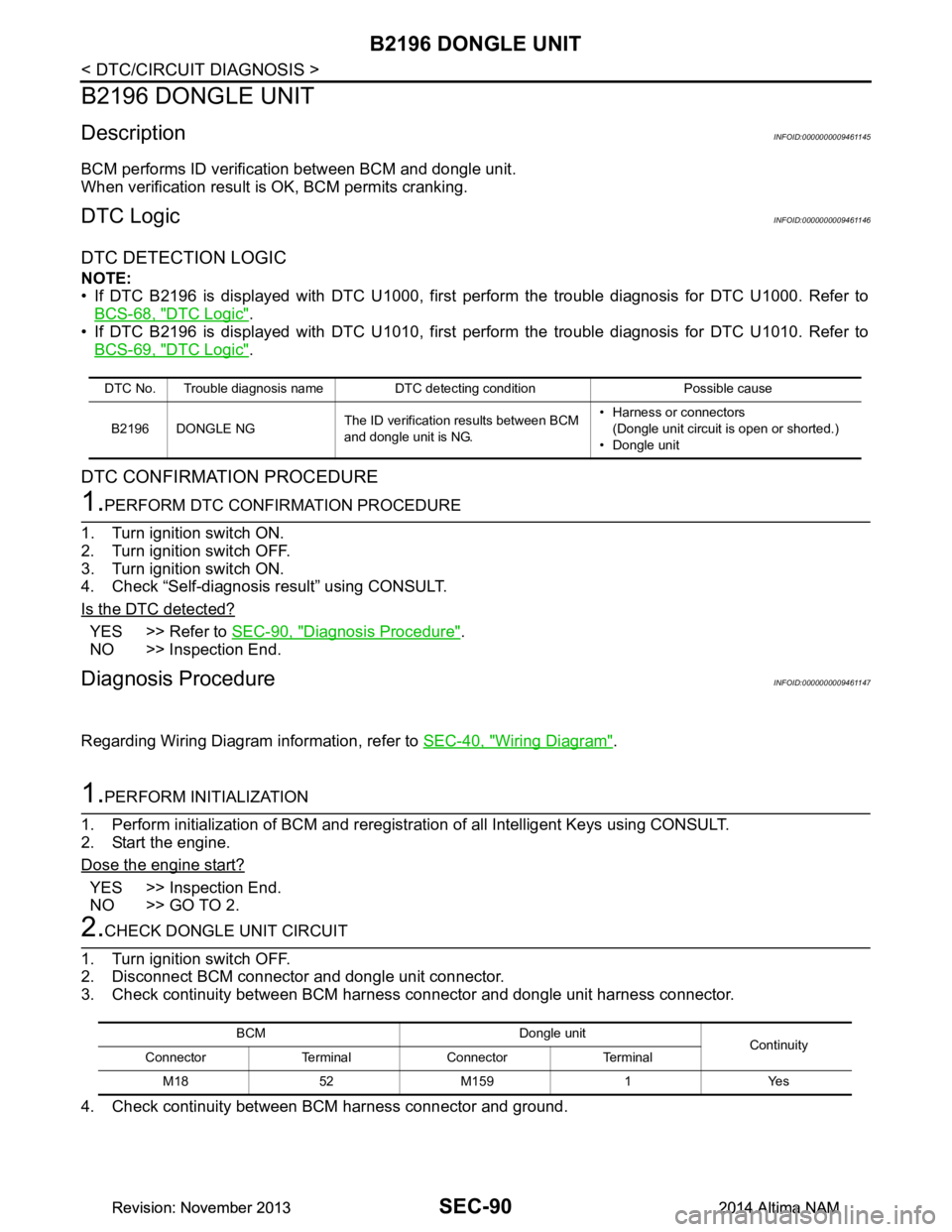
B2196 DONGLE UNIT
B2196 DONGLE UNIT
DescriptionINFOID:0000000009461145
BCM performs ID verification between BCM and dongle unit.
When verification result is OK, BCM permits cranking.
DTC LogicINFOID:0000000009461146
DTC DETECTION LOGIC
NOTE:
• If DTC B2196 is displayed with DTC U1000, first perform the trouble diagnosis for DTC U1000. Refer to
BCS-68, "DTC Logic"
.
• If DTC B2196 is displayed with DTC U1010, first perform the trouble diagnosis for DTC U1010. Refer to BCS-69, "DTC Logic"
.
DTC CONFIRMATION PROCEDURE
1.PERFORM DTC CONFIRMATION PROCEDURE
1. Turn ignition switch ON.
2. Turn ignition switch OFF.
3. Turn ignition switch ON.
4. Check “Self-diagnosis result” using CONSULT.
Is the DTC detected?
YES >> Refer to SEC-90, "Diagnosis Procedure".
NO >> Inspection End.
Diagnosis ProcedureINFOID:0000000009461147
Regarding Wiring Diagram information, refer to SEC-40, "Wiring Diagram".
1.PERFORM INITIALIZATION
1. Perform initialization of BCM and reregistration of all Intelligent Keys using CONSULT.
2. Start the engine.
Dose the engine start?
YES >> Inspection End.
NO >> GO TO 2.
2.CHECK DONGLE UNIT CIRCUIT
1. Turn ignition switch OFF.
2. Disconnect BCM connector and dongle unit connector.
3. Check continuity between BCM harness connector and dongle unit harness connector.
4. Check continuity between BCM harness connector and ground.
DTC No. Trouble diagnosis name DTC detecting condition Possible cause
B2196 DONGLE NG The ID verification results between BCM
and dongle unit is NG. • Harness or connectors
(Dongle unit circuit is open or shorted.)
• Dongle unit
BCM Dongle unit Continuity
Connector Terminal Connector Terminal
M1852M1591 Yes
Revision: November 20132014 Altima NAMRevision: November 20132014 Altima NAM
Page 3924 of 4801

B2557 VEHICLE SPEEDSEC-99
< DTC/CIRCUIT DIAGNOSIS >
C
D E
F
G H
I
J
L
M A
B
SEC
N
O P
B2557 VEHICLE SPEED
DTC LogicINFOID:0000000009461156
DTC DETECTION LOGIC
NOTE:
• If DTC B2557 is displayed with DTC U1000, first per form the trouble diagnosis for DTC U1000. Refer to
BCS-68, "DTC Logic"
.
• If DTC B2557 is displayed with DTC U1010, first per form the trouble diagnosis for DTC U1010. Refer to
BCS-69, "DTC Logic"
.
DTC CONFIRMATION PROCEDURE
1.PERFORM DTC CONFIRMATION PROCEDURE
1. Start engine and wait 10 seconds or more.
2. Drive the vehicle at a vehicle speed of 10 km/h (6.2 MPH) or more for 10 seconds or more.
3. Check DTC in “Self-Diagnostic Result” mode of “BCM” using CONSULT.
Is DTC detected?
YES >> GO TO SEC-99, "Diagnosis Procedure".
NO >> Inspection End.
Diagnosis ProcedureINFOID:0000000009461157
1.CHECK DTC OF “ABS ACTUATOR A ND ELECTRIC UNIT (CONTROL UNIT)”
Check DTC in “Self-Diagnostic Resu lt” mode of “ABS” using CONSULT.
Is DTC detected?
YES >> Perform the trouble diagnosis rela ted to the detected DTC. Refer to BRC-45, "DTC Index".
NO >> GO TO 2.
2.CHECK DTC OF “COMBINATION METER”
Check DTC in “Self-Diagnostic Result” mode of “METER/M&A” using CONSULT.
Is DTC detected?
YES >> Perform the trouble diagnosis rela ted to the detected DTC. Refer to MWI-27, "DTC Index".
NO >> GO TO 3.
3.CHECK INTERMITTENT INCIDENT
Refer to GI-43, "Intermittent Incident"
.
>> Inspection End.
DTC No. Trouble diagnosis name DTC detecting condition Possible causes
B2557 VEHICLE SPEED BCM detects one of the following conditions for 10
seconds continuously.
• Vehicle speed signal from combination meter is 10
km/h (6.2 MPH) or more, and vehicle speed signal
from ABS actuator and electric unit (control unit) is
4 km/h (2.5 MPH) or less.
• Vehicle speed signal from combination meter is 4 km/h (2.5 MPH) or less, and vehicle speed signal
from ABS actuator and electric unit (control unit) is
10 km/h (6.2 MPH) or more. • Harness or connectors
(The CAN communication line is
open or shorted.)
• Combination meter
• ABS actuator and electric unit (control unit)
Revision: November 20132014 Altima NAMRevision: November 20132014 Altima NAM
Page 3925 of 4801

SEC-100
< DTC/CIRCUIT DIAGNOSIS >
B2560 STARTER CONTROL RELAY
B2560 STARTER CONTROL RELAY
DescriptionINFOID:0000000009461158
Starter control relay, integrated in IPDM E/R, permits the starter relay operation when in N (Neutral) or P (Park)
position.
DTC LogicINFOID:0000000009461159
DTC DETECTION LOGIC
NOTE:
• If DTC B2560 is displayed with DTC U1000, first perform the trouble diagnosis for DTC U1000. Refer to
BCS-68, "DTC Logic"
.
• If DTC B2560 is displayed with DTC U1010, first perform the trouble diagnosis for DTC U1010. Refer to BCS-69, "DTC Logic"
.
DTC CONFIRMATION PROCEDURE
1.PERFORM DTC CONFIRMATION PROCEDURE
1. Turn ignition switch ON under the following conditions and wait for at least 2 seconds:
- CVT selector lever is in the P (Park) position.
- Depress the brake pedal.
2. Check “Self-Diagnostic Result” with CONSULT.
Is DTC detected?
YES >> Refer to SEC-100, "Diagnosis Procedure".
NO >> Inspection End.
Diagnosis ProcedureINFOID:0000000009461160
1.CHECK DTC WITH IPDM E/R
Check “Self Diagnostic Result” with CONSULT. Refer to PCS-20, "DTC Index"
.
Is the inspection result normal?
YES >> GO TO 2.
NO >> Repair or replace malfunctioning parts.
2.CHECK INTERMITTENT INCIDENT
Refer to GI-43, "Intermittent Incident"
.
>> Inspection End.
DTC Self-diagnosis name DTC detecting condition Possible causes
B2560 STARTER CONTROL
RELAY BCM detects a mismatch between the OFF re-
quest of starter control relay to IPDM E/R and the
feedback. (The feedback is ON instead of OFF.) •IPDM E/R
Revision: November 20132014 Altima NAMRevision: November 20132014 Altima NAM
Page 3926 of 4801

B2601 SHIFT POSITIONSEC-101
< DTC/CIRCUIT DIAGNOSIS >
C
D E
F
G H
I
J
L
M A
B
SEC
N
O P
B2601 SHIFT POSITION
DTC LogicINFOID:0000000009461161
DTC DETECTION LOGIC
NOTE:
• If DTC B2601 is displayed with DTC U1000, first per form the trouble diagnosis for DTC U1000. Refer to
BCS-68, "DTC Logic"
.
• If DTC B2601 is displayed with DTC U1010, first per form the trouble diagnosis for DTC U1010. Refer to
BCS-69, "DTC Logic"
.
DTC CONFIRMATION PROCEDURE
1.PERFORM DTC CONFIRMATION PROCEDURE
1. Shift the selector lever to the P (Park) position.
2. Turn ignition switch ON and wait 2 seconds or more.
3. Shift the selector lever to any position ot her than P (Park) and wait 2 seconds or more.
4. Check DTC in Self-Diagnostic Result mode of BCM using CONSULT.
Is DTC detected?
YES >> Go to SEC-101, "Diagnosis Procedure".
NO >> Inspection End.
Diagnosis ProcedureINFOID:0000000009461162
Regarding Wiring Diagram information, refer to SEC-29, "Wiring Diagram".
1.CHECK CVT SHIFT SELECTOR SWITCH FUNCTION
1. Turn ignition switch ON.
2. Select “DETE/CANCEL SW” and "DETENT SW - IPDM" in DATA MONITOR mode with CONSULT.
3. Check “DETE/CANCEL SW” and "DETENT SW - IP DM" indication under the following conditions.
Is the inspection result normal?
YES >> Refer to GI-43, "Intermittent Incident".
NO-1 >> If DETE/CANCEL SW function is incorrect. GO TO 2.
NO-2 >> If DETENT SW - IPDM function is incorrect. GO TO 5.
DTC No. Trouble diagnosis name DTC detecting condition Possible cause
B2601 SHIFT POSITION When there is a difference between P (Park)
range signal from CVT shift selector (park posi-
tion switch) and P (Park) position signal from
IPDM E/R (CAN). • Harness or connectors
(CAN communication line is open or
shorted.)
• Harness or connectors [CVT shift selector (park position
switch) circuit is open or shorted.]
• CVT shift selector (park position switch)
•BCM
Monitor item Condition Indication
DETE/CANCEL
SW CVT Shift se-
lector In any position oth-
er than P (Park) OFF
P (Park) ON
DETENT SW -
IPDM CVT Shift se-
lector In any position oth-
er than P (Park) OFF
P (Park) ON
Revision: November 20132014 Altima NAMRevision: November 20132014 Altima NAM
Page 3929 of 4801

SEC-104
< DTC/CIRCUIT DIAGNOSIS >
B2602 SHIFT POSITION
B2602 SHIFT POSITION
DTC LogicINFOID:0000000009461164
DTC DETECTION LOGIC
NOTE:
• If DTC B2602 is displayed with DTC U1000, first perform the trouble diagnosis for DTC U1000. Refer to
BCS-68, "DTC Logic"
.
• If DTC B2602 is displayed with DTC U1010, first perform the trouble diagnosis for DTC U1010. Refer to BCS-69, "DTC Logic"
.
DTC CONFIRMATION PROCEDURE
1.PERFORM DTC CONFIRMATION PROCEDURE
1. Start engine.
2. Drive vehicle at a speed of 4 km/h (2.5 MPH) or more for 10 seconds or more.
3. Check DTC in Self-Diagnostic Result mode of BCM using CONSULT.
Is DTC detected?
YES >> Go to SEC-104, "Diagnosis Procedure".
NO >> Inspection End.
Diagnosis ProcedureINFOID:0000000009461165
Regarding Wiring Diagram information, refer to SEC-29, "Wiring Diagram".
1.CHECK CVT SHIFT SELECTOR SWITCH FUNCTION
1. Turn ignition switch ON.
2. Select “DETE/CANCEL SW” and "VEH SPEED 1" in DATA MONITOR mode with CONSULT.
3. Check “DETE/CANCEL SW” and "VEH SPEED 1" indication under the following conditions.
Is the inspection result normal?
YES >> Refer to GI-43, "Intermittent Incident".
NO-1 >> If DETE/CANCEL SW is incorrect. GO TO 4.
NO-2 >> If VEH SPEED 1 is incorrect. GO TO 2.
2.CHECK DTC OF COMBINATION METER
DTC No. Trouble diagnosis name DTC detecting condition Possible cause
B2602 SHIFT POSITION BCM detects the following status for 10 seconds.
• Selector lever is in the P (Park) position
• Vehicle speed is 4 km/h (2.5 MPH) or more
• Ignition switch is in the ON position • Harness or connectors
(CAN communication line is open or
shorted.)
• Harness or connectors [CVT shift selector (park position
switch) circuit is open or shorted.]
• CVT shift selector (park position switch)
• Combination meter
•BCM
Monitor item Condition Indication
DETE/CANCEL
SW CVT Shift se-
lector In any position oth-
er than P (Park) OFF
P (Park) ON
VEH SPEED 1 Vehicle not moving 0
Vehicle moving Varies
Revision: November 20132014 Altima NAMRevision: November 20132014 Altima NAM
Page 3931 of 4801
SEC-106
< DTC/CIRCUIT DIAGNOSIS >
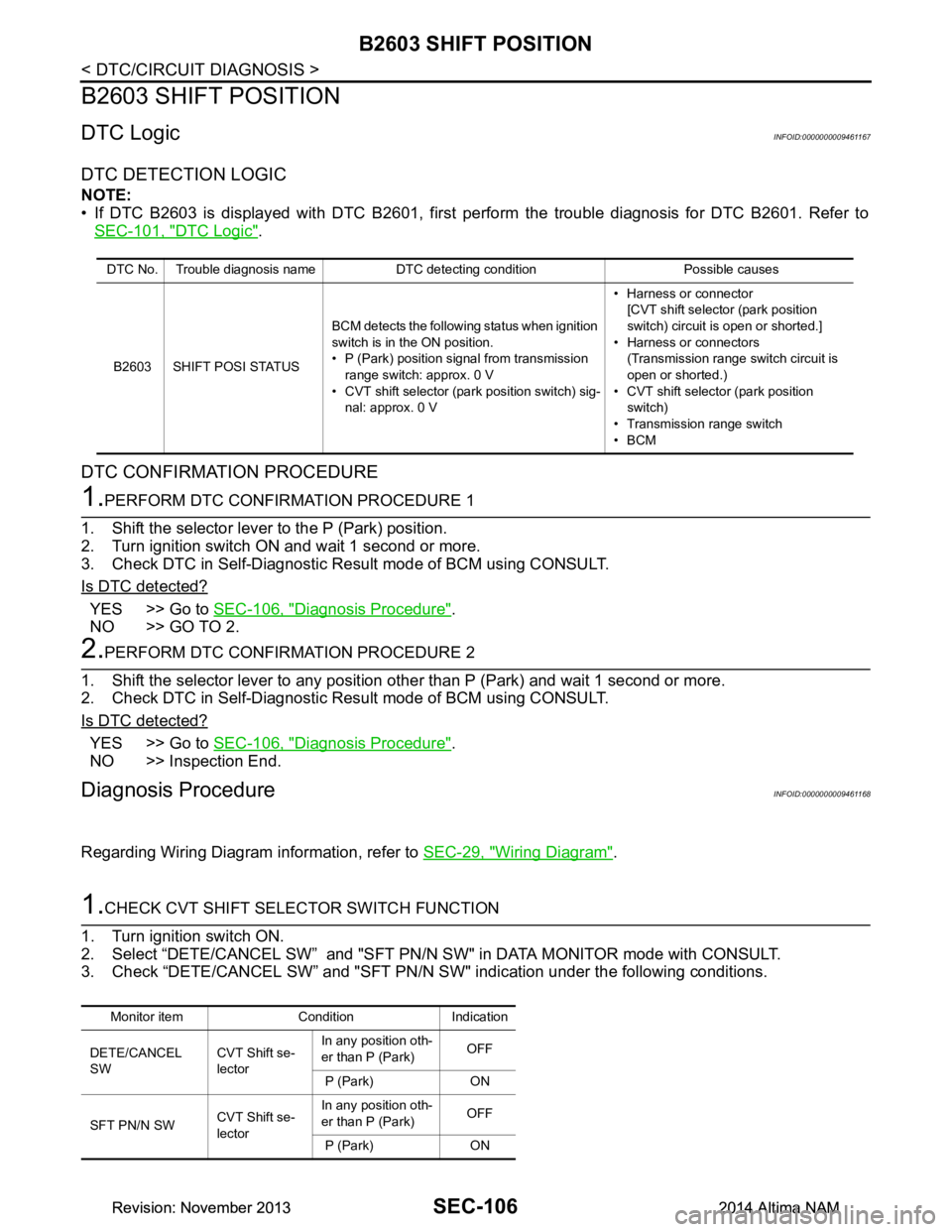
B2603 SHIFT POSITION
B2603 SHIFT POSITION
DTC LogicINFOID:0000000009461167
DTC DETECTION LOGIC
NOTE:
• If DTC B2603 is displayed with DTC B2601, first per form the trouble diagnosis for DTC B2601. Refer to
SEC-101, "DTC Logic"
.
DTC CONFIRMATION PROCEDURE
1.PERFORM DTC CONFIRMATION PROCEDURE 1
1. Shift the selector lever to the P (Park) position.
2. Turn ignition switch ON and wait 1 second or more.
3. Check DTC in Self-Diagnostic Result mode of BCM using CONSULT.
Is DTC detected?
YES >> Go to SEC-106, "Diagnosis Procedure".
NO >> GO TO 2.
2.PERFORM DTC CONFIRMATION PROCEDURE 2
1. Shift the selector lever to any position other than P (Park) and wait 1 second or more.
2. Check DTC in Self-Diagnostic Result mode of BCM using CONSULT.
Is DTC detected?
YES >> Go to SEC-106, "Diagnosis Procedure".
NO >> Inspection End.
Diagnosis ProcedureINFOID:0000000009461168
Regarding Wiring Diagram information, refer to SEC-29, "Wiring Diagram".
1.CHECK CVT SHIFT SELECTOR SWITCH FUNCTION
1. Turn ignition switch ON.
2. Select “DETE/CANCEL SW” and "SFT PN/N SW" in DATA MONITOR mode with CONSULT.
3. Check “DETE/CANCEL SW” and "SFT PN/N SW" indication under the following conditions.
DTC No. Trouble diagnosis name DTC detecting condition Possible causes
B2603 SHIFT POSI STATUS BCM detects the following status when ignition
switch is in the ON position.
• P (Park) position signal from transmission
range switch: approx. 0 V
• CVT shift selector (park position switch) sig- nal: approx. 0 V • Harness or connector
[CVT shift selector (park position
switch) circuit is open or shorted.]
• Harness or connectors (Transmission range switch circuit is
open or shorted.)
• CVT shift selector (park position switch)
• Transmission range switch
•BCM
Monitor item Condition Indication
DETE/CANCEL
SW CVT Shift se-
lector In any position oth-
er than P (Park) OFF
P (Park) ON
SFT PN/N SW CVT Shift se-
lector In any position oth-
er than P (Park) OFF
P (Park) ON
Revision: November 20132014 Altima NAMRevision: November 20132014 Altima NAM