power steering NISSAN TIIDA 2007 Service User Guide
[x] Cancel search | Manufacturer: NISSAN, Model Year: 2007, Model line: TIIDA, Model: NISSAN TIIDA 2007Pages: 5883, PDF Size: 78.95 MB
Page 99 of 5883
![NISSAN TIIDA 2007 Service User Guide AV-94
< ECU DIAGNOSIS >[AUDIO WITH NAVIGATION]
AV CONTROL UNIT
11
(BR)12
(P)Sound signal front RH OutputIgnition
switch
ONVoice output
13
(O)14
(V)Sound signal rear RH OutputIgnition
switch
ONVoic](/img/5/57395/w960_57395-98.png "NISSAN TIIDA 2007 Service User Guide AV-94
< ECU DIAGNOSIS >[AUDIO WITH NAVIGATION]
AV CONTROL UNIT
11
(BR)12
(P)Sound signal front RH OutputIgnition
switch
ONVoice output
13
(O)14
(V)Sound signal rear RH OutputIgnition
switch
ONVoic")
AV-94
< ECU DIAGNOSIS >[AUDIO WITH NAVIGATION]
AV CONTROL UNIT
11
(BR)12
(P)Sound signal front RH OutputIgnition
switch
ONVoice output
13
(O)14
(V)Sound signal rear RH OutputIgnition
switch
ONVoice output
15
(B)Ground Steering switch signal GND —Ignition
switch
ON—0 V
16
(Y)15
(B)Steering switch signal B InputIgnition
switch
ONKeep pressing VOL DOWN
switch.0 V
Keep pressing VOL UP
switch.1.2 V
Keep pressing
switch.2.5 V
Keep pressing switch.3.7 V
Except for above. 5 V
19
(LG)Ground Battery power supply InputIgnition
switch
OFF— Battery voltage
20
(B)Ground GND —Ignition
switch
ON—0 V
23
(L)—AV communication signal
(H)Input/
Output—— —
24
(P)—AV communication signal
(L)Input/
Output—— —
30
(W)31
(O)TEL voice signal InputIgnition
switch
ONTEL voice output
32
(O)33
(W)Voice guidance signal InputIgnition
switch
ONVoice guidance output Terminal
(Wire color)Description
ConditionReference value
(Approx.)
+ – Signal nameInput/
Output
SKIB3609E
SKIB3609E
SKIB3609E
SKIB3609E
Page 114 of 5883
![NISSAN TIIDA 2007 Service User Guide AV
MULTI AV SYSTEM SYMPTOMS
AV-109
< SYMPTOM DIAGNOSIS >[AUDIO WITH NAVIGATION]
C
D
E
F
G
H
I
J
K
L
MB A
O
P
RELATED TO AUDIO
RELATED TO RGB IMAGE
RELATED TO VOICE ACTIVATED CONTROL
RELATED TO HANDS F](/img/5/57395/w960_57395-113.png "NISSAN TIIDA 2007 Service User Guide AV
MULTI AV SYSTEM SYMPTOMS
AV-109
< SYMPTOM DIAGNOSIS >[AUDIO WITH NAVIGATION]
C
D
E
F
G
H
I
J
K
L
MB A
O
P
RELATED TO AUDIO
RELATED TO RGB IMAGE
RELATED TO VOICE ACTIVATED CONTROL
RELATED TO HANDS F")
AV
MULTI AV SYSTEM SYMPTOMS
AV-109
< SYMPTOM DIAGNOSIS >[AUDIO WITH NAVIGATION]
C
D
E
F
G
H
I
J
K
L
MB A
O
P
RELATED TO AUDIO
RELATED TO RGB IMAGE
RELATED TO VOICE ACTIVATED CONTROL
RELATED TO HANDS FREE PHONE
It cannot be switched to rear view
monitor.CONSULT-III self-diagnosis detects
a malfunction.Perform the self-diagnosis using CONSULT-III (MULTI
AV ) (AV- 4 8 , "CONSULT - III Function (MULTI AV)").
CONSULT-III self-diagnosis does not
detect a malfunction.NAVI control unit reverse signal circuit Symptoms Check items Possible malfunction location/Action to take
Symptom Check items Possible malfunction location / Action to take
Audio sound is not heard.No sound from all speakers Audio unit (XX-XX, "*****"
)
Sound is not heard only from the specif-
ic places (Front RH, rear RH, front LH
and rear LH).Sound signal circuit of suspect system
Symptoms Check items Possible malfunction location/Action to take
Color of RGB image is not proper.Light blue (Cyan) tintRGB signal (R: red) circuit (AV- 8 2 , "
Diagnosis Proce-
dure")
Purple (Magenta) tint and image is
rolling.RGB signal (G: green) circuit (AV- 8 3 , "
Diagnosis Proce-
dure")
Screen looks yellowish.RGB signal (B: blue) circuit (AV- 8 4 , "
Diagnosis Proce-
dure")
RGB image is too dark.
RGB image is too fuzzy.– RGB ground circuit
RGB image is not displayed.
(Nothing is displayed on the
screen.)“MULTI AV” is displayed on “SELECT
SYSTEM” screen of CONSULT-III.Perform the self-diagnosis using CONSULT-III (AV- 4 8 ,
"CONSULT - III Function (MULTI AV)").
“MULTI AV” is not displayed on “SE-
LECT SYSTEM” screen of CON-
SULT-III.NAVI control unit power supply and ground circuit (AV-
80, "NAVI CONTROL UNIT : Diagnosis Procedure")
Symptoms Check items Possible malfunction location/Action to take
The voice cannot be controlled
even if the voice control screen is
displayed.Voice sounds at “Speaker Test” and
“Voice Microphone Test” of “Confir-
mation / Adjustment Mode”.NAVI control unit (XX-XX, "*****"
)
Voice does not sound at “Speaker
Test” and “Voice Microphone Test” of
“Confirmation / Adjustment Mode”. MIC. power supply circuit (AV- 9 1 , "
Diagnosis Proce-
dure")
Shield (MIC.) circuit (AV- 9 1 , "
Diagnosis Procedure")
MIC. signal circuit (AV- 9 1 , "
Diagnosis Procedure")
The voice cannot be controlled.
(Voice control screen is not dis-
played.)TEL operation screen is displayed by
pressing and holding “ ” switch
of steering wheel switch.NAVI control unit (XX-XX, "*****"
)
TEL operation screen is not dis-
played by pressing and holding
“ ” switch of steering wheel
switch.
Other steering wheel switches are
normal.Steering switch (XX-XX, "*****"
)
“BACK”, “VOL UP”, “VOL DOWN”
and “ ” switches of steering
wheel switch are not operated.Steering switch signal B circuit XX-XX, "*****"
(XX-XX,
"*****")
All steering switches are not operat-
ed.Steering switch signal ground circuit (XX-XX, "*****"
)
Page 218 of 5883
BR-26
< ON-VEHICLE REPAIR >
FRONT DISC BRAKE
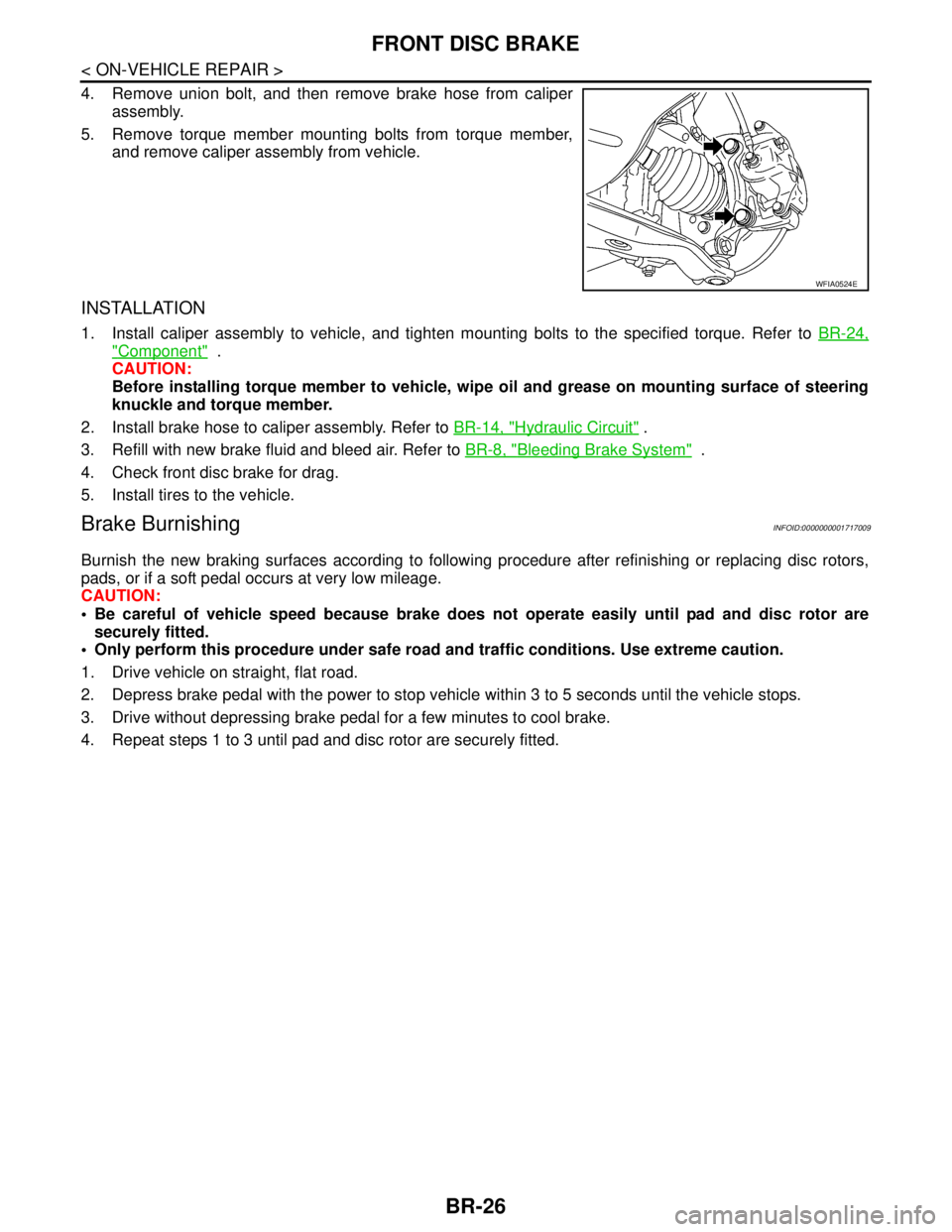
4. Remove union bolt, and then remove brake hose from caliper
assembly.
5. Remove torque member mounting bolts from torque member,
and remove caliper assembly from vehicle.
INSTALLATION
1. Install caliper assembly to vehicle, and tighten mounting bolts to the specified torque. Refer to BR-24,
"Component" .
CAUTION:
Before installing torque member to vehicle, wipe oil and grease on mounting surface of steering
knuckle and torque member.
2. Install brake hose to caliper assembly. Refer to BR-14, "
Hydraulic Circuit" .
3. Refill with new brake fluid and bleed air. Refer to BR-8, "
Bleeding Brake System" .
4. Check front disc brake for drag.
5. Install tires to the vehicle.
Brake BurnishingINFOID:0000000001717009
Burnish the new braking surfaces according to following procedure after refinishing or replacing disc rotors,
pads, or if a soft pedal occurs at very low mileage.
CAUTION:
Be careful of vehicle speed because brake does not operate easily until pad and disc rotor are
securely fitted.
Only perform this procedure under safe road and traffic conditions. Use extreme caution.
1. Drive vehicle on straight, flat road.
2. Depress brake pedal with the power to stop vehicle within 3 to 5 seconds until the vehicle stops.
3. Drive without depressing brake pedal for a few minutes to cool brake.
4. Repeat steps 1 to 3 until pad and disc rotor are securely fitted.
WFIA0524E
Page 234 of 5883

BRC-1
BRAKES
C
D
E
G
H
I
J
K
L
M
SECTION BRC
A
B
BRC
N
O
P
CONTENTS
BRAKE CONTROL SYSTEM
ABS
BASIC INSPECTION ....................................
6
DIAGNOSIS AND REPAIR WORKFLOW ..........6
Work Flow .................................................................6
Diagnostic Work Sheet ..............................................9
INSPECTION AND ADJUSTMENT ....................10
ADDITIONAL SERVICE WHEN REPLACING
CONTROL UNIT ........................................................
10
ADDITIONAL SERVICE WHEN REPLACING
CONTROL UNIT : Description ................................
10
ADDITIONAL SERVICE WHEN REPLACING
CONTROL UNIT : Special Repair Requirement .....
10
ADJUSTMENT OF STEERING ANGLE SENSOR
NEUTRAL POSITION ................................................
10
ADJUSTMENT OF STEERING ANGLE SENSOR
NEUTRAL POSITION : Description ........................
10
ADJUSTMENT OF STEERING ANGLE SENSOR
NEUTRAL POSITION : Special Repair Require-
ment ........................................................................
10
CALIBRATION OF DECEL G SENSOR ...................11
CALIBRATION OF DECEL G SENSOR : Descrip-
tion ..........................................................................
11
CALIBRATION OF DECEL G SENSOR : Special
Repair Requirement ................................................
12
FUNCTION DIAGNOSIS ..............................13
VDC ....................................................................13
System Diagram ......................................................13
System Description .................................................13
Component Parts Location ......................................14
Component Description ...........................................15
TCS .....................................................................16
System Diagram ......................................................16
System Description .................................................16
Component Parts Location ......................................17
Component Description ...........................................18
ABS ...................................................................19
System Diagram ......................................................19
System Description ..................................................19
Component Parts Location ......................................20
Component Description ...........................................21
EBD ...................................................................22
System Diagram ......................................................22
System Description ..................................................22
Component Parts Location ......................................23
Component Description ...........................................24
DIAGNOSIS SYSTEM [ABS ACTUATOR
AND ELECTRIC UNIT (CONTROL UNIT)] .......
25
CONSULT-III Function (ABS) ..................................25
COMPONENT DIAGNOSIS .........................30
C1101, C1102, C1103, C1104 WHEEL SEN-
SOR-1 ................................................................
30
Description ...............................................................30
DTC Logic ................................................................30
Diagnosis Procedure ...............................................30
Component Inspection .............................................32
Special Repair Requirement ....................................32
C1105, C1106, C1107, C1108 WHEEL SEN-
SOR-2 ................................................................
33
Description ...............................................................33
DTC Logic ................................................................33
Diagnosis Procedure ...............................................33
Component Inspection .............................................35
Special Repair Requirement ....................................35
C1109 POWER AND GROUND SYSTEM ........36
Description ...............................................................36
DTC Logic ................................................................36
Diagnosis Procedure ...............................................36
Special Repair Requirement ....................................37
Page 236 of 5883

BRC-3
C
D
E
G
H
I
J
K
L
MA
B
BRC
N
O
P
PREPARATION ...........................................82
PREPARATION ..................................................82
Special Service Tool ...............................................82
REMOVAL AND INSTALLATION ...............83
WHEEL SENSORS ............................................83
Removal and Installation .........................................83
SENSOR ROTOR ...............................................84
Removal and Installation .........................................84
ACTUATOR AND ELECTRIC UNIT (ASSEM-
BLY) ....................................................................
85
Removal and Installation .........................................85
ESP/TCS/ABS
BASIC INSPECTION ...................................
86
DIAGNOSIS AND REPAIR WORKFLOW .........86
Work Flow ...............................................................86
Diagnostic Work Sheet ............................................89
INSPECTION AND ADJUSTMENT ....................90
ADDITIONAL SERVICE WHEN REPLACING
CONTROL UNIT ........................................................
90
ADDITIONAL SERVICE WHEN REPLACING
CONTROL UNIT : Description ................................
90
ADDITIONAL SERVICE WHEN REPLACING
CONTROL UNIT : Special Repair Requirement .....
90
ADJUSTMENT OF STEERING ANGLE SENSOR
NEUTRAL POSITION ................................................
90
ADJUSTMENT OF STEERING ANGLE SENSOR
NEUTRAL POSITION : Description ........................
90
ADJUSTMENT OF STEERING ANGLE SENSOR
NEUTRAL POSITION : Special Repair Require-
ment ........................................................................
90
CALIBRATION OF DECEL G SENSOR ...................91
CALIBRATION OF DECEL G SENSOR : Descrip-
tion ..........................................................................
91
CALIBRATION OF DECEL G SENSOR : Special
Repair Requirement ................................................
92
FUNCTION DIAGNOSIS ..............................93
VDC ....................................................................93
System Diagram ......................................................93
System Description .................................................93
Component Parts Location ......................................94
Component Description ...........................................95
TCS .....................................................................96
System Diagram ......................................................96
System Description .................................................96
Component Parts Location ......................................97
Component Description ...........................................98
ABS ....................................................................99
System Diagram ......................................................99
System Description ..................................................99
Component Parts Location ....................................100
Component Description .........................................101
EBD .................................................................102
System Diagram ....................................................102
System Description ................................................102
Component Parts Location ....................................103
Component Description .........................................104
DIAGNOSIS SYSTEM [ABS ACTUATOR
AND ELECTRIC UNIT (CONTROL UNIT)] .....
105
CONSULT-III Function (ABS) ................................105
COMPONENT DIAGNOSIS .......................110
C1101, C1102, C1103, C1104 WHEEL SEN-
SOR-1 ..............................................................
110
Description .............................................................110
DTC Logic ..............................................................110
Diagnosis Procedure .............................................110
Component Inspection ...........................................112
Special Repair Requirement ..................................112
C1105, C1106, C1107, C1108 WHEEL SEN-
SOR-2 ..............................................................
113
Description .............................................................113
DTC Logic ..............................................................113
Diagnosis Procedure .............................................113
Component Inspection ...........................................115
Special Repair Requirement ..................................115
C1109 POWER AND GROUND SYSTEM ......116
Description .............................................................116
DTC Logic ..............................................................116
Diagnosis Procedure .............................................116
Special Repair Requirement ..................................117
C1110, C1170 ABS ACTUATOR AND ELEC-
TRIC UNIT (CONTROL UNIT) ........................
118
DTC Logic ..............................................................118
Diagnosis Procedure .............................................118
Special Repair Requirement ..................................118
C1111 ABS MOTOR, MOTOR RELAY SYS-
TEM .................................................................
119
Description .............................................................119
DTC Logic ..............................................................119
Diagnosis Procedure .............................................119
Component Inspection ...........................................120
Special Repair Requirement ..................................120
C1113, C1145, C1146 YAW RATE/SIDE/DE-
CEL G SENSOR ..............................................
121
Description .............................................................121
DTC Logic ..............................................................121
Diagnosis Procedure .............................................121
Component Inspection ...........................................122
Special Repair Requirement ..................................122
Page 270 of 5883
![NISSAN TIIDA 2007 Service User Guide C1109 POWER AND GROUND SYSTEM
BRC-37
< COMPONENT DIAGNOSIS >[ABS]
C
D
E
G
H
I
J
K
L
MA
B
BRC
N
O
P
5. Check continuity between ABS actuator and electric unit (control
unit) harness connector terminals](/img/5/57395/w960_57395-269.png "NISSAN TIIDA 2007 Service User Guide C1109 POWER AND GROUND SYSTEM
BRC-37
< COMPONENT DIAGNOSIS >[ABS]
C
D
E
G
H
I
J
K
L
MA
B
BRC
N
O
P
5. Check continuity between ABS actuator and electric unit (control
unit) harness connector terminals")
C1109 POWER AND GROUND SYSTEM
BRC-37
< COMPONENT DIAGNOSIS >[ABS]
C
D
E
G
H
I
J
K
L
MA
B
BRC
N
O
P
5. Check continuity between ABS actuator and electric unit (control
unit) harness connector terminals and ground.
Is the inspection result normal?
YES >> Check battery for terminal looseness, low voltage, etc. If any malfunction is found, repair malfunc-
tioning parts.
NO >> Repair or replace malfunctioning components.
Special Repair RequirementINFOID:0000000001731238
1.ADJUSTMENT OF STEERING ANGLE SENSOR NEUTRAL POSITION
Always perform neutral position adjustment for the steering angle sensor when replacing the ABS actuator
and electric unit (control unit). Refer to BRC-90, "
ADJUSTMENT OF STEERING ANGLE SENSOR NEUTRAL
POSITION : Description".
>> GO TO 2
2.CALIBRATION OF DECEL G SENSOR
Always perform calibration of decel G sensor when replacing the ABS actuator and electric unit (control unit).
Refer to BRC-91, "
CALIBRATION OF DECEL G SENSOR : Description".
>> END
ABS actuator and electric unit
(control unit)
—Continuity
Connector Terminal
E125 16, 47 Ground Yes
AWFIA0016ZZ
Page 350 of 5883
![NISSAN TIIDA 2007 Service User Guide C1109 POWER AND GROUND SYSTEM
BRC-117
< COMPONENT DIAGNOSIS >[ESP/TCS/ABS]
C
D
E
G
H
I
J
K
L
MA
B
BRC
N
O
P
5. Check continuity between ABS actuator and electric unit (control
unit) harness connector](/img/5/57395/w960_57395-349.png "NISSAN TIIDA 2007 Service User Guide C1109 POWER AND GROUND SYSTEM
BRC-117
< COMPONENT DIAGNOSIS >[ESP/TCS/ABS]
C
D
E
G
H
I
J
K
L
MA
B
BRC
N
O
P
5. Check continuity between ABS actuator and electric unit (control
unit) harness connector")
C1109 POWER AND GROUND SYSTEM
BRC-117
< COMPONENT DIAGNOSIS >[ESP/TCS/ABS]
C
D
E
G
H
I
J
K
L
MA
B
BRC
N
O
P
5. Check continuity between ABS actuator and electric unit (control
unit) harness connector terminals and ground.
Is the inspection result normal?
YES >> Check battery for terminal looseness, low voltage, etc. If any malfunction is found, repair malfunc-
tioning parts.
NO >> Repair or replace malfunctioning components.
Special Repair RequirementINFOID:0000000001731095
1.ADJUSTMENT OF STEERING ANGLE SENSOR NEUTRAL POSITION
Always perform neutral position adjustment for the steering angle sensor when replacing the ABS actuator
and electric unit (control unit). Refer to BRC-90, "
ADJUSTMENT OF STEERING ANGLE SENSOR NEUTRAL
POSITION : Description".
>> GO TO 2
2.CALIBRATION OF DECEL G SENSOR
Always perform calibration of decel G sensor when replacing the ABS actuator and electric unit (control unit).
Refer to BRC-91, "
CALIBRATION OF DECEL G SENSOR : Description".
>> END
ABS actuator and electric unit
(control unit)
—Continuity
Connector Terminal
E125 16, 47 Ground Yes
AWFIA0016ZZ
Page 489 of 5883
![NISSAN TIIDA 2007 Service User Guide CO-8
< PRECAUTION >[HR16DE]
PRECAUTIONS
PRECAUTION
PRECAUTIONS
Precaution for Supplemental Restraint System (SRS) "AIR BAG" and "SEAT BELT
PRE-TENSIONER"
INFOID:0000000001534589
The Supplemental Rest](/img/5/57395/w960_57395-488.png "NISSAN TIIDA 2007 Service User Guide CO-8
< PRECAUTION >[HR16DE]
PRECAUTIONS
PRECAUTION
PRECAUTIONS
Precaution for Supplemental Restraint System (SRS) \"AIR BAG\" and \"SEAT BELT
PRE-TENSIONER\"
INFOID:0000000001534589
The Supplemental Rest")
CO-8
< PRECAUTION >[HR16DE]
PRECAUTIONS
PRECAUTION
PRECAUTIONS
Precaution for Supplemental Restraint System (SRS) "AIR BAG" and "SEAT BELT
PRE-TENSIONER"
INFOID:0000000001534589
The Supplemental Restraint System such as “AIR BAG” and “SEAT BELT PRE-TENSIONER”, used along
with a front seat belt, helps to reduce the risk or severity of injury to the driver and front passenger for certain
types of collision. Information necessary to service the system safely is included in the SR and SB section of
this Service Manual.
WARNING:
• To avoid rendering the SRS inoperative, which could increase the risk of personal injury or death in
the event of a collision which would result in air bag inflation, all maintenance must be performed by
an authorized NISSAN/INFINITI dealer.
Improper maintenance, including incorrect removal and installation of the SRS, can lead to personal
injury caused by unintentional activation of the system. For removal of Spiral Cable and Air Bag
Module, see the SR section.
Do not use electrical test equipment on any circuit related to the SRS unless instructed to in this
Service Manual. SRS wiring harnesses can be identified by yellow and/or orange harnesses or har-
ness connectors.
Precaution Necessary for Steering Wheel Rotation After Battery Disconnect
INFOID:0000000001534590
NOTE:
This Procedure is applied only to models with Intelligent Key system and NATS (NISSAN ANTI-THEFT SYS-
TEM).
Remove and install all control units after disconnecting both battery cables with the ignition knob in the
″LOCK″ position.
Always use CONSULT-II to perform self-diagnosis as a part of each function inspection after finishing work.
If DTC is detected, perform trouble diagnosis according to self-diagnostic results.
For models equipped with the Intelligent Key system and NATS, an electrically controlled steering lock mech-
anism is adopted on the key cylinder.
For this reason, if the battery is disconnected or if the battery is discharged, the steering wheel will lock and
steering wheel rotation will become impossible.
If steering wheel rotation is required when battery power is interrupted, follow the procedure below before
starting the repair operation.
OPERATION PROCEDURE
1. Connect both battery cables.
NOTE:
Supply power using jumper cables if battery is discharged.
2. Use the Intelligent Key or mechanical key to turn the ignition switch to the ″ACC″ position. At this time, the
steering lock will be released.
3. Disconnect both battery cables. The steering lock will remain released and the steering wheel can be
rotated.
4. Perform the necessary repair operation.
5. When the repair work is completed, return the ignition switch to the ″LOCK″ position before connecting
the battery cables. (At this time, the steering lock mechanism will engage.)
6. Perform a self-diagnosis check of all control units using CONSULT-II.
Precaution for Liquid GasketINFOID:0000000001534591
REMOVAL OF LIQUID GASKET SEALING
After removing nuts and bolts, separate the mating surface, using Tool and remove old liquid gasket sealing.
Page 513 of 5883
![NISSAN TIIDA 2007 Service User Guide CO-32
< PRECAUTION >[MR18DE]
PRECAUTIONS
PRECAUTION
PRECAUTIONS
Precaution for Supplemental Restraint System (SRS) "AIR BAG" and "SEAT BELT
PRE-TENSIONER"
INFOID:0000000001516585
The Supplemental Res](/img/5/57395/w960_57395-512.png "NISSAN TIIDA 2007 Service User Guide CO-32
< PRECAUTION >[MR18DE]
PRECAUTIONS
PRECAUTION
PRECAUTIONS
Precaution for Supplemental Restraint System (SRS) \"AIR BAG\" and \"SEAT BELT
PRE-TENSIONER\"
INFOID:0000000001516585
The Supplemental Res")
CO-32
< PRECAUTION >[MR18DE]
PRECAUTIONS
PRECAUTION
PRECAUTIONS
Precaution for Supplemental Restraint System (SRS) "AIR BAG" and "SEAT BELT
PRE-TENSIONER"
INFOID:0000000001516585
The Supplemental Restraint System such as “AIR BAG” and “SEAT BELT PRE-TENSIONER”, used along
with a front seat belt, helps to reduce the risk or severity of injury to the driver and front passenger for certain
types of collision. Information necessary to service the system safely is included in the SR and SB section of
this Service Manual.
WARNING:
To avoid rendering the SRS inoperative, which could increase the risk of personal injury or death in
the event of a collision which would result in air bag inflation, all maintenance must be performed by
an authorized NISSAN/INFINITI dealer.
Improper maintenance, including incorrect removal and installation of the SRS, can lead to personal
injury caused by unintentional activation of the system. For removal of Spiral Cable and Air Bag
Module, see the SR section.
Do not use electrical test equipment on any circuit related to the SRS unless instructed to in this
Service Manual. SRS wiring harnesses can be identified by yellow and/or orange harnesses or har-
ness connectors.
Precaution Necessary for Steering Wheel Rotation After Battery Disconnect
INFOID:0000000001337832
NOTE:
This Procedure is applied only to models with Intelligent Key system and NATS (NISSAN ANTI-THEFT SYS-
TEM).
Remove and install all control units after disconnecting both battery cables with the ignition knob in the
″LOCK″ position.
Always use CONSULT-II to perform self-diagnosis as a part of each function inspection after finishing work.
If DTC is detected, perform trouble diagnosis according to self-diagnostic results.
For models equipped with the Intelligent Key system and NATS, an electrically controlled steering lock mech-
anism is adopted on the key cylinder.
For this reason, if the battery is disconnected or if the battery is discharged, the steering wheel will lock and
steering wheel rotation will become impossible.
If steering wheel rotation is required when battery power is interrupted, follow the procedure below before
starting the repair operation.
OPERATION PROCEDURE
1. Connect both battery cables.
NOTE:
Supply power using jumper cables if battery is discharged.
2. Use the Intelligent Key or mechanical key to turn the ignition switch to the ″ACC″ position. At this time, the
steering lock will be released.
3. Disconnect both battery cables. The steering lock will remain released and the steering wheel can be
rotated.
4. Perform the necessary repair operation.
5. When the repair work is completed, return the ignition switch to the ″LOCK″ position before connecting
the battery cables. (At this time, the steering lock mechanism will engage.)
6. Perform a self-diagnosis check of all control units using CONSULT-II.
Precaution for Liquid GasketINFOID:0000000001337833
REMOVAL OF LIQUID GASKET SEALING
After removing nuts and bolts, separate the mating surface, using Tool and remove old liquid gasket sealing.
Page 536 of 5883
![NISSAN TIIDA 2007 Service User Guide PRECAUTIONS
CO-55
< PRECAUTION >[K9K]
C
D
E
F
G
H
I
J
K
L
MA
CO
N
P O
PRECAUTION
PRECAUTIONS
Precaution for Supplemental Restraint System (SRS) "AIR BAG" and "SEAT BELT
PRE-TENSIONER"
INFOID:00000000](/img/5/57395/w960_57395-535.png "NISSAN TIIDA 2007 Service User Guide PRECAUTIONS
CO-55
< PRECAUTION >[K9K]
C
D
E
F
G
H
I
J
K
L
MA
CO
N
P O
PRECAUTION
PRECAUTIONS
Precaution for Supplemental Restraint System (SRS) \"AIR BAG\" and \"SEAT BELT
PRE-TENSIONER\"
INFOID:00000000")
PRECAUTIONS
CO-55
< PRECAUTION >[K9K]
C
D
E
F
G
H
I
J
K
L
MA
CO
N
P O
PRECAUTION
PRECAUTIONS
Precaution for Supplemental Restraint System (SRS) "AIR BAG" and "SEAT BELT
PRE-TENSIONER"
INFOID:0000000001534592
The Supplemental Restraint System such as “AIR BAG” and “SEAT BELT PRE-TENSIONER”, used along
with a front seat belt, helps to reduce the risk or severity of injury to the driver and front passenger for certain
types of collision. Information necessary to service the system safely is included in the SR and SB section of
this Service Manual.
WARNING:
To avoid rendering the SRS inoperative, which could increase the risk of personal injury or death in
the event of a collision which would result in air bag inflation, all maintenance must be performed by
an authorized NISSAN/INFINITI dealer.
Improper maintenance, including incorrect removal and installation of the SRS, can lead to personal
injury caused by unintentional activation of the system. For removal of Spiral Cable and Air Bag
Module, see the SR section.
Do not use electrical test equipment on any circuit related to the SRS unless instructed to in this
Service Manual. SRS wiring harnesses can be identified by yellow and/or orange harnesses or har-
ness connectors.
Precaution Necessary for Steering Wheel Rotation After Battery Disconnect
INFOID:0000000001534593
NOTE:
This Procedure is applied only to models with Intelligent Key system and NATS (NISSAN ANTI-THEFT SYS-
TEM).
Remove and install all control units after disconnecting both battery cables with the ignition knob in the
″LOCK″ position.
Always use CONSULT-II to perform self-diagnosis as a part of each function inspection after finishing work.
If DTC is detected, perform trouble diagnosis according to self-diagnostic results.
For models equipped with the Intelligent Key system and NATS, an electrically controlled steering lock mech-
anism is adopted on the key cylinder.
For this reason, if the battery is disconnected or if the battery is discharged, the steering wheel will lock and
steering wheel rotation will become impossible.
If steering wheel rotation is required when battery power is interrupted, follow the procedure below before
starting the repair operation.
OPERATION PROCEDURE
1. Connect both battery cables.
NOTE:
Supply power using jumper cables if battery is discharged.
2. Use the Intelligent Key or mechanical key to turn the ignition switch to the ″ACC″ position. At this time, the
steering lock will be released.
3. Disconnect both battery cables. The steering lock will remain released and the steering wheel can be
rotated.
4. Perform the necessary repair operation.
5. When the repair work is completed, return the ignition switch to the ″LOCK″ position before connecting
the battery cables. (At this time, the steering lock mechanism will engage.)
6. Perform a self-diagnosis check of all control units using CONSULT-II.
Precaution for Liquid GasketINFOID:0000000001534594
REMOVAL OF LIQUID GASKET SEALING
After removing nuts and bolts, separate the mating surface, using Tool and remove old liquid gasket sealing.