Ext NISSAN TIIDA 2007 Service Repair Manual
[x] Cancel search | Manufacturer: NISSAN, Model Year: 2007, Model line: TIIDA, Model: NISSAN TIIDA 2007Pages: 5883, PDF Size: 78.95 MB
Page 5421 of 5883
![NISSAN TIIDA 2007 Service Repair Manual A/T FLUID
TM-475
< ON-VEHICLE MAINTENANCE >[TYPE 2 (4AT: RE4F03B)]
C
E
F
G
H
I
J
K
L
MA
B
TM
N
O
P
11. Position an oil pan under the banjo bolts that connect the A/T fluid cooler steel lines to the A/](/img/5/57395/w960_57395-5420.png "NISSAN TIIDA 2007 Service Repair Manual A/T FLUID
TM-475
< ON-VEHICLE MAINTENANCE >[TYPE 2 (4AT: RE4F03B)]
C
E
F
G
H
I
J
K
L
MA
B
TM
N
O
P
11. Position an oil pan under the banjo bolts that connect the A/T fluid cooler steel lines to the A/")
A/T FLUID
TM-475
< ON-VEHICLE MAINTENANCE >[TYPE 2 (4AT: RE4F03B)]
C
E
F
G
H
I
J
K
L
MA
B
TM
N
O
P
11. Position an oil pan under the banjo bolts that connect the A/T fluid cooler steel lines to the A/T.
12. Remove the banjo bolts.
13. Flush each steel line from the cooler side back toward the A/T by spraying Transmission Cooler Cleaner
in a continuous stream for 5 seconds.
14. Blow compressed air regulated to 5 - 9 kg/cm
2 (70 - 130 psi) through each steel line from the cooler side
back toward the A/T for 10 seconds to force out any remaining A/T fluid.
15. Ensure all debris is removed from the steel cooler lines.
16. Ensure all debris is removed from the banjo bolts and fittings.
17. Perform "A/T FLUID COOLER DIAGNOSIS PROCEDURE".
A/T FLUID COOLER DIAGNOSIS PROCEDURE
NOTE:
Insufficient cleaning of the cooler inlet hose exterior may lead to inaccurate debris identification.
1. Position an oil pan under the A/T inlet and outlet cooler hoses.
2. Clean the exterior and tip of the cooler inlet hose.
3. Insert the extension adapter hose of a can of Transmission
Cooler Cleaner (Nissan P/N 999MP-AM006) into the cooler out-
let hose.
CAUTION:
Wear safety glasses and rubber gloves when spraying the
Transmission Cooler Cleaner.
Spray Transmission Cooler Cleaner only with adequate
ventilation.
Avoid contact with eyes and skin.
Do not breath vapors or spray mist.
4. Hold the hose and can as high as possible and spray Transmis-
sion Cooler Cleaner in a continuous stream into the cooler outlet
hose until A/T fluid flows out of the cooler inlet hose for 5 seconds.
5. Tie a common white, basket-type coffee filter to the end of the
cooler inlet hose.
6. Insert the tip of an air gun into the end of the cooler outlet hose.
7. Wrap a shop rag around the air gun tip and end of cooler outlet
hose.
8. Blow compressed air regulated to 5 - 9 kg/cm
2 (70 - 130 psi)
through the cooler outlet hose to force any remaining A/T fluid
into the coffee filter.
9. Remove the coffee filter from the end of the cooler inlet hose.
10. Perform "A/T FLUID COOLER INSPECTION PROCEDURE".
A/T FLUID COOLER INSPECTION PROCEDURE
SCIA5629E
SCIA5631E
SCIA5632E
Page 5424 of 5883
![NISSAN TIIDA 2007 Service Repair Manual TM-478
< ON-VEHICLE MAINTENANCE >[TYPE 2 (4AT: RE4F03B)]
STALL TEST
8. Move selector lever to “N” position.
9. Cool off ATF.
CAUTION:
Run the engine at idle for at least 1 minute.
10. Repeat steps](/img/5/57395/w960_57395-5423.png "NISSAN TIIDA 2007 Service Repair Manual TM-478
< ON-VEHICLE MAINTENANCE >[TYPE 2 (4AT: RE4F03B)]
STALL TEST
8. Move selector lever to “N” position.
9. Cool off ATF.
CAUTION:
Run the engine at idle for at least 1 minute.
10. Repeat steps")
TM-478
< ON-VEHICLE MAINTENANCE >[TYPE 2 (4AT: RE4F03B)]
STALL TEST
8. Move selector lever to “N” position.
9. Cool off ATF.
CAUTION:
Run the engine at idle for at least 1 minute.
10. Repeat steps 6 through 9 with selector lever in “2”, “1” and “R”
positions.
JUDGEMENT OF STALL TEST
The test result and possible damaged components relating to each result are shown in the illustrations on next
page.
In order to pinpoint the possible damaged components, refer to XX-XX, "*****"
.
NOTE:
Stall revolution is too high in “D”, “2”, or “1” position:
Slippage occurs in 1st gear but not in 2nd and 3rd gears. ..... Low one-way clutch slippage
Slippage occurs in the following gears:
1st through 3rd gears in “D” position and engine brake functions with OD OFF. (OD OFF indicator lamp is
on.)
1st and 2nd gears in “2” position and engine brake functions with accelerator pedal released (fully closed
throttle)...... Forward clutch or forward one-way clutch slippage
Stall revolution is too high in “R” position:
Engine brake does not function in “1” position. ..... Low & reverse brake slippage
Engine brake functions in “1” position. ..... Reverse clutch slippage
Stall revolution within specifications:
Vehicle does not achieve speed of more than 80 km/h (50 MPH). ..... One-way clutch seizure in torque con-
verter housing
CAUTION:
Be careful because automatic fluid temperature increases abnormally:
Slippage occurs in 3rd and 4th gears in “D” position. ..... High clutch slippage
Slippage occurs in 2nd and 4th gears in “D” position. ..... Brake band slippage
Engine brake does not function in 2nd and 3rd gears in “D” position, 2nd gear in “2” position, and 1st gear in
“1” position with OD OFF. (OD OFF indicator lamp is on.) ..... Overrun clutch slippage
Stall revolution less than specifications:
Poor acceleration during starts. ..... One-way clutch seizure in torque converter
SAT771B
Page 5673 of 5883
![NISSAN TIIDA 2007 Service Repair Manual VTL-12
< ON-VEHICLE REPAIR >[AUTOMATIC AIR CONDITIONER]
A/C UNIT ASSEMBLY
A/C UNIT ASSEMBLY
Removal and InstallationINFOID:0000000001696285
NOTE:
A LHD model shown, RHD model similar.
REMOVAL
1. Use t](/img/5/57395/w960_57395-5672.png "NISSAN TIIDA 2007 Service Repair Manual VTL-12
< ON-VEHICLE REPAIR >[AUTOMATIC AIR CONDITIONER]
A/C UNIT ASSEMBLY
A/C UNIT ASSEMBLY
Removal and InstallationINFOID:0000000001696285
NOTE:
A LHD model shown, RHD model similar.
REMOVAL
1. Use t")
VTL-12
< ON-VEHICLE REPAIR >[AUTOMATIC AIR CONDITIONER]
A/C UNIT ASSEMBLY
A/C UNIT ASSEMBLY
Removal and InstallationINFOID:0000000001696285
NOTE:
A LHD model shown, RHD model similar.
REMOVAL
1. Use the recovery/recycling equipment (for HFC-134a) to discharge the refrigerant. Refer to HA-29, "HFC-
134a (R-134a) Service Procedure".
2. Drain the coolant from the cooling system. Refer to CO-11, "
Changing Engine Coolant" (HR16DE), CO-
35, "Changing Engine Coolant" (MR18DE), CO-58, "Draining" (K9K).
3. Remove cowl top cover. Refer to EXT-20, "
Removal and Installation".
4. Remove lower dash insulator.
5. Remove bolt (A), and then disconnect low-pressure flexible
hose (1) and high-pressure pipe (2) from evaporator.
CAUTION:
Cap or wrap the joint of the pipe with suitable material such
as vinyl tape to avoid the entry of air.
6. Remove clamps (A), and then disconnect heater hoses (1) from
heater core.
SJIA0648E
A. A/C unit assembly bolts B. Steering member bolts C. Steering column nuts
SJIA0644E
SJIA0645E
Page 5698 of 5883
![NISSAN TIIDA 2007 Service Repair Manual A/C UNIT ASSEMBLY
VTL-37
< ON-VEHICLE REPAIR >[MANUAL AIR CONDITIONER]
C
D
E
F
G
H
J
K
L
MA
B
VTL
N
O
P
A/C UNIT ASSEMBLY
Removal and InstallationINFOID:0000000001696531
NOTE:
A LHD model shown, RHD m](/img/5/57395/w960_57395-5697.png "NISSAN TIIDA 2007 Service Repair Manual A/C UNIT ASSEMBLY
VTL-37
< ON-VEHICLE REPAIR >[MANUAL AIR CONDITIONER]
C
D
E
F
G
H
J
K
L
MA
B
VTL
N
O
P
A/C UNIT ASSEMBLY
Removal and InstallationINFOID:0000000001696531
NOTE:
A LHD model shown, RHD m")
A/C UNIT ASSEMBLY
VTL-37
< ON-VEHICLE REPAIR >[MANUAL AIR CONDITIONER]
C
D
E
F
G
H
J
K
L
MA
B
VTL
N
O
P
A/C UNIT ASSEMBLY
Removal and InstallationINFOID:0000000001696531
NOTE:
A LHD model shown, RHD model similar.
REMOVAL
1. Use a recovery/recycling equipment (for HFC-134a) to discharge refrigerant. Refer to HA-29, "HFC-134a
(R-134a) Service Procedure".
2. Drain coolant from cooling system. Refer to CO-11, "
Changing Engine Coolant" (HR16DE), CO-35,
"Changing Engine Coolant" (MR18DE), CO-58, "Draining" (K9K).
3. Remove cowl top cover. Refer to EXT-20, "
Removal and Installation".
4. Remove lower dash insulator.
5. Remove bolt (A), and then disconnect low-pressure flexible
hose (1) and high-pressure pipe (2) from evaporator.
CAUTION:
Cap or wrap the joint of the pipe with suitable material such
as vinyl tape to avoid the entry of air.
6. Remove clamps (A), and then disconnect heater hoses (1) from
heater core.
A. A/C unit assembly bolts B. Steering member bolts C. Steering column nuts
SJIA0648E
SJIA0644E
SJIA0645E
Page 5733 of 5883

WCS-18
< FUNCTION DIAGNOSIS >
DIAGNOSIS SYSTEM (METER)
DIAGNOSIS SYSTEM (METER)
CONSULT-III Function (METER/M&A)INFOID:0000000001728303
CONSULT-III can display each diagnostic item using the diagnostic test modes shown following.
SELF-DIAG RESULTS
Display Item List
Refer to MWI-54, "DTC Index".
DATA MONITOR
Display Item List
X: Applicable
METER/M&A diagnosis mode Description
SELF-DIAG RESULTS Displays combination meter self-diagnosis results.
DATA MONITOR Displays combination meter input/output data in real time.
CAN DIAG SUPPORT MNTR The result of transmit/receive diagnosis of CAN communication can be read.
Display item [Unit]MAIN
SIGNALSSELECTION
FROM MENUDescription
SPEED METER [km/h] or [mph] X X Displays the value of vehicle speed signal.
SPEED OUTPUT [km/h] or [mph] X XDisplays the value of vehicle speed signal, which is transmitted to
each unit with CAN communication.
TACHO METER [rpm] X X Displays the value of engine speed signal, which is input from ECM.
W TEMP METER [°C] or [°F] X XDisplays the value of engine coolant temperature signal, which is in-
put from ECM.
FUEL METER [lit.] X XDisplays the value, which processes a resistance signal from fuel
gauge.
DISTANCE [km] or [mile] X XDisplays the value, which is calculated by vehicle speed signal, fuel
gauge and fuel consumption from ECM.
FUEL W/L [ON/OFF] X X Displays [ON/OFF] condition of low-fuel warning lamp.
C-ENG W/L [ON/OFF] X Displays [ON/OFF] condition of malfunction indicator lamp.
SEAT BELT W/L [ON/OFF] X Indicates [ON/OFF] condition of seat belt warning lamp.
BUZZER [ON/OFF] X X Displays [ON/OFF] condition of buzzer.
DOOR W/L [ON/OFF] X Displays [ON/OFF] condition of door warning lamp.
HI-BEAM IND [ON/OFF] X Displays [ON/OFF] condition of high beam indicator.
TURN IND [ON/OFF] X Displays [ON/OFF] condition of turn indicator.
FR FOG IND X Displays [ON/OFF] condition of front fog lamp indicator.
RR FOG IND X Displays [ON/OFF] condition of rear fog lamp indicator.
OIL W/L [ON/OFF] X Displays [ON/OFF] condition of oil pressure warning lamp.
LIGHT IND X Displays [ON/OFF] condition of exterior lamp indicator.
VDC/TCS IND [ON/OFF] X Displays [ON/OFF] condition of VDC OFF indicator lamp.
ABS W/L [ON/OFF] X Displays [ON/OFF] condition of ABS warning lamp.
SLIP IND [ON/OFF] X Displays [ON/OFF] condition of SLIP indicator lamp.
BRAKE W/L [ON/OFF] X Displays [ON/OFF] condition of brake warning lamp.*
OIL LEVEL IND X Displays [ON/OFF] condition of oil level indicator.
KEY G W/L [ON/OFF] X Displays [ON/OFF] condition of key green warning lamp.
KEY R W/L [ON/OFF] X Displays [ON/OFF] condition of key red warning lamp.
KEY KNOB W/L [ON/OFF] X Displays [ON/OFF] condition of key knob warning lamp.
PNP P SW X X Displays [ON/OFF] condition of inhibitor P switch.
Page 5816 of 5883

WW-14
< FUNCTION DIAGNOSIS >
DIAGNOSIS SYSTEM (BCM)
DIAGNOSIS SYSTEM (BCM)
COMMON ITEM
COMMON ITEM : CONSULT-III Function (BCM - COMMON ITEM)INFOID:0000000001366604
APPLICATION ITEM
CONSULT-III performs the following functions via CAN communication with BCM.
SYSTEM APPLICATION
BCM can perform the following functions for each system.
NOTE:
It can perform the diagnosis modes except the following for all sub system selection items.
WIPER
WIPER : CONSULT-III Function (BCM - WIPER)INFOID:0000000001366605
WORK SUPPORT
*:Factory setting
DATA MONITOR
Diagnosis mode Function Description
WORK SUPPORT Changes the setting for each system function.
SELF-DIAG RESULTS Displays the diagnosis results judged by BCM. Refer to BCS-54, "
DTCIndex".
CAN DIAG SUPPORT MNTR Monitors the reception status of CAN communication viewed from BCM.
DATA MONITOR The BCM input/output signals are displayed.
ACTIVE TEST The signals used to activate each device are forcibly supplied from BCM.
ECU IDENTIFICATION The BCM part number is displayed.
CONFIGURATION Enables to read and save the vehicle specification.
Enables to write the vehicle specification when replacing BCM.
System Sub system selection itemDiagnosis mode
WORK SUPPORT DATA MONITOR ACTIVE TEST
—BCM×
Exterior lamp HEAD LAMP×××
Wiper and washer WIPER×××
Combination switch COMB SW×
Back door switch DOOR LOCK××
Service itemSetting
itemDescription
WIPER SPEED
SETTINGON*With vehicle speed
(Front wiper intermittent time linked with the vehicle speed and wiper intermittent dial position)
OFFWithout vehicle speed
(Front wiper intermittent time linked with the wiper intermittent dial position)
Monitor Item
[Unit]Description
IGN ON SW Ignition switch ON status judged from ignition power supply.
IGN SW CAN Ignition switch ON status received from IPDM E/R with CAN communication.
Page 5818 of 5883

WW-16
< FUNCTION DIAGNOSIS >
DIAGNOSIS SYSTEM (IPDM E/R)
DIAGNOSIS SYSTEM (IPDM E/R)
Diagnosis DescriptionINFOID:0000000001366606
AUTO ACTIVE TEST
Refer to PCS IPDM E/R AUTO ACTIVE TEST.
CONSULT - III Function (IPDM E/R)INFOID:0000000001366607
APPLICATION ITEM
CONSULT-III performs the following functions via CAN communication with IPDM E/R.
SELF DIAGNOSTIC
Refer to PCS-28, "DTCIndex".
DATA MONITOR
Monitor item
ACTIVE TEST
Te s t i t e m
Diagnosis mode Description
ECU Identification Allows confirmation of IPDM E/R part number.
Self Diagnostic Result Displays the diagnosis results judged by IPDM E/R.
Data Monitor Displays the real-time input/output data from IPDM E/R input/output data.
Active Test IPDM E/R can provide a drive signal to electronic components to check their operations.
CAN Diag Support Monitor The results of transmit/receive diagnosis of CAN communication can be read.
Monitor Item
[Unit]MAIN
SIGNALSDescription
HL WASHER REQ
[Off/On]Displays the status of the headlamp washer request signal received from BCM via CAN
communication.
FR WIP REQ
[Stop/1LOW/Low/Hi]×Displays the status of the front wiper request signal received from BCM via CAN com-
munication.
WIP AUTO STOP
[STOP P/ACT P]×Displays the status of the front wiper auto stop signal judged by IPDM E/R.
WIP PROT
[Off/BLOCK]×Displays the status of the front wiper fail-safe operation judged by IPDM E/R.
IGN RLY
[Off/On]×Displays the status of the ignition relay judged by IPDM E/R.
IGN ON SW
[Off/On]Displays the status of the ignition switch judged by IPDM E/R.
Test item Operation Description
FRONT WIPEROff OFF
Lo Operates the front wiper relay.
Hi Operates the front wiper relay and front wiper high relay.
HEAD LAMP WASHER On Operates the headlamp washer relay for 1 second.
EXTERNAL LAMPSOff OFF
TAIL Operates the tail lamp relay.
Lo Operates the headlamp low relay.
HiOperates the headlamp low relay and ON/OFF the headlamp high relay at 1 sec-
ond intervals.
Fog Operates the front fog lamp relay.
Page 5864 of 5883
WW-62
< ON-VEHICLE REPAIR >
HEADLAMP WASHER NOZZLE AND TUBE
ON-VEHICLE REPAIR
HEADLAMP WASHER NOZZLE AND TUBE
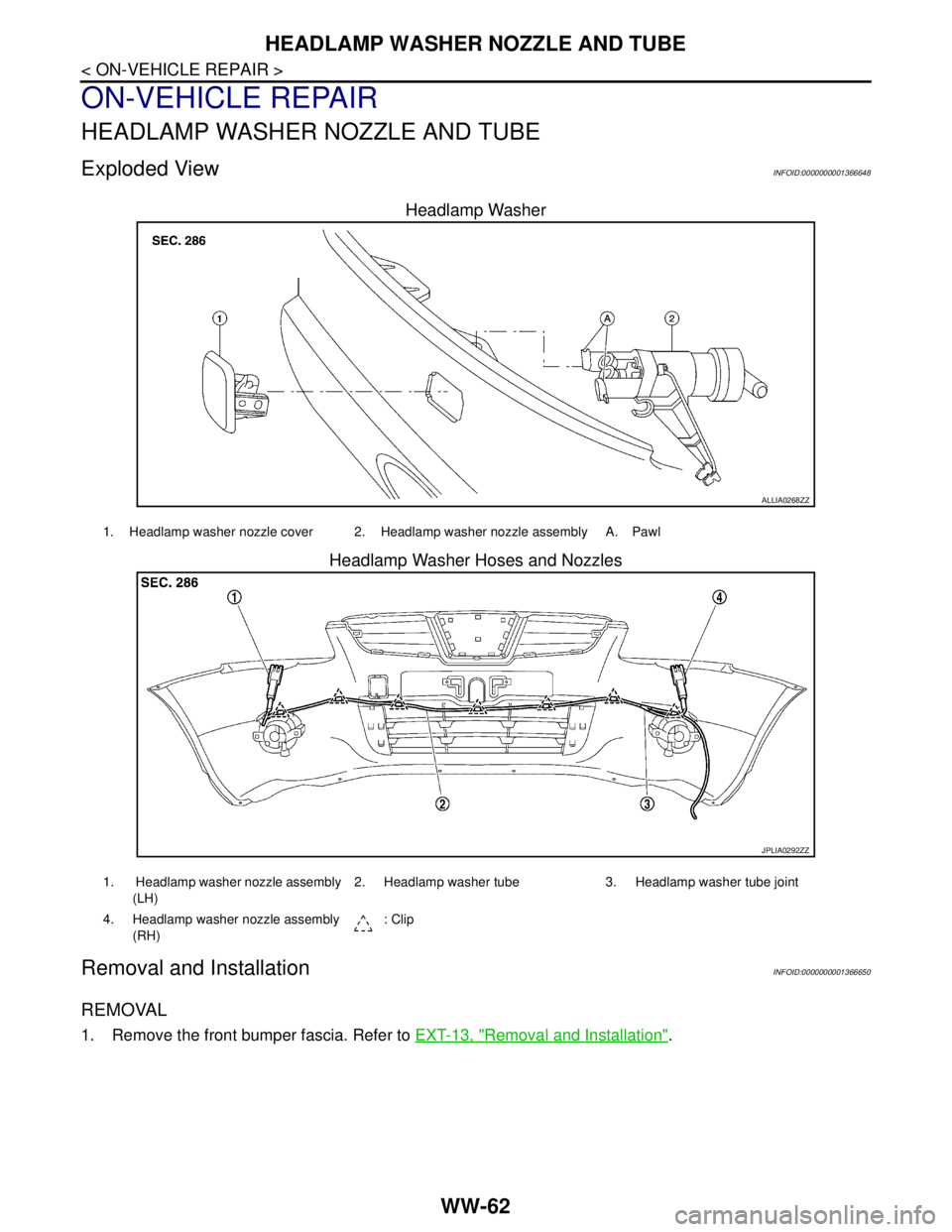
Exploded ViewINFOID:0000000001366648
Headlamp Washer
Headlamp Washer Hoses and Nozzles
Removal and InstallationINFOID:0000000001366650
REMOVAL
1. Remove the front bumper fascia. Refer to EXT-13, "Removal and Installation".
ALLIA0268ZZ
1. Headlamp washer nozzle cover 2. Headlamp washer nozzle assembly A. Pawl
JPLIA0292ZZ
1. Headlamp washer nozzle assembly
(LH)2. Headlamp washer tube 3. Headlamp washer tube joint
4. Headlamp washer nozzle assembly
(RH): Clip
Page 5866 of 5883
WW-64
< ON-VEHICLE REPAIR >
WASHER TANK
WASHER TANK
Removal and InstallationINFOID:0000000001366653
REMOVAL
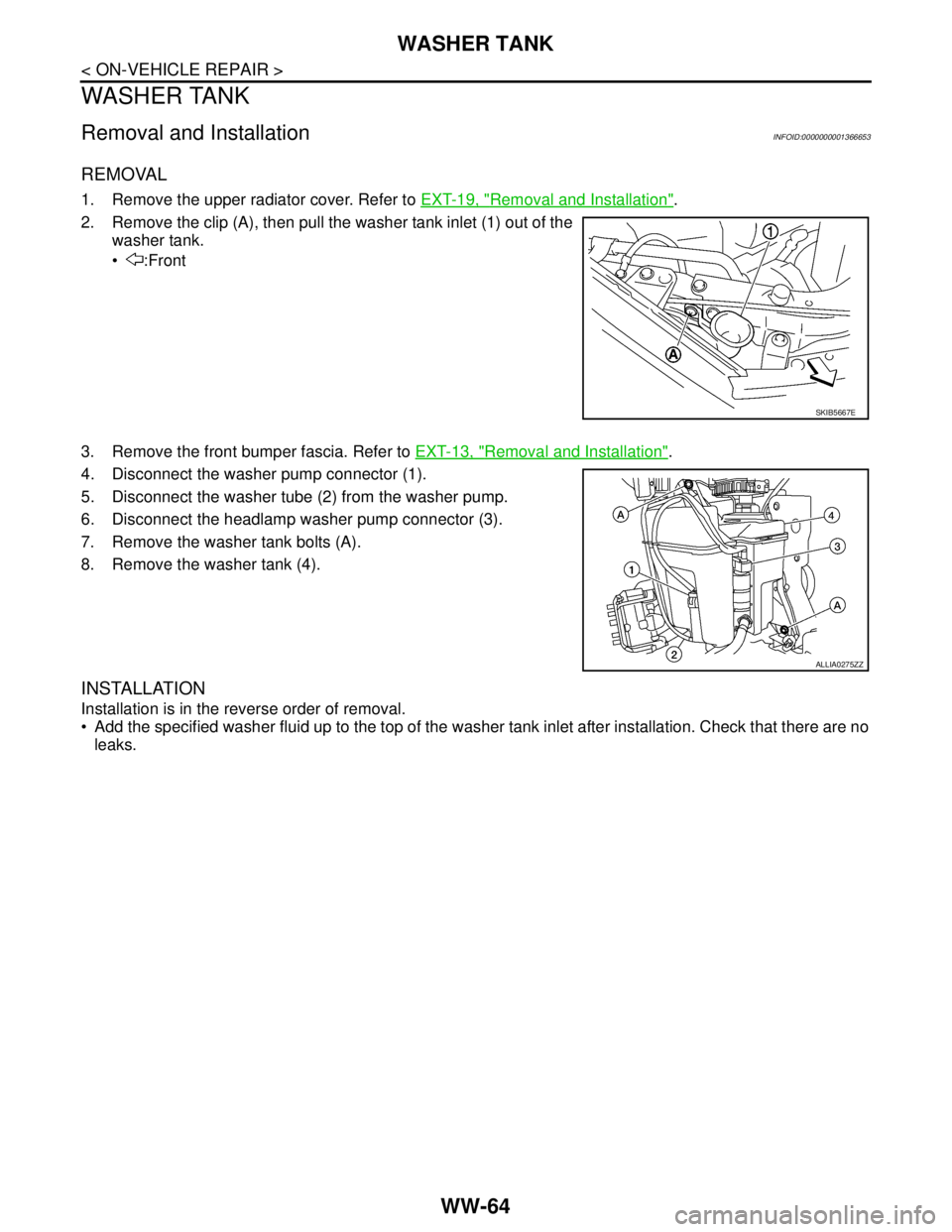
1. Remove the upper radiator cover. Refer to EXT-19, "Removal and Installation".
2. Remove the clip (A), then pull the washer tank inlet (1) out of the
washer tank.
:Front
3. Remove the front bumper fascia. Refer to EXT-13, "
Removal and Installation".
4. Disconnect the washer pump connector (1).
5. Disconnect the washer tube (2) from the washer pump.
6. Disconnect the headlamp washer pump connector (3).
7. Remove the washer tank bolts (A).
8. Remove the washer tank (4).
INSTALLATION
Installation is in the reverse order of removal.
Add the specified washer fluid up to the top of the washer tank inlet after installation. Check that there are no
leaks.
SKIB5667E
ALLIA0275ZZ
Page 5867 of 5883
WASHER PUMP
WW-65
< ON-VEHICLE REPAIR >
C
D
E
F
G
H
I
J
K
MA
B
WW
N
O
P
WASHER PUMP
Removal and InstallationINFOID:0000000001366655
REMOVAL
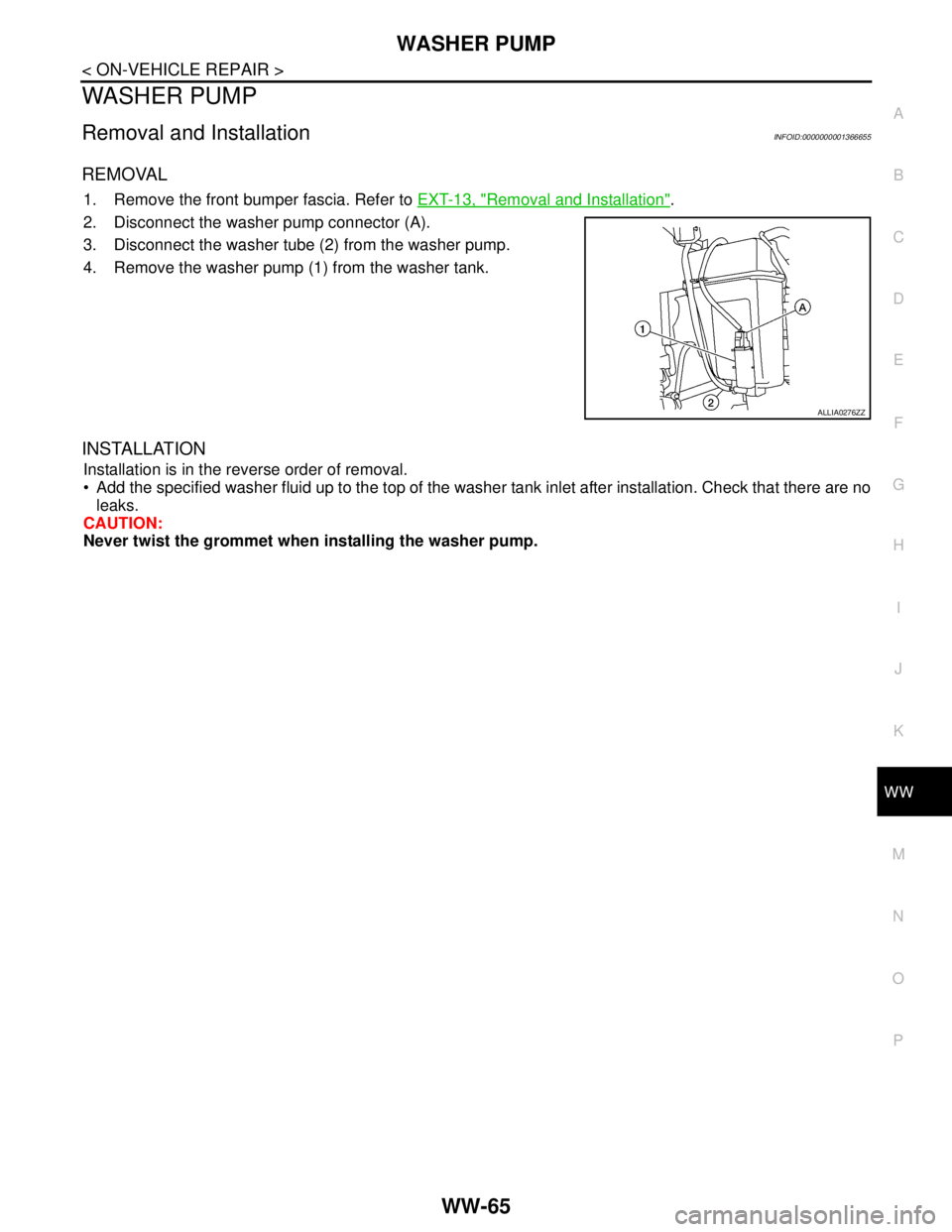
1. Remove the front bumper fascia. Refer to EXT-13, "Removal and Installation".
2. Disconnect the washer pump connector (A).
3. Disconnect the washer tube (2) from the washer pump.
4. Remove the washer pump (1) from the washer tank.
INSTALLATION
Installation is in the reverse order of removal.
Add the specified washer fluid up to the top of the washer tank inlet after installation. Check that there are no
leaks.
CAUTION:
Never twist the grommet when installing the washer pump.
ALLIA0276ZZ