Ext NISSAN TIIDA 2007 Service Repair Manual
[x] Cancel search | Manufacturer: NISSAN, Model Year: 2007, Model line: TIIDA, Model: NISSAN TIIDA 2007Pages: 5883, PDF Size: 78.95 MB
Page 4277 of 5883
ENGINE MAINTENANCE (MR18DE)
MA-37
< ON-VEHICLE MAINTENANCE >
C
D
E
F
G
H
I
J
K
L
MB
MAN
OA
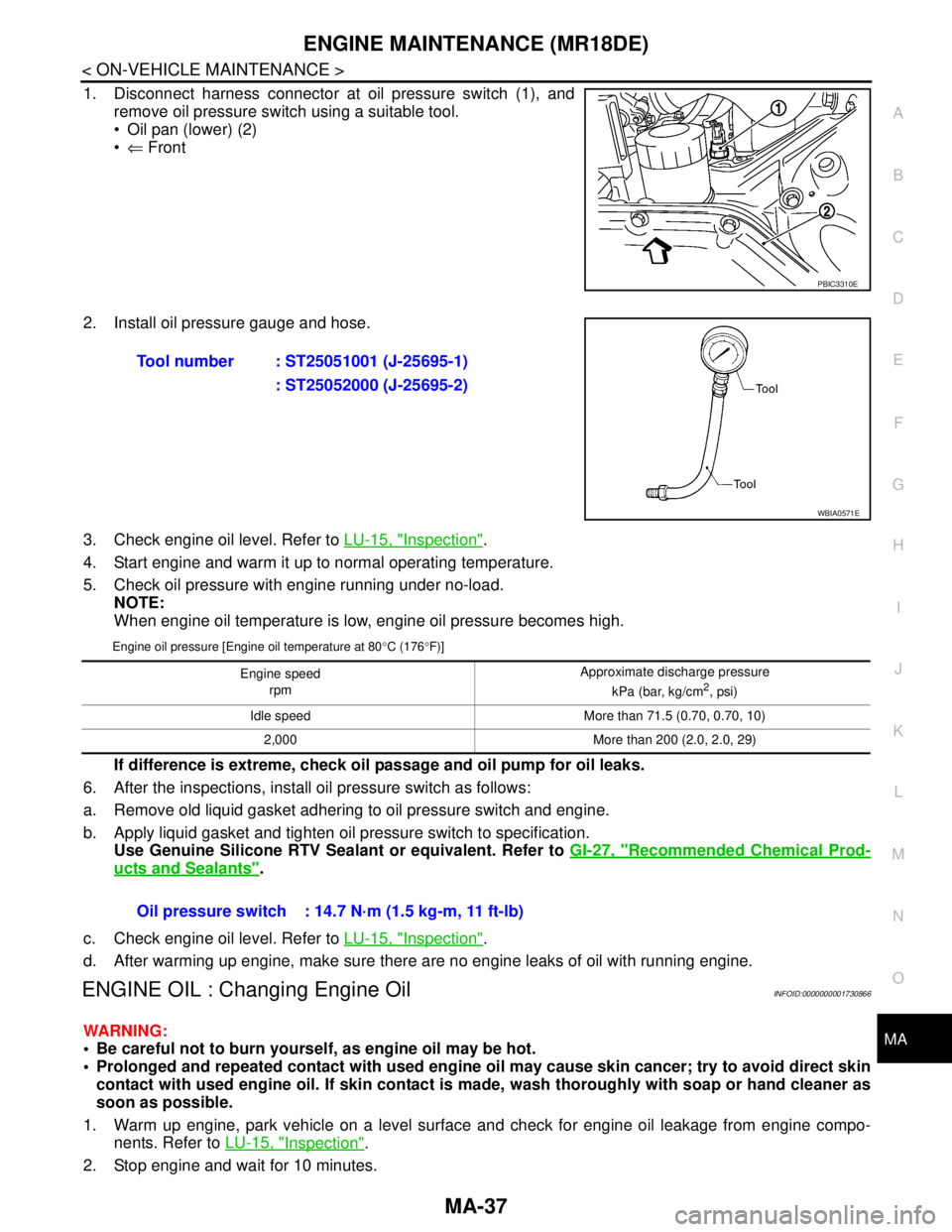
1. Disconnect harness connector at oil pressure switch (1), and
remove oil pressure switch using a suitable tool.
Oil pan (lower) (2)
⇐ Front
2. Install oil pressure gauge and hose.
3. Check engine oil level. Refer to LU-15, "
Inspection".
4. Start engine and warm it up to normal operating temperature.
5. Check oil pressure with engine running under no-load.
NOTE:
When engine oil temperature is low, engine oil pressure becomes high.
Engine oil pressure [Engine oil temperature at 80°C (176°F)]
If difference is extreme, check oil passage and oil pump for oil leaks.
6. After the inspections, install oil pressure switch as follows:
a. Remove old liquid gasket adhering to oil pressure switch and engine.
b. Apply liquid gasket and tighten oil pressure switch to specification.
Use Genuine Silicone RTV Sealant or equivalent. Refer to GI-27, "
Recommended Chemical Prod-
ucts and Sealants".
c. Check engine oil level. Refer to LU-15, "
Inspection".
d. After warming up engine, make sure there are no engine leaks of oil with running engine.
ENGINE OIL : Changing Engine OilINFOID:0000000001730866
WARNING:
Be careful not to burn yourself, as engine oil may be hot.
Prolonged and repeated contact with used engine oil may cause skin cancer; try to avoid direct skin
contact with used engine oil. If skin contact is made, wash thoroughly with soap or hand cleaner as
soon as possible.
1. Warm up engine, park vehicle on a level surface and check for engine oil leakage from engine compo-
nents. Refer to LU-15, "
Inspection".
2. Stop engine and wait for 10 minutes.
PBIC3310E
Tool number : ST25051001 (J-25695-1)
: ST25052000 (J-25695-2)
WBIA0571E
Engine speed
rpm Approximate discharge pressure
kPa (bar, kg/cm2, psi)
Idle speed More than 71.5 (0.70, 0.70, 10)
2,000 More than 200 (2.0, 2.0, 29)
Oil pressure switch : 14.7 N·m (1.5 kg-m, 11 ft-lb)
Page 4284 of 5883
MA-44
< ON-VEHICLE MAINTENANCE >
ENGINE MAINTENANCE (K9K)
4. Start engine without closing reservoir tank cap and keep engine racing at 1,500 rpm for about 2-3 minutes.
If necessary, pour engine coolant up to MAX level.
If coolant overflows reservoir tank hole, install filler cap.
Watch engine coolant temperature gauge so as not overheat the engine.
WARNING:
Be careful not to be scaled with hot engine coolant or vacuum pump when operating.
Radiator fan blade can start at any time and cause personal injuries.
5. Turn off the engine and loosen air relief plug until coolant spills from air relief hole.
6. Close the air relief plug and run the engine at 2,000 rpm until the upper hose becomes hot and radiator
fan operates. Leave the engine running approximately 5 minutes at idle speed and check for sound of
coolant flow while running engine from idle up to 3,000 rpm.
Sound may be noticeable at heater water cock.
7. If sound is heard, bleed air from cooling system by repeating steps 4 to 6 until coolant level no longer
drops.
Check the radiator lower hose for any signs of leakage.
8. Turn off the engine and let it cool down.
Cool down using a fan to reduce the time.
9. After cooling period, loosen the air relief plug and check if coolant spills from the air relief hole. if not,
remove the air relief plug until the coolant spills, and then close the relief air plug. Bleed air from cooling
system by repeating steps 6 to 10 until the coolant spills immediately.
10. Check the engine coolant level when engine is cool and refill to MAX level line if the level is lower.
Clean excess coolant from engine.
11. Check that the reservoir tank cap is tightened.
ENGINE COOLANT : FlushingINFOID:0000000001730883
1. Install reservoir tank if removed.
If water drain plug on cylinder block is removed, close and tighten it. Refer to EM-314, "
Exploded
View".
2. Fill reservoir tank with water until water spills from the air relief hole, then close air relief plug. Reinstall
reservoir tank cap.
3. Run engine and warm it up to normal operating temperature.
4. Rev engine two or three times under no-load.
5. Stop engine and wait until it cools down.
6. Drain water.
7. Repeat steps 1 through 6 until clear water begins to drain from radiator.
8. Blow compressed air into cooling circuit through the reservoir tank valve hole to drain all the water.
RADIATOR
RADIATOR : Checking Radiator CapINFOID:0000000001730884
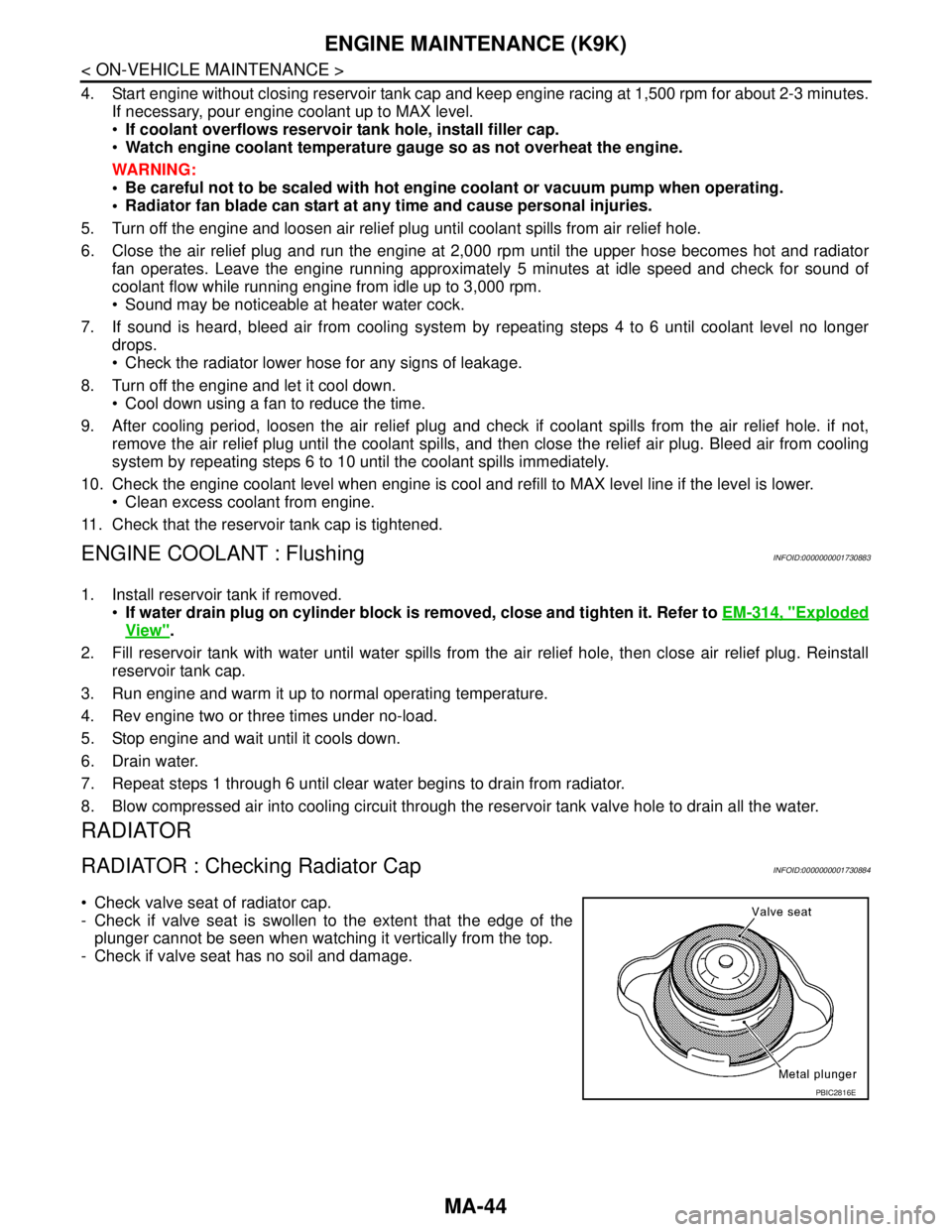
Check valve seat of radiator cap.
- Check if valve seat is swollen to the extent that the edge of the
plunger cannot be seen when watching it vertically from the top.
- Check if valve seat has no soil and damage.
PBIC2816E
Page 4290 of 5883
MA-50
< ON-VEHICLE MAINTENANCE >
CHASSIS AND BODY MAINTENANCE
CHASSIS AND BODY MAINTENANCE
Air Conditioner FilterINFOID:0000000001730893
1. Remove the instrument lower finisher and instrument lower cover (LH) for LHD only. Refer to IP-23, "Dis-
assembly and Assembly".
2. Remove the glove box assembly and instrument lower cover (RH) for RHD only. Refer to IP-23, "
Disas-
sembly and Assembly".
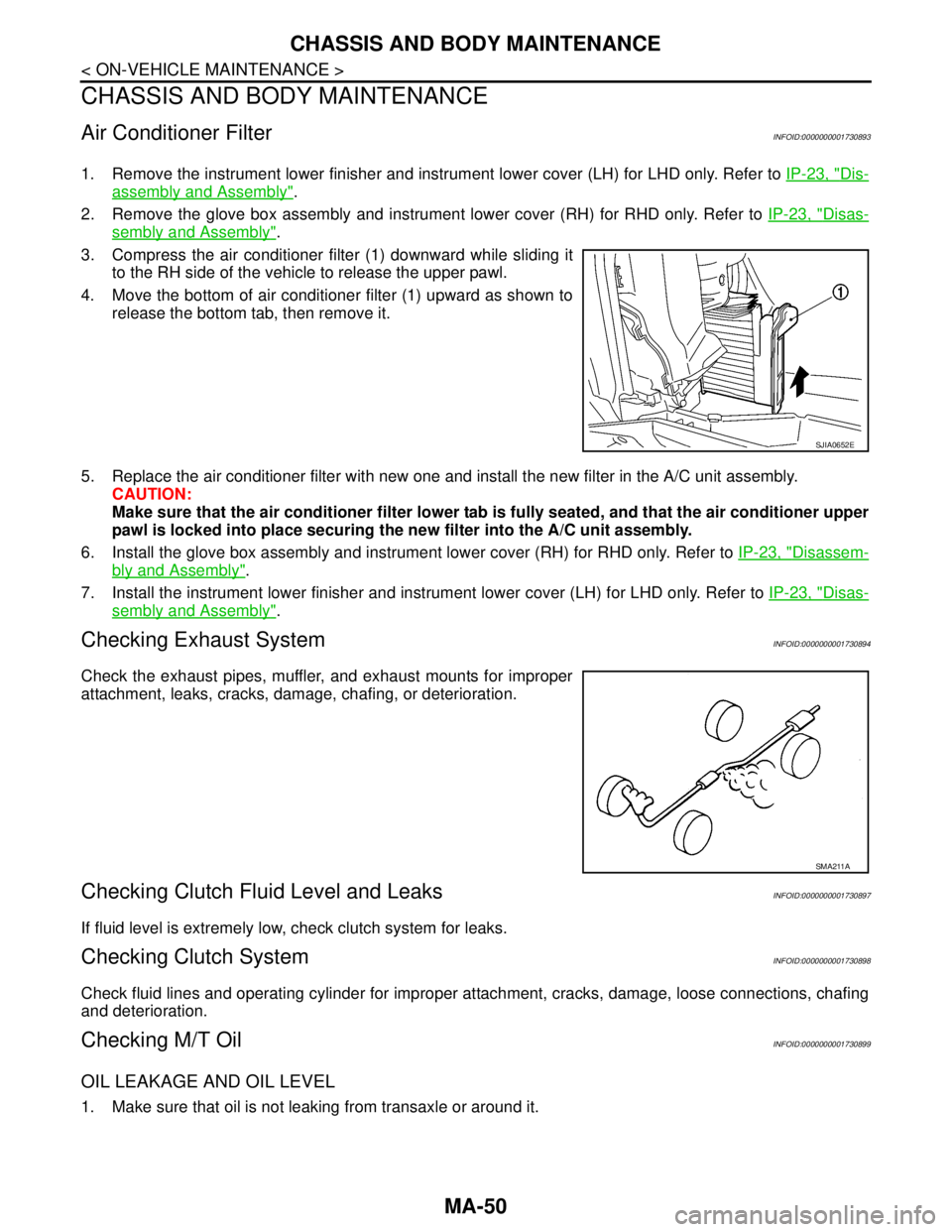
3. Compress the air conditioner filter (1) downward while sliding it
to the RH side of the vehicle to release the upper pawl.
4. Move the bottom of air conditioner filter (1) upward as shown to
release the bottom tab, then remove it.
5. Replace the air conditioner filter with new one and install the new filter in the A/C unit assembly.
CAUTION:
Make sure that the air conditioner filter lower tab is fully seated, and that the air conditioner upper
pawl is locked into place securing the new filter into the A/C unit assembly.
6. Install the glove box assembly and instrument lower cover (RH) for RHD only. Refer to IP-23, "
Disassem-
bly and Assembly".
7. Install the instrument lower finisher and instrument lower cover (LH) for LHD only. Refer to IP-23, "
Disas-
sembly and Assembly".
Checking Exhaust SystemINFOID:0000000001730894
Check the exhaust pipes, muffler, and exhaust mounts for improper
attachment, leaks, cracks, damage, chafing, or deterioration.
Checking Clutch Fluid Level and LeaksINFOID:0000000001730897
If fluid level is extremely low, check clutch system for leaks.
Checking Clutch SystemINFOID:0000000001730898
Check fluid lines and operating cylinder for improper attachment, cracks, damage, loose connections, chafing
and deterioration.
Checking M/T OilINFOID:0000000001730899
OIL LEAKAGE AND OIL LEVEL
1. Make sure that oil is not leaking from transaxle or around it.
SJIA0652E
SMA211A
Page 4330 of 5883

MWI
DIAGNOSIS SYSTEM (METER)
MWI-23
< FUNCTION DIAGNOSIS >
C
D
E
F
G
H
I
J
K
L
MB A
O
P
NOTE:
Some items are not available due to vehicle specification.
*: The monitor will indicate “OFF” even though the brake warning lamp is on if either of the following conditions exist.
The parking brake is engaged
The brake fluid level is lowDOOR W/L [ON/OFF] X Displays [ON/OFF] condition of door warning lamp.
HI-BEAM IND [ON/OFF] X Displays [ON/OFF] condition of high beam indicator.
TURN IND [ON/OFF] X Displays [ON/OFF] condition of turn indicator.
FR FOG IND X Displays [ON/OFF] condition of front fog lamp indicator.
RR FOG IND X Displays [ON/OFF] condition of rear fog lamp indicator.
OIL W/L [ON/OFF] X Displays [ON/OFF] condition of oil pressure warning lamp.
LIGHT IND X Displays [ON/OFF] condition of exterior lamp indicator.
VDC/TCS IND [ON/OFF] X Displays [ON/OFF] condition of VDC OFF indicator lamp.
ABS W/L [ON/OFF] X Displays [ON/OFF] condition of ABS warning lamp.
SLIP IND [ON/OFF] X Displays [ON/OFF] condition of SLIP indicator lamp.
BRAKE W/L [ON/OFF] X Displays [ON/OFF] condition of brake warning lamp.*
OIL LEVEL IND X Displays [ON/OFF] condition of oil level indicator.
KEY G W/L [ON/OFF] X Displays [ON/OFF] condition of key green warning lamp.
KEY R W/L [ON/OFF] X Displays [ON/OFF] condition of key red warning lamp.
KEY KNOB W/L [ON/OFF] X Displays [ON/OFF] condition of key knob warning lamp.
PNP P SW X X Displays [ON/OFF] condition of inhibitor P switch.
PNP N SW X X Displays [ON/OFF] condition of inhibitor N switch.
O/D OFF SW X Displays [ON/OFF] condition of O/D OFF switch.
BRAKE SW [ON/OFF] X Displays [ON/OFF] condition of parking brake switch.
P RANGE IND [ON/OFF] X X Displays [ON/OFF] condition of A/T shift P range indicator.
R RANGE IND [ON/OFF] X X Displays [ON/OFF] condition of A/T shift R range indicator.
N RANGE IND [ON/OFF] X X Displays [ON/OFF] condition of A/T shift N range indicator.
D RANGE IND [ON/OFF] X X Displays [ON/OFF] condition of A/T shift D range indicator.
2 RANGE IND [ON/OFF] X X Displays [ON/OFF] condition of A/T shift 2 range indicator.
1 RANGE IND [ON/OFF] X X Displays [ON/OFF] condition of A/T shift 1range indicator.
O/D OFF W/L X Displays [ON/OFF] condition of O/D OFF indicator lamp.
CRUISE IND [ON/OFF] X Displays [ON/OFF] condition of CRUISE indicator.
EPS W/L X Displays [ON/OFF] condition of EPS warning lamp. Display item [Unit]MAIN
SIGNALSSELECTION
FROM MENUDescription
Page 4428 of 5883
![NISSAN TIIDA 2007 Service Repair Manual PCS-14
< FUNCTION DIAGNOSIS >[IPDM E/R]
DIAGNOSIS SYSTEM (IPDM E/R)
ACTIVE TEST
Te s t i t e m
THFT HRN REQ
[OFF/ON]Displays the status of the theft warning horn request signal received from BCM
via](/img/5/57395/w960_57395-4427.png "NISSAN TIIDA 2007 Service Repair Manual PCS-14
< FUNCTION DIAGNOSIS >[IPDM E/R]
DIAGNOSIS SYSTEM (IPDM E/R)
ACTIVE TEST
Te s t i t e m
THFT HRN REQ
[OFF/ON]Displays the status of the theft warning horn request signal received from BCM
via")
PCS-14
< FUNCTION DIAGNOSIS >[IPDM E/R]
DIAGNOSIS SYSTEM (IPDM E/R)
ACTIVE TEST
Te s t i t e m
THFT HRN REQ
[OFF/ON]Displays the status of the theft warning horn request signal received from BCM
via CAN communication.
HORN CHIRP
[OFF/ON]Displays the status of the horn reminder signal received from BCM via CAN com-
munication. Monitor Item
[Unit]MAIN SIG-
NALSDescription
Test item Operation Description
REAR DEFOGGEROFF OFF
ON Operates rear window defogger relay.
FRONT WIPEROFF OFF
LO Operates the front wiper relay.
HI Operates the front wiper relay and front wiper high relay.
HEAD LAMP WASHER ON —
MOTOR FAN1OFF
2OFF
3 Operates the cooling fan relay.
4 Operates the cooling fan relay.
EXTERNAL LAMPSOFF OFF
TAIL Operates the tail lamp relay.
LO Operates the headlamp low relay.
HIOperates the headlamp low relay and the headlamp high relay ON/OFF at 1
second intervals.
FOG Operates the front fog lamp relay
HORN ON Operates horn relay for 20 ms.
Page 4458 of 5883
PG
BATTERY
PG-3
< BASIC INSPECTION >
C
D
E
F
G
H
I
J
K
L B A
O
P N
BASIC INSPECTION
BATTERY
How to Handle BatteryINFOID:0000000001723097
CAUTION:
If it becomes necessary to start the engine with a booster battery and jumper cables, use a 12-volt
booster battery.
After connecting battery cables, ensure that they are tightly clamped to battery terminals for good
contact.
Never add distilled water through the hole used to check specific gravity.
METHODS OF PREVENTING OVER-DISCHARGE
The following precautions must be taken to prevent over-discharging a battery.
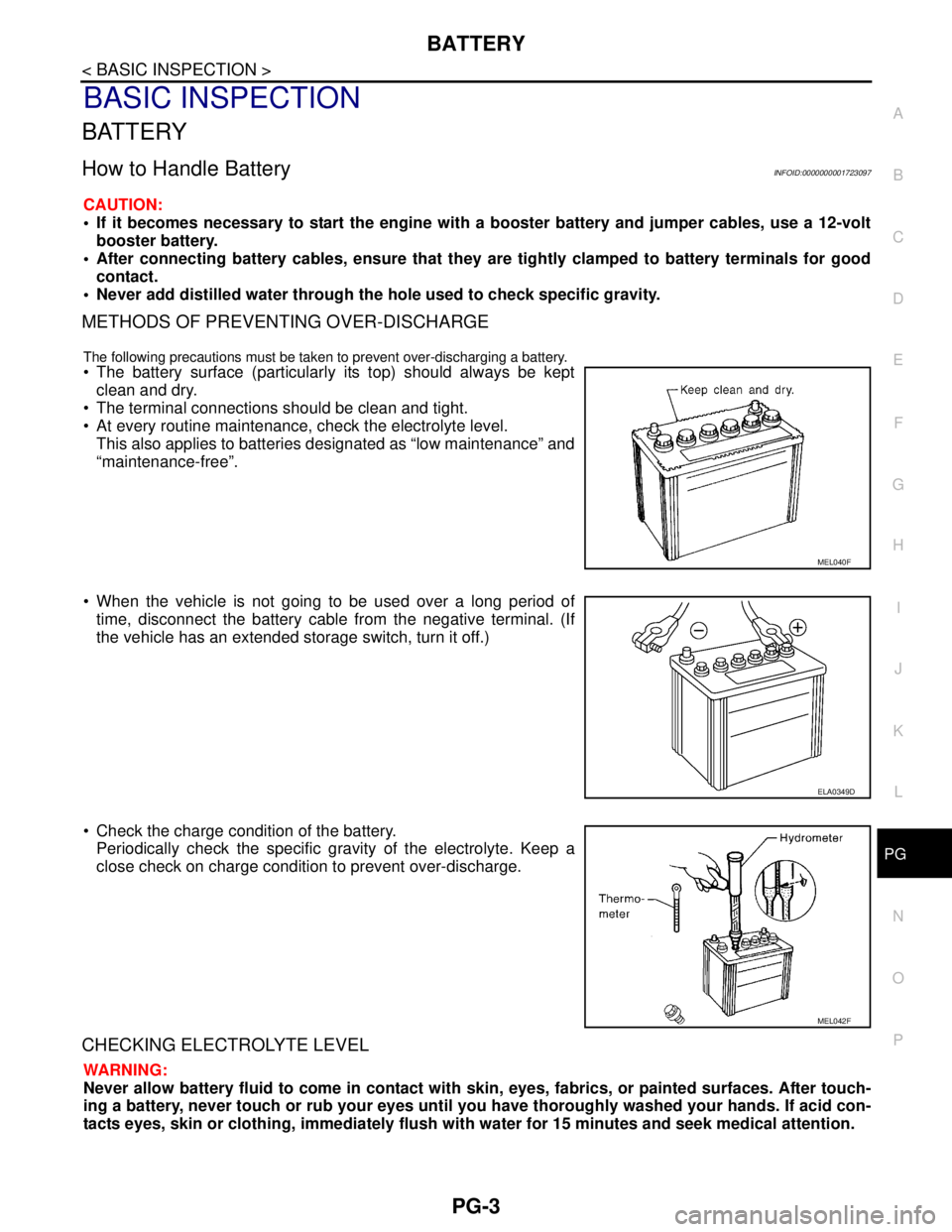
The battery surface (particularly its top) should always be kept
clean and dry.
The terminal connections should be clean and tight.
At every routine maintenance, check the electrolyte level.
This also applies to batteries designated as “low maintenance” and
“maintenance-free”.
When the vehicle is not going to be used over a long period of
time, disconnect the battery cable from the negative terminal. (If
the vehicle has an extended storage switch, turn it off.)
Check the charge condition of the battery.
Periodically check the specific gravity of the electrolyte. Keep a
close check on charge condition to prevent over-discharge.
CHECKING ELECTROLYTE LEVEL
WARNING:
Never allow battery fluid to come in contact with skin, eyes, fabrics, or painted surfaces. After touch-
ing a battery, never touch or rub your eyes until you have thoroughly washed your hands. If acid con-
tacts eyes, skin or clothing, immediately flush with water for 15 minutes and seek medical attention.
MEL040F
ELA0349D
MEL042F
Page 4462 of 5883

PWC-1
BODY EXTERIOR, DOORS, ROOF & VEHICLE SECURITY
C
D
E
F
G
H
I
J
L
M
SECTION PWC
A
B
PWC
N
O
P
CONTENTS
POWER WINDOW CONTROL SYSTEM
BASIC INSPECTION ....................................3
DIAGNOSIS AND REPAIR WORKFLOW ..........3
Work Flow .................................................................3
INSPECTION AND ADJUSTMENT .....................4
ADDITIONAL SERVICE WHEN REMOVING BAT-
TERY NEGATIVE TERMINAL .....................................
4
ADDITIONAL SERVICE WHEN REMOVING
BATTERY NEGATIVE TERMINAL : Description ......
4
ADDITIONAL SERVICE WHEN REMOVING
BATTERY NEGATIVE TERMINAL : Special Re-
pair Requirement .......................................................
4
ADDITIONAL SERVICE WHEN REPLACING
CONTROL UNIT ..........................................................
4
ADDITIONAL SERVICE WHEN REPLACING
CONTROL UNIT : Description ..................................
4
ADDITIONAL SERVICE WHEN REPLACING
CONTROL UNIT : Special Repair Requirement .......
4
FUNCTION DIAGNOSIS ...............................6
POWER WINDOW SYSTEM ...............................6
System Diagram .......................................................6
System Description ...................................................6
Component Parts Location ......................................8
Component Description .............................................8
DIAGNOSIS SYSTEM (BCM) ............................10
COMMON ITEM .........................................................10
COMMON ITEM : CONSULT-III Function (BCM -
COMMON ITEM) .....................................................
10
RETAINED PWR .......................................................10
RETAINED PWR : CONSULT-III Function (BCM -
RETAINED PWR) ...................................................
10
COMPONENT DIAGNOSIS .........................11
POWER SUPPLY AND GROUND CIRCUIT ......11
POWER WINDOW MAIN SWITCH ............................11
POWER WINDOW MAIN SWITCH : Description ....11
POWER WINDOW MAIN SWITCH : Component
Function Check ........................................................
11
POWER WINDOW MAIN SWITCH : Diagnosis
Procedure ................................................................
11
POWER WINDOW MAIN SWITCH : Component
Inspection ................................................................
14
POWER WINDOW MAIN SWITCH : Special Re-
pair Requirement .....................................................
16
FRONT POWER WINDOW SWITCH .........................16
FRONT POWER WINDOW SWITCH : Descrip-
tion ...........................................................................
16
FRONT POWER WINDOW SWITCH : Compo-
nent Function Check ................................................
16
FRONT POWER WINDOW SWITCH : Diagnosis
Procedure ................................................................
17
REAR POWER WINDOW SWITCH ...........................19
REAR POWER WINDOW SWITCH : Description ....19
REAR POWER WINDOW SWITCH : Component
Function Check ........................................................
19
REAR POWER WINDOW SWITCH : Diagnosis
Procedure ................................................................
19
REAR POWER WINDOW SWITCH : Component
Inspection ................................................................
21
POWER WINDOW MOTOR ..............................22
DRIVER SIDE .............................................................22
DRIVER SIDE : Description .....................................22
DRIVER SIDE : Component Function Check ..........22
DRIVER SIDE : Diagnosis Procedure .....................22
DRIVER SIDE : Component Inspection ...................23
DRIVER SIDE : Special Repair Requirement ..........23
PASSENGER SIDE ....................................................24
PASSENGER SIDE : Description ............................24
PASSENGER SIDE : Component Function Check
....
24
PASSENGER SIDE : Diagnosis Procedure ............24
Page 4465 of 5883
PWC-4
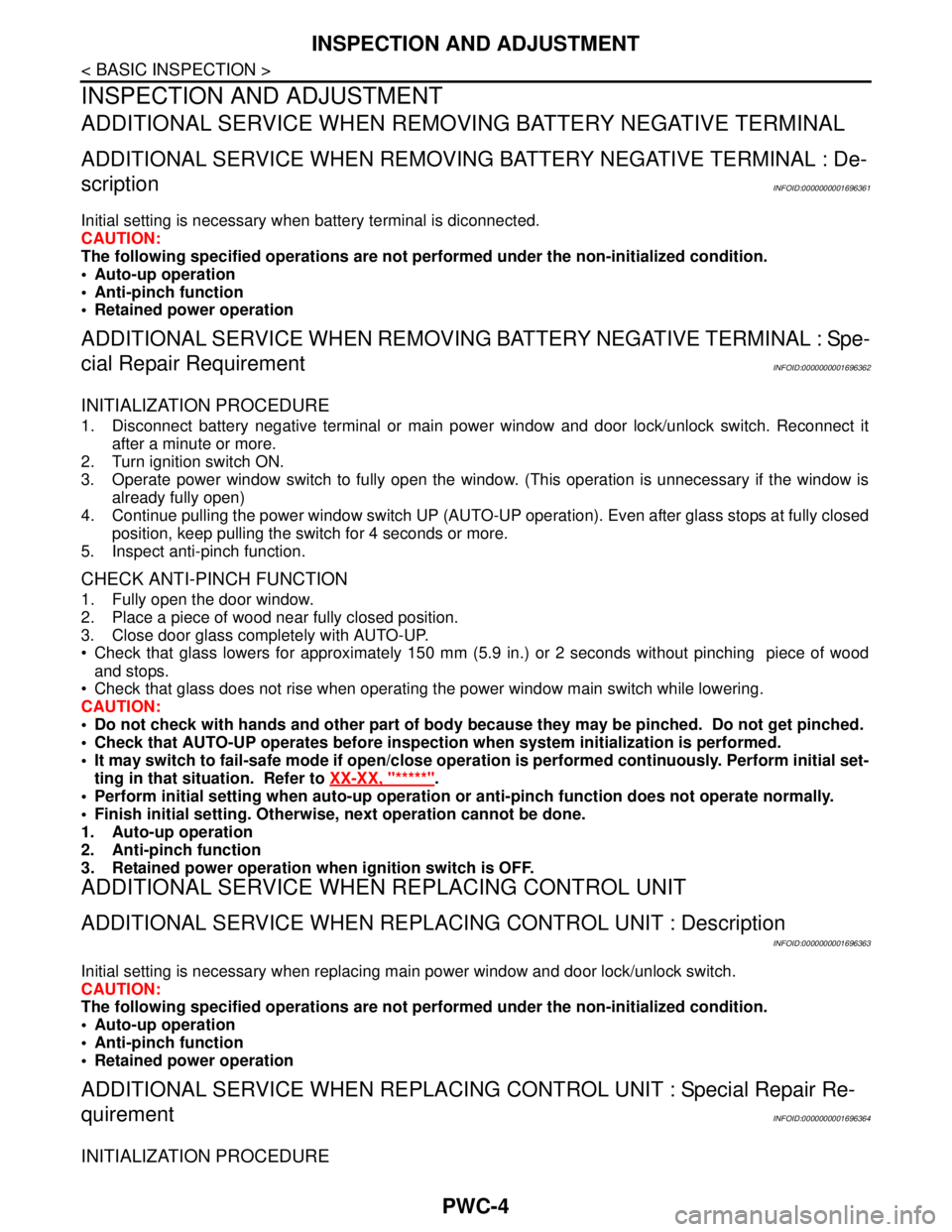
< BASIC INSPECTION >
INSPECTION AND ADJUSTMENT
INSPECTION AND ADJUSTMENT
ADDITIONAL SERVICE WHEN REMOVING BATTERY NEGATIVE TERMINAL
ADDITIONAL SERVICE WHEN REMOVING BATTERY NEGATIVE TERMINAL : De-
scription
INFOID:0000000001696361
Initial setting is necessary when battery terminal is diconnected.
CAUTION:
The following specified operations are not performed under the non-initialized condition.
• Auto-up operation
Anti-pinch function
Retained power operation
ADDITIONAL SERVICE WHEN REMOVING BATTERY NEGATIVE TERMINAL : Spe-
cial Repair Requirement
INFOID:0000000001696362
INITIALIZATION PROCEDURE
1. Disconnect battery negative terminal or main power window and door lock/unlock switch. Reconnect it
after a minute or more.
2. Turn ignition switch ON.
3. Operate power window switch to fully open the window. (This operation is unnecessary if the window is
already fully open)
4. Continue pulling the power window switch UP (AUTO-UP operation). Even after glass stops at fully closed
position, keep pulling the switch for 4 seconds or more.
5. Inspect anti-pinch function.
CHECK ANTI-PINCH FUNCTION
1. Fully open the door window.
2. Place a piece of wood near fully closed position.
3. Close door glass completely with AUTO-UP.
Check that glass lowers for approximately 150 mm (5.9 in.) or 2 seconds without pinching piece of wood
and stops.
Check that glass does not rise when operating the power window main switch while lowering.
CAUTION:
Do not check with hands and other part of body because they may be pinched. Do not get pinched.
Check that AUTO-UP operates before inspection when system initialization is performed.
It may switch to fail-safe mode if open/close operation is performed continuously. Perform initial set-
ting in that situation. Refer to XX-XX, "*****"
.
Perform initial setting when auto-up operation or anti-pinch function does not operate normally.
Finish initial setting. Otherwise, next operation cannot be done.
1. Auto-up operation
2. Anti-pinch function
3. Retained power operation when ignition switch is OFF.
ADDITIONAL SERVICE WHEN REPLACING CONTROL UNIT
ADDITIONAL SERVICE WHEN REPLACING CONTROL UNIT : Description
INFOID:0000000001696363
Initial setting is necessary when replacing main power window and door lock/unlock switch.
CAUTION:
The following specified operations are not performed under the non-initialized condition.
Auto-up operation
Anti-pinch function
Retained power operation
ADDITIONAL SERVICE WHEN REPLACING CONTROL UNIT : Special Repair Re-
quirement
INFOID:0000000001696364
INITIALIZATION PROCEDURE
Page 4466 of 5883
INSPECTION AND ADJUSTMENT
PWC-5
< BASIC INSPECTION >
C
D
E
F
G
H
I
J
L
MA
B
PWC
N
O
P
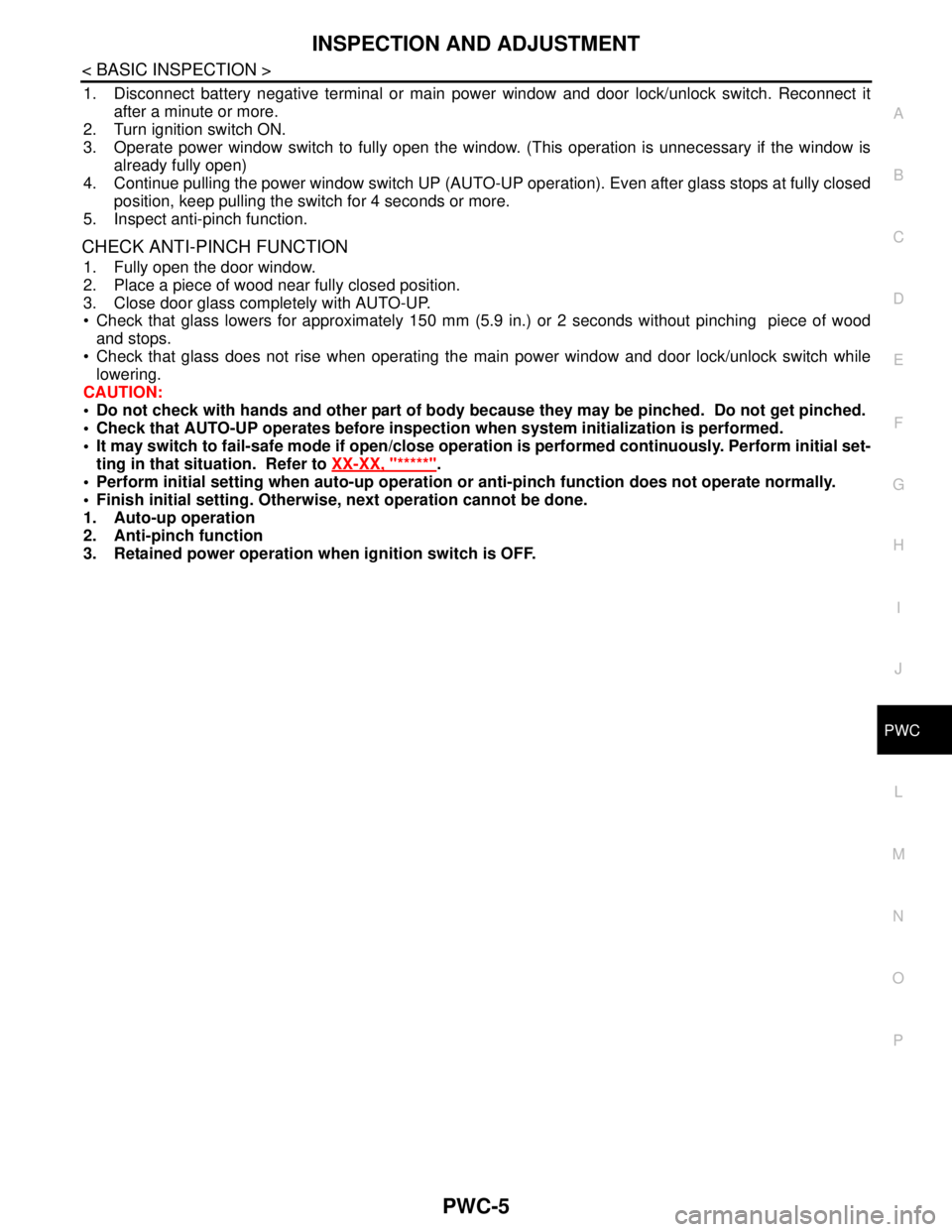
1. Disconnect battery negative terminal or main power window and door lock/unlock switch. Reconnect it
after a minute or more.
2. Turn ignition switch ON.
3. Operate power window switch to fully open the window. (This operation is unnecessary if the window is
already fully open)
4. Continue pulling the power window switch UP (AUTO-UP operation). Even after glass stops at fully closed
position, keep pulling the switch for 4 seconds or more.
5. Inspect anti-pinch function.
CHECK ANTI-PINCH FUNCTION
1. Fully open the door window.
2. Place a piece of wood near fully closed position.
3. Close door glass completely with AUTO-UP.
Check that glass lowers for approximately 150 mm (5.9 in.) or 2 seconds without pinching piece of wood
and stops.
Check that glass does not rise when operating the main power window and door lock/unlock switch while
lowering.
CAUTION:
Do not check with hands and other part of body because they may be pinched. Do not get pinched.
Check that AUTO-UP operates before inspection when system initialization is performed.
It may switch to fail-safe mode if open/close operation is performed continuously. Perform initial set-
ting in that situation. Refer to XX-XX, "*****"
.
Perform initial setting when auto-up operation or anti-pinch function does not operate normally.
Finish initial setting. Otherwise, next operation cannot be done.
1. Auto-up operation
2. Anti-pinch function
3. Retained power operation when ignition switch is OFF.
Page 4535 of 5883

RF-1
BODY EXTERIOR, DOORS, ROOF & VEHICLE SECURITY
C
D
E
F
G
H
I
J
L
M
SECTION RF
A
B
RF
N
O
P
CONTENTS
ROOF
PRECAUTION ...............................................3
PRECAUTIONS ...................................................3
Precaution for Supplemental Restraint System
(SRS) "AIR BAG" and "SEAT BELT PRE-TEN-
SIONER" ...................................................................
3
PREPARATION ............................................4
PREPARATION ...................................................4
Commercial Service Tool ..........................................4
BASIC INSPECTION ....................................5
DIAGNOSIS AND REPAIR WORKFLOW ..........5
Work Flow .................................................................5
INSPECTION AND ADJUSTMENT .....................7
ADDITIONAL SERVICE WHEN REPLACING
CONTROL UNIT ..........................................................
7
ADDITIONAL SERVICE WHEN REPLACING
CONTROL UNIT : Description ..................................
7
ADDITIONAL SERVICE WHEN REPLACING
CONTROL UNIT : Special Repair Requirement .......
7
FUNCTION DIAGNOSIS ...............................8
SUNROOF SYSTEM ...........................................8
System Diagram .......................................................8
System Description ...................................................8
Component Parts Location ......................................9
Component Description ............................................9
DIAGNOSIS SYSTEM (BCM) ............................10
COMMON ITEM .........................................................10
COMMON ITEM : CONSULT-III Function (BCM -
COMMON ITEM) .....................................................
10
RETAINED PWR .......................................................10
RETAINED PWR : CONSULT-III Function (BCM -
RETAINED PWR) ...................................................
10
COMPONENT DIAGNOSIS .........................11
POWER SUPPLY AND GROUND CIRCUIT ....11
SUNROOF MOTOR ASSEMBLY ..............................11
SUNROOF MOTOR ASSEMBLY :
Diagnosis Procedure ..............................................
11
SUNROOF MOTOR ASSEMBLY : Special Repair
Requirement ............................................................
12
SUNROOF SWITCH CIRCUIT ..........................13
Description ...............................................................13
Component Function Check ..................................13
Diagnosis Procedure ...............................................13
DOOR SWITCH .................................................15
Description ...............................................................15
Component Function Check ....................................15
Diagnosis Procedure ...............................................15
ECU DIAGNOSIS .........................................17
BCM (BODY CONTROL MODULE) .................17
Reference Value ......................................................17
SUNROOF SYSTEM .........................................18
Reference Value ......................................................18
Wiring Diagram ........................................................19
SYMPTOM DIAGNOSIS ..............................24
SQUEAK AND RATTLE TROUBLE DIAG-
NOSES ..............................................................
24
Work Flow ................................................................24
Generic Squeak and Rattle Troubleshooting ...........26
Diagnostic Worksheet ..............................................28
ON-VEHICLE REPAIR .................................30
SUNROOF SYSTEM .........................................30
Inspection ................................................................30
Fitting Adjustment ....................................................32
Exploded View .........................................................34