reverse NISSAN TIIDA 2007 Service Workshop Manual
[x] Cancel search | Manufacturer: NISSAN, Model Year: 2007, Model line: TIIDA, Model: NISSAN TIIDA 2007Pages: 5883, PDF Size: 78.95 MB
Page 357 of 5883
![NISSAN TIIDA 2007 Service Workshop Manual BRC-124
< COMPONENT DIAGNOSIS >[ESP/TCS/ABS]
C1115 WHEEL SENSOR
C1115 WHEEL SENSOR
DescriptionINFOID:0000000001731109
When the sensor rotor rotates, the magnetic field changes. It converts the magneti](/img/5/57395/w960_57395-356.png "NISSAN TIIDA 2007 Service Workshop Manual BRC-124
< COMPONENT DIAGNOSIS >[ESP/TCS/ABS]
C1115 WHEEL SENSOR
C1115 WHEEL SENSOR
DescriptionINFOID:0000000001731109
When the sensor rotor rotates, the magnetic field changes. It converts the magneti")
BRC-124
< COMPONENT DIAGNOSIS >[ESP/TCS/ABS]
C1115 WHEEL SENSOR
C1115 WHEEL SENSOR
DescriptionINFOID:0000000001731109
When the sensor rotor rotates, the magnetic field changes. It converts the magnetic field changes to current
signals (rectangular wave) and transmits them to the ABS actuator and electric unit (control unit).
DTC LogicINFOID:0000000001731110
DTC DETECTION LOGIC
DTC CONFIRMATION PROCEDURE
1.CHECK SELF-DIAGNOSIS RESULTS
Check the self-diagnosis results.
Is above displayed on the self-diagnosis display?
YES >> Proceed to diagnosis procedure. Refer to BRC-41, "Diagnosis Procedure".
NO >> INSPECTION END
Diagnosis ProcedureINFOID:0000000001731111
CAUTION:
Do not check between wheel sensor terminals.
INSPECTION PROCEDURE
1.CONNECTOR INSPECTION
Disconnect the ABS actuator and electric unit (control unit) connector E125 and wheel sensor of malfunction-
ing code.
Check the terminals for deformation, disconnection, looseness or damage.
Is the inspection result normal?
YES >> GO TO 2
NO >> Repair or replace as necessary.
2.CHECK WHEEL SENSOR OUTPUT SIGNAL
1. Connect ABS active wheel sensor tester (J-45741) to wheel sensor using appropriate adapter.
2. Turn on the ABS active wheel sensor tester power switch.
NOTE:
The green POWER indicator should illuminate. If the POWER indicator does not illuminate, replace the
battery in the ABS active wheel sensor tester before proceeding.
3. Spin the wheel of the vehicle by hand and observe the red SENSOR indicator on the ABS active wheel
sensor tester. The red SENSOR indicator should flash on and off to indicate an output signal.
NOTE:
If the red SENSOR indicator illuminates but does not flash, reverse the polarity of the tester leads and
retest.
Does the ABS active wheel sensor tester detect a signal?
YES >> GO TO 3
NO >> Replace the wheel sensor. Refer to BRC-182, "
Removal and Installation".
3.CHECK TIRES
DTC Display item Malfunction detected condition Possible cause
C 111 5ABS SENSOR
[ABNORMAL SIGNAL]When wheel sensor input signal is malfunctioning. Harness or connector
Wheel sensor
ABS actuator and electric unit
(control unit)
Self-diagnosis results
ABS SENSOR [ABNORMAL SIGNAL]
Page 417 of 5883
![NISSAN TIIDA 2007 Service Workshop Manual BRC-184
< REMOVAL AND INSTALLATION >[ESP/TCS/ABS]
ACTUATOR AND ELECTRIC UNIT (ASSEMBLY)
ACTUATOR AND ELECTRIC UNIT (ASSEMBLY)
Removal and InstallationINFOID:0000000001691453
REMOVAL
1. Disconnect ABS](/img/5/57395/w960_57395-416.png "NISSAN TIIDA 2007 Service Workshop Manual BRC-184
< REMOVAL AND INSTALLATION >[ESP/TCS/ABS]
ACTUATOR AND ELECTRIC UNIT (ASSEMBLY)
ACTUATOR AND ELECTRIC UNIT (ASSEMBLY)
Removal and InstallationINFOID:0000000001691453
REMOVAL
1. Disconnect ABS")
BRC-184
< REMOVAL AND INSTALLATION >[ESP/TCS/ABS]
ACTUATOR AND ELECTRIC UNIT (ASSEMBLY)
ACTUATOR AND ELECTRIC UNIT (ASSEMBLY)
Removal and InstallationINFOID:0000000001691453
REMOVAL
1. Disconnect ABS actuator and electric unit (control unit) connector.
2. Loosen brake tube flare nuts, then remove brake tubes from ABS actuator and electric unit (control unit).
3. Remove ABS actuator and electric unit (control unit) mounting nuts.
4. Remove ABS actuator and electric unit (control unit) from vehicle.
CAUTION:
Be careful of the following when removing ABS actuator and electric unit (control unit).
If the part number on the part number label (pasted on actuator upper surface) is the same, ABS
actuator and electric unit (control unit) cannot be used on another vehicle.
If it is used on another vehicle, ABS warning lamp, SLIP indicator lamp and ESP OFF indicator lamp
may turn ON or ESP/TCS/ABS may not operate normally.
When replacing ABS actuator and electric unit (control unit), must use new service parts.
Before servicing, disconnect battery cables.
To remove brake tube, use a flare nut wrench to prevent flare nuts and brake tube from being dam-
aged. To install, use a flare nut torque wrench (commercial service tool) and tighten to the specified
torque.
Do not apply excessive impact to actuator, such as dropping it.
Do not remove and install ABS actuator and electric unit (control unit) by holding harness.
INSTALLATION
To install, follow procedure for removal in reverse order.
CAUTION:
Be careful of the following when installing ABS actuator and electric unit (control unit).
Tighten the mounting bolts and nuts to the specified torque.
After the work, bleed air from brake piping. Refer to BR-8, "
Bleeding Brake System".
After installing vehicle harness connector in the actuator, make sure connector is securely locked.
MFIA0015E
Page 418 of 5883
![NISSAN TIIDA 2007 Service Workshop Manual YAW RATE/SIDE G SENSOR
BRC-185
< REMOVAL AND INSTALLATION >[ESP/TCS/ABS]
C
D
E
G
H
I
J
K
L
MA
B
BRC
N
O
P
YAW RATE/SIDE G SENSOR
Removal and InstallationINFOID:0000000001691454
REMOVAL
1. Remove cente](/img/5/57395/w960_57395-417.png "NISSAN TIIDA 2007 Service Workshop Manual YAW RATE/SIDE G SENSOR
BRC-185
< REMOVAL AND INSTALLATION >[ESP/TCS/ABS]
C
D
E
G
H
I
J
K
L
MA
B
BRC
N
O
P
YAW RATE/SIDE G SENSOR
Removal and InstallationINFOID:0000000001691454
REMOVAL
1. Remove cente")
YAW RATE/SIDE G SENSOR
BRC-185
< REMOVAL AND INSTALLATION >[ESP/TCS/ABS]
C
D
E
G
H
I
J
K
L
MA
B
BRC
N
O
P
YAW RATE/SIDE G SENSOR
Removal and InstallationINFOID:0000000001691454
REMOVAL
1. Remove center console. Refer to IP-10, "Component Parts".
2. Disconnect yaw rate/side G-sensor harness connector.
3. Remove yaw rate/side G-sensor mounting bolts. Then remove yaw rate/side G-sensor from vehicle.
CAUTION:
Do not drop or strike yaw rate/side G-sensor, because it has little endurance to impact.
Do not use power tool etc., because yaw rate/side G-sensor is weak for the impact.
INSTALLATION
To install, follow procedure for removal in reverse order.
CAUTION:
Do not drop or strike yaw rate/side G-sensor, because it has little endurance to impact.
MFIA0016E
Page 436 of 5883
![NISSAN TIIDA 2007 Service Workshop Manual CHG
GENERATOR
CHG-15
< ON-VEHICLE REPAIR >[HR16DE]
C
D
E
F
G
H
I
J
K
L B A
O
P N
ON-VEHICLE REPAIR
GENERATOR
Removal and InstallationINFOID:0000000001689492
REMOVAL
1. Disconnect the battery cable fro](/img/5/57395/w960_57395-435.png "NISSAN TIIDA 2007 Service Workshop Manual CHG
GENERATOR
CHG-15
< ON-VEHICLE REPAIR >[HR16DE]
C
D
E
F
G
H
I
J
K
L B A
O
P N
ON-VEHICLE REPAIR
GENERATOR
Removal and InstallationINFOID:0000000001689492
REMOVAL
1. Disconnect the battery cable fro")
CHG
GENERATOR
CHG-15
< ON-VEHICLE REPAIR >[HR16DE]
C
D
E
F
G
H
I
J
K
L B A
O
P N
ON-VEHICLE REPAIR
GENERATOR
Removal and InstallationINFOID:0000000001689492
REMOVAL
1. Disconnect the battery cable from the negative terminal.
2. Remove drive belt. Refer to EM-16, "
Removal and Installation".
3. Disconnect generator connector (1).
4. Remove “B” terminal nut (2) and “B” terminal harness.
5. Remove upper generator bolt (3) and generator lower bolt (4).
6. Remove generator upward from the vehicle.
INSTALLATION
Installation is in the reverse order of removal.
CAUTION:
Be sure to tighten “B” terminal nut carefully.
Temporarily tighten the generator bolts in order from the lower to the upper, and then tighten them in order
from the upper to the lower.
CAUTION:
For the generator, the front side (pulley side) surface is the reference surface. Fit the reference sur-
face to the generator mating part, and then tighten the bolts.
Install generator, and check tension of belt. Refer to EM-15, "
Checking".
1. Generator bracket bolt 2. Generator bracket 3. Generator bolt
4. Generator 5. “B” terminal harness 6. “B” terminal nut
7. Generator connector
SKIB1945J
JPMIA0082ZZ
Page 450 of 5883
![NISSAN TIIDA 2007 Service Workshop Manual CHG
GENERATOR
CHG-29
< ON-VEHICLE REPAIR >[MR18DE]
C
D
E
F
G
H
I
J
K
L B A
O
P N
ON-VEHICLE REPAIR
GENERATOR
Removal and InstallationINFOID:0000000001689498
REMOVAL
1. Disconnect the battery cable fro](/img/5/57395/w960_57395-449.png "NISSAN TIIDA 2007 Service Workshop Manual CHG
GENERATOR
CHG-29
< ON-VEHICLE REPAIR >[MR18DE]
C
D
E
F
G
H
I
J
K
L B A
O
P N
ON-VEHICLE REPAIR
GENERATOR
Removal and InstallationINFOID:0000000001689498
REMOVAL
1. Disconnect the battery cable fro")
CHG
GENERATOR
CHG-29
< ON-VEHICLE REPAIR >[MR18DE]
C
D
E
F
G
H
I
J
K
L B A
O
P N
ON-VEHICLE REPAIR
GENERATOR
Removal and InstallationINFOID:0000000001689498
REMOVAL
1. Disconnect the battery cable from the negative terminal.
2. Remove drive belt. Refer to EM-142, "
Removal and Installation".
3. Disconnect generator connector (1).
4. Remove “B” terminal nut (2) and “B” terminal harness.
5. Remove upper generator bolt (3).
6. Completely loosen lower generator bolt (4), and pull it out until
the bolt head is in contact with the side member. And then,
remove the generator by pulling it forward.
NOTE:
The generator can be removed together with the bolts by pulling
it forward and using the generator bracket bolt hole cutout.
7. Remove generator upward from the vehicle.
INSTALLATION
Installation is in the reverse order of removal.
CAUTION:
Be sure to tighten “B” terminal nut carefully.
Temporarily tighten the generator bolts in order from the lower to the upper, and then tighten them in order
from the upper to the lower.
CAUTION:
For the generator, the front side (pulley side) surface is the reference surface. Fit the reference sur-
face to the generator mating part, and then tighten the bolts.
Install generator, and check tension of belt. Refer to EM-142, "
Checking Drive Belts".
1. Generator connector 2. Generator bolt 3. Generator
4. “B” terminal harness 5. “B” terminal nut
PKID0787E
JPMIA0082ZZ
Page 464 of 5883
![NISSAN TIIDA 2007 Service Workshop Manual CHG
GENERATOR
CHG-43
< ON-VEHICLE REPAIR >[K9K]
C
D
E
F
G
H
I
J
K
L B A
O
P N
ON-VEHICLE REPAIR
GENERATOR
Removal and InstallationINFOID:0000000001689502
REMOVAL
1. Disconnect the battery cable from t](/img/5/57395/w960_57395-463.png "NISSAN TIIDA 2007 Service Workshop Manual CHG
GENERATOR
CHG-43
< ON-VEHICLE REPAIR >[K9K]
C
D
E
F
G
H
I
J
K
L B A
O
P N
ON-VEHICLE REPAIR
GENERATOR
Removal and InstallationINFOID:0000000001689502
REMOVAL
1. Disconnect the battery cable from t")
CHG
GENERATOR
CHG-43
< ON-VEHICLE REPAIR >[K9K]
C
D
E
F
G
H
I
J
K
L B A
O
P N
ON-VEHICLE REPAIR
GENERATOR
Removal and InstallationINFOID:0000000001689502
REMOVAL
1. Disconnect the battery cable from the negative terminal.
2. Remove RH fender protector partially.
3. Remove fuel injection pipe protector.
4. Remove drive belt. Refer to EM-263, "
Removal and Installation".
5. Disconnect generator connector.
6. Remove “B” terminal nut and “B” terminal harness.
7. Remove upper generator bolt.
8. Release lower generator bolt, then push it aside.
9. Remove generator with lower bolt.
NOTE:
Pull generator to the front side from upside. Turn, then pull lower side of generator with lower bolt.
INSTALLATION
Installation is in the reverse order of removal.
CAUTION:
Be sure to tighten “B” terminal nut carefully.
Install generator, and check tension of belt. Refer to EM-263, "
Inspection and Adjustment".
1. Generator connector 2. Generator bolt 3. Generator
4. “B” terminal harness 5. “B” terminal nut
JPMIA0263GB
Page 472 of 5883
CLUTCH PEDAL
CL-7
< SERVICE INFORMATION >
C
E
F
G
H
I
J
K
L
MA
B
CL
N
O
P
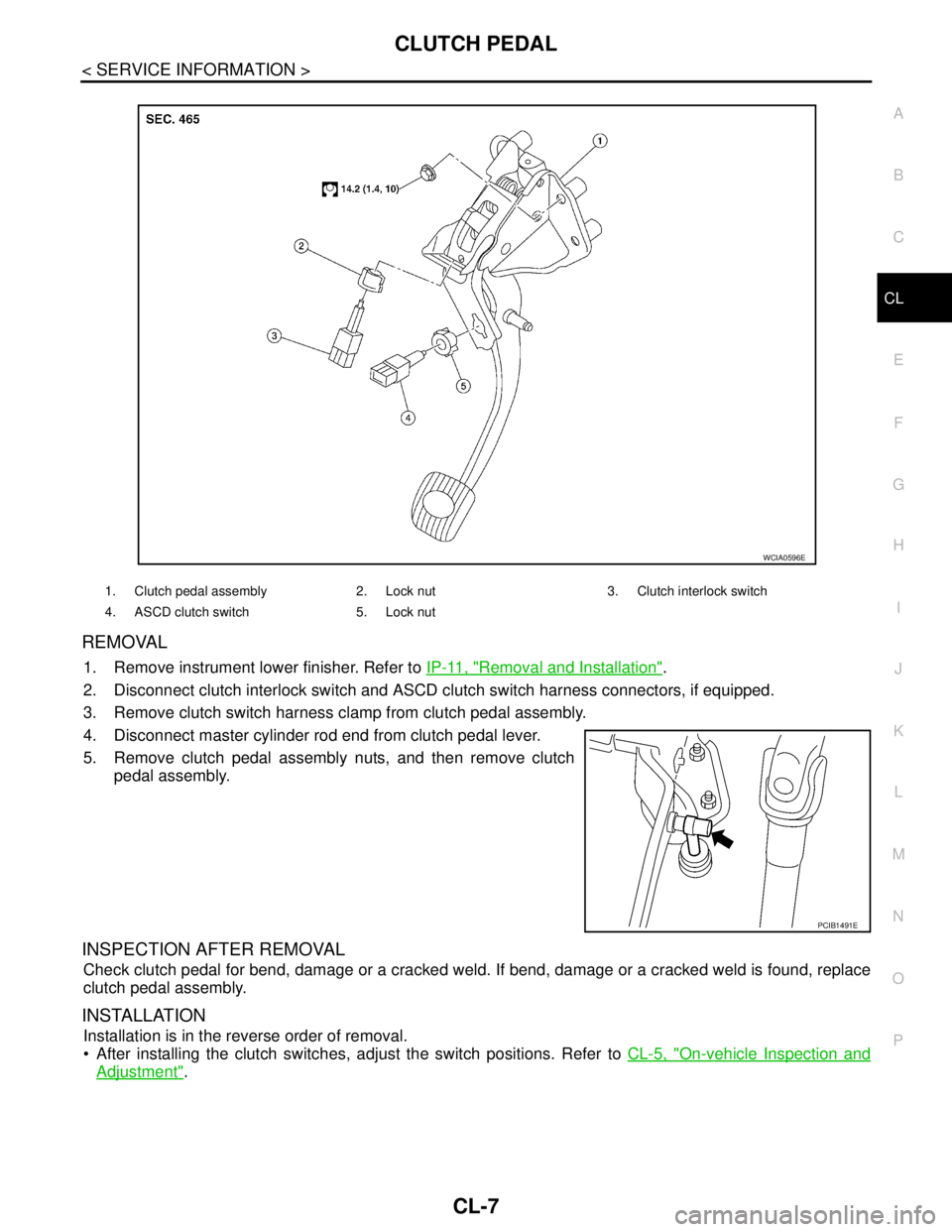
REMOVAL
1. Remove instrument lower finisher. Refer to IP-11, "Removal and Installation".
2. Disconnect clutch interlock switch and ASCD clutch switch harness connectors, if equipped.
3. Remove clutch switch harness clamp from clutch pedal assembly.
4. Disconnect master cylinder rod end from clutch pedal lever.
5. Remove clutch pedal assembly nuts, and then remove clutch
pedal assembly.
INSPECTION AFTER REMOVAL
Check clutch pedal for bend, damage or a cracked weld. If bend, damage or a cracked weld is found, replace
clutch pedal assembly.
INSTALLATION
Installation is in the reverse order of removal.
After installing the clutch switches, adjust the switch positions. Refer to CL-5, "
On-vehicle Inspection and
Adjustment".
1. Clutch pedal assembly 2. Lock nut 3. Clutch interlock switch
4. ASCD clutch switch 5. Lock nut
WCIA0596E
PCIB1491E
Page 475 of 5883
CL-10
< SERVICE INFORMATION >
CLUTCH MASTER CYLINDER
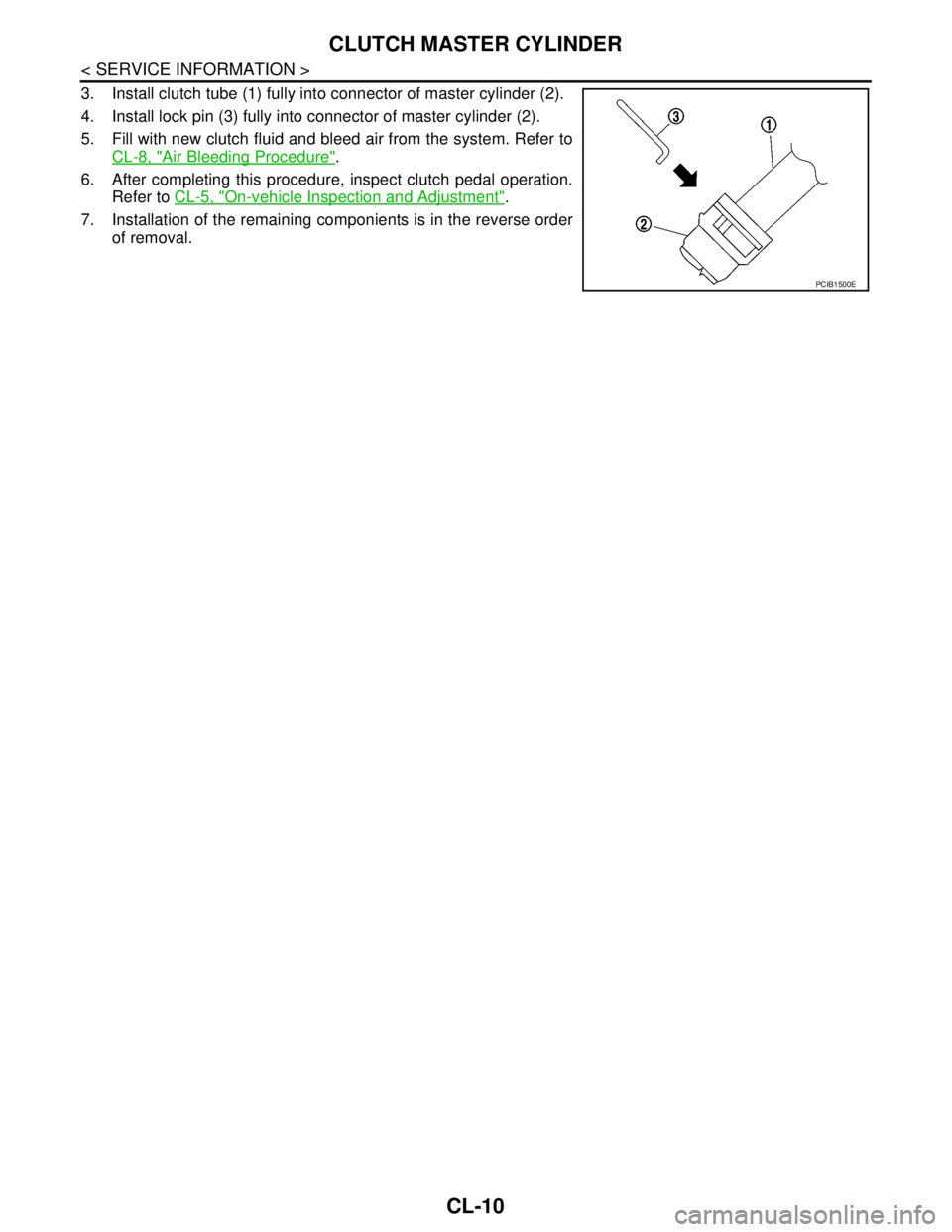
3. Install clutch tube (1) fully into connector of master cylinder (2).
4. Install lock pin (3) fully into connector of master cylinder (2).
5. Fill with new clutch fluid and bleed air from the system. Refer to
CL-8, "
Air Bleeding Procedure".
6. After completing this procedure, inspect clutch pedal operation.
Refer to CL-5, "
On-vehicle Inspection and Adjustment".
7. Installation of the remaining componients is in the reverse order
of removal.
PCIB1500E
Page 476 of 5883
CSC (CONCENTRIC SLAVE CYLINDER)
CL-11
< SERVICE INFORMATION >
C
E
F
G
H
I
J
K
L
MA
B
CL
N
O
P
CSC (CONCENTRIC SLAVE CYLINDER)
Removal and InstallationINFOID:0000000001375297
CAUTION:
If transaxle assembly is removed from the vehicle, always replace CSC (Concentric slave cylinder).
Return CSC insert to original position to remove transaxle assembly. Dust on clutch disc sliding
parts may damage CSC seal and may cause clutch fluid leakage.
Keep painted surface of the body and other parts free of clutch fluid. If it spills, wipe up immediately
and wash the affected area with water.
REMOVAL
1. Remove transaxle assembly. Refer to TM-633, "Removal and Installation" (5MT) or TM-681, "Removal
and Installation" (6MT).
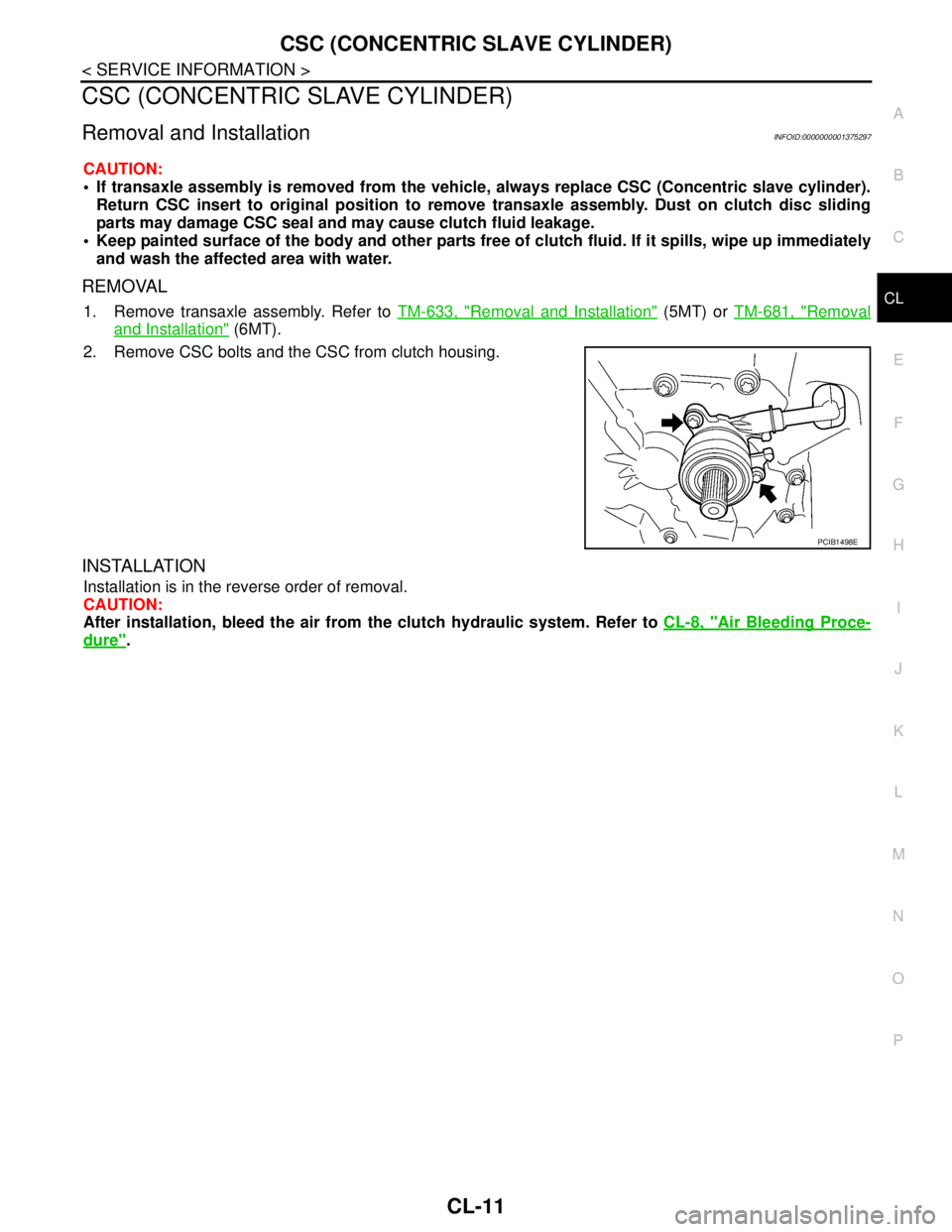
2. Remove CSC bolts and the CSC from clutch housing.
INSTALLATION
Installation is in the reverse order of removal.
CAUTION:
After installation, bleed the air from the clutch hydraulic system. Refer to CL-8, "
Air Bleeding Proce-
dure".
PCIB1498E
Page 477 of 5883
CL-12
< SERVICE INFORMATION >
CLUTCH PIPING
CLUTCH PIPING
Removal and InstallationINFOID:0000000001375298
Carefully observe the following steps during clutch tube removal and installation.
CAUTION:
Do not spill clutch fluid onto painted surfaces. If it spills, wipe up immediately and wash the affected
area with water.
REMOVAL
1. Remove the battery, battery tray and brackets. Refer to PG-6, "Removal and Installation".
2. Remove the air cleaner and air duct. Refer to EM-154, "
Removal and Installation" (MR18DE) or EM-269,
"Removal and Installation" (K9K).
3. Use one of the following methods to remove hose from clutch master cylinder.
Drain clutch fluid from reservoir tank and remove hose.
Remove hose from clutch master cylinder. Immediately plug hose and reservoir tank to prevent clutch
fluid from dripping.
CAUTION:
Do not spill clutch fluid onto painted surfaces. If it spills, wipe up immediately and wash the
affected area with water.
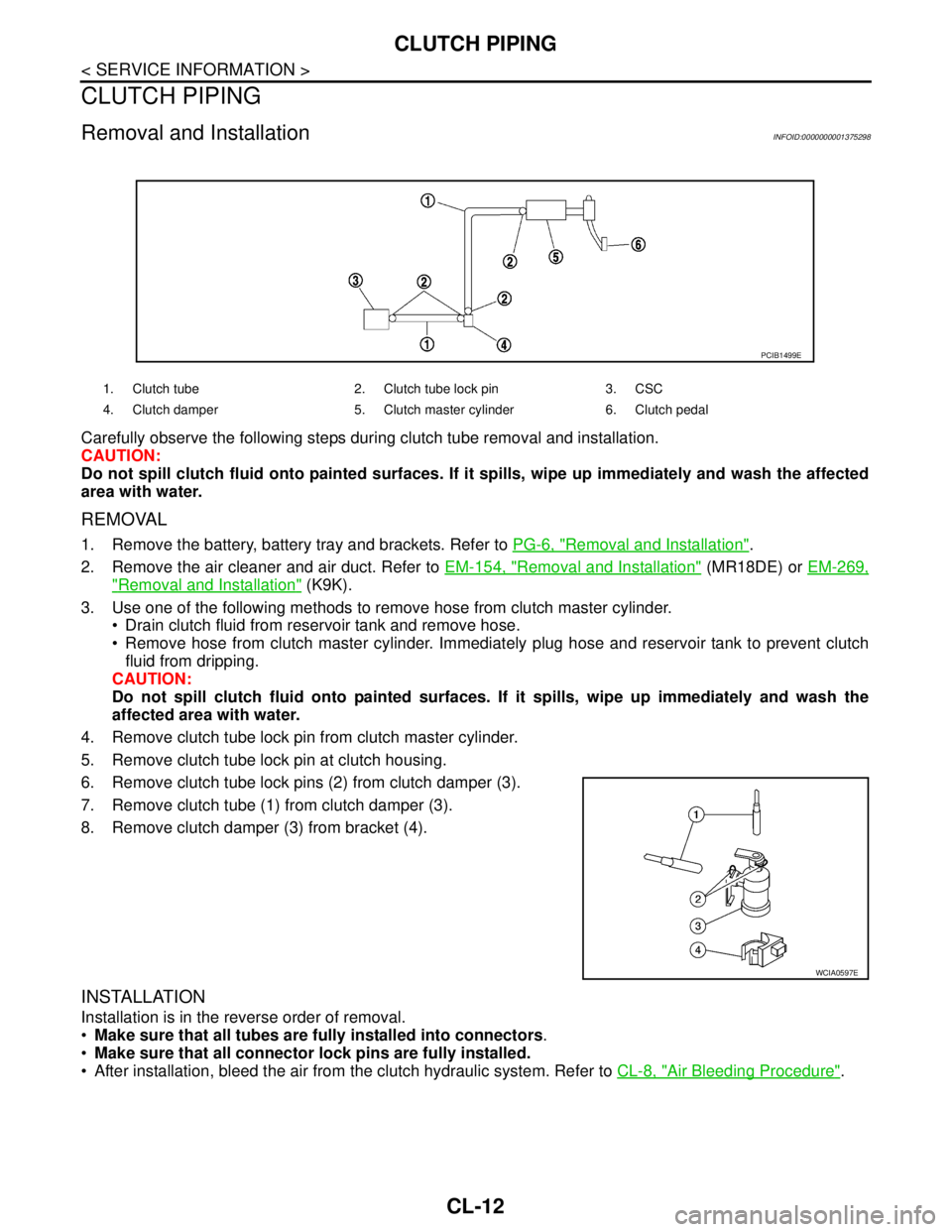
4. Remove clutch tube lock pin from clutch master cylinder.
5. Remove clutch tube lock pin at clutch housing.
6. Remove clutch tube lock pins (2) from clutch damper (3).
7. Remove clutch tube (1) from clutch damper (3).
8. Remove clutch damper (3) from bracket (4).
INSTALLATION
Installation is in the reverse order of removal.
Make sure that all tubes are fully installed into connectors.
Make sure that all connector lock pins are fully installed.
After installation, bleed the air from the clutch hydraulic system. Refer to CL-8, "
Air Bleeding Procedure".
1. Clutch tube 2. Clutch tube lock pin 3. CSC
4. Clutch damper 5. Clutch master cylinder 6. Clutch pedal
PCIB1499E
WCIA0597E