key NISSAN X-TRAIL 2003 Electronic Owner's Manual
[x] Cancel search | Manufacturer: NISSAN, Model Year: 2003, Model line: X-TRAIL, Model: NISSAN X-TRAIL 2003Pages: 3066, PDF Size: 51.47 MB
Page 777 of 3066

POWER DOOR LOCK — SUPER LOCK —
BL-33
C
D
E
F
G
H
J
K
L
MA
B
BL
Terminal and Reference Value for Time Control UnitEIS001SR
TER-
MINALWIRE
COLORITEM CONDITIONVOLTAGE
(Approximate values)
1 L/B BAT power supply — Battery voltage
3 L/Y Super lock actuator releaseDoor key cylinder switch
Unlock operation (Released)0V®12V
4G/RPassenger door and rear door
(LH/RH) lock actuator unlockPower door lock switch
Unlock operation0V®12V
6 Y/R Super lock actuator setDoor key cylinder switch
Lock operation (Set)0V®12V
10 W Power source (C/B) — Battery voltage
11 L Driver door lock actuator unlockPower door lock switch
Unlock operation0V®12V
14 R/B All door lock actuator lockPower door lock switch
Lock operation0V®12V
16 B Ground — 0V
17 G IGN power supply — Battery voltage
18 W/L Key switchKey inserted (ON)®key removed
from IGN key cylinder (OFF)Battery voltage®0V
20 GYPower door lock switch lock sig-
nalLock operation (ON) 0V
Other than above (OFF) 5V
23 PUPower door lock switch unlock
signalUnlock operation (ON) 0V
Other than above (OFF) 5V
24 LG/R Door key cylinder lock switch OFF (Neutral)®ON (Locked) 5V®0V
25 OR/L Door key cylinder unlock switch OFF (Neutral)®ON (Unlocked) 5V®0V
28 Y/G Driver door lock switch signalUnlock (ON) 0V
Lock (OFF) 5V
29 Y/LPassenger door lock switch sig-
nalUnlock (ON) 0V
Lock (OFF) 5V
30 R Driver door switch Door open (ON)®close (OFF) 0V®Battery voltage
32 OR Key less lock signalRemote controller button
Lock pressed5V®0V (Approx. 0.5 sec-
onds)
33 P/L Key less unlock signalRemote controller button
Unlock pressed5V®0V (Approx. 0.5 sec-
onds)
34 B/Y NATS release signal — 5V
Page 779 of 3066
POWER DOOR LOCK — SUPER LOCK —
BL-35
C
D
E
F
G
H
J
K
L
MA
B
BL
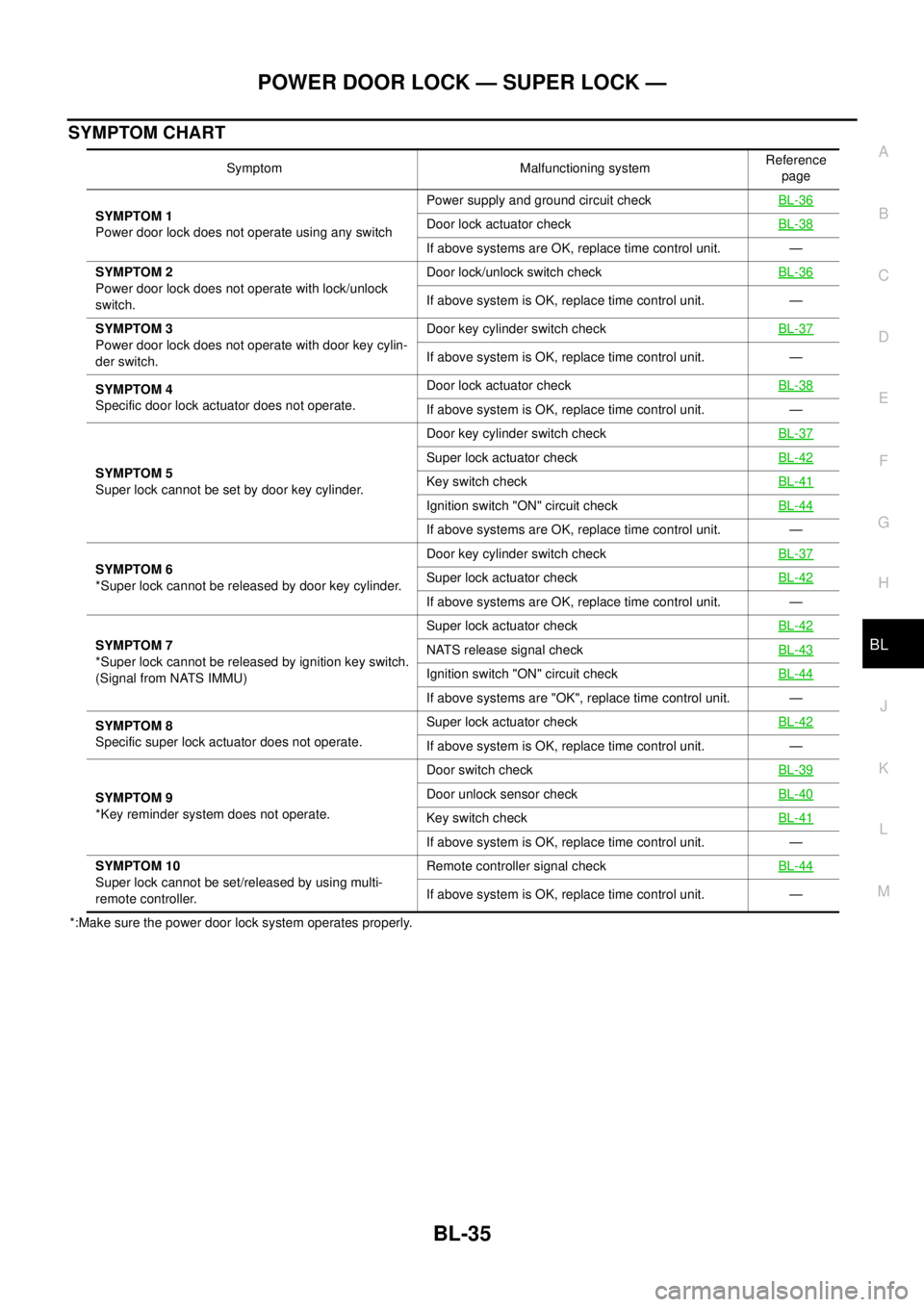
SYMPTOM CHART
*:Make sure the power door lock system operates properly.Symptom Malfunctioning systemReference
page
SYMPTOM 1
Power door lock does not operate using any switchPower supply and ground circuit checkBL-36
Door lock actuator checkBL-38
If above systems are OK, replace time control unit. —
SYMPTOM 2
Power door lock does not operate with lock/unlock
switch.Door lock/unlock switch checkBL-36
If above system is OK, replace time control unit. —
SYMPTOM 3
Power door lock does not operate with door key cylin-
der switch.Door key cylinder switch checkBL-37
If above system is OK, replace time control unit. —
SYMPTOM 4
Specific door lock actuator does not operate.Door lock actuator checkBL-38
If above system is OK, replace time control unit. —
SYMPTOM 5
Super lock cannot be set by door key cylinder.Door key cylinder switch checkBL-37
Super lock actuator checkBL-42
Key switch checkBL-41
Ignition switch "ON" circuit checkBL-44
If above systems are OK, replace time control unit. —
SYMPTOM 6
*Super lock cannot be released by door key cylinder.Door key cylinder switch checkBL-37
Super lock actuator checkBL-42
If above systems are OK, replace time control unit. —
SYMPTOM 7
*Super lock cannot be released by ignition key switch.
(Signal from NATS IMMU)Super lock actuator checkBL-42
NATS release signal checkBL-43
Ignition switch "ON" circuit checkBL-44
If above systems are "OK", replace time control unit. —
SYMPTOM 8
Specific super lock actuator does not operate.Super lock actuator checkBL-42
If above system is OK, replace time control unit. —
SYMPTOM 9
*Key reminder system does not operate.Door switch checkBL-39
Door unlock sensor checkBL-40
Key switch checkBL-41
If above system is OK, replace time control unit. —
SYMPTOM 10
Super lock cannot be set/released by using multi-
remote controller.Remote controller signal checkBL-44
If above system is OK, replace time control unit. —
Page 781 of 3066
POWER DOOR LOCK — SUPER LOCK —
BL-37
C
D
E
F
G
H
J
K
L
MA
B
BL
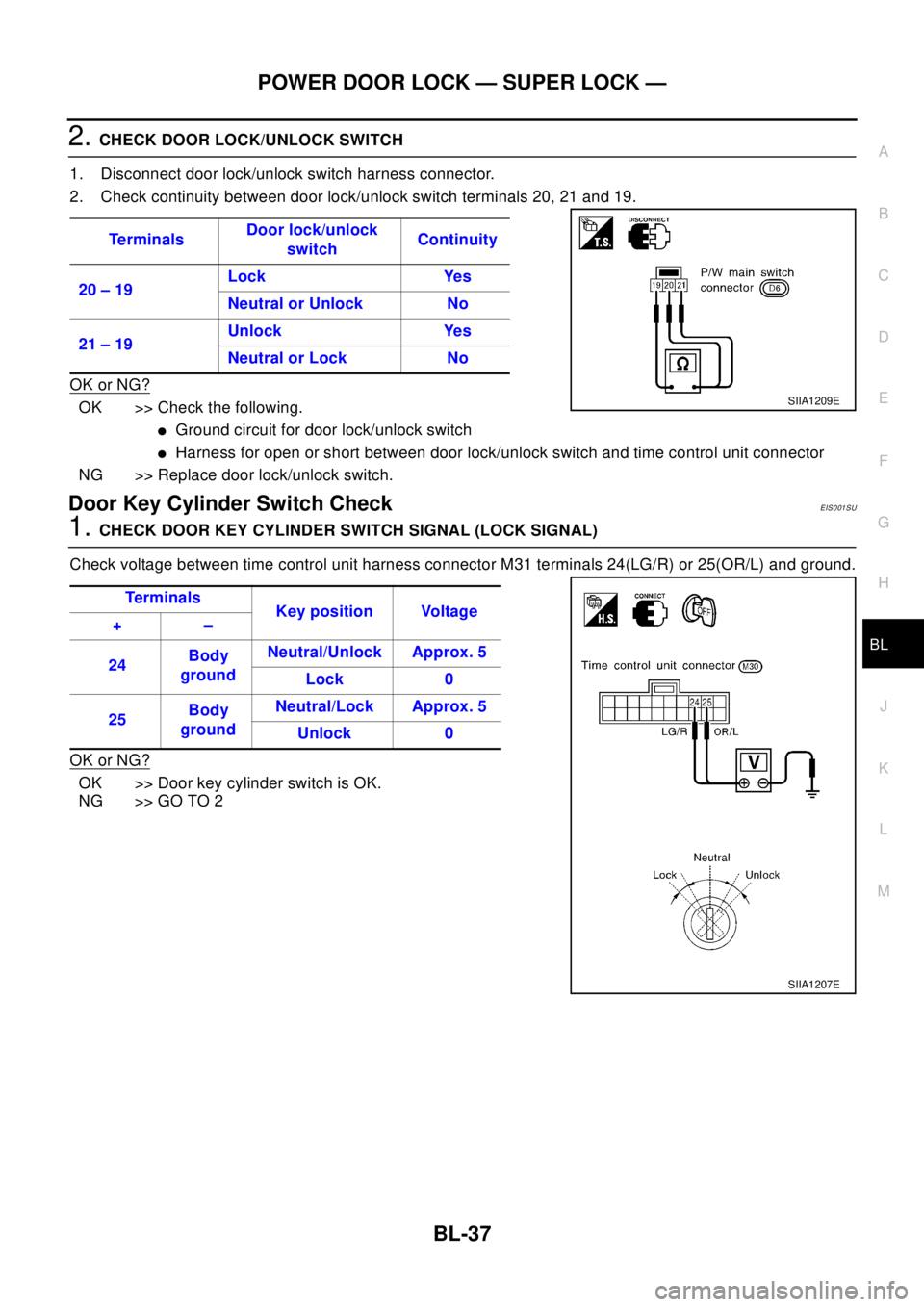
2.CHECK DOOR LOCK/UNLOCK SWITCH
1. Disconnect door lock/unlock switch harness connector.
2. Check continuity between door lock/unlock switch terminals 20, 21 and 19.
OK or NG?
OK >> Check the following.
lGround circuit for door lock/unlock switch
lHarness for open or short between door lock/unlock switch and time control unit connector
NG >> Replace door lock/unlock switch.
Door Key Cylinder Switch CheckEIS001SU
1.CHECK DOOR KEY CYLINDER SWITCH SIGNAL (LOCK SIGNAL)
Check voltage between time control unit harness connector M31 terminals 24(LG/R) or 25(OR/L) and ground.
OK or NG?
OK >> Door key cylinder switch is OK.
NG >> GO TO 2Te r m i n a l sDoor lock/unlock
switchContinuity
20 – 19Lock Yes
Neutral or Unlock No
21 – 19Unlock Yes
Neutral or Lock No
SIIA1209E
Te r m i na l s
Key position Voltage
+–
24Body
groundNeutral/Unlock Approx. 5
Lock 0
25Body
groundNeutral/Lock Approx. 5
Unlock 0
SIIA1207E
Page 782 of 3066
BL-38
POWER DOOR LOCK — SUPER LOCK —
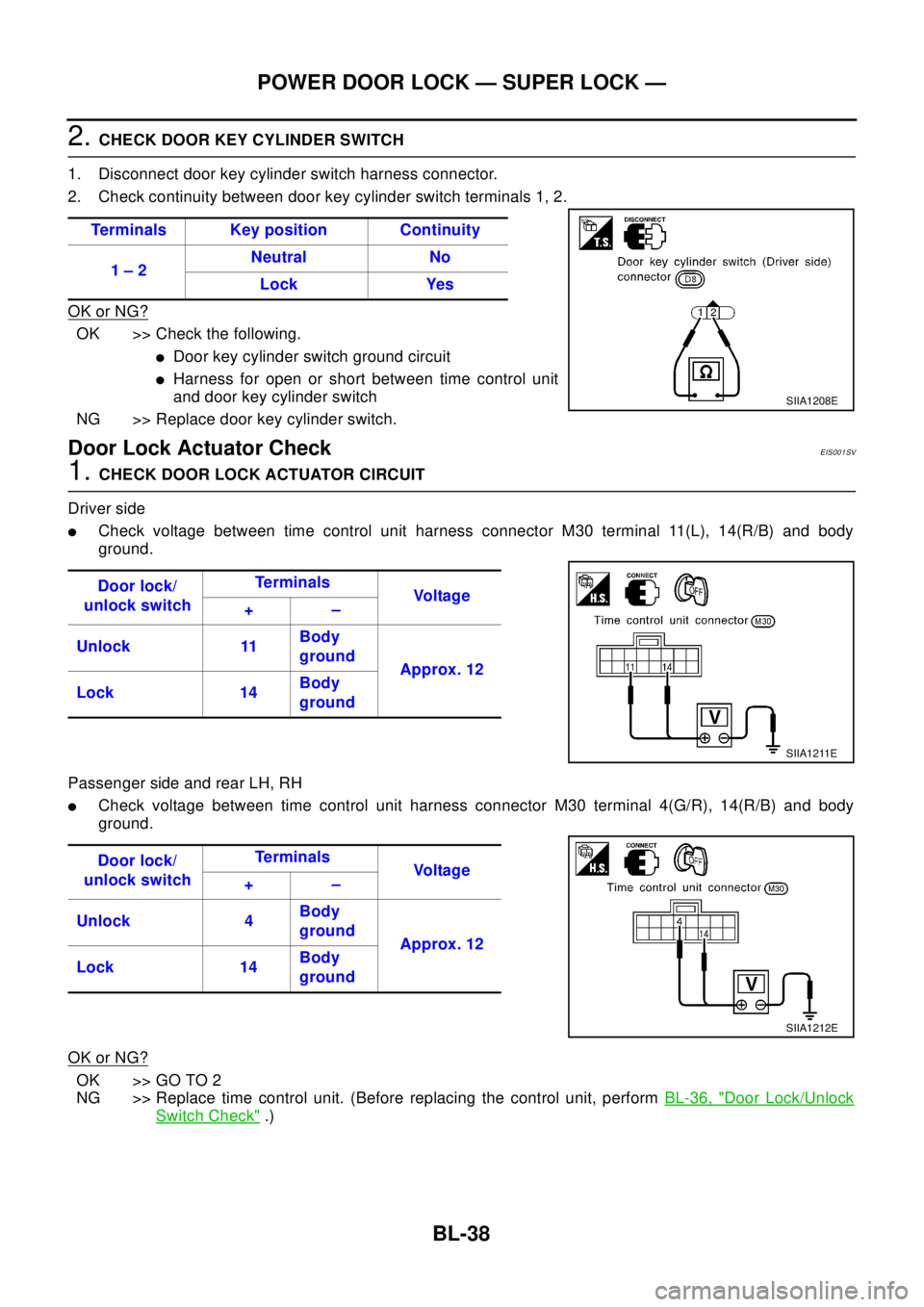
2.CHECK DOOR KEY CYLINDER SWITCH
1. Disconnect door key cylinder switch harness connector.
2. Check continuity between door key cylinder switch terminals 1, 2.
OK or NG?
OK >> Check the following.
lDoor key cylinder switch ground circuit
lHarness for open or short between time control unit
and door key cylinder switch
NG >> Replace door key cylinder switch.
Door Lock Actuator CheckEIS001SV
1.CHECK DOOR LOCK ACTUATOR CIRCUIT
Driver side
lCheck voltage between time control unit harness connector M30 terminal 11(L), 14(R/B) and body
ground.
Passenger side and rear LH, RH
lCheck voltage between time control unit harness connector M30 terminal 4(G/R), 14(R/B) and body
ground.
OK or NG?
OK >> GO TO 2
NG >> Replace time control unit. (Before replacing the control unit, performBL-36, "
Door Lock/Unlock
Switch Check".) Terminals Key position Continuity
1–2Neutral No
Lock Yes
SIIA1208E
Door lock/
unlock switchTe r m i n a l s
Vo l ta g e
+–
Unlock 11Body
ground
Approx. 12
Lock 14Body
ground
SIIA1211E
Door lock/
unlock switchTe r m i n a l s
Vo l ta g e
+–
Unlock 4Body
ground
Approx. 12
Lock 14Body
ground
SIIA1212E
Page 785 of 3066
POWER DOOR LOCK — SUPER LOCK —
BL-41
C
D
E
F
G
H
J
K
L
MA
B
BL
Key Switch CheckEIS001SY
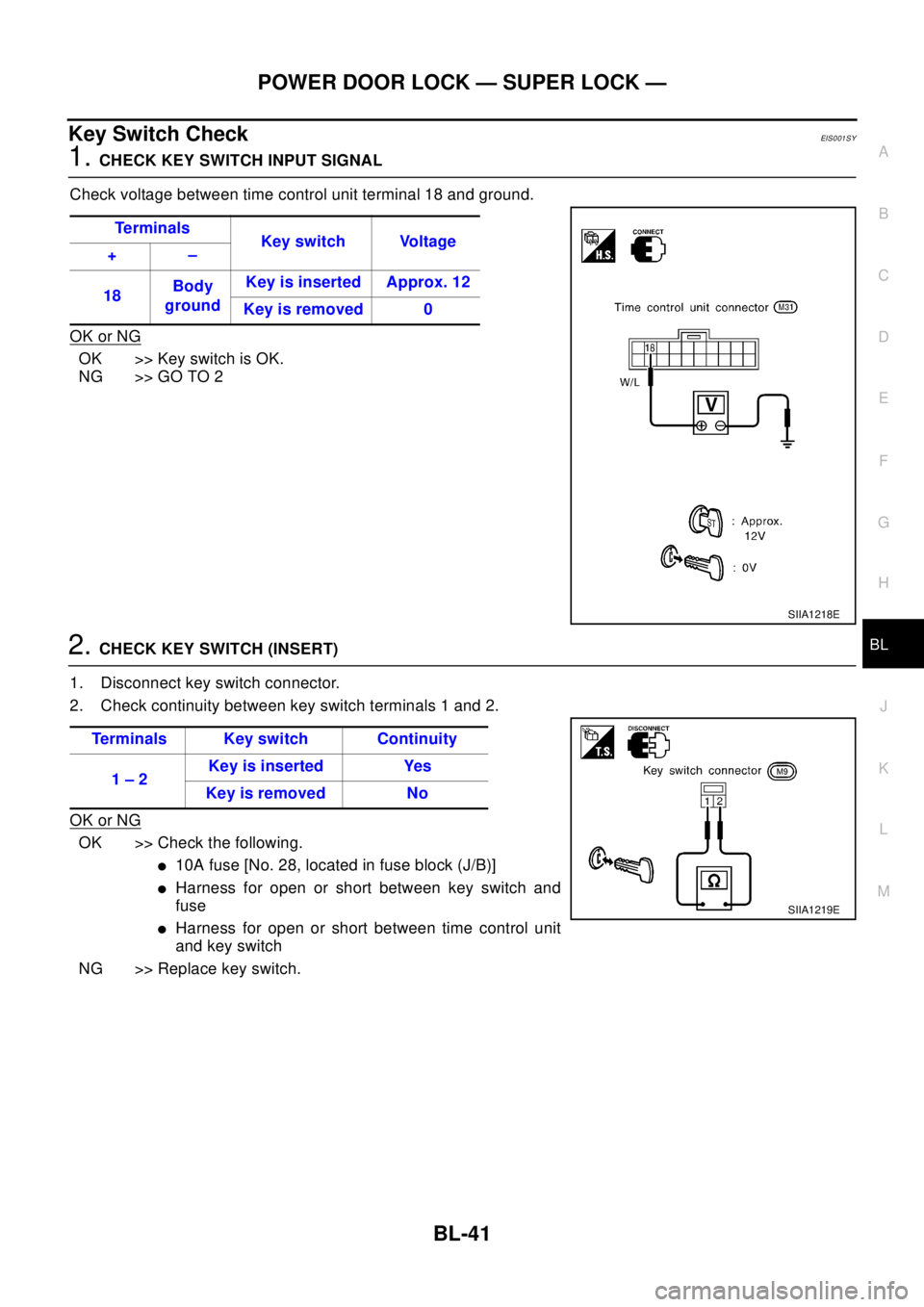
1.CHECK KEY SWITCH INPUT SIGNAL
Check voltage between time control unit terminal 18 and ground.
OK or NG
OK >>KeyswitchisOK.
NG >> GO TO 2
2.CHECK KEY SWITCH (INSERT)
1. Disconnect key switch connector.
2. Check continuity between key switch terminals 1 and 2.
OK or NG
OK >> Check the following.
l10A fuse [No. 28, located in fuse block (J/B)]
lHarness for open or short between key switch and
fuse
lHarness for open or short between time control unit
and key switch
NG >> Replace key switch.Te r m i n a l s
Key switch Voltage
+–
18Body
groundKey is inserted Approx. 12
Key is removed 0
SIIA1218E
Terminals Key switch Continuity
1–2Keyisinserted Yes
Keyisremoved No
SIIA1219E
Page 786 of 3066
BL-42
POWER DOOR LOCK — SUPER LOCK —
Super Lock Actuator Check
EIS001SK
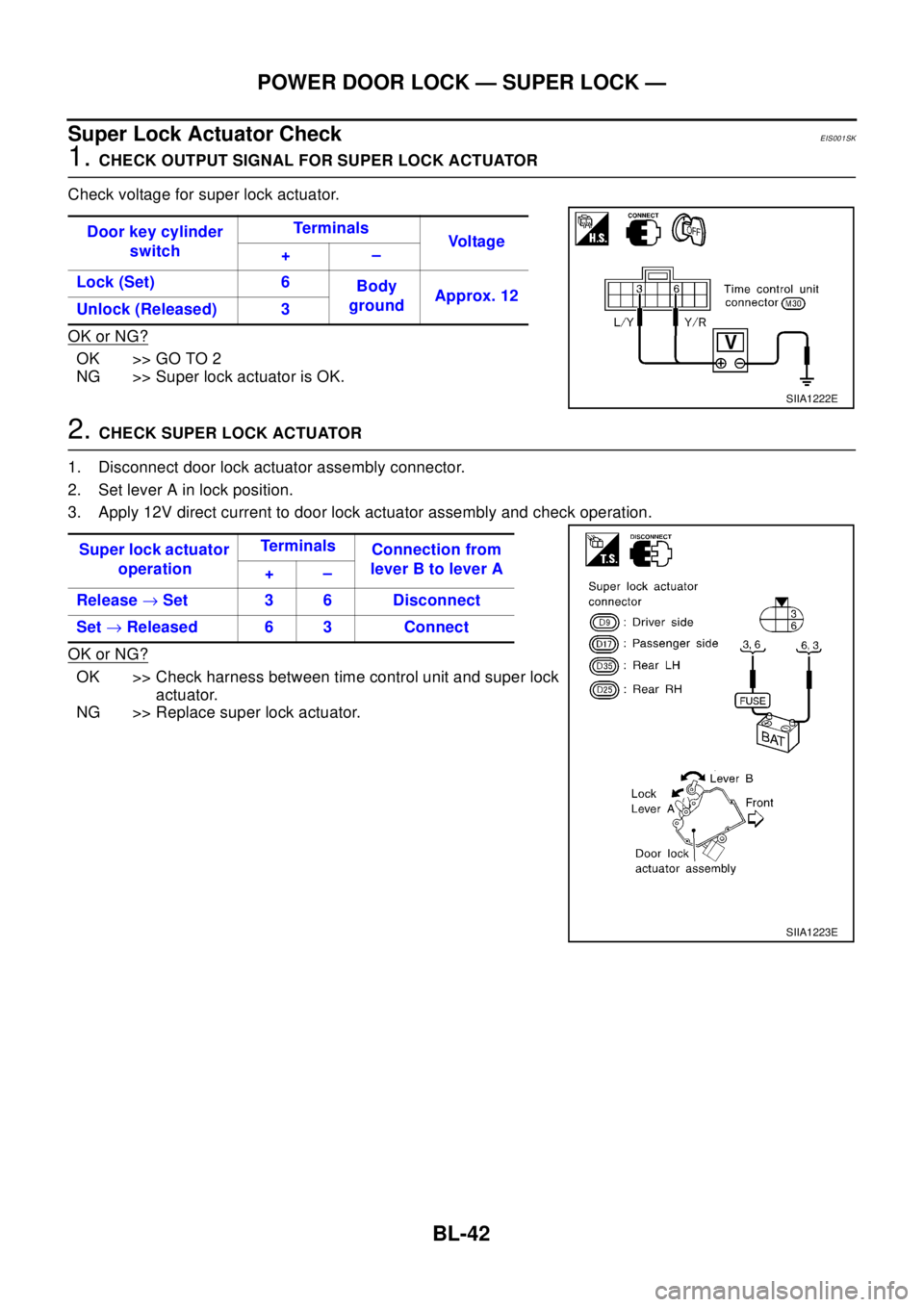
1.CHECK OUTPUT SIGNAL FOR SUPER LOCK ACTUATOR
Check voltage for super lock actuator.
OK or NG?
OK >> GO TO 2
NG >> Super lock actuator is OK.
2.CHECK SUPER LOCK ACTUATOR
1. Disconnect door lock actuator assembly connector.
2. Set lever A in lock position.
3. Apply 12V direct current to door lock actuator assembly and check operation.
OK or NG?
OK >> Check harness between time control unit and super lock
actuator.
NG >> Replace super lock actuator.Door key cylinder
switchTe r m i n a l s
Vo l ta g e
+–
Lock (Set) 6
Body
groundApprox. 12
Unlock (Released) 3
SIIA1222E
Super lock actuator
operationTe r m i n a l s
Connection from
lever B to lever A
+–
Release®Set 3 6 Disconnect
Set®Released 6 3 Connect
SIIA1223E
Page 788 of 3066
BL-44
POWER DOOR LOCK — SUPER LOCK —
Ignition Switch “ON” Circuit Check
EIS001SP
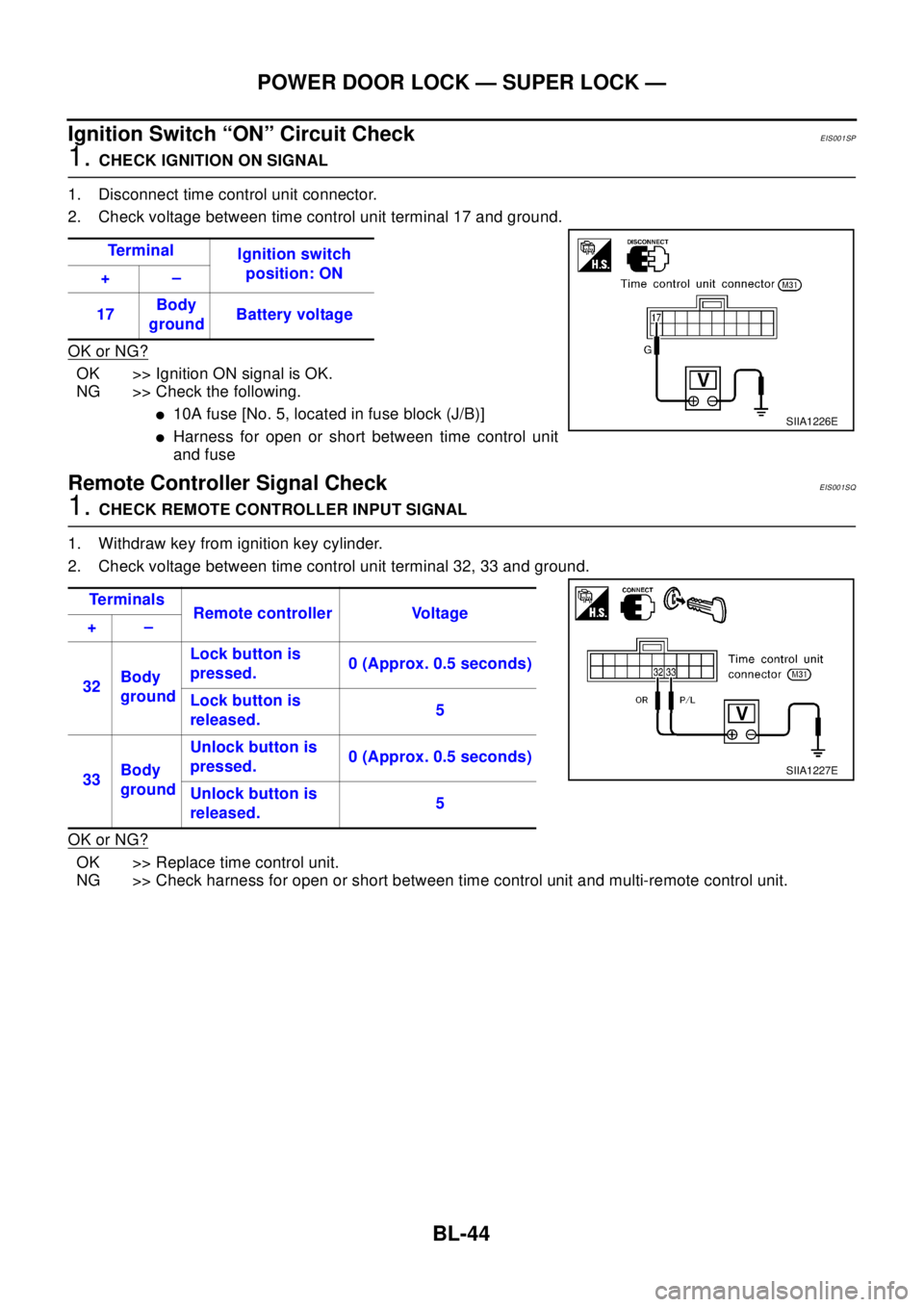
1.CHECK IGNITION ON SIGNAL
1. Disconnect time control unit connector.
2. Check voltage between time control unit terminal 17 and ground.
OK or NG?
OK >> Ignition ON signal is OK.
NG >> Check the following.
l10A fuse [No. 5, located in fuse block (J/B)]
lHarness for open or short between time control unit
and fuse
Remote Controller Signal CheckEIS001SQ
1.CHECK REMOTE CONTROLLER INPUT SIGNAL
1. Withdraw key from ignition key cylinder.
2. Check voltage between time control unit terminal 32, 33 and ground.
OK or NG?
OK >> Replace time control unit.
NG >> Check harness for open or short between time control unit and multi-remote control unit.Te r m i n a l
Ignition switch
position: ON
+–
17Body
groundBattery voltage
SIIA1226E
Te r m i n a l s
Remote controller Voltage
+–
32Body
groundLock button is
pressed.0 (Approx. 0.5 seconds)
Lock button is
released.5
33Body
groundUnlock button is
pressed.0 (Approx. 0.5 seconds)
Unlock button is
released.5
SIIA1227E
Page 793 of 3066
MULTI-REMOTE CONTROL SYSTEM
BL-49
C
D
E
F
G
H
J
K
L
MA
B
BL
Terminal and Reference Value for Multi-remote Control UnitEIS001TQ
Symptom ChartEIS001RG
NOTE:
Always check remote controller battery before replacing remote controller.
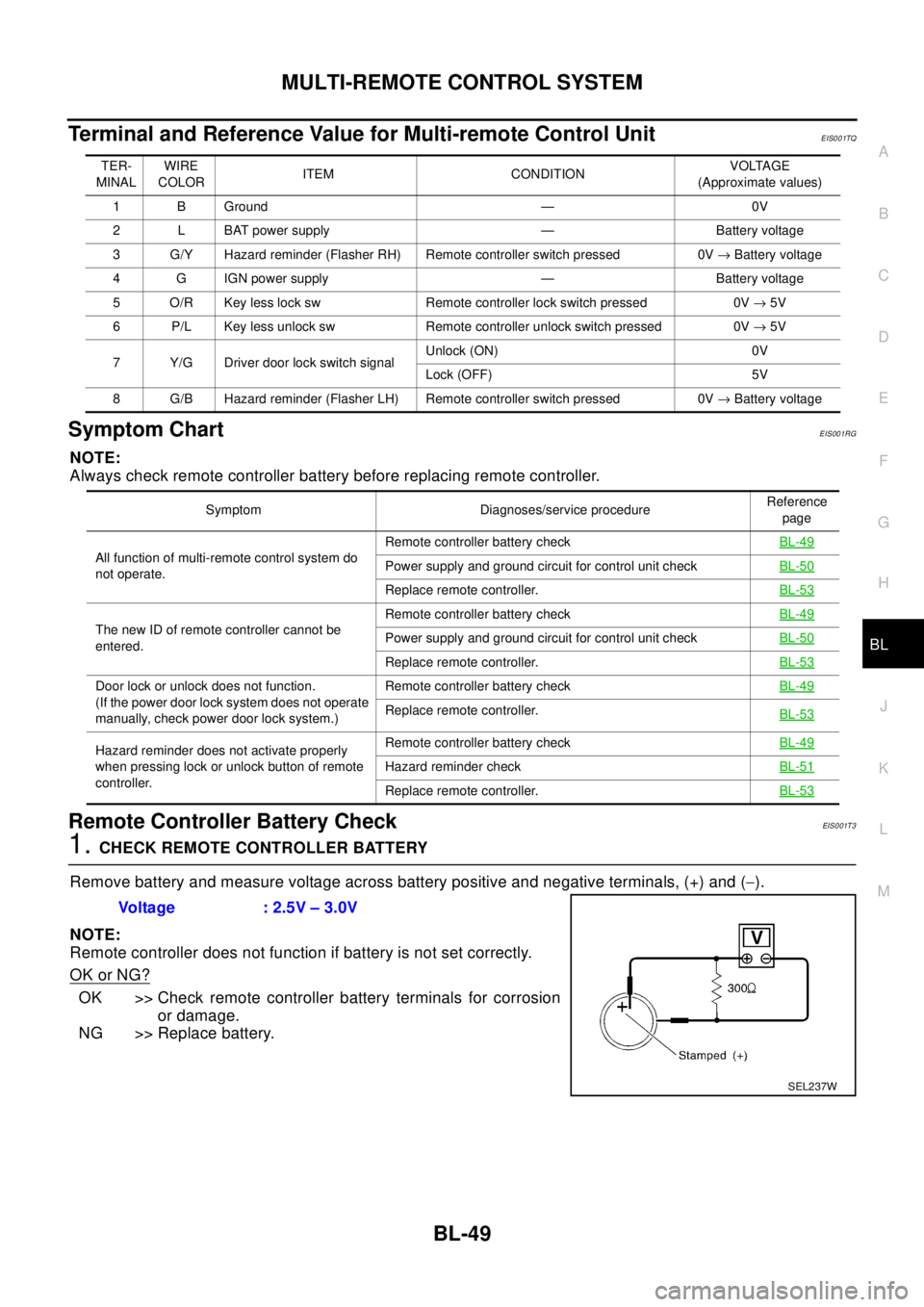
Remote Controller Battery CheckEIS0 01T 3
1.CHECK REMOTE CONTROLLER BATTERY
Remove battery and measure voltage across battery positive and negative terminals, (+) and (-).
NOTE:
Remote controller does not function if battery is not set correctly.
OK or NG?
OK >> Check remote controller battery terminals for corrosion
or damage.
NG >> Replace battery.
TER-
MINALWIRE
COLORITEM CONDITIONVOLTAGE
(Approximate values)
1 B Ground — 0V
2 L BAT power supply — Battery voltage
3 G/Y Hazard reminder (Flasher RH) Remote controller switch pressed 0V®Battery voltage
4 G IGN power supply — Battery voltage
5 O/R Key less lock sw Remote controller lock switch pressed 0V®5V
6 P/L Key less unlock sw Remote controller unlock switch pressed 0V®5V
7 Y/G Driver door lock switch signalUnlock (ON) 0V
Lock (OFF) 5V
8 G/B Hazard reminder (Flasher LH) Remote controller switch pressed 0V®Battery voltage
Symptom Diagnoses/service procedureReference
page
All function of multi-remote control system do
not operate.Remote controller battery checkBL-49
Power supply and ground circuit for control unit checkBL-50
Replace remote controller.BL-53
The new ID of remote controller cannot be
entered.Remote controller battery checkBL-49Power supply and ground circuit for control unit checkBL-50
Replace remote controller.BL-53
Door lock or unlock does not function.
(If the power door lock system does not operate
manually, check power door lock system.)Remote controller battery checkBL-49
Replace remote controller.
BL-53
Hazard reminder does not activate properly
when pressing lock or unlock button of remote
controller.Remote controller battery checkBL-49
Hazard reminder checkBL-51
Replace remote controller.BL-53
Voltage : 2.5V – 3.0V
SEL237W
Page 799 of 3066
FRONT DOOR LOCK
BL-55
C
D
E
F
G
H
J
K
L
MA
B
BL
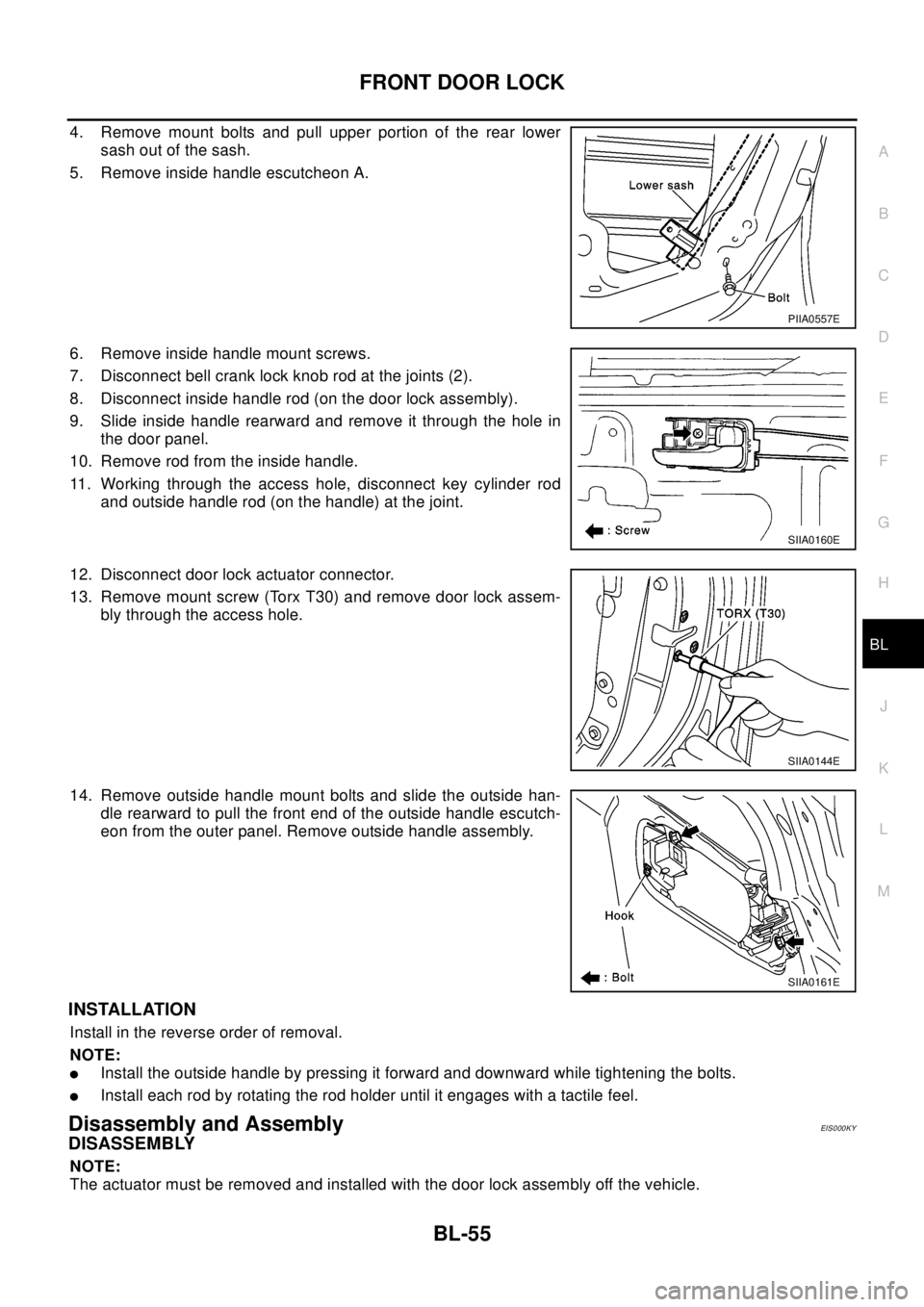
4. Remove mount bolts and pull upper portion of the rear lower
sash out of the sash.
5. Remove inside handle escutcheon A.
6. Remove inside handle mount screws.
7. Disconnect bell crank lock knob rod at the joints (2).
8. Disconnect inside handle rod (on the door lock assembly).
9. Slide inside handle rearward and remove it through the hole in
the door panel.
10. Remove rod from the inside handle.
11. Working through the access hole, disconnect key cylinder rod
and outside handle rod (on the handle) at the joint.
12. Disconnect door lock actuator connector.
13. Remove mount screw (Torx T30) and remove door lock assem-
bly through the access hole.
14. Remove outside handle mount bolts and slide the outside han-
dle rearward to pull the front end of the outside handle escutch-
eon from the outer panel. Remove outside handle assembly.
INSTALLATION
Install in the reverse order of removal.
NOTE:
lInstall the outside handle by pressing it forward and downward while tightening the bolts.
lInstall each rod by rotating the rod holder until it engages with a tactile feel.
Disassembly and AssemblyEIS000KY
DISASSEMBLY
NOTE:
The actuator must be removed and installed with the door lock assembly off the vehicle.
PIIA0557E
SIIA0160E
SIIA0144E
SIIA0161E
Page 814 of 3066
BL-70
NATS (NISSAN ANTI-THEFT SYSTEM)
NATS (NISSAN ANTI-THEFT SYSTEM)
PFP:25386
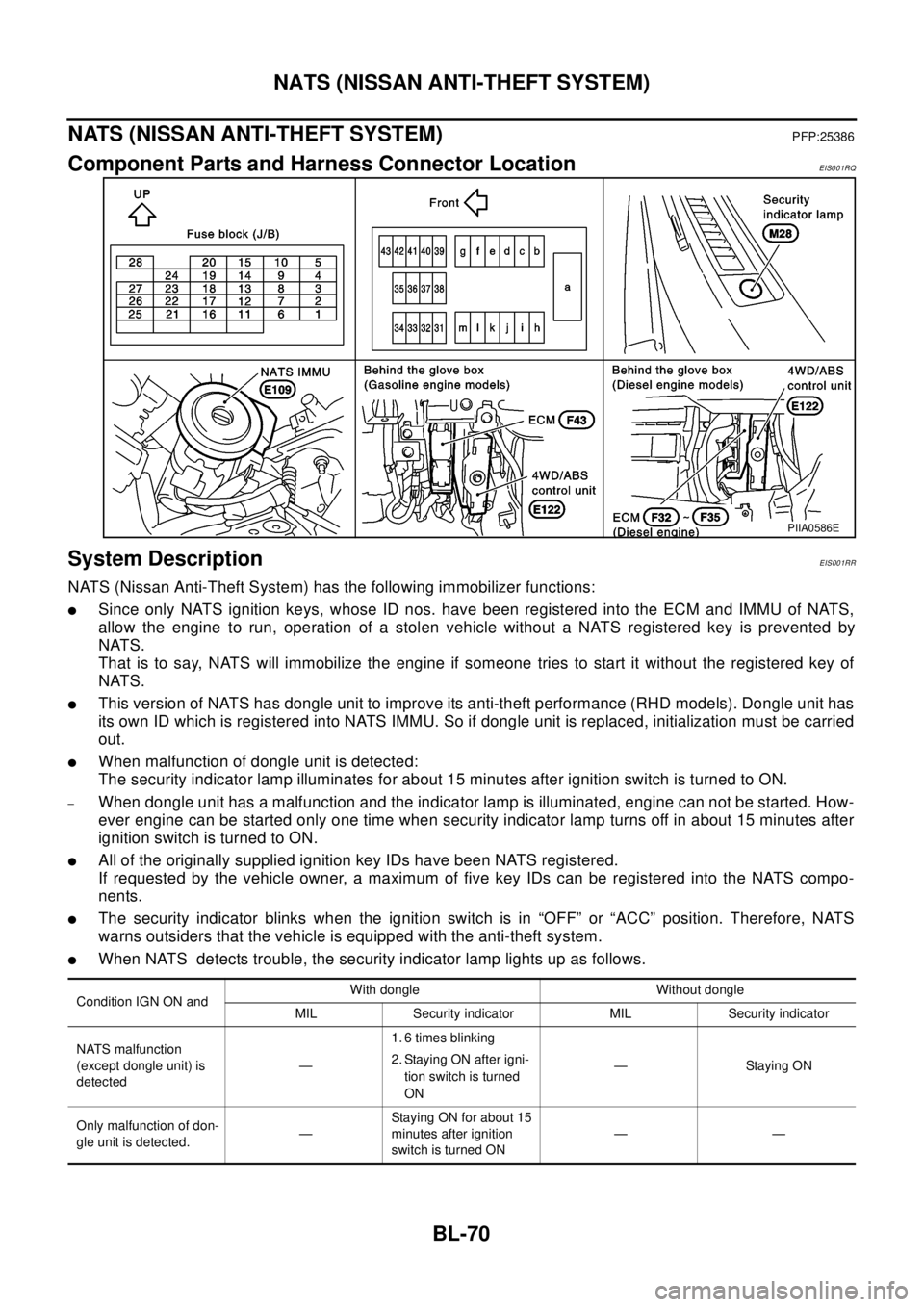
Component Parts and Harness Connector LocationEIS001RQ
System DescriptionEIS001RR
NATS (Nissan Anti-Theft System) has the following immobilizer functions:
lSince only NATS ignition keys, whose ID nos. have been registered into the ECM and IMMU of NATS,
allow the engine to run, operation of a stolen vehicle without a NATS registered key is prevented by
NATS.
That is to say, NATS will immobilize the engine if someone tries to start it without the registered key of
NATS.
lThis version of NATS has dongle unit to improve its anti-theft performance (RHD models). Dongle unit has
its own ID which is registered into NATS IMMU. So if dongle unit is replaced, initialization must be carried
out.
lWhen malfunction of dongle unit is detected:
The security indicator lamp illuminates for about 15 minutes after ignition switch is turned to ON.
–When dongle unit has a malfunction and the indicator lamp is illuminated, engine can not be started. How-
ever engine can be started only one time when security indicator lamp turns off in about 15 minutes after
ignition switch is turned to ON.
lAll of the originally supplied ignition key IDs have been NATS registered.
If requested by the vehicle owner, a maximum of five key IDs can be registered into the NATS compo-
nents.
lThe security indicator blinks when the ignition switch is in “OFF” or “ACC” position. Therefore, NATS
warns outsiders that the vehicle is equipped with the anti-theft system.
lWhen NATS detects trouble, the security indicator lamp lights up as follows.
PIIA0586E
Condition IGN ON andWith dongle Without dongle
MIL Security indicator MIL Security indicator
NATS malfunction
(except dongle unit) is
detected—1. 6 times blinking
2. Staying ON after igni-
tion switch is turned
ON—StayingON
Only malfunction of don-
gle unit is detected.—Staying ON for about 15
minutes after ignition
switch is turned ON——