warning PEUGEOT PARTNER TEPEE ELECTRIC 2017 Workshop Manual
[x] Cancel search | Manufacturer: PEUGEOT, Model Year: 2017, Model line: PARTNER TEPEE ELECTRIC, Model: PEUGEOT PARTNER TEPEE ELECTRIC 2017Pages: 252, PDF Size: 9.89 MB
Page 177 of 252
139
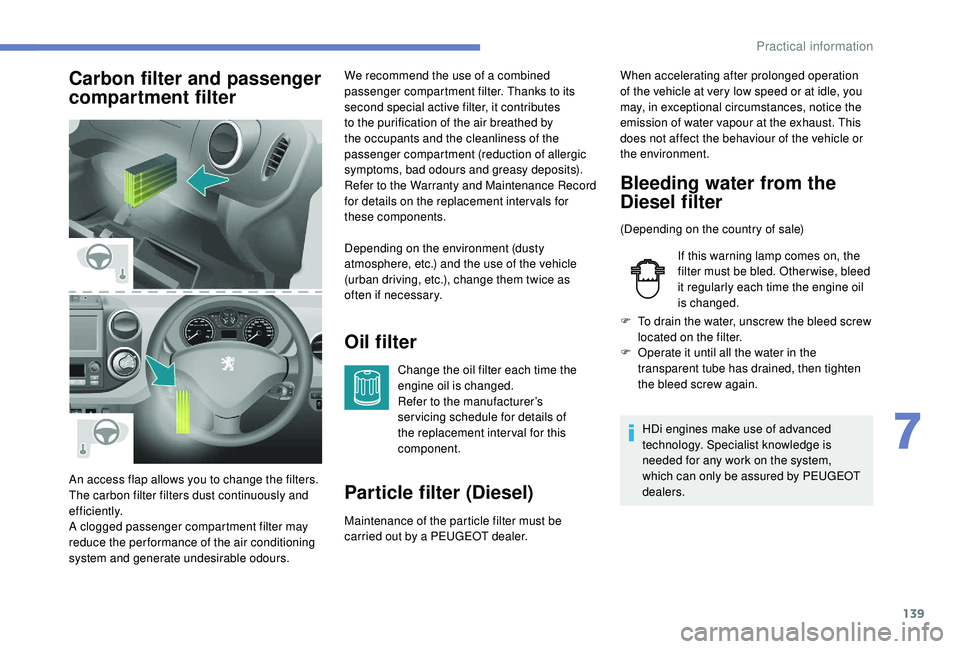
Carbon filter and passenger
compartment filterOil filter
Change the oil filter each time the
engine oil is changed.
Refer to the manufacturer’s
ser vicing schedule for details of
the replacement inter val for this
component.
Particle filter (Diesel)
Maintenance of the particle filter must be
carried out by a PEUGEOT dealer.
An access flap allows you to change the filters.
The carbon filter filters dust continuously and
ef f i c i e nt l y.
A clogged passenger compartment filter may
reduce the per formance of the air conditioning
system and generate undesirable odours. We recommend the use of a combined
passenger compartment filter. Thanks to its
second special active filter, it contributes
to the purification of the air breathed by
the occupants and the cleanliness of the
passenger compartment (reduction of allergic
symptoms, bad odours and greasy deposits).
Refer to the Warranty and Maintenance Record
for details on the replacement inter vals for
these components.
Depending on the environment (dusty
atmosphere, etc.) and the use of the vehicle
(urban driving, etc.), change them twice as
often if necessary.
Bleeding water from the
Diesel filter
(Depending on the country of sale)
If this warning lamp comes on, the
filter must be bled. Other wise, bleed
it regularly each time the engine oil
is changed.
F
T
o drain the water, unscrew the bleed screw
located on the filter.
F
O
perate it until all the water in the
transparent tube has drained, then tighten
the bleed screw again.
HDi engines make use of advanced
technology. Specialist knowledge is
needed for any work on the system,
which can only be assured by PEUGEOT
dealers.
When accelerating after prolonged operation
of the vehicle at very low speed or at idle, you
may, in exceptional circumstances, notice the
emission of water vapour at the exhaust. This
does not affect the behaviour of the vehicle or
the environment.
7
Practical information
Page 178 of 252
140
Manual gearbox
The gearbox does not require any
maintenance (no oil change).
Only use products recommended by
PEUGEOT or products of equivalent
quality and specification.
In order to optimise the operation of
components as important as those in the
braking system, PEUGEOT selects and
offers very specific products.
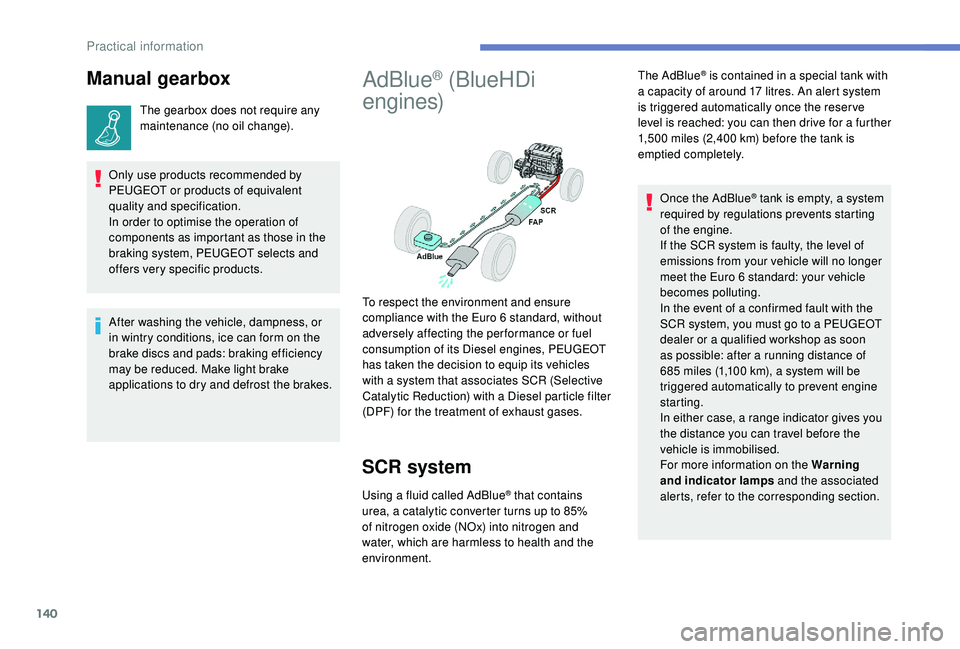
AdBlue® (BlueHDi
engines)
SCR system
Using a fluid called AdBlue® that contains
urea, a catalytic converter turns up to 85%
of nitrogen oxide (NOx) into nitrogen and
water, which are harmless to health and the
environment. The AdBlue
® is contained in a special tank with
a capacity of around 17 litres. An alert system
is triggered automatically once the reser ve
level is reached: you can then drive for a further
1,500
miles (2,400 km) before the tank is
emptied completely.
To respect the environment and ensure
compliance with the Euro 6 standard, without
adversely affecting the per formance or fuel
consumption of its Diesel engines, PEUGEOT
has taken the decision to equip its vehicles
with a system that associates SCR (Selective
Catalytic Reduction) with a Diesel particle filter
(DPF) for the treatment of exhaust gases. Once the AdBlue
® tank is empty, a system
r
equired by regulations prevents starting
of the engine.
If the SCR
system is faulty, the level of
emissions from your vehicle will no longer
meet the Euro 6 standard: your vehicle
becomes polluting.
In the event of a confirmed fault with the
SCR system, you must go to a PEUGEOT
dealer or a qualified workshop as soon
as possible: after a running distance of
685
miles (1,100
km), a system will be
triggered automatically to prevent engine
starting.
In either case, a range indicator gives you
the distance you can travel before the
vehicle is immobilised.
For more information on the Warning
and indicator lamps and the associated
alerts, refer to the corresponding section.
After washing the vehicle, dampness, or
in wintry conditions, ice can form on the
brake discs and pads: braking efficiency
may be reduced. Make light brake
applications to dry and defrost the brakes.
Practical information
Page 179 of 252
141
Freezing of AdBlue®
AdBlue® freezes at temperatures below
around -11°C.
The SCR system includes a heater for the
AdBlue
® tank, allowing you to continue
driving in all weather conditions.
Topping up with AdBlue®
Before topping up, please read the
following warnings carefully.
Precautions in use
In certain conditions (high ambient
temperature, for example), the risk of ammonia
being released cannot be discounted: do not
inhale the fluid. Ammonia vapour has an irritant
effect on mucous membranes (eyes, nose and
throat).
Keep AdBlue
® out of reach of children, in
its original container or bottle.
Never transfer AdBlue
® to another
container: it would lose its purity.
Use only AdBlue
® liquid that meets the
ISO
22241 standard.
AdBlue
® is a urea-based solution. This fluid is
non-flammable, colourless and odourless (kept
in a cool area).
In the event of contact with the skin, wash the
affected area with soap and running water. In
the event of contact with the eyes, immediately
rinse the eyes with large amounts of water
or with an eye wash solution for at least
15
minutes. If a burning sensation or irritation
persists, get medical attention.
If swallowed, immediately rinse the mouth with
clean water and then drink plenty of water.Never dilute AdBlue® with water.
Never pour AdBlue® into the Diesel fuel tank.
Containers or bottles are available from a
PEUGEOT dealer or a qualified workshop.
You can also visit a ser vice station
equipped with AdBlue pumps specially
designed for passenger vehicles and light
goods vehicles. Never top up from an AdBlue
® dispenser
reserved for heavy goods vehicles.
Recommendations on storage
AdBlue® freezes below around -11°C and
deteriorates above 25°C. It is recommended
that bottles or containers are stored in a cool
place and protected from direct sunlight.
Under these conditions, the fluid can be kept
for at least a year.
If the fluid has frozen, it can be used once
it has completely thawed out at ambient
temperature.
Never store bottles or containers of
AdBlue
® in your vehicle.
Do not dispose of AdBlue
® bottles or
containers in the household waste.
Place them in a container provided for
this purpose or take them to your dealer.
7
Practical information
Page 194 of 252
156
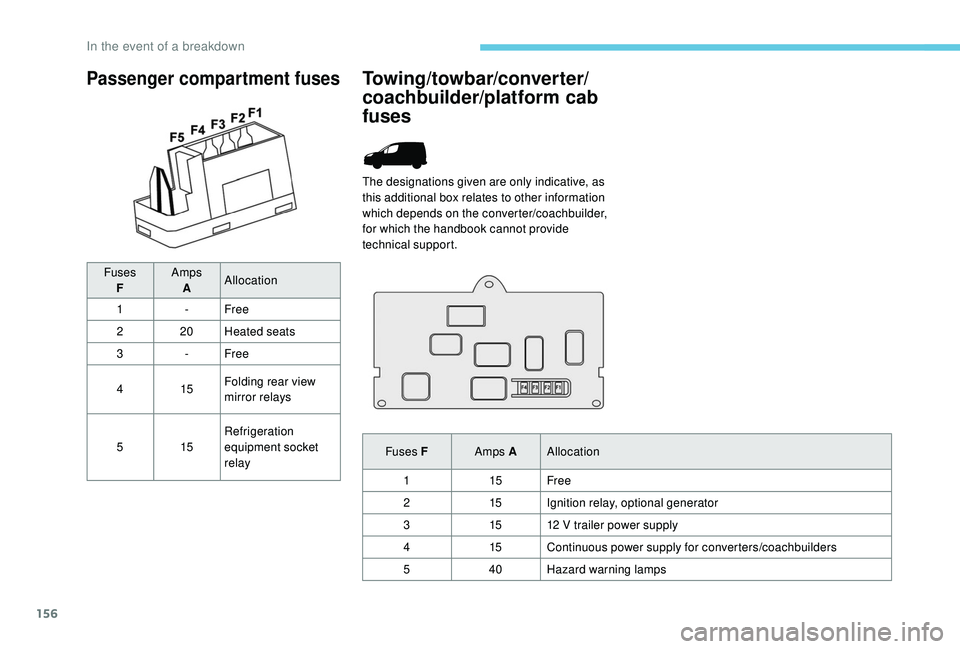
Passenger compartment fuses
FusesF Amps
A Allocation
1 -Free
2 20Heated seats
3 -Free
4 15Folding rear view
mirror relays
5 15Refrigeration
equipment socket
relay
Towing/towbar/converter/
coachbuilder/platform cab
fuses
The designations given are only indicative, as
this additional box relates to other information
which depends on the converter/coachbuilder,
for which the handbook cannot provide
technical support.
Fuses F Amps AAllocation
1 15Free
2 15Ignition relay, optional generator
3 1512
V trailer power supply
4 15Continuous power supply for converters/coachbuilders
5 40Hazard warning lamps
In the event of a breakdown
Page 197 of 252
159
Economy mode
When the engine is switched off and the key is
left in the ignition on position, certain functions
(windscreen wipers, electric windows, courtesy
lamps, audio system, etc.) can be used for a
combined duration of no more than than thirty
minutes, so as not to discharge the battery.
After thirty minutes the active functions are
put on standby and the battery warning lamp
flashes with a message displayed in the screen.
In order to restore the use of these functions
immediately, start the engine and let it run for a
few minutes.
The time available to you will then be double
the period for which the engine is left running.
However, this period will always be between
five and thirty minutes.The engine will not start if the battery is
discharged.
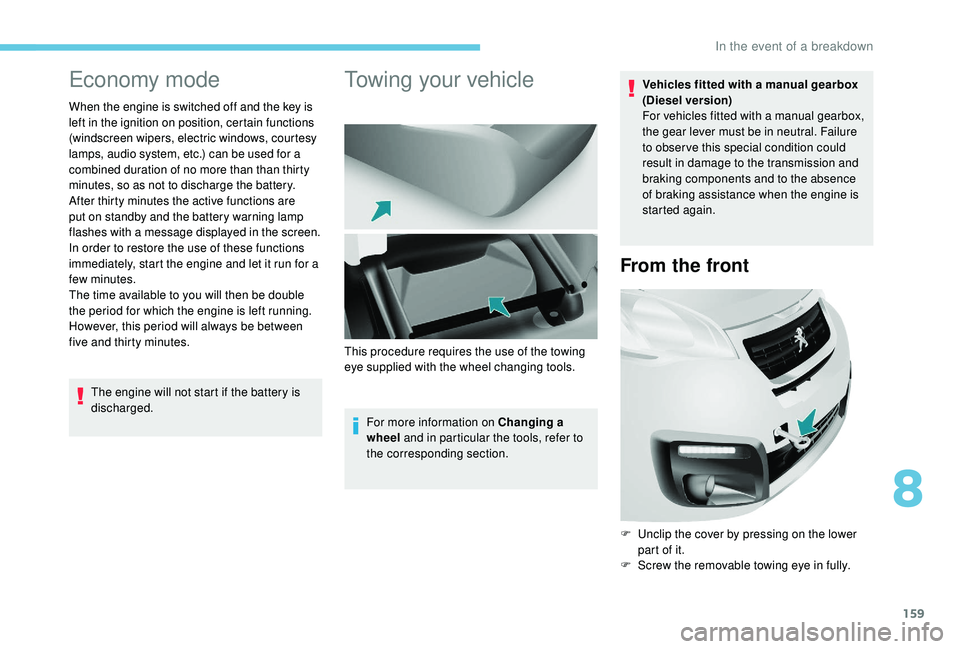
Towing your vehicle
For more information on Changing a
wheel and in particular the tools, refer to
the corresponding section. Vehicles fitted with a manual gearbox
(Diesel version)
For vehicles fitted with a manual gearbox,
the gear lever must be in neutral. Failure
to obser ve this special condition could
result in damage to the transmission and
braking components and to the absence
of braking assistance when the engine is
started again.
From the front
F Unclip the cover by pressing on the lower
part of it.
F
S
crew the removable towing eye in fully.
This procedure requires the use of the towing
eye supplied with the wheel changing tools.
8
In the event of a breakdown
Page 218 of 252
6
It is now possible to activate Risk areas alerts
then:
-
"
Audible warning"
-
"
Alert only when navigating"
-
"
Alert only for overspeed"
-
"
Display speed limits"
-
"
Timing": the choice of timing allows the
time before giving a Risk areas alert to be
defined.
Select " Confirm ".
This series of alerts and displays is only
available if Risk areas have first been
downloaded and installed on the system.
Traffic information
Display of messages
Press Navigation to display the
primary page.
Press on the secondary page. Select "Traffic messages ".
Choose filter settings for:
" On the route ", "
Around ",
" Near destination ", to fine-tune the list of
messages.
Press again to remove the filter.
Select the message from the list offered.
Select the magnifying glass to have
spoken information.
TMC (Traffic Message Channel)
messages on GPS-Navigation contain
traffic information transmitted in real time.
Setting filters
Press Navigation to display the
primary page.
Press on the secondary page. Select "Settings ".
Select " Traffic options ". Select:
-
"
Be advised of new
messages ",
- "
Speak messages ",
Then enter the filter radius.
Select " Confirm ".
We recommend a filter radius of:
-
1
2 miles (20 km) in urban areas,
-
3
0 miles (50 km) on motor ways.
Play TA messages
Press Navigation
to display the
primary page.
Press on the secondary page. Select "Settings ".
Select " Voice".
Activate/Deactivate " Traffic (TA)".
7-inch touch screen
Page 230 of 252
18
Navigation
QUESTIONRESPONSESOLUTION
The route calculation is not successful. The guidance criteria may be in conflict with the
current location (exclusion of toll roads on a toll
road).Check the route settings in the "Navigation"
menu.
The POIs do not appear. The POIs have not been selected.Select the POIs in the list of POIs.
The "Risk areas" audible warning does not
work. The audible warning is not active.
Activate audible warnings in the "Navigation"
menu.
The system does not suggest a detour around
an incident on the route. The guidance criteria do not take account of
TMC messages.Select the "Information-Ser vice" function in the
list of guidance criteria.
I receive a "Risk areas" alert which is not on my
route. If guidance is not active, the system announces
all "Risk areas" positioned in a cone located in
front of the vehicle. It may provide an alert for
"Risk areas" located on nearby or parallel roads.Zoom in on the map to see the exact position
of the "Risk areas". Select "On the route" to no
longer receive alerts except during guidance or
to reduce the time for the announcement.
Certain traffic jams along the route are not
indicated in real time. On starting, it is several minutes before the
system begins to receive the traffic information.Wait until the traffic information is being
received correctly (display of the traffic
information icons on the map).
The filters are too restrictive. Change the settings.
In certain countries, only major routes
(motor ways, etc.) are listed for the traffic
information. This is per fectly normal. The system is
dependent on the traffic information available.
The altitude is not displayed. On starting, the initialisation of the GPS may
take up to 3
minutes to receive more than 4
satellites correctly. Wait until the system has started up completely
so that there is GPS coverage by at least
4
satellites.
Depending on the geographical environment
(tunnel, etc.) or the weather, the conditions of
reception of the GPS signal may vary. This is per fectly normal. The system is
dependent on the GPS signal reception
conditions.
7-inch touch screen
Page 247 of 252
177
Socket, 12 V ....................................................64
S ocket, auxiliary ............................................ 9,
5
Socket, Jack
.................................................. 9, 5
Sockets, auxiliary
...............................
.............55
Speed limiter
.......................................... 11
5 -117
Stability control (ESC)..................................... 80
Starting a Diesel engine
............................... 12
8
Station, radio
...............................
..............7- 8, 3
Steering mounted controls, audio
.................... 2
S
teering wheel adjustment
.............................37
Stop & Start
................15, 69 , 108 -110 , 13 8, 15 8
Storage
............................................................ 55
Storage compartments
...................................54
TTable, writing ................................................... 55
Ta n k , f u e l ....................................................... 126
Telephone
..............................
............14 -16, 6-8
Time (setting)
............................................ 23 -24
TMC (Traffic info)
.............................................. 6
T
ouch screen ..................................................... 1
Towball, quickly detachable
..........................131
To w b a r
...............................
......103 -104 , 131-13 3
Towbar with quickly detachable towball
....... 13
1
Towed loads
.................................................. 161
Traction control (ASR)
........................12, 80 - 81
Traffic information (TA)
.................................6, 4
Traffic information (TMC)
..................................6
Tr a i l e r
...............
.............................. 103 -104, 131
Trip computer
............................................ 22-23
Tyre under-inflation detection
...........12, 112 -114
UUpdating risk areas ........................................... 5
Updating the date ............................................ 24
U
pdating the time
...............................
.......23 -24
UREA warning lamp
....................................... 21
USB
...................................................... 9 -10, 4, 6
VVentilation ....................................................... 69
Voice recognition ....................................... 13 -14
WWarning and indicator lamps ............................8
We ights ............... .......................................... 161
Window controls
....................................... 35-36
Wiper blades (changing)
...............................13 0
.
Alphabetical index