ignition Seat Alhambra 2011 Repair Manual
[x] Cancel search | Manufacturer: SEAT, Model Year: 2011, Model line: Alhambra, Model: Seat Alhambra 2011Pages: 385, PDF Size: 7.92 MB
Page 175 of 385
173
Driving WARNING
Cold start sprays could explode or cause a sudden increase in the engine
speed.
● Nev er u
se start boosters. CAUTION
● An attempt to start the engine while driving or starting the engine imme-
di at
ely after turning it off can cause damage to the engine or starter motor.
● When the engine is cold, avoid high revs and heavy acceleration and do
not mak
e the engine work hard.
● Do not push or tow start the engine. Sunburnt fuel could damage the
catalytic
converter. For the sake of the environment
Do not warm the engine at idle speed; start driving immediately if the visi-
bi lity
is OK. This helps the engine reach operating temperature faster and
reduces emissions. Note
● For example, if the key battery is very worn or flat, the engine cannot be
s t
arted with the starter button. In this case, remove the ignition button from
the lock and insert the key.
● Electrical components with a high power consumption are switched off
temporari
ly when the engine starts.
● When the engine is started cold, there may be strong vibrations for a few
moments for t
echnical reasons. This is quite normal, and no cause for con-
cern.
● At temperatures below +5°C (+41°F), smoke may be given off below the
vehicl
e when the additional heater is connected. Stopping the engine Complete operations only in the sequence given:
Step
1. Stopping the vehicle completely
⇒ .
2. Press the brake pedal and keep pressed until step 4 has been
comp
l
eted. 3. In automatic gearboxes, put the selector lever in position
P. 4. Connect the electronic parking brake
⇒ page 183. 5. Turn the key in the ignition lock to position
⇒ fig. 127 0 .
6. With a manual gearbox, put the vehicle in first or reverse gear.
WARNING
Never switch off the engine while the vehicle is moving. You may lose
contr o
l of the vehicle and there is a risk of serious accident.
● The airbags and belt tensioners do not work when the ignition is
switc
hed off.
● The brake servo does not work when the engine is not running. To
stop
, the brake pedal must be pressed with more force.
● As the power steering does not work if the engine is not running, you
wil
l need more strength to steer than normally.
● If the key is removed from the ignition, the steering may lock and it
wil
l not be possible to steer the vehicle. CAUTION
If the engine has been driven at high speed for a prolonged period of time,
it m a
y overheat when turned off. To avoid engine damage, allow the engine
to run for approximately two minutes in neutral before switching it off. Safety First Operating instructions Practical tips Technical Data
Page 176 of 385
174
Driving Note
● In vehicles with automatic gearbox, the key can only be removed when
the sel ect
or lever is in position P.
● After stopping the engine, the engine compartment fan may continue
running f
or a few minutes, even when the ignition has been switched off or
the key removed. The radiator fan is automatically switched off.
Electronic immobiliser The gear lock prevents the engine from being started with an unauthorised
key
and the
vehicle being moved.
The vehicle key has a built-in chip. It automatically deactivates the immobil-
izer when the key is inserted into the ignition lock.
For this reason, the vehicle can only be used with a genuine SEAT key with
the correct code. Coded keys can be obtained from your Authorised Service
Centre ⇒ page 71. If an unauthorised key is used, the message SAFE or Immobiliser active is
displayed on the instrument panel. The vehicle cannot be started in this
case Note
The correct operation of the vehicle is only guaranteed when original SEAT
key s
are used. Changing gear
Introduction When reverse gear is engaged and the ignition is switched on the following
tak
e
s place:
● Reverse lights light up.
● When reversing, the air conditioner automatically changes to air recircu-
lation mode.
● The re
ar window heater switches on when the windscreen wiper is acti-
vated.
● A
lso, the parking sensor system, the optical parking sensor and the
camera f
or the reverse assist system are connected.
Additional information and warnings:
● Instruments ⇒ page 57
● Br
aking, stopping and parking ⇒ page 183
● P
arking sensor system ⇒ page 198
● P
ark Assist system ⇒ page 202
● R
everse assist system (Rear Assist) ⇒ page 207
● Air c
onditioning ⇒ page 155
● El
ectronic power control and exhaust gases purification system
⇒ page 228
● Emer
gency locking and unlocking ⇒ page 314 WARNING
Rapid acceleration can cause loss of traction and skidding, especially on
slip per
y ground. This could cause loss of control of the vehicle resulting
in an accident and considerable damage.
● Only use the kickdown or rapid acceleration if visibility, weather, road
and traffic c
onditions so permit.
Page 177 of 385
175
Driving WARNING
Do not allow the brakes to “rub” for a prolonged period of time, or brake
frequently or f
or long periods of time. Continuous braking heats up the
brakes. This could significantly reduce braking power, increase braking
distance or even result in the total failure of the brake system. CAUTION
● Never make the brakes slip by pressing the pedal gently, if it is not really
nec e
ssary to brake. This will increase wear.
● Reduce speed, move down a gear or select a shorter range of gears be-
fore lon
g steep slopes. This allows you to use the engine braking effect and
to reduce the strain on the brake system. Otherwise, the brakes may over-
heat and fail. Only use the brakes to reduce speed or to stop.
Warning and control lamps lights up Possible cause Solution
(red) Brake pedal not pressed! Press brake pedal to the floor.
(green) Brake pedal not pressed. To select a range of gears, press
the brak
e ped
al.
Please also see "Electronic park-
ing brake" ⇒ page 183. flashes Possible cause Solution
(green) The selector lever locking but-
ton h
a
s not engaged. The ve-
hicle does not start to move. Engage the selector lever lock
⇒ pag
e 178. Several warning and control lamps should light up for a few seconds when
the ignition is
sw
itched. This signals that the lamp is working properly. They
will switch off after a few seconds. WARNING
If the warning lamps and messages are ignored, the vehicle may stall in
traffic, or m a
y cause accidents and severe injuries.
● Never ignore the warning lamps or text messages.
● Stop the vehicle safely as soon as possible.
● If the vehicle stops and must be stopped for repairs, always park a
safe di
stance from surrounding traffic, turn on the hazard warning lights,
stop the engine and take all of the safety measures necessary to warn
other road users. CAUTION
Failure to heed the warning lamps and text messages when they appear
ma y
result in faults in the vehicle. Safety First Operating instructions Practical tips Technical Data
Page 180 of 385
178
Driving
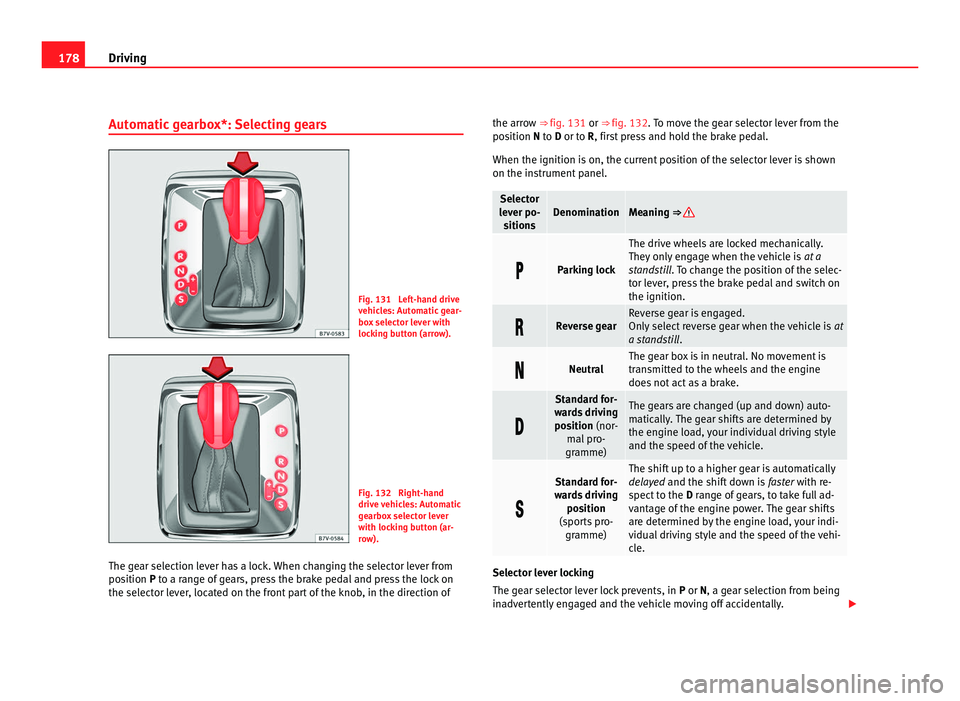
Automatic gearbox*: Selecting gears Fig. 131 Left-hand drive
vehic
l
es: Automatic gear-
box selector lever with
locking button (arrow). Fig. 132 Right-hand
drive
v
ehicles: Automatic
gearbox selector lever
with locking button (ar-
row).
The gear selection lever has a lock. When changing the selector lever from
position
P to a range of gears, press the brake pedal and press the lock on
the selector lever, located on the front part of the knob, in the direction of the arrow ⇒ fig. 131 or ⇒
fig. 132.
To move the gear selector lever from the
position N to D or to R, first press and hold the brake pedal.
When the ignition is on, the current position of the selector lever is shown
on the instrument panel. Selector
lev er po-
s
itions Denomination Meaning ⇒
Parking lock The drive wheels are locked mechanically.
They on
ly
engage when the vehicle is at a
standstill. To change the position of the selec-
tor lever, press the brake pedal and switch on
the ignition. Reverse gear Reverse gear is engaged.
Only
sel
ect reverse gear when the vehicle is at
a standstill . Neutral The gear box is in neutral. No movement is
tran
smitt
ed to the wheels and the engine
does not act as a brake. Standard for-
war d
s driving
position (nor- mal pro-
gramme) The gears are changed (up and down) auto-
matic
al
ly. The gear shifts are determined by
the engine load, your individual driving style
and the speed of the vehicle. Standard for-
war d
s driving
position
(sports pro- gramme) The shift up to a higher gear is automatically
dela
y
ed and the shift down is faster with re-
spect to the D range of gears, to take full ad-
vantage of the engine power. The gear shifts
are determined by the engine load, your indi-
vidual driving style and the speed of the vehi-
cle. Selector lever locking
The ge
ar sel
ector lever lock prevents, in P or N, a gear selection from being
inadvertently engaged and the vehicle moving off accidentally.
Page 181 of 385
179
Driving
To release the gear selector lever lock, press and hold the brake pedal with
the ignition on. Pre s
s simultaneously on the selector lever lock.
The selector lever lock is not engaged if the selector lever is moved quickly
through position N (e.g. when shifting from R to D). This makes it possible,
for instance, to rock the vehicle backwards and forwards if it is stuck in
snow or mud. The selector lever lock engages automatically if the brake
pedal is not pressed and the lever is in position N for more than about one
second at a speed of less than 5 km/h (3 mph).
In vehicles with a DSG ®
automatic gearbox, on rare occasions the selector
lever lock may not engage. In this case, the transmission is locked to pre-
vent the vehicle from moving accidentally. The green control light flashes
and an information text is displayed. Proceed as follows to engage the se-
lector lever lock:
● Press the brake pedal and then release. WARNING
Placing the selector lever in an incorrect position may cause loss of con-
tro l
of the vehicle and a serious accident.
● Do not press the accelerator when engaging a range of gears.
● With the engine running and a range of gears selected, the vehicle
wil
l move off when the brake pedal is released.
● Never select reverse gear or the parking lock while driving. WARNING
Unintentional movements of the vehicle could cause serious injury.
● As a driver, you should never leave your vehicle if the engine is run-
ning and a g e
ar is engaged. If you have to leave your vehicle while the
engine is running, you must apply the electronic parking brake and en-
gage parking lock P. WARNING (Continued)
● Whi le the engine is running and with the D, S or R range of gears se-
l ect
ed, keep the brake pressed to keep the vehicle at a standstill. Trans-
mission is not totally interrupted either when the vehicle is idling or
when the vehicle continues moving forwards.
● Never engage the R or P gear ranges when the vehicle is moving.
● Never leave the vehicle with the gear selector in N. The vehicle may
move do
wnhill regardless of whether the engine is switched on or not. CAUTION
If, when the vehicle is at a standstill, the electronic parking brake is not ap-
plied and the br ak
e pedal is released while in position P, the vehicle may
move a few centimetres forwards or backwards. Note
If, while driving, the selector lever is accidentally placed in position N, lift
y our f
oot off the accelerator. Wait until the engine is running at idle speed
before selecting a new gear ratio. Safety First Operating instructions Practical tips Technical Data
Page 185 of 385
183
Driving
Braking, stopping and parking
Introduction The assisted braking systems include the anti-lock braking system (ABS),
the br
ak
e assist system (BAS), the electronic differential system (EDS), the
ASR traction control system (TCS) and the ESC electronic stabilisation pro-
gram (ESP).
Additional information and warnings:
● Towing mode ⇒ page 233
● St
art assist systems ⇒ page 194
● Wheel
s and tyres ⇒ page 293
● A
ccessories, parts replacement, repairs and modifications ⇒ page 257WARNING
Driving with worn brake pads or a faulty brake system may lead to seri-
ous ac
cident.
● If lights, alone or accompanied by a warning message on the in-
strument
panel, please go immediately to a specialist workshop to check
the brake pads and to replace them if they are worn. WARNING
Careless parking can cause serious injury.
● Never remove the key from the ignition if the vehicle is in motion. The
st eerin
g lock may engage and locked the steering wheel making the vehi-
cle impossible to control. WARNING (Continued)
● Always park your vehicle so that no part of the exhaust system can
c ome in c
ontact with flammable materials (such as wood, leaves, spilled
fuel, dried grass, etc).
● Always apply the electronic parking brake when you leave your vehi-
cle and when
you park.
● Never leave children or disabled people alone in the vehicle. They
coul
d release the electronic parking brake, activate the selector lever or
gear stick and start the vehicle moving. This could result in serious acci-
dent.
● Always take all the keys with you whenever you leave the vehicle. The
engine cou
ld accidentally be started and electrical equipment such as
the windows could accidentally be operated resulting in serious injury.
● Never leave children or disabled people alone in the car. They could
be trapped in the c
ar in an emergency and will not be able to get them-
selves to safety. For example, depending on the time of the year, temper-
atures inside a locked and closed vehicle can be extremely high or ex-
tremely low resulting in serious injuries and illness or even death, partic-
ularly for young children. CAUTION
● Special care should be taken when parking in areas with high kerbs or
fi x
ed barriers. Objects protruding from the ground may damage the bumper
or other parts of the vehicle during manoeuvres. To avoid damage, stop be-
fore the wheels touched the barrier or kerb.
● Special attention is required when driving through entrances, over
ramps, k
erbs or other objects. The vehicle underbody, bumpers, mudguards
and running gear, and the engine and exhaust system could be damaged as
you drive over these objects. Safety First Operating instructions Practical tips Technical Data
Page 186 of 385
184
Driving
Warning and control lamps lights up Possible cause ⇒ Solution
(red) Together with the control
lamp
on the b
utton: Elec-
tronic parking brake on. ⇒ page 185
Fault in the brake system
Stop the vehicle!
Seek pr
ofessional assistance!
⇒ page 187. Brake fluid level inadequate.
Do not drive on!
Chec k
brake fluid level
⇒ page 192. Together with the ABS con-
tro
l
lamp : ABS fault. Contact a specialist workshop.
The v
ehic
le can be braked with-
out ABS. (red) Brake pedal not pressed! Press brake pedal to the floor.
(yel-
lo w) Front brake pads worn. Contact a specialist workshop
immediat
ely
. Inspect all the
brake pads and replace as nec-
essary.
(yel-
lo w) ESC (ESP) disconnected by
sys
t
em. Switching the ignition on and
off If
nec
essary, drive for a short
distance. Fault in ESC (ESP). Contact a specialist workshop.
Together with the ABS con-
tro
l
lamp : Fault in ABS. Contact a specialist workshop.
The v
ehic
le can be braked with-
out ABS. The battery has been recon-
nected.
⇒ page 288
(yellow) ASR (TCS) manually deactiva-
ted. Turn on the ASR (TCS)
⇒ pag
e 191. ASR (T
CS) is auto-
matically activated when the ig-
nition is switched on or off. lights up Possible cause ⇒ Solution
(yel-
lo w) Together with the ESC (ESP)
contr
o
l lamp : Fault in ABS. Contact a specialist workshop.
The v
ehic
le can be braked with-
out ABS. Together with the warning
lamp
or : ABS fault. (yel-
lo w) Together with the warning
lamp
flashing: Electronic
parking brake faulty. Contact a specialist workshop.
(green) Brake pedal not pressed. Press the brake pedal to select
a ge
ar r
atio. Press the brake pedal to discon-
nect the el
ectr
onic parking
brake ⇒ page 185. flashes Possible cause ⇒ Solution
(red) Electronic parking brake faul-
ty.
The c
ontrol lamp may
light up at the same time or
the control lamp may flash
on the button. Contact a specialised work-
shop, a
s
it may not be possible
to park the vehicle in safety. (yel-
lo w) ESC (ESP) or ASR (TCS) regu-
lat
or
. Take your foot off the accelera-
tor
. Adju
st your driving style to
the road conditions. Several warning and control lamps should light up for a few seconds when
the ignition is
sw
itched. This signals that the lamp is working properly. They
will switch off after a few seconds. WARNING
If the warning lamps and messages are ignored, the vehicle may stall in
traffic, or m a
y cause accidents and severe injuries.
● Never ignore the warning lamps or text messages.
● Stop the vehicle safely as soon as possible.
Page 187 of 385
185
Driving WARNING
Driving with brakes in bad condition could result in a serious accident.
● If the brake warning lamp does not go out, or if it lights up when
driving, the brake fluid level in the reservoir is too low or there is a fault
in the brake system. Obtain professional assistance immediately
⇒ page 191, Brake fluid.
● If the brake warning lamp lights up t
ogether with the ABS warning
lamp , the regulation function of the ABS could be malfunctioning. As a
result, the rear wheels can lock relatively easily when braking. If the rear
wheels lock this could result in loss of vehicle control! If possible, reduce
your speed and drive carefully to a specialist workshop close by to check
the brake system. During the following journey, avoid sudden braking
and manoeuvres.
● If the ABS warning lamp does not
go out or if it lights while driv-
ing, the ABS is malfunctioning. The vehicle can only be stopped using
normal braking without ABS. The protection provided by the ABS is not
available. Visit a specialised workshop as soon as possible.
● If lights, alone or accompanied by a warning message on the in-
strument
panel screen, please go immediately to a specialist workshop
to check the brake pads and to replace them if they are worn. CAUTION
Failure to heed the warning lamps and text messages when they appear
ma y
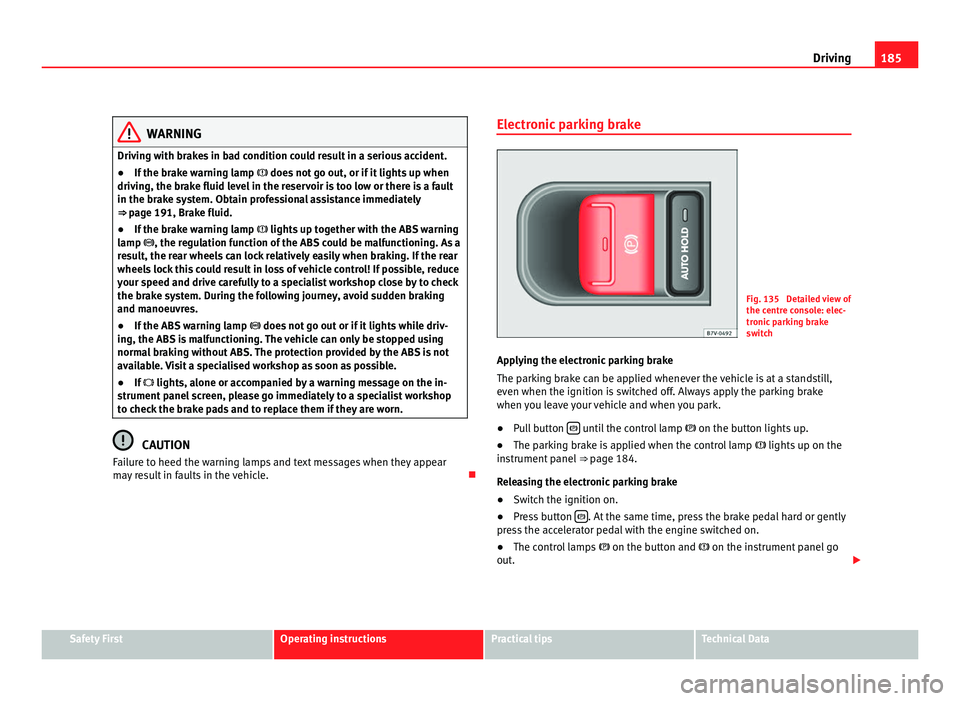
result in faults in the vehicle. Electronic parking brake Fig. 135 Detailed view of
the centr
e c
onsole: elec-
tronic parking brake
switch
Applying the electronic parking brake
The parkin
g brake can be applied whenever the vehicle is at a standstill,
even when the ignition is switched off. Always apply the parking brake
when you leave your vehicle and when you park.
● Pull button until the control lamp
on the button lights
up.
● The parking brake is applied when the control lamp lights up on the
ins
trument panel ⇒ page 184.
Releasing the electronic parking brake
● Switch the ignition on.
● Press button . At the same time, press the brake pedal hard or gently
pre s
s the accelerator pedal with the engine switched on.
● The control lamps on the button and
on the instrument panel go
out. Safety First Operating instructions Practical tips Technical Data
Page 188 of 385
186
Driving
Automatic release of the electronic parking brake on starting the engine
The electr onic
parking brake is automatically released when the vehicle
starts moving, if the driver's door is closed and the driver is wearing his/her
seat belt. In vehicles with a manual gearbox the clutch pedal should also be
pressed to the floor before starting the engine so that the system recogni-
ses that the parking brake should be released.
Emergency braking function
Only use the emergency braking function if the vehicle cannot be stopped
with the brake pedal ⇒ !
● Pull button hard to stop the vehicle. The warning display will be ac-
c omp
anied by the corresponding warning chime.
● To stop the braking process, release the button or press the accelerator. WARNING
The incorrect use of the electronic parking brake may result in serious ac-
cident .
● Nev
er use the electronic parking brake to brake the vehicle except in
an emergency
. The braking distance is considerably longer, because
braking is only applied to the rear wheels. Always use the foot brake.
● Never accelerate from the engine compartment with the engine run-
ning and a ge
ar or a gear range engaged. The vehicle could move, even if
the parking brake is applied. Note
● In vehicles with a manual gearbox: When the clutch pedal is released
and the ac c
elerator pressed at the same time, the electronic parking brake
is automatically released.
● If the vehicle battery is flat, it will not be possible to disconnect the elec-
tronic p
arking brake. Use the jump-start ⇒ page 337. ●
When the electronic
parking brake is applied or released, noises may be
heard.
● If the electronic parking brake has not been used for a long while, the
syst
em sometimes performs automatic and audible checks while the vehi-
cle is at a standstill.
Parking When parking your vehicle, all legal requirements should be observed.
To p
ark
the vehicle
Complete operations only in the sequence given.
● Park the vehicle on a suitable surface ⇒ .
● Press and hold the brake pedal until the vehicle comes to a standstill.
● Connect the electronic parking brake ⇒ page 185.
● F
or an automatic gearbox, move the selector lever to position P.
● Switch off the engine and release the brake pedal.
● Remove the key from the ignition.
● If necessary, turn the steering wheel slightly to lock the steering.
● With a manual gearbox, engage the 1st gear on flat ground and slopes,
or even the rev
erse gear on hills, and release the clutch pedal.
● Ensure that all passengers leave the vehicle, especially children.
● When leaving the vehicle, take all keys with you.
● Lock the vehicle.
Additiona
l information for steep slopes and hills
Before switching off the engine, rotate the steering wheel so that if the vehi-
cle should move then it will be held by the kerb.
Page 191 of 385
189
Driving Note
When checking the front brake pads, take the time to also check the rear
brak e p
ads. The thickness of the brake pads should be checked visually and
regularly, by looking through the openings in the wheel rims or from under-
neath the vehicle. If necessary, remove the wheels to check them thorough-
ly. SEAT recommends visiting a Technical Service.
Assisted braking systems The assisted braking systems ESC (ESP), ABS, BAS, ASR (TCS) and EDS only
operat
e when the ignition i
s switched on. They contribute significantly to in-
creasing active safety.
Electronic stability programme ESC (ESP)
ESC (ESP) reduces the risk of skidding and increases the vehicle stability by
braking individual wheels under specific driving conditions. ESC (ESP) de-
tects critical handling situations, such as understeer, oversteer and wheel-
spin on the drive wheels. The system stabilises the vehicle by braking indi-
vidual wheels or by reducing the engine torque.
The ESC (ESP) has limits. It is important to realise that the ESC (ESP) is also
subject to the laws of physics. ESC (ESP) will not be able to deal with all sit-
uations with which drivers may be faced. For example, if the road surface
changes suddenly then ESC (ESP) will not be useful in all cases. If the vehi-
cle suddenly enters a section covered by water, mud or snow then ESC (ESP)
will not provide assistance in the same way as on dry ground. If the vehicle
loses its grip on the ground and moves on a film of water (“aquaplaning”),
the ESC (ESP) will not be able to assist the driver to control the vehicle due
to the loss of adherence with the road surface preventing braking and steer-
ing. If the vehicle is driven through series of bends at high speed, the ESC
(ESP) will not always be as effective: the vehicle reaction to aggressive driv-
ing is not the same as at reduced speeds. When driving with a trailer, ESC
(ESP) does not provide the same amount of vehicle control as without a
trailer. Adjust your speed and driving style to road, traffic and weather conditions.
ESC (E
SP) cannot push the limits of the laws of physics; improve the trans-
mission available or maintain the vehicle on the road if a lack of driver at-
tention creates an inevitable situation. Otherwise, ESC (ESP) assists in
maintaining vehicle control in extreme situations and uses the movements
of the steering made by the driver to maintain the vehicle moving in the de-
sired direction. If the vehicle is driven at such a speed that it will leave the
road before ESC (ESP) can intervene then the system cannot provide assis-
tance.
The ABS, BAS, ASR (TCS) and EDS systems are incorporated into the ESC
(ESP). The ESC (ESP) is always on. The ESC (ESP) should only be turned off
using the ASR (TCS) button ⇒ fig. 136 when traction is insufficient. Always remember to turn on the ASR (TCS) once more when the vehicle has traction
once again.
Anti-lock brake system (ABS)
ABS can prevent the wheels from locking during braking until just before
the vehicle stops thus helping the driver to steer the vehicle and maintain
control. This means that, even during full braking, the risk of skidding is re-
duced:
● Press and hold the brake pedal fully. Do not remove your foot from the
brake ped
al or reduce braking force!
● Do not “pump” the brake pedal, or reduce braking force!
● Maintain vehicle direction when braking fully.
● When the brake pedal is released or when the brake force is reduced,
ABS is
turned off.
ABS control can be observed by vibration of the brake pedal and noise. You
should never expect the ABS to reduce the braking distance under any cir-
cumstances. Braking distances will increase when driving on gravel, recent
snow or on icy and slippery ground.
When driving on loose ground, the all-terrain configuration of the ABS is au-
tomatically turned on. When ABS is activated, the front wheels may lock
briefly. This shortens the braking distance in off-road situations as the Safety First Operating instructions Practical tips Technical Data