engine ACURA NSX 1997 Service Repair Manual
[x] Cancel search | Manufacturer: ACURA, Model Year: 1997, Model line: NSX, Model: ACURA NSX 1997Pages: 1503, PDF Size: 57.08 MB
Page 781 of 1503
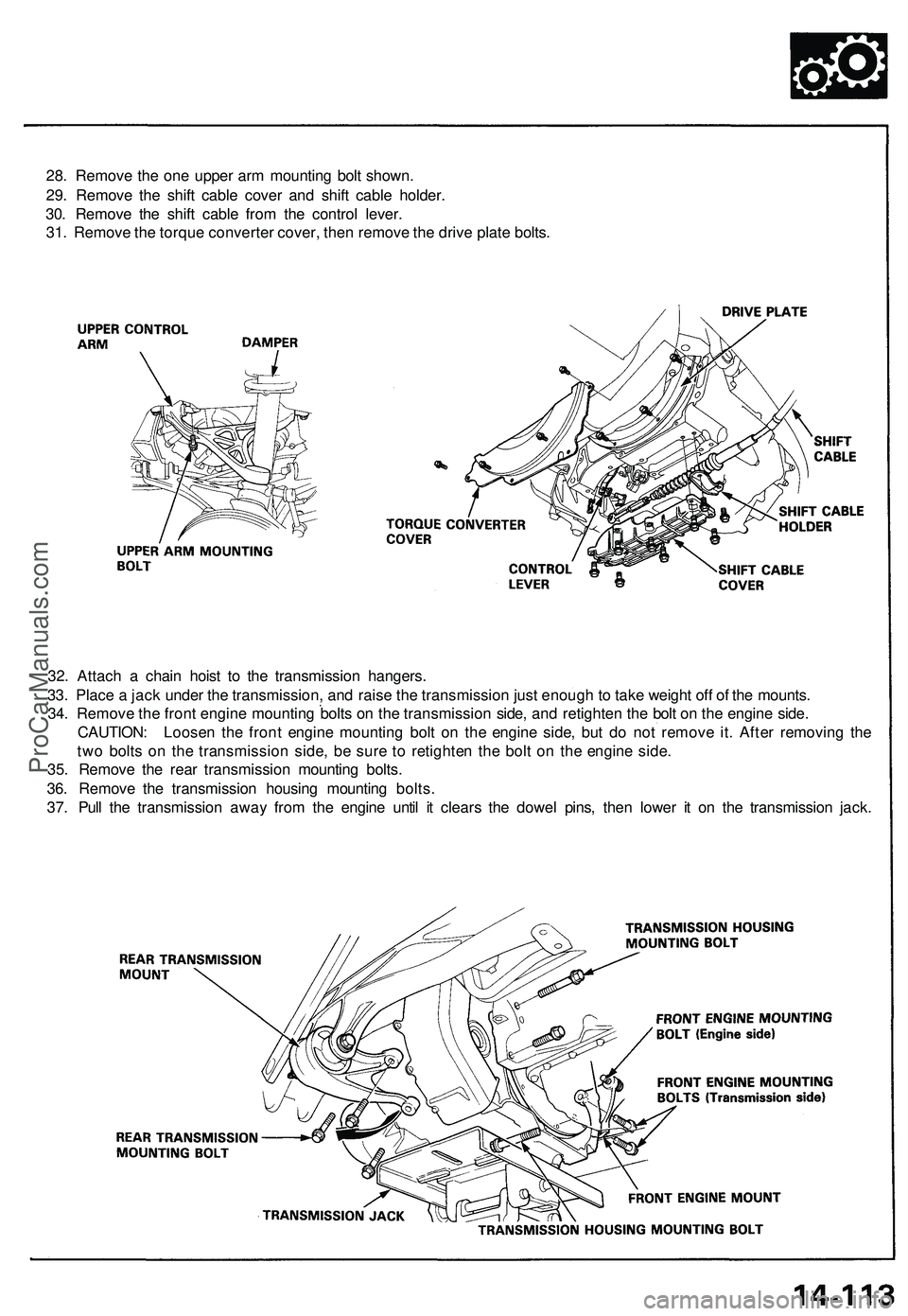
28. Remove the one upper arm mounting bolt shown.
29. Remove the shift cable cover and shift cable holder.
30. Remove the shift cable from the control lever.
31. Remove the torque converter cover, then remove the drive plate bolts.
32. Attach a chain hoist to the transmission hangers.
33. Place a jack under the transmission, and raise the transmission just enough to take weight off of the mounts.
34. Remove the front engine mounting bolts on the transmission side, and retighten the bolt on the engine side.
CAUTION: Loosen the front engine mounting bolt on the engine side, but do not remove it. After removing the
two bolts on the transmission side, be sure to retighten the bolt on the engine side.
35. Remove the rear transmission mounting bolts.
36. Remove the transmission housing mounting bolts.
37. Pull the transmission away from the engine until it clears the dowel pins, then lower it on the transmission jack.ProCarManuals.com
Page 835 of 1503
Transmission
Installation
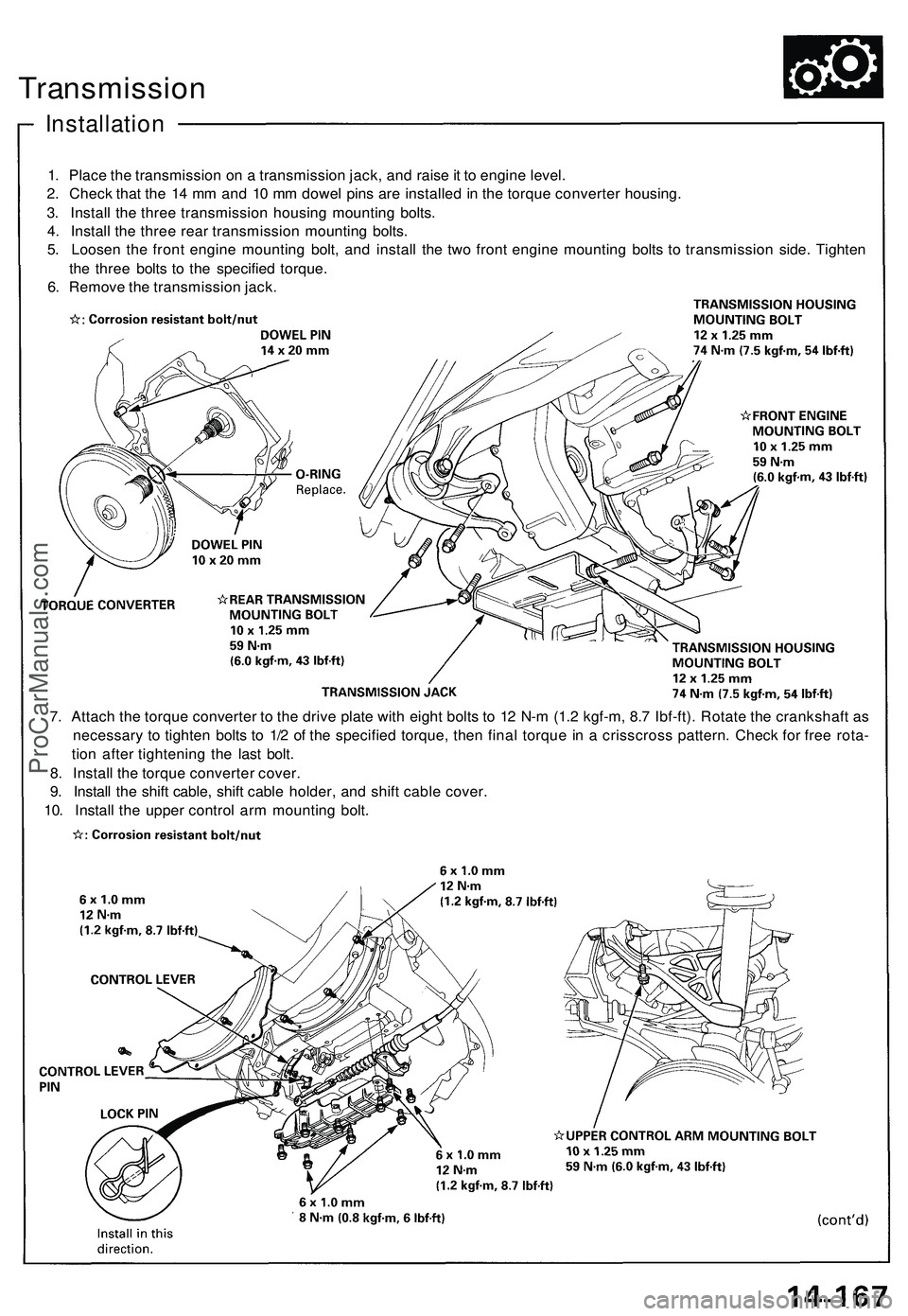
1. Place the transmission on a transmission jack, and raise it to engine level.
2. Check that the 14 mm and 10 mm dowel pins are installed in the torque converter housing.
3. Install the three transmission housing mounting bolts.
4. Install the three rear transmission mounting bolts.
5. Loosen the front engine mounting bolt, and install the two front engine mounting bolts to transmission side. Tighten
the three bolts to the specified torque.
6. Remove the transmission jack.
7. Attach the torque converter to the drive plate with eight bolts to 12 N-m (1.2 kgf-m, 8.7 Ibf-ft). Rotate the crankshaft as
necessary to tighten bolts to 1/2 of the specified torque, then final torque in a crisscross pattern. Check for free rota-
tion after tightening the last bolt.
8. Install the torque converter cover.
9. Install the shift cable, shift cable holder, and shift cable cover.
10. Install the upper control arm mounting bolt.ProCarManuals.com
Page 838 of 1503
Installation (cont'd )
Transmissio n
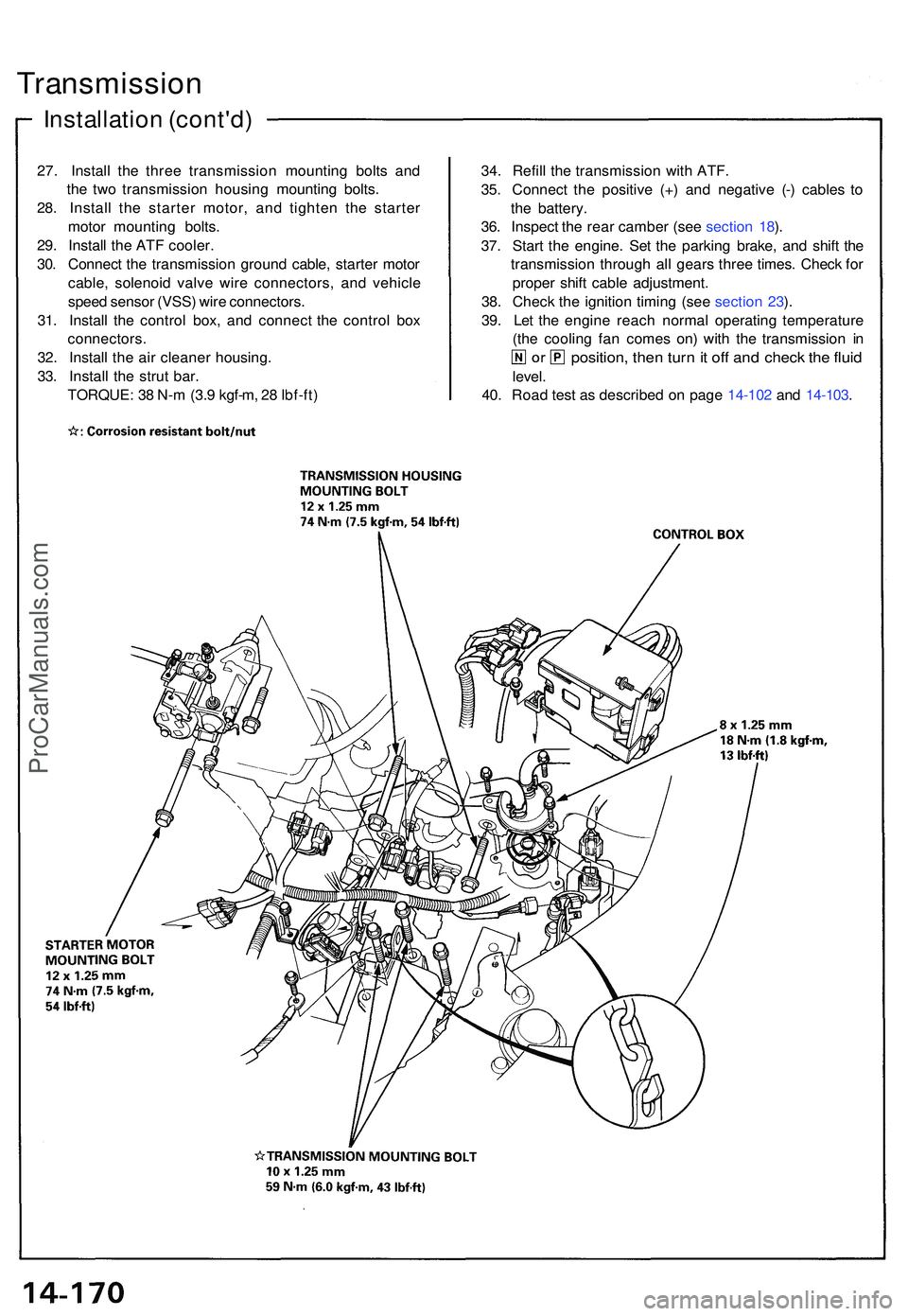
27. Instal l th e thre e transmissio n mountin g bolt s an d
th e tw o transmissio n housin g mountin g bolts .
28 . Instal l th e starte r motor , an d tighte n th e starte r
moto r mountin g bolts .
29 . Instal l th e AT F cooler .
30 . Connec t th e transmissio n groun d cable , starte r moto r
cable , solenoi d valv e wir e connectors , an d vehicl e
spee d senso r (VSS ) wir e connectors .
31 . Instal l th e contro l box , an d connec t th e contro l bo x
connectors .
32 . Instal l th e ai r cleane r housing .
33 . Instal l th e stru t bar .
TORQUE : 3 8 N- m (3. 9 kgf-m , 2 8 Ibf-ft ) 34
. Refil l th e transmissio n wit h ATF .
35 . Connec t th e positiv e (+ ) an d negativ e (- ) cable s t o
th e battery .
36 . Inspec t th e rea r cambe r (se e sectio n 18 ).
37 . Star t th e engine . Se t th e parkin g brake , an d shif t th e
transmissio n throug h al l gear s thre e times . Chec k fo r
prope r shif t cabl e adjustment .
38 . Chec k th e ignitio n timin g (se e sectio n 23 ).
39 . Le t th e engin e reac h norma l operating temperatur e
(th e coolin g fa n come s on ) wit h th e transmissio n i n
position , the n tur n it of f an d chec k th e flui d
level .
40 . Roa d tes t a s describe d o n pag e 14-10 2 an d 14-103 .
ProCarManuals.com
Page 839 of 1503
Shift Cabl e
Adjustmen t
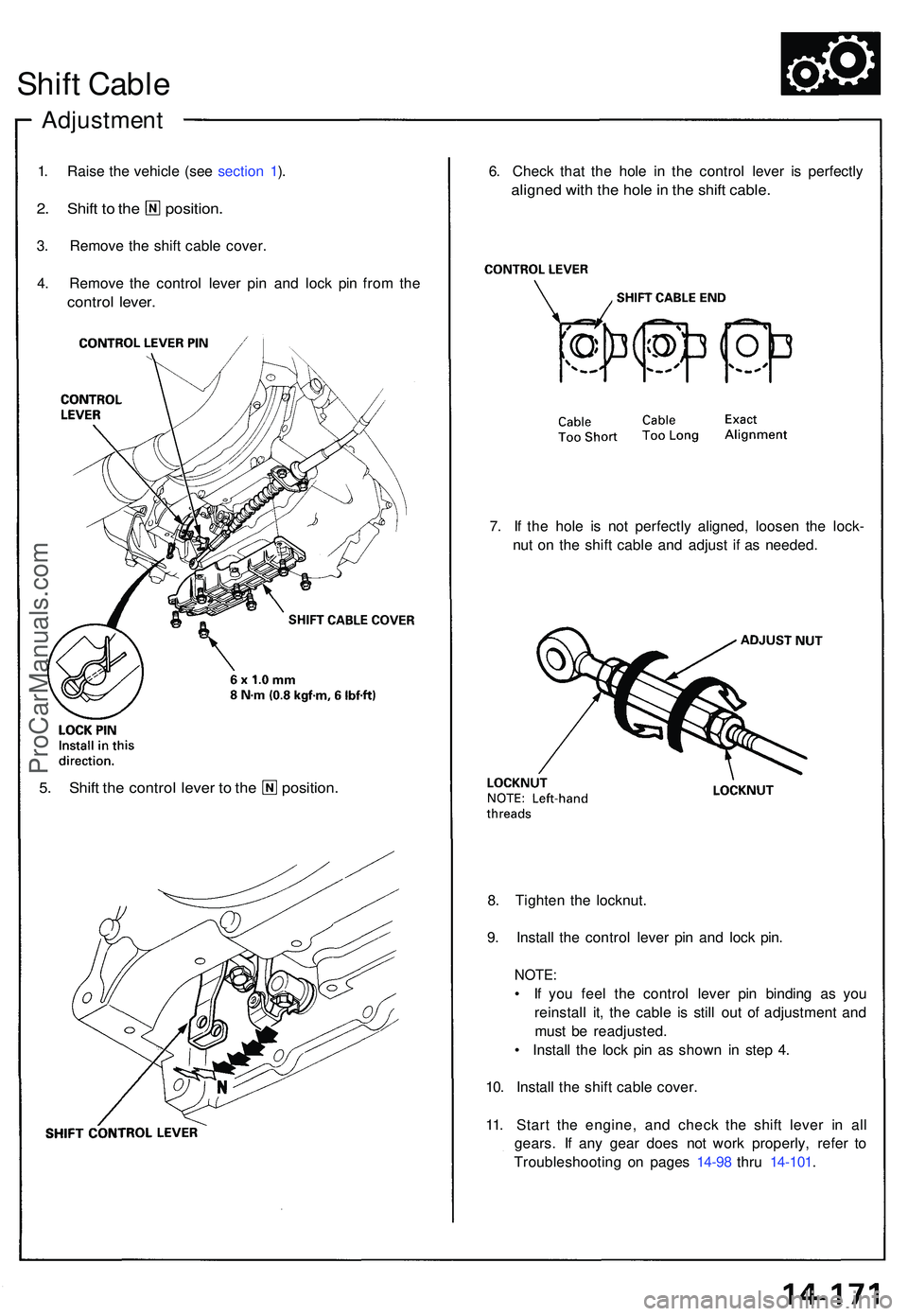
1. Rais e th e vehicl e (se e sectio n 1 ).
2 . Shif t t o th e position .
3. Remov e th e shif t cabl e cover .
4 . Remov e th e contro l leve r pi n an d loc k pi n fro m th e
contro l lever .
6. Chec k tha t th e hol e i n th e contro l leve r i s perfectl y
aligned wit h th e hol e in th e shif t cable .
7. I f th e hol e i s no t perfectl y aligned , loose n th e lock -
nu t o n th e shif t cabl e an d adjus t i f a s needed .
5. Shif t th e contro l leve r t o th e position .
8. Tighte n th e locknut .
9 . Instal l th e contro l leve r pi n an d loc k pin .
NOTE :
• I f yo u fee l th e contro l leve r pi n bindin g a s yo u
reinstal l it , th e cabl e i s stil l ou t o f adjustmen t an d
mus t b e readjusted .
• Instal l th e loc k pi n a s show n i n ste p 4 .
10 . Instal l th e shif t cabl e cover .
11 . Star t th e engine , an d chec k th e shif t leve r i n al l
gears . I f an y gea r doe s no t wor k properly , refe r t o
Troubleshootin g o n page s 14-9 8 thr u 14-101 .
ProCarManuals.com
Page 901 of 1503
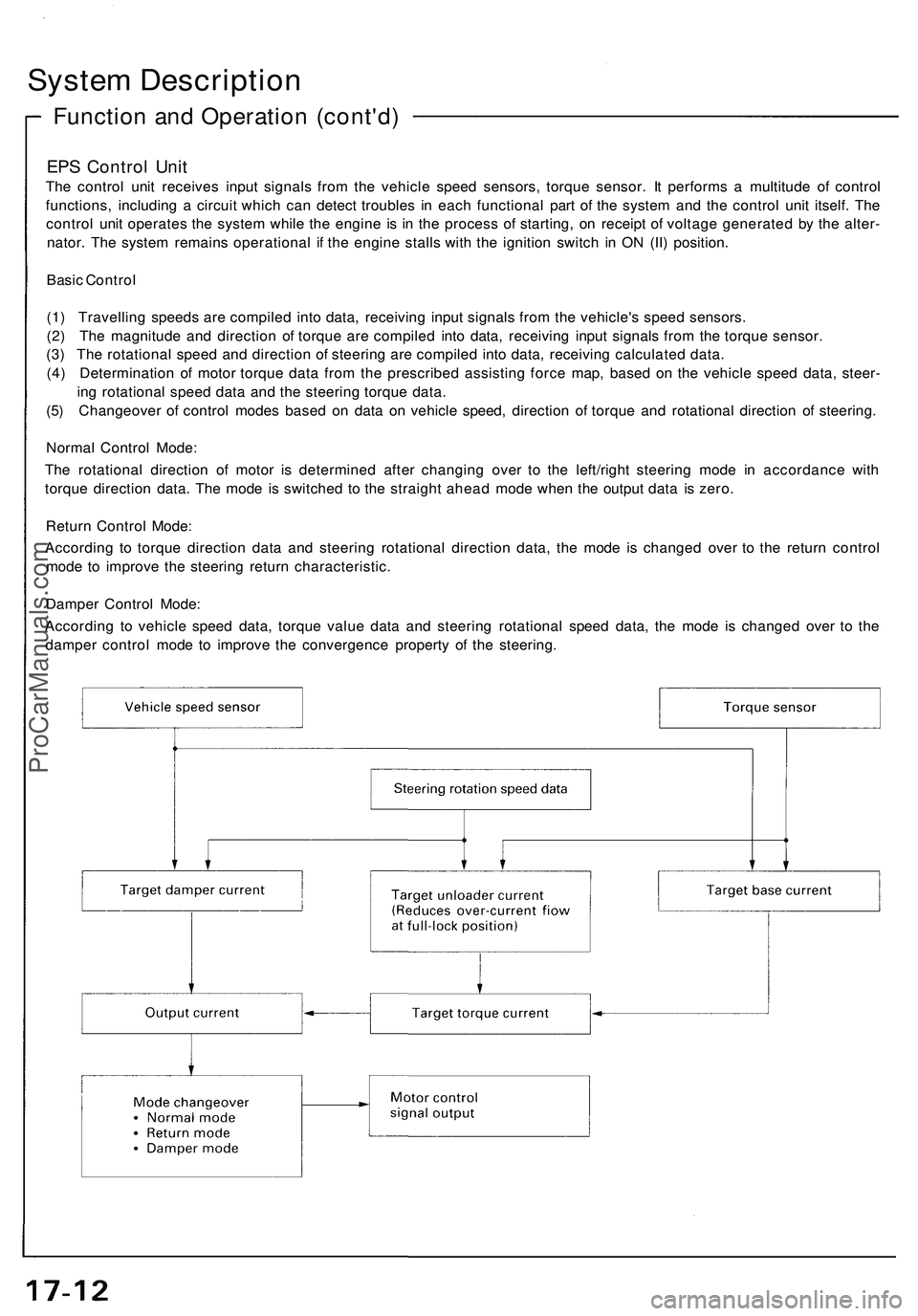
System Description
Function and Operation (cont'd)
EPS Control Unit
The control unit receives input signals from the vehicle speed sensors, torque sensor. It performs a multitude of control
functions, including a circuit which can detect troubles in each functional part of the system and the control unit itself. The
control unit operates the system while the engine is in the process of starting, on receipt of voltage generated by the alter-
nator. The system remains operational if the engine stalls with the ignition switch in ON (II) position.
Basic Control
(1) Travelling speeds are compiled into data, receiving input signals from the vehicle's speed sensors.
(2) The magnitude and direction of torque are compiled into data, receiving input signals from the torque sensor.
(3) The rotational speed and direction of steering are compiled into data, receiving calculated data.
(4) Determination of motor torque data from the prescribed assisting force map, based on the vehicle speed data, steer-
ing rotational speed data and the steering torque data.
(5) Changeover of control modes based on data on vehicle speed, direction of torque and rotational direction of steering.
Normal Control Mode:
The rotational direction of motor is determined after changing over to the left/right steering mode in accordance with
torque direction data. The mode is switched to the straight ahead mode when the output data is zero.
Return Control Mode:
According to torque direction data and steering rotational direction data, the mode is changed over to the return control
mode to improve the steering return characteristic.
Damper Control Mode:
According to vehicle speed data, torque value data and steering rotational speed data, the mode is changed over to the
damper control mode to improve the convergence property of the steering.ProCarManuals.com
Page 909 of 1503
Troubleshooting Precautions
EPS Indicator Light
Under normal conditions, the EPS indicator light in the gauge assembly comes on when the ignition switch is turned to
the ON (II) position, then goes off after the engine is started. This indicates that the bulb and its circuits are operating cor-
rectly. If there is any trouble in the system, the EPS indicator light turns on during driving, and the power steering assist is
turned off. When the EPS indicator light comes on, the control unit memorizes the DTC. In this case, the control unit does
not activate the EPS system after the engine starts again but it keeps the EPS indicator light on.
Diagnostic Trouble Code (DTC)
• The lowest DTC is indicated first.
• The DTCs continue blinking until the ignition switch is turned off.
• The DTCs are erased from the control unit when the EPS control unit VBU power supply or connector is disconnected.
• The EPS system can be reset and the control unit's memory can be erased by disconnecting the CLOCK (7.5 A) fuse for
more than ten seconds.
Self-diagnosis:
The CPU (central processing unit) controls the following when it detects a problem during self-diagnosis:
1. Turns the EPS indicator light ON to alert the driver.
2. Power assist stops, and normal manual steering operation resumes (except DTC 33).
3. The EPS control unit memorizes the diagnostic trouble code (DTC).
4. After the DTC is stored in the control unit, the CPU stops self-diagnosis.
Troubleshooting:
• Before starting the troubleshooting, clear the DTC by disconnecting the CLOCK (7.5 A) fuse for ten seconds or more,
and test-drive the car. Check that the symptom of the trouble appears again, and then troubleshoot.
• When both EPS indicator light and A/T "D" indicator light come on, perform the A/T troubleshooting first.
• When the customer's reported problem cannot be verified in the car, ask the customer about the conditions when the
EPS indicator light came ON, then test-drive the car under those conditions, if possible. If the EPS indicator light does
not come ON during the test, check for loose connections or poor contacts at the connectors by wiggling the harness,
etc.
• The connector terminal numbers are viewed from the wire side for the female terminals and from the terminal side for
the male terminals.
• After the repair, test-drive the car and check that the EPS indicator light does not come ON again during the test. (Refer
to the Symptom-to-System Chart for diagnostic period.)ProCarManuals.com
Page 910 of 1503
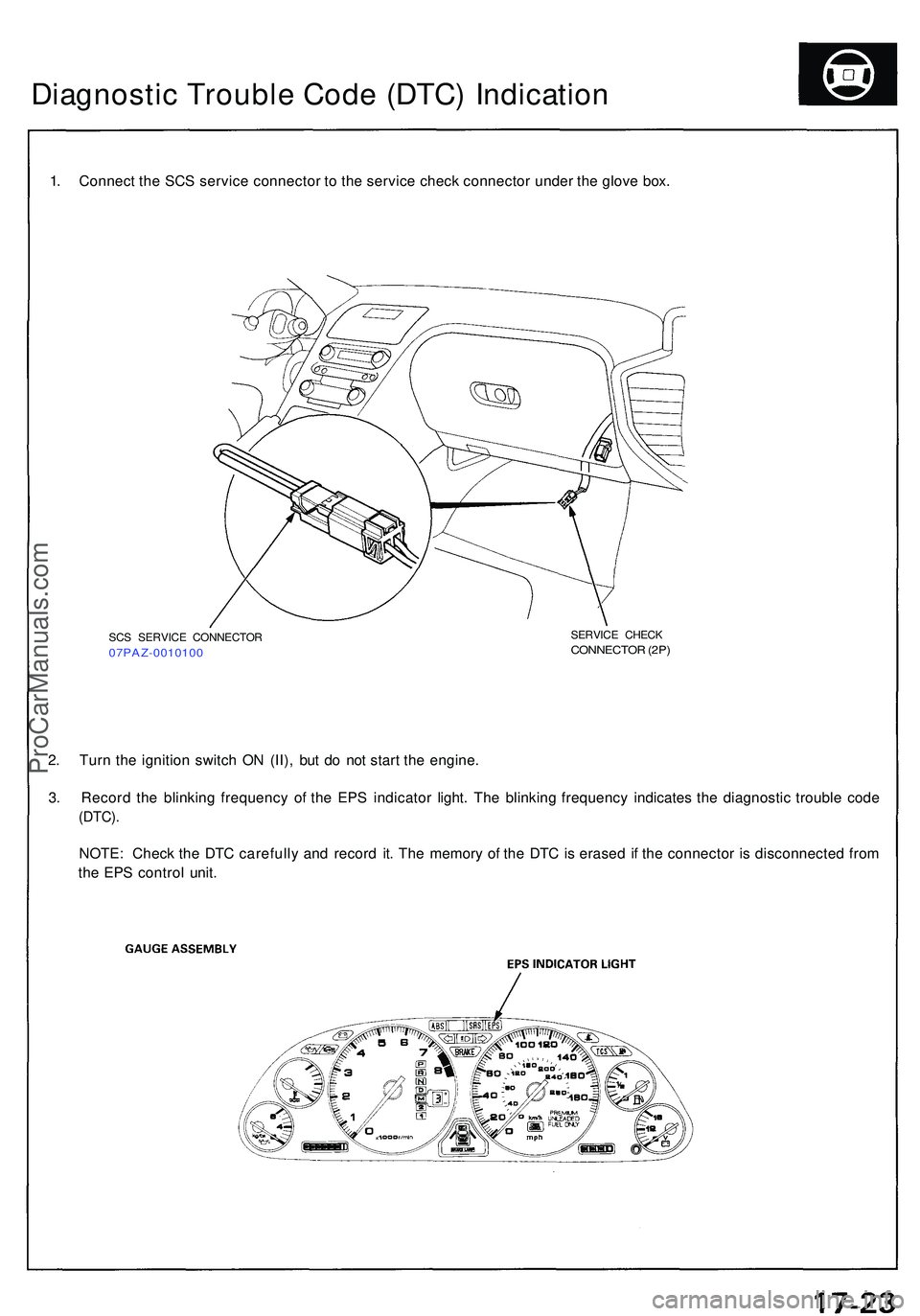
Diagnostic Troubl e Cod e (DTC ) Indicatio n
1. Connec t th e SC S servic e connecto r t o th e servic e chec k connecto r unde r th e glov e box .
2 . Tur n th e ignitio n switc h O N (II) , bu t d o no t star t th e engine .
3 . Recor d th e blinkin g frequenc y o f th e EP S indicato r light . Th e blinkin g frequenc y indicate s th e diagnosti c troubl e cod e
(DTC) .
NOTE : Chec k th e DT C carefull y an d recor d it . Th e memor y o f th e DT C is erase d i f th e connecto r i s disconnecte d fro m
th e EP S contro l unit .
SCS SERVIC E CONNECTO R07PAZ-001010 0
SERVICE CHEC KCONNECTO R (2P )
ProCarManuals.com
Page 973 of 1503
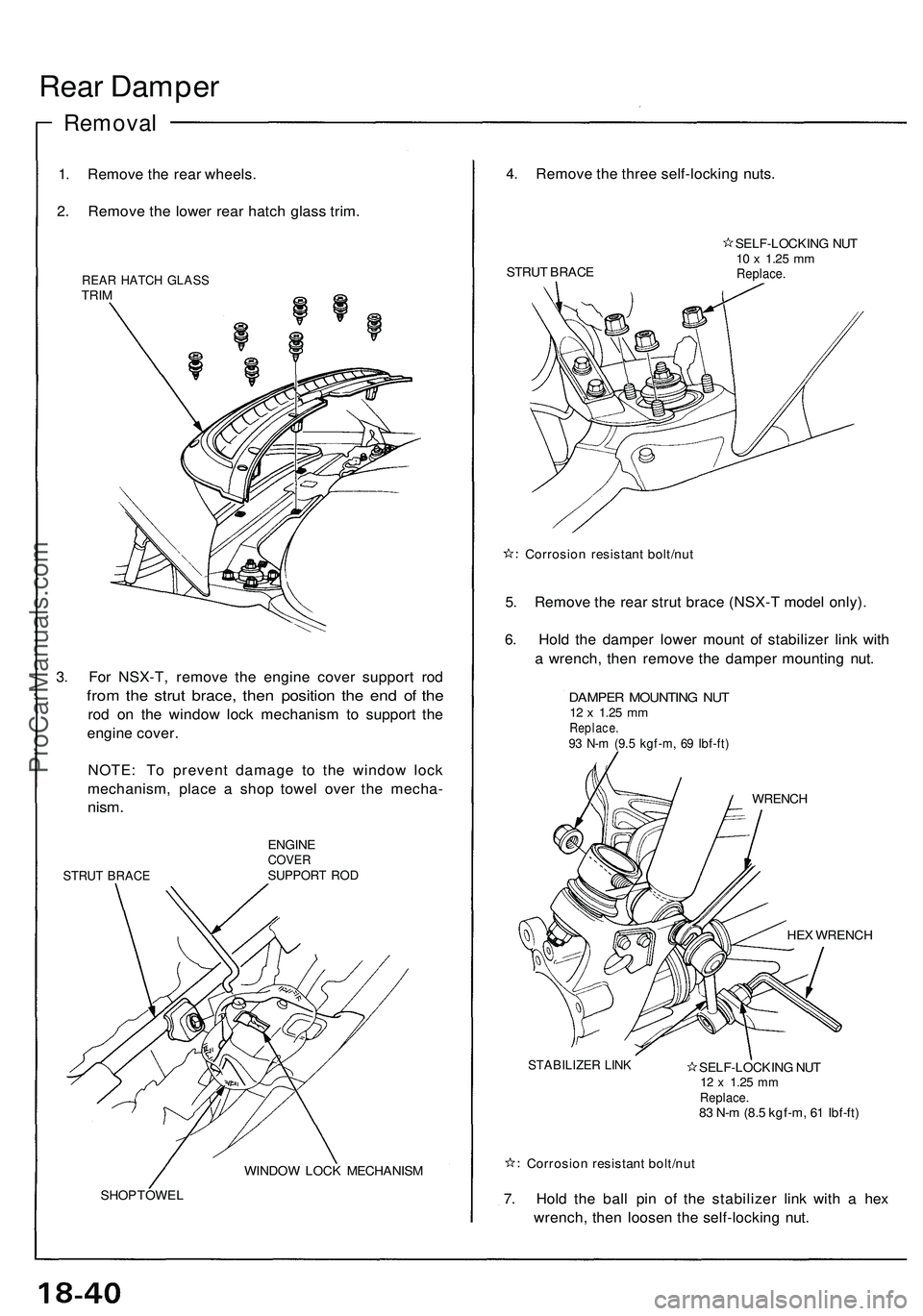
Rear Damper
Removal
1. Remove the rear wheels.
2. Remove the lower rear hatch glass trim.
REAR HATCH GLASS
TRIM
3. For NSX-T, remove the engine cover support rod
from the strut brace, then position the end of the
rod on the window lock mechanism to support the
engine cover.
NOTE: To prevent damage to the window lock
mechanism, place a shop towel over the mecha-
nism.
STRUT BRACE
ENGINE
COVER
SUPPORT ROD
WINDOW LOCK MECHANISM
SHOP TOWEL
4. Remove the three self-locking nuts.
STRUT BRACE
SELF-LOCKING NUT
10 x
1.25
mm
Replace.
Corrosion resistant bolt/nut
5. Remove the rear strut brace (NSX-T model only).
6. Hold the damper lower mount of stabilizer link with
a wrench, then remove the damper mounting nut.
DAMPER MOUNTING NUT
12 x
1.25
mm
Replace.
93 N-m (9.5 kgf-m, 69 Ibf-ft)
WRENCH
HEX WRENCH
STABILIZER LINK
SELF-LOCKING NUT
12 x
1.25
mm
Replace.
83 N-m (8.5 kgf-m, 61 Ibf-ft)
Corrosion resistant bolt/nut
7. Hold the ball pin of the stabilizer link with a hex
wrench, then loosen the self-locking nut.ProCarManuals.com
Page 979 of 1503
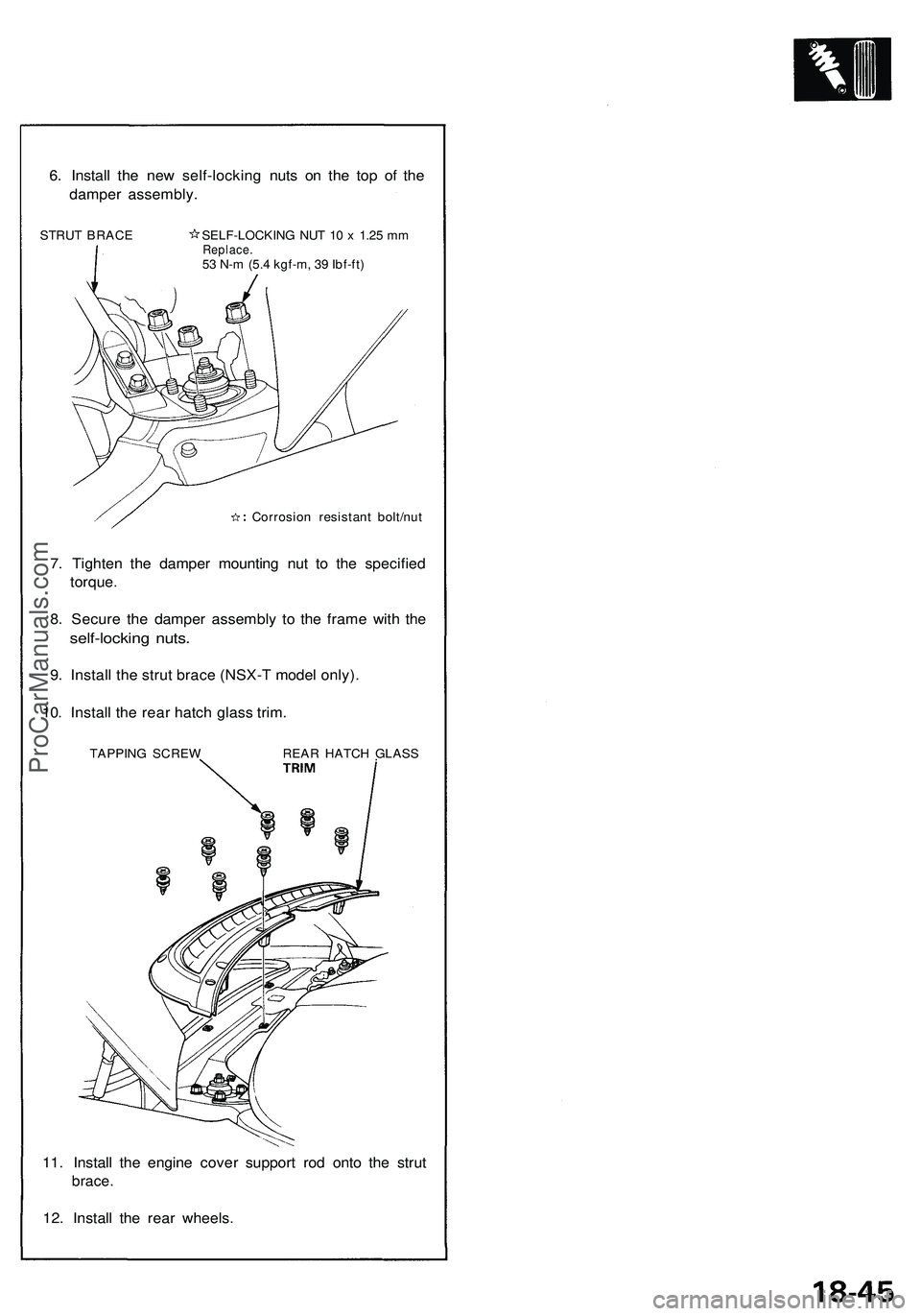
6. Install the new self-locking nuts on the top of the
damper assembly.
STRUT BRACE SELF-LOCKING NUT 10 x 1.25 mm
Replace.
53 N-m (5.4 kgf-m, 39 Ibf-ft)
Corrosion resistant bolt/nut
7. Tighten the damper mounting nut to the specified
torque.
8. Secure the damper assembly to the frame with the
self-locking nuts.
9. Install the strut brace (NSX-T model only).
10. Install the rear hatch glass trim.
TAPPING SCREW REAR HATCH GLASS
11. Install the engine cover support rod onto the strut
brace.
12. Install the rear wheels.ProCarManuals.com
Page 983 of 1503
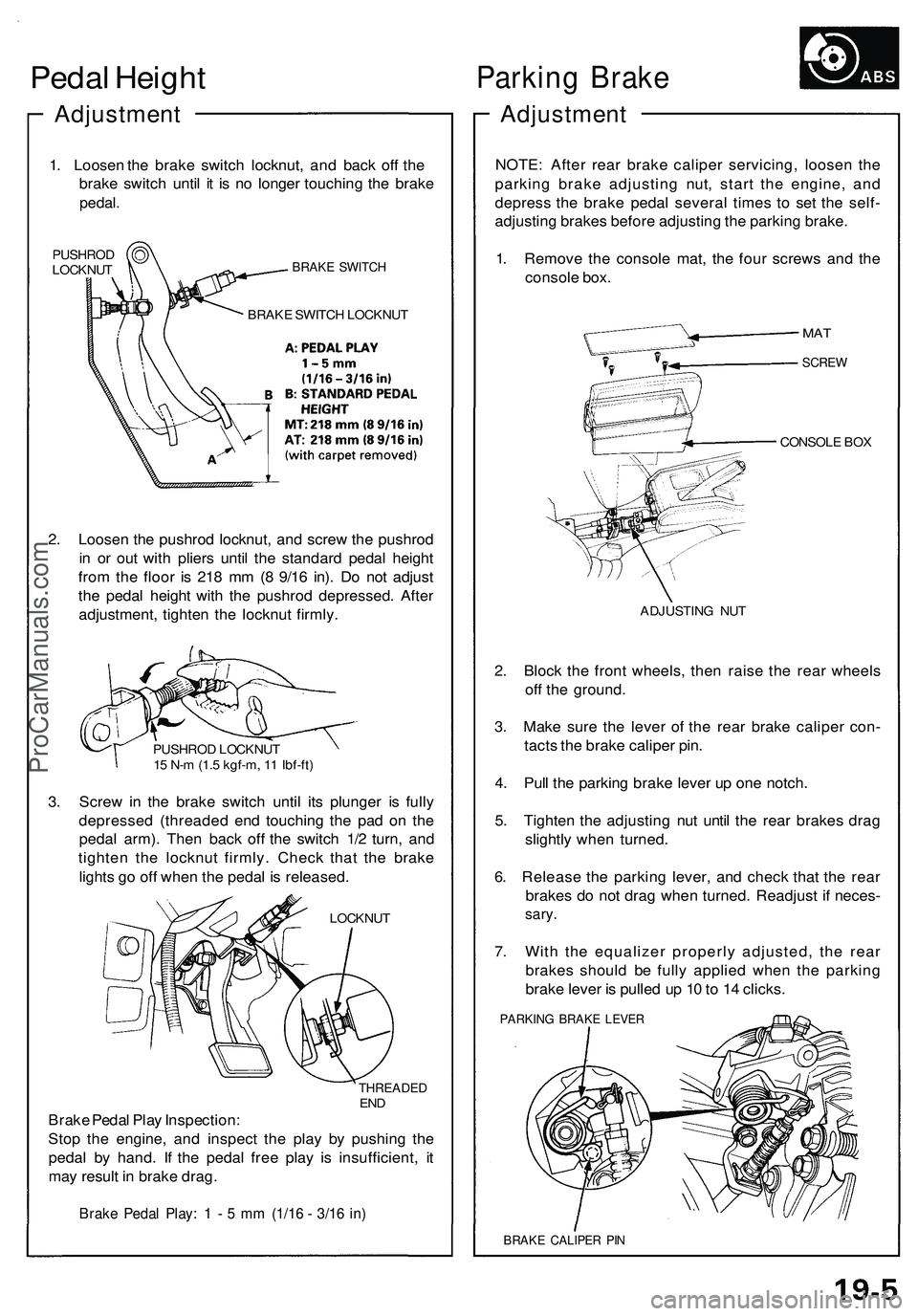
Pedal Heigh t
Adjustmen t
1. Lo osen th e brak e switc h locknut , an d bac k of f th e
brak e switc h unti l i t i s n o longe r touchin g th e brak e
pedal .
PUSHRO D
LOCKNU TBRAKE SWITC H
BRAKE SWITC H LOCKNU T
2. Loose n th e pushro d locknut , an d scre w th e pushro d
i n o r ou t wit h plier s unti l th e standar d peda l heigh t
fro m th e floo r i s 21 8 m m (8 9/1 6 in) . D o no t adjus t
th e peda l heigh t wit h th e pushro d depressed . Afte r
adjustment , tighte n th e locknu t firmly .
PUSHRO D LOCKNU T
1 5 N- m (1. 5 kgf-m , 1 1 Ibf-ft )
3. Scre w in th e brak e switc h unti l it s plunge r i s full y
depresse d (threade d en d touchin g th e pa d o n th e
peda l arm) . The n bac k of f th e switc h 1/ 2 turn , an d
tighte n th e locknu t firmly . Chec k tha t th e brak e
light s g o of f whe n th e peda l i s released .
LOCKNUT
THREADE DEND
Brak e Peda l Pla y Inspection :
Sto p th e engine , an d inspec t th e pla y b y pushin g th e
peda l b y hand . I f th e peda l fre e pla y i s insufficient , i t
ma y resul t i n brak e drag .
Brake Peda l Play : 1 - 5 m m (1/1 6 - 3/1 6 in )
Parkin g Brak e
Adjustmen t
NOTE: Afte r rea r brak e calipe r servicing , loose n th e
parkin g brak e adjustin g nut , star t th e engine , an d
depres s th e brak e peda l severa l time s t o se t th e self -
adjustin g brake s befor e adjustin g th e parkin g brake .
1 . Remov e th e consol e mat , th e fou r screw s an d th e
consol e box .
CONSOL E BO X
ADJUSTIN G NU T
2. Bloc k th e fron t wheels , the n rais e th e rea r wheel s
of f th e ground .
3 . Mak e sur e th e leve r o f th e rea r brak e calipe r con -
tact s th e brak e calipe r pin .
4 . Pul l th e parkin g brak e leve r u p on e notch .
5 . Tighte n th e adjustin g nu t unti l th e rea r brake s dra g
slightl y whe n turned .
6 . Releas e th e parkin g lever , an d chec k tha t th e rea r
brake s d o no t dra g whe n turned . Readjus t i f neces -
sary.
7. Wit h th e equalize r properl y adjusted , th e rea r
brake s shoul d b e full y applie d whe n th e parkin g
brak e leve r i s pulle d u p 1 0 to 1 4 clicks .
PARKIN G BRAK E LEVE R
BRAKE CALIPE R PI N
MA T
SCRE W
ProCarManuals.com