Test ACURA TL 1995 Service Repair Manual
[x] Cancel search | Manufacturer: ACURA, Model Year: 1995, Model line: TL, Model: ACURA TL 1995Pages: 1771, PDF Size: 62.49 MB
Page 1538 of 1771
Five-step Troubleshooting
1. Verify The Complaint
Turn on all the components in the problem circuit to
verify the customer complaint. Note the symptoms.
Do not begin disassembly or testing until you have
narrowed down the problem area.
2. Analyze The Schematic
Look up the schematic for the problem circuit.
Determine how the circuit is supposed to work by
tracing the current paths from the power feed
through the circuit components to ground. If several
circuits fail at the same time, the fuse or ground is a
likely cause.
Based on the symptoms and your understanding of
the circuit operation, identify one or more possible
causes of the problem.
3. Isolate The Problem By Testing The Circuit
Make circuit tests to check the diagnosis you made
in step 2. Keep in mind that a logical, simple proce-
dure is the key to efficient troubleshooting. Test for
the most likely cause of failure first. Try to make
tests at points that are easily accessible.
4. Fix The Problem
Once the specific problem is identified, make the
repair. Be sure to use proper tools and safe proce-
dures.
5. Make Sure The Circuit Works
Turn on all components in the repaired circuit in all
modes to make sure you've fixed the entire prob-
lem. If the problem was a blown fuse, be sure to
test all of the circuits on the fuse. Make sure no new
problems turn up and the original problem does not
recur.
Wire Color Codes
The following abbreviations are used to identify wire
colors in the circuit schematics:
WHT .............................White
YEL ............................... Yellow
BLK .............................. Black
BLU
..............................
Blue
GRN ............................. Green
RED
..............................
Red
ORN ............................. Orange
PNK.............................. Pink
BRN .............................. Brown
GRY.............................. Gray
PUR .............................. Purple
LT BLU ......................... Light Blue
LT GRN ........................ Light Green
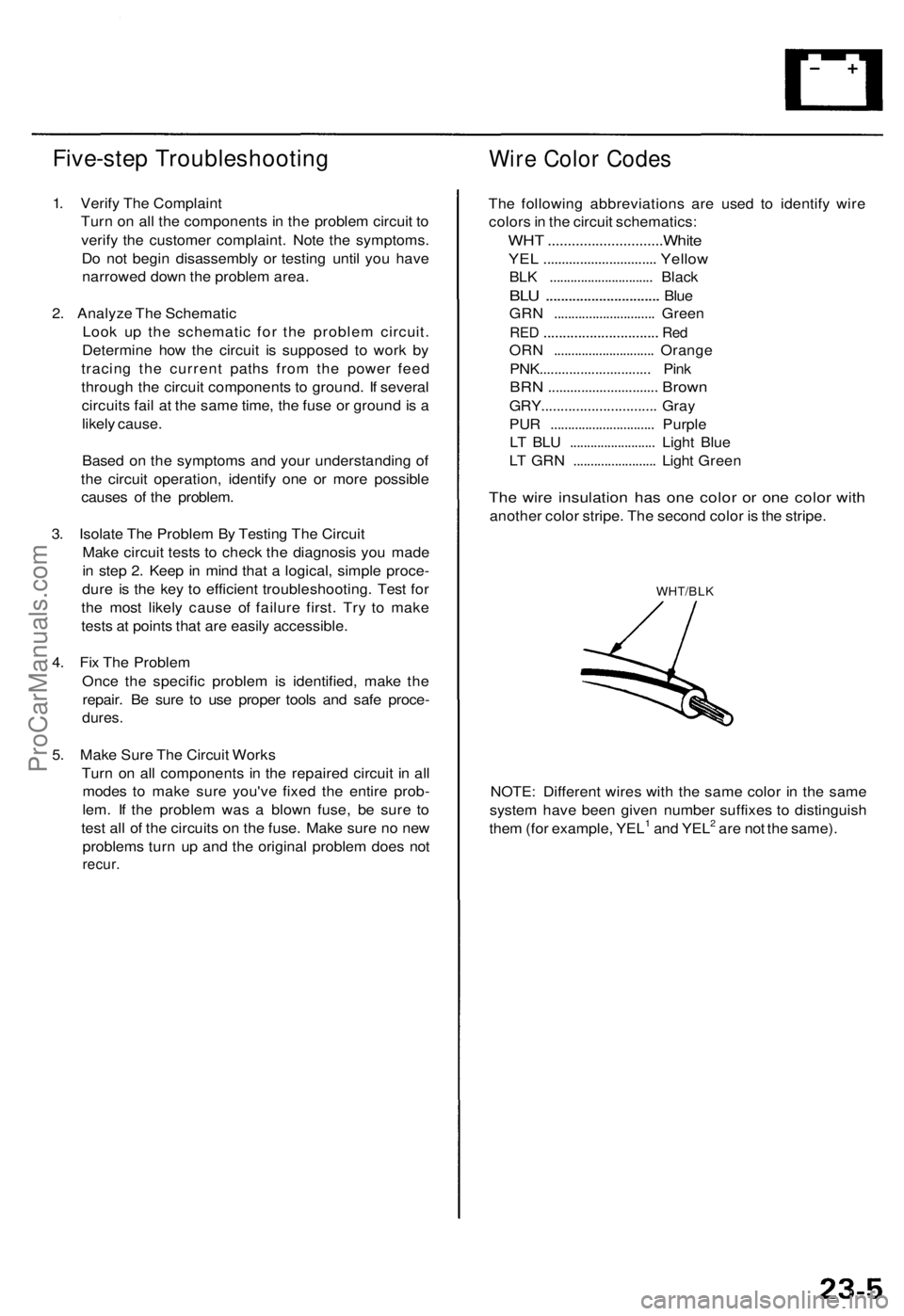
The wire insulation has one color or one color with
another color stripe. The second color is the stripe.
WHT/BLK
NOTE: Different wires with the same color in the same
system have been given number suffixes to distinguish
them (for example, YEL1 and YEL2 are not the same).ProCarManuals.com
Page 1545 of 1771
Battery
Test
Battery fluid (electrolyte) contains sulfuric acid. It may cause severe burns if it gets on your skin or in your eyes. Wear
protective clothing and a face shield.
— If electrolyte gets on your skin or clothes, rinse it off with water immediately.
— If electrolyte gets in your eyes, flush it out by splashing water in your eyes for at least 15 minutes; call a physician
immediately.
A battery gives off hydrogen gas. If ignited, the hydrogen will explode and could crack the battery case and splatter
acid on you. Keep sparks, flames, and cigarettes away from the battery.
Overcharging will raise the temperature of the electrolyte. This may force electrolyte to spray out of the battery vents.
Follow the charger manufacturer's instructions, and charge the battery at a proper rate.
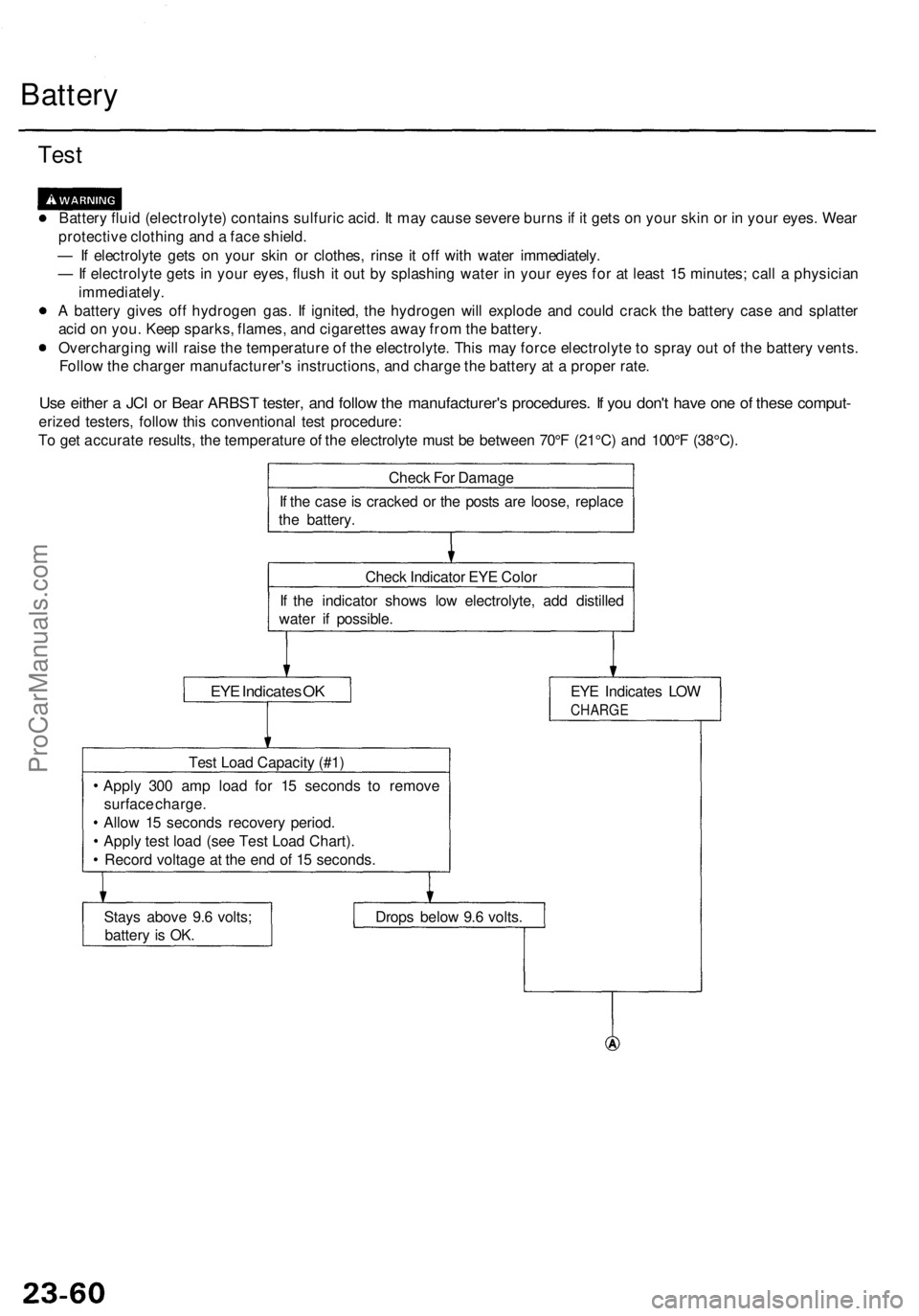
Use either a JCI or Bear ARBST tester, and follow the manufacturer's procedures. If you don't have one of these comput-
erized testers, follow this conventional test procedure:
To get accurate results, the temperature of the electrolyte must be between 70°F (21°C) and 100°F (38°C).
Check For Damage
If the case is cracked or the posts are loose, replace
the battery.
Check Indicator EYE Color
If the indicator shows low electrolyte, add distilled
water if possible.
EYE Indicates OK
EYE Indicates LOW
CHARGE
Test Load Capacity (#1)
Apply 300 amp load for 15 seconds to remove
surface charge.
Allow 15 seconds recovery period.
Apply test load (see Test Load Chart).
Record voltage at the end of 15 seconds.
Stays above 9.6 volts;
battery is OK.
Drops below 9.6 volts.ProCarManuals.com
Page 1546 of 1771
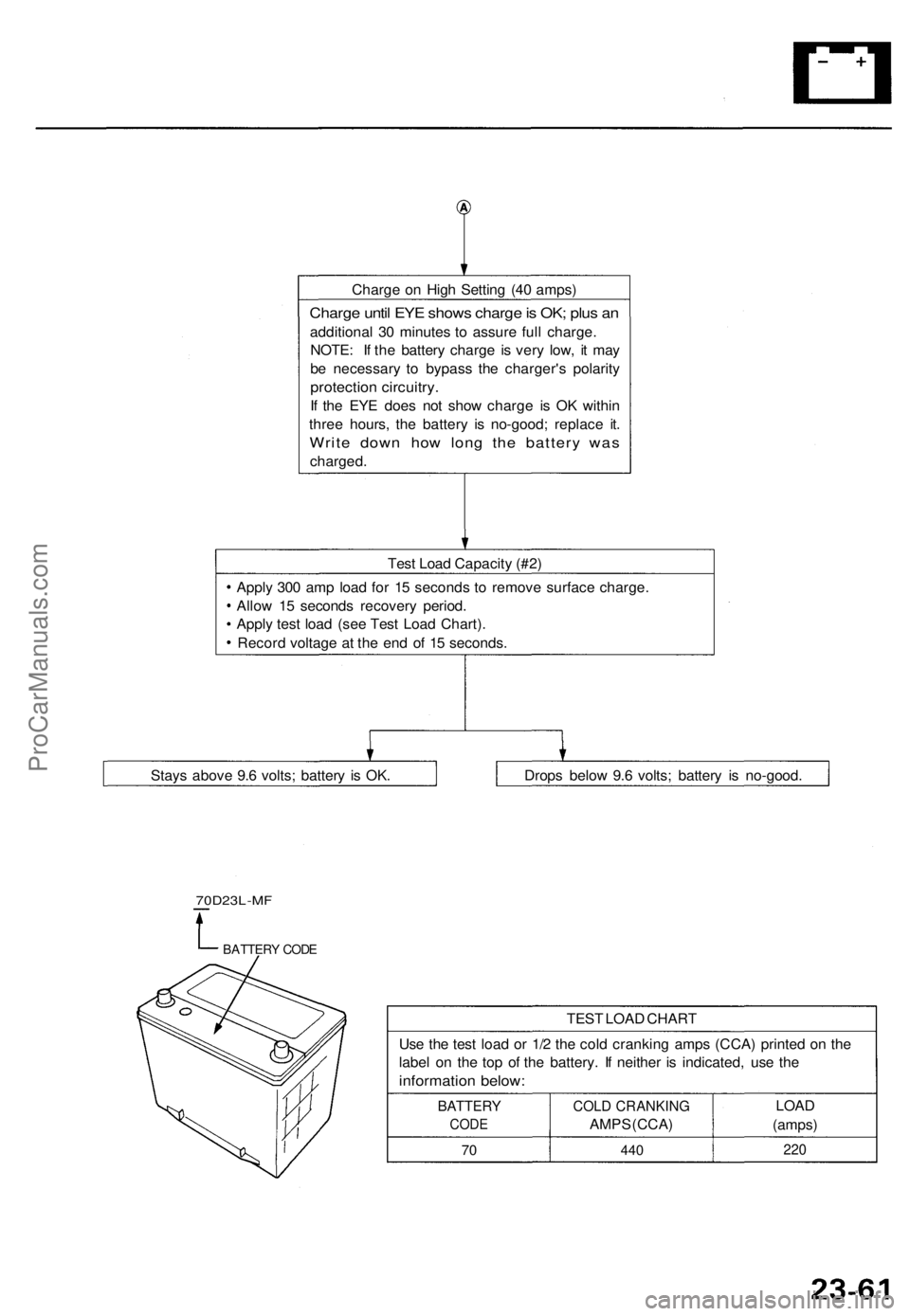
Charge on High Setting (40 amps)
Charge until EYE shows charge is OK; plus an
additional 30 minutes to assure full charge.
NOTE: If the battery charge is very low, it may
be necessary to bypass the charger's polarity
protection circuitry.
If the EYE does not show charge is OK within
three hours, the battery is no-good; replace it.
Write down how long the battery was
charged.
Test Load Capacity (#2)
Apply 300 amp load for 15 seconds to remove surface charge.
Allow 15 seconds recovery period.
Apply test load (see Test Load Chart).
Record voltage at the end of 15 seconds.
70D23L-MF
BATTERY CODE
TEST LOAD CHART
Use the test load or 1/2 the cold cranking amps (CCA) printed on the
label on the top of the battery. If neither is indicated, use the
information below:
BATTERY
CODE
70
COLD CRANKING
AMPS (CCA)
440
LOAD
(amps)
220
Drops below 9.6 volts; battery is no-good.
Stays above 9.6 volts; battery is OK.ProCarManuals.com
Page 1547 of 1771
Power Relay s
Relay Tes t
NOTE : Se e pag e 23-18 9 fo r tur n signal/hazar d rela y inpu t
test .
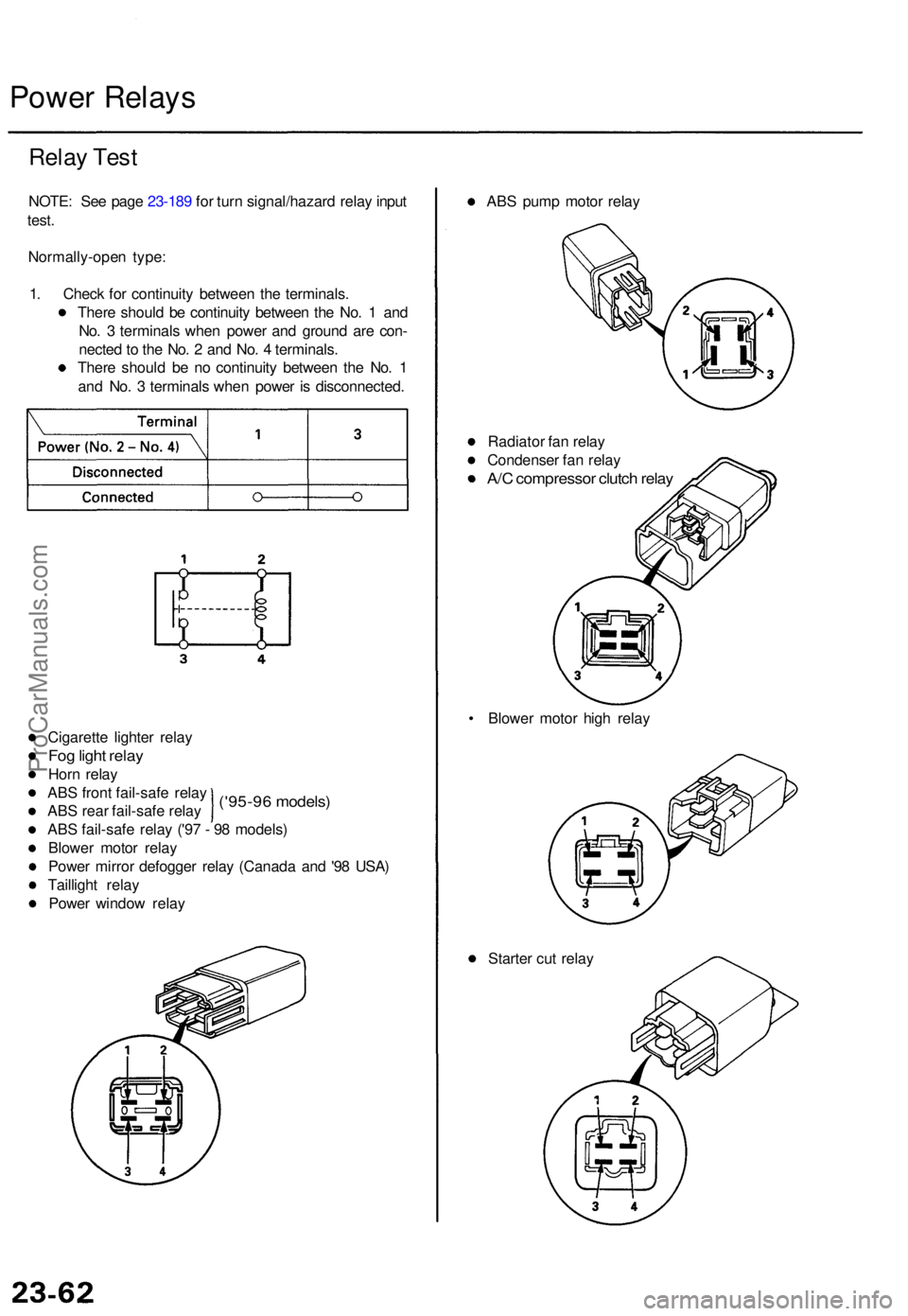
Normally-ope n type :
1 . Chec k fo r continuit y betwee n th e terminals .
Ther e shoul d b e continuit y betwee n th e No . 1 an d
No . 3 terminal s whe n powe r an d groun d ar e con -
necte d to th e No . 2 an d No . 4 terminals .
Ther e shoul d b e n o continuit y betwee n th e No . 1
an d No . 3 terminal s whe n powe r i s disconnected .
('95-96 models )
Cigarett e lighte r rela y
Fog ligh t rela y
Horn rela y
AB S fron t fail-saf e rela y
AB S rea r fail-saf e rela y
AB S fail-saf e rela y ('9 7 - 9 8 models )
Blowe r moto r rela y
Powe r mirro r defogge r rela y (Canad a an d '9 8 USA )
Tailligh t rela y
Powe r windo w rela y AB
S pum p moto r rela y
Radiato r fa n rela y
Condense r fa n rela y
A/C compresso r clutc h rela y
• Blowe r moto r hig h rela y
Starte r cu t rela y
ProCarManuals.com
Page 1551 of 1771
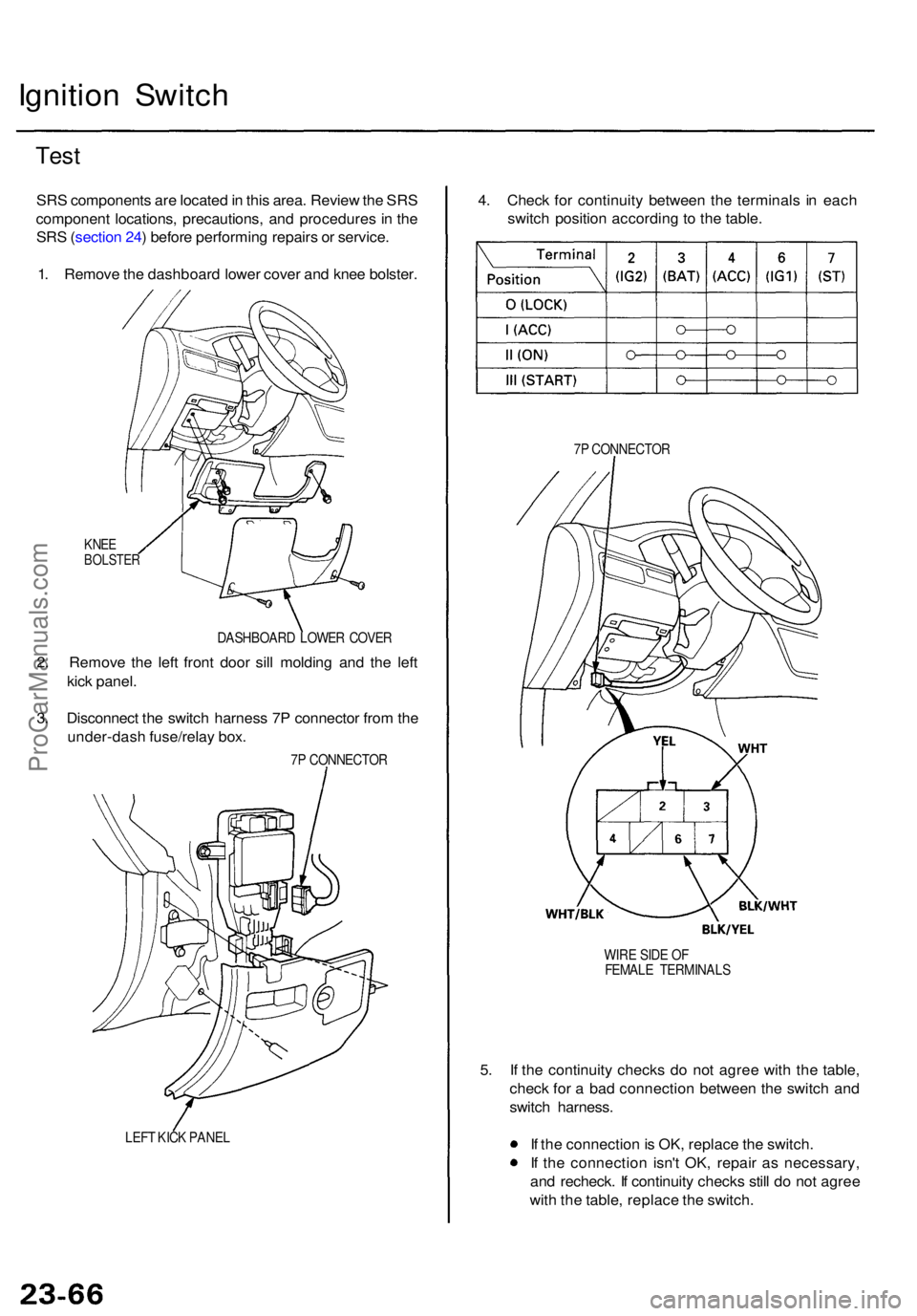
Ignition Switc h
Test
SRS component s ar e locate d in thi s area . Revie w th e SR S
componen t locations , precautions , an d procedure s i n th e
SR S (sectio n 24 ) befor e performin g repair s o r service .
1 . Remov e th e dashboar d lowe r cove r an d kne e bolster .
KNEEBOLSTE R
DASHBOAR D LOWE R COVE R
2. Remov e th e lef t fron t doo r sil l moldin g an d th e lef t
kic k panel .
3 . Disconnec t th e switc h harnes s 7 P connecto r fro m th e
under-das h fuse/rela y box .
7P CONNECTO R
LEF T KIC K PANE L
4. Chec k fo r continuit y betwee n th e terminal s i n eac h
switc h positio n accordin g t o th e table .
7P CONNECTO R
WIR E SID E O F
FEMAL E TERMINAL S
5. I f th e continuit y check s d o no t agre e wit h th e table ,
chec k fo r a ba d connectio n betwee n th e switc h an d
switc h harness .
I f th e connectio n is OK , replac e th e switch .
I f th e connectio n isn' t OK , repai r a s necessary ,
an d recheck . I f continuit y check s stil l d o no t agre e
wit h th e table , replac e th e switch .
ProCarManuals.com
Page 1555 of 1771
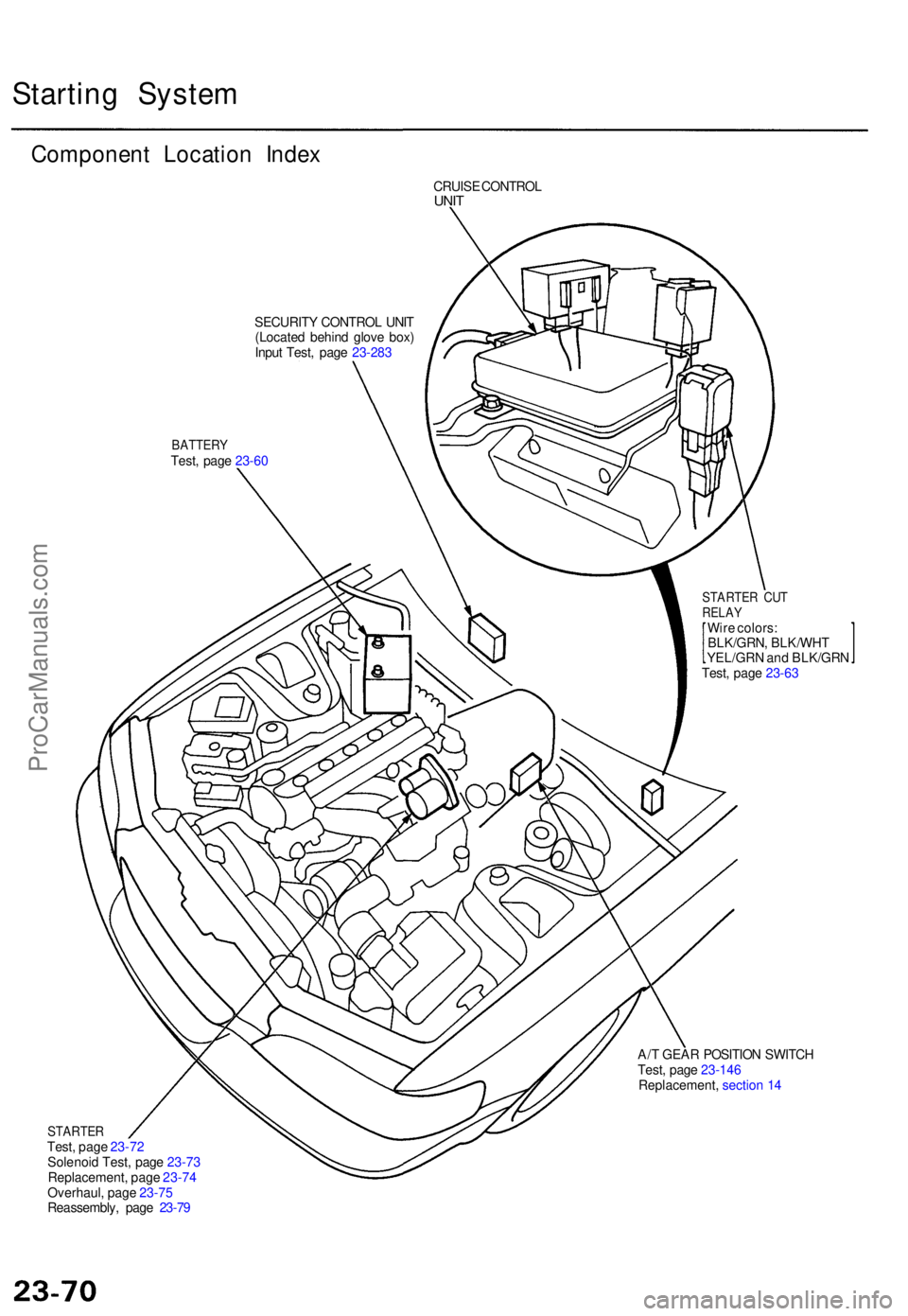
Starting Syste m
Componen t Locatio n Inde x
CRUIS E CONTRO LUNIT
SECURIT Y CONTRO L UNI T
(Locate d behin d glov e box )
Inpu t Test , pag e 23-28 3
BATTER YTest, pag e 23-6 0
STARTE R CU TRELA YWire colors :
BLK/GRN , BLK/WH T
YEL/GR N an d BLK/GR N
Test , pag e 23-6 3
A/ T GEA R POSITIO N SWITC H
Test , pag e 23-14 6
Replacement , sectio n 1 4
STARTE RTest, pag e 23-7 2
Solenoi d Test , pag e 23-7 3
Replacement , pag e 23-7 4
Overhaul , pag e 23-7 5
Reassembly , pag e 23-7 9
ProCarManuals.com
Page 1556 of 1771
Starting Syste m
Starter Tes t
NOTE : Th e ai r temperatur e mus t b e betwee n 5 9 an d
100° F (1 5 an d 38°C ) befor e testing .
Recommende d Procedure :
Use a starte r syste m tester .
Connec t an d operat e th e equipmen t i n accordanc e
wit h th e manufacturer' s instructions .
Tes t an d troubleshoo t a s described .
Alternate Procedure :
Use followin g equipment :
— Ammeter , 0 - 400 A
— Voltmeter , 0 - 20 V (accurat e withi n 0. 1 volt )
— Tachometer , 0 - 1,20 0 rp m
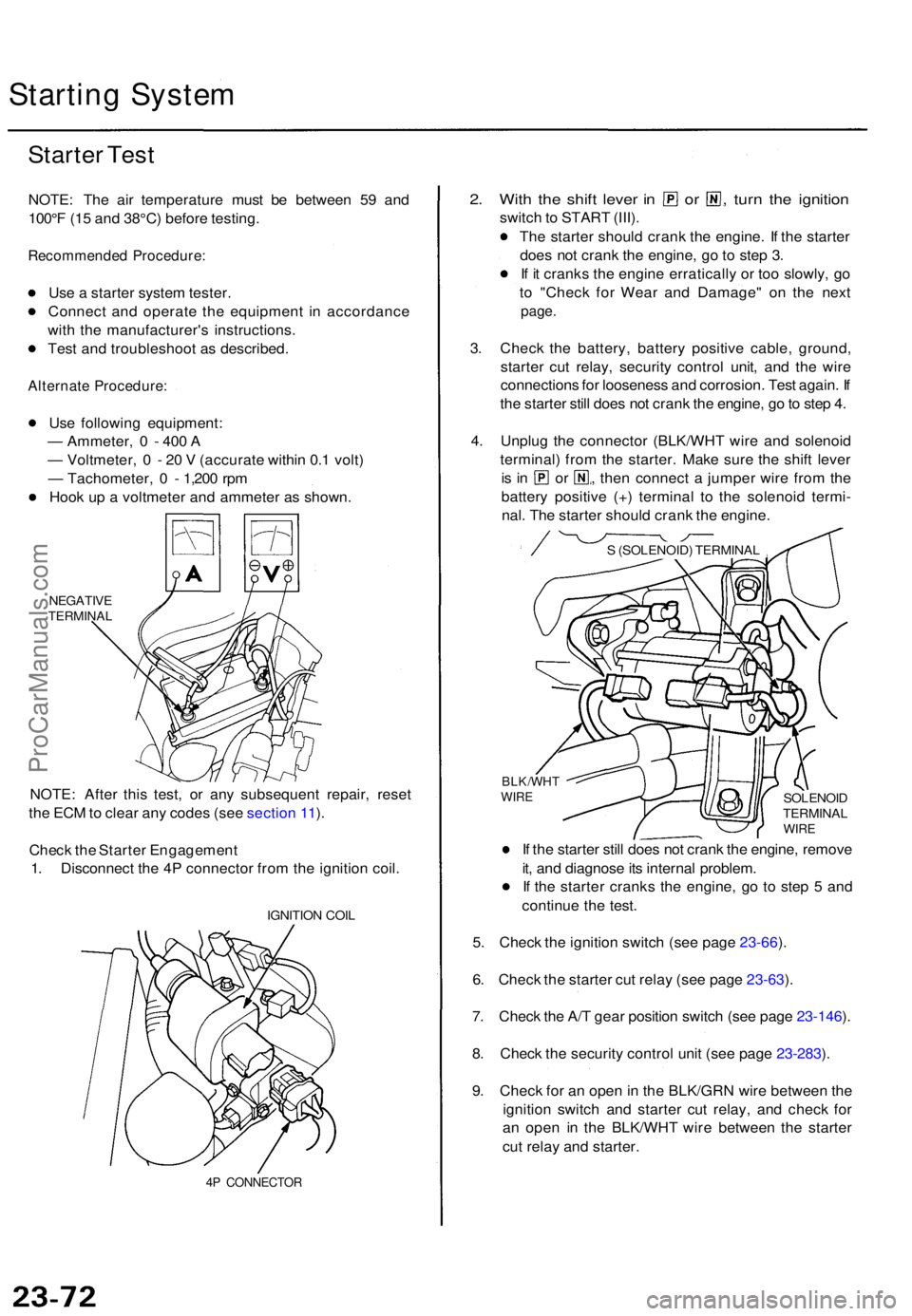
Hoo k u p a voltmete r an d ammete r a s shown .
NEGATIV ETERMINA L
NOTE: Afte r thi s test , o r an y subsequen t repair , rese t
th e EC M to clea r an y code s (se e sectio n 11 ).
Chec k th e Starte r Engagemen t
1 . Disconnec t th e 4 P connecto r fro m th e ignitio n coil .
IGNITIO N COI L
4P CONNECTO R
2. Wit h th e shif t leve r i n o r , turn th e ignitio n
switch to STAR T (III) .
Th e starte r shoul d cran k th e engine . I f th e starte r
doe s no t cran k th e engine , g o to ste p 3 .
I f i t crank s th e engin e erraticall y o r to o slowly , g o
t o "Chec k fo r Wea r an d Damage " o n th e nex t
page .
3. Chec k th e battery , batter y positiv e cable , ground ,
starte r cu t relay , securit y contro l unit , an d th e wir e
connection s fo r loosenes s an d corrosion . Tes t again . I f
th e starte r stil l doe s no t cran k th e engine , g o to ste p 4 .
4 . Unplu g th e connecto r (BLK/WH T wir e an d solenoi d
terminal ) fro m th e starter . Mak e sur e th e shif t leve r
is i n o r , then connec t a jumpe r wir e fro m th e
batter y positiv e (+ ) termina l t o th e solenoi d termi -
nal . Th e starte r shoul d cran k th e engine .
I f th e starte r stil l doe s no t cran k th e engine , remov e
it , an d diagnos e it s interna l problem .
I f th e starte r crank s th e engine , g o t o ste p 5 an d
continu e th e test .
5 . Chec k th e ignitio n switc h (se e pag e 23-66 ).
6 . Chec k th e starte r cu t rela y (se e pag e 23-63 ).
7 . Chec k th e A/ T gea r positio n switc h (se e pag e 23-146 ).
8 . Chec k th e securit y contro l uni t (se e pag e 23-283 ).
9 . Chec k fo r a n ope n in th e BLK/GR N wir e betwee n th e
ignitio n switc h an d starte r cu t relay , an d chec k fo r
a n ope n i n th e BLK/WH T wir e betwee n th e starte r
cu t rela y an d starter .
SOLENOI DTERMINA LWIRE
BLK/WH TWIRE
S (SOLENOID ) TERMINA L
ProCarManuals.com
Page 1558 of 1771
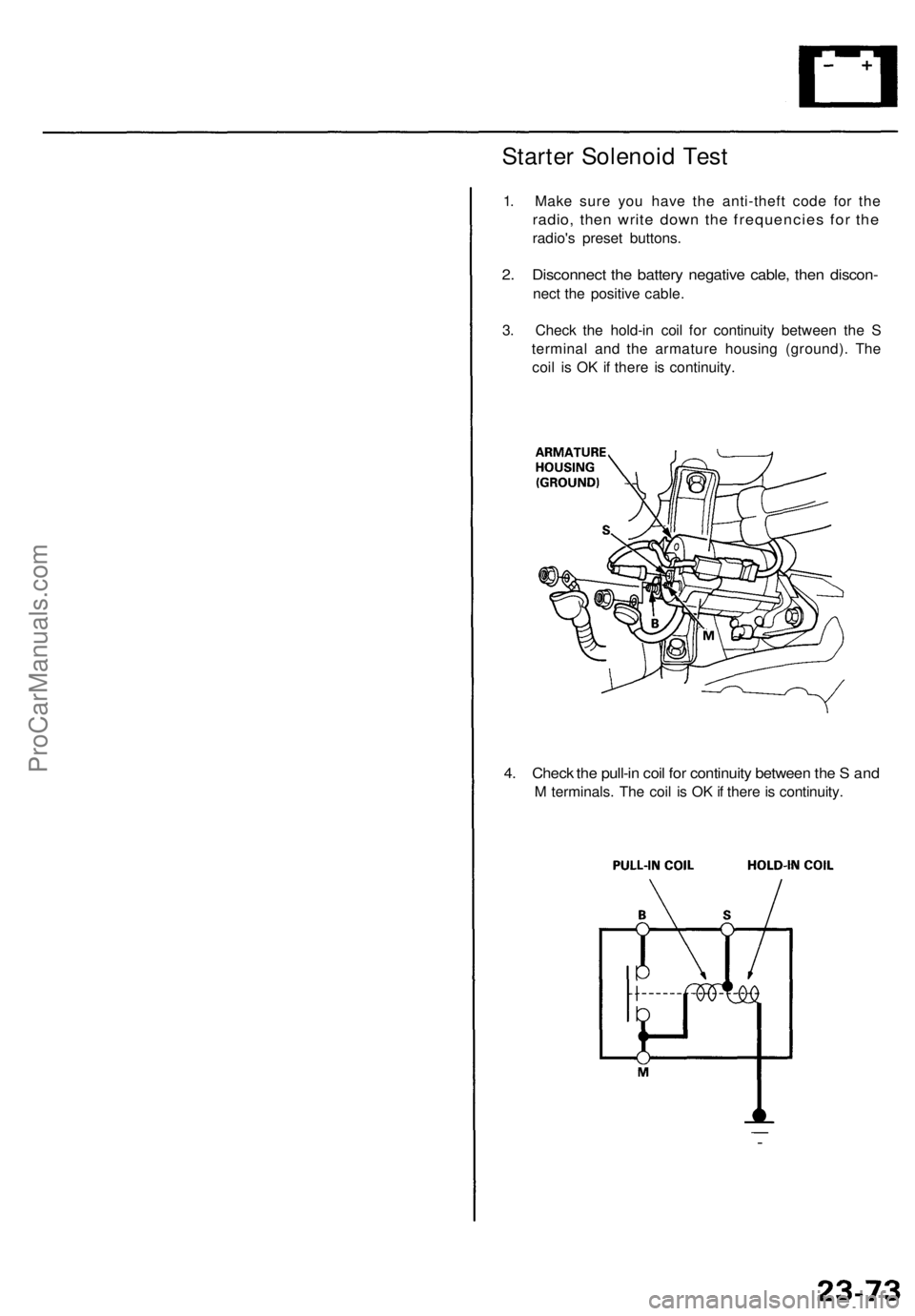
Starter Solenoid Test
1. Make sure you have the anti-theft code for the
radio, then write down the frequencies for the
radio's preset buttons.
2. Disconnect the battery negative cable, then discon-
nect the positive cable.
3. Check the hold-in coil for continuity between the S
terminal and the armature housing (ground). The
coil is OK if there is continuity.
4. Check the pull-in coil for continuity between the S and
M terminals. The coil is OK if there is continuity.ProCarManuals.com
Page 1560 of 1771
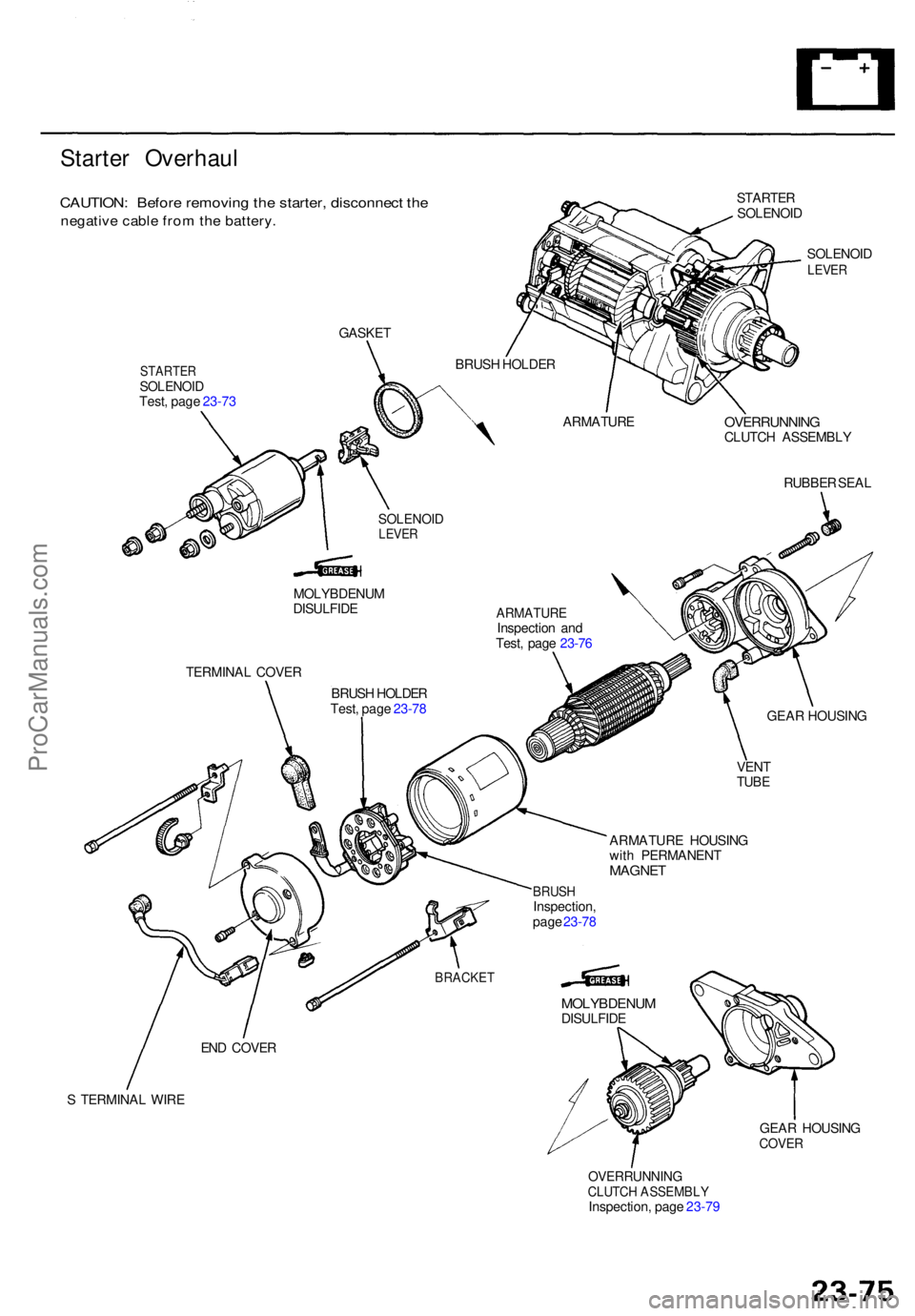
Starter Overhau l
CAUTION: Befor e removin g th e starter , disconnec t th e
negativ e cabl e fro m th e battery .
STARTE R
SOLENOI D
SOLENOI D
LEVER
STARTE RSOLENOI DTest, pag e 23-7 3
OVERRUNNIN GCLUTCH ASSEMBL Y
RUBBE R SEA L
MOLYBDENU M
DISULFID E
TERMINA L COVE R
BRUSH HOLDE R
Test , pag e 23-7 8
ARMATUR EInspection an d
Test , pag e 23-7 6
ARMATUR E HOUSIN G
wit h PERMANEN T
MAGNET
GEAR HOUSIN G
VEN T
TUBE
S TERMINA L WIR E
GEAR HOUSIN G
COVER
OVERRUNNIN GCLUTCH ASSEMBL YInspection, pag e 23-7 9
GASKE
T
BRUSH HOLDE R
ARMATUR E
SOLENOIDLEVER
BRUS HInspection ,
pag e 23-7 8
BRACKE T
END COVE R
MOLYBDENU MDISULFIDE
ProCarManuals.com
Page 1561 of 1771
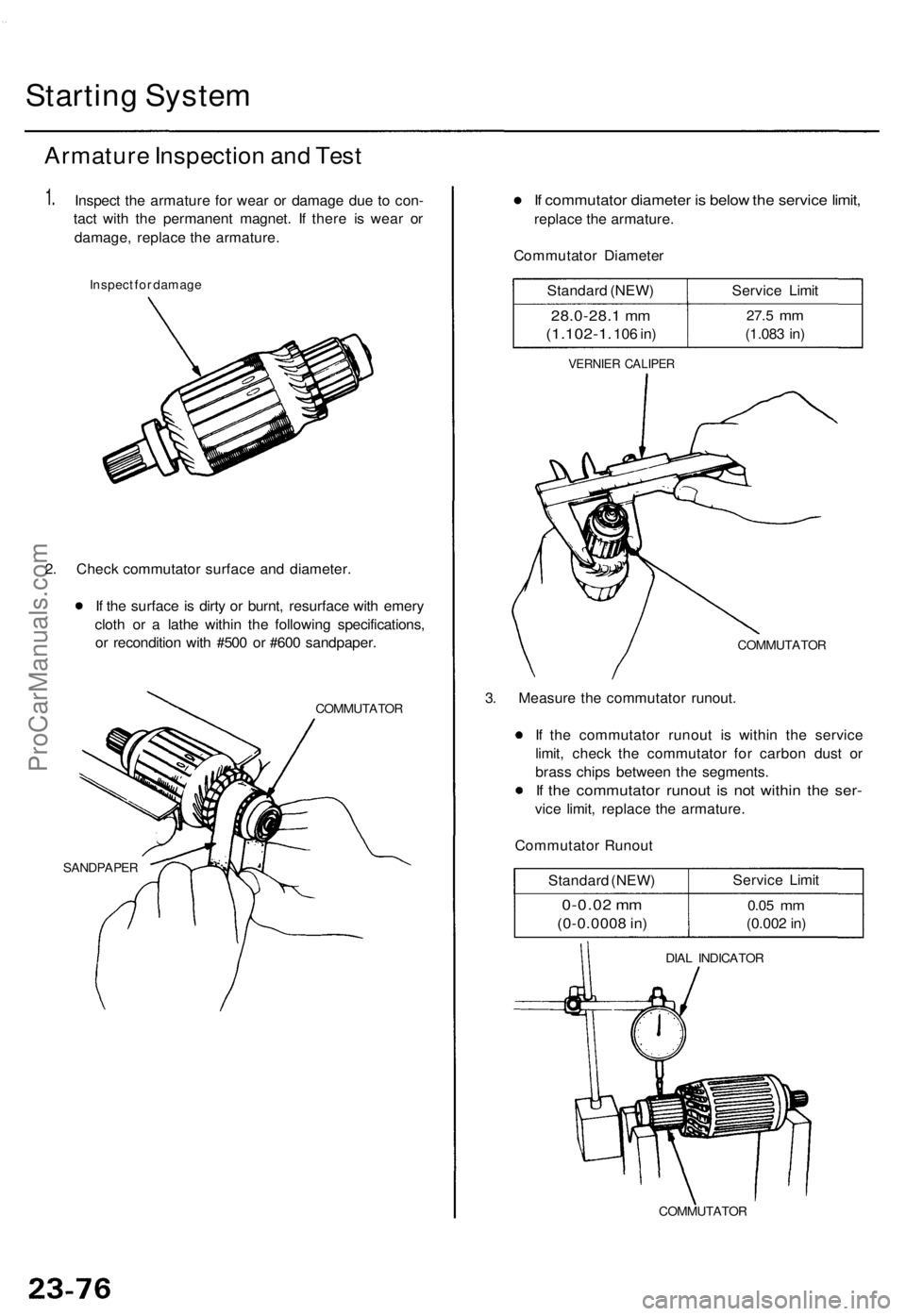
Starting System
Armature Inspection and Test
1.
Inspect the armature for wear or damage due to con-
tact with the permanent magnet. If there is wear or
damage, replace the armature.
Inspect for damage
2. Check commutator surface and diameter.
If the surface is dirty or burnt, resurface with emery
cloth or a lathe within the following specifications,
or recondition with #500 or #600 sandpaper.
COMMUTATOR
SANDPAPER
If commutator diameter is below the service limit,
replace the armature.
Commutator Diameter
Standard (NEW)
28.0-28.1 mm
(1.102-1.
106 in)
Service Limit
27.5
mm
(1.083 in)
VERNIER CALIPER
COMMUTATOR
3. Measure the commutator runout.
If the commutator runout is within the service
limit, check the commutator for carbon dust or
brass chips between the segments.
If the commutator runout is not within the ser-
vice limit, replace the armature.
Commutator Runout
Standard (NEW)
0-0.02 mm
(0-0.0008 in)
Service Limit
0.05
mm
(0.002 in)
DIAL INDICATOR
COMMUTATORProCarManuals.com