lock DODGE NEON 2000 Service Repair Manual
[x] Cancel search | Manufacturer: DODGE, Model Year: 2000, Model line: NEON, Model: DODGE NEON 2000Pages: 1285, PDF Size: 29.42 MB
Page 893 of 1285
NOTE: The power steering gear should not be ser-
viced or adjusted. If a malfunction or oil leak occurs
with the steering gear, the complete steering gear
needs to be replaced.
REMOVAL AND INSTALLATION
SERVICE WARNINGS AND CAUTIONS
WARNING: POWER STEERING FLUID, ENGINE
PARTS AND EXHAUST SYSTEM MAY BE
EXTREMELY HOT IF ENGINE HAS BEEN RUNNING.
DO NOT START ENGINE WITH ANY LOOSE OR DIS-
CONNECTED HOSES. DO NOT ALLOW HOSES TO
TOUCH HOT EXHAUST MANIFOLD OR CATALYST.
WARNING: FLUID LEVEL SHOULD BE CHECKED
WITH THE ENGINE OFF TO PREVENT PERSONAL
INJURY FROM MOVING PARTS.
CAUTION: When the system is open, cap all open
ends of the hoses, power steering pump fittings or
power steering gear ports to prevent entry of for-
eign material into the components.
NOTE: Do not use any type of automatic transmis-
sion fluid in the power steering system.
POWER STEERING GEAR
NOTE: Before proceeding with this removal and
installation procedure, review SERVICE WARNINGS
AND CAUTIONS at the beginning of REMOVAL AND
INSTALLATION in this section.
REMOVAL
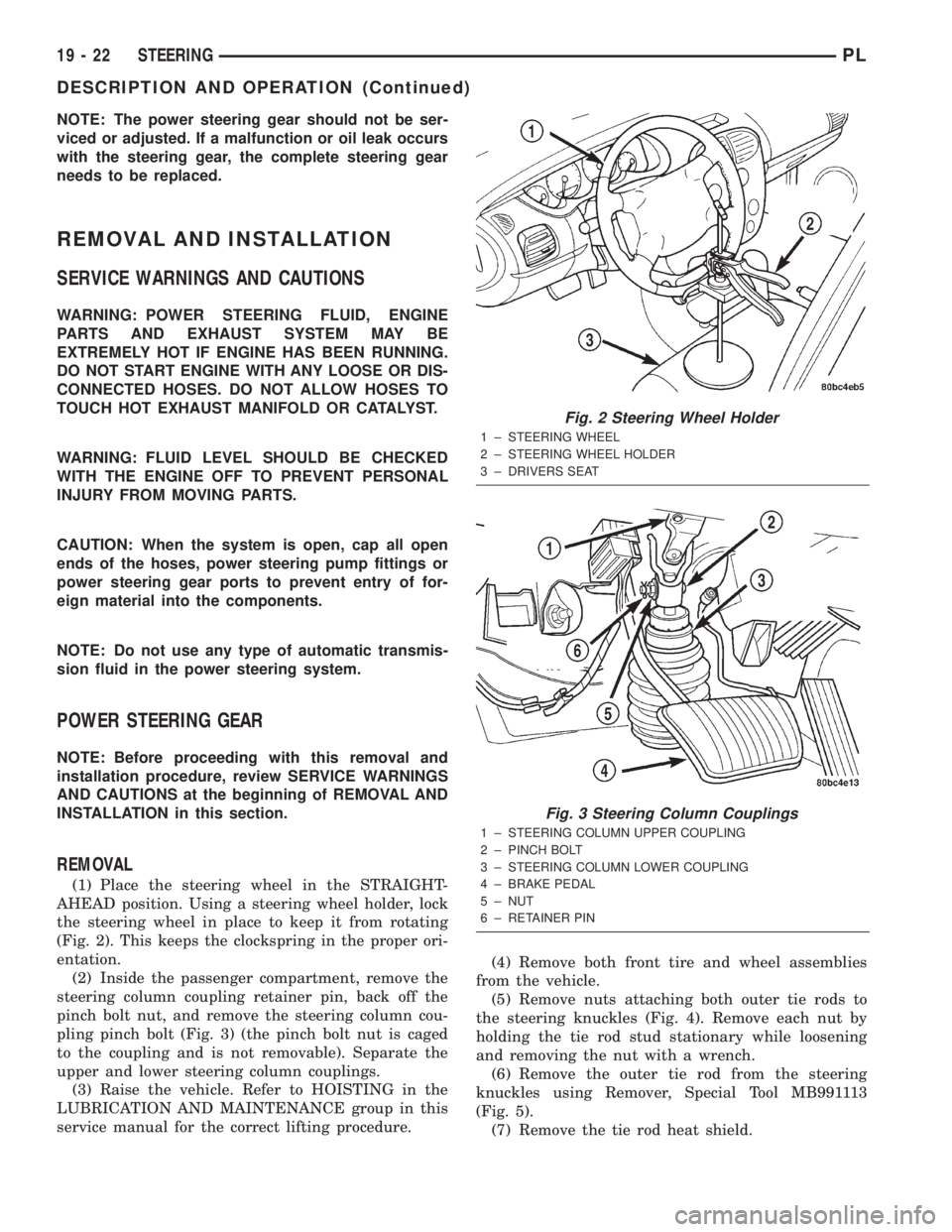
(1) Place the steering wheel in the STRAIGHT-
AHEAD position. Using a steering wheel holder, lock
the steering wheel in place to keep it from rotating
(Fig. 2). This keeps the clockspring in the proper ori-
entation.
(2) Inside the passenger compartment, remove the
steering column coupling retainer pin, back off the
pinch bolt nut, and remove the steering column cou-
pling pinch bolt (Fig. 3) (the pinch bolt nut is caged
to the coupling and is not removable). Separate the
upper and lower steering column couplings.
(3) Raise the vehicle. Refer to HOISTING in the
LUBRICATION AND MAINTENANCE group in this
service manual for the correct lifting procedure.(4) Remove both front tire and wheel assemblies
from the vehicle.
(5) Remove nuts attaching both outer tie rods to
the steering knuckles (Fig. 4). Remove each nut by
holding the tie rod stud stationary while loosening
and removing the nut with a wrench.
(6) Remove the outer tie rod from the steering
knuckles using Remover, Special Tool MB991113
(Fig. 5).
(7) Remove the tie rod heat shield.
Fig. 2 Steering Wheel Holder
1 ± STEERING WHEEL
2 ± STEERING WHEEL HOLDER
3 ± DRIVERS SEAT
Fig. 3 Steering Column Couplings
1 ± STEERING COLUMN UPPER COUPLING
2 ± PINCH BOLT
3 ± STEERING COLUMN LOWER COUPLING
4 ± BRAKE PEDAL
5 ± NUT
6 ± RETAINER PIN
19 - 22 STEERINGPL
DESCRIPTION AND OPERATION (Continued)
Page 894 of 1285
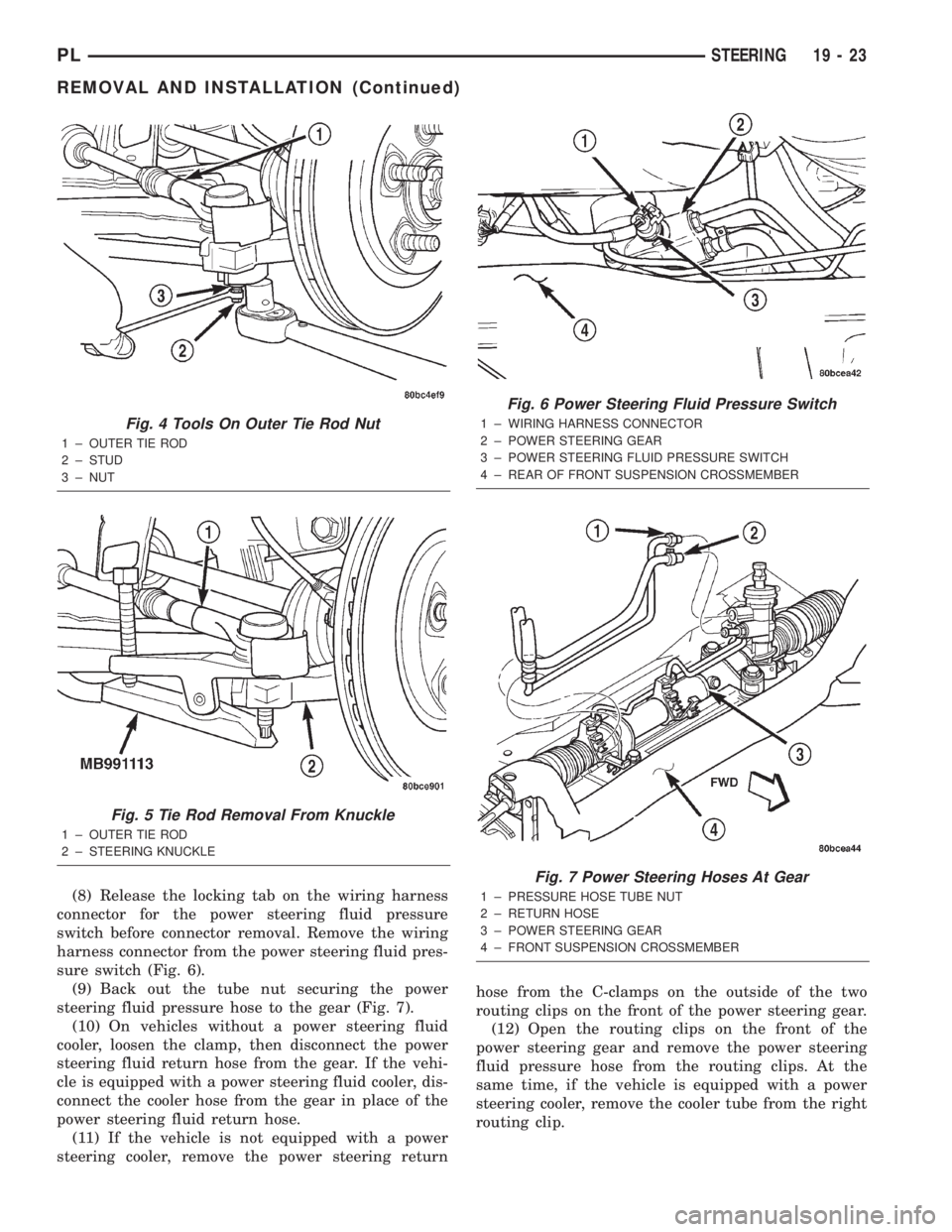
(8) Release the locking tab on the wiring harness
connector for the power steering fluid pressure
switch before connector removal. Remove the wiring
harness connector from the power steering fluid pres-
sure switch (Fig. 6).
(9) Back out the tube nut securing the power
steering fluid pressure hose to the gear (Fig. 7).
(10) On vehicles without a power steering fluid
cooler, loosen the clamp, then disconnect the power
steering fluid return hose from the gear. If the vehi-
cle is equipped with a power steering fluid cooler, dis-
connect the cooler hose from the gear in place of the
power steering fluid return hose.
(11) If the vehicle is not equipped with a power
steering cooler, remove the power steering returnhose from the C-clamps on the outside of the two
routing clips on the front of the power steering gear.
(12) Open the routing clips on the front of the
power steering gear and remove the power steering
fluid pressure hose from the routing clips. At the
same time, if the vehicle is equipped with a power
steering cooler, remove the cooler tube from the right
routing clip.
Fig. 4 Tools On Outer Tie Rod Nut
1 ± OUTER TIE ROD
2 ± STUD
3 ± NUT
Fig. 5 Tie Rod Removal From Knuckle
1 ± OUTER TIE ROD
2 ± STEERING KNUCKLE
Fig. 6 Power Steering Fluid Pressure Switch
1 ± WIRING HARNESS CONNECTOR
2 ± POWER STEERING GEAR
3 ± POWER STEERING FLUID PRESSURE SWITCH
4 ± REAR OF FRONT SUSPENSION CROSSMEMBER
Fig. 7 Power Steering Hoses At Gear
1 ± PRESSURE HOSE TUBE NUT
2 ± RETURN HOSE
3 ± POWER STEERING GEAR
4 ± FRONT SUSPENSION CROSSMEMBER
PLSTEERING 19 - 23
REMOVAL AND INSTALLATION (Continued)
Page 897 of 1285
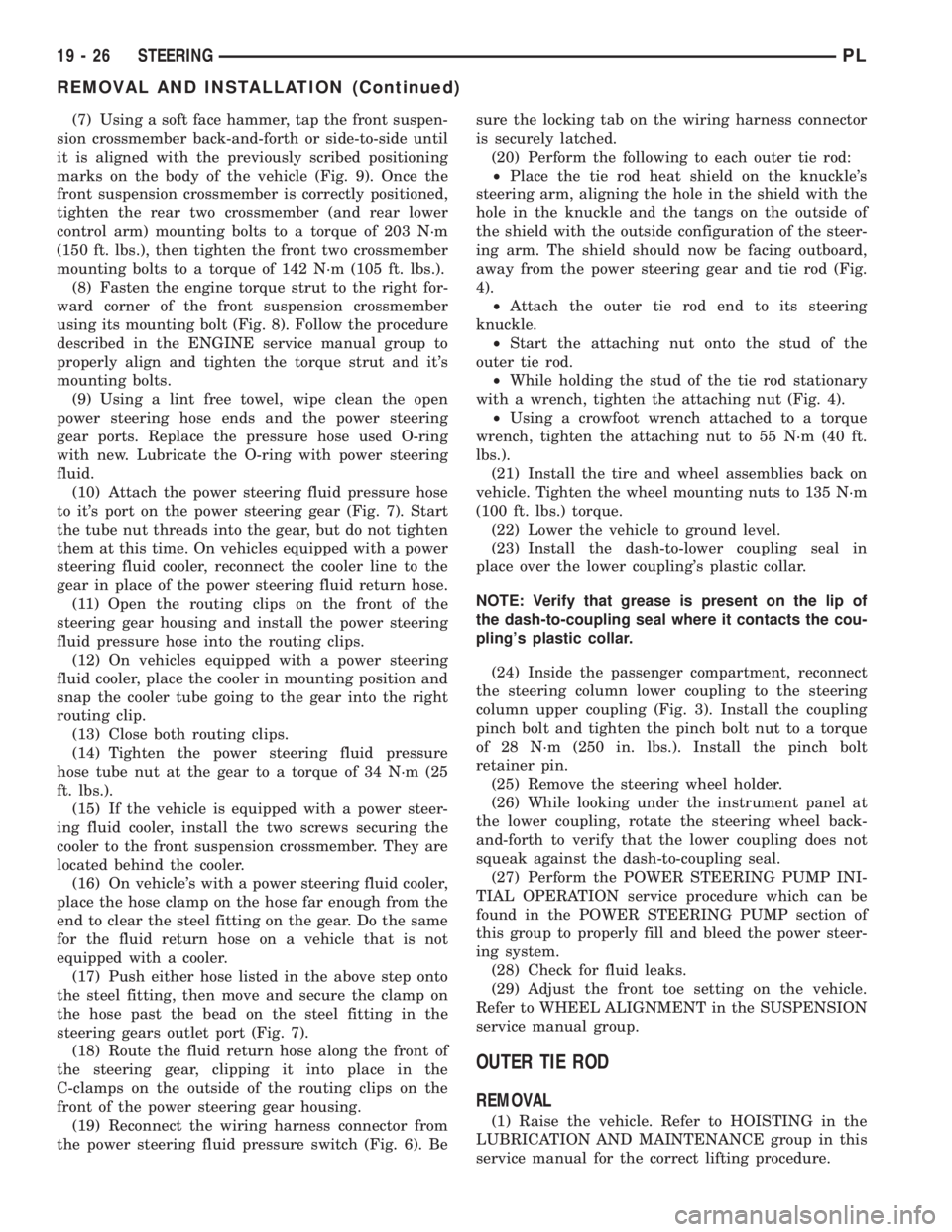
(7) Using a soft face hammer, tap the front suspen-
sion crossmember back-and-forth or side-to-side until
it is aligned with the previously scribed positioning
marks on the body of the vehicle (Fig. 9). Once the
front suspension crossmember is correctly positioned,
tighten the rear two crossmember (and rear lower
control arm) mounting bolts to a torque of 203 N´m
(150 ft. lbs.), then tighten the front two crossmember
mounting bolts to a torque of 142 N´m (105 ft. lbs.).
(8) Fasten the engine torque strut to the right for-
ward corner of the front suspension crossmember
using its mounting bolt (Fig. 8). Follow the procedure
described in the ENGINE service manual group to
properly align and tighten the torque strut and it's
mounting bolts.
(9) Using a lint free towel, wipe clean the open
power steering hose ends and the power steering
gear ports. Replace the pressure hose used O-ring
with new. Lubricate the O-ring with power steering
fluid.
(10) Attach the power steering fluid pressure hose
to it's port on the power steering gear (Fig. 7). Start
the tube nut threads into the gear, but do not tighten
them at this time. On vehicles equipped with a power
steering fluid cooler, reconnect the cooler line to the
gear in place of the power steering fluid return hose.
(11) Open the routing clips on the front of the
steering gear housing and install the power steering
fluid pressure hose into the routing clips.
(12) On vehicles equipped with a power steering
fluid cooler, place the cooler in mounting position and
snap the cooler tube going to the gear into the right
routing clip.
(13) Close both routing clips.
(14) Tighten the power steering fluid pressure
hose tube nut at the gear to a torque of 34 N´m (25
ft. lbs.).
(15) If the vehicle is equipped with a power steer-
ing fluid cooler, install the two screws securing the
cooler to the front suspension crossmember. They are
located behind the cooler.
(16) On vehicle's with a power steering fluid cooler,
place the hose clamp on the hose far enough from the
end to clear the steel fitting on the gear. Do the same
for the fluid return hose on a vehicle that is not
equipped with a cooler.
(17) Push either hose listed in the above step onto
the steel fitting, then move and secure the clamp on
the hose past the bead on the steel fitting in the
steering gears outlet port (Fig. 7).
(18) Route the fluid return hose along the front of
the steering gear, clipping it into place in the
C-clamps on the outside of the routing clips on the
front of the power steering gear housing.
(19) Reconnect the wiring harness connector from
the power steering fluid pressure switch (Fig. 6). Besure the locking tab on the wiring harness connector
is securely latched.
(20) Perform the following to each outer tie rod:
²Place the tie rod heat shield on the knuckle's
steering arm, aligning the hole in the shield with the
hole in the knuckle and the tangs on the outside of
the shield with the outside configuration of the steer-
ing arm. The shield should now be facing outboard,
away from the power steering gear and tie rod (Fig.
4).
²Attach the outer tie rod end to its steering
knuckle.
²Start the attaching nut onto the stud of the
outer tie rod.
²While holding the stud of the tie rod stationary
with a wrench, tighten the attaching nut (Fig. 4).
²Using a crowfoot wrench attached to a torque
wrench, tighten the attaching nut to 55 N´m (40 ft.
lbs.).
(21) Install the tire and wheel assemblies back on
vehicle. Tighten the wheel mounting nuts to 135 N´m
(100 ft. lbs.) torque.
(22) Lower the vehicle to ground level.
(23) Install the dash-to-lower coupling seal in
place over the lower coupling's plastic collar.
NOTE: Verify that grease is present on the lip of
the dash-to-coupling seal where it contacts the cou-
pling's plastic collar.
(24) Inside the passenger compartment, reconnect
the steering column lower coupling to the steering
column upper coupling (Fig. 3). Install the coupling
pinch bolt and tighten the pinch bolt nut to a torque
of 28 N´m (250 in. lbs.). Install the pinch bolt
retainer pin.
(25) Remove the steering wheel holder.
(26) While looking under the instrument panel at
the lower coupling, rotate the steering wheel back-
and-forth to verify that the lower coupling does not
squeak against the dash-to-coupling seal.
(27) Perform the POWER STEERING PUMP INI-
TIAL OPERATION service procedure which can be
found in the POWER STEERING PUMP section of
this group to properly fill and bleed the power steer-
ing system.
(28) Check for fluid leaks.
(29) Adjust the front toe setting on the vehicle.
Refer to WHEEL ALIGNMENT in the SUSPENSION
service manual group.
OUTER TIE ROD
REMOVAL
(1) Raise the vehicle. Refer to HOISTING in the
LUBRICATION AND MAINTENANCE group in this
service manual for the correct lifting procedure.
19 - 26 STEERINGPL
REMOVAL AND INSTALLATION (Continued)
Page 900 of 1285
STEERING COLUMN
TABLE OF CONTENTS
page page
DESCRIPTION AND OPERATION
STEERING COLUMN......................29
STEERING COLUMN LOWER COUPLING......29
DIAGNOSIS AND TESTING
STEERING COLUMN......................30
STEERING COLUMN LOWER COUPLING......30
REMOVAL AND INSTALLATION
SERVICE WARNINGS AND CAUTIONS........31STEERING COLUMN......................31
STEERING COLUMN LOWER COUPLING......38
SPECIFICATIONS
STEERING COLUMN FASTENER TORQUE
SPECIFICATIONS.......................41
DESCRIPTION AND OPERATION
STEERING COLUMN
This vehicle is equipped with both tilt and non-tilt
steering columns. Both steering columns have been
designed to be serviced only as complete assemblies
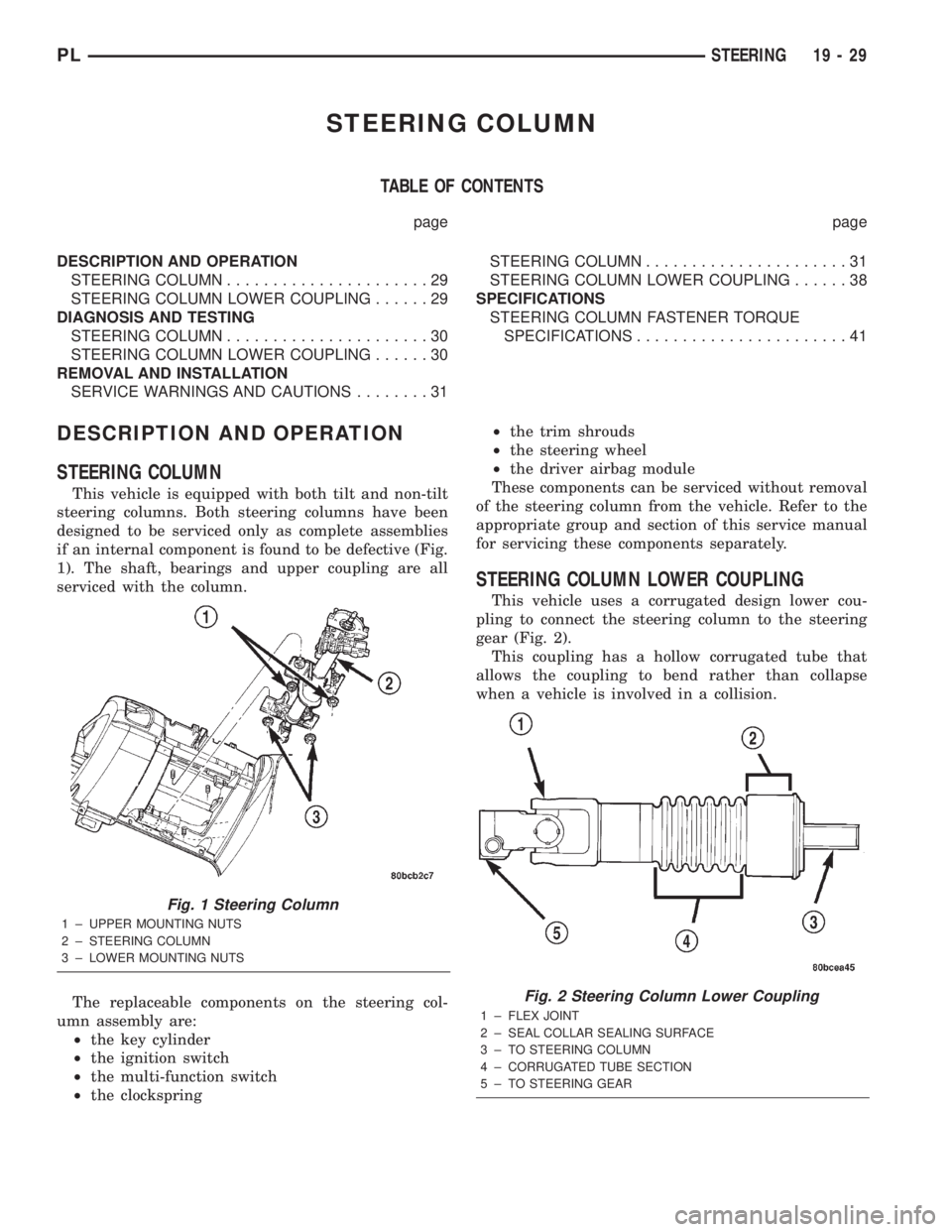
if an internal component is found to be defective (Fig.
1). The shaft, bearings and upper coupling are all
serviced with the column.
The replaceable components on the steering col-
umn assembly are:
²the key cylinder
²the ignition switch
²the multi-function switch
²the clockspring²the trim shrouds
²the steering wheel
²the driver airbag module
These components can be serviced without removal
of the steering column from the vehicle. Refer to the
appropriate group and section of this service manual
for servicing these components separately.
STEERING COLUMN LOWER COUPLING
This vehicle uses a corrugated design lower cou-
pling to connect the steering column to the steering
gear (Fig. 2).
This coupling has a hollow corrugated tube that
allows the coupling to bend rather than collapse
when a vehicle is involved in a collision.
Fig. 1 Steering Column
1 ± UPPER MOUNTING NUTS
2 ± STEERING COLUMN
3 ± LOWER MOUNTING NUTS
Fig. 2 Steering Column Lower Coupling
1 ± FLEX JOINT
2 ± SEAL COLLAR SEALING SURFACE
3 ± TO STEERING COLUMN
4 ± CORRUGATED TUBE SECTION
5 ± TO STEERING GEAR
PLSTEERING 19 - 29
Page 901 of 1285
DIAGNOSIS AND TESTING
STEERING COLUMN
For diagnosis of conditions relating to the steering
column, refer to the STEERING SYSTEM DIAGNO-
SIS CHARTS in DIAGNOSIS AND TESTING in the
POWER STEERING section of this service manual
group.
STEERING COLUMN LOWER COUPLING
The steering column coupling must be inspected
whenever a vehicle is involved in an impact or when-
ever any of the following conditions exist:
²whenever a vehicle is involved in a collision
which deploys the air bag, regardless of the extent of
damage done to the vehicle.
²if a vehicle is involved in an impact of the vehi-
cles front suspension or under carriage, which results
in any type of damage to the front suspension cross-
member.
²under any conditions which result in the steer-
ing column assembly or steering column shaft receiv-
ing a force great enough to move the steering column
or shaft forward or rearward in a vehicle.
STEERING COLUMN COUPLING INSPECTION
PROCEDURE
(1) Place the steering wheel in the STRAIGHT-
AHEAD position. Using a steering wheel holding
clamp, lock the steering wheel in place to keep it
from rotating. This keeps the clockspring in the
proper orientation.
(2) Inside the passenger compartment, remove the
steering column coupling retainer pin, back off the
pinch bolt nut, and remove the steering column cou-
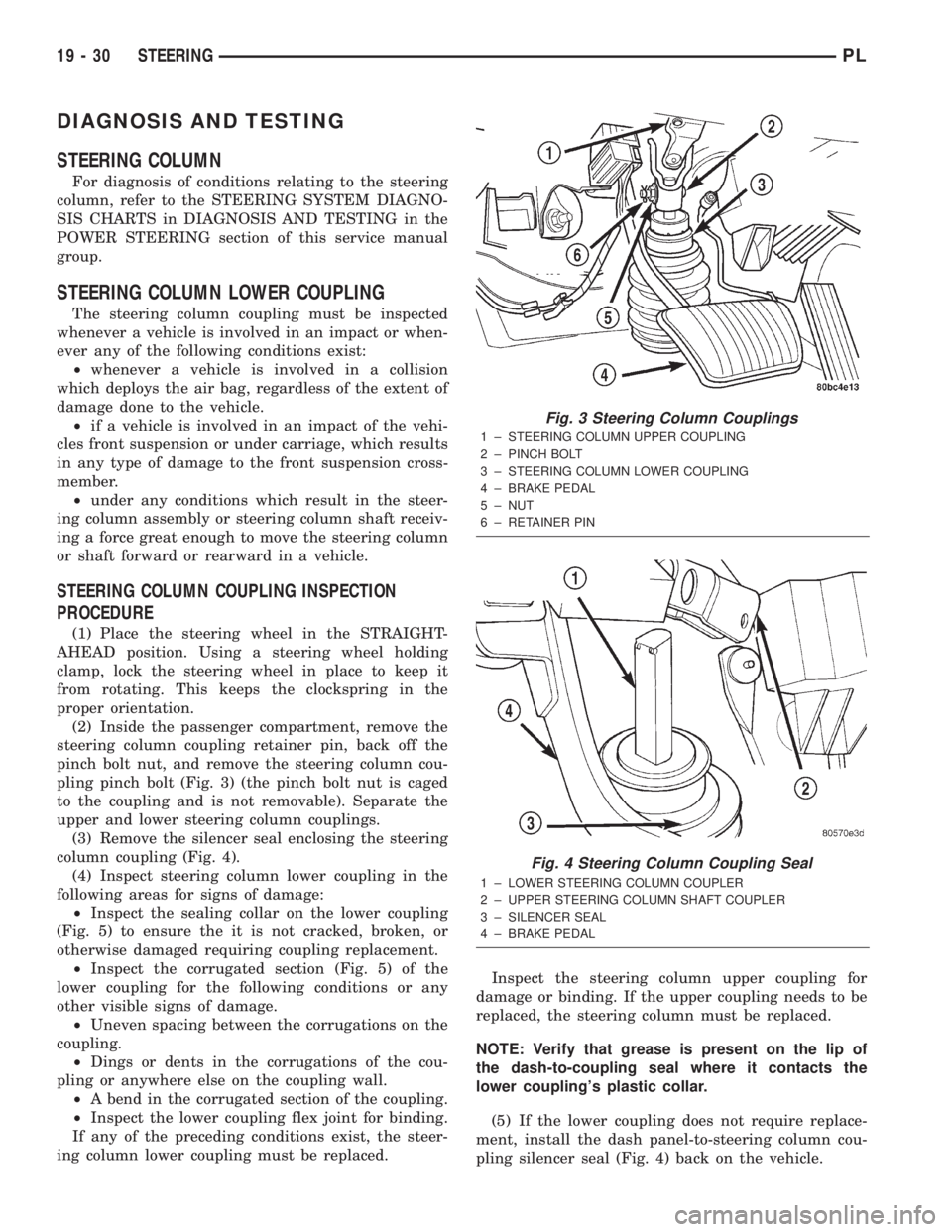
pling pinch bolt (Fig. 3) (the pinch bolt nut is caged
to the coupling and is not removable). Separate the
upper and lower steering column couplings.
(3) Remove the silencer seal enclosing the steering
column coupling (Fig. 4).
(4) Inspect steering column lower coupling in the
following areas for signs of damage:
²Inspect the sealing collar on the lower coupling
(Fig. 5) to ensure the it is not cracked, broken, or
otherwise damaged requiring coupling replacement.
²Inspect the corrugated section (Fig. 5) of the
lower coupling for the following conditions or any
other visible signs of damage.
²Uneven spacing between the corrugations on the
coupling.
²Dings or dents in the corrugations of the cou-
pling or anywhere else on the coupling wall.
²A bend in the corrugated section of the coupling.
²Inspect the lower coupling flex joint for binding.
If any of the preceding conditions exist, the steer-
ing column lower coupling must be replaced.Inspect the steering column upper coupling for
damage or binding. If the upper coupling needs to be
replaced, the steering column must be replaced.
NOTE: Verify that grease is present on the lip of
the dash-to-coupling seal where it contacts the
lower coupling's plastic collar.
(5) If the lower coupling does not require replace-
ment, install the dash panel-to-steering column cou-
pling silencer seal (Fig. 4) back on the vehicle.
Fig. 3 Steering Column Couplings
1 ± STEERING COLUMN UPPER COUPLING
2 ± PINCH BOLT
3 ± STEERING COLUMN LOWER COUPLING
4 ± BRAKE PEDAL
5 ± NUT
6 ± RETAINER PIN
Fig. 4 Steering Column Coupling Seal
1 ± LOWER STEERING COLUMN COUPLER
2 ± UPPER STEERING COLUMN SHAFT COUPLER
3 ± SILENCER SEAL
4 ± BRAKE PEDAL
19 - 30 STEERINGPL
Page 903 of 1285
REMOVAL
(1) Disconnect the negative (-) cable from the bat-
tery and isolate the cable.
(2) Before beginning removal of the steering col-
umn, be sure the front wheels of vehicle are in the
STRAIGHT-AHEAD position.
(3) Remove the screw securing the left end of the
top cover to the instrument panel. It is located just
above the left instrument panel end cap.
(4) Starting on the driver's end, push upward on
the instrument panel top cover, disengaging its
retainer clips along the face of the instrument panel.
Disengage just enough clips to allow access to the
upper ends of the instrument cluster bezel.
(5) Disengage the clips along the outer edge of the
instrument cluster bezel and remove the bezel from
the vehicle.
(6) Remove the two screws along the bottom of the
steering column cover that mounts below the steering
column on the instrument panel. Disengage the clips
on the upper end of the steering column cover and
remove the cover by pulling it straight away from the
instrument panel.
(7) If the vehicle is equipped with speed control,
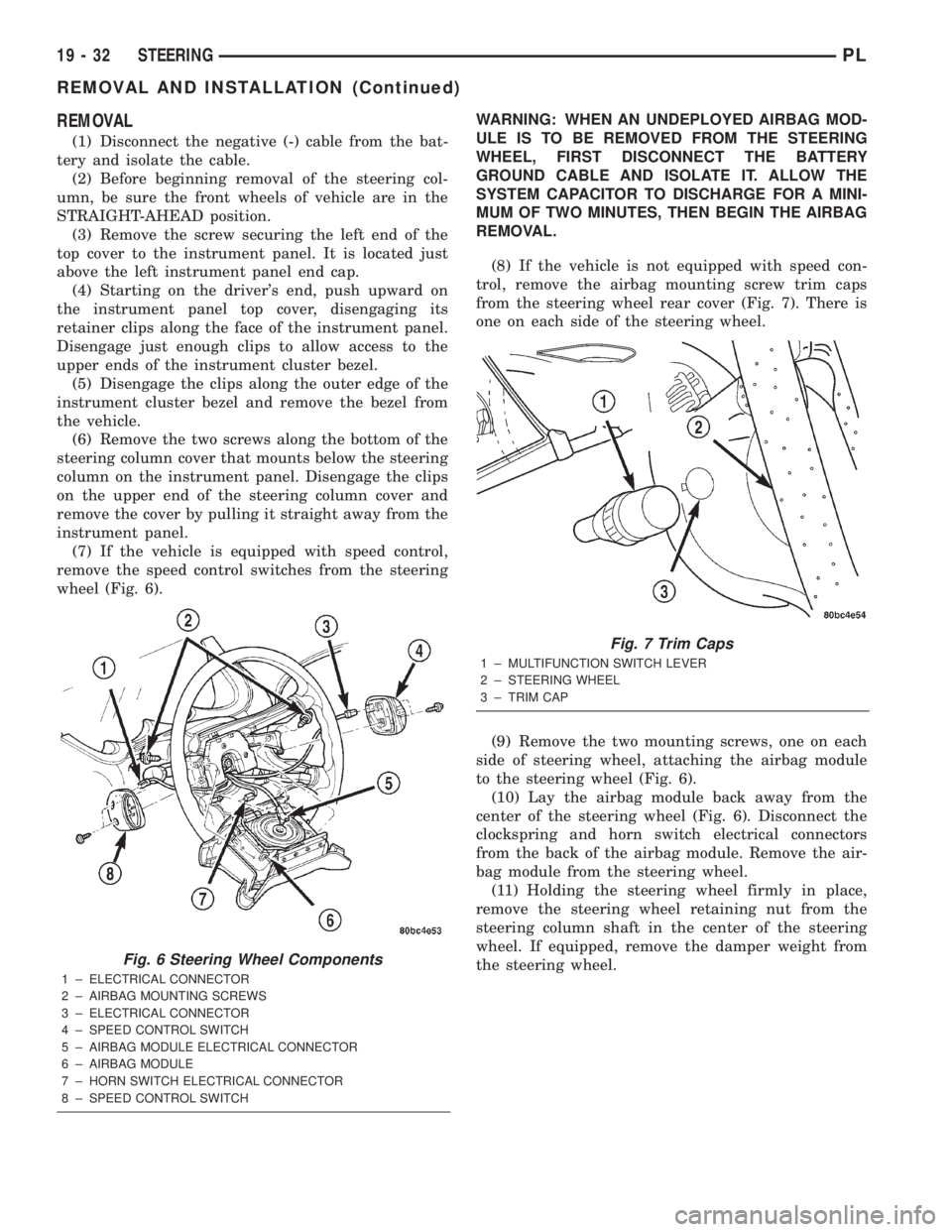
remove the speed control switches from the steering
wheel (Fig. 6).WARNING: WHEN AN UNDEPLOYED AIRBAG MOD-
ULE IS TO BE REMOVED FROM THE STEERING
WHEEL, FIRST DISCONNECT THE BATTERY
GROUND CABLE AND ISOLATE IT. ALLOW THE
SYSTEM CAPACITOR TO DISCHARGE FOR A MINI-
MUM OF TWO MINUTES, THEN BEGIN THE AIRBAG
REMOVAL.
(8) If the vehicle is not equipped with speed con-
trol, remove the airbag mounting screw trim caps
from the steering wheel rear cover (Fig. 7). There is
one on each side of the steering wheel.
(9) Remove the two mounting screws, one on each
side of steering wheel, attaching the airbag module
to the steering wheel (Fig. 6).
(10) Lay the airbag module back away from the
center of the steering wheel (Fig. 6). Disconnect the
clockspring and horn switch electrical connectors
from the back of the airbag module. Remove the air-
bag module from the steering wheel.
(11) Holding the steering wheel firmly in place,
remove the steering wheel retaining nut from the
steering column shaft in the center of the steering
wheel. If equipped, remove the damper weight from
the steering wheel.
Fig. 6 Steering Wheel Components
1 ± ELECTRICAL CONNECTOR
2 ± AIRBAG MOUNTING SCREWS
3 ± ELECTRICAL CONNECTOR
4 ± SPEED CONTROL SWITCH
5 ± AIRBAG MODULE ELECTRICAL CONNECTOR
6 ± AIRBAG MODULE
7 ± HORN SWITCH ELECTRICAL CONNECTOR
8 ± SPEED CONTROL SWITCH
Fig. 7 Trim Caps
1 ± MULTIFUNCTION SWITCH LEVER
2 ± STEERING WHEEL
3 ± TRIM CAP
19 - 32 STEERINGPL
REMOVAL AND INSTALLATION (Continued)
Page 904 of 1285
CAUTION: When installing a wheel puller on the
steering wheel, be sure the puller bolts are fully
seated in the threaded holes on the steering wheel.
If the bolts are not fully seated in the threaded
holes, the threads may be stripped out of the steer-
ing wheel when attempting to remove the steering
wheel. Also, thread the retaining nut back on the
end of the shaft until it is flush with the shaft end to
avoid damage to the shaft threads by the wheel
puller.
(12) Install a steering wheel puller on the steering
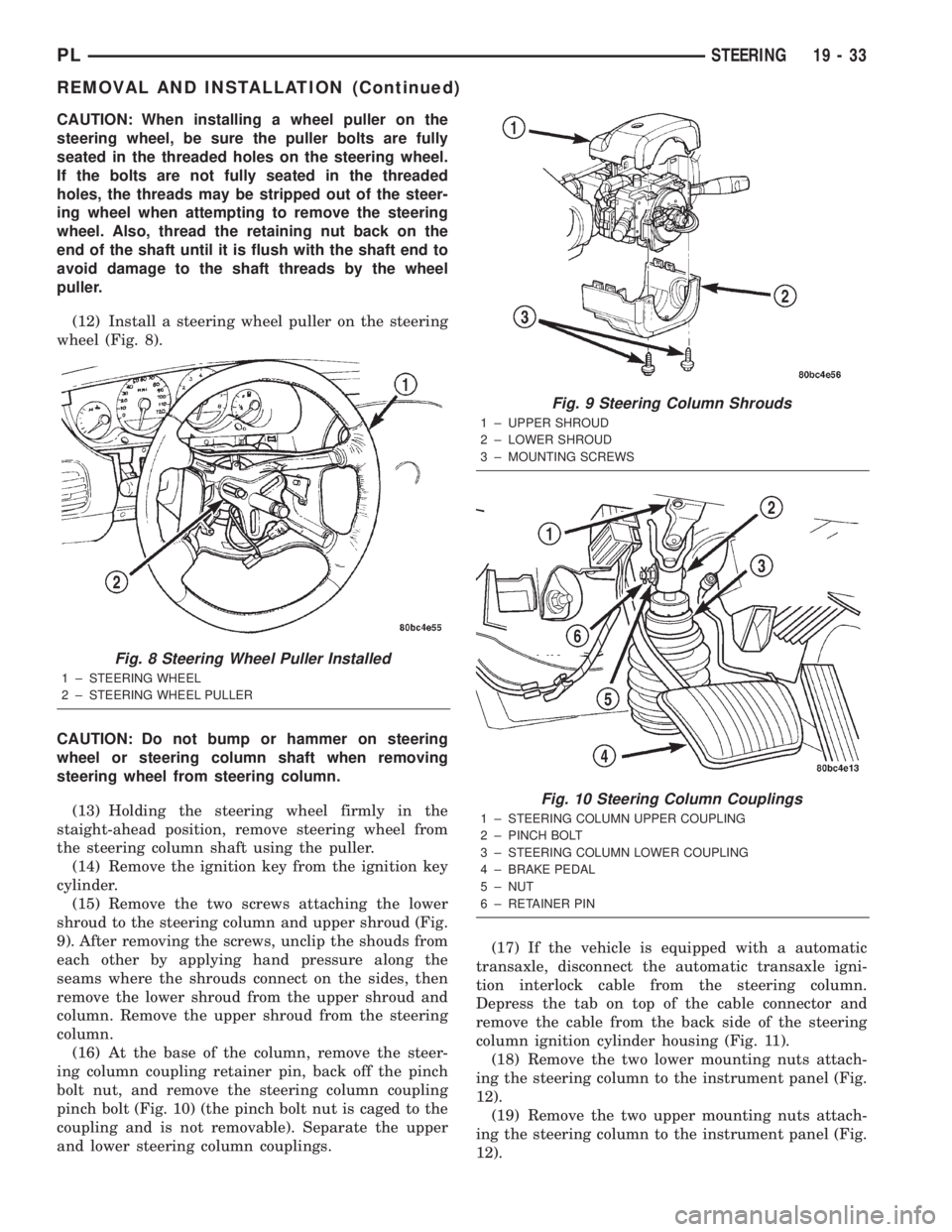
wheel (Fig. 8).
CAUTION: Do not bump or hammer on steering
wheel or steering column shaft when removing
steering wheel from steering column.
(13) Holding the steering wheel firmly in the
staight-ahead position, remove steering wheel from
the steering column shaft using the puller.
(14) Remove the ignition key from the ignition key
cylinder.
(15) Remove the two screws attaching the lower
shroud to the steering column and upper shroud (Fig.
9). After removing the screws, unclip the shouds from
each other by applying hand pressure along the
seams where the shrouds connect on the sides, then
remove the lower shroud from the upper shroud and
column. Remove the upper shroud from the steering
column.
(16) At the base of the column, remove the steer-
ing column coupling retainer pin, back off the pinch
bolt nut, and remove the steering column coupling
pinch bolt (Fig. 10) (the pinch bolt nut is caged to the
coupling and is not removable). Separate the upper
and lower steering column couplings.(17) If the vehicle is equipped with a automatic
transaxle, disconnect the automatic transaxle igni-
tion interlock cable from the steering column.
Depress the tab on top of the cable connector and
remove the cable from the back side of the steering
column ignition cylinder housing (Fig. 11).
(18) Remove the two lower mounting nuts attach-
ing the steering column to the instrument panel (Fig.
12).
(19) Remove the two upper mounting nuts attach-
ing the steering column to the instrument panel (Fig.
12).
Fig. 8 Steering Wheel Puller Installed
1 ± STEERING WHEEL
2 ± STEERING WHEEL PULLER
Fig. 9 Steering Column Shrouds
1 ± UPPER SHROUD
2 ± LOWER SHROUD
3 ± MOUNTING SCREWS
Fig. 10 Steering Column Couplings
1 ± STEERING COLUMN UPPER COUPLING
2 ± PINCH BOLT
3 ± STEERING COLUMN LOWER COUPLING
4 ± BRAKE PEDAL
5 ± NUT
6 ± RETAINER PIN
PLSTEERING 19 - 33
REMOVAL AND INSTALLATION (Continued)
Page 905 of 1285
(20) Lower the steering column away from the
instrument panel.
(21) Disconnect the wiring harness electrical con-
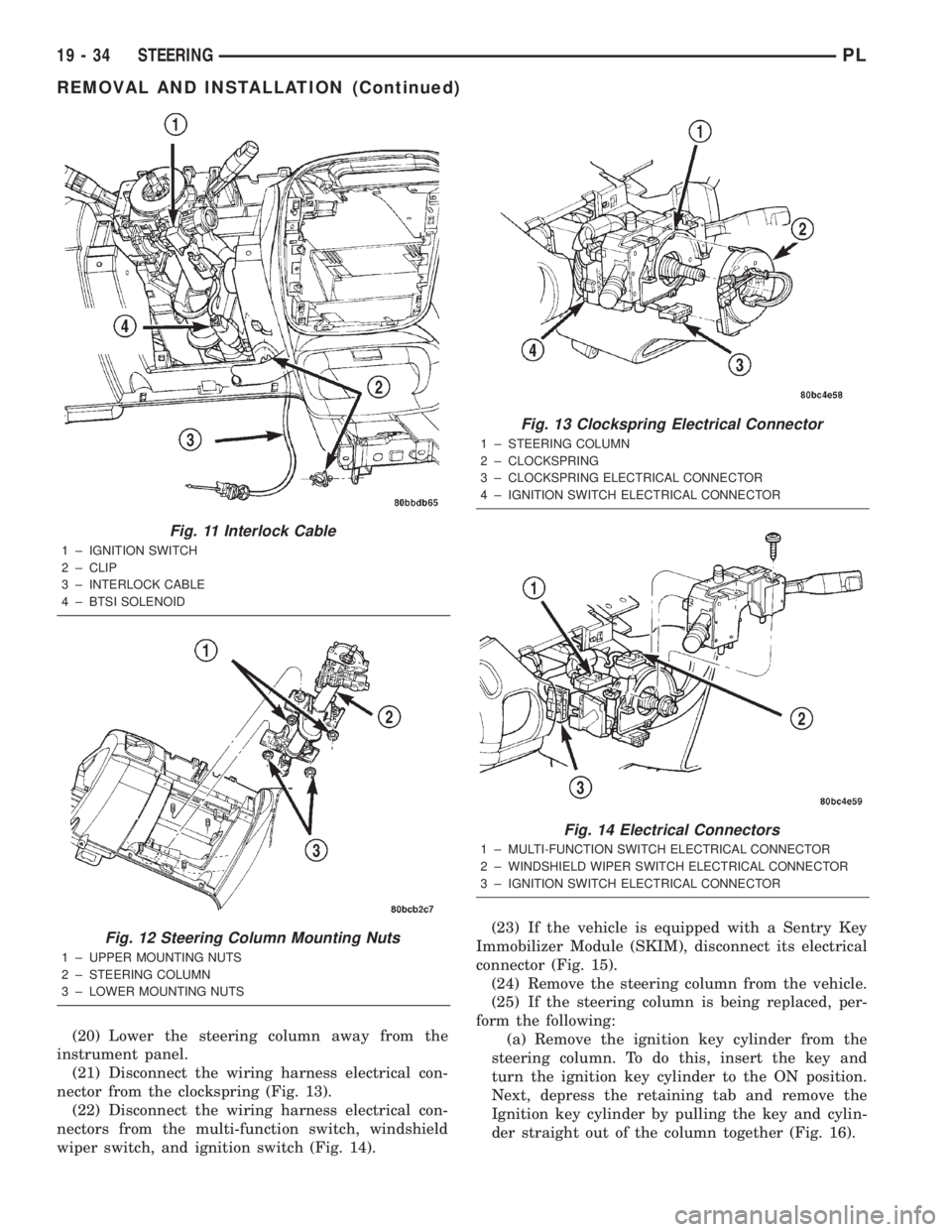
nector from the clockspring (Fig. 13).
(22) Disconnect the wiring harness electrical con-
nectors from the multi-function switch, windshield
wiper switch, and ignition switch (Fig. 14).(23) If the vehicle is equipped with a Sentry Key
Immobilizer Module (SKIM), disconnect its electrical
connector (Fig. 15).
(24) Remove the steering column from the vehicle.
(25) If the steering column is being replaced, per-
form the following:
(a) Remove the ignition key cylinder from the
steering column. To do this, insert the key and
turn the ignition key cylinder to the ON position.
Next, depress the retaining tab and remove the
Ignition key cylinder by pulling the key and cylin-
der straight out of the column together (Fig. 16).
Fig. 11 Interlock Cable
1 ± IGNITION SWITCH
2 ± CLIP
3 ± INTERLOCK CABLE
4 ± BTSI SOLENOID
Fig. 12 Steering Column Mounting Nuts
1 ± UPPER MOUNTING NUTS
2 ± STEERING COLUMN
3 ± LOWER MOUNTING NUTS
Fig. 13 Clockspring Electrical Connector
1 ± STEERING COLUMN
2 ± CLOCKSPRING
3 ± CLOCKSPRING ELECTRICAL CONNECTOR
4 ± IGNITION SWITCH ELECTRICAL CONNECTOR
Fig. 14 Electrical Connectors
1 ± MULTI-FUNCTION SWITCH ELECTRICAL CONNECTOR
2 ± WINDSHIELD WIPER SWITCH ELECTRICAL CONNECTOR
3 ± IGNITION SWITCH ELECTRICAL CONNECTOR
19 - 34 STEERINGPL
REMOVAL AND INSTALLATION (Continued)
Page 906 of 1285
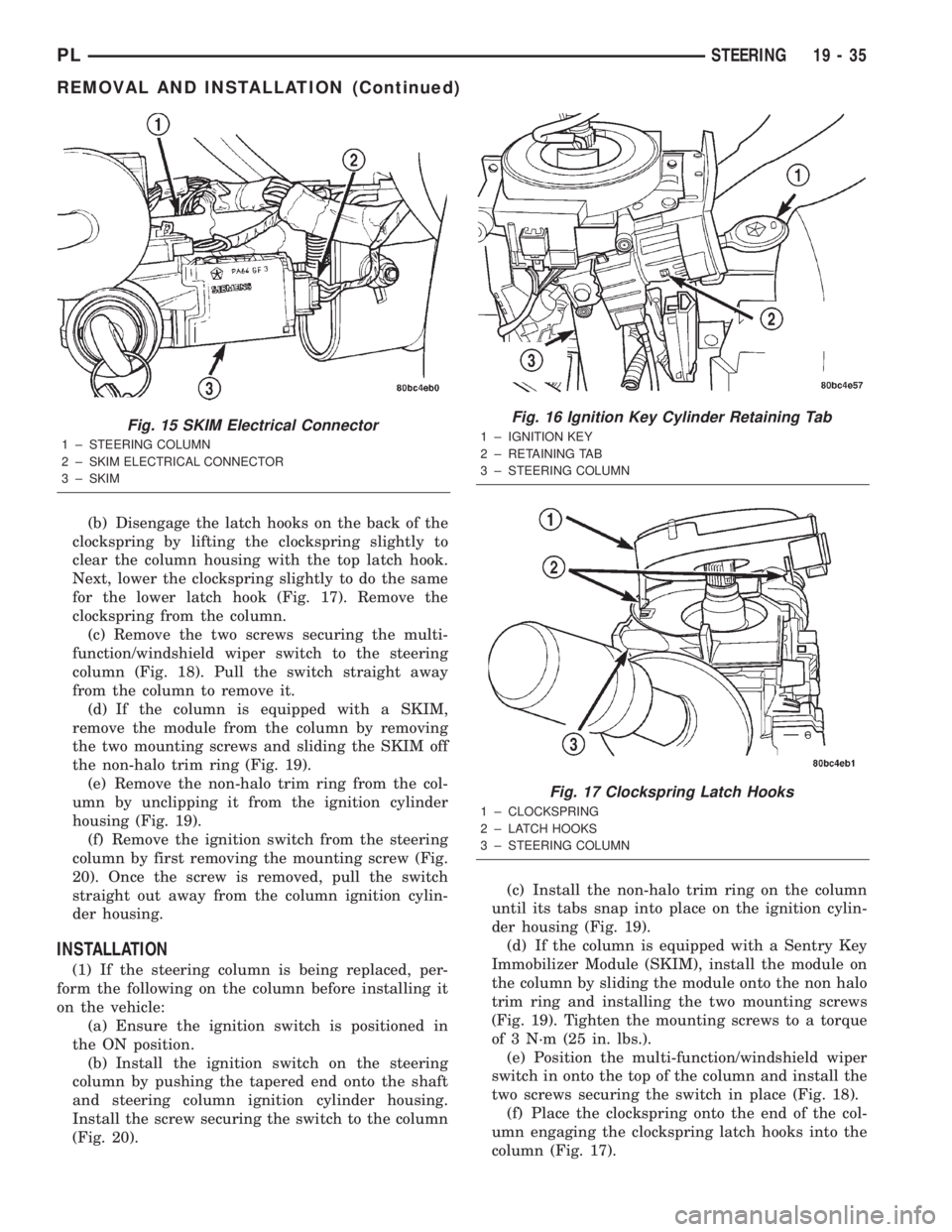
(b) Disengage the latch hooks on the back of the
clockspring by lifting the clockspring slightly to
clear the column housing with the top latch hook.
Next, lower the clockspring slightly to do the same
for the lower latch hook (Fig. 17). Remove the
clockspring from the column.
(c) Remove the two screws securing the multi-
function/windshield wiper switch to the steering
column (Fig. 18). Pull the switch straight away
from the column to remove it.
(d) If the column is equipped with a SKIM,
remove the module from the column by removing
the two mounting screws and sliding the SKIM off
the non-halo trim ring (Fig. 19).
(e) Remove the non-halo trim ring from the col-
umn by unclipping it from the ignition cylinder
housing (Fig. 19).
(f) Remove the ignition switch from the steering
column by first removing the mounting screw (Fig.
20). Once the screw is removed, pull the switch
straight out away from the column ignition cylin-
der housing.
INSTALLATION
(1) If the steering column is being replaced, per-
form the following on the column before installing it
on the vehicle:
(a) Ensure the ignition switch is positioned in
the ON position.
(b) Install the ignition switch on the steering
column by pushing the tapered end onto the shaft
and steering column ignition cylinder housing.
Install the screw securing the switch to the column
(Fig. 20).(c) Install the non-halo trim ring on the column
until its tabs snap into place on the ignition cylin-
der housing (Fig. 19).
(d) If the column is equipped with a Sentry Key
Immobilizer Module (SKIM), install the module on
the column by sliding the module onto the non halo
trim ring and installing the two mounting screws
(Fig. 19). Tighten the mounting screws to a torque
of 3 N´m (25 in. lbs.).
(e) Position the multi-function/windshield wiper
switch in onto the top of the column and install the
two screws securing the switch in place (Fig. 18).
(f) Place the clockspring onto the end of the col-
umn engaging the clockspring latch hooks into the
column (Fig. 17).
Fig. 15 SKIM Electrical Connector
1 ± STEERING COLUMN
2 ± SKIM ELECTRICAL CONNECTOR
3 ± SKIM
Fig. 16 Ignition Key Cylinder Retaining Tab
1 ± IGNITION KEY
2 ± RETAINING TAB
3 ± STEERING COLUMN
Fig. 17 Clockspring Latch Hooks
1 ± CLOCKSPRING
2 ± LATCH HOOKS
3 ± STEERING COLUMN
PLSTEERING 19 - 35
REMOVAL AND INSTALLATION (Continued)
Page 907 of 1285
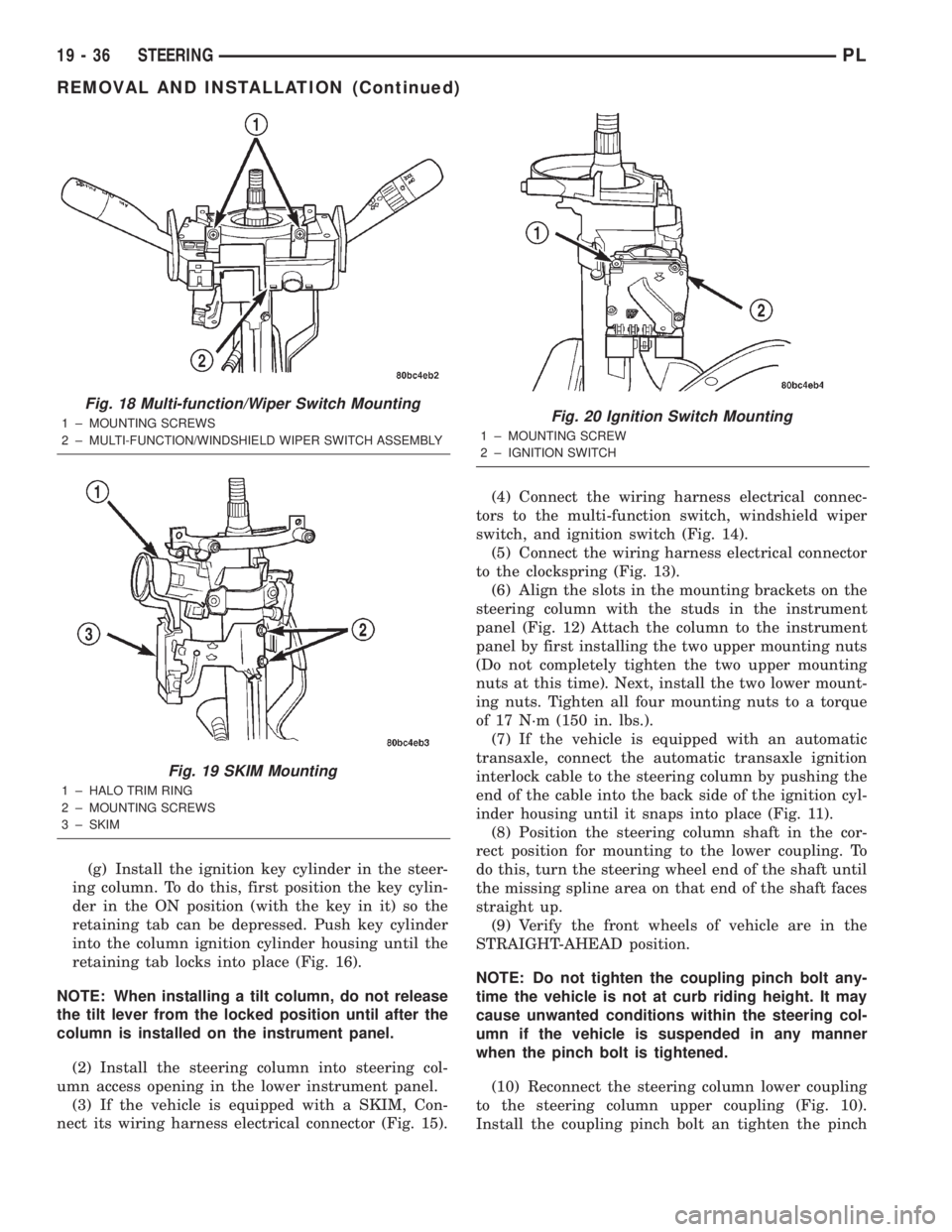
(g) Install the ignition key cylinder in the steer-
ing column. To do this, first position the key cylin-
der in the ON position (with the key in it) so the
retaining tab can be depressed. Push key cylinder
into the column ignition cylinder housing until the
retaining tab locks into place (Fig. 16).
NOTE: When installing a tilt column, do not release
the tilt lever from the locked position until after the
column is installed on the instrument panel.
(2) Install the steering column into steering col-
umn access opening in the lower instrument panel.
(3) If the vehicle is equipped with a SKIM, Con-
nect its wiring harness electrical connector (Fig. 15).(4) Connect the wiring harness electrical connec-
tors to the multi-function switch, windshield wiper
switch, and ignition switch (Fig. 14).
(5) Connect the wiring harness electrical connector
to the clockspring (Fig. 13).
(6) Align the slots in the mounting brackets on the
steering column with the studs in the instrument
panel (Fig. 12) Attach the column to the instrument
panel by first installing the two upper mounting nuts
(Do not completely tighten the two upper mounting
nuts at this time). Next, install the two lower mount-
ing nuts. Tighten all four mounting nuts to a torque
of 17 N´m (150 in. lbs.).
(7) If the vehicle is equipped with an automatic
transaxle, connect the automatic transaxle ignition
interlock cable to the steering column by pushing the
end of the cable into the back side of the ignition cyl-
inder housing until it snaps into place (Fig. 11).
(8) Position the steering column shaft in the cor-
rect position for mounting to the lower coupling. To
do this, turn the steering wheel end of the shaft until
the missing spline area on that end of the shaft faces
straight up.
(9) Verify the front wheels of vehicle are in the
STRAIGHT-AHEAD position.
NOTE: Do not tighten the coupling pinch bolt any-
time the vehicle is not at curb riding height. It may
cause unwanted conditions within the steering col-
umn if the vehicle is suspended in any manner
when the pinch bolt is tightened.
(10) Reconnect the steering column lower coupling
to the steering column upper coupling (Fig. 10).
Install the coupling pinch bolt an tighten the pinch
Fig. 18 Multi-function/Wiper Switch Mounting
1 ± MOUNTING SCREWS
2 ± MULTI-FUNCTION/WINDSHIELD WIPER SWITCH ASSEMBLY
Fig. 19 SKIM Mounting
1 ± HALO TRIM RING
2 ± MOUNTING SCREWS
3 ± SKIM
Fig. 20 Ignition Switch Mounting
1 ± MOUNTING SCREW
2 ± IGNITION SWITCH
19 - 36 STEERINGPL
REMOVAL AND INSTALLATION (Continued)