stop start ISUZU TROOPER 1995 User Guide
[x] Cancel search | Manufacturer: ISUZU, Model Year: 1995, Model line: TROOPER, Model: ISUZU TROOPER 1995Pages: 1928
Page 333 of 1928
HYDRAULIC BRAKES SA-13
BRAKE PEDAL ASSEMBL V
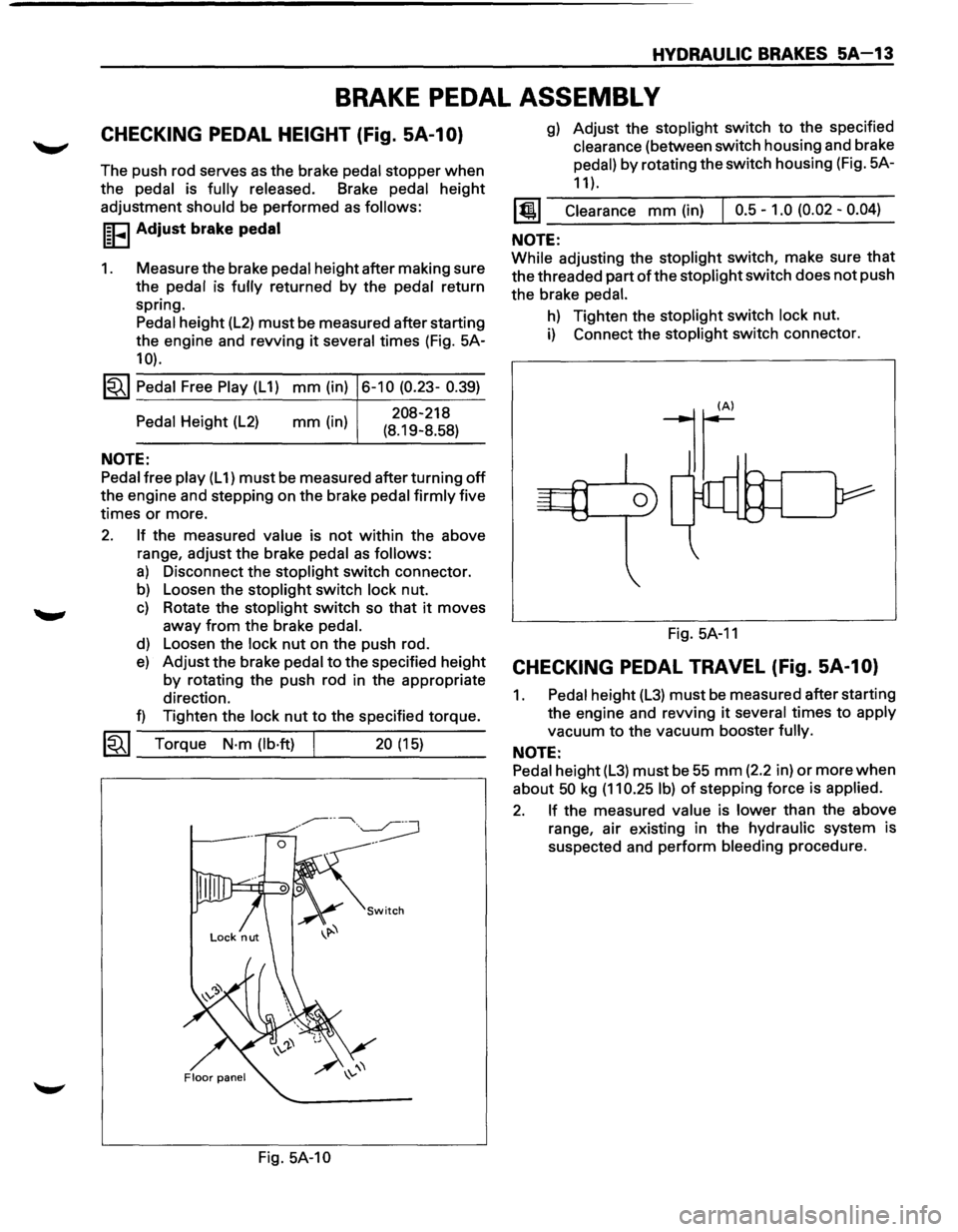
CHECKING PEDAL HEIGHT (Fig. SA-1 0)
The push rod serves as the brake pedal stopper when
the pedal is fully released. Brake pedal height
adjustment
should be performed as follows:
I~FI Adjust brake pedal
1. Measure the brake pedal height after making sure
the pedal is
fully returned by the pedal return
spring. Pedal height
(L2) must be measured after starting
the engine and revving
it several times (Fig. 5A-
10).
1~1 Pedal Free Play (L 1) mm (in) 6-10 (0.23- 0.39)
Pedal Height (L2)
NOTE:
mm (in) 208-218
(8.19-8.58)
Pedal free play (L 1) must be measured after turning off
the engine and stepping on the brake pedal firmly five
times
or more.
2. If the measured value is not within the above
range, adjust the brake
pedal as follows:
a) Disconnect the stoplight switch connector.
b) Loosen the stoplight switch lock nut.
c) Rotate the stoplight switch so that it moves
away
from the brake pedal.
d) Loosen the lock nut on the push rod.
e) Adjust the brake pedal to the specified height
by rotating the push rod in the appropriate
direction.
f) Tighten the lock nut to the specified torque.
~~~ Torque N·m (lb·ft) 20 (15) --------~----~---
Fig. 5A-10
g) Adjust the stoplight switch to the specified
clearance (between switch housing and brake
pedal)
by rotating the switch housing (Fig. 5A-
11 ).
1@1 Clearance mm (in) I 0.5-1.0 (0.02-0.04)
NOTE:
While adjusting the stoplight switch, make sure that
the threaded part of the stoplight switch does not push
the brake
pedal.
h) Tighten the stoplight switch lock nut.
i) Connect the stoplight switch connector.
Fig.
5A-11
CHECKING PEDAL TRAVEL (Fig. SA-1 0)
1. Pedal height (L3) must be measured after starting
the engine and revving
it several times to apply
vacuum
to the vacuum booster fully.
NOTE:
Pedal height (L3) must be 55 mm (2.2 in) or more when
about 50 kg (11 0.25 I b) of stepping force is applied.
2. If the measured value is lower than the above
range, air existing in the hydraulic system is
suspected and perform bleeding procedure.
Page 375 of 1928
REAR WHEEL ANTILOCK BRAKE SYSTEM 5A3-7
REAR WHEEL ANTILOCK (RWAL) SYSTEM DIAGNOSTICS
DIAGNOSIS PROCEDURE
The RWAL system contains 13 diagnostic trouble
codes
for system troubleshooting. With the ignition
key turned
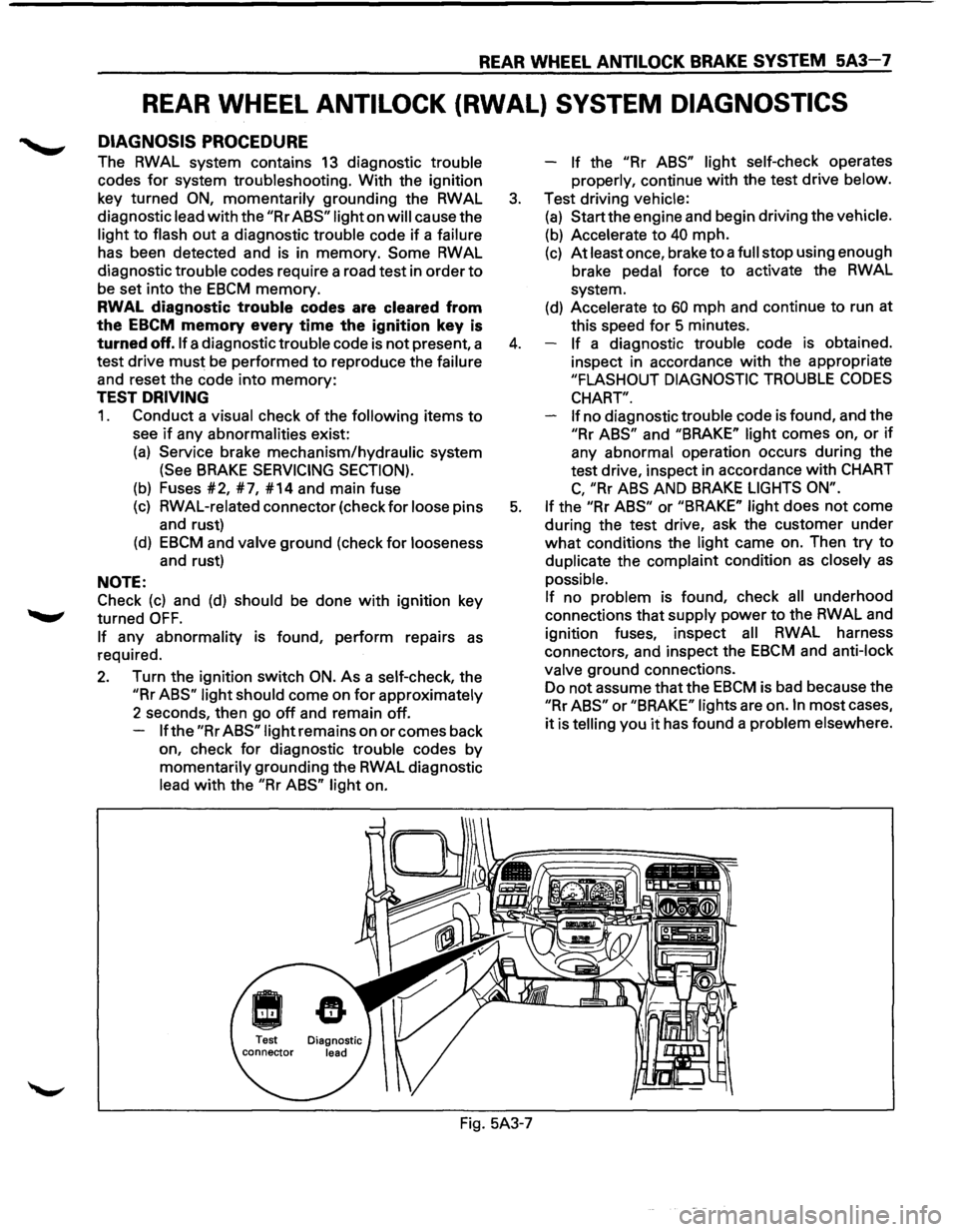
ON, momentarily grounding the RWAL
diagnostic lead
with the "Rr ABS" light on will cause the
light
to flash out a diagnostic trouble code if a failure
has been detected and is in memory.
Some RWAL
diagnostic trouble codes require a road test in order
to
be set into the EBCM memory.
RWAL diagnostic trouble codes are cleared from
the
EBCM memory every time the ignition key is
turned off. If a diagnostic trouble code is not present, a
test drive
must be performed to reproduce the failure
and reset the code into
memory:
TEST DRIVING
1. Conduct a visual check of the following items to
see if any abnormalities exist:
(a) Service brake mechanism/hydraulic system
(See BRAKE SERVICING SECTION).
(b) Fuses #2, #7, #14 and main fuse
(c) RWAL-related connector (check for loose pins
and rust)
(d) EBCM and valve ground (check for looseness
and rust)
NOTE:
Check
(c) and (d) should be done with ignition key
turned
OFF.
If any abnormality is found, perform repairs as
required.
2. Turn the ignition switch ON. As a self-check, the
"Rr ABS" light should come on for approximately
2 seconds, then go
off and remain off.
If the "Rr ABS" light remains on or comes back
on, check
for diagnostic trouble codes by
momentarily grounding the RWAL diagnostic
lead
with the "Rr ABS" light on. -
If the "Rr
ABS" light self-check operates
properly, continue
with the test drive below.
3. Test driving vehicle:
(a) Start the engine and begin driving the vehicle.
(b) Accelerate to 40 mph.
(c) At least once, brake to a full stop using enough
brake pedal force
to activate the RWAL
system.
(d) Accelerate to 60 mph and continue to run at
this speed
for 5 minutes.
4. If a diagnostic trouble code is obtained.
inspect in accordance
with the appropriate
"FLASHOUT DIAGNOSTIC TROUBLE CODES
CHART".
If
no diagnostic trouble code is found, and the
"Rr ABS" and "BRAKE" light comes on, or if
any abnormal operation occurs during the
test drive, inspect in accordance
with CHART
C, "Rr ABS AND BRAKE LIGHTS ON".
5. If the "Rr ABS" or "BRAKE" light does not come
during the test drive, ask the customer under
what conditions the light came on. Then try to
duplicate the complaint condition
as closely as
possible.
If no problem is found, check all underhood
connections that supply power
to the RWAL and
ignition fuses, inspect
all RWAL harness
connectors, and inspect the
EBCM and anti-lock
valve ground connections.
Do not assume that the
EBCM is bad because the
"Rr ABS" or "BRAKE" lights are on. In most cases,
it is telling you it has found a problem elsewhere.
Fig. 5A3-7
Page 376 of 1928
5A3-8 REAR WHEEL ANTILOCK BRAKE SYSTEM
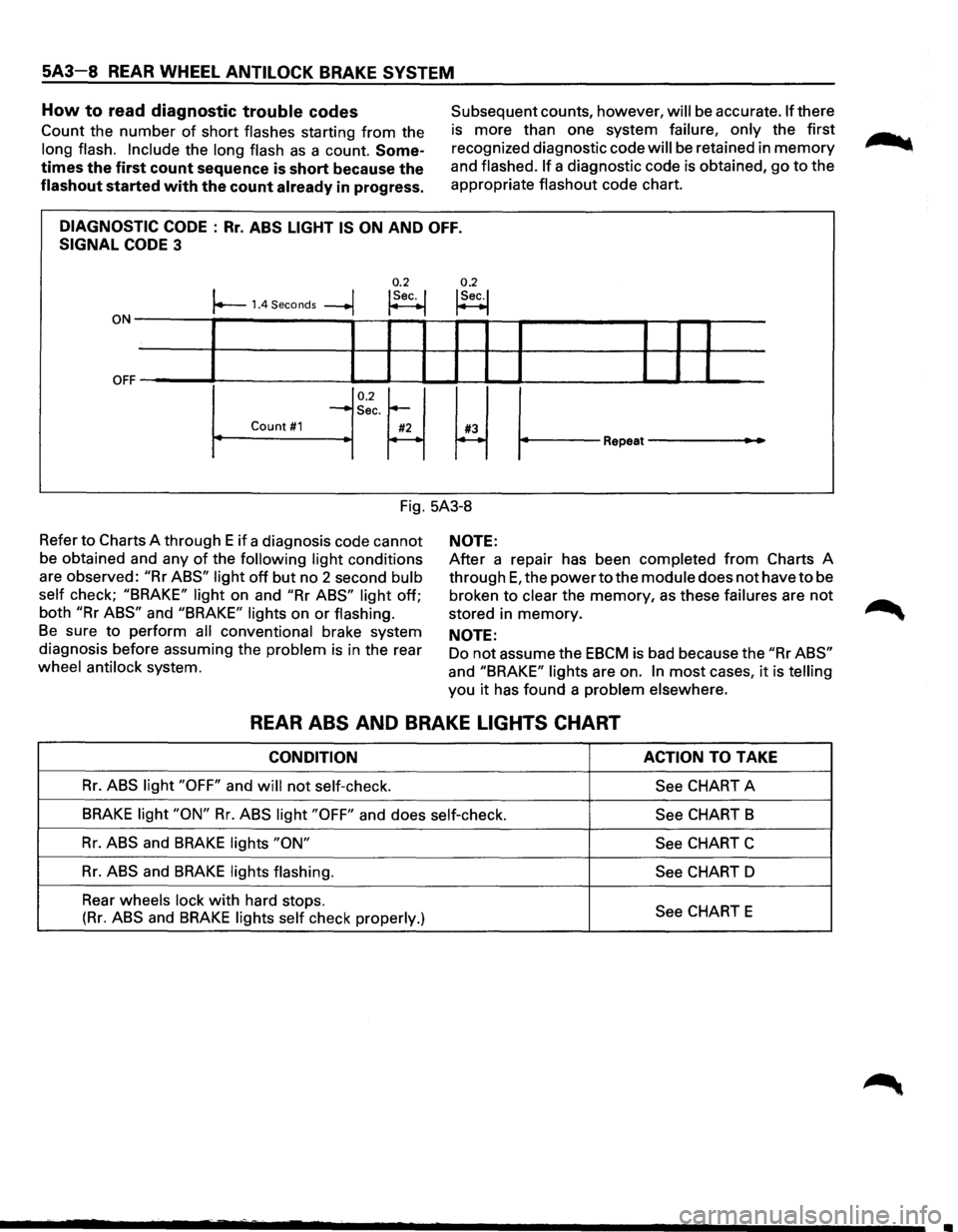
How to read diagnostic trouble codes
Count the number of short flashes starting from the
long flash. Include the long flash as a count. Some
times the first count sequence is short because the
flashout started with the count already in progress.
Subsequent counts, however, will be accurate. If there
is more than one system
failure, only the first
recognized diagnostic code
will be retained in memory
and flashed. If a diagnostic code is obtained, go to the
appropriate
flashout code chart.
DIAGNOSTIC CODE : Rr. ABS LIGHT IS ON AND OFF.
SIGNAL CODE 3
0.2 0.2 I I !Sec. I !Sec.! r--1.4 Seconds --+j ~ t--1
ON-------,~-----------,--~--~~~-r--?-----------~--r--r-----
OFF ~' ----L-1--'-----11 IL....-l.-1 ~I I ______..l__.__l ..____I
0.2~ ~ ~
-Sec.
Count #1 #2 #3 r----~ Repeat---
Fig. 5A3-8
Refer
to Charts A through E if a diagnosis code cannot
be obtained and any
of the following light conditions
are observed:
"Rr ABS" light off but no 2 second bulb
self
check; "BRAKE" light on and "Rr ABS" light off;
both
"Rr ABS" and "BRAKE" lights on or flashing.
Be sure to perform all conventional brake system
diagnosis before assuming the
problem is in the rear
wheel antilock system.
NOTE:
After a repair has been completed from Charts A
through
E, the power to the module does not have to be
broken to
clear the memory, as these failures are not
stored in memory.
NOTE:
Do not assume the EBCM is bad because the "Rr ABS"
and "BRAKE" lights are on. In most cases, it is telling
you it has found a problem elsewhere.
REAR ABS AND BRAKE LIGHTS CHART
CONDITION ACTION TO TAKE
Rr. ABS light "OFF" and will not self-check.
See CHART A
BRAKE light "ON" Rr. ABS light "OFF" and does self-check.
See CHART B
Rr. ABS and BRAKE lights "ON"
See CHART C
Rr. ABS and BRAKE lights flashing.
See CHART D
Rear
wheels lock with hard stops. See CHART E (Rr. ABS and BRAKE lights self check properly.)
Page 384 of 1928
5A3-16 REAR WHEEL ANTILOCK BRAKE SYSTEM
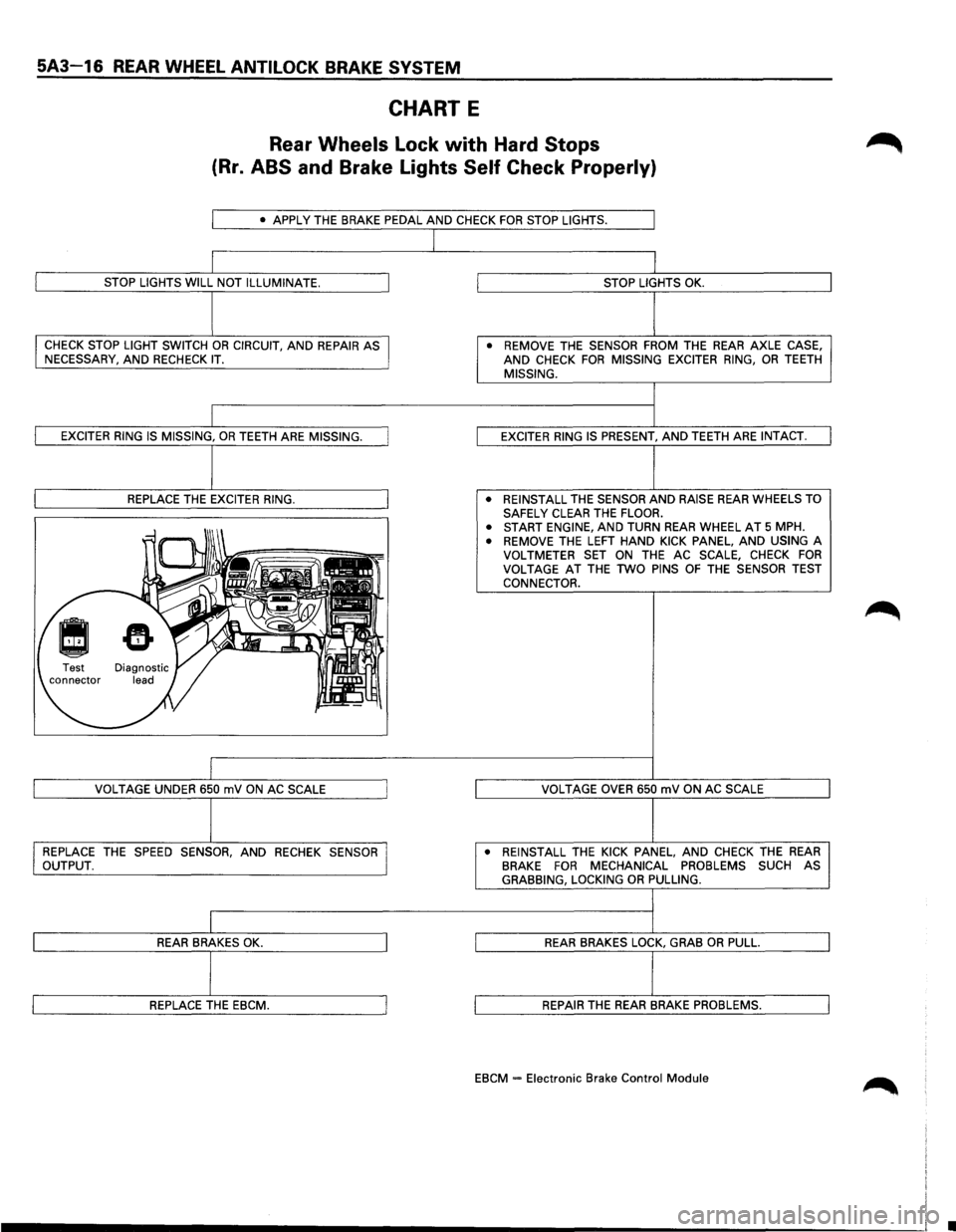
CHART E
Rear Wheels Lock with Hard Stops
(Rr. ABS and Brake Lights Self Check Properly)
• APPLY THE BRAKE PEDAL AND CHECK FOR STOP LIGHTS.
STOP LIGHTS WILL NOT ILLUMINATE.
CHECK STOP LIGHT SWITCH OR CIRCUIT, AND REPAIR AS
NECESSARY, AND RECHECK IT.
EXCITER RING IS MISSING, OR TEETH ARE MISSING.
REPLACE
THE EXCITER RING.
VOLTAGE
UNDER 650 mV ON AC SCALE
REPLACE
THE SPEED SENSOR, AND RECHEK SENSOR
OUTPUT.
REAR BRAKES OK.
REPLACE THE EBCM.
STOP LIGHTS OK.
• REMOVE THE SENSOR FROM THE REAR AXLE CASE, AND CHECK FOR MISSING EXCITER RING, OR TEETH MISSING.
EXCITER
RING IS PRESENT, AND TEETH ARE INTACT.
• REINSTALL
THE SENSOR AND RAISE REAR WHEELS TO
SAFELY CLEAR THE FLOOR.
• START ENGINE, AND TURN REAR WHEEL AT 5 MPH.
• REMOVE THE LEFT HAND KICK PANEL, AND USING A
VOLTMETER SET ON THE AC SCALE, CHECK FOR VOLTAGE AT THE TWO PINS OF THE SENSOR TEST
CONNECTOR.
VOLTAGE
OVER 650 mV ON AC SCALE
• REINSTALL
THE KICK PANEL, AND CHECK THE REAR BRAKE FOR MECHANICAL PROBLEMS SUCH AS GRABBING, LOCKING OR PULLING.
REAR BRAKES LOCK, GRAB OR PULL.
REPAIR THE REAR BRAKE PROBLEMS.
EBCM = Electronic Brake Control Module
•
Page 403 of 1928
REAR WHEEL ANTILOCK BRAKE SYSTEM 5A3-35
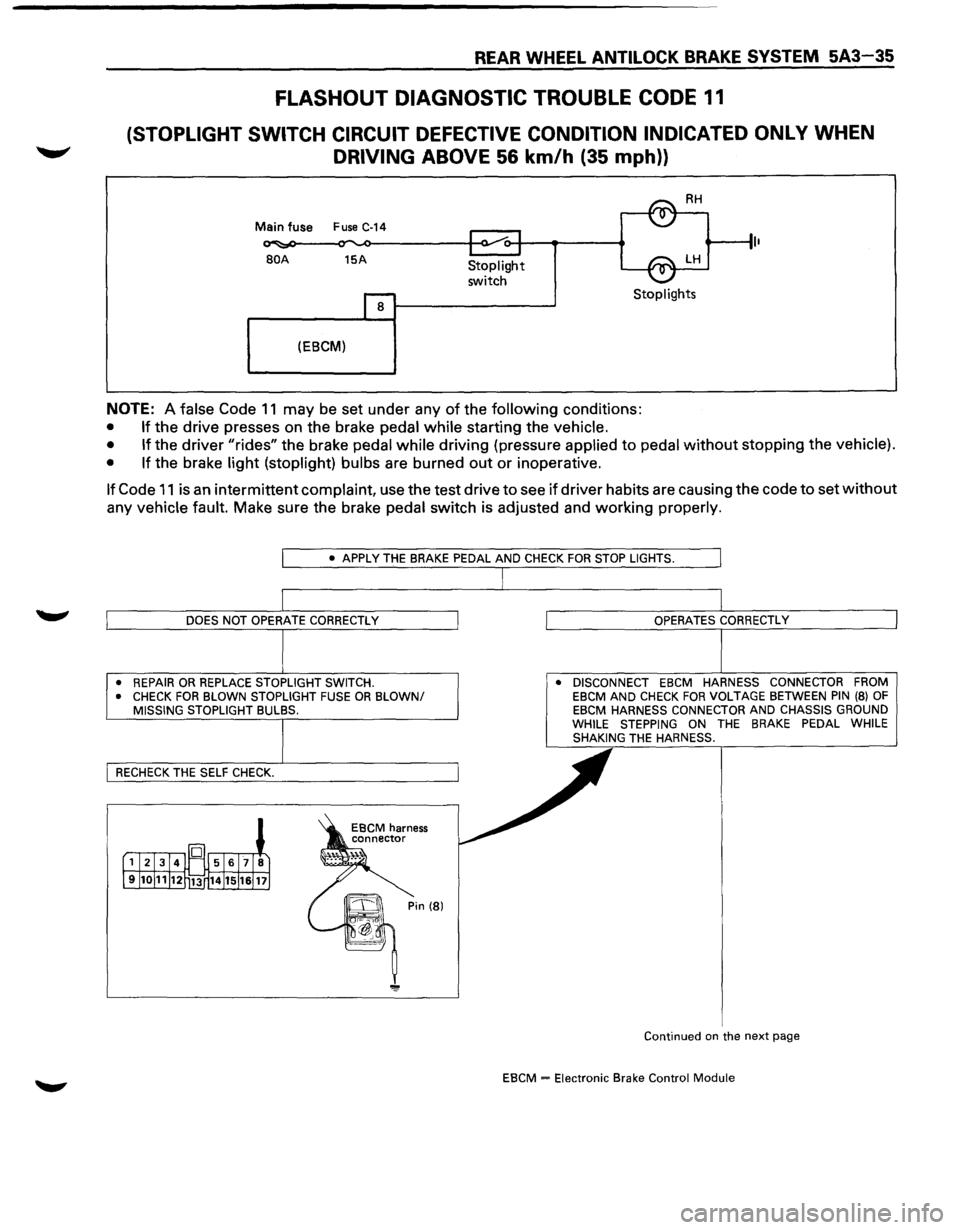
FLASHOUT DIAGNOSTIC TROUBLE CODE 11
(STOPLIGHT SWITCH CIRCUIT DEFECTIVE CONDITION INDICATED ONLY WHEN
DRIVING ABOVE 56 km/h (35 mph))
Main fuse Fuse C-14
BOA 15A
8
(EBCM)
Stoplight
switch Stoplights
NOTE: A false Code 11 may be set under any of the following conditions:
• If the drive presses on the brake pedal while starting the vehicle.
• If
the driver "rides" the brake pedal while driving (pressure applied to pedal without stopping the vehicle).
• If
the brake light (stoplight) bulbs are burned out or inoperative.
If Code 11 is an intermittent complaint, use the test drive to see if driver habits are causing the code to set without
any vehicle fault. Make sure the brake pedal switch is adjusted and working properly.
• REPAIR OR REPLACE STOPLIGHT SWITCH.
• CHECK FOR BLOWN STOPLIGHT FUSE OR BLOWN/ MISSING STOPLIGHT BULBS. •
DISCONNECT EBCM HARNESS CONNECTOR FROM
EBCM AND CHECK FOR VOLTAGE BETWEEN PIN (8) OF EBCM HARNESS CONNECTOR AND CHASSIS GROUND
WHILE STEPPING ON THE BRAKE PEDAL WHILE
SHAKING THE HARNESS.
Continued
on the next page
EBCM = Electronic Brake Control Module
Page 414 of 1928
5A4-4 4-WHEEL ANTILOCK BRAKE SYSTEM (ABS)
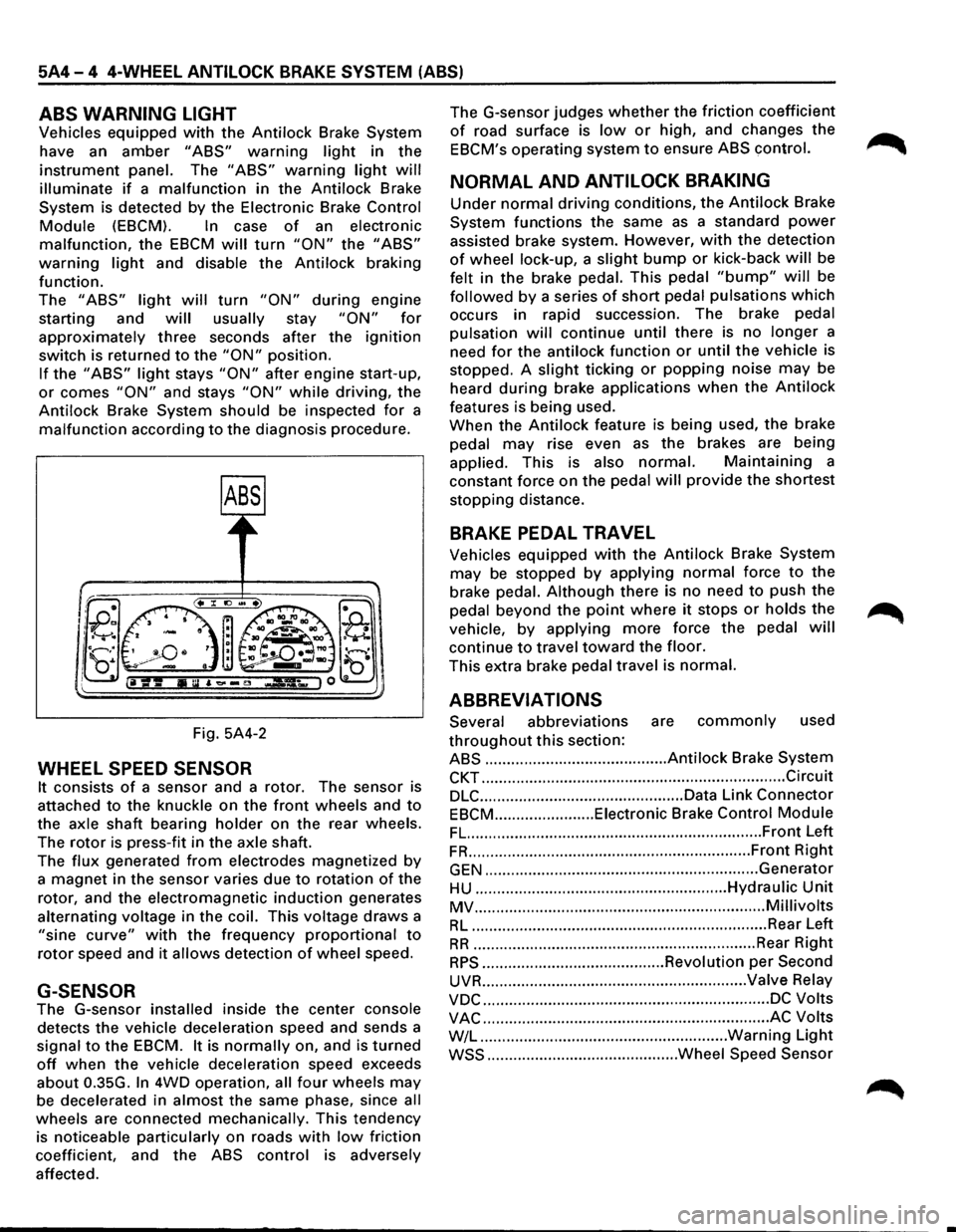
ABS WARNING LIGHT
Vehicles equipped with the Antilock Brake System
have an
amber "ABS" warning light in the
instrument panel. The "ABS" warning light will
illuminate if a malfunction in the Antilock Brake
System is detected by the Electronic Brake
Control
Module (EBCM). In case of an electronic
malfunction, the EBCM will turn "ON" the "ABS"
warning light and disable the Antilock braking
function.
The
"ABS" light will turn "ON" during engine
starting and
will usually stay "ON" for
approximately three seconds after the ignition
switch is returned to the "ON" position.
If the "ABS" light stays "ON" after engine start-up,
or comes "ON" and stays "ON" while driving, the
Antilock Brake System should be inspected
for a
malfunction according to the diagnosis procedure.
Fig. 5A4-2
WHEEL SPEED SENSOR
It consists of a sensor and a rotor. The sensor is
attached
to the knuckle on the front wheels and to
the axle shaft bearing holder on the rear wheels.
The
rotor is press-fit in the axle shaft.
The
flux generated from electrodes magnetized by
a magnet in the sensor varies due to rotation of the
rotor, and the electromagnetic
induction generates
alternating voltage in
the coil. This voltage draws a
"sine curve" with the frequency proportional to
rotor speed and it allows detection of wheel speed.
G-SENSOR
The G-sensor installed inside the center console
detects the vehicle deceleration speed and sends a
signal
to the EBCM. It is normally on, and is turned
off when the vehicle deceleration speed exceeds
about 0.35G.
In 4WD operation, all four wheels may
be decelerated in almost the same phase, since all
wheels are connected mechanically. This tendency
is noticeable particularly on roads
with low friction
coefficient, and the
ABS control is adversely
affected. The
G-sensor judges
whether the friction coefficient
of road surface is low or high, and changes the
EBCM's operating system to ensure ABS control.
NORMAL AND ANTILOCK BRAKING
Under normal driving conditions, the Antilock Brake
System functions the same
as a standard power
assisted brake system. However, with the detection
of wheel lock-up, a slight bump or kick-back will be
felt in the brake pedal. This pedal
"bump" will be
followed by a series of short pedal pulsations which
occurs in rapid succession. The brake pedal
pulsation
will continue until there is no longer a
need
for the antilock function or until the vehicle is
stopped. A
slight ticking or popping noise may be
heard
during brake applications when the Antilock
features is being used.
When the
Antilock feature is being used, the brake
pedal
may rise even as the brakes are being
applied. This is also
normal. Maintaining a
constant force on the pedal
will provide the shortest
stopping distance.
BRAKE PEDAL TRAVEL
Vehicles equipped with the Antilock Brake System
may be stopped by applying normal force to the
brake pedal.
Although there is no need to push the
pedal beyond the
point where it stops or holds the ~
vehicle, by applying more force the pedal will
continue to travel toward the floor.
This extra brake pedal travel is normal.
ABBREVIATIONS
Several abbreviations are commonly used
throughout this section:
ABS .......................................... Antilock Brake System
CKT ...................................................................... Circuit
DLC ............................................... Data Link Connector
EBCM ....................... Eiectronic Brake Control Module
FL. ................................................................... Front Left
FR ................................................................. Front Right
GEN ............................................................... Generator
HU .......................................................... Hydraulic Unit
MV ................................................................... Millivolts
RL .................................................................... Rear Left
RR ................................................................. Rear Right
RPS .......................................... Revolution per Second
UVR ............................................................. Valve Relay
VDC .................................................................. DC Volts
VAC .................................................................. AC Volts
W/L .........................................................
Warning Light
WSS ............................................ Wheel Speed Sensor
Page 416 of 1928
5A4-6 4-WHEEL ANTILOCK BRAKE SYSTEM (ABS)
If only rear wheels are rotated using jacks or
drum tester, the system will diagnose a speed
sensor
malfunction and the "ABS" warning
light will illuminate. But actually no trouble
exists. After inspection stop the engine once
and re-start it,
then make sure that the "ABS"
warning light does not illuminate.
If the battery has been discharged
The engine may stall if the battery has been
completely discharged and the engine is started via
a
jumper cable. This is because the Antilock Brake
System (ABS) requires a
large quantity of
electricity. In this case, wait until the battery is
recharged,
or set the ABS to a non-operative state
by removing the fuse for the ABS (40A). After the
battery has been recharged, stop the engine and
install the ABS fuse. Start the engine again, and
confirm that the ABS warning light does not light.
NOTE ON INTERMITTENTS
As with virtually any electronic system, it is difficult
to identify an intermittent failure. In such a case
duplicating the system malfunction during a test
drive
or a good description of vehicle behavior from
the customer may be helpful in locating a "most
likely" failed component or circuit. The symptom
diagnosis chart may also be useful in isolating the
failure. Most intermittent problems are caused by
faulty electrical connections or wiring. When an
intermittent failure is encountered, check suspect
circuits for:
Suspected harness damage.
• Poor mating of connector halves or terminals
not fully seated in the connector body (backed
out).
Improperly formed or damaged terminals.
TEST DRIVING ABS COMPLAINT
VEHICLES
In case that there has been an abnormality in the
lighting pattern of "ABS" warning light, the fault
can be located in accordance with the "DIAGNOSIS
BY 'ABS' WARNING LIGHT ILLUMINATION
PATTERN". In case of such trouble as can be
detected
by the driver as a vehicle symptom,
however, it is necessary to give a test drive
following the test procedure mentioned below,
thereby reproducing the symptom for trouble
diagnosis on a symptom basis:
1. Start the engine and make sure that the "ABS"
W/L goes OFF. If the W/L remains ON, it
means that the Diagnostic Trouble Code (DTC)
is stored. Therefore, read the code and
locate
the fault.
2. Start the vehicle and accelerate to 30 km/h (19
mph) or more.
3. Slowly brake and stop the vehicle completely.
4. Then restart the vehicle and accelerate to 40
km/h (25 mph) or more.
5. Brake at a time so as to actuate the ABS and ... ~
stop the vehicle.
6. Be cautious of abnormality during the test. If
theW/Lis actuated while driving, read the DTC
and locate the fault.
7. If the abnormality is not reproduced by the
test, make best efforts
to reproduce the
situation reported
by the customer.
8. If the abnormality has been detected, repair in
accordance
with the "SYMPTOM DIAGNOSIS".
NOTE:
Be sure to give a test drive on a wide, even
road
with a small traffic.
If an abnormality is detected, be sure to
suspend the test and start
trouble diagnosis at
once.
II ABS" WARNING LIGHT
When ABS trouble occurs to actuate "ABS"
warning light, the trouble code corresponding to
the trouble is stored in the EBCM. Only ordinary
brake is available with ABS being unactuated. Even
when "ABS" warning light is actuated, if the starter
switch is set
ON after setting it OFF once, the EBCM
checks
up on the entire system and, if there is no
abnormality, judges ABS to work currently and the
warning light is lit normally even though the
trouble code is stored.
NOTE:
Illumination of the "ABS" warning light
indicates that antilock braking is no longer
available. Power assisted braking without
antilock control is still available.
NORMAL OPERATION
II ABS" WARNING LIGHT
When the ignition is first moved from "OFF" to
"RUN", the amber "ABS" warning light will turn
"ON". The "ABS" warning light will turn "ON"
during engine starting and will usually stay "ON"
for approximately three seconds after the ignition
switch is returned to the "ON" position. The
warning light should remain "OFF" at all other
times.
•
Page 425 of 1928
4-WHEEL ANTILOCK BRAKE SYSTEM (ABS) 5A4-15
3. EXPLANATION OF MODES
Mode FO: OAT A LIST
FO: DATA LIST can display the
conditions
of sensors and switches as
well as the ONfOFF operation of
solenoid valves as commanded by the
EBCM.
In case of system abnormality,
the trouble area can be roughly
identified
with the data displayed.
Mode
F2: TROUBLE CODE
F2: TROUBLE CODE can display the
past (history) Diagnostic Trouble Codes
(DTCs) stored
by the EBCM. When
some
trouble occurs and a TROUBLE
CODE is set in this mode, the faulty
area can
promptly be located by
checking the associated Trouble Code
No.
Mode
F3: SNAPSHOT
F3: SNAPSHOT can help locate the
cause
of trouble by storing and
displaying the data
from a specific
period
of vehicle operation.
Mode
F4: CLEAR CODES
F4: CLEAR CODES erases the DTC
stored by the control unit.
Mode F5: ACTUATOR TEST
F5: ACTUATOR TEST can make sure if
the system-related motor, solenoid
valves, and hydraulic circuit function
normally. If there is still a problem in
the operation of the system even after
making electrical repairs, ACTUATOR
TEST may uncover another problem.
(note
1) This mode can be used under
the
following conditions:
No
trouble code is stored. (note 1)
The vehicle is not in motion. (note 2)
This mode should be selected before
starting the engine.
note
1: As this mode forcibly operates
actuators (solenoid valves,
relays, motor, etc.), the control
unit may be damaged if this
test
is conducted on damaged
actuators. Therefore, be sure
to repair all electrical faults
and make sure no
DTC is
stored before using this mode. note
2: If a vehicle speed (30 km/h
(18.6
mph)
or more) is detected
during the ACTUATOR
TEST,
the test function will auto
matically stop.
Mode
F6: WHEEL SENSORS
F6: WHEEL SENSORS can check to
detect such speed sensor trouble as
EBCM's self-diagnosing function fails to
detect, including excessive gap in each
speed sensor,
momentary cut-off of
sensor signal, etc.
Page 431 of 1928
4-WHEEL ANTILOCK BRAKE SYSTEM (ABS) 5A4-21
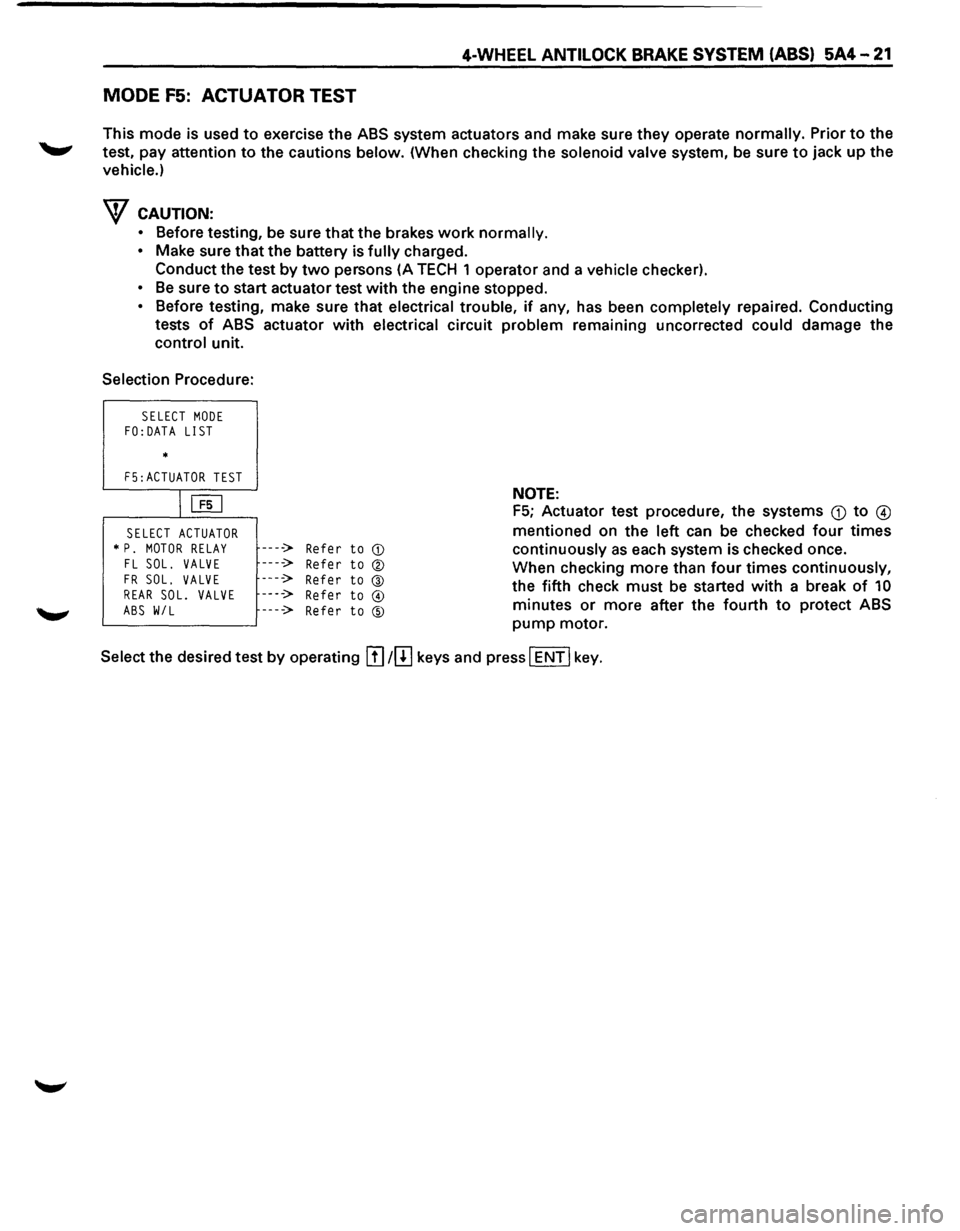
MODE F5: ACTUATOR TEST
This mode is used to exercise the ABS system actuators and make sure they operate normally. Prior to the
test, pay attention
to the cautions below. (When checking the solenoid valve system, be sure to jack up the
vehicle.)
w CAUTION:
• Before testing, be sure that the brakes work normally.
• Make sure that the battery is fully charged.
Conduct the test
by two persons (A TECH 1 operator and a vehicle checker).
• Be sure to start actuator test with the engine stopped.
• Before testing, make sure that electrical trouble, if any, has been completely repaired. Conducting
tests
of ABS actuator with electrical circuit problem remaining uncorrected could damage the
control unit.
Selection Procedure:
SELECT MODE FO:DATA LIST
*
F5:ACTUATOR TEST
IUiJ
SELECT ACTUATOR * P. MOTOR RELAY FL SOL. VALVE
FR SOL. VALVE REAR SOL. VALVE
ABS W/L
----> Refer to CD
----> Refer to ®
----> Refer to @ ----> Refer to @
----> Refer to ®
NOTE:
F5; Actuator test procedure, the systems Q) to @
mentioned on the left can be checked four times
continuously as each system is checked once.
When checking more than
four times continuously,
the fifth check
must be started with a break of 10
minutes or more after the fourth to protect ABS
pump motor.
Select the desired test
by operating !I] 1[!] keys and press I ENT I key.
Page 442 of 1928
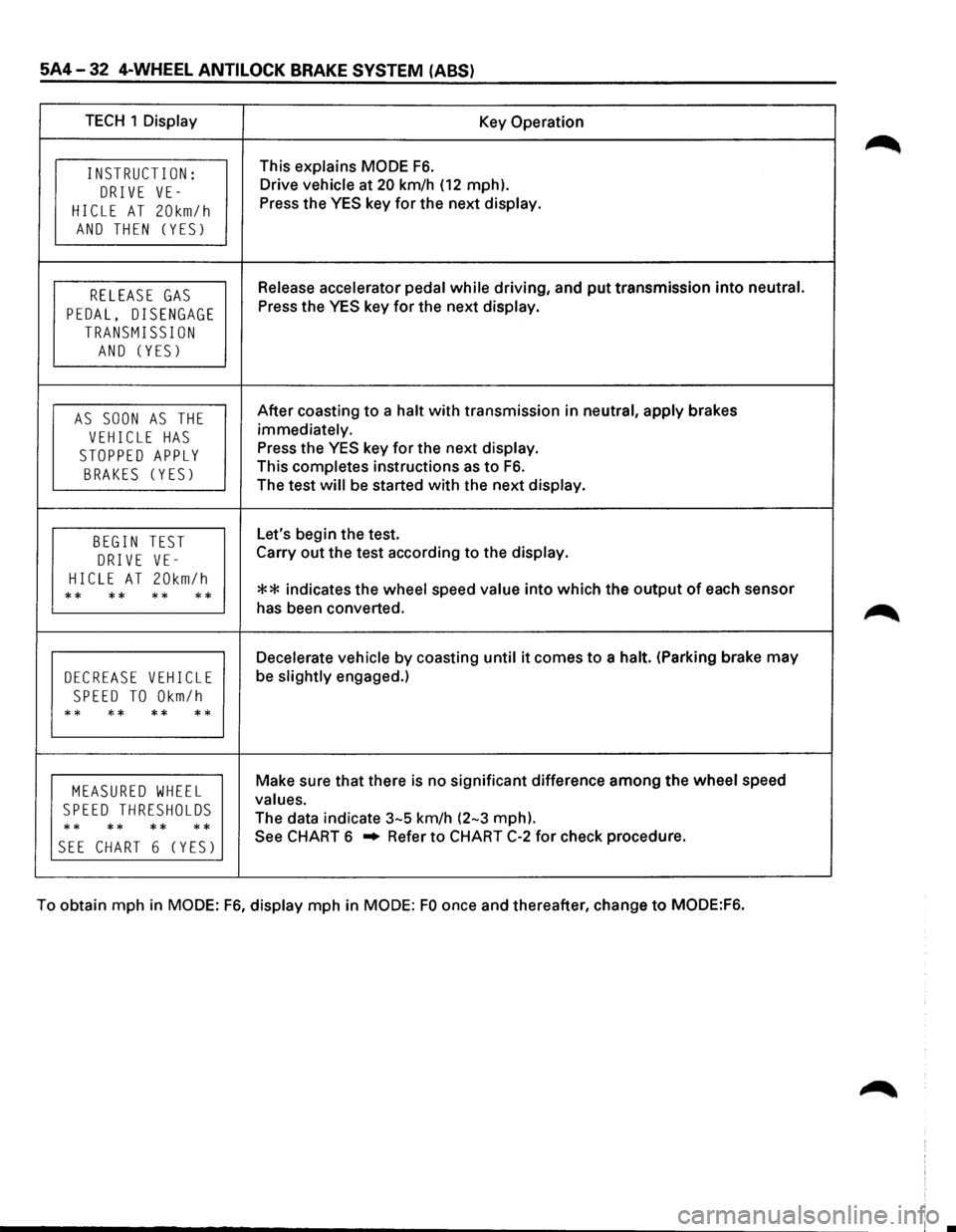
5A4-32 4-WHEEL ANTI LOCK BRAKE SYSTEM (ABS)
TECH 1 Display Key Operation
INSTRUCT I ON: This explains MODE F6.
DRIVE VE-Drive vehicle at 20 km/h (12 mph).
HICLE AT 20km/h Press the YES key for the next display.
AND THEN (YES)
RELEASE GAS Release accelerator pedal while driving, and put transmission into neutral.
PEDAL, DISENGAGE Press the YES key for the next display.
TRANSMISSION
AND (YES)
AS SOON AS THE After coasting to a halt with transmission in neutral, apply brakes
VEHICLE HAS immediately.
STOPPED APPLY Press the YES key for the next display.
BRAKES (YES) This completes instructions as to F6.
The test will be started with the next display.
BEGIN TEST Let's begin the test.
DRIVE VE-Carry out the test according to the display.
HICLE AT 20km/h ** indicates the wheel speed value into which the output of each sensor ** ** ** ** has been converted.
Decelerate vehicle by coasting until it comes to a halt. (Parking brake may
DECREASE VEHICLE be slightly engaged.)
SPEED TO Okm/h
** ** ** **
MEASURED WHEEL Make sure that there is no significant difference among the wheel speed
SPEED THRESHOLDS values.
** **
** ** The
data indicate 3-5 km/h (2-3 mph).
SEE CHART 6 (YES) See CHART 6 .. Refer to CHART C-2 for check procedure.
To obtain mph in
MODE: F6, display mph in MODE: FO once and thereafter, change to MODE:F6.