battery ISUZU TROOPER 1995 Workshop Manual
[x] Cancel search | Manufacturer: ISUZU, Model Year: 1995, Model line: TROOPER, Model: ISUZU TROOPER 1995Pages: 1928
Page 1276 of 1928
8-86 CHASSIS ELECTRICAL
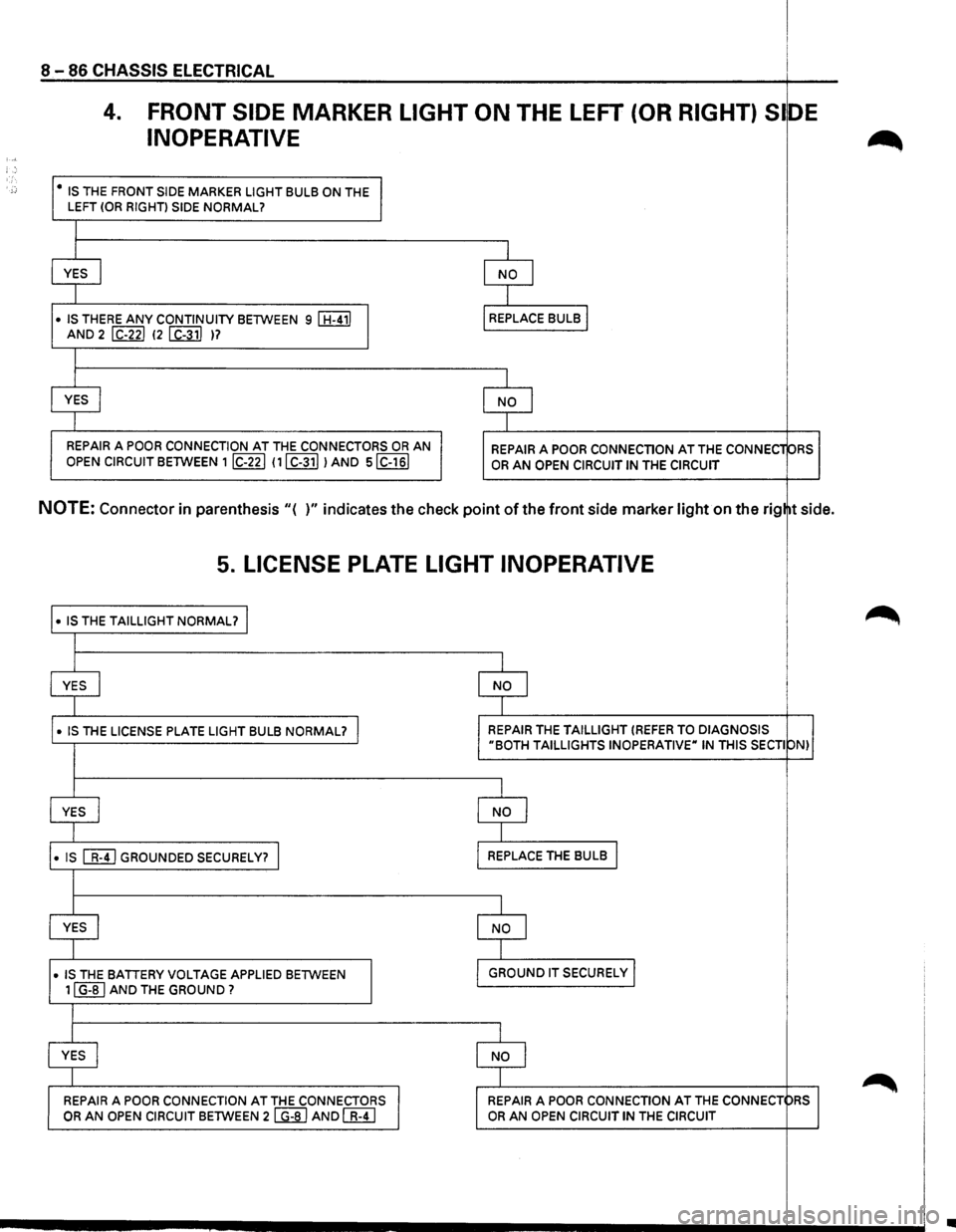
4. FRONT SIDE MARKER LIGHT ON THE LEFT (OR RIGHT) Sl DE
INOPERATIVE ~ :,, '.
;:: • IS THE FRONT SIDE MARKER LIGHT BULB ON THE I LEFT (OR RIGHT) SIDE NORMAL?
I
YES
I NO I
I
• IS THERE ANY CONTINUITY BETWEEN 9 I H-411
I
REPLACE BULB I
AND 2 I C-221 (2 I C-311 )?
I
YES
I NO I
I
REPAIR
A POOR CONNECTION AT THE CONNECTORS OR AN REPAIR A POOR CONNECTION AT THE CONNEC1 ORS
OPEN CIRCUIT BETWEEN 1 IC-221 111 C-311 I AND siC-161 OR AN OPEN CIRCUIT IN THE CIRCUIT
NOTE: Connector in parenthesis "( )" indicates the check point of the front side marker light on the rig tside.
5. LICENSE PLATE LIGHT INOPERATIVE
• IS THE TAILLIGHT NORMAL? I ~
I
YES I I NO I
I
•
IS THE LICENSE PLATE LIGHT BULB NORMAL? I I REPAIR THE TAILLIGHT (REFER TO DIAGNOSIS "BOTH TAILLIGHTS INOPERATIVE" IN THIS SECTI ON) I
I
YES j I NO l
I
• IS [[!]GROUNDED SECURELY? I I REPLACE
THE BULB I
I
YES I
I NO I
I
• IS THE BATTERY VOLTAGE APPLIED BETWEEN
I
I GROUND IT SECURELY I
I 11 G-BI AND THE GROUND? I
I
I YES I
I NO
I ~ I REPAIR A POOR CONNECTION AT THE CONNECTORS I I REPAIR A POOR
CONNECTION AT THE CONNECT pRS OR AN OPEN
CIRCUIT BETWEEN 2 I G-81 AND [fl;TI OR AN OPEN CIRCUIT IN THE CIRCUIT
•
Page 1277 of 1928
LIGHTING SWITCH
Refer to "HEADLIGHT AND FOG LIGHT" in this
~ section.
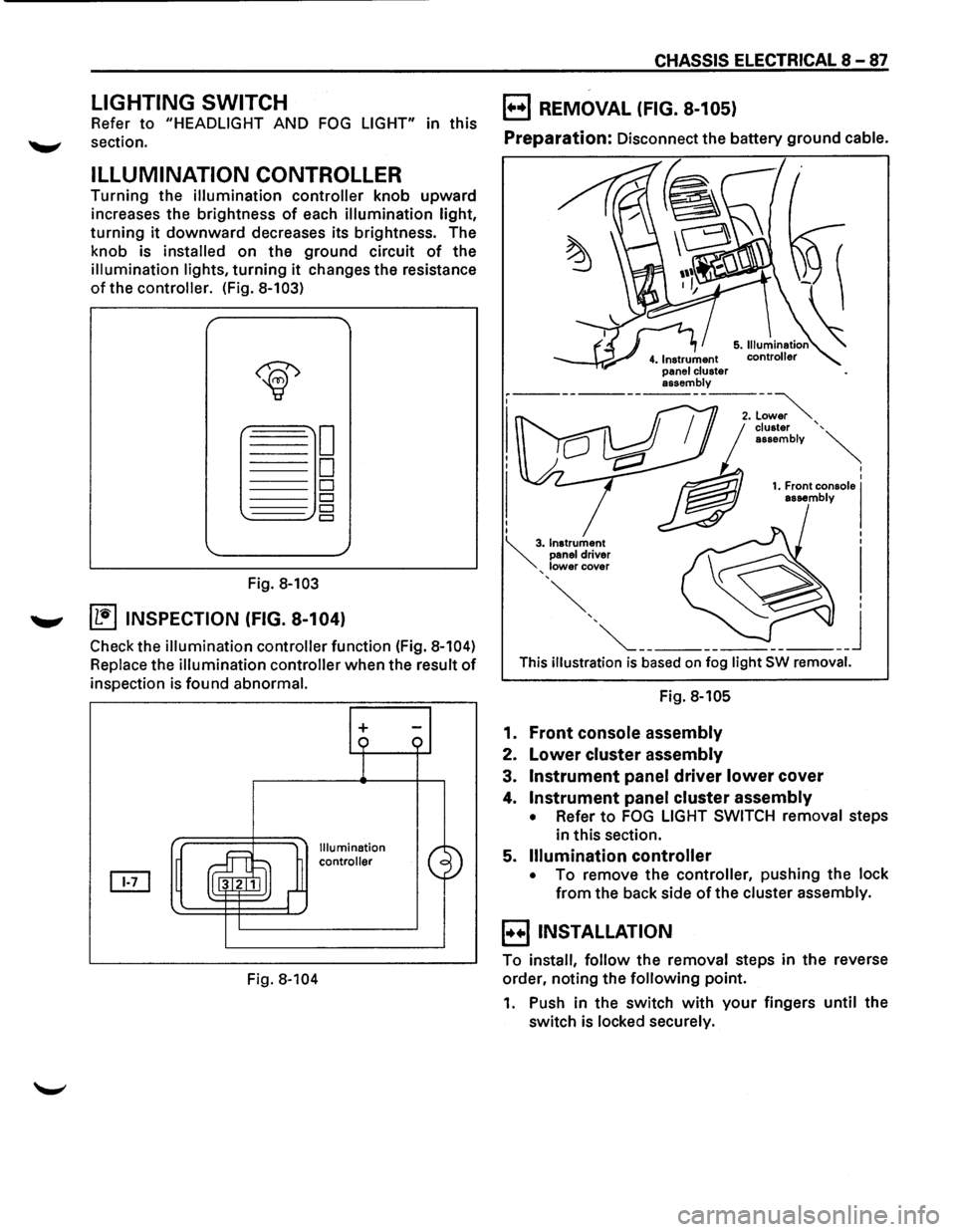
ILLUMINATION CONTROLLER
Turning the illumination controller knob upward
increases the brightness
of each illumination light,
turning it downward decreases its brightness. The
knob is
installed on the ground circuit of the
illumination lights, turning it changes the resistance
of the controller. (Fig. 8-103)
Fig. 8-103
....._., ~ INSPECTION (FIG. 8-104)
Check the illumination controller function (Fig. 8-104)
Replace the illumination controller when the result of
inspection is found abnormal.
Fig.
8-104
+
Illumination
controller
CHASSIS ELECTRICAL 8-87
B REMOVAL (FIG. 8-105)
Preparation: Disconnect the battery ground cable.
This illustration is based on fog light SW removal.
Fig. 8-105
1. Front console assembly
2. Lower cluster assembly
3. Instrument panel driver lower cover
4. Instrument panel cluster assembly
• Refer to FOG LIGHT SWITCH removal steps
in this section.
5.
Illumination controller
• To remove the controller, pushing the lock
from the back side of the cluster assembly.
B INSTALLATION
To install, follow the removal steps in the reverse
order, noting the
following point.
1. Push in the switch with your fingers until the
switch is locked securely.
Page 1278 of 1928
8 -88 CHASSIS ELECTRICAL
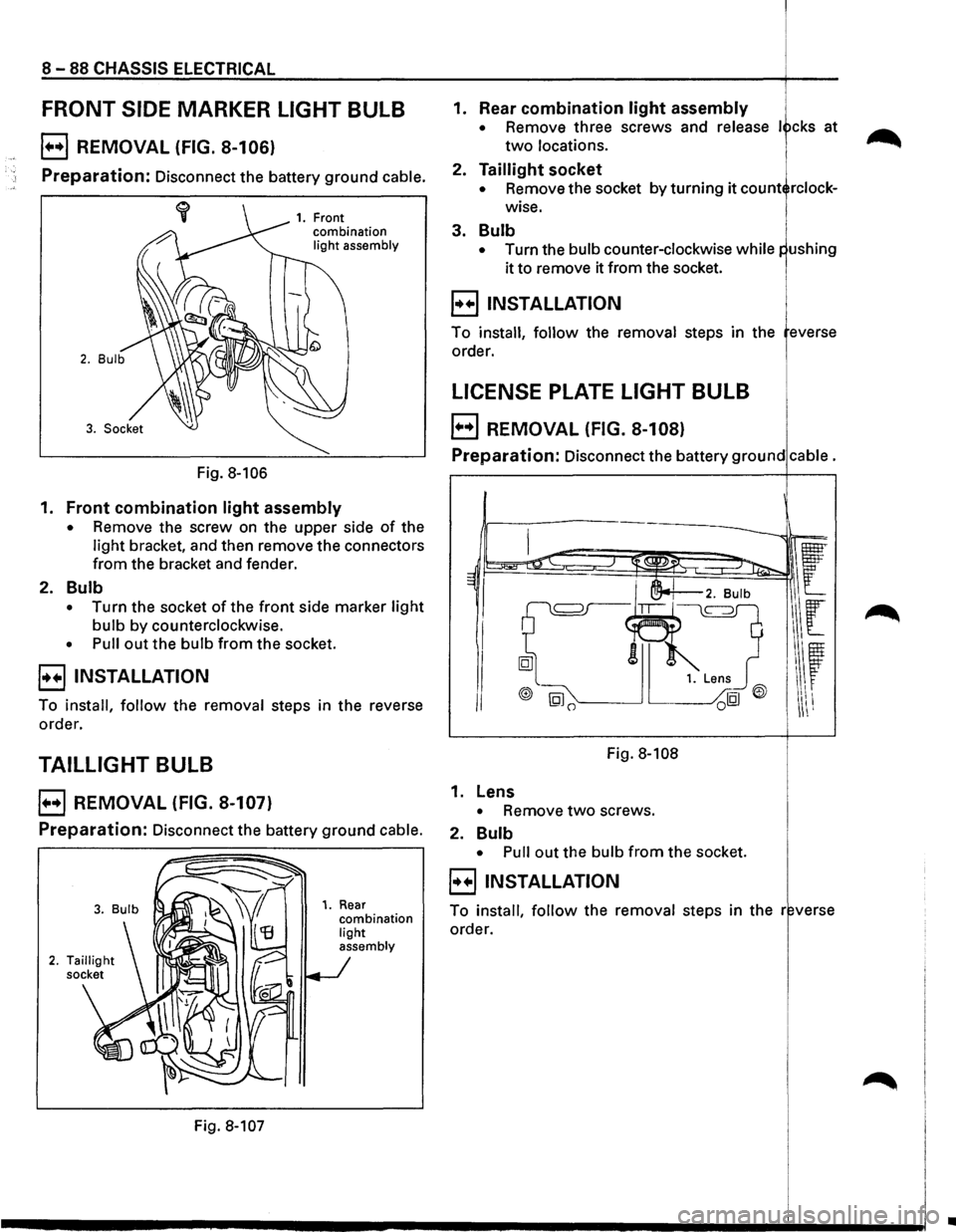
FRONT SIDE MARKER LIGHT BULB
E) REMOVAL (FIG. 8-106)
Preparation: Disconnect the battery ground cable.
Fig. 8-106
1. Front
combination
light assembly
1. Front combination light assembly
• Remove the screw on the upper side of the
light bracket, and then remove the connectors
from the bracket and fender.
2. Bulb
• Turn the socket of the front side marker light
bulb by counterclockwise.
• Pull out the bulb from the socket.
8 INSTALLATION
To install, follow the removal steps in the reverse
order.
TAILLIGHT BULB
EJ REMOVAL (FIG. 8-107)
Preparation: Disconnect the battery ground cable.
Fig. 8-107
1. Rear combination light
assembly
1. Rear combination light assembly
• Remove three screws and release I cks at
two locations.
2. Taillight socket
• Remove the socket by turning it count rclock
wise.
3. Bulb
• Turn the bulb counter-clockwise while
it to remove it from the socket.
8 INSTALLATION i
To install, follow the removal steps in the everse
order.
LICENSE PLATE LIGHT BULB 1.
E) REMOVAL (FIG. 8-108)
Preparation: Disconnect the battery ground cable.
Fig. 8-108
1. Lens
• Remove two screws.
2.
Bulb
• Pull out the bulb from the socket.
8 INSTALLATION
To install, follow the removal steps in the r verse
order.
..
Page 1279 of 1928
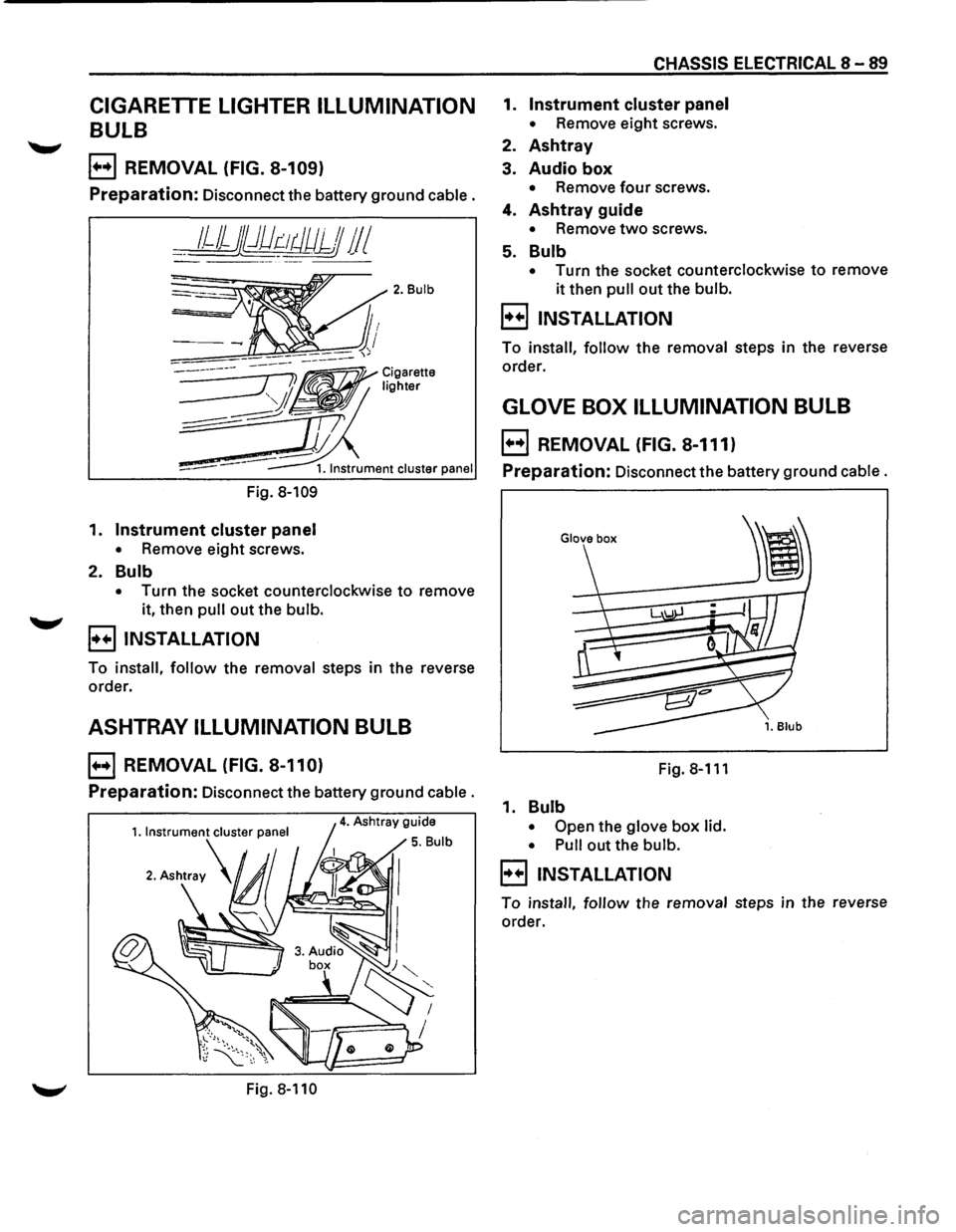
CIGARETTE LIGHTER ILLUMINATION
BULB
E) REMOVAL (FIG. 8-109)
Preparation: Disconnect the battery ground cable.
__ 1JJjj})dr:-~tJUJJJ 11 I
Fig. 8-109
1. Instrument cluster panel
• Remove eight screws.
2. Bulb
2. Bulb
• Turn the socket counterclockwise to remove
it, then
pull out the bulb.
B INSTALLATION
To install, follow the removal steps in the reverse
order.
ASHTRAY ILLUMINATION BULB
E) REMOVAL (FIG. 8-110)
Preparation: Disconnect the battery ground cable.
Fig. 8-110
CHASSIS ELECTRICAL 8-89
1. Instrument cluster panel
• Remove eight screws.
2. Ashtray
3. Audio box
• Remove four screws.
4. Ashtray guide
• Remove two screws.
5. Bulb
• Turn the socket counterclockwise to remove
it then pull out the bulb.
B INSTALLATION
To install, follow the removal steps in the reverse
order.
GLOVE BOX ILLUMINATION BULB
E) REMOVAL (FIG. 8-111)
Preparation: Disconnect the battery ground cable.
Fig.8-111
1. Bulb
• Open the glove box lid.
• Pull
out the bulb.
B INSTALLATION
To install, follow the removal steps in the reverse
order.
Page 1280 of 1928
8 -90 CHASSIS ELECTRICAL
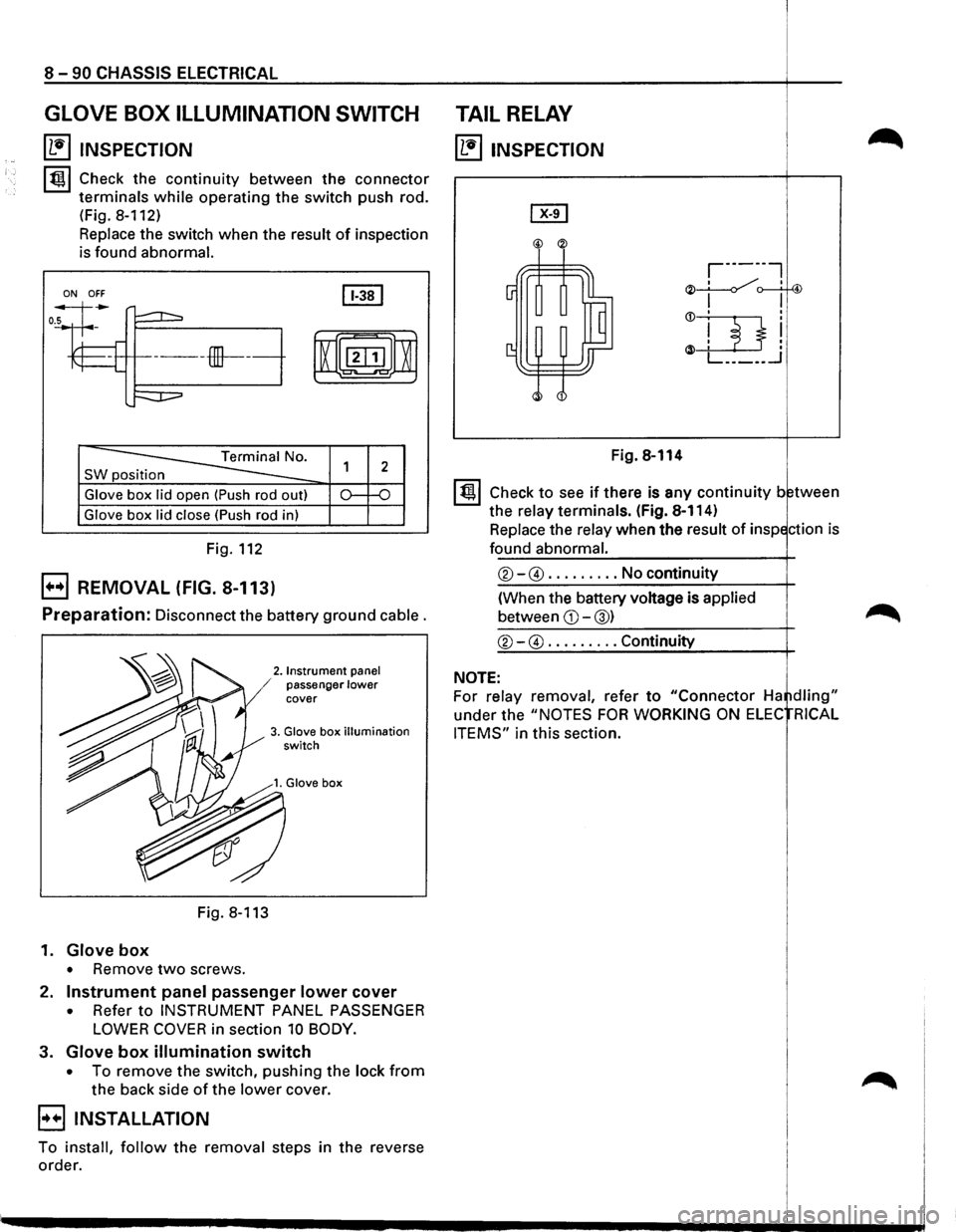
GLOVE BOX ILLUMINATION SWITCH
~ INSPECTION
lt!ll Check the continuity between the connector
terminals
while operating the switch push rod.
(Fig.
8-112)
Replace the switch when the result of inspection
is found
abnormal.
ON OFF
SW position
Glove box lid open (Push rod out)
Glove box lid close (Push rod in)
Fig. 112
EJ REMOVAL (FIG. 8-113)
Preparation: Disconnect the battery ground cable.
2. Instrument panel / passenger lower cover
3. Glove box illumination switch
Fig. 8-113
1.
Glove box
• Remove two screws.
2.
Instrument panel passenger lower cover
• Refer to INSTRUMENT PANEL PASSENGER
LOWER COVER in section 10 BODY.
3. Glove box illumination switch
• To remove the switch, pushing the lock from
the back side of the lower cover.
EIINSTALLATION
To install, follow the removal steps in the reverse
order.
TAIL RELAY
~ INSPECTION
Fig. 8-114
I t!ll Check to see if there is any continuity between
the
relay terminals. (Fig. 8-114)
Replace the
relay when the result of inspection is
found abnormal.
®-@ ......... No continuity
(When the battery voltage is
applied
between CD-@) ~
®-@ ......... Continuity
NOTE:
For relay removal, refer to "Connector Ha ~dling"
under the "NOTES FOR WORKING ON ELEC RICAL
ITEMS"
in this section.
Page 1282 of 1928
I
8 -92 CHASSIS ELECTRICAL I
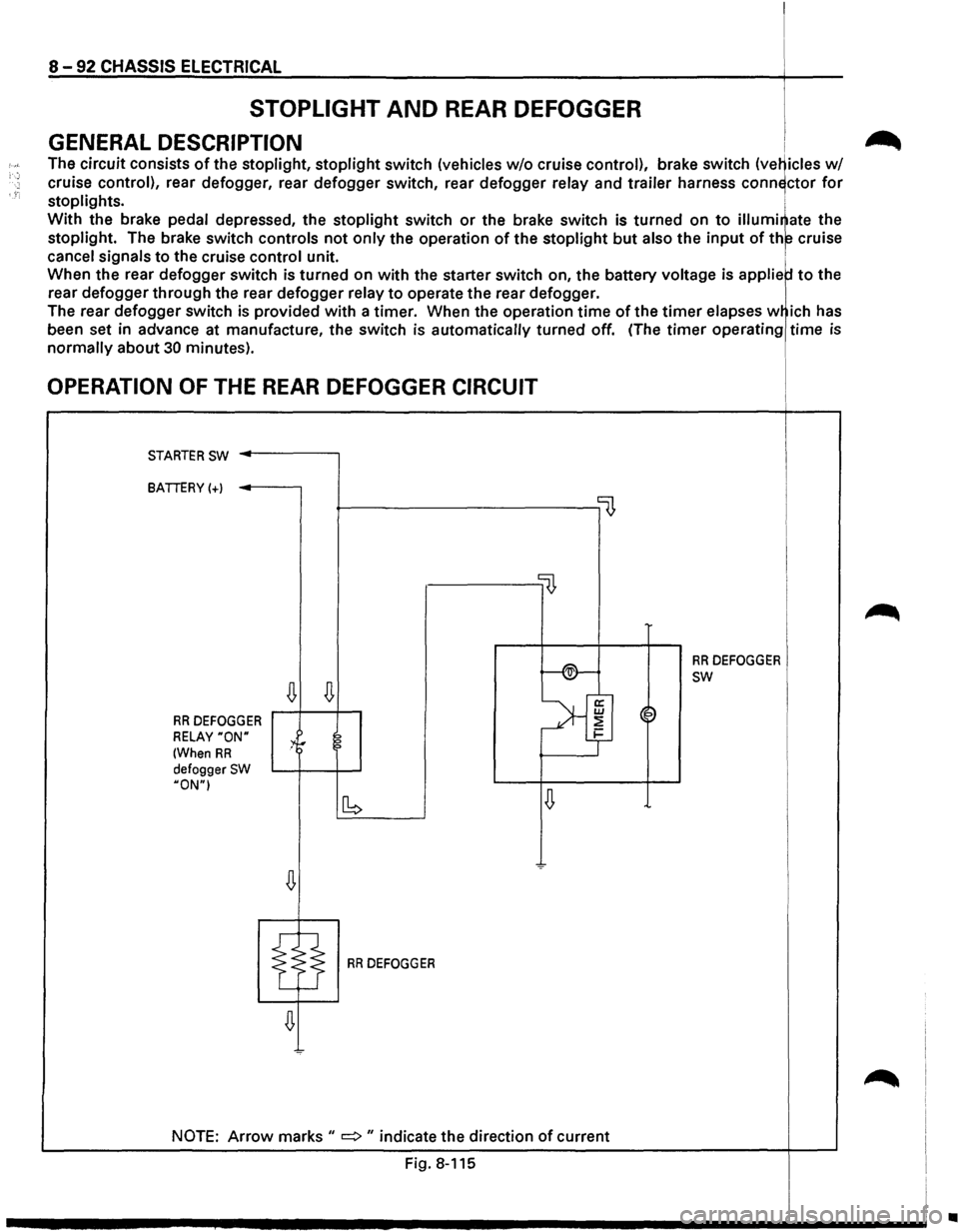
STOPLIGHT AND REAR DEFOGGER I
GENERAL DESCRIPTION i .-_
The circuit consists of the stoplight, stoplight switch (vehicles w/o cruise control), brake switch (ve~icles w/
cruise control), rear defogger, rear defogger switch, rear defogger relay and trailer harness conn~ctor for
stoplights. i
With the brake pedal depressed, the stoplight switch or the brake switch is turned on to illumi~ate the
stoplight. The brake switch controls not only the operation of the stoplight but also the input of th~ cruise
cancel signals to the cruise control unit. 1
When the rear defogger switch is turned on with the starter switch on, the battery voltage is applie to the
rear
defogger through the rear defogger relay to operate the rear defogger.
The rear
defogger switch is provided with a timer. When the operation time of the timer elapses w ich has
been set in advance at manufacture,
the switch is automatically turned off. (The timer operating time is
normally about 30 minutes).
OPERATION OF THE REAR DEFOGGER CIRCUIT
STARTER SW ..------,
BATTERY(+)
~----------------0
llJ,
f-®-
RR DEFOGGER
~
SW
~
>'f RR DEFOGGER ~~
RELAY "ON" :4r 2 1-
(When RR ?
defogger SW HON"I
~ [b
RR DEFOGGER
NOTE: Arrow marks II => II indicate the direction of current
Fig. 8-115
~
•
Page 1283 of 1928
"T1 tO. 00 I _. ... 0>
(
H-7 H-25
,,
B-11
BRAKE
SW
(W/CRUISE
CONTROL)
STOPLIGHT
SW
(W/0
CRUISE
CONTROL) BATTERY
B-38
-
'I ,....., , lUI,).,.
FUSE
sox~
!C-4,
C-14,
C-17l
/
H-44
(
,RELAY
AND
FUSE
BOX
IFL-1,
FL-21
/
~----._
HIGH
MOUNT
STOPLIGHT
~-----
~
G-,~,
~-~------
-~,
I
"~
'
RRDEFOGGER
STOPLIGHT
(LHI
{RR
COMBINATION
LIGHT)
STOPLIGHT
(RHI
(RR
COMBINATION
LIGHT)
(
;g ::xJ ~ r-0 (') ~ -0 2
(') ::t l> en
en en m rm ~ ::Jl ~ Cl) I CD w
Page 1287 of 1928
CHASSIS ELECTRICAL 8 -97
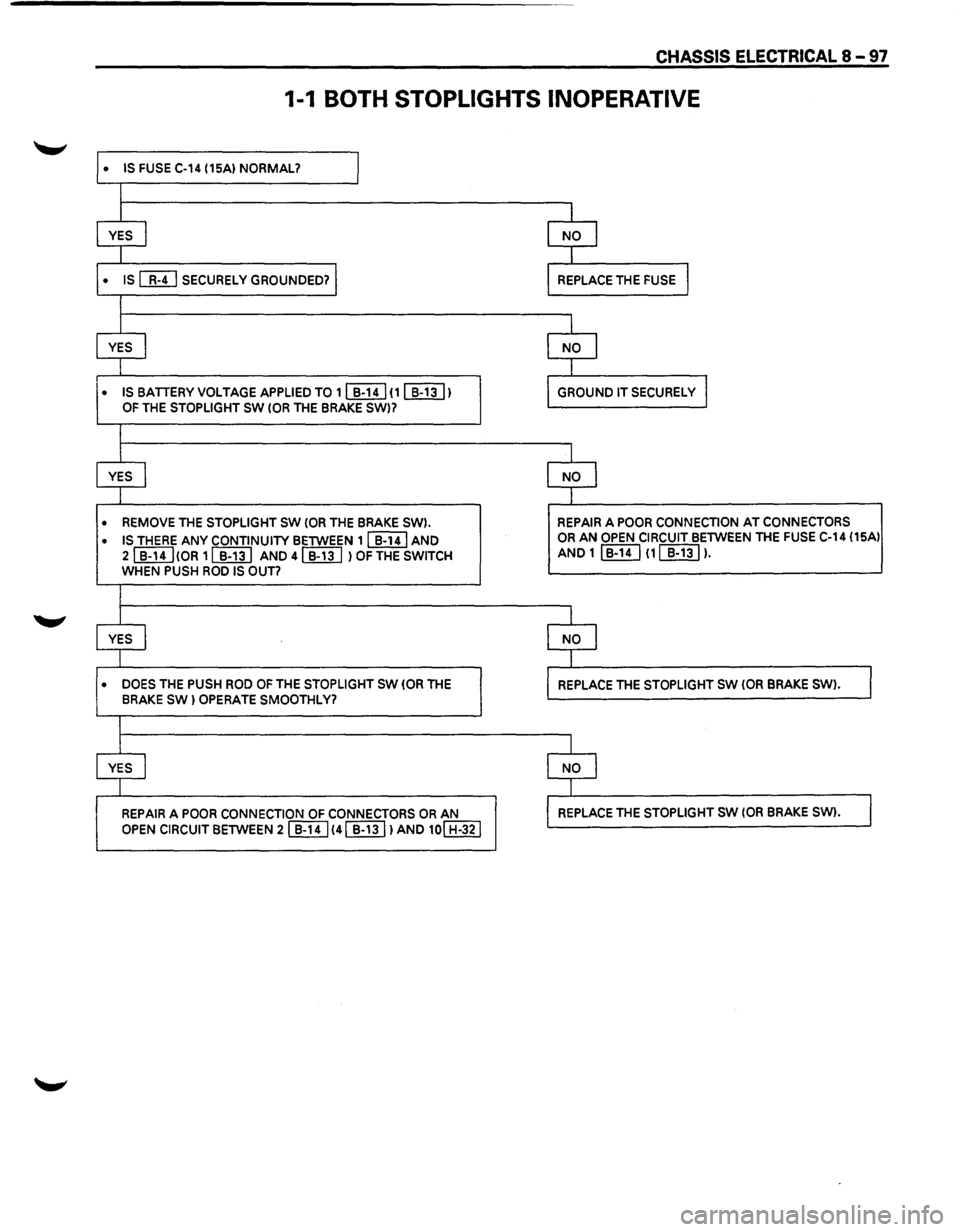
1-1 BOTH STOPLIGHTS INOPERATIVE
• IS FUSE C-14 (15A) NORMAL? I
l
l l
YES I NO l
I I
• IS [MJ SECURELY GROUNDED? I REPLACE THE FUSE l
I
I I
YES I NO I
I 1
• IS BATTERY VOLTAGE APPLIED TO 1 ~ (1 [[ill) GROUND IT SECURELY I OF THE STOPLIGHT SW (OR THE BRAKE SW)7
I
I I
YES I NO l
I I
• REMOVE THE STOPLIGHT SW (OR THE BRAKE SW). REPAIR A POOR CONNECTION AT CONNECTORS
• IS THERE ANY CONTINUITY BETWEEN 11 B-141 AND OR AN OPEN CIRCUIT BETWEEN THE FUSE C-14 (15Al
21 B-14I!OR 11 B-131 AND
4 ~ l OF THE SWITCH AND 1 I B-14 I (1 ~ ).
WHEN PUSH ROO IS OUT?
I
I I
YES I NO I
I T
• DOES THE PUSH ROD OF THE STOPLIGHT SW (OR THE REPLACE THE STOPLIGHT SW (OR BRAKE SW) . 1 BRAKE SW) OPERATE SMOOTHLY?
I
I I
YES I NO I
J -1
REPAIR A POOR CONNECTION OF CONNECTORS OR AN REPLACE THE STOPLIGHT SW (OR BRAKE SW). I OPEN CIRCUIT BETWEEN 21]}!] 141 B-131 lAND 10! H-321
Page 1291 of 1928
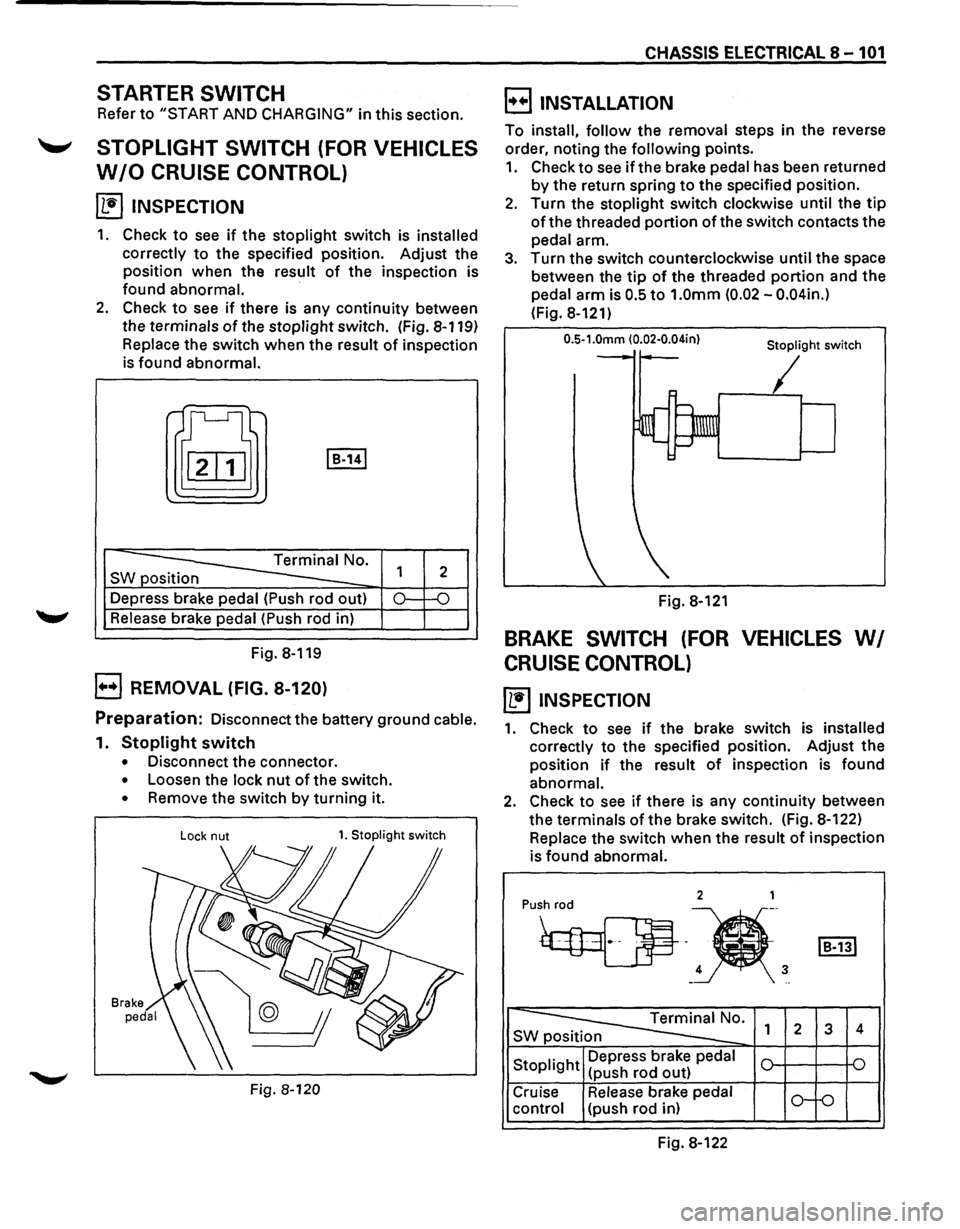
STARTER SWITCH
Refer to "START AND CHARGING" in this section.
'-' STOPLIGHT SWITCH (FOR VEHICLES
W/0 CRUISE CONTROL)
~ INSPECTION
1. Check to see if the stoplight switch is installed
correctly
to the specified position. Adjust the
position when the result
of the inspection is
found abnormal.
·
2. Check to see if there is any continuity between
the terminals
of the stoplight switch. (Fig. 8-119)
Replace the switch when the result of inspection
is found abnormal.
t[J I B-141
-----==== Terminal No.
SW position
--Depress brake pedal (Push rod out)
Release brake pedal (Push rod in)
Fig. 8-119
B REMOVAL (FIG. 8-120)
1
2
0.: -o
Preparation: Disconnect the battery ground cable.
1. Stoplight switch
• Disconnect the connector.
• Loosen the lock nut of the switch.
• Remove the switch by turning it.
Lock nut 1. Stoplight switch
Fig. 8-120
CHASSIS ELECTRICAL 8-101
B INSTALLATION
To install, follow the removal steps in the reverse
order, noting the
following points.
1. Check to see if the brake pedal has been returned
by the return spring to the specified position.
2. Turn the stoplight switch clockwise until the tip
of the threaded portion of the switch contacts the
pedal arm.
3. Turn the switch counterclockwise until the space
between the
tip of the threaded portion and the
pedal arm is
0.5 to 1.0mm (0.02 -0.04in.)
(Fig. 8-121)
0.5-1.0mm (0.02·0.04in} Stoplight switch
Fig. 8-121
BRAKE SWITCH (FOR VEHICLES WI
CRUISE CONTROL)
~ INSPECTION
1. Check to see if the brake switch is installed
correctly
to the specified position. Adjust the
position
if the result of inspection is found
abnormal.
2. Check to see if there is any continuity between
the terminals
of the brake switch. (Fig. 8-122)
Replace the switch
when the result of inspection
is
found abnormal.
2 1
Pu•h
4 3 -..
~0. SWp 1 2 3 4
Stoplight Depress
brake pedal
(push rod out)
Cruise Release brake pedal
o-f-o control (push rod in)
Fig. 8-122
Page 1292 of 1928
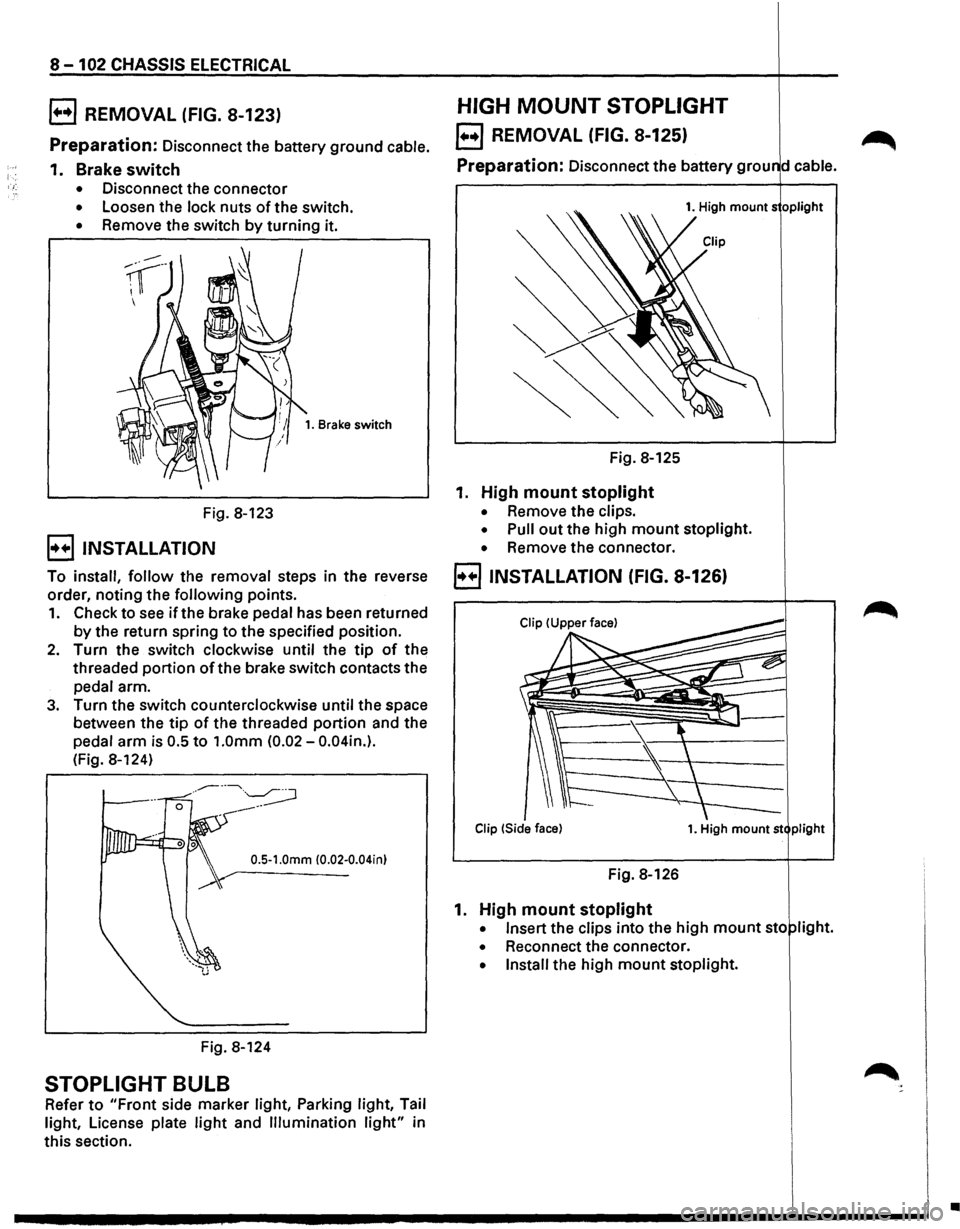
8-102 CHASSIS ELECTRICAL
B REMOVAL (FIG. 8-123)
Preparation: Disconnect the battery ground cable.
1. Brake switch
• Disconnect the connector
• Loosen the lock nuts of the switch.
• Remove the switch by turning it.
Fig. 8-123
B INSTALLATION
1. Brake switch
To install, follow the removal steps in the reverse
order, noting the
following points.
1. Check to see if the brake pedal has been returned
by the return spring to the specified position.
2. Turn the switch clockwise until the tip of the
threaded
portion ofthe brake switch contacts the
pedal arm.
3. Turn the switch counterclockwise until the space
between the
tip of the threaded portion and the
pedal
arm is 0.5 to 1.0mm (0.02-0.04in.).
(Fig. 8-124)
0.5-1.0mm (0.02-0.04in)
Fig. 8-124
STOPLIGHT BULB
Refer to "Front side marker light, Parking light, Tail
light, License plate
light and Illumination light" in
this section.
HIGH MOUNT STOPLIGHT
EJ REMOVAL (FIG. 8-125) ~
Preparation: Disconnect the battery grou d cable.
1. High mounts oplight
Fig. 8-125
1. High mount stoplight
• Remove the clips.
• Pull out the high mount stoplight.
• Remove the connector.
B INSTALLATION (FIG. 8-126)
Clip !Side face) 1. High mount st plight
Fig. 8-126
1. High mount stoplight
• Insert the clips into the high mount sto light.
• Reconnect the connector.
• Install the high mount stoplight.
•