battery ISUZU TROOPER 1995 Workshop Manual
[x] Cancel search | Manufacturer: ISUZU, Model Year: 1995, Model line: TROOPER, Model: ISUZU TROOPER 1995Pages: 1928
Page 1293 of 1928
![ISUZU TROOPER 1995 Workshop Manual REAR DEFOGGER SWITCH
(1!] INSPECTION
I~~ Check to see if there is any continuity between
the terminals
of the defogger switch. (Fig. 8-127)
Replace the switch, when the result
of inspecti](/img/61/57183/w960_57183-1292.png "ISUZU TROOPER 1995 Workshop Manual REAR DEFOGGER SWITCH
(1!] INSPECTION
I~~ Check to see if there is any continuity between
the terminals
of the defogger switch. (Fig. 8-127)
Replace the switch, when the result
of inspecti")
REAR DEFOGGER SWITCH
(1!] INSPECTION
I~~ Check to see if there is any continuity between
the terminals
of the defogger switch. (Fig. 8-127)
Replace the switch, when the result
of inspection
is found abnormal.
a [~~·~] ]]
r ~)
~0. s 1
4
ON o-r--0---
OFF o-~
Fig. 8-127
B REMOVAL (FIG. 8-128)
5. Rear defogger switch
Fig. 8-128
[ill
5 2 1 s
-o
~
4. Instrument panel
.cluster assembly
CHASSIS ELECTRICAL 8-103
Preparation: Disconnect the battery ground cable.
1.
Front console assembly
2. Lower cluster assembly
3. Instrument panel driver lower cover
4. Instrument panel cluster assembly
• Refer to FOG LIGHT SWITCH removal steps
in
this section.
5.
Rear defogger switch
• To remove the switch, pushing the lock from
the back side of the cluster assembly.
E) INSTALLATION
To install, follow the removal steps in the reverse
order, noting
the following point.
1. Push in the switch with your fingers until it locks
securely.
REAR DEFOGGER HEAT WIRES
w CAUTION:
• Heat wires are printed on the inner side of
the rear glass.
To clean, use a
soft cloth and wipe horizon
tally along the wires.
• Never use glass cleaner or equivalent.
~ INSPECTION
It~ I Measure the voltage of heat wire.
Repair the heat wire
when the result of inspection
is found abnormal.
'f CAUTION:
• When measuring voltage, wind a piece of
tin foil around the tip of the negative probe
and press
the foil against the wire with your
finger (Fig. 8-129).
1. Turn the starter switch on.
2. Turn the rear defogger switch on.
3. Measure the voltage between the three points
on
the heat wire and the(-) terminal with a voltmeter.
4. Check that the voltage becomes smaller from ®
to @to© (Fig. 8-130).
5. If there is a place where the voltage suddenly
changes
to OV, there is a OPEN CIRCUIT between
there and the
prior point.
Page 1295 of 1928
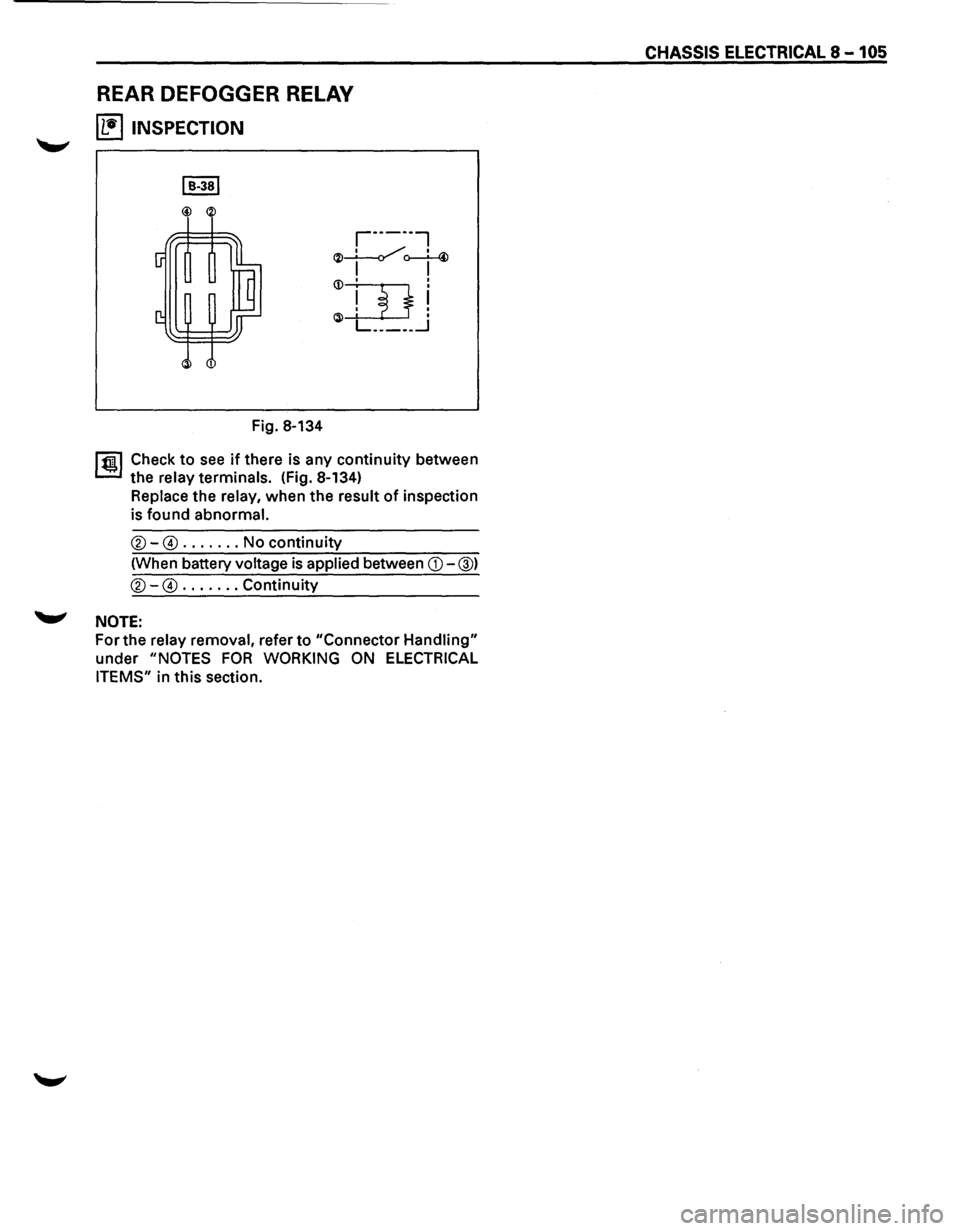
REAR DEFOGGER RELAY
~ INSPECTION
Fig. 8-134
r·-----,
~~o--L-4> I I
1 ~~ Check to see if there is any continuity between
the
relay terminals. (Fig. 8-134)
Replace the relay, when the result of inspection
is found
abnormal.
®-@ ....... No continuity
(When battery
voltage is applied between CD-@)
®-@ ....... Continuity
'-"' NOTE:
For the relay removal, refer to "Connector Handling"
under "NOTES FOR WORKING ON ELECTRICAL
ITEMS"
in this section.
CHASSIS ELECTRICAL 8-105
Page 1296 of 1928
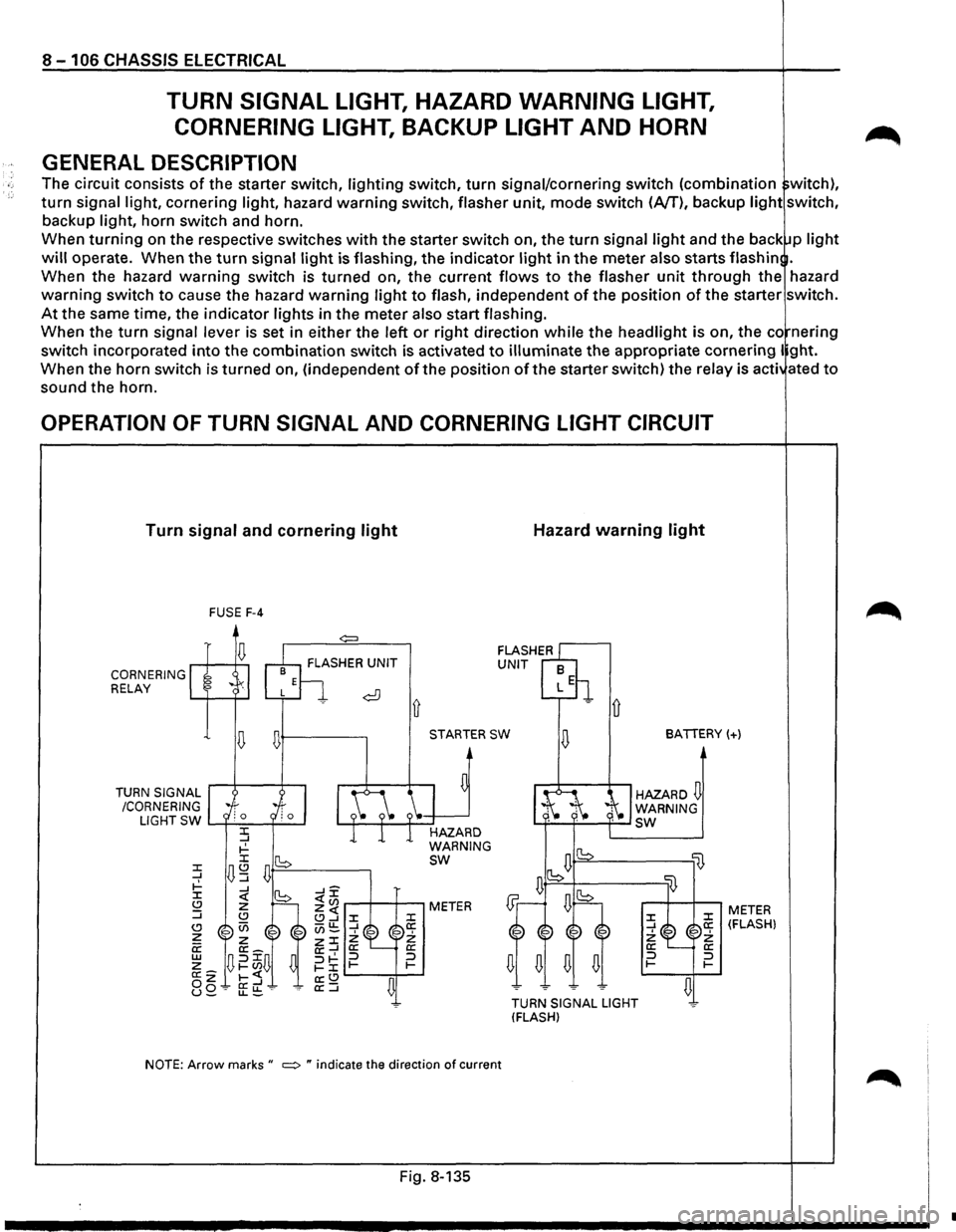
8 - 1 06 CHASSIS ELECTRICAL
TURN SIGNAL LIGHT, HAZARD WARNING LIGHT,
CORNERING LIGHT,
BACKUP LIGHT AND HORN
GENERAL DESCRIPTION
The circuit consists of the starter switch, lighting switch, turn signal/cornering switch (combination witch),
turn signal light, cornering light, hazard warning switch, flasher unit, mode switch (A/T), backup light switch,
backup light, horn switch and horn.
When
turning on the respective switches with the starter switch on, the turn signal light and the back p light
will operate. When the turn signal light is flashing, the indicator light in the meter also starts flash in .
When the hazard
warning switch is turned on, the current flows to the flasher unit through the hazard
warning switch to cause the hazard warning light to flash, independent of the position of the starter switch.
At the same time, the indicator lights in the meter also start flashing.
When the
turn signal lever is set in either the left or right direction while the headlight is on, the co nering
switch incorporated
into the combination switch is activated to illuminate the appropriate cornering I ght.
When the horn switch is turned on, (independent
of the position of the starter switch) the relay is acti ated to
sound the horn.
OPERATION OF TURN SIGNAL AND CORNERING LIGHT CIRCUIT
Turn signal and cornering light
CORNERING RELAY
TURN
SIGNAL
/CORNERING FUSE
F-4
~+---------.
Ll G
HT SW L......f-'-=-~--l
STARTER SW
HAZARD
WARNING
sw
NOTE: Arrow marks " ~ " indicate the direction of current
Fig. 8-135
Hazard warning light
D
BATTERY(+)
HAZARD~ WARNING L.f-~'-'----f--' sw
lB
TURN SIGNAL LIGHT
(FLASH)
:z: _J 2: a: :::J 1-
li}
:z: a: 2: a: :::J 1-
~
METER (FLASH)
•
Page 1297 of 1928
 /
CORN")
-n 10' 00 I .... w 0>
(
RELAY:
CORNERING LIGHT
DIODE
RELAY;HORN
\
RELAY
& FUSE
BOX'·.,,
(FL-1, FL-2,
F-31
~.
"",
BATTERY
'
FRT
TURN
SIGNAL,
HAZARD.
WARNING LIGHT
(RH) /
CORNERING LIGHT
(RH) C-31 HORN (HIGH)
( TURN
SIGNAL,
HAZARED
WARNING
INDICATOR LIGHT
(METER)
(
COMBINATION
SW
HAZARD
WARN
IN~
LIGHT
SW
FRT TURN
SIGNAL,
HAZARD
WARNING
LIGHT
(LH)
CORNERING LIGHT
(LH)
LIGHTING
SW
TURN
SIGNAL LIGHT,
/~l/
~/
CORNERING LIGHT SW. RR
TURN
SIGNAL,
HAZARD
WARNING LIGHT (LHI
=·
BACKUP
B-53
LIGHT(LH) "R-7 TRAILER HARNESS
CONNECTOR
FLASHER
UNIT
FUSE
BOX (C-3)
BACKUP LIGHT SW, (MfTI
)g ~ (/) r-0 (") ~ 0
2
(") ::c )> en
en en m rm (") -i :lJ (") )> rQI) I ..a 0 .....
Page 1302 of 1928
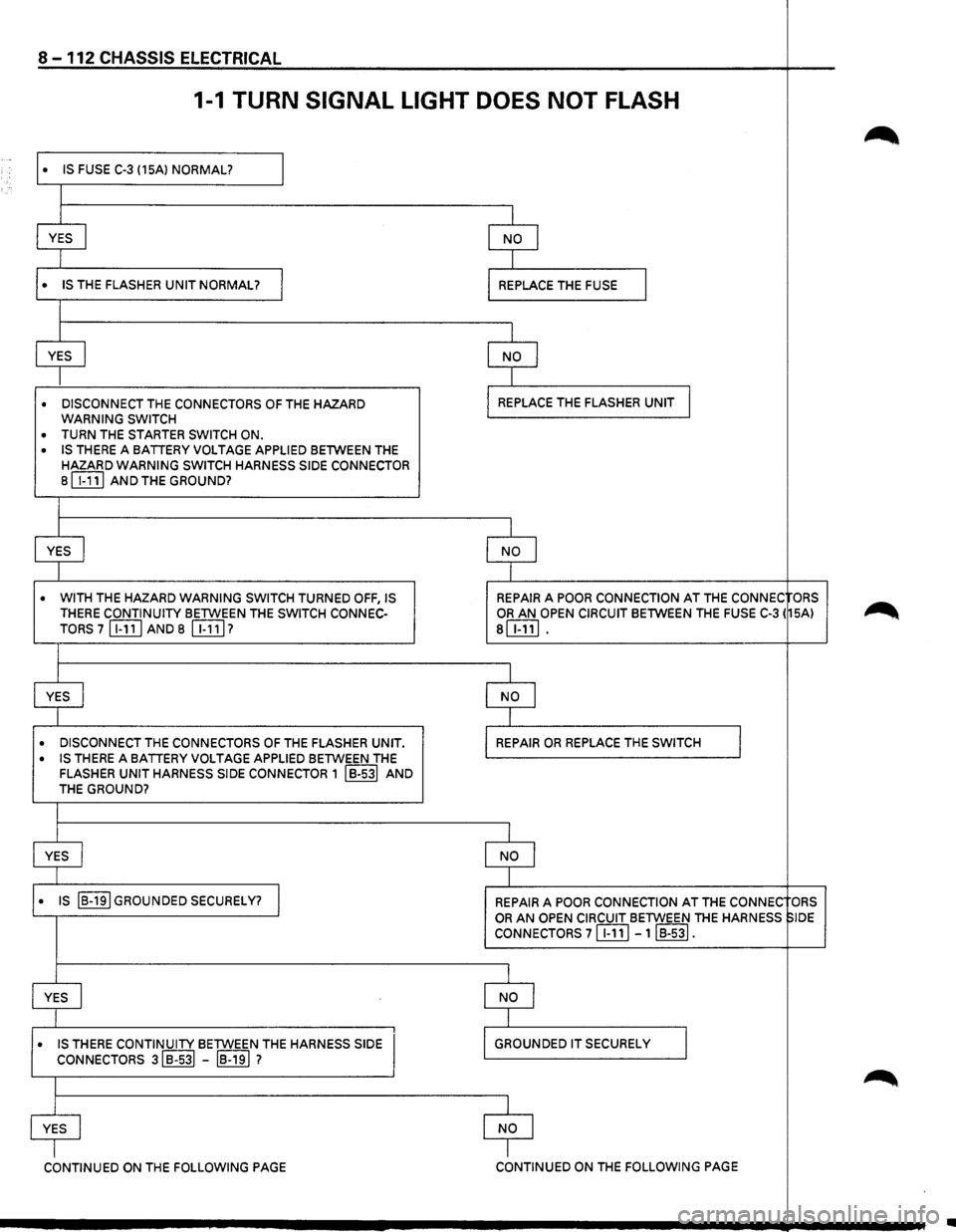
8-112 CHASSIS ELECTRICAL
1-1 TURN SIGNAL LIGHT DOES NOT FLASH
~ ..
I • IS FUSE C-3 (15A) NORMAL?
I
YES
I NO I
I
• IS THE FLASHER UNIT NORMAL? I REPLACE THE FUSE I
I
YES
I NO I
I
• DISCONNECT THE CONNECTORS OF THE HAZARD REPLACE
THE FLASHER UNIT
WARNING SWITCH
• TURN THE STARTER SWITCH ON .
• IS THERE A BATTERY VOLTAGE APPLIED BETWEEN THE
HAZARD WARNING SWITCH HARNESS SIDE CONNECTOR 8 WJ] AND THE GROUND?
I
YES
I NO I
I
• WITH THE HAZARD WARNING SWITCH TURNED OFF, IS REPAIR A POOR CONNECTION AT THE CONNEC ORS THERE CONTINUITY BETWEEN
THE SWITCH CONNEC-OR AN OPEN CIRCUIT BETWEEN THE FUSE C-3 ( SA) ~ TORS 7 [Iill AND 8 WJ] 7 8!ITIJ.
I
YES
J NO I
I
• DISCONNECT THE CONNECTORS OF THE FLASHER UNIT • REPAIR OR REPLACE THE SWITCH I • IS THERE A BATTERY VOLTAGE APPLIED BETWEEN THE FLASHER UNIT HARNESS SIDE CONNECTOR 1 IB-531 AND THE GROUND?
I
YES
I NO I
I
• IS IB-191 GROUNDED SECURELY? I REPAIR A POOR CONNECTION AT THE CONNEC ORS
OR AN OPEN CIRCUIT BETWEEN THE HARNESS SIDE
CONNECTORS 7 WJ] -1IB-53I.
I
YES
I NO I
I
• IS THERE CONTINUITY BETWEEN THE HARNESS SIDE GROUNDED IT SECURELY I CONNECTORS 3IB-s3l -IB-191 7
~
I
YES
I NO I
I I
CONTINUED ON THE FOLLOWING PAGE CONTINUED ON THE FOLLOWING PAGE
•
Page 1304 of 1928
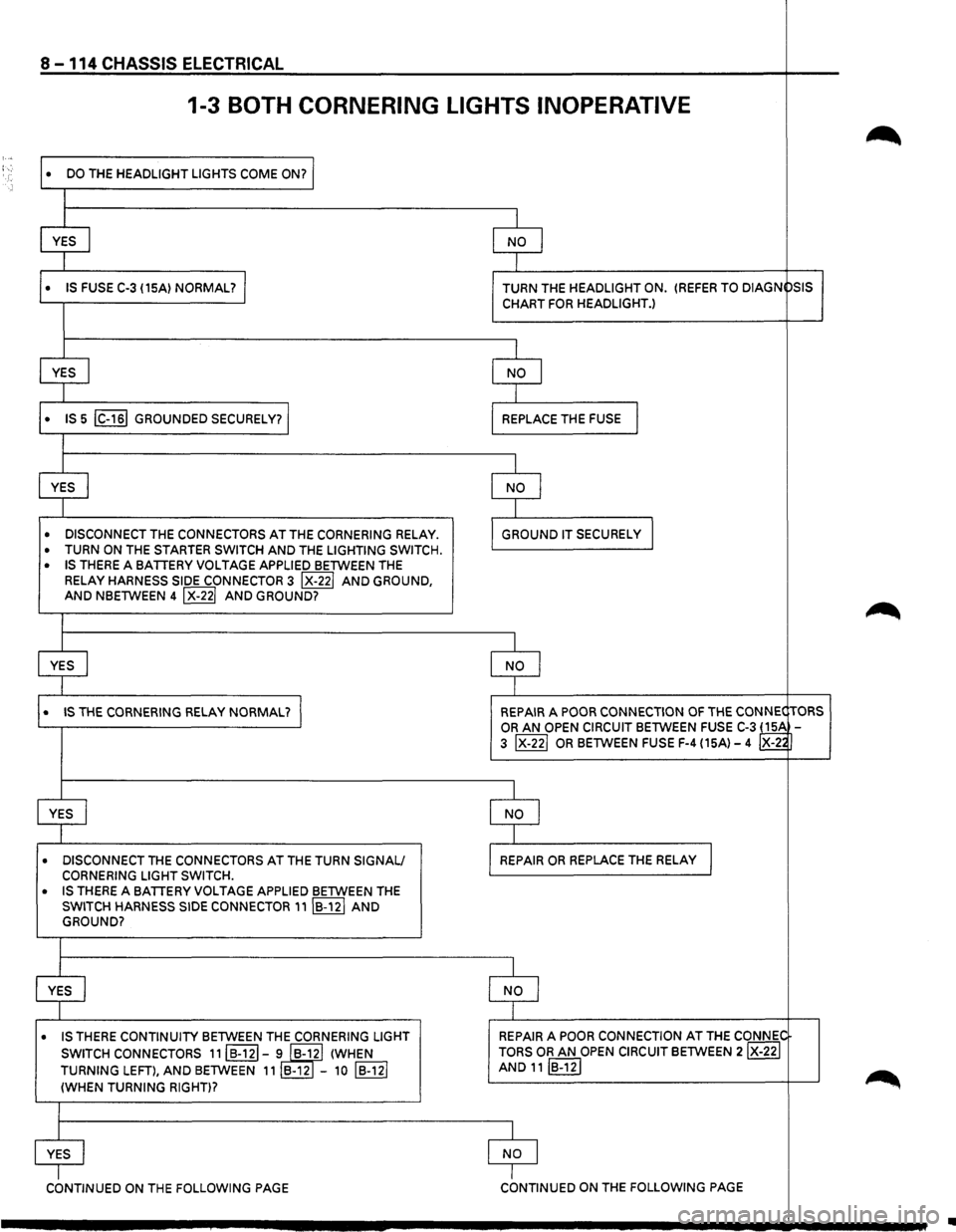
8 -114 CHASSIS ELECTRICAL
1-3 BOTH CORNERING LIGHTS INOPERATIVE
~ : ...
DO THE HEADLIGHT LIGHTS COME ON? I •
I
YES
I NO I
1
• IS FUSE C-3 {15A) NORMAL? I TURN THE HEADLIGHT ON. {REFER TO DIAGN
PSIS
CHART
FOR HEADLIGHT.)
I
YES
I NO I
I
• IS 5 IC-161 GROUNDED SECURELY? REPLACE THE FUSE I
I
YES
I NO I
I
• DISCONNECT THE CONNECTORS AT THE CORNERING RELAY . GROUND IT SECURELy I
• TURN ON THE STARTER SWITCH AND THE LIGHTING SWITCH .
• IS THERE A BATTERY VOLTAGE APPLIED BETWEEN THE
RELAY
HARNESS SIDE CONNECTOR 3 IX-221 AND GROUND, AND NBETWEEN 4 IX-221 AND GROUND?
~
I
YES
I NO I
I
• IS THE CORNERING RELAY NORMAL? I REPAIR A POOR CONNECTION OF THE CONNEC TORS
OR AN OPEN CIRCUIT BETWEEN FUSE C-3 ~ 3 IX-221 OR BETWEEN FUSE F-4 {15A)-4 X-2~
I
YES
I NO I
I
• DISCONNECT THE CONNECTORS AT THE TURN SIGNAL/ REPAIR OR REPLACE THE RELAY I CORNERING LIGHT SWITCH.
• IS THERE A BATTERY VOLTAGE APPLIED BETWEEN THE
SWITCH HARNESS SIDE CONNECTOR 11IB-12I AND GROUND?
I
YES
I NO I
I
• IS THERE CONTINUITY BETWEEN THE CORNERING LIGHT REPAIR A
POOR CONNECTION AT THE CONNI;,C
SWITCH CONNECTORS
11IB·121-i IB-yl {WHEN TORS OR AN OPEN CIRCUIT BETWEEN 2IX-22I
TURNING LEFT), AND BETWEEN 11 B-12 -10 IB-121 AND 11IB-12I
~ {WHEN TURNING RIGHT)?
I
YES
NO I
cbNTINUED ON THE FOLLOWING PAGE I CONTINUED ON THE FOLLOWING PAGE
..
Page 1311 of 1928
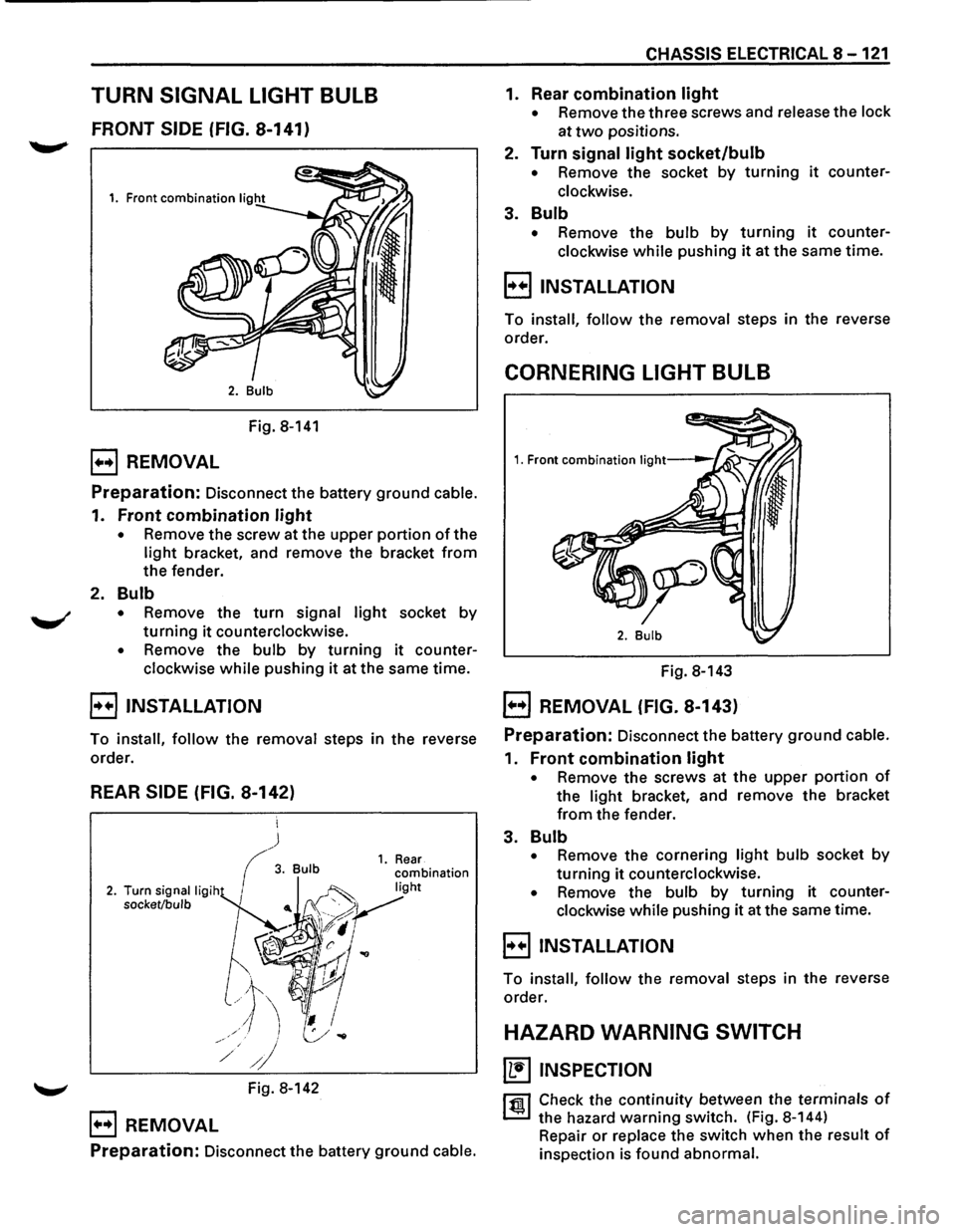
TURN SIGNAL LIGHT BULB
FRONT SIDE (FIG. 8-141)
Fig. 8-141
B REMOVAL
Preparation: Disconnect the battery ground cable.
1. Front combination light
• Remove the screw at the upper portion of the
light bracket, and remove the bracket from
the fender.
2. Bulb
• Remove the turn signal light socket by
turning it counterclockwise.
• Remove the bulb by turning it counter
clockwise
while pushing it at the same time.
B INSTALLATION
To install, follow the removal steps in the reverse
order.
REAR SIDE (FIG. 8-142)
~ Fig. 8-142
B REMOVAL
Preparation: Disconnect the battery ground cable.
CHASSIS ELECTRICAL 8-121
1. Rear combination light
• Remove the three screws and release the lock
at
two positions.
2. Turn signal light socket/bulb
• Remove the socket by turning it counter
clockwise.
3. Bulb
• Remove the bulb by turning it counter
clockwise
while pushing it at the same time.
B INSTALLATION
To install, follow the removal steps in the reverse
order.
CORNERING LIGHT BULB
Fig. 8-143
EJ REMOVAL (FIG. 8-143)
Preparation: Disconnect the battery ground cable.
1. Front combination light
• Remove the screws at the upper portion of
the light bracket, and remove the bracket
from the fender.
3. Bulb
• Remove the cornering light bulb socket by
turning it counterclockwise.
• Remove the bulb by turning it counter
clockwise while pushing it at the same time.
E) INSTALLATION
To install, follow the removal steps in the reverse
order.
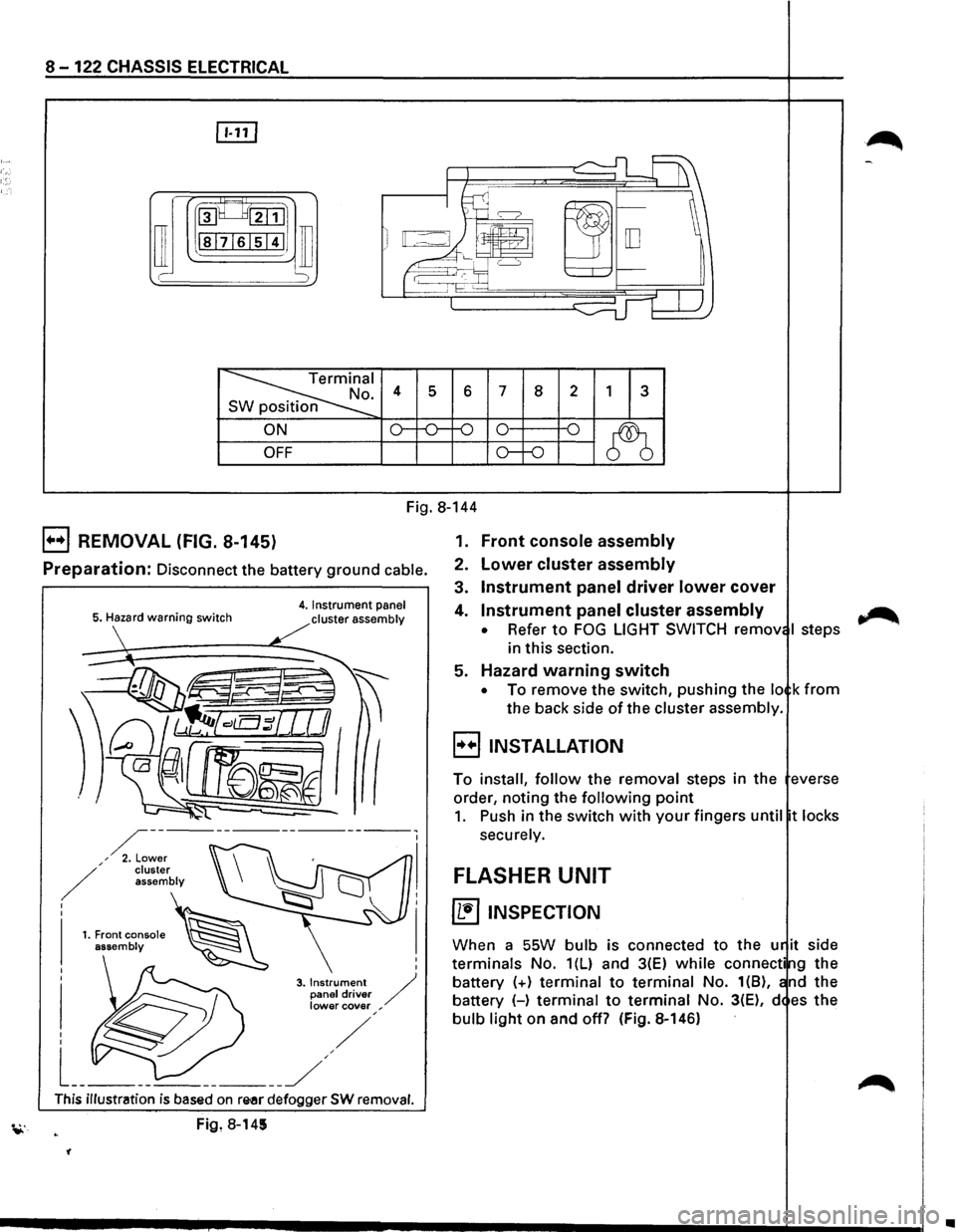
HAZARD WARNING SWITCH
~ INSPECTION
rfll Check the continuity between the terminals of
~ the hazard warning switch. (Fig. 8-144)
Repair
or replace the switch when the result of
inspection is found abnormal.
Page 1312 of 1928
8-122 CHASSIS ELECTRICAL
rn
~~:::1
ill I -
~I . 4 s 6 7 8 2 1 3 n
ON o--o-f-0 0 -o
~ OFF o--o
Fig. 8-144
B REMOVAL (FIG. 8-145)
Preparation: Disconnect the battery ground cable.
5. Hazard warning switch 4. Instrument panel
cluster assembly
I
I
3. Instrument / panel driver lower cover ,
This illustration is based on re-ar defogger SW removal.
Fig, 8-145
'(
1. Front console assembly
2. Lower cluster assembly
3. Instrument panel driver lower cover
4. Instrument panel cluster assembly
• Refer to FOG LIGHT SWITCH remov I steps
in this section.
5. Hazard warning switch
• To remove the switch, pushing the lo k from
the back side of the cluster assembly.
B INSTALLATION
To install, follow the removal steps in the everse
order, noting the
following point
1. Push in the switch with your fingers until t locks
securely.
FLASHER UNIT
~ INSPECTION
When a SSW bulb is connected to the u it side
terminals No. 1(L) and 3(E) while connecti g the
battery
(+) terminal to terminal No. 1(8), nd the
battery (-)
terminal to terminal No. 3(E), d es the
bulb light on and off? (Fig. 8-146)
~
•
Page 1313 of 1928
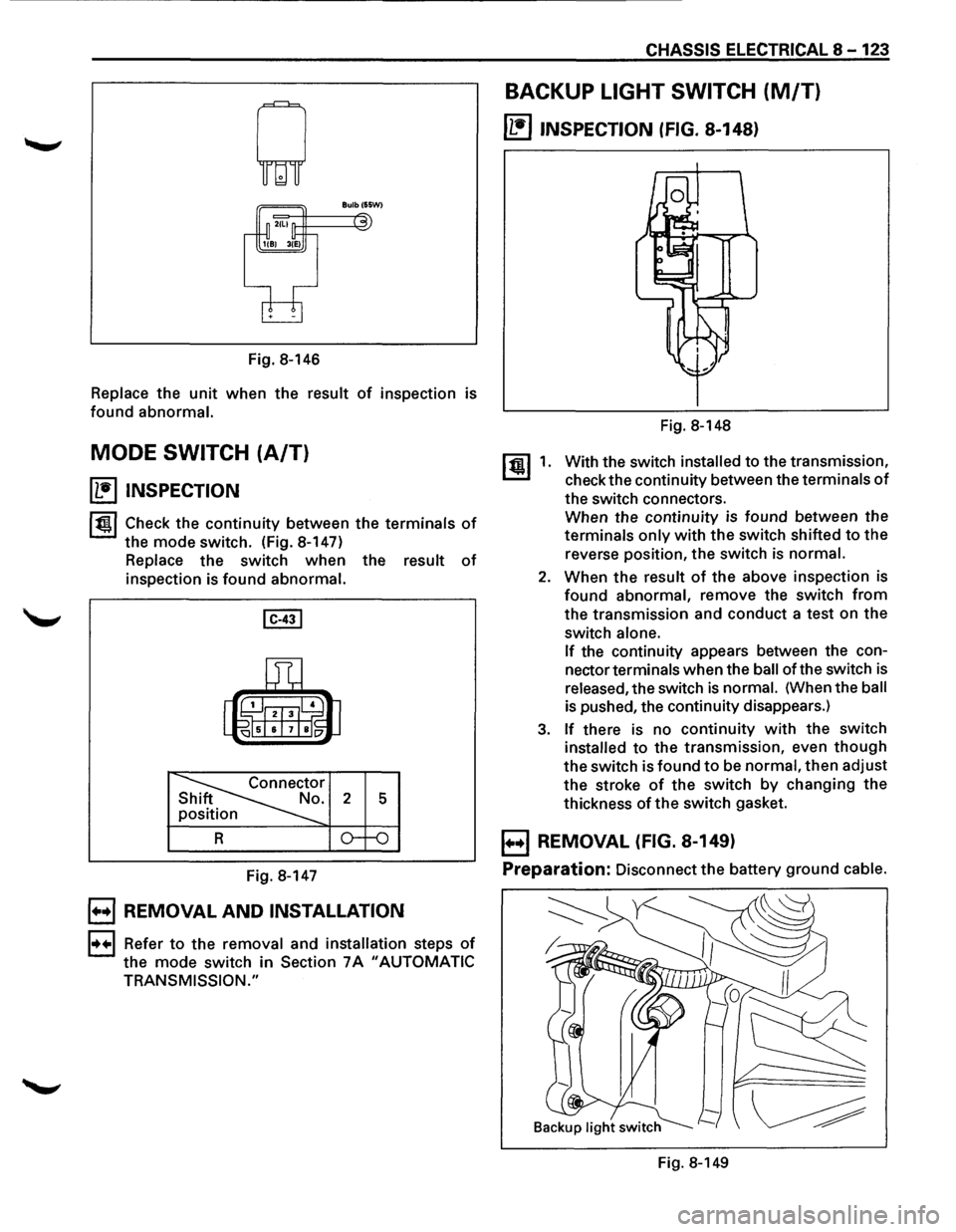
Fig. 8-146
Replace the unit when the result of inspection is
found abnormal.
MODE SWITCH (A/T)
~ INSPECTION
1~1 Check the continuity between the terminals of
the mode switch. (Fig. 8-147)
Replace the switch when the result of
inspection is found abnormal.
Fig. 8-147
B REMOVAL AND INSTALLATION
1••1 Refer to the removal and installation steps of
the mode switch in Section 7A "AUTOMATIC
TRANSMISSION."
CHASSIS ELECTRICAL 8-123
BACKUP LIGHT SWITCH (M/T)
~ INSPECTION (FIG. 8-148}
[!) 1.
Fig. 8-148
With the switch
installed to the transmission,
check the continuity between the
terminals of
the switch connectors.
When the continuity is found between the
terminals only with the switch shifted to the
reverse position, the switch
is normal.
2. When the result of the above inspection is
found abnormal, remove the switch from
the transmission and conduct a test on the
switch
alone.
If
the continuity appears between the con
nector
terminals when the ball of the switch is
released, the switch is normal. (When the ball
is pushed, the continuity disappears.)
3. If there is no continuity with the switch
installed to the transmission, even though
the switch is found to be normal, then adjust
the stroke
of the switch by changing the
thickness
of the switch gasket.
B REMOVAL (FIG. 8-149}
Preparation:
Disconnect the battery ground cable.
Fig. 8-149
Page 1314 of 1928
8-124 CHASSIS ELECTRICAL
1. Backup light switch For low note (Fig.S-151)
• Remove the connectors.
• Remove the switch by turning it counter
clockwise.
B INSTALLATION
To install, follow the removal steps in the reverse
order,
noting the following point.
1.
Backup light switch
li:i1 • Apply liquid gasket to the screw portion of
~ the switch to prevent oil leak.
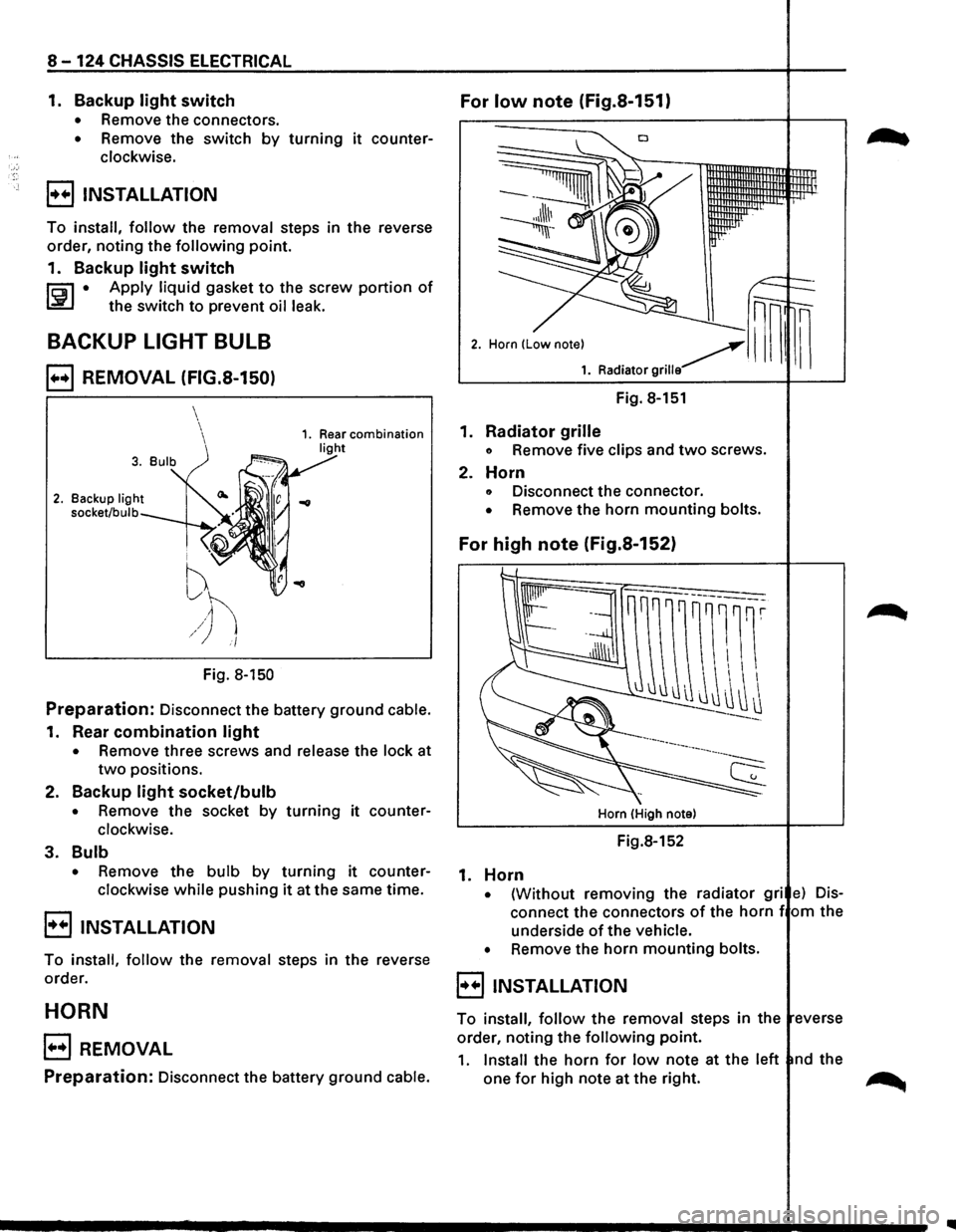
BACKUP LIGHT BULB
B REMOVAL (FIG.S-150)
2. Backup light
socket/bulb
i ''V
f
~h /) i/
Fig. 8-150
Preparation: Disconnect the battery ground cable.
1. Rear combination light
• Remove three screws and release the lock at
two positions.
2.
Backup light socket/bulb
• Remove the socket by turning it counter
clockwise.
3. Bulb
• Remove the bulb by turning it counter
clockwise
while pushing it at the same time.
B INSTALLATION
To install, follow the removal steps in the reverse
order.
HORN
B REMOVAL
Preparation: Disconnect the battery ground cable.
Fig. 8-151
1.
Radiator grille
o Remove five clips and two screws.
2. Horn
o Disconnect the connector.
• Remove the horn mounting bolts.
For high note (Fig.S-152)
Horn (High note)
Fig.8-152
1. Horn
• {Without removing the radiator gri e) Dis
connect the connectors of the horn f om the
underside
of the vehicle.
•
Remove the horn mounting bolts.
8 INSTALLATION
To install, follow the removal steps in the everse
order, noting the
following point.
1. Install the horn for low note at the left nd the
one
for high note at the right. ~