lock ISUZU TROOPER 1995 Workshop Manual
[x] Cancel search | Manufacturer: ISUZU, Model Year: 1995, Model line: TROOPER, Model: ISUZU TROOPER 1995Pages: 1928
Page 639 of 1928
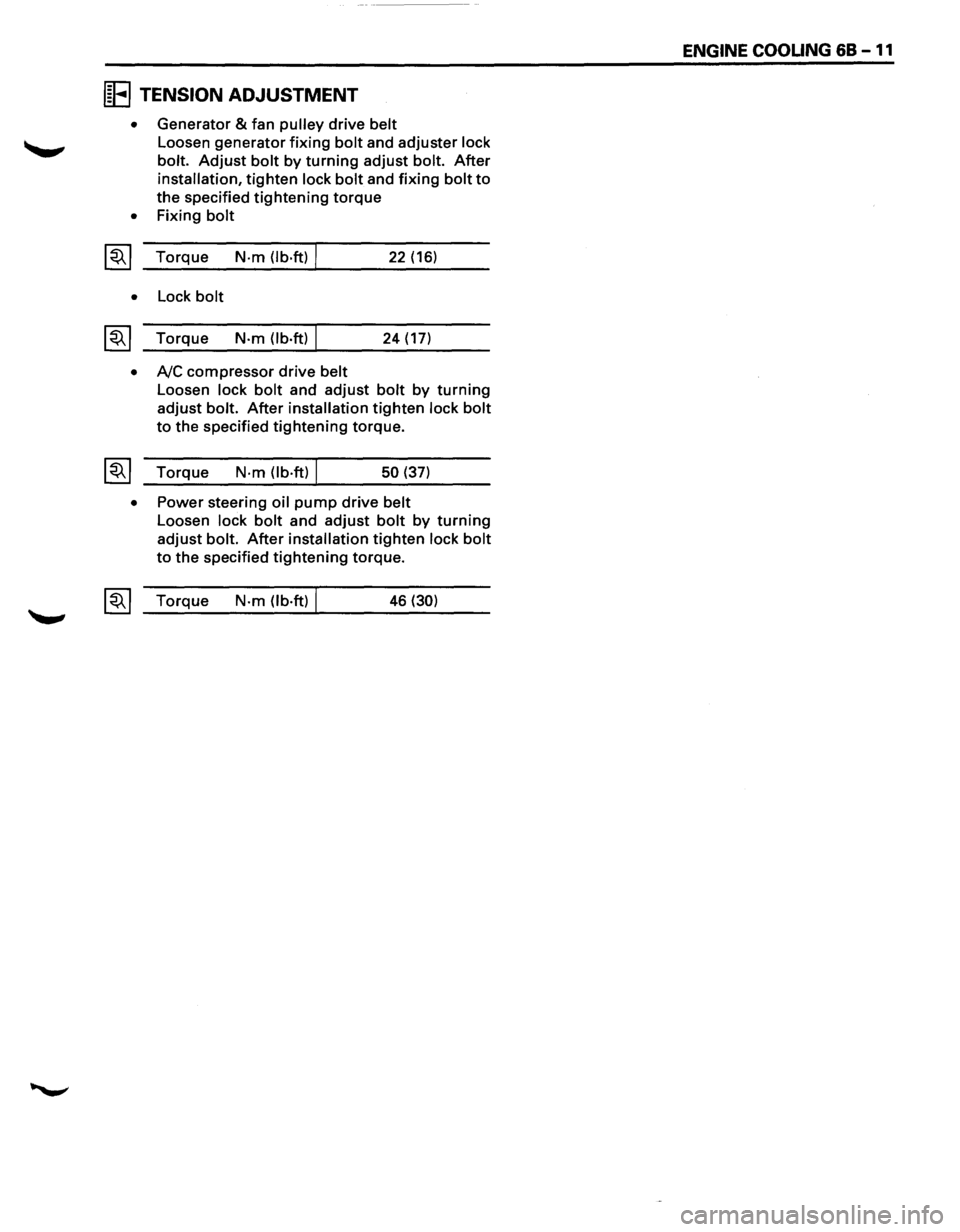
IE TENSION ADJUSTMENT
• Generator & fan pulley drive belt
Loosen generator fixing bolt and adjuster lock
bolt.
Adjust bolt by turning adjust bolt. After
installation, tighten lock bolt and fixing bolt to
the specified tightening torque
• Fixing bolt
~~~ Torque N·m (lb·ft) I 22 (16)
• Lock bolt
~~~ Torque N·m (lb.ft) I 24 (17)
• A/C compressor drive belt
Loosen lock bolt and adjust bolt by turning
adjust bolt. After installation tighten lock bolt
to the specified tightening torque.
~~~ Torque N·m (lb·ft) I 50 (37)
• Power steering oil pump drive belt
Loosen lock bolt and adjust bolt by turning
adjust bolt. After installation tighten lock bolt
to the specified tightening torque.
~~~ Torque N·m (lb·ft) I 46 (30)
ENGINE COOUNG 68 -11
Page 650 of 1928
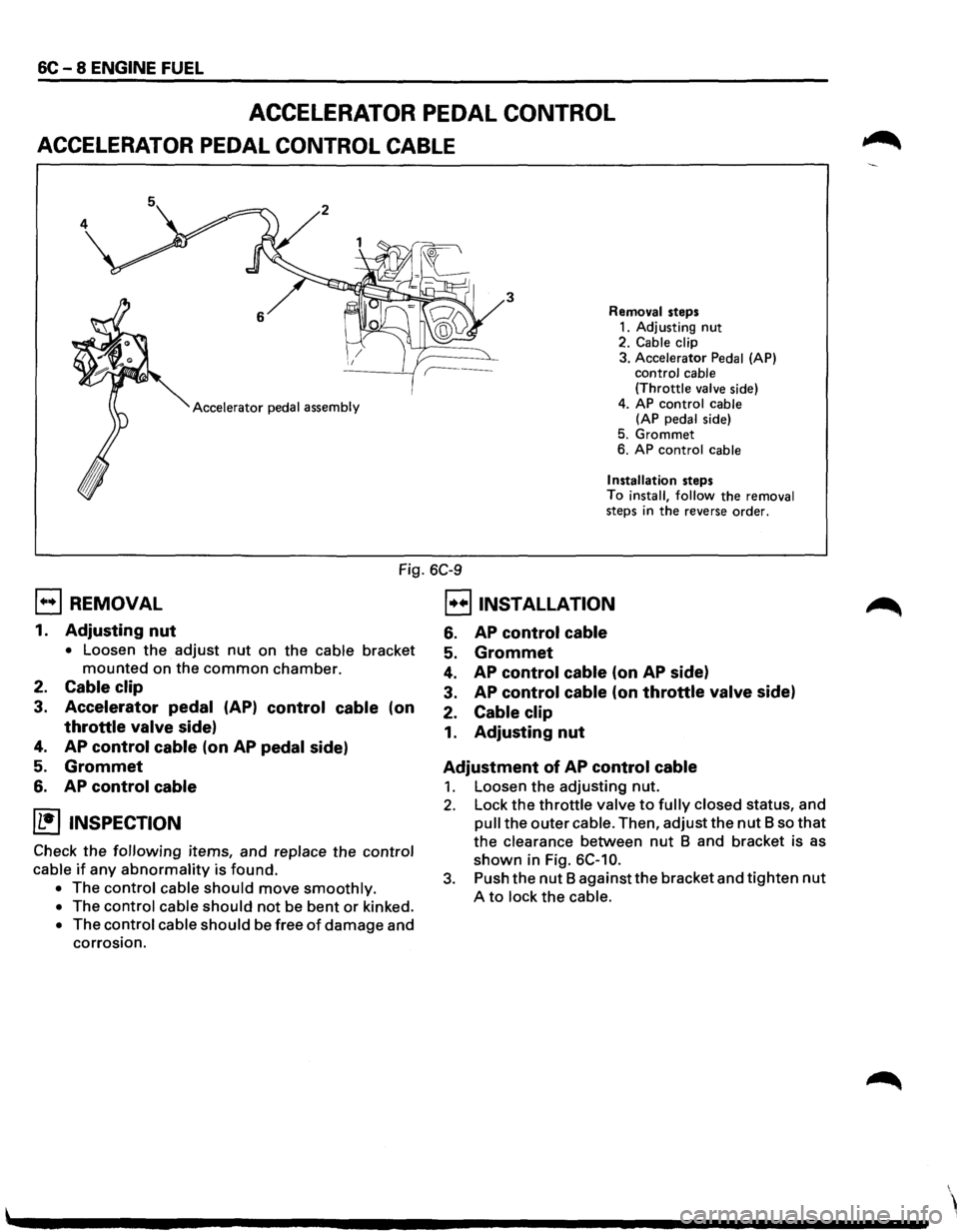
6C - 8 ENGINE FUEL
ACCELERATOR PEDAL CONTROL
ACCELERATOR PEDAL CONTROL CABLE
3
Accelerator pedal assembly Removal
steps
1. Adjusting nut 2. Cable clip
3. Accelerator Pedal (AP)
control cable
(Throttle valve side)
4. AP
control cable
(AP pedal side)
5.
Grommet
6. AP control cable
Installation steps
To install, follow the removal
steps in the reverse order.
Fig. 6C-9
EJ REMOVAL
1. Adjusting nut
• Loosen the adjust nut on the cable bracket
mounted on the common chamber.
2. Cable clip
3. Accelerator pedal (AP) control cable (on
throttle valve side)
4. AP control cable (on AP pedal side)
5. Grommet
6. AP control cable
(1!] INSPECTION
Check the following items, and replace the control
cable
if any abnormality is found.
• The control cable should move smoothly.
• The control cable should not be bent or kinked.
• The control cable should be free of damage and
corrosion.
B INSTALLATION
6. AP control cable
5. Grommet
4. AP control cable (on AP side)
3. AP control cable (on throttle valve side)
2.
Cable clip
1. Adjusting nut
Adjustment of
AP control cable
1. Loosen the adjusting nut.
2. Lock the throttle valve to fully closed status, and
pull the outer cable. Then, adjust the nut B so that
the clearance between nut B and bracket is as
shown in Fig. 6C-10.
3. Push the nut B against the bracket and tighten nut
A to lock the cable.
Page 652 of 1928
6C -10 ENGINE FUEL
Adjustment of pedal stroke
Manual Transmission:
• Rotate counterclockwise to loosen the stopper
bolt sufficiently.
• Fully depress the pedal and hold it there hand.
Next, rotate the stopper bolt until it hits the
stopper of pedal bracket. Then, lock the stopper
bolt there.
Automatic Transmission:
• Rotate counterclockwise to loosen the kickdown
switch sufficiently.
• Fully depress the pedal and hold it there hand.
Rotate
the switch clockwise and then rotate
further by 1/2 turn from the position where the
switch clicks. Lock the switch there.
• Step on the accelerator pedal and make sure that
you can hear clicking sound at the full stroke
position.
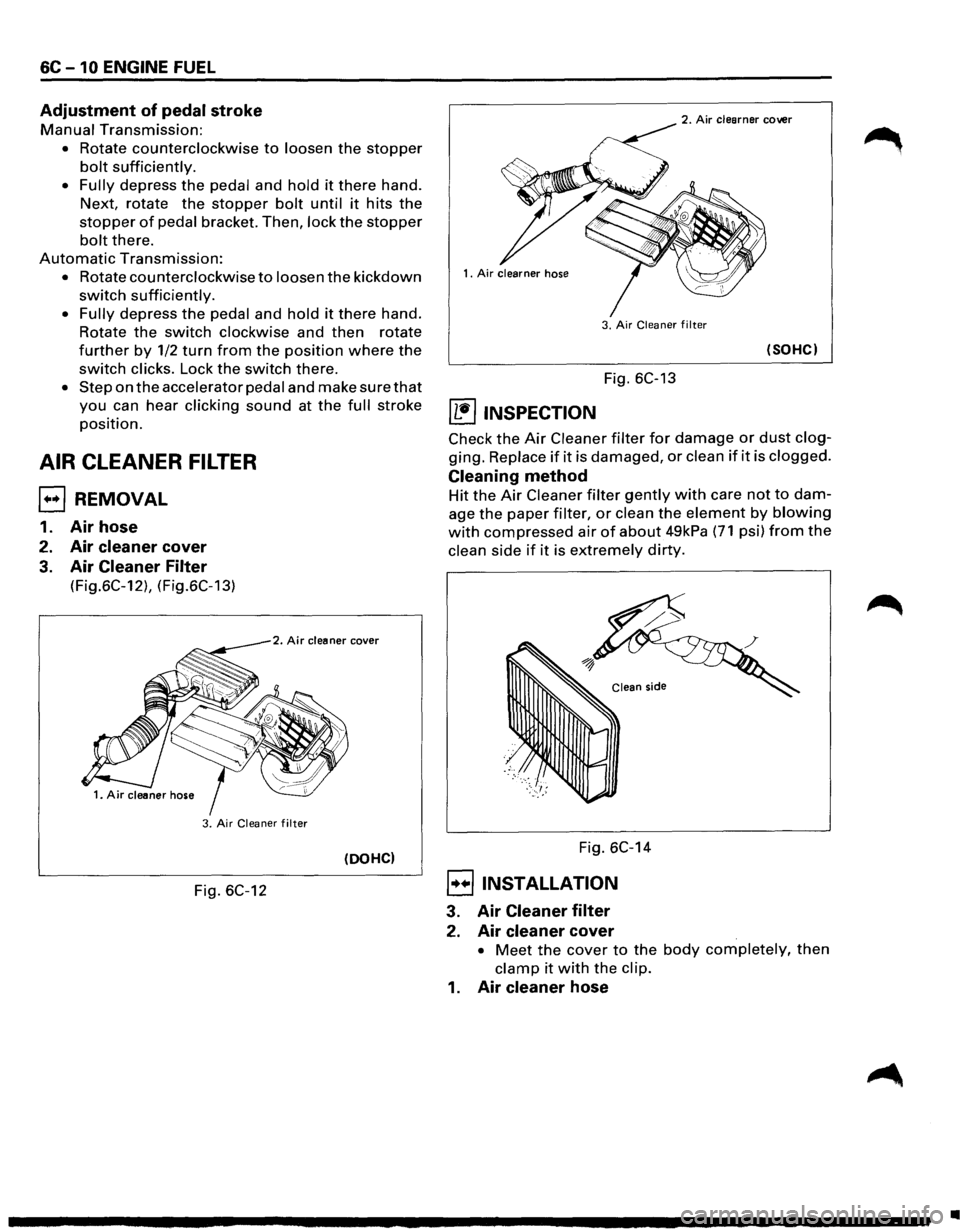
AIR CLEANER FILTER
EJ REMOVAL
1. Air hose
2. Air cleaner cover
3. Air Cleaner Filter
(Fig.6C-12), (Fig.6C-13)
2. Air cleaner cover
3. Air Cleaner filter
(DOHC)
Fig. 6C-12
2. Air clearner cover
3.
Air Cleaner filter
(SOHC)
Fig. 6C-13
~ INSPECTION
Check the Air Cleaner filter for damage or dust clog
ging. Replace if it is damaged, or clean if it is clogged.
Cleaning method
Hit the Air Cleaner filter gently with care not to dam
age the paper filter, or clean the element by blowing
with compressed air of about 49kPa (71 psi) from the
clean side if it is extremely dirty.
Fig. 6C-14
8 INSTALLATION
3. Air Cleaner filter
2. Air cleaner cover
• Meet the cover to the body completely, then
clamp it with the clip.
1. Air cleaner hose
•
Page 660 of 1928
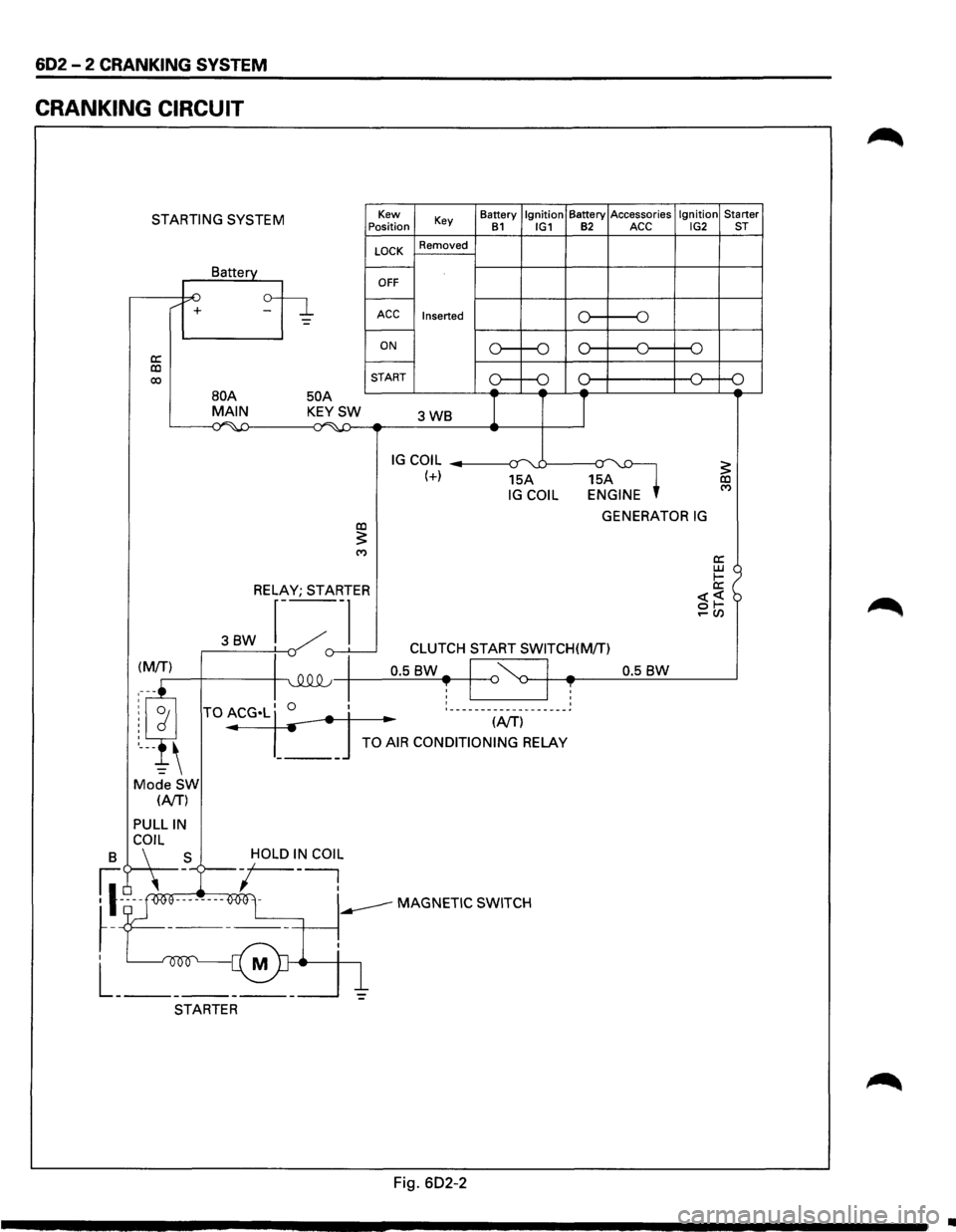
602 - 2 CRANKING SYSTEM
CRANKING CIRCUIT
STARTING SYSTEM
a: co 00
/ +
Battery
50 A
Kew
Position
LOCK
OFF
Key
Removed
ACC Inserted
ON
START Battery
Ignition Battery
Accessories Ignition Starter B1 IG1 B2 ACC IG2 ST
o----o
o----o
oc l---+----+--<0---o
BOA MAIN KEYSW 3WB I I ~~ ...;~-4:) -
IG COIL --------1~-:r uJ----a~ (+) 15A 15A IG COIL ENGINE
GENERATOR IG co :5: ('f)
RELAY; STARTER
3BW r---~
._,()-.L___j -v CLUTCH START SWITCH(M/T)
0.5
BW-I '~ I -0.5 BW ~-+-4~--~~~------~ T I ~ I T : ___________________ ~
.. (NT)
TO AIR CONDITIONING RELAY
Mode SW (NT)
PULLIN
B C\~L _S -/OLD I~ COl~
fl-~ooe--------O<>Ol -----MAGNETIC SWITCH
~-T ------+-----~.
I M
L _______ _
STARTER
Fig. 602-2
•
Page 665 of 1928
CRANKING SYSTEM 602 -7
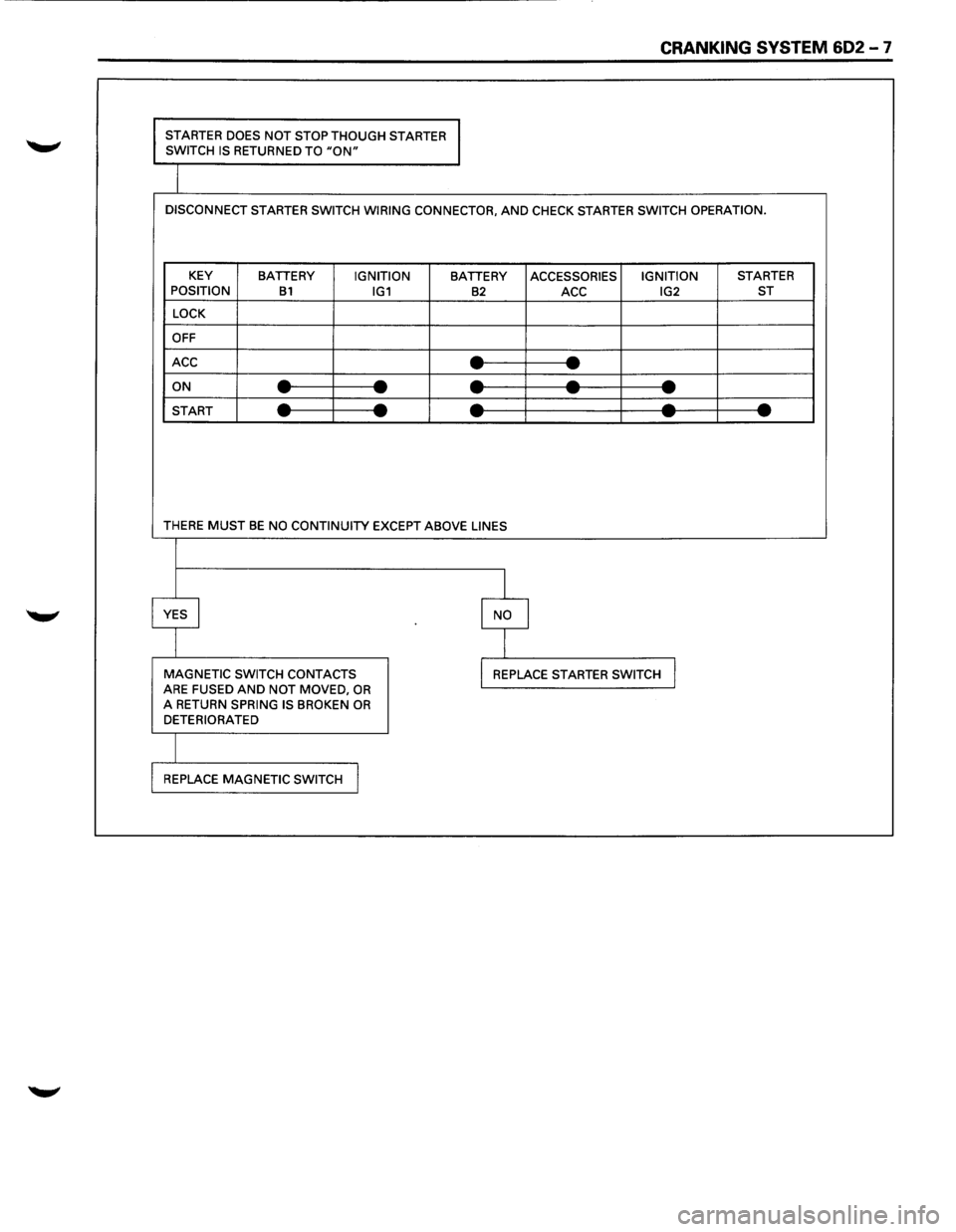
STARTER DOES NOT STOP THOUGH STARTER
SWITCH IS RETURNED TO "ON"
DISCONNECT STARTER SWITCH WIRING CONNECTOR, AND CHECK STARTER SWITCH OPERATION.
KEY
BATTERY IGNITION BATTERY ACCESSORIES IGNITION STARTER
POSITION B1 IG1 B2 ACC IG2 ST
LOCK
OFF
ACC
--- -ON ----------START ----------
THERE MUST BE NO CONTINUITY EXCEPT ABOVE LINES
I
YES I I NO
I
MAGNETIC SWITCH CONTACTS I REPLACE STARTER SWITCH J ARE FUSED AND NOT MOVED, OR A RETURN SPRING IS BROKEN OR DETERIORATED
REPLACE
MAGNETIC SWITCH I
Page 670 of 1928
602 -12 CRANKING SYSTEM
23. Pinion
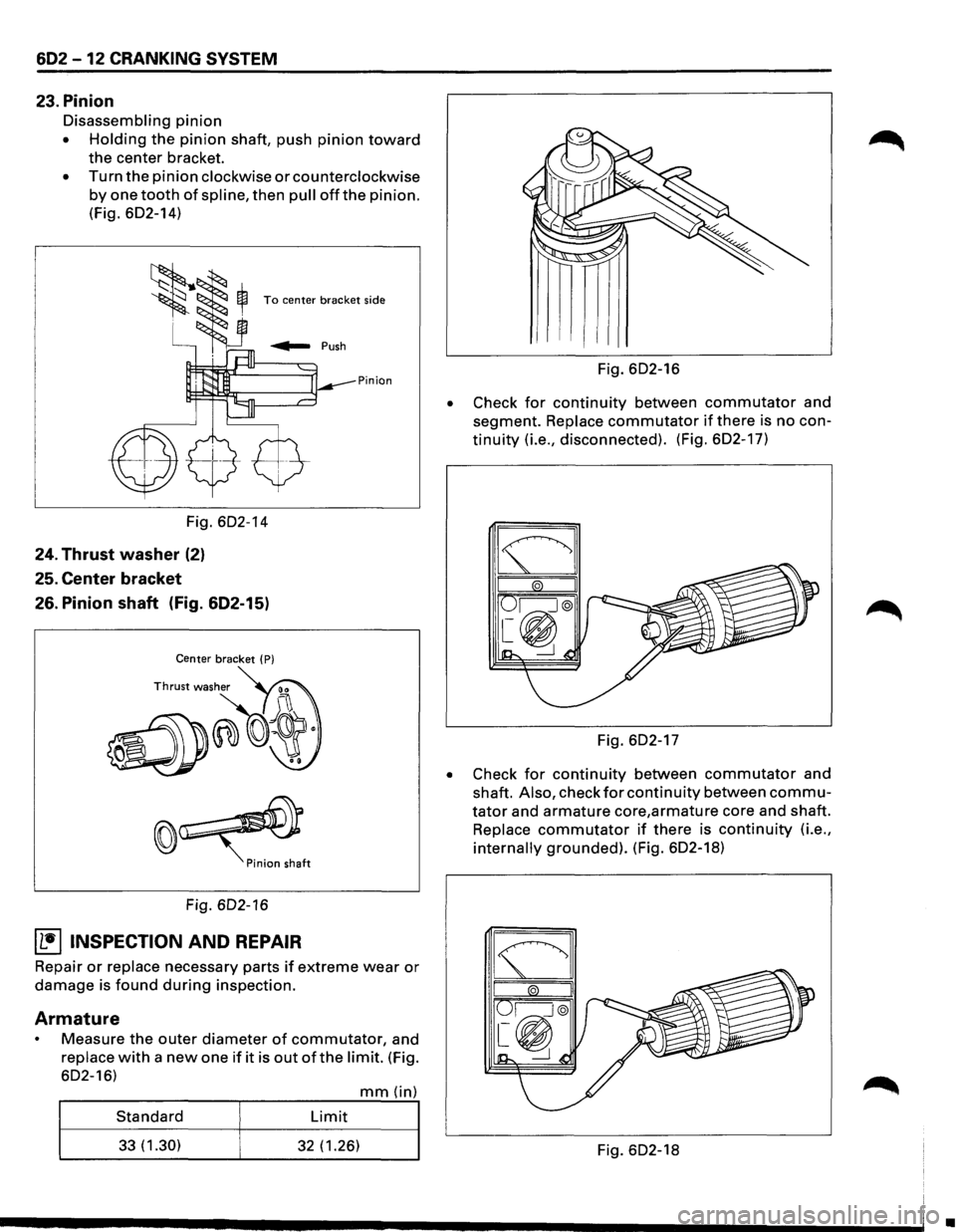
Disassembling pinion
• Holding the pinion shaft, push pinion toward
the center bracket.
• Turn the pinion clockwise or counterclockwise
by one tooth of spline, then pull offthe pinion.
(Fig. 602-14)
To center bracket side
Pinion
Fig. 602-14
24. Thrust washer (2)
25. Center bracket
26. Pinion shaft (Fig. 602-15)
Center bracket ( P)
Fig. 602-16
~ INSPECTION AND REPAIR
Repair or replace necessary parts if extreme wear or
damage is found during inspection.
Armature
Measure the outer diameter of commutator, and
replace with a new one if it is out of the limit. (Fig.
602-16)
mm(in)
Standard Limit
33(1.30) 32 (1.26)
•
Fig. 602-16
Check
for continuity between commutator and
segment.
Replace commutator if there is no con
tinuity (i.e., disconnected). (Fig. 602-17)
Fig. 602-17
• Check for continuity between commutator and
shaft.
Also, check for continuity between commu
tator and armature core,armature core and shaft.
Replace commutator if there is continuity (i.e.,
internally grounded). (Fig. 602-18)
Fig. 602-18
•
Page 672 of 1928
602-14 CRANKING SYSTEM
Fig. 602-23
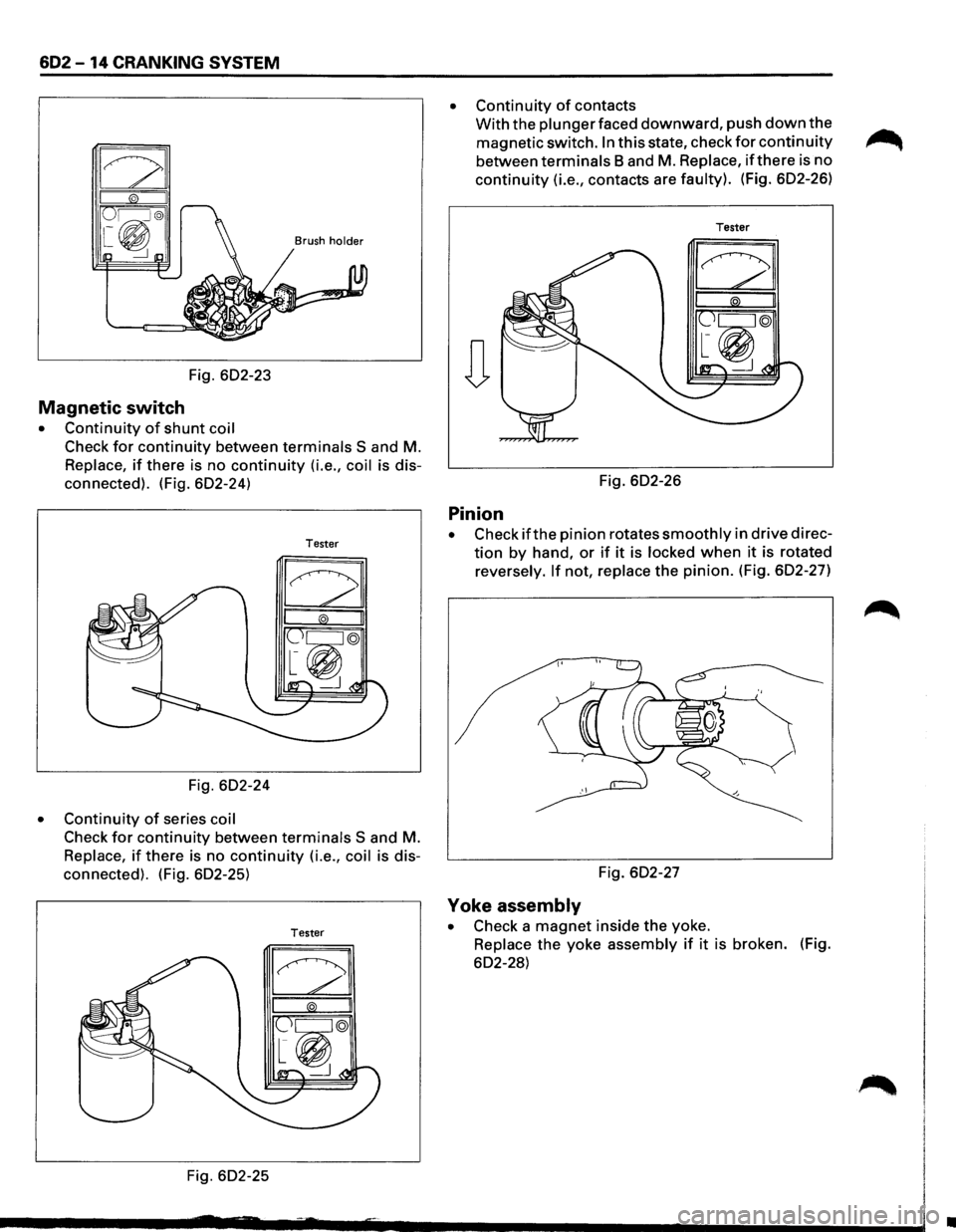
Magnetic switch
• Continuity of shunt coil
Check for continuity between terminals S and M.
Replace, if there is no continuity (i.e., coil is dis
connected). (Fig. 602-24)
Tester
Fig. 602-24
• Continuity of series coil
Check for continuity between terminals S and M.
Replace, if there is no continuity (i.e., coil is dis
connected). (Fig. 602-25)
Tester
Fig. 602-25
• Continuity of contacts
With the plunger faced downward, push down the
magnetic switch. In this state, check for continuity ~
between terminals Band M. Replace, if there is no
continuity (i.e., contacts are faulty). (Fig. 602-26)
Tester
Fig. 602-26
Pinion
• Check ifthe pinion rotates smoothly in drive direc
tion by hand, or if it is locked when it is rotated
reversely.
If not, replace the pinion. (Fig. 602-27)
Fig. 602-27
Yoke assembly
• Check a magnet inside the yoke.
Replace the yoke assembly if it is broken. (Fig.
602-28)
•
Page 675 of 1928
CRANKING SYSTEM 602-17
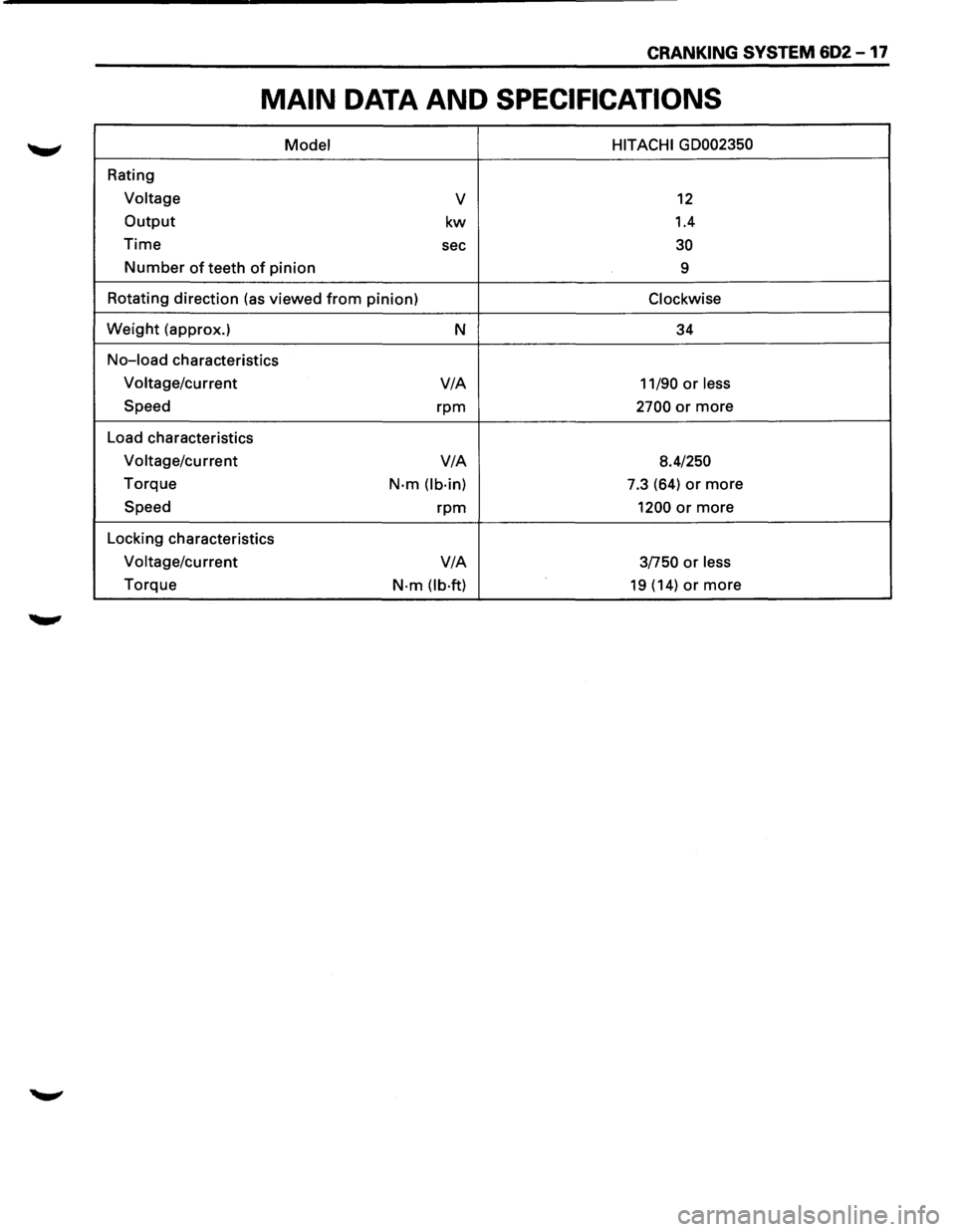
MAIN DATA AND SPECIFICATIONS
Model HITACHI GD002350
Rating
Voltage v 12
Output kw 1.4
Time sec 30
Number of teeth of pinion
9
Rotating direction (as viewed
from pinion) Clockwise
Weight (approx.)
N 34
No-load characteristics
Voltage/current V/A
11/90 or less
Speed rpm 2700 or more
Load characteristics
Voltage/current V/A
8.4/250
Torque N·m (lb·in) 7.3 (64) or more
Speed rpm 1200 or more
Locking characteristics
Voltage/current V/A
3/750 or less
Torque N·m (lb·ft) 19 (14) or more
Page 678 of 1928
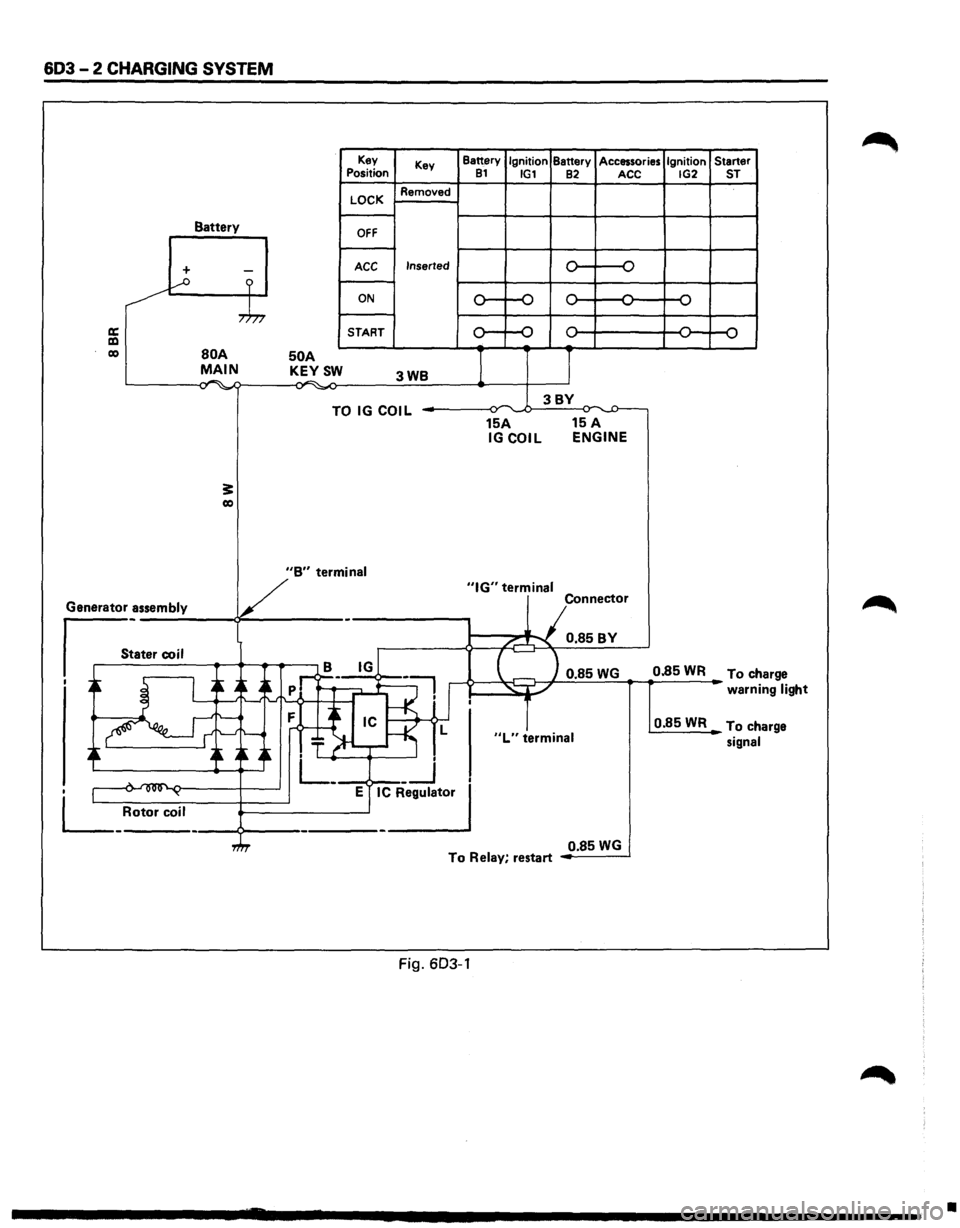
603-2 CHARGING SYSTEM
Battery
+ -...--o ?
,.h,
a: a:l co BOA MAIN . .-. -,., ~
3: co
50 A KEYSW
Key
Position
LOCK
OFF
ACC
ON
START Key
Removed
Inserted
3WB
TO IG COIL
Battery Ignition Battery Accessories Ignition Starter 81 IG1 82 ACC IG2 ST
0 -o
,.... ,....
,.... ,... ,.... ...., ...., ...., ...., ....,
0 ,.... ,.... ,.... 0 ....,
...., ....,
I J
3BY ~ ,.,.
15A 15 A IGCOIL ENGINE
V
"B" termin_a_I _____ _,"IG" terminal
Generator assembly
s_:a_t_er_co __ i_l __ ~~~.-.-~ - Connector
/...-"""\. 0.85BY
B IG
I ~ I ~ A~
-~ ..->--~~ 0.85 WG 0.85 WR To ch arge
' _-: .~:f--<·1'
.~ ~ ~~~~ T ~-r-~ L
. L_ __j
• 1 .... ~ ~ E IC Regulator
L_ Rotor coil ----9---------------'
"L" terminal
warni ng light
0.85WR To ch arge
signal
0.85
WG To Relay, restart
Fig. 603-1
•
Page 681 of 1928
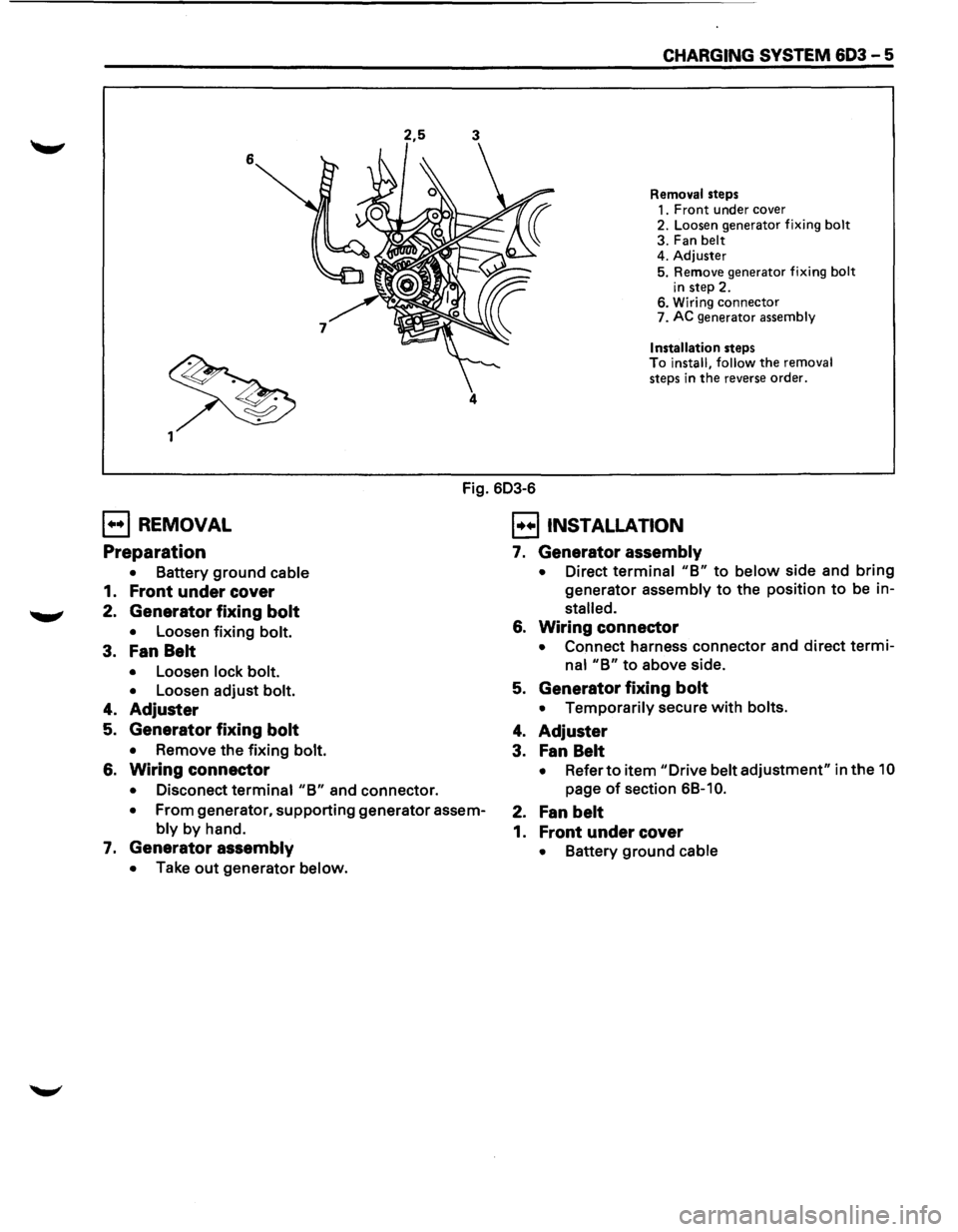
2,5 3
6 4
CHARGING SYSTEM 603 - 5
Removal steps
1. Front under cover
2. Loosen generator fixing bolt
3. Fan belt
4. Adjuster
5. Remove generator fixing bolt
in step 2. 6. Wiring connector
7. AC generator assembly
Installation steps To install, follow the removal
steps in
the reverse order.
Fig. 603-6
E] REMOVAL
Preparation
• Battery ground cable
1. Front under cover
2. Generator fixing bolt
• Loosen fixing bolt.
3. Fan Belt
• Loosen lock bolt.
•
Loosen adjust bolt.
4. Adjuster
5. Generator fixing bolt
• Remove the fixing bolt.
6. Wiring connector
• Disconect terminal "B" and connector.
• From generator, supporting generator assem
bly by hand.
7. Generator assembly
• Take out generator below.
EJ INSTALLATION
7. Generator assembly
• Direct terminal "B" to below side and bring
generator assembly to the position to be in
stalled.
6. Wiring connector
• Connect harness connector and direct termi
nal "B" to above side.
5. Generator fixing bolt
• Temporarily secure with bolts.
4. Adjuster
3. Fan Belt
• Refer to item "Drive belt adjustment" in the 10
page of section 6B-1 0.
2. Fan belt
1. Front under cover
• Battery ground cable