transmission ISUZU TROOPER 1995 Workshop Manual
[x] Cancel search | Manufacturer: ISUZU, Model Year: 1995, Model line: TROOPER, Model: ISUZU TROOPER 1995Pages: 1928
Page 1130 of 1928
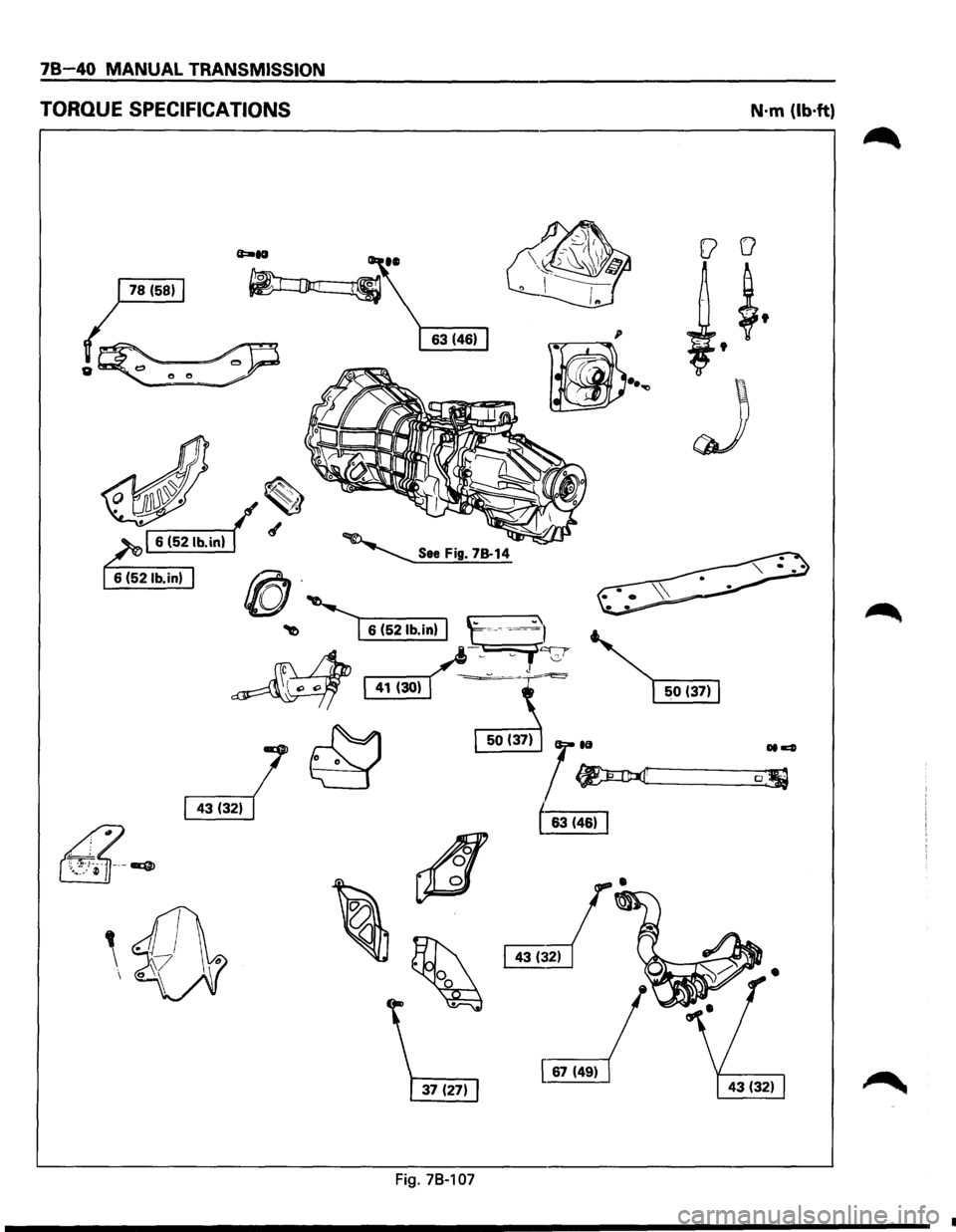
JB 40 MANUAL TRANSMISSION
TORQUE SPECIFICATIONS
~ ~6314611
4
\·
~
[ 67 (49)
Fig. 78-107
N·m (lb·ft)
0. '
•
Page 1131 of 1928
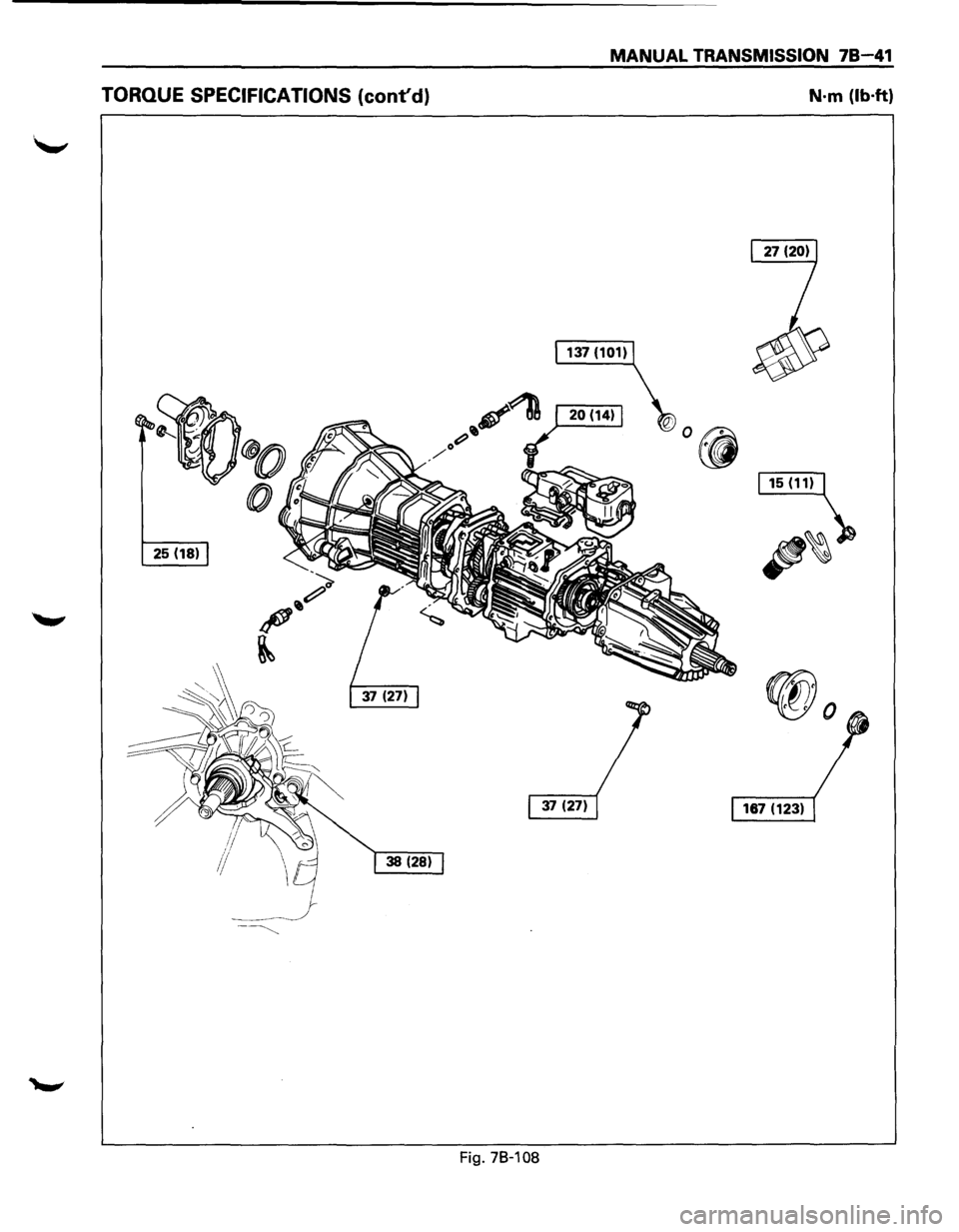
MANUAL TRANSMISSION 78-41
TORQUE SPECIFICATIONS (cont'd) N·m (lb·ft)
25 (18)
Fig. 78-108
Page 1132 of 1928
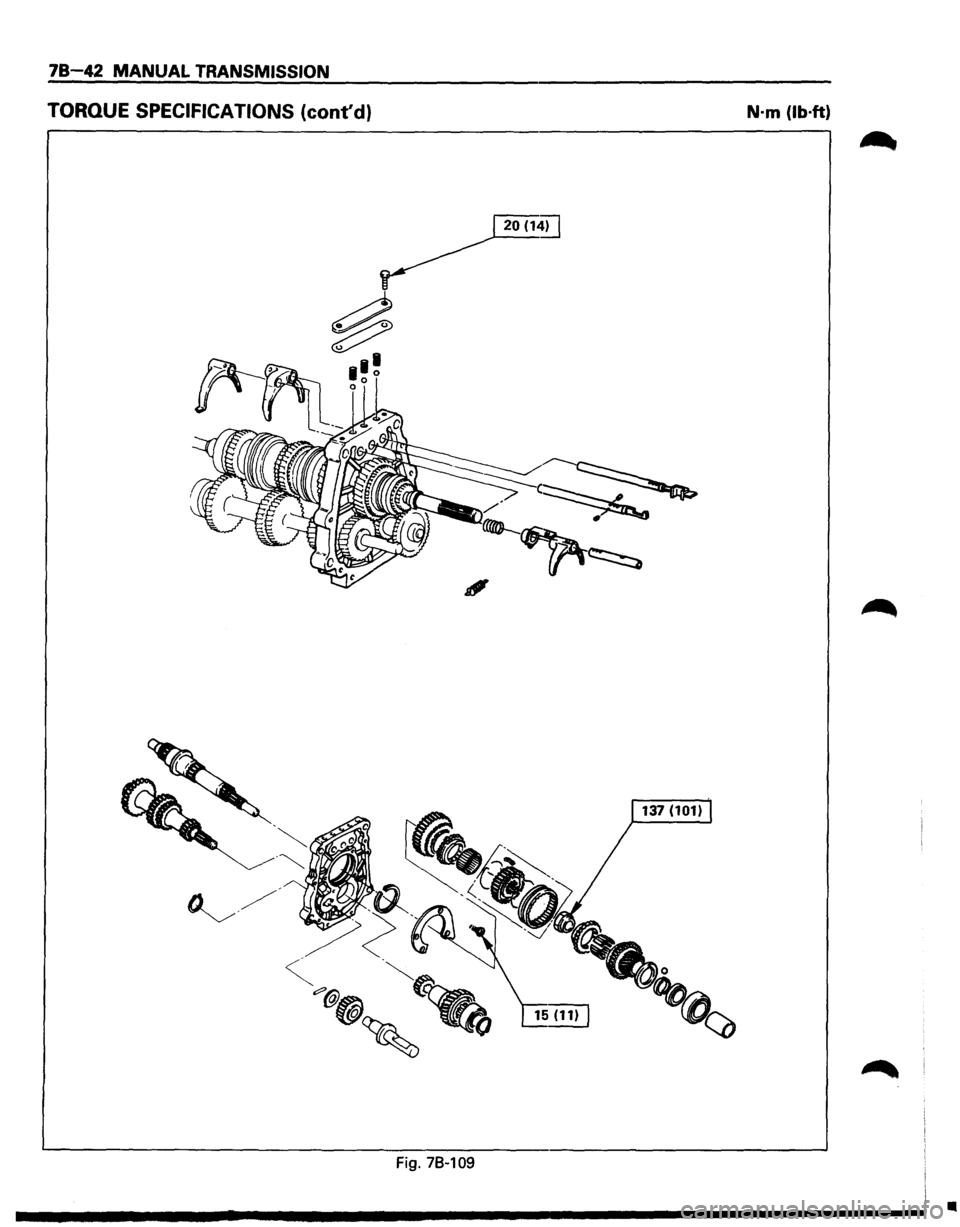
78-42 MANUAL TRANSMISSION
TORQUE SPECIFICATIONS (cont'd) N·m (lb·ft)
20(1~
Fig. 78~109
•
Page 1133 of 1928
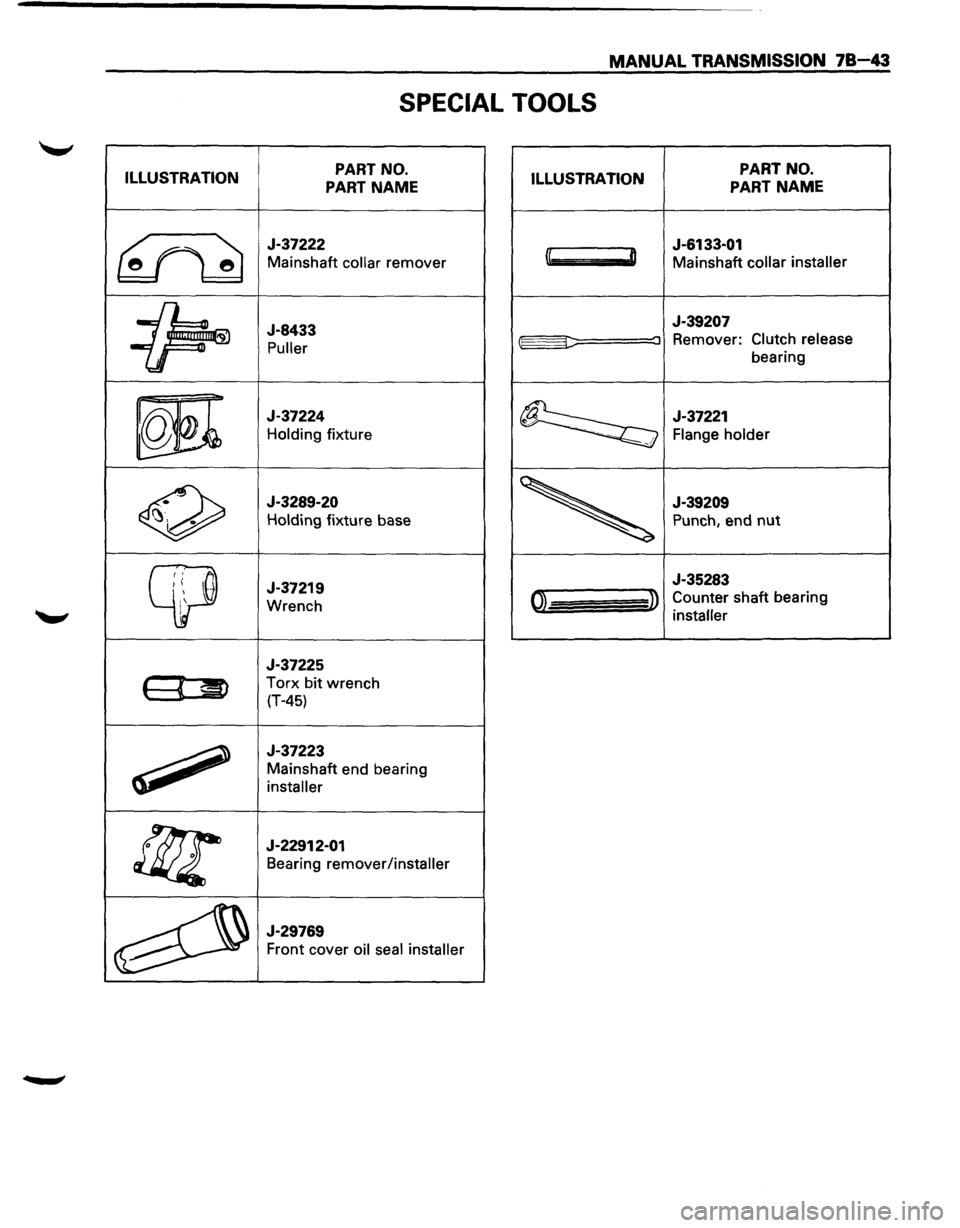
MANUAL TRANSMISSION 78-43
SPECIAL TOOLS
ILLUSTRATION PART
NO.
PART NAME ILLUSTRATION PART
NO.
PART NAME
~
J-37222
Mainshaft collar remover
J-6133-01
l~ D Mainshaft collar installer
~
J-8433
Puller
J-39207
::::: :J Remover: Clutch release
bearing
m
J-37224
Holding fixture ~
J-37221
Flange holder !.
0
J-3289-20
Holding fixture base
J-39209
Punch, end nut
~
J-37219
Wrench I '
J-35283
01 » Counter shaft bearing
installer
J-37225
( « ~ Torx bit wrench
(T-45)
~
J-37223
Mainshaft end bearing
installer
!f;r
J-22912-01
Bearing remover/installer
~
J-29769
Front cover oil seal installer
Page 1140 of 1928
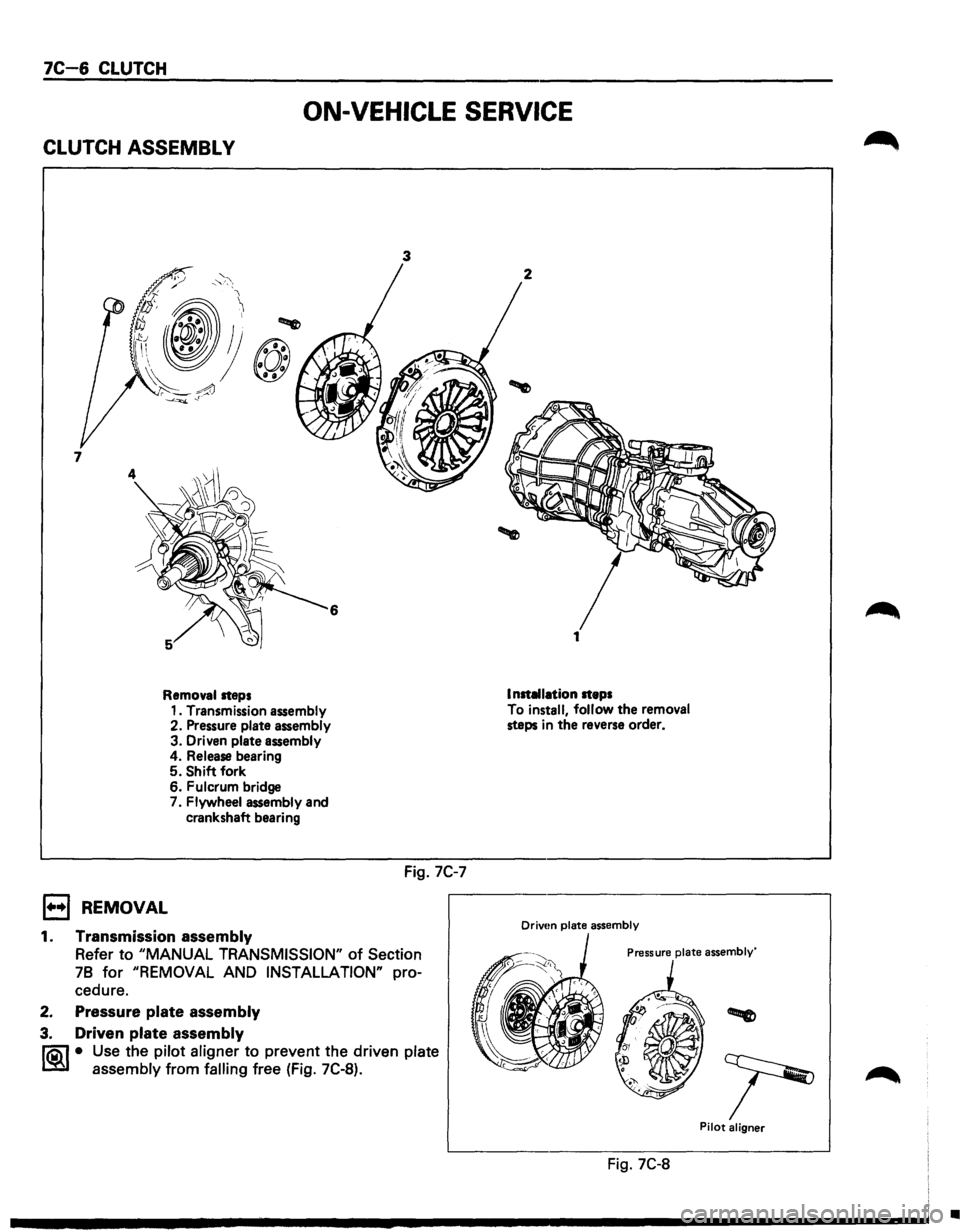
7C-6 CLUTCH
ON-VEHICLE SERVICE
CLUTCH ASSEMBL V
6
Removal steps
1••1 REMOVAL
1. Transmission assembly
2. Pressure plate assembly
3. Driven plate assembly 4. Release bearing 5. Shift fork
6. Fulcrum bridge
7. Flywheel assembly and
crankshaft bearing
1. Transmission assembly
3
Fig. 7C-7
Refer to "MANUAL TRANSMISSION" of Section
78
for "REMOVAL AND INSTALLATION" pro
cedure.
2. Pressure plate assembly
3. Driven plate assembly
li0\1 • Use the pilot aligner to prevent the driven plate
lSi~ assembly from falling free (Fig. 7C-8).
2
Installation steps
To install,
follow the removal steps in the reverse order.
Drivtm plate assembly
Pressure plate assembly'
Pilot aligner
Fig. 7C-8
•
Page 1141 of 1928
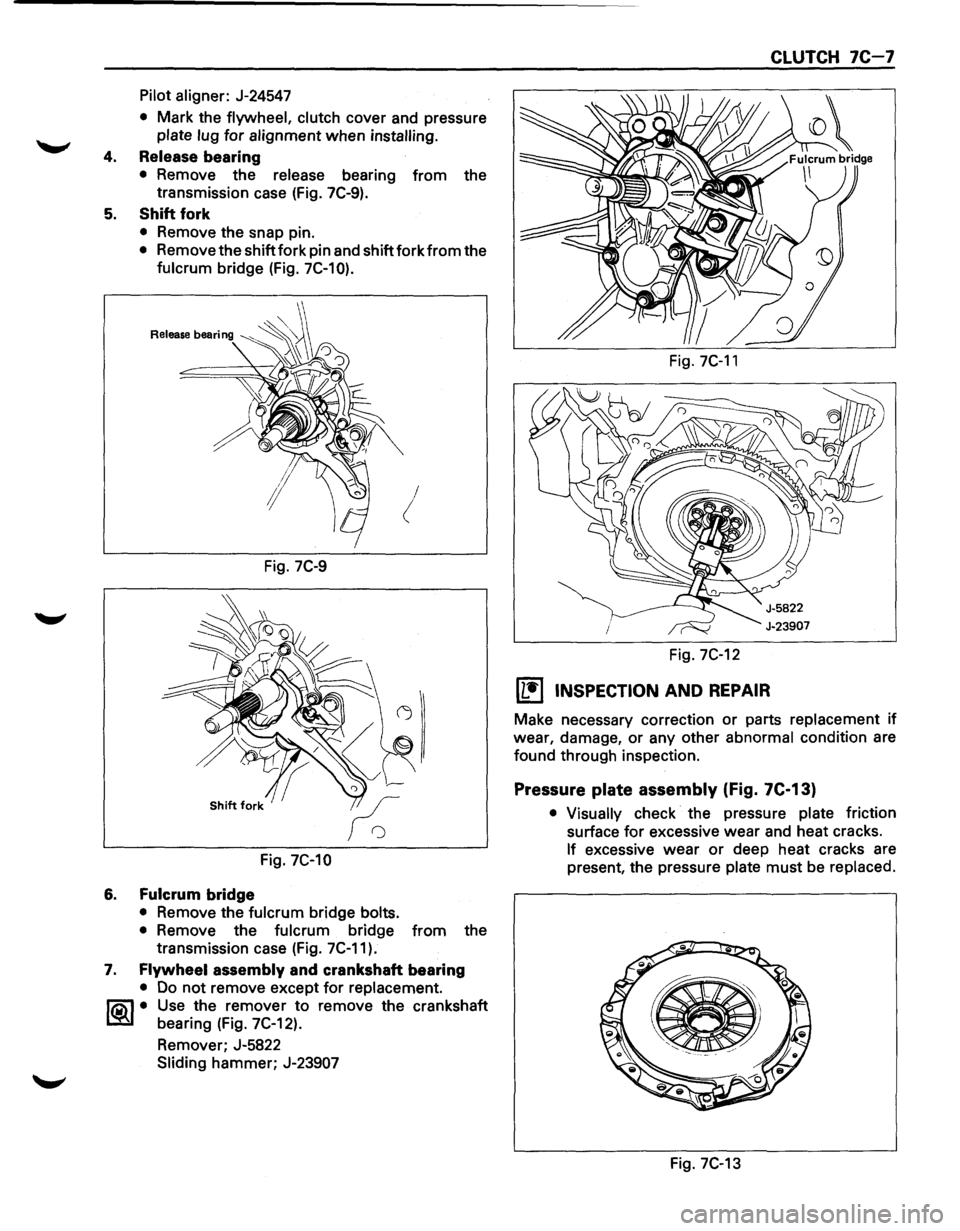
Pilot aligner: J-24547
• Mark the flywheel, clutch cover and pressure
plate lug for alignment when installing.
4. Release bearing
• Remove the release bearing from the
transmission case (Fig. 7C-9).
5. Shift fork
• Remove the snap pin.
• Remove the shift fork pin and shift fork from the
fulcrum bridge (Fig. 7C-10).
!
Fig. 7C-9
Fig. 7C-10
6. Fulcrum bridge
• Remove the fulcrum bridge bolts.
•
Remove the fulcrum bridge from the
transmission case (Fig. 7C-11).
7. Flywheel assembly and crankshaft bearing
• Do not remove except for replacement.
~~~· Use the remover to remove the crankshaft
bearing (Fig. 7C-12).
Remover; J-5822
Sliding hammer; J-23907
Fig. 7C-11
Fig. 7C-12
[L!j INSPECTION AND REPAIR
CLUTCH 7C-7
Make necessary correction or parts replacement if
wear, damage, or any other
abnormal condition are
found through inspection.
Pressure plate assembly (Fig. 7C-13)
• Visually check the pressure plate friction
surface
for excessive wear and heat cracks.
If excessive wear or deep heat cracks are
present, the pressure
plate must be replaced.
e ·---------
Fig. 7C-13
Page 1143 of 1928
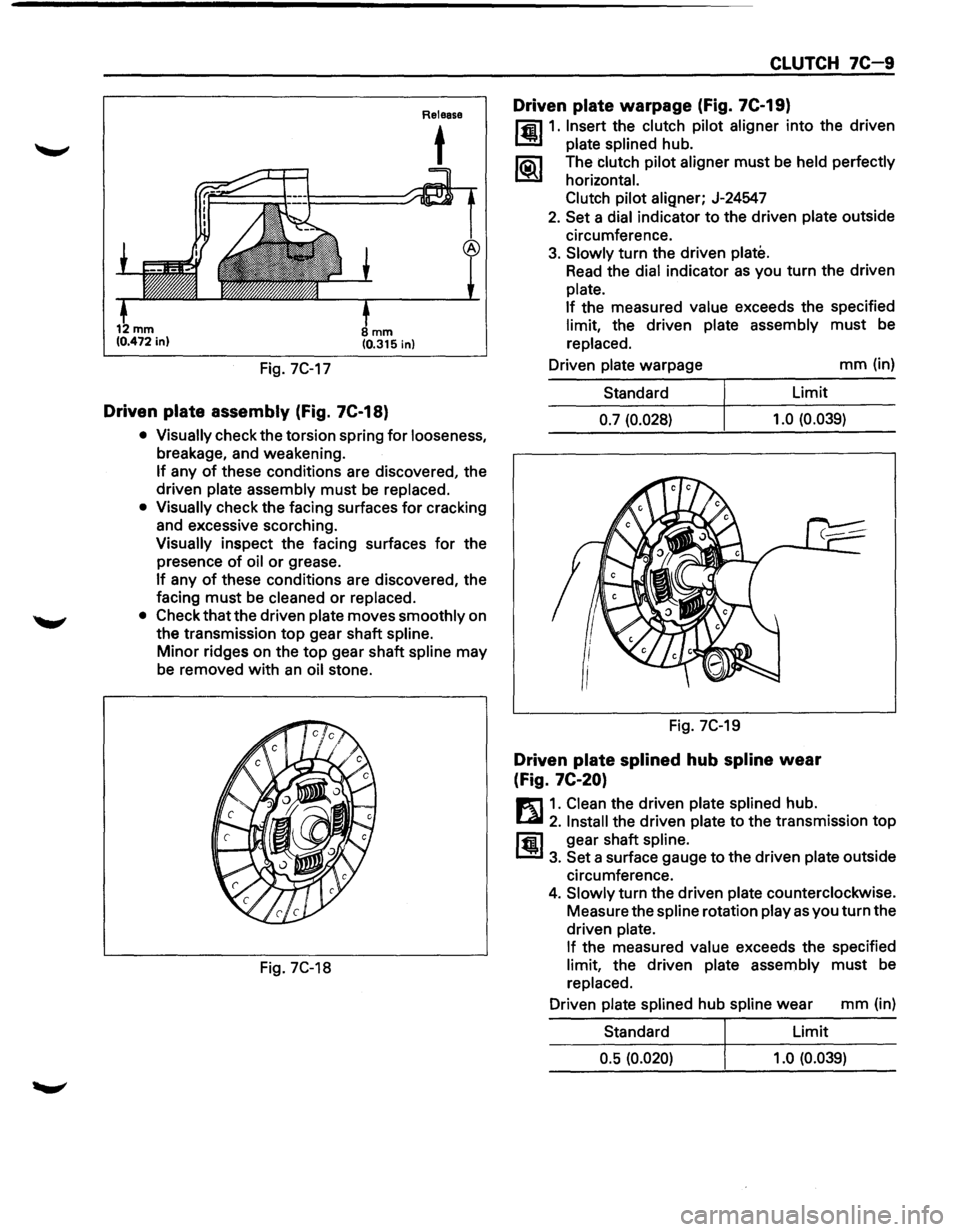
Fig. 7C-17
mm (0.315 in)
Driven plate assembly (Fig. 7C-18)
Release
t
• Visually check the torsion spring for looseness,
breakage, and weakening.
If any of these conditions are discovered, the
driven
plate assembly must be replaced.
• Visually check the facing surfaces for cracking
and excessive scorching.
Visually inspect the facing surfaces for the
presence
of oil or grease.
If any of these conditions are discovered, the
facing
must be cleaned or replaced.
• Check that the driven plate moves smoothly on
the transmission
top gear shaft spline.
Minor ridges on the top gear shaft spline may
be removed
with an oil stone.
Fig. 7C-18
CLUTCH 7C-9
Driven plate warpage (Fig. 7C-19)
l'fil1. Insert the clutch pilot aligner into the driven
1.!!!1 plate splined hub.
li5\l The clutch pilot aligner must be held perfectly
I.::2Y horizontal.
Clutch pilot
aligner; J-24547
2. Set a dial indicator to the driven plate outside
circumference.
3. Slowly turn the driven plate.
Read the dial indicator as you turn the driven
plate.
If
the measured value exceeds the specified
limit, the driven plate assembly must be
replaced.
Driven
plate warpage mm (in)
Standard Limit
0.7 (0.028) 1.0
(0.039)
Fig. 7C-19
Driven plate splined hub spline wear
(Fig.
7C-20)
E1 1. Clean the driven plate splined hub.
l...al 2. Install the driven plate to the transmission top
ffi1 gear shaft spline.
1.!!1 3. Set a surface gauge to the driven plate outside
circumference.
4. Slowly turn the driven plate counterclockwise.
Measure the
spline rotation play as you turn the
driven
plate.
If
the measured value exceeds the specified
limit, the driven plate assembly must be
replaced.
Driven
plate splined hub spline wear mm (in)
Standard Limit
0.5 (0.020) 1.0 (0.039)
Page 1145 of 1928
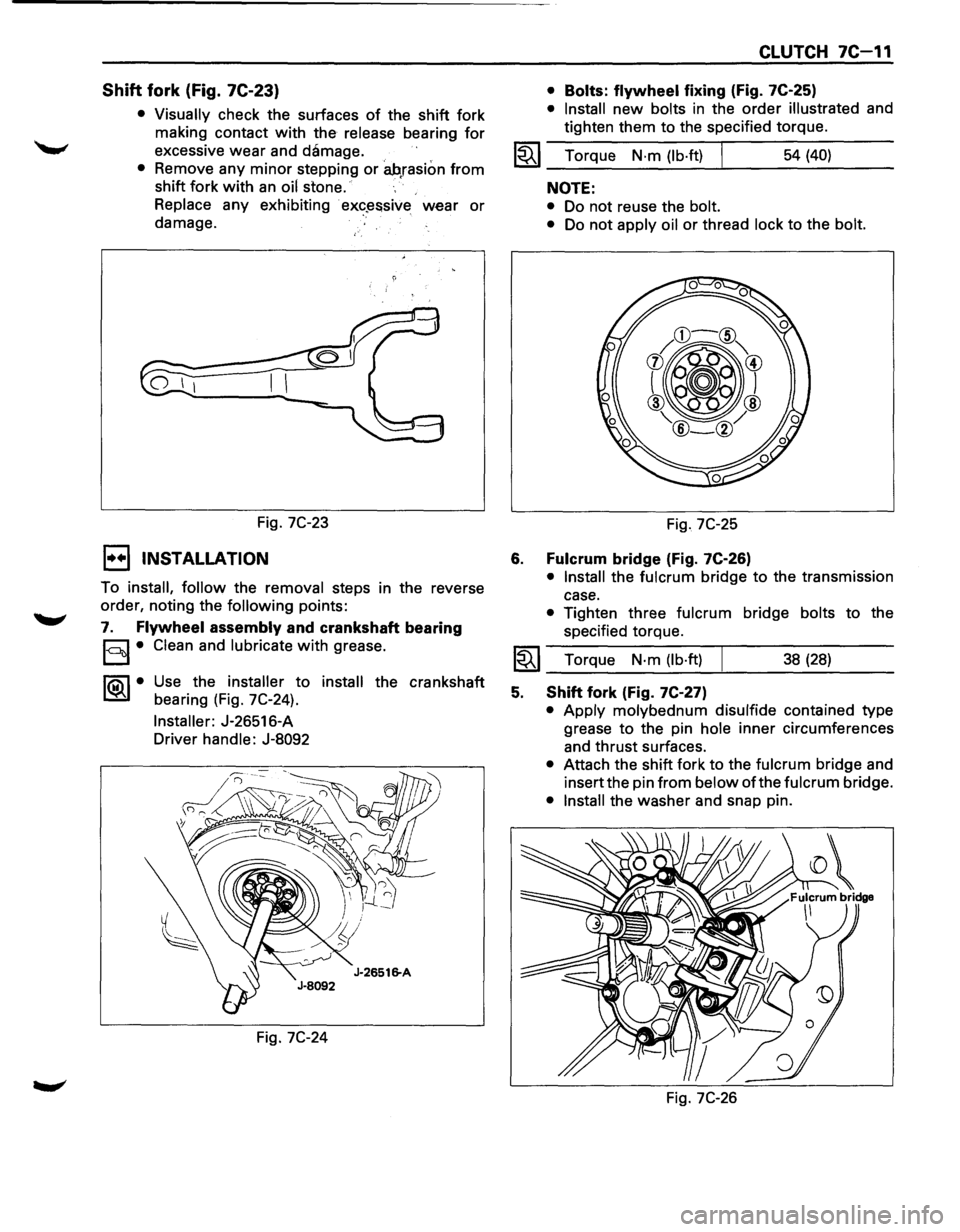
Shift fork (Fig. 7C-23)
• Visually check the surfaces of the shift fork
making contact
with the release bearing for
excessive wear and damage.
• Remove any minor stepping or ah,rasion from
shift fork with an oil stone.
Replace any exhibiting
· ex«?~ssive wear or
damage.
Fig.
7C-23
1••1 INSTALLATION
To install, follow the removal steps in the reverse
order, noting the
following points:
7. Flywheel assembly and crankshaft bearing
§I• Clean and lubricate with grease.
1®..1• Use the installer to install the crankshaft
bearing (Fig. 7C-24).
Installer: J-26516-A
Driver handle: J-8092
Fig.
7C-24
CLUTCH 7C-11
• Bolts: flywheel fixing (Fig. 7C-25)
• Install new bolts in the order illustrated and
tighten them to the specified torque.
1~1 Torque N·m (lb·ft) I 54 (40)
6.
NOTE:
• Do not reuse the bolt.
•
Do not apply oil or thread lock to the bolt.
Fig. 7C-25
Fulcrum bridge (Fig. 7C-26)
• Install the fulcrum bridge to the transmission
case.
• Tighten three fulcrum bridge bolts to the
specified torque.
I~I __ T_o_rq~u_e __ N_·_m~(_lb_·ft_l~ _____ 3_8_(_28_) ____ _
5. Shift fork (Fig. 7C-27)
• Apply molybednum disulfide contained type
grease
to the pin hole inner circumferences
and thrust surfaces.
• Attach the shift fork to the fulcrum bridge and
insert the pin
from below of the fulcrum bridge.
• Install the washer and snap pin.
Fig.
7C-26
Page 1146 of 1928
7C-12 CLUTCH
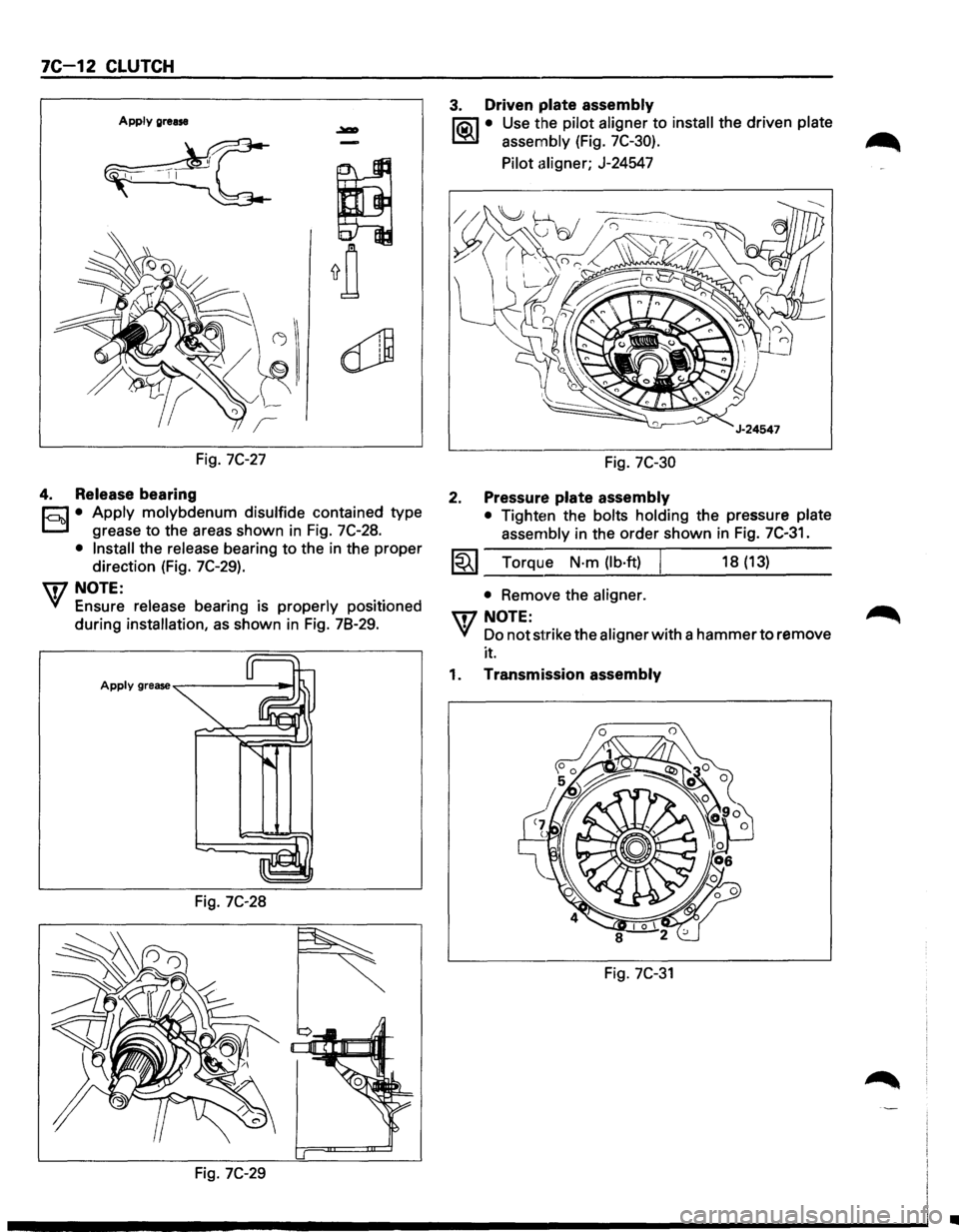
Apply grease
Fig. 7C-27
4. Release bearing
r;:J • Apply molybdenum disulfide contained type
D grease to the areas shown in Fig. 7C-28.
• Install the release bearing to the in the proper
direction (Fig.
7C-29).
U7 NOTE:
VI Ensure release bearing is properly positioned
during
installation, as shown in Fig. 78-29.
Fig. 7C-28
Fig. 7C-29
3. Driven plate assembly
liQ\1 • Use the pilot aligner to install the driven plate
~ assembly (Fig. 7C-30).
Pilot aligner; J-24547
Fig. 7C-30
2. Pressure plate assembly
• Tighten the bolts holding the pressure plate
assembly in the order shown in
Fig. 7C-31.
1~1 Torque N·m (lb·ft) I 18 (13)
• Remove the aligner.
UJNOTE:
VI Do not strike the aligner with a hammer to remove
it.
1. Transmission assembly
Fig. 7C-31
•
Page 1160 of 1928
70-2 TRANSFER CASE
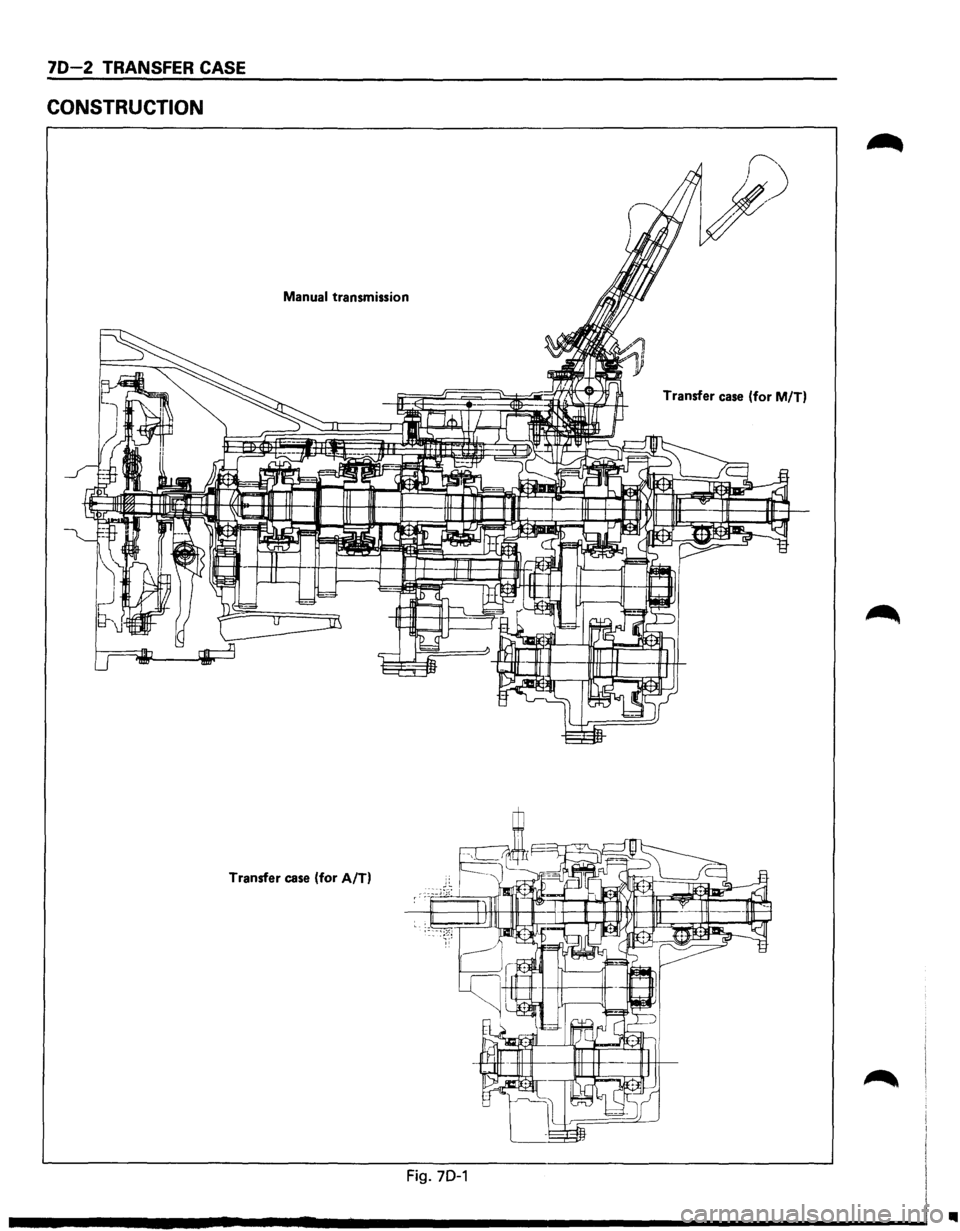
CONSTRUCTION
Manual transmission Transfer case (for M/T)
Transfer case (for A/T)
Fig. 70-1
..