air condition ISUZU TROOPER 1995 Service Manual
[x] Cancel search | Manufacturer: ISUZU, Model Year: 1995, Model line: TROOPER, Model: ISUZU TROOPER 1995Pages: 1928
Page 78 of 1928
1 B -24 AIR CONDITIONING
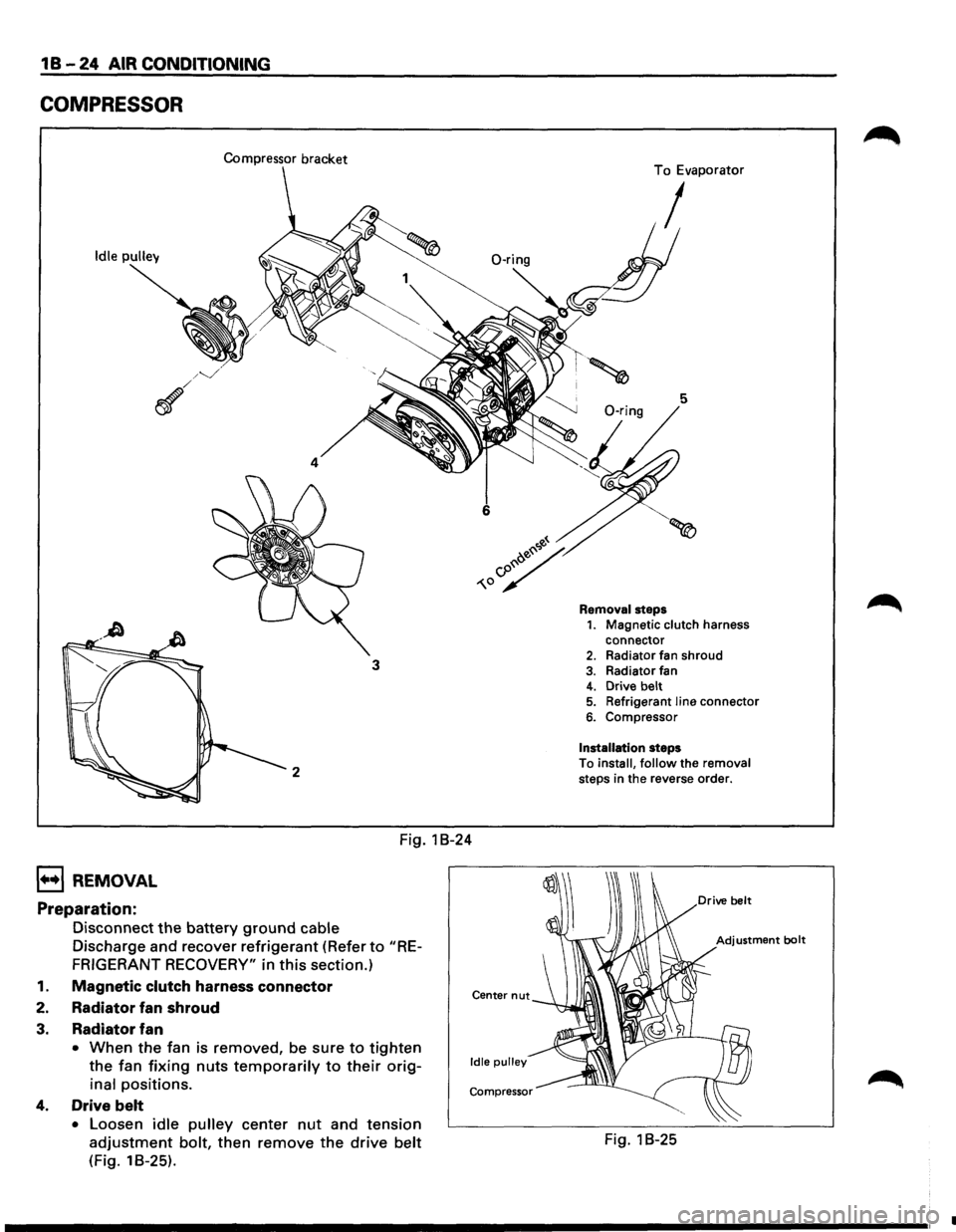
COMPRESSOR
Compressor bracket
Idle pulley
4
3
2
Fig. 1 B-24
1••1 REMOVAL
Preparation:
Disconnect the battery ground cable
Discharge and recover refrigerant (Refer to "RE
FRIGERANT RECOVERY"
in this section.)
1. Magnetic clutch harness connector
2. Radiator fan shroud
3. Radiator fan
• When the fan is removed, be sure to tighten
the fan fixing nuts temporarily to their orig
inal positions.
4. Drive belt
• Loosen idle pulley center nut and tension
adjustment bolt, then remove the drive belt
(Fig. 18-25).
Center nut
Idle pulley
Compressor
To Evaporator
I
5
Removal steps 1. Magnetic clutch harness
connector
2. Radiator fan shroud
3. Radiator fan 4. Drive belt 5. Refrigerant line connector
6. Compressor
Installation steps
To
install, follow the removal steps in the reverse order.
Fig. 1 B-25
•
Page 79 of 1928
5. Refrigerant line connector
• When removing the line connector, the con
necting part
should immediately be plugged
or capped to prevent foreign matter from
being mixed into the line.
6. Compressor
l••liNSTALLATION
6. Compressor
• Tighten the compressor fixing bolts to the
specified torque.
~~~ Torque N·m (lb·ft) 19 (14)
5. Refrigerant line connector
• Tighten the refrigerant line connector fixing
bolts to the specified torque.
~~~ Torque N·m (lb.ft) 15 (11)
• 0-rings cannot be reused. Always replace
with new ones.
1~1 • Be sure to apply new compressor oil to the 0-
rings when connecting refrigerant lines.
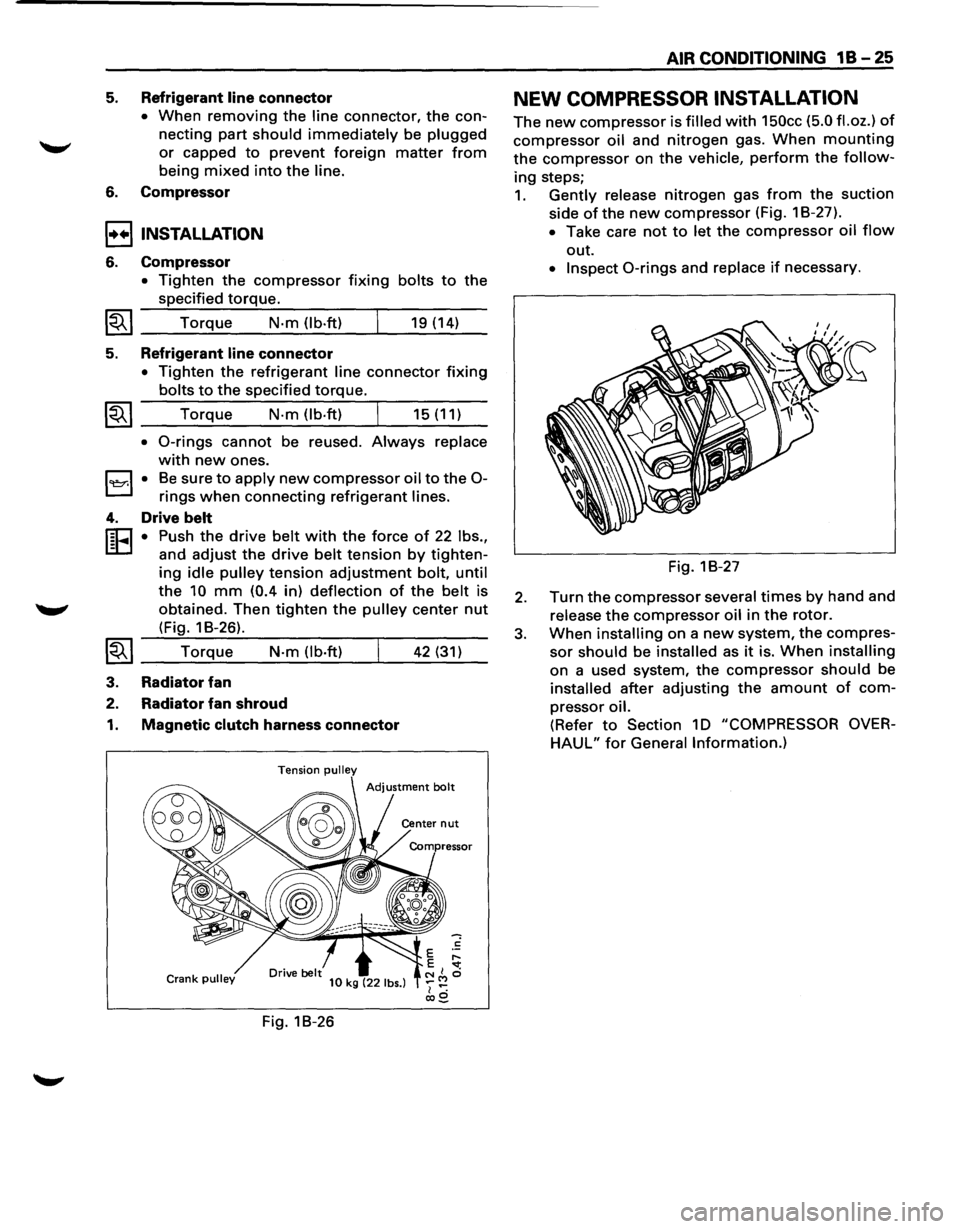
4. Drive belt
r:cJ • Push the drive belt with the force of 22 lbs.,
L:D and adjust the drive belt tension by tighten-
ing idle pulley tension adjustment bolt, until
the 10 mm (0.4 in) deflection of the belt is
obtained. Then
tighten the pulley center nut
(Fig. 1 B-26).
~~I __ T_o_r_!q_ue.:...._ __ N_·m__;_(l_b_·ft....:..) _ __,_ __ 4_2....:..(_31_)_
3. Radiator fan
2. Radiator fan shroud
1. Magnetic clutch harness connector
Tension pulley
Crank pulley 10 kg (22 lbs.)
Fig. 18-26
AIR CONDITIONING 1 B -25
NEW COMPRESSOR INSTALLATION
The new compressor is filled with 150cc (5.0 fl.oz.) of
compressor oil and nitrogen gas. When mounting
the compressor on the vehicle, perform the follow
ing steps;
1. Gently release nitrogen gas from the suction
side
ofthe new compressor (Fig. 18-27).
• Take care not to let the compressor oil flow
out.
• Inspect 0-rings and replace if necessary.
Fig. 18-27
2. Turn the compressor several times by hand and
release
the compressor oil in the rotor.
3. When installing on a new system, the compres
sor should be installed as it is. When installing
on a used system, the compressor should be
installed after adjusting the amount of com
pressor oil.
(Refer to Section 10 "COMPRESSOR OVER
HAUL" for General Information.)
Page 80 of 1928
1 B -26 AIR CONDITIONING
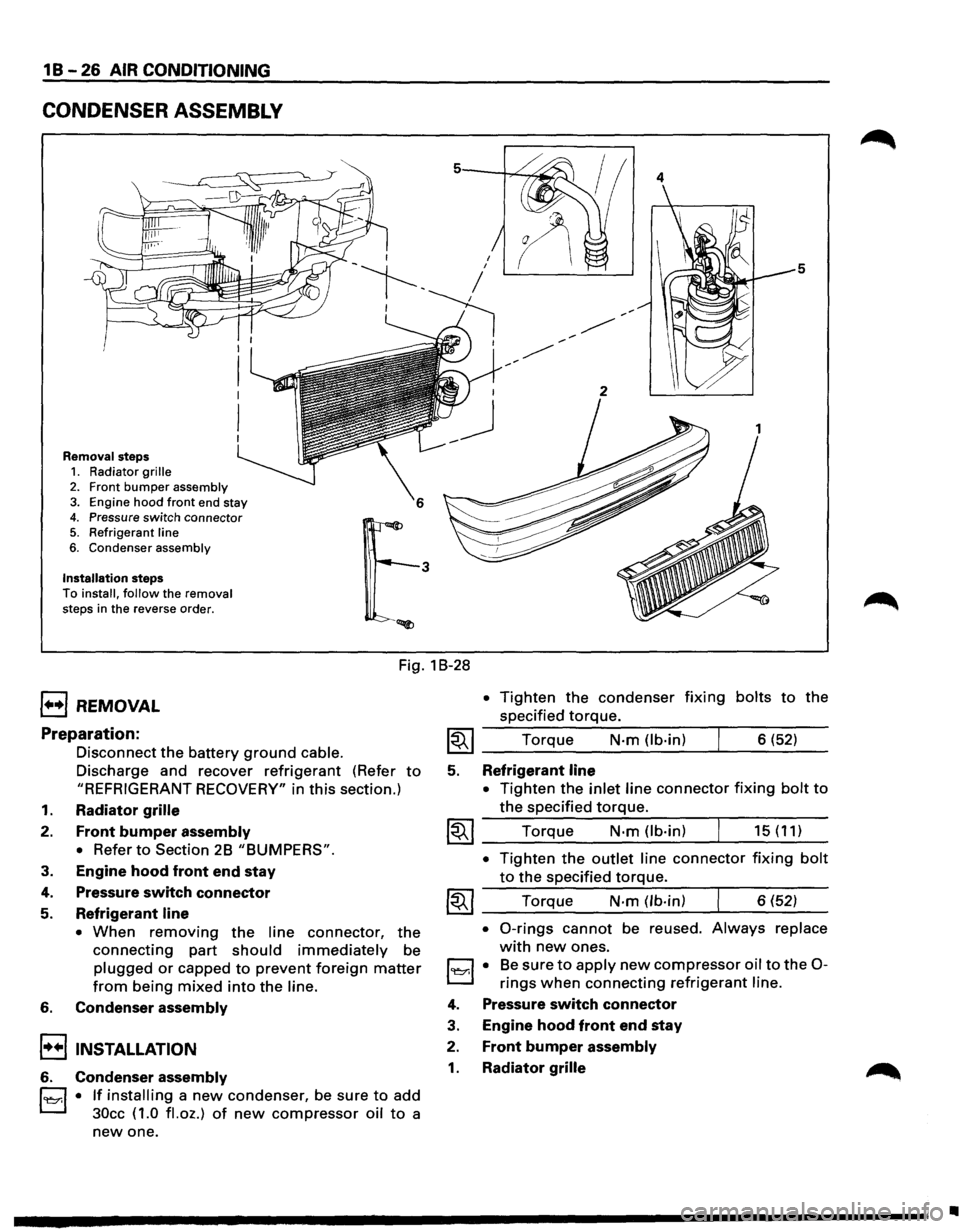
CONDENSER ASSEMBLY
Removal steps 1. Radiator grille
2. Front bumper assembly 3. Engine hood front end stay
4. Pressure switch connector 5. Refrigerant line
6. Condenser assembly
Installation steps To install, follow the removal
steps in the reverse order.
4
5
Fig. 1 B-28
1••1 REMOVAL
Preparation:
Disconnect the battery ground cable.
Discharge and recover refrigerant (Refer to
"REFRIGERANT RECOVERY" in this section.)
1. Radiator grille
2. Front bumper assembly
•
Refer to Section 2B "BUMPERS".
3. Engine hood front end stay
4. Pressure switch connector
5. Refrigerant line
• When removing the line connector, the
connecting part should immediately be
plugged or capped to prevent foreign matter
from being mixed into the line.
6. Condenser assembly
!••I INSTALLATION
6. Condenser assembly
l'l::r.l • If installing a new condenser, be sure to add
30cc ( 1.0
fl. oz.) of new compressor oil to a
new one.
• Tighten the condenser fixing bolts to the
specified
torque.
~~~ Torque N·m (lb-in) 6 (52)
5. Refrigerant line
•
Tighten the inlet line connector fixing bolt to
the specified torque.
~~~ Torque N·m (lb-in) 15 (11)
• Tighten the outlet line connector fixing bolt
to the specified torque.
~~~ Torque N-m (lb-in) 6 (52)
• 0-rings cannot be reused. Always replace
with new ones.
l'l::r.l • Be sure to apply new compressor oil to the 0-
rings when connecting refrigerant line.
4. Pressure switch connector
3. Engine hood front end stay
2. Front bumper assembly
1. Radiator grille
•
Page 81 of 1928
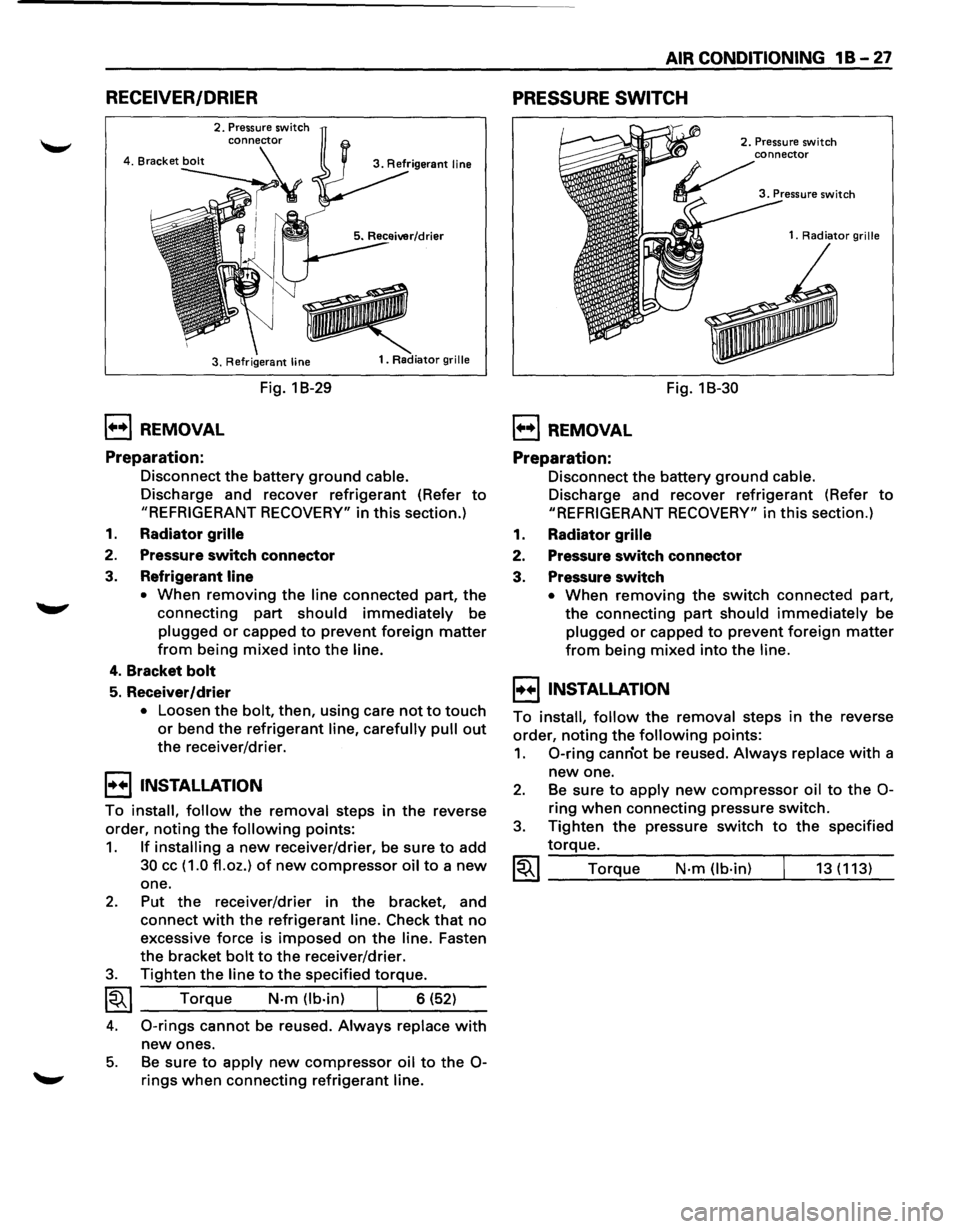
RECEIVER/DRIER
2. Pressure switch
3. Refrigerant
line
1••1 REMOVAL
Preparation:
Fig. 1 B-29
1. Radiator grille
Disconnect the battery ground cable.
Discharge and recover refrigerant (Refer to
"REFRIGERANT RECOVERY" in this section.)
1. Radiator grille
2. Pressure switch connector
3. Refrigerant line
•
When removing the line connected part, the
connecting part
should immediately be
plugged or capped to prevent foreign matter
from being mixed into the line.
4. Bracket bolt
5. Receiver/drier
• Loosen the bolt, then, using care not to touch
or bend the refrigerant line, carefully pull out
the receiver/drier.
I••I•NSTALLATION
To install, follow the removal steps in the reverse
order,
noting the following points:
1. If installing a new receiver/drier, be sure to add
30 cc ( 1.0 fl. oz.) of new compressor oil to a new
one.
2. Put the receiver/drier in the bracket, and
connect
with the refrigerant line. Check that no
excessive force is imposed on the line. Fasten
the bracket
bolt to the receiver/drier.
3. Tighten the line to the specified torque.
~~~ Torque N-m (lb-in) I 6 (52)
4. 0-rings cannot be reused. Always replace with
new ones.
5. Be sure to apply new compressor oil to the 0-
rings when connecting refrigerant line.
AIR CONDITIONING 1 B -27
PRESSURE SWITCH
1••1 REMOVAL
Preparation:
Fig. 18-30
2. Pressure switch
1.
Radiator grille
Disconnect the battery ground cable.
Discharge and recover refrigerant (Refer to
"REFRIGERANT RECOVERY" in this section.)
1. Radiator grille
2. Pressure switch connector
3. Pressure switch
• When removing the switch connected part,
the connecting
part should immediately be
plugged or capped to prevent foreign matter
from being mixed into the line.
I••IINSTALLATION
To install, follow the removal steps in the reverse
order,
noting the following points:
1. 0-ring canriot be reused. Always replace with a
new one.
2. Be sure to apply new compressor oil to the 0-
ring when connecting pressure switch.
3. Tighten the pressure switch to the specified
torque.
~~~ Torque N·m (lb-in) 13 (113)
Page 82 of 1928
1 B-28 AIR CONDITIONING
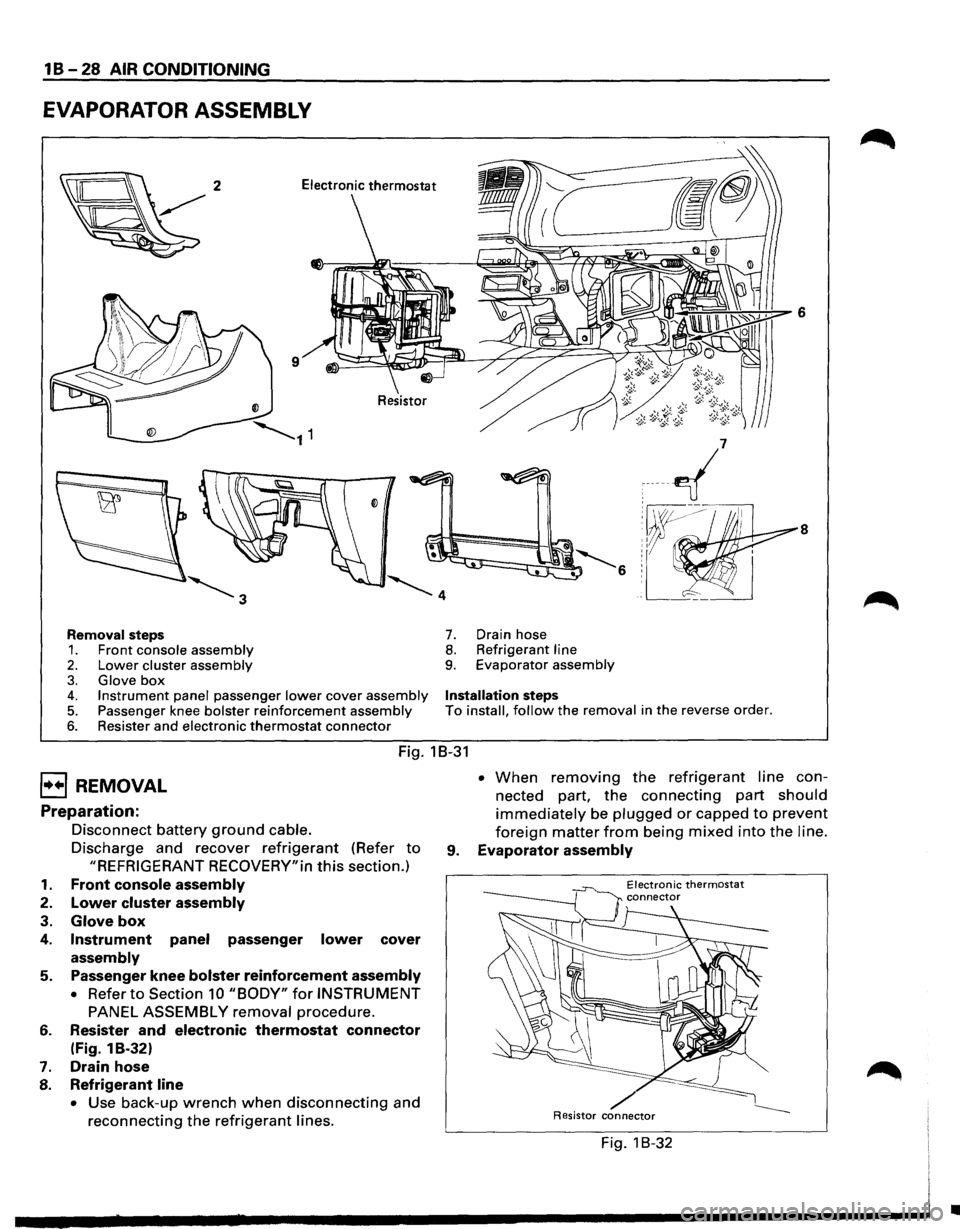
EVAPORATOR ASSEMBLY
8
Removal steps 7. Drain hose
1. Front console assembly 8. Refrigerant line
2. Lower cluster assembly 9. Evaporator assembly
3. Glove box 4. Instrument panel passenger lower cover assembly Installation steps
5. Passenger knee bolster reinforcement assembly To install, follow the removal in the reverse order.
6. Resister and electronic thermostat connector
Fig. 18-31
EJ REMOVAL
Preparation:
1.
2.
3.
4.
5.
6.
7.
8.
Disconnect battery ground cable.
Discharge and recover refrigerant (Refer to
"REFRIGERANT RECOVERY"in this section.)
Front console assembly
Lower cluster assembly
Glove box
Instrument panel passenger lower cover
assembly
Passenger knee bolster reinforcement assembly
• Refer to Section 10 "BODY" for INSTRUMENT
PANEL ASSEMBLY removal procedure.
Resister
and electronic thermostat connector
(Fig. 1 B-32)
Drain hose
Refrigerant line
• Use back-up wrench when disconnecting and
reconnecting the refrigerant lines. •
When removing the refrigerant line con
nected part,
the connecting part should
immediately be plugged or capped to prevent
foreign matter from being mixed into the line.
9. Evaporator assembly
Electronic thermostat
/ Resistor connector
Fig. 1 B-32
•
Page 83 of 1928
I••IINSTALLATION
To install, follow the removal steps in the reverse
order,
noting the following points:
1. To install a new evaporator assembly, add 50cc
(1.7 fl.oz.) of new compressor oil to a new core.
2. Tighten the refrigerant outlet line to the
specified torque.
~~~ Torque N·m (lb.ft) 25 (18)
AIR CONDITIONING 1 B-29
3. Tighten the refrigerant inlet line to the specified
torque.
~~~ Torque N·m (lb·ft) 15 (11)
4. 0-rings cannot be reused. Always replace with
new ones.
5. Be sure to apply new compressor oil to the 0-
rings when connecting lines.
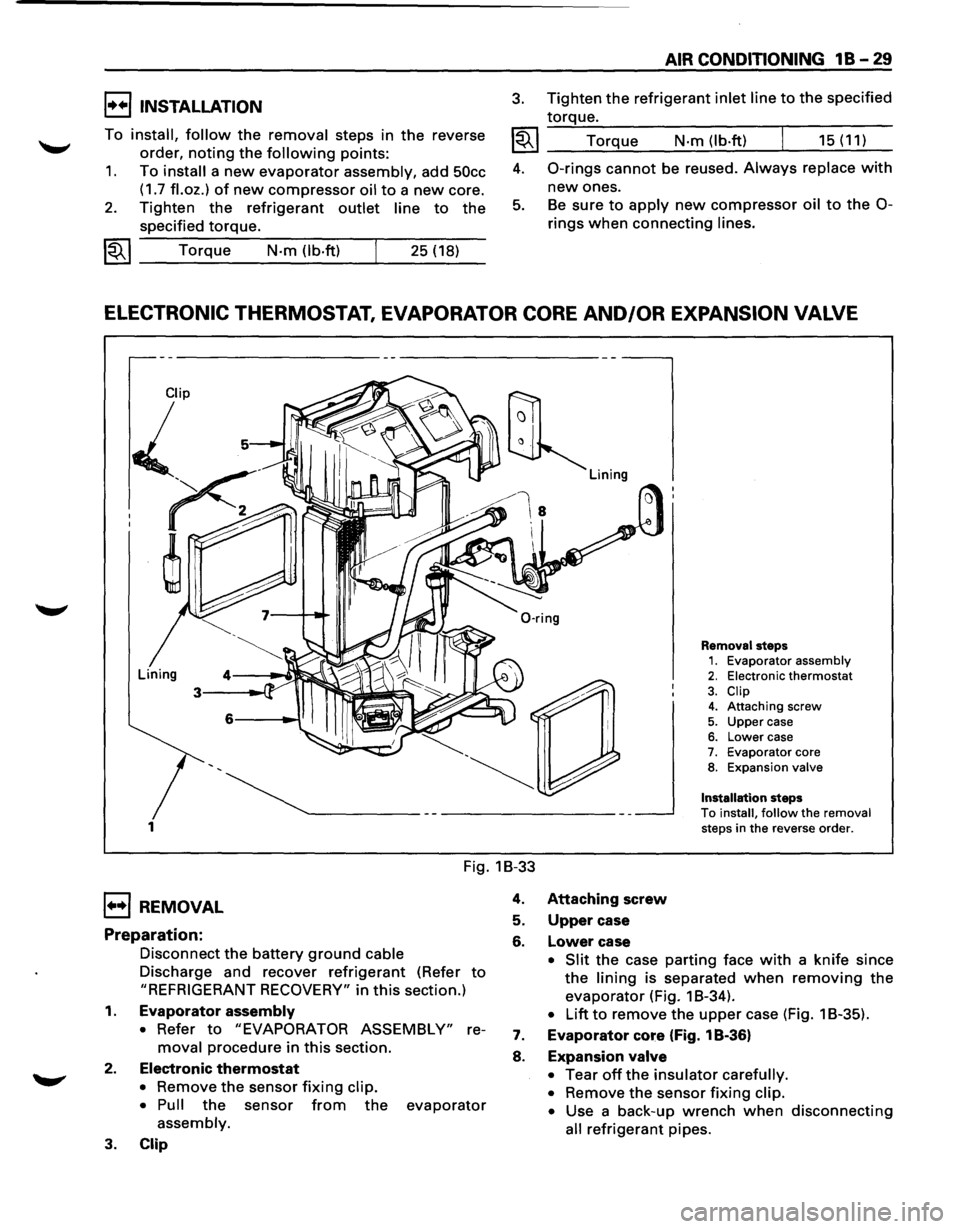
ELECTRONIC THERMOSTAT, EVAPORATOR CORE AND/OR EXPANSION VALVE
1
Removal steps 1. Evaporator assembly 2. Electronic thermostat
3. Clip 4. Attaching screw
5. Upper case 6. Lower case 7. Evaporator core 8. Expansion valve
Installation
steps
To install, follow the removal steps in the reverse order.
Fig. 1B-33
1••1 REMOVAL
Preparation:
Disconnect the battery ground cable
Discharge and recover refrigerant (Refer to
"REFRIGERANT RECOVERY" in this section.)
1. Evaporator assembly
• Refer to "EVAPORATOR ASSEMBLY" re
moval procedure in this section.
2. Electronic thermostat
• Remove the sensor fixing clip.
• Pull
the sensor from the evaporator
assembly.
3. Clip
4. Attaching screw
5. Upper case
6. Lower case
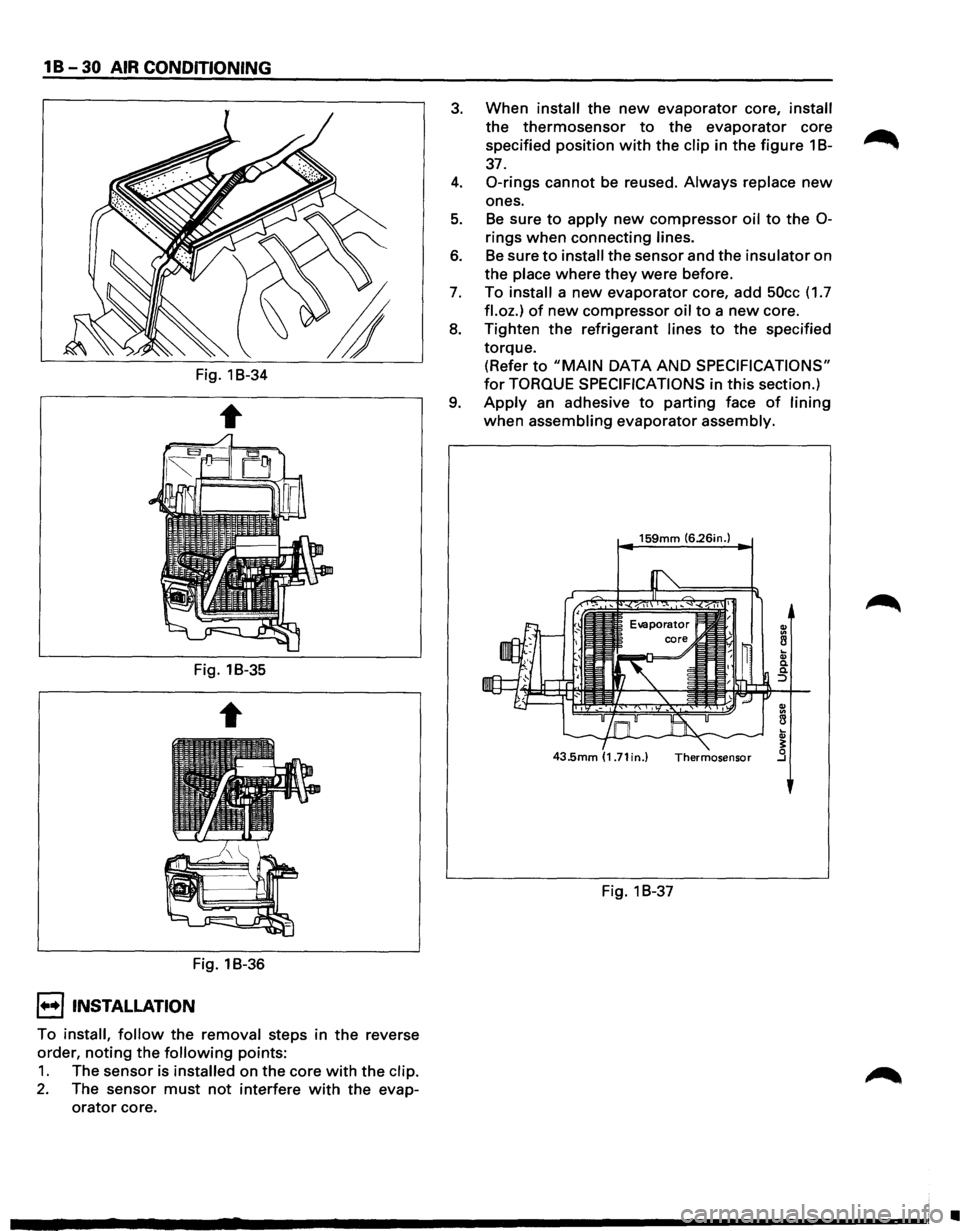
• Slit the case parting face with a knife since
the lining is separated when removing the
evaporator (Fig. 1 B-34).
• Lift to remove the upper case (Fig. 1 B-35).
7. Evaporator core (Fig. 1 B-36)
8. Expansion valve
•
Tear off the insulator carefully.
•
Remove the sensor fixing clip.
•
Use a back-up wrench when disconnecting
all refrigerant pipes.
Page 84 of 1928
1 B -30 AIR CONDITIONING
Fig. 1B-34
Fig. 1B-35
Fig. 1B-36
I••! INSTALLATION
To install, follow the removal steps in the reverse
order,
noting the following points:
1. The sensor is installed on the core with the clip.
2. The sensor must not interfere with the evap
orator core.
3. When install the new evaporator core, install
the thermosensor to the evaporator core
specified position
with the clip in the figure 1 B-~
37.
4. 0-rings cannot be reused. Always replace new
ones.
5. Be sure to apply new compressor oil to the 0-
rings when connecting lines.
6. Be sure to install the sensor and the insulator on
the place where
they were before.
7. To install a new evaporator core, add 50cc (1.7
fl.oz.) of new compressor oil to a new core.
8. Tighten the refrigerant lines to the specified
torque. (Refer
to "MAIN DATA AND SPECIFICATIONS"
for TORQUE SPECIFICATIONS in this section.)
9. Apply an adhesive to parting face of lining
when assembling evaporator assembly.
159mm (6.26in.)
Fig. 1 B-37
•
Page 85 of 1928
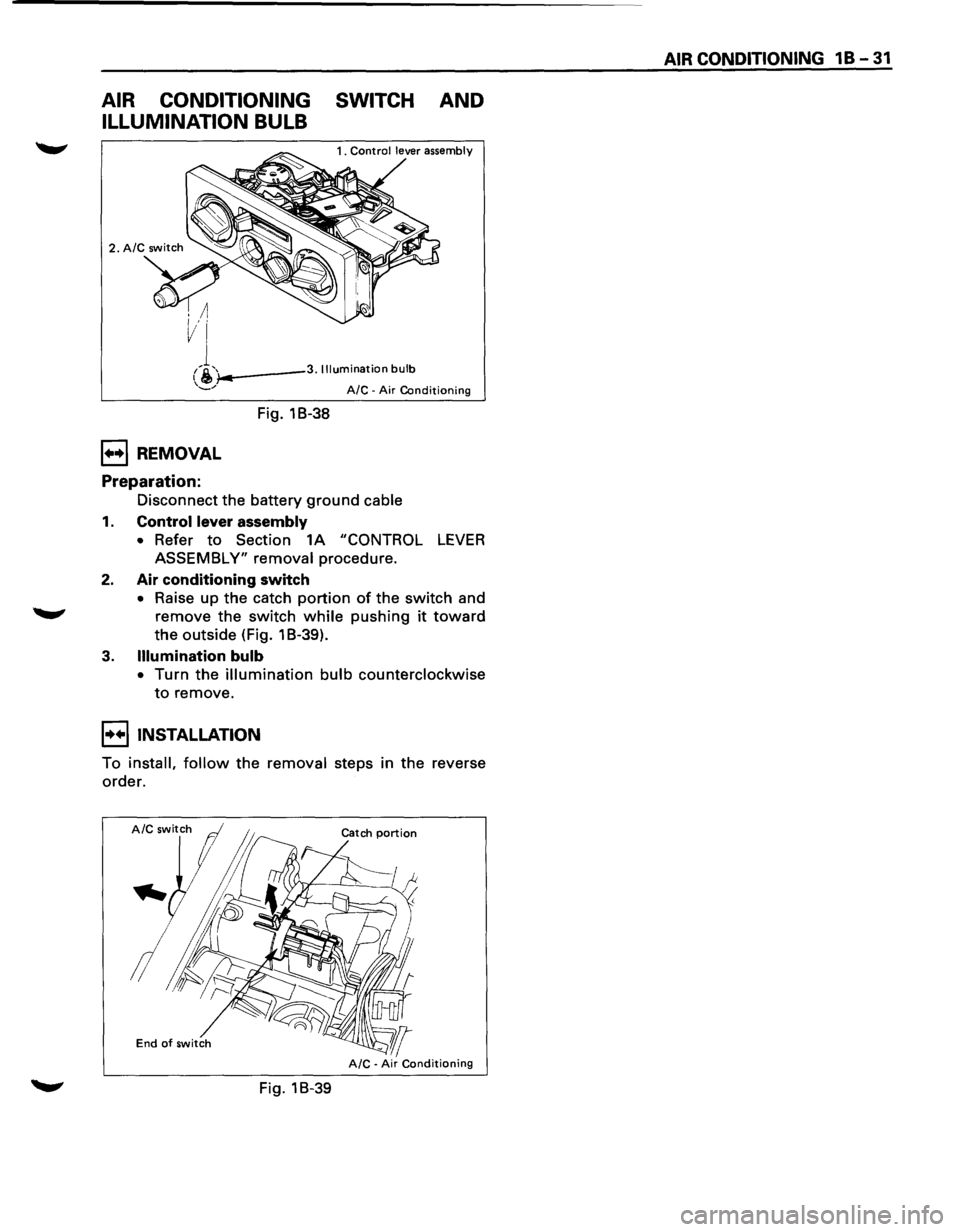
AIR CONDITIONING SWITCH AND
ILLUMINATION BULB
i-..---3. Illumination bulb
1++1 REMOVAL
Preparation:
Fig. 18-38
A/C -Air Conditioning
Disconnect the battery ground cable
1. Control lever assembly
• Refer to Section 1A "CONTROL LEVER
ASSEMBLY" removal procedure.
2. Air conditioning switch
• Raise up the catch portion of the switch and
remove the switch while pushing it toward
the outside (Fig. 1 B-39).
3. Illumination bulb
• Turn the illumination bulb counterclockwise
to remove.
I••IINSTALLATION
To install, follow the removal steps in the reverse
order.
End of switch
Fig. 18-39
AIR CONDITIONING 1 B -31
Page 86 of 1928
1 B -32 AIR CONDITIONING
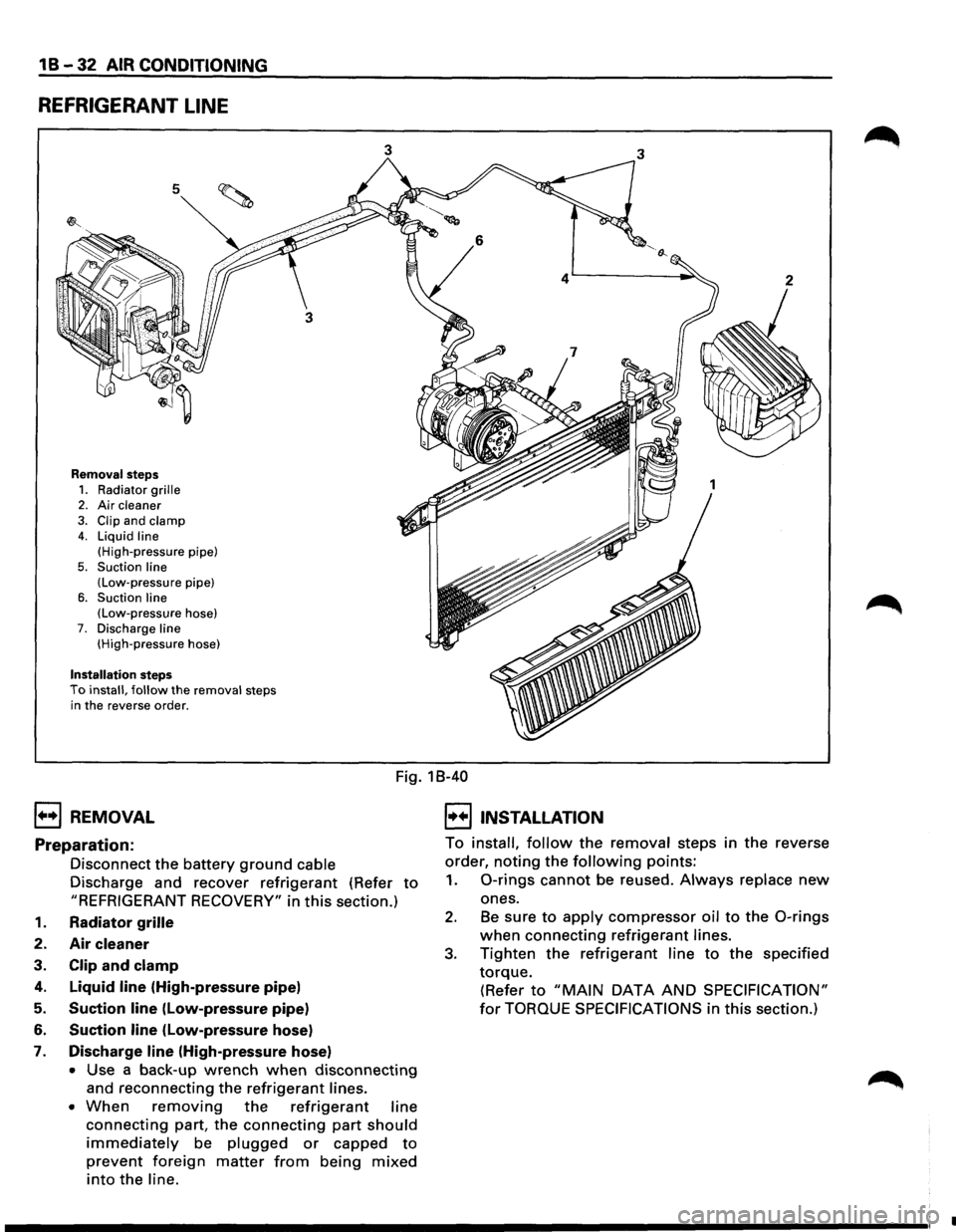
REFRIGERANT LINE
5
Removal steps
1. Radiator grille 2. Air cleaner
3. Clip and clamp 4. Liquid line
(High-pressure pipe)
5. Suction line (Low-pressure pipe)
6. Suction line (Low-pressure hose) 7. Discharge line (High-pressure hose)
Installation steps To install, follow the removal steps
in the reverse order.
3 3
1++1 REMOVAL
Fig. 18-40
I••IINSTALLATION
Preparation:
Disconnect the battery ground cable
Discharge and recover
refrigerant (Refer to
"REFRIGERANT RECOVERY" in this section.)
1. Radiator grille
2. Air cleaner
3. Clip and clamp
4. Liquid line (High-pressure pipe)
5. Suction line (Low-pressure pipe)
6. Suction line (low-pressure hose)
7. Discharge line (High-pressure hose)
• Use a back-up wrench when disconnecting
and reconnecting the refrigerant lines.
• When removing the refrigerant line
connecting part, the connecting part should
immediately be plugged or capped to
prevent foreign matter from being mixed
into the line. To
install,
follow the removal steps in the reverse
order,
noting the following points:
1. 0-rings cannot be reused. Always replace new
ones.
2. Be sure to apply compressor oil to the 0-rings
when connecting refrigerant lines.
3. Tighten the refrigerant line to the specified
torque.
(Refer to "MAIN DATA AND SPECIFICATION"
for TORQUE SPECIFICATIONS in this section.)
•
Page 87 of 1928
AIR CONDITIONING 1 B -33
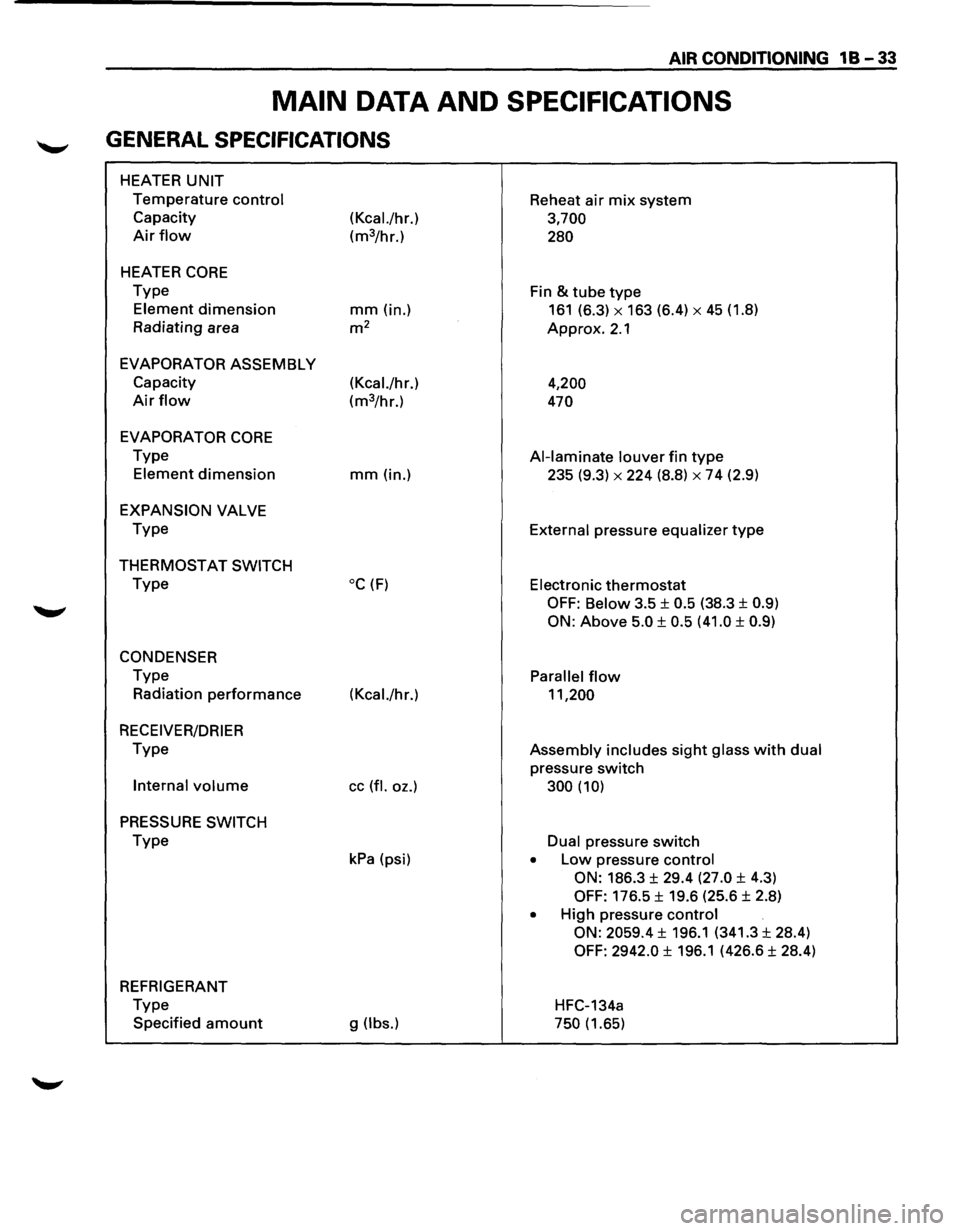
MAIN DATA AND SPECIFICATIONS
GENERAL SPECIFICATIONS
HEATER UNIT
Temperature control Reheat air mix system
Capacity
(Kcal./hr.) 3,700
Air flow (m3/hr.) 280
HEATER CORE
Type
Fin & tube type
Element dimension mm (in.) 161 (6.3) X 163 (6.4) X 45 (1.8)
Radiating area
m2 Approx. 2.1
EVAPORATOR ASSEMBLY
Capacity (Kcal./hr.)
4,200
Air flow (m3/hr.) 470
EVAPORATOR
CORE
Type Al-laminate louver fin type
Element dimension mm(in.) 235 (9.3) X 224 (8.8) X 7 4 (2.9)
EXPANSION VALVE
Type
External pressure equalizer type
THERMOSTAT SWITCH
Type oc (F) Electronic thermostat
OFF: Below 3.5 ± 0.5 (38.3 ± 0.9)
ON:
Above 5.0 ± 0.5 (41.0 ± 0.9)
CONDENSER
Type Parallel flow
Radiation performance (Kcal./hr.) 11,200
RECEIVER/DRIER
Type Assembly includes sight glass with dual
pressure switch
Internal volume cc (fl. oz.) 300 (10)
PRESSURE SWITCH
Type Dual pressure switch
kPa (psi) • Low pressure control
ON:
186.3 ± 29.4 (27.0 ± 4.3)
OFF: 176.5 ± 19.6 (25.6 ± 2.8)
• High pressure control
ON: 2059.4
± 196.1 (341.3 ± 28.4)
OFF: 2942.0 ± 196.1 (426.6 ± 28.4)
REFRIGERANT
Type
HFC-134a
Specified
amount g (lbs.) 750 (1.65)