ISUZU TROOPER 1995 Workshop Manual
Manufacturer: ISUZU, Model Year: 1995, Model line: TROOPER, Model: ISUZU TROOPER 1995Pages: 1928
Page 921 of 1928
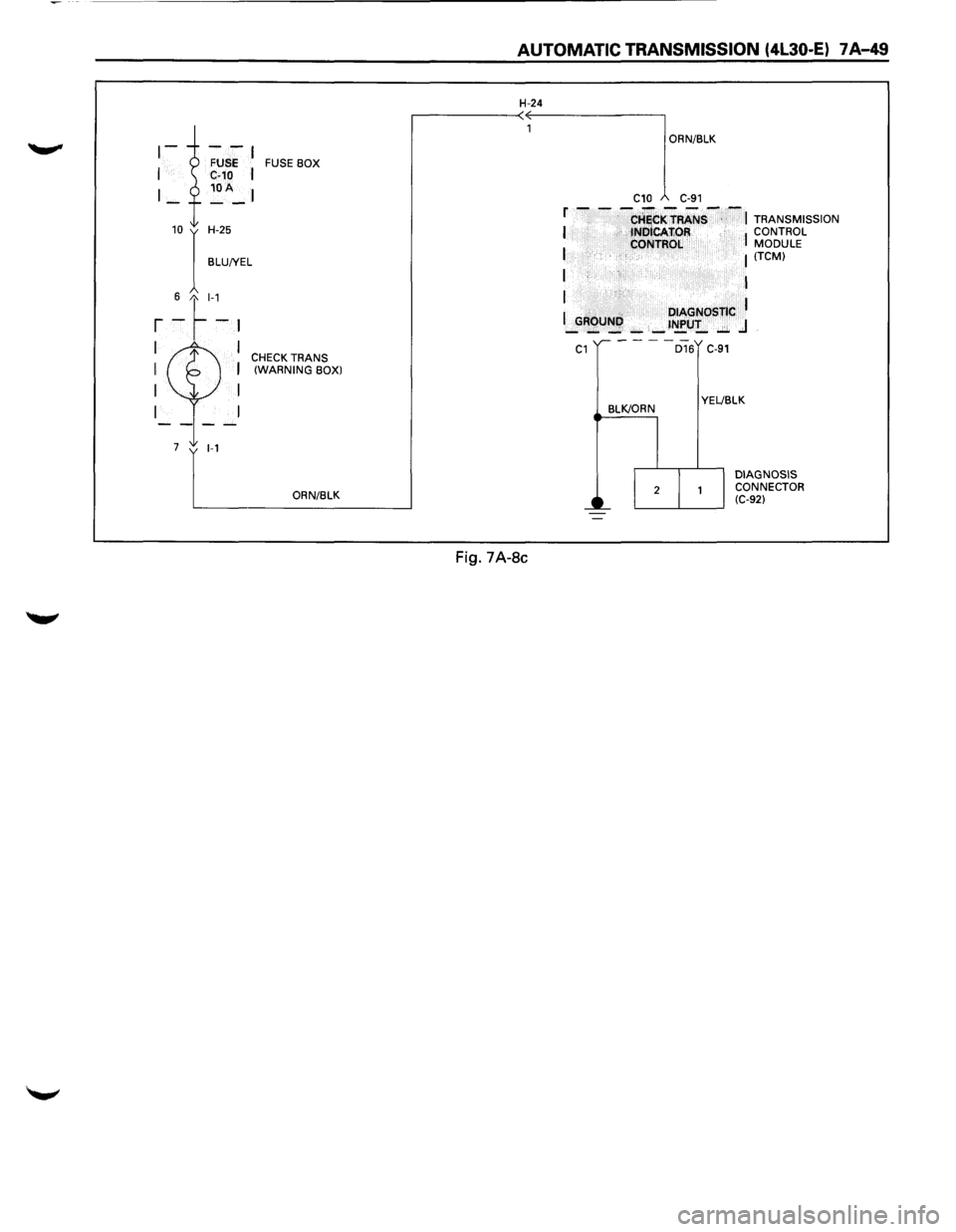
FUSE BOX
10 I H-25
BLU!YEL
6 t_l-1
r -~-~
I I CHECK TRANS I I (WARNING BOX)
I I
I
7 1-1
ORN/BLK
AUTOMATIC TRANSMISSION (4l30-E) 7 A-49
H-24
Fig. 7A-8c
ORN/BLK
C10 C-91
f - - -CHiCKTRANS--~ TRANSMISSION I tNOICAfiOR I CONTROL
I CONTROL MODULE I (TCM)
I I
I
I .. DIAGNOSTIC I _GROUNI',): _ _ t~U!_ ..:;;. .J
C1
BLK/ORN
D16 C-91
YEL!BLK
DIAGNOSIS
CONNECTOR
(C-92)
Page 922 of 1928
7 A-50 AUTOMATIC TRANSMISSION (4L30-E)
FLASHING CODES
1. ON BOARD DIAGNOSIS (SELF-DIAGNOSIS)
(1) The Transmission Control Module (TCM)
conducts a
self-test of most of the wiring
and components in the system each time
the key is turned ON. If a fault is detected
the TCM
will store a Diagnostic Trouble
Code (DTC) in memory. It's a number that
corresponds to a specific problem.
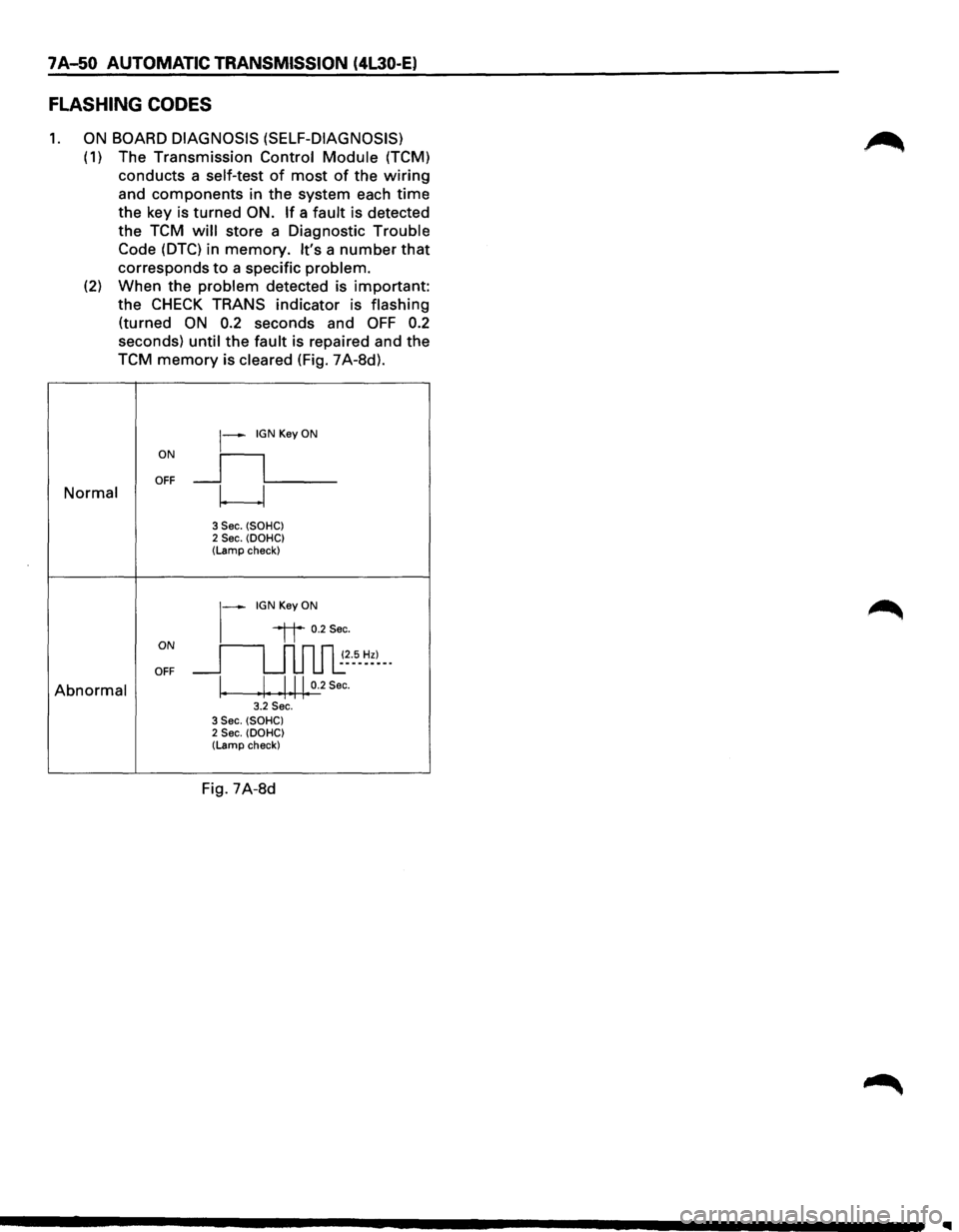
(2) When the problem detected is important:
the
CHECK TRANS indicator is flashing
(turned ON 0.2 seconds and OFF 0.2
seconds) until the fault is repaired and the
TCM
memory is cleared (Fig. 7A-8d).
ON
~--IGN Key ON
_ll___ OFF Normal w
3 Sec. (SOHC) 2 Sec. (DOHC) (Lamp check)
~-IGNKeyON
ON
"it 0.2Sec.
~~--5-~~)--· OFF
Abnormal \. Ill 0.2 Sec. • 1 ••.. 3.2 Sec. 3 Sec. (SOHC) 2 Sec. (DOHC) (Lamp check)
Fig. 7A-8d
Page 923 of 1928
2. DIAGNOSTIC TROUBLE CODES (DTC)
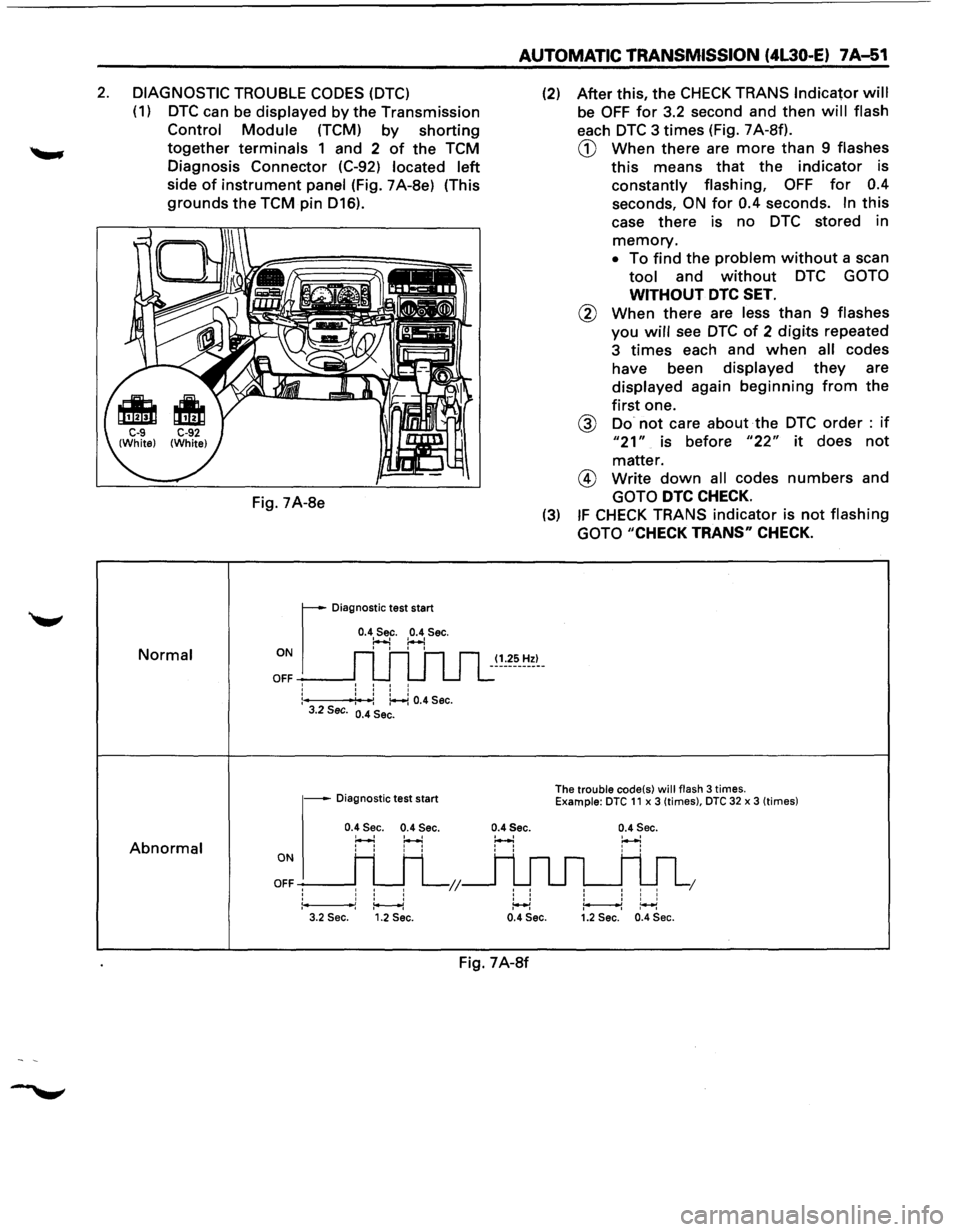
(1) DTC can be displayed by the Transmission
Control Module (TCM) by shorting
together terminals 1 and 2 of the TCM
Diagnosis Connector (C-92)
located left
side of instrument panel (Fig. 7A-8e) (This
grounds the TCM pin D16).
Normal
Abnormal
Fig. 7A-8e
r
Diagnostic test start
0.4 Sec. 0.4 Sec. ~ :..-.! ON I I I I
OFF -----J: : : :
:---f4': -:: ~ 0.4 Sec. 3.2 Sec. 0.4 Sec.
- Diagnostic test start
0.4 Sec. 0.4 Sec.
H H
ONI H H
OFFH H L;;
1*----1 3.2 Sec. 1.2 Sec.
AUTOMATIC TRANSMISSION (4L30-E) 7A-51
(1.25 Hz)
0.4Sec.
' '
' ' ' ' :++l
(2) After this, the CHECK TRANS Indicator will
be OFF for 3.2 second and then will flash
each DTC 3 times (Fig. 7 A-Sf).
CD When there are more than 9 flashes
this means that the indicator is
constantly flashing, OFF for 0.4
seconds, ON for 0.4 seconds. In this
case there is no DTC stored in
memory.
• To find the problem without a scan
tool and without DTC GOTO
WITHOUT DTC SET.
@ When there are less than 9 flashes
you will see DTC of 2 digits repeated
3
times each and when all codes
have been
displayed they are
displayed again beginning from the
first one.
@ Do not care about the DTC order : if
"21" is before "22" it does not
matter.
@ Write down all codes numbers and
GOTO DTC CHECK.
(3) IF CHECK TRANS indicator is not flashing
GOTO
"CHECK TRANS" CHECK.
The trouble code(s) will flash 3 times. Example: DTC 11 x 3 (times), DTC 32 x 3 (times)
0.4 Sec.
' ' I I I I I
1 I I I ~~ 0.4 Sec. 1.2 Sec. 0.4 Sec.
Fig. 7A-8f
Page 924 of 1928
7A..J52 AUTOMATIC TRANSMISSION (4l30-E)
TECH1 CONNECTION
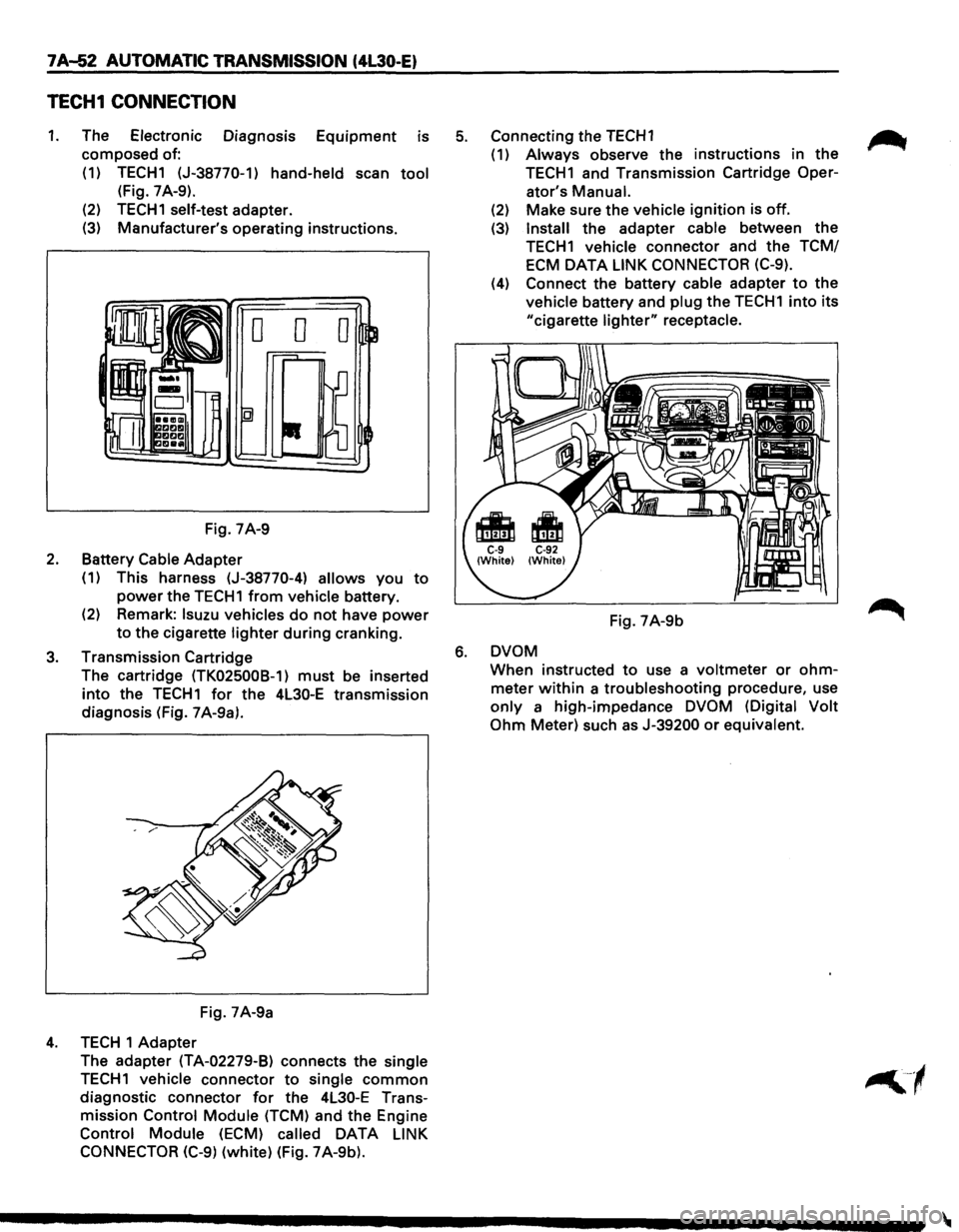
1. The Electronic Diagnosis Equipment is
composed of:
(1) TECH1 (J-38770-1)
hand-held scan tool
(Fig. 7 A-9).
(2)
TECH1 self-test adapter.
(3) Manufacturer's operating instructions.
Fig. 7A-9
2. Battery Cable Adapter
(1) This harness (J-38770-4) allows you to
power the TECH1 from vehicle battery.
(2) Remark:
lsuzu vehicles do not have power
to the cigarette lighter during cranking.
3. Transmission Cartridge
The cartridge
(TK025008-1) must be inserted
into the TECH1 for the 4L30-E transmission
diagnosis (Fig. 7 A-9a).
Fig. 7A-9a
4. TECH 1 Adapter
The adapter
(TA-02279-B) connects the single
TECH1 vehicle connector to single common
diagnostic connector for the 4L30-E Trans
mission
Control Module (TCM) and the Engine
Control Module (ECM) called DATA LINK
CONNECTOR (C-9)
(white) (Fig. 7A-9b).
5. Connecting the TECH1 ~
(1) Always observe the instructions in the
TECH1 and Transmission Cartridge Oper-
ator's
Manual.
(2) Make sure the vehicle ignition is off.
(3) Install the adapter cable between the
TECH1 vehicle connector and the TCM/
ECM
DATA LINK CONNECTOR (C-9).
(4) Connect the battery cable adapter to the
vehicle battery and plug the TECH1 into its
"cigarette lighter" receptacle.
Fig. 7A-9b
6. DVOM
When instructed to use a voltmeter or ohm
meter within a troubleshooting procedure, use
only a high-impedance DVOM (Digital Volt
Ohm
Meter) such as J-39200 or equivalent.
Page 925 of 1928
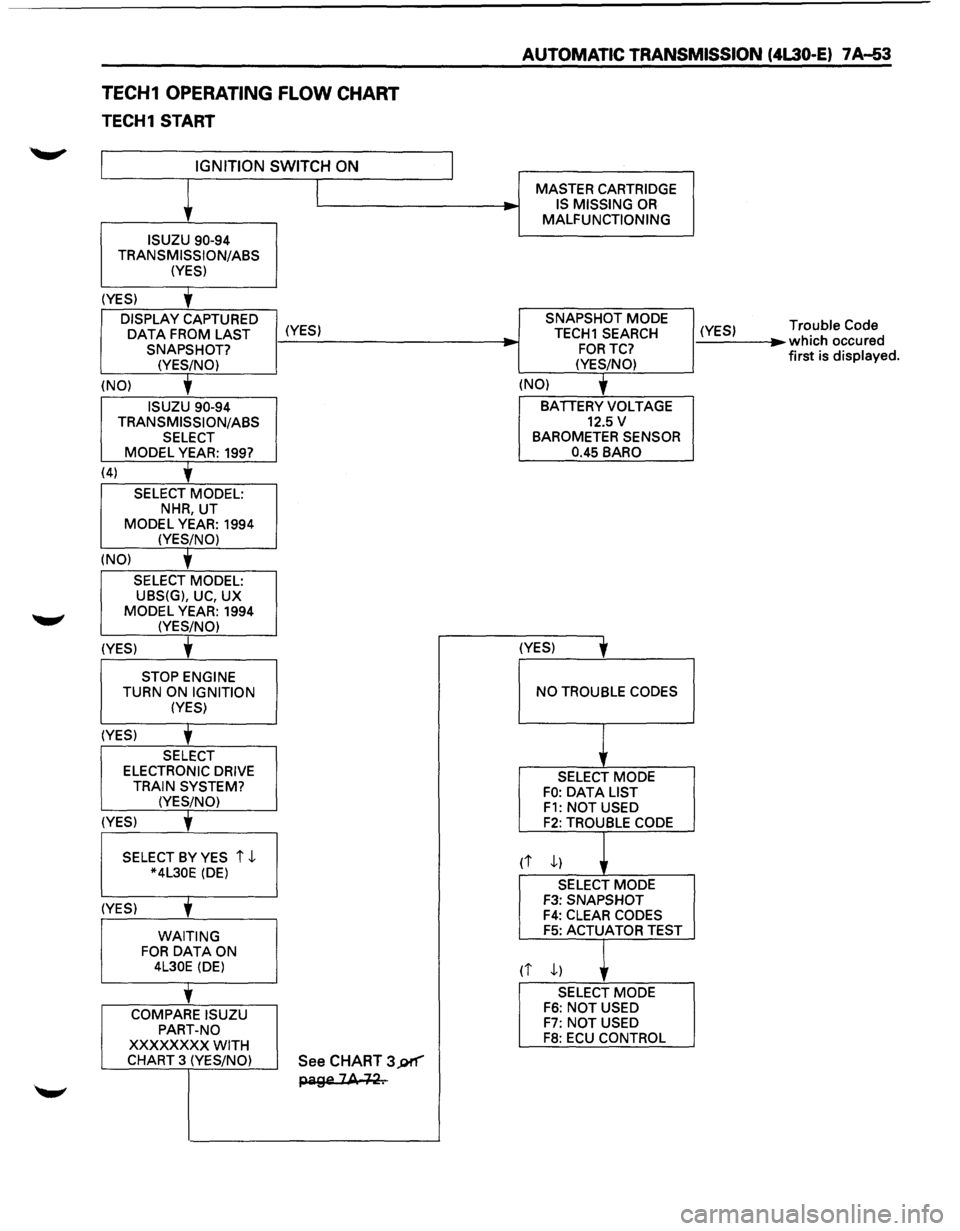
TECH1 OPERATING FLOW CHART
TECH1 START
IGNITION SWITCH ON
ISUZU 90-94
TRANSMISSION/ASS (YES)
(YES)
'
DISPLAY CAPTURED
OAT A FROM LAST (YES) SNAPSHOT?
(YES/NO)
(NO)
'
ISUZU 90-94
TRANSMISSION/ASS SELECT MODEL YEAR: 199?
(4)
'
SELECT MODEL: NHR, UT
MODEL YEAR: 1994 (YES/NO)
(NO)
'
SELECT MODEL: UBS(G), UC, UX
MODEL YEAR: 1994 (YES/NO)
(YES) t
STOP ENGINE TURN ON IGNITION (YES)
(YES)
'
SELECT ELECTRONIC DRIVE
TRAIN SYSTEM? (YES/NO)
(YES)
' SELECT BY YES i ,J.. *4L30E (DE)
(YES)
' WAITING FOR DATA ON 4L30E (DE)
'
COMPARE ISUZU
PART-NO
XXXXXXXX WITH CHART 3 (YES/NO) See CHART 3J)f"'"'"
page 2A +~.
__, -
AUTOMATIC TRANSMISSION (4L30-E) 7 A-53
MASTER CARTRIDGE
IS MISSING OR MALFUNCTIONING
SNAPSHOT MODE
TECH1 SEARCH
FORTC?
(YES/NO)
(NO)
'
BATIERY VOLTAGE 12.5 v BAROMETER SENSOR
0.45 BARO
(YES)
' NO TROUBLE CODES
SELECT MODE FO: OAT A LIST F1: NOT USED F2: TROUBLE CODE
rt ,J..)
SELECT MODE F3: SNAPSHOT F4: CLEAR CODES F5: ACTUATOR TEST
(i ,J..) ,
SELECT MODE F6: NOT USED F7: NOT USED F8: ECU CONTROL
(YES) ...
Trouble Code which occured
first is displayed.
Page 926 of 1928
7A-54 AUTOMATIC TRANSMISSION (4L30-E)
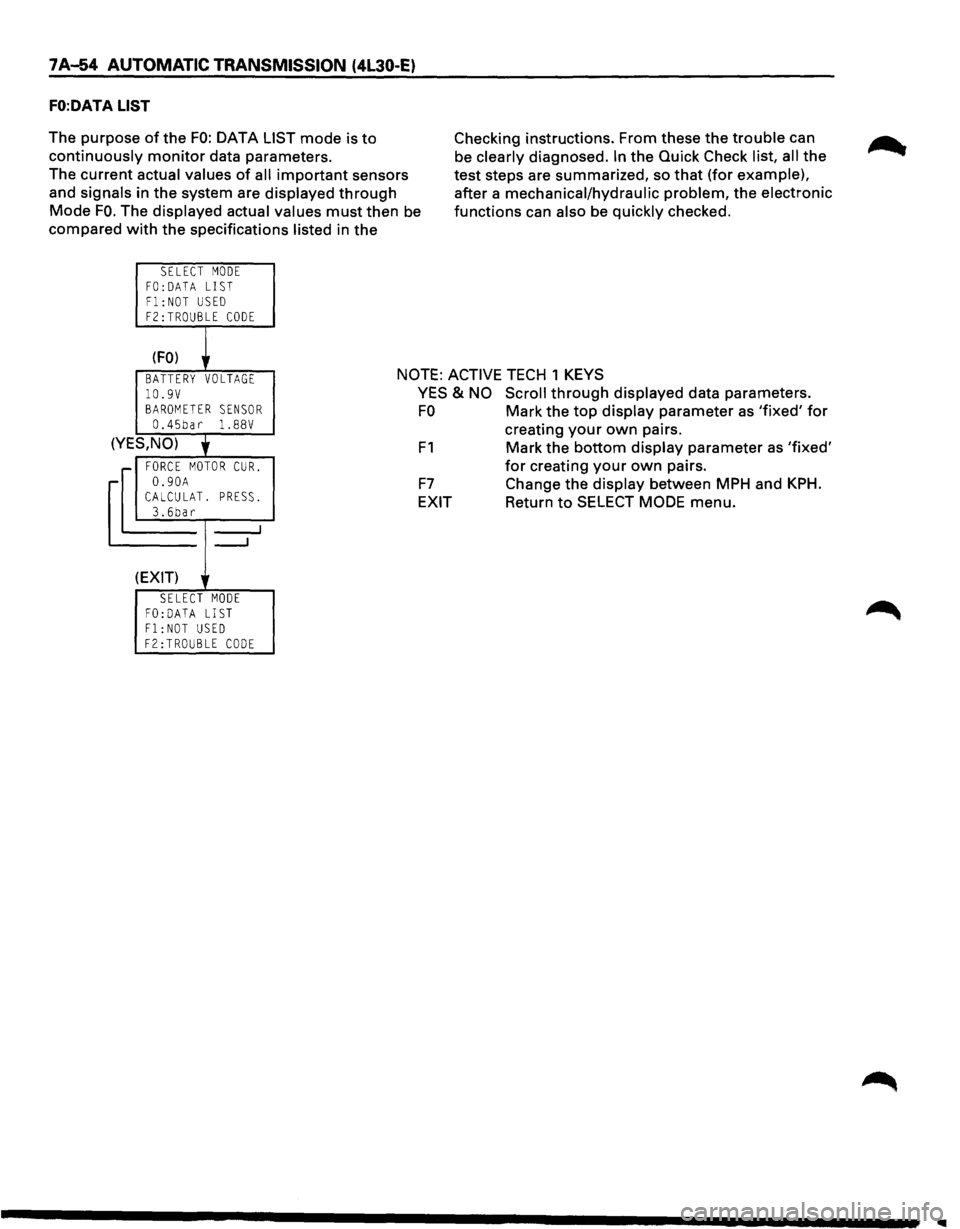
FO:DATA LIST
The purpose of the FO: DATA LIST mode is to
continuously monitor data parameters.
The current actual values
of all important sensors
and signals in the system are displayed
through
Mode FO. The displayed actual values must then be
compared
with the specifications listed in the
SELECT MODE
FO: DATA LIST Fl:NOT USED F2:TROUBLE CODE
(FO) r
Checking instructions. From these the trouble can
be clearly diagnosed.
In the Quick Check list, all the
test steps are summarized, so
that (for example),
after a mechanical/hydraulic problem, the electronic
functions can also be quickly checked.
BATTERY VOLTAGE NOTE: ACTIVE TECH 1 KEYS
10.9V BAROMETER SENSOR 0.45bar 1. 88V
(YES,NO)
' r FORCE MOTOR CUR.
-0.90A CALCULAT. PRESS. 3.6bar
_....J
---'
(EXIT)
SELECT MODE FO:DATA LIST Fl:NOT USED F2:TROUBLE CODE
YES & NO Scroll through displayed data parameters.
FO Mark the top display parameter as 'fixed' for
F1
F7
EXIT
creating your own pairs.
Mark the bottom display parameter as 'fixed'
for creating your own pairs.
Change the display between MPH and
KPH.
Return to SELECT MODE menu.
Page 927 of 1928
AUTOMATIC TRANSMISSION (4L30-E) 7 A-55
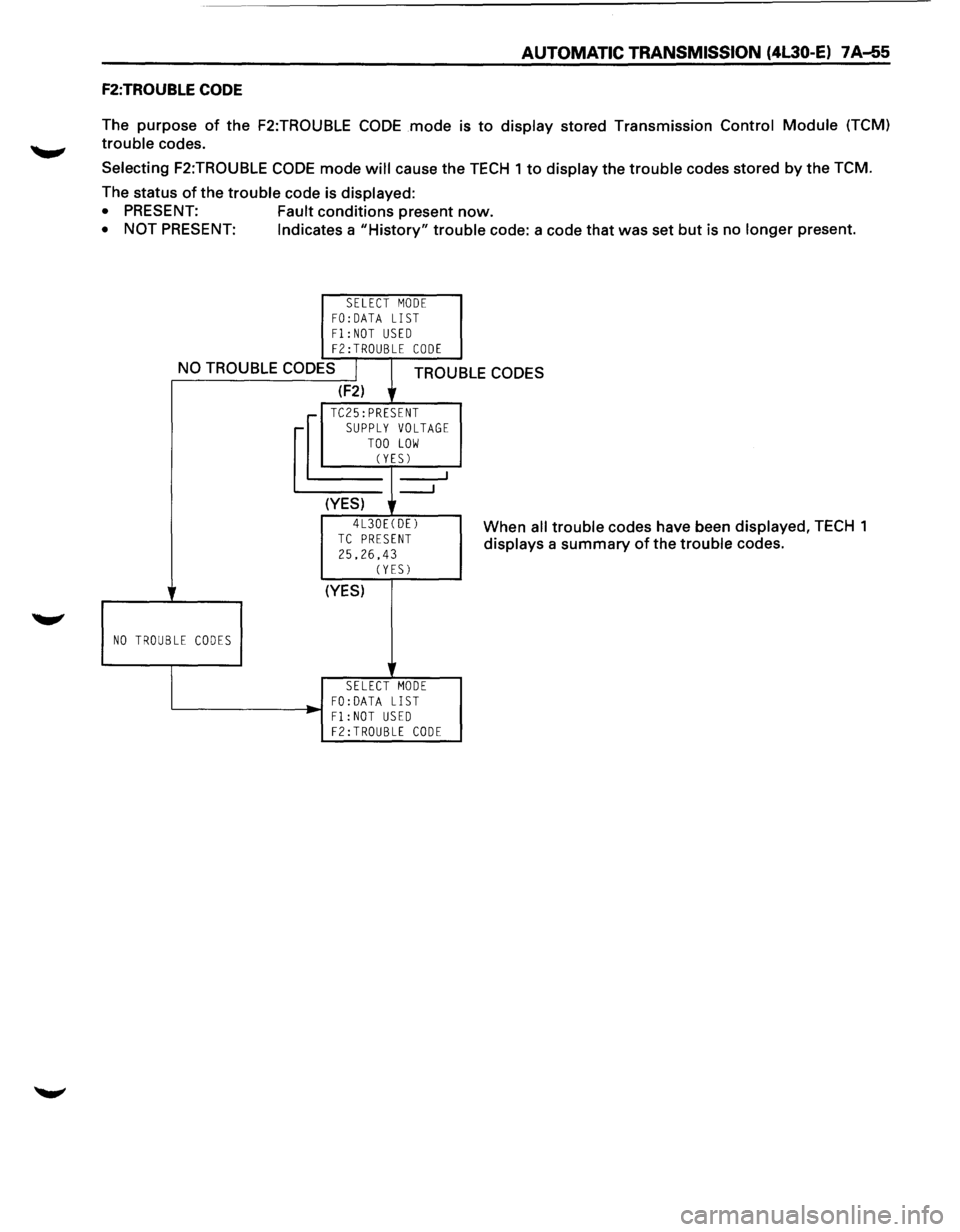
F2:TROUBLE CODE
The purpose of the F2:TROUBLE CODE mode is to display stored Transmission Control Module (TCM)
trouble codes.
Selecting F2:TROUBLE CODE mode will cause the TECH 1 to display the trouble codes stored by the TCM.
The status
of the trouble code is displayed:
• PRESENT: Fault conditions present now.
• NOT PRESENT: Indicates a "History" trouble code: a code that was set but is no longer present.
SELECT MODE FO:DATA LIST Fl:NOT USED F2:TROUBLE CODE
NO TROUBLE CODES I TROUBLE CODES
NO TROUBLE CODES
(F2) lr
__J
(YES) r
4L30E(DE)
TC PRESENT
25.26,43
SELECT MODE FO: DATA LIST '-------------1-~ F 1 : NOT USED
F2:TROUBLE CODE
I
When all trouble codes have been displayed, TECH 1
displays a
summary of the trouble codes.
Page 928 of 1928
7 A-56 AUTOMATIC TRANSMISSION (4L30-E)
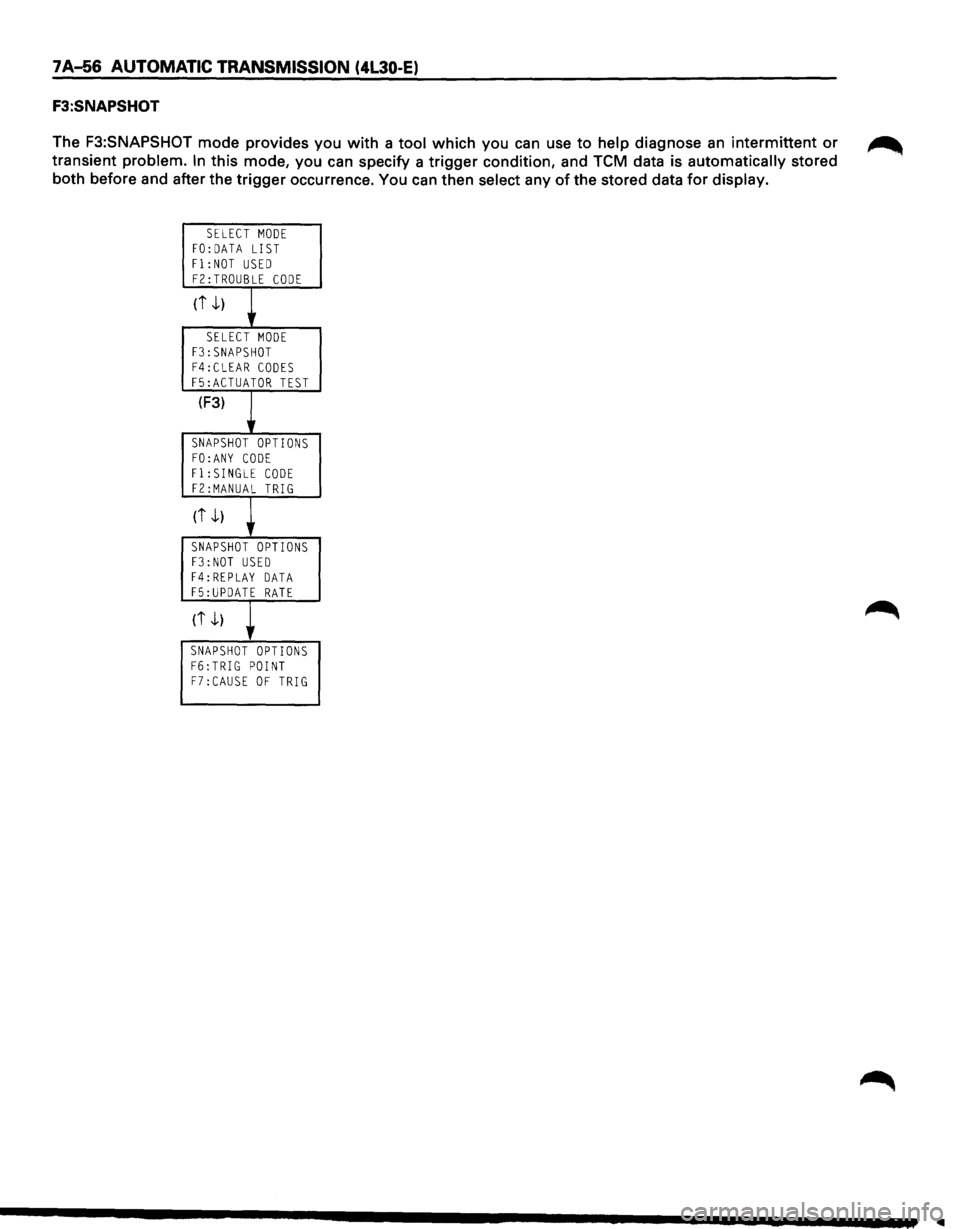
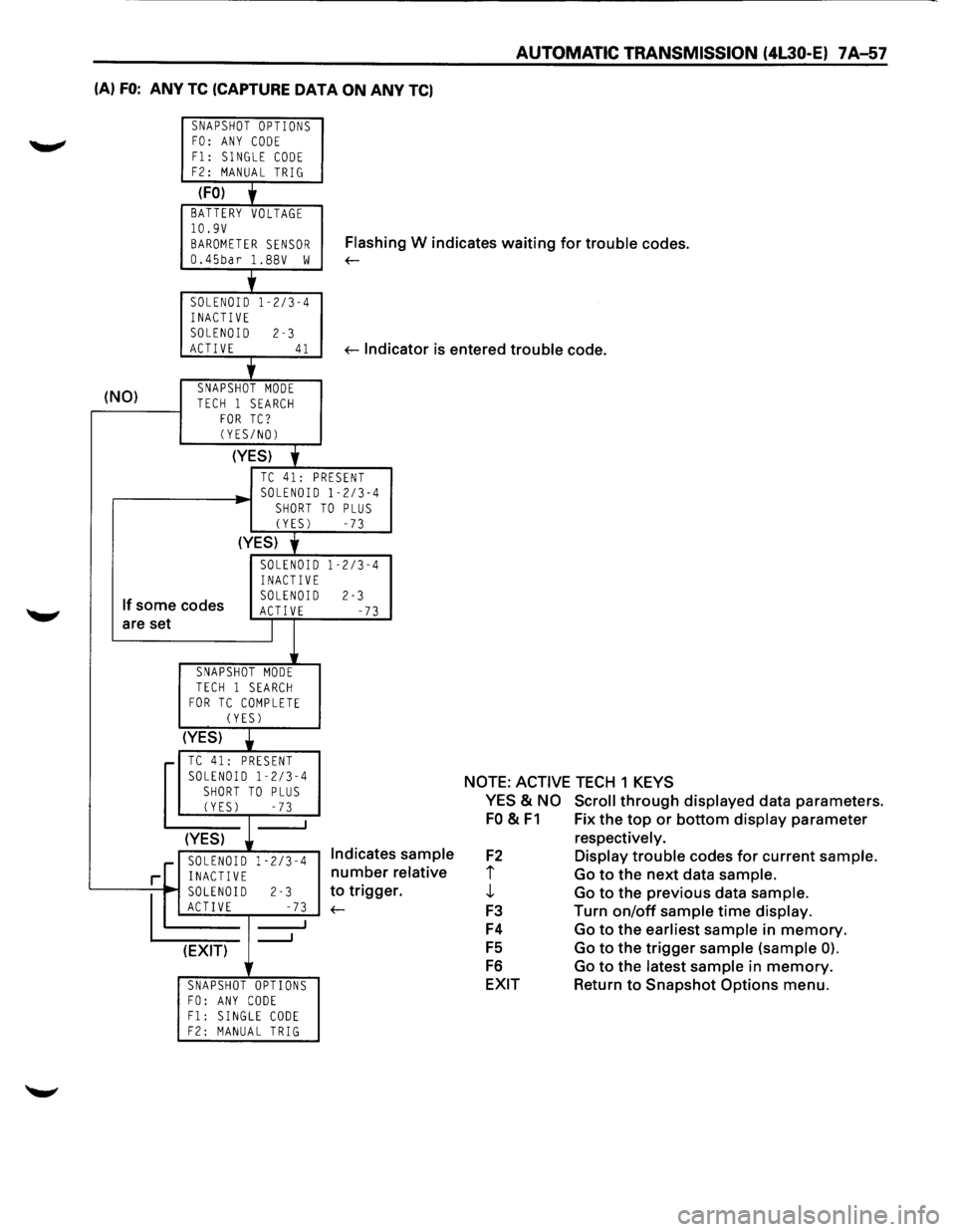
F3:SNAPSHOT
The F3:SNAPSHOT mode provides you with a tool which you can use to help diagnose an intermittent or ~
transient problem. In this mode, you can specify a trigger condition, and TCM data is automatically stored
both before and after the trigger occurrence. You can then select any
of the stored data for display.
SELECT MODE FO:DATA LIST
Fl:NOT USED FZ:TROUBLE CODE
(i -1)
+ SELECT MODE F3:SNAPSHOT F4:CLEAR CODES
F5:ACTUATOR TEST
(F3)
~ SNAPSHOT OPTIONS
FO:ANY CODE Fl:SINGLE CODE FZ:MANUAL TRIG
(i -1)
+ SNAPSHOT OPTIONS F3:NOT USED F4:REPLAY DATA F5:UPDATE RATE
(it)
~ SNAPSHOT OPTIONS F6:TRIG POINT F7:CAUSE OF TRIG
..
Page 929 of 1928
AUTOMATIC TRANSMISSION (4l30·E) 7 A-57
(A) FO: ANY TC (CAPTURE DATA ON ANY TC)
SNAPSHOT OPTIONS FO: ANY CODE
F1: SINGLE CODE F2: MANUAL TRIG
(FO) + BATTERY VOLTAGE 10.9V
BAROMETER SENSOR Flash in g W indicates waiting for trouble codes.
0.45bar l.BBV w ~
'
SOLENOID 1-2/3-4
INACTIVE SOLENOID 2-3 ACTIVE 41 ~lndi cator is entered trouble code.
+
(NO) SNAPSHOT MODE TECH 1 SEARCH FOR TC? (YES/NO)
(YES)
'
TC 41: PRESENT SOLENOID 1-2/3-4 SHORT TO PLUS (YES) -73
(YES) y
SOLENOID 1-2/3-4 INACTIVE
If some codes SOLENOID 2-3 ACT! VE -73 are set I
SNAPSHOT MODE
TECH 1 SEARCH FOR TC COMPLETE (YES)
(YES)
• TC 41: PRESENT SOLENOID 1-2/3-4
SHORT TO PLUS (YES) -73
(YES)
.[ SOLENOID 1-2/3-4 Indicates sample
relative
r. r INACTIVE number
~0
2-3 to trigge
E -73 ~
_J (EXIT) lr
SNAPSHOT OPTIONS FO: ANY CODE F1: SINGLE CODE F2: MANUAL TRIG
NOTE: ACTIVE TECH 1 KEYS
YES
& NO Scroll through displayed data parameters.
FO & F1 Fix the top or bottom display parameter
F2
i j,
F3
F4
FS
F6
EXIT respectively.
Display trouble
codes for current sample.
Go to the next data sample.
Go to the previous data sample.
Turn on/off sample time display.
Go to the earliest sample in memory.
Go to the trigger sample (sample 0).
Go to the latest sample in memory.
Return to Snapshot Options menu.
Page 930 of 1928
1 A-58 AUTOMATIC TRANSMISSION (4l30-E)
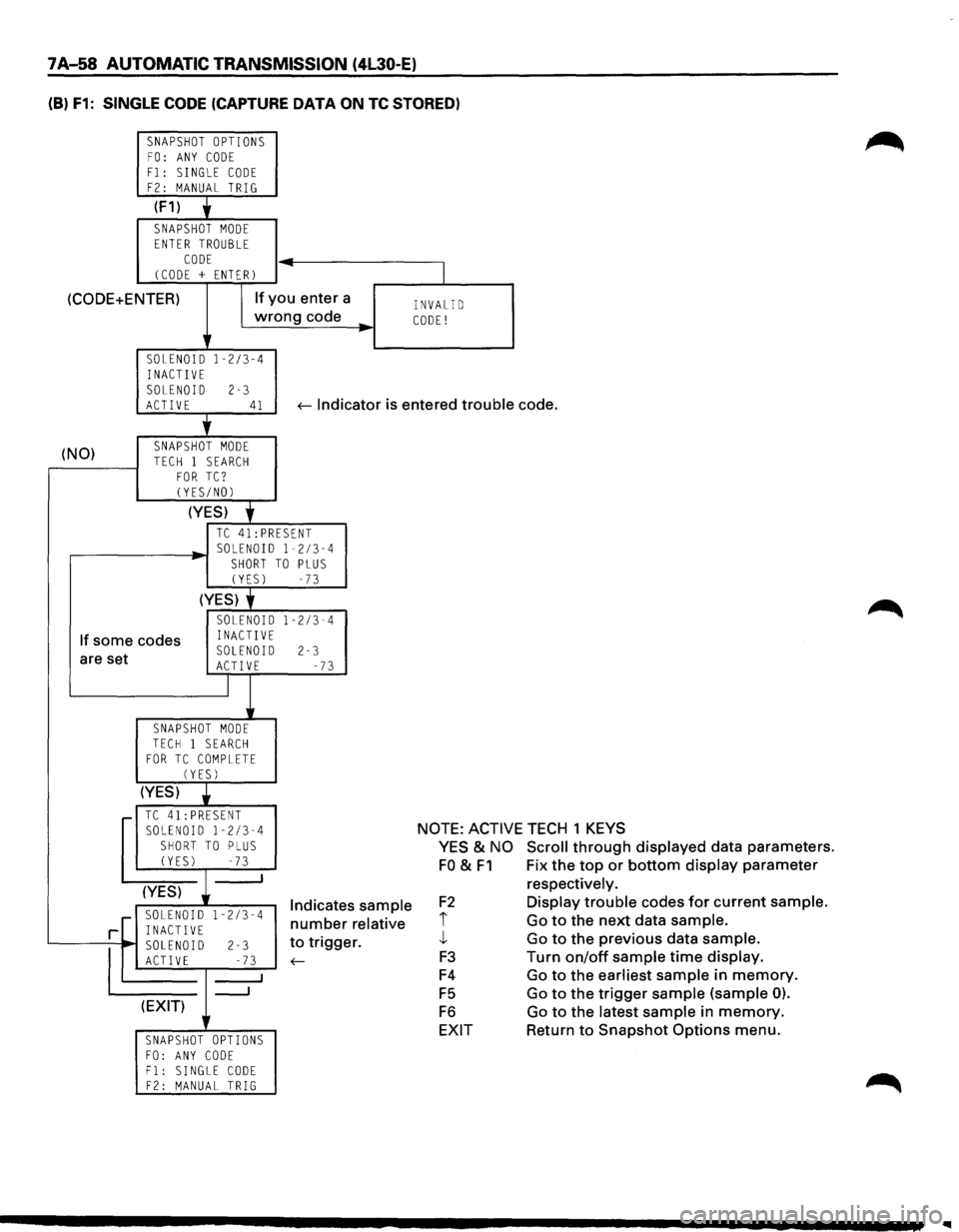
(B) F1: SINGLE CODE (CAPTURE DATA ON TC STORED)
SNAPSHOT OPTIONS FO: ANY CODE
F1: SINGLE CODE F2: MANUAL TRIG
(F1) y
SNAPSHOT MODE ENTER TROUBLE
CODE (CODE + ENTER) -
(CODE+ENTER) If you
enter a
wrong code
..
SOLENOID 1-2/3-4 INACTIVE
SOLENOID 2-3
I
INVALID CODE!
ACTIVE 41 ~ Indicator is entered trouble code.
(NO) '
SNAPSHOT MODE
TECH 1 SEARCH FOR TC? CYES/NOl
(YES) f
TC 41:PRESENT
,...-------~ SOLENOID 1-2/3-4 SHORT TO PLUS (YES) -73
(YES) f
If some codes
SOLENOID 1-2/3-4 INACTIVE
are set SOLENOID 2-3 ACTIVE -73
I
SNAPSHOT MODE TECH 1 SEARCH FOR TC COMPLETE (YES)
(YES) •
.-TC41:PRESENT SOLENOID 1-2/3-4 SHORT TO PLUS (YES) -73 _j
(YES)
1-2/3-4 r SOLENOID
rL INACTIVE
'------,~, SOLEN~ 1-,D ;------l-2 _: ;...;;.3---'
(EXIT)
SNAPSHOT OPTIONS
FO: ANY CODE F1: SINGLE CODE F2: MANUAL TRIG
Indicates sample
number relative
to trigger.
~
NOTE: ACTIVE TECH 1 KEYS
YES & NO Scroll through displayed data parameters.
FO & F1 Fix the top or bottom display parameter
F2
i j_
F3
F4
F5
F6
EXIT respectively.
Display trouble
codes for current sample.
Go to the next data sample.
Go to the previous data sample.
Turn on/off sample time display.
Go to the earliest sample in memory.
Go to the trigger
sample (sample 0).
Go to the latest sample in memory.
Return to Snapshot Options menu.