ad blue ISUZU TROOPER 1995 Workshop Manual
[x] Cancel search | Manufacturer: ISUZU, Model Year: 1995, Model line: TROOPER, Model: ISUZU TROOPER 1995Pages: 1928
Page 27 of 1928
,
MAINTENANCE AND LUBRICATION OB-11
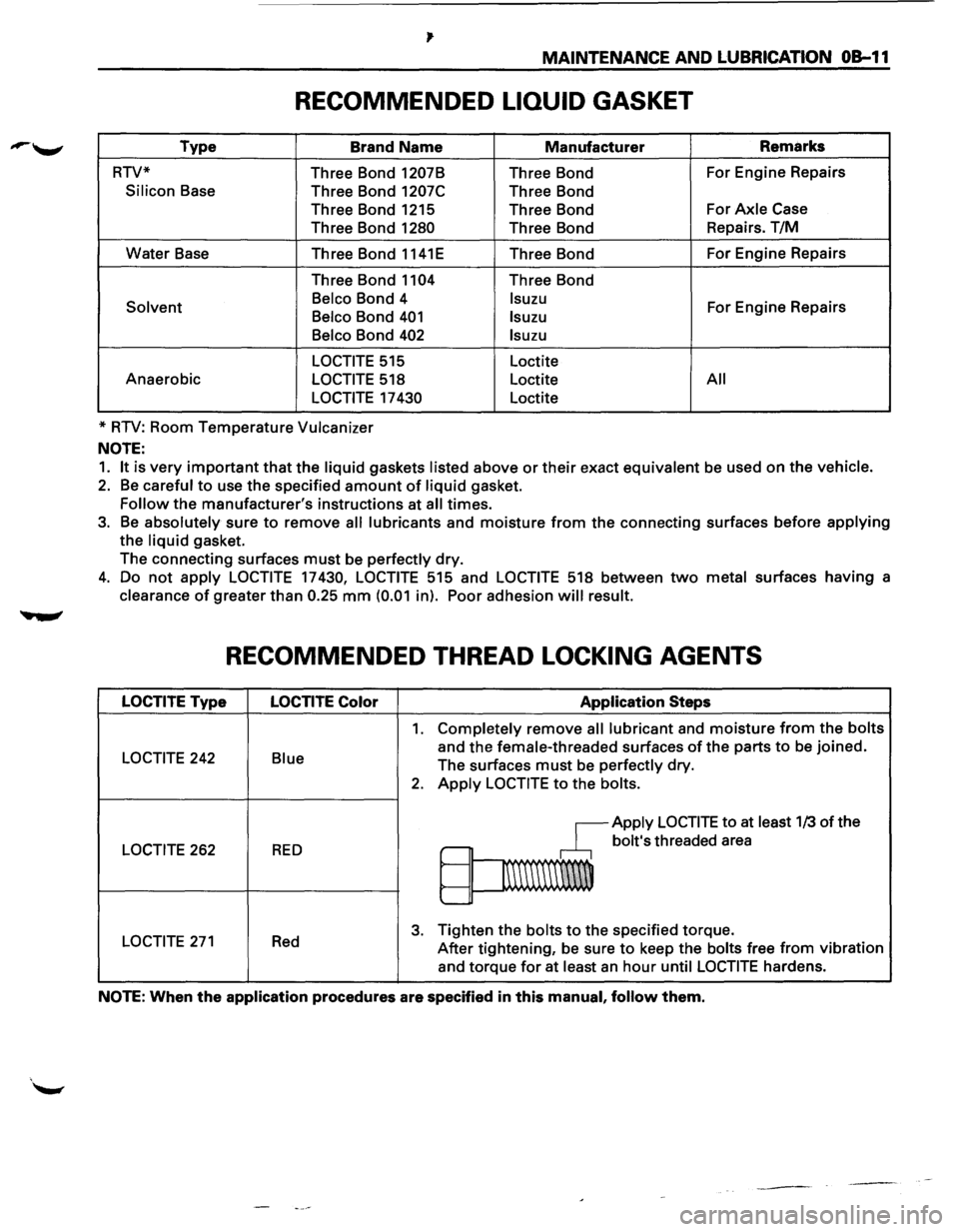
RECOMMENDED LIQUID GASKET
Type Brand Name Manufacturer Remarks
RTV* Three Bond
1207B Three Bond For
Engine Repairs
Silicon Base
Three Bond 1207C Three Bond
Three Bond 1215 Three Bond For
Axle Case
Three Bond
1280 Three Bond Repairs.
T/M
Water Base
Three Bond 1141E Three Bond For
Engine Repairs
Three Bond
1104 Three Bond
Solvent Belco Bond
4 lsuzu For Engine Repairs Belco Bond 401 lsuzu
Belco
Bond 402 lsuzu
LOCTITE
515 Loctite
Anaerobic
LOCTITE 518 Loctite All
LOCTITE
17 430 Loctite
*
RTV: Room Temperature Vulcanizer
NOTE:
1. It is very important that the liquid gaskets listed above or their exact equivalent be used on the vehicle.
2. Be careful to use the specified amount of liquid gasket.
Follow the manufacturer's instructions at all times.
3. Be absolutely sure to remove all lubricants and moisture from the connecting surfaces before applying
the liquid gasket.
The connecting surfaces
must be perfectly dry.
4. Do not apply LOCTITE 17430, LOCTITE 515 and LOCTITE 518 between two metal surfaces having a
clearance
of greater than 0.25 mm (0.01 in). Poor adhesion will result.
RECOMMENDED THREAD LOCKING AGENTS
LOCTITE Type LOCTITE Color Application Steps
1. Completely remove all lubricant and moisture from the bolts
LOCTITE 242 Blue and the female-threaded surfaces of the parts to be joined.
The surfaces
must be perfectly dry.
2. Apply LOCTITE to the bolts.
~Apply LOCTITE to at least 1/3 of the
LOCTITE 262 RED ,.-bolt's threaded area
~
1\\\\\\\W
'--
LOCTITE 271 Red 3. Tighten the bolts to the specified torque.
After tightening, be sure
to keep the bolts free from vibration
and torque
for at least an hour until LOCTITE hardens.
NOTE: When the application procedures are specified in this manual, follow them.
Page 235 of 1928
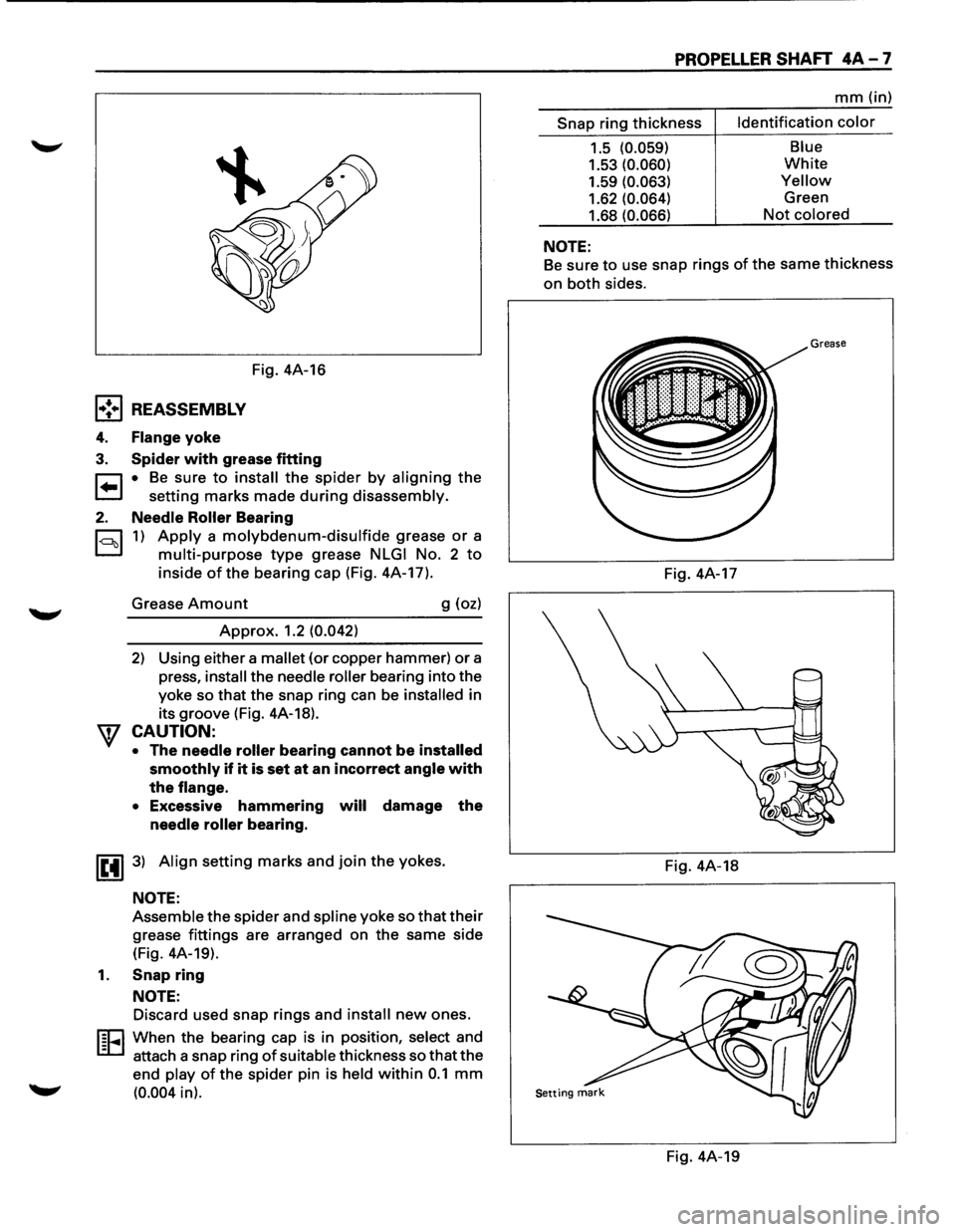
Fig. 4A-16
l•!•l REASSEMBLY
4. Flange yoke
3. Spider with grease fitting
r:::1 • Be sure to install the spider by aligning the
t.=.l setting marks made during disassembly.
2. Needle Roller Bearing
c=::l 1) Apply a molybdenum-disulfide grease or a
D multi-purpose type grease NLGI No. 2 to
inside of the bearing cap (Fig. 4A-17).
Grease
Amount g (oz)
Approx. 1.2 (0.042)
2) Using either a mallet (or copper hammer) or a
press,
install the needle roller bearing into the
yoke so
that the snap ring can be installed in
its groove (Fig. 4A-18).
CAUTION:
• The needle roller bearing cannot be installed
smoothly
if it is set at an incorrect angle with
the
flange.
•
Excessive hammering will damage the
needle roller bearing.
IE41 3) Align setting marks and join the yokes.
NOTE:
Assemble the spider and spline yoke so that their
grease fittings are arranged on the same side
(Fig. 4A-19).
1. Snap ring
NOTE:
Discard used snap rings and install new ones.
I§EI When the bearing cap is in position, select and
- attach a snap ring
of suitable thickness so that the
end play
of the spider pin is held within 0.1 mm
(0.004 in).
PROPELLER SHAFT 4A-7
mm (in)
Snap ring thickness Identification
color
1.5 (0.059)
1.53 (0.060)
1.59 (0.063)
1.62 (0.064)
1.68 (0.066)
NOTE:
Blue
White
Yellow
Green
Not colored
Be sure
to use snap rings of the same thickness
on both sides.
Grease
Fig. 4A-17
Fig. 4A-18
Fig. 4A-19
Page 239 of 1928
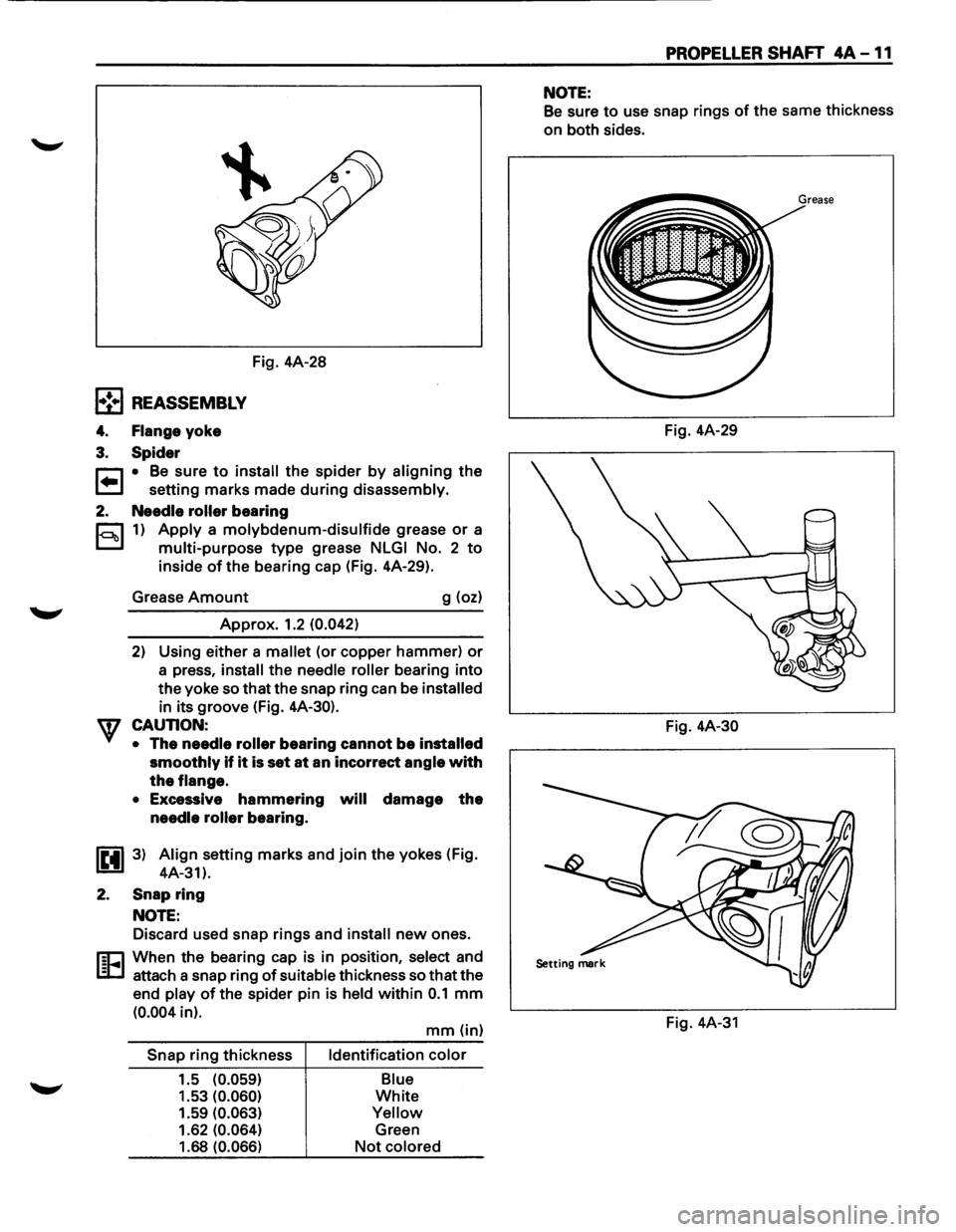
l•!•l REASSEMBLY
4. Flange yoke
3. Spider
Fig. 4A-28
r::1 • Be sure to install the spider by aligning the
t=J setting marks made during disassembly.
2. Needle roller bearing
c::::1 1) Apply a molybdenum-disulfide grease or a
D multi-purpose type grease NLGI No. 2 to
inside of the bearing cap (Fig. 4A-29).
Grease
Amount g (oz)
Approx. 1.2 (0.042)
2) Using either a mallet (or copper hammer) or
a press, install the needle roller bearing into
the yoke so that the snap ring can be installed
in its groove (Fig. 4A-30).
CAUTION: •
The needle roller bearing cannot be installed
smoothly if it is set at an incorrect angle with
the flange.
•
Excessive hammering will damage the
needle roller bearing.
IP.il 3) Align setting marks and join the yokes (Fig.
1!!!.1 4A-31).
2.
Snap ring
NOTE:
Discard used snap rings and install new ones.
rn:1 When the bearing cap is in position, select and
l:cJ attach a snap ring of suitable thickness so that the
end
play of the spider pin is held within 0.1 mm
(0.004 in).
Snap ring thickness
1.5
(0.059)
1.53 (0.060)
1.59 (0.063)
1.62 (0.064)
1.68 (0.066)
mm (in)
Identification color
Blue
White
Yellow
Green
Not colored
PROPELLER SHAFT 4A -11
NOTE:
Be sure to use snap rings of the same thickness
on both sides.
Fig. 4A-29
Fig.
4A-30
Fig. 4A-31
Page 263 of 1928
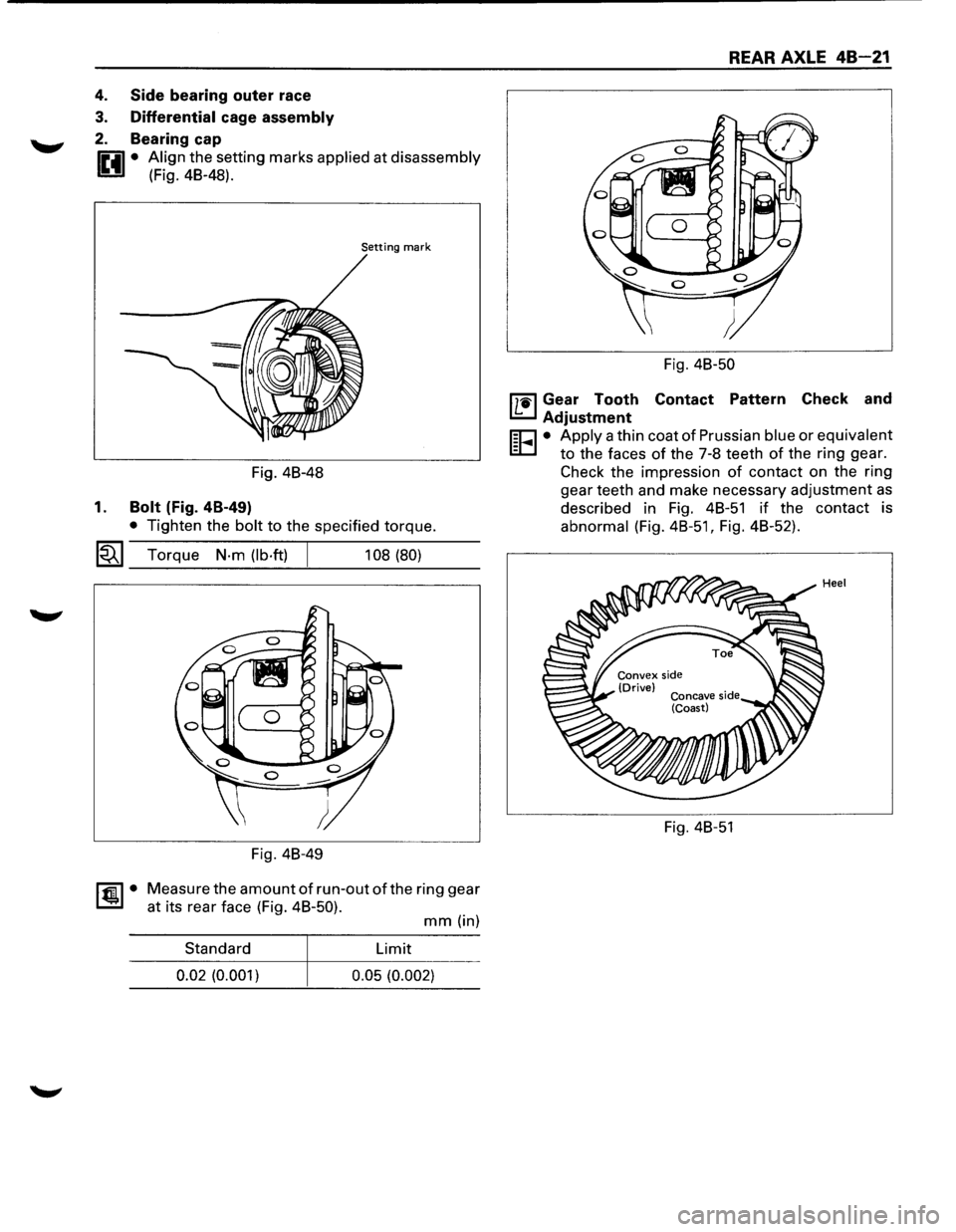
4. Side bearing outer race
3. Differential cage assembly
2. Bearing cap
0 • Align the setting marks applied at disassembly
1!!:!.1 (Fig. 48-48).
Setting mark
Fig. 48-48
1. Bolt (Fig. 4B-49)
• Tighten the bolt to the specified torque.
~~~ Torque N·m (lb·ft) 108 (80)
Fig. 48-49
~·
Measure the amount of run-out of the ring gear
at its rear face (Fig. 48-50).
mm (in)
Standard Limit
0.02 (0.001)
0.05 (0.002)
REAR AXLE 48-21
Fig. 48-50
l'7'1il Gear Tooth Contact Pattern Check and
I.£..J Adjustment
r;o • Apply a thin coat of Prussian blue or equivalent
EC.I to the faces of the 7-8 teeth of the ring gear.
Check the impression
of contact on the ring
gear teeth and make necessary adjustment
as
described in Fig. 48-51 if the contact is
abnormal (Fig.
48-51, Fig. 48-52).
Fig. 48-51
Page 300 of 1928
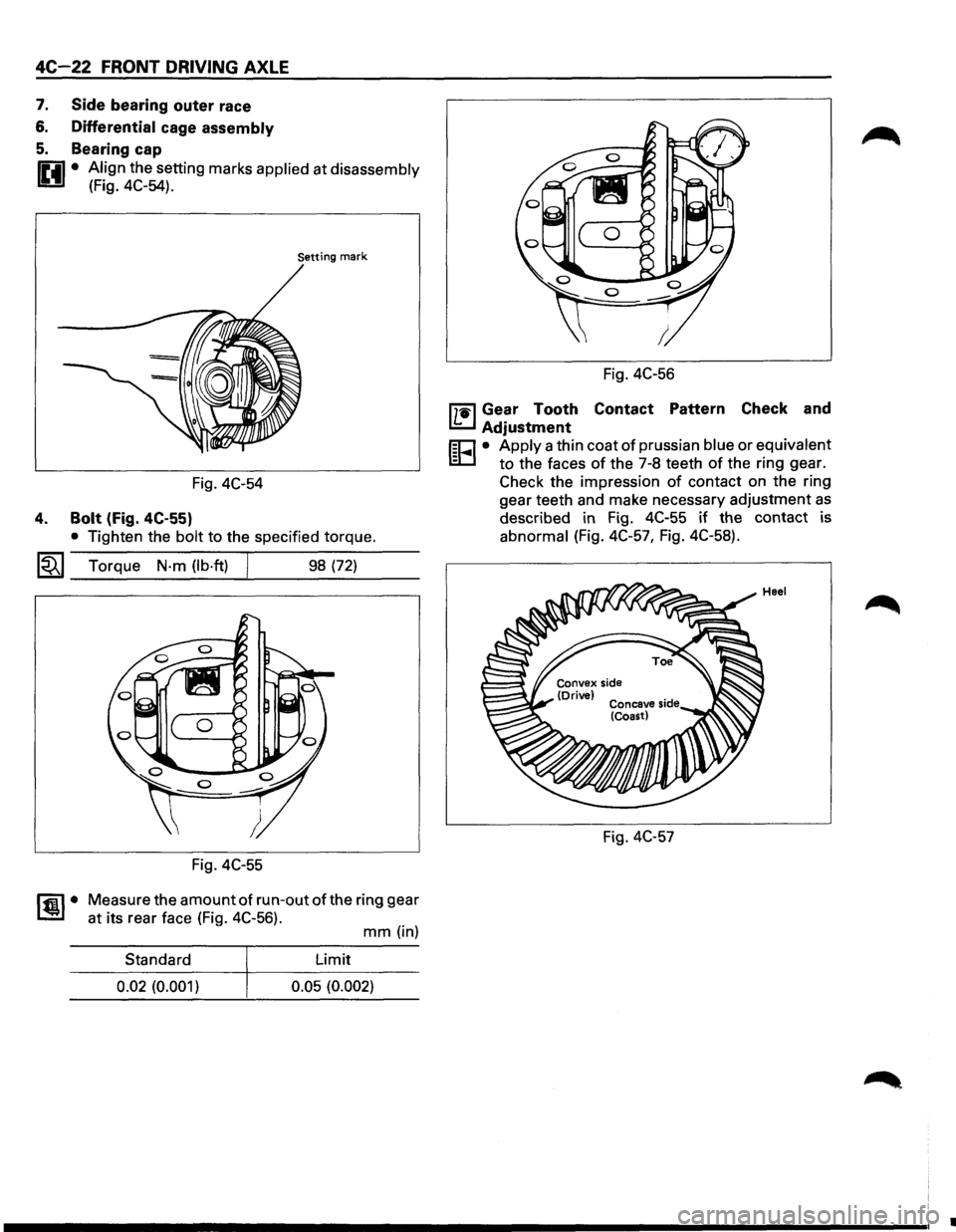
4C-22 FRONT DRIVING AXLE
7. Side bearing outer race
6. Differential cage assembly
5. Bearing cap
IP.il • Align the setting marks applied at disassembly
U (Fig. 4C-54).
Setting mark
Fig. 4C-54
4. Bolt (Fig. 4C-55)
• Tighten the bolt to the specified torque.
~~~ Torque N·m (lb·ft) 98 (72)
Fig. 4C-55
~·
Measure the amount of run-out of the ring gear
at its rear face (Fig. 4C-56).
mm (in)
Standard Limit
0.02
(0.001) 0.05 (0.002)
Fig. 4C-56
mil Gear Tooth Contact Pattern Check and
I.!:::..J Adjustment
r;o • Apply a thin coat of prussian blue or equivalent
ID to the faces of the 7-8 teeth of the ring gear.
Check the impression
of contact on the ring
gear teeth and make necessary adjustment
as
described in Fig. 4C-55 if the contact is
abnormal (Fig. 4C-57, Fig. 4C-58).
Fig. 4C-57
•
Page 655 of 1928
ENGINE ELECTRICAL 601-1
SECTION 60
ENGINE ELECTRICAL
CONTENTS
Battery . . ..... . ...... . ... . .... . .... ..... .... . .... .. .... . .... . . ... . . . .... . . .. . . .... . ... . ... . .... . . .. ... . .... . . ... . ... . . .. . Section 601
Cranking System
........... ... . ... . .... . .... . . .... . .... .
. ... . . .... . .... . .... . . ... ...
.. .... . . ..... . .... . ......... ... Section 602
Charging System ..... .... . . .............. .... . .... . . .. .. . . ... . . ... . . ... . . ... . . ........ .... . . ..... .. .... . ... . .... . .. Section 603
Ignition System (V6 3.2L) .. .... ...... ...... .. .. .. .... ...... .... .. .... .... .... ...... ...... ...... .......... .... Section 6D4A
SECTION 601
BATTERY
CONTENTS
General Description ............................... 6D1-1
Diagnosis .............................................. 6D1-1
On-Vehicle Service ................................ 6D1-3
Battery Charging ................................ 6D1-3
Jump Starting .................................... 6D1-3
Removal and Installation of The Battery . . 6D1-4
Main Data and Specifications . . . . . . . . . . . . . . . . . . 6D1-4
GENERAL DESCRIPTION
There are six battery fluid caps at the top of the
battery. These are covered by a paper
label.
The battery is completely sealed except for the six
small vent holes at the side. These vent holes per
mit the escape of small amounts of gas generated
by the battery.
This type
of battery has the following advantages
over
conventional batteries:
1. There is no need to add water during the entire
service
life of the battery.
2. The battery protects itself against overcharging.
The battery
will refuse to accept an excessive
charge. (A
conventional battery will accept an excessive
charge,
resulting in gassing and loss of battery
fluid.)
3. The battery is much less vulnerable to self
discharge than a conventional type battery.
DIAGNOSIS
1. VISUAL INSPECTION
Inspect the battery for obvious physical damage,
such
as a cracked or broken case, which would per
mit electrolyte loss.
Replace
the battery if obvious physical damage is
discovered during inspection.
Check
for any other physical damage and correct it
as necessary. If not, proceed to Step 2.
2. HYDROMETER CHECK
There is a built-in hydrometer (Charge test indica
tor) at the top of the battery. It is designed to be
used during diagnostic procedures. Before
trying to read the hydrometer,
carefully
clean
the upper battery surface.
If your work area is poorly lit, additional light may
be necessary
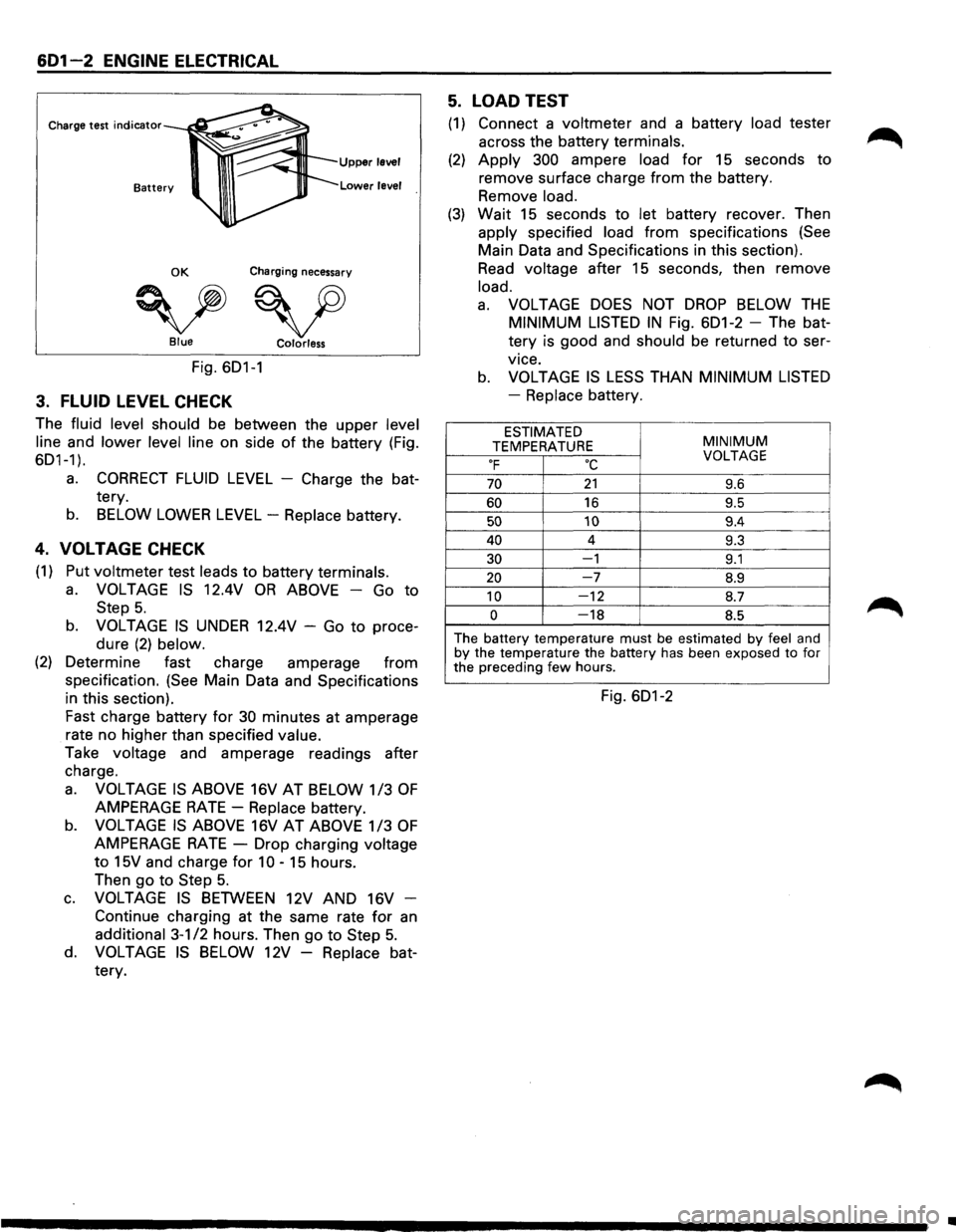
to read the hydrometer (Fig. 6D1-1).
a. BLUE RING OR DOT VISIBLE -Go to Step
4.
b. BLUE RING OR DOT NOT VISIBLE -Go to
Step 3.
Page 656 of 1928
6D1-2 ENGINE ELECTRICAL
Charge test indicator
Upper level
Lower level
OK Charging necessary
vv Blue Colorless
Fig. 6D1-1
3. FLUID LEVEL CHECK
The fluid level should be between the upper level
line
and lower level line on side of the battery (Fig.
6D1-1).
a. CORRECT FLUID LEVEL - Charge the bat
tery.
b. BELOW LOWER LEVEL -Replace battery.
4. VOLTAGE CHECK
(1) Put voltmeter test leads to battery terminals.
a. VOLTAGE IS 12.4V OR ABOVE -Go to
Step 5.
b. VOLTAGE IS UNDER 12.4V -Go to proce
dure
(2) below.
(2) Determine fast charge amperage from
specification. (See Main Data and Specifications
in this section).
Fast charge battery for
30 minutes at amperage
rate no higher than specified
value.
Take voltage and amperage readings after
charge.
a. VOLTAGE IS ABOVE 16V AT BELOW 1/3 OF
AMPERAGE RATE-Replace battery.
b. VOLTAGE IS ABOVE 16V AT ABOVE 1/3 OF
AMPERAGE RATE -Drop charging voltage
to 15V and charge for 10 -15 hours.
Then
go to Step 5.
c. VOLTAGE IS BETWEEN 12V AND 16V -
Continue charging at the same rate for
an
additional 3-1/2 hours. Then go to Step 5.
d. VOLTAGE IS BELOW 12V -Replace bat
tery.
5. LOAD TEST
(1) Connect a voltmeter and a battery load tester
across the battery
terminals.
(2) Apply 300 ampere load for 15 seconds to
remove surface charge
from the battery.
Remove
load.
(3) Wait 15 seconds to let battery recover. Then
apply specified load from specifications (See
Main Data and Specifications in this section).
Read voltage after 15 seconds, then remove
load.
a. VOLTAGE DOES NOT DROP BELOW THE
MINIMUM LISTED IN Fig. 6D1-2 -The bat
tery is good and
should be returned to ser
vice.
b. VOLTAGE IS LESS THAN MINIMUM LISTED
-Replace battery.
ESTIMATED MINIMUM TEMPERATURE OF oc VOLTAGE
70 21 9.6
60 16 9.5
50 10 9.4
40 4 9.3
30 -1 9.1
20 -7 8.9
10 -12 8.7
0 -18 8.5
The battery temperature must be estimated by feel and by the temperature the battery has been exposed to for
the preceding few hours.
Fig. 6D1-2
•
Page 657 of 1928
ENGINE ELECTRICAL 601-3
ON-VEHICLE SERVICE
BATTERY CHARGING
Observe the following safety precautions when
charging the battery:
1. Never attempt to charge the battery when the
fluid level is below the lower level line on the
side
of the battery. In this case, the battery
must be replaced.
2. Pay close attention to the battery during the
charging procedure.
Battery charging
should be discontinued or the
rate
of charge reduced if the battery feels hot
to the touch.
Battery charging
should be discontinued or the
rate
of charge reduced if the battery begins to
gas or spew electrolyte from the vent holes.
3. In order to more easily view the hydrometer
blue dot or ring, it may be necessary to jiggle
or tilt the battery.
4. Battery temperature can have a great effect on
battery charging capacity.
5. The sealed battery used on this vehicle may be
either quick-charged or slow-charged in the
same manner
as other batteries.
Whichever method you decide
to use, be sure
that you
completely charge the battery. Never
partially charge the battery.
JUMP STARTING
JUMP STARTING WITH AN AUXILIARY
(BOOSTER)
BATTERY
W CAUTION:
Never push or tow the vehicle in an attempt to
start it.
Serious damage to the emission sys
tem as
well as other vehicle parts will result.
Treat both the discharged battery and the
booster battery
with great care when using
jumper cables. Carefully follow the jump start
ing procedure, being
careful at all times to
avoid sparking.
wwARNING:
Failure to carefully follow the jump starting
procedure
could result in the following:
1. Serious personal injury, particulaly to your
eyes.
2. Property damage from a battery explo
sion, battery acid, or an electrical fire.
3. Damage to the electronic components of
one or both vehicles particularly.
Never expose the battery to an open flame or elec
trical
spark. Gas generated by the battery may catch
fire
or explode.
Remove any rings, watches, or other jewelry before
working around the battery. Protect
your eyes by
wearing
an approved set of goggles.
Never allow battery fluid to come in contact with
your eyes or skin.
Never
allow battery fluid to come in contact with
fabrics or painted surfaces.
Battery
fluid is a highly corrosive acid.
Should battery fluid come in contact with your eyes,
skin, fabric, or a painted surface,
immediately and
thoroughly rinse the affected area with clean tap
water. Never
allow metal tools or jumper cables to come
in contact with the positive battery
terminal, or any
other
metal surface of the vehicle. This will protect
against a short circuit.
Always keep batteries out of the reach of young
children.
JUMP STARTING PROCEDURE
1. Set the vehicle parking brake.
If the vehicle is equipped with an automatic
transmission,
place the selector lever in the
"PARK" position.
If the vehicle is equipped with a manual trans
mission
place the shift lever in the "NEUTRAL"
position.
Turn
"OFF" the ignition.
Turn
"OFF" all lights and any other accessory
requiring
electrical power.
2. Look at the built-in hydrometer.
If the indication area of the built-in hydrometer
is
completely clear, do not try to jump start.
3. Attach the end of one jumper cable to the posi
tive
terminal of the booster battery.
Attach the other end
of the same cable to the
positive
terminal of the discharged battery.
Do not allow the vehicles to touch each other.
This
will cause a ground connection, effectively
neutralizing
the charging procedure.
Be sure that the booster battery has a 12 volt
rating.
4. Attach one end of the remaining cable to the
negative
terminal of the booster battery.
Attach the other end
of the same cable to a
solid engine ground (such as the air condition
ing compressor bracket or the generator
mounting bracket)
of the vehicle with the dis
charged battery.
This ground connection must be at
least 450
mm (18 in) from the battery of the vehicle
whose battery is being charged.
Page 732 of 1928
6E2-36 DRIVEABILITV AND EMISSIONS
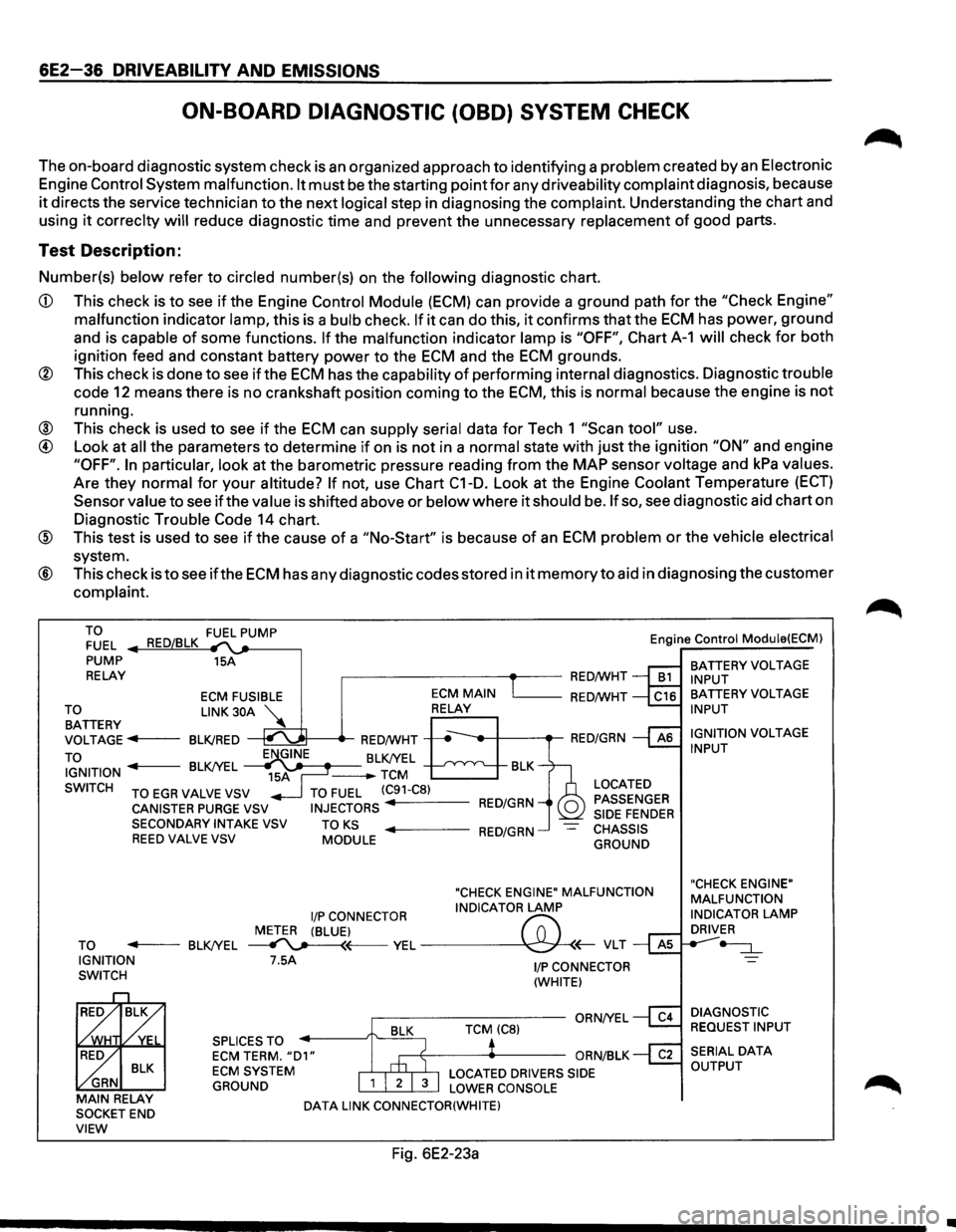
ON-BOARD DIAGNOSTIC (OBD) SYSTEM CHECK
The on-board diagnostic system check is an organized approach to identifying a problem created by an Electronic
Engine
Control System malfunction. It must be the starting point for any driveability complaint diagnosis, because
it directs the service technician to the next logical step in diagnosing the complaint. Understanding the chart and
using
it correclty will reduce diagnostic time and prevent the unnecessary replacement of good parts.
Test Description:
Number(s) below refer to circled number(s) on the following diagnostic chart.
CD This check is to see if the Engine Control Module (ECM) can provide a ground path for the "Check Engine"
malfunction indicator lamp, this is a bulb check. If it can do this, it confirms that the ECM has power, ground
and is capable
of some functions. If the malfunction indicator lamp is "OFF", Chart A-1 will check for both
ignition feed and constant battery power to the
ECM and the ECM grounds.
® This check is done to see if the ECM has the capability of performing internal diagnostics. Diagnostic trouble
code
12 means there is no crankshaft position coming to the ECM, this is normal because the engine is not
running.
® This check is used to see if the ECM can supply serial data for Tech 1 "Scan tool" use.
@ Look at all the parameters to determine if on is not in a normal state with just the ignition "ON" and engine
"OFF". In particular, look at the barometric pressure reading from the MAP sensor voltage and kPa values.
Are they normal for
your altitude? If not, use Chart C1-D. Look at the Engine Coolant Temperature (ECT)
Sensor value to see if the value is shifted above or below where it should be. If so, see diagnostic aid chart on
Diagnostic Trouble
Code 14 chart.
@ This test is used to see if the cause of a "No-Start" is because of an ECM problem or the vehicle electrical
system.
® This check is to see ifthe ECM has any diagnostic codes stored in it memory to aid in diagnosing the customer
complaint.
TO FUEL
PUMP
RELAY 15A
,------------+--RED/WHT Engine
Control Module(ECM)
BATTERY
VOLTAGE INPUT
ECM FUSIBLE L_ __ RED/WHT
~~TTERY LINK 30A ~
VOLTAGE ..,.,.f----BLK/RED
TO
~t-----tr-RED/WHT -----,t--+---.-RED/GRN
IGNITION BLK/YEL J-------BLK/YEL -TCM BLK
SWITCH
TO EGR VALVE VSV
CANISTER PURGE VSV SECONDARYINTAKEVSV REED VALVE VSV
TO FUEL (C91-C8)
INJECTORS RED/GRN
TO KS MODULE ..,._ ___ RED/GRN
LOCATED
PASSENGER
SIDE
FENDER CHASSIS
GROUND
"CHECK ENGINE" MALFUNCTION
I/P CONNECTOR INDICATOR LAMP
METER (BLUE)
f'7:' TO ..,._ __ BLK/YEL ~~VEL~(;-VLT IGNITION
SWITCH 7.5A
SPLICES TO
ECM TERM. "D1" ECM SYSTEM
GROUND
DATA LINK CONNECTOR(WHITE)
Fig. 6E2-23a
1/P CONNECTOR
(WHITE)
BATTERY VOLTAGE INPUT
IGNITION
VOLTAGE INPUT
"CHECK ENGINE"
MALFUNCTION
INDICATOR
LAMP DRIVER
-=:J._
DIAGNOSTIC
REQUEST INPUT
•
Page 734 of 1928
6E2-38 DRIVEABILITV AND EMISSIONS
CHART A-1
WILL NOT FLASH DIAGNOSTIC TROUBLE CODE (DTC) 12
NO "CHECK ENGINE" MALFUNCTION INDICATOR LAMP (MIL)
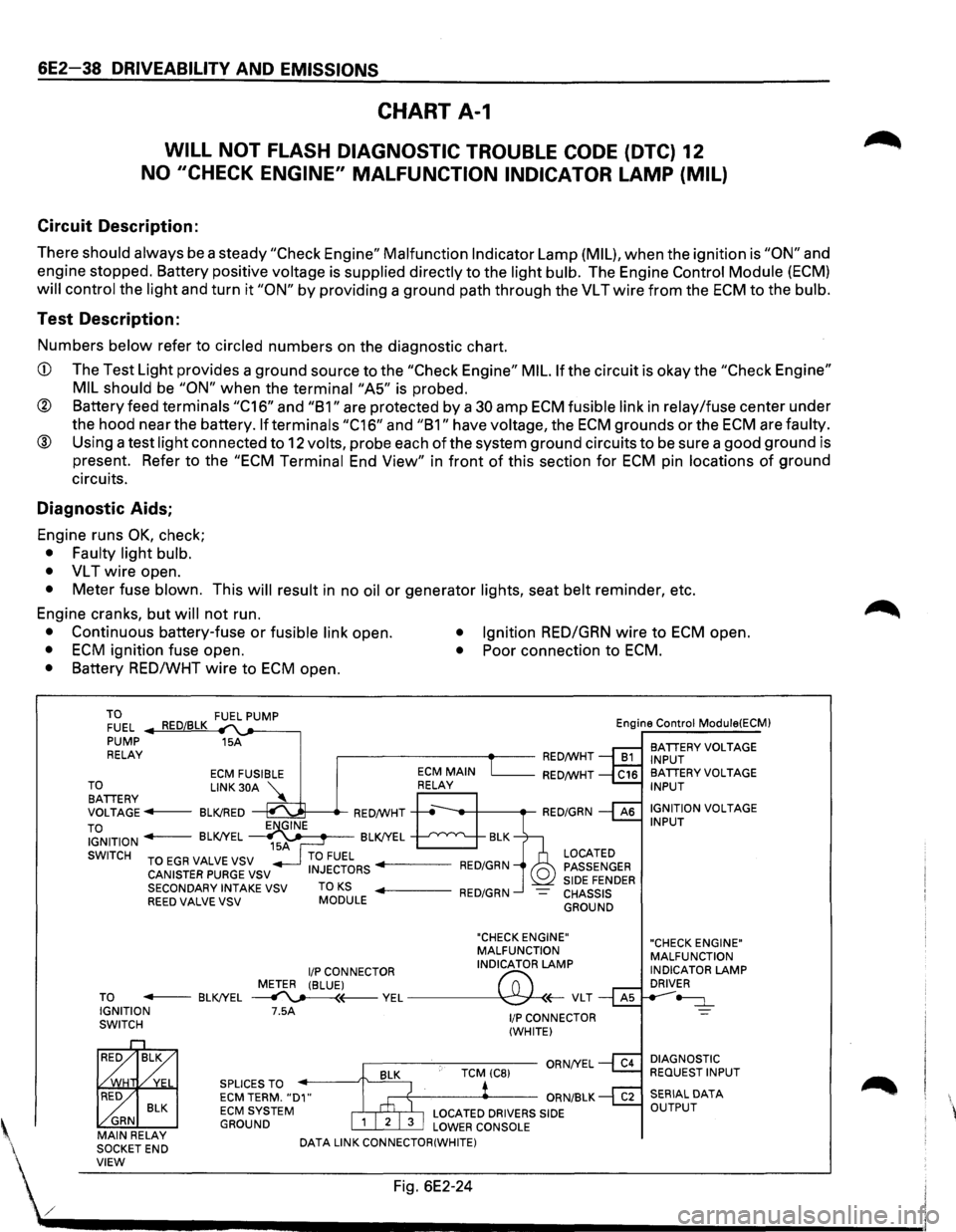
Circuit Description:
There should always be a steady "Check Engine" Malfunction Indicator Lamp (MIL), when the ignition is "ON" and
engine stopped. Battery positive
voltage is supplied directly to the light bulb. The Engine Control Module (ECM)
will control the light and turn it "ON" by providing a ground path through the VL T wire from the ECM to the bulb.
Test Description:
Numbers below refer to circled numbers on the diagnostic chart.
CD The Test Light provides a ground source to the "Check Engine" MIL. If the circuit is okay the "Check Engine"
MIL should
be "ON" when the terminai"A5" is probed.
® Battery feed terminals "C16" and "B1" are protected by a 30 amp ECM fusible link in relay/fuse center under
the hood near the battery.
If terminals "C16" and "B1" have voltage, the ECM grounds or the ECM are faulty.
® Using a test light connected to 12 volts, probe each of the system ground circuits to be sure a good ground is
present. Refer to the
"ECM Terminal End View" in front of this section for ECM pin locations of ground
circuits.
Diagnostic Aids;
Engine runs OK, check;
• Faulty light bulb.
•
VL T wire open.
• Meter fuse blown. This will result in no oil or generator lights, seat belt reminder, etc.
Engine cranks, but
will not run.
• Continuous battery-fuse or fusible link open. • Ignition RED/GRN wire to ECM open.
• ECM ignition fuse open. • Poor connection to ECM.
• Battery RED/WHT wire to ECM open.
TO FUEL .._..,==~ ,__,__-----, PUMP 15A
RELAY .--------~~-RED/WHT Engine
Control
Module(ECM)
BATIERY VOLTAGE
INPUT
ECM FUSIBLE RED/WHT TO LINK 30A '\.. BATIERY ~ VOLTAGE---BLK!RED ~---.-RED/WHT
TO IGNITION - BLK!YEL ~~~-BLK!YEL --'--'~"'---..__
SWITCH TO EGR VALVE VSV
CANISTER PURGE VSV
SECONDARY INTAKE VSV
REED VALVE VSV TO KS MODULE
LOCATED
PASSENGER
SIDE FENDER CHASSIS GROUND
"CHECK ENGINE"
MALFUNCTION
I/P CONNECTOR INDICATOR LAMP
METER (BLUE)
("";:; TO - BLK!YEL ~(---VEL~(;-VLT IGNITION 7.5A SWITCH
BLK ~ GRN MAIN RELAY
SOCKETEND SPLICES
TO ECM TERM. "D1" ECM SYSTEM GROUND
DATA
LINK CONNECTOR(WHITE)
1/P CONNECTOR
(WHITE)
BA TIERY VOLTAGE INPUT
IGNITION
VOLTAGE INPUT
"CHECK ENGINE"
MALFUNCTION
INDICATOR
LAMP DRIVER
~
DIAGNOSTIC REQUEST INPUT
' VIEW Fig. 6E2-24
./ .................................... __________________________ _