ISUZU TROOPER 1995 Workshop Manual
Manufacturer: ISUZU, Model Year: 1995, Model line: TROOPER, Model: ISUZU TROOPER 1995Pages: 1928
Page 1411 of 1928
CHASSIS ELECTRICAL 8-221
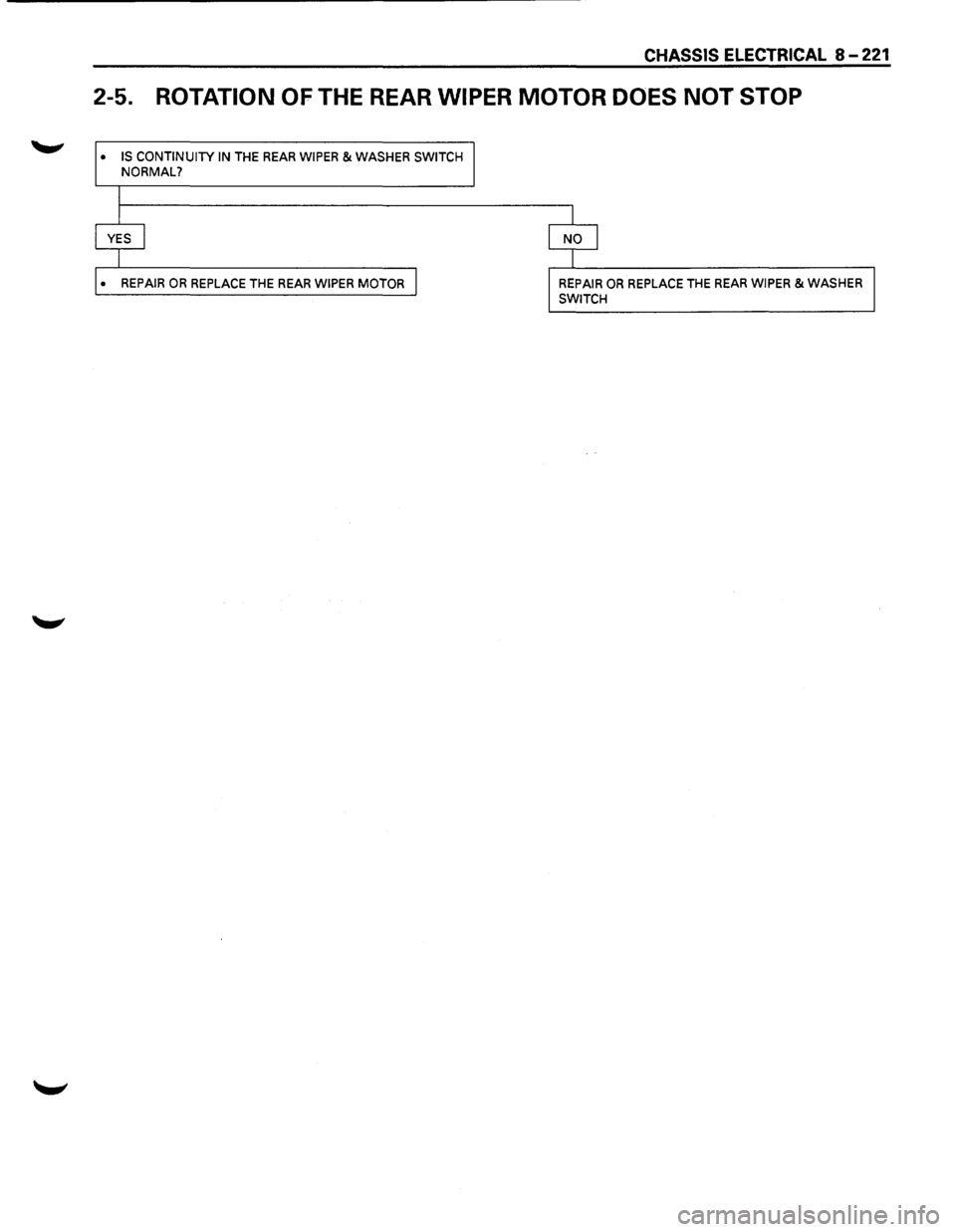
2-5. ROTATION OF THE REAR WIPER MOTOR DOES NOT STOP
• IS CONTINUITY IN THE REAR WIPER & WASHER SWITCH NORMAL?
• REPAIR OR REPLACE THE REAR WIPER MOTOR REPAIR OR REPLACE THE REAR WIPER & WASHER
SWITCH
Page 1412 of 1928
8 -222 CHASSIS ELECTRICAL
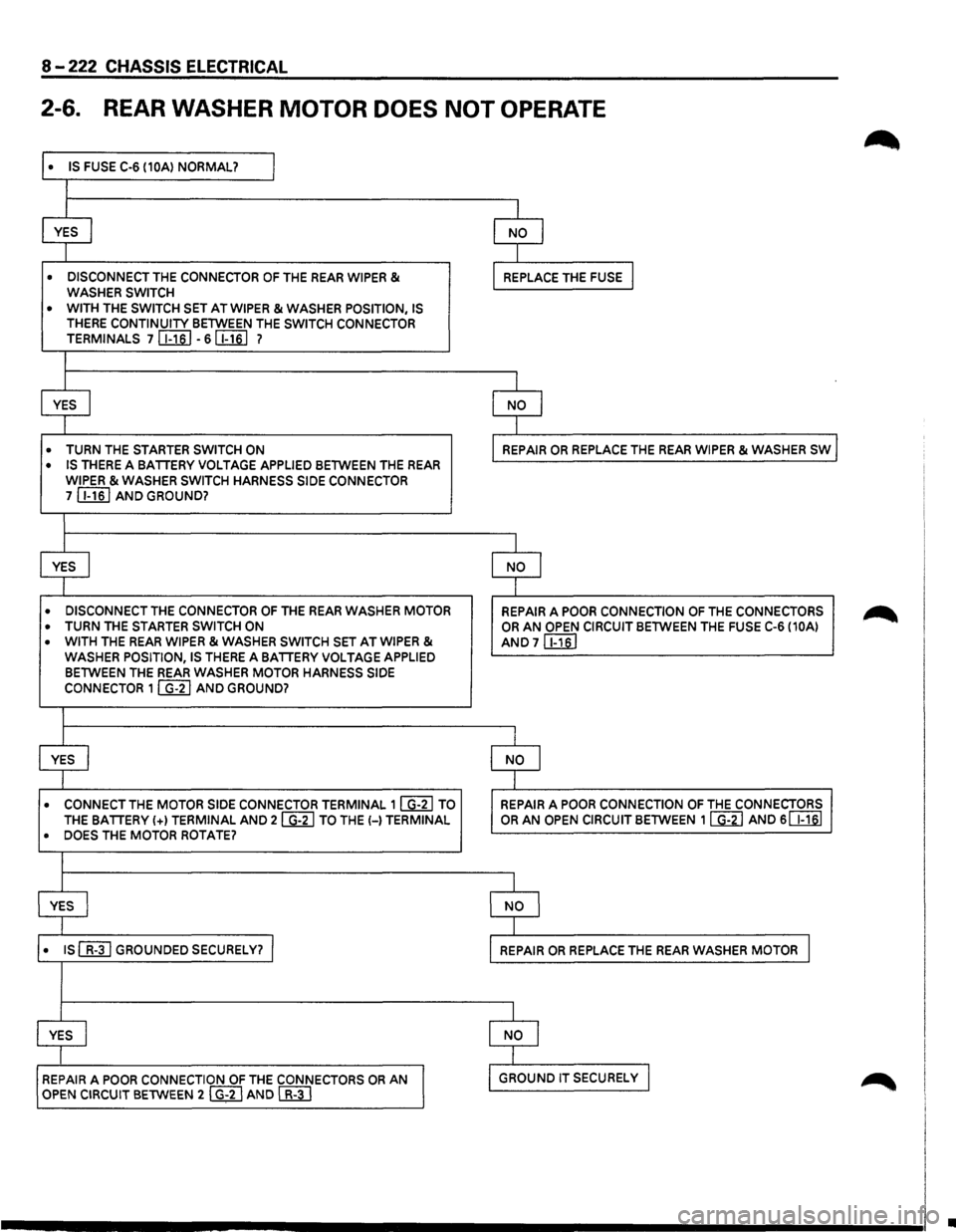
2-6. REAR WASHER MOTOR DOES NOT OPERATE
• IS FUSE C-6 (10A) NORMAL? l
I
YES I NO I
I
• DISCONNECT THE CONNECTOR OF THE REAR WIPER & WASHER SWITCH REPLACE THE FUSE I
• WITH THE SWITCH SET AT WIPER & WASHER POSITION, IS THERE CONTINUITY BETWEEN THE SWITCH CONNECTOR TERMINALS 7 [i;ill -6[Iill 7
I
YES I NO I
I
• TURN THE STARTER SWITCH ON REPAIR OR REPLACE THE REAR WIPER & WASHER SW l
• IS THERE A BATTERY VOLTAGE APPLIED BETWEEN THE REAR
WIPER & WASHER SWITCH HARNESS SIDE CONNECTOR 7 [i;ill AND GROUND?
I
YES I NO I
I
• DISCONNECT THE CONNECTOR OF THE REAR WASHER MOTOR REPAIR A POOR CONNECTION OF THE CONNECTORS
• TURN THE STARTER SWITCH ON OR AN OPEN CIRCUIT BETWEEN THE FUSE C-6 (10A)
• WITH THE REAR WIPER & WASHER SWITCH SET AT WIPER &
AND 7 [i;ill WASHER POSITION, IS THERE A BATTERY VOLTAGE APPLIED BETWEEN THE REAR WASHER MOTOR HARNESS SIDE
CONNECTOR 1 I G-21 AND GROUND?
I
YES I NO I
I
• CONNECT THE MOTOR SIDE CONNECTOR TERMINAL 1 ~ TO REPAIR A POOR CONNECTION OF THE CONNECTORS
THE BATTERY(+) TERMINAL AND 2 ~ TO THE(-) TERMINAL OR AN OPEN CIRCUIT BETWEEN 1 ~ AND 6 ~
• DOES THE MOTOR ROTATE?
I
YES I NO I
I
• IS~ GROUNDED SECURELY? I REPAIR OR REPLACE THE REAR WASHER MOTOR I
I
YES I NO I
I
REPAIR A POOR CONNECTION OF THE CONNECTORS OR AN
I
GROUND IT SECURELy I
OPEN CIRCUIT BETWEEN 2 I G~2 I AND c::B;TI
•
Page 1413 of 1928
STARTER SWITCH
Refer to "START AND CHARGING" in this section.
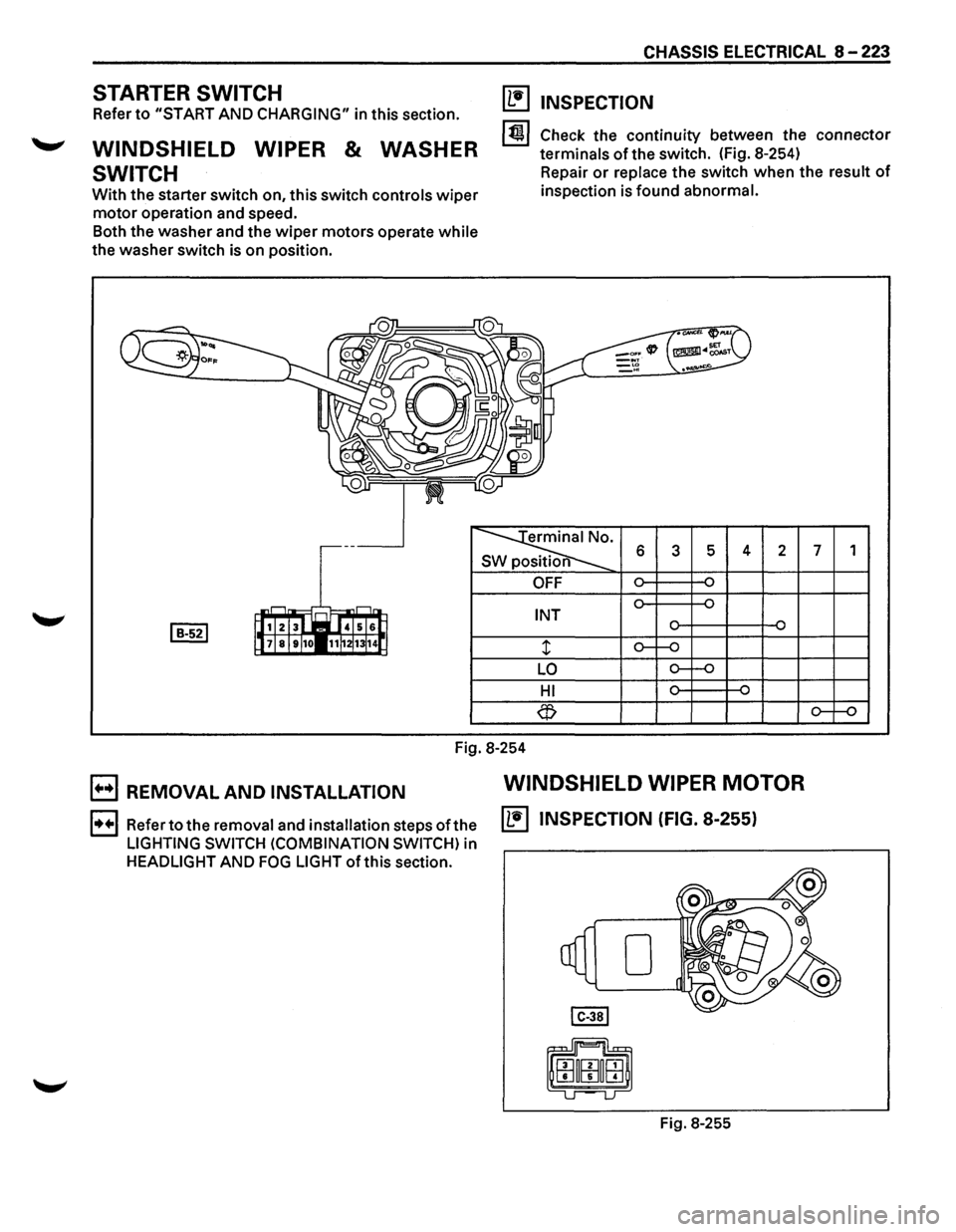
WINDSHIELD WIPER & WASHER
SWITCH
With the starter switch on, this switch controls wiper
motor operation and speed.
Both the washer and the
wiper motors operate while
the washer switch is on position.
CHASSIS ELECTRICAL 8 -223
(1!1 INSPECTION
1~1 Check the continuity between the connector
terminals
of the switch. (Fig. 8-254)
Repair
or replace the switch when the result of
inspection is found abnormal.
erminal No.
SW position 6 3 5 4 2 7 1
OFF
INT
LO
HI
Fig.
8-254
B REMOVAL AND INSTALLATION WINDSHIELD WIPER MOTOR
1••1 Refer to the removal and installation steps ofthe IL•IINSPECTION (FIG. 8-255)
LIGHTING SWITCH (COMBINATION SWITCH) in
HEADLIGHT AND FOG LIGHT ofthis section.
Fig. 8-255
Page 1414 of 1928
8-224 CHASSIS ELECTRICAL
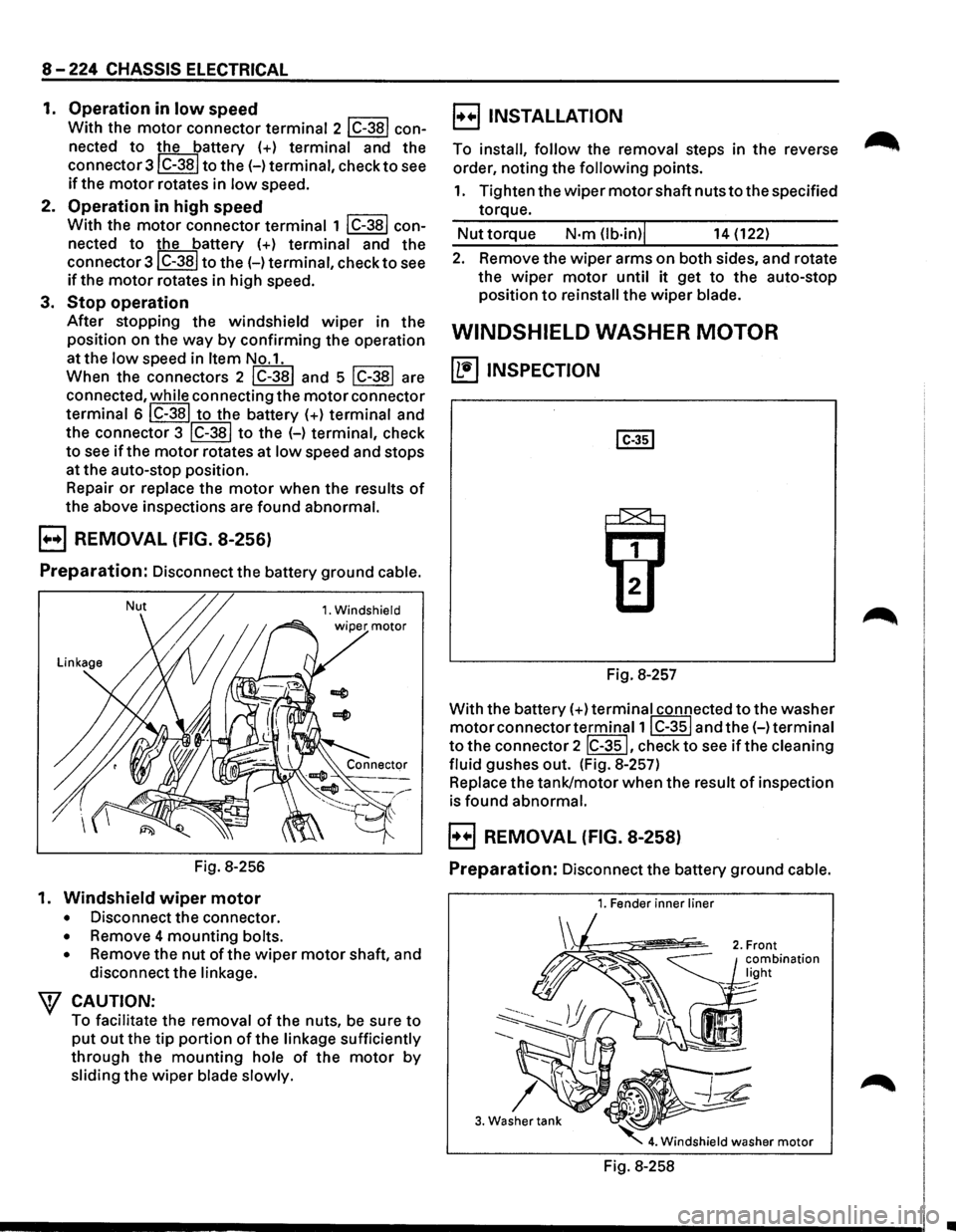
1. Operation in low speed
With the motor connector terminal 2 lC-38l con
nected
to the battery (+) terminal and the
connector3lC-38l
to the(-) terminal, check to see
if the motor rotates in low speed.
2. Operation in high speed
With the motor connector terminal 1 lC-38l con
nected
to the battery (+) terminal and the
connector
3lC-38I to the(-) terminal, check to see
if the motor rotates in high speed.
3.
Stop operation
After stopping the windshield wiper in the
position on the
way by confirming the operation
at the
low speed in Item No.1.
When the connectors 2
lC-381 and 5 lC-381 are
connected,
while connecting the motor connector
terminal 6
IC-381 to the battery (+) terminal and
the connector 3
IC-381 to the H terminal, check
to see if the motor rotates at low speed and stops
at the auto-stop position.
Repair
or replace the motor when the results of
the above inspections are found abnormal.
B REMOVAL (FIG. 8-256)
Preparation: Disconnect the battery ground cable.
Nut 1. Windshield
Fig. 8-256
1.
Windshield wiper motor
• Disconnect the connector.
• Remove 4 mounting bolts.
•
Remove the nut of the wiper motor shaft, and
disconnect the
linkage.
\f CAUTION:
To facilitate the removal of the nuts, be sure to
put out the tip portion of the linkage sufficiently
through the mounting hole of the motor by
sliding the wiper blade slowly.
B INSTALLATION
To install, follow the removal steps in the reverse
order, noting the
following points.
1. Tighten the wiper motor shaft nuts to the specified
torque.
Nut torque N·m (lb·in)j 14 (122)
2. Remove the wiper arms on both sides, and rotate
the
wiper motor until it get to the auto-stop
position
to reinstall the wiper blade.
WINDSHIELD WASHER MOTOR
~ INSPECTION
Fig. 8-257
With the battery(+)
terminal connected to the washer
motor connector terminal1 I C-351 and the(-) terminal
to the connector 2 IC-351, check to see if the cleaning
fluid
gushes out. (Fig. 8-257)
Replace the tank/motor when the result of inspection
is found abnormal.
B REMOVAL (FIG. 8-258)
Preparation: Disconnect the battery ground cable.
1. Fender inner liner
3. Washer tank
Fig. 8-258
•
Page 1415 of 1928
1. Fender inner liner (right side)
2. Front combination light
• Remove the screw
3. Washer tank
• Remove 2 screws.
• Remove the filler neck
• Remove the hose.
• Disconnect the connector of the washer
motor.
4. Windshield washer motor
• Hold the motor and pull it out from the washer
tank.
E3 INSTALLATION
To install, follow the removal steps in the reverse
order.
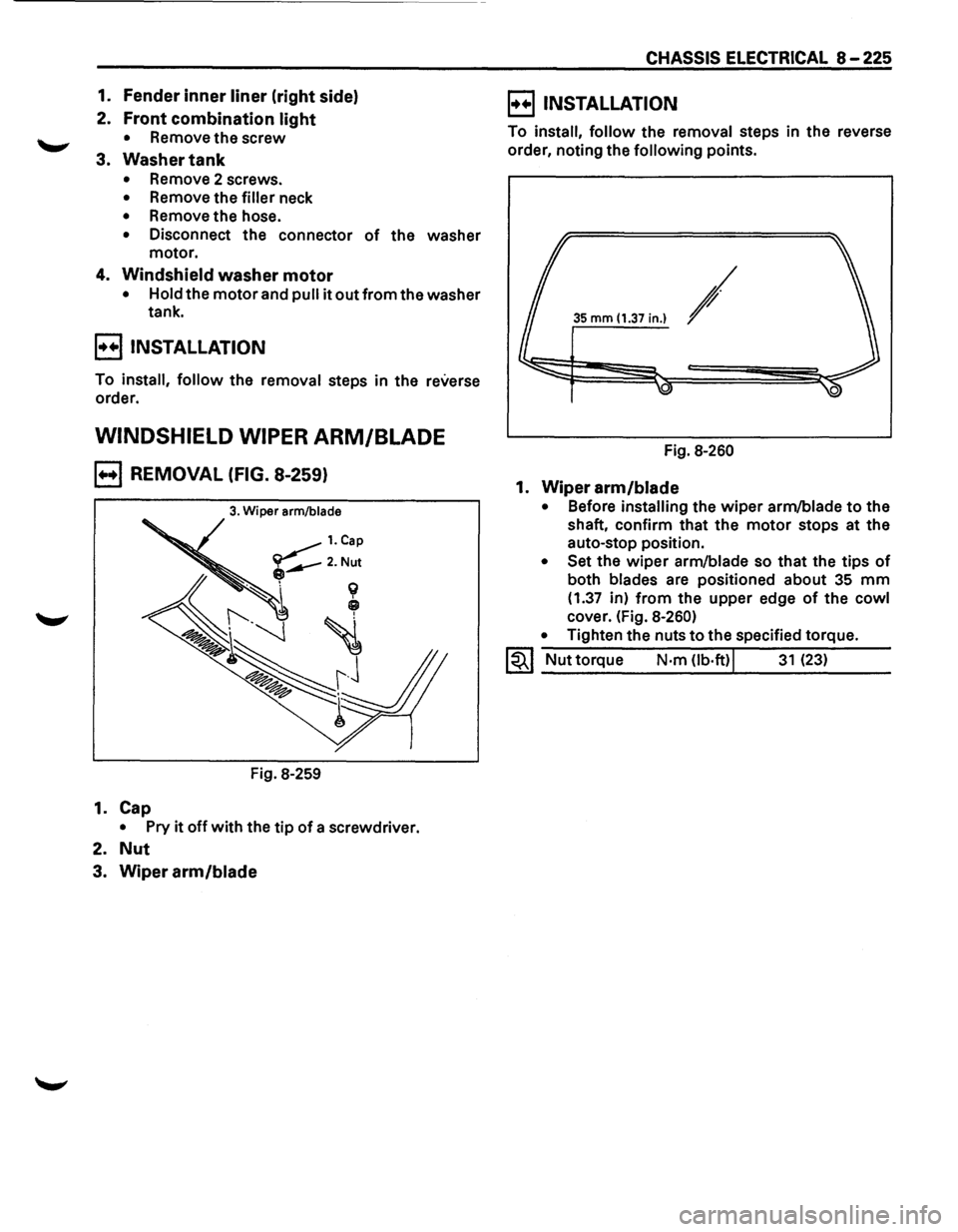
WINDSHIELD WIPER ARM/BLADE
B REMOVAL (FIG. 8-259)
3. Wiper arm/blade
Fig. 8-259
1. Cap
• Pry it off with the tip of a screwdriver.
2. Nut
3. Wiper arm/blade
CHASSIS ELECTRICAL 8-225
E) INSTALLATION
To install, follow the removal steps in the reverse
order, noting the
following points.
35 mm (1.37 in.) /
Fig. 8-260
1. Wiper arm/blade
• Before installing the wiper arm/blade to the
shaft, confirm that the
motor stops at the
auto-stop position.
• Set the wiper arm/blade so that the tips of
both blades are positioned about 35 mm
(1.37 in) from the upper edge of the cowl
cover. (Fig. 8-260)
•
Tighten the nuts to the specified torque.
1~1 Nut torque N·m Ob·ft)j 31 (23)
Page 1416 of 1928
8-226 CHASSIS ELECTRICAL
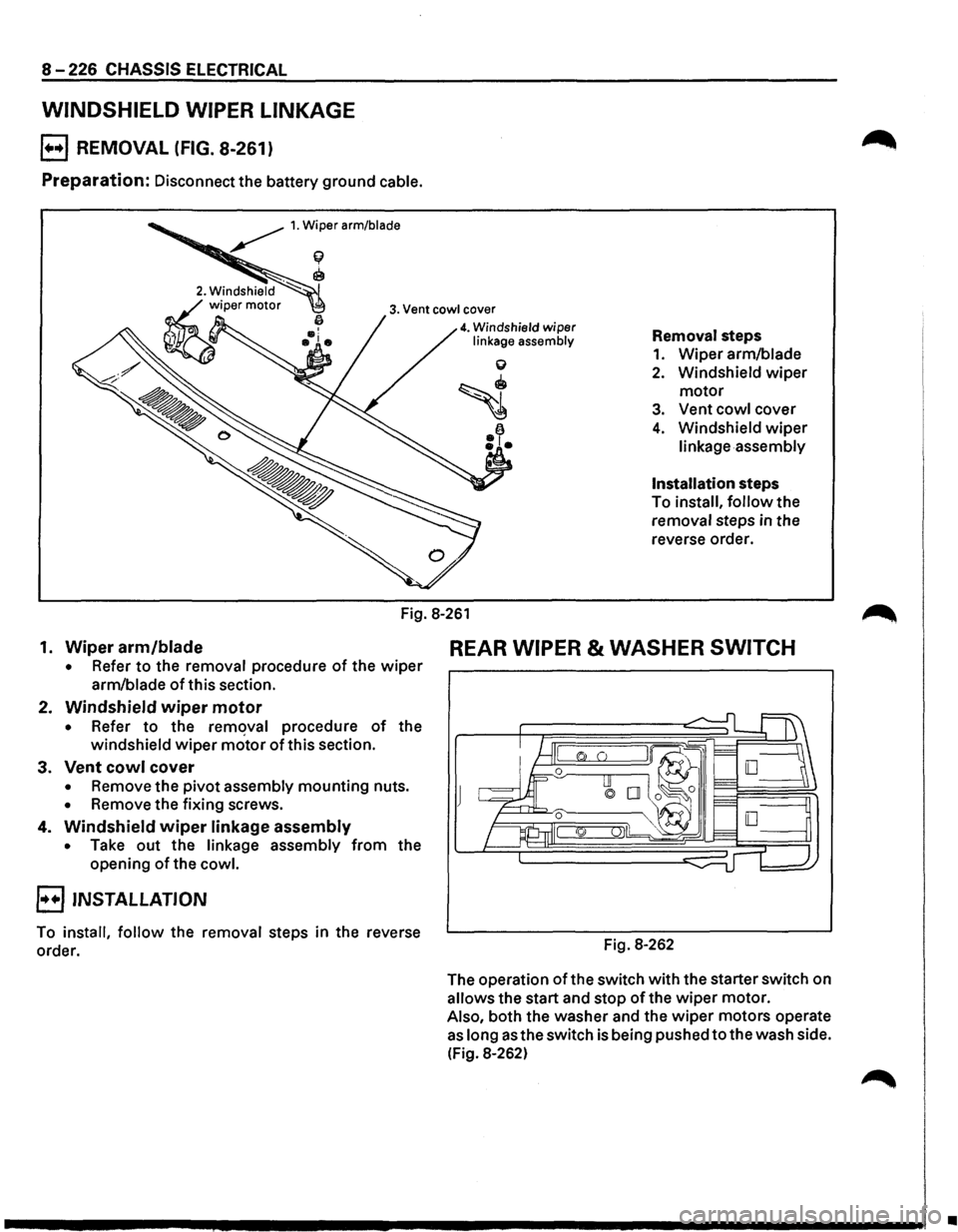
WINDSHIELD WIPER LINKAGE
B REMOVAL (FIG. 8-261)
Preparation: Disconnect the battery ground cable.
~ 1. Wiper arm/blade
f(
~
3. Vent cowl cover
4. Windshield wiper linkage assembly Removal steps
1. Wiper arm/blade
2. Windshield wiper
motor
3. Vent cowl cover
4. Windshield wiper
linkage assembly
Installation steps
To install,
follow the
removal steps in the
reverse order.
Fig.
8-261
1. Wiper arm/blade REAR WIPER & WASHER SWITCH
• Refer to the removal procedure of the wiper
arm/blade ofthis section.
2. Windshield wiper motor
• Refer to the remqval procedure of the
windshield
wiper motor of this section.
3. Vent cowl cover
• Remove the pivot assembly mounting nuts.
• Remove the fixing screws.
4. Windshield wiper linkage assembly
• Take out the linkage assembly from the
opening
of the cowl.
B INSTALLATION
To install, follow the removal steps in the reverse
order. Fig. 8-262
The
operation of the switch with the starter switch on
allows the start and stop
of the wiper motor.
Also, both the washer and the
wiper motors operate
as long as the switch is being pushed to the wash side.
(Fig.
8-262)
•
Page 1417 of 1928
![ISUZU TROOPER 1995 Workshop Manual ~ INSPECTION
I 4131 2 1 i~~j
l~ 101918 71615 jJ [ill]
~
s 6 7 8 2 3 s position
CD
OFF
~ ON o-~
...... ~ ~ ...... OFF
CD ~ ON o-~
Fig. 8-263
Check
the continuity between the connector
te](/img/61/57183/w960_57183-1416.png "ISUZU TROOPER 1995 Workshop Manual ~ INSPECTION
I 4131 2 1 i~~j
l~ 101918 71615 jJ [ill]
~
s 6 7 8 2 3 s position
CD
OFF
~ ON o-~
...... ~ ~ ...... OFF
CD ~ ON o-~
Fig. 8-263
Check
the continuity between the connector
te")
~ INSPECTION
I 4131 2 1 i~~j
l~ 101918 71615 jJ [ill]
~
s 6 7 8 2 3 s position
CD
OFF
~ ON o-~
...... ~ ~ ...... OFF
CD ~ ON o-~
Fig. 8-263
Check
the continuity between the connector
terminals of the switch. (Fig. 8-263)
Repair
or replace the switch when the result of
inspection is found abnormal.
E) REMOVAL (FIG. 8-264)
Preparation: Disconnect the battery ground cable.
This illustration is based on rear defogger SW removal.
Fig. 8-264
'-"' 1. Front console assembly
2. lower cluster assembly
3. Instrument panel driver lower cover
4. Instrument panel cluster assembly
CHASSIS ELECTRICAL 8-227
o Refer to FOG LIGHT SWITCH removal steps in
this section.
5. Rear wiper & washer switch
• To remove the switch, pushing the lock from
the back side of the cluster assembly.
B INSTALLATION
To install, follow the removal steps in the reverse
order, noting the
following point.
1. Push the switch with your fingers until it locks
securely.
REAR WIPER MOTOR
~ INSPECTION
Fig. 8-265
With the battery
(+)terminal connected to the wiper
motor connector termina12l G-6 land the H terminal
to the connector 41 G-6 I, check to see if the motor
rotates. (Fig. 8-265)
Repair
or replace the motor when the result of
inspection is found abnormal.
E) REMOVAL (FIG. 8-266)
Preparation: Disconnect the battery ground cable.
-,
Fig. 8-266
Page 1418 of 1928
8-228 CHASSIS ELECTRICAL
1. Tailgate trim pad
• Refer to the removal steps of the tailgate in
Section
10 "BODY".
2. Wiper arm/blade
Refer to the removal steps of the rear wiper arm/
blade in this section.
3.
Motor
• Remove the wiper motor shaft nut.
• Disconnect the connector.
• Remove 3 screws.
E) INSTALLATION
To install, follow the removal steps in the reverse
order, noting the
following points.
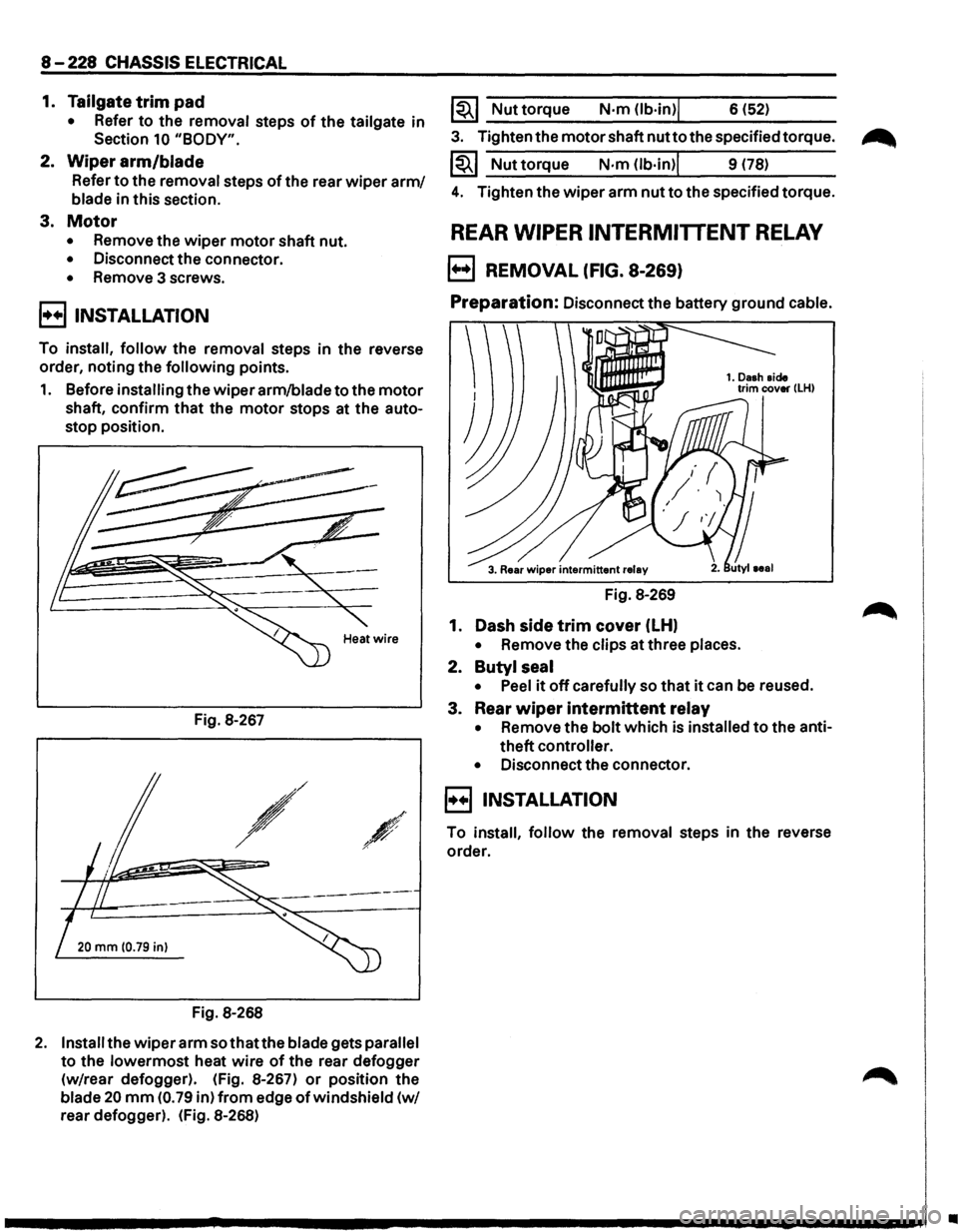
1. Before installing the wiperarm/bladetothe motor
shaft, confirm that the motor stops at the auto
stop position.
Fig. 8-267
,/
/
20 mm (0.79 in)
Fig. 8-268
2. Install the wiper arm sothatthe blade gets parallel
to the lowermost heat wire of the rear defogger
(w/rear defogger). (Fig. 8-267)
or position the
blade 20 mm (0. 79 in) from edge of windshield (w/
rear defogger). (Fig. 8-268)
1~1 Nut torque N·m (lb·in)j 6 (52)
3. Tighten the motor shaft nutto the specified torque.
1~1 Nuttorque N·m (lb·in)l 9 (78)
4. Tighten the wiper arm nut to the specified torque.
REAR WIPER INTERMITTENT RELAY
B REMOVAL (FIG. 8-269)
Preparation: Disconnect the battery ground cable.
Fig. 8-269
1. Dash
side trim cover (LH)
• Remove the clips at three places.
2. Butyl seal
•
Peel it off carefully so that it can be reused.
3. Rear
wiper intermittent relay
• Remove the bolt which is installed to the anti
theft
controller.
•
Disconnect the connector.
E) INSTALLATION
To install, follow the removal steps in the reverse
order.
•
Page 1419 of 1928
REAR WASHER MOTOR
~ INSPECTION
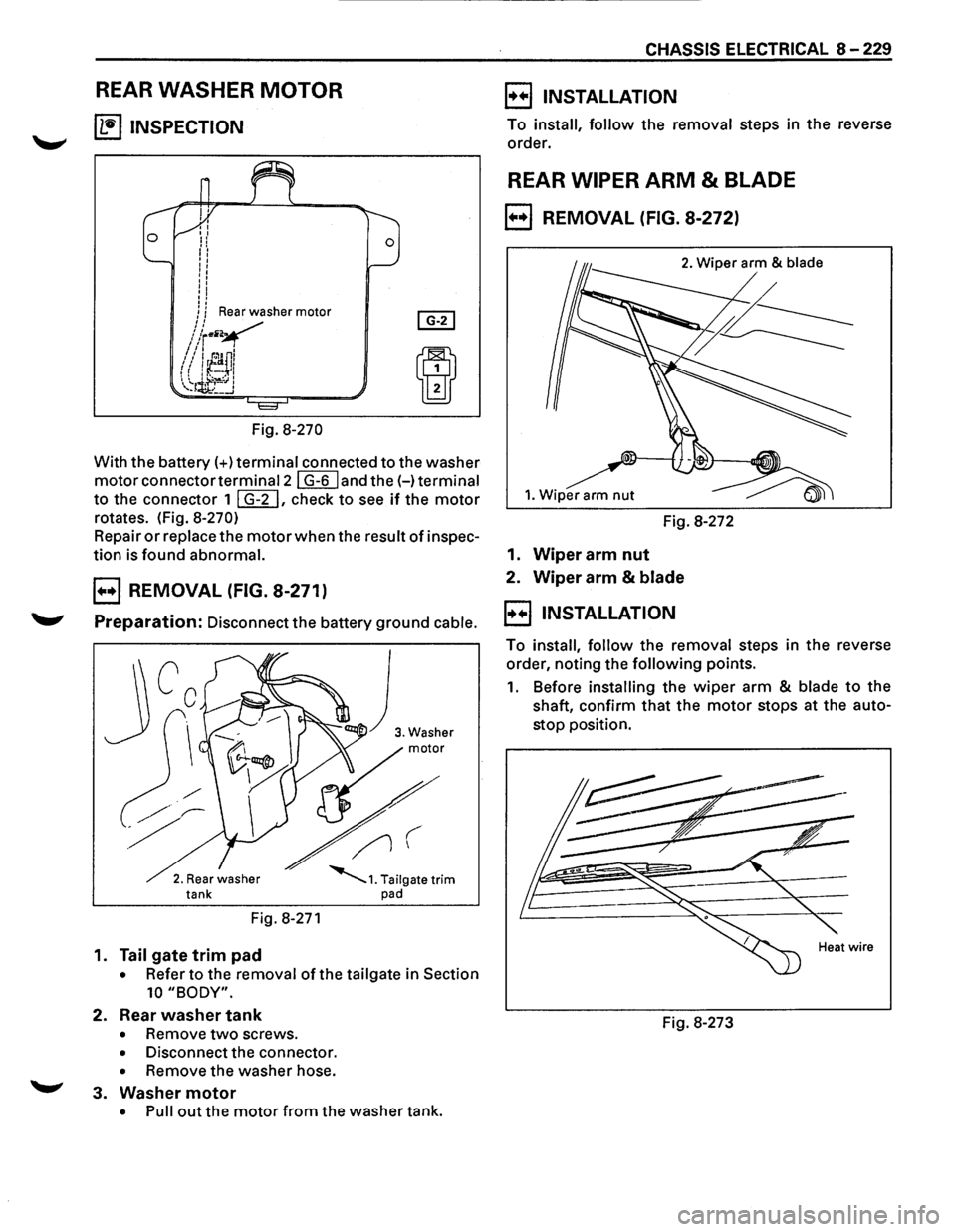
Fig. 8-270
With the battery(+) terminal connected to the washer
motorconnectortermina12l G-6 land the(-) terminal
to the connector 1 I G-2 I, check to see if the motor
rotates. (Fig. 8-270)
Repair or replace the motor when the result of inspec
tion is found abnormal.
B REMOVAL (FIG. 8-271)
Preparation: Disconnect the battery ground cable.
2. Rear washer tank
Fig. 8-271
1. Tail gate trim pad
• Refer to the removal of the tailgate in Section
10 "BODY".
2. Rear washer tank
• Remove two screws.
• Disconnect the connector.
• Remove the washer hose.
~ 3. Washer motor
• Pull out the motor from the washer tank.
CHASSIS ELECTRICAL 8-229
B INSTALLATION
To install, follow the removal steps in the reverse
order.
REAR WIPER ARM & BLADE
B REMOVAL (FIG. 8-272)
2. Wiper arm & blade
1. Wiper arm nut
Fig. 8-272
1.
Wiper arm nut
2. Wiper arm & blade
B INSTALLATION
To install, follow the removal steps in the reverse
order, noting the
following points.
1. Before installing the wiper arm & blade to the
shaft, confirm
that the motor stops at the auto
stop position.
Fig. 8-273
Page 1420 of 1928
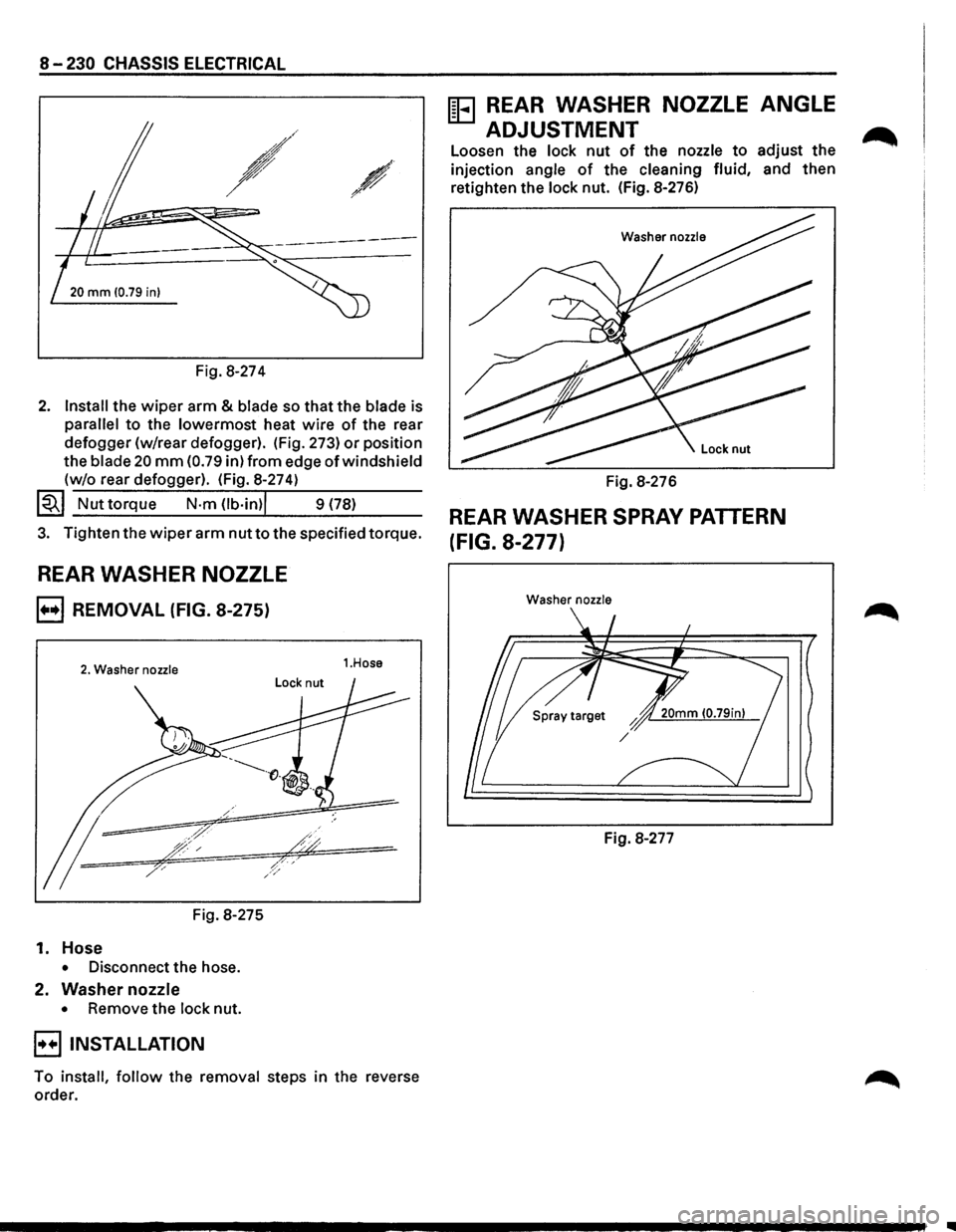
8-230 CHASSIS ELECTRICAL
-~ ~-
20 mm 10.79 in)
Fig. 8-274
2. Install the wiper arm & blade so that the blade is
parallel to the lowermost heat wire of the rear
defogger (w/rear defogger). (Fig. 273)
or position
the
blade 20 mm (0.79 in) from edge of windshield
(w/o rear defogger). (Fig. 8-274)
~~~ Nut torque N·m Ob·in)l 9 (78)
3. Tighten the wiper arm nut to the specified torque.
REAR WASHER NOZZLE
B REMOVAL (FIG. 8-275)
2. Washer nozzle
Fig. 8-275
1. Hose
• Disconnect the hose.
2. Washer nozzle
• Remove the lock nut.
B INSTALLATION
1.Hose
To install, follow the removal steps in the reverse
order.
ffi3 REAR WASHER NOZZLE ANGLE
ADJUSTMENT
Loosen the lock nut of the nozzle to adjust the
injection angle of the cleaning fluid, and then
retighten the lock nut. (Fig. 8-276)
Washer nozzle
Fig. 8-276
REAR WASHER SPRAY PATTERN
(FIG. 8-277)
Washer nozzle
Fig. 8-277
..