torque ISUZU TROOPER 1995 Workshop Manual
[x] Cancel search | Manufacturer: ISUZU, Model Year: 1995, Model line: TROOPER, Model: ISUZU TROOPER 1995Pages: 1928
Page 1186 of 1928
70-28 TRANSFER CASE
16. Front output gear assembly
15. Bearing snap ring
• Use a pair of snap ring pliers to install the snap
ring to the transfer case.
U7NOTE:
VI The snap ring must be fully inserted into the
transfer case snap ring groove.
14. Input shaft (A/T)
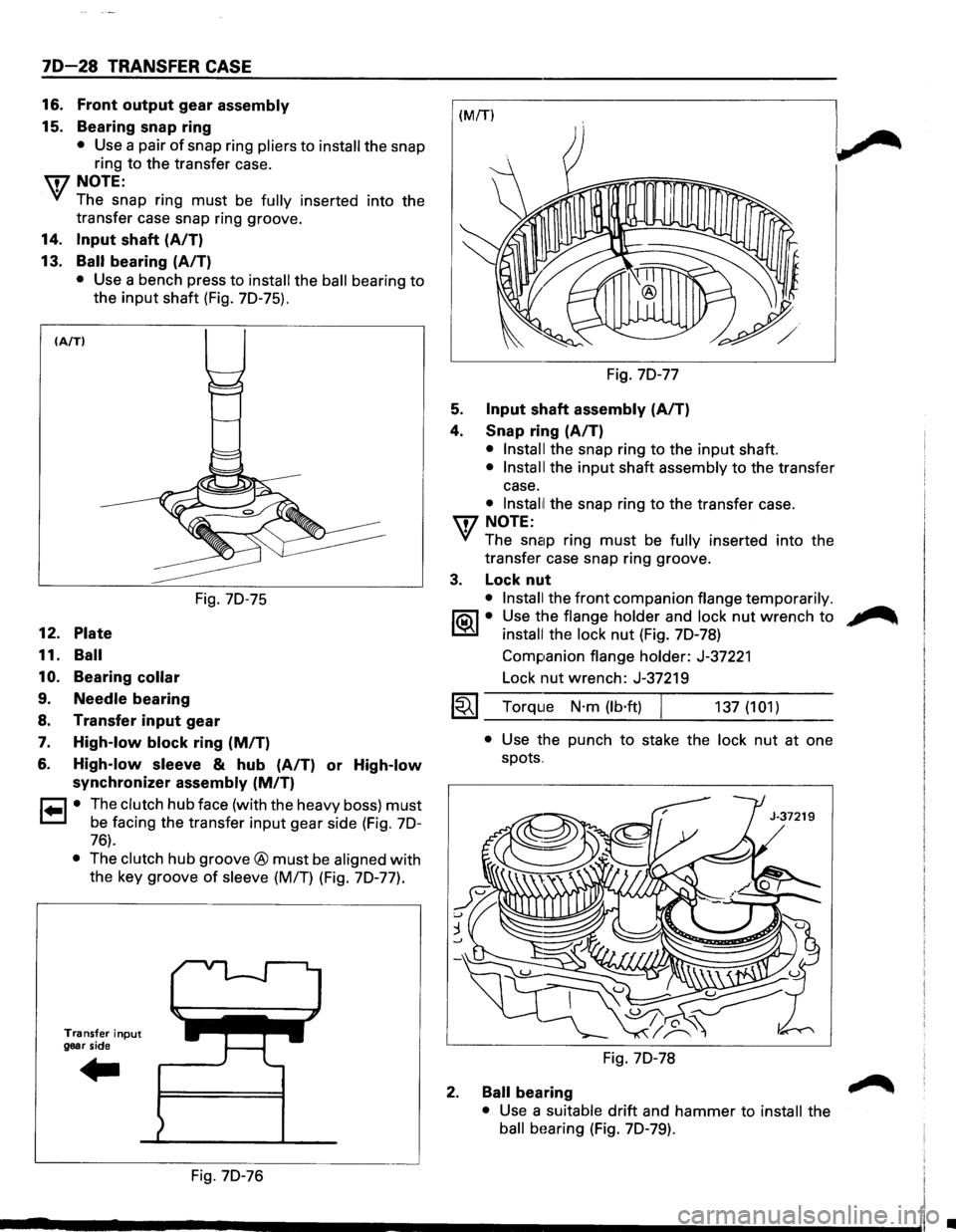
13.
Ball bearing (A/T)
• Use a bench press to install the ball bearing to
the
input shaft (Fig. 70-75).
(A/TI
12. Plate
11. Ball
10.
Bearing collar
9. Needle bearing
Fig. 70-75
8. Transfer input gear
7. High-low block ring (MIT)
6. High-low sleeve & hub (A/T) or High-low
synchronizer assembly (MIT)
r=l • The clutch hub face (with the heavy boss) must
1=.1 be facing the transfer input gear side (Fig. 70-
76).
• The clutch hub groove® must be aligned with
the key groove
of sleeve (M/T) (Fig. 70-77).
Transfer input
gear side
Fig. 70-76 Fig.
70-77
5. Input shaft assembly (AIT)
4. Snap ring (A/T)
• Install the snap ring to the input shaft.
• Install the input shaft assembly to the transfer
case.
• lnstal1l the snap ring to the transfer case.
U7 NOTE:
VI The snap ring must be fully inserted into the
transfer case snap ring groove.
3. Lock nut
• Install the front companion flange temporarily.
1®..1• Use the flange holder and lock nut wrench to
install the lock nut (Fig. 70-78)
Companion
flange holder: J-37221
Lock nut wrench: J-37219
1~1 Torque N·m (lb·ft) 137 (101)
2.
• Use the punch to stake the lock nut at one
spots
..
Fig. 70-78
Ball bearing
• Use a suitable drift and hammer to install the
ball bHaring (Fig. 70-79).
•
Page 1188 of 1928
70-30 TRANSFER CASE
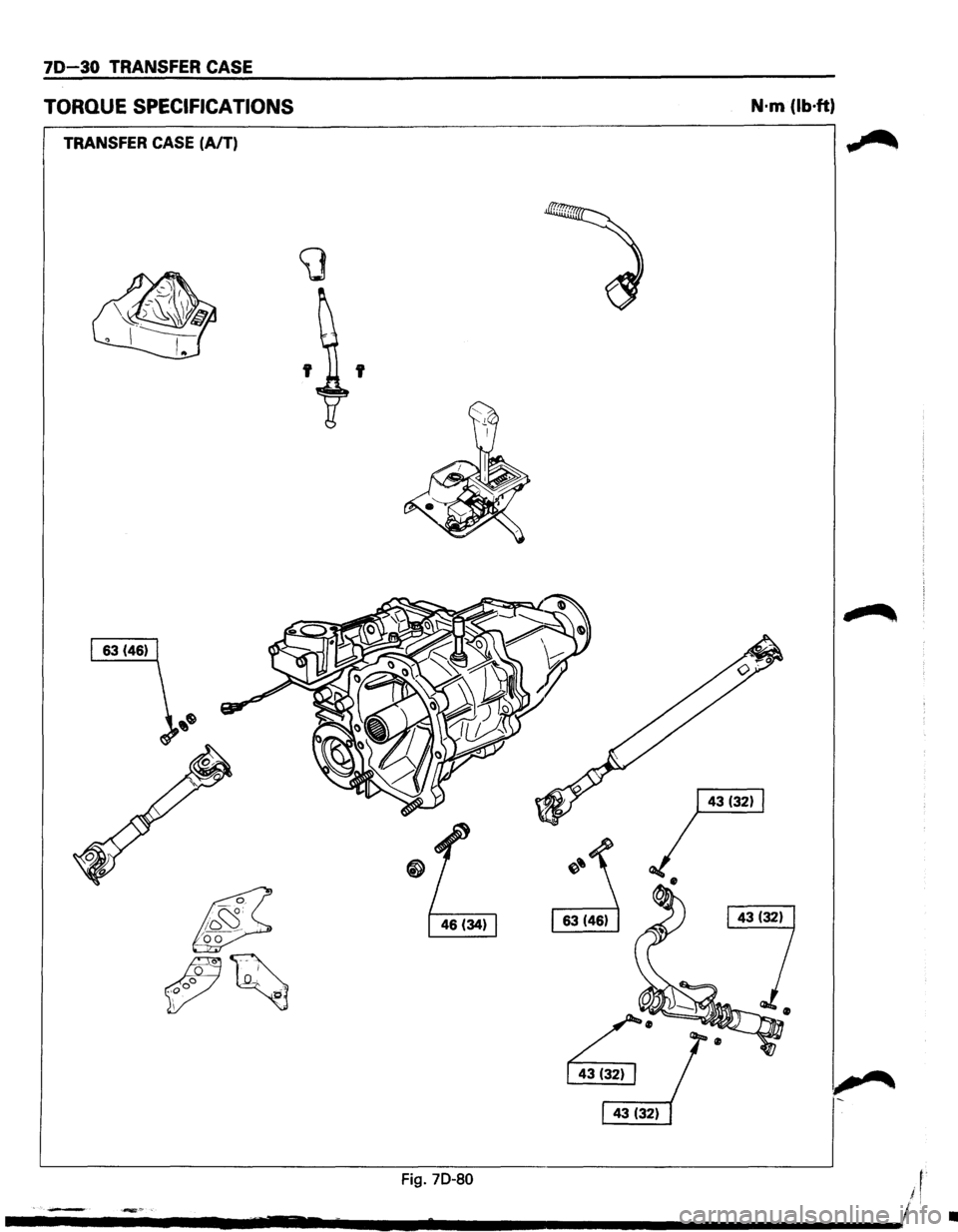
TORQUE SPECIFICATIONS
TRANSFER CASE (A/T)
~
-1 J2_ -"
'
~'~
~
r;;;;·
I 43 (32) I
N·m (lb·ft)
~"
1-
~----------------------------------------------------------~ Fig. 70-80
•
Page 1189 of 1928
TRANSFER CASE 70~31
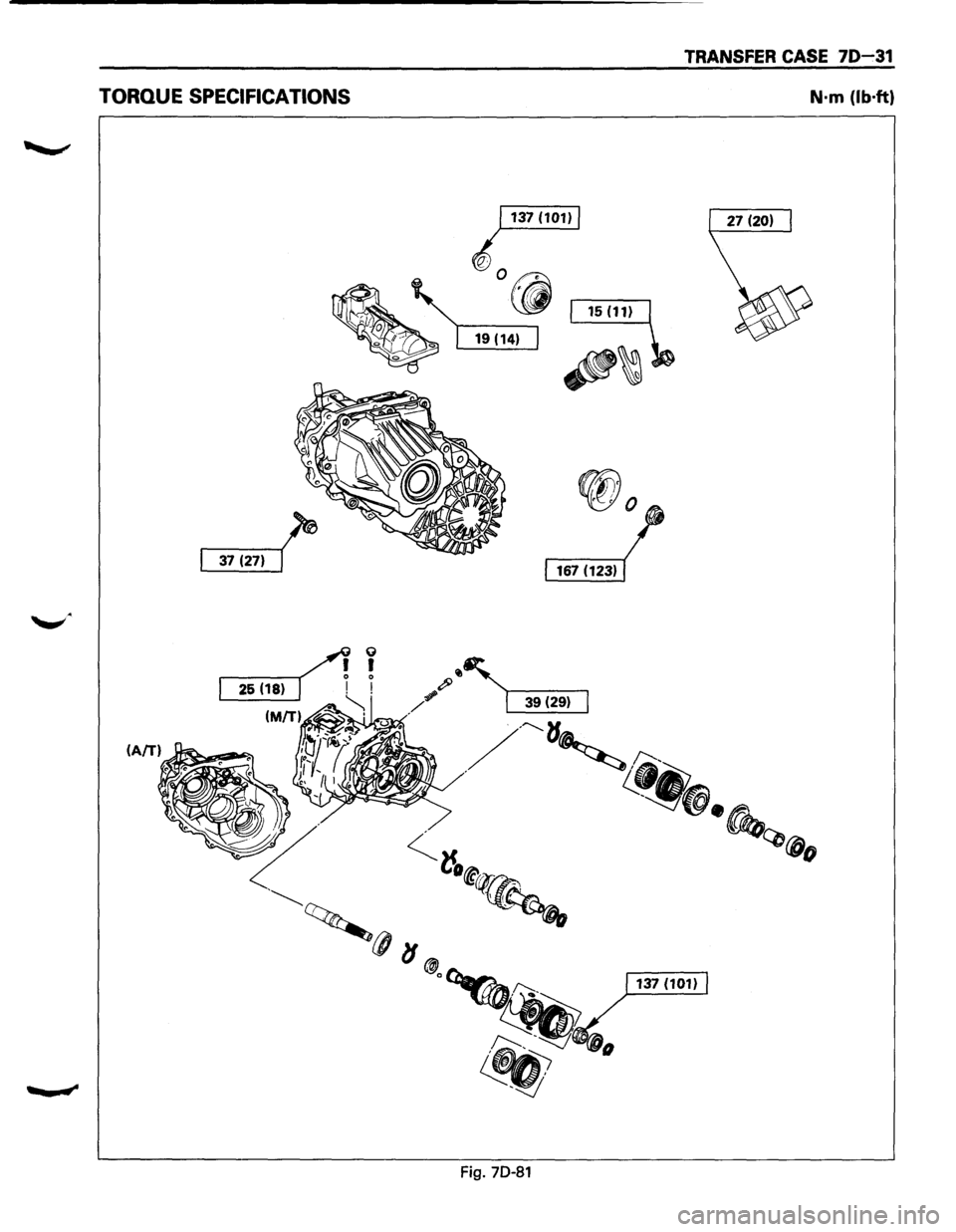
TORQUE SPECIFICATIONS N·m (lb·ft)
Fig. 70-81
Page 1191 of 1928
CHASSIS ELECTRICAL 8-1
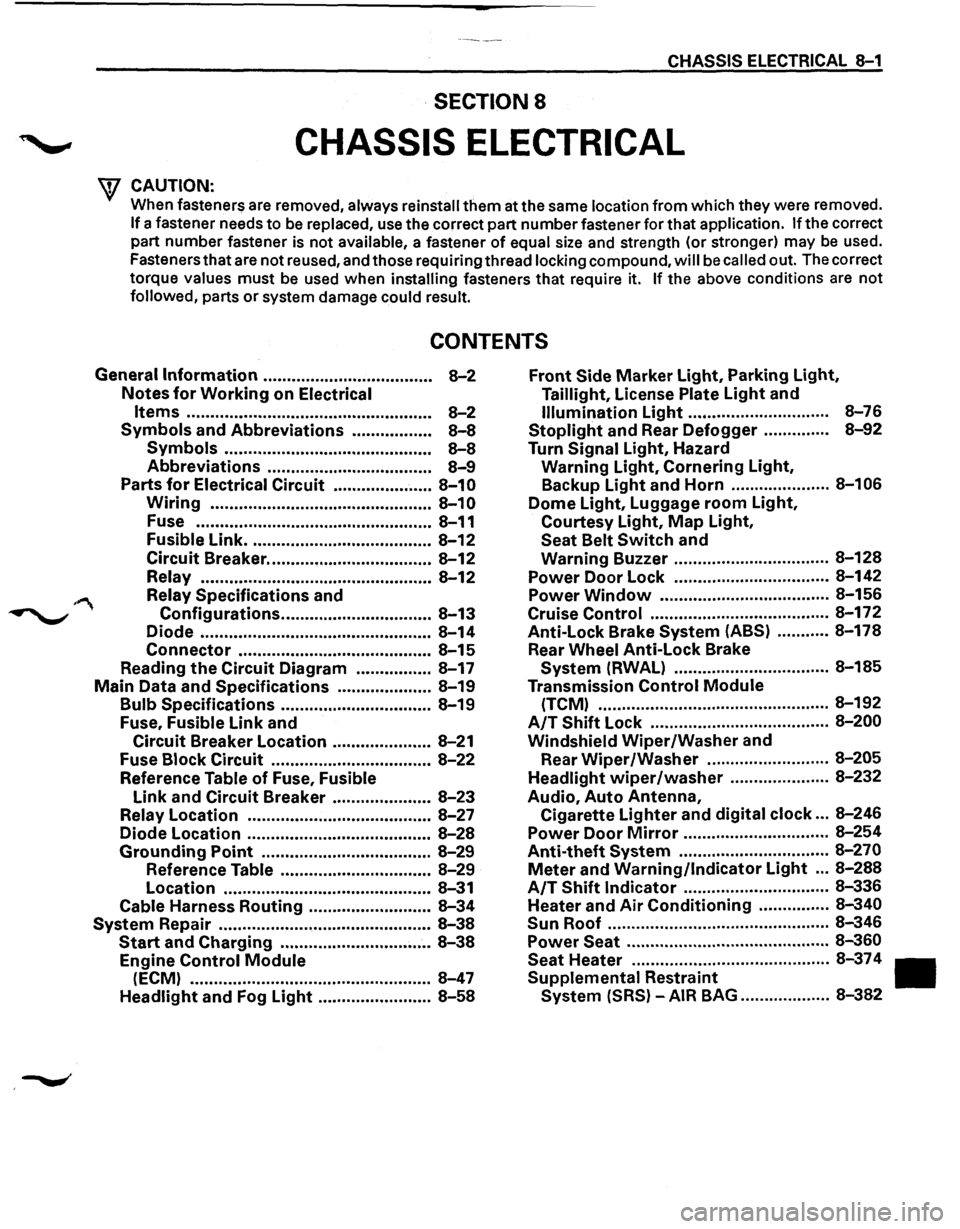
·SECTION 8
CHASSIS ELECTRICAL
'\f CAUTION: .
When fasteners are removed, always reinstall them at the same location from which they were removed.
If a fastener needs to be replaced, use the correct part number fastener for that application. If the correct
part number fastener is not
available, a fastener of equal size and strength (or stronger) may be used.
Fasteners that are not reused, and those requiring thread
locking compound, will be called out. The correct
torque
values must be used when installing fasteners that require it. If the above conditions are not
followed, parts or system damage could result.
CONTENTS
General Information .................................... 8-2
Notes for Working on Electrical
Items .................................................... 8-2
Symbols and Abbreviations ................. 8-8
Symbols ............................................ 8-8
Abbreviations ................................... 8-9
Parts for Electrical Circuit ..................... 8-10
Wiring ............................................... 8-10
Fuse .................................................. 8-11
Fusible Link ....................................... 8-12
Circuit Breaker ................................... 8-12
Relay ................................................. 8-12
Relay Specifications and
Configurations ................................ 8-13
Diode ................................................. 8-14
Connector ......................................... 8-15
Reading the Circuit Diagram ................ 8-17
Main Data and Specifications .................... 8-19
Bulb Specifications ................................ 8-19
Fuse,
Fusible Link and
Circuit Breaker Location ..................... 8-21
Fuse
Block Circuit .................................. 8-22
Reference Table of Fuse, Fusible
Link and Circuit Breaker ..................... 8-23
Relay Location ....................................... 8-27
Diode Location .......................................
8-28
Grounding Point .................................... 8-29
Reference Table ................................ 8-29
Location ............................................ 8-31
Cable Harness Routing .......................... 8-34
System Repair .............................................. 8-38
Start and Charging ................................ 8-38
Engine Control Module
(ECM) ................................................... 8-47
Headlight and Fog Light ........................ 8-58
Front Side Marker Light, Parking Light,
Taillight, License Plate Light and
Illumination Light .............................. 8-76
Stoplight and Rear Defogger .............. 8-92
Turn Signal Light, Hazard
Warning
Light, Cornering Light,
Backup
Light and Horn ..................... 8-106
Dome Light, Luggage room Light,
Courtesy Light, Map Light,
Seat Belt Switch and
Warning Buzzer ................................. 8-128
Power Door Lock ................................. 8-142
Power
Window .................................... 8-156
Cruise
Control ...................................... 8-172
Anti-Lock Brake
System (ABS) ........... 8-178
Rear
Wheel Anti-Lock Brake
System (RWAL) ................................. 8-185
Transmission
Control Module
(TCM) ................................................. 8-192
A/T Shift Lock ...................................... 8-200
Windshield
Wiper/Washer and
Rear
Wiper/Washer .......................... 8-205
Headlight wiper /washer ..................... 8-232
Audio, Auto Antenna,
Cigarette
Lighter and digital clock ... 8-246
Power Door Mirror ............................... 8-254
Anti-theft System ................................ 8-270
Meter and Warning/Indicator Light ... 8-288
A/T Shift Indicator ............................... 8-336
Heater and
Air Conditioning ............... 8-340
Sun
Roof ............................................... 8-346
Power Seat ........................................... 8-360
Seat
Heater .......................................... 8-37 4
Supplemental Restraint
System (SRS) -AIR BAG ................... 8-382
Page 1260 of 1928
I ..
8 -70 CHASSIS ELECTRICAL
When placing a live inflator module on a bench
or other surface, always face the bag and trim
cover up, away from the surface. This is neces
sary so that a free space is provided to allow the
air bag to expand in the unlikely event of acci·
dental
deployment.
4. Steering wheel
• Refer to STEERING WHEEL REPLACEMENT in
Section 3F4.
5. Lighting switch (Combination switch)
• Disconnect the switch connector.
• Remove four screws.
• Remove the lighting switch together with SRS
coil assembly.
'\f CAUTION:
Do not remove SRS coil assembly from the com·
bination switch assembly.
E) INSTALLATION
To install, follow the removal steps in the reverse
order, noting the
following points.
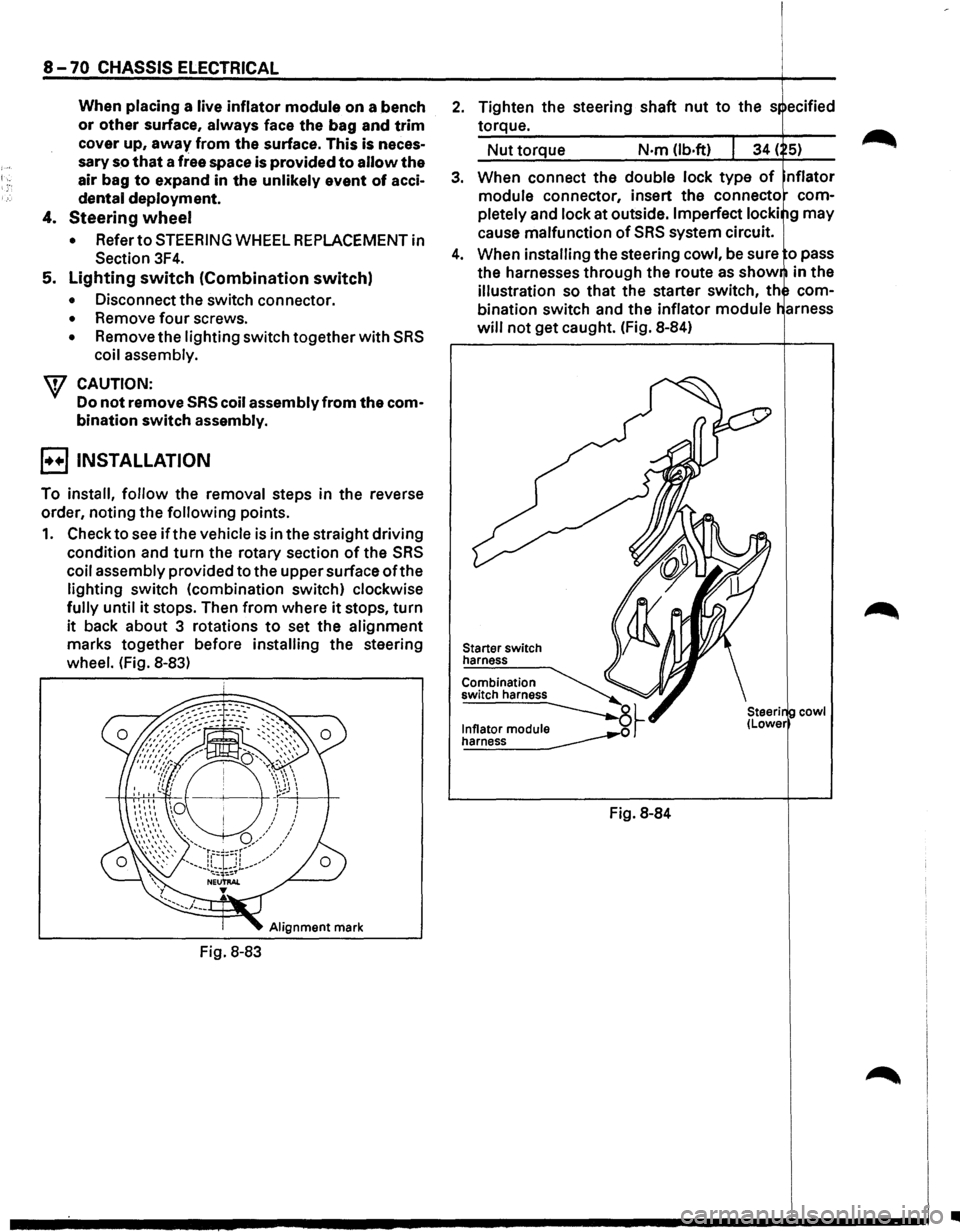
1. Check to see if the vehicle is in the straight driving
condition and turn the rotary section of the SRS
coil assembly provided to the upper surface ofthe
lighting switch (combination switch) clockwise
fully until it stops. Then from where it stops, turn
it back about 3 rotations to set the alignment
marks together before installing the steering
wheel. (Fig. 8-83)
Alignment mark
Fig. 8-83
2. Tighten the steering shaft nut to the s ecified
torque.
Nut torque N·m (lb.ft)
3. When connect the double lock type of nflator
module connector, insert the connecto com
pletely
and lock at outside. Imperfect locki g may
cause malfunction of SRS system circuit.
4. When installing the steering cowl, be sure o pass
the harnesses
through the route as show in the
illustration so that the starter switch, th com
bination switch and the inflator module
will not get caught. (Fig. 8-84)
Starter switch
harness
Combination
switch harness
~~ ~
Fig. 8-84
cowl
•
Page 1414 of 1928
8-224 CHASSIS ELECTRICAL
1. Operation in low speed
With the motor connector terminal 2 lC-38l con
nected
to the battery (+) terminal and the
connector3lC-38l
to the(-) terminal, check to see
if the motor rotates in low speed.
2. Operation in high speed
With the motor connector terminal 1 lC-38l con
nected
to the battery (+) terminal and the
connector
3lC-38I to the(-) terminal, check to see
if the motor rotates in high speed.
3.
Stop operation
After stopping the windshield wiper in the
position on the
way by confirming the operation
at the
low speed in Item No.1.
When the connectors 2
lC-381 and 5 lC-381 are
connected,
while connecting the motor connector
terminal 6
IC-381 to the battery (+) terminal and
the connector 3
IC-381 to the H terminal, check
to see if the motor rotates at low speed and stops
at the auto-stop position.
Repair
or replace the motor when the results of
the above inspections are found abnormal.
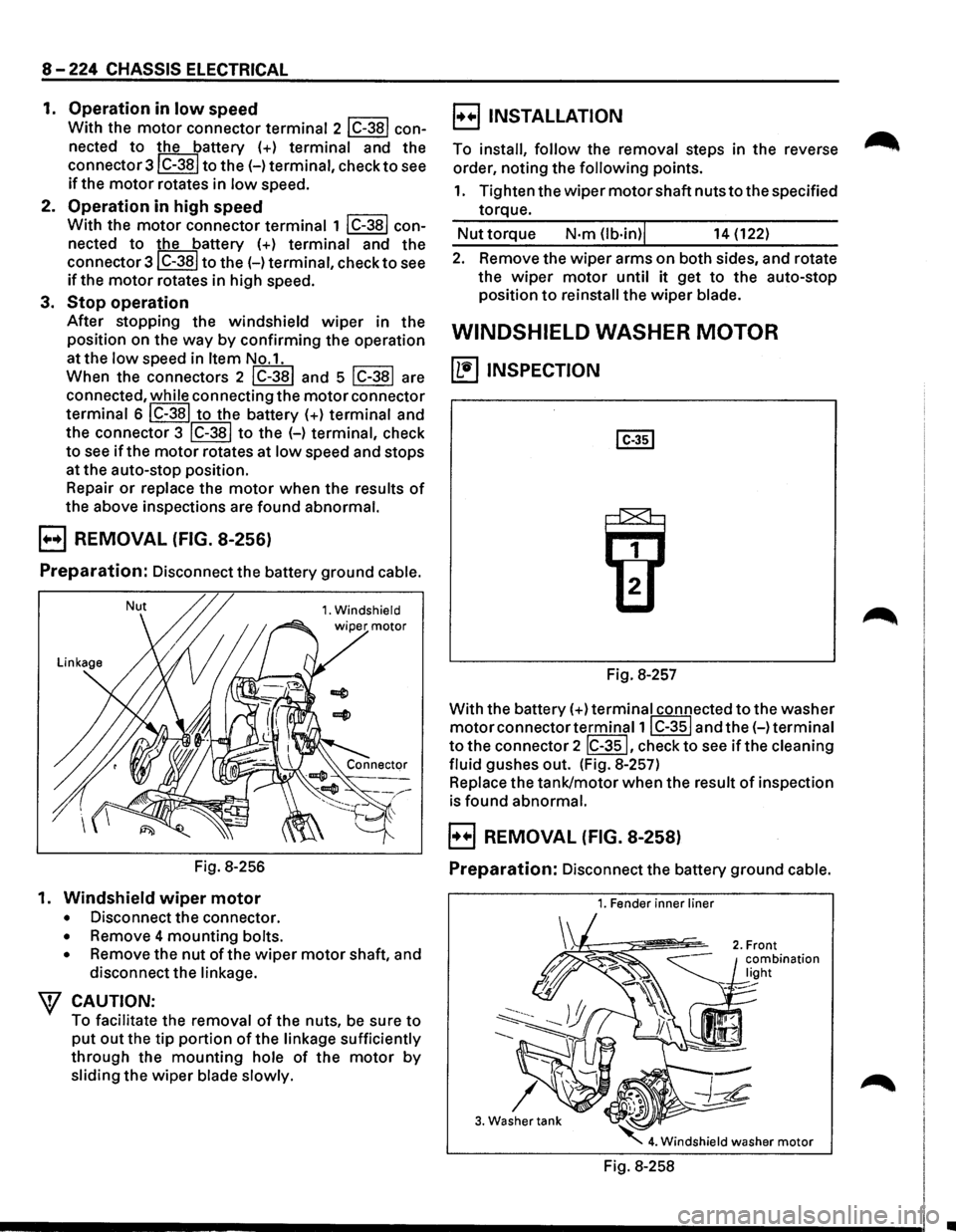
B REMOVAL (FIG. 8-256)
Preparation: Disconnect the battery ground cable.
Nut 1. Windshield
Fig. 8-256
1.
Windshield wiper motor
• Disconnect the connector.
• Remove 4 mounting bolts.
•
Remove the nut of the wiper motor shaft, and
disconnect the
linkage.
\f CAUTION:
To facilitate the removal of the nuts, be sure to
put out the tip portion of the linkage sufficiently
through the mounting hole of the motor by
sliding the wiper blade slowly.
B INSTALLATION
To install, follow the removal steps in the reverse
order, noting the
following points.
1. Tighten the wiper motor shaft nuts to the specified
torque.
Nut torque N·m (lb·in)j 14 (122)
2. Remove the wiper arms on both sides, and rotate
the
wiper motor until it get to the auto-stop
position
to reinstall the wiper blade.
WINDSHIELD WASHER MOTOR
~ INSPECTION
Fig. 8-257
With the battery(+)
terminal connected to the washer
motor connector terminal1 I C-351 and the(-) terminal
to the connector 2 IC-351, check to see if the cleaning
fluid
gushes out. (Fig. 8-257)
Replace the tank/motor when the result of inspection
is found abnormal.
B REMOVAL (FIG. 8-258)
Preparation: Disconnect the battery ground cable.
1. Fender inner liner
3. Washer tank
Fig. 8-258
•
Page 1415 of 1928
1. Fender inner liner (right side)
2. Front combination light
• Remove the screw
3. Washer tank
• Remove 2 screws.
• Remove the filler neck
• Remove the hose.
• Disconnect the connector of the washer
motor.
4. Windshield washer motor
• Hold the motor and pull it out from the washer
tank.
E3 INSTALLATION
To install, follow the removal steps in the reverse
order.
WINDSHIELD WIPER ARM/BLADE
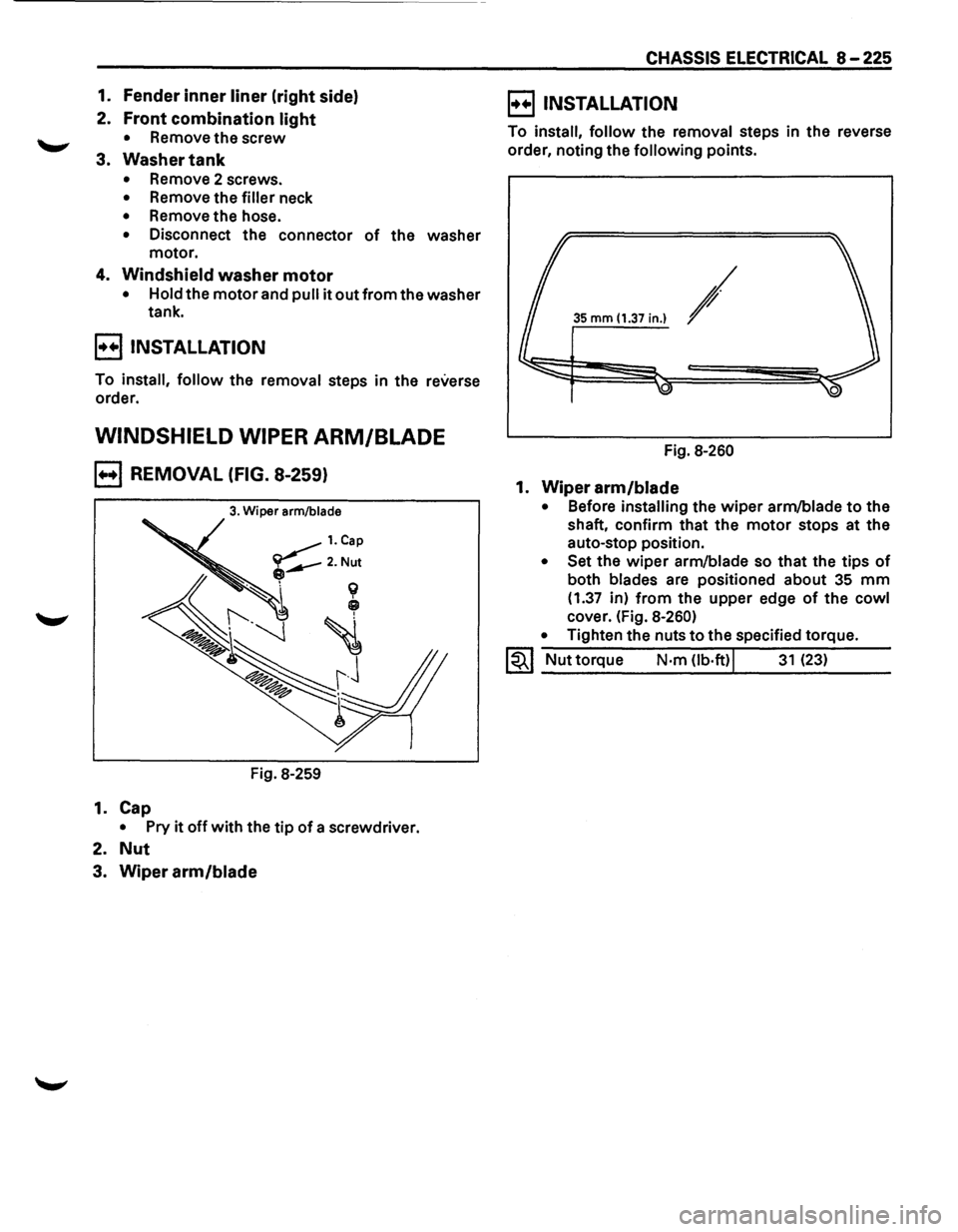
B REMOVAL (FIG. 8-259)
3. Wiper arm/blade
Fig. 8-259
1. Cap
• Pry it off with the tip of a screwdriver.
2. Nut
3. Wiper arm/blade
CHASSIS ELECTRICAL 8-225
E) INSTALLATION
To install, follow the removal steps in the reverse
order, noting the
following points.
35 mm (1.37 in.) /
Fig. 8-260
1. Wiper arm/blade
• Before installing the wiper arm/blade to the
shaft, confirm that the
motor stops at the
auto-stop position.
• Set the wiper arm/blade so that the tips of
both blades are positioned about 35 mm
(1.37 in) from the upper edge of the cowl
cover. (Fig. 8-260)
•
Tighten the nuts to the specified torque.
1~1 Nut torque N·m Ob·ft)j 31 (23)
Page 1418 of 1928
8-228 CHASSIS ELECTRICAL
1. Tailgate trim pad
• Refer to the removal steps of the tailgate in
Section
10 "BODY".
2. Wiper arm/blade
Refer to the removal steps of the rear wiper arm/
blade in this section.
3.
Motor
• Remove the wiper motor shaft nut.
• Disconnect the connector.
• Remove 3 screws.
E) INSTALLATION
To install, follow the removal steps in the reverse
order, noting the
following points.
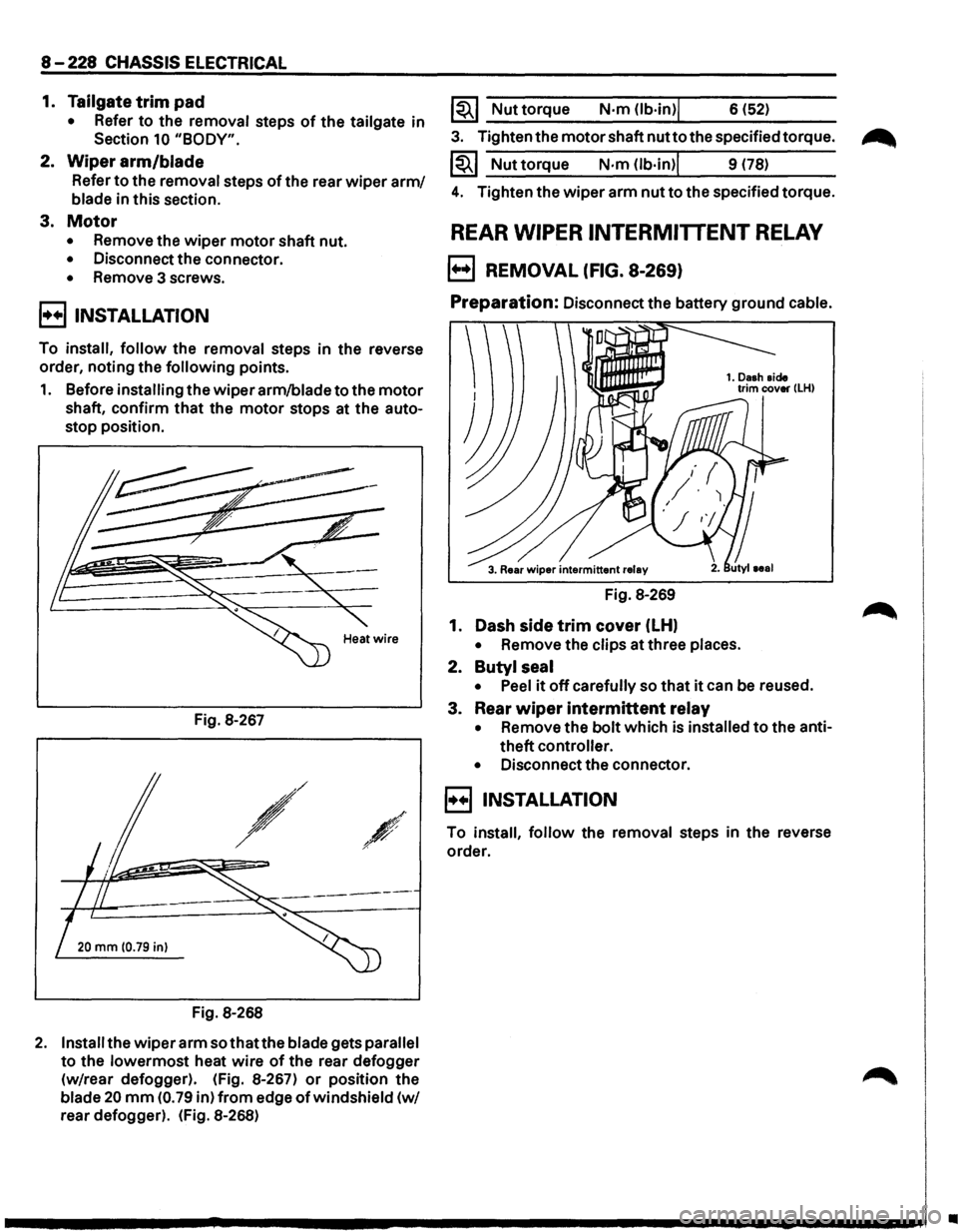
1. Before installing the wiperarm/bladetothe motor
shaft, confirm that the motor stops at the auto
stop position.
Fig. 8-267
,/
/
20 mm (0.79 in)
Fig. 8-268
2. Install the wiper arm sothatthe blade gets parallel
to the lowermost heat wire of the rear defogger
(w/rear defogger). (Fig. 8-267)
or position the
blade 20 mm (0. 79 in) from edge of windshield (w/
rear defogger). (Fig. 8-268)
1~1 Nut torque N·m (lb·in)j 6 (52)
3. Tighten the motor shaft nutto the specified torque.
1~1 Nuttorque N·m (lb·in)l 9 (78)
4. Tighten the wiper arm nut to the specified torque.
REAR WIPER INTERMITTENT RELAY
B REMOVAL (FIG. 8-269)
Preparation: Disconnect the battery ground cable.
Fig. 8-269
1. Dash
side trim cover (LH)
• Remove the clips at three places.
2. Butyl seal
•
Peel it off carefully so that it can be reused.
3. Rear
wiper intermittent relay
• Remove the bolt which is installed to the anti
theft
controller.
•
Disconnect the connector.
E) INSTALLATION
To install, follow the removal steps in the reverse
order.
•
Page 1420 of 1928
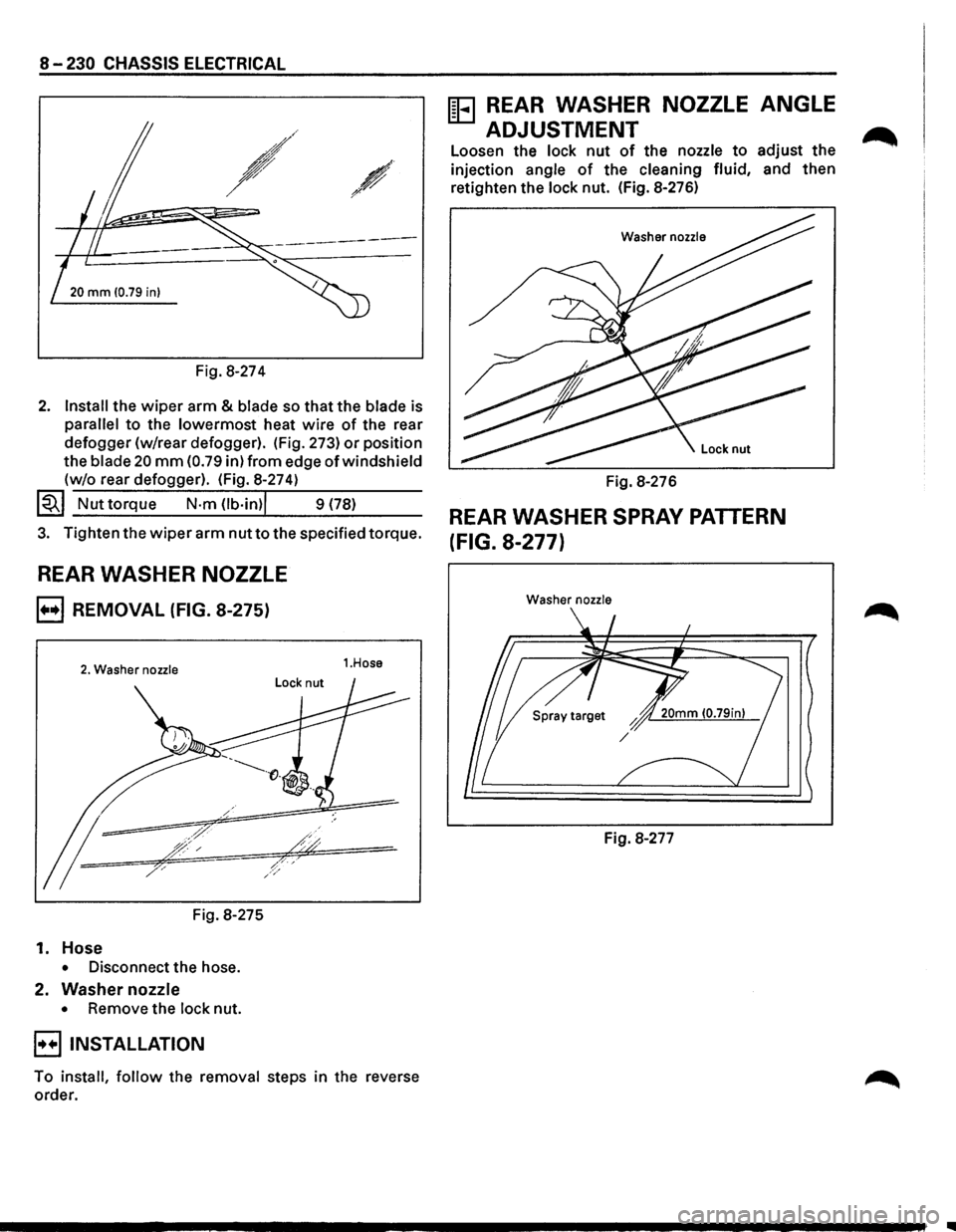
8-230 CHASSIS ELECTRICAL
-~ ~-
20 mm 10.79 in)
Fig. 8-274
2. Install the wiper arm & blade so that the blade is
parallel to the lowermost heat wire of the rear
defogger (w/rear defogger). (Fig. 273)
or position
the
blade 20 mm (0.79 in) from edge of windshield
(w/o rear defogger). (Fig. 8-274)
~~~ Nut torque N·m Ob·in)l 9 (78)
3. Tighten the wiper arm nut to the specified torque.
REAR WASHER NOZZLE
B REMOVAL (FIG. 8-275)
2. Washer nozzle
Fig. 8-275
1. Hose
• Disconnect the hose.
2. Washer nozzle
• Remove the lock nut.
B INSTALLATION
1.Hose
To install, follow the removal steps in the reverse
order.
ffi3 REAR WASHER NOZZLE ANGLE
ADJUSTMENT
Loosen the lock nut of the nozzle to adjust the
injection angle of the cleaning fluid, and then
retighten the lock nut. (Fig. 8-276)
Washer nozzle
Fig. 8-276
REAR WASHER SPRAY PATTERN
(FIG. 8-277)
Washer nozzle
Fig. 8-277
..
Page 1433 of 1928
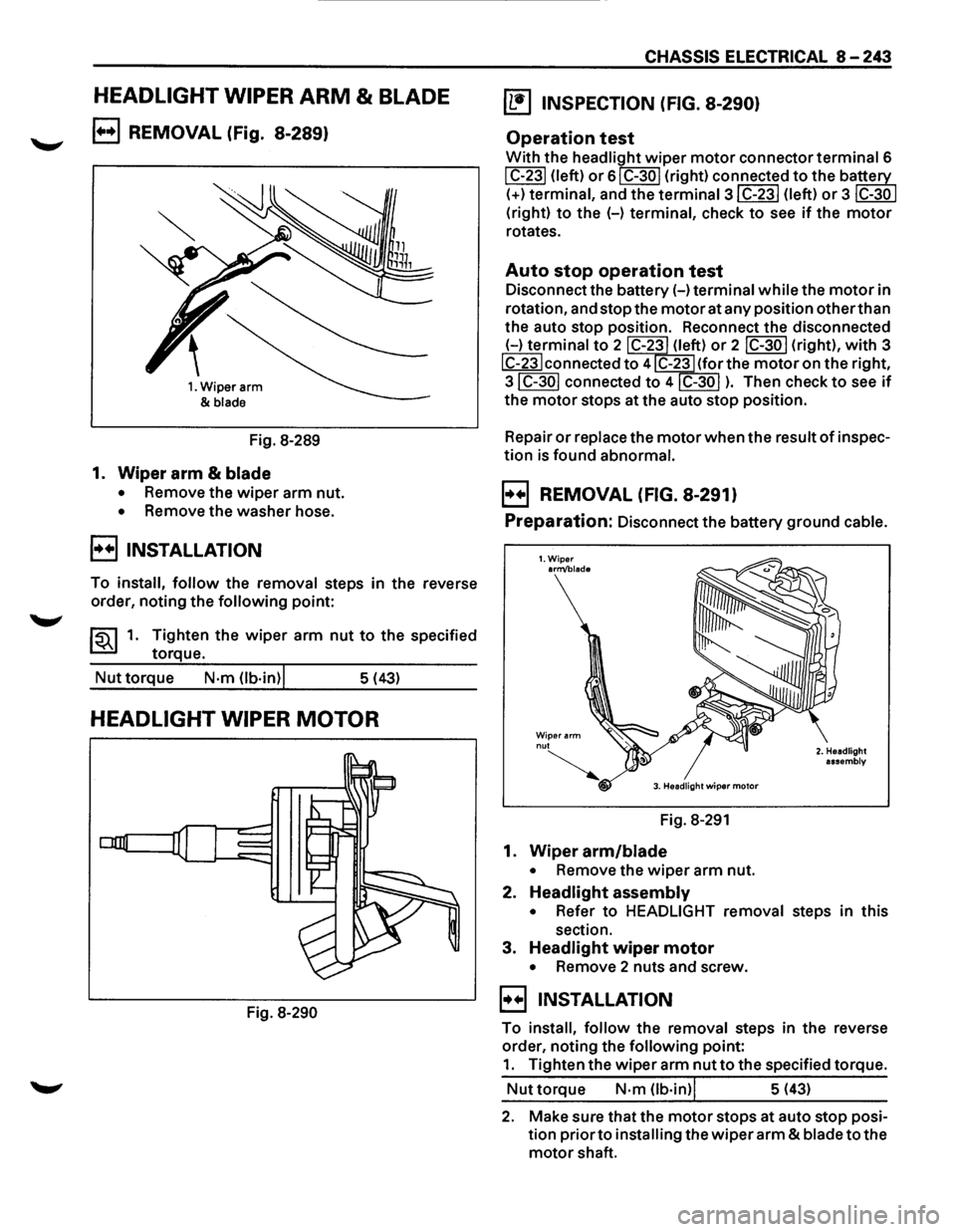
HEADLIGHT WIPER ARM & BLADE
B REMOVAL (Fig. 8-289)
1. Wiper arm
&
blade
Fig. 8-289
1. Wiper arm & blade
• Remove the wiper arm nut.
• Remove the washer hose.
B INSTALLATION
To install, follow the removal steps in the reverse
order, noting
the following point:
~~~1. Tighten the wiper arm nut to the specified
torque.
Nut torque N·m Ob·in)l 5 (43)
HEADLIGHT WIPER MOTOR
Fig. 8-290
CHASSIS ELECTRICAL 8-243
~ INSPECTION (FIG. 8-290)
Operation test
With the headlight wiper motor connector terminal 6
I C-231 (left) or 61 C-30 I (right) connected to the ba~
(+)terminal, and the termina13IC-23I (left) or 3 ~
(right) to the (-) terminal, check to see if the motor
rotates.
Auto stop operation test
Disconnect the battery(-) terminal while the motor in
rotation, and stop the
motor at any position other than
the auto stop position. Reconnect the disconnected
(-)terminal to 2 C-23 (left) or 2 IC-30 I (right), with 3
IC-23Iconnected to 4 C-23 (for the motor on the right,
3IC-30I connected to 4IC-30I ). Then check to see if
the motor stops at the auto stop position.
Repair
or replace the motor when the result of inspec
tion is found abnormal.
B REMOVAL (FIG. 8-291)
Preparation: Disconnect the battery ground cable.
1.Wiper arm/blade
Wiper arm nut
~ 3. Headlight wiper motor
Fig. 8-291
1. Wiper arm/blade
• Remove the wiper arm nut.
2. Headlight assembly
2. Headlight
assembly
• Refer to HEADLIGHT removal steps in this
section.
3. Headlight wiper motor
• Remove 2 nuts and screw.
B INSTALLATION
To install, follow the removal steps in the reverse
order, noting the
following point:
1. Tighten the wiper arm nut to the specified torque.
Nut torque N·m (lb·in)l 5 (43)
2. Make sure that the motor stops at auto stop posi
tion
prior to installing the wiper arm & blade to the
motor shaft.