battery ISUZU TROOPER 1995 Workshop Manual
[x] Cancel search | Manufacturer: ISUZU, Model Year: 1995, Model line: TROOPER, Model: ISUZU TROOPER 1995Pages: 1928
Page 1634 of 1928
9J-10 Supplemental Restraint System
DIAGNOSIS
WARNING: TO AVOID DEPLOYMENT WHEN
TROUBLESHOOTING THE SRS, DO NOT USE
ELECTRICAL TEST EQUIPMENT SUCH AS A
BATTERY-POWERED OR AC-POWERED
VOLTMETER,OHMMETER,ETC., OR ANY TYPE OF
ELECTRICAL EQUIPMENT OTHER THAN THAT
SPECIFIED IN THIS MANUAL. DO NOT USE A
NON-POWERED PROBE TYPE TESTER.
INSTRUCTIONS IN THIS MANUAL MUST BE
FOLLOWED CAREFULLY, OTHERWISE PERSONAL
INJURY
MAY RESULT.
DIAGNOSTIC TROUBLE CODES
The "SRS Diagnostic System Check" must always be the
starting point of any SRS diagnosis. The "SRS
Diagnostic System Check" checks for proper" AIR BAG"
warning lamp operation and checks for
SRS diagnostic
trouble codes using the scan
tool.
1. Current diagnostic trouble codes-Malfunctions that
are presently being detected. Current diagnostic
trouble codes are stored
in RAM(Random Access
Memory).
2. History diagnostic trouble codes -All malfunctions
detected since the last time the history memory was
cleared. History diagnostic trouble codes are stored
in EEPROM.
SCAN TOOL DIAGNOSTICS
A scan tool is used to read current and history diagnostic
trouble codes and to clear all diagnostic trouble codes
after a repair is completed. The scan tool must be
updated to communicate with the SRS through a
replaceable cartridge before it can be used for
SRS
diagnostics. To use the scan tool, connect it to the data
link connector and turn the ignition switch
"ON." The scan
tool reads serial data from the DERM
"Serial Data" line
terminal
"A11" to the data link connector terminal "2".
USE OF SPECIAL TOOLS ~
WARNING: TO AVOID DEPLOYMENT WHEN
TROUBLESHOOTING THE SRS, DO NOT USE
ELECTRICAL TEST EQUIPMENT SUCH AS A
BATTERY POWERED
OR AC POWERED
VOLTMETER, OHMMETER, ETC., OR ANY TYPE OF
ELECTRICAL EQUIPMENT OTHER THAN THAT
SPECIFIED IN THIS MANUAL. DO NOT USE A
NON-POWERED PROBE TYPE TESTER.
INSTRUCTIONS IN THIS MANUAL MUST BE
FOLLOWED CAREFULLY, OTHERWISE PERSONAL
INJURY
MAY RESULT. YOU SHOULD BE FAMILIAR
WITH
THE TOOLS LISTED IN THIS SECTION UNDER
THE HEADING SRS SPECIAL TOOLS."
You should be able to measure voltage and resistance.
You should be familiar with proper use of a scan tool such
as the Tech 1 Diagnostic Computer TK-O, SRS
Driver/Passenger Load Tool J-41433, Connector Test
Adapter Kit J-35616-A, and the DVM(Digital
Multimeter)J-39200.
•
Page 1637 of 1928
Supplemental Restraint System 9J-13
ON-VEHICLE SERVICE
SERVICE PRECAUTIONS
WARNING: WHEN PERFORMING SERVICE ON OR
AROUND SRS COMPONENTS OR SRS WIRING,
FOLLOW
THE PROCEDURES LISTED BELOW TO
TEMPORARILY DISABLE THE SRS. FAILURE TO
FOLLOW PROCEDURES COULD RESULT IN
POSSIBLE AIR
BAG DEPLOYMENT, PERSONAL
INJURY OR OTHERWISE
UNNEEDED SRS
REPAIRS.
The DERM in Driver-Passenger SRS can maintain
sufficient voltage to cause a deployment for up to 2
minutes after the ignition switch is turned
"OFF," the
battery is disconnected, or the fuse powering the DERM
is removed.
Many of the service procedures require removal of the
"AIR BAG" fuse, and disconnection of the inflator
modules from the deployment loop to avoid an accidental
deployment.
If the inflator module is disconnected from
the deployment loop as noted in the "Disabling the
SRS"
procedure that follows, service can begin immediately
without waiting for the 2-minute time period to expire.
DISABLING THE SRS
REMOVAL
Turn the ignition switch to "OFF"
1. Remove SRS fuse C-21, C-22, C-23 and C-24 from
left dash side lower fuse block.
2. Disconnect yellow 3-way connector at the base of
steering column.
3. Remove 1/P compartment door assembly, Refer to
"Passenger inflator module replacement" in section
9J-132.
4. Disconnect yellow 4-way connector behind the 1/P
compartment door assembly.
IMPORTANT
• With the "AIR BAG" fuse removed and ignition switch
"ON," if Fuse 21 left. the "AIR BAG" warning lamp will
be "ON." This is normal operation and does not
indicate an
SRS malfunction.
ENABLING THE SRS
INSTALLATION
Turn ignition switch to "LOCK" and remove key.
1. Connect yellow 4-way connector for passenger
inflator module.
2. 1/P compartment door assembly, Refer to
"Passenger inflator module replacemenf' in section
9J-3.
3. Connect yellow 2-way connector at the base of the
steering column.
4. Install "AIR BAG" fuse C-21, C-22, C-23 and C-24 to
left dash side lower fuse block.
Turn ignition switch to
"RUN" and verify that the "AIR
BAG"
warning lamp flashes seven times and then turns
"OFP' If it does not operate as described, perform the
"SRS Diagnostic System Check" in section 9J-2.
HANDLING/INSTALLATION/DIAGNOSIS
1. Inflator modules should not be subjected to
temperatures above
65°C{150°F).
2. Discriminating sensors, inflator modules, arming
sensors, or DERMs should not be used if they have
been dropped from a height
of 91.4 centimeters
{3feet).
3. When a discriminating sensor or arming sensor is
replaced, it must be oriented with the arrow on the
sensor pointing toward the front of the vehicle.
It is
very important for the discriminating sensors and
arming sensor to be located flat on the mounting
surface, parallel to the vehicle datum line.
It is
important that the sensor mounting surface is free of
any dirt or other foreign material.
4. Do not apply power to the SRS unless all
components are connected or a diagnostic chart
requests it, as this
will set a diagnostic trouble code.
5. The "SRS Diagnostic System Check" must be the
starting point of any
SRS diagnostics. The "SRS
Diagnostic System Check" will verify proper "AIR
BAG"
warning lamp operation and will lead you to the
correct chart to diagnose any
SRS malfunctions.
Bypassing these procedures may result
in extended
diagnostic time, incorrect diagnosis, and incorrect
parts replacements.
Page 1641 of 1928
'"""' Supplemental Restraint System 9J-17
3. Short the two SRS deployment harness leads
together by fully seating one banana plug into the
other. SRS deployment harness shall remain
shorted and not be connected to a power source until
the air bag is to
be deployed.
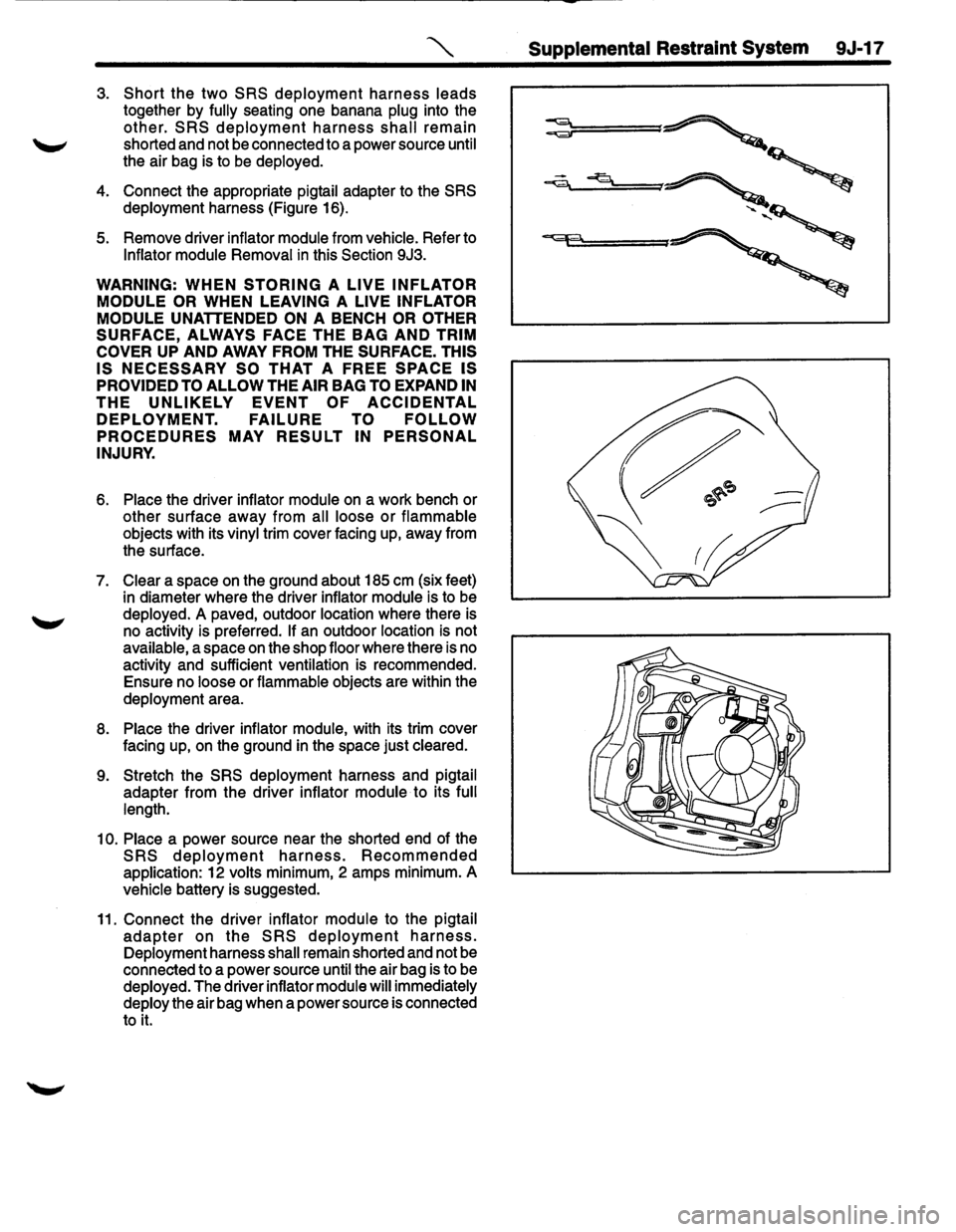
4. Connect the appropriate pigtail adapter to the SRS
deployment harness (Figure 16).
5. Remove driver inflator module from vehicle. Refer to
Inflator module Removal in this Section 9J3.
WARNING: WHEN STORING A LIVE INFLATOR
MODULE OR
WHEN LEAVING A LIVE INFLATOR
MODULE
UNATTENDED ON A BENCH OR OTHER
SURFACE, ALWAYS FACE THE BAG AND TRIM
COVER
UP AND AWAY FROM THE SURFACE. THIS
IS NECESSARY SO THAT A FREE SPACE IS
PROVIDED TO ALLOW THE AIR BAG TO EXPAND IN
THE UNLIKELY EVENT OF ACCIDENTAL
DEPLOYMENT. FAILURE TO FOLLOW
PROCEDURES MAY RESULT IN PERSONAL
INJURY.
6. Place the driver inflator module on a work bench or
other surface away from all loose
or flammable
objects with its vinyl trim cover facing up, away from
the surface.
7. Clear a space on the ground about 185 em (six feet)
in diameter where the driver inflator module is to be
deployed.
A paved, outdoor location where there is
no activity is preferred.
If an outdoor location is not
available, a space
on the shop floor where there is no
activity and sufficient ventilation is recommended.
Ensure no loose or flammable objects are within the
deployment area.
8. Place the driver inflator module, with its trim cover
facing up,
on the ground in the space just cleared.
9. Stretch the SRS deployment harness and pigtail
adapter from the driver inflator module to its full
length.
10. Place a power source near the shorted end of the
SRS deployment harness. Recommended
application: 12 volts minimum, 2 amps minimum. A
vehicle battery is suggested.
11. Connect the driver inflator module to the pigtail
adapter on the SRS deployment harness.
Deployment harness shall remain shorted and not be
connected to a power source until the air bag is to be
deployed. The driver inflator module will immediately
deploy the air bag when a power source is connected
to
it.
Page 1642 of 1928
9J-18 Supplemental Restraint System
NOTE: Ensure that the pigtail adapter is firmly seated
into the driver inflator module connector. Failure to fully
seat the connectors may leave the shorting bar located
in the
driver inflator module connector functioning
(shorted) and may result
in non-deployment of the driver
inflator module.
12. Verify that the area around the driver inflator module
is clear of all people and loose or flammable objects.
13. Verify that the driver inflator module is resting with its
trim cover facing up.
14. Notify all people
in the immediate area that you
intend to deploy the driver inflator module. The
deployment will be accompanied by a loud noise
which may startle the uninformed.
15.
Separate the two banana plugs on the SRS
deployment harness.
NOTE: When the air bag deploys, the driver inflator
module may jump about
30 em (one foot) vertically. This
is a normal reaction of the driver inflator module to the
force of the rapid gas expansion inside the air bag.
NOTE: When the air bag deploys, the rapid gas
expansion will create a loud noise. Notify all people
in the
immediate area that you intend to deploy the driver
inflator module.
16. Connect the
SRS deployment harness wires to the
power source to immediately deploy the driver
inflator module. Recommended application: 12 volts
minimum, 2 amps minimum. A vehicle battery is
suggested.
17. Disconnect the
SRS deployment harness from the
power source.
18.
Short the two SRS deployment harness leads
together by fully seating one banana plug into the
other.
19.
In the unlikely event that the driver inflator module did
not deploy after following these procedures, proceed
immediately with
Steps 24 through 27. If the driver
inflator module did deploy, proceed with
Steps 20
through 23.
20. Put on a pair of shop gloves to protect your hands
from possible irritation and heat when handling the
deployed driver inflator module.After the driver
inflator module has been deployed, the surface of the
air bag may contain a powdery residue. This power
consists primarily of cornstarch(used to lubricate the
bag as it inflates) and byproducts of the chemical
reaction.
Sodium hydroxide dust( similar to lye soap)
is produced as a byproduct
of the deployment
reaction.The sodium hydroxide then quickly reacts
with the atmospheric moisture and is converted to
sodium carbonate and sodium bicarbonate(baking
soda). Therefore, it is unlikely that sodium hydroxide
will be present after deployment. As a precaution,
however, gloves and safely glasses are
recommended to prevent any possible irritation of
the skin or eyes.
WARNING: SAFETY PRECAUTIONS MUST BE
OBSERVED WHEN
HANDING A DEPLOYED
INFLATOR MODULE. AFTER DEPLOYMENT, THE ~
METAL SURFACES OF THE INFLATOR MODULE
WILL BE VERY HOT. ALLOW THE INFLATOR
MODULE TO COOL BEFORE HANDLING ANY
METAL PORTION OF IT. DO NOT PLACE THE
DEPLOYED
INFLATOR MODULE NEAR ANY
FLAMMABLE OBJECTS.
FAILURE TO FOLLOW
PROCEDURES MAY RESULT
IN FIRE OR
PERSONAL INJURY.
After a driver inflator module has been deployed, the
metal canister and surrounding areas
of the driver
inflator module will
be very hot. Do not touch the metal
areas of the driver inflator module for about twenty
minutes after deployment.
If the deployed driver inflator
module must
be moved before it is cool, wear gloves and
handle by the air bag or trim cover.
21. Disconnect the pigtail adapter from the driver inflator
module as soon after deployment as possible. This
will prevent damage to the pigtail adapter or
SRS
deployment harness due to possible contact with the
hot driver inflator module canister. The pigtail can be
reused. They should, however, be inspected for
damage after each deployment and replaced if
necessary.
22. Dispose of the deployed driver inflator module
through normal refuse channels after it has cooled
for at least
20 minutes. ~
23. Wash your hands with mild soap and water
afterward.
NOTE: The remaining steps are to be followed in the
unlikely event that the driver inflator module did not
deploy after following these procedures.
24. Ensure that the
SRS deployment harness has been
disconnected from the power source and that its two
banana plugs have been shorted together by fully
seating one banana plug into the other.
25. Disconnect the pigtail
adapter from the driver inflator
module.
WARNING: WHEN STORING A LIVE INFLATOR
MODULE OR WHEN LEAVING A LIVE INFLATOR
MODULE UNATTENDED ON A BENCH OR OTHER
SURFACE, ALWAYS FACE THE BAG AND
TRIM
COVER
UP AND AWAY FROM THE SURFACE. THIS
IS
NECESSARY SO THAT A FREE SPACE
ISRPROVIDED TO ALLOW THE AIR BAG TO
EXPAND IN THE UNLIKELY EVENT OF ACCIDENTAL
DEPLOYMENT. FAILURE TO FOLLOW
PROCEDURES MAY RESULT IN PERSONAL
INJURY.
•
Page 1644 of 1928
9J-20 Supplemental Restraint SysteA
~----------------------------------~
--
=======C.pp=::::J
============~~ 'r;;;;r=
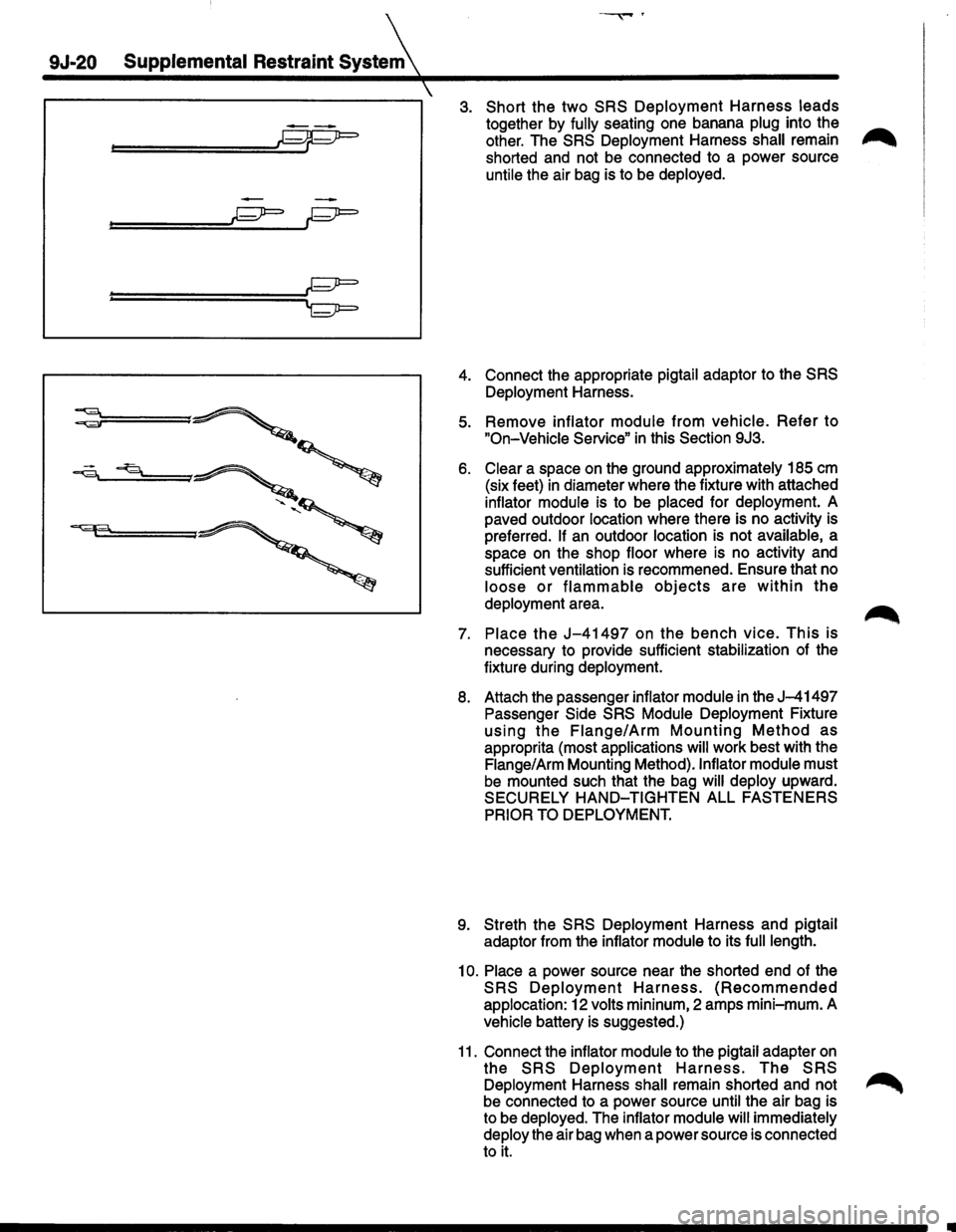
3. Short the two SRS Deployment Harness leads
together by fully seating one banana plug into the ..-.,.
other. The SRS Deployment Harness shall remain ,..,......
shorted and not be connected to a power source
untile the air bag is to be deployed.
4. Connect the appropriate pigtail adaptor to the SRS
Deployment Harness.
5. Remove inflator module from vehicle. Refer to
"On-Vehicle Service" in this Section 9J3.
6. Clear a space on the ground approximately 185 em
(six feet) in diameter where the fixture with attached
inflator module is to be placed for deployment. A
paved outdoor location where there is no activity is
preferred.
If an outdoor location is not available, a
space on the shop floor where is no activity and
sufficient ventilation is recommened. Ensure that no
loose or flammable objects are within the
deployment area.
7. Place the J-41497 on the bench vice. This is
necessary to provide sufficient stabilization of the
fixture during deployment.
8. Attach the passenger inflator module in the J-41497
Passenger Side SRS Module Deployment Fixture
using the Flange/Arm Mounting Method as
approprita (most applications will work best with the
Flange/Arm Mounting Method).lnflator module must
be mounted such that the bag will deploy upward.
SECURELY
HAND-TIGHTEN ALL FASTENERS
PRIOR TO DEPLOYMENT.
9. Streth the SRS Deployment Harness and pigtail
adaptor from the inflator module to its
full length.
10. Place a power source near the shorted end of the
SRS Deployment Harness. (Recommended
applocation: 12 volts mininum, 2 amps mini-mum. A
vehicle battery is suggested.)
11. Connect the inflator module to the pigtail adapter on
the SRS Deployment Harness. The SRS
Deployment Harness shall remain shorted and not ~
be connected to a power source until the air bag is
to be deployed. The inflator module
will immediately
deploy the air bag when a power source is connected
to it.
Page 1647 of 1928
15. Strip 13 mm(1/2 inch) of insulation from each wire
lead of the connector.
16.
Cut two 900 cm(30 feet) deployment wires from
0.8mm2(18 gauge) or thicker multi-strand wire.
These wires
will be used to fabricate the passenger
deployment harness.
17.
Strip 13 mm {1/2inch)of insulation from both ends of
the wires cut in the previous step.
18.
Short the wires by twisting together one end from
each.
Deployment wires shall remain shorted and
not be connected to a power source
until the air bag
is to be deployed.
WARNING: FAILURE TO FOLLOW
PROCEDURES
IN THE ORDER LISTED COULD RESULT IN
PERSONAL INJURY. NEVER CONNECT
DEPLOYMENT WIRES TO ANY POWER SOURCE
BEFORE CONNECTING DEPLOYMENT WIRES TO
THE INFLATOR MODULE LEADS. DEPLOYMENT
WIRES SHALL REMAIN SHORTED AND NOT BE
CONNECTED TO A POWER SOURCE UNTIL THE
AIR BAG IS DEPLOYED? THE INFLATOR MODULE
WILL IMMEDIATELY DEPLOY THE AIR BAG WHEN
A POWER
SOURCE IS CONNECTED TO IT. WEAR
SAFETY GLASSES THROUGHOUT THIS ENTIRE
DEPLOYMENT AND DISPOSAL PROCEDURE.
19. Twist
together one connector wire lead to one
deployment wire. The connection should be
mechanically secure.
20. Bend twisted connection made in the previous step
flat and wrap tightly with electrical tape to insulate
and secure.
21.
Twist together, bend and tape the remaining
connector wire lead to the remaining deployment
wire.
22. Connect the
deployment harness to the passenger
inflator module jumper, yellow 2-way connector
located behind the 1/P compartment door assembly.
Route deployment harness out the passenger side of
the
vehicle.
WARNING:
DEPLOYMENT WIRES SHALL REMAIN
SHORTED
AND NOT BE CONNECTED TO A POWER
SOURCE UNTIL THE AIR BAG IS TO BE DEPLOYED.
THE INFLATOR MODULE WILL IMMEDIATELY
DEPLOY THE AIR BAG WHEN A POWER SOURCE IS
CONNECTED TO IT. CONNECTING THE
DEPLOYMENT WIRES SHOULD ALWAYS BE THE
FINAL STEP IN THE INFLATOR MODULE
DEPLOYMENT PROCEDURE. FAILURE TO
FOLLOW PROCEDURES IN THE ORDER LISTED
COULD RESULT IN PERSONAL INJURY.
23. Verify that the inside of the vehicle and the area
surrounding the
vehicle are clear of all people and
loose or flammable objects.
24.
Stretch the driver and passenger deployment
harnesses to their full length.
Supplemental Restraint System 9J-23
. Completely cover windshield area and front door
window openings with a drop
cloth, blanket or similar
item. This reduced the possibility of injury due to
possible fragmentation of the vehicle's glass or
interior.
26. Notify
all people in the immediate area that you
intend to
deploy the air bags. The deployment will be
accompanied by a
loud noise which may startle the
uninformed.
27.
Separate the two ends of the driver deployment
harness wires.
WARNING: DEPLOYMENT WIRES SHALL REMAIN
SHORTED
AND NOT BE CONNECTED TO A POWER
SOURCE UNTIL THE AIR BAG IS TO BE DEPLOYED.
THE INFLATOR MODULE WILL IMMEDIATELY
DEPLOY THE AIR BAG WHEN A POWER SOURCE IS
CONNECTED TO IT. CONNECTING THE
DEPLOYMENT WIRES TO THE POWER SOURCE
SHOULD ALWAYS BE THE FINAL STEP IN THE
INFLATOR MODUL,E DEPLOYMENT PROCEDURE.
FAILURE TO FOLLOW PROCEDURES IN THE
ORDER LISTED COULD RESULT IN PERSONAL
INJURY.
NOTE: When the air bag deploys, the rapid gas
expansion will create a loud noise. Notify all people in the
immediate area that you intend to
deploy the air bags.
28. Connect the driver
deployment harness wires to a
power source to immediately deploy the driver
inflator module. Recommended application: 12 volts
minimum, 2 amps minimum. A vehicle battery is
suggested.
29.
Separate the two ends of the passenger deployment
harness wires.
WARNING: DEPLOYMENT WIRES SHALL REMAIN
SHORTED
AND NOT BE CONNECTED TO A POWER
SOURCE UNTIL THE AIR BAG IS TO BE DEPLOYED.
THE INFLATOR MODULE WILL IMMEDIATELY
DEPLOY THE AIR BAG WHEN A POWER SOURCE IS
CONNECTED TO IT. CONNECTING THE
DEPLOYMENT WIRES TO THE POWER SOURCE
SHOULD ALWAYS BE THE FINAL STEP IN THE
INFLATOR MODULE DEPLOYMENT PROCEDURE.
FAILURE TO FOLLOW PROCEDURES IN THE
ORDER LISTED COULD RESULT IN PERSONAL
INJURY.
30.
Connectthe passenger deployment harness wires to
a power source to
immediately deploy the passenger
inflator module. Recommended application: 12 volts
minimum, 2 amps minimum. A vehicle battery is
suggested.
After
an inflator module has been deployed, the
surface of the air bag may contain a powdery
residue. This powder consists primarily of cornstarch
(used to lubricate the bag as it inflates) and
byproducts of the chemical reaction. Sodium
hydroxide dust (similar to lye soap) is produced as a
byproduct of the
deployment reaction. The sodium
Page 1649 of 1928
, Supplem~l Restraint System
SPECIAL TOOLS
WARNING: TO AVOID DEPLOYMENT WHEN
'-' TROUBLESHOOTING THE SRS, DO NOT USE
ELECTRICAL TEST EQUIPMENT SUCH AS A
BATTERY-POWERED OR AC-POWERED
VOLTMETER, OHMMETER, ETC., OR ANY TYPE OF
ELECTRICAL EQUIPMENT OTHER THAN THAT
SPECIFIED IN THIS MANUAL. DO NOT USE A
NON-POWERED PROBE TYPE TESTER.
INSTRUCTIONS IN THIS MANUAL MUST BE
FOLLOWED CAREFULLY, OTHERWISE PERSONAL
INJURY
MAY RESULT.
SRS DRIVER/PASSENGER LOAD TOOL
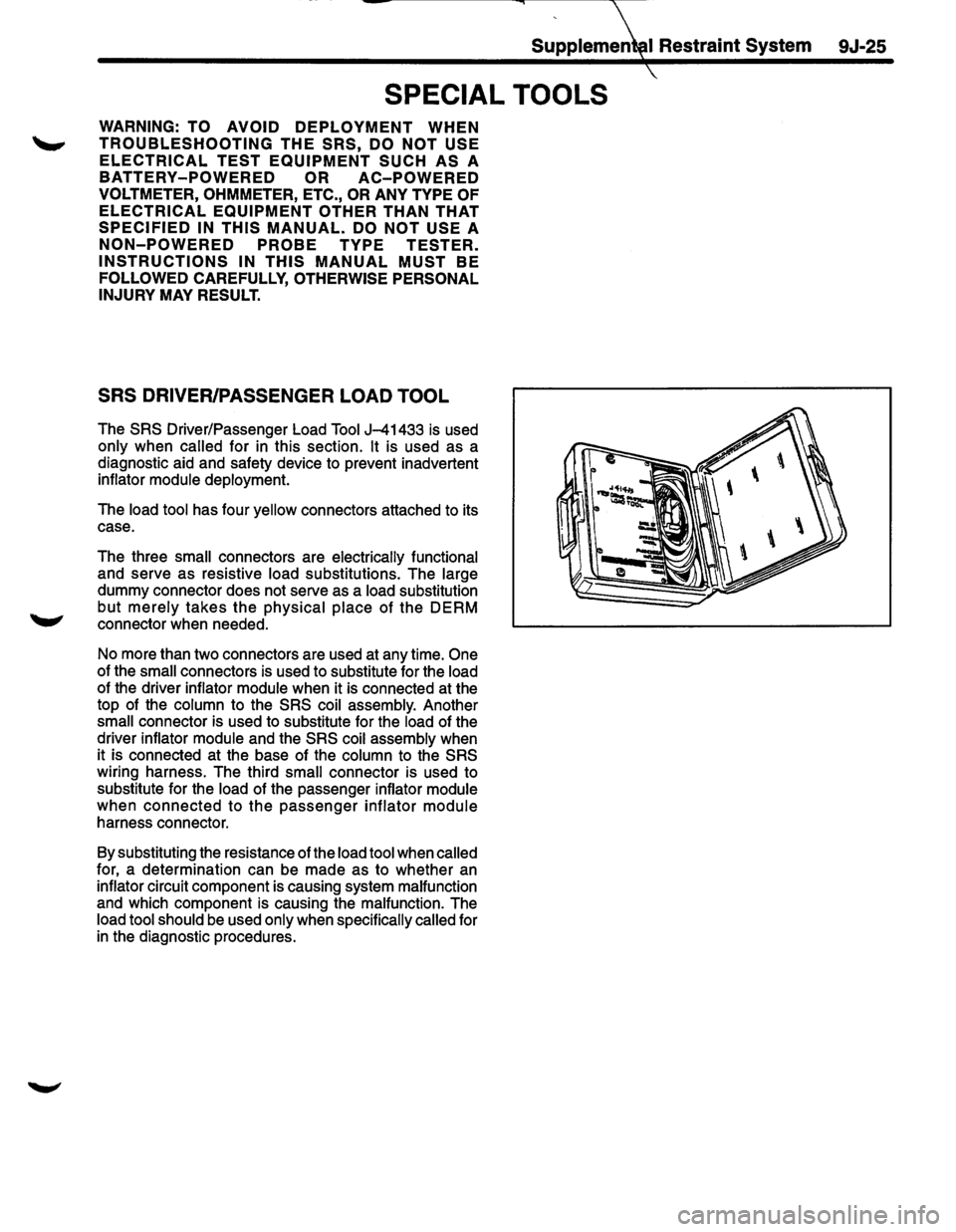
The SRS Driver/Passenger Load Tool J-41433 is used
only when called for in this section. It is used as a
diagnostic aid and safety device to prevent inadvertent
inflator
module deployment.
The
load tool has four yellow connectors attached to its
case.
The three
small connectors are electrically functional
and serve as resistive
load substitutions. The large
dummy connector does not serve as a load substitution
but
merely takes the physical place of the DERM
connector when needed.
No more than two connectors are used at any time.
One
of the small connectors is used to substitute for the load
of the driver inflator module when it is connected at the
top of the
column to the SRS coil assembly. Another
small connector is used to substitute for the load of the
driver inflator
module and the SRS coil assembly when
it is connected at the base of the
column to the SRS
wiring harness. The third small connector is used to
substitute for the
load of the passenger inflator module
when connected to the passenger inflator module
harness connector.
By substituting the resistance of the
load tool when called
for, a determination can be made as to whether an
inflator circuit component is causing system malfunction
and which component is causing the malfunction. The
load tool should be used only when specifically called for
in the diagnostic procedures.
9J-25
Page 1654 of 1928
9J-30 Supplemental Restraint System (SRS)
HOW TO USE THIS SECTION
DIAGNOSTIC PROCEDURES
WARNING: TO AVOID DEPLOYMENT WHEN
TROUBLESHOOTING THE SRS, DO NOT USE
ELECTRICAL TEST EQUIPMENT SUCH AS A
BATTERY-POWERED OR AC-POWERED
VOLTMETER, OHMMETR,ETC. ,OR ANY TYPE OF
ELECTRICAL EQUIPMENT OTHER THAN THAT
SPECIFIED IN THIS MANUAL. DO NOT USE A
NON-POWERED PROBE TYPE TESTER.
INSTRUCTIONS IN THIS MANUAL MUST BE
FOLLOWED CAREFULLY, OTHERWISE PERSONAL
INJURY
MAY RESULT.
The diagnostic procedures used in this section are
designed to aid
in finding and repairing SRS problems.
Outlined below
are the steps to find and repair SRS
problems quickly
and effectively. Failure to carefully
follow these procedures may result in extended
diagnostic time, incorrect diagnosis and incorrect parts
replacement.
1. Perform the "SRS Diagnostic System Check". The
"SRS Diagnostic System Check" should always be
the starting point of any SRS diagnostics. The "SRS
Diagnostic System Check" checks for proper "AIR
BAG" indicator operation and checks for SRS trouble
codes using both "Flash Code" and "Scan Tool"
Methods.
2. Refer to the proper diagnostic chart as directed by
the
"SRS Diagnostic System Check". The "SRS
Diagnostic System Check" will lead you to the correct
chart to diagnose any
SRS problems. Bypassing
these procedures may
result in extended diagnostic
time, incorrect diagnosis and incorrect parts
replacement.
3. Repeat the "SRS Diagnostic System Check" after
any repair
or diagnostic procedures have been
performed.Performing the
"SRS Diagnostic System
Check" after all repair or diagnostic procedures will
assure that the repair has been made correctly and
that no other conditions exist.
DIAGNOSTIC CODES
The Diagnostic Energy Reserve Module (DERM)
maintains a history record of all diagnostic codes that
have been detected since the
SRS codes were last
cleared
during service.
1. Current Codes -Faults that are presently detected
this ignition
cycle. Active and Cycle codes are stored
in RAM (Random Access Memory).
2. History
Codes-All faults detected since the last time
the history
fault memory was cleared. History codes
are stored in EEPROM (Electrically Erasable
Programmable Read Only Memory )
HOW TO READ TROUBLE CODES
All codes (Active cycle and history) can be read (or
cleared) by using a Scan Tool (Portable Diagnostic Tool
[PDT)) or equivalent. If a PDT is not available, have the
vehicle serviced by a Saturn Dealer.
HOW TO CLEAR TROUBLE CODES
Trouble codes can only be cleared by using a Scan Tool.
If
a "Scan Tool" is not available, then inform the owner of
the stored codes and suggest that the codes are
cleared
upon the next visit to a ISUZU dealership.
SCAN TOOL DIAGNOSTICS
A Scan Tool can be used to read current and history
codes and to
clear all history codes after a repair is
complete. The scan tool must be updated to
communicate with the
SRS through a replaceable
cartridge or a manufacturer's update before it can be
used for
SRS diagnostics. To use the scan tool, connect
it to the ALDL connector and turn the ignition switch
"ON". Then follow the manufacturer's directions for
communication with the
SRS. The scan tool reads serial
data from the DERM "Serial Data" output (terminal A 11)
to the ALDL connector (terminal M) Via ISUZU
Convertible Connector (terminal 2).
BASIC KNOWLEDGE REQUIRED
Before using this section of the Service Manual, there is
some basic
knowledge which will be required. Without
this knowledge, you
will have trouble using the diagnostic
procedures
in this section. Use care to prevent harm or
unwanted
deployment. Read all cautions in the service
manual and on warning labels attached to SRS
components.
BASIC ELECTRICAL CIRCUITS
You should understand the basic theory of electricity
including series and parallel circuits, and understand the
voltage drops across series resistors. You should know
the meaning of
voltage (volts), current (amps), and
resistance (ohms). You should understand what
happens in a circuit with an open or a shorted wire. You
should be able to read and understand a wiring diagram.
"FLASH CODE" DIAGNOSTICS
"Flash Code" diagnostics are not implemented for SRS
diagnostic on TROOPER(UX)Vehicles.
Page 1656 of 1928
9J-32 Supplemental Restraint System (SRS)
SRS DIAGNOSTIC SYSTEM CHECK
WARNING: TO AVOID DEPLOYMENT WHEN
TROUBLESHOOTING THE SRS, DO NOT USE
ELECTRICAL TEST EQUIPMENT SUCH AS A
BATTERY-POWERED OR AC-POWERED
VOLTMETER, OHMMETER, ETC., OR ANY TYPE OF
ELECTRICAL EQUIPMENT OTHER THAN THAT
SPECIFIED IN THIS MANUAL. DO NOT USE A
NON-POWERED PROBE TYPE TESTER.
INSTRUCTIONS IN THIS MANUAL MUST BE
FOLLOWED CAREFULLY, OTHERWISE PERSONAL
INJURY
MAY RESULT.
The diagnostic procedures used in this section are
designed to find and repair
SRS malfunctions. To get the
best results, it is important to use the diagnostic charts
and
follow the sequence listed below:
A. PERFORM THE "SRS DIAGNOSTIC SYSTEM
CHECK."
The "SRS Diagnostic System Check" must be the
starting point of any
SRS diagnostics. The "SRS
Diagnostic System Check" checks for proper "AIR
BAG"
warning lamp operation, the ability of the
DERM to communicate through the
"Serial Data" line
and whether SRS diagnostic trouble codes exist.
B. REFER TO THE PROPER DIAGNOSTIC CHART
AS
DIRECTED BY THE SRS DIAGNOSTIC
SYSTEM CHECK."
The "SRS Diagnostic System Check" will lead you to
the correct chart to diagnose any
SRS malfunctions.
Bypassing these procedures may result
in extended
diagnostic time, incorrect diagnosis and incorrect
parts replacement.
C. REPEAT THE "SRS DIAGNOSTIC SYSTEM
CHECK" AFTER ANY REPAIR OR DIAGNOSTIC
PROCEDURES HAVE
BEEN PERFORMED.
Performing
the "SRS Diagnostic System Check"
after all repair or diagnostic procedures will ensure
that the repair has been made correctly and that no
other malfunctions exist.
CIRCUIT DESCRIPTION
When the ignition switch is first turned "ON,""Ignition 1"
voltage is applied from the "C-22·C-23" fuse to the
DERM at the
"Ignition 1" input terminals "A9" and "A10"
and from the "C-21" fuse to the DERM at the "Redundant
Indicator Ignition 1" input terminal "B2". The DERM
responds by flashing the
"AIR BAG" warning lamp seven
times while performing tests on the
SRS.When the
engine is being cranked,
"Starter'' voltage is applied from
the
"C-1" fuse to the DERM at the "Crank" input terminal
"B10".The DERM responds by grounding the "SRS
Indicator"
output terminal "B 1" until "Starter" voltage is
removed from the "Crank" input. This results in the "AIR
BAG" warning lamp being "ON" steady during
cranking.After cranking, the DERM will flash the "AIR
BAG"
warning lamp six times and perform tests on the
SRS.
NOTES ON SYSTEM CHECK CHART ~
1. The "AIR BAG" warning lamp should flash seven
times after ignition is first turned
"ON."
2. The "AIR BAG" warning lamp should remain "ON"
steady during cranking.
3. When the "AIR BAG" warning lamp flashes four
times during
"Bulb Check" this indicates a
malfunction
in the redundant lamp driver circuitry.
These malfunctions are diagnosed by
DTC 62 chart.
4. After cranking, the "AIR BAG" warning lamp should
flash six times then go
"OFF."
5. Improper operation of the "AIR BAG" warning lamp
is indicated. This test differentiates a warning lamp
stays
"ON" condition from a warning lamp does not
come
"ON" condition.
6. This test checks for the proper operation of the
"Serial Data" line. This test will also determine
whether history diagnostic trouble codes are stored
and, if so, identify them.
7. This test checks for proper operation of the
"Serial
Data"
line. This test will also identify the stored
diagnostic trouble codes and
whether they are
current or history.
~
DIAGNOSTIC AIDS
The order in which diagnostic trouble codes are
diagnosed is very important. Failure to diagnose the
diagnostic trouble codes in the order specified may result
in extended diagnostic time, incorrect diagnosis and
incorrect parts replacement.
Page 1724 of 1928
9J-1 00 Supplemental Restraint System
DTC61
SRS
INDICATOR CIRCUIT FAIL E
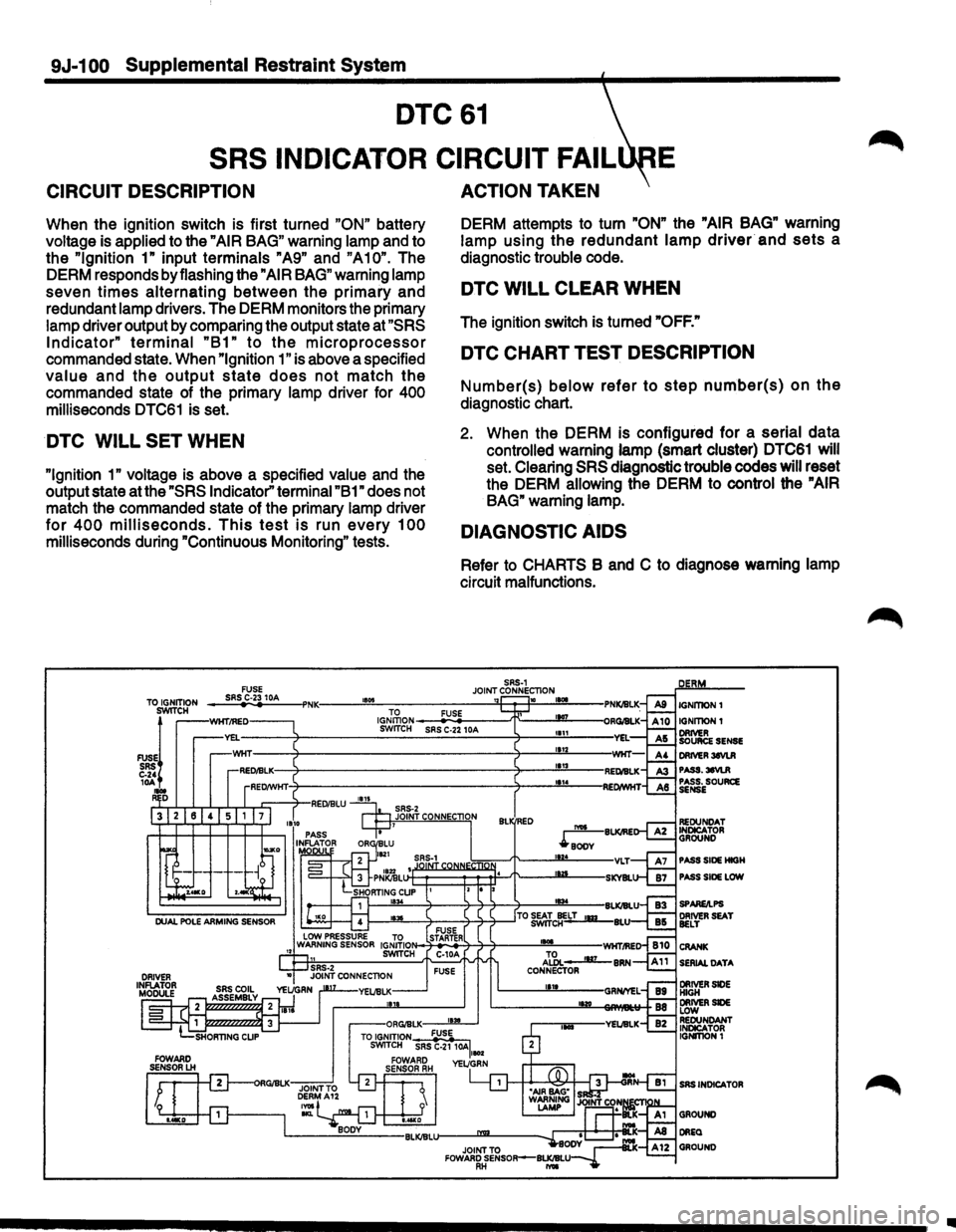
CIRCUIT DESCRIPTION
When the ignition switch is first turned "ON" battery
voltage is applied to the
"AIR BAG" warning lamp and to
the
"Ignition 1" input terminals "A9" and "A10". The
DERM responds by flashing the
"AIR BAG" warning lamp
seven
times alternating between the primary and
redundant lamp drivers. The DERM monitors the primary
lamp driver output by comparing the output state at
"SRS
Indicator" terminal "B1" to the microprocessor
commanded state. When "Ignition 1" is above a specified
value and the output state does not match the
commanded state of the primary lamp driver for 400
milliseconds DTC61 is set.
DTC WILL SET WHEN
"Ignition 1" voltage is above a specified value and the
output state at the
"SRS Indicator" terminal "B1" does not
match the commanded state of the primary lamp driver
for 400 milliseconds. This test is run every 100
milliseconds during "Continuous Monitoring" tests.
ACTION TAKEN
DERM attempts to turn "ON" the "AIR BAG" warning
lamp using
the redundant lamp driver and sets a
diagnostic trouble code.
DTC WILL CLEAR WHEN
The ignition switch is turned "OFF."
DTC CHART TEST DESCRIPTION
Number(s) below refer to step number(s) on the
diagnostic chart.
2. When the DERM is configured for a serial data
controlled warning lamp (smart cluster) DTC61 will
set. Clearing
SRS diagnostic trouble codes will reset
the DERM allowing the DERM to control the
"AIR
BAG"
warning lamp.
DIAGNOSTIC AIDS
Refer to CHARTS B and C to diagnose warning lamp
circuit malfunctions.
Ill