torque ISUZU TROOPER 1995 Owners Manual
[x] Cancel search | Manufacturer: ISUZU, Model Year: 1995, Model line: TROOPER, Model: ISUZU TROOPER 1995Pages: 1928
Page 263 of 1928
4. Side bearing outer race
3. Differential cage assembly
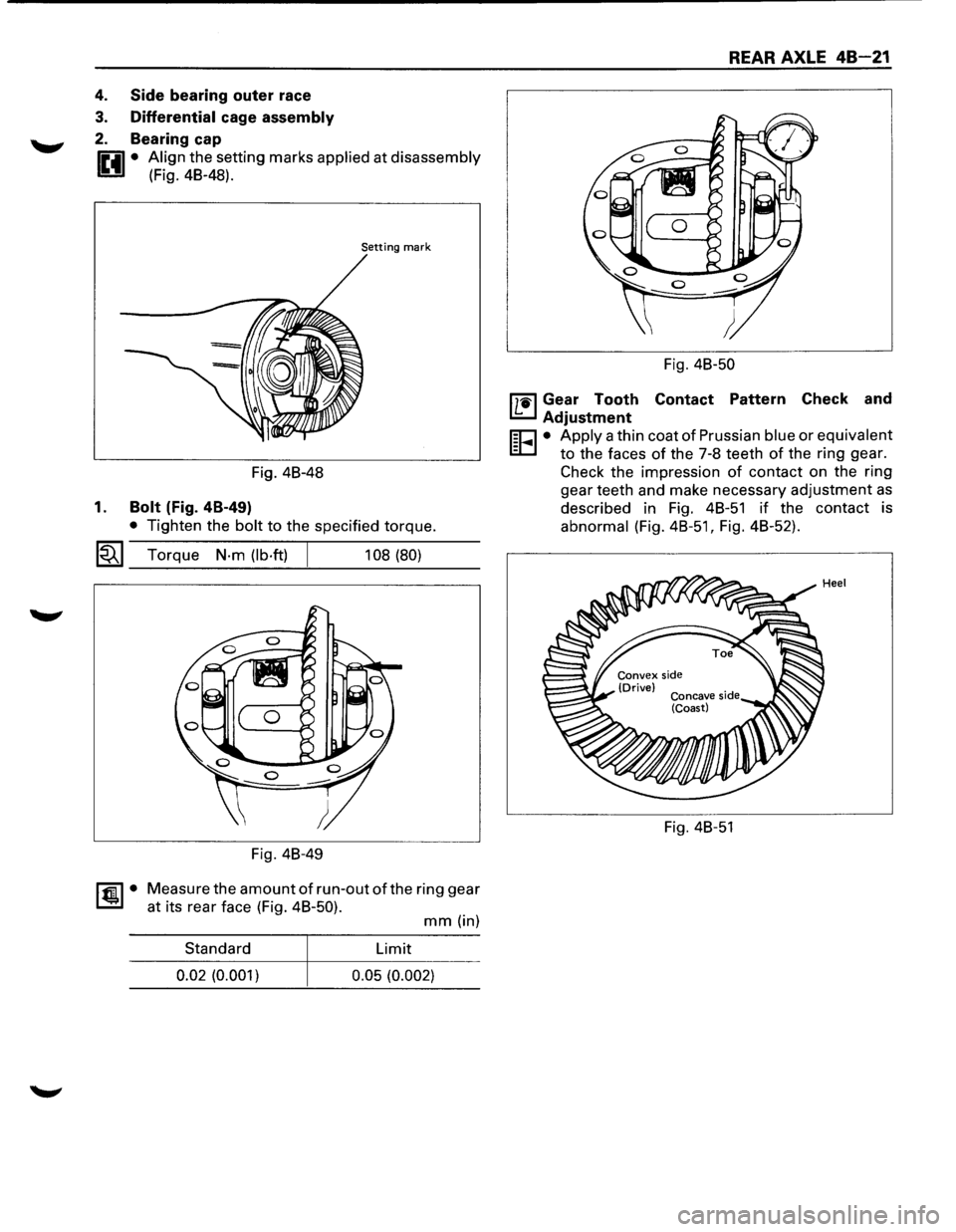
2. Bearing cap
0 • Align the setting marks applied at disassembly
1!!:!.1 (Fig. 48-48).
Setting mark
Fig. 48-48
1. Bolt (Fig. 4B-49)
• Tighten the bolt to the specified torque.
~~~ Torque N·m (lb·ft) 108 (80)
Fig. 48-49
~·
Measure the amount of run-out of the ring gear
at its rear face (Fig. 48-50).
mm (in)
Standard Limit
0.02 (0.001)
0.05 (0.002)
REAR AXLE 48-21
Fig. 48-50
l'7'1il Gear Tooth Contact Pattern Check and
I.£..J Adjustment
r;o • Apply a thin coat of Prussian blue or equivalent
EC.I to the faces of the 7-8 teeth of the ring gear.
Check the impression
of contact on the ring
gear teeth and make necessary adjustment
as
described in Fig. 48-51 if the contact is
abnormal (Fig.
48-51, Fig. 48-52).
Fig. 48-51
Page 266 of 1928
48-24 REAR AXLE
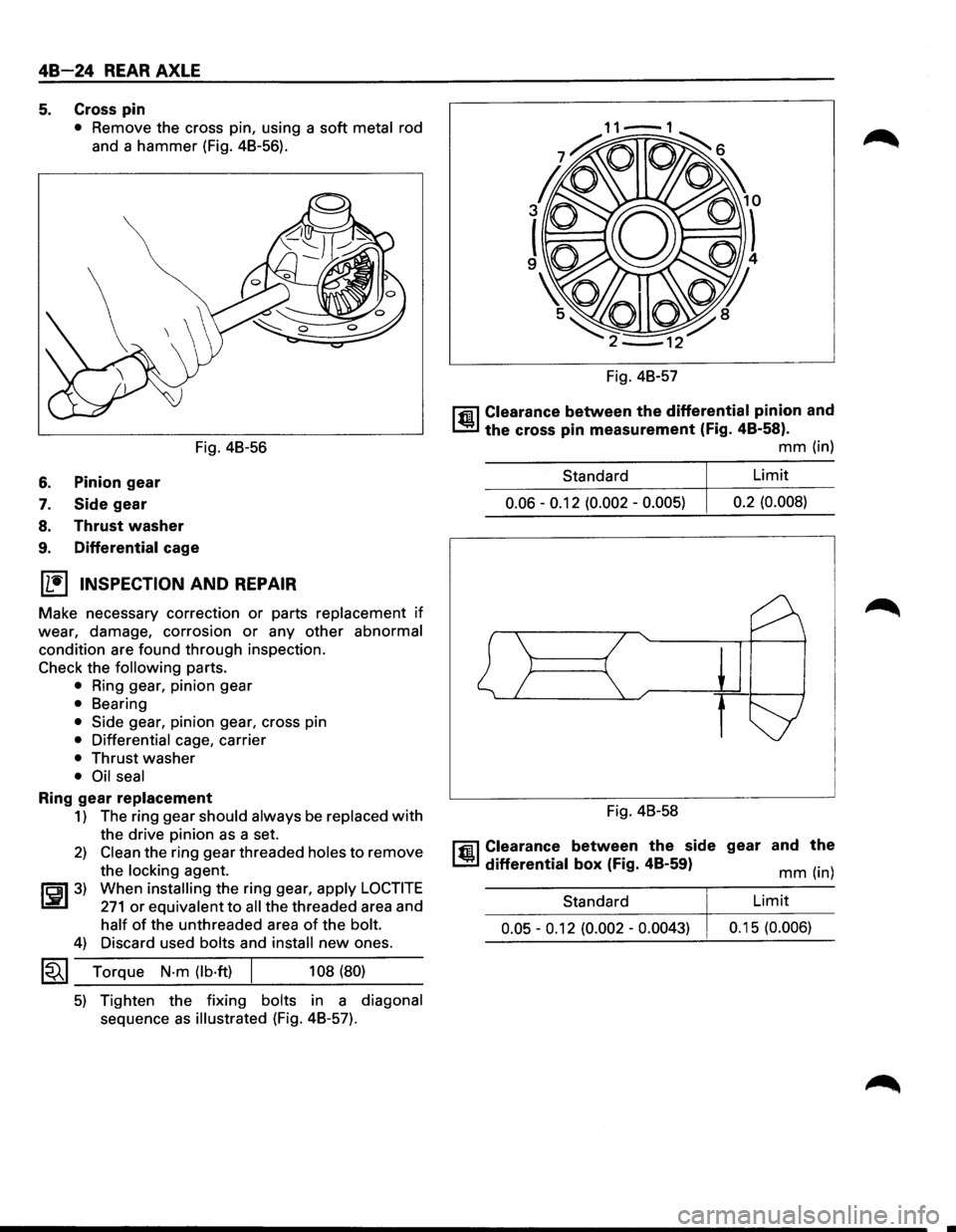
5. Cross pin
• Remove the cross pin, using a soft metal rod
and a hammer (Fig. 48-56).
Fig. 48-56
6. Pinion gear
7. Side gear
8. Thrust washer
9. Differential cage
(1!] INSPECTION AND REPAIR
Make necessary correction or parts replacement if
wear, damage, corrosion or any other abnormal
condition are found through inspection.
Check the following parts.
• Ring gear, pinion gear
• Bearing
• Side gear, pinion gear, cross pin
• Differential cage, carrier
• Thrust washer
• Oil seal
Ring gear replacement
1) The ring gear should always be replaced with
the drive pinion as a set.
2) Clean the ring gear threaded holes to remove
the
locking agent.
~~~3) When installing the ring gear, apply LOCTITE
271 or equivalent to all the threaded area and
half of the unthreaded area of the bolt.
4) Discard used bolts and install new ones.
1~1 Torque N·m (lb·ft) 108 (80)
5) Tighten the fixing bolts in a diagonal
sequence as illustrated (Fig. 48-57). Fig.
48-57
l'fil Clearance between the differential pinion and
1..!:.1 the cross pin measurement (Fig. 48-58).
mm (in)
Standard Limit
0.06 -0.12
(0.002 -0.005) 0.2
(0.008)
Fig. 48-58
l'fil Clearance between the side gear and the
1..!:.1 differential box (Fig. 48-59) mm (in)
Standard
Limit
0.05 -0.12 (0.002 -0.0043) 0.1 5 (0.006)
Page 268 of 1928
48-26 REAR AXLE
Fig. 48-63
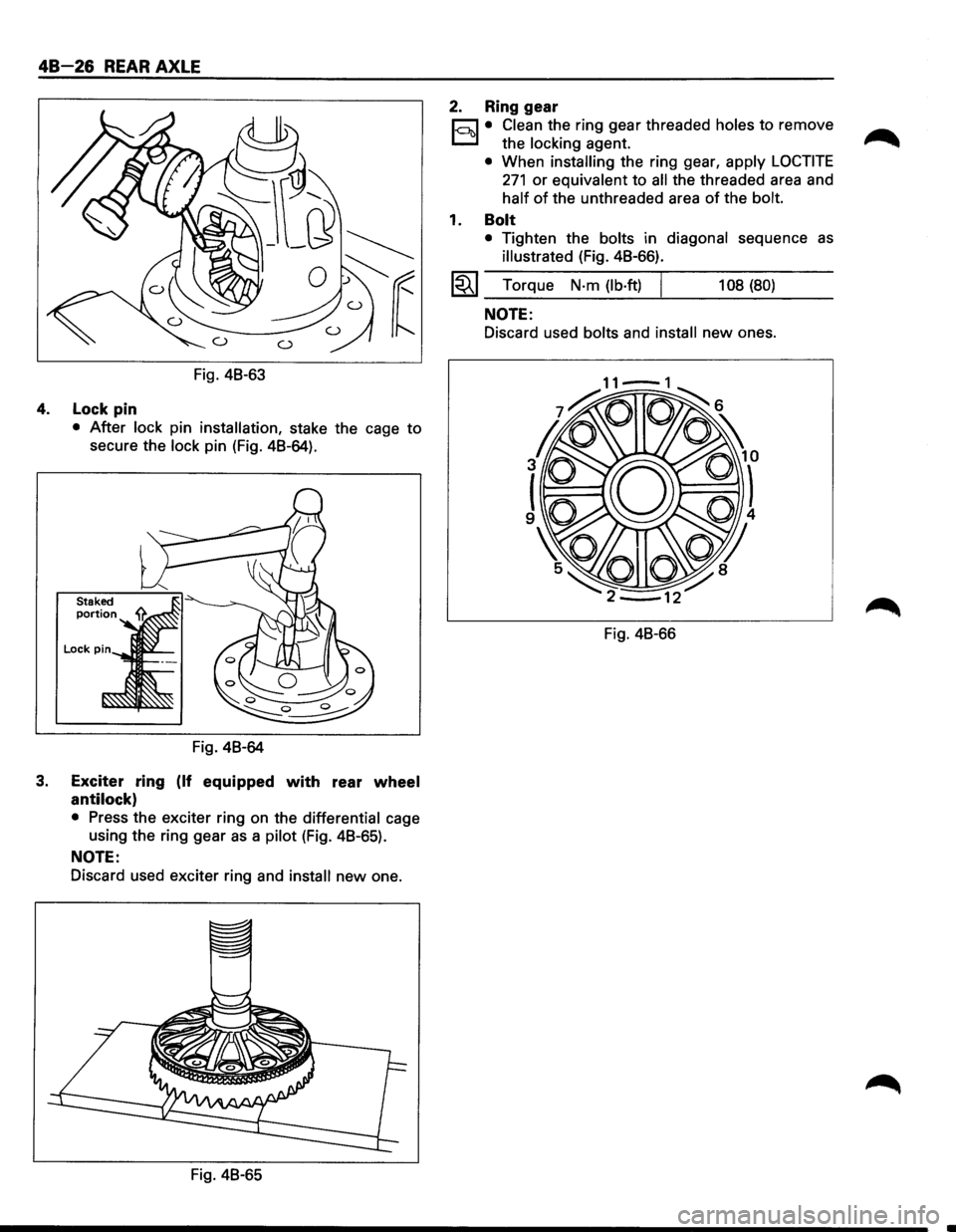
4. Lock pin
• After lock pin installation, stake the cage to
secure the lock pin (Fig. 48-64).
Fig. 48-64
3. Exciter ring (If equipped with rear wheel
antilock)
• Press the exciter ring on the differential cage
using the ring gear
as a pilot (Fig. 48-65).
NOTE:
Discard used exciter ring and install new one.
Fig. 48-65
2. Ring gear
r;:::;J • Clean the ring gear threaded holes to remove
D the locking agent.
• When installing the ring gear, apply LOCTITE
271 or equivalent to all the threaded area and
half of the unthreaded area of the bolt.
1. Bolt
• Tighten the bolts in diagonal sequence as
illustrated (Fig. 48-66).
l~l Torque N·m (lb·ft) I 108 (80)
NOTE:
Discard used bolts and install new ones.
Fig. 48-66
Page 274 of 1928
48 32 REAR AXLE
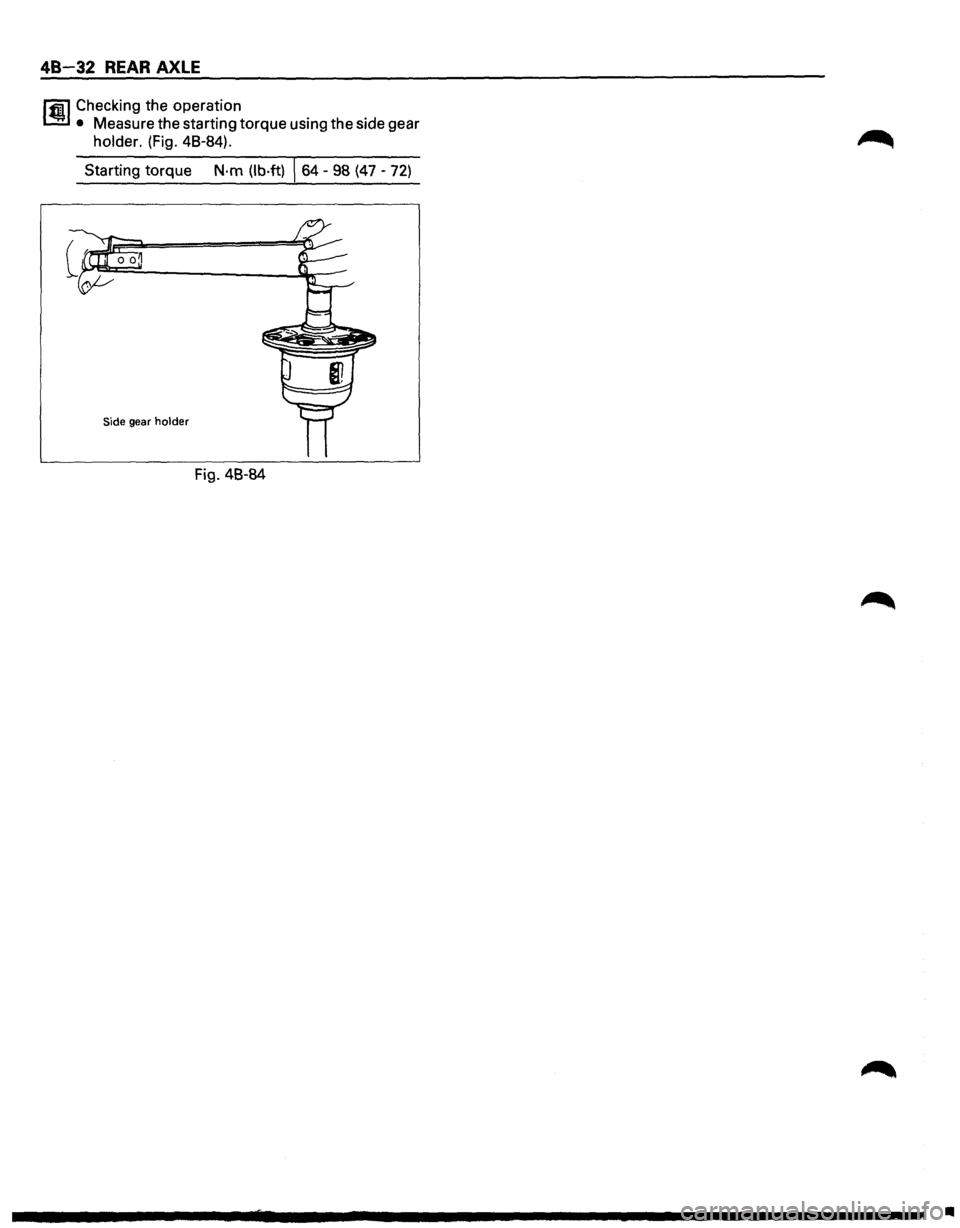
lfl1 Checking the operation
1.!!:.1 • Measure the starting torque using the side gear
holder. (Fig. 48-84).
Starting torque
N·m (lb·ft) \s4 -98 (47 -72)
Side gear holder
Fig. 48-84
•
Page 276 of 1928
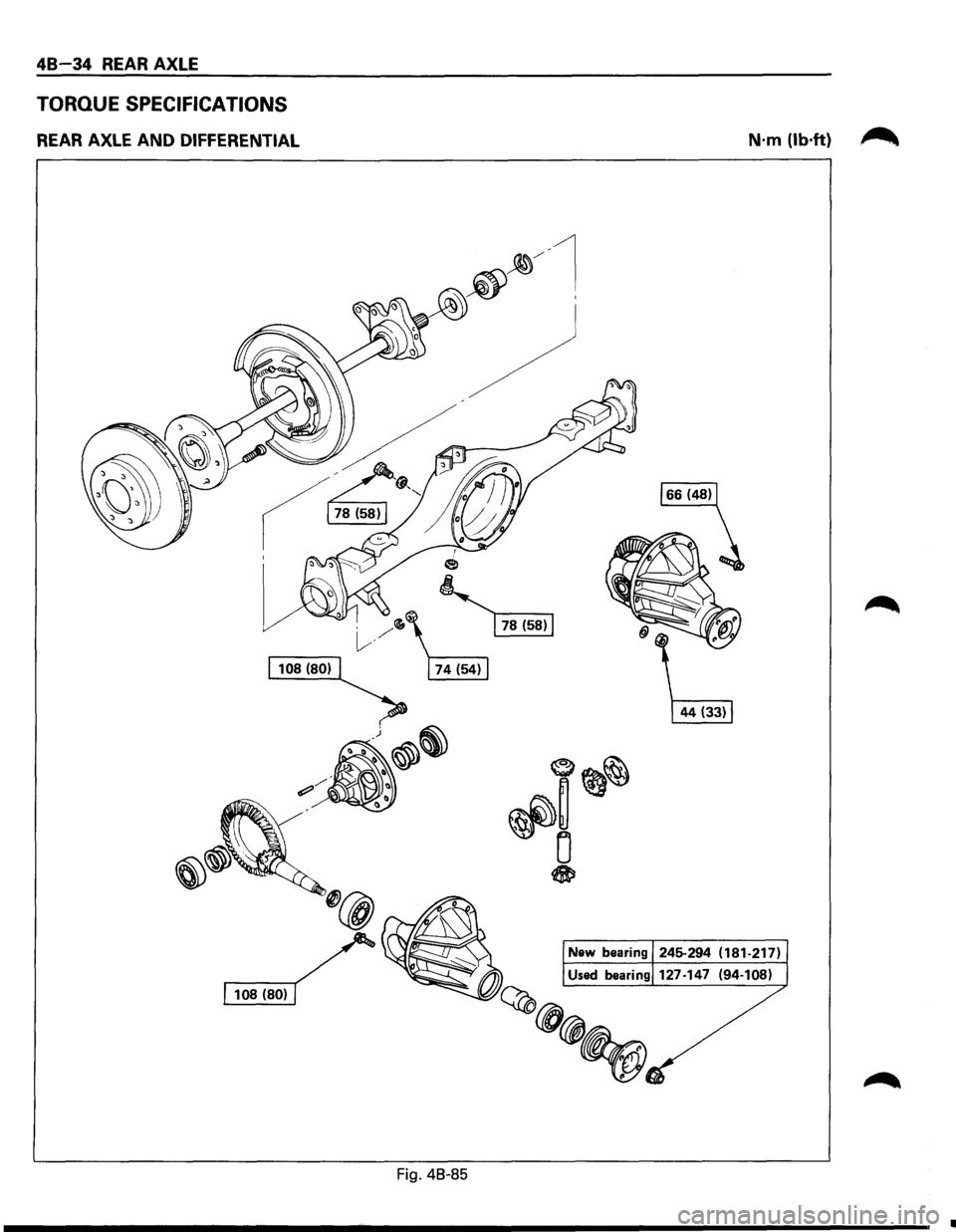
48 34 REAR AXLE
TORQUE SPECIFICATIONS
REAR AXLE AND DIFFERENTIAL
Fig. 48-85
N·m (lb·ft) ~
•
Page 279 of 1928
FRONT DRIVING AXLE 4C-1
SECTION 4C
FRONT DRIVING AXLE
'f CAUTION:
When fasteners are removed, always reinstall them at the same location from which they were removed.
If a fastener needs to be replaced, use the correct part number fastener for that application. If the correct
part
number fastener is not available, a fastener of equal size and strength (or stronger) may be used.
Fasteners
that are not reused, and those requiring thread locking compound, will be called out. The
correct
torque values must be used when installing fasteners that require torque. If the above conditions
are not followed, parts or system damage could result.
CONTENTS
General Description . . . . . . . . . . . . . . . . . . . . 4C-1
Diagnosis
of Front Driving Axle . . . . . . . . . . . 4C-2
Automatic Locking Free Wheel Hub . . . . . 4C-3
On-Vehicle Service ..................... 4C- 4
Pinion
Shaft Oil Seal Replacement . . . . . . 4C-4
Front Drive Shaft Joints Replacement . . . 4C-5
Front Hub Bearing Preload Check . . . . . . . 4C-5
Unit Repair . . . . . . . . . . . . . . . . . . . . . . . . . . . . 4C-6
Front Drive Axle Assembly . . . . . . . . . . . . 4C-6
Front Axle Drive Shaft . . . . . . . . . . . . . . . . 4C-9
Differential Assembly ................. 4C-14
Differential Cage Assembly . . . . . . . . . . . . 4C-24
Front Hub and Disc (4WD Model with
Automatic Locking Hub) . . . . . . . . . . . . 4C-28
Main Data and Specifications . . . . . . . . . . . . 4C-37
General Specifications . .
. . . . . . . . . . . . . . 4C-37
Torque Specifications ................. 4C-38
Special Tools .......................... 4C-41
GENERAL DESCRIPTION
This publication contains essential removal, instal
lation,
adjustment and maintenance procedures.
The
front axle utilizes a central disconnect type front
axle/transfer case system. The
drive axles are completely flexible assemblies,
consisting
of inner and outer constant velocity (CV)
drive shaft joints connected by an axle shaft. For
description
of front propeller shaft and universal
joint, refer to Section 4A "PROPELLER SHAFT".
Page 286 of 1928
4C - 8 FRONT DRIVING AXLE
9. Front drive shaft assembly (RH)
l•!•l REASSEMBLY
9. Front drive shaft assembly (RH)
• Lay the assembly on the lower arm.
8. Front axle case assembly and front drive shaft
assembly (LH)
• Place the axle case on the jack, connect to the
front drive shaft assembly (RH) before
installing to the vehicle.
7. Bolt
• Tighten the mounting bracket fixing bolt to
the specified torque.
~~~ Torque N.m (lb.ft) I 116 (85)
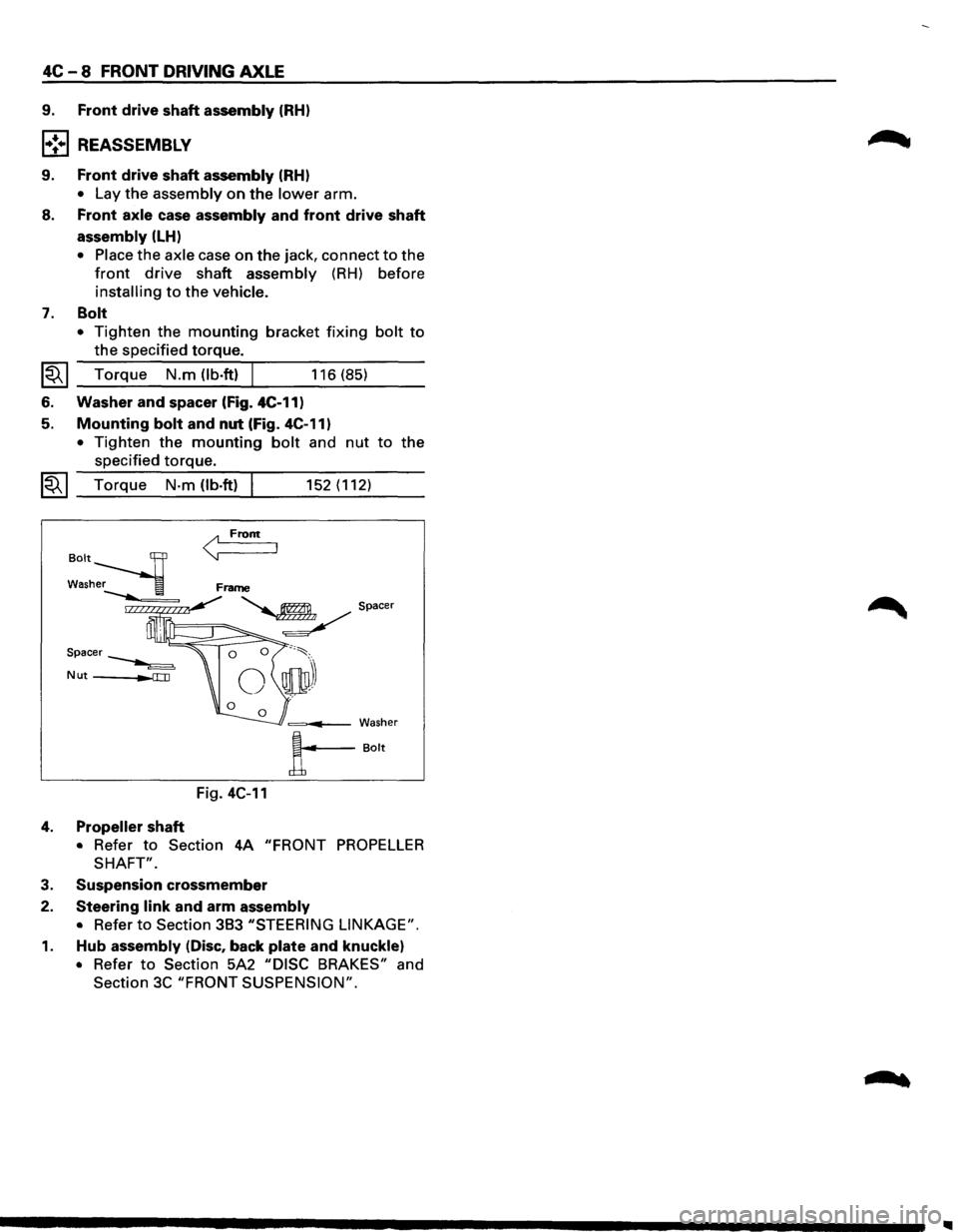
6. Washer and spacer (Fig. 4C-11)
5. Mounting bolt and nut (Fig. 4C-11)
• Tighten the mounting bolt and nut to the
specified torque.
~~~ Torque N·m (lb.ft) I 152 (112)
< From
=---Washer
A--Bolt
Fig. 4C-11
4. Propeller shaft
• Refer to Section 4A "FRONT PROPELLER
SHAFT".
3. Suspension crossmember
2. Steering link and arm assembly
• Refer to Section 383 "STEERING LINKAGE".
1. Hub assembly (Disc, back plate and knuckle)
• Refer to Section 5A2 "DISC BRAKES" and
Section
3C "FRONT SUSPENSION".
Page 289 of 1928
__,.
9. Ball retainer
10. Ball guide
11. Bellows
12. Band
13. 14.
15.
16.
17.
18.
19.
20.
21.
22.
23.
24. 25.
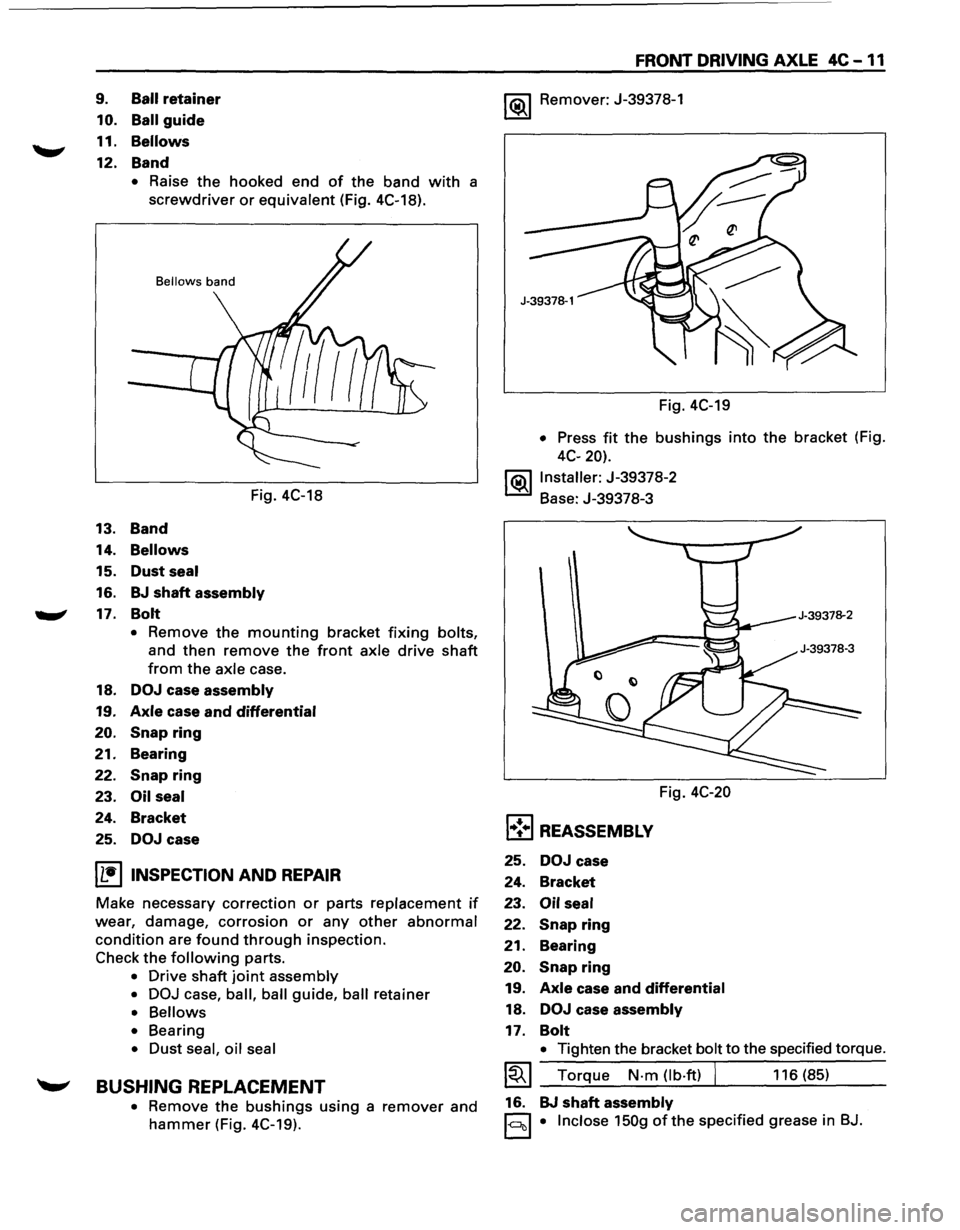
• Raise the hooked end of the band with a
screwdriver or equivalent (Fig. 4C-18).
Bellows band
Fig. 4C-18
Band
Bellows
Dust seal
BJ shaft assembly
Bolt
• Remove the mounting bracket fixing bolts,
and then remove the front axle drive shaft
from the axle case.
DOJ case assembly
Axle case and differential
Snap ring
Bearing
Snap ring
Oil seal
Bracket
DOJ case
I L•IINSPECTION AND REPAIR
Make necessary correction or parts replacement if
wear, damage, corrosion or any other abnormal
condition are found through inspection.
Check
the following parts.
• Drive shaft joint assembly
• DOJ
case, ball, ball guide, ball retainer
• Bellows
• Bearing
• Dust seal, oil seal
~ BUSHING REPLACEMENT
• Remove the bushings using a remover and
hammer (Fig. 4C-19).
FRONT DRIVING AXLE 4C -11
1 (ij),_j Remover: J-39378-1
Fig. 4C-19
• Press fit the bushings into the bracket (Fig.
4C-20).
j(ij),_jlnstaller:
J-39378-2
Base: J-39378-3
Fig.
4C-20
l•!•l REASSEMBLY
25. DOJ case
24. Bracket
23.
Oil seal
22. Snap ring
21.
Bearing
20.
Snap ring
19. Axle case and differential
18. DOJ case assembly
17. Bolt
• Tighten the bracket bolt to the specified torque.
~~~ Torque N-m (lb-ft) I 116 (85)
16. BJ
shaft assembly
1-c:::lcll • Inclose 150g ofthe specified grease in BJ.
Page 295 of 1928
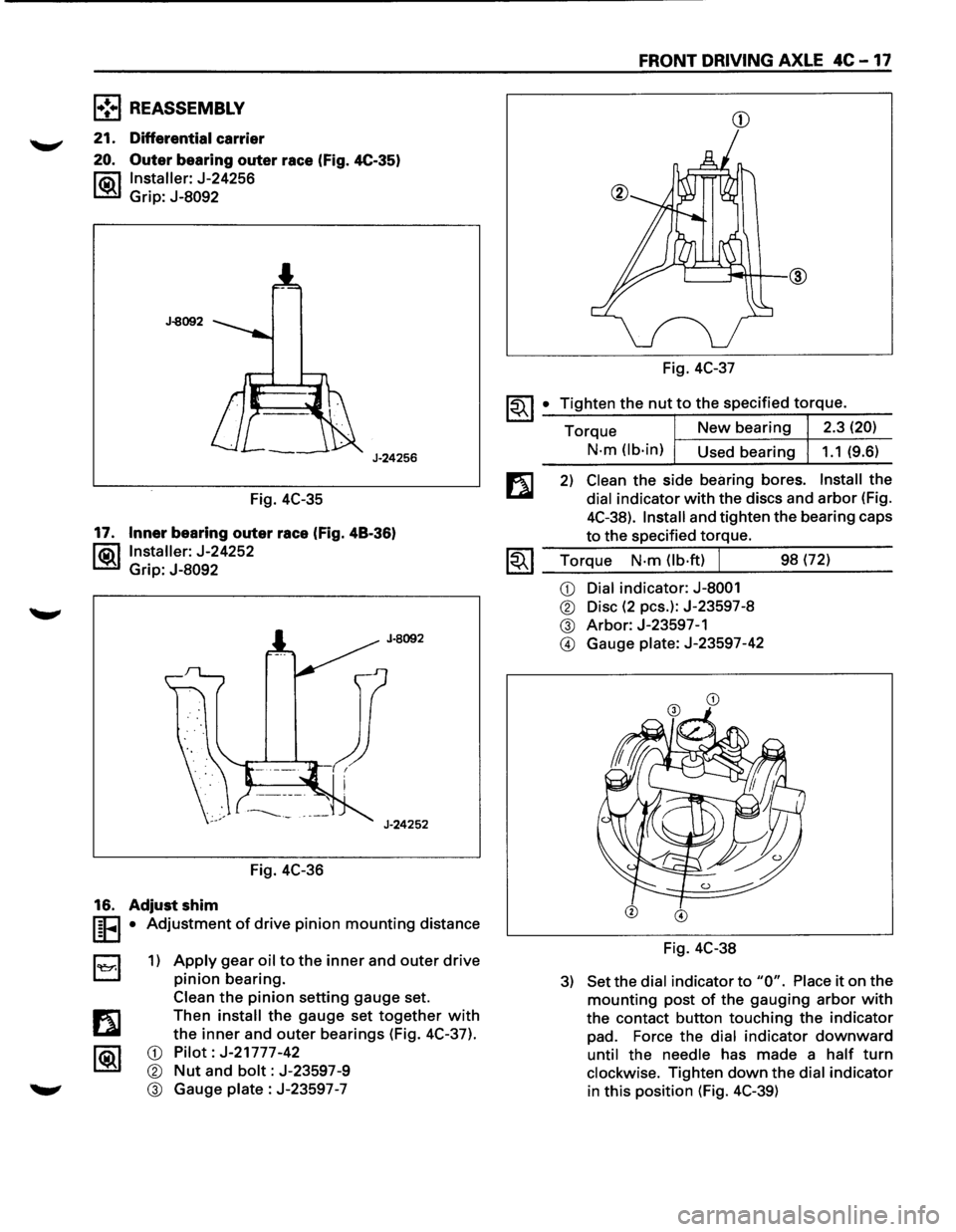
l•!•l REASSEMBLY
21. Differential carrier
20. Outer bearing outer race (Fig. 4C-35)
l"ii\1 Installer: J-24256
~ Grip: J-8092
J-8092
J-24256
Fig. 4C-35
17. Inner bearing outer race (Fig. 48-36)
l®.llnstaller: J-24252
Grip:
J-8092
Fig. 4C-36
16. Adjust shim
I§FI • Adjustment of drive pinion mounting distance
B 1) Apply gear oil to the inner and outer drive
pinion bearing.
Clean
the pinion setting gauge set.
Then
install the gauge set together with
the inner and outer bearings (Fig. 4C-37).
CD Pilot: J-21777-42
® Nut and bolt: J-23597-9
® Gauge plate : J-23597 -7
FRONT DRIVING AXLE 4C -17
CD
Fig. 4C-37
~~I _• _T:.:i:?.g.:.:h.:.:te:.:..n:...:t:.:..:h~e...:.n.:..:u:..:.t,..:.to.::......:.:th..:...e:.....:.:sp:....e:....:c_if_ie_d_t_orr-=-q-ue_. __
Torque New bearing 2.3 (20)
N-m (lb-in)
Used bearing 1.1 (9.6)
2) Clean the side bearing bores. Install the
dial indicator with the discs and arbor (Fig.
4C-38).
Install and tighten the bearing caps
to the specified torque.
1.;-. I Torque N-m (lb·ft) J 98 (72) ~ ~~--~~.---------
CD Dial indicator: J-8001
® Disc (2 pes.): J-23597-8
® Arbor: J-23597-1
@ Gauge plate: J-23597-42
Fig. 4C-38
3) Set the dial indicator to "0". Place it on the
mounting post of the gauging arbor with
the contact button touching the indicator
pad. Force the dial indicator downward
until the needle has made a half turn
clockwise. Tighten down the dial indicator
in this position (Fig. 4C-39)
Page 298 of 1928
4C-20 FRONT DRIVING AXLE
12. Dust cover
11.
Flange
1 0. Flange nut
8 1) Apply lubricant to the pinion threads.
2) Tighten the nut to the specified torque using
1®..1 the pinion flange holder (Fig. 4C-45).
Pinion
flange holder: J-37221
~~~ Torque New bearing 177-275 (130-203)
N·m (lb·ft)
Used bearing 89-137 (65-101)
NOTE:
• Discard used flange nut and install new one.
• Do not over tighten the flange nut.
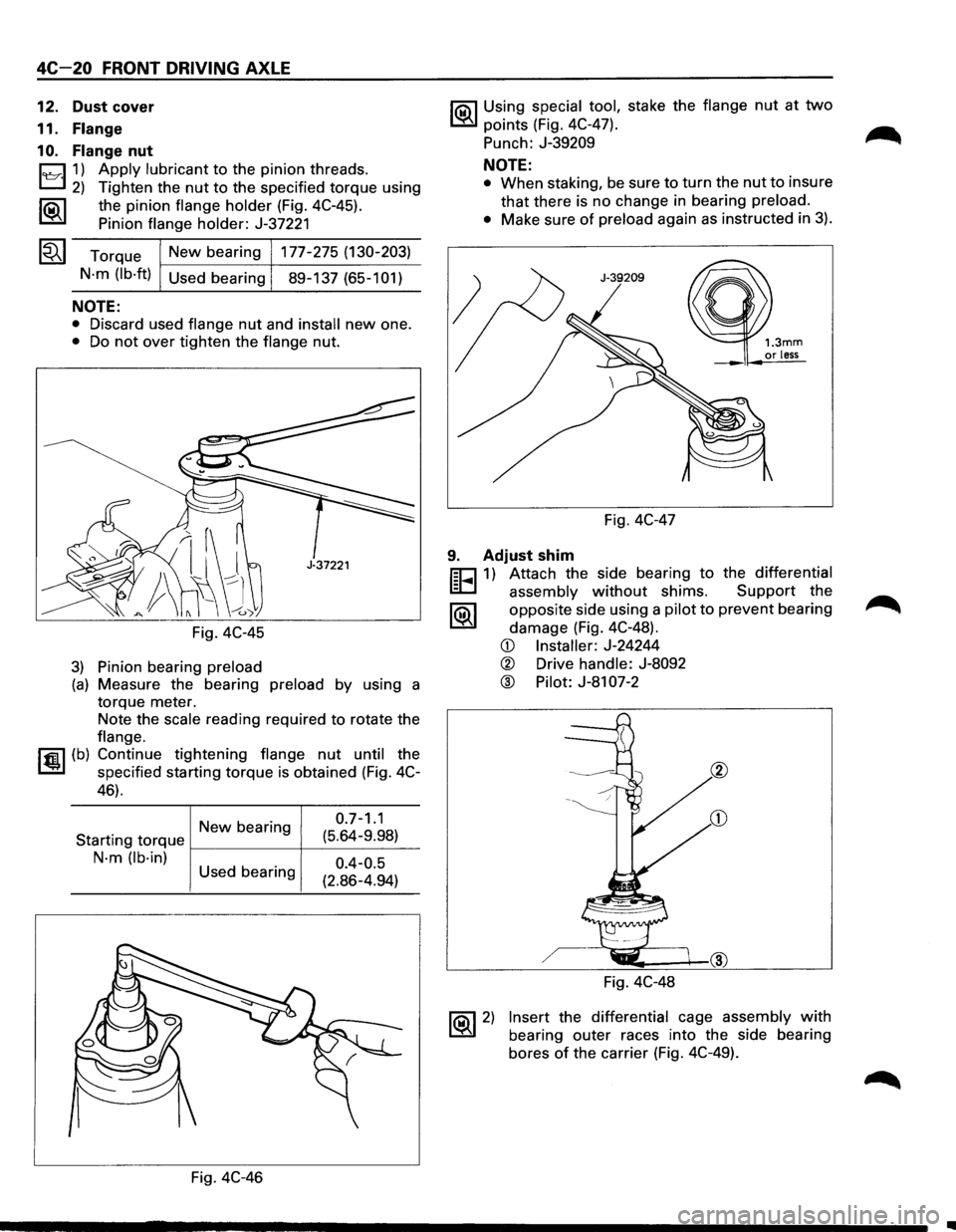
Fig. 4C-45
3) Pinion bearing preload
(a) Measure the bearing preload by using a
torque meter.
Note the
scale reading required to rotate the
flange.
I~U (b) Continue tightening flange nut until the
specified starting torque is obtained (Fig. 4C-
46).
Newbearing 0 ·7
-1
·1
Starting
torque f---------+--(:_5_.6_4_-9_._98_:_)_
N·m (lb·in)
0.4-0.5
(2.86-4.94)
Used
bearing
Fig. 4C-46
I'Q\1 Using special tool, stake the flange nut at two
~ points (Fig. 4C-47).
Punch:
J-39209
NOTE:
• When staking, be sure to turn the nut to insure
that there is no change in bearing preload.
•
Make sure of preload again as instructed in 3).
Fig. 4C-47
1.3mm or less
9. Adjust shim
r;cJ 1) Attach the side bearing to the differential
~ assembly without shims. Support the
1®.1 opposite side using a pilot to prevent bearing
damage (Fig. 4C-48).
~ 2)
CD Installer: J-24244
® Drive handle: J-8092
@ Pilot: J-81 07-2
Fig. 4C-48
Insert the differential cage assembly with
bearing outer races into the side bearing
bores
of the carrier (Fig. 4C-49).
..