air condition ISUZU TROOPER 1995 Workshop Manual
[x] Cancel search | Manufacturer: ISUZU, Model Year: 1995, Model line: TROOPER, Model: ISUZU TROOPER 1995Pages: 1928
Page 357 of 1928
ll .. •l INSPECTION AND REPAIR
Make necessary parts replacement, if wear, damage,
"'-"' corrosion or any other abnormal conditions are found
through inspection.
Check the following parts;
• Rotor
• Cylinder body
• Cylinder bore
• Piston
•
Guide bolt, Lock bolt
•
Support bracket
NOTE:
The piston seal, boot ring and dust boot are to be
replaced each time the caliper is overhauled. Discard
these used rubber parts and
replace with new ones.
l*!•l REASSEMBLY
9. Caliper body
8. Bleeder with cap
~~~ Torque N·m (lb·in) 8 (69)
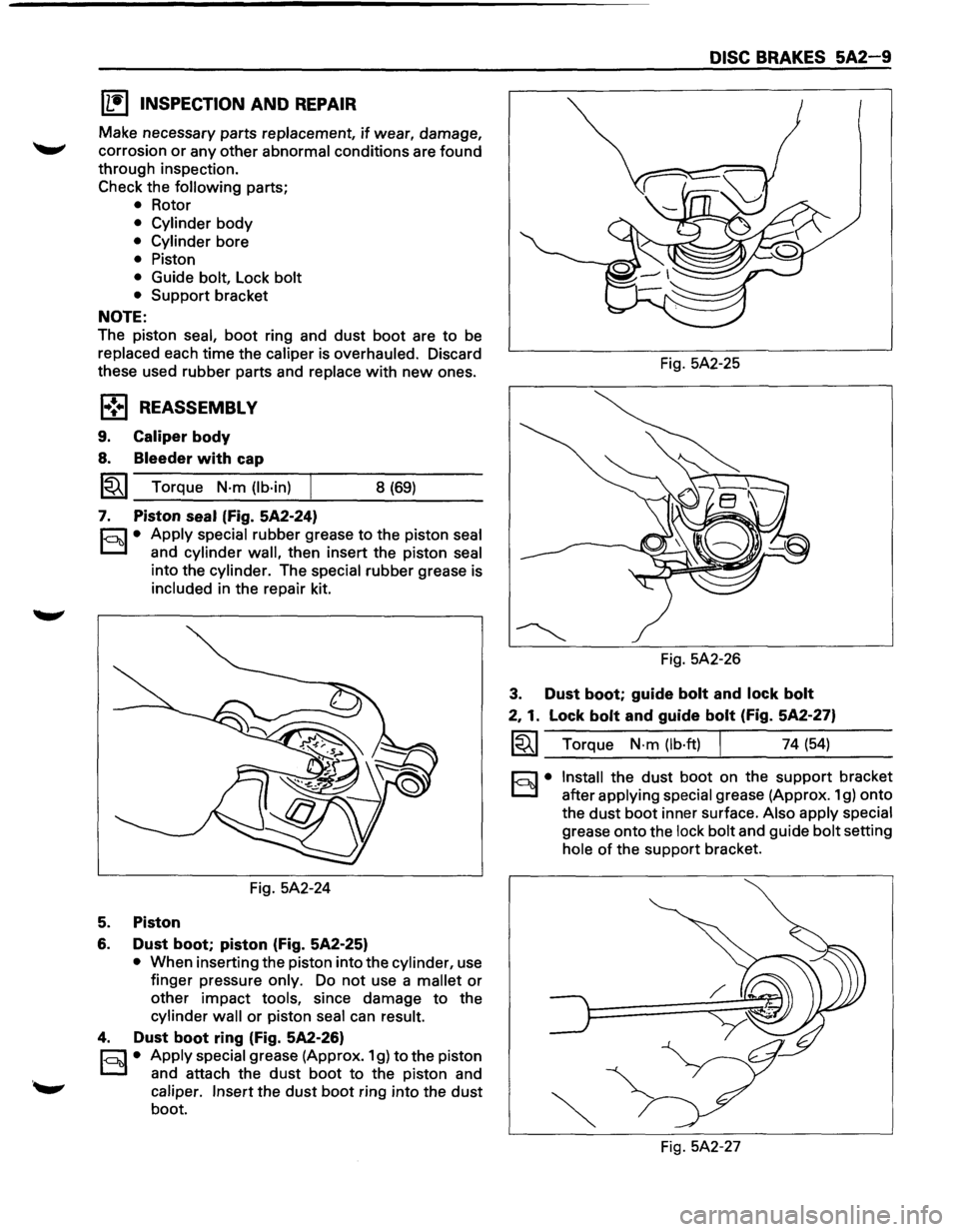
7. Piston seal (Fig. 5A2-24)
r.:;::'1 • Apply special rubber grease to the piston seal
0 and cylinder wall, then insert the piston seal
into the cylinder. The special rubber grease is
included in the repair kit.
Fig. 5A2-24
5. Piston
6. Dust boot; piston (Fig. 5A2-25)
• When inserting the piston into the cylinder, use
finger pressure
only. Do not use a mallet or
other impact tools, since damage to the
cylinder wall or piston seal can result.
4. Dust boot ring (Fig. 5A2-26)
r;::;:] • Apply special grease (Approx. 1 g) to the piston
0 and attach the dust boot to the piston and
caliper. Insert the dust boot ring into the dust
boot.
DISC BRAKES 5A2-9
Fig. 5A2-25
Fig. 5A2-26
3. Dust boot; guide bolt and lock bolt
2, 1. Lock bolt and guide bolt (Fig. 5A2-27)
~~~ Torque N·m (lb·ft) I 74 (54)
§)• Install the dust boot on the support bracket
after
applying special grease (Approx. 1 g) onto
the
dust boot inner surface. Also apply special
grease onto the lock bolt and guide bolt setting
hole of the support bracket.
Fig. 5A2-27
Page 366 of 1928
![ISUZU TROOPER 1995 Workshop Manual 5A2-18 DISC BRAKES
(1!] INSPECTION AND REPAIR
Make necessary parts replacement, if wear, damage,
corrosion
or any other abnormal conditions are found
through inspection.
Check the
followi](/img/61/57183/w960_57183-365.png "ISUZU TROOPER 1995 Workshop Manual 5A2-18 DISC BRAKES
(1!] INSPECTION AND REPAIR
Make necessary parts replacement, if wear, damage,
corrosion
or any other abnormal conditions are found
through inspection.
Check the
followi")
5A2-18 DISC BRAKES
(1!] INSPECTION AND REPAIR
Make necessary parts replacement, if wear, damage,
corrosion
or any other abnormal conditions are found
through inspection.
Check the
following parts;
• Rotor
• Cylinder body
• Cylinder bore
• Piston
• Slide
pin
• Support bracket
NOTE:
The piston dust seal and dust boot are to be replaced
each time the caliper is overhauled. Discard these
used rubber parts and
replace with new ones.
1•! .. 1 REASSEMBLY
9. Caliper body
8. Bleeder with cap
1~1 Torque N·m (lb·in) 8 (69)
7. Piston seal (Fig. 5A2-51)
r:::;] • Apply special rubber grease to the piston seal
D and cylinder wall, then insert the piston seal
into the cylinder. The special rubber grease is
included in the repair kit.
Fig. 5A2-51
5. Piston
6. Dust boot; piston (Fig. 5A2-52)
• When inserting the piston into the cylinder, use
finger pressure
only. Do not use a mallet or
other impact tools, since damage to the
cylinder wall or piston seal can result.
4. Dust boot ring (Fig. 5A2-53)
r:::;] • Apply special grease (Approx. 1 g) to the piston
D and attach the dust boot to the piston and
caliper. Insert the dust boot ring into the dust
boot. Fig.
5A2-52
Fig. 5A2-53
3. Dust boot (Fig. 5A2-54)
r:::;] • Install the dust boot on the support bracket
D after applying special grease (Approx. 1 g) onto
the dust
boot inner surface. Also apply special
grease onto the lock bolt and guide bolt setting
hole of the support bracket.
2. Lock bolt
1. Guide bolt
Fig. 5A2-54
~~~ Torque N-m (lb·ft) 44 (32)
•
Page 375 of 1928
REAR WHEEL ANTILOCK BRAKE SYSTEM 5A3-7
REAR WHEEL ANTILOCK (RWAL) SYSTEM DIAGNOSTICS
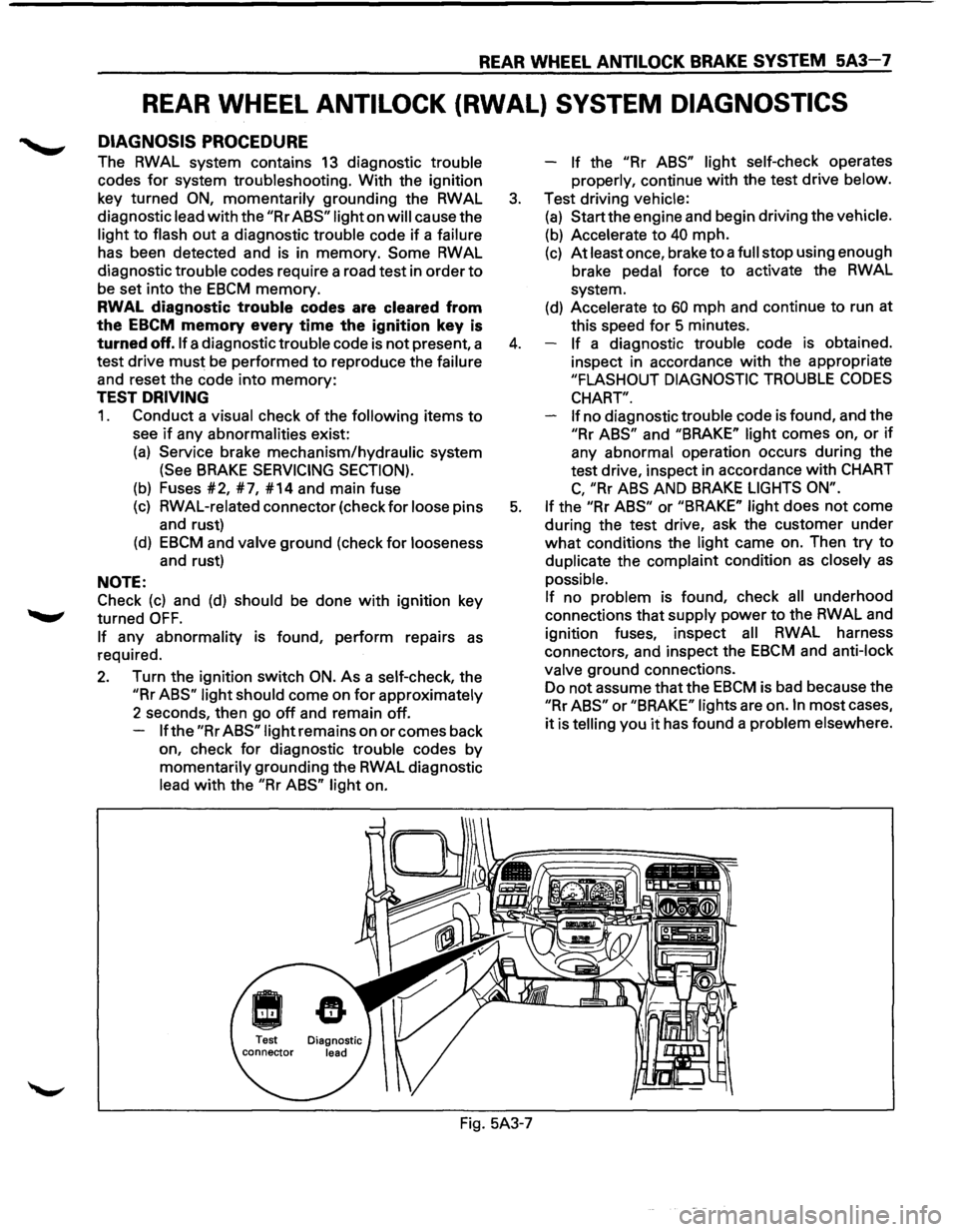
DIAGNOSIS PROCEDURE
The RWAL system contains 13 diagnostic trouble
codes
for system troubleshooting. With the ignition
key turned
ON, momentarily grounding the RWAL
diagnostic lead
with the "Rr ABS" light on will cause the
light
to flash out a diagnostic trouble code if a failure
has been detected and is in memory.
Some RWAL
diagnostic trouble codes require a road test in order
to
be set into the EBCM memory.
RWAL diagnostic trouble codes are cleared from
the
EBCM memory every time the ignition key is
turned off. If a diagnostic trouble code is not present, a
test drive
must be performed to reproduce the failure
and reset the code into
memory:
TEST DRIVING
1. Conduct a visual check of the following items to
see if any abnormalities exist:
(a) Service brake mechanism/hydraulic system
(See BRAKE SERVICING SECTION).
(b) Fuses #2, #7, #14 and main fuse
(c) RWAL-related connector (check for loose pins
and rust)
(d) EBCM and valve ground (check for looseness
and rust)
NOTE:
Check
(c) and (d) should be done with ignition key
turned
OFF.
If any abnormality is found, perform repairs as
required.
2. Turn the ignition switch ON. As a self-check, the
"Rr ABS" light should come on for approximately
2 seconds, then go
off and remain off.
If the "Rr ABS" light remains on or comes back
on, check
for diagnostic trouble codes by
momentarily grounding the RWAL diagnostic
lead
with the "Rr ABS" light on. -
If the "Rr
ABS" light self-check operates
properly, continue
with the test drive below.
3. Test driving vehicle:
(a) Start the engine and begin driving the vehicle.
(b) Accelerate to 40 mph.
(c) At least once, brake to a full stop using enough
brake pedal force
to activate the RWAL
system.
(d) Accelerate to 60 mph and continue to run at
this speed
for 5 minutes.
4. If a diagnostic trouble code is obtained.
inspect in accordance
with the appropriate
"FLASHOUT DIAGNOSTIC TROUBLE CODES
CHART".
If
no diagnostic trouble code is found, and the
"Rr ABS" and "BRAKE" light comes on, or if
any abnormal operation occurs during the
test drive, inspect in accordance
with CHART
C, "Rr ABS AND BRAKE LIGHTS ON".
5. If the "Rr ABS" or "BRAKE" light does not come
during the test drive, ask the customer under
what conditions the light came on. Then try to
duplicate the complaint condition
as closely as
possible.
If no problem is found, check all underhood
connections that supply power
to the RWAL and
ignition fuses, inspect
all RWAL harness
connectors, and inspect the
EBCM and anti-lock
valve ground connections.
Do not assume that the
EBCM is bad because the
"Rr ABS" or "BRAKE" lights are on. In most cases,
it is telling you it has found a problem elsewhere.
Fig. 5A3-7
Page 376 of 1928
5A3-8 REAR WHEEL ANTILOCK BRAKE SYSTEM
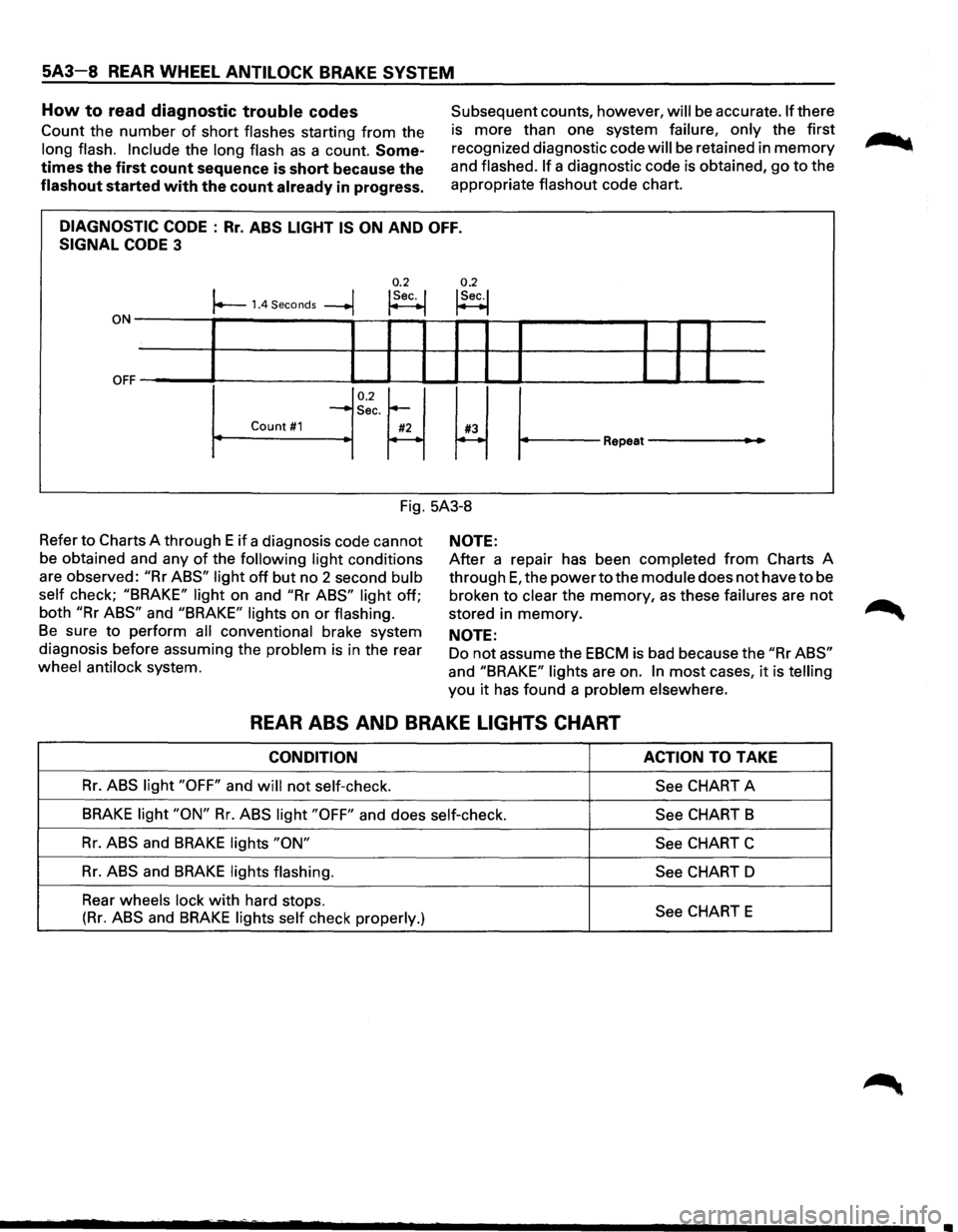
How to read diagnostic trouble codes
Count the number of short flashes starting from the
long flash. Include the long flash as a count. Some
times the first count sequence is short because the
flashout started with the count already in progress.
Subsequent counts, however, will be accurate. If there
is more than one system
failure, only the first
recognized diagnostic code
will be retained in memory
and flashed. If a diagnostic code is obtained, go to the
appropriate
flashout code chart.
DIAGNOSTIC CODE : Rr. ABS LIGHT IS ON AND OFF.
SIGNAL CODE 3
0.2 0.2 I I !Sec. I !Sec.! r--1.4 Seconds --+j ~ t--1
ON-------,~-----------,--~--~~~-r--?-----------~--r--r-----
OFF ~' ----L-1--'-----11 IL....-l.-1 ~I I ______..l__.__l ..____I
0.2~ ~ ~
-Sec.
Count #1 #2 #3 r----~ Repeat---
Fig. 5A3-8
Refer
to Charts A through E if a diagnosis code cannot
be obtained and any
of the following light conditions
are observed:
"Rr ABS" light off but no 2 second bulb
self
check; "BRAKE" light on and "Rr ABS" light off;
both
"Rr ABS" and "BRAKE" lights on or flashing.
Be sure to perform all conventional brake system
diagnosis before assuming the
problem is in the rear
wheel antilock system.
NOTE:
After a repair has been completed from Charts A
through
E, the power to the module does not have to be
broken to
clear the memory, as these failures are not
stored in memory.
NOTE:
Do not assume the EBCM is bad because the "Rr ABS"
and "BRAKE" lights are on. In most cases, it is telling
you it has found a problem elsewhere.
REAR ABS AND BRAKE LIGHTS CHART
CONDITION ACTION TO TAKE
Rr. ABS light "OFF" and will not self-check.
See CHART A
BRAKE light "ON" Rr. ABS light "OFF" and does self-check.
See CHART B
Rr. ABS and BRAKE lights "ON"
See CHART C
Rr. ABS and BRAKE lights flashing.
See CHART D
Rear
wheels lock with hard stops. See CHART E (Rr. ABS and BRAKE lights self check properly.)
Page 392 of 1928
5A3-24 REAR WHEEL ANTILOCK BRAKE SYSTEM
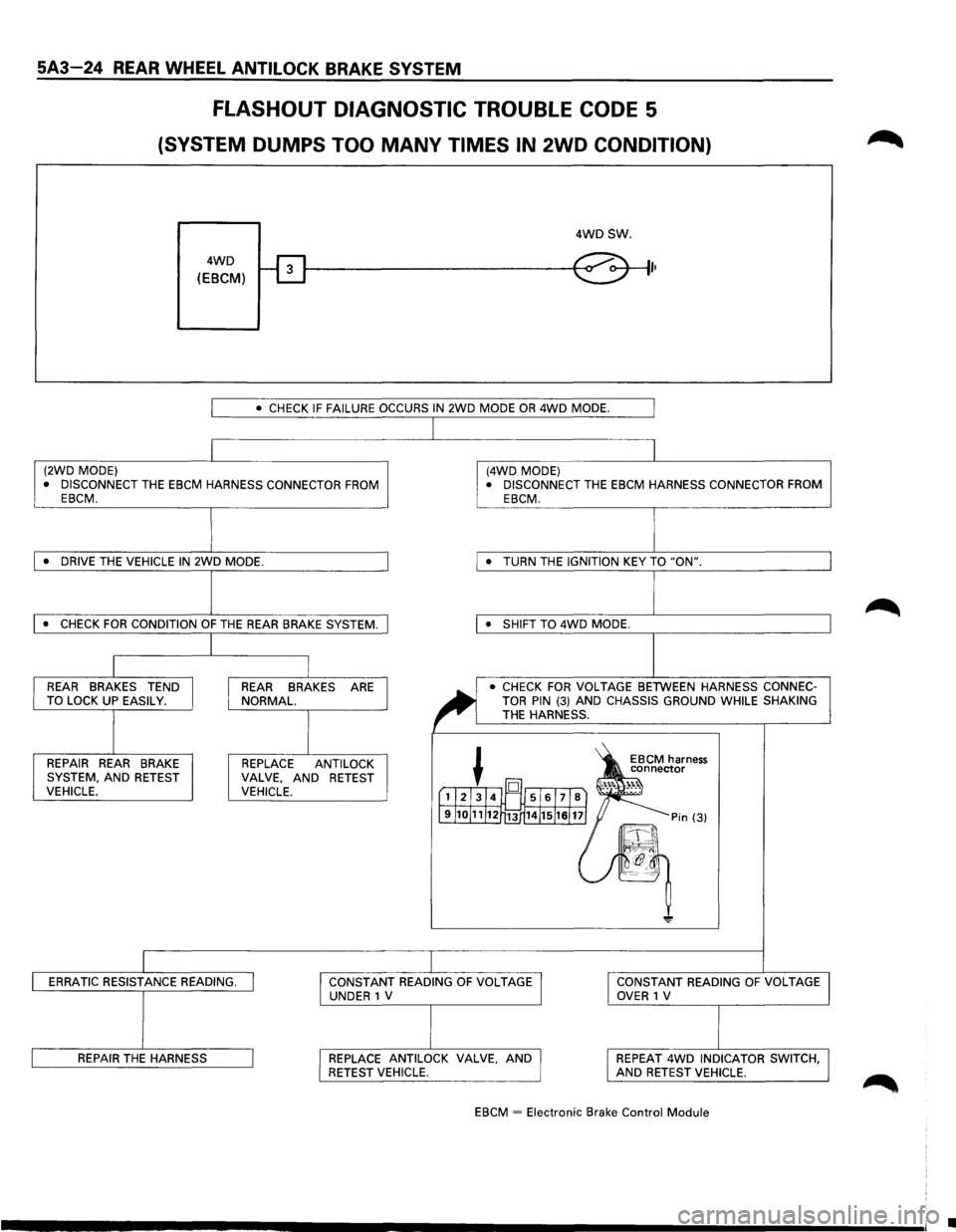
FLASHOUT DIAGNOSTIC TROUBLE CODE 5
(SYSTEM DUMPS TOO MANY TIMES IN 2WD CONDITION)
4WD
(EBCM)
4WDSW.
I•
I • CHECK IF FAILURE OCCURS IN 2WD MODE OR 4WD MODE. I
I I (2WD MODE) (4WD MODE)
• DISCONNECT THE EBCM HARNESS CONNECTOR FROM • DISCONNECT THE EBCM HARNESS CONNECTOR FROM
EBCM. EBCM.
J I • DRIVE THE VEHICLE IN 2WD MODE. • TURN
THE IGNITION KEY TO "ON".
l I • CHECK FOR CONDITION OF THE REAR BRAKE SYSTEM. • SHIFT TO 4WD MODE.
I
I I I REAR BRAKES TEND REAR BRAKES ARE
~
• CHECK FOR VOLTAGE BETWEEN HARNESS CONNEC-
TO LOCK UP EASILY. NORMAL. TOR PIN (3) AND CHASSIS GROUND WHILE SHAKING
I I
THE HARNESS.
~ 1S
REPAIR REAR BRAKE REPLACE
ANTI LOCK EBCM harness
connector
SYSTEM, AND RETEST VALVE, AND
RETEST ·'"·. ~)l VEHICLE. VEHICLE. [1l21314l~ 5161718) .......
J9J1oJ11J12r13 14J15J1sJ 11] = Pin (3)
~-~\
~ -~~~
"!!'
ERRATIC RESISTANCE READING. I I CONSTANT READING OF VOLTAGE I I CONSTANT
READING OF VOLTAGE
UNDER 1 V OVER 1 V
REPAIR THE HARNESS I I REPLACE ANTILOCK VALVE, AND I I REPEAT 4WD INDICATOR
SWITCH, RETEST VEHICLE. AND RETEST VEHICLE.
EBCM
~ Electronic Brake Control Module
I
•
Page 403 of 1928
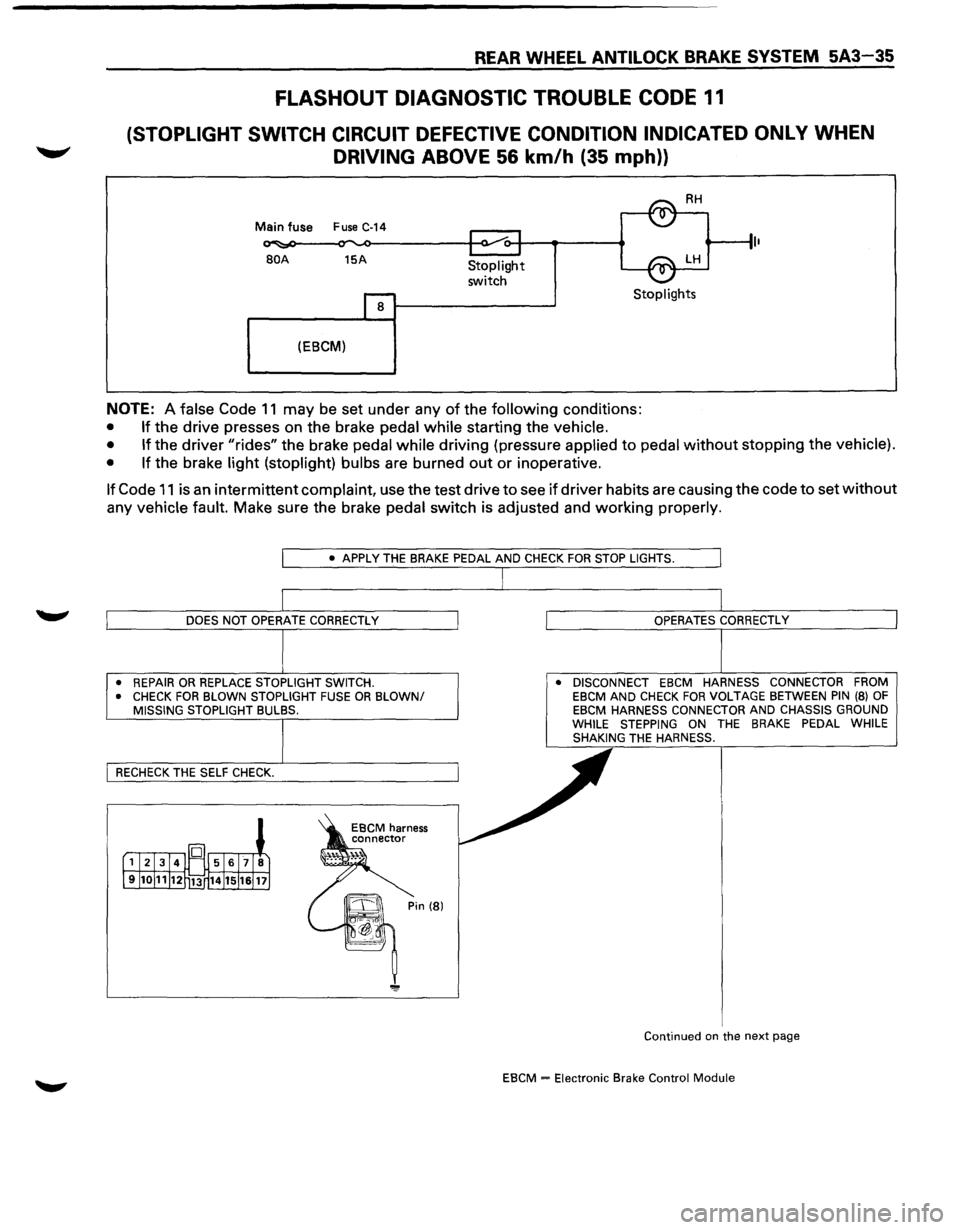
REAR WHEEL ANTILOCK BRAKE SYSTEM 5A3-35
FLASHOUT DIAGNOSTIC TROUBLE CODE 11
(STOPLIGHT SWITCH CIRCUIT DEFECTIVE CONDITION INDICATED ONLY WHEN
DRIVING ABOVE 56 km/h (35 mph))
Main fuse Fuse C-14
BOA 15A
8
(EBCM)
Stoplight
switch Stoplights
NOTE: A false Code 11 may be set under any of the following conditions:
• If the drive presses on the brake pedal while starting the vehicle.
• If
the driver "rides" the brake pedal while driving (pressure applied to pedal without stopping the vehicle).
• If
the brake light (stoplight) bulbs are burned out or inoperative.
If Code 11 is an intermittent complaint, use the test drive to see if driver habits are causing the code to set without
any vehicle fault. Make sure the brake pedal switch is adjusted and working properly.
• REPAIR OR REPLACE STOPLIGHT SWITCH.
• CHECK FOR BLOWN STOPLIGHT FUSE OR BLOWN/ MISSING STOPLIGHT BULBS. •
DISCONNECT EBCM HARNESS CONNECTOR FROM
EBCM AND CHECK FOR VOLTAGE BETWEEN PIN (8) OF EBCM HARNESS CONNECTOR AND CHASSIS GROUND
WHILE STEPPING ON THE BRAKE PEDAL WHILE
SHAKING THE HARNESS.
Continued
on the next page
EBCM = Electronic Brake Control Module
Page 425 of 1928
4-WHEEL ANTILOCK BRAKE SYSTEM (ABS) 5A4-15
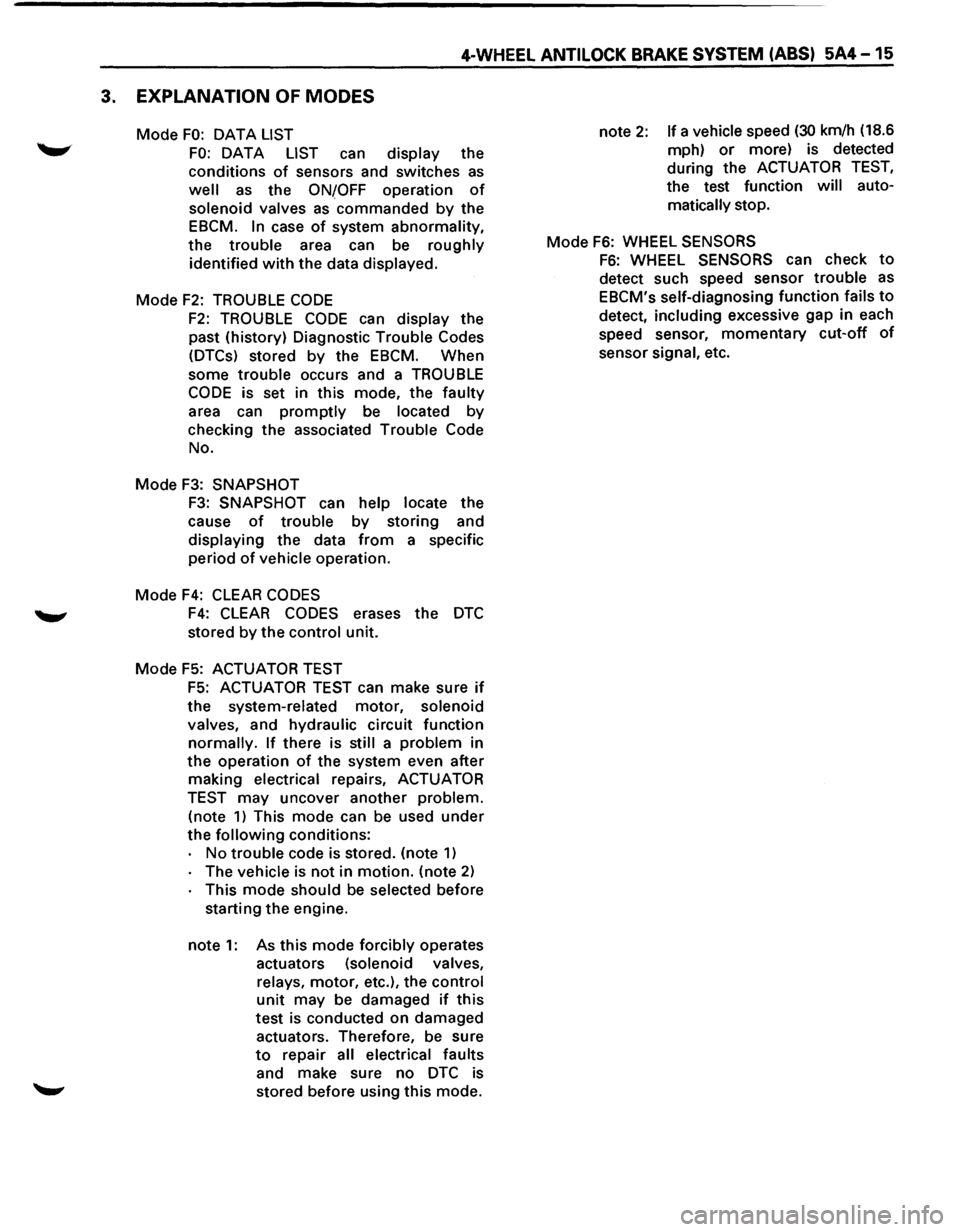
3. EXPLANATION OF MODES
Mode FO: OAT A LIST
FO: DATA LIST can display the
conditions
of sensors and switches as
well as the ONfOFF operation of
solenoid valves as commanded by the
EBCM.
In case of system abnormality,
the trouble area can be roughly
identified
with the data displayed.
Mode
F2: TROUBLE CODE
F2: TROUBLE CODE can display the
past (history) Diagnostic Trouble Codes
(DTCs) stored
by the EBCM. When
some
trouble occurs and a TROUBLE
CODE is set in this mode, the faulty
area can
promptly be located by
checking the associated Trouble Code
No.
Mode
F3: SNAPSHOT
F3: SNAPSHOT can help locate the
cause
of trouble by storing and
displaying the data
from a specific
period
of vehicle operation.
Mode
F4: CLEAR CODES
F4: CLEAR CODES erases the DTC
stored by the control unit.
Mode F5: ACTUATOR TEST
F5: ACTUATOR TEST can make sure if
the system-related motor, solenoid
valves, and hydraulic circuit function
normally. If there is still a problem in
the operation of the system even after
making electrical repairs, ACTUATOR
TEST may uncover another problem.
(note
1) This mode can be used under
the
following conditions:
No
trouble code is stored. (note 1)
The vehicle is not in motion. (note 2)
This mode should be selected before
starting the engine.
note
1: As this mode forcibly operates
actuators (solenoid valves,
relays, motor, etc.), the control
unit may be damaged if this
test
is conducted on damaged
actuators. Therefore, be sure
to repair all electrical faults
and make sure no
DTC is
stored before using this mode. note
2: If a vehicle speed (30 km/h
(18.6
mph)
or more) is detected
during the ACTUATOR
TEST,
the test function will auto
matically stop.
Mode
F6: WHEEL SENSORS
F6: WHEEL SENSORS can check to
detect such speed sensor trouble as
EBCM's self-diagnosing function fails to
detect, including excessive gap in each
speed sensor,
momentary cut-off of
sensor signal, etc.
Page 452 of 1928
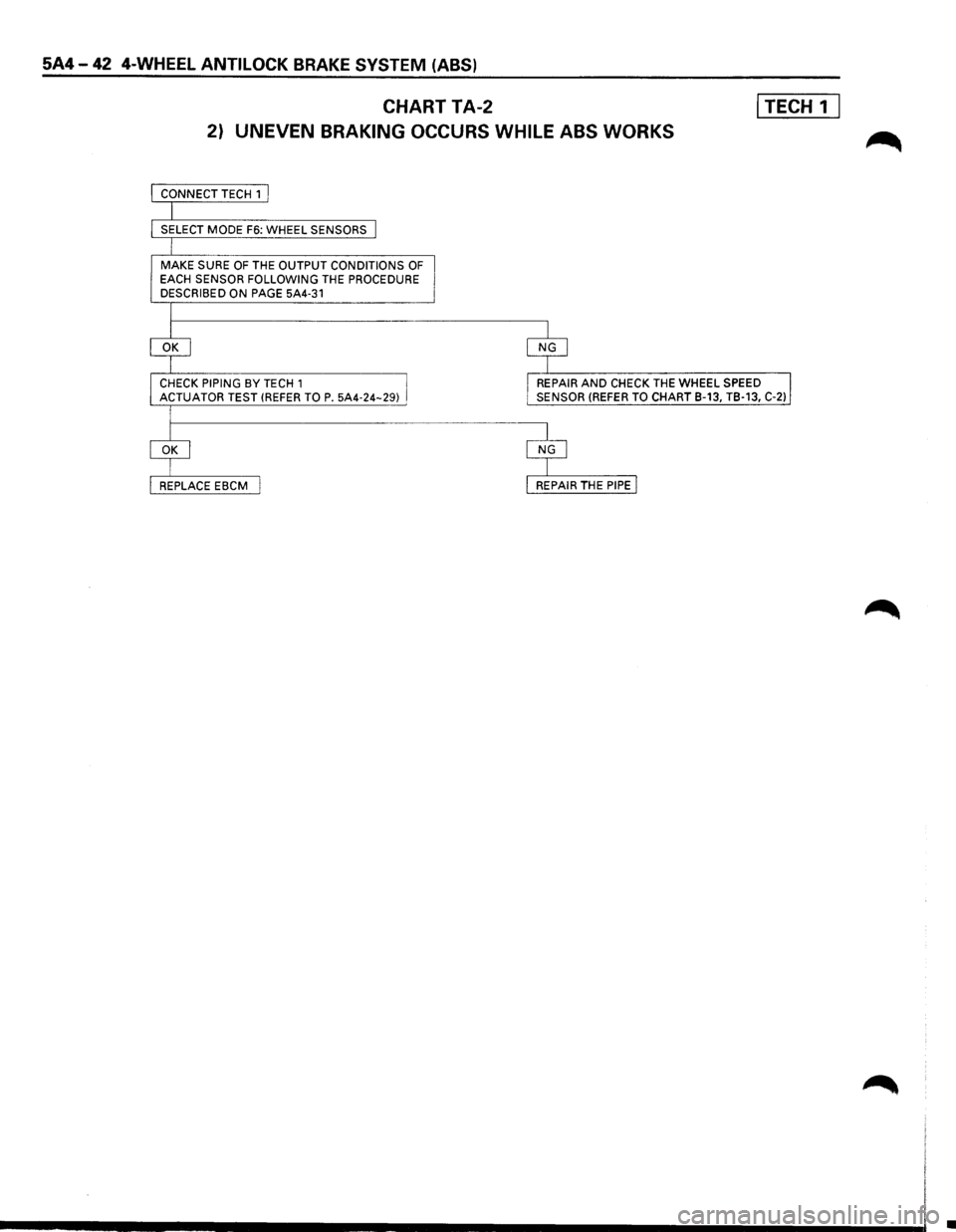
5A4-42 4-WHEEL ANTILOCK BRAKE SYSTEM (ABS)
CHART TA-2 I TECH 1 I
2) UNEVEN BRAKING OCCURS WHILE ABS WORKS
MAKE SURE OF THE OUTPUT CONDITIONS OF EACH SENSOR FOLLOWING THE PROCEDURE
DESCRIBED ON PAGE 5A4-31
REPAIR AND CHECK THE WHEEL SPEED
SENSOR (REFER TO CHART B-13, TB-13, C-2)
•
Page 457 of 1928
4-WHEEL ANTILOCK BRAKE SYSTEM (ASS) 5A4-47
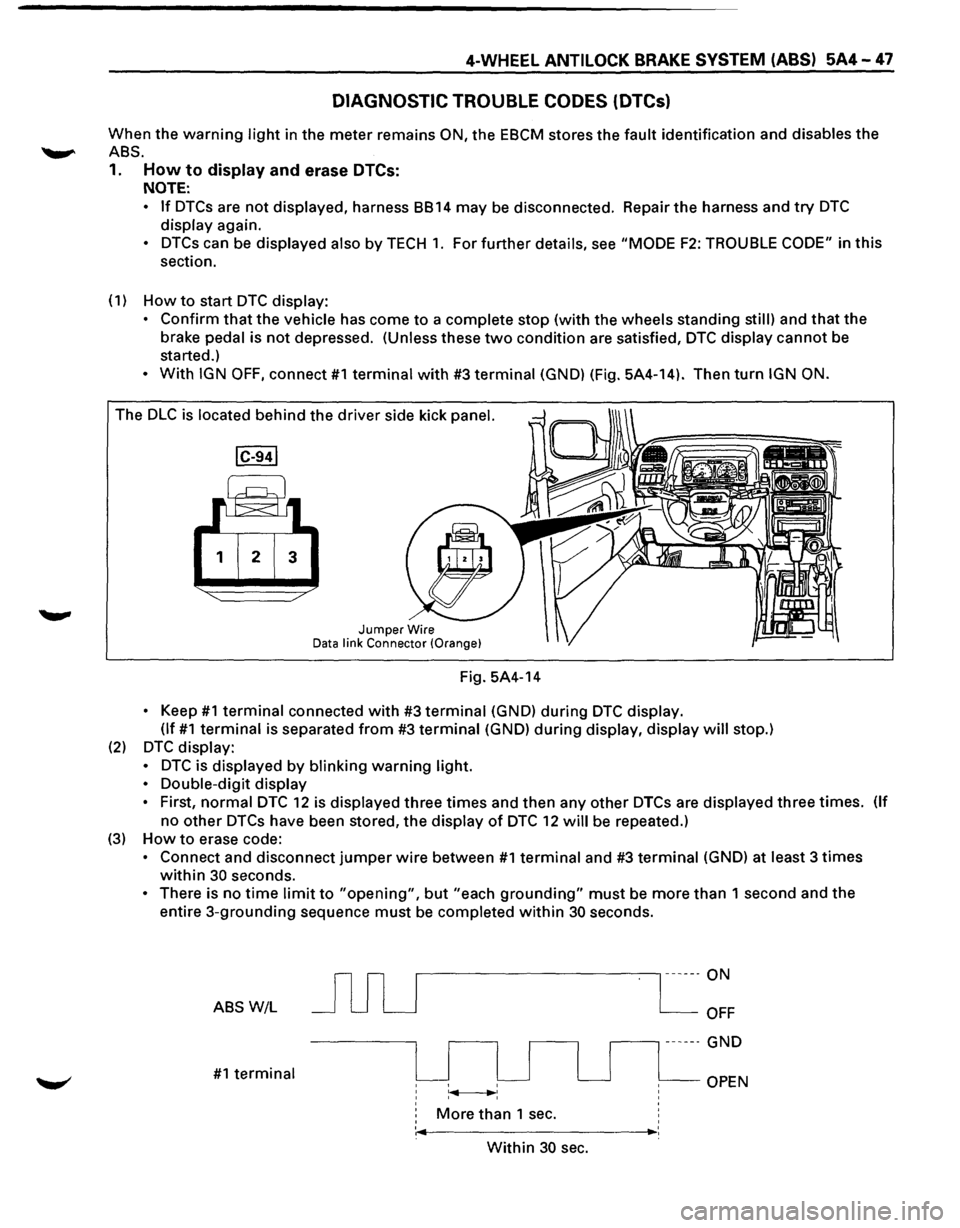
DIAGNOSTIC TROUBLE CODES (DTCs)
When the warning light in the meter remains ON, the EBCM stores the fault identification and disables the
.........,.. ABS.
1. How to display and erase DTCs:
NOTE:
• If DTCs are not displayed, harness BB 14 may be disconnected. Repair the harness and try DTC
display again.
• DTCs can be displayed also by TECH 1. For further details, see "MODE F2: TROUBLE CODE" in this
section.
(1)
How to start DTC display:
• Confirm
that the vehicle has come to a complete stop (with the wheels standing still) and that the
brake pedal is not depressed. (Unless these two condition are satisfied, DTC display cannot be
started.)
• With IGN OFF, connect #1 terminal with #3 terminal (GND) (Fig. 5A4-14). Then turn IGN ON.
The DLC is located behind the driver side kick panel.
1 2 3
Jumper Wire Data link Connector (Orange}
Fig. 5A4-14
• Keep #1 terminal connected with #3 terminal (GND) during DTC display.
(If
#1 terminal is separated from #3 terminal (GND) during display, display will stop.)
(2) DTC display:
•
DTC is displayed by blinking warning light.
•
Double-digit display
•
First, normal DTC 12 is displayed three times and then any other DTCs are displayed three times. (If
no other DTCs have been stored, the display of DTC 12 will be repeated.)
(3) How to erase code:
• Connect and disconnect jumper wire between #1 terminal and #3 terminal (GND) at least 3 times
within 30 seconds.
• There is no time limit to "opening", but "each grounding" must be more than 1 second and the
entire 3-grounding sequence must be completed within 30 seconds.
ABS W/L
#1 terminal
r---------------, ------ON
More than 1 sec.
OFF
.--------, ------ GND
OPEN
' ,._ _________ ,_:
Within 30 sec.
Page 503 of 1928
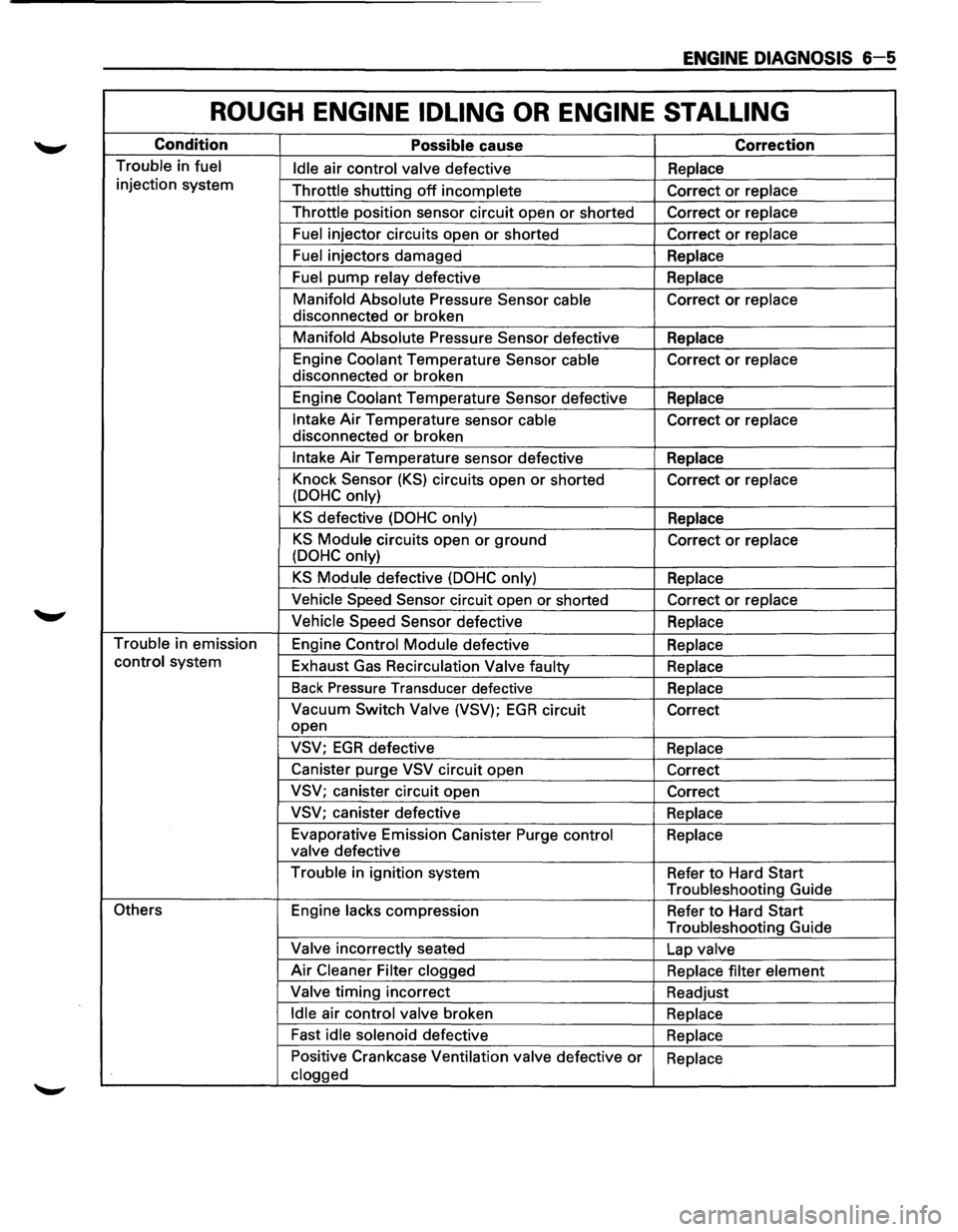
ENGINE DIAGNOSIS 6-5
ROUGH ENGINE IDLING OR ENGINE STALLING
Condition Possible cause Correction
Trouble in fuel
Idle air control valve defective Replace
injection system
Throttle shutting
off incomplete Correct or replace
Throttle position sensor circuit open
or shorted Correct or replace
Fuel injector circuits open or shorted Correct or replace
Fuel injectors damaged
Replace
Fuel pump relay defective Replace
Manifold Absolute Pressure Sensor
cable Correct or replace
disconnected
or broken
Manifold Absolute Pressure Sensor defective
Replace
Engine Coolant Temperature Sensor cable Correct
or replace
disconnected
or broken
Engine Coolant Temperature Sensor defective
Replace
Intake Air Temperature sensor cable Correct or replace
disconnected
or broken
Intake Air Temperature sensor defective
Replace
Knock Sensor
(KS) circuits open or shorted
Correct or replace
(DOHC only)
KS defective (DOHC only) Replace
KS Module circuits open or ground
Correct or replace
(DOHC only)
KS Module defective (DOHC only) Replace
Vehicle Speed Sensor circuit open or shorted
Correct or replace
Vehicle Speed Sensor defective
Replace
Trouble in emission
Engine Control Module defective
Replace
control system
Exhaust Gas Recirculation
Valve faulty
Replace
Back Pressure Transducer defective
Replace
Vacuum Switch Valve (VSV); EGR circuit
Correct
open
VSV; EGR defective Replace
Canister purge
VSV circuit open
Correct
VSV; canister circuit open
Correct
VSV; canister defective
Replace
Evaporative Emission Canister Purge control
Replace
valve defective
Trouble in ignition system
Refer
to Hard Start
Troubleshooting Guide
Others Engine lacks compression
Refer to Hard Start
Troubleshooting Guide
Valve incorrectly seated
Lap valve
Air Cleaner Filter clogged
Replace filter element
Valve timing incorrect
Readjust
Idle air control valve broken
Replace
Fast
idle solenoid defective
Replace
Positive Crankcase Ventilation valve defective
or Replace
clogged