light ISUZU TROOPER 1995 Workshop Manual
[x] Cancel search | Manufacturer: ISUZU, Model Year: 1995, Model line: TROOPER, Model: ISUZU TROOPER 1995Pages: 1928
Page 1394 of 1928
·;.
8 -204 CHASSIS ELECTRICAL
STARTER SWITCH
Refer to "START AND CHARGING" in this section.
STOPLIGHT
STOPLIGHT SWITCH
BRAKE SWITCH
Refer to "STOPLIGHT AND REAR DEFOGGER" in
,c, this section.
SHIFT LOCK CONTROLLER
Refer to the shift lock controller in Section 7 A
"AUTOMATIC TRANSMISSION."
SHIFT LOCK SOLENOID
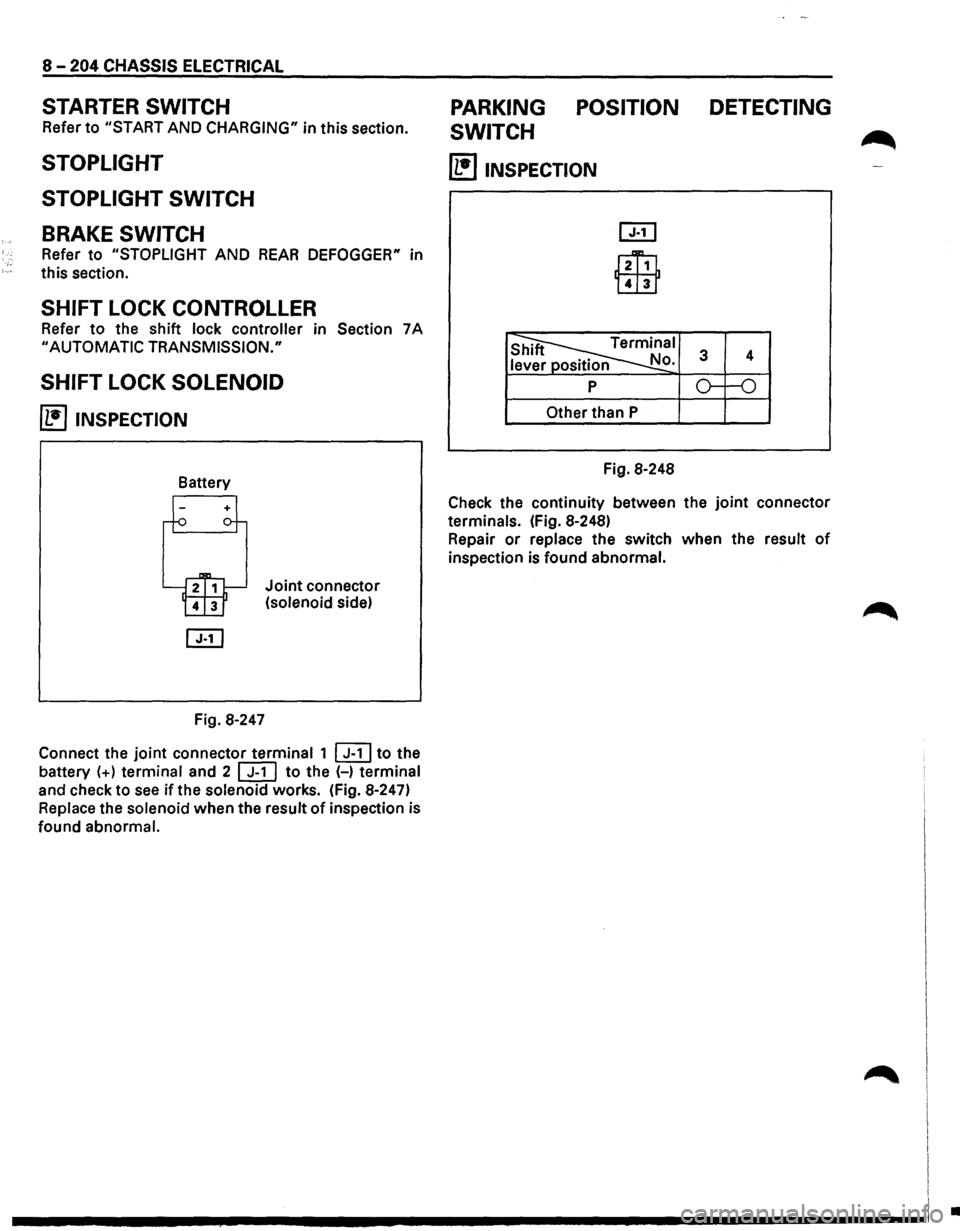
~ INSPECTION
Fig. 8-247
Joint connector
(solenoid side)
Connect the
joint connector terminal 1 ~to the
battery
(+) terminal and 2 [ill to the (-) terminal
and check to
see if the solenoid works. (Fig. 8-247)
Replace the solenoid when the result
of inspection is
found abnormal.
PARKING POSITION DETECTING
SWITCH
~
(1!]1NSPECTION
l2Ti1
Lill1
Other than P
Fig. 8-248
Check the continuity between the
joint connector
terminals. (Fig. 8-248)
Repair
or replace the switch when the result of
inspection is found abnormal.
I
I I
.............. ~ ................................ -----------------1 .
Page 1396 of 1928
•
., c5" cp N g
)
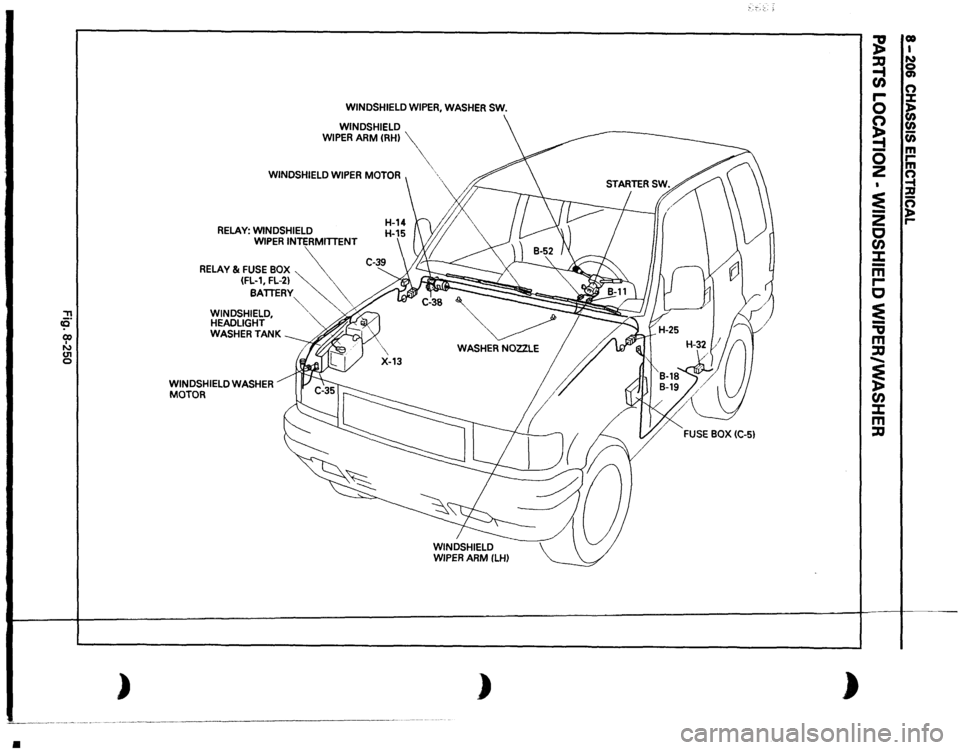
WINDSHIELD
WIPER,
WASHER
SW.
WINDSHIELD
WIPER
ARM
CRH)
WINDSHIELD
WIPER
MOTOR
RELAY:
WINDSHIELD WIPER
INTERMITTENT
RELAY
& FUSE
BOX
~~
(FL-1,
FL-21
\.
BATTERY
\.
"'
',
WINDSHIELD,
""-
. ;;.,
HEADLIGHT WASHER
TANK
WINDSHIELD
WASHER
MOTOR
',
WASHER
NOZZLE
)
;--,-:-.
;g
00 I
~
N 0
en
en n
r-0
X )>
~
(I) (I)
....
c;;
-
m
0
,...
z
m n ......
:E
1:!!
-
n
z
)>
c
,...
en :X: -m r-c ~ -., m :a ...... ~ en :X: m :a
)
Page 1413 of 1928
STARTER SWITCH
Refer to "START AND CHARGING" in this section.
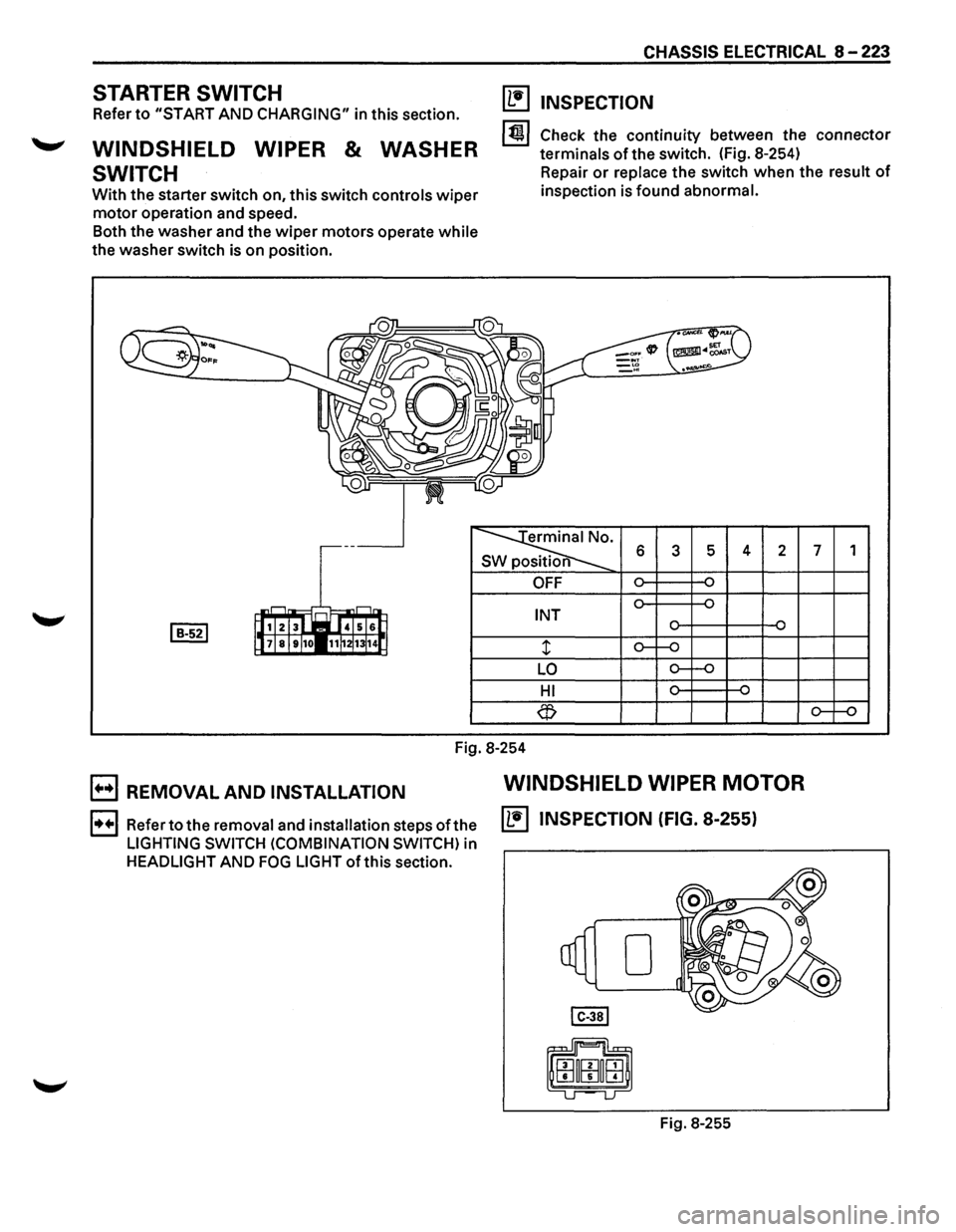
WINDSHIELD WIPER & WASHER
SWITCH
With the starter switch on, this switch controls wiper
motor operation and speed.
Both the washer and the
wiper motors operate while
the washer switch is on position.
CHASSIS ELECTRICAL 8 -223
(1!1 INSPECTION
1~1 Check the continuity between the connector
terminals
of the switch. (Fig. 8-254)
Repair
or replace the switch when the result of
inspection is found abnormal.
erminal No.
SW position 6 3 5 4 2 7 1
OFF
INT
LO
HI
Fig.
8-254
B REMOVAL AND INSTALLATION WINDSHIELD WIPER MOTOR
1••1 Refer to the removal and installation steps ofthe IL•IINSPECTION (FIG. 8-255)
LIGHTING SWITCH (COMBINATION SWITCH) in
HEADLIGHT AND FOG LIGHT ofthis section.
Fig. 8-255
Page 1415 of 1928
1. Fender inner liner (right side)
2. Front combination light
• Remove the screw
3. Washer tank
• Remove 2 screws.
• Remove the filler neck
• Remove the hose.
• Disconnect the connector of the washer
motor.
4. Windshield washer motor
• Hold the motor and pull it out from the washer
tank.
E3 INSTALLATION
To install, follow the removal steps in the reverse
order.
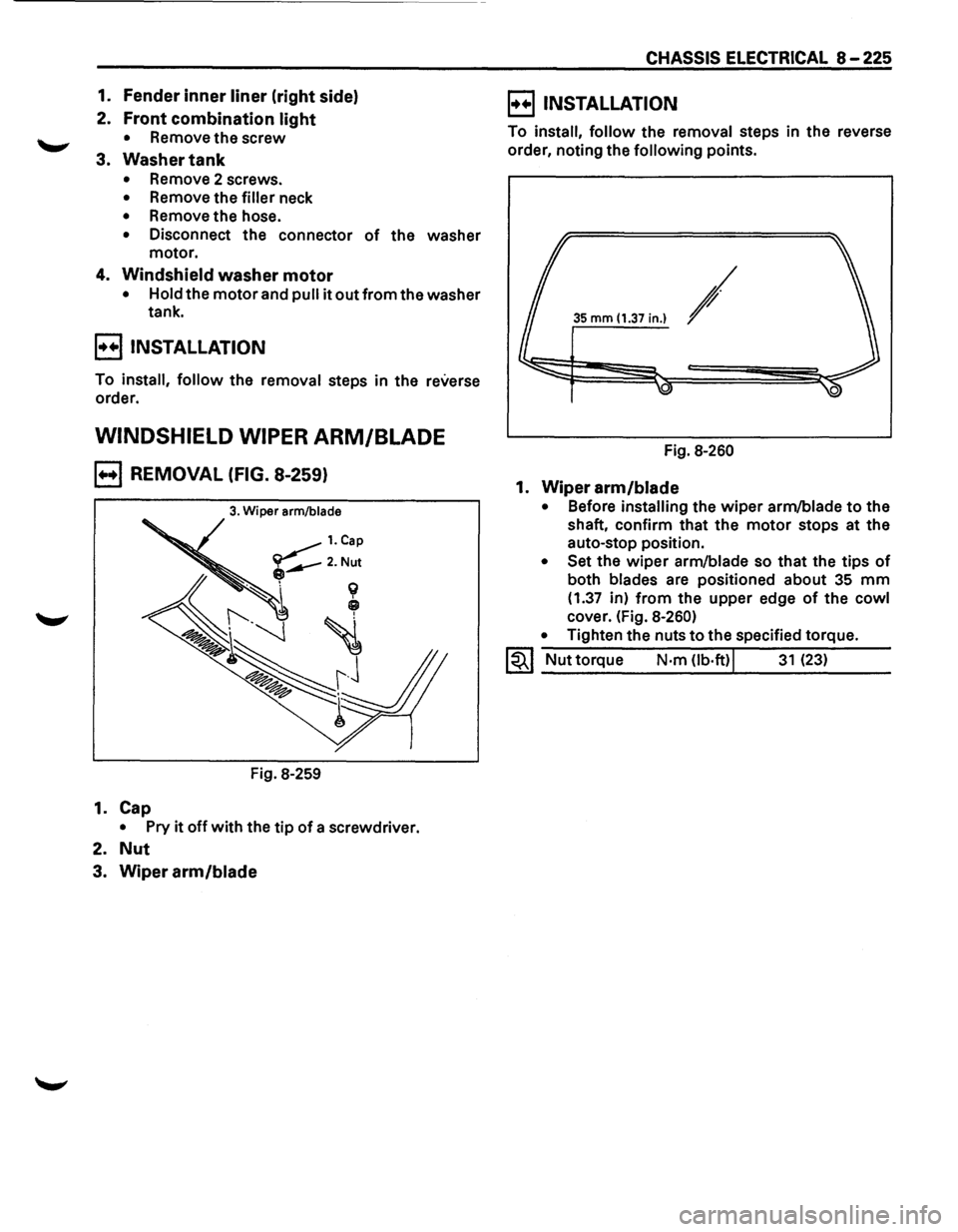
WINDSHIELD WIPER ARM/BLADE
B REMOVAL (FIG. 8-259)
3. Wiper arm/blade
Fig. 8-259
1. Cap
• Pry it off with the tip of a screwdriver.
2. Nut
3. Wiper arm/blade
CHASSIS ELECTRICAL 8-225
E) INSTALLATION
To install, follow the removal steps in the reverse
order, noting the
following points.
35 mm (1.37 in.) /
Fig. 8-260
1. Wiper arm/blade
• Before installing the wiper arm/blade to the
shaft, confirm that the
motor stops at the
auto-stop position.
• Set the wiper arm/blade so that the tips of
both blades are positioned about 35 mm
(1.37 in) from the upper edge of the cowl
cover. (Fig. 8-260)
•
Tighten the nuts to the specified torque.
1~1 Nut torque N·m Ob·ft)j 31 (23)
Page 1417 of 1928
![ISUZU TROOPER 1995 Workshop Manual ~ INSPECTION
I 4131 2 1 i~~j
l~ 101918 71615 jJ [ill]
~
s 6 7 8 2 3 s position
CD
OFF
~ ON o-~
...... ~ ~ ...... OFF
CD ~ ON o-~
Fig. 8-263
Check
the continuity between the connector
te](/img/61/57183/w960_57183-1416.png "ISUZU TROOPER 1995 Workshop Manual ~ INSPECTION
I 4131 2 1 i~~j
l~ 101918 71615 jJ [ill]
~
s 6 7 8 2 3 s position
CD
OFF
~ ON o-~
...... ~ ~ ...... OFF
CD ~ ON o-~
Fig. 8-263
Check
the continuity between the connector
te")
~ INSPECTION
I 4131 2 1 i~~j
l~ 101918 71615 jJ [ill]
~
s 6 7 8 2 3 s position
CD
OFF
~ ON o-~
...... ~ ~ ...... OFF
CD ~ ON o-~
Fig. 8-263
Check
the continuity between the connector
terminals of the switch. (Fig. 8-263)
Repair
or replace the switch when the result of
inspection is found abnormal.
E) REMOVAL (FIG. 8-264)
Preparation: Disconnect the battery ground cable.
This illustration is based on rear defogger SW removal.
Fig. 8-264
'-"' 1. Front console assembly
2. lower cluster assembly
3. Instrument panel driver lower cover
4. Instrument panel cluster assembly
CHASSIS ELECTRICAL 8-227
o Refer to FOG LIGHT SWITCH removal steps in
this section.
5. Rear wiper & washer switch
• To remove the switch, pushing the lock from
the back side of the cluster assembly.
B INSTALLATION
To install, follow the removal steps in the reverse
order, noting the
following point.
1. Push the switch with your fingers until it locks
securely.
REAR WIPER MOTOR
~ INSPECTION
Fig. 8-265
With the battery
(+)terminal connected to the wiper
motor connector termina12l G-6 land the H terminal
to the connector 41 G-6 I, check to see if the motor
rotates. (Fig. 8-265)
Repair
or replace the motor when the result of
inspection is found abnormal.
E) REMOVAL (FIG. 8-266)
Preparation: Disconnect the battery ground cable.
-,
Fig. 8-266
Page 1422 of 1928
8 -232 CHASSIS ELECTRICAL
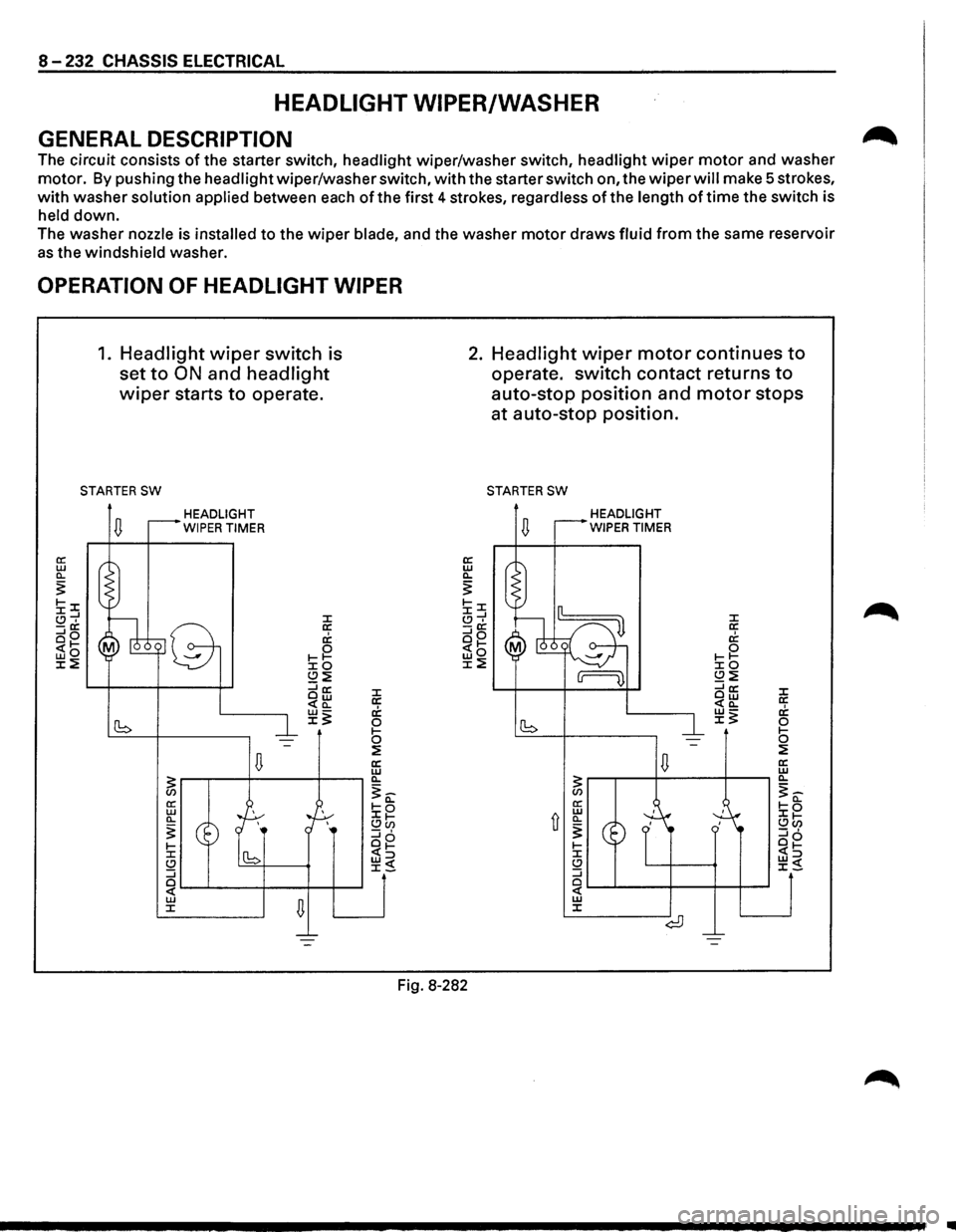
HEADLIGHT WIPER/WASHER
GENERAL DESCRIPTION
The circuit consists of the starter switch, headlight wiper/washer switch, headlight wiper motor and washer
motor. By pushing the headlight wiper/washer switch, with the starter switch on, the wiper will make 5 strokes,
with washer solution applied between each of the first 4 strokes, regardless of the length of time the switch is
held down.
The washer nozzle is installed to the wiper blade, and the washer motor draws fluid from the same reservoir
as the windshield washer.
OPERATION OF HEADLIGHT WIPER
1. Headlight wiper switch is
set
to ON and headlight
wiper starts to operate.
STARTER SW
HEADLIGHT
WIPER TIMER
J: a: c1; 0 1-1-J:O (.!)~ ::::ia: Ow <(a_
~~
Fig. 8-282
2. Headlight wiper motor continues to
operate. switch contact returns to
auto-stop position and motor stops
at auto-stop position.
STARTER SW
HEADLIGHT
WIPER TIMER
..
Page 1423 of 1928
::!!
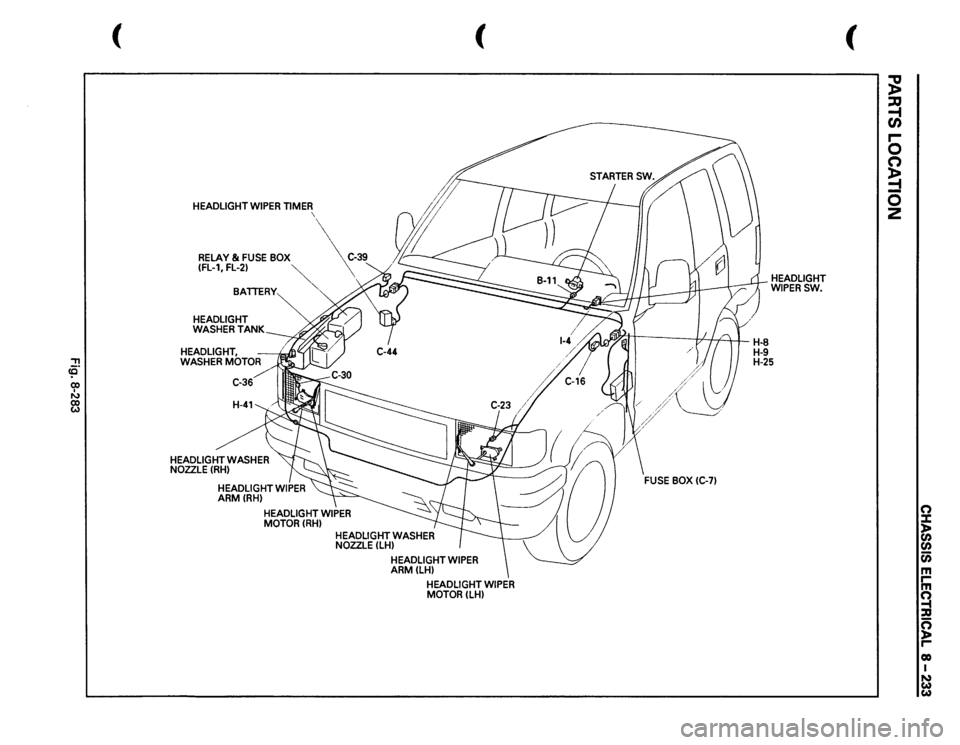
HEADLIGHT
WIPER
TIMER
'
RELAY
& FUSE
BOX
C-39
(fl-1,FL-21
~
BATTERY
HEADLIGHT WASHER
TANK
HEADLIGHT, WASHER
MOTOR
HEADLIGHT
WASHER
NOZZLE(RHI
(
HEADLIGHT
WIPER
MOTORILHI
~II
1/
//'
I
H-8
HEADLIGHT WIPERSW.
H-9 H-25
(
;g ~ r-0 n ~ 0 2
0 X )> en
en Cii m rm ~ :D 0 ~ 00 I N w
w
Page 1424 of 1928
8-234 CHASSIS ELECTRICAL
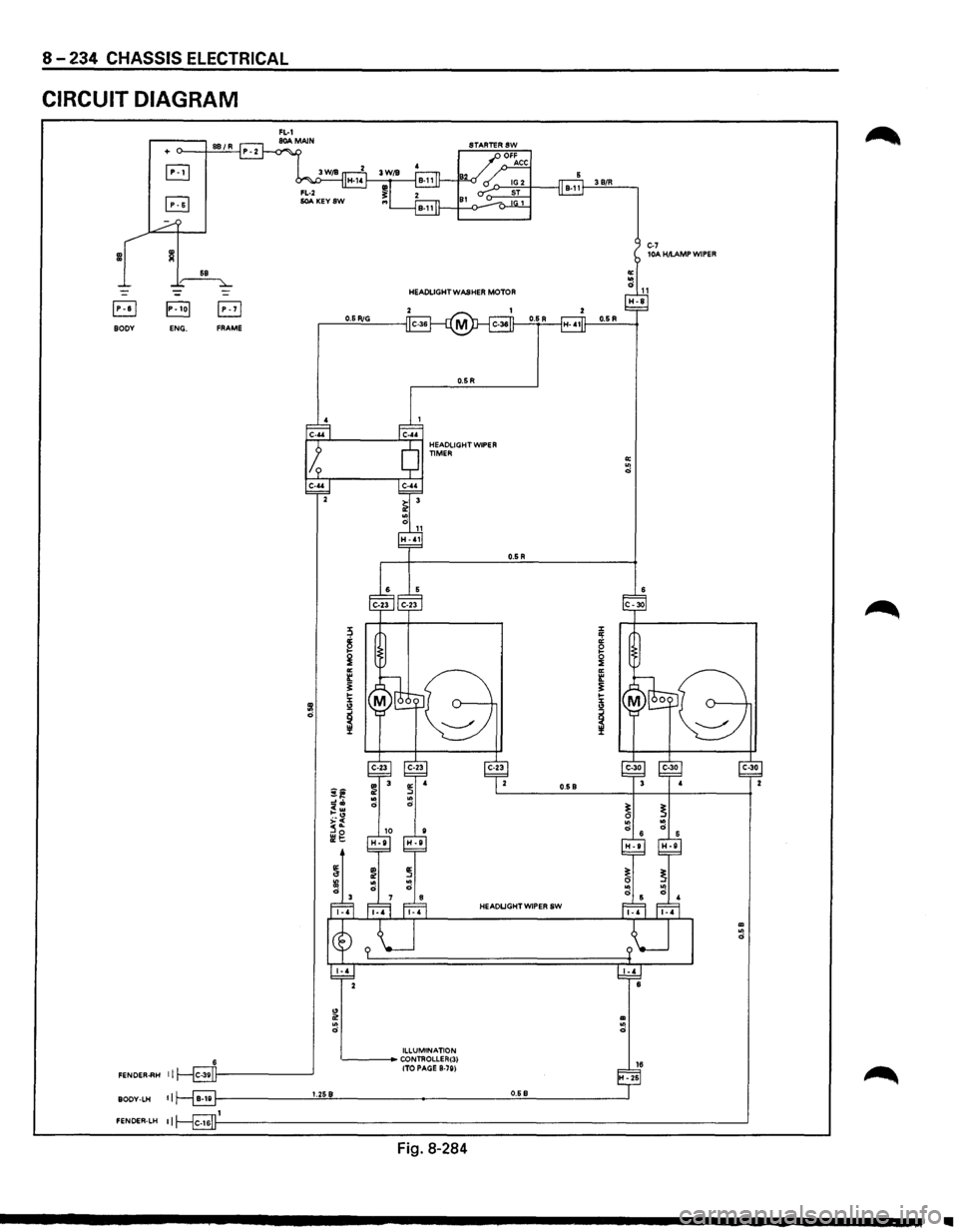
CIRCUIT DIAGRAM
3 B/R
C-7 lOA H/I.AMP WIPER
HEADLIGHT WASHER
MOTOR
B 0.5 RiG BODY ENG. FRAME
0.5R
0.5 R
0.5 B
HEADLIGHT WIPER SW
" 0! ID .. .. 0 0
ILLUMINATION CONTROLLER(31 16 (TO PAGE B-781 FENOER..RH II H-25
II 1.258 0.68 BODY-LH
FENOER-LH II
Fig.
8-284
Ill
Page 1426 of 1928
8-236 CHASSIS ELECTRICAL
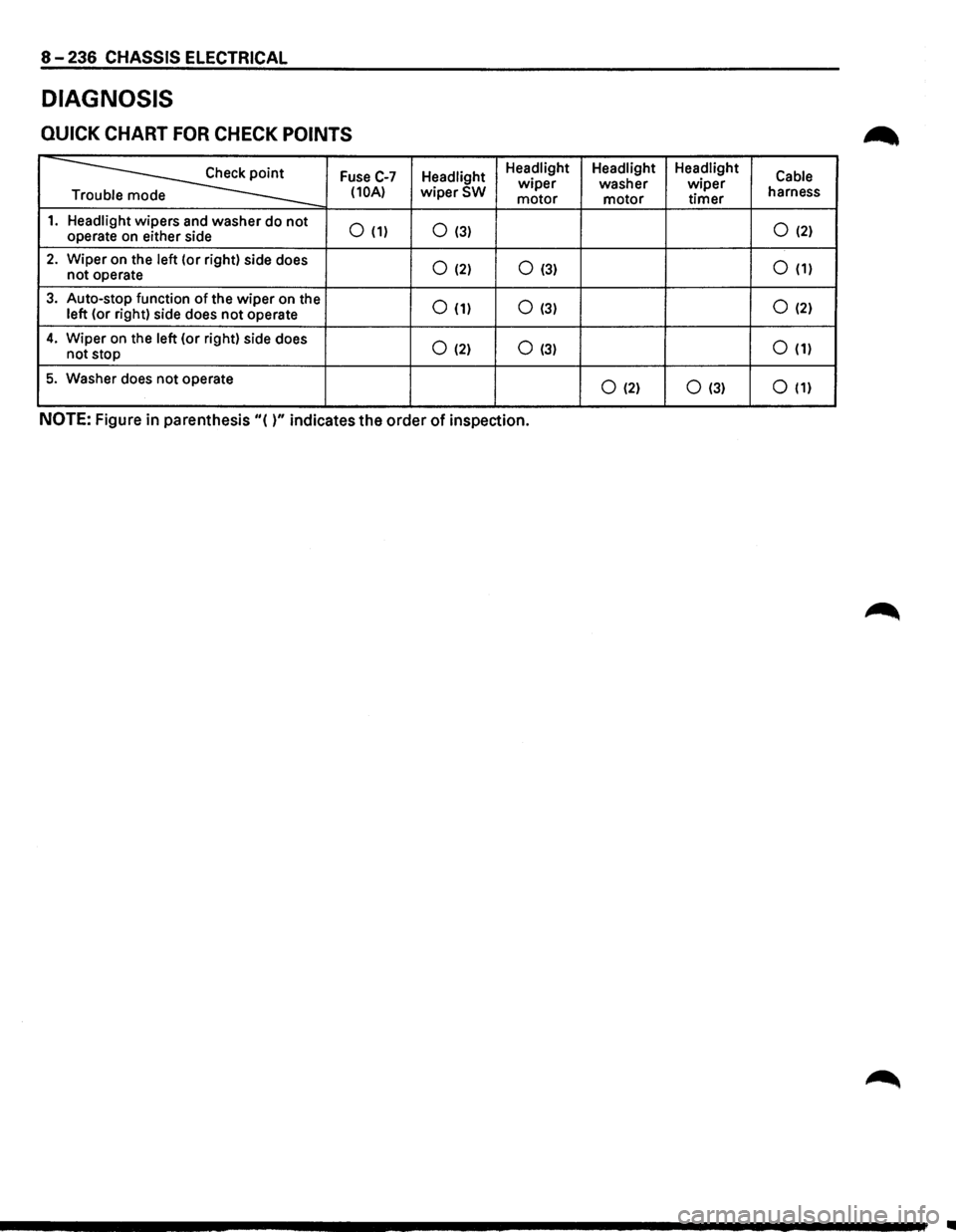
DIAGNOSIS
QUICK CHART FOR CHECK POINTS
~
Fuse C-7 Headlight Headlight
Headlight Headlight
Cable wiper washer wiper (10A) wiperSW motor motor timer harness
e
1. Headlight wipers and washer do not 0 (1) 0 (3) 0 (2) operate on either side
2. Wiper on the left (or right) side does 0 (2) 0 (3) 0 (1) not operate
3. Auto-stop function of the wiper on the 0 (1) 0 (3) 0 (2) left (or right) side does not operate
4. Wiper on the left (or right) side does 0 (2) 0 (3) 0 (1) not stop
5. Washer does not operate 0 (2) 0 (3) 0 (1)
NOTE: Figure in parenthesis "( )" indicates the order of inspection.
Page 1427 of 1928
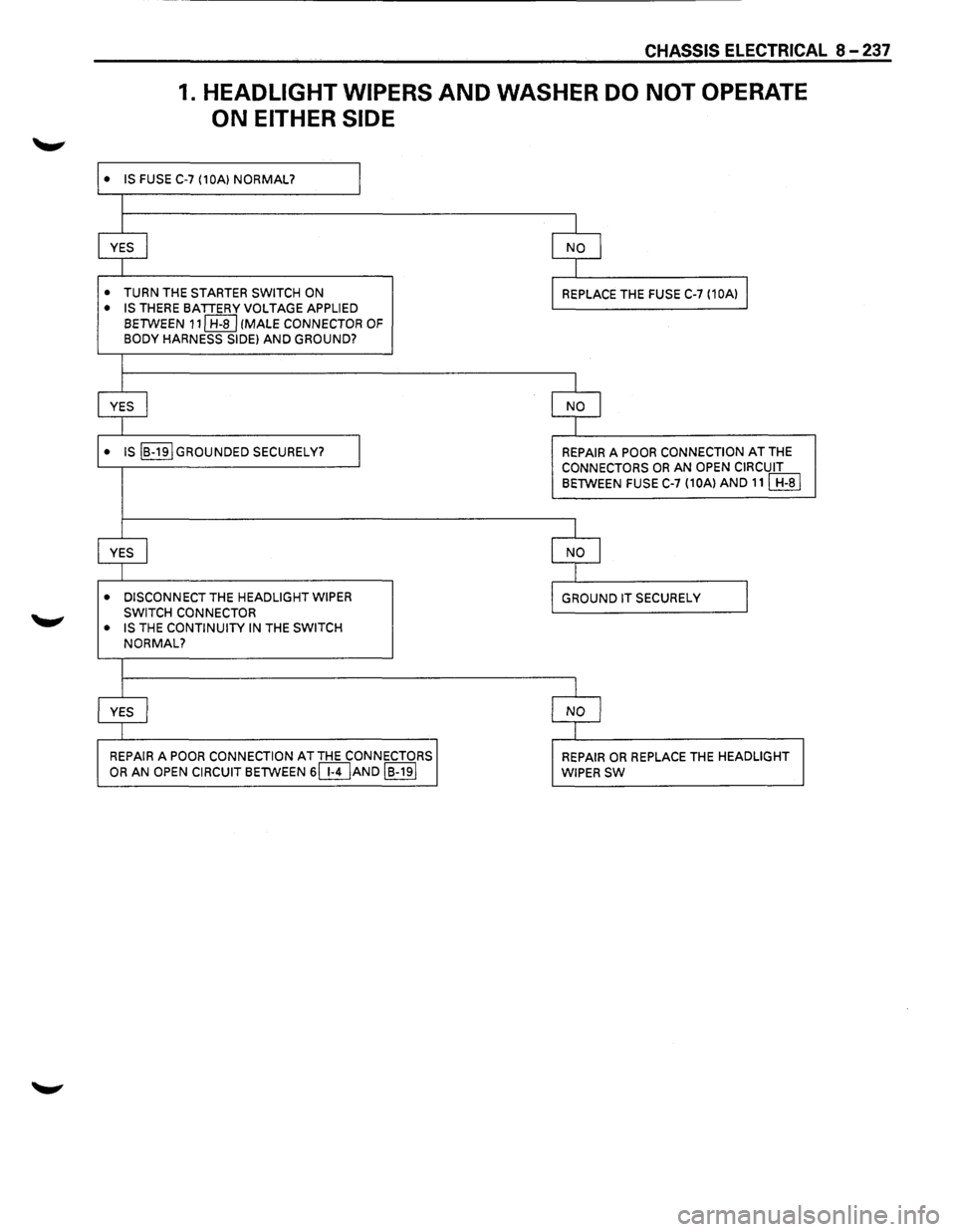
CHASSIS ELECTRICAL 8-237
1. HEADLIGHT WIPERS AND WASHER DO NOT OPERATE
ON EITHER SIDE
• IS FUSE C-7 (10A) NORMAL? I
I
YES
I NO I
I
• TURN THE STARTER SWITCH ON REPLACE THE FUSE C-7 (10A) I
• IS THERE BATTERY VOLTAGE APPLIED
BETWEEN 111 H-8 I (MALE CONNECTOR OF BODY HARNESS SIDE) AND GROUND?
I
YES I NO I
I
• IS IB-19IGROUNDED SECURELY? I REPAIR A POOR CONNECTION AT THE CONNECTORS OR AN OPEN CIRCUIT BETWEEN FUSE C-7 (10A) AND 111 H-81
I
YES
I NO I
I
• DISCONNECT THE HEADLIGHT WIPER
GROUND IT SECURELY J SWITCH CONNECTOR
• IS THE CONTINUITY IN THE SWITCH
NORMAL?
I
YES I NO
I
REPAIR A POOR CONNECTION AT THE CONNECTORS
REPAIR OR REPLACE THE HEADLIGHT OR AN OPEN CIRCUIT BETWEEN 6(}DAND IB-191 WIPER SW