tow ISUZU TROOPER 1995 Service Manual
[x] Cancel search | Manufacturer: ISUZU, Model Year: 1995, Model line: TROOPER, Model: ISUZU TROOPER 1995Pages: 1928
Page 1072 of 1928
7 A-200 AUTOMATIC TRANSMISSION (4L30-E)
l•!•l REASSEMBLY
11. Second clutch drum
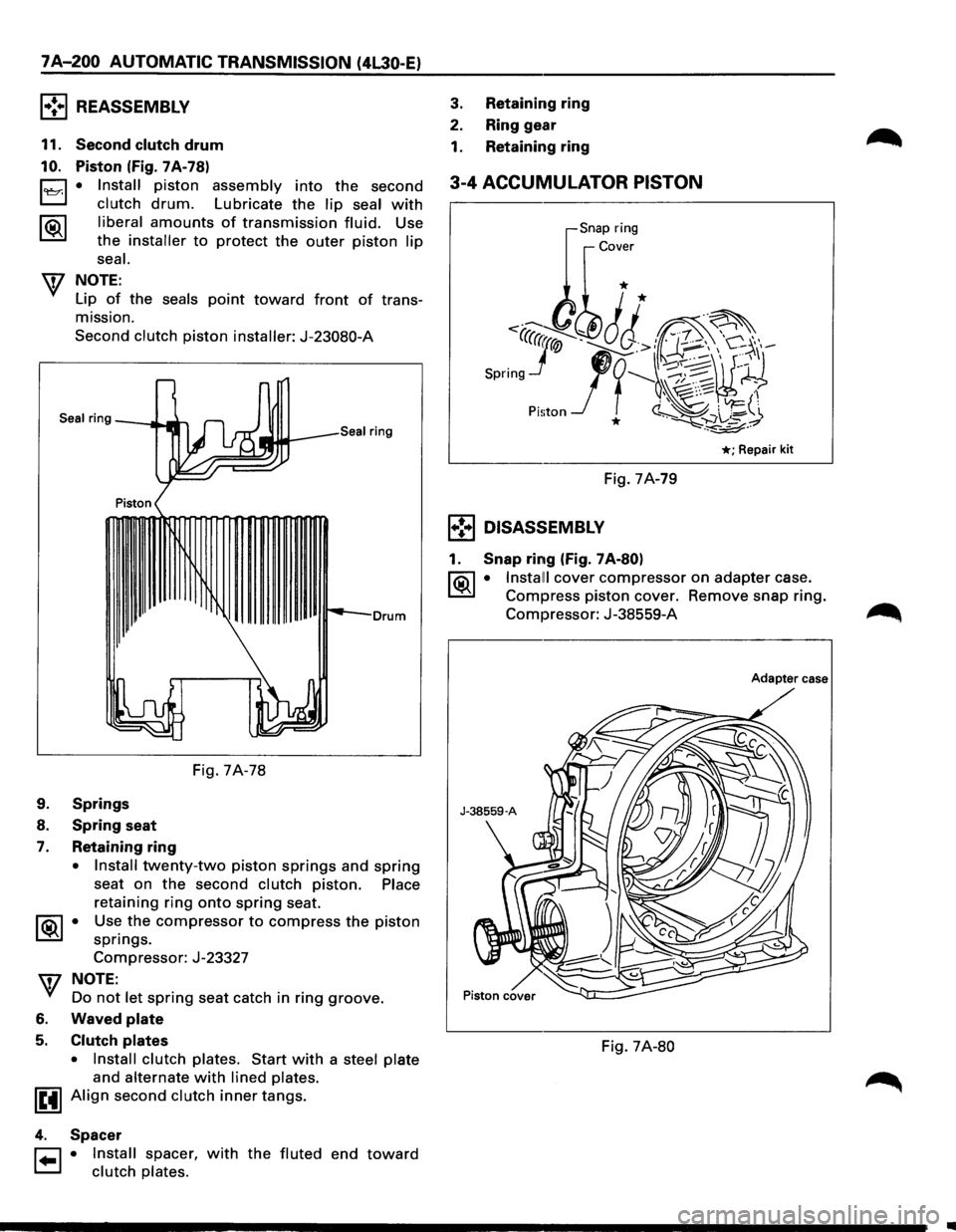
10. Piston (Fig. 7A-78)
0 • Install piston assembly into the second
t..::::::.:J clutch drum. Lubricate the lip seal with
1®..1 liberal amounts of transmission fluid. Use
the installer to protect the outer piston lip
seal.
W NOTE:
Lip of the seals point toward front of trans
mission.
Second clutch piston installer: J-23080-A
Seal ring
3. Retaining ring
2. Ring gear
1. Retaining ring
3-4 ACCUMULATOR PISTON
,Snap ring
Cover
* *
<·-' ~·· ··~
Spring Jr-J
1
t -;;~~H -~, ~:·.-... , ' ~ '-'FJ:
Pi!;ton * ~~+_z.~~
*;Repair kit
Fig. 7A-79
1•!•1 DISASSEMBLY
1. Snap ring (Fig. 7 A-80)
l?.i\1 • Install! cover compressor on adapter case.
~ Compress piston cover. Remove snap ring.
Drum Compressor: J-38559-A
Fig. 7A-78
9. Springs
8. Spring seat
7. Retaining ring
• Install twenty-two piston springs and spring
seat on the second clutch piston. Place
retaining ring onto spring seat.
1 ®..I • Use the compressor to compress the piston
springs.
Compressor: J-23327
w NOTE:
Do not let spring seat catch in ring groove.
6. Waved plate
5. Clutch plates
• Install clutch plates. Start with a steel plate
and alternate with lined plates.
IEtl Align second clutch inner tangs.
4. Spacer
r::1 • Install spacer, with the fluted end toward
t.:=.l clutch plates.
Adapter case
Fig. 7A-80
•
Page 1097 of 1928
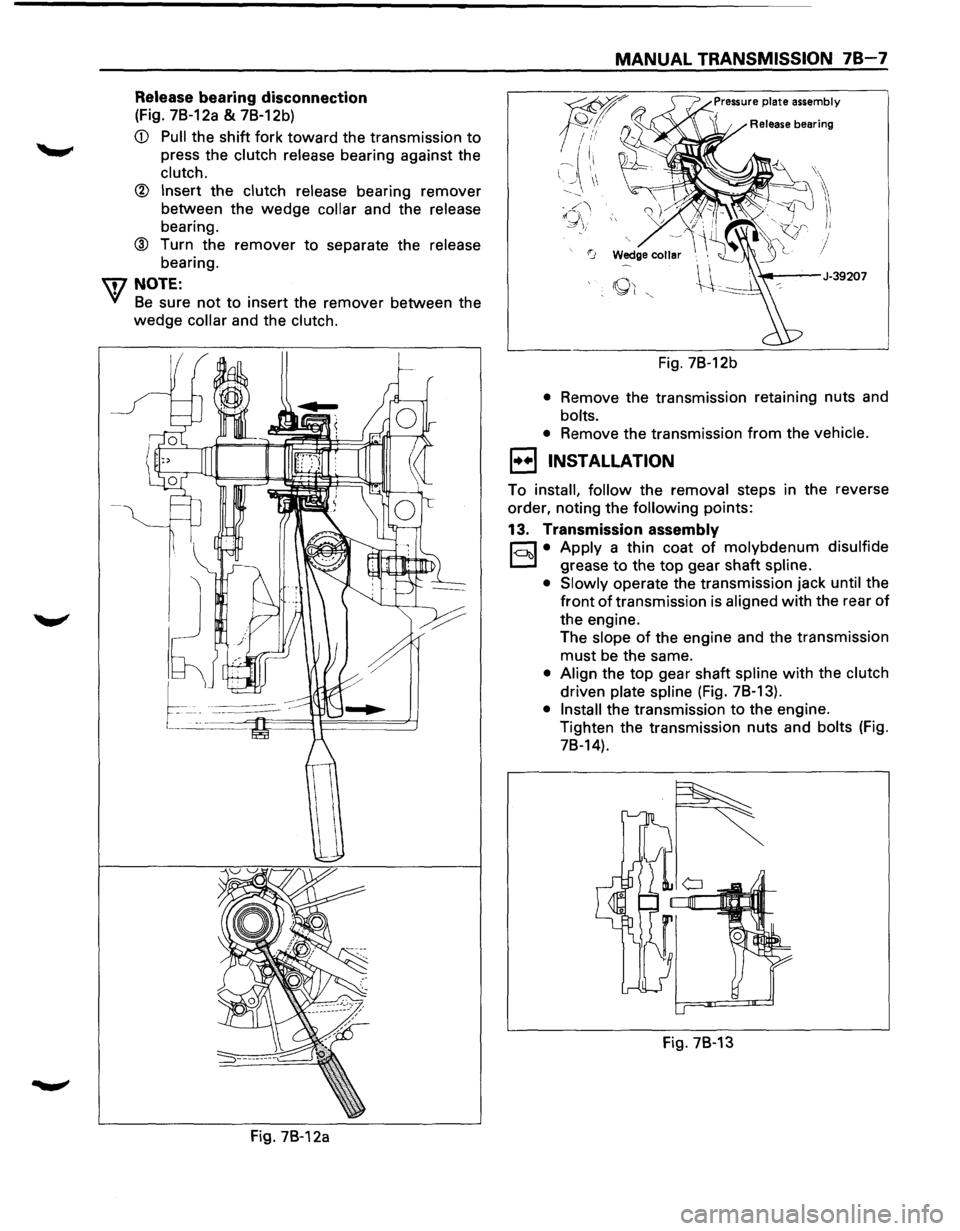
Release bearing disconnection
(Fig. 7B-12a & 7B-12b)
CD Pull the shift fork toward the transmission to
press the clutch release bearing against the
clutch.
® Insert the clutch release bearing remover
between the
wedge collar and the release
bearing.
® Turn the remover to separate the release
bearing.
IDNOTE:
Yl Be sure not to insert the remover between the
wedge collar and the clutch.
Fig. 7B-12a
MANUAL TRANSMISSION 78-7
Fig. 7B-12b
• Remove the transmission retaining nuts and
bolts.
•
Remove the transmission from the vehicle.
1••1 INSTALLATION
To install, follow the removal steps in the reverse
order, noting the
following points:
13. Transmission assembly
r;:::;J • Apply a thin coat of molybdenum disulfide
D grease to the top gear shaft spline.
• Slowly
operate the transmission jack until the
front
of transmission is aligned with the rear of
the engine.
The
slope of the engine and the transmission
must be the same.
• Align the top gear shaft spline with the clutch
driven plate spline (Fig. 78-13).
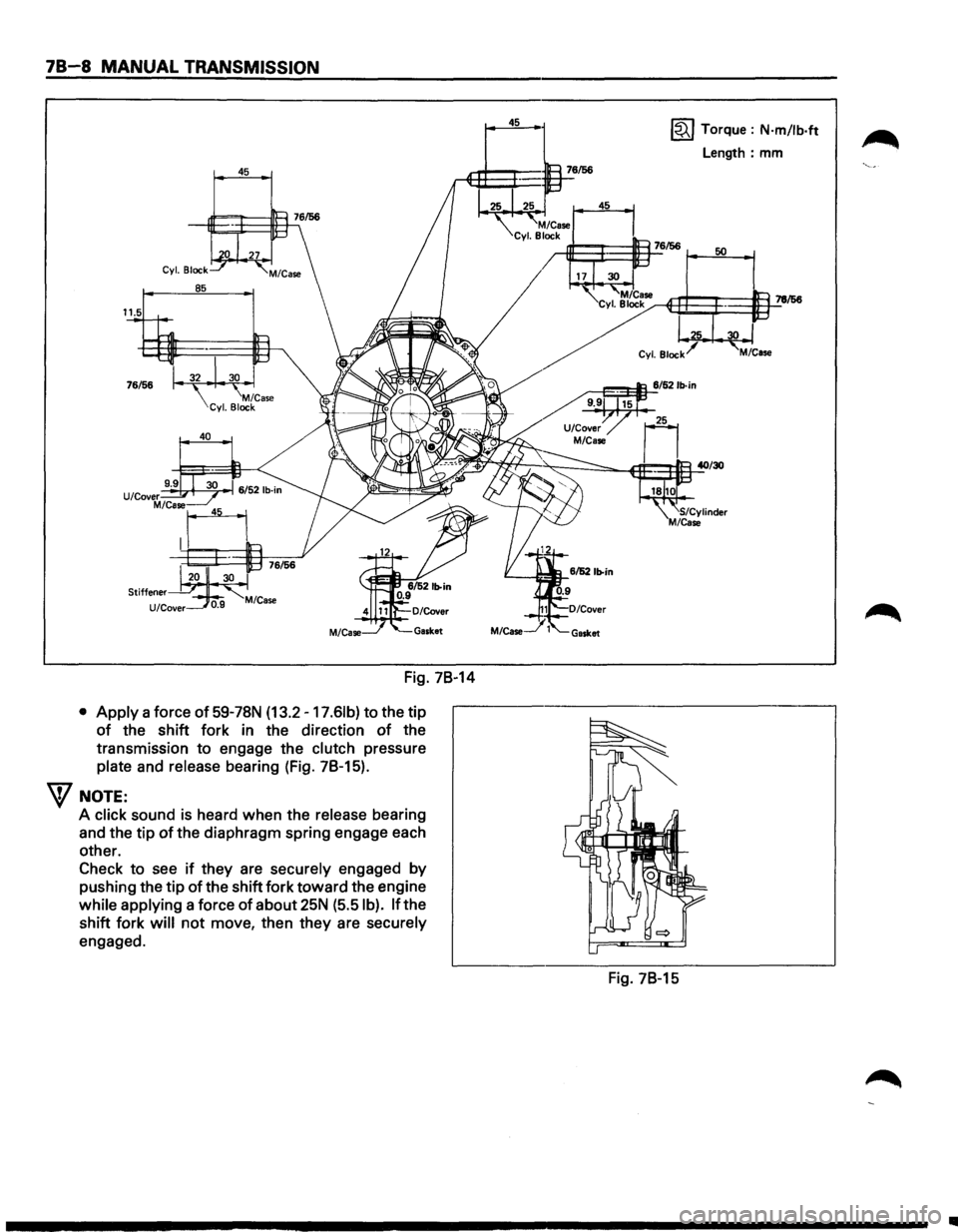
• Install the transmission to the engine.
Tighten the transmission nuts and
bolts (Fig.
78-14).
Fig. 78-13
Page 1098 of 1928
78-8 MANUAL TRANSMISSION
45
Fig. 78-14
• Apply a force of 59-78N (13.2 -17.61b) to the tip
of the shift fork in the direction of the
transmission
to engage the clutch pressure
plate and release bearing (Fig. 78-15).
W NOTE:
A click sound is heard when the release bearing
and the tip
of the diaphragm spring engage each
other.
Check
to see if they are securely engaged by
pushing the tip of the shift fork toward the engine
while applying a force
of about 25N (5.5 I b). If the
shift fork
will not move, then they are securely
engaged.
45 ~ Torque : N·m/lb·ft
Length: mm
Fig. 78-15
..
Page 1113 of 1928
l•!•l DISASSEMBLY
1. Oil Seal Collar
2. Ball bearing
3. Retainer
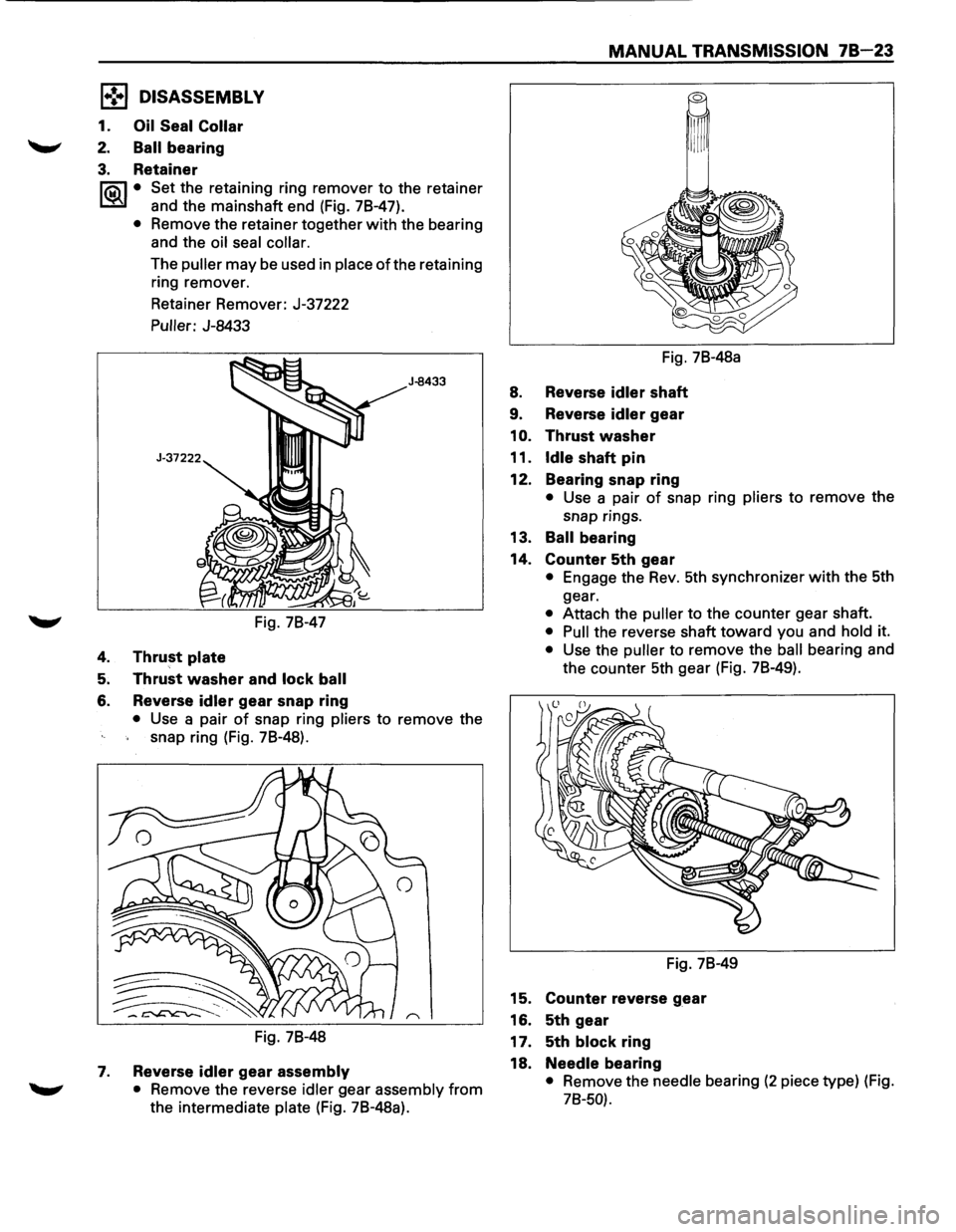
I®J • Set the retaining ring remover to the retainer
and the mainshaft end (Fig. 78-47).
• Remove the retainer together with the bearing
and the
oil seal collar.
The puller may be used in place ofthe retaining
ring remover.
Retainer Remover: J-37222
Puller: J-8433
Fig. 78-47
4. Thrust plate
5. Thrust washer and lock ball
6. Reverse idler gear snap ring
J-8433
• Use a pair of snap ring pliers to remove the
snap ring (Fig. 78-48).
Fig. 78-48
7. Reverse idler gear assembly
• Remove the reverse idler gear assembly from
the intermediate plate (Fig. 78-48a).
MANUAL TRANSMISSION 78 23
Fig. 78-48a
8. Reverse idler shaft
9. Reverse idler gear
1
0. Thrust washer
11.
Idle shaft pin
12. Bearing snap ring
• Use a pair of snap ring pliers to remove the
snap rings.
13. Ball bearing
14. Counter 5th gear
• Engage the Rev. 5th synchronizer with the 5th
gear.
• Attach the puller to the counter gear shaft.
• Pull the reverse shaft toward you and hold it.
• Use the puller to remove the ball bearing and
the counter 5th gear (Fig. 78-49).
Fig. 78-49
15. Counter reverse gear
16. 5th gear
17. 5th
block ring
18.
Needle bearing
• Remove the needle bearing (2 piece type) (Fig.
78-50).
Page 1114 of 1928
78-24 MANUAL TRANSMISSION
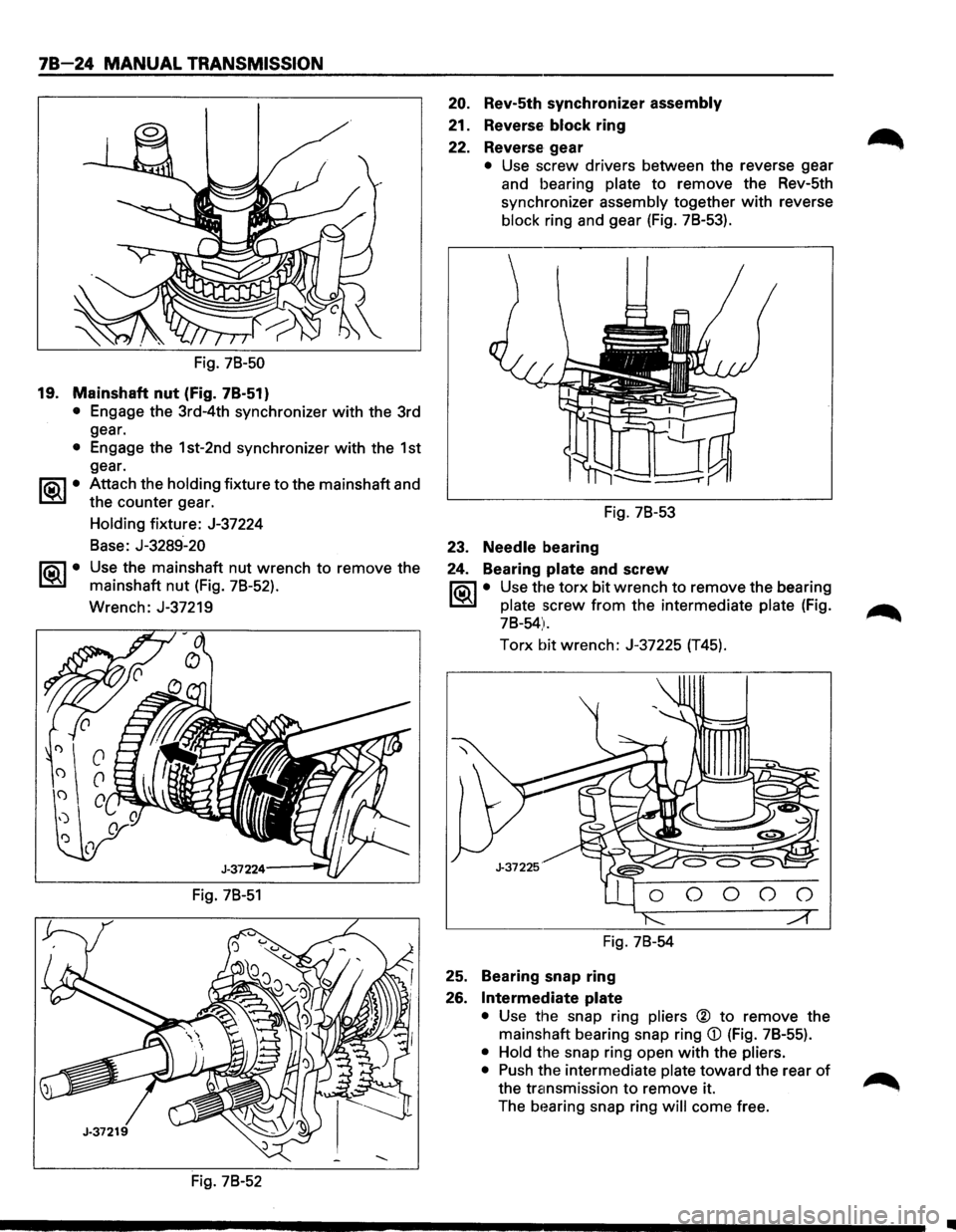
Fig. 78-50
19. Mainshaft nut (Fig. 7B-51)
• Engage the 3rd-4th synchronizer with the 3rd
gear.
• Engage the 1st-2nd synchronizer with the 1st
gear.
~~~· Attach the holding fixture to the mainshaft and
the counter gear.
~·
Holding fixture: J-37224
Base: J-3289-20
Use the mainshaft nut wrench to remove the
mainshaft
nut (Fig. 78-52).
Wrench: J-37219
Fig. 78-51
Fig. 78-52
20. Rev-5th synchronizer assembly
21. Reverse block ring
22. Reverse gear
• Use screw drivers between the reverse gear
and bearing plate to remove the Rev-5th
synchronizer assembly together
with reverse
block ring and gear (Fig. 78-53).
Fig. 78-53
23. Needle bearing
24. Bearing
plate and screw
1'?.3\1 • Use the torx bit wrench to remove the bearing
C::BJ plate screw from the intermediate plate (Fig.
78-54).
Torx bit wrench: J-37225 (T45).
Fig. 78-54
25. Bearing snap ring
26.
Intermediate plate
• Use the snap ring pliers ® to remove the
mainshaft bearing snap ring
CD (Fig. 7B-55).
• Hold the snap ring open with the pliers.
• Push the intermediate plate toward the rear of
the transmission to remove it.
The
b1~aring snap ring will come free.
•
Page 1115 of 1928
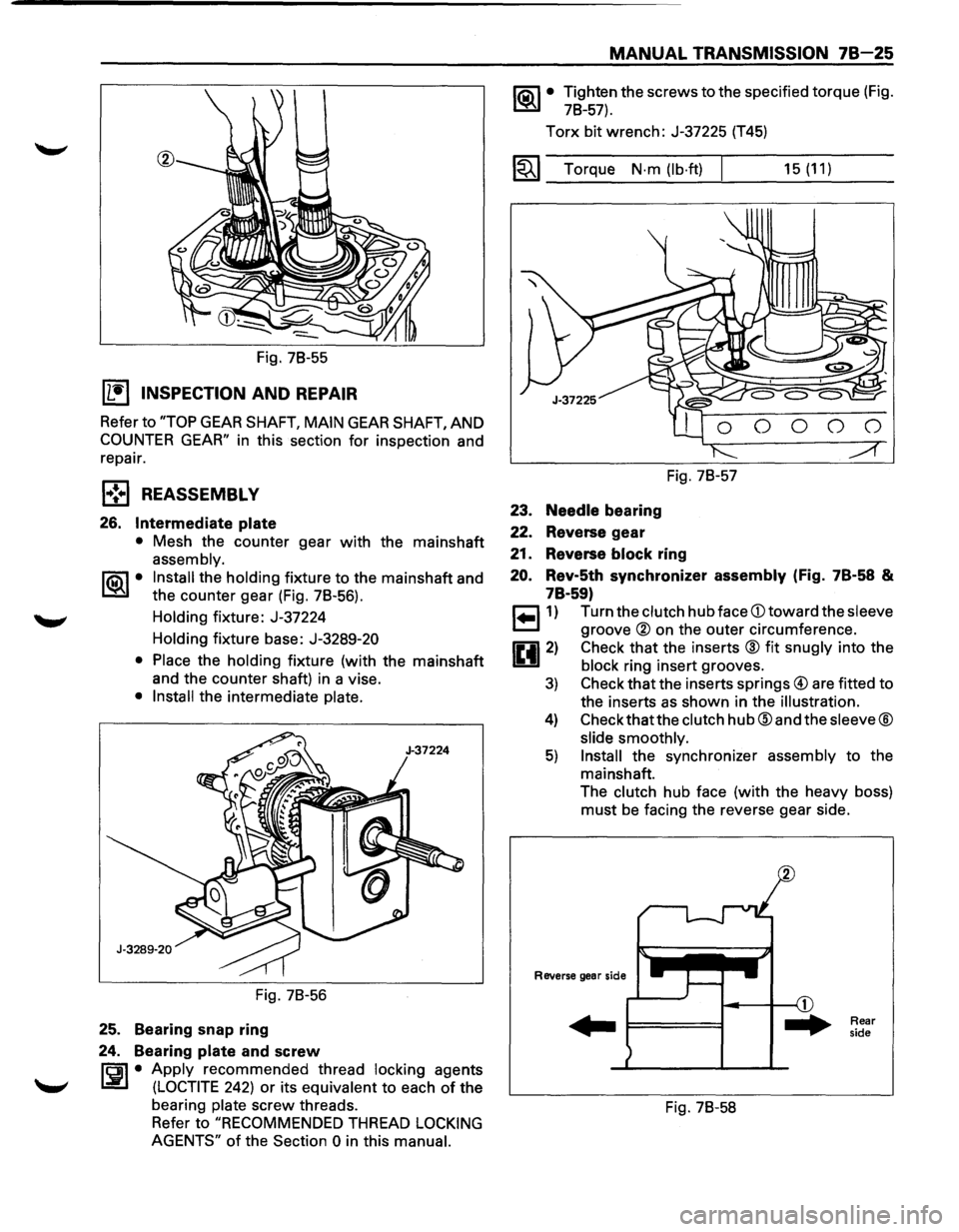
Fig. 78-55
IL•I INSPECTION AND REPAIR
Refer to "TOP GEAR SHAFT, MAIN GEAR SHAFT, AND
COUNTER GEAR" in this section for inspection and
repair.
l•!•l REASSEMBLY
26. Intermediate plate
• Mesh the counter gear with the mainshaft
assembly.
1®.1• Install the holding fixture to the mainshaft and
the counter gear (Fig. 78-56).
Holding fixture: J-37224
Holding fixture base:
J-3289-20
• Place
the holding fixture (with the mainshaft
and the counter shaft) in a vise.
• Install the intermediate plate.
Fig. 78-56
25. Bearing snap ring
24. Bearing
plate and screw
rci1 • Apply recommended thread locking agents
l.:i!.l (LOCTITE 242) or its equivalent to each of the
bearing
plate screw threads.
Refer to
"RECOMMENDED THREAD LOCKING
AGENTS"
of the Section 0 in this manual.
MANUAL TRANSMISSION 78-25
1®.1• Tighten the screws to the specified torque (Fig.
78-57).
Torx bit wrench: J-37225 (T45)
1~1 Torque N·m (lb·ft) I
23. Needle bearing
22. Reverse gear
Fig. 78-57
21. Reverse block ring
15 (11)
20. Rev-5th synchronizer assembly (Fig. 7B·58 &
7B·59)
r=l1) Turn the clutch hub face CD toward the sleeve
~ groove ® on the outer circumference.
0 2) Check that the inserts ® fit snugly into the
1!!.!1 block ring insert grooves.
3) Check that the inserts springs@ are fitted to
the inserts
as shown in the illustration.
4) Check thatthe clutch hub@ and the sleeve®
slide smoothly.
5) Install the synchronizer assembly to the
mainshaft.
The clutch hub face (with the heavy boss)
must be facing the reverse gear side.
Reverse gear side
... F====I
Fig. 78-58
Rear
side
Page 1192 of 1928
-·*; ~---
8-2 CHASSIS ELECTRICAL
GENERAL INFORMATION
The chassis electrical system is of 12-volt specifications with a negative ground polarity.
Wire sizes are appropriate
to respective circuits, and classified by color. (The classification of harnesses by
color is shown on the circuit diagram for ease of harness identification.)
The
wire size is determined by load capacity and the length of wire required.
The
vehicle harnesses are: body harness, chassis harness, engine room harness, instrument harness,
transmission harness, engine
ECGI harness, dome light harness, door harness, rear body harness, tailgate
harness,
SRS harness and battery cables.
The harnesses are protected either
by tape or corrugated tube, depending on harness location.
The circuit
for each system consists of the power source, wire, fuse, relay, switch, load parts and ground, all of
which are shown on the circuit diagram.
In this manual, each electrical device is classified by system. For major parts shown on the circuit based on
the circuit diagram
for each system, a summary, diagnosis oftroubles, inspection and removal and installation
procedures are detailed.
NOTES FOR WORKING ON ELECTRICAL ITEMS
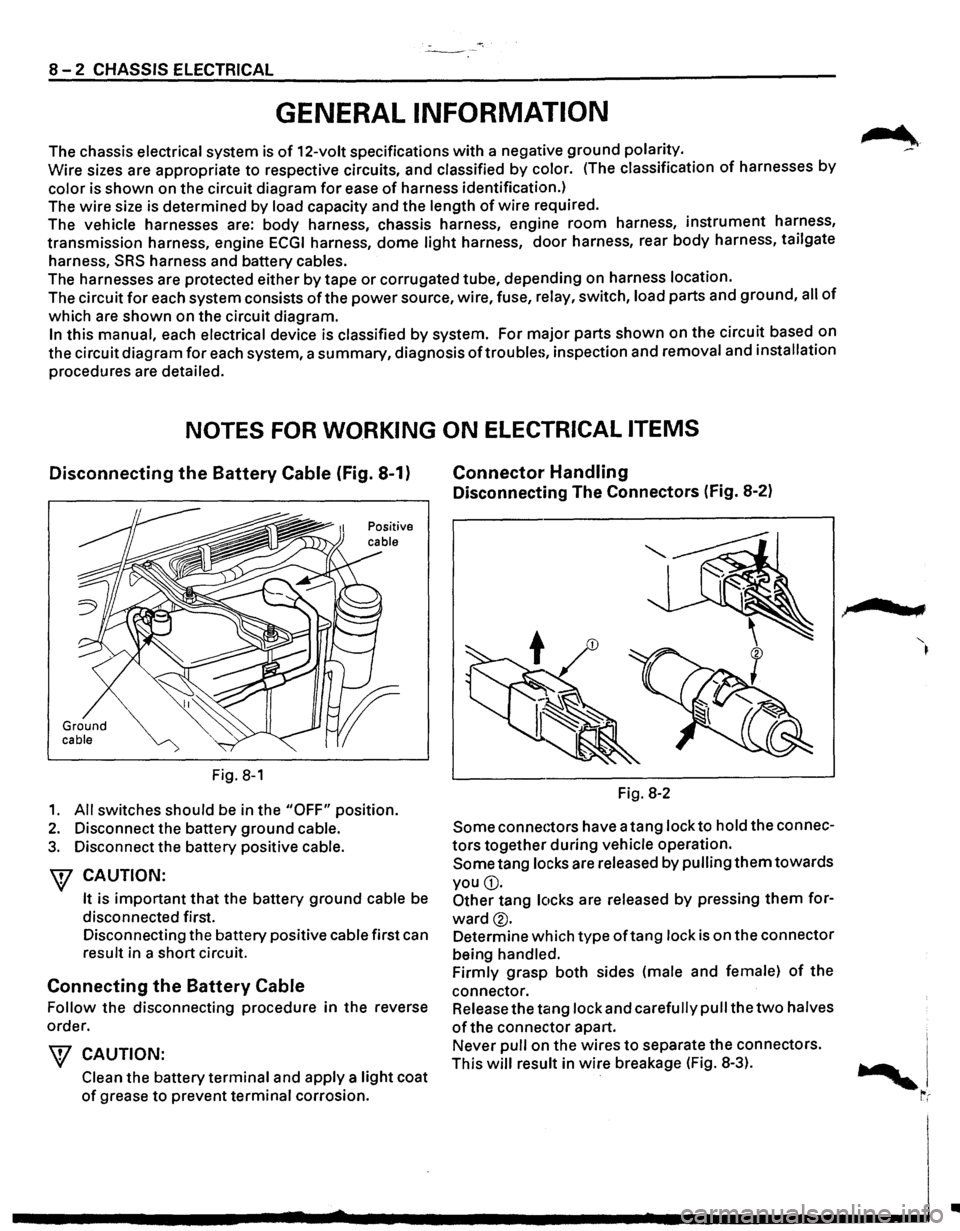
Disconnecting the Battery Cable (Fig. 8-1)
Ground cable
Fig. 8-1
1. All switches should be in the "OFF" position.
2. Disconnect the battery ground cable.
3. Disconnect the battery positive cable.
W CAUTION:
It is important that the battery ground cable be
disconnected first.
Disconnecting the battery positive cable first can
result in a short circuit.
Connecting the Battery Cable
Follow the disconnecting procedure in the reverse
order.
\V CAUTION:
Clean the battery terminal and apply a light coat
of grease to prevent terminal corrosion.
Connector Handling
Disconnecting The Connectors (Fig. 8-2)
Fig. 8-2
Some connectors have a tang lock to hold the connec
tors together during vehicle operation.
Some tang locks are released by pulling them towards
you
G).
Other tang locks are released by pressing them for
ward®.
Determine which type oftang lock is on the connector
being handled.
Firmly grasp both sides (male and female)
of the
connector. Release the tang lock and carefully pull the
two halves
of the connector apart.
Never pull on the wires
to separate the connectors.
This
will result in wire breakage (Fig. 8-3).
.,
..
Page 1194 of 1928
8-4 CHASSIS ELECTRICAL
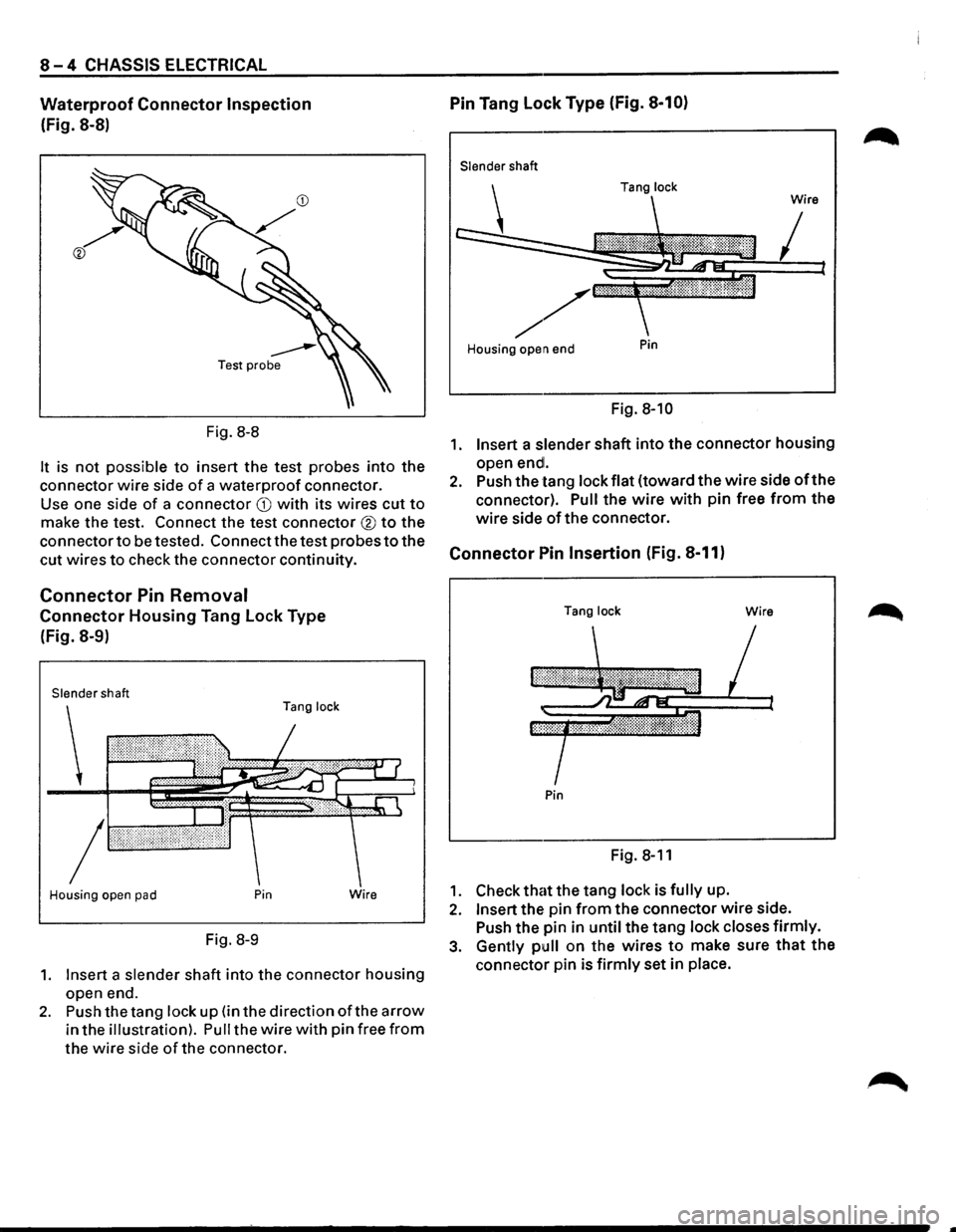
Waterproof Connector Inspection
(Fig. 8-8)
Fig.
8-8
It is not possible to insert the test probes into the
connector wire side
of a waterproof connector.
Use one side
of a connector CD with its wires cut to
make the test. Connect the test connector ® to the
connector
to be tested. Connect the test probes to the
cut wires
to check the connector continuity.
Connector Pin Removal
Connector Housing Tang Lock Type
(Fig. 8-9)
Slender shaft
Tang lock
Housing open pad Pin
Fig. 8-9
Wire
1. Insert a slender shaft into the connector housing
open end.
2. Push the tang lock up (in the direction ofthe arrow
in the illustration). Pull the wire with pin free from
the wire side of the connector.
Pin Tang Lock Type (Fig. 8-10)
Slender shaft
Housing open end
Pin
Fig. 8-10
1. Insert a slender shaft into the connector housing
open
endl.
2. Push the tang lock flat (toward the wire side oft he
connector).
Pull the wire with pin free from the
wire side of the connector.
Connector Pin Insertion (Fig. 8-11)
Tang lock Wire
Pin
Fig. 8-11
1. Check that the tang lock is fully up.
2. Insert the pin from the connector wire side.
Push the pin in
until the tang lock closes firmly.
3. Gently pull on the wires to make sure that the
connector pin is firmly set in place.
Page 1294 of 1928
8 -104 CHASSIS ELECTRICAL
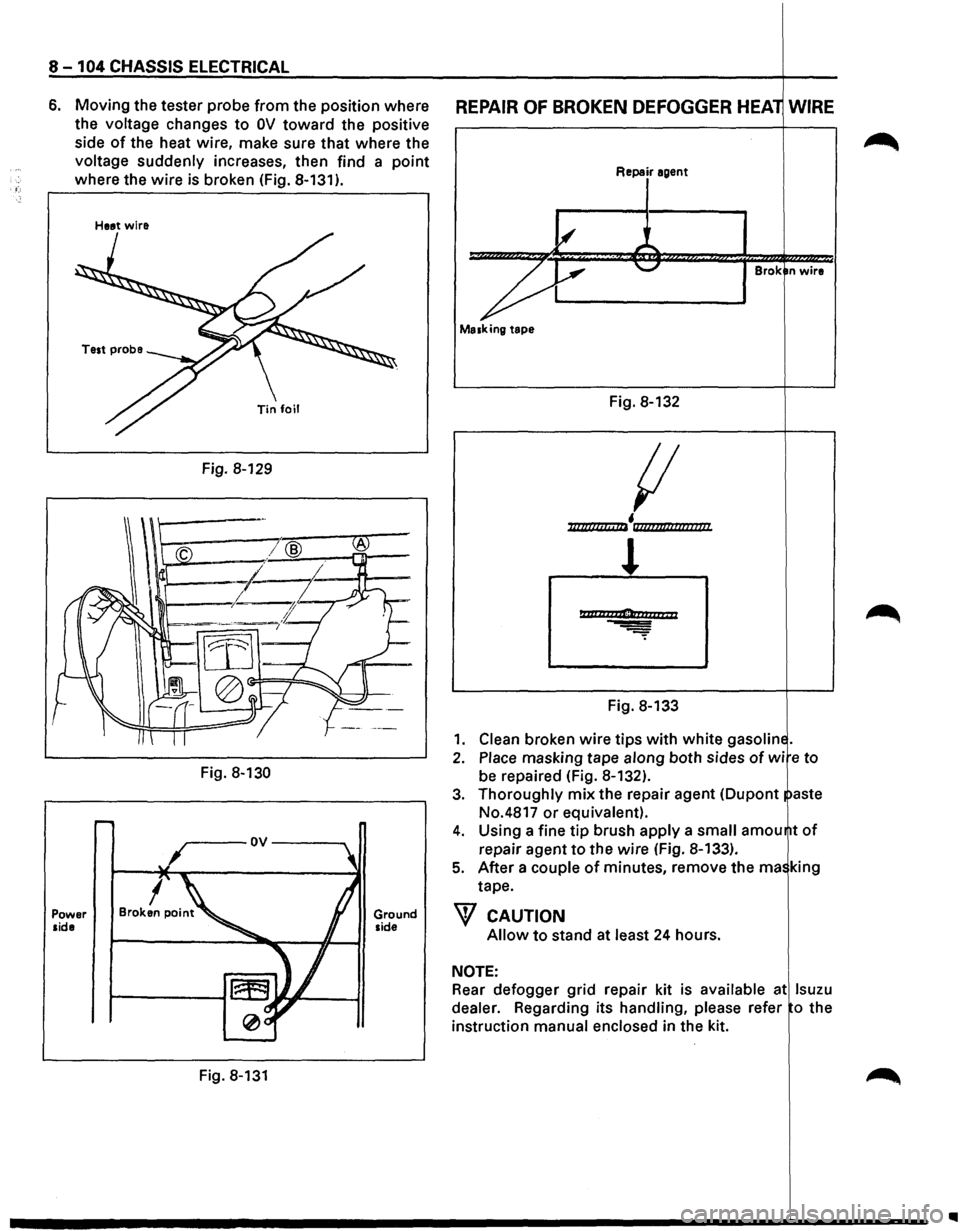
6. Moving the tester probe from the position where
the
voltage changes to OV toward the positive
side
of the heat wire, make sure that where the
voltage suddenly increases, then find a point
where the wire is broken (Fig. 8-131).
Power side
Heat wire
Fig. 8-129
Fig.
8-130
Fig. 8-131
Ground side
REPAIR OF BROKEN DEFOGGER HEA WIRE
Repair agent
Brok n wire
Masking tape
Fig. 8-132
{I
• ll/lllllclt c IIi llli?flt/llflllllll/
l
Ptttlh2ti1Clonaarr; 11
Fig. 8-133
1. Clean broken wire tips with white gasolin
2. Place masking tape along both sides of wi e to
be repaired (Fig. 8-132).
3. Thoroughly mix the repair agent (Dupont aste
No.4817
or equivalent).
4. Using a fine tip brush apply a small amou
repair agent
to the wire (Fig. 8-133).
5. After a couple of minutes, remove the rna king
tape.
W CAUTION
Allow to stand at least 24 hours.
NOTE:
Rear defogger grid repair kit is available at lsuzu
dealer.
Regarding its handling, please refer o the
instruction
manual enclosed in the kit.
..
Page 1562 of 1928
8-372 CHASSIS ELECTRICAL
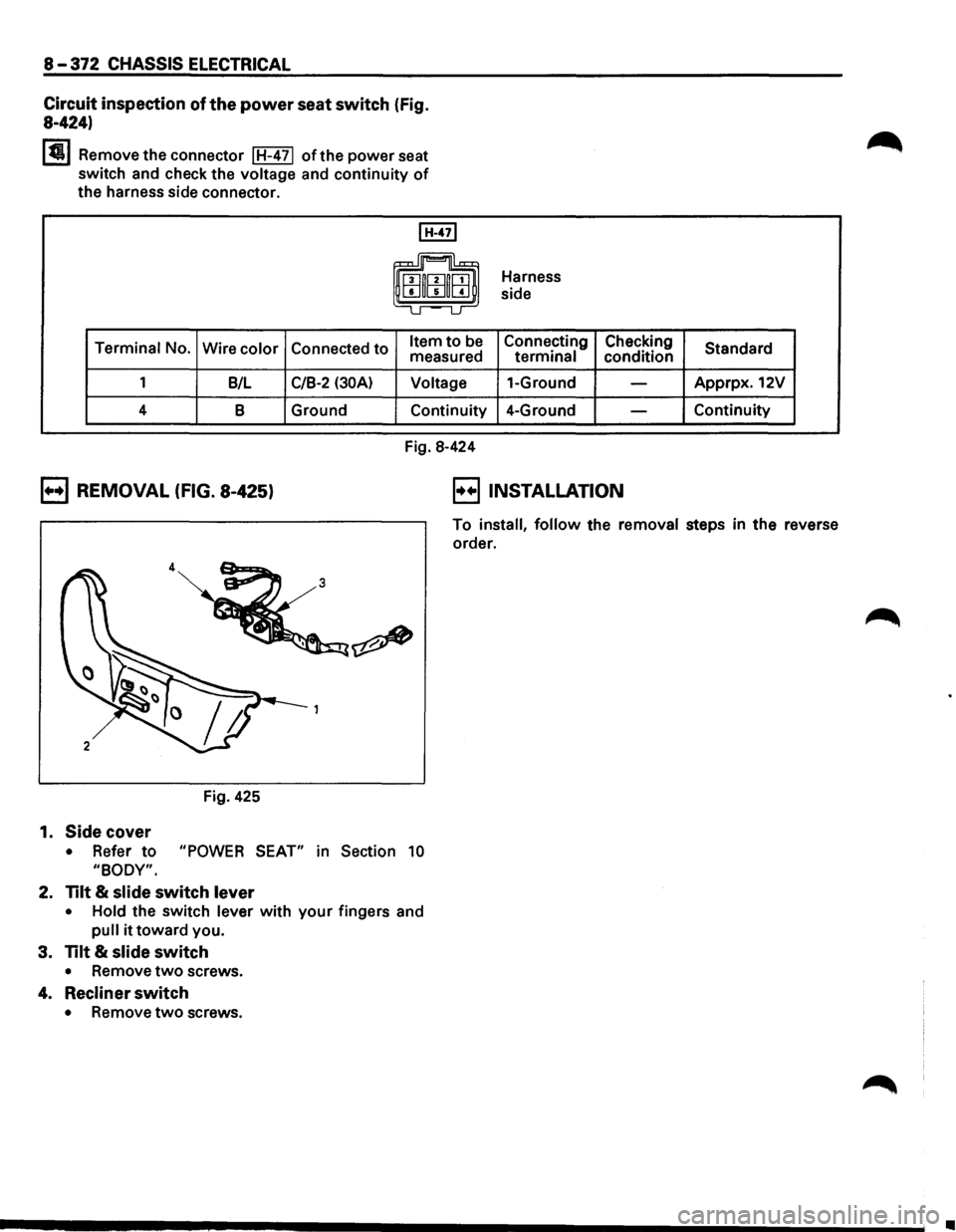
Circuit
inspection of the power seat switch (Fig.
8-424)
I~ I Remove the connector I H-4 71 of the power seat
switch and check the voltage and continuity
of
the harness side connector.
I H-471
0 ~u
Terminal No.
Wire color Connected to Item to be measured
1 B/L
C/B-2 (30A) Voltage
4 B Ground
Continuity
Fig.
8-424 Harness
side
Connecting Checking
terminal condition
1-Ground
-
4-Ground -
B REMOVAL (FIG. 8-425) B INSTALLATION
Standard
Apprpx. 12V
Continuity
To
install, follow the removal steps in the reverse
order.
Fig.
425
1. Side cover
• Refer to "POWER SEAT" in Section 10
"BODY".
2. Tilt & slide switch lever
• Hold the switch lever with your fingers and
pull it toward you.
3. Tilt & slide switch
• Remove two screws.
4. Recliner switch
• Remove two screws.
Ill