Start NISSAN TERRANO 2002 Service Repair Manual
[x] Cancel search | Manufacturer: NISSAN, Model Year: 2002, Model line: TERRANO, Model: NISSAN TERRANO 2002Pages: 1767, PDF Size: 41.51 MB
Page 810 of 1767
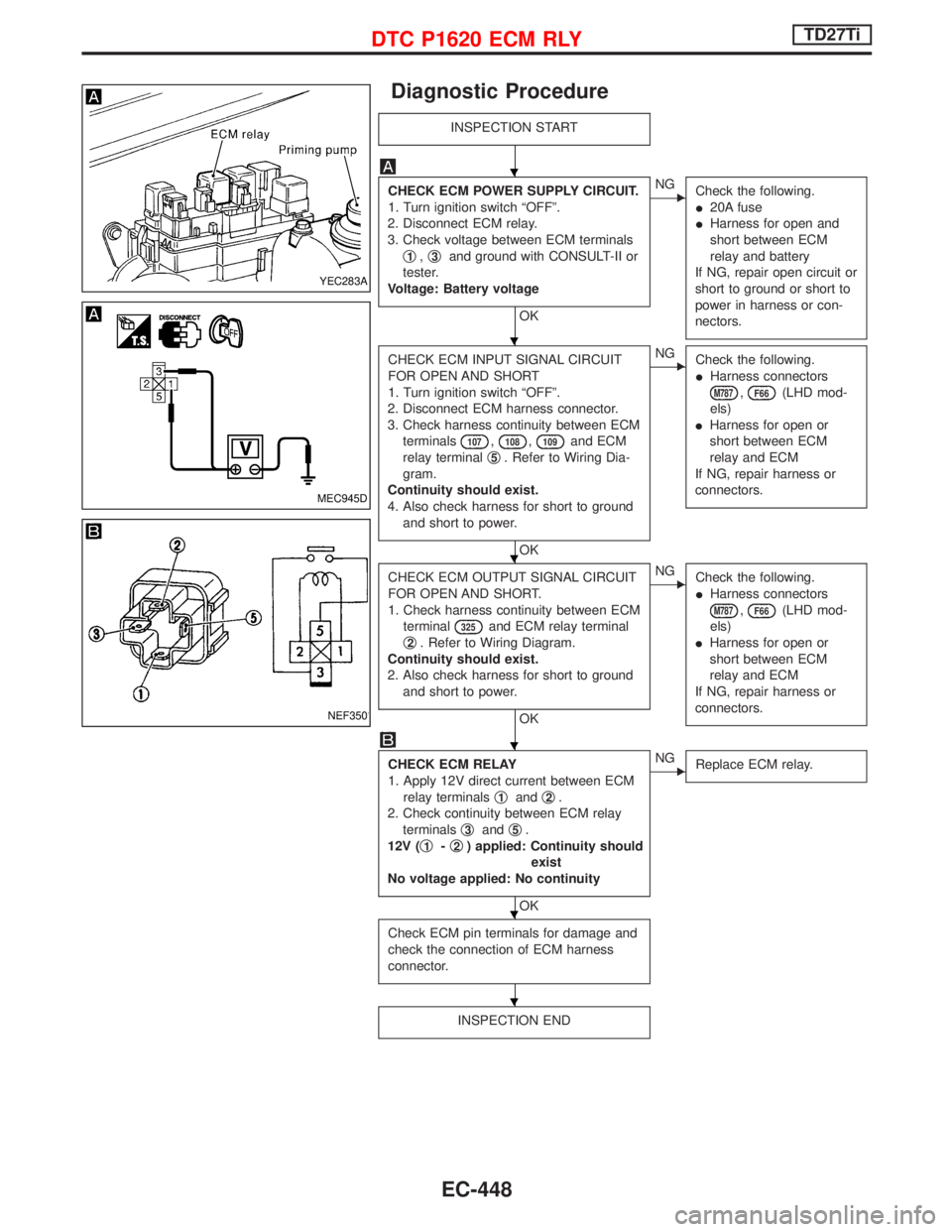
Diagnostic Procedure
INSPECTION START
CHECK ECM POWER SUPPLY CIRCUIT.
1. Turn ignition switch ªOFFº.
2. Disconnect ECM relay.
3. Check voltage between ECM terminals
q
1,q3and ground with CONSULT-II or
tester.
Voltage: Battery voltage
OK
ENG
Check the following.
I20A fuse
IHarness for open and
short between ECM
relay and battery
If NG, repair open circuit or
short to ground or short to
power in harness or con-
nectors.
CHECK ECM INPUT SIGNAL CIRCUIT
FOR OPEN AND SHORT
1. Turn ignition switch ªOFFº.
2. Disconnect ECM harness connector.
3. Check harness continuity between ECM
terminals
107,108,109and ECM
relay terminalq
5. Refer to Wiring Dia-
gram.
Continuity should exist.
4. Also check harness for short to ground
and short to power.
OK
ENG
Check the following.
IHarness connectors
M787,F66(LHD mod-
els)
IHarness for open or
short between ECM
relay and ECM
If NG, repair harness or
connectors.
CHECK ECM OUTPUT SIGNAL CIRCUIT
FOR OPEN AND SHORT.
1. Check harness continuity between ECM
terminal
325and ECM relay terminal
q
2. Refer to Wiring Diagram.
Continuity should exist.
2. Also check harness for short to ground
and short to power.
OK
ENG
Check the following.
IHarness connectors
M787,F66(LHD mod-
els)
IHarness for open or
short between ECM
relay and ECM
If NG, repair harness or
connectors.
CHECK ECM RELAY
1. Apply 12V direct current between ECM
relay terminalsq
1andq2.
2. Check continuity between ECM relay
terminalsq
3andq5.
12V (q
1-q2) applied: Continuity should
exist
No voltage applied: No continuity
OK
ENG
Replace ECM relay.
Check ECM pin terminals for damage and
check the connection of ECM harness
connector.
INSPECTION END
YEC283A
MEC945D
NEF350
H
H
H
H
H
H
DTC P1620 ECM RLYTD27Ti
EC-448
Page 811 of 1767

Wiring Diagram
YEC153A
START SIGNALTD27Ti
EC-449
Page 812 of 1767
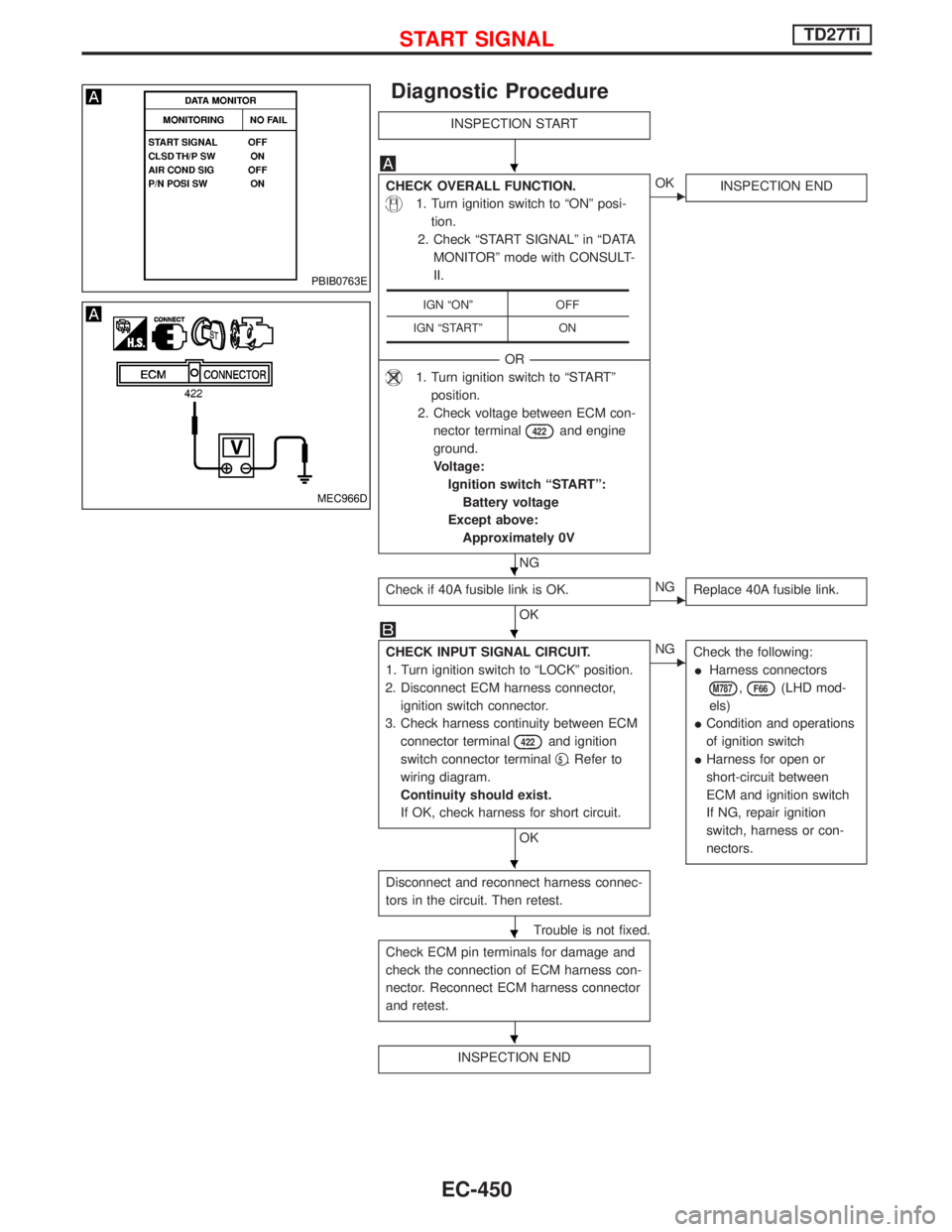
Diagnostic Procedure
INSPECTION START
CHECK OVERALL FUNCTION.
1. Turn ignition switch to ªONº posi-
tion.
2. Check ªSTART SIGNALº in ªDATA
MONITORº mode with CONSULT-
II.
--------------------------------------------------------------------------------------------------------------------------------------OR--------------------------------------------------------------------------------------------------------------------------------------
1. Turn ignition switch to ªSTARTº
position.
2. Check voltage between ECM con-
nector terminal
422and engine
ground.
Voltage:
Ignition switch ªSTARTº:
Battery voltage
Except above:
Approximately 0V
NG
EOK
INSPECTION END
Check if 40A fusible link is OK.
OKENG
Replace 40A fusible link.
CHECK INPUT SIGNAL CIRCUIT.
1. Turn ignition switch to ªLOCKº position.
2. Disconnect ECM harness connector,
ignition switch connector.
3. Check harness continuity between ECM
connector terminal
422and ignition
switch connector terminalq
5. Refer to
wiring diagram.
Continuity should exist.
If OK, check harness for short circuit.
OK
ENG
Check the following:
IHarness connectors
M787,F66(LHD mod-
els)
ICondition and operations
of ignition switch
IHarness for open or
short-circuit between
ECM and ignition switch
If NG, repair ignition
switch, harness or con-
nectors.
Disconnect and reconnect harness connec-
tors in the circuit. Then retest.
Trouble is not fixed.
Check ECM pin terminals for damage and
check the connection of ECM harness con-
nector. Reconnect ECM harness connector
and retest.
INSPECTION END
IGN ªONº OFF
IGN ªSTARTº ON
PBIB0763E
MEC966D
H
H
H
H
H
H
START SIGNALTD27Ti
EC-450
Page 835 of 1767
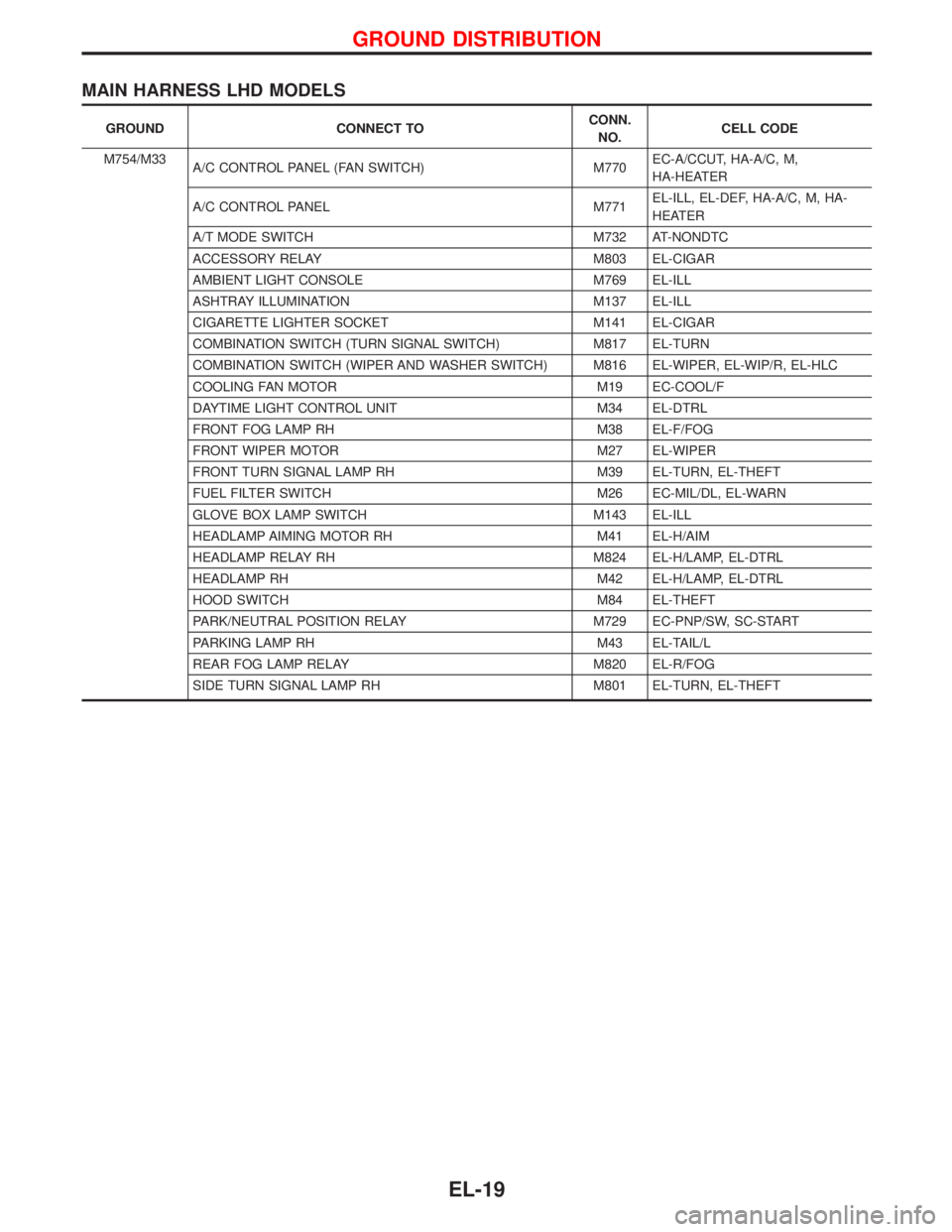
MAIN HARNESS LHD MODELS
GROUND CONNECT TOCONN.
NO.CELL CODE
M754/M33
A/C CONTROL PANEL (FAN SWITCH) M770EC-A/CCUT, HA-A/C, M,
HA-HEATER
A/C CONTROL PANEL M771EL-ILL, EL-DEF, HA-A/C, M, HA-
HEATER
A/T MODE SWITCH M732 AT-NONDTC
ACCESSORY RELAY M803 EL-CIGAR
AMBIENT LIGHT CONSOLE M769 EL-ILL
ASHTRAY ILLUMINATION M137 EL-ILL
CIGARETTE LIGHTER SOCKET M141 EL-CIGAR
COMBINATION SWITCH (TURN SIGNAL SWITCH) M817 EL-TURN
COMBINATION SWITCH (WIPER AND WASHER SWITCH) M816 EL-WIPER, EL-WIP/R, EL-HLC
COOLING FAN MOTOR M19 EC-COOL/F
DAYTIME LIGHT CONTROL UNIT M34 EL-DTRL
FRONT FOG LAMP RH M38 EL-F/FOG
FRONT WIPER MOTOR M27 EL-WIPER
FRONT TURN SIGNAL LAMP RH M39 EL-TURN, EL-THEFT
FUEL FILTER SWITCH M26 EC-MIL/DL, EL-WARN
GLOVE BOX LAMP SWITCH M143 EL-ILL
HEADLAMP AIMING MOTOR RH M41 EL-H/AIM
HEADLAMP RELAY RH M824 EL-H/LAMP, EL-DTRL
HEADLAMP RH M42 EL-H/LAMP, EL-DTRL
HOOD SWITCH M84 EL-THEFT
PARK/NEUTRAL POSITION RELAY M729 EC-PNP/SW, SC-START
PARKING LAMP RH M43 EL-TAIL/L
REAR FOG LAMP RELAY M820 EL-R/FOG
SIDE TURN SIGNAL LAMP RH M801 EL-TURN, EL-THEFT
GROUND DISTRIBUTION
EL-19
Page 836 of 1767
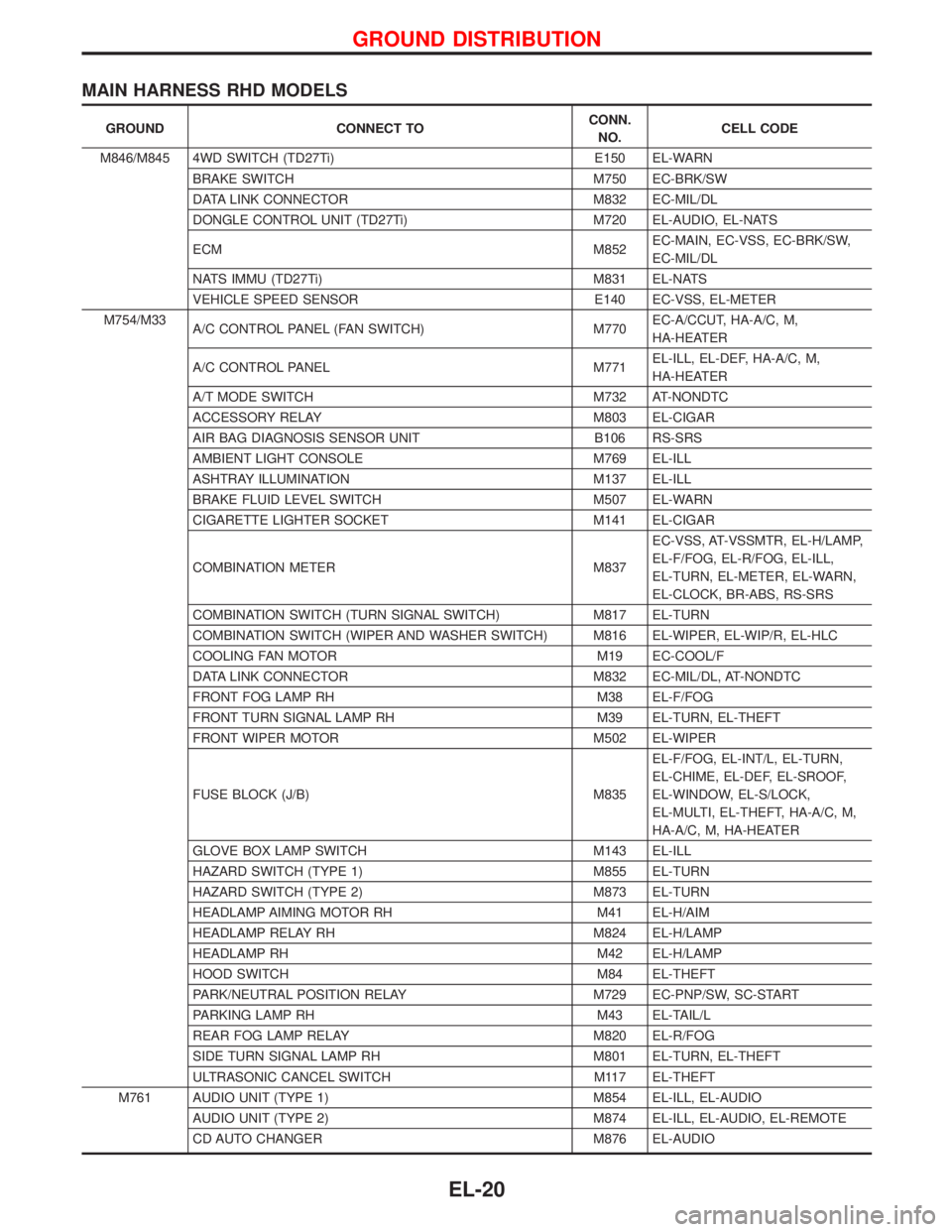
MAIN HARNESS RHD MODELS
GROUND CONNECT TOCONN.
NO.CELL CODE
M846/M845 4WD SWITCH (TD27Ti) E150 EL-WARN
BRAKE SWITCH M750 EC-BRK/SW
DATA LINK CONNECTOR M832 EC-MIL/DL
DONGLE CONTROL UNIT (TD27Ti) M720 EL-AUDIO, EL-NATS
ECM M852EC-MAIN, EC-VSS, EC-BRK/SW,
EC-MIL/DL
NATS IMMU (TD27Ti) M831 EL-NATS
VEHICLE SPEED SENSOR E140 EC-VSS, EL-METER
M754/M33
A/C CONTROL PANEL (FAN SWITCH) M770EC-A/CCUT, HA-A/C, M,
HA-HEATER
A/C CONTROL PANEL M771EL-ILL, EL-DEF, HA-A/C, M,
HA-HEATER
A/T MODE SWITCH M732 AT-NONDTC
ACCESSORY RELAY M803 EL-CIGAR
AIR BAG DIAGNOSIS SENSOR UNIT B106 RS-SRS
AMBIENT LIGHT CONSOLE M769 EL-ILL
ASHTRAY ILLUMINATION M137 EL-ILL
BRAKE FLUID LEVEL SWITCH M507 EL-WARN
CIGARETTE LIGHTER SOCKET M141 EL-CIGAR
COMBINATION METER M837EC-VSS, AT-VSSMTR, EL-H/LAMP,
EL-F/FOG, EL-R/FOG, EL-ILL,
EL-TURN, EL-METER, EL-WARN,
EL-CLOCK, BR-ABS, RS-SRS
COMBINATION SWITCH (TURN SIGNAL SWITCH) M817 EL-TURN
COMBINATION SWITCH (WIPER AND WASHER SWITCH) M816 EL-WIPER, EL-WIP/R, EL-HLC
COOLING FAN MOTOR M19 EC-COOL/F
DATA LINK CONNECTOR M832 EC-MIL/DL, AT-NONDTC
FRONT FOG LAMP RH M38 EL-F/FOG
FRONT TURN SIGNAL LAMP RH M39 EL-TURN, EL-THEFT
FRONT WIPER MOTOR M502 EL-WIPER
FUSE BLOCK (J/B) M835EL-F/FOG, EL-INT/L, EL-TURN,
EL-CHIME, EL-DEF, EL-SROOF,
EL-WINDOW, EL-S/LOCK,
EL-MULTI, EL-THEFT, HA-A/C, M,
HA-A/C, M, HA-HEATER
GLOVE BOX LAMP SWITCH M143 EL-ILL
HAZARD SWITCH (TYPE 1) M855 EL-TURN
HAZARD SWITCH (TYPE 2) M873 EL-TURN
HEADLAMP AIMING MOTOR RH M41 EL-H/AIM
HEADLAMP RELAY RH M824 EL-H/LAMP
HEADLAMP RH M42 EL-H/LAMP
HOOD SWITCH M84 EL-THEFT
PARK/NEUTRAL POSITION RELAY M729 EC-PNP/SW, SC-START
PARKING LAMP RH M43 EL-TAIL/L
REAR FOG LAMP RELAY M820 EL-R/FOG
SIDE TURN SIGNAL LAMP RH M801 EL-TURN, EL-THEFT
ULTRASONIC CANCEL SWITCH M117 EL-THEFT
M761 AUDIO UNIT (TYPE 1) M854 EL-ILL, EL-AUDIO
AUDIO UNIT (TYPE 2) M874 EL-ILL, EL-AUDIO, EL-REMOTE
CD AUTO CHANGER M876 EL-AUDIO
GROUND DISTRIBUTION
EL-20
Page 845 of 1767
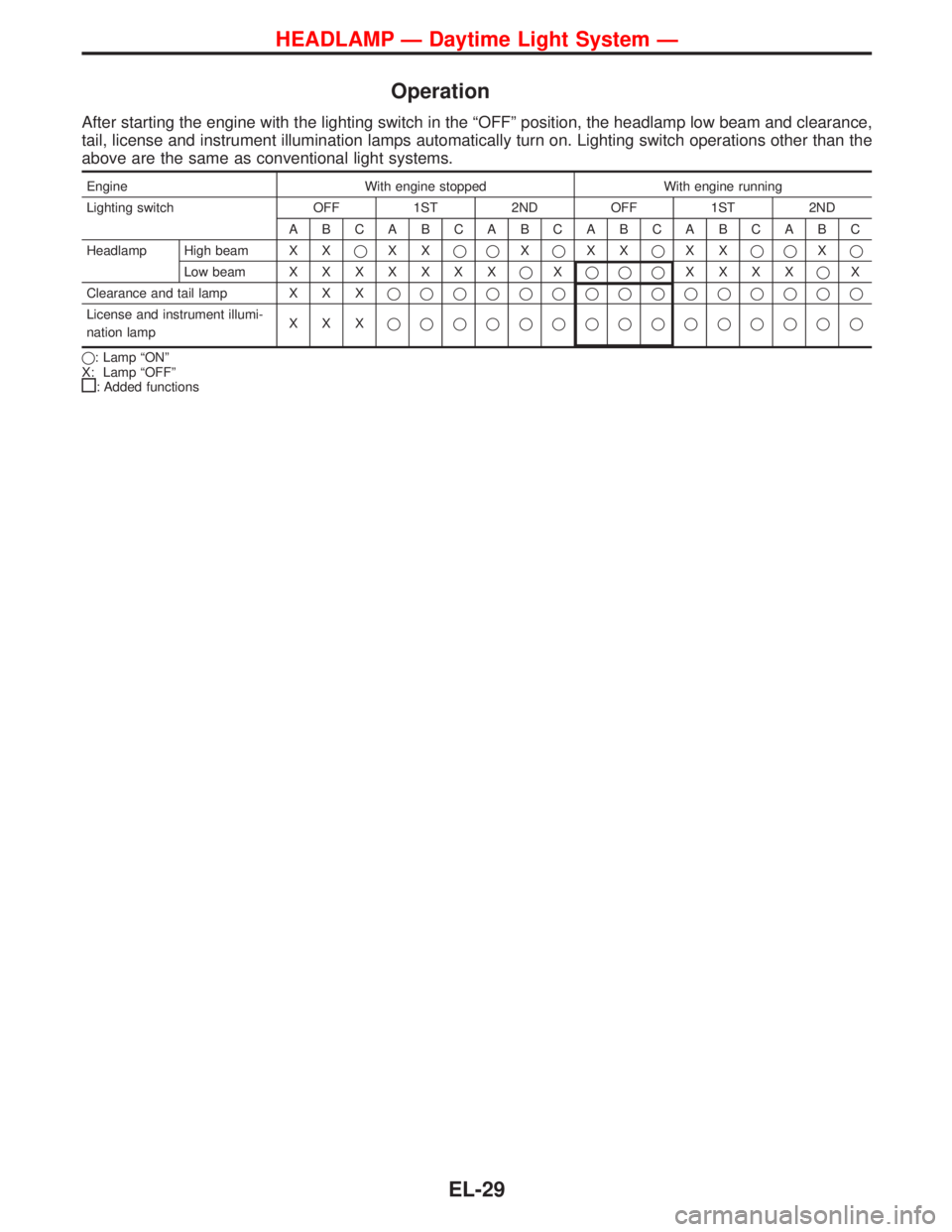
Operation
After starting the engine with the lighting switch in the ªOFFº position, the headlamp low beam and clearance,
tail, license and instrument illumination lamps automatically turn on. Lighting switch operations other than the
above are the same as conventional light systems.
Engine With engine stopped With engine running
Lighting switch OFF 1ST 2ND OFF 1ST 2ND
ABCABCABCABCABCABC
Headlamp High beam X XqXXqqXqXXqXXqqXq
Low beamXXXXXXXqXqqqXXXXqX
Clearance and tail lamp X X Xqqqqqqqqqqqqqqq
License and instrument illumi-
nation lampXXXqqqqqqqqqqqqqqq
q: Lamp ªONº
X: Lamp ªOFFº
: Added functions
HEADLAMP Ð Daytime Light System Ð
EL-29
Page 892 of 1767
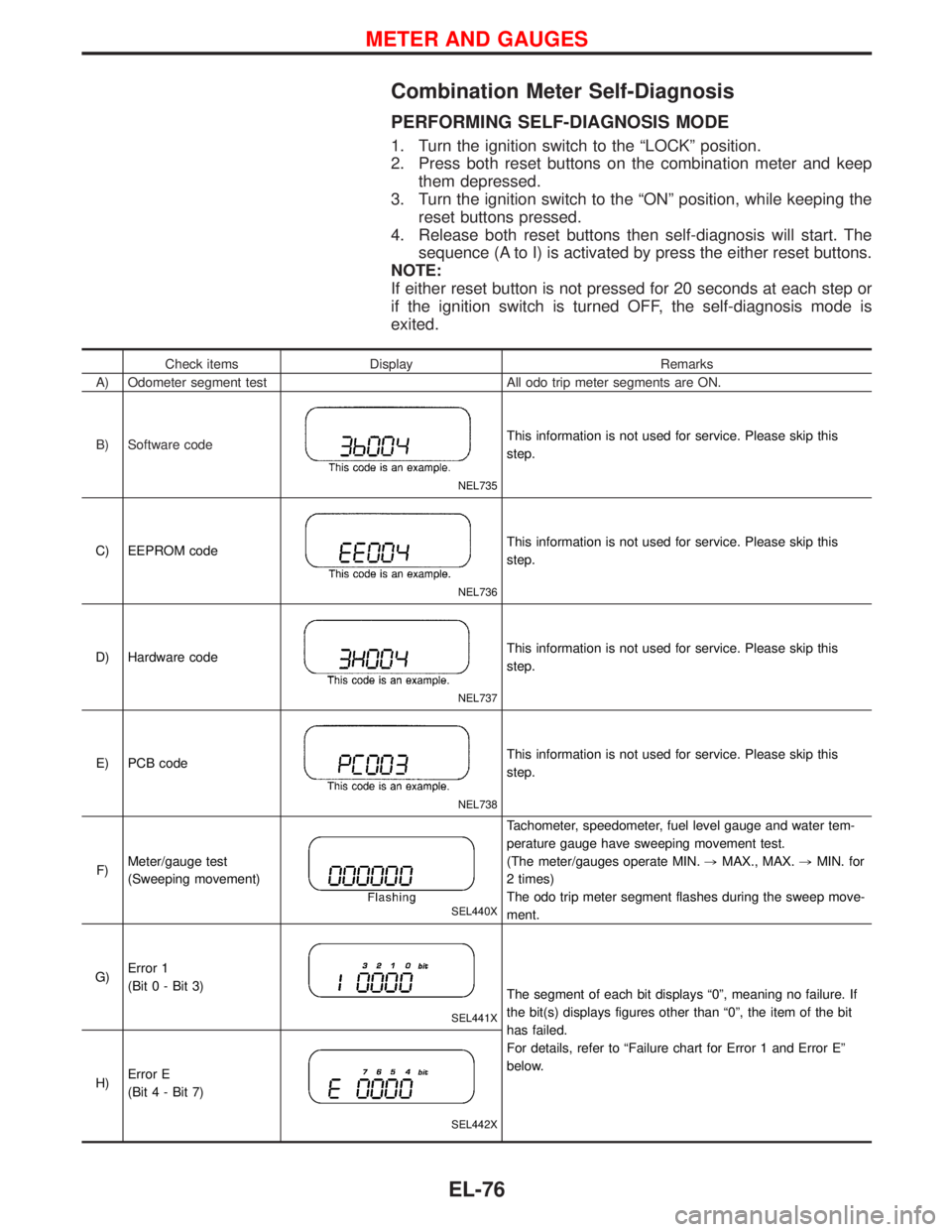
Combination Meter Self-Diagnosis
PERFORMING SELF-DIAGNOSIS MODE
1. Turn the ignition switch to the ªLOCKº position.
2. Press both reset buttons on the combination meter and keep
them depressed.
3. Turn the ignition switch to the ªONº position, while keeping the
reset buttons pressed.
4. Release both reset buttons then self-diagnosis will start. The
sequence (A to I) is activated by press the either reset buttons.
NOTE:
If either reset button is not pressed for 20 seconds at each step or
if the ignition switch is turned OFF, the self-diagnosis mode is
exited.
Check items Display Remarks
A) Odometer segment test All odo trip meter segments are ON.
B) Software code
NEL735
This information is not used for service. Please skip this
step.
C) EEPROM code
NEL736
This information is not used for service. Please skip this
step.
D) Hardware code
NEL737
This information is not used for service. Please skip this
step.
E) PCB code
NEL738
This information is not used for service. Please skip this
step.
F)Meter/gauge test
(Sweeping movement)
SEL440X
Tachometer, speedometer, fuel level gauge and water tem-
perature gauge have sweeping movement test.
(The meter/gauges operate MIN.,MAX., MAX.,MIN. for
2 times)
The odo trip meter segment flashes during the sweep move-
ment.
G)Error 1
(Bit 0 - Bit 3)
SEL441X
The segment of each bit displays ª0º, meaning no failure. If
the bit(s) displays figures other than ª0º, the item of the bit
has failed.
For details, refer to ªFailure chart for Error 1 and Error Eº
below.
H)Error E
(Bit 4 - Bit 7)
SEL442X
METER AND GAUGES
EL-76
Page 896 of 1767
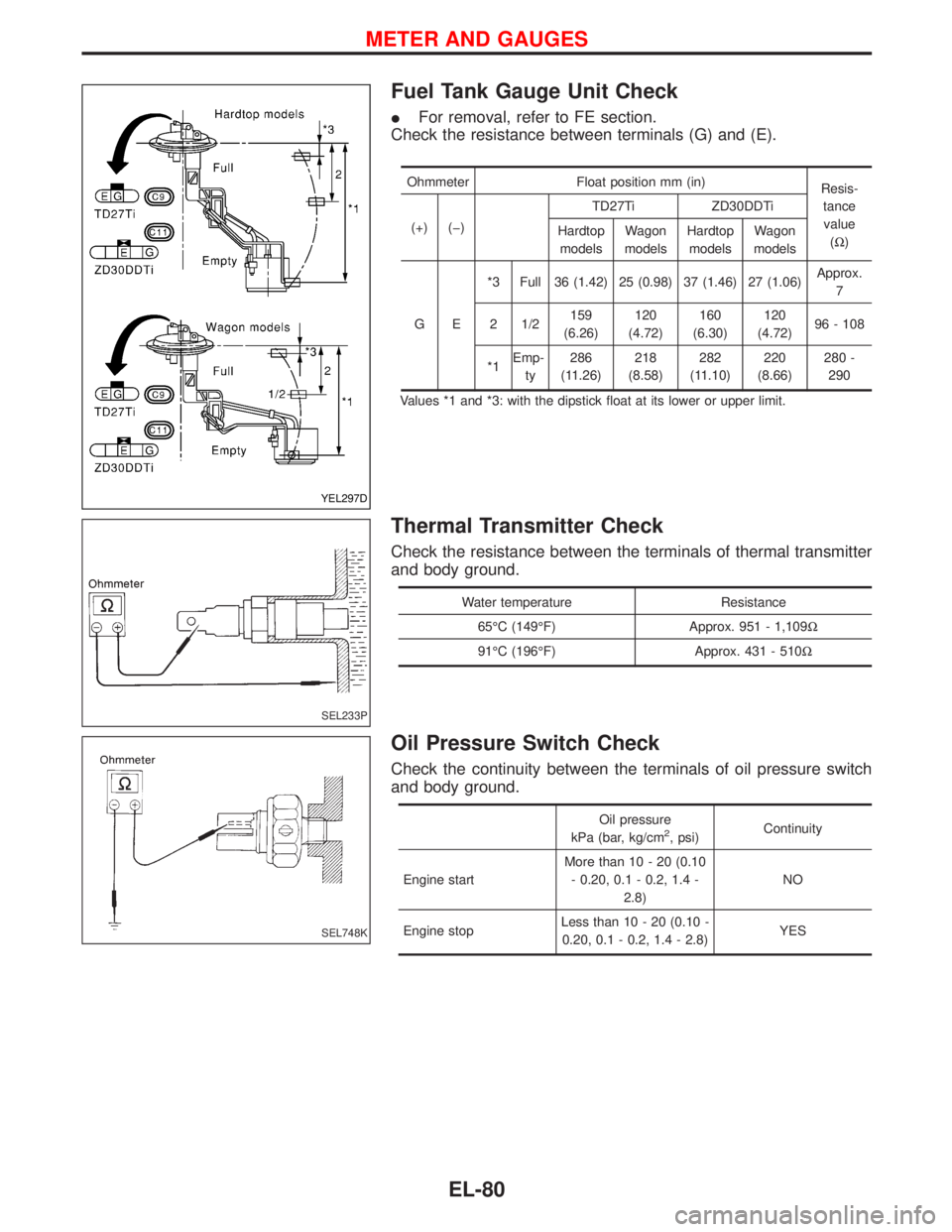
Fuel Tank Gauge Unit Check
IFor removal, refer to FE section.
Check the resistance between terminals (G) and (E).
Ohmmeter Float position mm (in)
Resis-
tance
value
(W) (+) (þ)TD27Ti ZD30DDTi
Hardtop
modelsWagon
modelsHardtop
modelsWagon
models
GE*3 Full 36 (1.42) 25 (0.98) 37 (1.46) 27 (1.06)Approx.
7
2 1/2159
(6.26)120
(4.72)160
(6.30)120
(4.72)96 - 108
*1Emp-
ty286
(11.26)218
(8.58)282
(11.10)220
(8.66)280 -
290
Values *1 and *3: with the dipstick float at its lower or upper limit.
Thermal Transmitter Check
Check the resistance between the terminals of thermal transmitter
and body ground.
Water temperature Resistance
65ÉC (149ÉF) Approx. 951 - 1,109W
91ÉC (196ÉF) Approx. 431 - 510W
Oil Pressure Switch Check
Check the continuity between the terminals of oil pressure switch
and body ground.
Oil pressure
kPa (bar, kg/cm2, psi)Continuity
Engine startMore than 10 - 20 (0.10
- 0.20, 0.1 - 0.2, 1.4 -
2.8)NO
Engine stopLess than 10 - 20 (0.10 -
0.20, 0.1 - 0.2, 1.4 - 2.8)YES
YEL297D
SEL233P
SEL748K
METER AND GAUGES
EL-80
Page 927 of 1767
System Description
Refer to Owner's Manual for audio system operating instructions.
NATS AUDIO LINK
Description
The link with the NATS IMMU implies that the audio unit can basically only be operated if connected to the
matching NATS IMMU to which the audio unit was initially fitted on the production line.
Since radio operation is impossible after the link with the NATS is disrupted theft of the audio unit is basically
useless since special equipment is required to reset the audio unit.
Initialization process for audio units that are linked to the NATS IMMU
New audio units will be delivered to the factories in the ªNEWº state, i.e. ready to be linked with the vehicle's
NATS. When the audio unit in ªNEWº state is first switched on at the factory, it will start up communication
with the vehicle's immobiliser control unit (IMMU) and send a code (the ªaudio unit Codeº) to the IMMU. The
IMMU will then store this code, which is unique to each audio unit, in its (permanent) memory.
Upon receipt of the code by the IMMU, the NATS will confirm correct receipt of the audio unit code to the audio
unit. Hereafter, the audio unit will operate as normal.
During the initialisation process, ªNEWº is displayed on the audio unit display. Normally though, communica-
tion between audio unit and IMMU takes such a short time that the audio unit seems to switch on directly
without showing ªNEWº on its display.
Normal operation
Each time the audio unit is switched on afterwards, the audio unit code will be verified between the audio unit
and the NATS before the audio unit becomes operational. During the code verification process, ªWAITº is
shown on the audio unit display. Again, the communication takes such a short time that the audio unit seems
to switch on directly without showing ªWAITº on its display.
When the radio is locked
In case of a audio unit being linked with the vehicle's NATS (immobilizer system), disconnection of the link
between the audio unit and the IMMU will cause the audio unit to switch into the lock (ªSECUREº) mode in
which the audio unit is fully inoperative. Hence, repair of the audio unit is basically impossible, unless the audio
unit is reset to the ªNEWº state for which special decoding equipment is required.
Clarion has provided their authorized service representatives with so called ªdecoder boxesº which can bring
the audio unit back to the ªNEWº state, enabling the audio unit to be switched on after which repair can be
carried out. Subsequently, when the repaired audio unit is delivered to the final user again, it will be in the
ªNEWº state as to enable re-linking the audio unit to the vehicle's immobiliser system. As a result of the above,
repair of the audio unit can only be done by an authorized Clarion representative.
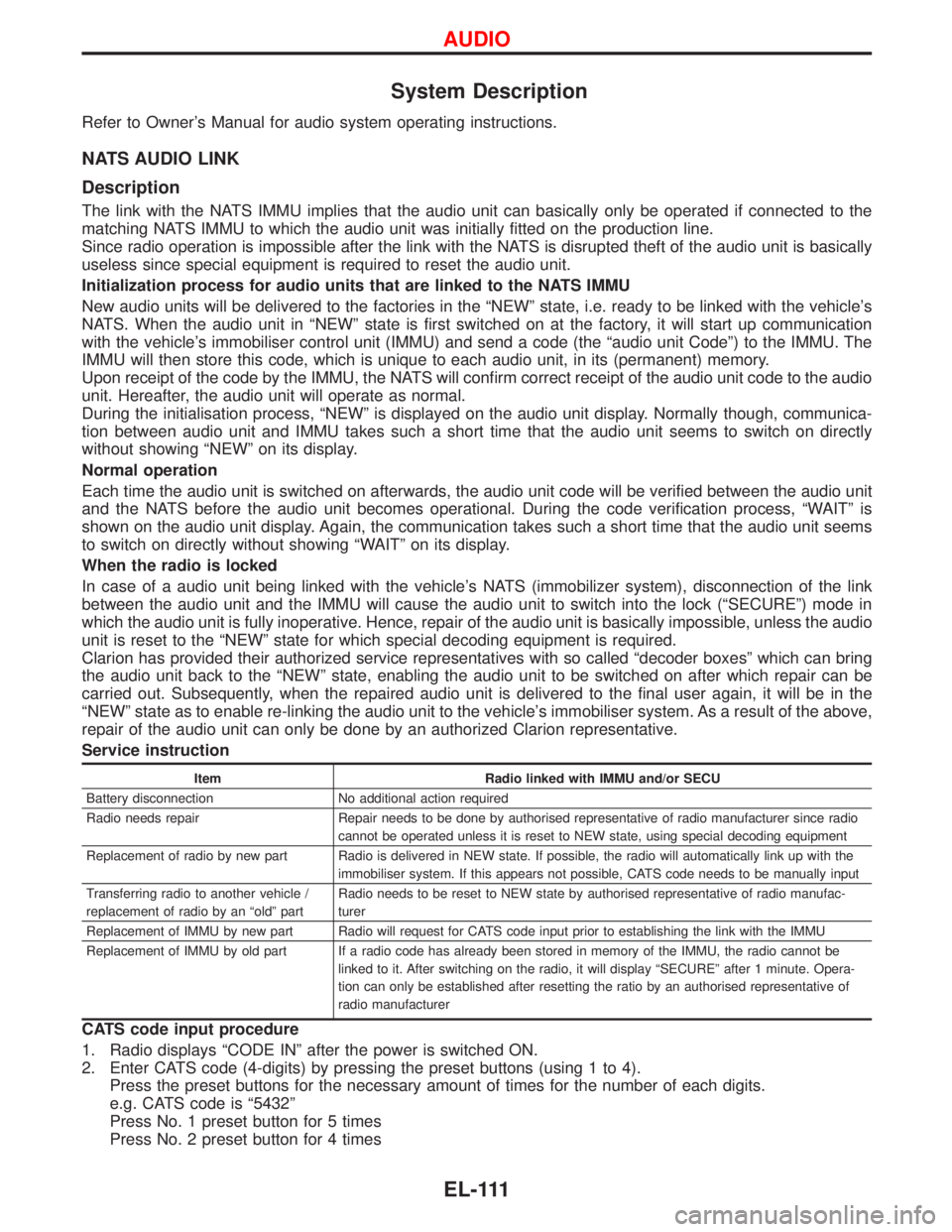
Service instruction
Item Radio linked with IMMU and/or SECU
Battery disconnection No additional action required
Radio needs repair Repair needs to be done by authorised representative of radio manufacturer since radio
cannot be operated unless it is reset to NEW state, using special decoding equipment
Replacement of radio by new part Radio is delivered in NEW state. If possible, the radio will automatically link up with the
immobiliser system. If this appears not possible, CATS code needs to be manually input
Transferring radio to another vehicle /
replacement of radio by an ªoldº partRadio needs to be reset to NEW state by authorised representative of radio manufac-
turer
Replacement of IMMU by new part Radio will request for CATS code input prior to establishing the link with the IMMU
Replacement of IMMU by old part If a radio code has already been stored in memory of the IMMU, the radio cannot be
linked to it. After switching on the radio, it will display ªSECUREº after 1 minute. Opera-
tion can only be established after resetting the ratio by an authorised representative of
radio manufacturer
CATS code input procedure
1. Radio displays ªCODE INº after the power is switched ON.
2. Enter CATS code (4-digits) by pressing the preset buttons (using 1 to 4).
Press the preset buttons for the necessary amount of times for the number of each digits.
e.g. CATS code is ª5432º
Press No. 1 preset button for 5 times
Press No. 2 preset button for 4 times
AUDIO
EL-111
Page 941 of 1767
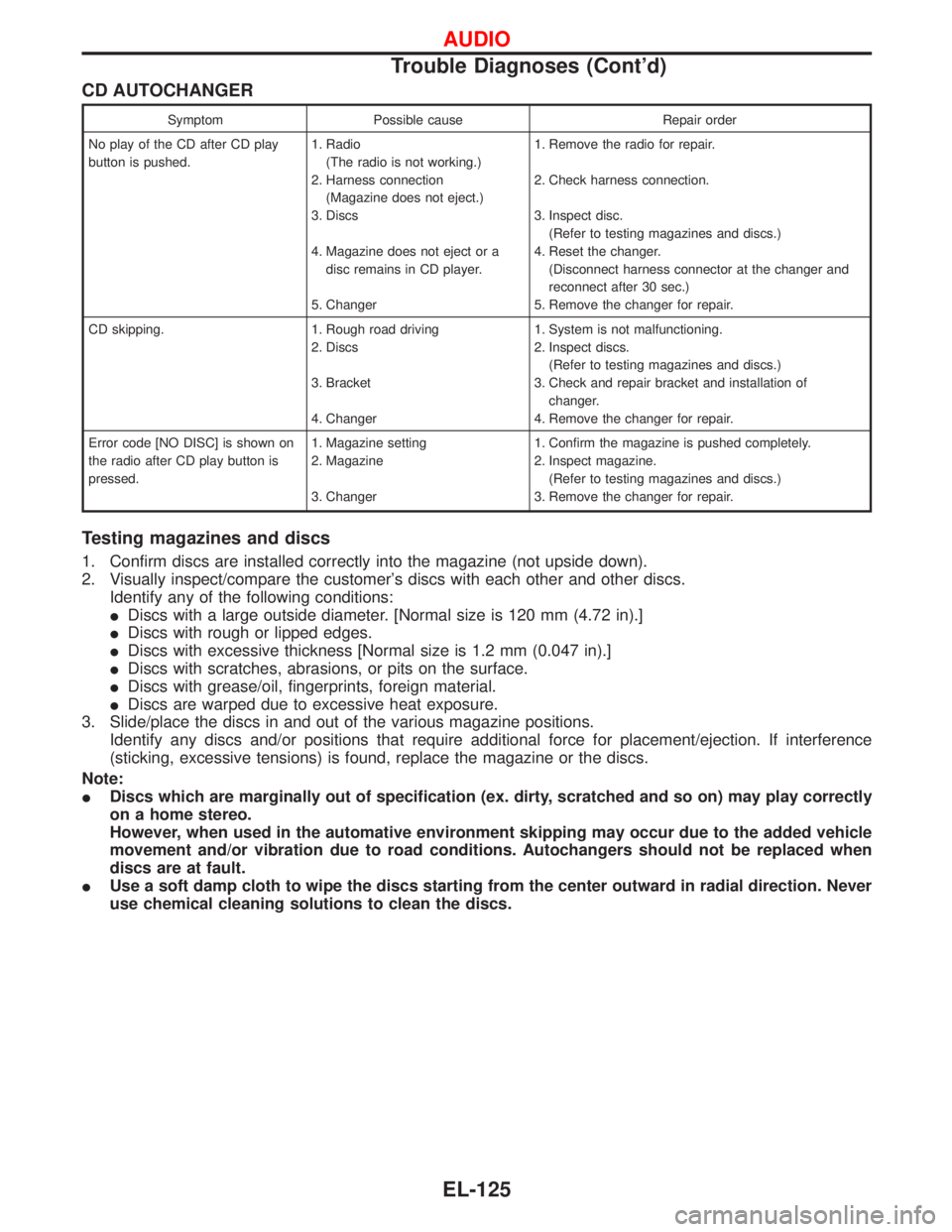
CD AUTOCHANGER
Symptom Possible cause Repair order
No play of the CD after CD play
button is pushed.1. Radio
(The radio is not working.)
2. Harness connection
(Magazine does not eject.)
3. Discs
4. Magazine does not eject or a
disc remains in CD player.
5. Changer1. Remove the radio for repair.
2. Check harness connection.
3. Inspect disc.
(Refer to testing magazines and discs.)
4. Reset the changer.
(Disconnect harness connector at the changer and
reconnect after 30 sec.)
5. Remove the changer for repair.
CD skipping. 1. Rough road driving
2. Discs
3. Bracket
4. Changer1. System is not malfunctioning.
2. Inspect discs.
(Refer to testing magazines and discs.)
3. Check and repair bracket and installation of
changer.
4. Remove the changer for repair.
Error code [NO DISC] is shown on
the radio after CD play button is
pressed.1. Magazine setting
2. Magazine
3. Changer1. Confirm the magazine is pushed completely.
2. Inspect magazine.
(Refer to testing magazines and discs.)
3. Remove the changer for repair.
Testing magazines and discs
1. Confirm discs are installed correctly into the magazine (not upside down).
2. Visually inspect/compare the customer's discs with each other and other discs.
Identify any of the following conditions:
IDiscs with a large outside diameter. [Normal size is 120 mm (4.72 in).]
IDiscs with rough or lipped edges.
IDiscs with excessive thickness [Normal size is 1.2 mm (0.047 in).]
IDiscs with scratches, abrasions, or pits on the surface.
IDiscs with grease/oil, fingerprints, foreign material.
IDiscs are warped due to excessive heat exposure.
3. Slide/place the discs in and out of the various magazine positions.
Identify any discs and/or positions that require additional force for placement/ejection. If interference
(sticking, excessive tensions) is found, replace the magazine or the discs.
Note:
IDiscs which are marginally out of specification (ex. dirty, scratched and so on) may play correctly
on a home stereo.
However, when used in the automative environment skipping may occur due to the added vehicle
movement and/or vibration due to road conditions. Autochangers should not be replaced when
discs are at fault.
IUse a soft damp cloth to wipe the discs starting from the center outward in radial direction. Never
use chemical cleaning solutions to clean the discs.
AUDIO
Trouble Diagnoses (Cont'd)
EL-125