ISUZU TROOPER 1995 Workshop Manual
Manufacturer: ISUZU, Model Year: 1995, Model line: TROOPER, Model: ISUZU TROOPER 1995Pages: 1928
Page 661 of 1928
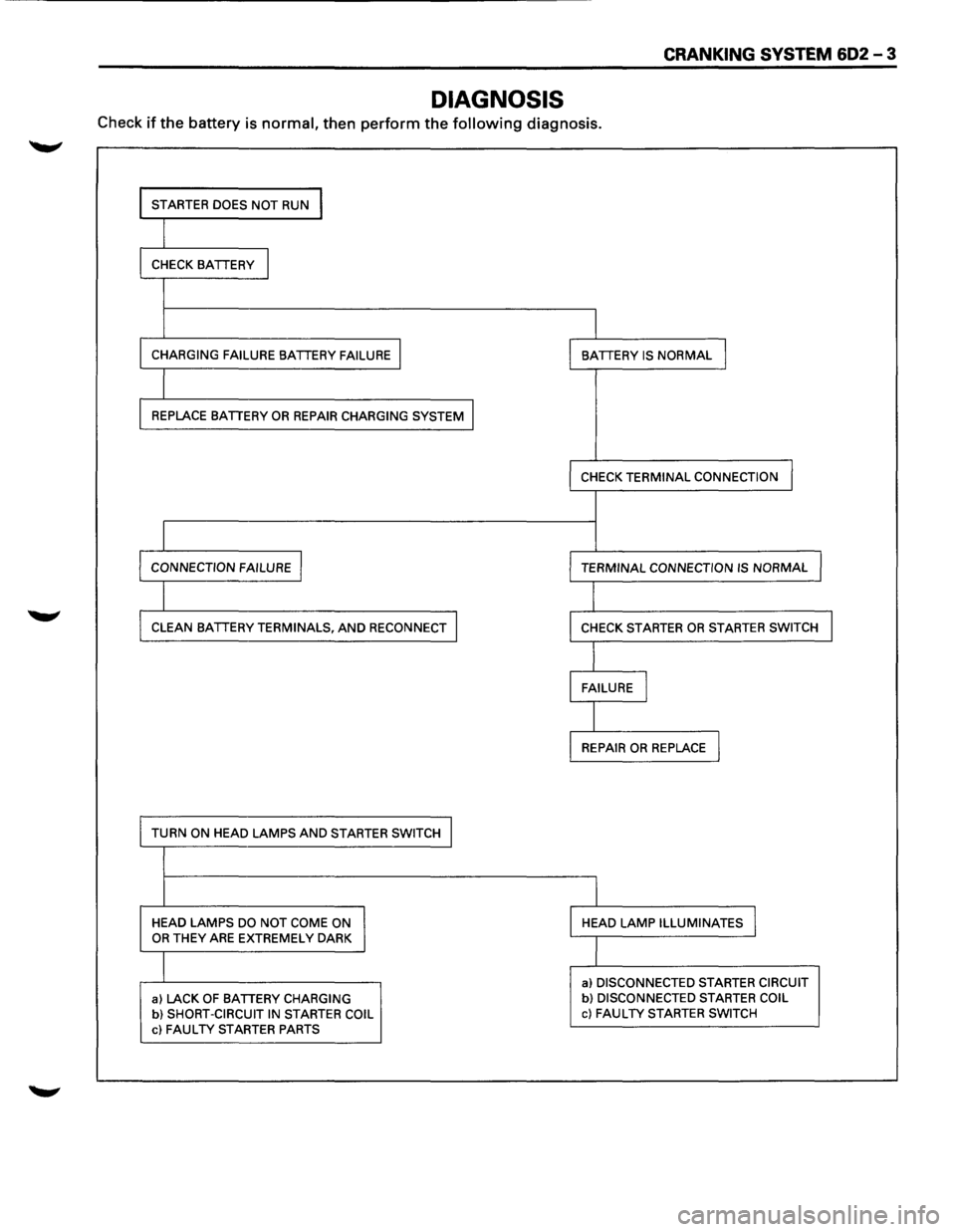
CRANKING SYSTEM 602 -3
DIAGNOSIS
Check if the battery is normal, then perform the following diagnosis.
I STARTER DOES NOT RUN I
I CHECK BATTERY I
I
CHARGING FAILURE BATTERY FAILURE I I BATTERY IS NORMAL I
I REPLACE BATTERY OR REPAIR CHARGING SYSTEM I
I
CHECK TERMINAL CONNECTION
I CONNECTION FAILURE I I TERMINAL CONNECTION IS NORMAL J
I CLEAN BATTERY TERMINALS, AND RECONNECT I
I CHECK STARTER OR STARTER SWITCH I
I FAILURE I
I REPAIR OR REPLACE I
TURN ON HEAD LAMPS AND STARTER SWITCH I
I
HEAD LAMPS DO NOT COME ON HEAD LAMP ILLUMINATES I OR THEY ARE EXTREMELY DARK
I
a) DISCONNECTED STARTER CIRCUIT
a) LACK OF BATTERY CHARGING b) DISCONNECTED STARTER COIL
b) SHORT-CIRCUIT IN STARTER COIL c) FAULTY STARTER SWITCH
c) FAULTY STARTER PARTS
Page 662 of 1928
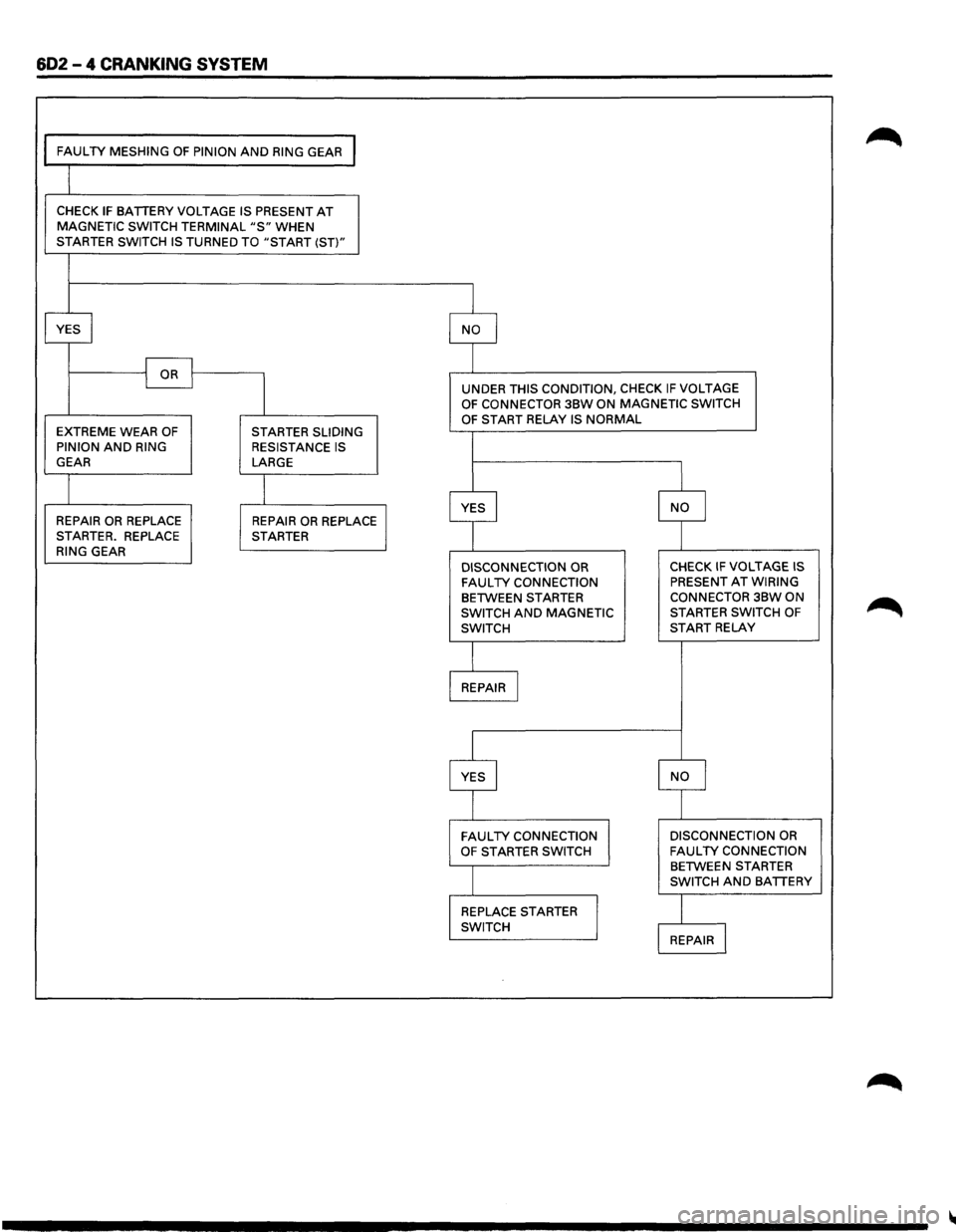
602 - 4 CRANKING SYSTEM
FAULTY MESHING OF PINION AND RING GEAR I
CHECK IF BATTERY VOLTAGE IS PRESENT AT MAGNETIC SWITCH TERMINAL "S" WHEN STARTER SWITCH IS TURNED TO "START (ST)"
YES
I NO I
I OR I I
I
UNDER THIS CONDITION, CHECK IF VOLTAGE OF CONNECTOR 3BW ON MAGNETIC SWITCH
OF START RELAY IS NORMAL EXTREME WEAR OF STARTER SLIDING
PINION AND RING RESISTANCE IS GEAR LARGE
I
I YES I NO I REPAIR OR REPLACE REPAIR OR REPLACE STARTER. REPLACE STARTER
RING GEAR
DISCONNECTION OR CHECK IF VOLTAGE IS
FAULTY CONNECTION PRESENT AT WIRING
BETWEEN STARTER
CONNECTOR 3BW ON
SWITCH
AND MAGNETIC STARTER
SWITCH OF
SWITCH START RELAY
REPAIR I
YES I NO I
FAULTY CONNECTION
DISCONNECTION OR
OF STARTER
SWITCH FAULTY CONNECTION BETWEEN STARTER
SWITCH AND BATTERY
REPLACE
STARTER
I SWITCH REPAIR l
Page 663 of 1928
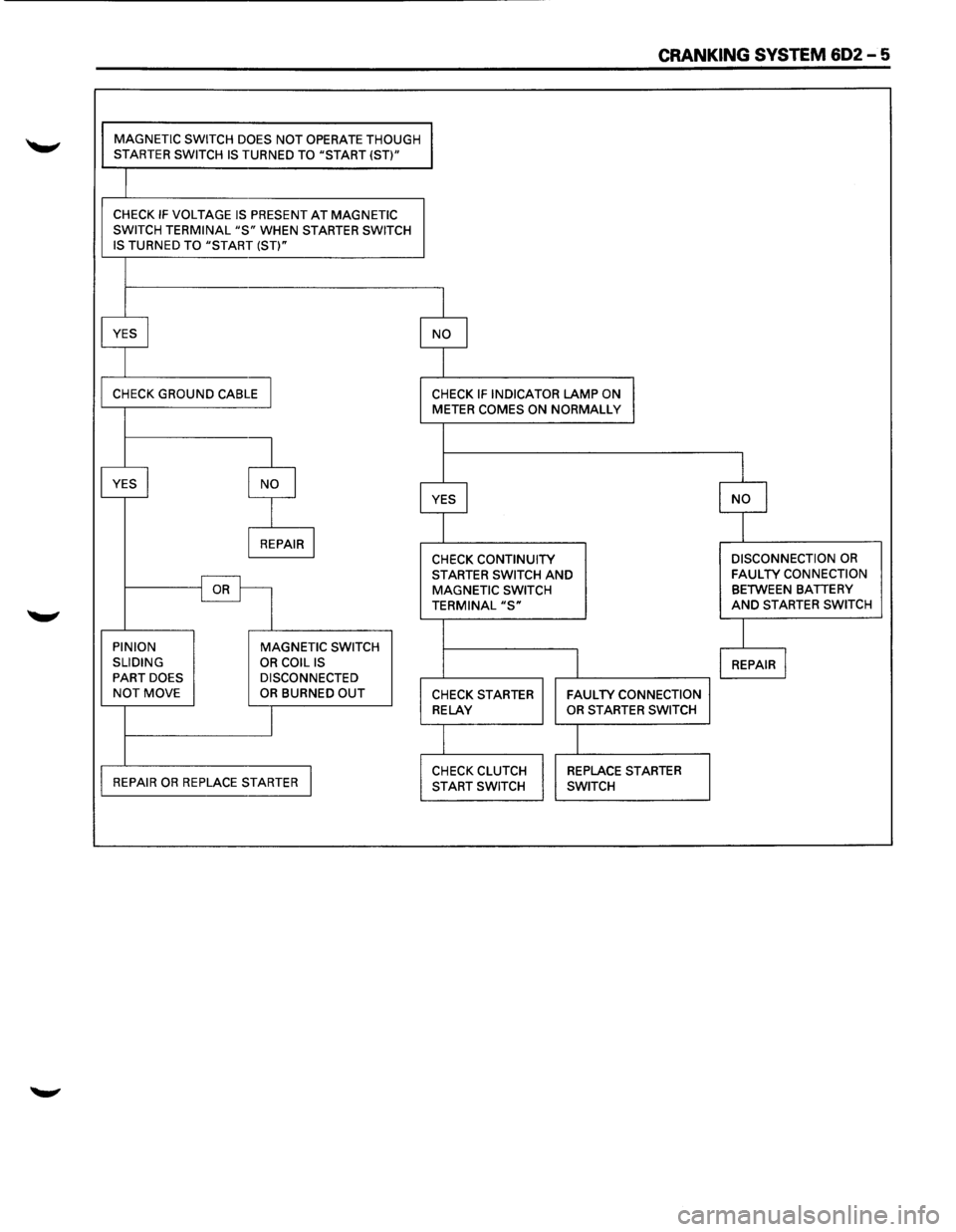
CRANKING SYSTEM 602-5
MAGNETIC SWITCH DOES NOT OPERATE THOUGH STARTER SWITCH IS TURNED TO "START (ST)"
CHECK IF VOLTAGE IS PRESENT AT MAGNETIC
SWITCH TERMINAL "S" WHEN STARTER SWITCH
IS TURNED TO "START (ST)"
YES
I NO I
CHECK GROUND CABLE I CHECK IF INDICATOR LAMP ON METER COMES ON NORMALLY
I
I
YES I NO I YES I I I
NO
I REPAIR I CHECK CONTINUITY DISCONNECTION OR
STARTER SWITCH AND FAULTY CONNECTION
OR MAGNETIC
SWITCH BETWEEN BATTERY
TERMINAL "S" AND STARTER SWITCH
I PINION
MAGNETIC SWITCH
SLIDING
OR COIL IS I REPAIR I PART DOES DISCONNECTED NOT MOVE OR BURNED OUT CHECK STARTER FAULTY CONNECTION
I
RELAY OR STARTER SWITCH
I
REPAIR OR REPLACE STARTER I CHECK CLUTCH REPLACE STARTER
START SWITCH SWITCH
Page 664 of 1928
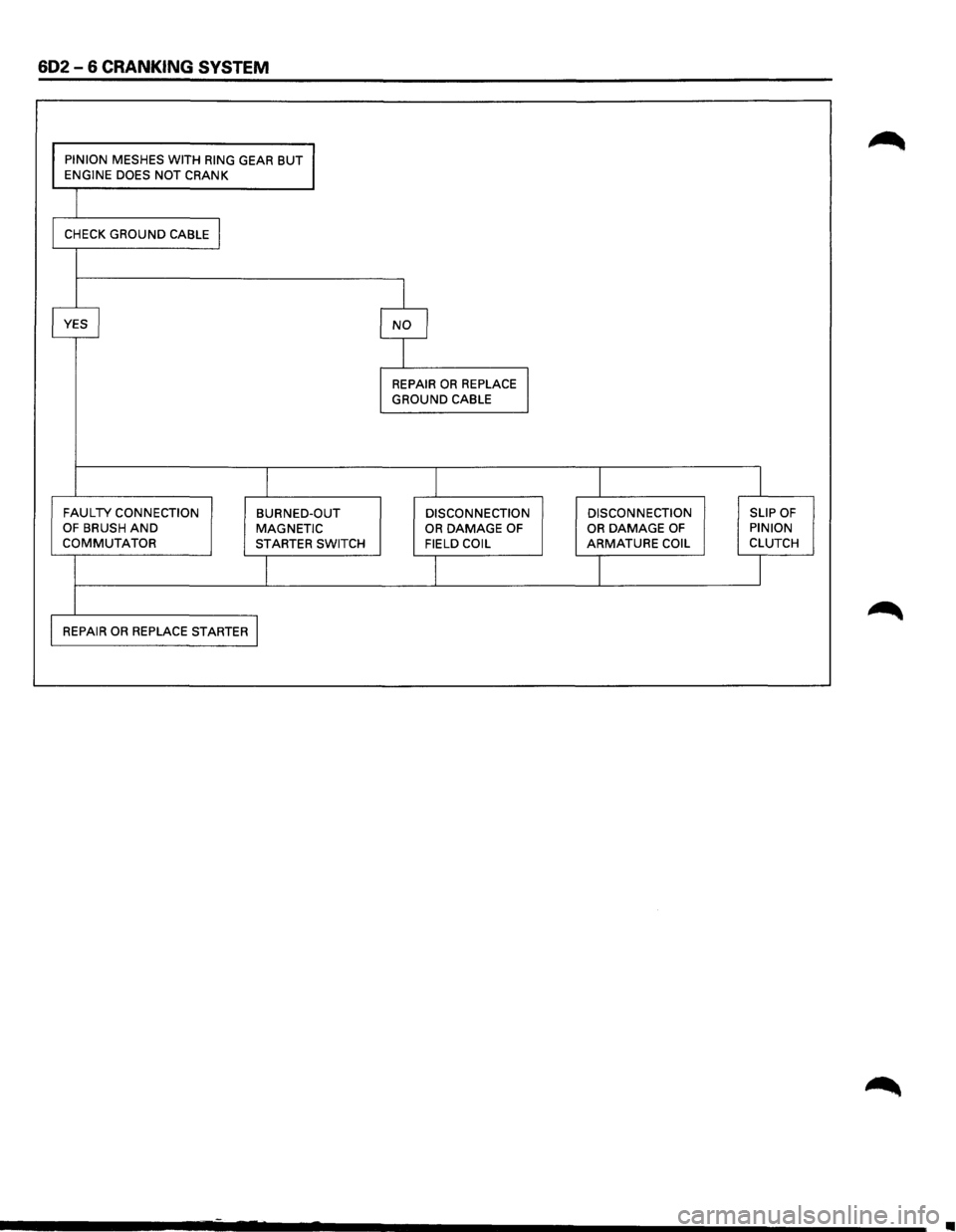
602-6 CRANKING SYSTEM
PINION MESHES WITH RING GEAR BUT ENGINE DOES NOT CRANK
CHECK
GROUND CABLE I
I
YES I NO I
I
REPAIR OR REPLACE I GROUND CABLE
I I I I
FAULTY CONNECTION BURNED-OUT DISCONNECTION DISCONNECTION SLIP OF OF BRUSH AND MAGNETIC OR DAMAGE OF OR DAMAGE OF PINION COMMUTATOR STARTER
SWITCH FIELD COIL ARMATURE COIL CLUTCH
I I I J
REPAIR OR REPLACE STARTER I
•
Page 665 of 1928
CRANKING SYSTEM 602 -7
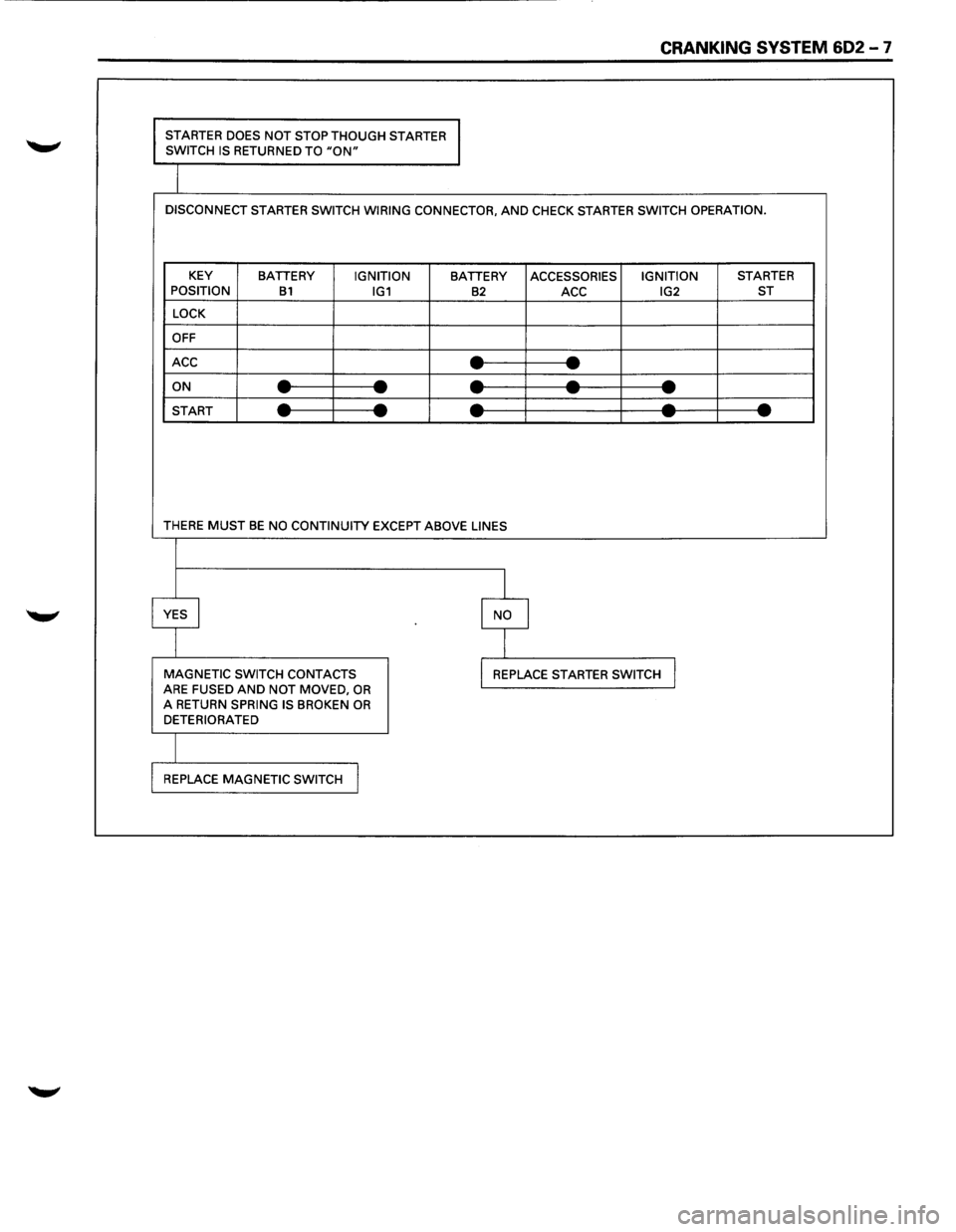
STARTER DOES NOT STOP THOUGH STARTER
SWITCH IS RETURNED TO "ON"
DISCONNECT STARTER SWITCH WIRING CONNECTOR, AND CHECK STARTER SWITCH OPERATION.
KEY
BATTERY IGNITION BATTERY ACCESSORIES IGNITION STARTER
POSITION B1 IG1 B2 ACC IG2 ST
LOCK
OFF
ACC
--- -ON ----------START ----------
THERE MUST BE NO CONTINUITY EXCEPT ABOVE LINES
I
YES I I NO
I
MAGNETIC SWITCH CONTACTS I REPLACE STARTER SWITCH J ARE FUSED AND NOT MOVED, OR A RETURN SPRING IS BROKEN OR DETERIORATED
REPLACE
MAGNETIC SWITCH I
Page 666 of 1928
602-8 CRANKING SYSTEM
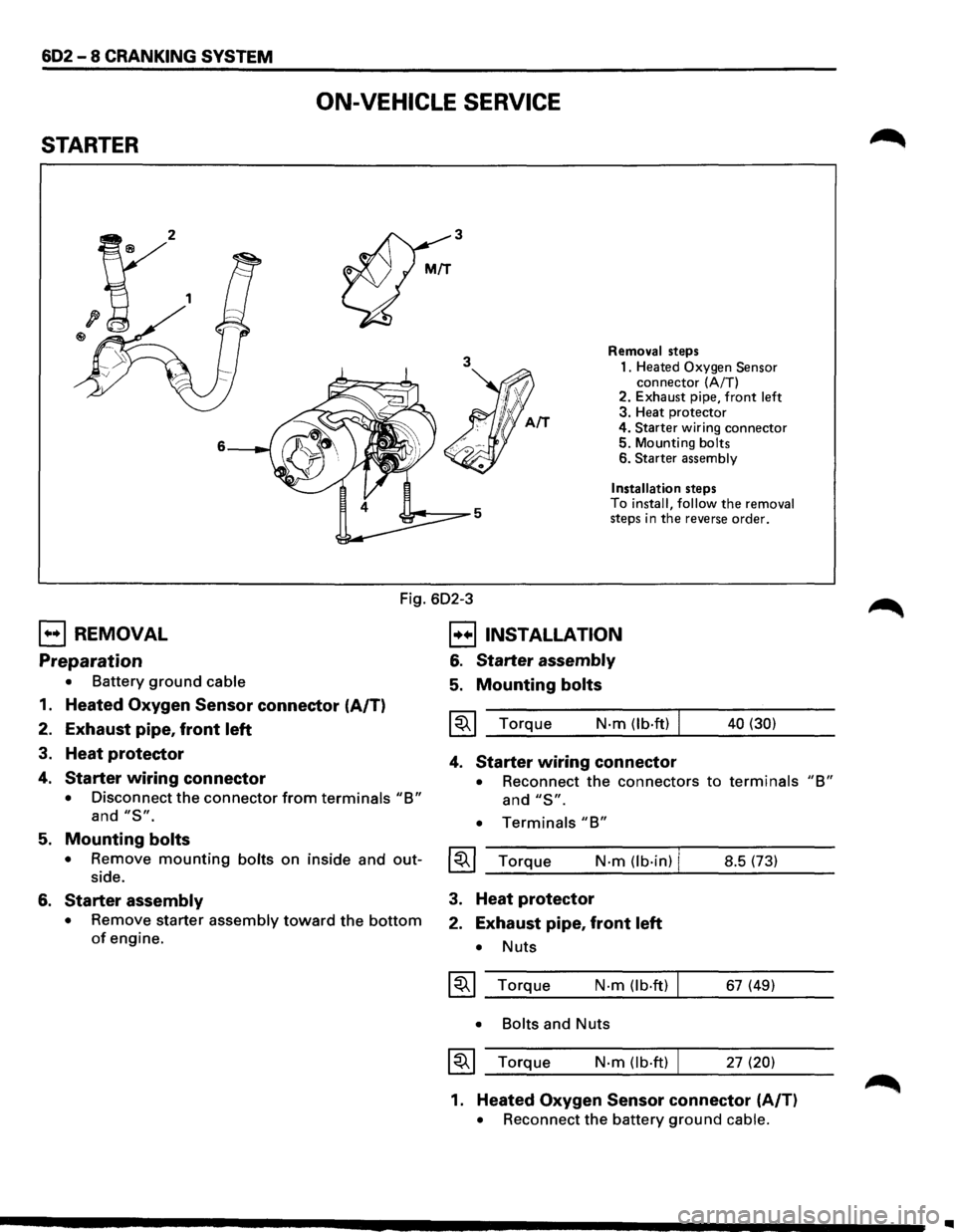
ON-VEHICLE SERVICE
STARTER
3
3
6
Removal steps
1. Heated
Oxygen Sensor connector (A/T)
2. Exhaust pipe, front left 3. Heat protector
4.
Starter wiring connector 5. Mounting bolts 6. Starter assembly
Installation
steps
To install, follow the removal steps in the reverse order.
Fig. 602-3
EJ REMOVAL
Preparation
• Battery ground cable
1. Heated Oxygen Sensor connector (A/T)
2. Exhaust pipe, front left
3. Heat protector
4. Starter wiring connector
• Disconnect the connector from terminals "B"
and "S".
B INSTALLATION
6. Starter assembly
5. Mounting bolts
~~~ Torque N·m (lb·ft) I
4. Starter wiring connector
40 (30)
• Reconnect the connectors to terminals "B"
and "S".
• Terminals "B"
5. Mounting bolts
• Remove mounting bolts on inside and out-~~~ Torque N·m (lb·in) I side. __ _;_ ______ -J.... ______ _ 8.5 (73)
6. Starter assembly
• Remove starter assembly toward the bottom
of engine.
3. Heat protector
2. Exhaust pipe, front left
• Nuts
~~~ Torque N·m (lb.ft)
• Bolts
and Nuts
~~~ Torque N·m (lb·ft) I
67 (49)
27
(20)
1. Heated Oxygen Sensor connector (A/T)
• Reconnect the battery ground cable.
..
Page 667 of 1928
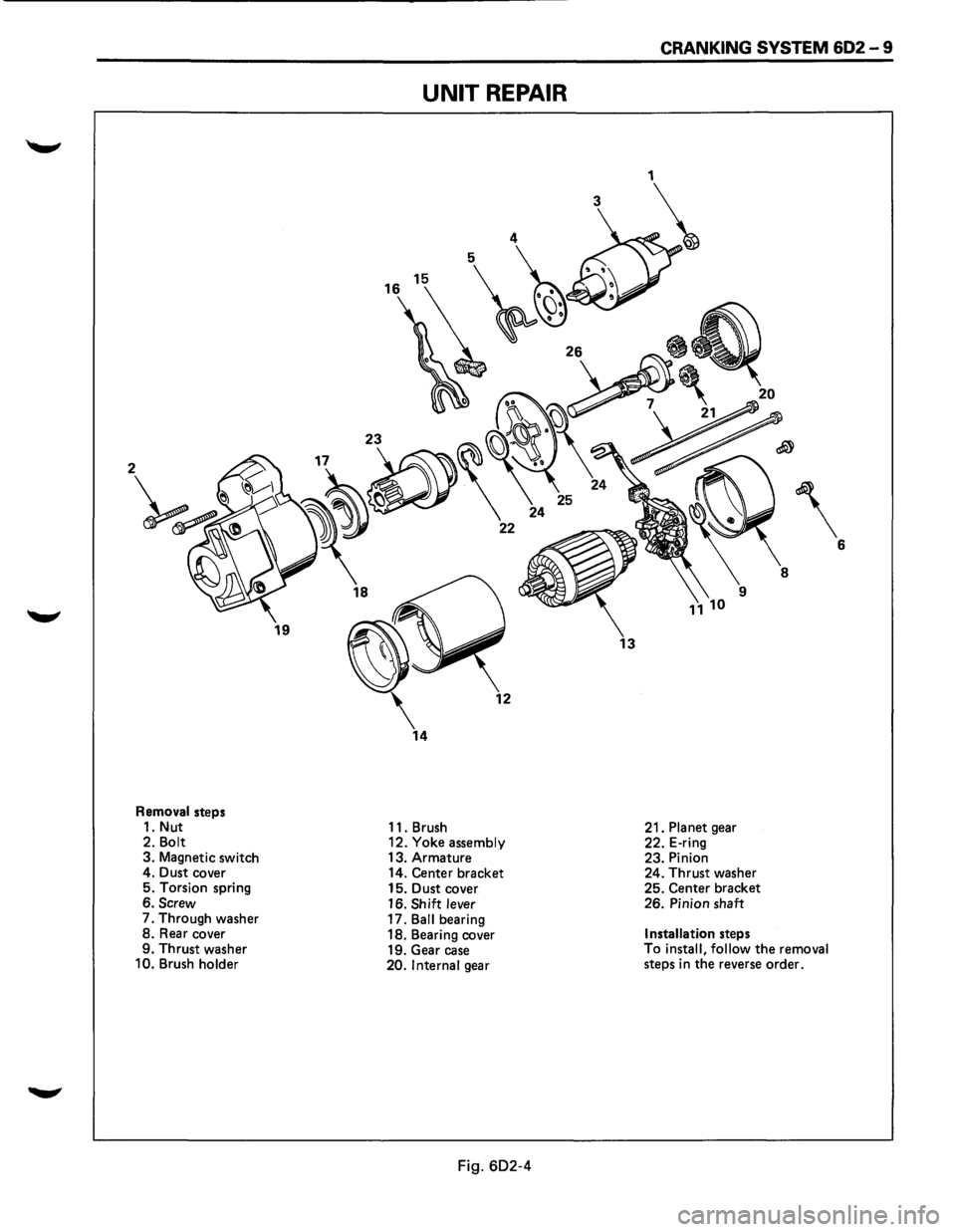
Removal steps
1. Nut
2.
Bolt 3. Magnetic switch
4. Dust cover
5. Torsion spring
6.
Screw 7. Through washer 8. Rear cover
9. Thrust washer
10. Brush holder
UNIT REPAIR
11. Brush
12. Yoke assembly 13. Armature
14. Center bracket
15. Dust cover
16.
Shift lever 17. Ball bearing
18. Bearing cover
19. Gear case
20. Internal gear
Fig. 602-4
13
CRANKING SYSTEM 602-9
21. Planet gear
22. E-ring
23. Pinion
24. Thrust washer
25. Center bracket
26. Pinion shaft
Installation steps
To install, follow the removal steps in the reverse order.
Page 668 of 1928
602-10 CRANKING SYSTEM
l•!•l DISASSEMBLY
1. Nut
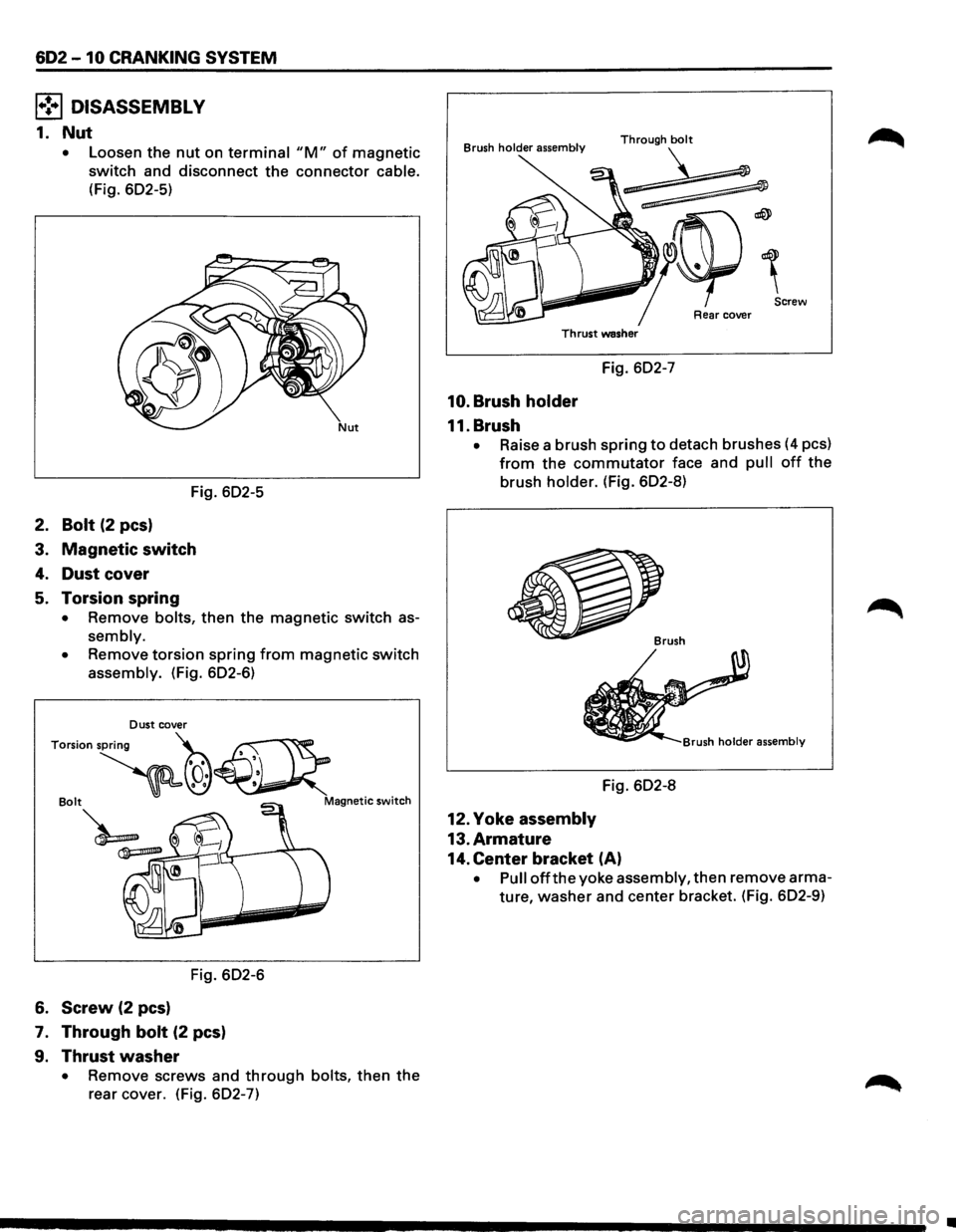
• Loosen the nut on terminal "M" of magnetic
switch and disconnect the connector cable.
(Fig. 602-5)
Fig. 602-5
2. Bolt (2 pes)
3. Magnetic switch
4. Dust cover
5. Torsion spring
• Remove bolts, then the magnetic switch as
sembly.
•
Remove torsion spring from magnetic switch
assembly. (Fig. 602-6)
Fig. 602-6
6. Screw (2 pes)
7. Through bolt (2 pes)
9. Thrust washer
• Remove screws and through bolts, then the
rear cover. (Fig. 602-7)
Brush holder assembly
Screw
Rear cover
Thrust washer
Fig. 602-7
10. Brush holder
11. Brush
• Raise a brush spring to detach brushes (4 pes)
from the commutator face and pull off the
brush holder. (Fig. 602-8)
Fig. 602-8
12. Yoke assembly
13. Armature
14. Center bracket (A)
• Pull off the yoke assembly, then remove arma
ture,
washer and center bracket. (Fig. 602-9)
•
Page 669 of 1928
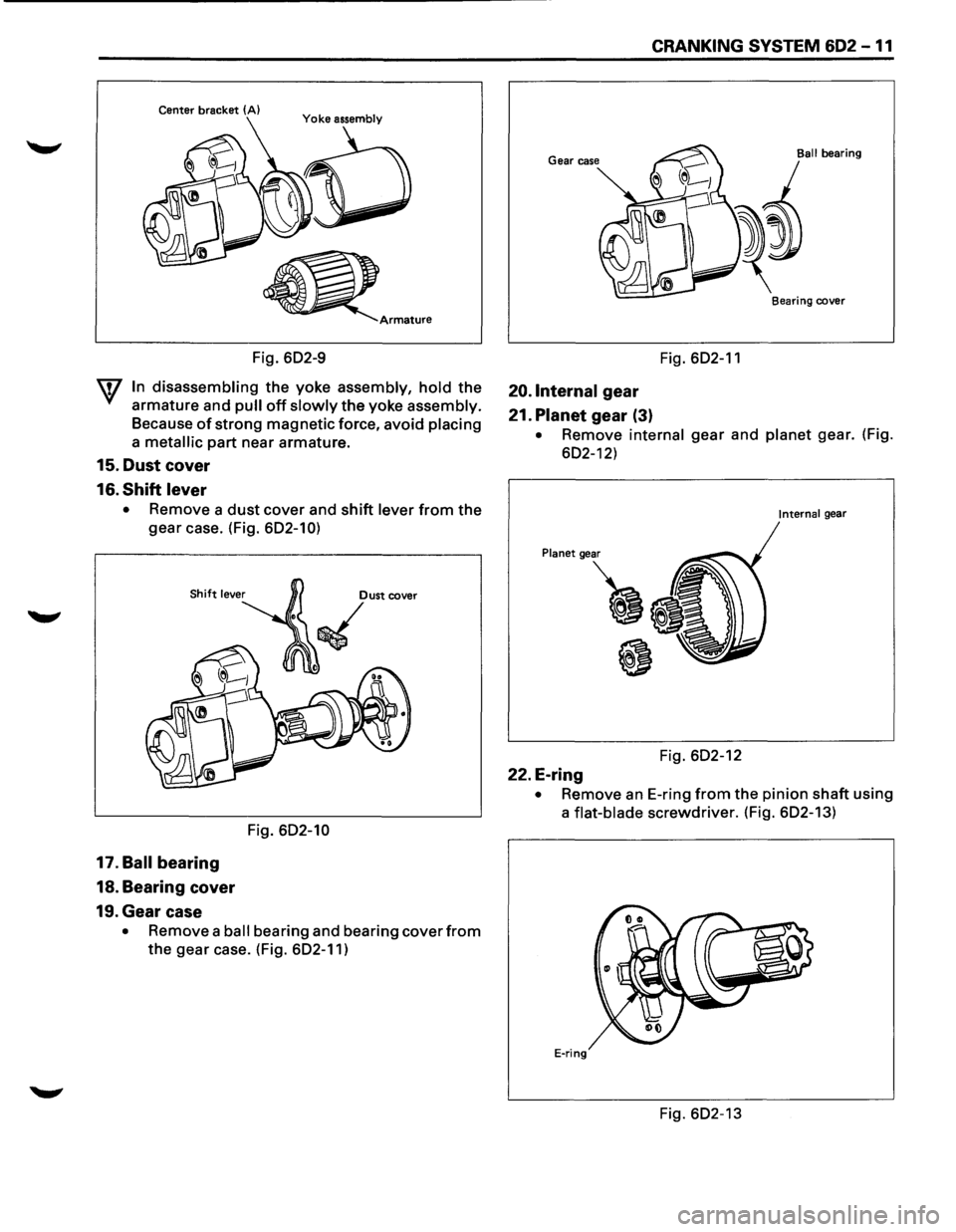
Center bracket (A)
Fig. 602-9
W In disassembling the yoke assembly, hold the
armature and pull off slowly the yoke assembly.
Because of strong magnetic force, avoid placing
a metallic part near armature.
15. Dust cover
16.
Shift lever
• Remove a dust cover and shift lever from the
gear case. (Fig. 602-10)
17. Ball bearing
18. Bearing cover
19. Gear case
Dust cover
/
~
Fig. 602-10
• Remove a ball bearing and bearing cover from
the gear case. (Fig. 602-11)
CRANKING SYSTEM 602 -11
Ball bearing
Bearing cover
Fig. 602-11
20.1nternal gear
21.
Planet gear (3)
• Remove internal gear and planet gear. (Fig.
602-12)
Internal gear
Fig. 602-12
22. E-ring
• Remove an E-ring from the pinion shaft using
a
flat-blade screwdriver. (Fig. 602-13)
E-ring
Fig. 602-13
Page 670 of 1928
602 -12 CRANKING SYSTEM
23. Pinion
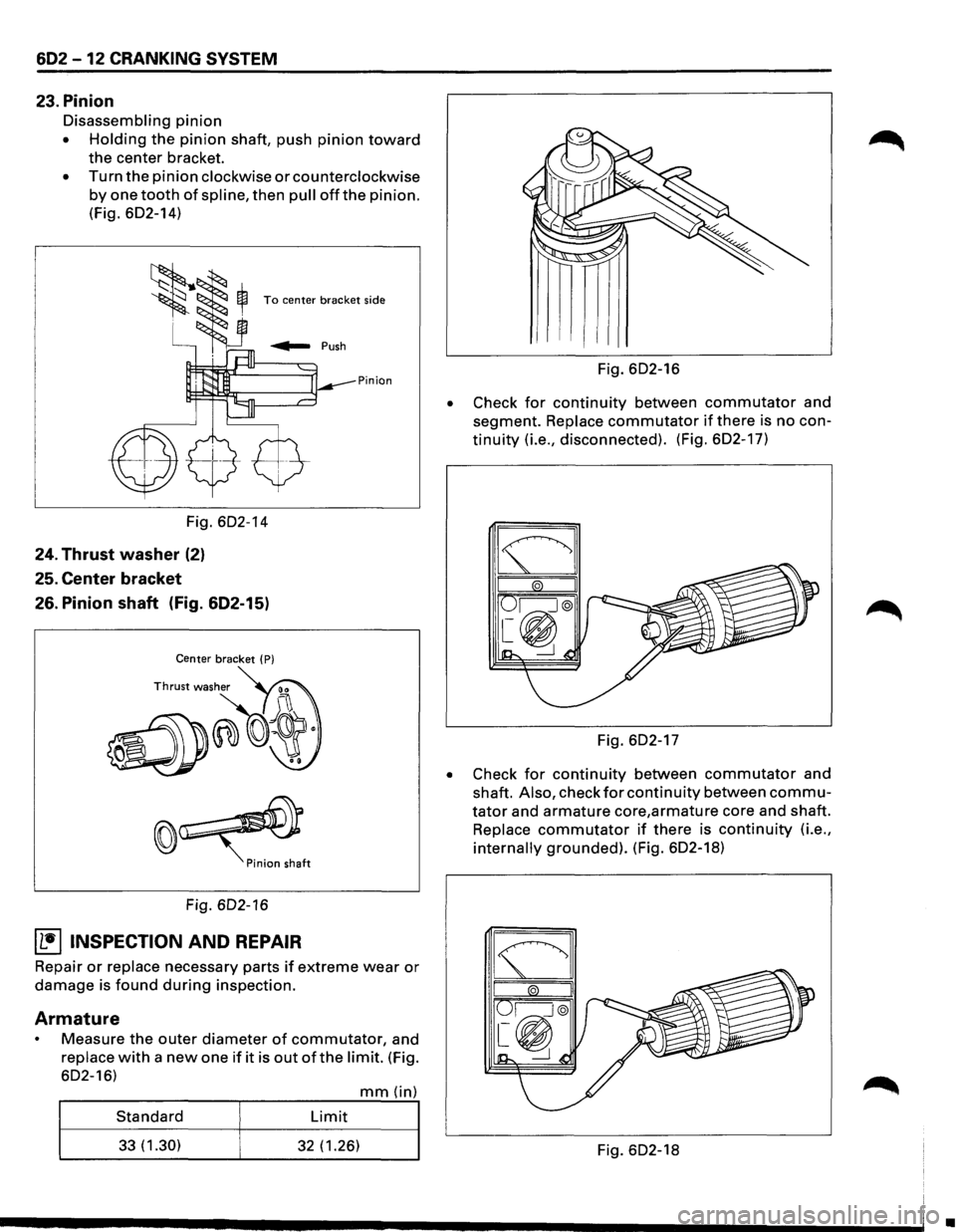
Disassembling pinion
• Holding the pinion shaft, push pinion toward
the center bracket.
• Turn the pinion clockwise or counterclockwise
by one tooth of spline, then pull offthe pinion.
(Fig. 602-14)
To center bracket side
Pinion
Fig. 602-14
24. Thrust washer (2)
25. Center bracket
26. Pinion shaft (Fig. 602-15)
Center bracket ( P)
Fig. 602-16
~ INSPECTION AND REPAIR
Repair or replace necessary parts if extreme wear or
damage is found during inspection.
Armature
Measure the outer diameter of commutator, and
replace with a new one if it is out of the limit. (Fig.
602-16)
mm(in)
Standard Limit
33(1.30) 32 (1.26)
•
Fig. 602-16
Check
for continuity between commutator and
segment.
Replace commutator if there is no con
tinuity (i.e., disconnected). (Fig. 602-17)
Fig. 602-17
• Check for continuity between commutator and
shaft.
Also, check for continuity between commu
tator and armature core,armature core and shaft.
Replace commutator if there is continuity (i.e.,
internally grounded). (Fig. 602-18)
Fig. 602-18
•